My question is what free no registration Android app reads and saves PDF?
I rarely (actually almost never) deal with PDFs on Android.
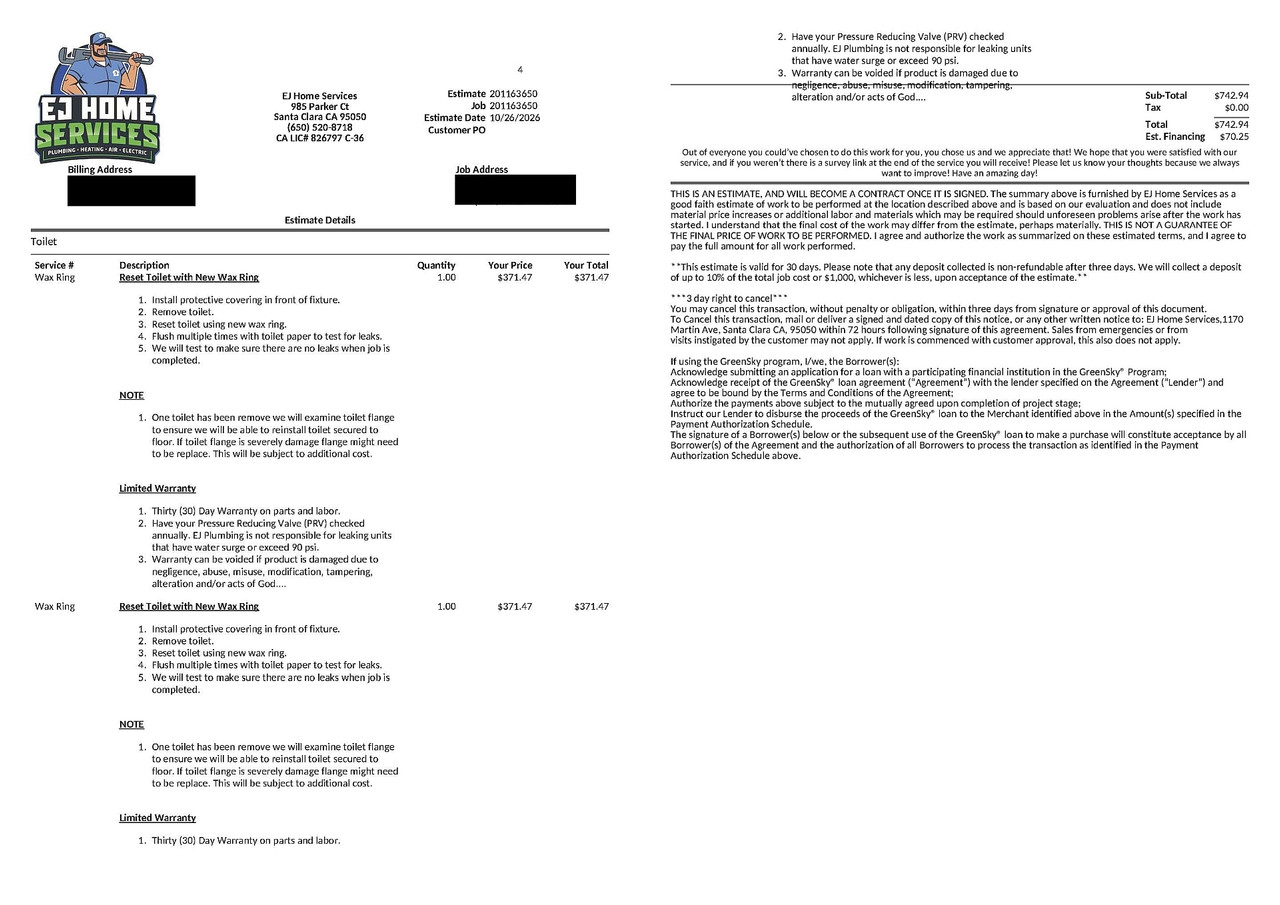
Needed to have two toilet wax rings replaced so I received a PDF in
Whatsapp on Android of the $750 estimate (I ended up doing it for $15).
<https://i.postimg.cc/g2kQdrwY/toilet.jpg>
My question is what free no registration Android app reads and saves PDF?
Needed to have two toilet wax rings replaced so I received a PDF in
Whatsapp on Android of the $750 estimate (I ended up doing it for $15).
<https://i.postimg.cc/g2kQdrwY/toilet.jpg>
My question is what free no registration Android app reads and saves PDF?
I rarely (actually almost never) deal with PDFs on Android.
But this time, I had to read it, pronto, in order to make a decision.
So I had to do whatever was needed to read the quote emailed to me.
I tried a pre-installed Adobe Acrobat Reader but it immediately asked for a login, which is just nuts, so I deleted it. Next I chose QField out of the list, which read it, so I could see the quote, but I couldn't save the PDF.
<ch.opengis.qfield>
That solved the emergency though, but it begs the question of a PDF reader.[...]
Anyway, I read it. I saved it.
But what do you prefer for reading and saving PDFs on Android?
Needed to have two toilet wax rings replaced so I received a PDF in
Whatsapp on Android of the $750 estimate (I ended up doing it for $15).
<https://i.postimg.cc/g2kQdrwY/toilet.jpg>
My question is what free no registration Android app reads and saves PDF?
I rarely (actually almost never) deal with PDFs on Android.
But this time, I had to read it, pronto, in order to make a decision.
So I had to do whatever was needed to read the quote emailed to me.
I tried a pre-installed Adobe Acrobat Reader but it immediately asked for a login, which is just nuts, so I deleted it. Next I chose QField out of the list, which read it, so I could see the quote, but I couldn't save the PDF.
<ch.opengis.qfield>
That solved the emergency though, but it begs the question of a PDF reader.
And, for the home-repair crowd, how does $750 sound for 2 toilet wax rings?
Needed to have two toilet wax rings replaced so I received a PDF in
Whatsapp on Android of the $750 estimate (I ended up doing it for $15).
<https://i.postimg.cc/g2kQdrwY/toilet.jpg>
My question is what free no registration Android app reads and saves PDF?
I rarely (actually almost never) deal with PDFs on Android.
And, for the home-repair crowd, how does $750 sound for 2 toilet wax rings?
My question is what free no registration Android app reads and saves PDF?.....
I rarely (actually almost never) deal with PDFs on Android.
posting from PC with MesNews <---- Synchronet 3.22a-Linux NewsLink 1.2
My question is what free no registration Android app reads and saves PDF?
I rarely (actually almost never) deal with PDFs on Android.
Anyway, I read it. I saved it.
But what do you prefer for reading and saving PDFs on Android?
Needed to have two toilet wax rings replaced so I received a PDF in
Whatsapp on Android of the $750 estimate (I ended up doing it for $15).
<https://i.postimg.cc/g2kQdrwY/toilet.jpg>
My question is what free no registration Android app reads and saves PDF?
I rarely (actually almost never) deal with PDFs on Android.
But this time, I had to read it, pronto, in order to make a decision.
So I had to do whatever was needed to read the quote emailed to me.
But what do you prefer for reading and saving PDFs on Android?
My question is what free no registration Android app reads and saves PDF?On Windows, I prefer sumatraPDF as a viewer (It does have annotation,
I rarely (actually almost never) deal with PDFs on Android.
Maria Sophia, 2026-10-28 08:23:
Needed to have two toilet wax rings replaced so I received a PDF in Whatsapp on Android of the $750 estimate (I ended up doing it for $15).
<https://i.postimg.cc/g2kQdrwY/toilet.jpg>
My question is what free no registration Android app reads and saves PDF?
Why "save"? If you can view the PDF you already have it. And saving the
PDF you got via WhatsApp should be a feature of WhatsApp itself.
So--- Synchronet 3.22a-Linux NewsLink 1.2
whenever you recieve any file via WhatsApp - not only PDF - you can save
it or "share" it with a file manage on your device to save it.
My preferred file manager is Cx File Explorer.
My preferred PDF viewer is MuPDF.
On 28/10/2026 07:23, Maria Sophia wrote:
My question is what free no registration Android app reads and saves PDF?
I rarely (actually almost never) deal with PDFs on Android.
Anyway, I read it. I saved it.
But what do you prefer for reading and saving PDFs on Android?
I have MJ PDF and Falcon PDF. The problem with these PDF readers is the unnecessary addition of "features" to keep up with what alternative apps
are offering.
For example MJ PDF has on its opening screen:
"Allow file access to build your library from the PDF's on this device".
Er, why?
I want to read a single PDF - what is it doing trying to build a
library? It explains if I touch "Allow access" that MJ PDF needs
permission to access all files to find and open PDF files on the phone.
That just seems the usual weasel-wording for almost any app. Why does it need access to /all/ files? Why not just PDFs? Is it just the way that Android operates of the access requirement is worded?
But as I mentioned in my earlier response, you can just just view the
PDF from WhatsApp and then save the file from the PDF viewer.
If there is a way to SAVE the PDF directly from WhatsApp, I don't see it. Still, we need to VIEW the PDF, and WhatsApp, for me, asked for a viewer.
Frank Slootweg wrote:
But as I mentioned in my earlier response, you can just just view the
PDF from WhatsApp and then save the file from the PDF viewer.
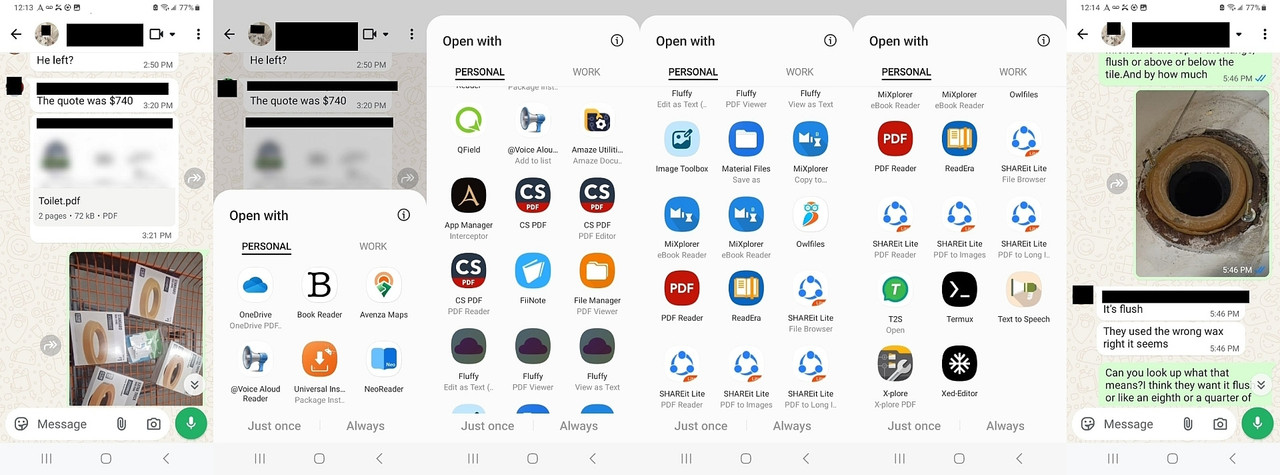
I don't doubt anything Frank said, but my Android 13 Samsung didn't seem to have a save in the WhatsApp GUI, but it had a ton of "open with" options.
If there is a way to SAVE the PDF directly from WhatsApp, I don't see it.
Still, we need to VIEW the PDF, and WhatsApp, for me, asked for a viewer.
Why isn't Samsung Notes in there, as you have a Samsung phone?
Frank Slootweg wrote:
But as I mentioned in my earlier response, you can just just view the
PDF from WhatsApp and then save the file from the PDF viewer.
I don't doubt anything Frank said, but my Android 13 Samsung didn't seem to have a save in the WhatsApp GUI, but it had a ton of "open with" options.
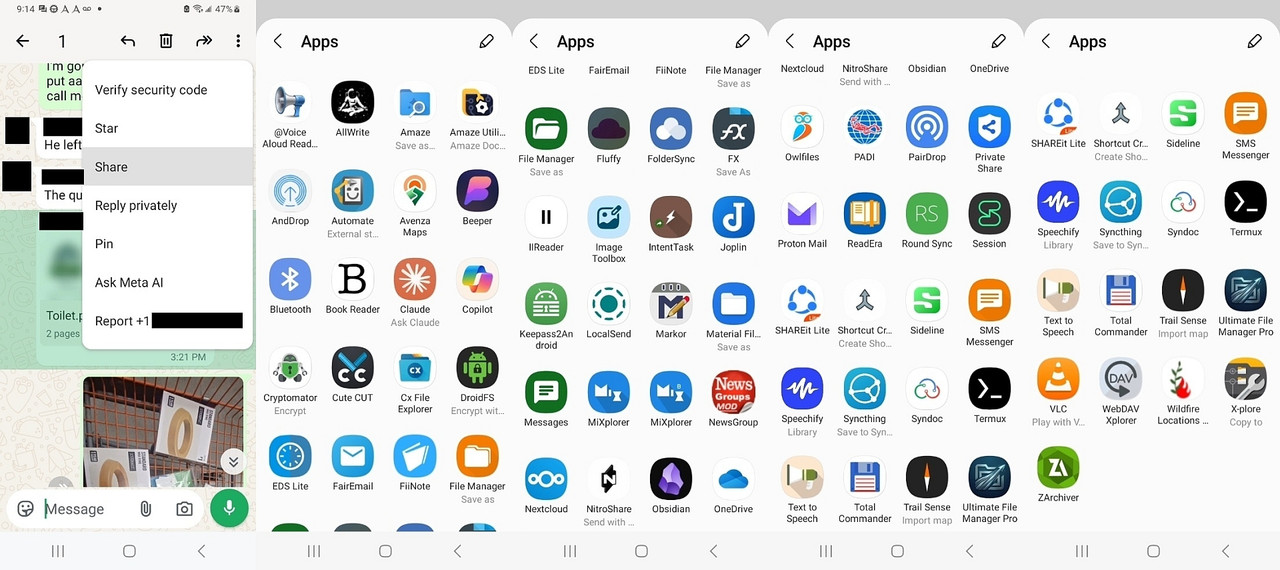
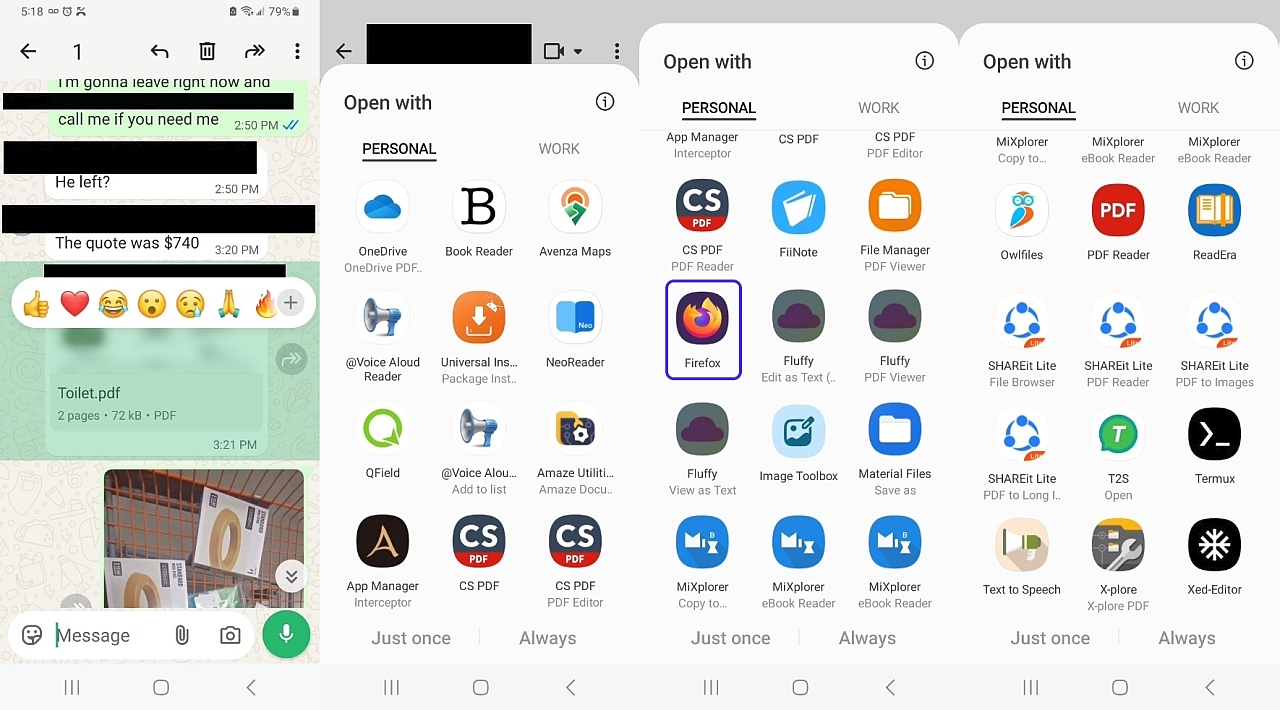
<https://i.postimg.cc/tRmWnpFP/whatsappshare.jpg>
<https://i.postimg.cc/g2kQdrwY/toilet.jpg>
OneDrive, Book Reader, Avenza Maps, @Voice Aloud Reader, Universal
Installer, NeoReader, QField, Amaze Utilities, App Manager, CS PDF,
CS PDF Editor, CS PDF Reader, FiiNote, File Manager PDF Viewer,
Fluffy Edit as Text, Fluffy PDF Viewer, Fluffy View as Text,
Image Toolbox, Material Files Save As, MiXplorer Copy to, MiXplorer
eBook Reader, Owlfiles, PDF Reader, ReadEra, ShareIt Lite File Browser, ShareIt Lite PDF Reader, ShareIt Lite PDF to Images, ShareIt Lite PDF to Long1..., T2S, Termux, Text to Speech, X-plore, Xed-Editor as shown above.
If you look at that image, I don't see WHERE to just save the damn thing.
If there is a button somewhere in WhatsApp to just save it, I don't see it.
But as Frank mentioned, I can read it via any one of those, let me count,
at least 40 apps that will open "application/PDF" mime types on my phone.
The question is which ones do three things, which is all I'd need.
1. Open PDF (by showing up in Application/PDF mime type)
2. Save it outside of WhatsApp file storage
3. And maybe also pinch zoom as the text was tiny
If there is a way to SAVE the PDF directly from WhatsApp, I don't see it.
Still, we need to VIEW the PDF, and WhatsApp, for me, asked for a viewer.
Richmond wrote:
If there is a way to SAVE the PDF directly from WhatsApp, I don't see it. >> Still, we need to VIEW the PDF, and WhatsApp, for me, asked for a viewer.
Why isn't Samsung Notes in there, as you have a Samsung phone?
You're new here, huh? :)
Since it's a USA-spec Samsung, the bootloader isn't known to be unlockable.
<https://xdaforums.com/t/is-my-almost-3-year-old-t-mobile-network-unlocked-samsung-galaxy-sm-a326u-bootloader-still-unlockable-and-hence-is-my-sm-a326u-still-unrootable.4638955/>
But, even so, with adb/shizuku I've degoogled & de-samsung'd my phone to
the point I accidentally disabled the capability of ever showing advertisements, which I still don't know how I managed that, but I've
removed all the bloatware that adb can find, and I don't have any accounts
on my phone either, so there's no Samsung or Google account set up.
Richmond wrote:
If there is a way to SAVE the PDF directly from WhatsApp, I don't see it. >>> Still, we need to VIEW the PDF, and WhatsApp, for me, asked for a viewer. >>Why isn't Samsung Notes in there, as you have a Samsung phone?
You're new here, huh? :)
Since it's a USA-spec Samsung, the bootloader isn't known to be unlockable.
<https://xdaforums.com/t/is-my-almost-3-year-old-t-mobile-network-unlocked-samsung-galaxy-sm-a326u-bootloader-still-unlockable-and-hence-is-my-sm-a326u-still-unrootable.4638955/>
But, even so, with adb/shizuku I've degoogled & de-samsung'd my phone to
the point I accidentally disabled the capability of ever showing advertisements, which I still don't know how I managed that, but I've
removed all the bloatware that adb can find, and I don't have any accounts
on my phone either, so there's no Samsung or Google account set up.
<https://xdaforums.com/t/psa-non-root-adb-debloat-without-fear-by-reinstalling-problematic-system-packages-using-pm-install-existing-after-uninstalling-one-too-many-packages.4789795/>
I install via Aurora which scrapes the Google Play store without us needing to set up a Google account on the phone, so I can run anything I want.
<https://xdaforums.com/t/app-5-0-aurora-store-open-source-google-play-client.3739733/post-89547905>
What's odd is some payware actually works, but it complains that it has no way of charging me, which I never did understand but which is not frequent.
So once more you've created your own problem and sent us on a wild
goose chase. Nothing new there.
Anyway, even with your degoogled & de-samsung'd phone, with the
plethora of PDF viewers which you *do* have, it should be trivial to
solve your 'problem'
What's odd is some payware actually works, but it complains that it has no >> way of charging me, which I never did understand but which is not frequent.
You did all that and then installed Whatsapp??
Read my other response. The Android version of WhatsApp cannot save,
only share and share has no 'save' choice, unless you have a file
manager, which can be a share destination, which can do that. (As said,
no such problem with the Windows version of WhatsApp.)
And the Samsung Notes PDF reader can view and save. 'Problem' solved.
[1] I don't see the Samsung PDF reader listed as a seperate app, but it
*is* shown as a choice in 'Open with'.
Its icon looks like that of (Samsung) Notes and indeed the Notes app has
a PDF+ icon near the top right.
It seems that the PDF reader is just a read-only version of the PDF
reader in Notes.
When the 'Open with' popup is shown in landscape mode, the text says
'Samsung N... PDF reader', so apparently the 'N...' part should actually
be 'Notes', so in full 'Samsung Notes PDF reader'. Sigh!
See also Richmond's comment on the apparent absence of Samsung Notes on
your phone.
But as I mentioned in my earlier response, you can just just view the >>> PDF from WhatsApp and then save the file from the PDF viewer.
I don't doubt anything Frank said, but my Android 13 Samsung didn't seem to >> have a save in the WhatsApp GUI, but it had a ton of "open with" options.
There isn't, but you can navigate the phone with a file browser and find
the file somewhere in the wasap tree.
Arno Welzel <usenet@arnowelzel.de> wrote:
Maria Sophia, 2026-10-28 08:23:
Needed to have two toilet wax rings replaced so I received a PDF inWhy "save"? If you can view the PDF you already have it. And saving the
Whatsapp on Android of the $750 estimate (I ended up doing it for $15). >>> <https://i.postimg.cc/g2kQdrwY/toilet.jpg>
My question is what free no registration Android app reads and saves PDF? >>
PDF you got via WhatsApp should be a feature of WhatsApp itself.
I agree, saving *should* be a feature of WhatsApp, but - contrary to
the Windows version - the Android version of WhatsApp does not have a
save (file) feature, only Share. And by default - at least on Arlen's
and my Samsung phone - Share does not have a a save choice either. So as
you mention (below), you'll need a extra file manager to get that.
But as I mentioned in my earlier response, you can just just view the
PDF from WhatsApp and then save the file from the PDF viewer.
--whenever you recieve any file via WhatsApp - not only PDF - you can save
it or "share" it with a file manage on your device to save it.
My preferred file manager is Cx File Explorer.
My preferred PDF viewer is MuPDF.
On 2026-10-28 14:21, Jeff Layman wrote:
On 28/10/2026 07:23, Maria Sophia wrote:
My question is what free no registration Android app reads and saves PDF? >>> I rarely (actually almost never) deal with PDFs on Android.
Anyway, I read it. I saved it.
But what do you prefer for reading and saving PDFs on Android?
I have MJ PDF and Falcon PDF. The problem with these PDF readers is the
unnecessary addition of "features" to keep up with what alternative apps
are offering.
For example MJ PDF has on its opening screen:
"Allow file access to build your library from the PDF's on this device".
Er, why?
I want to read a single PDF - what is it doing trying to build a
library? It explains if I touch "Allow access" that MJ PDF needs
permission to access all files to find and open PDF files on the phone.
That just seems the usual weasel-wording for almost any app. Why does it
need access to /all/ files? Why not just PDFs? Is it just the way that
Android operates of the access requirement is worded?
It is the way Android operates. The tool filters out non pdf files (or
the other way round). Several PDF readers do this, then present a list
of pdfs found for you to choose.
Some tools can read a number of book formats, and create a "library view
of your books". It is convenient.
That's the entire point of Usenet, after all, to add to the knowledge base.
Coincidentally, a new update has just appeared for Falcon PDF. See
"All your docs in one place" at <https://play.google.com/store/search?q=falcon+pdf+app&c=apps&hl=en>
(it's the "screenshot" of a cellphone. Just touch/click on the > and
it will move to that photo. It says it supports PDF, Word, ePub, and
10+ formats).
There is a paid version of Falcon, but the free version has no ads. I
find it hard to believe that the paid-for version covers the cost of
the free version, and without ads how is it financed?
Frank Slootweg wrote:
So once more you've created your own problem and sent us on a wild
goose chase. Nothing new there.
Act like an adult, Frank.
And I'll treat you like an adult.
You always throw the first punch, Frank, and then act surprised when I counter your attempts to attack, insult and belittle me, Frank.
That was unwarranted since you're assuming that nobody owns anything but Samsung when you make that odd claim, and worse, that the product from Samsung is the best in the world at what it does, both absurd claims.
I get it you're desperate to insult me, Frank, but bear in mind that your hatred for me forces you to come up with such astoundingly absurd claims.
Carlos E.R. wrote:
There isn't, but you can navigate the phone with a file browser and findBut as I mentioned in my earlier response, you can just just view the >>>> PDF from WhatsApp and then save the file from the PDF viewer.
I don't doubt anything Frank said, but my Android 13 Samsung didn't seem to >>> have a save in the WhatsApp GUI, but it had a ton of "open with" options. >>
the file somewhere in the wasap tree.
I found the solution!
Frank Slootweg wrote:
Read my other response. The Android version of WhatsApp cannot save,
only share and share has no 'save' choice, unless you have a file
manager, which can be a share destination, which can do that. (As said,
no such problem with the Windows version of WhatsApp.)
Hi Frank,
Thanks for that data about Android WA not having a Share-to-Save choice.
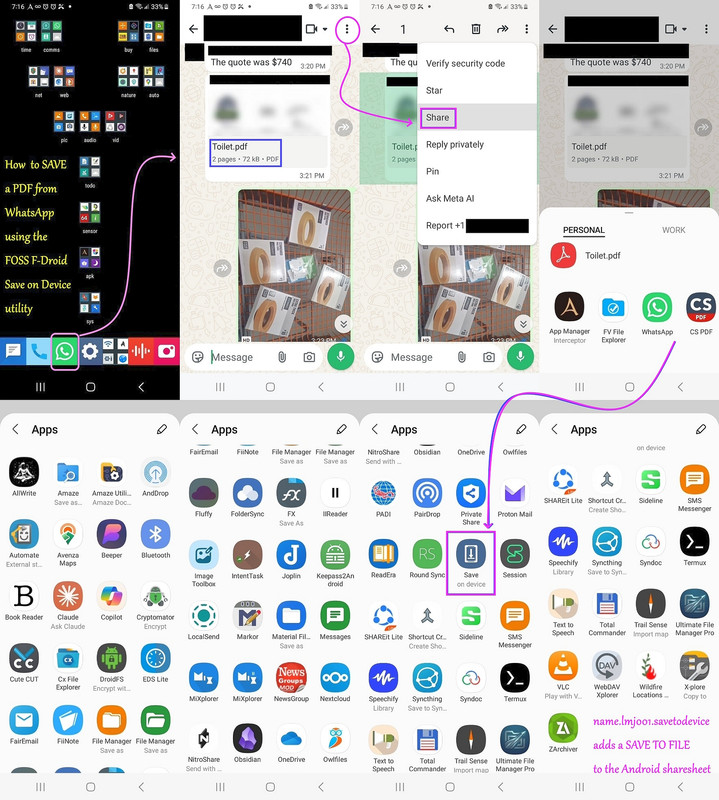
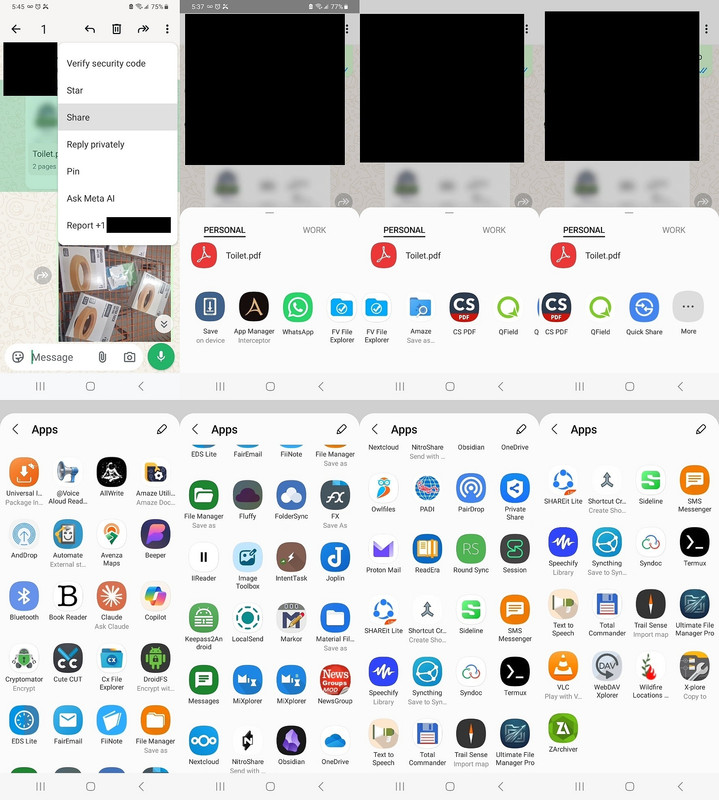
Thankfully, I found a way to add "Save on Device" to WhatsApp sharesheet!
<https://i.postimg.cc/B6ryMZpn/saveasfile.jpg>
As are almost all my solutions, it's universal, simple, and hence, brilliantly elegant, since it works for any app that won't let you save.
Here are the 40 apps that appear when WhatsApp triggers the OpenWith.
<https://i.postimg.cc/tRmWnpFP/whatsappshare.jpg>
Since I've tested all the free file managers on Android, of course some of those will save to device, but that was never the reason for the question.
The question was to find a UNIVERSAL solution that everyone can benefit
from, and I found it,
since almost never am I stumped by Android problems.
Even you must know by now that I'm DIFFERENT than almost every poster here, save for maybe the smartest like Andy and maybe one or two other posters.
There isn't a problem I can't solve, for me, but the goal, always, for me,
is to solve the problem for EVERYONE, so we can't assume only Samsung here.
Anyway, the solution for saving the file that works for all apps
(presumably) and for all Android phones, might just be to install this.
<https://f-droid.org/packages/name.lmj001.savetodevice>
"Save on Device adds an option to the Android Sharesheet
that allows you to save files to your device."
Arguably, you created the problem by removing a needed app. Don't get
mad because someone tells you that. Smile and go on. :-)
if you really think I "created the problem" that WhatsApp doesn't
have a "Save as" button, then you're as nuts as the Apple nutcases are.
You simply can not blame me for WhatsApp NOT having a 'Save As' button.
If "someone tells me that", they are a bona fide idiot
As are almost all my solutions, it's universal, simple, and hence,
brilliantly elegant, since it works for any app that won't let you save.
<barf!>
The question was to find a UNIVERSAL solution that everyone can benefit
from, and I found it,
Using an extra file manager is *also* "a UNIVERSAL solution that
everyone can benefit from", just a *different* one than you came up
with.
Anyway, the solution for saving the file that works for all apps
(presumably) and for all Android phones, might just be to install this.
<https://f-droid.org/packages/name.lmj001.savetodevice>
"Save on Device adds an option to the Android Sharesheet
that allows you to save files to your device."
And, as Arno and I have been saying, extra file managers *also* offer exactly that 'save to device' functionality. So I guess that makes our solution equally "universal, simple, brilliant, elegant and smart"!
You simply can not blame me for WhatsApp NOT having a 'Save As' button.
If "someone tells me that", they are a bona fide idiot
But "save-as" isn't the android way, "share-to" is.
Which you've found a utility to act as a bridge between sharing and
saving ...
Exactly - "share" *is* the "save" feature, since this allows you to use
the data wherever you want. You can also "share" data it with a file
manager which then saves it as file.
But as I mentioned in my earlier response, you can just just view the
PDF from WhatsApp and then save the file from the PDF viewer.
Yes - *if* the PDF viewer has a "save" function. This was the original question in this thread - which PDF viewer provides a "save" function.
And since you can just use a file manager to store data as file, I also suggested to "share" it this way:
The question was hoping to find a GOOD PDF viewer (better than others).
Carlos E.R. wrote:
Arguably, you created the problem by removing a needed app. Don't get
mad because someone tells you that. Smile and go on. :-)
Hi Carlos,
First, if you really think I "created the problem" that WhatsApp doesn't
have a "Save as" button, then you're as nuts as the Apple nutcases are.
You simply can not blame me for WhatsApp NOT having a 'Save As' button.
If "someone tells me that", they are a bona fide idiot, Carlos.
Maria Sophia <mariasophia@comprehension.com> wrote:
Frank Slootweg wrote:
Read my other response. The Android version of WhatsApp cannot save,
only share and share has no 'save' choice, unless you have a file
manager, which can be a share destination, which can do that. (As said,
no such problem with the Windows version of WhatsApp.)
Hi Frank,
Thanks for that data about Android WA not having a Share-to-Save choice.
Thankfully, I found a way to add "Save on Device" to WhatsApp sharesheet!
<https://i.postimg.cc/B6ryMZpn/saveasfile.jpg>
As are almost all my solutions, it's universal, simple, and hence,
brilliantly elegant, since it works for any app that won't let you save.
<barf!>
we mean you having uninstalled "Samsung Notes" previously.
Yes, you explained how that happened. I'm not criticizing you for that.
But apparently that tool can do at least some of what you wanted (I
don't personally know).
That's the entire point of Usenet, after all, to add to the knowledge base.
Well I did suggest fennec, which is free and oss, and allows you to view
and save pdfs.
Maria Sophia wrote:
The question was hoping to find a GOOD PDF viewer (better than others).
In fairness to Arno, I should commend him for understanding the subject of this thread, which he did, which is the chosen PDF viewer has to also save.
My question is what free no registration Android app reads and saves PDF?On Windows, I prefer sumatraPDF as a viewer (It does have annotation,
I rarely (actually almost never) deal with PDFs on Android.
but not form-filling or document editing) and I wish it had an android version, but no.
I've got something against javascript PDF viewers built-in to browsers,
they used to be slow, I know that's no longer true, but I prefer an
external program.
So MuPDF seems to have a similar approach, be quick and lightweight,
which is all I'm likely to want to do on a phone/tablet.
I only use Acrobat when I have to ... I see it trip customer machines up
too often, with its hooks into Explorer/Word/Outlook.
My question is what free no registration Android app reads and saves PDF? >> I rarely (actually almost never) deal with PDFs on Android.
On my Amazon tablet I use Fennec (web browser), which I got from F-Droid
or directly from the Mozilla website. It's a bit of a sledgehammer to
crack a nut, but it loads quickly.
1. Longpress the PDF attachment and "Open with" a PDF reader, or,
2. Longpress the PDF attachment and "Share to" a file saver.
As for you blaming me for keeping a clean system devoid of the Samsung and Google bloatware, you need to know that you shouldn't play that blame game.
I get it you and Frank teamed up to blame me for not using Samsung's crap.
Anyway, it was CLEAR IN THE OP that I solved the problem, temporarily,
using first the Adobe reader (which failed) and then QField which worked.
The only open question in this thread, is what's the BEST PDF viewer on Android, where I already have plenty to test out, plus thread suggestions.
But what do you prefer for reading and saving PDFs on Android?
Can you test a PDF attachment to WhatsApp for the team?
Arno Welzel wrote:
Exactly - "share" *is* the "save" feature, since this allows you to use
the data wherever you want. You can also "share" data it with a file
manager which then saves it as file.
Hi Arno,
You bring up a good point, where, moments ago, I had responded to Andy
after looking up the design intentions, and agree with you on this fact.
Luckily, the solution I came up with uses the share feature to save.
*PSA: I found a GREAT way to add 'save to device' to the Android share sheet (which works on apps like WA that don't want you to share to the device!)*
<https://xdaforums.com/t/psa-i-found-a-great-way-to-add-save-to-device-to-the-android-share-sheet-which-works-on-apps-like-wa-that-dont-want-you-to-share-to-the-device.4806835/>
But as I mentioned in my earlier response, you can just just view the
PDF from WhatsApp and then save the file from the PDF viewer.
Yes - *if* the PDF viewer has a "save" function. This was the original
question in this thread - which PDF viewer provides a "save" function.
And since you can just use a file manager to store data as file, I also
suggested to "share" it this way:
When I first saw you suggested "the PDF viewer" in WhatsApp, I didn't say anything because I don't see any PDF viewer inside of the WhatsApp GUI.
Maria Sophia, 2026-10-29 20:43:
Arno Welzel wrote:
Exactly - "share" *is* the "save" feature, since this allows you to use
the data wherever you want. You can also "share" data it with a file
manager which then saves it as file.
Hi Arno,
You bring up a good point, where, moments ago, I had responded to Andy
after looking up the design intentions, and agree with you on this fact.
Luckily, the solution I came up with uses the share feature to save.
*PSA: I found a GREAT way to add 'save to device' to the Android share sheet (which works on apps like WA that don't want you to share to the device!)*
<https://xdaforums.com/t/psa-i-found-a-great-way-to-add-save-to-device-to-the-android-share-sheet-which-works-on-apps-like-wa-that-dont-want-you-to-share-to-the-device.4806835/>
But as I mentioned in my earlier response, you can just just view the >>>> PDF from WhatsApp and then save the file from the PDF viewer.
Yes - *if* the PDF viewer has a "save" function. This was the original
question in this thread - which PDF viewer provides a "save" function.
And since you can just use a file manager to store data as file, I also
suggested to "share" it this way:
When I first saw you suggested "the PDF viewer" in WhatsApp, I didn't say >> anything because I don't see any PDF viewer inside of the WhatsApp GUI.
No, I didn't.
I assumed, that WhatsApp has a "save" feature (I never used WhatsApp).
And if this is not the case, then use "share" and select a file manager
like "Cx File Manager" as target where you then can save the file.
Frank Slootweg wrote:[...]
The question was to find a UNIVERSAL solution that everyone can benefit
from, and I found it,
Using an extra file manager is *also* "a UNIVERSAL solution that
everyone can benefit from", just a *different* one than you came up
with.
I get it Frank, that invest all your time shooting down solutions to
problems so that you can propose absurdly complex, substandard &
proprietary workarounds that only work for a subset of people, but...
I get it that you hate me but instead of spending all your time attacking
me, why don't you invest some time in proposing a useful solution?
Your adamant suggestion to use a piece-of-shit proprietary Samsung tool is fine but you need to respect my intelligence when I point out that using Samsung's crappy tools doesn't work on all Android devices, even as you
seem to think that the only solution to all problems is a Samsung tool.
Carlos E.R. wrote:[...]
With those two solutions being the topic, first, let's be very clear
because for some reason you're following Frank in BLAMING me for
1. WhatsApp doesn't have a direct SAVE
2. WhatsApp doesn't come with a PDF reader
Now, let's address the asininely idiotic claim that the piece of crap
Samsung tools would 'solve' this problem for everyone in the newsgroup.
Carlos E.R. wrote:[...]
With those two solutions being the topic, first, let's be very clear
because for some reason you're following Frank in BLAMING me for
1. WhatsApp doesn't have a direct SAVE
2. WhatsApp doesn't come with a PDF reader
We are not blaming you for anything. We are just stating facts.
WhatsApp does not have I direct save, because that's not the Android
way. The Android way is share.
As to the PDF reader, the issue is the other way around: Why *would* WhatsApp come with a PDF reader?
[More of the same and other misrepresentations deleted.]
Now, let's address the asininely idiotic claim that the piece of crap
Samsung tools would 'solve' this problem for everyone in the newsgroup.
Nobody suggested that. You're just making that up.
[...]
On 2026-10-29, Jeff Layman wrote:
Coincidentally, a new update has just appeared for Falcon PDF. See
"All your docs in one place" at
<https://play.google.com/store/search?q=falcon+pdf+app&c=apps&hl=en>
(it's the "screenshot" of a cellphone. Just touch/click on the > and
it will move to that photo. It says it supports PDF, Word, ePub, and
10+ formats).
There is a paid version of Falcon, but the free version has no ads. I
find it hard to believe that the paid-for version covers the cost of
the free version, and without ads how is it financed?
I can't fathom why is this surprising or hard to believe in a world full
of software developed without payment being required.
Sure, there's talk about some companies - especially among those
developing commercial software - enjoying such programs, libraries,
projects without trying to support their maintenance and/or
development. But still, the world is full of such cases of free tools,
and more notably free and open source software.
So, how is this hard to believe?
Maria Sophia <mariasophia@comprehension.com> wrote:
Frank Slootweg wrote:[...]
[Usual lies deleted.]
The question was to find a UNIVERSAL solution that everyone can benefit >>>> from, and I found it,
Using an extra file manager is *also* "a UNIVERSAL solution that
everyone can benefit from", just a *different* one than you came up
with.
I get it Frank, that invest all your time shooting down solutions to
problems so that you can propose absurdly complex, substandard &
proprietary workarounds that only work for a subset of people, but...
Since when is an extra file manager "absurdly complex, substandard & proprietary"!?
And note that it is not just my suggestion. also Arno's (and I think Andy's).
[...]
I get it that you hate me but instead of spending all your time attacking
me, why don't you invest some time in proposing a useful solution?
I don't hate you and I didn't attack you. That you can't handle it
when people don't fully and unconditionally agree with your methods,
isn't anyone's problem but yours.
[More ranting, insults, lies, etc. deleted.]
Your adamant suggestion to use a piece-of-shit proprietary Samsung tool is >> fine but you need to respect my intelligence when I point out that using
Samsung's crappy tools doesn't work on all Android devices, even as you
seem to think that the only solution to all problems is a Samsung tool.
1) I didn't suggest the "proprietary Samsung tool", 2) it's by no
means "a piece-of-shit" and 3) other Android devices will have similar
tools they can use.
adb shell cmd package query-activities -a android.intent.action.SEND -t application/pdf --user 0 | grep -E "(packageName|name=)"
Can you test a PDF attachment to WhatsApp for the team?
I don't use WhatsApp.
I assumed, that WhatsApp has a "save" feature (I never used WhatsApp).
And if this is not the case, then use "share" and select a file manager
like "Cx File Manager" as target where you then can save the file.
The correct name is "Cx File Explorer" not "Cx File Manager".
adb shell cmd package query-activities -a android.intent.action.SEND -t application/pdf --user 0 | grep -E "(packageName|name=)"
But what do you prefer for reading and saving PDFs on Android?
You don't want to know.
Frank Slootweg wrote:[...]
You wasted everyone's time and energy on this thread acting like a child.
When you act like an adult, I'll treat you like you're an adult. Clear?
[And Carlos wasted our time by telling me to stop responding to you, when
he really should have told you to stop the crap that I had to respond to.]
1. Android deprecates SaveAs in deference to ShareTo/OpenWith
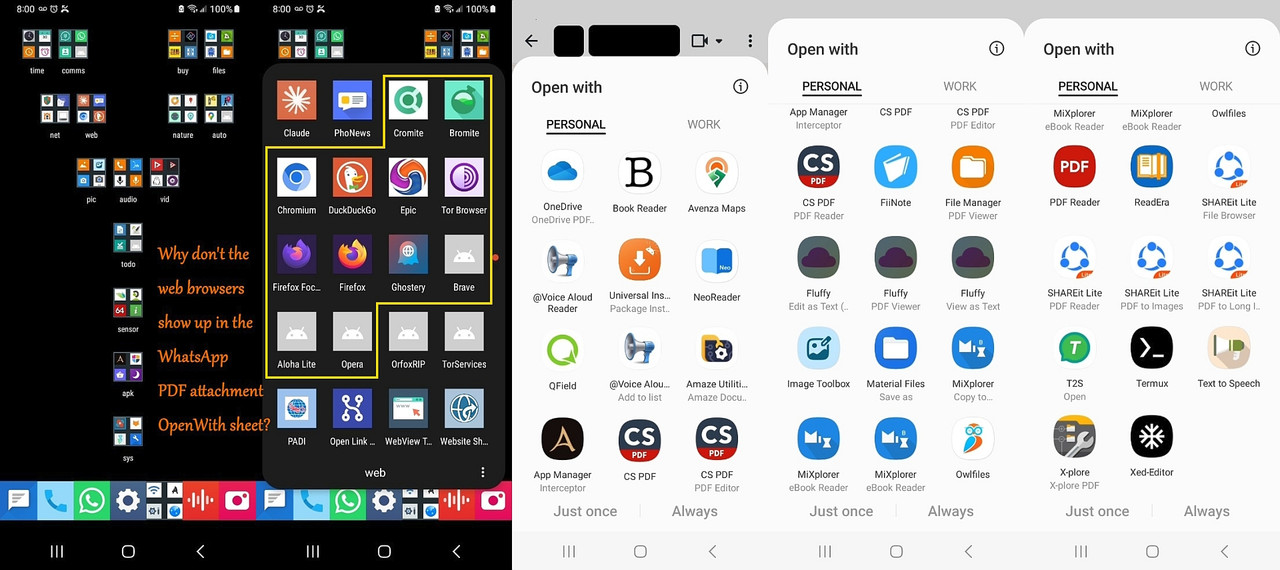
Do you see any web browsers in that Android WhatsApp PDF OpenWith menu?
I don't.
Do you see any web browsers in that Android WhatsApp PDF OpenWith menu?
I don't.
I do. I said, days ago, that I used FFx to read a PDF directly from
wasap, in Android. And FFx allows to download or share the file, and the later allows to save via file browsers like Cx.
adb shell cmd package resolve-activity --brief -t application/pdf -d content://com.whatsapp.provider.media/item/123priority=100 preferredOrder=0 match=0x608000 specificIndex=-1
adb shell dumpsys package org.mozilla.firefox | grep -i -E "pdf|mime|intent" -C 2
adb shell getprop ro.build.version.release
adb shell cat /system/build.prop | grep -E "ro.build.version.release|ro.build.version.sdk|ro.product.model"
adb shell dumpsys package org.mozilla.firefox | grep -E "versionName|versionCode"
echo "=== SYSTEM INFO ===" && adb shell getprop ro.product.model && adb shell getprop ro.build.version.release && echo "=== FIREFOX VERSION ===" && adb shell dumpsys package org.mozilla.firefox | grep versionName"=== SYSTEM INFO ==="
My Firefox only registers handlers for web schemes (http/https) andPresumably your Firefox is *not* installed from the Play Store?
specific text types (text/plain, application/xhtml+xml), alongside a
generic share receiver (ACTION_SEND).
[snip detail]
Notice the absence of any local document types like application/pdf
or local file schemes under ACTION_VIEW.
When you act like an adult, I'll treat you like you're an adult. Clear?
Promises, promises.
Someone-with-a-different-view != 'child'.
Someone-with-a-misplaced-superiority-complex != 'adult'.
[And Carlos wasted our time by telling me to stop responding to you, when
he really should have told you to stop the crap that I had to respond to.]
Carlos did no such thing. And he doesn't have to do anything and he *cannot*'t tell someone to 'stop' something which never started.
1. Android deprecates SaveAs in deference to ShareTo/OpenWith
I think that is your opinion, not some stated Android policy.
I also posted a solution using a file manager. But arguably, some people might find easier to use a small app that just does "saves as" which is easier to handle.
To me, it is easier to use an existing file manager than install a new
app for a single purpose.
My Firefox only registers handlers for web schemes (http/https) andPresumably your Firefox is *not* installed from the Play Store?
specific text types (text/plain, application/xhtml+xml), alongside a
generic share receiver (ACTION_SEND).
[snip detail]
Notice the absence of any local document types like application/pdf
or local file schemes under ACTION_VIEW.
Mine is, so I assume a different build, or different manifest ...
adb shell dumpsys package org.mozilla.firefox | grep -E "installerPackageName|userId|versionName"userId=10160
adb shell dumpsys package com.whatsapp | grep -E "versionName|installerPackageName|userId"userId=10714
adb shell dumpsys package com.android.vending | grep -i "installerPackageName"installerPackageName=com.android.vending
The main issue (that I didn't know, until moments ago when I tried to document the list of apps/activities that show up in the sharesheet), is
that the sharesheet gives a DIFFERENT result on different invocations.
Andy Burns wrote:
Can you test a PDF attachment to WhatsApp for the team?
I don't use WhatsApp.
Isn't the Android sharesheet common across all apps (not just WhatsApp)?
Maria Sophia <mariasophia@comprehension.com> wrote:
Frank Slootweg wrote:[...]
[Usual lies deleted.]
The question was to find a UNIVERSAL solution that everyone can benefit >>>> from, and I found it,
Using an extra file manager is *also* "a UNIVERSAL solution that
everyone can benefit from", just a *different* one than you came up
with.
I get it Frank, that invest all your time shooting down solutions to
problems so that you can propose absurdly complex, substandard &
proprietary workarounds that only work for a subset of people, but...
Since when is an extra file manager "absurdly complex, substandard & proprietary"!?
And note that it is not just my suggestion. also Arno's (and I think Andy's).
Carlos E.R. wrote:
we mean you having uninstalled "Samsung Notes" previously.
Yes, you explained how that happened. I'm not criticizing you for that.
But apparently that tool can do at least some of what you wanted (I
don't personally know).
Hi Carlos,
First, let's be clear we SOLVED the saving problem in a way that is brilliantly elegant, in that it turns the SHARE concept into a SAVE.
Until Andy explained it to me, I wasn't aware that Android is DESIGNED to share instead of to save, so WhatsApp wants us to SHARE to a PDF reader.
So that SOLVES the second half of the question in the SUBJECT, in a way
that only I can do, as I doubt ANYONE on this newsgroup could do that.
Q2: How do you SAVE a PDF attachment from WhatsApp to the file system?
For those who claimed WhatsApp comes with a native PDF reader, that's
false, so what it means is the first half of the SUBJECT still stands.
Q1: What's the BEST PDF reader that reads, zooms, and saves?
With those two solutions being the topic, first, let's be very clear
because for some reason you're following Frank in BLAMING me for
1. WhatsApp doesn't have a direct SAVE
2. WhatsApp doesn't come with a PDF reader
I need to repeat you can't blame me for those two WhatsApp flaws.
You just can't. So stop it. Don't follow Frank into the abyss.
I get it both Frank and Richmond blamed me for WhatsApp decisions.
But trust me, I'm really smart but I'm not *that* smart, Carlos.
So you give me way too much credit for controlling WhatsApp software.
Now, let's address the asininely idiotic claim that the piece of crap
Samsung tools would 'solve' this problem for everyone in the newsgroup.
That's so absurd, that just pointing out your claims shows it's nuts.
It's just absurd that you claim everyone should use Samsung's OEM crap.
I get it you're following your hero, Frank, as you seem to back him up.
And that's fine. Back up Frank all you want. You clearly are doing that.
But at least pick something to back him up on that isn't utterly absurd.
....
...
...
...
...
Let's get back to creating SOLUTIONS for Android that nobody else can.
Q1: What's the best PDF reader that can zoom and save?
Q2: What's the best way to add a "Save As" to the "Share to"?
I think we've solved the second problem in ways that nobody but I can.
But I have at this point, too many PDF viewers to pick the best one yet.
Frank Slootweg wrote:
When you act like an adult, I'll treat you like you're an adult. Clear?
Promises, promises.
Someone-with-a-different-view != 'child'.
Someone-with-a-misplaced-superiority-complex != 'adult'.
Bullshit.
You acted like a child and now, as the first absurd excuse you can think of to defend yourself, you're claiming it's a difference of a point of view.
Name the "difference in a point of view" that you're alluding to, Frank.
Name it!
HINT: If you can't name it, then it's bullshit.
Carlos E. R. wrote:
Do you see any web browsers in that Android WhatsApp PDF OpenWith menu?
I don't.
I do. I said, days ago, that I used FFx to read a PDF directly from
wasap, in Android. And FFx allows to download or share the file, and the
later allows to save via file browsers like Cx.
Hi Carlos,
Hmmmmm.....
Thanks for checking that out for the team as that's not what I see when I long press on a PDF attachment and then look at the Android OpenWith sheet.
Clearly I have Firefox & just as clearly it doesn't show and neither do
any of the other web browsers (on my Samsung A32-5G on Android 13 anyway).
<https://i.postimg.cc/59qhZRmR/openwithpdf.jpg>
The first question to affirm is whether you used "ShareTo" or "OpenWith" (although browsers don't show up in my ShareTo either).
And of course a direct file:// open from internal storage should work:
Android > media > com.whatsapp > WhatsApp > Media > WhatsApp Documents
When WhatsApp generates an "Open With" sheet for a file ending in .pdf, Android queries the system for apps that have explicitly registered themselves to handle the application/pdf MIME type and support viewing
local file URIs/content URIs from external apps.
To see what app handles local PDF views I ran
c:\> adb shell cmd package resolve-activity --brief -t application/pdf -d content://com.whatsapp.provider.media/item/123
priority=100 preferredOrder=0 match=0x608000 specificIndex=-1
isDefault=true com.google.android.documentsui/
com.android.documentsui.picker.PickActivity
This told me Android's package manager checked the system resolution
table and found DocumentsUI (PickActivity) as the only registered
handler for local content URIs with an application/pdf MIME type.
My web browsers, including Firefox, omit local PDF intent filters
from their manifests, so they do not appear in this resolution
table.
That explains why Android strips them from WA's "Open With" menu.
To further see only the package names of apps registered for local
PDF viewing I used adb to reveal my Firefox does not register any
intent filter for application/pdf under ACTION_VIEW.
c:\> adb shell dumpsys package org.mozilla.firefox | grep -i -E "pdf|mime|intent" -C 2
My Firefox only registers handlers for web schemes (http/https) and
specific text types (text/plain, application/xhtml+xml), alongside a
generic share receiver (ACTION_SEND).
adb shell dumpsys package org.mozilla.firefox | grep -A 15 "MIME Typed Actions:"
MIME Typed Actions:
android.intent.action.SEND:
2900abb org.mozilla.firefox/org.mozilla.fenix.IntentReceiverActivity filter 59cbd84
Action: "android.intent.action.SEND"
Category: "android.intent.category.DEFAULT"
StaticType: "text/plain"
android.intent.action.VIEW:
2900abb org.mozilla.firefox/org.mozilla.fenix.IntentReceiverActivity filter 1aa9797
Action: "android.intent.action.VIEW"
Category: "android.intent.category.BROWSABLE"
Category: "android.intent.category.DEFAULT"
Scheme: "http"
Scheme: "https"
StaticType: "text/html"
StaticType: "text/plain"
StaticType: "application/xhtml+xml"
Notice that ACTION_VIEW is strictly limited to web schemes (http/https)
and specific web mime types (text/html, text/plain, application/xhtml+xml).
Notice the absence of any local document types like application/pdf
or local file schemes under ACTION_VIEW.
This confirms why my Android system resolver omits Firefox from
WhatsApp's direct document "Open With" menu.
So I'm confused why/how Firefox shows up for you, but it's
impossible for it to show up for me given that data above.
But maybe it's due to a difference in systems and versions?
C:\> adb shell getprop ro.build.version.release
C:\> adb shell cat /system/build.prop | grep -E "ro.build.version.release|ro.build.version.sdk|ro.product.model"
C:\> adb shell dumpsys package org.mozilla.firefox | grep -E "versionName|versionCode"
Here is an all-in-one echo code to get both at once:
C:\> echo "=== SYSTEM INFO ===" && adb shell getprop ro.product.model && adb shell getprop ro.build.version.release && echo "=== FIREFOX VERSION ===" && adb shell dumpsys package org.mozilla.firefox | grep versionName
"=== SYSTEM INFO ==="
SM-A326U
13
"=== FIREFOX VERSION ==="
versionName=117.1.0
On 2026-10-30 19:58, Maria Sophia wrote:
The main issue (that I didn't know, until moments ago when I tried to
document the list of apps/activities that show up in the sharesheet), is
that the sharesheet gives a DIFFERENT result on different invocations.
It is sorted by most recent use and some other criteria I don't know.
So, yes, indeed it changes from call to call
Carlos E. R. wrote:
On 2026-10-31 19:04, Maria Sophia wrote:
This implies that my Android Firefox build (v117.1.0) limits its
ACTION_VIEW
Update it. You are using an obsolete version, thus you miss features.
FFx is striving to be the best free PDF cross platform viewer.
My Android Firefox says it is 159.0.
Of course updating from 117 to 159 will totally change all sorts of
things because the developers seem to like change for the sake of change
but - irritating though that is - it is better to be current, especially
if you want some "correct" feature(s).
cd c:\software\apk\browser\firefox\.Name: fenix-159.0.multi.android-arm64-v8a.apk
curl -O https://ftp.mozilla.org/pub/fenix/releases/159.0/android/fenix-159.0-android-arm64-v8a/fenix-159.0.multi.android-arm64-v8a.apk
cd c:\software\apk\browser\firefox\.Name: fenix-159.0.multi.android-universal.apk
curl -O https://ftp.mozilla.org/pub/fenix/releases/159.0/android/fenix-159.0-android/fenix-159.0.multi.android-universal.apk
adb install -r fenix-159.0.multi.android-universal.apkPerforming Streamed Install
echo "=== SYSTEM INFO ===" && adb shell getprop ro.product.model && adb shell getprop ro.build.version.release && echo "=== FIREFOX VERSION ===" && adb shell dumpsys package org.mozilla.firefox | grep versionName"=== SYSTEM INFO ==="
adb shell cmd package resolve-activity --brief -t application/pdf -d content://com.whatsapp.provider.media/item/123priority=100 preferredOrder=0 match=0x608000 specificIndex=-1 isDefault=true
adb shell dumpsys package org.mozilla.firefox | grep -A 15 "MIME Typed Actions:"MIME Typed Actions:
The question was to find a UNIVERSAL solution that everyone can benefit
from, and I found it, since almost never am I stumped by Android problems.
A few days ago, Maria Sophia <mariasophia@comprehension.com> wrote:
[...]
The question was to find a UNIVERSAL solution that everyone can benefit
from, and I found it, since almost never am I stumped by Android problems.
Just for kicks, I checked another solution, which is universal (for non-deGoogled phones, so not for your (deGoogled) phone).
The solution is to use the (Google) 'Drive' app as your choice in the 'Open with' dialog, when opening the PDF in WhatsApp. (The 'Drive' app
should be standard on any normal Android phone.)
While 'Drive' implies The Cloud and similar horrors :-), it can work without the cloud, which we do in this case. The 'Drive' app will just
open and display the PD, i.e. step one of your "reading & saving PDFs on Android".
Now tap the three-vertical-dots icon and tap 'Download', which will--
*not* - as one might expect - download something from the cloud, but
will download the displayed PDF to your Download folder. From there, you
can copy/move it to any place you like, , i.e. step two of your "reading
& saving PDFs on Android".
Elementary, dear Watson!
Yes, this method has a few more steps if your desired 'save' target is other than your Download folder, but it *is* "UNIVERSAL' for all normal Android phones.
As a famous poster said: "So no need to install anything else."! :-)
[...]
Carlos E. R. wrote:
On 2026-10-30 19:58, Maria Sophia wrote:
The main issue (that I didn't know, until moments ago when I tried to
document the list of apps/activities that show up in the sharesheet), is >>> that the sharesheet gives a DIFFERENT result on different invocations.
It is sorted by most recent use and some other criteria I don't know.
So, yes, indeed it changes from call to call
Thanks.
What I've found out in this thread is that the options are capriciously presented, where even the "Save on device" option shows up only sometimes.
I didn't know Android was that badly designed in terms of what shows up.
Now I do know that it's basically capricious in what it presents to us.
What I've found out in this thread is that the options are capriciously
presented, where even the "Save on device" option shows up only sometimes. >>
I didn't know Android was that badly designed in terms of what shows up.
Now I do know that it's basically capricious in what it presents to us.
Another consideration is that you seem to have a lot of apps that can go into that list. 60 I think you said. My list is far shorter: only 6 entries.
It is possible that Android doesn't cope well with that number.
On 2026-11-01 15:12, Maria Sophia wrote:
Carlos E. R. wrote:
On 2026-10-30 19:58, Maria Sophia wrote:
The main issue (that I didn't know, until moments ago when I tried to
document the list of apps/activities that show up in the sharesheet), is >>>> that the sharesheet gives a DIFFERENT result on different invocations.
It is sorted by most recent use and some other criteria I don't know.
So, yes, indeed it changes from call to call
Thanks.
What I've found out in this thread is that the options are capriciously
presented, where even the "Save on device" option shows up only sometimes. >>
I didn't know Android was that badly designed in terms of what shows up.
Now I do know that it's basically capricious in what it presents to us.
Another consideration is that you seem to have a lot of apps that can
go into that list. 60 I think you said. My list is far shorter: only 6 entries.
It is possible that Android doesn't cope well with that number.
On 2026-11-03, Carlos E. R. wrote:
On 2026-11-01 15:12, Maria Sophia wrote:
Carlos E. R. wrote:
On 2026-10-30 19:58, Maria Sophia wrote:
The main issue (that I didn't know, until moments ago when I tried to >>>>> document the list of apps/activities that show up in the sharesheet), is >>>>> that the sharesheet gives a DIFFERENT result on different invocations. >>>>It is sorted by most recent use and some other criteria I don't know.
So, yes, indeed it changes from call to call
Thanks.
What I've found out in this thread is that the options are capriciously
presented, where even the "Save on device" option shows up only sometimes. >>>
I didn't know Android was that badly designed in terms of what shows up. >>> Now I do know that it's basically capricious in what it presents to us.
Another consideration is that you seem to have a lot of apps that can
go into that list. 60 I think you said. My list is far shorter: only 6
entries.
It is possible that Android doesn't cope well with that number.
Well, then it's poorly designed. Windows 4.10 with an editable program
list in the Start Menu might have lacked package management, it might
have lacked automatic categorization in that menu, but at least that
menu could be customized. A lot. As could context menu options for
content handling (Windows back then came with an editor for such associations).
Meanwhile on Android 15, I've had to disable Google Drive in order to
make the application/activity chooser for PDF files put Fossify
Documents at the top, so that I could choose "Always". Did I miss some
other way of doing this? How does one change the order in which options
are presented, and how does one make it so that another one is the top
one, and how does one choose "Always" for an option other than the top
one?
Note: this isn't after an association has been set, but *before*...
On 2026-11-01 20:43, Frank Slootweg wrote:
A few days ago, Maria Sophia <mariasophia@comprehension.com> wrote:
[...]
The question was to find a UNIVERSAL solution that everyone can benefit
from, and I found it, since almost never am I stumped by Android problems.
Just for kicks, I checked another solution, which is universal (for non-deGoogled phones, so not for your (deGoogled) phone).
The solution is to use the (Google) 'Drive' app as your choice in the 'Open with' dialog, when opening the PDF in WhatsApp. (The 'Drive' app should be standard on any normal Android phone.)
Yes, I thought of this, too, initially, but knowing who was asking, I skipped it ;-)
While 'Drive' implies The Cloud and similar horrors :-), it can work without the cloud, which we do in this case. The 'Drive' app will just
open and display the PD, i.e. step one of your "reading & saving PDFs on Android".
It is possible that there is a hidden step, drive making a local to it
copy, meaning a copy in the cloud for it to work with.
Then the download button makes sense.--- Synchronet 3.22a-Linux NewsLink 1.2
Now tap the three-vertical-dots icon and tap 'Download', which will *not* - as one might expect - download something from the cloud, but
will download the displayed PDF to your Download folder. From there, you can copy/move it to any place you like, , i.e. step two of your "reading
& saving PDFs on Android".
Elementary, dear Watson!
Yes, this method has a few more steps if your desired 'save' target is other than your Download folder, but it *is* "UNIVERSAL' for all normal Android phones.
As a famous poster said: "So no need to install anything else."! :-)
[...]
Meanwhile on Android 15, I've had to disable Google Drive in order to
make the application/activity chooser for PDF files put Fossify
Documents at the top, so that I could choose "Always". Did I miss some
other way of doing this? How does one change the order in which options
are presented, and how does one make it so that another one is the top
one, and how does one choose "Always" for an option other than the top
one?
Note: this isn't after an association has been set, but *before*...
It is possible that there is a hidden step, drive making a local to it
copy, meaning a copy in the cloud for it to work with.
Yes, I thought of this issue, but there is no (temporary) cloud copy.
I could do more stringent tests like disabling tthe network, logging out
of my Google accoun, etc., but for me no visible copy in the cloud is
enough proof.
Nuno Silva <nunojsilva@invalid.invalid> wrote:
[...]
Meanwhile on Android 15, I've had to disable Google Drive in order to
make the application/activity chooser for PDF files put Fossify
Documents at the top, so that I could choose "Always". Did I miss some
other way of doing this? How does one change the order in which options
are presented, and how does one make it so that another one is the top
one, and how does one choose "Always" for an option other than the top
one?
Note: this isn't after an association has been set, but *before*...
I'm confused! If you're about to choose "Always", why do you *care*
where the choice-to-be is in the list? It's a one-time action. After
that, you never get the "Open with" popup again (until you remove the association in the app's 'App info' page).
If your wish to change the order of the list was for the "Just once" choice, I would understand, but for "Always", who cares?
On 2026-11-03, Frank Slootweg wrote:
Nuno Silva <nunojsilva@invalid.invalid> wrote:
[...]
Meanwhile on Android 15, I've had to disable Google Drive in order to
make the application/activity chooser for PDF files put Fossify
Documents at the top, so that I could choose "Always". Did I miss some
other way of doing this? How does one change the order in which options
are presented, and how does one make it so that another one is the top
one, and how does one choose "Always" for an option other than the top
one?
Note: this isn't after an association has been set, but *before*...
I'm confused! If you're about to choose "Always", why do you *care*
where the choice-to-be is in the list? It's a one-time action. After
that, you never get the "Open with" popup again (until you remove the association in the app's 'App info' page).
If your wish to change the order of the list was for the "Just once" choice, I would understand, but for "Always", who cares?
I can only click "Always" for the top one.
Nuno Silva <nunojsilva@invalid.invalid> wrote:
On 2026-11-03, Frank Slootweg wrote:
Nuno Silva <nunojsilva@invalid.invalid> wrote:
[...]
Meanwhile on Android 15, I've had to disable Google Drive in order to
make the application/activity chooser for PDF files put Fossify
Documents at the top, so that I could choose "Always". Did I miss some
other way of doing this? How does one change the order in which options >> >> are presented, and how does one make it so that another one is the top
one, and how does one choose "Always" for an option other than the top
one?
Note: this isn't after an association has been set, but *before*...
I'm confused! If you're about to choose "Always", why do you *care*
where the choice-to-be is in the list? It's a one-time action. After
that, you never get the "Open with" popup again (until you remove the
association in the app's 'App info' page).
If your wish to change the order of the list was for the "Just once"
choice, I would understand, but for "Always", who cares?
I can only click "Always" for the top one.
Still doesn't compute.
Even if you have a big list, I have never encountered a "top one".
Always one or more lines with each multiple choices/icons.
Also you *first* select/tap the choice/icon you want and *then* tap "Always".
And what about "Just once"? Can you select/tap the choice/icon you
want and then tap "Just once"?
On 2026-11-04, Frank Slootweg wrote:
Nuno Silva <nunojsilva@invalid.invalid> wrote:
On 2026-11-03, Frank Slootweg wrote:
Nuno Silva <nunojsilva@invalid.invalid> wrote:
[...]
Meanwhile on Android 15, I've had to disable Google Drive in order to >> >> make the application/activity chooser for PDF files put Fossify
Documents at the top, so that I could choose "Always". Did I miss some >> >> other way of doing this? How does one change the order in which options >> >> are presented, and how does one make it so that another one is the top >> >> one, and how does one choose "Always" for an option other than the top >> >> one?
Note: this isn't after an association has been set, but *before*...
I'm confused! If you're about to choose "Always", why do you *care*
where the choice-to-be is in the list? It's a one-time action. After
that, you never get the "Open with" popup again (until you remove the
association in the app's 'App info' page).
If your wish to change the order of the list was for the "Just once" >> > choice, I would understand, but for "Always", who cares?
I can only click "Always" for the top one.
Still doesn't compute.
Even if you have a big list, I have never encountered a "top one".
Always one or more lines with each multiple choices/icons.
Also you *first* select/tap the choice/icon you want and *then* tap "Always".
And what about "Just once"? Can you select/tap the choice/icon you
want and then tap "Just once"?
Tapping any entry other than the top one *is* "just once" for that
entry.
Of course with "Always", the two-step process is a one-time process, because after the first time, you will no longer get the "Open with"
popup.
Nuno Silva <nunojsilva@invalid.invalid> wrote:
On 2026-11-04, Frank Slootweg wrote:
Nuno Silva <nunojsilva@invalid.invalid> wrote:
On 2026-11-03, Frank Slootweg wrote:
Nuno Silva <nunojsilva@invalid.invalid> wrote:
[...]
Meanwhile on Android 15, I've had to disable Google Drive in order to >> >> >> make the application/activity chooser for PDF files put Fossify
Documents at the top, so that I could choose "Always". Did I miss some >> >> >> other way of doing this? How does one change the order in which options
are presented, and how does one make it so that another one is the top >> >> >> one, and how does one choose "Always" for an option other than the top >> >> >> one?
Note: this isn't after an association has been set, but *before*...
I'm confused! If you're about to choose "Always", why do you *care* >> >> > where the choice-to-be is in the list? It's a one-time action. After
that, you never get the "Open with" popup again (until you remove the >> >> > association in the app's 'App info' page).
If your wish to change the order of the list was for the "Just once" >> >> > choice, I would understand, but for "Always", who cares?
I can only click "Always" for the top one.
Still doesn't compute.
Even if you have a big list, I have never encountered a "top one".
Always one or more lines with each multiple choices/icons.
Also you *first* select/tap the choice/icon you want and *then* tap
"Always".
And what about "Just once"? Can you select/tap the choice/icon you
want and then tap "Just once"?
Tapping any entry other than the top one *is* "just once" for that
entry.
Well, then something is wrong, because both for "Always" and "Just
once", the process is a *two*-step process: *First* tap which app you
want to use, *then* tap if you want to use the selected app "Just once"
or "Always".
N.B. If the desired app *is* already selected (grey border around the
icon) from a previous use, you do not have to select it again. If you
*do* tap on an already selected app/icon, it will act as if you tapped
"Just once". Also a *double*-tap on a not yet selected app/icon, acts as select+just-once.
Of course with "Always", the two-step process is a one-time process, because after the first time, you will no longer get the "Open with"
popup.
On 2026-11-05, Frank Slootweg wrote:
Nuno Silva <nunojsilva@invalid.invalid> wrote:
On 2026-11-04, Frank Slootweg wrote:
Nuno Silva <nunojsilva@invalid.invalid> wrote:
On 2026-11-03, Frank Slootweg wrote:
Nuno Silva <nunojsilva@invalid.invalid> wrote:
[...]
Meanwhile on Android 15, I've had to disable Google Drive in order toI'm confused! If you're about to choose "Always", why do you *care* >> >> > where the choice-to-be is in the list? It's a one-time action. After >> >> > that, you never get the "Open with" popup again (until you remove the >> >> > association in the app's 'App info' page).
make the application/activity chooser for PDF files put Fossify
Documents at the top, so that I could choose "Always". Did I miss some
other way of doing this? How does one change the order in which options
are presented, and how does one make it so that another one is the top
one, and how does one choose "Always" for an option other than the top
one?
Note: this isn't after an association has been set, but *before*... >> >> >
If your wish to change the order of the list was for the "Just once"
choice, I would understand, but for "Always", who cares?
I can only click "Always" for the top one.
Still doesn't compute.
Even if you have a big list, I have never encountered a "top one".
Always one or more lines with each multiple choices/icons.
Also you *first* select/tap the choice/icon you want and *then* tap
"Always".
And what about "Just once"? Can you select/tap the choice/icon you
want and then tap "Just once"?
Tapping any entry other than the top one *is* "just once" for that
entry.
Well, then something is wrong, because both for "Always" and "Just
once", the process is a *two*-step process: *First* tap which app you
want to use, *then* tap if you want to use the selected app "Just once"
or "Always".
N.B. If the desired app *is* already selected (grey border around the icon) from a previous use, you do not have to select it again. If you
*do* tap on an already selected app/icon, it will act as if you tapped "Just once". Also a *double*-tap on a not yet selected app/icon, acts as select+just-once.
Of course with "Always", the two-step process is a one-time process, because after the first time, you will no longer get the "Open with"
popup.
The interface I get on this build of Android 15 is like this:
<https://www.guidingtech.com/wp-content/uploads/Foxit-App-PDF-Editor-Select-App-Menu.jpg>
The "Just once" and "Always" buttons apply to the item above, for the
list below a click is "Just once", and a long press shows the app info
screen for that application.
Nuno Silva <nunojsilva@invalid.invalid> wrote:
On 2026-11-05, Frank Slootweg wrote:
Nuno Silva <nunojsilva@invalid.invalid> wrote:
On 2026-11-04, Frank Slootweg wrote:
Nuno Silva <nunojsilva@invalid.invalid> wrote:
On 2026-11-03, Frank Slootweg wrote:
Nuno Silva <nunojsilva@invalid.invalid> wrote:
[...]
Meanwhile on Android 15, I've had to disable Google Drive in order to >>>>>>>> make the application/activity chooser for PDF files put Fossify >>>>>>>> Documents at the top, so that I could choose "Always". Did I miss some >>>>>>>> other way of doing this? How does one change the order in which optionsI'm confused! If you're about to choose "Always", why do you *care* >>>>>>> where the choice-to-be is in the list? It's a one-time action. After >>>>>>> that, you never get the "Open with" popup again (until you remove the >>>>>>> association in the app's 'App info' page).
are presented, and how does one make it so that another one is the top >>>>>>>> one, and how does one choose "Always" for an option other than the top >>>>>>>> one?
Note: this isn't after an association has been set, but *before*... >>>>>>>
If your wish to change the order of the list was for the "Just once" >>>>>>> choice, I would understand, but for "Always", who cares?
I can only click "Always" for the top one.
Still doesn't compute.
Even if you have a big list, I have never encountered a "top one". >>>>> Always one or more lines with each multiple choices/icons.
Also you *first* select/tap the choice/icon you want and *then* tap >>>>> "Always".
And what about "Just once"? Can you select/tap the choice/icon you >>>>> want and then tap "Just once"?
Tapping any entry other than the top one *is* "just once" for that
entry.
Well, then something is wrong, because both for "Always" and "Just
once", the process is a *two*-step process: *First* tap which app you
want to use, *then* tap if you want to use the selected app "Just once"
or "Always".
N.B. If the desired app *is* already selected (grey border around the >>> icon) from a previous use, you do not have to select it again. If you
*do* tap on an already selected app/icon, it will act as if you tapped
"Just once". Also a *double*-tap on a not yet selected app/icon, acts as >>> select+just-once.
Of course with "Always", the two-step process is a one-time process,
because after the first time, you will no longer get the "Open with"
popup.
The interface I get on this build of Android 15 is like this:
<https://www.guidingtech.com/wp-content/uploads/Foxit-App-PDF-Editor-Select-App-Menu.jpg>
The "Just once" and "Always" buttons apply to the item above, for the
list below a click is "Just once", and a long press shows the app info
screen for that application.
This doesn't look like anything I've ever seen on multiple phones and brands.
The interface I get on this build of Android 15 is like this:
<https://www.guidingtech.com/wp-content/uploads/Foxit-App-PDF-Editor-Select-App-Menu.jpg>
The "Just once" and "Always" buttons apply to the item above, for the
list below a click is "Just once", and a long press shows the app info
screen for that application.
This doesn't look like anything I've ever seen on multiple phones and
brands.
It looks like mine. I have a Motorola G52. In my Lenovo tablet it is
similar to your sample.
Carlos E. R. wrote:
The interface I get on this build of Android 15 is like this:
<https://www.guidingtech.com/wp-content/uploads/Foxit-App-PDF-Editor-Select-App-Menu.jpg>
The "Just once" and "Always" buttons apply to the item above, for the
list below a click is "Just once", and a long press shows the app info >>>> screen for that application.
This doesn't look like anything I've ever seen on multiple phones and >>> brands.
It looks like mine. I have a Motorola G52. In my Lenovo tablet it is
similar to your sample.
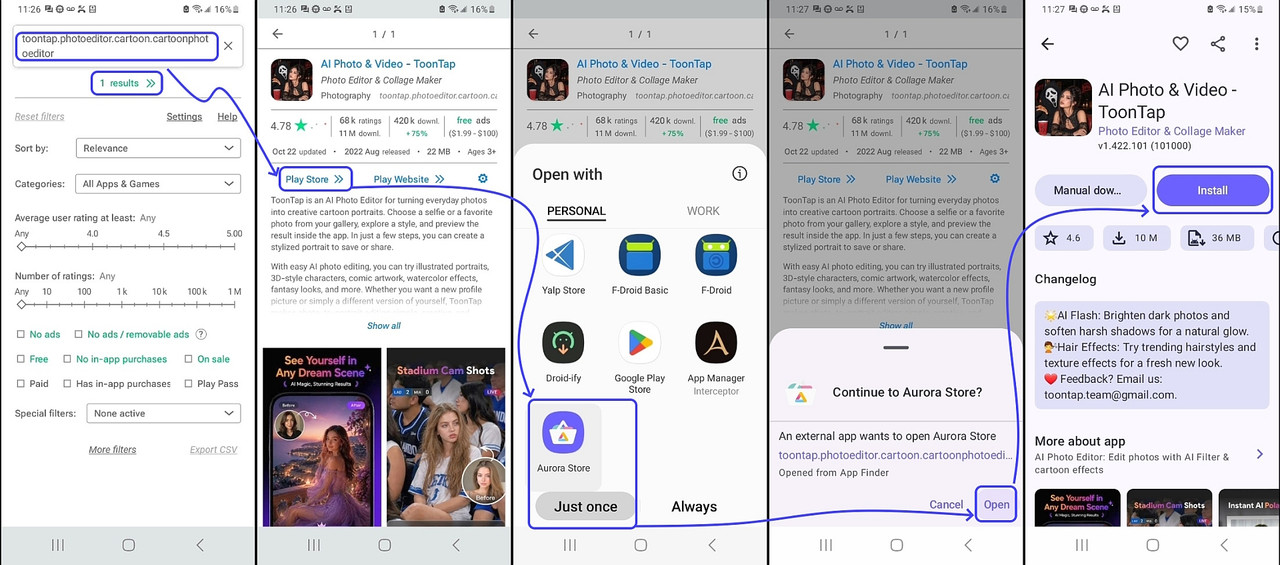
This is what my Samsung Android 13 OpenWith looks like (on Nova Launcher)
<https://i.postimg.cc/k5k5RV9T/aurora-search.jpg>
On 2026-11-06 19:48, Frank Slootweg wrote:[...]
Nuno Silva <nunojsilva@invalid.invalid> wrote:
The interface I get on this build of Android 15 is like this:
<https://www.guidingtech.com/wp-content/uploads/Foxit-App-PDF-Editor-Select-App-Menu.jpg>
The "Just once" and "Always" buttons apply to the item above, for the
list below a click is "Just once", and a long press shows the app info
screen for that application.
This doesn't look like anything I've ever seen on multiple phones and brands.
It looks like mine. I have a Motorola G52. In my Lenovo tablet it is
similar to your sample.
On 2026-11-07, Maria Sophia wrote:
Carlos E. R. wrote:
The interface I get on this build of Android 15 is like this:
<https://www.guidingtech.com/wp-content/uploads/Foxit-App-PDF-Editor-Select-App-Menu.jpg>
The "Just once" and "Always" buttons apply to the item above, for the >>>>> list below a click is "Just once", and a long press shows the app info >>>>> screen for that application.
This doesn't look like anything I've ever seen on multiple phones and >>>> brands.
It looks like mine. I have a Motorola G52. In my Lenovo tablet it is
similar to your sample.
It is, indeed, a Motorola build of Android.
This is what my Samsung Android 13 OpenWith looks like (on Nova Launcher)
<https://i.postimg.cc/k5k5RV9T/aurora-search.jpg>
But is this UI controlled by the launcher? I thought it was part of the >Android system UI.
| Sysop: | Amessyroom |
|---|---|
| Location: | Fayetteville, NC |
| Users: | 76 |
| Nodes: | 6 (0 / 6) |
| Uptime: | 57:40:35 |
| Calls: | 1,265 |
| Calls today: | 1 |
| Files: | 1,362 |
| D/L today: |
4 files (9,632K bytes) |
| Messages: | 285,926 |