• Linus Torvalds

    From Axel@none@not.here to alt.os.linux.mint,alt.os.linux.ubuntu on Wed Aug 26 13:10:14 2026
    From Newsgroup: alt.os.linux.ubuntu


    Linux was announced by Linus Torvalds 35 years ago today rCo humble OS
    started with 10,000 lines of code but has now grown to 40 million,
    dominates global infrastructure | Tom's Hardware
    https://tinyurl.com/3cuc22yv

    Linus Torvalds fixed a Linux bug using AI, highlighting both the
    strengths and weaknesses of the new tech
    https://tinyurl.com/2trtpv2p
    --
    Linux Mint 22.3

    --- Synchronet 3.22a-Linux NewsLink 1.2
  • From Lawrence =?iso-8859-13?q?D=FFOliveiro?=@ldo@nz.invalid to alt.os.linux.mint,alt.os.linux.ubuntu on Wed Aug 26 04:30:53 2026
    From Newsgroup: alt.os.linux.ubuntu

    Efc|Efc+On Wed, 26 Aug 2026 13:10:14 +1000, Axel wrote:

    Linux was announced by Linus Torvalds 35 years ago today rCo humble OS started with 10,000 lines of code but has now grown to 40 million,
    dominates global infrastructure

    <https://www.tomshardware.com/software/linux/linux-was-announced-by-linus-torvalds-35-years-ago-today-humble-os-started-with-10-000-lines-of-code-but-has-now-grown-to-40-million-dominates-global-infrastructure>

    Some reminiscences from the early days: the friend who rejected the
    name rCLFreaxrCY and proposed rCLLinuxrCY instead, and the other friend who
    was the first to get an actual Linux installation from scratch,
    personally done by Torvalds himself <https://www.zdnet.com/article/just-a-hobby-linus-torvalds-introduced-linux-35-years-ago-almost-called-it-freax/>.
    --- Synchronet 3.22a-Linux NewsLink 1.2
  • From rbowman@bowman@montana.com to alt.os.linux.mint,alt.os.linux.ubuntu on Wed Aug 26 05:10:54 2026
    From Newsgroup: alt.os.linux.ubuntu

    On Wed, 26 Aug 2026 13:10:14 +1000, Axel wrote:

    Linux was announced by Linus Torvalds 35 years ago today rCo humble OS started with 10,000 lines of code but has now grown to 40 million,
    dominates global infrastructure | Tom's Hardware
    https://tinyurl.com/3cuc22yv

    I got curious about an old Compaq tower in the shed yesterday. It has 48
    MB of RAM and in it's day ran Windows 95 fairly well. Today there are only
    a couple of Linux distros that *might* run in 48 MB if you stick to text
    mode. Yup, it's grown alright. Even by 2002 SuSE probably wouldn't run
    with that little RAM.

    --- Synchronet 3.22a-Linux NewsLink 1.2
  • From Mike Easter@MikeE@ster.invalid to alt.os.linux.mint,alt.os.linux.ubuntu on Tue Aug 25 22:28:52 2026
    From Newsgroup: alt.os.linux.ubuntu

    Axel wrote:
    Linux was announced by Linus Torvalds 35 years ago today

    Can you imagine starting a project as a young adult and staying with it
    the rest of your life?
    --
    Mike Easter
    --- Synchronet 3.22a-Linux NewsLink 1.2
  • From german newsgroups@usualsuspectrider@gmail.com to alt.os.linux.mint,alt.os.linux.ubuntu on Wed Aug 26 07:38:30 2026
    From Newsgroup: alt.os.linux.ubuntu

    Le 26/08/2026 |a 05:10, Axel a |-crit-a:

    Linux was announced by Linus Torvalds 35 years ago today rCo humble OS started with 10,000 lines of code but has now grown to 40 million,
    dominates global infrastructure | Tom's Hardware https:// tinyurl.com/3cuc22yv

    Linus Torvalds fixed a Linux bug using AI, highlighting both the
    strengths and weaknesses of the new tech
    https://tinyurl.com/2trtpv2p


    il faut reconna|<tre la capacit|- mentale de ceux qui font
    linux, et leurs talent pour aborder de nouvelles technologies
    telles que l'iA.

    un jour, esp|-rons que la communaut|- sera salu|-e au del|a de la
    peur quelle suscite parce que le monde fonctionne gr|oce |a elle.

    je trouve dommage, que lorsqu'on veut aller dans le bon sens,
    quelque soit la discipline, qu'il faille fait faire |a tant
    d'adversit|-s, comme si la fatalit|- avait besoin d'horreurs,
    de co|+ts horribles !

    bravo, pour le driver nouveau :o)
    --
    Amicalement,

    Frenchy Friendly, & French touch !

    german
    --- Synchronet 3.22a-Linux NewsLink 1.2
  • From german newsgroups@usualsuspectrider@gmail.com to alt.os.linux.mint,alt.os.linux.ubuntu on Wed Aug 26 07:39:47 2026
    From Newsgroup: alt.os.linux.ubuntu

    Le 26/08/2026 |a 05:10, Axel a |-crit-a:

    Linux was announced by Linus Torvalds 35 years ago today rCo humble OS started with 10,000 lines of code but has now grown to 40 million,
    dominates global infrastructure | Tom's Hardware https:// tinyurl.com/3cuc22yv

    Linus Torvalds fixed a Linux bug using AI, highlighting both the
    strengths and weaknesses of the new tech
    https://tinyurl.com/2trtpv2p


    il faut reconna|<tre la capacit|- mentale de ceux qui font
    linux, et leurs talents pour aborder de nouvelles technologies
    telles que l'iA.

    un jour, esp|-rons que la communaut|- sera salu|-e au del|a de la
    peur quelle suscite parce que le monde fonctionne gr|oce |a elle.

    je trouve dommage, que lorsqu'on veut aller dans le bon sens,
    quelque soit la discipline, qu'il faille faire face |a autant
    d'adversit|-s, comme si la fatalit|- avait besoin d'horreurs,
    de co|+ts horribles !

    bravo, pour le driver nouveau :o)
    --
    Amicalement,

    Frenchy Friendly, & French touch !

    german
    --- Synchronet 3.22a-Linux NewsLink 1.2
  • From rbowman@bowman@montana.com to alt.os.linux.mint,alt.os.linux.ubuntu on Thu Aug 27 00:36:27 2026
    From Newsgroup: alt.os.linux.ubuntu

    On Tue, 25 Aug 2026 22:28:52 -0700, Mike Easter wrote:

    Axel wrote:
    Linux was announced by Linus Torvalds 35 years ago today

    Can you imagine starting a project as a young adult and staying with it
    the rest of your life?

    My CV is filled with companies that does exist anymore, let alone
    projects. Some were small niche companies, some larger like Sprague
    Electric and GTE Sylvania. GE still lives on but not in the areas I had anything to do with.

    I did put in 26 years with the last company I worked for but that's also
    gone as of December 2025.
    --- Synchronet 3.22a-Linux NewsLink 1.2
  • From Loach505@riffraffdj@gmail.com to alt.os.linux.mint,alt.os.linux.ubuntu on Fri Sep 11 09:48:29 2026
    From Newsgroup: alt.os.linux.ubuntu

    On 8/25/26 11:10 PM, rbowman wrote:
    On Wed, 26 Aug 2026 13:10:14 +1000, Axel wrote:

    Linux was announced by Linus Torvalds 35 years ago today rCo humble OS
    started with 10,000 lines of code but has now grown to 40 million,
    dominates global infrastructure | Tom's Hardware
    https://tinyurl.com/3cuc22yv

    I got curious about an old Compaq tower in the shed yesterday. It has 48
    MB of RAM and in it's day ran Windows 95 fairly well. Today there are only
    a couple of Linux distros that *might* run in 48 MB if you stick to text mode. Yup, it's grown alright. Even by 2002 SuSE probably wouldn't run
    with that little RAM.


    Ironically, despite the growth of the size of the Kernel over the years.
    The Kernel is actually faster than ever before. It's scheduler is
    improved. Improved memory management. In the Open Source world, just
    because it works, doesn't mean it can't be better. This is one of the
    reasons why Windows is slower today than ever before.
    --
    riffraffdj@gmail.com
    Aka: Loach505
    -----PGP FINGERPRINT-----
    DE6D4 49EDF BC6CB 6B3C7 59AF3 EB968 D0C3A 80954
    --- Synchronet 3.22a-Linux NewsLink 1.2
  • From Paul@nospam@needed.invalid to alt.os.linux.mint,alt.os.linux.ubuntu on Fri Sep 11 14:20:25 2026
    From Newsgroup: alt.os.linux.ubuntu

    On Fri, 9/11/2026 11:48 AM, Loach505 wrote:
    On 8/25/26 11:10 PM, rbowman wrote:
    On Wed, 26 Aug 2026 13:10:14 +1000, Axel wrote:

    Linux was announced by Linus Torvalds 35 years ago today rCo humble OS
    started with 10,000 lines of code but has now grown to 40 million,
    dominates global infrastructure | Tom's Hardware
    https://tinyurl.com/3cuc22yv

    I got curious about an old Compaq tower in the shed yesterday. It has 48
    MB of RAM and in it's day ran Windows 95 fairly well. Today there are only >> a couple of Linux distros that *might* run in 48 MB if you stick to text
    mode. Yup, it's grown alright. Even by 2002 SuSE probably wouldn't run
    with that little RAM.


    Ironically, despite the growth of the size of the Kernel over the years. The Kernel
    is actually faster than ever before. It's scheduler is improved. Improved memory management.
    In the Open Source world, just because it works, doesn't mean it can't be better. This
    is one of the reasons why Windows is slower today than ever before.

    I hope you're getting your benchmarks from a respectable source.

    Phoronix bought a new 48C 96T computer and did a benchmark comparison
    between Linux and Windows. And they used the wrong OS SKU for the Windows runs. When a machine is 96T, 96>64 and that means you need Windows For Workstations which has processor groups support. That causes the benchmark curve to be linear
    all the way out to 96 threads on a machine like that.

    Linux is faster than Windows, it's just a small percentage number.
    If the number is too big, then somebody screwed up.

    You should also separate your claims into subsystems, as
    there are things that Windows could be better at. Making a hand
    wavey single point observation earns you no cred at all.

    I've tested the compute bound portion of Windows performance,
    from WInXP to Win10 (on one box, my former daily driver where
    the motherboard died). I've also compared Win10 and Win11.
    The results of all those benchmarks, are that Win10 is slightly
    slower, and the slowdown happened late in the lifecycle of
    Windows 10. It wasn't always like that. Whether some smart
    person did that on purpose, to make people get off Windows 10,
    I don't know. But that's what the results show. The WinXP and
    Win11 have similar compute bound performance. It was Win10
    that was anomalously slow, for things where the kernel was
    not called all that often (compute bound).

    The newer graphics stack on Windows, is not exactly a prince.
    There was also some sort of bug on Windows 11 for the last
    few months, could have been in StartExperienceHost, can't
    really be sure. After Patch Tuesday, it doesn't seem to be
    as bad. At one point, there was a one second delay from
    clicking the Win11 screen on my 4th generation Intel box,
    and getting a response. Booting Win10 on the same hard drive,
    that was not seen (response, normal).

    Windows does not work well in a "build environment". The
    Google Chrome developer who tunes the build environment
    for fastest build times, he was noticing that as a build
    proceeded on a Windows box, the build slowed down a bit
    near the end. I verified that here, and saw the same thing.
    For the mouse stutter bug (an issue with the Windows garbage
    collector perhaps), I didn't see that one.

    It might have been Imagemagick, they rewrote part of it
    to do parallization (divide and conquer), and when I
    ran that code here (OpenMP), and the OpenMP threads all
    called malloc() at the same time, it made Windows freeze,
    on the spot. Microsoft was able to fix that after it was
    reported, so that doesn't happen today. But some of the
    other regressions, their fixes generally never tend to
    admit architecting errors. They like to double down on
    stuff. When you report a bug, the fix is not always
    an honest effort.

    For modern Windows, you really want to follow the hardware
    recommendation, which is 8th gen Intel or higher. Having MBEC
    support in hardware, works best. The reason I run W10/W11
    on the 4th gen Intel box, is to demonstrate old hardware
    still works. Where W11 won't work, is on an E8400 (no SSE4
    and POPCNT instruction).

    Paul
    --- Synchronet 3.22a-Linux NewsLink 1.2
  • From Mike Easter@MikeE@ster.invalid to alt.os.linux.mint,alt.os.linux.ubuntu on Fri Sep 11 15:57:06 2026
    From Newsgroup: alt.os.linux.ubuntu

    Paul wrote:
    Phoronix bought a new 48C 96T computer and did a benchmark comparison
    between Linux and Windows.

    For those who live in a real world and don't have access to the bleeding
    edge hardware that Michael Larabel and Phoronix do, he recently compared
    some pretty vanilla stuff, a $500 laptop (Intel Core 3 Wildcat Lake and
    with 8GB of RAM) using W11, Ub 26.04 LTS, & Cachy. He did 100
    benchmarks, and while W11 won some/many, the 'overall' winner was the
    Arch Cachy, W11 2nd, Ub last.

    CHUWI UniBook $449
    --
    Mike Easter
    --- Synchronet 3.22a-Linux NewsLink 1.2
  • From Lawrence =?iso-8859-13?q?D=FFOliveiro?=@ldo@nz.invalid to alt.os.linux.mint,alt.os.linux.ubuntu on Sat Sep 12 02:23:35 2026
    From Newsgroup: alt.os.linux.ubuntu

    On Fri, 11 Sep 2026 14:20:25 -0400, Paul wrote:

    Linux is faster than Windows, it's just a small percentage number.
    If the number is too big, then somebody screwed up.

    Also, Windows filesystems get fragmented and slow down over time,
    while Linux ones are more resistant to fragmentation. ThatrCOs why a
    defragger had to be introduced in Vista.

    Funny story about that: it was about the same time as SSDs started
    becoming popular. Then people discovered the life of their SSDs was
    being shortened by the defragger. So one of the changes in Windows 7
    was to check the type of disk, and skip the defragger if it was an
    SSD.
    --- Synchronet 3.22a-Linux NewsLink 1.2
  • From Paul@nospam@needed.invalid to alt.os.linux.mint,alt.os.linux.ubuntu on Sat Sep 12 03:22:43 2026
    From Newsgroup: alt.os.linux.ubuntu

    On Fri, 9/11/2026 10:23 PM, Lawrence DrCOOliveiro wrote:
    On Fri, 11 Sep 2026 14:20:25 -0400, Paul wrote:

    Linux is faster than Windows, it's just a small percentage number.
    If the number is too big, then somebody screwed up.

    Also, Windows filesystems get fragmented and slow down over time,
    while Linux ones are more resistant to fragmentation. ThatrCOs why a defragger had to be introduced in Vista.

    Funny story about that: it was about the same time as SSDs started
    becoming popular. Then people discovered the life of their SSDs was
    being shortened by the defragger. So one of the changes in Windows 7
    was to check the type of disk, and skip the defragger if it was an
    SSD.


    Defragmentation is on a schedule. It's being done for you (on HDD storage).
    The built-in defragmenter does not defragment files larger than 50MB
    (they are considered to be data files, and not a seek-time loading problem like code).
    If you want those defragmented as well (large data files), you can do that
    with JKDefrag if you want.

    On Flash based storage, the treatment is TRIM, which is done for you.
    In a detected slow-COW situation, the optimizer switches to defragmentation
    and defragments the SSD for you. This typically happens when using that
    backup software that opens too many persistent VSS shadows. The SSD
    on this box, has never been defragmented by the optimization, just
    TRIM is issued.

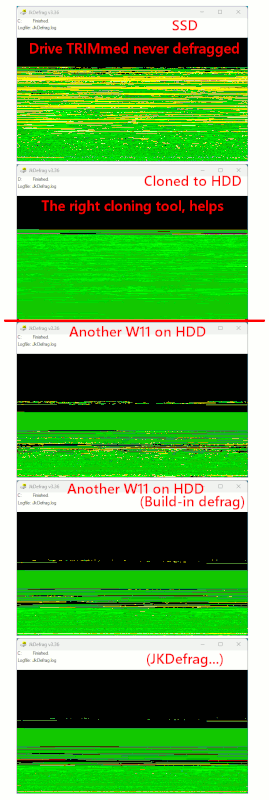
    [Picture] Green=good Yellow=fragmented Red=Cannot-be-Moved

    https://imgur.com/a/SVRnpol

    https://postimg.cc/hhTP4tBx
    https://i.postimg.cc/c15KmvkD/SSD-versus-HDD-NTFS-frag-state-W11.gif

    The picture demonstrates:

    1) What an SSD looks like, which is just being "TRIMmed and not defragmented" on schedule.
    2) How good it can look, after being cloned to an HDD (Macrium Reflect, resize+clone mode).

    3) What an HDD looks like with Win11 on it. Last defrag Aug15.
    4) What the HDD looks like after "scheduled defragmentation".
    5) How much difference it makes, to then run JKDefrag after step (4). Not much improvement.
    Only Raxco Perfectdisk (out of business), could make it all-green.

    Paul
    --- Synchronet 3.22a-Linux NewsLink 1.2
  • From Paul@nospam@needed.invalid to alt.os.linux.mint,alt.os.linux.ubuntu on Sat Sep 12 03:52:48 2026
    From Newsgroup: alt.os.linux.ubuntu

    On Fri, 9/11/2026 6:57 PM, Mike Easter wrote:
    Paul wrote:
    Phoronix bought a new 48C 96T computer and did a benchmark comparison
    between Linux and Windows.

    For those who live in a real world and don't have access to the bleeding edge hardware that
    Michael Larabel and Phoronix do, he recently compared some pretty vanilla stuff, a $500 laptop
    (Intel Core 3 Wildcat Lake and with 8GB of RAM) using W11, Ub 26.04 LTS, & Cachy.-a He did
    100 benchmarks, and while W11 won some/many, the 'overall' winner was the Arch Cachy, W11 2nd, Ub last.

    CHUWI UniBook $449


    We've already looked at the Chuwi.

    It's using the 1P + 4E Wildcat.

    For Windows 11, I would recommend the 2P + 4E Wildcat in its place.
    The 2P (two performance cores) is what you want during Patch Tuesday
    Windows Update. Having some Turbo, having some clock speed, seems
    to help that part of being a Windows user.

    You would not want to run W11 on all E cores, or it would be like
    the N150 all over again.

    Whether Microsoft can "get out of their own way", remains to be seen.
    They put on a P.R. blitz that "they were going to fix the OS". Well,
    not really. Their real interest is in keeping some sort of audience
    for W12, and when push comes to shove, they plan to "not deliver"
    on their promises. If something easy comes along they can fix,
    if it has a little P.R. value, then "ring out the chimes". If it
    was an option like not having an MSA, or giving users absolute
    control over when updates happen, no, that's not going to happen.

    One of the promises, is to ship a patch that reduces conspicuous
    RAM consumption (you know, the part where we aren't really sure
    why an idle OS has so much RAM booked). They are doing this, to
    help products like the Chuwi 8GB. And it's the Apple offering,
    that started all of this sudden interest in keeping OEM computer
    makers alive during a RAM crisis.

    Part of the RAM booking, is keeping a mini-image-of-the-OS
    in RAM, for usage in a sandbox. But that's not all of the RAM,
    and when my machine is using 8GB at idle, and the OS image
    is 2.3GB, you have to wonder where the other 5GB went.
    The idle RAM amount scales with total RAM size, but not in
    the predictable way it used to do that. Even a small machine
    is pretty porky at idle.

    For applications on Windows, you have three compilers.
    The Intel compiler (for benching Intel boxes), GCC, and Visual Studio.
    And at least one of those, is known for being able to goose a result.
    On newer processors, Intel has a runtime optimizer for cheating
    on executable speed (your executable can be optimized for
    running on your shiny new CPU). To some extent, this information points
    out the futility of benching, but, we have to try. Presumably, the
    Phoronix guy is using GCC to cross-compile for Windows, to keep the
    compiler versions "the same".

    Windows is hard to bench, because it forks maintenance tasks
    at the same instant it notices you loading an application. This is
    so bad, that when I run HDTune and need an accurate result, I boot
    a WinPE x86 DVD and run HDTune in that environment, as then,
    nothing forks, while you bench :-) Even if all you wanted to do,
    was just bench on Win for the hell of it, and not do comparisons,
    you're still hobbled by the OS activity. After boot, you must
    "wait a while" for the known pests on the OS, to settle down.
    That could include a WU scan, a Windows Defender scan, a Search
    Indexer gather run. This kinda shit *never* happened in Win2K :-)

    Paul
    --- Synchronet 3.22a-Linux NewsLink 1.2
  • From Dan Purgert@dan@djph.net to alt.os.linux.mint,alt.os.linux.ubuntu on Sat Sep 12 13:20:53 2026
    From Newsgroup: alt.os.linux.ubuntu

    On 2026-09-12, Lawrence DrCOOliveiro wrote:
    On Fri, 11 Sep 2026 14:20:25 -0400, Paul wrote:

    Linux is faster than Windows, it's just a small percentage number.
    If the number is too big, then somebody screwed up.

    Also, Windows filesystems get fragmented and slow down over time,
    while Linux ones are more resistant to fragmentation. ThatrCOs why a defragger had to be introduced in Vista.

    Introduced? I skipped Vista, but I recall disk-defrag from winXP and
    older...

    Or did it ship without one at first, and they had to add it via patch?
    --- Synchronet 3.22a-Linux NewsLink 1.2
  • From Monsieur@Monsieur@notreal.invalid to alt.os.linux.mint,alt.os.linux.ubuntu on Sat Sep 12 20:07:07 2026
    From Newsgroup: alt.os.linux.ubuntu

    Dan Purgert wrote:
    On 2026-09-12, Lawrence DrCOOliveiro wrote:
    On Fri, 11 Sep 2026 14:20:25 -0400, Paul wrote:

    Linux is faster than Windows, it's just a small percentage number.
    If the number is too big, then somebody screwed up.

    Also, Windows filesystems get fragmented and slow down over time,
    while Linux ones are more resistant to fragmentation. ThatrCOs why a
    defragger had to be introduced in Vista.

    Introduced? I skipped Vista, but I recall disk-defrag from winXP and older...

    Or did it ship without one at first, and they had to add it via patch?

    Defrag was already present in MS-DOS 6.1 and was a standard tool in the
    OS from Windows 95 onwards...


    --- Synchronet 3.22a-Linux NewsLink 1.2
  • From Paul@nospam@needed.invalid to alt.os.linux.mint,alt.os.linux.ubuntu on Sat Sep 12 15:16:21 2026
    From Newsgroup: alt.os.linux.ubuntu

    On Sat, 9/12/2026 9:20 AM, Dan Purgert wrote:
    On 2026-09-12, Lawrence DrCOOliveiro wrote:
    On Fri, 11 Sep 2026 14:20:25 -0400, Paul wrote:

    Linux is faster than Windows, it's just a small percentage number.
    If the number is too big, then somebody screwed up.

    Also, Windows filesystems get fragmented and slow down over time,
    while Linux ones are more resistant to fragmentation. ThatrCOs why a
    defragger had to be introduced in Vista.

    Introduced? I skipped Vista, but I recall disk-defrag from winXP and older...

    Or did it ship without one at first, and they had to add it via patch?


    The WinXP one was provided by the OS.

    It was actually written by a "President software" or something of
    a similar name. It was renowned for its ability to lay files
    "head to tail with no air gap".

    Which is not how the modern (Microsoft written!) defragmenter works.

    It leaves gaps between files, as part of various sorting strategies.
    The WinXP defrag.exe could spend eight hours defragging, you could
    awake in the morning and the defrag still was not finished. The
    Win10/Win11 one takes ten minutes. It is not a beauty contest that one,
    the modern defrag is only interested in restoring performance,
    not making giant green blocks out of your files. And that's why
    it doesn't take nearly as long for it to finish. That's the most
    significant part of the evolution, is it is more practical now
    and not a beauty-thing.

    On W10/W11, there will still be occasions where you are using
    a third-party tool for cleanup.

    Superfetch (Sysmain service) is an example of a service off to
    the side, that messes about with C: . Is it really helping, when
    C: is a HDD, or does it make things worse ? Hard to say. One thing
    Windows doesn't need, when using a HDD, is more file I/O at startup.
    And Superfetch isn't really required when an SSD is used instead.

    https://en.wikipedia.org/wiki/Windows_Vista_I%2FO_technologies#SuperFetch

    Paul
    --- Synchronet 3.22a-Linux NewsLink 1.2
  • From Heinz Schmitz@sch@example.invalid to alt.os.linux.mint,alt.os.linux.ubuntu on Sun Sep 13 08:52:35 2026
    From Newsgroup: alt.os.linux.ubuntu

    Paul wrote:
    ...
    The WinXP defrag.exe could spend eight hours defragging, you could
    awake in the morning and the defrag still was not finished.
    Looks like none of the MS-employees ever used it. Same as file-search. Otherwise they'd have noticed what they use to call 'excellent' :-).
    Regards,
    H.
    --- Synchronet 3.22a-Linux NewsLink 1.2
  • From Monsieur@Monsieur@notreal.invalid to alt.os.linux.mint,alt.os.linux.ubuntu on Sun Sep 13 09:44:17 2026
    From Newsgroup: alt.os.linux.ubuntu

    Monsieur wrote:

    Defrag was already present in MS-DOS 6.1 and was a standard tool in the
    OS from Windows 95 onwards...

    Also, if you miss the old defrag, here's a cool simulator that will
    (pretend to) defrag your C: drive, complete with crunchy sounds.

    https://defrag98.com/

    Listen and stare at it as long as you like, relive those moments... :-)


    --- Synchronet 3.22a-Linux NewsLink 1.2
  • From Lawrence =?iso-8859-13?q?D=FFOliveiro?=@ldo@nz.invalid to alt.os.linux.mint,alt.os.linux.ubuntu on Sun Sep 13 08:22:55 2026
    From Newsgroup: alt.os.linux.ubuntu

    On Sat, 12 Sep 2026 03:52:48 -0400, Paul wrote:

    Whether Microsoft can "get out of their own way", remains to be
    seen. They put on a P.R. blitz that "they were going to fix the OS".
    Well, not really.

    DidnrCOt Davuluri promise to focus on improving the quality of Windows
    updates?

    And then the latest update broke more stuff--nothing you would call
    advanced or abstruse, but really basic functions like cursors and
    wallpaper, of all things.
    --- Synchronet 3.22a-Linux NewsLink 1.2
  • From Paul@nospam@needed.invalid to alt.os.linux.mint,alt.os.linux.ubuntu on Sun Sep 13 05:10:25 2026
    From Newsgroup: alt.os.linux.ubuntu

    On Sun, 9/13/2026 4:22 AM, Lawrence DrCOOliveiro wrote:
    On Sat, 12 Sep 2026 03:52:48 -0400, Paul wrote:

    Whether Microsoft can "get out of their own way", remains to be
    seen. They put on a P.R. blitz that "they were going to fix the OS".
    Well, not really.

    DidnrCOt Davuluri promise to focus on improving the quality of Windows updates?

    And then the latest update broke more stuff--nothing you would call
    advanced or abstruse, but really basic functions like cursors and
    wallpaper, of all things.


    They were supposed to have fixed a large number of issues
    discovered with Mythos and similar things. And yet the security
    update this month, I haven't noticed side effects from it. That is
    not to say there aren't issues out there. Just that things aren't
    so bad, I have a litany of sins to report.

    The different machines here, showed slightly different symptoms during updates.

    The DoSVC "sharing of update files" between machines, it worked
    for the third machine I was running updates on. On the machine
    "sourcing" the shared file, I found a 4.6GB sparse file, mostly
    full of zeros, and 800MB of that file shot across the room
    so that the third machine did not need to download that part over again.
    And that scheme hasn't worked for quite a while. It seemed to be
    broken, or disabled for security reasons. And it is running again.
    Since that file is sparse, it only takes 800MB of actual space
    on the disk, but the properties show the size as 4.6GB. For
    some reason, the second machine did not want to share with
    the first machine. Maybe next month it will work.

    My wallpaper is loading. I have no third party wallpaper schemes,
    and my wallpaper file is just a single color. The wallpaper cannot
    be a .bmp file (even though .bmp is a native Windows file), and
    .jpg seems to work for it.

    A cursor issue could just as easily be a video card driver issue,
    as something in the graphics code. I've seen worse.

    I would rather have the older graphics code that ran on Windows,
    as it does not "creak" quite as much. There are just too many
    moving parts on this version.

    Paul
    --- Synchronet 3.22a-Linux NewsLink 1.2
  • From Paul@nospam@needed.invalid to alt.os.linux.mint,alt.os.linux.ubuntu on Sun Sep 13 05:35:06 2026
    From Newsgroup: alt.os.linux.ubuntu

    On Sun, 9/13/2026 3:44 AM, Monsieur wrote:
    Monsieur wrote:

    Defrag was already present in MS-DOS 6.1 and was a standard tool in the OS from Windows 95 onwards...

    Also, if you miss the old defrag, here's a cool simulator that will (pretend to) defrag your C: drive, complete with crunchy sounds.

    https://defrag98.com/

    Listen and stare at it as long as you like, relive those moments... :-)


    Why pretend, when you can have the real thing ?

    Disks don't make the same sounds they used to. The
    big drives here, on a full stroke, they make quite
    a "thump" sound. During defrag, the stroke size is
    a lot smaller, so there isn't quite as much noise.
    This is a picture, from recent runs.

    [Picture] Green=good Yellow=fragmented Red=Cannot-be-Moved

    https://imgur.com/a/SVRnpol

    https://postimg.cc/hhTP4tBx
    https://i.postimg.cc/c15KmvkD/SSD-versus-HDD-NTFS-frag-state-W11.gif

    The OS partitions tend to be smaller than the data partitions. In
    that picture, just the OS partition is in the rectangular window,
    not the entire disk drive (which could be a lot larger).

    Paul


    --- Synchronet 3.22a-Linux NewsLink 1.2
  • From Paul@nospam@needed.invalid to alt.os.linux.mint,alt.os.linux.ubuntu on Sun Sep 13 06:16:26 2026
    From Newsgroup: alt.os.linux.ubuntu

    On Sun, 9/13/2026 2:52 AM, Heinz Schmitz wrote:
    Paul wrote:

    ...
    The WinXP defrag.exe could spend eight hours defragging, you could
    awake in the morning and the defrag still was not finished.

    Looks like none of the MS-employees ever used it. Same as file-search. Otherwise they'd have noticed what they use to call 'excellent' :-).

    Regards,
    H.

    It did do a good job. But from a performance perspective, it
    was doing too much work. Much of the effort, was purely for
    "appearances" sake. After an hour of work, the disk was likely
    fast enough for it to stop. Making a giant green block
    is just showing off, and that might take an extra seven hours
    to do. But that was also what the commercial third-party
    defragmentation tools were selling, was the giant green block
    concept. The Windows one, at the time, did that too
    (as it was bought from another company and shipped
    with every copy of WinXP).

    Even the defrag API that Microsoft uses today, it was
    invented by a third party, and the API was bought for
    Windows usage. The minimum block size of defragmentation,
    has to be large enough to not cause problems for
    persistent VSS shadow copies that are set up. The
    minimum block size might be 64KB now, whereas in Win2K
    era, a defragmentation method could use a size smaller
    than that.

    The defrag API is power-safe, or, it is supposed to be power-safe :-)
    I haven't done too many defragmentation runs, where the
    power went off in the middle of the run.

    Paul


    --- Synchronet 3.22a-Linux NewsLink 1.2
  • From Paul@nospam@needed.invalid to alt.os.linux.mint,alt.os.linux.ubuntu on Sun Sep 13 06:53:33 2026
    From Newsgroup: alt.os.linux.ubuntu

    On Sun, 9/13/2026 2:52 AM, Heinz Schmitz wrote:
    Paul wrote:

    ...
    The WinXP defrag.exe could spend eight hours defragging, you could
    awake in the morning and the defrag still was not finished.

    Looks like none of the MS-employees ever used it. Same as file-search. Otherwise they'd have noticed what they use to call 'excellent' :-).

    Regards,
    H.

    File Search on Windows, is an "intellectual investment".
    Maybe the Microsoft Research division invented Federated Search.
    And they've been somewhat faithful to how that works.

    The first version of Vista, is where they showed some guts.
    The search in that case, after you did a run and you were
    unhappy with the results, it had a "Try Harder" button.
    Which resorted to a fresh run in the old-fashioned
    brute force way. I used to like that, just because... it worked.
    All I would want, was a filename match, and I could be
    quite happy with that much of it working. They
    removed the "Try Harder" button, maybe in one of the
    Service Packs.

    Paul
    --- Synchronet 3.22a-Linux NewsLink 1.2
  • From rbowman@bowman@montana.com to alt.os.linux.mint,alt.os.linux.ubuntu on Sun Sep 13 21:57:57 2026
    From Newsgroup: alt.os.linux.ubuntu

    On Sun, 13 Sep 2026 06:16:26 -0400, Paul wrote:

    It did do a good job. But from a performance perspective, it was doing
    too much work. Much of the effort, was purely for "appearances" sake.
    After an hour of work, the disk was likely fast enough for it to stop.
    Making a giant green block is just showing off, and that might take an
    extra seven hours to do. But that was also what the commercial
    third-party defragmentation tools were selling, was the giant green
    block concept. The Windows one, at the time, did that too (as it was
    bought from another company and shipped with every copy of WinXP).

    If you wanted to install Linux as a dual boot system you needed that giant green block to shrink Windows rather than having bits and pieces spread
    all over.

    I haven't bothered with dual boot in a long time. When the installed asks about how much of the drive to use I answer 'all of it'.

    --- Synchronet 3.22a-Linux NewsLink 1.2
  • From BobbieSellers@bliss-sf4ever@dslextreme.invalid to alt.os.linux.mint,alt.os.linux.ubuntu on Sun Sep 13 16:01:30 2026
    From Newsgroup: alt.os.linux.ubuntu

    On 9/13/26 14:57, rbowman wrote:
    On Sun, 13 Sep 2026 06:16:26 -0400, Paul wrote:

    It did do a good job. But from a performance perspective, it was doing
    too much work. Much of the effort, was purely for "appearances"
    sake. After an hour of work, the disk was likely fast enough for it
    to stop. Making a giant green block is just showing off, and that
    might take an extra seven hours to do. But that was also what the
    commercial third-party defragmentation tools were selling, was the
    giant green block concept. The Windows one, at the time, did that
    too (as it was bought from another company and shipped with every
    copy of WinXP).

    If you wanted to install Linux as a dual boot system you needed that giant green block to shrink Windows rather than having bits and pieces
    spread all over.

    I haven't bothered with dual boot in a long time. When the installed asks about how much of the drive to use I answer 'all of it'.


    Actually there are setting to reduce the size of the
    Big Green Blocks in the Windows settings but the "all of it"
    setting it the simplest thing to do.
    The dual-boot system was unreliable because
    whenever Windows updates its kernel it overwrites the UEFI...
    Worse it never tells you that the Kernel is being updated
    or that it will overwrite the UEFI because there is only
    Windows-< in the minds of the people who design and send
    out updates.

    If you must use Windows the best way is to run it in a
    Virtual Machine.
    If you must have Windows on the box then Windows has
    an adapted Linux for that purpose or alternatively you
    can pick a good GNU/Linux Live-Booting system to run
    from preferably a fast USB Flash Drive.


    bliss- Dell 7730- PCLinuxOS 2026.09 Linux 6.18.50- Plasma 6.7.5

    --- Synchronet 3.22a-Linux NewsLink 1.2
  • From Lawrence =?iso-8859-13?q?D=FFOliveiro?=@ldo@nz.invalid to alt.os.linux.mint,alt.os.linux.ubuntu on Mon Sep 14 01:52:41 2026
    From Newsgroup: alt.os.linux.ubuntu

    On Sun, 13 Sep 2026 05:35:06 -0400, Paul wrote:

    Why pretend, when you can have the real thing ?

    Some of us are quite happy not to have to put up with the real thing,
    thank you. ;)

    EfEo:\>
    --- Synchronet 3.22a-Linux NewsLink 1.2
  • From Paul@nospam@needed.invalid to alt.os.linux.mint,alt.os.linux.ubuntu on Sun Sep 13 23:33:59 2026
    From Newsgroup: alt.os.linux.ubuntu

    On Sun, 9/13/2026 9:52 PM, Lawrence DrCOOliveiro wrote:
    On Sun, 13 Sep 2026 05:35:06 -0400, Paul wrote:

    Why pretend, when you can have the real thing ?

    Some of us are quite happy not to have to put up with the real thing,
    thank you. ;)

    EfEo:\>


    Since the scheduled activity happens without user intervention,
    usually other equipment noise (cooling fans) mask any drive noise.

    The Windows Defender, Windows Update, Search Indexer activity,
    Superfetch at startup, have about the same level of activity
    as a defragmentation run. Since the defragmentation runs once a week
    on a schedule, there is not a lot of fragmentation built up, and
    it's at the 1%-3% level. It should not take a lot of incremental time
    to defrag a disk, when it has been on a schedule. Time is taken
    for "Consolidation" and "Re-location" during a run - any big files
    like the Patch Tuesday file, they may get moved around (not
    to defragment them, just to "get them out of the way").

    An SSD tends to not be a limited resource, whereas the hard drive
    doesn't really like multiple sessions at the same time. You can
    squeeze in lots of seeks on an SSD, have multiple threads of usage,
    before it affects what the user is doing. Hard drives aren't nearly
    as tolerant that way. So you want the defrag to run when the
    disk isn't doing anything else.

    A scheduled defrag, should not be running at t=0, nor at t=120 seconds ("delayed start"). It may be configured to wait for disk activity
    to drop to idle, before it starts. You can stop it, in mid-defrag.
    It's power safe, so if you hold down the power button for four seconds,
    that should not affect data integrity. You can also manually defrag
    via button click. There is an "analyze" button for measuring fragmentation
    and a "do it" button for starting a run.

    The reason I run SSDs and HDD in the room, is so there is a representative sample of behaviors. It allows testing "just how annoying is a HDD, this week". The Test Machine has a 2TB HDD in it right now. The Daily Driver, an SSD.
    The Big Machine, an NVMe (I only own one NVMe, should have bought more
    when they were affordable).

    Paul
    --- Synchronet 3.22a-Linux NewsLink 1.2
  • From Paul@nospam@needed.invalid to alt.os.linux.mint,alt.os.linux.ubuntu on Mon Sep 14 00:10:14 2026
    From Newsgroup: alt.os.linux.ubuntu

    On Sun, 9/13/2026 5:57 PM, rbowman wrote:
    On Sun, 13 Sep 2026 06:16:26 -0400, Paul wrote:

    It did do a good job. But from a performance perspective, it was doing
    too much work. Much of the effort, was purely for "appearances" sake.
    After an hour of work, the disk was likely fast enough for it to stop.
    Making a giant green block is just showing off, and that might take an
    extra seven hours to do. But that was also what the commercial
    third-party defragmentation tools were selling, was the giant green
    block concept. The Windows one, at the time, did that too (as it was
    bought from another company and shipped with every copy of WinXP).

    If you wanted to install Linux as a dual boot system you needed that giant green block to shrink Windows rather than having bits and pieces spread
    all over.

    I haven't bothered with dual boot in a long time. When the installed asks about how much of the drive to use I answer 'all of it'.


    When you shrink a partition in Windows, it does the work to get
    the stuff out of the way. You do not need to "worry" about your
    Big Green Block status. Naturally, you can run it that way, and
    the shrink runs in a couple seconds if you Big Green Block it.
    But if you allow Disk Management to do the shrink, it only
    does enough data movement to achieve your request.

    For example, a C: drive dropping to half its original size,
    if the partition was not shockingly full, the second half
    of the drive may not have any data in it anyway. Which is
    why the shrink in that case, runs in a couple seconds.
    Making a Big Green Block then, would be a waste of your time.
    If you want to play around, go right ahead.

    JKDefrag has a "squash" option, where it moves data to
    the left, until extra data can no longer be moved to the
    left. While doing so, it is programmed to "Not Care" about
    fragmentation. That's an example of a more aggressive
    policy than the Disk Management shrink uses. If you want
    to "archive" a partition, basically put the partition out
    of commission, that is a method you can use. Your data
    is still there -- it just isn't pretty any more. Your choice.

    The Linux gparted shrink, can handle NTFS without worrying
    about "non-moveable" red-colored blocks. The Windows
    Disk Management shrink function, there is some metadata at
    50%, which it cannot move. And then you have to find
    some other way to move that. The Raxco PerfectDisk, could
    move that metadata, but the Windows one doesn't know how.
    Something like Paragon, it and some other programs, they
    do activity like that "offline" in some sort of WinPE
    environment. There would be a reboot, to do a shrink like that
    (a "stuck" one). I don't do too many of those, because
    their progress indicators kinda suck, and you don't
    know how much longer it is going to take.

    Paul
    --- Synchronet 3.22a-Linux NewsLink 1.2
  • From rbowman@bowman@montana.com to alt.os.linux.mint,alt.os.linux.ubuntu on Mon Sep 14 04:43:39 2026
    From Newsgroup: alt.os.linux.ubuntu

    On Sun, 13 Sep 2026 16:01:30 -0700, BobbieSellers wrote:

    The dual-boot system was unreliable because
    whenever Windows updates its kernel it overwrites the UEFI...
    Worse it never tells you that the Kernel is being updated or that it
    will overwrite the UEFI because there is only Windows-< in the minds of
    the people who design and send out updates.

    The last dual boot I did was about 2013 on a Dell Windows 7 box with
    openSUSE 31.1. The box lives on and is happily running Fedora 45/KDE prrelease.

    btw, where have you been?
    --- Synchronet 3.22a-Linux NewsLink 1.2
  • From rbowman@bowman@montana.com to alt.os.linux.mint,alt.os.linux.ubuntu on Mon Sep 14 04:47:40 2026
    From Newsgroup: alt.os.linux.ubuntu

    On Mon, 14 Sep 2026 00:10:14 -0400, Paul wrote:

    The Linux gparted shrink, can handle NTFS without worrying about "non-moveable" red-colored blocks. The Windows Disk Management shrink function, there is some metadata at 50%, which it cannot move. And then
    you have to find some other way to move that. The Raxco PerfectDisk,
    could move that metadata, but the Windows one doesn't know how.
    Something like Paragon, it and some other programs, they do activity
    like that "offline" in some sort of WinPE environment. There would be a reboot, to do a shrink like that (a "stuck" one). I don't do too many of those, because their progress indicators kinda suck, and you don't know
    how much longer it is going to take.

    I haven't done a dual boot since 2013 or so and then I almost never booted into Win 7. Scorched earth works for me. I do have a Win 11 laptop. In
    case of emergency break glass.
    --- Synchronet 3.22a-Linux NewsLink 1.2
  • From Paul@nospam@needed.invalid to alt.os.linux.mint,alt.os.linux.ubuntu on Mon Sep 14 00:55:21 2026
    From Newsgroup: alt.os.linux.ubuntu

    On Sun, 9/13/2026 7:01 PM, BobbieSellers wrote:
    On 9/13/26 14:57, rbowman wrote:
    On Sun, 13 Sep 2026 06:16:26 -0400, Paul wrote:

    It did do a good job. But from a performance perspective, it was doing
    too much work. Much of the effort, was purely for "appearances"
    sake. After an hour of work, the disk was likely fast enough for it
    to stop. Making a giant green block is just showing off, and that
    might take an extra seven hours to do. But that was also what the
    commercial third-party defragmentation tools were selling, was the
    giant green block concept. The Windows one, at the time, did that
    too (as it was bought from another company and shipped with every
    copy of WinXP).

    If you wanted to install Linux as a dual boot system you needed that giant >> green block to shrink Windows rather than having bits and pieces
    spread all over.

    I haven't bothered with dual boot in a long time. When the installed asks
    about how much of the drive to use I answer 'all of it'.


    -a-a-a-aActually there are setting to reduce the size of the
    Big Green Blocks in the Windows settings but the "all of it"
    setting it the simplest thing to do.
    -a-a-a-aThe dual-boot system was unreliable because \
    whenever Windows updates its kernel it overwrites the UEFI... \
    Worse it never tells you that the Kernel is being updated \__ NO
    or that it will overwrite the UEFI because there is only /
    Windows-< in the minds of the people who design and send /
    out updates. /

    If you must use Windows the best way is to run it in a
    Virtual Machine.
    If you must have Windows on the box then Windows has
    an adapted Linux for that purpose or alternatively you
    can pick a good GNU/Linux Live-Booting system to run
    from preferably a fast USB Flash Drive.


    bliss- Dell 7730- PCLinuxOS 2026.09 Linux 6.18.50- Plasma 6.7.5


    The dual boot system is not unreliable, to start with.

    The only time the Windows Installer DVD "manipulates" the UEFI
    content, is on a Clean Install. A Repair Install, it does not do it.
    Windows Update, it does not do it. It "edits" the contents of
    the Microsoft folder in UEFI. The Microsoft folder is separate
    from the Ubuntu folder.

    +-----+-------+-----------+------------+---------------+-------+-------+
    | MBR | ESP | Microsoft | Windows C: | Recovery | Linux | Linux |
    | | | Reserved | | Partition 2GB | Slash | Swap |
    +-----+-------+-----------+------------+---------------+-------+-------+

    Clean Install Windows (on right) - would remove GRUB

    +-----+-------+-----------+------------+---------------+-------+-------+------------+---------------+
    | MBR | ESP | Microsoft | Windows C: | Recovery | Linux | Linux | Windows C: | Recovery |
    | | | Reserved | | Partition 2GB | Slash | Swap | | Partition 2GB |
    +-----+-------+-----------+------------+---------------+-------+-------+------------+---------------+

    Now, run the YannBuntu Repair DVD, and GRUB is back in control

    +-----+-------+-----------+------------+---------------+-------+-------+------------+---------------+
    | MBR | ESP | Microsoft | Windows C: | Recovery | Linux | Linux | Windows C: | Recovery |
    | | | Reserved | | Partition 2GB | Slash | Swap | | Partition 2GB |
    +-----+-------+-----------+------------+---------------+-------+-------+------------+---------------+

    Practically *every* Patch Tuesday, you receive a *new* kernel file.
    The kernel is a high frequency patch. The three high frequency ones
    were "something GDI related" for graphics, Internet Explorer was high frequency,
    and the kernel. You had to know these things, to "prune" how long it
    takes for Windows Update to tip things upright. For example, back when you could still patch Vista, the Vista Windows Update would take Infinity Time
    to become ready. If you installed certain KB in a certain order, the supercedence calculation was returned to normal, and then the Windows Update could actually finish a run. The people at WSUSOffline figured these things out.
    And that's how we were alerted to the large number of changes to the kernel,
    so it's always being changed. That's not some "Linux release" model we're talking about, it's a "constant patching" thing. A Kernel as a rolling release. It has a build number, but it is constantly evolving. And it's patched
    every month, months when you have boot problems and months when you
    don't have boot problems, because it doesn't cause boot problems
    when patched. The file is in the C: partition.

    In terms of the Windows boot sequence, it is likely "winload.exe" which
    is the last frictional item in terms of the design of the thing. If
    you're in Safe Mode, you get a list of the things that have
    been "successfully loaded". You can't see the unsuccessful things,
    or an error indication, if there is a problem in Safe Mode. And when
    that list starts printing on the screen, it is likely the kernel is
    already there (kernel services, to shepherd the boot).

    Something else you should know about, as a multibooter, is there
    is the SuperGRUB CD, and I use that for booting things that are "broken".
    For example, I installed some Linux test distro, the GRUB portion
    didn't finish properly. I was still able to chainload the installation,
    by scanning with SuperGRUB, tabbing down to the correct line, and
    then selecting that, and SuperGRUB will chainload it for you.

    You actually have PLENTY of options to run a tight ship.
    I can sail my ship, with three compartments flooded and
    the ship is tilted to one side :-) All it takes... is "recipes".
    And a very dirty vat to cook them in.

    I have the capability now, to entirely repave the UEFI FAT32 partition.
    I can format it! Then, lay in a new Microsoft folder in the UEFI partition (there is a way to do that). And using the YannBuntu Repair Disc,
    I can put GRUB back in control. With enough recipes, you no longer
    have to live in fear.

    *******

    The powers that be, are messing around again. There is a systemD boot now,
    so GRUB isn't the only thing you have to worry about. Some people have
    started seeing various error and warning messages. I have no advice
    to offer at this time, except to wear galoshes as your feet are
    going to get wet. "If a thing isn't complex enough, we have the
    devs to make it more complex." And then they wonder why it isn't
    the "Year Of The Linux Desktop" yet. Well, fuck around and find out,
    is all I can say.

    Paul
    --- Synchronet 3.22a-Linux NewsLink 1.2
  • From BobbieSellers@bliss-sf4ever@dslextreme.invalid to alt.os.linux.mint,alt.os.linux.ubuntu on Sun Sep 13 22:43:12 2026
    From Newsgroup: alt.os.linux.ubuntu

    On 9/13/26 21:55, Paul wrote:
    On Sun, 9/13/2026 7:01 PM, BobbieSellers wrote:
    On 9/13/26 14:57, rbowman wrote:
    On Sun, 13 Sep 2026 06:16:26 -0400, Paul wrote:

    It did do a good job. But from a performance perspective, it was doing >>>> too much work. Much of the effort, was purely for "appearances"
    sake. After an hour of work, the disk was likely fast enough for it
    to stop. Making a giant green block is just showing off, and that
    might take an extra seven hours to do. But that was also what the
    commercial third-party defragmentation tools were selling, was the
    giant green block concept. The Windows one, at the time, did that
    too (as it was bought from another company and shipped with every
    copy of WinXP).

    If you wanted to install Linux as a dual boot system you needed that giant >>> green block to shrink Windows rather than having bits and pieces
    spread all over.

    I haven't bothered with dual boot in a long time. When the installed asks >>> about how much of the drive to use I answer 'all of it'.


    -a-a-a-aActually there are setting to reduce the size of the
    Big Green Blocks in the Windows settings but the "all of it"
    setting it the simplest thing to do.
    -a-a-a-aThe dual-boot system was unreliable because \
    whenever Windows updates its kernel it overwrites the UEFI... \
    Worse it never tells you that the Kernel is being updated \__ NO
    or that it will overwrite the UEFI because there is only /
    Windows-< in the minds of the people who design and send /
    out updates. /

    If you must use Windows the best way is to run it in a
    Virtual Machine.
    If you must have Windows on the box then Windows has
    an adapted Linux for that purpose or alternatively you
    can pick a good GNU/Linux Live-Booting system to run
    from preferably a fast USB Flash Drive.


    bliss- Dell 7730- PCLinuxOS 2026.09 Linux 6.18.50- Plasma 6.7.5


    The dual boot system is not unreliable, to start with.

    The only time the Windows Installer DVD "manipulates" the UEFI
    content, is on a Clean Install. A Repair Install, it does not do it.
    Windows Update, it does not do it. It "edits" the contents of
    the Microsoft folder in UEFI. The Microsoft folder is separate
    from the Ubuntu folder.

    +-----+-------+-----------+------------+---------------+-------+-------+
    | MBR | ESP | Microsoft | Windows C: | Recovery | Linux | Linux |
    | | | Reserved | | Partition 2GB | Slash | Swap |
    +-----+-------+-----------+------------+---------------+-------+-------+

    Clean Install Windows (on right) - would remove GRUB

    +-----+-------+-----------+------------+---------------+-------+-------+------------+---------------+
    | MBR | ESP | Microsoft | Windows C: | Recovery | Linux | Linux | Windows C: | Recovery |
    | | | Reserved | | Partition 2GB | Slash | Swap | | Partition 2GB |
    +-----+-------+-----------+------------+---------------+-------+-------+------------+---------------+

    Now, run the YannBuntu Repair DVD, and GRUB is back in control

    +-----+-------+-----------+------------+---------------+-------+-------+------------+---------------+
    | MBR | ESP | Microsoft | Windows C: | Recovery | Linux | Linux | Windows C: | Recovery |
    | | | Reserved | | Partition 2GB | Slash | Swap | | Partition 2GB |
    +-----+-------+-----------+------------+---------------+-------+-------+------------+---------------+

    Practically *every* Patch Tuesday, you receive a *new* kernel file.
    The kernel is a high frequency patch. The three high frequency ones
    were "something GDI related" for graphics, Internet Explorer was high frequency,
    and the kernel. You had to know these things, to "prune" how long it
    takes for Windows Update to tip things upright. For example, back when you could still patch Vista, the Vista Windows Update would take Infinity Time
    to become ready. If you installed certain KB in a certain order, the supercedence calculation was returned to normal, and then the Windows Update could actually finish a run. The people at WSUSOffline figured these things out.
    And that's how we were alerted to the large number of changes to the kernel, so it's always being changed. That's not some "Linux release" model we're talking about, it's a "constant patching" thing. A Kernel as a rolling release.
    It has a build number, but it is constantly evolving. And it's patched
    every month, months when you have boot problems and months when you
    don't have boot problems, because it doesn't cause boot problems
    when patched. The file is in the C: partition.

    In terms of the Windows boot sequence, it is likely "winload.exe" which
    is the last frictional item in terms of the design of the thing. If
    you're in Safe Mode, you get a list of the things that have
    been "successfully loaded". You can't see the unsuccessful things,
    or an error indication, if there is a problem in Safe Mode. And when
    that list starts printing on the screen, it is likely the kernel is
    already there (kernel services, to shepherd the boot).

    Something else you should know about, as a multibooter, is there
    is the SuperGRUB CD, and I use that for booting things that are "broken".
    For example, I installed some Linux test distro, the GRUB portion
    didn't finish properly. I was still able to chainload the installation,
    by scanning with SuperGRUB, tabbing down to the correct line, and
    then selecting that, and SuperGRUB will chainload it for you.

    You actually have PLENTY of options to run a tight ship.
    I can sail my ship, with three compartments flooded and
    the ship is tilted to one side :-) All it takes... is "recipes".
    And a very dirty vat to cook them in.

    I have the capability now, to entirely repave the UEFI FAT32 partition.
    I can format it! Then, lay in a new Microsoft folder in the UEFI partition (there is a way to do that). And using the YannBuntu Repair Disc,
    I can put GRUB back in control. With enough recipes, you no longer
    have to live in fear.

    *******

    The powers that be, are messing around again. There is a systemD boot now,
    so GRUB isn't the only thing you have to worry about. Some people have started seeing various error and warning messages. I have no advice
    to offer at this time, except to wear galoshes as your feet are
    going to get wet. "If a thing isn't complex enough, we have the
    devs to make it more complex." And then they wonder why it isn't
    the "Year Of The Linux Desktop" yet. Well, fuck around and find out,
    is all I can say.

    Paul

    My last experience with dual-booting was about 10 years ago.
    So maybe the Windows Updates have changed and having changed they
    may change again.
    I do not use systemd so will likely never use systemd-boot. Mr.Poettering should put systemd where the sun don't shine IMHO...

    Grub2 has been working very well for me for years and I expect
    at the age of 89 I will be using it until i give up on computers with keyboards. It has a been the year of the Linux Desktop time and time
    again but hides under other identities there it is on your tablet and
    your phone on that cheap laptop you got for a younger member of the
    family. Android, ChromeOS and others are just Linux with reduced
    capabilities and hiding the useful bits under streamlining for the
    naive. I started in the 1980s with a Commodore 64. Gor to Linux in
    the 2000s after I gave up on the Amiga ever fixing its lack of
    memory control.

    bliss- Dell 7730- PCLinuxOS 2026.09 Linux 6.18.51- Plasma 6.7.5
    --- Synchronet 3.22a-Linux NewsLink 1.2
  • From BobbieSellers@bliss-sf4ever@dslextreme.invalid to alt.os.linux.mint,alt.os.linux.ubuntu on Sun Sep 13 23:16:46 2026
    From Newsgroup: alt.os.linux.ubuntu

    On 9/13/26 21:43, rbowman wrote:
    On Sun, 13 Sep 2026 16:01:30 -0700, BobbieSellers wrote:

    The dual-boot system was unreliable because
    whenever Windows updates its kernel it overwrites the UEFI...
    Worse it never tells you that the Kernel is being updated or that it
    will overwrite the UEFI because there is only Windows-< in the minds of
    the people who design and send out updates.

    The last dual boot I did was about 2013 on a Dell Windows 7 box with
    openSUSE 31.1. The box lives on and is happily running Fedora 45/KDE prrelease.

    btw, where have you been?

    Well in 2024 I got too tired to climb 5 stair-
    steps to my apartment level and tripped over the bull-
    nose on the top step and fell on my right ankle breaking
    it completely. On the Xrays my fibula looked like popcorn.
    Early in 2025 I got to surgery and am now a woman
    of Steel at least in my right leg with rods and screws
    where the range of motion caused by the repair destroys
    a lot of my ankle flexibility so will never wear my high
    heels again nor dance en pointe. ;^{

    When I got back home I overdid my attempts to
    increase my leg strength and made several stupid mistakes
    being swindled out of ~$15,000 which amounted to $5000
    cash and lost all my credit to the value of $10,000.
    Tragic NO!
    Then I tried to back up my home and it overwrote my
    home instead of filling up a flash drive. I lost about
    20 years of notes moved across 3 or 4 OSes.

    Then a little thing on my nose, I had a painful
    sample taken at the Dermatologist office and a week later
    the news was back, turned out to be basal cell carcinoma
    and I had to go to a surgeon to have it remove with 2
    separate cuts and Doses of Lidocaine for the tissue removals
    for lab check then finally more lidocaine and wait for it to
    take effect then a shot of really painful local anesthetic
    before the skilled and beautiful black surgeon did a plastic
    procedure to cover up the hole in my nose.

    In between I cook for myself and on Fridays meet some
    acquaintances one from my more active days and some other
    folks of his acquaintance and we play Blackjack for an hour or
    so then that one will drive me to a couple of food shops for
    the odds and ends that make up my diet.

    Well updating the PCLinuxOS aoap in my spare
    time. But after the loose nut using the keyboard did
    lose an install I reduced the number of newsgroups
    with which I share my experience. I also found
    r.a.sf.written, where I am pleased to share my
    impressions of whatever that you can call
    "speculative fiction" and anything else that
    is pertinent to another's users OT post.

    Good to encounter some one from early 2024.
    Hope you are keeping well.


    bliss- Dell 7730- PCLinuxOS 2026.09 Linux 6.18.51- Plasma 6.7.5
    --- Synchronet 3.22a-Linux NewsLink 1.2
  • From Paul@nospam@needed.invalid to alt.os.linux.mint,alt.os.linux.ubuntu on Mon Sep 14 04:09:50 2026
    From Newsgroup: alt.os.linux.ubuntu

    On Mon, 9/14/2026 12:47 AM, rbowman wrote:
    On Mon, 14 Sep 2026 00:10:14 -0400, Paul wrote:

    The Linux gparted shrink, can handle NTFS without worrying about
    "non-moveable" red-colored blocks. The Windows Disk Management shrink
    function, there is some metadata at 50%, which it cannot move. And then
    you have to find some other way to move that. The Raxco PerfectDisk,
    could move that metadata, but the Windows one doesn't know how.
    Something like Paragon, it and some other programs, they do activity
    like that "offline" in some sort of WinPE environment. There would be a
    reboot, to do a shrink like that (a "stuck" one). I don't do too many of
    those, because their progress indicators kinda suck, and you don't know
    how much longer it is going to take.

    I haven't done a dual boot since 2013 or so and then I almost never booted into Win 7. Scorched earth works for me. I do have a Win 11 laptop. In
    case of emergency break glass.


    Win7 now, it's hard to find some old stuff to run on it.
    Like some of the Sysinternals stuff, the newer versions
    of programs don't run on Win7.

    That would be mostly a clone-over now, and then build stuff next to it.
    Since there are multiple ways that could have been installed, it
    could be a major project (or, even impossible) to bring Win7 into
    alignment with other stuff you wanted to run.

    On Win8, the install-only keys are gone (invalidated), so
    you can't do convenience type installs. Cloning-over still works for that
    (the cloned disks are used on the same machine where it was originally licensed).

    Win10 is the last 32-bit environment, for people who need it. I install
    a 32-bit, so I can install a Macrium 32-bit executable (it "matches" the
    OS it is to be installed on), then I can make 32-bit WinPE bootable discs.
    And from there, I can run a limited set of graphical 32-bit Windows software, like HDTune when I'm checking small disks.

    There are still a few reasons to run older OSes. But once your old hardware stops functioning, that breaks an awful lot of stuff. I've had two motherboards fail, and that's two epochs I've no longer got.

    Take an old PCIe video card. I wanted to use that card, to see how
    Linux Mint Driver Manager handles it. I plug it into the newer computer,
    the screen is black and I get "error beeps". And that's because
    the video card has a CSM VBIOS and not a UEFI VBIOS. That card
    seemed to be a hybrid, when run on the old system, but all the
    newer computers don't like the video card, and then I lose access
    to the ability to test corner conditions from the past.

    Virtual Machines aren't always a solution, as the "certified support"
    dries up, the more modern the release of hosting software. If I wanted
    to run Win98 in a VM, I could, it's just the maker of the software
    has not recently tested it. Things like Win2K, constantly needed
    custom tweaks to make it run properly, and once the "official" support
    is gone, you would not expect that to behave itself. It will rail
    on one core, due to multi-core issues. Running it on a single
    core, might work, but that's pretty limiting.

    Paul

    --- Synchronet 3.22a-Linux NewsLink 1.2
  • From BobbieSellers@bliss-sf4ever@dslextreme.invalid to alt.os.linux.mint,alt.os.linux.ubuntu on Mon Sep 14 08:03:48 2026
    From Newsgroup: alt.os.linux.ubuntu

    On 9/14/26 01:09, Paul wrote:
    On Mon, 9/14/2026 12:47 AM, rbowman wrote:
    On Mon, 14 Sep 2026 00:10:14 -0400, Paul wrote:

    The Linux gparted shrink, can handle NTFS without worrying about
    "non-moveable" red-colored blocks. The Windows Disk Management shrink
    function, there is some metadata at 50%, which it cannot move. And then
    you have to find some other way to move that. The Raxco PerfectDisk,
    could move that metadata, but the Windows one doesn't know how.
    Something like Paragon, it and some other programs, they do activity
    like that "offline" in some sort of WinPE environment. There would be a
    reboot, to do a shrink like that (a "stuck" one). I don't do too many of >>> those, because their progress indicators kinda suck, and you don't know
    how much longer it is going to take.

    I haven't done a dual boot since 2013 or so and then I almost never booted >> into Win 7. Scorched earth works for me. I do have a Win 11 laptop. In
    case of emergency break glass.


    Win7 now, it's hard to find some old stuff to run on it.
    Like some of the Sysinternals stuff, the newer versions
    of programs don't run on Win7.

    That would be mostly a clone-over now, and then build stuff next to it.
    Since there are multiple ways that could have been installed, it
    could be a major project (or, even impossible) to bring Win7 into
    alignment with other stuff you wanted to run.

    On Win8, the install-only keys are gone (invalidated), so
    you can't do convenience type installs. Cloning-over still works for that (the cloned disks are used on the same machine where it was originally licensed).

    Win10 is the last 32-bit environment, for people who need it. I install
    a 32-bit, so I can install a Macrium 32-bit executable (it "matches" the
    OS it is to be installed on), then I can make 32-bit WinPE bootable discs. And from there, I can run a limited set of graphical 32-bit Windows software, like HDTune when I'm checking small disks.

    There are still a few reasons to run older OSes. But once your old hardware stops functioning, that breaks an awful lot of stuff. I've had two motherboards
    fail, and that's two epochs I've no longer got.

    Take an old PCIe video card. I wanted to use that card, to see how
    Linux Mint Driver Manager handles it. I plug it into the newer computer,
    the screen is black and I get "error beeps". And that's because
    the video card has a CSM VBIOS and not a UEFI VBIOS. That card
    seemed to be a hybrid, when run on the old system, but all the
    newer computers don't like the video card, and then I lose access
    to the ability to test corner conditions from the past.

    Virtual Machines aren't always a solution, as the "certified support"
    dries up, the more modern the release of hosting software. If I wanted
    to run Win98 in a VM, I could, it's just the maker of the software
    has not recently tested it. Things like Win2K, constantly needed
    custom tweaks to make it run properly, and once the "official" support
    is gone, you would not expect that to behave itself. It will rail
    on one core, due to multi-core issues. Running it on a single
    core, might work, but that's pretty limiting.

    Paul


    You haven't read any FOSS licenses lately have you?
    No certification of proper behavior. You have to learn
    to use the tools. If you are using Windows-< and not using FOSS
    then you will wish you had.


    bliss- Dell 7730- PCLinuxOS 2026.09 Linux 6.18.51- Plasma 6.7.5
    --- Synchronet 3.22a-Linux NewsLink 1.2
  • From Paul@nospam@needed.invalid to alt.os.linux.mint,alt.os.linux.ubuntu on Mon Sep 14 11:38:59 2026
    From Newsgroup: alt.os.linux.ubuntu

    On Mon, 9/14/2026 11:03 AM, BobbieSellers wrote:

    -a-a-a-aYou haven't read any FOSS licenses lately have you?
    -a-a-a-aNo certification of proper behavior. You have to learn
    to use the tools. If you are using Windows-< and not using FOSS
    then you will wish you had.


    bliss- Dell 7730- PCLinuxOS 2026.09 Linux 6.18.51- Plasma 6.7.5

    This is Virtualbox and VMWare we are talking about.

    These are policies of two companies, namely, to stop
    testing and supporting the running of ancient Guests.

    At the current time, they support W10 and W11, as
    an example. I run a VirtualBox 5 on one machine, which
    would still support a range of Guests for me. I run Guests
    in both Legacy BIOS mode and UEFI mode, and I can pound
    that ESC key like a ninja when I need to get into the
    UEFI boot manager :-)

    Paul
    --- Synchronet 3.22a-Linux NewsLink 1.2
  • From Lawrence =?iso-8859-13?q?D=FFOliveiro?=@ldo@nz.invalid to alt.os.linux.mint,alt.os.linux.ubuntu on Mon Sep 14 23:17:00 2026
    From Newsgroup: alt.os.linux.ubuntu

    On Sun, 13 Sep 2026 23:33:59 -0400, Paul wrote:

    An SSD tends to not be a limited resource, whereas the hard drive
    doesn't really like multiple sessions at the same time. You can
    squeeze in lots of seeks on an SSD, have multiple threads of usage,
    before it affects what the user is doing. Hard drives aren't nearly
    as tolerant that way.

    Linux has this function called rCLionicerCY, where you can specify the
    priority of I/O requests. For example, I can run a disk scan or a
    backup task so all its I/O is queued at the bottom rCLidlerCY priority,
    below that of regular users. This minimizes the impact on user work
    going on at the same time.
    --- Synchronet 3.22a-Linux NewsLink 1.2
  • From Mike Easter@MikeE@ster.invalid to alt.os.linux.mint,alt.os.linux.ubuntu on Mon Sep 14 16:20:12 2026
    From Newsgroup: alt.os.linux.ubuntu

    BobbieSellers wrote:
    I started in the 1980s with a Commodore 64. Gor to Linux in
    the 2000s after I gave up on the Amiga ever fixing its lack of
    memory control.

    I started in '87 w/ Atari ST and progressed to networking them by their
    midi ports, graduated to using w/ a Supra 20 meg hd instead of just
    running in 1 meg ram, then later to 4 meg Mega. I didn't leave Atari's
    Tramiel OS until W95 when my connectivity also became cable broadband
    instead of dialup. By W98 I was dabbling w/ linux, but it didn't become
    my primary OS until the XP era. I continued to use some Win thru' Vista
    and W7 to help my friends as well as an occasional W7 tool.

    During my Atari days (and ever since) I NEVER had anything to do w/
    games, which was the earlier Atari forte'. My most interesting Atari
    software was an unusual db app called Zoomracks, whose power and depth required me to get into the Supra hd in an office environment. Until
    then it was amazing how much I was able to do running in 1 meg of ram.

    https://en.wikipedia.org/wiki/Zoomracks
    --
    Mike Easter
    --- Synchronet 3.22a-Linux NewsLink 1.2
  • From Lawrence =?iso-8859-13?q?D=FFOliveiro?=@ldo@nz.invalid to alt.os.linux.mint,alt.os.linux.ubuntu on Mon Sep 14 23:25:35 2026
    From Newsgroup: alt.os.linux.ubuntu

    On Mon, 14 Sep 2026 00:55:21 -0400, Paul wrote:

    That's not some "Linux release" model we're talking about, it's a
    "constant patching" thing. A Kernel as a rolling release. It has a
    build number, but it is constantly evolving. And it's patched every
    month ...

    rCLThe Linux security team issues 60 CVEs a week ...rCY <https://www.zdnet.com/article/the-linux-security-team-issues-60-cves-a-week-but-dont-stress-do-this-instead/>:

    What you can do to keep your system safe rCo whether itrCOs a car or
    10,000 servers in a data center rCo is simple. Kroah-HartmanrCOs rule
    is rCLIf yourCOre not using the latest stable/long-term kernel system,
    your system is insecure.rCY

    By that, he means update your kernel almost every week. Now, most
    of you will find that notion as scary as dealing with 60 CVEs a
    week.

    The thing is, Kroah-Hartman said, rCLWe have proof this can be done.
    Debian runs over 80% of the worldrCOs servers and theyrCOre using
    stable kernel updates. Android, billions of devices out there,
    takes every stable kernel update on a couple months lag, but
    theyrCOre doing it and keeping their devices secure. ThererCOs nothing
    more complex than embedded into the system, and thererCOs nothing
    more common and easy to use than a Debian server.
    --- Synchronet 3.22a-Linux NewsLink 1.2
  • From rbowman@bowman@montana.com to alt.os.linux.mint,alt.os.linux.ubuntu on Tue Sep 15 00:54:34 2026
    From Newsgroup: alt.os.linux.ubuntu

    On Mon, 14 Sep 2026 23:25:35 -0000 (UTC), Lawrence DrCOOliveiro wrote:

    By that, he means update your kernel almost every week. Now, most of
    you will find that notion as scary as dealing with 60 CVEs a week.

    Fedora and SUSE Tumbleweed often have a new kernel in a week, sometimes
    less. Fedora 45 Prerelease is now using 7.2.5, SUSE 7.2.4. Ubuntu 26.04.1
    is 7.0.0. Mint is 6.17. A 7 kernel is offered but it had had problems so
    I'm not jumping into it. The Broadcom WiFi on that laptop is a pain in the ass.

    So that means Fedora is secure, Linux Mint not so much? MX is 6.12.107 so that's a disaster?
    --- Synchronet 3.22a-Linux NewsLink 1.2
  • From Lawrence =?iso-8859-13?q?D=FFOliveiro?=@ldo@nz.invalid to alt.os.linux.mint,alt.os.linux.ubuntu on Tue Sep 15 02:30:51 2026
    From Newsgroup: alt.os.linux.ubuntu

    On Mon, 14 Sep 2026 16:20:12 -0700, Mike Easter wrote:

    https://en.wikipedia.org/wiki/Zoomracks

    Fell prey to the old rCLwhen a company starts litigating, it stops innovatingrCY trap ...
    --- Synchronet 3.22a-Linux NewsLink 1.2
  • From Lawrence =?iso-8859-13?q?D=FFOliveiro?=@ldo@nz.invalid to alt.os.linux.mint,alt.os.linux.ubuntu on Tue Sep 15 02:37:37 2026
    From Newsgroup: alt.os.linux.ubuntu

    On Mon, 14 Sep 2026 04:09:50 -0400, Paul wrote:

    If I wanted to run Win98 in a VM, I could, it's just the maker of
    the software has not recently tested it.

    I set this up <https://pcem-emulator.co.uk/> to run Windows 98 for a
    friend a few years ago. Emulates your choice of authentic period
    hardware, from the 1990s and even earlier.
    --- Synchronet 3.22a-Linux NewsLink 1.2
  • From Paul@nospam@needed.invalid to alt.os.linux.mint,alt.os.linux.ubuntu on Tue Sep 15 02:11:22 2026
    From Newsgroup: alt.os.linux.ubuntu

    On Mon, 9/14/2026 8:54 PM, rbowman wrote:
    On Mon, 14 Sep 2026 23:25:35 -0000 (UTC), Lawrence DrCOOliveiro wrote:

    By that, he means update your kernel almost every week. Now, most of
    you will find that notion as scary as dealing with 60 CVEs a week.

    Fedora and SUSE Tumbleweed often have a new kernel in a week, sometimes less. Fedora 45 Prerelease is now using 7.2.5, SUSE 7.2.4. Ubuntu 26.04.1
    is 7.0.0. Mint is 6.17. A 7 kernel is offered but it had had problems so
    I'm not jumping into it. The Broadcom WiFi on that laptop is a pain in the ass.

    So that means Fedora is secure, Linux Mint not so much? MX is 6.12.107 so that's a disaster?


    I don't know about Secure, but the LM223 I installed yesterday, updated
    itself to 7.0.0 . Some of the kernels in your list, might not be long
    term ones.

    Windows got an out-of-band patch today, with a kernel from yesterday evening.

    C:\Windows\System32

    ntoskrnl.exe
    13,104,632 bytes
    Monday, rCASeptember rCA14, rCA2026, rCArCA6:46:36 PM
    10.0.26100.9457

    When Patch Tuesday was only a week ago.

    Paul

    --- Synchronet 3.22a-Linux NewsLink 1.2
  • From Lawrence =?iso-8859-13?q?D=FFOliveiro?=@ldo@nz.invalid to alt.os.linux.mint,alt.os.linux.ubuntu on Tue Sep 15 07:40:13 2026
    From Newsgroup: alt.os.linux.ubuntu

    On Tue, 15 Sep 2026 02:11:22 -0400, Paul wrote:

    Windows got an out-of-band patch today, with a kernel from yesterday
    evening.

    C:\Windows\System32

    ntoskrnl.exe
    13,104,632 bytes
    Monday, rCASeptember rCA14, rCA2026, rCArCA6:46:36 PM
    10.0.26100.9457

    When Patch Tuesday was only a week ago.

    Why are they called rCLout-of-bandrCY? Because theyrCOre not part of the regular schedule; they are to fix screwups in the last Patch Tuesday
    update.

    Fred Brooks long ago predicted the idea of a piece of software getting
    so far beyond the capacity of the human mind to cope with complexity,
    that it was no longer humanly possible to fix bugs in it without
    introducing new ones. Microsoft Windows is the living embodiment of
    that prediction.
    --- Synchronet 3.22a-Linux NewsLink 1.2
  • From Paul@nospam@needed.invalid to alt.os.linux.mint,alt.os.linux.ubuntu on Tue Sep 15 04:39:34 2026
    From Newsgroup: alt.os.linux.ubuntu

    On Tue, 9/15/2026 3:40 AM, Lawrence DrCOOliveiro wrote:
    On Tue, 15 Sep 2026 02:11:22 -0400, Paul wrote:

    Windows got an out-of-band patch today, with a kernel from yesterday
    evening.

    C:\Windows\System32

    ntoskrnl.exe
    13,104,632 bytes
    Monday, rCASeptember rCA14, rCA2026, rCArCA6:46:36 PM
    10.0.26100.9457

    When Patch Tuesday was only a week ago.

    Why are they called rCLout-of-bandrCY? Because theyrCOre not part of the regular schedule; they are to fix screwups in the last Patch Tuesday
    update.

    Fred Brooks long ago predicted the idea of a piece of software getting
    so far beyond the capacity of the human mind to cope with complexity,
    that it was no longer humanly possible to fix bugs in it without
    introducing new ones. Microsoft Windows is the living embodiment of
    that prediction.


    https://support.microsoft.com/en-us/servicing/os/windows-11/2026/09/kb5129195-windows-11-24h2-25h2-security-update

    "[Security] This update includes protections documented in CVE-2026-62721, which refers
    to a Windows User-Mode Power Service (UMPS) Elevation of Privilege vulnerability.
    "

    The other parts of it, would be cleanup for Patch Tuesday.

    Paul
    --- Synchronet 3.22a-Linux NewsLink 1.2
  • From rbowman@bowman@montana.com to alt.os.linux.mint,alt.os.linux.ubuntu on Tue Sep 15 18:59:22 2026
    From Newsgroup: alt.os.linux.ubuntu

    On Tue, 15 Sep 2026 02:11:22 -0400, Paul wrote:

    I don't know about Secure, but the LM223 I installed yesterday, updated itself to 7.0.0 . Some of the kernels in your list, might not be long
    term ones.

    I just ran an update and the kernel still is 6.17.0-14. I have to go to
    the update manager to see the 7.0 kernels although it warns there may be problems with the drivers. After the 6.13 to 6.17 hassle with Broadcom
    drivers I'm not feeling lucky.


    Windows got an out-of-band patch today, with a kernel from yesterday
    evening.

    C:\Windows\System32

    ntoskrnl.exe 13,104,632 bytes Monday, rCASeptember rCA14, rCA2026,
    rCArCA6:46:36 PM 10.0.26100.9457

    When Patch Tuesday was only a week ago.

    Good timing. I overlooked 1 September being a Tuesday and thought Patch Tuesday was today. I'll fire up the Win11 laptop and see if I can break
    it.
    --- Synchronet 3.22a-Linux NewsLink 1.2
  • From rbowman@bowman@montana.com to alt.os.linux.mint,alt.os.linux.ubuntu on Tue Sep 15 19:00:31 2026
    From Newsgroup: alt.os.linux.ubuntu

    On Tue, 15 Sep 2026 07:40:13 -0000 (UTC), Lawrence DrCOOliveiro wrote:

    Fred Brooks long ago predicted the idea of a piece of software getting
    so far beyond the capacity of the human mind to cope with complexity,
    that it was no longer humanly possible to fix bugs in it without
    introducing new ones. Microsoft Windows is the living embodiment of that prediction.

    When will the Linux kernel hit that point?
    --- Synchronet 3.22a-Linux NewsLink 1.2