Linux was announced by Linus Torvalds 35 years ago today rCo humble OS started with 10,000 lines of code but has now grown to 40 million,
dominates global infrastructure
Linux was announced by Linus Torvalds 35 years ago today rCo humble OS started with 10,000 lines of code but has now grown to 40 million,
dominates global infrastructure | Tom's Hardware
https://tinyurl.com/3cuc22yv
Linux was announced by Linus Torvalds 35 years ago today
Linux was announced by Linus Torvalds 35 years ago today rCo humble OS started with 10,000 lines of code but has now grown to 40 million,
dominates global infrastructure | Tom's Hardware https:// tinyurl.com/3cuc22yv
Linus Torvalds fixed a Linux bug using AI, highlighting both the
strengths and weaknesses of the new tech
https://tinyurl.com/2trtpv2p
Linux was announced by Linus Torvalds 35 years ago today rCo humble OS started with 10,000 lines of code but has now grown to 40 million,
dominates global infrastructure | Tom's Hardware https:// tinyurl.com/3cuc22yv
Linus Torvalds fixed a Linux bug using AI, highlighting both the
strengths and weaknesses of the new tech
https://tinyurl.com/2trtpv2p
Axel wrote:
Linux was announced by Linus Torvalds 35 years ago today
Can you imagine starting a project as a young adult and staying with it
the rest of your life?
On Wed, 26 Aug 2026 13:10:14 +1000, Axel wrote:
Linux was announced by Linus Torvalds 35 years ago today rCo humble OS
started with 10,000 lines of code but has now grown to 40 million,
dominates global infrastructure | Tom's Hardware
https://tinyurl.com/3cuc22yv
I got curious about an old Compaq tower in the shed yesterday. It has 48
MB of RAM and in it's day ran Windows 95 fairly well. Today there are only
a couple of Linux distros that *might* run in 48 MB if you stick to text mode. Yup, it's grown alright. Even by 2002 SuSE probably wouldn't run
with that little RAM.
On 8/25/26 11:10 PM, rbowman wrote:
On Wed, 26 Aug 2026 13:10:14 +1000, Axel wrote:
Linux was announced by Linus Torvalds 35 years ago today rCo humble OS
started with 10,000 lines of code but has now grown to 40 million,
dominates global infrastructure | Tom's Hardware
https://tinyurl.com/3cuc22yv
I got curious about an old Compaq tower in the shed yesterday. It has 48
MB of RAM and in it's day ran Windows 95 fairly well. Today there are only >> a couple of Linux distros that *might* run in 48 MB if you stick to text
mode. Yup, it's grown alright. Even by 2002 SuSE probably wouldn't run
with that little RAM.
Ironically, despite the growth of the size of the Kernel over the years. The Kernel
is actually faster than ever before. It's scheduler is improved. Improved memory management.
In the Open Source world, just because it works, doesn't mean it can't be better. This
is one of the reasons why Windows is slower today than ever before.
Phoronix bought a new 48C 96T computer and did a benchmark comparison
between Linux and Windows.
Linux is faster than Windows, it's just a small percentage number.
If the number is too big, then somebody screwed up.
On Fri, 11 Sep 2026 14:20:25 -0400, Paul wrote:
Linux is faster than Windows, it's just a small percentage number.
If the number is too big, then somebody screwed up.
Also, Windows filesystems get fragmented and slow down over time,
while Linux ones are more resistant to fragmentation. ThatrCOs why a defragger had to be introduced in Vista.
Funny story about that: it was about the same time as SSDs started
becoming popular. Then people discovered the life of their SSDs was
being shortened by the defragger. So one of the changes in Windows 7
was to check the type of disk, and skip the defragger if it was an
SSD.
Paul wrote:
Phoronix bought a new 48C 96T computer and did a benchmark comparison
between Linux and Windows.
For those who live in a real world and don't have access to the bleeding edge hardware that
Michael Larabel and Phoronix do, he recently compared some pretty vanilla stuff, a $500 laptop
(Intel Core 3 Wildcat Lake and with 8GB of RAM) using W11, Ub 26.04 LTS, & Cachy.-a He did
100 benchmarks, and while W11 won some/many, the 'overall' winner was the Arch Cachy, W11 2nd, Ub last.
CHUWI UniBook $449
On Fri, 11 Sep 2026 14:20:25 -0400, Paul wrote:
Linux is faster than Windows, it's just a small percentage number.
If the number is too big, then somebody screwed up.
Also, Windows filesystems get fragmented and slow down over time,
while Linux ones are more resistant to fragmentation. ThatrCOs why a defragger had to be introduced in Vista.
On 2026-09-12, Lawrence DrCOOliveiro wrote:
On Fri, 11 Sep 2026 14:20:25 -0400, Paul wrote:
Linux is faster than Windows, it's just a small percentage number.
If the number is too big, then somebody screwed up.
Also, Windows filesystems get fragmented and slow down over time,
while Linux ones are more resistant to fragmentation. ThatrCOs why a
defragger had to be introduced in Vista.
Introduced? I skipped Vista, but I recall disk-defrag from winXP and older...
Or did it ship without one at first, and they had to add it via patch?
On 2026-09-12, Lawrence DrCOOliveiro wrote:
On Fri, 11 Sep 2026 14:20:25 -0400, Paul wrote:
Linux is faster than Windows, it's just a small percentage number.
If the number is too big, then somebody screwed up.
Also, Windows filesystems get fragmented and slow down over time,
while Linux ones are more resistant to fragmentation. ThatrCOs why a
defragger had to be introduced in Vista.
Introduced? I skipped Vista, but I recall disk-defrag from winXP and older...
Or did it ship without one at first, and they had to add it via patch?
...Looks like none of the MS-employees ever used it. Same as file-search. Otherwise they'd have noticed what they use to call 'excellent' :-).
The WinXP defrag.exe could spend eight hours defragging, you could
awake in the morning and the defrag still was not finished.
Defrag was already present in MS-DOS 6.1 and was a standard tool in the
OS from Windows 95 onwards...
Whether Microsoft can "get out of their own way", remains to be
seen. They put on a P.R. blitz that "they were going to fix the OS".
Well, not really.
On Sat, 12 Sep 2026 03:52:48 -0400, Paul wrote:
Whether Microsoft can "get out of their own way", remains to be
seen. They put on a P.R. blitz that "they were going to fix the OS".
Well, not really.
DidnrCOt Davuluri promise to focus on improving the quality of Windows updates?
And then the latest update broke more stuff--nothing you would call
advanced or abstruse, but really basic functions like cursors and
wallpaper, of all things.
Monsieur wrote:
Defrag was already present in MS-DOS 6.1 and was a standard tool in the OS from Windows 95 onwards...
Also, if you miss the old defrag, here's a cool simulator that will (pretend to) defrag your C: drive, complete with crunchy sounds.
https://defrag98.com/
Listen and stare at it as long as you like, relive those moments... :-)
Paul wrote:
...
The WinXP defrag.exe could spend eight hours defragging, you could
awake in the morning and the defrag still was not finished.
Looks like none of the MS-employees ever used it. Same as file-search. Otherwise they'd have noticed what they use to call 'excellent' :-).
Regards,
H.
Paul wrote:
...
The WinXP defrag.exe could spend eight hours defragging, you could
awake in the morning and the defrag still was not finished.
Looks like none of the MS-employees ever used it. Same as file-search. Otherwise they'd have noticed what they use to call 'excellent' :-).
Regards,
H.
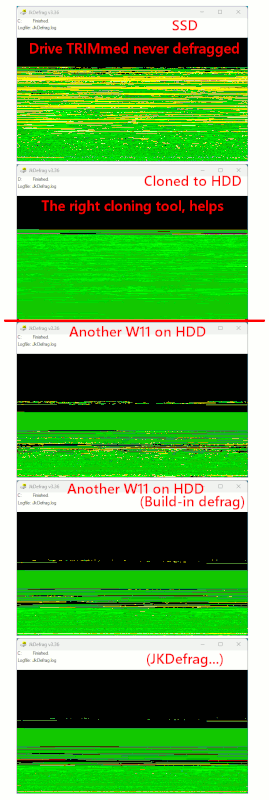
It did do a good job. But from a performance perspective, it was doing
too much work. Much of the effort, was purely for "appearances" sake.
After an hour of work, the disk was likely fast enough for it to stop.
Making a giant green block is just showing off, and that might take an
extra seven hours to do. But that was also what the commercial
third-party defragmentation tools were selling, was the giant green
block concept. The Windows one, at the time, did that too (as it was
bought from another company and shipped with every copy of WinXP).
On Sun, 13 Sep 2026 06:16:26 -0400, Paul wrote:
It did do a good job. But from a performance perspective, it was doing
too much work. Much of the effort, was purely for "appearances"
sake. After an hour of work, the disk was likely fast enough for it
to stop. Making a giant green block is just showing off, and that
might take an extra seven hours to do. But that was also what the
commercial third-party defragmentation tools were selling, was the
giant green block concept. The Windows one, at the time, did that
too (as it was bought from another company and shipped with every
copy of WinXP).
If you wanted to install Linux as a dual boot system you needed that giant green block to shrink Windows rather than having bits and pieces
spread all over.
I haven't bothered with dual boot in a long time. When the installed asks about how much of the drive to use I answer 'all of it'.
Why pretend, when you can have the real thing ?
On Sun, 13 Sep 2026 05:35:06 -0400, Paul wrote:
Why pretend, when you can have the real thing ?
Some of us are quite happy not to have to put up with the real thing,
thank you. ;)
EfEo:\>
On Sun, 13 Sep 2026 06:16:26 -0400, Paul wrote:
It did do a good job. But from a performance perspective, it was doing
too much work. Much of the effort, was purely for "appearances" sake.
After an hour of work, the disk was likely fast enough for it to stop.
Making a giant green block is just showing off, and that might take an
extra seven hours to do. But that was also what the commercial
third-party defragmentation tools were selling, was the giant green
block concept. The Windows one, at the time, did that too (as it was
bought from another company and shipped with every copy of WinXP).
If you wanted to install Linux as a dual boot system you needed that giant green block to shrink Windows rather than having bits and pieces spread
all over.
I haven't bothered with dual boot in a long time. When the installed asks about how much of the drive to use I answer 'all of it'.
The dual-boot system was unreliable because
whenever Windows updates its kernel it overwrites the UEFI...
Worse it never tells you that the Kernel is being updated or that it
will overwrite the UEFI because there is only Windows-< in the minds of
the people who design and send out updates.
The Linux gparted shrink, can handle NTFS without worrying about "non-moveable" red-colored blocks. The Windows Disk Management shrink function, there is some metadata at 50%, which it cannot move. And then
you have to find some other way to move that. The Raxco PerfectDisk,
could move that metadata, but the Windows one doesn't know how.
Something like Paragon, it and some other programs, they do activity
like that "offline" in some sort of WinPE environment. There would be a reboot, to do a shrink like that (a "stuck" one). I don't do too many of those, because their progress indicators kinda suck, and you don't know
how much longer it is going to take.
On 9/13/26 14:57, rbowman wrote:
On Sun, 13 Sep 2026 06:16:26 -0400, Paul wrote:
It did do a good job. But from a performance perspective, it was doing
too much work. Much of the effort, was purely for "appearances"
sake. After an hour of work, the disk was likely fast enough for it
to stop. Making a giant green block is just showing off, and that
might take an extra seven hours to do. But that was also what the
commercial third-party defragmentation tools were selling, was the
giant green block concept. The Windows one, at the time, did that
too (as it was bought from another company and shipped with every
copy of WinXP).
If you wanted to install Linux as a dual boot system you needed that giant >> green block to shrink Windows rather than having bits and pieces
spread all over.
I haven't bothered with dual boot in a long time. When the installed asks
about how much of the drive to use I answer 'all of it'.
-a-a-a-aActually there are setting to reduce the size of the
Big Green Blocks in the Windows settings but the "all of it"
setting it the simplest thing to do.
-a-a-a-aThe dual-boot system was unreliable because \
whenever Windows updates its kernel it overwrites the UEFI... \
Worse it never tells you that the Kernel is being updated \__ NO
or that it will overwrite the UEFI because there is only /
Windows-< in the minds of the people who design and send /
out updates. /
If you must use Windows the best way is to run it in a
Virtual Machine.
If you must have Windows on the box then Windows has
an adapted Linux for that purpose or alternatively you
can pick a good GNU/Linux Live-Booting system to run
from preferably a fast USB Flash Drive.
bliss- Dell 7730- PCLinuxOS 2026.09 Linux 6.18.50- Plasma 6.7.5
On Sun, 9/13/2026 7:01 PM, BobbieSellers wrote:
On 9/13/26 14:57, rbowman wrote:
On Sun, 13 Sep 2026 06:16:26 -0400, Paul wrote:
It did do a good job. But from a performance perspective, it was doing >>>> too much work. Much of the effort, was purely for "appearances"
sake. After an hour of work, the disk was likely fast enough for it
to stop. Making a giant green block is just showing off, and that
might take an extra seven hours to do. But that was also what the
commercial third-party defragmentation tools were selling, was the
giant green block concept. The Windows one, at the time, did that
too (as it was bought from another company and shipped with every
copy of WinXP).
If you wanted to install Linux as a dual boot system you needed that giant >>> green block to shrink Windows rather than having bits and pieces
spread all over.
I haven't bothered with dual boot in a long time. When the installed asks >>> about how much of the drive to use I answer 'all of it'.
-a-a-a-aActually there are setting to reduce the size of the
Big Green Blocks in the Windows settings but the "all of it"
setting it the simplest thing to do.
-a-a-a-aThe dual-boot system was unreliable because \
whenever Windows updates its kernel it overwrites the UEFI... \
Worse it never tells you that the Kernel is being updated \__ NO
or that it will overwrite the UEFI because there is only /
Windows-< in the minds of the people who design and send /
out updates. /
If you must use Windows the best way is to run it in a
Virtual Machine.
If you must have Windows on the box then Windows has
an adapted Linux for that purpose or alternatively you
can pick a good GNU/Linux Live-Booting system to run
from preferably a fast USB Flash Drive.
bliss- Dell 7730- PCLinuxOS 2026.09 Linux 6.18.50- Plasma 6.7.5
The dual boot system is not unreliable, to start with.
The only time the Windows Installer DVD "manipulates" the UEFI
content, is on a Clean Install. A Repair Install, it does not do it.
Windows Update, it does not do it. It "edits" the contents of
the Microsoft folder in UEFI. The Microsoft folder is separate
from the Ubuntu folder.
+-----+-------+-----------+------------+---------------+-------+-------+
| MBR | ESP | Microsoft | Windows C: | Recovery | Linux | Linux |
| | | Reserved | | Partition 2GB | Slash | Swap |
+-----+-------+-----------+------------+---------------+-------+-------+
Clean Install Windows (on right) - would remove GRUB
+-----+-------+-----------+------------+---------------+-------+-------+------------+---------------+
| MBR | ESP | Microsoft | Windows C: | Recovery | Linux | Linux | Windows C: | Recovery |
| | | Reserved | | Partition 2GB | Slash | Swap | | Partition 2GB |
+-----+-------+-----------+------------+---------------+-------+-------+------------+---------------+
Now, run the YannBuntu Repair DVD, and GRUB is back in control
+-----+-------+-----------+------------+---------------+-------+-------+------------+---------------+
| MBR | ESP | Microsoft | Windows C: | Recovery | Linux | Linux | Windows C: | Recovery |
| | | Reserved | | Partition 2GB | Slash | Swap | | Partition 2GB |
+-----+-------+-----------+------------+---------------+-------+-------+------------+---------------+
Practically *every* Patch Tuesday, you receive a *new* kernel file.
The kernel is a high frequency patch. The three high frequency ones
were "something GDI related" for graphics, Internet Explorer was high frequency,
and the kernel. You had to know these things, to "prune" how long it
takes for Windows Update to tip things upright. For example, back when you could still patch Vista, the Vista Windows Update would take Infinity Time
to become ready. If you installed certain KB in a certain order, the supercedence calculation was returned to normal, and then the Windows Update could actually finish a run. The people at WSUSOffline figured these things out.
And that's how we were alerted to the large number of changes to the kernel, so it's always being changed. That's not some "Linux release" model we're talking about, it's a "constant patching" thing. A Kernel as a rolling release.
It has a build number, but it is constantly evolving. And it's patched
every month, months when you have boot problems and months when you
don't have boot problems, because it doesn't cause boot problems
when patched. The file is in the C: partition.
In terms of the Windows boot sequence, it is likely "winload.exe" which
is the last frictional item in terms of the design of the thing. If
you're in Safe Mode, you get a list of the things that have
been "successfully loaded". You can't see the unsuccessful things,
or an error indication, if there is a problem in Safe Mode. And when
that list starts printing on the screen, it is likely the kernel is
already there (kernel services, to shepherd the boot).
Something else you should know about, as a multibooter, is there
is the SuperGRUB CD, and I use that for booting things that are "broken".
For example, I installed some Linux test distro, the GRUB portion
didn't finish properly. I was still able to chainload the installation,
by scanning with SuperGRUB, tabbing down to the correct line, and
then selecting that, and SuperGRUB will chainload it for you.
You actually have PLENTY of options to run a tight ship.
I can sail my ship, with three compartments flooded and
the ship is tilted to one side :-) All it takes... is "recipes".
And a very dirty vat to cook them in.
I have the capability now, to entirely repave the UEFI FAT32 partition.
I can format it! Then, lay in a new Microsoft folder in the UEFI partition (there is a way to do that). And using the YannBuntu Repair Disc,
I can put GRUB back in control. With enough recipes, you no longer
have to live in fear.
*******
The powers that be, are messing around again. There is a systemD boot now,
so GRUB isn't the only thing you have to worry about. Some people have started seeing various error and warning messages. I have no advice
to offer at this time, except to wear galoshes as your feet are
going to get wet. "If a thing isn't complex enough, we have the
devs to make it more complex." And then they wonder why it isn't
the "Year Of The Linux Desktop" yet. Well, fuck around and find out,
is all I can say.
Paul
On Sun, 13 Sep 2026 16:01:30 -0700, BobbieSellers wrote:
The dual-boot system was unreliable because
whenever Windows updates its kernel it overwrites the UEFI...
Worse it never tells you that the Kernel is being updated or that it
will overwrite the UEFI because there is only Windows-< in the minds of
the people who design and send out updates.
The last dual boot I did was about 2013 on a Dell Windows 7 box with
openSUSE 31.1. The box lives on and is happily running Fedora 45/KDE prrelease.
btw, where have you been?
On Mon, 14 Sep 2026 00:10:14 -0400, Paul wrote:
The Linux gparted shrink, can handle NTFS without worrying about
"non-moveable" red-colored blocks. The Windows Disk Management shrink
function, there is some metadata at 50%, which it cannot move. And then
you have to find some other way to move that. The Raxco PerfectDisk,
could move that metadata, but the Windows one doesn't know how.
Something like Paragon, it and some other programs, they do activity
like that "offline" in some sort of WinPE environment. There would be a
reboot, to do a shrink like that (a "stuck" one). I don't do too many of
those, because their progress indicators kinda suck, and you don't know
how much longer it is going to take.
I haven't done a dual boot since 2013 or so and then I almost never booted into Win 7. Scorched earth works for me. I do have a Win 11 laptop. In
case of emergency break glass.
On Mon, 9/14/2026 12:47 AM, rbowman wrote:
On Mon, 14 Sep 2026 00:10:14 -0400, Paul wrote:
The Linux gparted shrink, can handle NTFS without worrying about
"non-moveable" red-colored blocks. The Windows Disk Management shrink
function, there is some metadata at 50%, which it cannot move. And then
you have to find some other way to move that. The Raxco PerfectDisk,
could move that metadata, but the Windows one doesn't know how.
Something like Paragon, it and some other programs, they do activity
like that "offline" in some sort of WinPE environment. There would be a
reboot, to do a shrink like that (a "stuck" one). I don't do too many of >>> those, because their progress indicators kinda suck, and you don't know
how much longer it is going to take.
I haven't done a dual boot since 2013 or so and then I almost never booted >> into Win 7. Scorched earth works for me. I do have a Win 11 laptop. In
case of emergency break glass.
Win7 now, it's hard to find some old stuff to run on it.
Like some of the Sysinternals stuff, the newer versions
of programs don't run on Win7.
That would be mostly a clone-over now, and then build stuff next to it.
Since there are multiple ways that could have been installed, it
could be a major project (or, even impossible) to bring Win7 into
alignment with other stuff you wanted to run.
On Win8, the install-only keys are gone (invalidated), so
you can't do convenience type installs. Cloning-over still works for that (the cloned disks are used on the same machine where it was originally licensed).
Win10 is the last 32-bit environment, for people who need it. I install
a 32-bit, so I can install a Macrium 32-bit executable (it "matches" the
OS it is to be installed on), then I can make 32-bit WinPE bootable discs. And from there, I can run a limited set of graphical 32-bit Windows software, like HDTune when I'm checking small disks.
There are still a few reasons to run older OSes. But once your old hardware stops functioning, that breaks an awful lot of stuff. I've had two motherboards
fail, and that's two epochs I've no longer got.
Take an old PCIe video card. I wanted to use that card, to see how
Linux Mint Driver Manager handles it. I plug it into the newer computer,
the screen is black and I get "error beeps". And that's because
the video card has a CSM VBIOS and not a UEFI VBIOS. That card
seemed to be a hybrid, when run on the old system, but all the
newer computers don't like the video card, and then I lose access
to the ability to test corner conditions from the past.
Virtual Machines aren't always a solution, as the "certified support"
dries up, the more modern the release of hosting software. If I wanted
to run Win98 in a VM, I could, it's just the maker of the software
has not recently tested it. Things like Win2K, constantly needed
custom tweaks to make it run properly, and once the "official" support
is gone, you would not expect that to behave itself. It will rail
on one core, due to multi-core issues. Running it on a single
core, might work, but that's pretty limiting.
Paul
-a-a-a-aYou haven't read any FOSS licenses lately have you?
-a-a-a-aNo certification of proper behavior. You have to learn
to use the tools. If you are using Windows-< and not using FOSS
then you will wish you had.
bliss- Dell 7730- PCLinuxOS 2026.09 Linux 6.18.51- Plasma 6.7.5
An SSD tends to not be a limited resource, whereas the hard drive
doesn't really like multiple sessions at the same time. You can
squeeze in lots of seeks on an SSD, have multiple threads of usage,
before it affects what the user is doing. Hard drives aren't nearly
as tolerant that way.
I started in the 1980s with a Commodore 64. Gor to Linux in
the 2000s after I gave up on the Amiga ever fixing its lack of
memory control.
That's not some "Linux release" model we're talking about, it's a
"constant patching" thing. A Kernel as a rolling release. It has a
build number, but it is constantly evolving. And it's patched every
month ...
By that, he means update your kernel almost every week. Now, most of
you will find that notion as scary as dealing with 60 CVEs a week.
https://en.wikipedia.org/wiki/Zoomracks
If I wanted to run Win98 in a VM, I could, it's just the maker of
the software has not recently tested it.
On Mon, 14 Sep 2026 23:25:35 -0000 (UTC), Lawrence DrCOOliveiro wrote:
By that, he means update your kernel almost every week. Now, most of
you will find that notion as scary as dealing with 60 CVEs a week.
Fedora and SUSE Tumbleweed often have a new kernel in a week, sometimes less. Fedora 45 Prerelease is now using 7.2.5, SUSE 7.2.4. Ubuntu 26.04.1
is 7.0.0. Mint is 6.17. A 7 kernel is offered but it had had problems so
I'm not jumping into it. The Broadcom WiFi on that laptop is a pain in the ass.
So that means Fedora is secure, Linux Mint not so much? MX is 6.12.107 so that's a disaster?
Windows got an out-of-band patch today, with a kernel from yesterday
evening.
C:\Windows\System32
ntoskrnl.exe
13,104,632 bytes
Monday, rCASeptember rCA14, rCA2026, rCArCA6:46:36 PM
10.0.26100.9457
When Patch Tuesday was only a week ago.
On Tue, 15 Sep 2026 02:11:22 -0400, Paul wrote:
Windows got an out-of-band patch today, with a kernel from yesterday
evening.
C:\Windows\System32
ntoskrnl.exe
13,104,632 bytes
Monday, rCASeptember rCA14, rCA2026, rCArCA6:46:36 PM
10.0.26100.9457
When Patch Tuesday was only a week ago.
Why are they called rCLout-of-bandrCY? Because theyrCOre not part of the regular schedule; they are to fix screwups in the last Patch Tuesday
update.
Fred Brooks long ago predicted the idea of a piece of software getting
so far beyond the capacity of the human mind to cope with complexity,
that it was no longer humanly possible to fix bugs in it without
introducing new ones. Microsoft Windows is the living embodiment of
that prediction.
I don't know about Secure, but the LM223 I installed yesterday, updated itself to 7.0.0 . Some of the kernels in your list, might not be long
term ones.
Windows got an out-of-band patch today, with a kernel from yesterday
evening.
C:\Windows\System32
ntoskrnl.exe 13,104,632 bytes Monday, rCASeptember rCA14, rCA2026,
rCArCA6:46:36 PM 10.0.26100.9457
When Patch Tuesday was only a week ago.
Fred Brooks long ago predicted the idea of a piece of software getting
so far beyond the capacity of the human mind to cope with complexity,
that it was no longer humanly possible to fix bugs in it without
introducing new ones. Microsoft Windows is the living embodiment of that prediction.
| Sysop: | Amessyroom |
|---|---|
| Location: | Fayetteville, NC |
| Users: | 74 |
| Nodes: | 6 (0 / 6) |
| Uptime: | 121:05:48 |
| Calls: | 1,194 |
| Files: | 1,352 |
| Messages: | 290,204 |