• Can't find clearcut instructions that work for resetting Mikrotik RB411 routerboard to 192.168.88.1

    From RJH@patchmoney@gmx.com to sci.electronics.design,sci.electronics.equipment,sci.electronics.misc on Tue Mar 28 18:46:46 2023
    From Newsgroup: sci.electronics.equipment

    I know it was working when I put it in the storage box years ago.
    But I don't remember what IP address it was set to at that time.

    The 18VDC 1Amp POE is known to be good & the RB411 lights & beeps
    when it's powered (although I'm not sure what's supposed to light up).

    I went to the firmware download page (which shows it's discontinued)
    and read every document there and tried all their reset instructions
    but what they fail to do in all of them is provide explicit instructions. https://mikrotik.com/product/RB411

    None of those instructions work, but as I recall, they're all too generic anyway in that it matters greatly exactly the procedure that you use
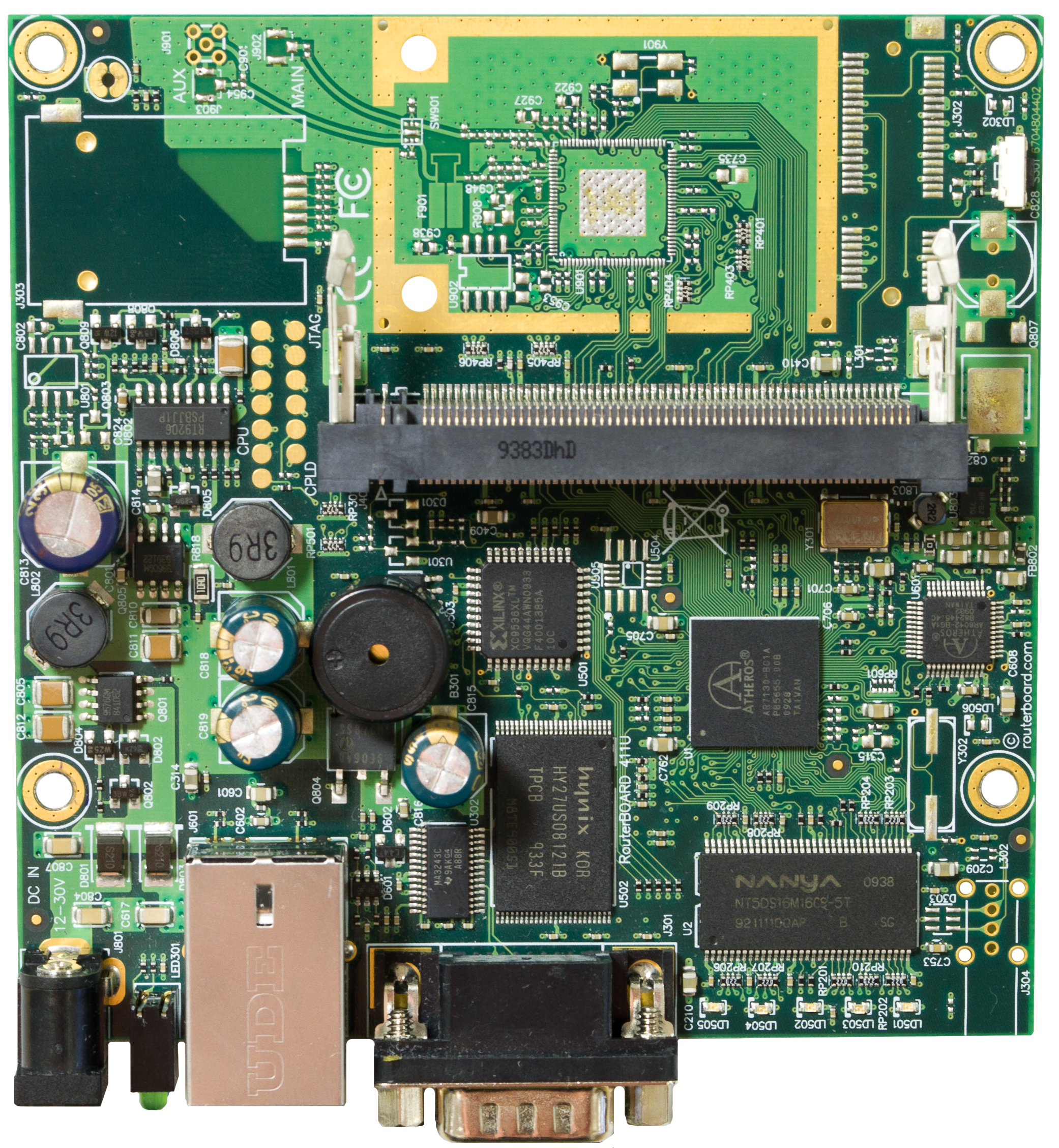
    and even which of the two different onboard reset mechanisms that you use. https://i.postimg.cc/FKsR3Mk1/mikrotik-rb411-reset.jpg

    Even so, I have the latest RouterOS just in case I need to flash. https://download.mikrotik.com/routeros/7.8/routeros-mipsbe-7.8.npk
    And I downloaded the latest RouterBoot firmware just in case I need it. https://i.mt.lv/cdn/rb_bootloaders/ar7100_3.41.fwf

    I read the User Guide but the instructions there are too generic too. https://i.mt.lv/cdn/product_files/rb411ugA_130511.pdf

    As with the same problem with the too generic RouterOS Software Manual. https://wiki.mikrotik.com/wiki/Manual:TOC

    Factory defaults are supposed to be 192.168.88.1 admin with no password.
    I remember the reset procedure to be non intuitive (so no generic
    instructions will work) but I don't remember the precise reset process.

    But I can't get a successful ping (even with well-tested cat5 cables).
    ping 192.168.88.1 -t

    Nor will a web browser access the webfig configuration at that address. http://192.168.1.88/webfig/

    None of the generic reset instructions appear to be working for me. https://wiki.mikrotik.com/wiki/Manual:Reset

    Unfortunately, even the specific instructions are completely generic. https://www.router-reset.com/info/MikroTik/RouterBOARD-411-RB411 https://www.mikrotik.com.my/reset-to-factory-default-settings/

    The reset, as I recall, is actually complicated in that doing it right
    has a lot to do with exactly which LEDs flash which color (blue or green)
    and how many times specific LEDs flash & exactly when you let up.

    I set the Windows IP address as admin so that's not the problem (AFAICT).
    netsh interface ipv4 set address name="Ethernet" static 192.168.88.2 255.255.255.0 192.168.88.1
    netsh interface ipv4 show config "Ethernet"

    There are two different resets on the Mikrotik RB411 routerboard.
    One is a "S301" button & the other is a short slot, both of which I tried. https://i.mt.lv/cdn/rb_images/669_hi_res.png

    All I can find is I hold the S301 spring-loaded button until some unknown
    LED light starts flashing (blue or green, there are many) & then I release
    the S301 spring-loaded button which is supposed to reset the RouterOS configuration to the factory default setup (but how long does it take?).

    I've done it so many times so many ways that I'm not even sure which of
    the many reset configurations the RB411 routerboard is currently set to. https://wiki.mikrotik.com/wiki/Manual:Etherboot

    I have the MikroTik WinBox Loader v3.37 but it won't connect.
    winbox.exe 192.168.88.1 admin ""
    winbox.exe 84:1B:5E:AF:BF:CF admin ""

    I also tried the webfig interface of the RouterBoard RB411 on port 80. http://192.168.88.1/webfig/

    https://wiki.mikrotik.com/wiki/Manual:Winbox
    https://mikrotik.com/download https://download.mikrotik.com/winbox/3.37/winbox.exe https://download.mikrotik.com/winbox/3.37/winbox64.exe

    I haven't used TheDude or NetInstall yet as I just want to reset it. https://wiki.mikrotik.com/wiki/Manual:The_Dude https://wiki.mikrotik.com/wiki/Manual:Netinstall https://wiki.mikrotik.com/wiki/Manual:Flashfig

    In desperation I even found YouTube videos on how to reset it.
    How to HARD RESET MikroTik RouterBOARD RB411
    https://youtu.be/OD708qX23eM
    a. No power
    b. Hold Phillips screwdriver in the corner hard reset
    c. Connect power
    d. Lift after 28 seconds it seems ???

    Reset manual Mikrotik RB 411
    https://youtu.be/8xhdrpEtlc4
    a. no power
    b. hold button on side
    c. connect RJ45
    d. flashing by RJ45

    How do you reset the RouterOS IP address settings & login back to default? https://wiki.mikrotik.com/wiki/Manual:Reset

    Resetting the RouterOS configuration
    Hold this button until LED light starts flashing.
    Release the button to reset RouterOS configuration to default.

    Which LED light?
    There are blue & green LEDs to the left of the RJ45.
    There are five green LEDs to the right of the RS232.

    How do you reset the RouterOS back to the factory configuration?

    Nothing has worked yet but what I haven't found is useful usable explicit instructions on how to reset the MikroTik RouterBoard RB411 to its default.

    Do you have any way of finding those specific explicit reset instructions?

    I don't care what settings it resets to just as long as I can log into
    it from Windows on the same subnet (presumably the 192.168.88.xxx subnet). netsh interface ipv4 show config
    netsh interface ipv4 show config "MyEthernet"
    netsh interface ipv4 set address name="MyEthernet" static 192.168.88.2 255.255.255.0 192.168.88.1
    ping 192.168.88.1 -t

    None of this works so I think the router is in some stuck state,
    although it boots up (seemingly) with lights lighting up and
    blinking at times (blue and green LEDs) and it beeps too.

    I just need a definitive specific explicit reference for the MikroTik routerboard RB411 with RouterOS on it for how to reset it to a state that I
    can then connect to the RouterOS on it to set it up as a CPE Access Point.

    I tried the MikroTik forum but it never sent the confirmation registration
    mail so I don't think it's still supported as it seems to be dead a while. https://forum.mikrotik.com/viewtopic.php?p=438256 https://forum.mikrotik.com/viewtopic.php?p=454673 https://help.mikrotik.com/docs/display/ROS/Reset+Button https://mikrotik.com/product/RB411 https://www.mikrotik-store.eu/en/MikroTik-RouterBOARD-RB411 https://forum.routerboard.com/viewtopic.php?t=156670

    I can put openwrt on it if I have to but I still need to connect first. https://openwrt.org/toh/mikrotik/rb411

    Most of the descriptions aren't specific enough to actually work.
    I will try anything because all I want to do is connect to it.
    --
    Cheers, Rob

    --- Synchronet 3.21d-Linux NewsLink 1.2
  • From RJH@patchmoney@gmx.com to sci.electronics.design,sci.electronics.equipment,sci.electronics.misc on Wed Mar 29 08:28:32 2023
    From Newsgroup: sci.electronics.equipment

    On 28 Mar 2023 at 8:12:41 PM, Don Y <blockedofcourse@foo.invalid> wrote:

    I know it was working when I put it in the storage box years ago.
    But I don't remember what IP address it was set to at that time.

    Can you run a general port scan with something like Nessus
    (assuming you know all of the other hosts on your network)?

    I put a label on each device with it's hostname (resolves
    to an IP in my DNS; resolves to a MAC in bootptab) and
    password. In my case, if you've got physical access to
    the device (to be able to read the label!), then there's
    little sense in trying to "hide" these details. This
    wouldn't be true in a business, public space, etc.

    I don't know if the RB411 is on the 192.168.88.xxx or 192.168.1.xxx subnet.
    Do I need to put the Windows PC on the same subnet as the RB411 might be?

    Anyway, I googled for nmap and somehow I ended up with Zenmap on my
    desktop.
    https://nmap.org/book/zenmap.html

    The default zenmap scan is apparently this command.
    Target: 192.168.1.1/24
    Command: nmap -T4 -A -v 192.168.1.1/24

    Target: 192.168.88.1/24
    Command: nmap -T4 -A -v 192.168.88.1/24

    The first nmap command it ran from the Zenmap GUI without the RB411 was
    Nmap scan report for 192.168.1.0 [host down]
    Nmap scan report for 192.168.1.2 [host down]
    Nmap scan report for 192.168.1.3 [host down]
    ...
    Discovered open port 443/tcp on 192.168.1.100
    Discovered open port 443/tcp on 192.168.1.101
    Discovered open port 443/tcp on 192.168.1.102

    There were pages of results, so I'm weeding through them first while
    I'm on my home LAN before I connect the PC directly to the RB411 router.

    It's a pain not knowing what subnet to put the PC on so I pulled
    the Ethernet out of the home router and plugged it into the RB411
    instead. Then I changed the PC IP address to these two one by one.
    Win+r cmd {control+shift+enter}
    netsh interface ipv4 show config
    netsh interface ipv4 show config "Ethernet"
    netsh interface ipv4 set address name="Ethernet" static 192.168.1.2 255.255.255.0 192.168.1.1
    ping 192.168.1.1 -t (which fails)
    Then I ran the zenmap GUI with a Target: 192.168.1.1 192.168.1.255
    Command: nmap -T4 -A -v 192.168.1.1/24
    setup_target: failed to determine route to 192.168.1.0
    setup_target: failed to determine route to 192.168.1.1
    setup_target: failed to determine route to 192.168.1.2
    ...

    Then I tried the 88 subnet.
    Win+r cmd {control+shift+enter}
    netsh interface ipv4 show config
    netsh interface ipv4 show config "Ethernet"
    netsh interface ipv4 set address name="Ethernet" static 192.168.88.2 255.255.255.0 192.168.88.1
    ping 192.168.88.1 -t (which fails)
    Then I ran the zenmap GUI with a Target: 192.168.88.1 192.168.88.255
    Command: nmap -T4 -A -v 192.168.88.1/24
    setup_target: failed to determine route to 192.168.88.0
    setup_target: failed to determine route to 192.168.88.1
    get_srcaddr: can't connect socket: A socket operation was attempted to an unreachable host.
    setup_target: failed to determine route to 192.168.88.3
    setup_target: failed to determine route to 192.168.88.4
    setup_target: failed to determine route to 192.168.88.5
    ...

    I'm not sure what I'm doing, but it seems I get different results
    if I put the PC on 192.168.1.xxx versus 192.168.88.xxx and then
    I run that zenmap port scan - but I don't yet know what to make
    of the results since nothing came back as a really good hit.

    My googling found also "ipscan" and "portscanner" which I may try. https://angryip.org/download/#windows https://www.eusing.com/ipscan/free_ip_scanner.htm https://www.advanced-ip-scanner.com/download/

    The problem is that the search is filled with shills so I don't know
    which is the right freeware respected ipscanner or port scanner download.

    Given the syntax is not in the least intuitive (it takes experimentation),
    does anyone have a recommendation as to which scanner to concentrate on?
    --
    Cheers, Rob

    --- Synchronet 3.21d-Linux NewsLink 1.2
  • From RJH@patchmoney@gmx.com to sci.electronics.design,sci.electronics.equipment,sci.electronics.misc on Wed Mar 29 08:32:24 2023
    From Newsgroup: sci.electronics.equipment

    On 28 Mar 2023 at 10:23:43 PM, a a <manta103g@gmail.com> wrote:

    Mikrotik comes with social chat room.
    Ask the same question to get help from other users of Mikrotik.

    I tried to register but they never sent me the registration email
    to my protonmail account so I can't verify the mikrotik forum account.

    In the OP you can see I already searched the mikrotik forum.
    Other people had the same problem and they just gave up
    (at least according to the mikrotik forum links I gave in the OP). https://forum.mikrotik.com/viewtopic.php?p=438256 https://forum.mikrotik.com/viewtopic.php?p=454673

    I suspect that mikrotik business forum only allows business addresses. Otherwise why did it not send my registration to protonmail?
    --
    Cheers, Rob

    --- Synchronet 3.21d-Linux NewsLink 1.2
  • From manta103g@manta103g@gmail.com (darius) to sci.electronics.design,sci.electronics.equipment,sci.electronics.misc on Wed Jan 10 22:50:07 2024
    From Newsgroup: sci.electronics.equipment

    I recall my experience with Mikrotik forum,
    asking for multi WiFi interface feature in the router

    It looks like Mikrotik forum is for selling new models of routers not for the support of old ones

    So I gave up

    bye bye Mikrotik
    --- Synchronet 3.21d-Linux NewsLink 1.2