• PSA: Creating *any* RGB solid color for mobile wallpaper or Windows background

    From Maria Sophia@mariasophia@comprehension.com to rec.photo.digital on Wed Feb 18 14:07:15 2026
    From Newsgroup: rec.photo.digital

    PSA:
    Creating *any* RGB solid color for mobile wallpaper or Windows background

    On the Android newsgroup is a lengthy thread about setting the homescreen/lockscreen to a pure solid-colored wallpaper, where, for
    Android, the capability depends greatly on the device particulars
    (launcher, Android version, OEM, model, etc.), which is complex.
    Newsgroups: comp.mobile.android
    Subject: How to create a plain wallpaper/background?
    Date: Mon, 16 Feb 2026 13:09:54 +0000
    Message-ID: <2ihb6m-91k63.ln1@q957.zbmc.eu>

    The holy grail goal would be to select *any* RGB/HEX color by value,
    such as R=AB, G=CD, B=EF (decimal 171, 205, 239) for the solid color.

    As far as I know, none of the three platforms I own (and hence can test), allow the user to *directly* natively set a solid background color by
    number although all three platforms have a "color picker" & slider.

    Windows is perhaps the best because it's color-picker GUI has all colors,
    but the problem applies to all 3 major consumer platforms I own (AFAIK).
    a. Windows: Settings > Personalization > Colors > Custom color
    b. Android: (multiple methods depending on the device setup)
    c. iOS: (has no native method to set a solid color, but see below)

    To simplify things, we pointed out a free wallpaper-picker app, that works
    on all Android devices, but it only had a limited set of solid colors.
    *Wallpapers*, by Google
    <https://play.google.com/store/apps/details?id=com.google.android.apps.wallpaper>

    For a fee, meaning you lose some privacy, there are solid-color wallpaper generators on the mobile devices, which can generate *any* RGB value:
    *RGB Color Wallpaper Pro*, by TecDrop
    <https://play.google.com/store/apps/details?id=com.tecdrop.rgbcolorwallpaperpro>

    This simple app-to-wallpaper integration is possible because Android
    exposes a public wallpaper-setting API that apps are allowed to use.

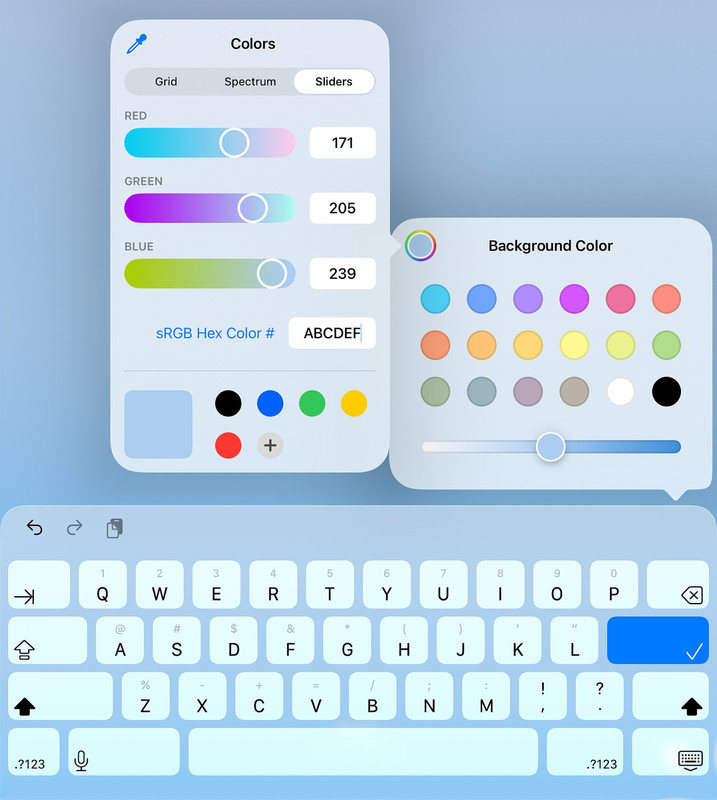
    On my iPadOS 26.3 device, I could choose Settings > Wallpaper > Add a new wallpaper > colors but those are not true colors but color gradients.
    Even when I set the RGB values into the iOS GUI, it's still a gradient.
    <https://i.postimg.cc/RFJJph5s/abcdef.jpg>

    But all is not lost given we can generate a pure solid-color image.
    <https://singlecolorimage.com/>
    Which, when we parse the API, turns out to be:
    <https://singlecolorimage.com/get/<HEX>/<WIDTH>x<HEIGHT>>
    So, for example, for the color ABCDEF, at 400x100, the link would be:
    <https://singlecolorimage.com/get/abcdef/400x100>

    But having to use the web just to generate a solid-color image file is,
    well, it's against my standards, so let's do it with just an editor.
    gvim wallpaper.ppm
    P3 1 1 255 171 205 239

    Where...
    P3 -> Magic number. Means "ASCII PPM" (Portable Pixmap, text format).
    1 -> Image width in pixels. This file contains exactly 1 column.
    1 -> Image height in pixels. This file contains exactly 1 row.
    255 -> Maximum channel value. Defines the scale for R, G, B.
    255 means each color channel ranges from 0 to 255.
    171 -> Red channel value for the single pixel (0-255).
    This corresponds to hex AB.
    205 -> Green channel value for the single pixel (0-255).
    This corresponds to hex CD.
    239 -> Blue channel value for the single pixel (0-255).
    This corresponds to hex EF.

    magick wallpaper.ppm -scale 400x100! wallpaper.png

    Where...
    -scale -> Resize operation.
    Tells ImageMagick to scale the image to a new size.
    400x100! -> Target dimensions for the resize.
    400 = width in pixels
    100 = height in pixels
    ! = force exact size, ignore aspect ratio.
    (The bang means to stretch or squash if needed.)

    That creates a solid-color RGB #ABCDEF PNG, identical to the
    downloaded image created from the single-color-image web site above.

    Note that almost any Windows image editor will do what ImageMagick does,
    so consider the "magick" command simply one example of many that work.

    The PPM can vary depending on the device screen particular
    a. Windows: P3 1920 1080 255 171 205 239 (1920x180 monitor)
    b. Android: P3 1600 720 255 171 205 239 (Galaxy A32-5G)
    c. iOS: P3 2360 1640 255 171 205 239 (my 10th-gen iPad)

    Using the exact screen resolution is ideal if:
    a. We want zero scaling
    b. We want pixel-perfect gradients (not needed for solid colors)
    c. We want crisp edges (again, not needed for solid colors)
    But for a pure solid color, scaling is mathematically lossless.
    So our 400x100 wallpaper image is just as good as a 2360x1640 one.

    This produces a mathematically perfect solid-color image of any
    desired resolution such as these for my three platforms I own:

    a. Windows (1920x1080)
    C:\> magick wallpaper.ppm -scale 1920x1080! win-1920x1080.png

    b. Android (Galaxy A32-5G, 1600x720)
    C:\> magick wallpaper.ppm -scale 1600x720! android-1600x720.png

    c. iOS (10th-gen iPad, 2360x1640)
    C:\> magick wallpaper.ppm -scale 2360x1640! ipad-2360x1640.png

    Once we have the image, all three platforms can choose that image.
    a. Windows: Settings > Personalization > Background > Picture
    b. Android: Gallery/Photos > (choose the image) > Set as wallpaper
    c. iOS: Settings > Wallpaper > Add New Wallpaper > Photos

    Speaking of privacy, you likely do not want your wallpaper to be unique:
    *How your phone can be tracked by your wallpaper*
    <https://groups.google.com/g/comp.mobile.android/c/MH2n3cymu6E/>

    In the current Android versions, apps get much less wallpaper information:
    WallpaperManager.getWallpaperColors()
    a. 3 "main colors"
    b. 1 "secondary color"
    c. 1 "tertiary color"
    d. And some luminance metadata

    FingerprintJS showed that this color set can be hashed into what they
    called ~144 bits of entropy but if you use a pure solid-color wallpaper,
    the color set contains almost no entropy & as such, is apparently not all
    that useful for malevolent fingerprinting purposes (AFAIK).

    Because if you take:
    a. 3 RGB colors
    b. luminance metadata
    c. some internal weighting
    and hash them, you can produce a value that looks like a fingerprint.

    But it is only a fingerprint within the same app on the same device.
    Better yet, pure solid colors collapse the entropy to almost nothing

    A 1x1 PPM expanded to our screen size produces a mathematically uniform
    image with no EXIF, no camera noise & no unique patterns to fingerprint.

    I guess if we use a color nobody uses, that might still fingerprint us,
    but a pure black wallpaper produces the same WallpaperColors object for everyone.

    Which is why this PSA about generating solid-color wallpapers is actually
    one of the million things most people "should" know about privacy, but
    perhaps they only know about 3 or 4 of those million things about privacy.

    Note that there is no iOS wallpaper fingerprinting vector. If an iOS app
    knows anything about your wallpaper, you gave it the image yourself.

    As for Windows, any app can read the wallpaper, which is stored in
    %AppData%\Microsoft\Windows\Themes\TranscodedWallpaper
    No special wallpaper fingerprinting mechanism exists, but programs you run
    can read your wallpaper file because they can read all your files anyway.

    As always, everything I say above could be wrong so I challenge others to
    help make this PSA iron-clad so that it's a useful reference for all.
    --
    There are many ways to do something as simple as set a solid color.
    --- Synchronet 3.21b-Linux NewsLink 1.2
  • From Geoff@geoff@nospamgeoffwood.org to rec.photo.digital on Thu Feb 19 17:05:03 2026
    From Newsgroup: rec.photo.digital

    On 19/02/2026 8:07 am, Maria Sophia wrote:
    PSA: Creating *any* RGB solid color for mobile wallpaper or Windows background

    On the Android newsgroup is a lengthy thread about setting the homescreen/lockscreen to a pure solid-colored wallpaper, where, for
    Android, the capability depends greatly on the device particulars
    (launcher, Android version, OEM, model, etc.), which is complex.
    Newsgroups: comp.mobile.android
    Subject: How to create a plain wallpaper/background?
    Date: Mon, 16 Feb 2026 13:09:54 +0000
    Message-ID: <2ihb6m-91k63.ln1@q957.zbmc.eu>

    The holy grail goal would be to select *any* RGB/HEX color by value,
    such as R=AB, G=CD, B=EF (decimal 171, 205, 239) for the solid color.

    As far as I know, none of the three platforms I own (and hence can
    test), allow the user to *directly* natively set a solid background
    color by
    number although all three platforms have a "color picker" & slider.

    Windows is perhaps the best because it's color-picker GUI has all
    colors, but the problem applies to all 3 major consumer platforms I own (AFAIK).
    a. Windows: Settings > Personalization > Colors > Custom color
    b. Android: (multiple methods depending on the device setup)
    c. iOS: (has no native method to set a solid color, but see below)

    To simplify things, we pointed out a free wallpaper-picker app, that works
    on all Android devices, but it only had a limited set of solid colors. *Wallpapers*, by Google
    <https://play.google.com/store/apps/details? id=com.google.android.apps.wallpaper>

    For a fee, meaning you lose some privacy, there are solid-color wallpaper generators on the mobile devices, which can generate *any* RGB value:
    *RGB Color Wallpaper Pro*, by TecDrop <https://play.google.com/store/apps/details? id=com.tecdrop.rgbcolorwallpaperpro>

    This simple app-to-wallpaper integration is possible because Android
    exposes a public wallpaper-setting API that apps are allowed to use.

    On my iPadOS 26.3 device, I could choose Settings > Wallpaper > Add a new wallpaper > colors but those are not true colors but color gradients.
    Even when I set the RGB values into the iOS GUI, it's still a gradient.
    -a<https://i.postimg.cc/RFJJph5s/abcdef.jpg>

    But all is not lost given we can generate a pure solid-color image. <https://singlecolorimage.com/>
    Which, when we parse the API, turns out to be: <https://singlecolorimage.com/get/<HEX>/<WIDTH>x<HEIGHT>>
    So, for example, for the color ABCDEF, at 400x100, the link would be: <https://singlecolorimage.com/get/abcdef/400x100>

    But having to use the web just to generate a solid-color image file is,
    well, it's against my standards, so let's do it with just an editor.
    gvim wallpaper.ppm
    -a-a-a-a P3 1 1 255 171 205 239

    Where... P3-a -> Magic number. Means "ASCII PPM" (Portable Pixmap, text format).
    1-a-a -> Image width in pixels. This file contains exactly 1 column.
    1-a-a -> Image height in pixels. This file contains exactly 1 row.
    255 -> Maximum channel value. Defines the scale for R, G, B.
    -a-a-a-a-a 255 means each color channel ranges from 0 to 255.
    171 -> Red channel value for the single pixel (0-255).
    -a-a-a-a-a This corresponds to hex AB.
    205 -> Green channel value for the single pixel (0-255).
    -a-a-a-a-a This corresponds to hex CD.
    239 -> Blue channel value for the single pixel (0-255).
    -a-a-a-a-a This corresponds to hex EF.

    magick wallpaper.ppm -scale 400x100! wallpaper.png

    Where... -scale -> Resize operation. -a-a-a-a-a-a-a-a-a Tells ImageMagick to scale the image to a new size. 400x100! -> Target dimensions for the
    resize. -a-a-a-a-a-a-a-a-a-a-a 400 = width in pixels -a-a-a-a-a-a-a-a-a-a-a 100 = height in
    pixels -a-a-a-a-a-a-a-a-a-a-a ! = force exact size, ignore aspect ratio.
    -a-a-a-a-a-a-a-a-a-a-a (The bang means to stretch or squash if needed.)

    That creates a solid-color RGB #ABCDEF PNG, identical to the
    downloaded image created from the single-color-image web site above.

    Note that almost any Windows image editor will do what ImageMagick does,
    so consider the "magick" command simply one example of many that work.

    The PPM can vary depending on the device screen particular
    a. Windows: P3 1920 1080 255 171 205 239 (1920x180 monitor)
    b. Android: P3 1600 720 255 171 205 239 (Galaxy A32-5G)
    c. iOS: P3 2360 1640 255 171 205 239 (my 10th-gen iPad)

    Using the exact screen resolution is ideal if:
    a. We want zero scaling
    b. We want pixel-perfect gradients (not needed for solid colors)
    c. We want crisp edges (again, not needed for solid colors)
    But for a pure solid color, scaling is mathematically lossless.
    So our 400x100 wallpaper image is just as good as a 2360x1640 one.

    This produces a mathematically perfect solid-color image of any
    desired resolution such as these for my three platforms I own:

    a. Windows (1920x1080)
    -a C:\> magick wallpaper.ppm -scale 1920x1080! win-1920x1080.png

    b. Android (Galaxy A32-5G, 1600x720)
    -a C:\> magick wallpaper.ppm -scale 1600x720! android-1600x720.png

    c. iOS (10th-gen iPad, 2360x1640)
    -a C:\> magick wallpaper.ppm -scale 2360x1640! ipad-2360x1640.png

    Once we have the image, all three platforms can choose that image.
    a. Windows: Settings > Personalization > Background > Picture
    b. Android: Gallery/Photos > (choose the image) > Set as wallpaper c.
    iOS: Settings > Wallpaper > Add New Wallpaper > Photos

    Speaking of privacy, you likely do not want your wallpaper to be unique:
    -a*How your phone can be tracked by your wallpaper* <https://groups.google.com/g/comp.mobile.android/c/MH2n3cymu6E/>

    In the current Android versions, apps get much less wallpaper information: WallpaperManager.getWallpaperColors()
    a. 3 "main colors"
    b. 1 "secondary color"
    c. 1 "tertiary color"
    d. And some luminance metadata

    FingerprintJS showed that this color set can be hashed into what they
    called ~144 bits of entropy but if you use a pure solid-color wallpaper,
    the color set contains almost no entropy & as such, is apparently not all that useful for malevolent fingerprinting purposes (AFAIK).

    Because if you take:
    a. 3 RGB colors
    b. luminance metadata
    c. some internal weighting
    and hash them, you can produce a value that looks like a fingerprint.

    But it is only a fingerprint within the same app on the same device.
    Better yet, pure solid colors collapse the entropy to almost nothing

    A 1x1 PPM expanded to our screen size produces a mathematically uniform
    image with no EXIF, no camera noise & no unique patterns to fingerprint.

    I guess if we use a color nobody uses, that might still fingerprint us,
    but a pure black wallpaper produces the same WallpaperColors object for everyone.

    Which is why this PSA about generating solid-color wallpapers is actually
    one of the million things most people "should" know about privacy, but perhaps they only know about 3 or 4 of those million things about privacy.

    Note that there is no iOS wallpaper fingerprinting vector. If an iOS app knows anything about your wallpaper, you gave it the image yourself.

    As for Windows, any app can read the wallpaper, which is stored in
    -a%AppData%\Microsoft\Windows\Themes\TranscodedWallpaper
    No special wallpaper fingerprinting mechanism exists, but programs you run can read your wallpaper file because they can read all your files anyway.

    As always, everything I say above could be wrong so I challenge others to help make this PSA iron-clad so that it's a useful reference for all.

    A pity you can't channel all your energy into something more, um, important.
    --
    geoff
    --- Synchronet 3.21b-Linux NewsLink 1.2
  • From Abandoned Trolley@that.bloke@microsoft.com to rec.photo.digital on Thu Feb 19 08:38:45 2026
    From Newsgroup: rec.photo.digital


    A pity you can't channel all your energy into something more, um,
    important.


    in another newsgroup ?
    --- Synchronet 3.21b-Linux NewsLink 1.2