• PSA: ImageToolbox is supposedly the best FOSS Android image editor

    From Maria Sophia@mariasophia@comprehension.com to comp.mobile.android,rec.photo.digital on Sat Aug 8 11:17:22 2026
    From Newsgroup: rec.photo.digital

    PSA: ImageToolbox is supposedly the best FOSS Android image editor

    I just found out about this Android image editor from folks who make flows.
    <https://github.com/T8RIN/ImageToolbox>

    It's supposedly the best image editor on Android for documenting flows.
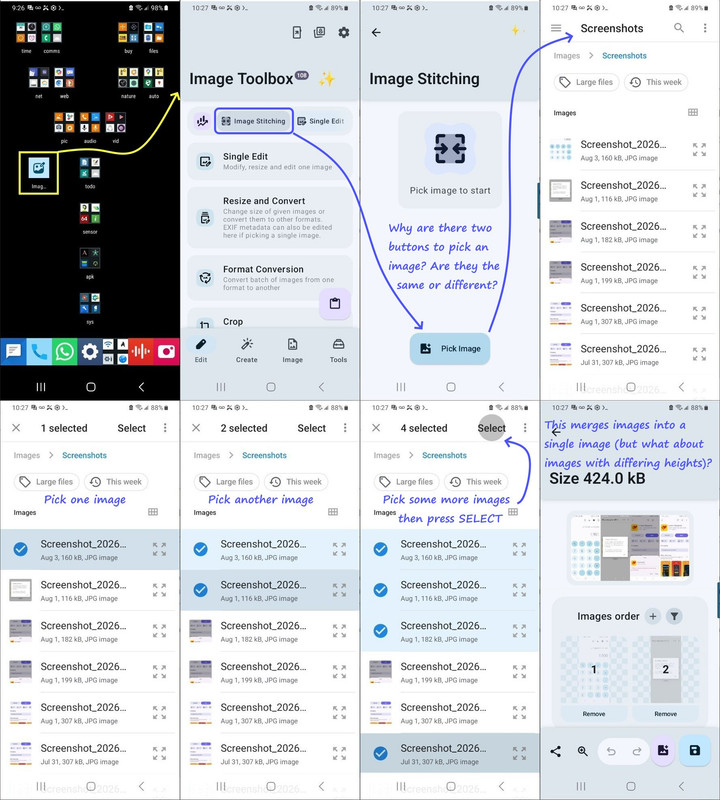
    a. They save screenshots & pick a few
    b. Then they merge the selected screenshots
    c. They annotate them with boxes, text & arrows

    Anyone have any experience with it making flows like this?
    <https://i.postimg.cc/NMwxXPz3/merge-screenshots.jpg>

    This has the latest versions, one of which is supplied as a universal APK.
    <https://github.com/T8RIN/ImageToolbox/releases/tag/4.1.0>
    wget https://github.com/T8RIN/ImageToolbox/releases/download/4.1.0/image-toolbox-4.1.0-universal.apk
    Name: image-toolbox-4.1.0-universal.apk
    Size: 216660774 bytes (206 MiB)
    SHA256: A0122FE2558172675D79B8F174FA6F141DAB5C204A441D59B47BB2E069ED51DE

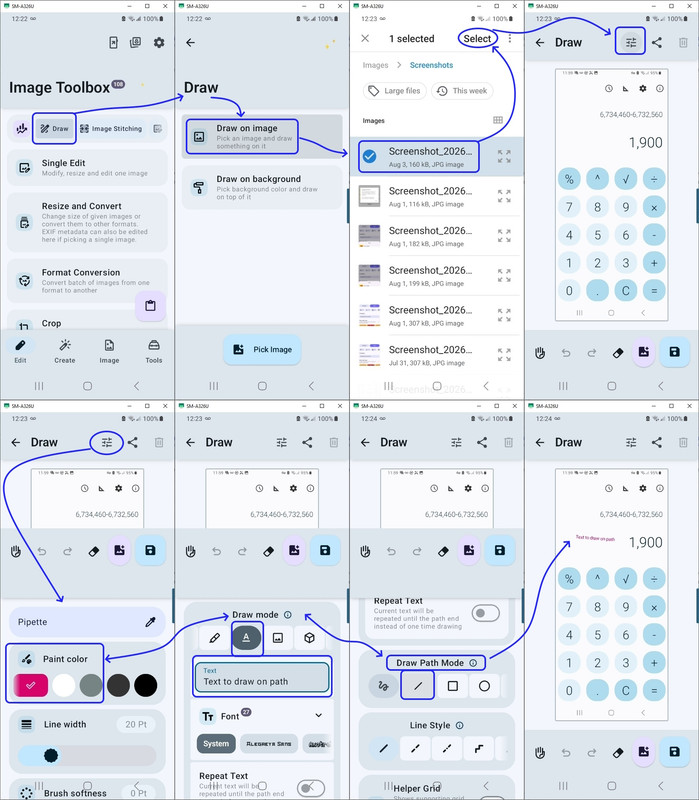
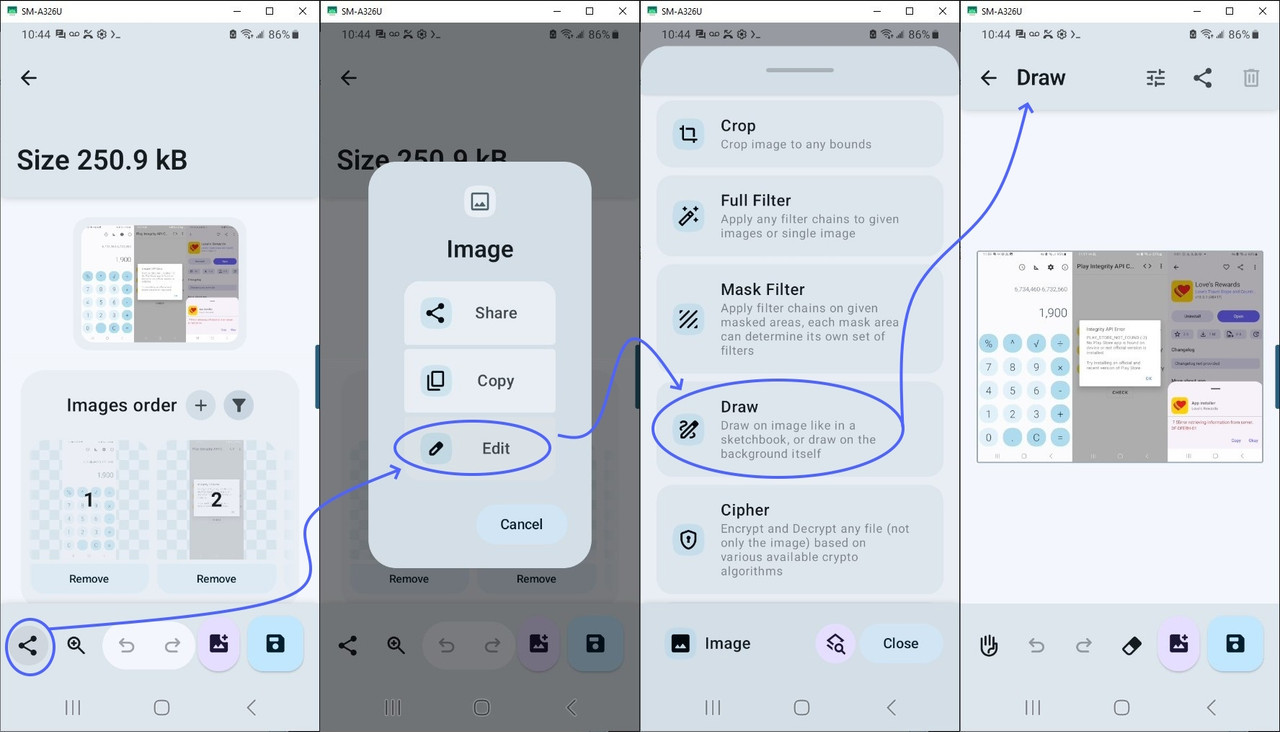
    I figured out how to draw onto an image using this flow shown below.
    <https://i.postimg.cc/ncsQHGdm/drawonimage.jpg>

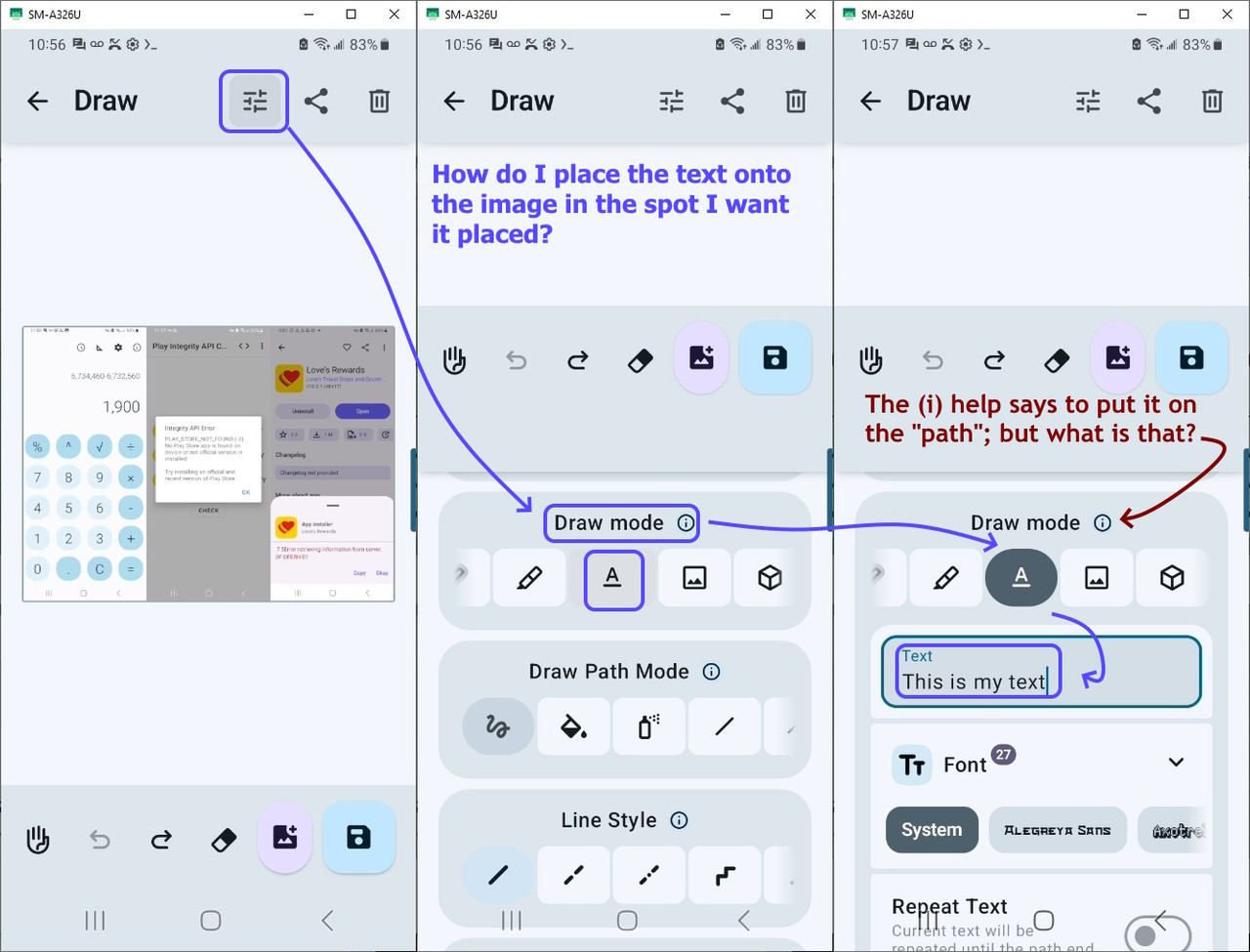
    But I'm having trouble anchoring the added anchored text though.
    <https://i.postimg.cc/bNd1Zhvt/annotate.jpg>

    Q: Do you know how to add anchored text in that FOSS Android image editor?
    A: ???
    --- Synchronet 3.22a-Linux NewsLink 1.2
  • From Maria Sophia@mariasophia@comprehension.com to comp.mobile.android,rec.photo.digital on Mon Aug 10 00:29:11 2026
    From Newsgroup: rec.photo.digital

    Maria Sophia wrote:
    Q: Do you know how to add anchored text in that FOSS Android image editor?
    A: ???

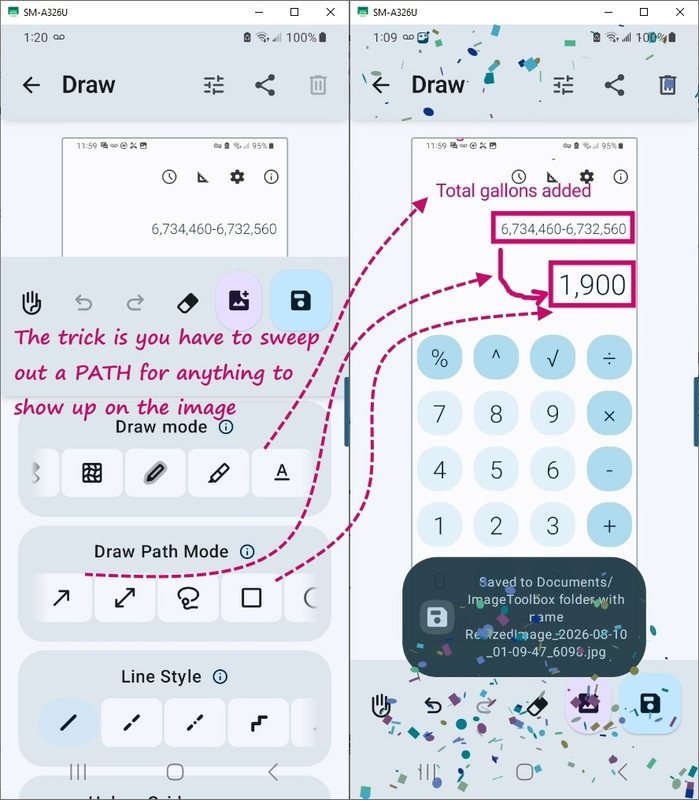
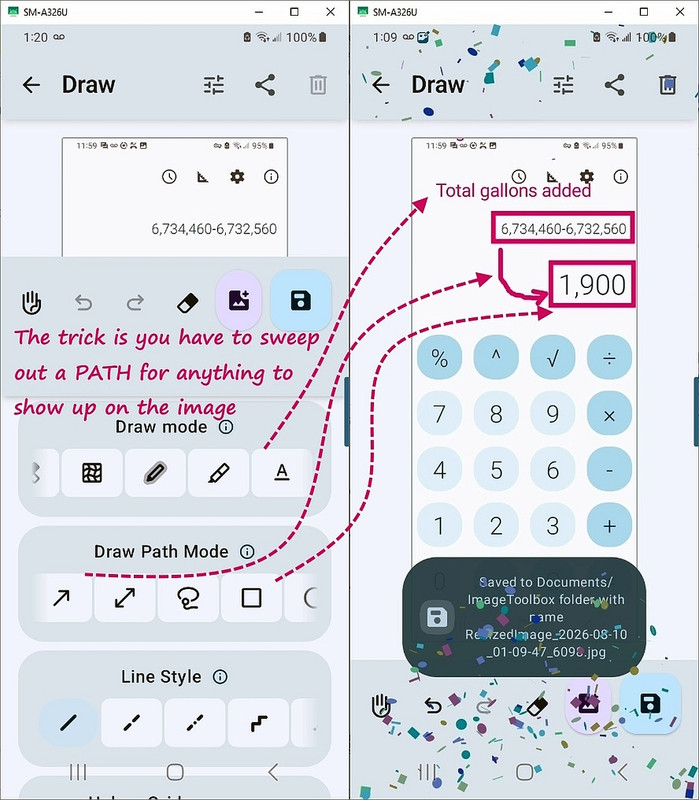
    I figured it out. <https://i.postimg.cc/W3KTTMDQ/draw-path-text.jpg>
    a. You have enter the ImageToolbox "Draw" menu
    b. You have to set the "Draw Mode" to "A" (text) and type the desired text
    c. Just clicking won't place it - you have to actually sweep out a path!

    The three things a screenshot editor needs to do are:
    1. Add text in desired locations
    2. Add a box around desired locations
    3. Add curved arrows (which should not cross fields)

    Now to add a box, it's the same sequence.
    a. You have enter the ImageToolbox "Draw" menu
    b. Set the "Draw Path Mode" to a rectangle or circle
    c. Just clicking won't place the box/circle - you have to sweep out a path

    To connect the text to the box, it's still the same sequence.
    a. You have enter the ImageToolbox "Draw" menu
    b. Set the "Draw Path Mode" to a curved arrow (double or single headed)
    c. Just clicking won't place the arrow - you have to sweep out a path

    Voila! <https://i.postimg.cc/xCW8trPQ/image-annotation.jpg>

    The main things needed to annotate screenshots to show flows is there.
    A. Merge screenshots (vertically or horizontally, scaling as needed)
    B. Annotate with boxes, text and curved arrows

    A lot of people might not intuitively grasp why a curved arrow is critical,
    but if it crosses over something they care about, they'll figure it out
    right away that the arrow should stay always in neutral space.
    --
    Every Usenet thread should be designed as a learning experience for all.
    --- Synchronet 3.22a-Linux NewsLink 1.2
  • From Eli the Bearded@*@eli.users.panix.com to comp.mobile.android,rec.photo.digital on Mon Aug 10 19:25:40 2026
    From Newsgroup: rec.photo.digital

    In rec.photo.digital, Maria Sophia <pusvul@getTjewytR4so+mqe2.invalid> wrote:
    PSA: ImageToolbox is supposedly the best FOSS Android image editor

    I just found out about this Android image editor from folks who make flows.
    <https://github.com/T8RIN/ImageToolbox>

    It's supposedly the best image editor on Android for documenting flows.
    a. They save screenshots & pick a few
    b. Then they merge the selected screenshots
    c. They annotate them with boxes, text & arrows
    [...]

    I was intrigued and installed this from F-Droid (search for "Image Toolbox"
    as two words was the hard part). I edited one image with it as a test.
    The app feels sleazy in the way that drives me away from so much of the
    stuff in "Play" store.

    It may well be "the best FOSS Android image editor" but I'll stick with
    less best that feels more wholesome.

    Elijah
    ------
    your mileage (and preferences) may vary
    --- Synchronet 3.22a-Linux NewsLink 1.2
  • From Maria Sophia@mariasophia@comprehension.com to comp.mobile.android,rec.photo.digital,comp.editors,comp.text.pdf on Mon Aug 10 12:17:30 2026
    From Newsgroup: rec.photo.digital

    Eli the Bearded wrote:
    I was intrigued and installed this from F-Droid (search for "Image Toolbox" as two words was the hard part). I edited one image with it as a test.
    The app feels sleazy in the way that drives me away from so much of the
    stuff in "Play" store.

    It may well be "the best FOSS Android image editor" but I'll stick with
    less best that feels more wholesome.


    Thanks for testing the FOSS Android Image Toolbox out for the team.
    <https://github.com/T8RIN/ImageToolbox>

    I had only heard of it a couple of days ago when I had complained on
    another site that there wasn't any good image editor that did these things
    1. Easily merge screenshots (vertical, horizontal, resize as needed)
    2. Easily draw a box around something (round, rectangular, whatever)
    3. Easily draw curved arrows (so that they can be routed around stuff)
    4. Easily add text where desired (sizes, fonts, placement, whatever)
    5. Easily remove the metadata (e.g., EXIF) prior to uploading to the net

    As far as I know, this is the only FOSS Android tool that does all that.
    Of course, it does a lot more. Like format conversion, Exif modification, cutting and flipping and rotating, resize by weight or limits, etc.

    It can also mess with PDF, in so much as it view PDF and merge images into
    PDF, convert images to PDF and vice versa, remove PDF pages, rotate,
    rearrange PDF pages, add page numbers to PDF, add electronic signatures to PDFs, remove annotations from PDF, grayscale, flatten, repair, unlock PDFs, extract images, etc.

    It also has QR & barcode and cipher and zip and ascii art and jxl and apng
    and webp and checksum tools.

    If it works, a keeper feature might be the OCR features in PDF-to-Text, although it might just spit out the inherent text in a nonbitmap PDF.

    Dunno if that stuff works well or not, but, as far as I know, it's the only FOSS tool on Android that does the main things needed to annotate
    screenshots for upload to the Internet.

    Note that it has the same issue all powerful image editors have.
    The learning curve is steep.

    Ask me how I know this...
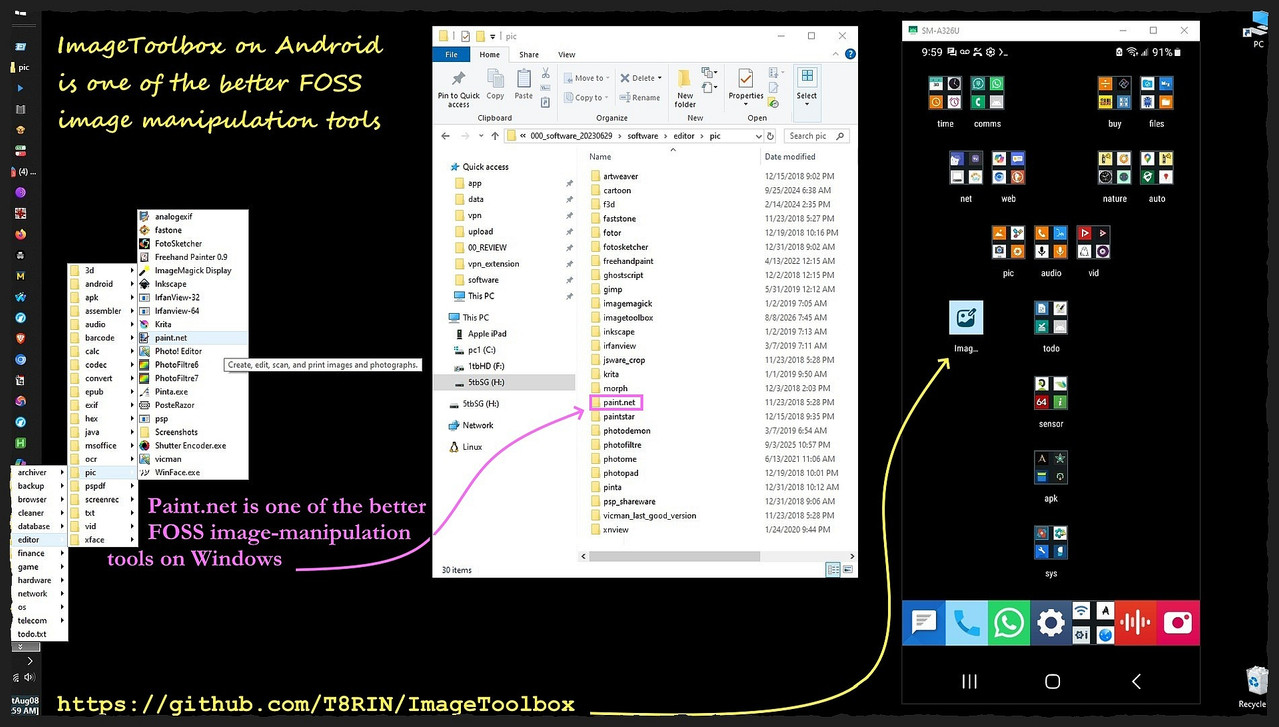
    <https://i.postimg.cc/pTnPx2j4/imagetoolbox.jpg>
    --- Synchronet 3.22a-Linux NewsLink 1.2
  • From Geoff@geoff@nospamgeoffwood.org to comp.mobile.android,rec.photo.digital on Tue Aug 11 16:41:15 2026
    From Newsgroup: rec.photo.digital

    On 11/08/2026 7:25 am, Eli the Bearded wrote:
    In rec.photo.digital, Maria Sophia <pusvul@getTjewytR4so+mqe2.invalid> wrote:
    PSA: ImageToolbox is supposedly the best FOSS Android image editor

    I just found out about this Android image editor from folks who make flows. >> <https://github.com/T8RIN/ImageToolbox>

    It's supposedly the best image editor on Android for documenting flows.
    a. They save screenshots & pick a few
    b. Then they merge the selected screenshots
    c. They annotate them with boxes, text & arrows
    [...]

    I was intrigued and installed this from F-Droid (search for "Image Toolbox" as two words was the hard part). I edited one image with it as a test.
    The app feels sleazy in the way that drives me away from so much of the
    stuff in "Play" store.

    It may well be "the best FOSS Android image editor" but I'll stick with
    less best that feels more wholesome.

    Elijah
    ------
    your mileage (and preferences) may vary

    So many 'best' things seem to suffer like that. I installed Irfanview
    for a period, but found some of the even the basic functions quirky and unintuitive.
    --
    geoff
    --- Synchronet 3.22a-Linux NewsLink 1.2
  • From Maria Sophia@mariasophia@comprehension.com to comp.mobile.android,rec.photo.digital on Mon Aug 10 22:27:18 2026
    From Newsgroup: rec.photo.digital

    Geoff wrote:
    your mileage (and preferences) may vary

    So many 'best' things seem to suffer like that. I installed Irfanview
    for a period, but found some of the even the basic functions quirky and unintuitive.

    Wow. Tough customer! :)

    Still, it's good to get other people's observations of editing tools!

    We're all different.

    There are very few people who don't use Irfanview, but as with all
    software, there are, as you say, 'quirks' such as constantly setting the Windows background to the current image by mistake until the more recent releases where, if you hit the keys, it will finally *ask* you if that's
    what you wanted to do (and, it's almost never, if not never, what you
    wanted to do, so that was a 'quirk' that the developer finally resolved).

    Even the venerable The GIMP will do everything you need to do, but with its
    own set of quirks. For example, drawing a box and texting and arrowing is
    way harder than it needs to be when you compared with Paint.NET usability.

    It has been years since I tried Pinta, which was supposed to replace
    Paint.NET (which has its own 'quirks', such as needing dot.NET crap).
    <https://pinta-project.com/pintaproject/pinta/releases>

    While Paint.NET is basically a free Photoshop on Windows, it too has
    quirks, such as the fact that you can't save your canvas values.
    <https://www.dotpdn.com/downloads/pdn.html>

    Anyway, for those of us who do extensive screenshot editing, the main
    things any editor needs to do is
    1. It has to merge images well
    2. It has to draw boxes and circles well
    3. It has to add text anywhere you want it
    4. And it has to draw curved arrows so as to avoid objects

    The hardest thing to get in an editor is the curved arrow, where even
    Paint.NET doesn't have as many handles to modify the curve as PhotoShop.

    I noticed that the suggested Image ToolBox also lacks handles, so its
    curved arrows are not nearly as smooth as those with Paint.NET.

    Take a look at this image, for example. Can you tell the difference in the Android curved Arrows versus the Windows curved arrows in the editing?
    <https://i.postimg.cc/0506CkNt/curved-arrows.jpg>

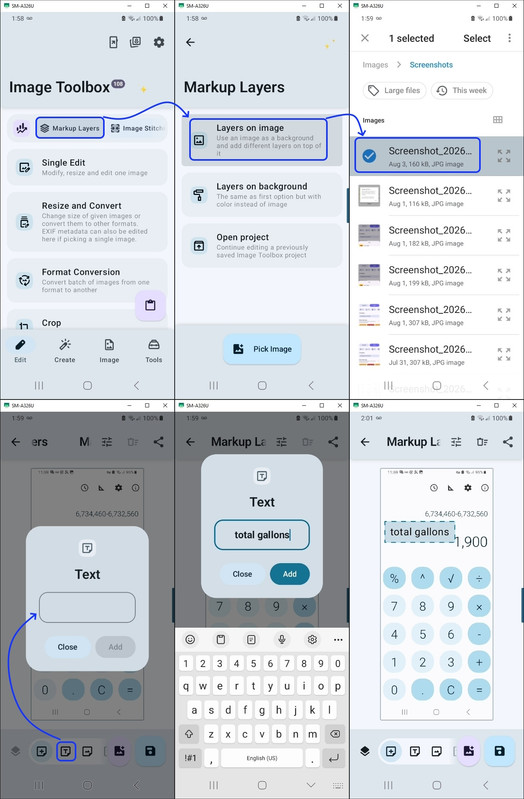
    BTW, I found another, perhaps easier but less functional way to add text
    using the Android Image Tool Box, which is to use the Markup Layer tool.
    <https://i.postimg.cc/KzFGKTtj/markuplayer.jpg>

    It's good to get other people's observations of editing tools!
    --
    Every Usenet thread should be designed as a learning experience for all.
    --- Synchronet 3.22a-Linux NewsLink 1.2
  • From Geoff@geoff@nospamgeoffwood.org to comp.mobile.android,rec.photo.digital on Wed Aug 12 12:00:05 2026
    From Newsgroup: rec.photo.digital

    On 11/08/2026 6:27 pm, Maria Sophia wrote:
    Geoff wrote:
    your mileage (and preferences) may vary

    So many 'best' things seem to suffer like that. I installed Irfanview
    for a period, but found some of the even the basic functions quirky and
    unintuitive.

    Wow. Tough customer! :)

    .........


    It's good to get other people's observations of editing tools!

    Yep, and give them all a good try. One day one might have everything
    just right for me. But that may not be just right for others ....
    --
    geoff
    --- Synchronet 3.22a-Linux NewsLink 1.2