• internet while travelling

    From Ted Heise@theise@panix.com to rec.outdoors.rv-travel on Mon Jun 15 14:54:59 2026
    From Newsgroup: rec.outdoors.rv-travel


    Hi all,

    My 2023 Acadia Denali came with OnStar service and data when new,
    but it expires this month. I've looked at extending it, as well
    as Starlink, but both seem to expensive for the few times we would
    actually use it. Our primary connectivity when travelling is wifi
    with my Samsung S25 (on Verizon) as backup. If the Verizon
    coverage isn't good enough (e.g., for us to watch Jeopardy!) I
    have used the Acadia's hotspot (on AT&T) as a third option. This
    has drawbacks, not least because the car has to be running.

    After thinking and searching the web a bit, I'm wondering whether
    a second SIM crd (or an eSIM) might be the best option for my use
    case. I think this would allow for infrequent limited use, with
    no extra equipment needed. Seems some options would be Nano SIM
    (for the physical card) and Airolo or Ubigi for eSIMS.

    Anyone have experience with this approach and options?
    --
    Ted Heise <theise@panix.com> Gretna, NE, USA
    --- Synchronet 3.22a-Linux NewsLink 1.2
  • From sticks@wolverine01@charter.net to rec.outdoors.rv-travel on Mon Jun 15 16:59:02 2026
    From Newsgroup: rec.outdoors.rv-travel

    On 6/15/2026 9:54 AM, Ted Heise wrote:
    Hi all,

    My 2023 Acadia Denali came with OnStar service and data when new,
    but it expires this month. I've looked at extending it, as well
    as Starlink, but both seem to expensive for the few times we would
    actually use it. Our primary connectivity when travelling is wifi
    with my Samsung S25 (on Verizon) as backup. If the Verizon
    coverage isn't good enough (e.g., for us to watch Jeopardy!) I
    have used the Acadia's hotspot (on AT&T) as a third option. This
    has drawbacks, not least because the car has to be running.

    After thinking and searching the web a bit, I'm wondering whether
    a second SIM crd (or an eSIM) might be the best option for my use
    case. I think this would allow for infrequent limited use, with
    no extra equipment needed. Seems some options would be Nano SIM
    (for the physical card) and Airolo or Ubigi for eSIMS.

    Anyone have experience with this approach and options?

    I haven't had to use the Starlink yet this year because I get good
    enough coverage with my phone that I can use it as a hotspot for the
    laptop. I have hooked up to the tv just to see if it works, and it is
    just fine, but I almost never watch tv. We tried one time out in Utah
    when a debate or something was on, but other than that it never gets
    turned on.

    Have you tried just using your phone as a hotspot? I don't see why you
    would need another sim card if the phone has signal.

    I really do like having the Starlink option though. I had upgraded to unlimited, but they raised the cheaper mobile plan from 50 GB to 100 GB
    now. That will probably work just fine for what we do. You pause it
    when not in use, and I pay $5 for that. the !00 GB plan is $55, and now
    they added a 300 GB that is $80, or the unlimited which is up to $175 now.
    --
    Science DoesnrCOt Support Darwin. Scientists Do

    --- Synchronet 3.22a-Linux NewsLink 1.2
  • From Ted Heise@theise@panix.com to rec.outdoors.rv-travel on Tue Jun 16 14:43:22 2026
    From Newsgroup: rec.outdoors.rv-travel

    On Mon, 15 Jun 2026 16:59:02 -0500,
    sticks <wolverine01@charter.net> wrote:
    On 6/15/2026 9:54 AM, Ted Heise wrote:

    My 2023 Acadia Denali came with OnStar service and data when
    new, but it expires this month. I've looked at extending it,
    as well as Starlink, but both seem to expensive for the few
    times we would actually use it. Our primary connectivity when
    travelling is wifi with my Samsung S25 (on Verizon) as backup.
    If the Verizon coverage isn't good enough (e.g., for us to
    watch Jeopardy!) I have used the Acadia's hotspot (on AT&T) as
    a third option. This has drawbacks, not least because the car
    has to be running.

    I haven't had to use the Starlink yet this year because I get
    good enough coverage with my phone that I can use it as a
    hotspot for the laptop. I have hooked up to the tv just to see
    if it works, and it is just fine, but I almost never watch tv.
    We tried one time out in Utah when a debate or something was
    on, but other than that it never gets turned on.

    Have you tried just using your phone as a hotspot? I don't see
    why you would need another sim card if the phone has signal.

    Yeah, I probably wasn't clear enough that my Samsung as backup to
    wifi is as a hotspot. It works well when there's enough signal,
    but there are places with nearly none. Hence, my considering a
    second SIM (physical or e) as a third option. The likelihod tho
    is that if I'm in a remote area with no Verizon signal neither
    AT&T nor T-Mobile will be strong.


    I really do like having the Starlink option though. I had
    upgraded to unlimited, but they raised the cheaper mobile plan
    from 50 GB to 100 GB now. That will probably work just fine
    for what we do. You pause it when not in use, and I pay $5 for
    that. the !00 GB plan is $55, and now they added a 300 GB that
    is $80, or the unlimited which is up to $175 now.

    I read about the pause option, how much of a hassle is to actually
    do? And how much trouble was it to get and install the equipment?
    I might consider this option as a backup.
    --
    Ted Heise <theise@panix.com> Gretna, NE, USA
    --- Synchronet 3.22a-Linux NewsLink 1.2
  • From sticks@wolverine01@charter.net to rec.outdoors.rv-travel on Tue Jun 16 10:19:13 2026
    From Newsgroup: rec.outdoors.rv-travel

    On 6/16/2026 9:43 AM, Ted Heise wrote:
    On Mon, 15 Jun 2026 16:59:02 -0500,
    sticks <wolverine01@charter.net> wrote:
    On 6/15/2026 9:54 AM, Ted Heise wrote:

    My 2023 Acadia Denali came with OnStar service and data when
    new, but it expires this month. I've looked at extending it,
    as well as Starlink, but both seem to expensive for the few
    times we would actually use it. Our primary connectivity when
    travelling is wifi with my Samsung S25 (on Verizon) as backup.
    If the Verizon coverage isn't good enough (e.g., for us to
    watch Jeopardy!) I have used the Acadia's hotspot (on AT&T) as
    a third option. This has drawbacks, not least because the car
    has to be running.

    I haven't had to use the Starlink yet this year because I get
    good enough coverage with my phone that I can use it as a
    hotspot for the laptop. I have hooked up to the tv just to see
    if it works, and it is just fine, but I almost never watch tv.
    We tried one time out in Utah when a debate or something was
    on, but other than that it never gets turned on.

    Have you tried just using your phone as a hotspot? I don't see
    why you would need another sim card if the phone has signal.

    Yeah, I probably wasn't clear enough that my Samsung as backup to
    wifi is as a hotspot. It works well when there's enough signal,
    but there are places with nearly none. Hence, my considering a
    second SIM (physical or e) as a third option. The likelihod tho
    is that if I'm in a remote area with no Verizon signal neither
    AT&T nor T-Mobile will be strong.

    Yeah, that's what I was thinking, and with Verizon you've got probably
    the best overall coverage. There are some places where this is not
    true, but it is hit or miss on which one would be better. For example,
    I've heard US Cellular is good in parts of Wisconsin my T-Mobile gets no signal. But everywhere else, T-Mobile is much better.

    I really do like having the Starlink option though. I had
    upgraded to unlimited, but they raised the cheaper mobile plan
    from 50 GB to 100 GB now. That will probably work just fine
    for what we do. You pause it when not in use, and I pay $5 for
    that. the !00 GB plan is $55, and now they added a 300 GB that
    is $80, or the unlimited which is up to $175 now.

    I read about the pause option, how much of a hassle is to actually
    do? And how much trouble was it to get and install the equipment?
    I might consider this option as a backup.

    Nothing to it. You just log in to Starlink and pause the service. Same
    for starting up. Log in, and either resume the plan you have or change
    to a different plan with the click of a mouse. That part is easy. I
    take it all with me when I go, it's in a closet now, and if I don't have
    good wifi I can resume service and use it. Around here, I probably
    don't need it much as I get enough cell service. Out west is another story.

    As far as the equipment, it would depend on how you wanted to go. I got
    mine from a special on Home Depot, but you can also order directly from Starlink, I think. Before you purchase though, there are different
    kinds of panels and you'd have to decide what you want. I went with the standard size because I knew I would be mostly pole mounting it for use,
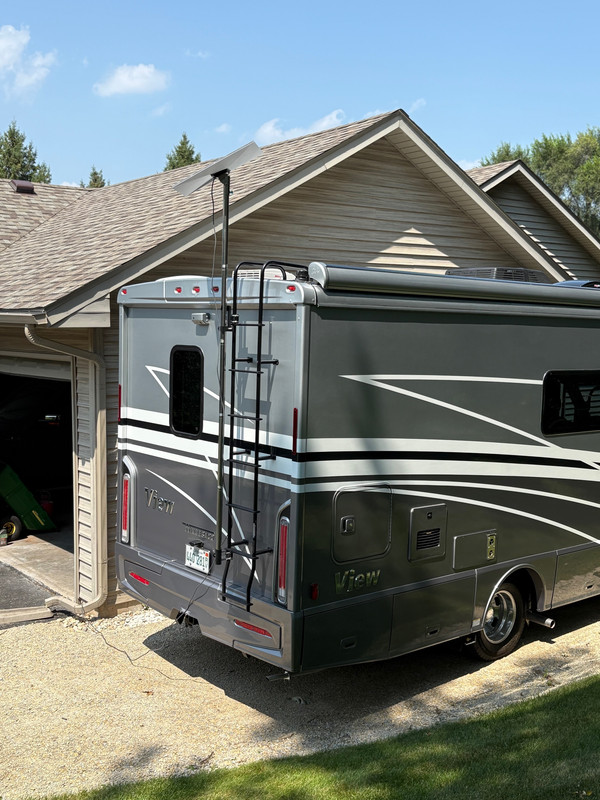
    but they do make the smaller portable ones. I have mine set up so I can
    mount it over the top of the View and rotate it on a pole for proper alignment. I don't think you would need to do this, but you could. You
    often see people at campgrounds with these simply on their stands on the ground. You can move the panel around to a spot with a better clear
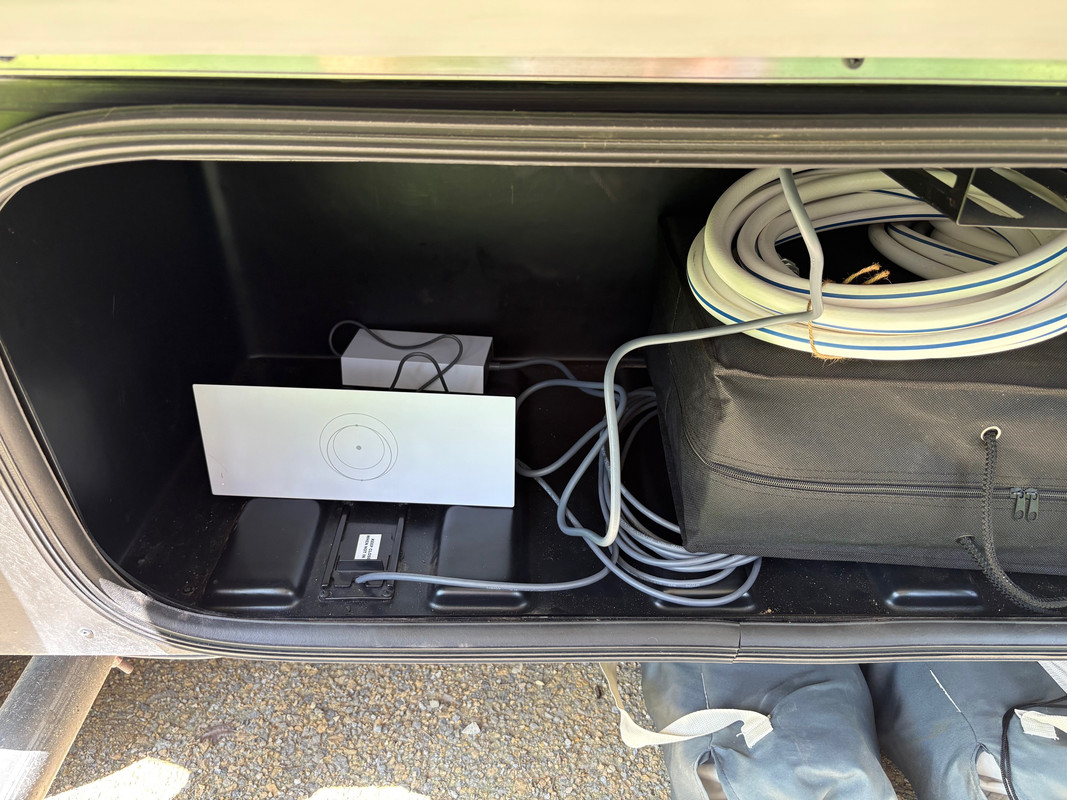
    sky. They provide the router and all the special cables. You plug in
    the router power supply and power up the router. Your provided ethernet
    cable goes from the panel to the router. Once you power up the router
    and that's about it. I keep all mine once I get it out in one of my
    storage compartments that has a power outlet inside it.

    <https://i.postimg.cc/25rYMthj/Starlink.jpg> <https://i.postimg.cc/dQkwD85m/Starlink-Router.jpg>

    BTW, with mine I did have issues with heavy tree cover not getting good
    enough signal to use. But, when I was in Missouri the camp host had his
    right under the trees with what looked like no clear sky at all. I
    asked him how his signal was and he said it worked just fine and they
    never had any issues. Really surprised me on that.
    --
    Science DoesnrCOt Support Darwin. Scientists Do

    --- Synchronet 3.22a-Linux NewsLink 1.2
  • From Ted Heise@theise@panix.com to rec.outdoors.rv-travel on Wed Jun 17 14:28:20 2026
    From Newsgroup: rec.outdoors.rv-travel

    On Tue, 16 Jun 2026 10:19:13 -0500,
    sticks <wolverine01@charter.net> wrote:

    Nothing to it. You just log in to Starlink and pause the
    service. Same for starting up. Log in, and either resume the
    plan you have or change to a different plan with the click of a
    mouse. That part is easy. I take it all with me when I go,
    it's in a closet now, and if I don't have good wifi I can
    resume service and use it. Around here, I probably don't need
    it much as I get enough cell service. Out west is another
    story.

    As far as the equipment, it would depend on how you wanted to
    go. I got mine from a special on Home Depot, but you can also
    order directly from Starlink, I think. Before you purchase
    though, there are different kinds of panels and you'd have to
    decide what you want. I went with the standard size because I
    knew I would be mostly pole mounting it for use, but they do
    make the smaller portable ones. I have mine set up so I can
    mount it over the top of the View and rotate it on a pole for
    proper alignment. I don't think you would need to do this, but
    you could. You often see people at campgrounds with these
    simply on their stands on the ground. You can move the panel
    around to a spot with a better clear sky. They provide the
    router and all the special cables. You plug in the router
    power supply and power up the router. Your provided ethernet
    cable goes from the panel to the router. Once you power up the
    router and that's about it. I keep all mine once I get it out
    in one of my storage compartments that has a power outlet
    inside it.

    <https://i.postimg.cc/25rYMthj/Starlink.jpg> <https://i.postimg.cc/dQkwD85m/Starlink-Router.jpg>

    Thanks for the overview, much appreciated!


    BTW, with mine I did have issues with heavy tree cover not
    getting good enough signal to use. But, when I was in Missouri
    the camp host had his right under the trees with what looked
    like no clear sky at all. I asked him how his signal was and
    he said it worked just fine and they never had any issues.
    Really surprised me on that.

    I've used various GPS devices on my bicycles (and for hiking) for
    decades. The earliest ones sometimes had trouble under heavy tree
    cover (or in "urban canyons"). My impression (don't recall if it
    was from reading, experience, or both) was that the tree cover was
    more of a problem if it was wet (i.e., recent rain). The more
    recent units seem to be much more robust in this respect.
    --
    Ted Heise <theise@panix.com> Gretna, NE, USA
    --- Synchronet 3.22a-Linux NewsLink 1.2
  • From sticks@wolverine01@charter.net to rec.outdoors.rv-travel on Wed Jun 17 12:13:38 2026
    From Newsgroup: rec.outdoors.rv-travel

    On 6/17/2026 9:28 AM, Ted Heise wrote:
    On Tue, 16 Jun 2026 10:19:13 -0500,
    BTW, with mine I did have issues with heavy tree cover not
    getting good enough signal to use. But, when I was in Missouri
    the camp host had his right under the trees with what looked
    like no clear sky at all. I asked him how his signal was and
    he said it worked just fine and they never had any issues.
    Really surprised me on that.

    I've used various GPS devices on my bicycles (and for hiking) for
    decades. The earliest ones sometimes had trouble under heavy tree
    cover (or in "urban canyons"). My impression (don't recall if it
    was from reading, experience, or both) was that the tree cover was
    more of a problem if it was wet (i.e., recent rain). The more
    recent units seem to be much more robust in this respect.

    With GPS, I've not had problems with those satellites under trees that I recall. Where I do have problems is hiking in canyons. If you get
    enough rock cover I guess you can create blind spots to the hookups. I
    just gotta keep moving to hook back up.
    --
    Science DoesnrCOt Support Darwin. Scientists Do

    --- Synchronet 3.22a-Linux NewsLink 1.2