I've been using an old HF $15 wired OBDII tester for a decade or more, but when I scanned a friend's car for her today, her neighbor came over to
see what the commotion was, and then he came back to give me a Christmas gift.
It's a blue plastic OBD adapter with "ELM 327 mini Interace" on the sticker. He said he kept one in each vehicle, so he just pulled it out of his bimmer.
All it says otherwise is "Supports all OBDII protocols" but it doesn't have any brand or model identifier. He said it works (as he said some don't work).
He said I could get software for it on the net, so I ran an AppFinder search for free ad free Android apps rated over 4.0 with no in-app purchases, etc.
There were 18 results for free, adfree & inapppurchasefree, but when I raised the sort slider to exclude those with less than a 4.0 rating, only 2 showed up.
*ULTRA OBD OBD2 CAR SCANNER ELM* by XAS Applications
free,adfree,gsf?,rated 4.4 stars in 320 reviews with 10K+ Downloads
<https://play.google.com/store/apps/details?id=com.applications.xas.obdultra>
*OBD Diag & Scan* by clickshopping.fr
free,adfree,gsf?,rated 4.2 stars in 382 reviews with 50K+ Downloads
<https://play.google.com/store/apps/details?id=com.clickshopping.obddiagscan>
When I lowered the filtering criteria below 4.0, one more showed up.
*Smart Control OBD2 Scanner ELM* by SmartApps4Me
free,adfree,gsf?,rated 3.9 stars in 2.94K reviews with 100K+ Downloads
<https://play.google.com/store/apps/details?id=it.smartapps4me.smartcontrol>
Further lowering the filtering below 3.7 brought up another app.
*ELM OBD Terminal* by CHINH LUONG QUOC
free,adfree,gsf?,inappfree,rated 3.6 stars in 25 reviews with 5K+ Downloads
<https://play.google.com/store/apps/details?id=com.chinhlqtb.elm327.obd2.terminal>
Lowering filters to 3.5 brings up yet another set of free OBDII ELM apps.
*alOBD Scanner* by Alexandre Beloussov
free,adfree,gsf?,inappfree,rated 3.5 stars in 130 reviews with 50K+ Downloads
<https://play.google.com/store/apps/details?id=com.obd2>
Which seems to have a command-line terminal CLI utility.
*alOBD Terminal* by Alexandre Beloussov
free,adfree,gsf?,inappfree,rated 3.1 stars in 72 reviews with 10K+ Downloads
<https://play.google.com/store/apps/details?id=com.obd2.research>
Lowering filters to 3.4 brings up more free OBDII ELM apps.
*CCY OBD MOBILE - for ELM327 an* by CCY - DIAGNOSTIC INTERFACES
free,adfree,gsf?,inappfree,rated no stars with 5K+ Downloads
<https://play.google.com/store/apps/details?id=pl.ccy.ccyobdmobile>
And then there are the apps which have too few reviews to be rated.
*X-ELM* by v-checker
free,adfree,gsf?,inappfree,rated no stars with 100+ Downloads
<https://play.google.com/store/apps/details?id=com.vchecker.x_elm>
*Dashboard Racing 695* by Laurent CASSIER
free,adfree,gsf?,inappfree,rated 5.0 stars in 77 reviews with 10K+ Downloads
<https://play.google.com/store/apps/details?id=com.konart.obd.dashboardRacing>
*Infocar Connect - Diagnostics* by Infocar Connect AB
free,adfree,gsf?,inappfree,rated no stars with 10K+ Downloads
<https://play.google.com/store/apps/details?id=se.infocar.icardtc>
*Escaner coche ELM OBD Autoxuga* by Autoxuga Movil, SL
free,adfree,gsf?,inappfree,rated no stars with 500+ Downloads
<https://play.google.com/store/apps/details?id=com.autoxuga.obd>
*Escaner coche ELM OBD2 tecnico* by Autoxuga Movil, SL
free,adfree,gsf?,inappfree,rated no stars with 1+ Downloads
<https://play.google.com/store/apps/details?id=com.autoxuga.diagnosisobd>
Given all that above... (all of which I've now installed on my Galaxy)...
Do any of you out there use these inexpensive bluetooth scanners on your car? Do you have recommendations as to what software and which features you prefer?
Is the use as simple as just setting up bluetooth on my phone and plugging this OBDII into the car's OBD port under the driver's cockpit dash board.
Do you leave them in all the time (the guy who gave it to me says he does).
I'll test it out tomorrow - but I figured I'd ask now that I've run the search for the free OBDII software that has no ads or in-app purchases.
I've used Torque for several years - although I don't need to use it
very often. The Lite version is free but may have ads (can't remember) -
but the Pro version only costs peanuts - currently just under 5 US dollars.
I've used Torque for several years - although I don't need to use it
very often. The Lite version is free but may have ads (can't remember) -
but the Pro version only costs peanuts - currently just under 5 US dollars.
Roger Mills <mills37.fslife@gmail.com> wrote
I've used Torque for several years - although I don't need to use it
very often. The Lite version is free but may have ads (can't remember) -
but the Pro version only costs peanuts - currently just under 5 US dollars.
Thanks. I should have mentioned the gift giver mentioned that app, while
the apps I listed are all ad free (and in-app-purchase free).
However, I've already nixed most of them as apps get one strike and they're out, where just asking for an account is considered a first strike.
Since we always want everyone to benefit from every action, I went looking for links, but it seems a lot of OBDII scanners glom off the Torque name.
<https://play.google.com/store/search?q=torque%20obd&c=apps>
Which of those is the "real" torque app?
I've used Torque for several years - although I don't need to use it
very often. The Lite version is free but may have ads (can't remember) -
but the Pro version only costs peanuts - currently just under 5 US dollars.
I've used Torque Pro for many years. Well worth the cost.
I've found that the best ELM327 adapter is the one from Carista. The
lower cost ones from Aliexpress often have connection issues.
Carista also sells vehicle-specific software, for some makes, that goes beyond the generic OBD-II capabilities and that lets you program a bunch
of features of the vehicle. But I've never purchased that software.
Before I go for a smog check I always check that all the self-tests on
the vehicle are complete. On one of my vehicles that I don't drive a lot
I disconnect the battery when not in use so the self-tests all need to complete before I go for a smog check.
Which of those is the "real" torque app?
The REAL ones (LITE and PRO) are the ones by Ian Hawkins.
The REAL ones (LITE and PRO) are the ones by Ian Hawkins.
The REAL ones (LITE and PRO) are the ones by Ian Hawkins.
Also, unless things have changed, Torque is not available for iOS. The original issue was the the Bluetooth ELM327 adapters use the Bluetooth Serial Port Profile (SPP) which Apple forgot to include on iOS <https://support.apple.com/en-us/102842> so ELM327 adapters to use with
iOS were Wi-Fi and were less common and more expensive. A few newer
ELM327 adapters, like the Carista, are BLE; SPP capability is built into BLE.
sms <scharf.steven@geemail.com> wrote
The REAL ones (LITE and PRO) are the ones by Ian Hawkins.
Also, unless things have changed, Torque is not available for iOS. The
original issue was the the Bluetooth ELM327 adapters use the Bluetooth
Serial Port Profile (SPP) which Apple forgot to include on iOS
<https://support.apple.com/en-us/102842> so ELM327 adapters to use with
iOS were Wi-Fi and were less common and more expensive. A few newer
ELM327 adapters, like the Carista, are BLE; SPP capability is built into
BLE.
This is good information that venerable Torque OBDII app isn't on iOS, as many of us have both platforms, Steve Scharf included (who is also a long-time a.h.r poster).
I've pretty much given up on iOS mainly because there are thousands upon thousands of useful things it can't do that every other platform does (an example is the Tor Browser, but there are thousands of things it can't do).
Still, I noticed that the Torque Lite app does Wi-Fi, so if the ELM327
OBDII adapter can do Wi-Fi, maybe the Bluetooth SPP might not matter?
Dunno.
Looking it up briefly, there are caveats galore for these iOS apps but a
lot of the reviews seem to be focused on Wi-Fi and not so much Bluetooth.
*How To Setup ELM327 WiFi OBD II Scanner With iPhone (iOS)*
<https://www.fueleconomysolutions.com.au/page/obd-ii-applications-guide/how-to-setup-elm327-wifi-obd-ii-scanner-with-iphon/>
Even though the iOS platform is crippled by Apple such that it can't do the thousands upon thousands of useful things, it seems people "do" finally (after careful purchasing anyway) get iOS to work with ELM327 OBD devices.
*What iPhone/iPad app works best with ELM327 Bluetooth OBD-II reader?*
<https://mechanics.stackexchange.com/questions/346/what-iphone-ipad-app-works-best-with-elm327-bluetooth-obd-ii-reader>
Apparently the reason is Apple uses a highly non-standard hardware implementation, which (surprise!) you have to purchase from Apple
if you're an OBDII device manufacturer, which not only makes the Apple product (as always) the most expensive to do even the simplest of things,
but also extremely non standard (I'm shocked. Shocked I say).
Even though I myself have people in my family (mostly the non-technical
girls whom Apple markets the most to anyway), I've given up since time and again iOS can't do what every other platform easily does. (Sigh).
And I ended up with IOS when ONLY IOS supported my requirements -8
years ago - and the IOS implementation of both my hearing aids and my (non-apple) smart watch is still head and shoulders ahead of the"Droid version (which my brother uses)
I have always (I've been in the IT world for 30+ years) been an Apple
Sceptic - but other than the google search engine I've had little or
no use for any Google product - particularly Android and Chrome.
sms <scharf.steven@geemail.com> wrote
The REAL ones (LITE and PRO) are the ones by Ian Hawkins.
Also, unless things have changed, Torque is not available for iOS. The
original issue was the the Bluetooth ELM327 adapters use the Bluetooth
Serial Port Profile (SPP) which Apple forgot to include on iOS
<https://support.apple.com/en-us/102842> so ELM327 adapters to use with
iOS were Wi-Fi and were less common and more expensive. A few newer
ELM327 adapters, like the Carista, are BLE; SPP capability is built into
BLE.
This is good information that venerable Torque OBDII app isn't on iOS, as many of us have both platforms, Steve Scharf included (who is also a long-time a.h.r poster).
Since you were asking about *Android* OBDII software, the issue of
whether or not it works on Apple devices is completely irrelevant
On 24/12/2023 16:51, Wally J wrote:
sms <scharf.steven@geemail.com> wroteSince you were asking about *Android* OBDII software, the issue of
The REAL ones (LITE and PRO) are the ones by Ian Hawkins.
Also, unless things have changed, Torque is not available for iOS. The
original issue was the the Bluetooth ELM327 adapters use the Bluetooth
Serial Port Profile (SPP) which Apple forgot to include on iOS
<https://support.apple.com/en-us/102842> so ELM327 adapters to use with
iOS were Wi-Fi and were less common and more expensive. A few newer
ELM327 adapters, like the Carista, are BLE; SPP capability is built into >>> BLE.
This is good information that venerable Torque OBDII app isn't on iOS, as
many of us-a have both platforms, Steve Scharf included (who is also a
long-time a.h.r poster).
whether or not it works on Apple devices is completely irrelevant
Roger Mills <mills37.fslife@gmail.com> wrote
Since you were asking about *Android* OBDII software, the issue of
whether or not it works on Apple devices is completely irrelevant
True. It was Steve (as I recall) who brought up iOS devices, not me.
I knew that all iOS devices are crippled by Apple from the start.
However I did duly respond to what Steve brought up, so I apologize.Show the posting id of the post and a quote.
If you want to get something done, Android is always the way to go.
I've nixed a few of the Android apps in the original list already, mostly
for requiring a login account (what for?) but also for language issues.
An OBDII app is worthless (to me anyway) if it doesn't support (almost) all ELM327 devices and bluetooth protocols as there's no need for having to
deal with proprietary anything and whatever bluetooth that Android supports is what EVERY OBDII app should support (it's fine if the OBDII device additionally has Wi-Fi but if a setup requires Wi-Fi devices, it's garbage, IMHO).
Some even "seem" to require their own ELM327 OBD brand, which is crazy.
The OBDII setup should just work with just about everything out there. Anything else is crippled from the start.
Moving forward, so that everyone always benefits from every action, I ran a few tests - which require me to be near the car & away from the PC, so they're not finished yet - but here is the preliminary test result...
1 requires account (strike 1, you're out)
Clare Snyder <clare@snyder.on.ca> wrote
And I ended up with IOS when ONLY IOS supported my requirements -8
years ago - and the IOS implementation of both my hearing aids and my
(non-apple) smart watch is still head and shoulders ahead of the"Droid
version (which my brother uses)
Many years ago, when my company in the Silicon Valley used on the Mac whatever the app was that PowerPoint replaced, I set up SunOS (later
Solaris) and Windows (probably Windows 95 at the time) with the Mac (I
don't remember which one but I have two black canvas Apple "travel bags" (which are as large as a vertical suitcase tower) - and that interoperable Windows:Linux:Mac "integration" was my "IT" introduction to the strange things that Apple does - which no other consumer OS would think of doing.
I had to use Apple's Columbia AppleTalk protocol (aka "cap") to interface
with Windows Samba (I think it would be more properly called CIFs or SMB) with the Linux implementation of Samba (which was a joy to set up by way of comparison). And it worked. At least it worked as well as it could work. (This is well before "the web" existed - of course.)
*The problem was _always_ the Apple users.*
First off, they created (unbeknownst to themselves) a "resource fork" and a "data fork" for their Microsoft Office documents, but secondly they never could get the handle on the fact that a file could be accessed by different users and therefore a bit of data management (often called DM) had to be exercised.
Of course, there were the UNIX CR/LF issues to deal with also. :)
I have always (I've been in the IT world for 30+ years) been an Apple
Sceptic - but other than the google search engine I've had little or
no use for any Google product - particularly Android and Chrome.
While I own plenty of iOS devices, as do many in my family (usually the
least technical for reasons I won't go into at the moment but which the
Apple advertising caters to and the marketing analysis agrees with), my
first introduction to the hell that is Apple was when I bought iPods.
I still have them - where they were a world easier to use in the hand than the Panasonic mp3 players ever were - where a single thumb controlled everything, which is just great. Steve Jobs at his finest in the iPod.
However...
I took that iPod home from Costco, and lo and behold the damn thing doesn't work unless you create a walled-garden account on it - which - of course - required walled-garden bloatware - which - let's be clear - is pure
garbage.
Luckily, once you've initialized an iPod using Windows iTunes bloatware,
<https://duckduckgo.com/?hps=1&q=itunes+bloatware>
you don't need the iTunes bloatware ever again (or so you would think).
Now it's time to put all your songs onto that iPod. How do you do it?
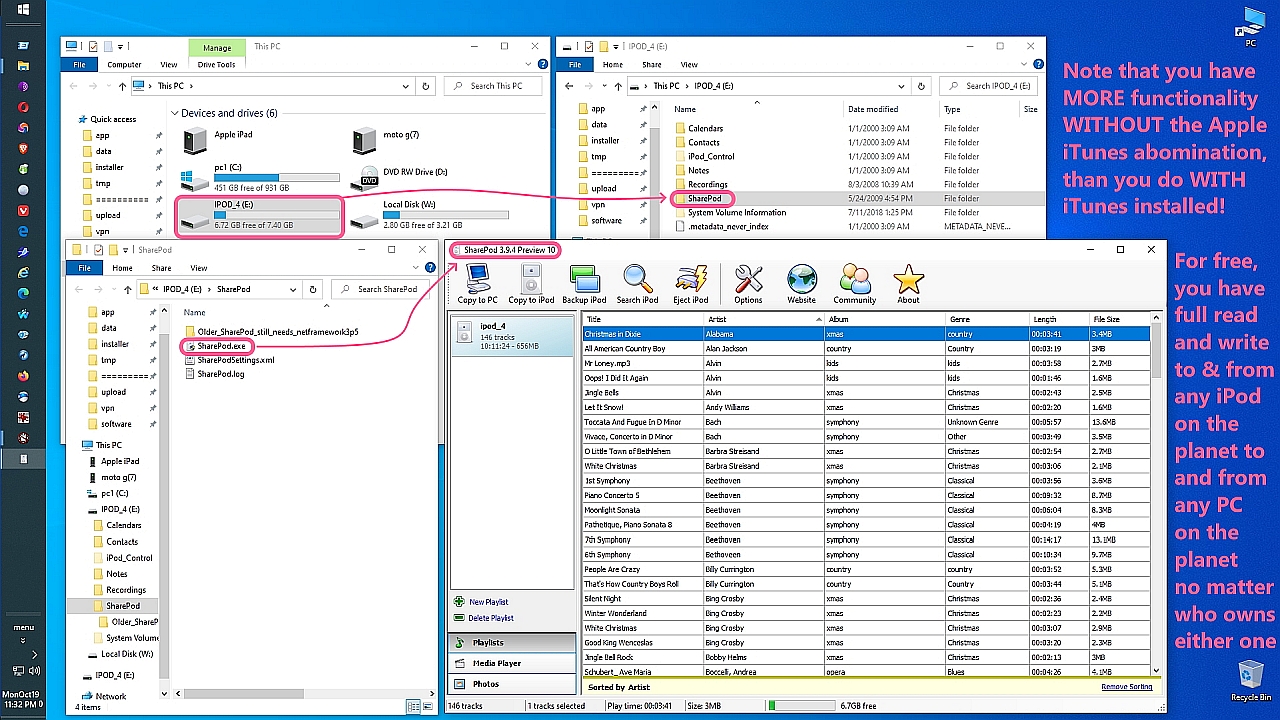
Well, you install Sharepod, that's how.
It works perfectly. And still does, by the way, becasue you literally put
the SharePod executable ON THE iPod and it works off of the iPod itself!
How great it that!
a. You plug in the iPod to Windows (without iTunes bloatware involved)
b. You see all your songs in a spreadsheet-like drag-n-drop GUI
c. You slide songs on or off the iPod on or off the PC
What could be easier, right?
Now install iTunes.
Watch what happens.
<https://i.postimg.cc/fRtZFGSt/sharepod01.jpg> iTunes removes functionality
| Sysop: | Amessyroom |
|---|---|
| Location: | Fayetteville, NC |
| Users: | 70 |
| Nodes: | 6 (0 / 6) |
| Uptime: | 02:07:12 |
| Calls: | 950 |
| Calls today: | 2 |
| Files: | 1,325 |
| Messages: | 281,587 |