• Revamp the freeware PDF munging tool chart we've maintained for decades

    From Maria Sophia@mariasophia@comprehension.com to comp.text.pdf,alt.comp.os.windows-10,alt.os.linux,alt.comp.freeware,comp.editors on Sun Nov 15 02:21:11 2026
    From Newsgroup: comp.text.pdf

    It's time, I think, either to find a comprehensive chart of freeware PDF munging tools online, or, to revamp the decades-old chart we've been using.

    (Limited to 80 characters per line, save for URLs)...

    PDF munging freeware suggested on the various Usenet groups:

    Edit (LibreOfx,InkScape,PDFSam,OpenOfx,PDFEdit,Scribus,PDFcraft,Stirling) Delete pages (pdfsam,pdftk,PDF-XChange Editor,PDF Arranger,muPDF)
    Add bookmarks/TOC (jpdfbookmarks,LaTeX(hyperref),PDF-ExchangeEditor
    Add hyperlinks & buttons (LibreOffice,LaTeX,PDF-XChange Editor)
    Add or concatenate pages (pdftk,muPDF)
    Add signature (Adobe Reader,PDFgear)
    Add minor text to pdf (Irfanview or Paint.NET plugins +
    Ghostscript,pdfgear)
    Minor text editing changes (Adobe Reader commenting,PDF-XChange Editor)
    Add watermarks or background layers (pdftk,PDFgear,PDFsam)
    Archive web sites to clickable PDF (wkhtmltopdf,fastone scroll capture)
    Batch rename,convert,split PDFs (PDFsam,Poppler,Ghostscript)
    Compare two PDFs side-by-side (DiffPDF,Acrobat Pro)
    Compress PDFs (ImageMagick,PDFgear,rlvision)
    Optimize PDF line endings for small screens (K2pdfopt)
    Convert PDF to epub format (Calibre)
    Convert PDF to MSOffice (PDFgear,Calibre for MS Word only)
    Convert PDF to MSWord (Calibre,PDFgear)
    Convert PDF to PostScript (Calibre,Poppler)
    Convert PDF to raster (Imagemagick,GhostScript,Poppler-pdftocairo)
    Convert PDF to vector (Inkscape,Poppler-pdftocairo)
    Converts PDFs to HTML (poppler)
    Converts PDFs to PPM/PGM/PBM image formats (poppler)
    Convert to OCR (Tesseract OCR,PDF-Xchange,ABBYY FineReader)
    Enable search of scanned PDFs by adding an ocr layer (OCRmyPDF)
    Create fillable forms (LibreOffice Draw,Scribus,LaTeX (AcroTeX)
    Digitally sign with certificate-based signature (Foxit PDF Editor)
    Embed audio/video into PDFs (Acrobat Pro,LaTeX (media9 package)
    Embeds files into a PDF as attachments (poppler)
    Extract annotations/comments (PDF-XChange Editor,Adobe Acrobat)
    Extract embedded files (attachments) from a PDF (poppler)
    Extract tables inside a PDF to CSV/Excel (Tabula or Camelot)
    Extract text (poppler) or mine textual & metadata (pdfminersix)
    Fastest PDF readers (Sumatra or Foxit)
    Fill out active & passive (flat) PDF form fields (pdfgear)
    Flatten form fields (Ghostscript,Acrobat Pro)
    Generate PDF from Markdown or HTML (Pandoc,wkhtmltopdf)
    Generate PDF using markup language (LaTeX via pdfTeX or LuaTeX)
    Globally search & replace PDF text (Libre Office)
    List fonts used in a PDF (poppler)
    Merge PDFs (pdfsam,pdftk,PDFgear,Poppler,Ghostscript,muPDF)
    Metadata display on command line (poppler)
    Metadata removal (LibreOffice Writer,PDFgear offline)
    OCR,PDF-Xchange,freeOCR (paperfile.net),GOCR (jocr.sourceforge.net)
    Offline encrypt PDF with a password (pdfencrypt)
    Online shrink PDF <adobe.com/acrobat/online/compress-pdf.html>
    PDF text to audio file (Balabolka)
    Print booklet format (pdfbook,pdfbooklet,enbooken,acrobat reader)
    Redact sensitive information (PDF-Xchange Editor,Adobe Acrobat Pro)
    Remove restrictions (Ghostscript,Ghostview,ps2edit,pdfwrite,pdf2djvu)
    Renumber pages (Acrobat Reader)
    Reorder pages (pdftk,PDF-XChange Editor,PDF Arranger,muPDF)
    Rotate pages (pdftk,mutool,PDF-XChange Editor,PDF Arranger)
    Separates a PDF into individual pages (poppler)
    Split PDFs (PDFgear,Poppler,Ghostscript)
    Tile PDFs (i.e.,to print large posters) (Posterazor)

    Free PDF samples
    <https://examplefile.com/document/pdf>
    <https://onlinetestcase.com/pdf-file/>
    <https://sample-files.com/documents/pdf/>
    <https://graydart.com/sample/documents/pdf>
    <https://freetestdata.com/document-files/pdf/>
    <https://getsamplefiles.com/sample-document-files/pdf>
    <https://learningcontainer.com/sample-pdf-files-for-testing/>
    Free resume PDF samples <https://cdn.uconnectlabs.com/wp-content/uploads/sites/123/2025/05/MITCAPD-PhDI.pdf>
    <https://cdn.uconnectlabs.com/wp-content/uploads/sites/123/2025/05/MITCAPD-PhDII.pdf>
    <https://cdn.uconnectlabs.com/wp-content/uploads/sites/123/2025/05/MITCAPD-PhDIII.pdf>

    What other tasks do you do to edit or modify a PDF file using freeware?
    --
    The great thing about Usenet is people work together to help all learn.
    --- Synchronet 3.22a-Linux NewsLink 1.2
  • From Maria Sophia@mariasophia@comprehension.com to comp.text.pdf,alt.comp.os.windows-10,alt.os.linux,alt.comp.freeware,comp.editors on Sun Nov 15 02:28:08 2026
    From Newsgroup: comp.text.pdf

    This chart used to be simple two decades ago, where there was often zero to one freeware tool that did the task which we needed to do with the PDF.

    Now there are many freeware PDF-munging tools for the pdfchart.txt file.
    Sigh.

    The topic came up this week in this pdf-munging thread:
    Newsgroups: comp.text.pdf,alt.comp.os.windows-10,alt.os.linux,comp.sys.mac.apps
    Subject: Re: Cross-platform local pdf resume editing using Mozilla-inspired tools
    Date: Sun, 15 Nov 2026 01:59:20 -0400
    Message-ID: <11dbhno$1ka9$1@nnrp.usenet.blueworldhosting.com>

    Where this is the second pass at that decades-old pdfchart.txt ascii file.

    The PDF chart reference was designed for one freeware item per action.
    It was a single page of 80 characters per line item for two decades.
    But that was then. Now there seem to be too many freeware solutions.

    How is this for a second pass at the pdfchart organization?

    Usenet freeware PDF utility and toolchain reference chart.

    Edit layout and content
    LibreOffice, Inkscape, Scribus, PDFEdit, PDFsam, PDFcraft, Stirling

    Delete pages
    pdfsam, pdftk, PDF-XChange Editor, PDF Arranger, muPDF

    Add bookmarks and table of contents
    jpdfbookmarks, LaTeX (hyperref), PDF-XChange Editor

    Add hyperlinks and buttons
    LibreOffice, LaTeX, PDF-XChange Editor

    Add or concatenate pages
    pdftk, muPDF

    Add signature
    Adobe Reader, PDFgear

    Add minor text to PDF
    Irfanview or Paint.NET plugins + Ghostscript, PDFgear

    Minor text editing changes
    Adobe Reader commenting, PDF-XChange Editor

    Add watermarks or background layers
    pdftk, PDFgear, PDFsam

    Archive web sites to clickable PDF
    wkhtmltopdf, Fastone screen capture

    Batch rename, convert, split PDFs
    PDFsam, Poppler, Ghostscript

    Compare two PDFs side-by-side
    DiffPDF

    Compress PDFs
    ImageMagick, PDFgear, rlvision

    Optimize PDF line endings for small screens
    K2pdfopt

    Convert PDF to epub format
    Calibre

    Convert PDF to MSOffice
    PDFgear, Calibre for MS Word only

    Convert PDF to MSWord
    Calibre, PDFgear

    Convert PDF to PostScript
    Calibre, Poppler

    Convert PDF to raster
    Imagemagick, GhostScript, Poppler-pdftocairo

    Convert PDF to vector
    Inkscape, Poppler-pdftocairo

    Converts PDFs to HTML
    Poppler

    Converts PDFs to PPM/PGM/PBM image formats
    Poppler

    Convert to OCR
    Tesseract OCR, PDF-Xchange, ABBYY FineReader

    Enable search of scanned PDFs by adding an OCR layer
    OCRmyPDF

    Create fillable forms
    LibreOffice Draw, Scribus, LaTeX (AcroTeX)

    Digitally sign with certificate-based signature
    Foxit PDF Editor

    Embed audio/video into PDFs
    LaTeX (media9 package)

    Embeds files into a PDF as attachments
    Poppler

    Extract annotations/comments
    PDF-XChange Editor, Adobe Acrobat

    Extract embedded files (attachments) from a PDF
    Poppler

    Extract tables inside a PDF to CSV/Excel
    Tabula or Camelot

    Extract text
    Poppler (pdftotext) or mine textual and metadata (pdfminersix)

    Fastest PDF readers
    Sumatra or Foxit

    Fill out active and passive (flat) PDF form fields
    PDFgear

    Flatten form fields
    Ghostscript

    Generate PDF from Markdown or HTML
    Pandoc, wkhtmltopdf

    Generate PDF using markup language
    LaTeX via pdfTeX or LuaTeX

    Globally search and replace PDF text
    LibreOffice

    List fonts used in a PDF
    Poppler

    Merge PDFs
    pdfsam, pdftk, PDFgear, Poppler, Ghostscript, muPDF

    Metadata display on command line
    Poppler

    Metadata removal
    LibreOffice Writer, PDFgear offline

    OCR, PDF-Xchange, freeOCR (paperfile.net), GOCR (jocr.sourceforge.net)

    Offline encrypt PDF with a password
    pdfencrypt

    Online shrink PDF
    adobe.com/acrobat/online/compress-pdf.html

    PDF text to audio file
    Balabolka

    Print booklet format
    pdfbook, pdfbooklet, enbooken, Acrobat Reader

    Redact sensitive information
    PDF-XChange Editor

    Remove restrictions
    Ghostscript, Ghostview, ps2edit, pdfwrite, pdf2djvu

    Renumber pages
    Acrobat Reader

    Reorder pages
    pdftk, PDF-XChange Editor, PDF Arranger, muPDF

    Rotate pages
    pdftk, mutool, PDF-XChange Editor, PDF Arranger

    Separates a PDF into individual pages
    Poppler

    Split PDFs
    PDFgear, Poppler, Ghostscript

    Tile PDFs (i.e., to print large posters)
    Posterazor

    Free PDF samples
    https://examplefile.com/document/pdf
    https://onlinetestcase.com/pdf-file/
    https://sample-files.com/documents/pdf/ https://graydart.com/sample/documents/pdf https://freetestdata.com/document-files/pdf/ https://getsamplefiles.com/sample-document-files/pdf https://learningcontainer.com/sample-pdf-files-for-testing/

    Free resume PDF samples
    https://cdn.uconnectlabs.com/wp-content/ uploads/sites/123/2025/05/MITCAPD-PhDI.pdf https://cdn.uconnectlabs.com/wp-content/ uploads/sites/123/2025/05/MITCAPD-PhDII.pdf https://cdn.uconnectlabs.com/wp-content/ uploads/sites/123/2025/05/MITCAPD-PhDIII.pdf
    --
    On Usenet, we pass along knowledge that once we had to learn ourselves.
    --- Synchronet 3.22a-Linux NewsLink 1.2
  • From Maria Sophia@mariasophia@comprehension.com to comp.text.pdf,alt.comp.os.windows-10,alt.os.linux,alt.comp.freeware,comp.editors on Sun Nov 15 02:33:46 2026
    From Newsgroup: comp.text.pdf

    Below I tried to organize the existing tasks using free PDF mungers
    without losing any that were in the original pdfchart.txt file.

    1. Essentials (merging, splitting, and viewing)

    Merge PDFs
    pdfsam, pdftk, PDFgear, Poppler, Ghostscript, muPDF

    Split PDFs
    PDFgear, Poppler, Ghostscript

    Delete pages
    pdfsam, pdftk, PDF-XChange Editor, PDF Arranger, muPDF

    Reorder pages
    pdftk, PDF-XChange Editor, PDF Arranger, muPDF

    Rotate pages
    pdftk, mutool, PDF-XChange Editor, PDF Arranger

    Fastest PDF readers
    Sumatra or Foxit

    Add or concatenate pages
    pdftk, muPDF

    Separates a PDF into individual pages
    Poppler

    2. Extraction and conversion

    Extract text
    Poppler (pdftotext) or mine textual and metadata (pdfminersix)

    Convert PDF to MSWord
    Calibre, PDFgear

    Convert PDF to MSOffice
    PDFgear, Calibre for MS Word only

    Extract tables inside a PDF to CSV/Excel
    Tabula or Camelot

    Convert PDF to raster
    Imagemagick, GhostScript, Poppler-pdftocairo

    Convert PDF to vector
    Inkscape, Poppler-pdftocairo

    Converts PDFs to HTML
    Poppler

    Converts PDFs to PPM/PGM/PBM image formats
    Poppler

    Convert PDF to epub format
    Calibre

    Convert PDF to PostScript
    Calibre, Poppler

    Archive web sites to clickable PDF
    wkhtmltopdf, Fastone screen capture

    Generate PDF from Markdown or HTML
    Pandoc, wkhtmltopdf

    Generate PDF using markup language
    LaTeX via pdfTeX or LuaTeX

    PDF text to audio file
    Balabolka

    3. Forms, annotations, and markup

    Fill out active and passive (flat) PDF form fields
    PDFgear

    Minor text editing changes
    Adobe Reader commenting, PDF-XChange Editor

    Extract annotations/comments
    PDF-XChange Editor, Adobe Acrobat

    Add signature
    Adobe Reader, PDFgear

    Digitally sign with certificate-based signature
    Foxit PDF Editor

    Create fillable forms
    LibreOffice Draw, Scribus, LaTeX (AcroTeX)

    Flatten form fields
    Ghostscript

    Add bookmarks and table of contents
    jpdfbookmarks, LaTeX (hyperref), PDF-XChange Editor

    Add hyperlinks and buttons
    LibreOffice, LaTeX, PDF-XChange Editor

    4. Document structure, layout, and visuals

    Edit layout and content
    LibreOffice, Inkscape, Scribus, PDFEdit, PDFsam, PDFcraft, Stirling

    Add watermarks or background layers
    pdftk, PDFgear, PDFsam

    Add minor text to PDF
    Irfanview or Paint.NET plugins + Ghostscript, PDFgear

    Print booklet format
    pdfbook, pdfbooklet, enbooken, Acrobat Reader

    Tile PDFs (i.e., to print large posters)
    Posterazor

    Renumber pages
    Acrobat Reader

    5. OCR and scanned document processing

    OCR text recognition
    Tesseract OCR, PDF-Xchange, ABBYY FineReader, freeOCR, GOCR
    (also GOCR at jocr.sourceforge.net, freeOCR at paperfile.net)

    Enable search of scanned PDFs by adding an OCR layer
    OCRmyPDF

    6. Security, optimization, and maintenance

    Compress PDFs
    ImageMagick, PDFgear, rlvision

    Online shrink PDF
    adobe.com/acrobat/online/compress-pdf.html

    Optimize PDF line endings for small screens
    K2pdfopt

    Remove restrictions
    Ghostscript, Ghostview, ps2edit, pdfwrite, pdf2djvu

    Redact sensitive information
    PDF-XChange Editor

    Metadata removal
    LibreOffice Writer, PDFgear offline

    Offline encrypt PDF with a password
    pdfencrypt

    Metadata display on command line
    Poppler

    List fonts used in a PDF
    Poppler

    Batch rename, convert, split PDFs
    PDFsam, Poppler, Ghostscript

    Compare two PDFs side-by-side
    DiffPDF

    Globally search and replace PDF text
    LibreOffice

    Embeds files into a PDF as attachments
    Poppler

    Extract embedded files (attachments) from a PDF
    Poppler

    7. Free PDF samples and test repositories

    General test files:
    https://examplefile.com/document/pdf
    https://onlinetestcase.com/pdf-file/
    https://sample-files.com/documents/pdf/ https://graydart.com/sample/documents/pdf https://freetestdata.com/document-files/pdf/ https://getsamplefiles.com/sample-document-files/pdf https://learningcontainer.com/sample-pdf-files-for-testing/

    Sample resume PDFs (thanks Paul)
    https://cdn.uconnectlabs.com/wp-content/ uploads/sites/123/2025/05/MITCAPD-PhDI.pdf https://cdn.uconnectlabs.com/wp-content/ uploads/sites/123/2025/05/MITCAPD-PhDII.pdf https://cdn.uconnectlabs.com/wp-content/ uploads/sites/123/2025/05/MITCAPD-PhDIII.pdf
    --
    Usenet is where kind-hearted well-educated people gather to exchange ideas.
    --- Synchronet 3.22a-Linux NewsLink 1.2
  • From Maria Sophia@mariasophia@comprehension.com to comp.text.pdf,alt.comp.os.windows-10,alt.os.linux,alt.comp.freeware,comp.editors on Sun Nov 15 03:02:44 2026
    From Newsgroup: comp.text.pdf

    I added platform compatibility...

    pdfchart.txt, Free PDF mungers discussed on Usenet over the years.

    1. Essentials (merging, splitting, and viewing)
    Merge PDFs
    pdfsam, pdftk, PDFgear, Poppler, Ghostscript, muPDF

    Split PDFs
    PDFgear, Poppler, Ghostscript

    Delete pages
    pdfsam, pdftk, PDF-XChange Editor, PDF Arranger, muPDF

    Reorder pages
    pdftk, PDF-XChange Editor, PDF Arranger, muPDF

    Rotate pages
    pdftk, mutool, PDF-XChange Editor, PDF Arranger

    Fastest PDF readers
    Sumatra or Foxit

    Add or concatenate pages
    pdftk, muPDF

    Separates a PDF into individual pages
    Poppler

    2. Extraction and conversion

    Extract text
    Poppler (pdftotext)

    Extract text and complex layout mapping
    pdfminer.six (coordinate mapping and typography analysis)

    Convert PDF to MSWord
    Calibre, PDFgear

    Convert PDF to MSOffice
    PDFgear, Calibre for MS Word only

    Extract tables inside a PDF to CSV/Excel
    Tabula or Camelot

    Convert PDF to raster
    Imagemagick, GhostScript, Poppler-pdftocairo

    Convert PDF to vector
    Inkscape, Poppler-pdftocairo

    Converts PDFs to HTML
    Poppler

    Converts PDFs to PPM/PGM/PBM image formats
    Poppler

    Convert PDF to epub format
    Calibre

    Convert PDF to PostScript
    Calibre, Poppler

    Archive web sites to clickable PDF
    wkhtmltopdf, Fastone screen capture

    Generate PDF from Markdown or HTML
    Pandoc, wkhtmltopdf

    Generate PDF using markup language
    LaTeX via pdfTeX or LuaTeX

    PDF text to audio file
    Balabolka

    3. Forms, annotations, and markup

    Fill out active and passive (flat) PDF form fields
    PDFgear

    Minor text editing changes
    Adobe Reader commenting, PDF-XChange Editor

    Extract annotations/comments
    PDF-XChange Editor, Adobe Acrobat

    Add signature
    Adobe Reader, PDFgear

    Digitally sign with certificate-based signature
    Foxit PDF Editor

    Create fillable forms
    LibreOffice Draw, Scribus, LaTeX (AcroTeX)

    Flatten form fields
    Ghostscript

    Add bookmarks and table of contents
    jpdfbookmarks, LaTeX (hyperref), PDF-XChange Editor

    Add hyperlinks and buttons
    LibreOffice, LaTeX, PDF-XChange Editor

    4. Document structure, layout, and visuals

    Edit layout and content
    LibreOffice, Inkscape, Scribus, PDFEdit, PDFsam, PDFcraft, Stirling

    Add watermarks or background layers
    pdftk, PDFgear, PDFsam

    Add minor text to PDF
    Irfanview or Paint.NET plugins + Ghostscript, PDFgear

    Print booklet format
    pdfbook, pdfbooklet, enbooken

    Tile PDFs (i.e., to print large posters)
    Posterazor

    Renumber pages
    Adobe Reader

    5. OCR and scanned document processing

    OCR text recognition
    Tesseract OCR, PDF-Xchange, ABBYY FineReader, freeOCR, GOCR
    (also GOCR at jocr.sourceforge.net, freeOCR at paperfile.net)

    Enable search of scanned PDFs by adding an OCR layer
    OCRmyPDF

    6. Security, optimization, and maintenance

    Compress PDFs
    ImageMagick, PDFgear, rlvision

    Online shrink PDF
    adobe.com/acrobat/online/compress-pdf.html

    Optimize PDF line endings for small screens
    K2pdfopt

    Remove restrictions
    Ghostscript, Ghostview, ps2edit, pdfwrite, pdf2djvu

    Redact sensitive information
    PDF-XChange Editor

    Metadata removal
    LibreOffice Writer, PDFgear offline

    Offline encrypt PDF with a password
    pdfencrypt

    Metadata display on command line
    Poppler

    List fonts used in a PDF
    Poppler

    Batch rename, convert, split PDFs
    PDFsam, Poppler, Ghostscript

    Compare two PDFs side-by-side
    DiffPDF

    Globally search and replace PDF text
    LibreOffice

    Embeds files into a PDF as attachments
    Poppler

    Extract embedded files (attachments) from a PDF
    Poppler

    7. Free PDF samples and test repositories

    General test files:
    <https://examplefile.com/document/pdf>
    <https://onlinetestcase.com/pdf-file/>
    <https://sample-files.com/documents/pdf/>
    <https://graydart.com/sample/documents/pdf>
    <https://freetestdata.com/document-files/pdf/>
    <https://getsamplefiles.com/sample-document-files/pdf>
    <https://learningcontainer.com/sample-pdf-files-for-testing/>

    Sample resume PDFs (thanks Paul)
    <https://cdn.uconnectlabs.com/wp-content/uploads/sites/123/2025/05/MITCAPD-PhDI.pdf>
    <https://cdn.uconnectlabs.com/wp-content/uploads/sites/123/2025/05/MITCAPD-PhDII.pdf>
    <https://cdn.uconnectlabs.com/wp-content/uploads/sites/123/2025/05/MITCAPD-PhDIII.pdf>

    8. Operating system platform compatibility
    A. Cross-platform (Windows, Linux and macOS)
    LibreOffice
    Inkscape
    Scribus
    PDFsam (Basic)
    pdftk
    muPDF / mutool
    Calibre
    Tabula
    Camelot
    Ghostscript
    Tesseract OCR
    Pandoc
    LaTeX (TeX Live / MiKTeX)
    ImageMagick
    K2pdfopt
    pdfminer.six
    PDFcraft (cross-platform Java app)
    jpdfbookmarks (cross-platform Java app)
    DiffPDF (cross-platform / source available)
    Posterazor (cross-platform Qt app)
    pdfbook / pdfbooklet (Perl/TeX scripts)

    B. Windows-only tools
    PDF-XChange Editor
    SumatraPDF
    Foxit PDF Editor / Reader
    Balabolka
    Irfanview
    Paint.NET
    rlvision (PDF compressor tool)
    freeOCR (paperfile.net)
    FastStone Screen Capture
    pdfencrypt (Windows binary utility)

    C. Linux, macOS, web, and container-based tools
    Poppler utilities (pdftotext, pdftocairo, pdftotoppm, etc.)
    native on Linux/macOS via package managers
    requires WSL or precompiled binaries on Windows
    OCRmyPDF (Linux/macOS primary, runs via CLI/Docker)
    PDF Arranger (Linux and Windows via python/executable)
    Stirling PDF (self-hosted web application via Docker)
    GOCR (jocr.sourceforge.net - Unix command-line tool)
    Ghostview, ps2edit, pdfwrite, pdf2djvu
    enbooken (Unix CLI script tool)

    D. Web-based / cloud tools referenced in the list
    Adobe PDF Compressor (adobe.com/acrobat/online/compress-pdf.html)
    --
    For some people, Usenet is amusement, but for me, it's for adding value.
    --- Synchronet 3.22a-Linux NewsLink 1.2
  • From Maria Sophia@mariasophia@comprehension.com to comp.text.pdf,alt.comp.os.windows-10,alt.os.linux,alt.comp.freeware,comp.editors on Sun Nov 15 03:22:12 2026
    From Newsgroup: comp.text.pdf

    For diffing, the original pdfchart.txt had DiffPDF, but visual side-by-side
    or programmatic text/layout comparison can now be handled natively by tools like PDF4QT DocDiff, so I'm going to add pdfdiffing as an explicit task.

    Likewise, while removing metadata was always listed in the pdfchart.txt, permanent redaction (i.e., blacking out and scrubbing sensitive text/images
    so they cannot be recovered from the data layer) was missing as a dedicated task, so I'm going to add redaction as another explicit task.

    Similarly, flattening form fields was noted under Ghostscript, but general
    form flattening/locking is a distinct workflow that probably deserves its
    own explicit task.

    Combining diffing, redaction, form filling and digital signatures, I will
    add the FOSS PDF4QT PDF reader & editor for Windows and Linux.

    Also for form filling, I'll add the FOSS Xournal++ which is supposedly good
    for filling forms by hand, adding handwritten notes, drawing signatures or marking up pages.

    In my searches for missing functionality, I'm not sure if we should add the FOSS OnlyOffice PDF Editor, which, unlike LibreOffice Draw (which handles
    PDFs as raw vector graphics), has a PDF editor that natively supports
    editing existing text blocks and paragraphs inside PDFs.

    What else is missing?
    --
    The great thing about Usenet is people work together to help all learn.
    --- Synchronet 3.22a-Linux NewsLink 1.2
  • From Maria Sophia@mariasophia@comprehension.com to comp.text.pdf,alt.comp.os.windows-10,alt.os.linux,alt.comp.freeware,comp.editors on Sun Nov 15 03:39:39 2026
    From Newsgroup: comp.text.pdf

    Maria Sophia wrote:
    What else is missing?

    Encryption/decryption with cpdf was missing...

    pdfchart.txt, Free PDF mungers discussed on Usenet over the years.

    1. Essentials (merging, splitting, and viewing)
    Fastest PDF readers
    Sumatra, Foxit

    Merge PDFs
    pdfsam, pdftk, PDFgear, Poppler, Ghostscript, muPDF, cpdf

    Split PDFs
    PDFgear, Poppler, Ghostscript, cpdf

    Delete pages
    pdfsam, pdftk, PDF-XChange Editor, PDF Arranger, muPDF, cpdf

    Reorder pages
    pdftk, PDF-XChange Editor, PDF Arranger, muPDF, cpdf

    Rotate pages
    pdftk, mutool, PDF-XChange Editor, PDF Arranger, cpdf

    Add or concatenate pages
    pdftk, muPDF, cpdf

    Separates a PDF into individual pages
    Poppler

    2. Extraction and conversion
    Extract text
    Poppler (pdftotext)

    Extract text and complex layout mapping
    pdfminer.six (Python library for PDF extraction & analysis)

    Convert PDF to MSWord
    Calibre, PDFgear

    Extract tables inside a PDF to CSV/Excel
    Tabula, Camelot

    Convert PDF to raster
    Imagemagick, GhostScript, Poppler-pdftocairo

    Convert PDF to vector
    Inkscape, Poppler-pdftocairo

    Converts PDFs to HTML
    Poppler

    Converts PDFs to PPM/PGM/PBM image formats
    Poppler

    Convert PDF to epub format
    Calibre

    Convert PDF to PostScript
    Calibre, Poppler

    Archive web sites to clickable PDF
    wkhtmltopdf, Fastone screen capture

    Generate PDF from Markdown or HTML
    Pandoc, wkhtmltopdf

    Generate PDF using markup language
    LaTeX via pdfTeX, LuaTeX

    PDF text to audio file
    Balabolka

    3. Forms, annotations, and markup
    Fill out active and passive (flat) PDF form fields
    PDFgear

    Minor text editing changes
    Adobe Reader commenting,PDF-XChange Editor,OnlyOffice,LibreOffice Draw

    Extract annotations/comments
    PDF-XChange Editor, Adobe Acrobat

    Add signature
    Adobe Reader, PDFgear, Xournal++

    Digitally sign with certificate-based signature
    Foxit PDF Editor, PDF4QT

    Create fillable forms
    LibreOffice Draw, Scribus, LaTeX (AcroTeX)

    Flatten form fields
    Ghostscript

    Add bookmarks and table of contents
    jpdfbookmarks, LaTeX (hyperref), PDF-XChange Editor, cpdf

    Add hyperlinks and buttons
    LibreOffice, LaTeX, PDF-XChange Editor

    4. Document structure, layout, and visuals

    Edit layout and content
    LibreOffice, Inkscape, Scribus, PDFEdit, PDFsam, PDFcraft, Stirling,
    OnlyOffice

    Add watermarks or background layers
    pdftk, PDFgear, PDFsam, cpdf

    Add minor text to PDF
    Irfanview or Paint.NET plugins + Ghostscript, PDFgear

    Print booklet format
    pdfbook, pdfbooklet, enbooken

    Tile PDFs (i.e., to print large posters)
    Posterazor

    Renumber pages
    Adobe Reader

    5. OCR and scanned document processing
    OCR text recognition
    Tesseract OCR, PDF-Xchange, ABBYY FineReader, freeOCR, GOCR
    (also GOCR at jocr.sourceforge.net, freeOCR at paperfile.net)

    Enable search of scanned PDFs by adding an OCR layer
    OCRmyPDF

    6. Security, optimization and maintenance
    Compress PDFs
    ImageMagick, PDFgear, rlvision, BentoPDF

    Online shrink PDF
    <https://adobe.com/acrobat/online/compress-pdf.html>

    Optimize PDF line endings for small screens
    K2pdfopt

    Remove restrictions
    Ghostscript, Ghostview, ps2edit, pdfwrite, pdf2djvu

    Redact sensitive information
    PDF-XChange Editor, PDF4QT

    Metadata removal
    LibreOffice Writer, PDFgear offline

    Offline encrypt PDF with a password
    pdfencrypt, cpdf

    Remove password / decrypt PDF
    Ghostscript, cpdf, pdftk

    Metadata display on command line
    Poppler

    List fonts used in a PDF
    Poppler

    Batch rename, convert, split PDFs
    PDFsam, Poppler, Ghostscript, cpdf

    Compare two PDFs side-by-side, structural diff
    DiffPDF, PDF4QT DocDiff

    Globally search and replace PDF text
    LibreOffice

    Embeds files into a PDF as attachments
    Poppler

    Extract embedded files (attachments) from a PDF
    Poppler

    7. Free PDF samples and test repositories
    General test files:
    <https://examplefile.com/document/pdf>
    <https://onlinetestcase.com/pdf-file/>
    <https://sample-files.com/documents/pdf/>
    <https://graydart.com/sample/documents/pdf>
    <https://freetestdata.com/document-files/pdf/>
    <https://getsamplefiles.com/sample-document-files/pdf>
    <https://learningcontainer.com/sample-pdf-files-for-testing/>

    Sample resume PDFs (thanks Paul)
    <https://cdn.uconnectlabs.com/wp-content/uploads/sites/123/2025/05/MITCAPD-PhDI.pdf>
    <https://cdn.uconnectlabs.com/wp-content/uploads/sites/123/2025/05/MITCAPD-PhDII.pdf>
    <https://cdn.uconnectlabs.com/wp-content/uploads/sites/123/2025/05/MITCAPD-PhDIII.pdf>

    8. Operating system platform compatibility
    A. Cross-platform (Windows, Linux, macOS)
    LibreOffice
    Inkscape
    Scribus
    PDFsam (Basic)
    pdftk
    muPDF / mutool
    Calibre
    Tabula
    Camelot
    Ghostscript
    Tesseract OCR
    Pandoc
    LaTeX (TeX Live / MiKTeX)
    ImageMagick
    K2pdfopt
    pdfminer.six
    PDFcraft (cross-platform Java app)
    jpdfbookmarks (cross-platform Java app)
    DiffPDF (cross-platform / source available)
    Posterazor (cross-platform Qt app)
    pdfbook / pdfbooklet (Perl/TeX scripts)
    Xournal++ (cross-platform annotation app)
    OnlyOffice Desktop (cross-platform suite with native text editing)
    cpdf (Coherent PDF command-line tool)

    B. Windows-only tools
    PDF-XChange Editor
    SumatraPDF
    Foxit PDF Editor / Reader
    Balabolka
    Irfanview
    Paint.NET
    rlvision (PDF compressor tool)
    freeOCR (paperfile.net)
    FastStone Screen Capture
    pdfencrypt (Windows binary utility)
    PDF4QT (Open-source Qt reader, editor, and diff tool)

    C. Linux, macOS and web-based tools
    Poppler utilities (pdftotext, pdftocairo, pdftotoppm, etc.)
    native on Linux/macOS via package managers
    requires WSL or precompiled binaries on Windows
    OCRmyPDF (Linux/macOS primary, runs via CLI/Docker)
    PDF Arranger (Linux and Windows via python/executable)
    Stirling PDF (self-hosted web application via Docker)
    BentoPDF (client-side browser processing tool)
    GOCR (jocr.sourceforge.net - Unix command-line tool)
    Ghostview, ps2edit, pdfwrite, pdf2djvu
    enbooken (Unix CLI script tool)

    D. Web-based / cloud tools referenced in the list
    PDF Compressor (<https://adobe.com/acrobat/online/compress-pdf.html>) --
    On Usenet, we pass along knowledge that once we had to learn ourselves.
    --- Synchronet 3.22a-Linux NewsLink 1.2
  • From Maria Sophia@mariasophia@comprehension.com to comp.text.pdf,alt.comp.os.windows-10,alt.os.linux,alt.comp.freeware,comp.editors on Sun Nov 15 04:42:01 2026
    From Newsgroup: comp.text.pdf

    Drat!

    I checked the latest listing against my software archives, and lo and
    behold, I have used tools that are NOT in the listing, so I need to update.

    Every time, in the past two decades, someone asked a PDF question,
    or I needed to munge a PDF, I installed the software to test it.
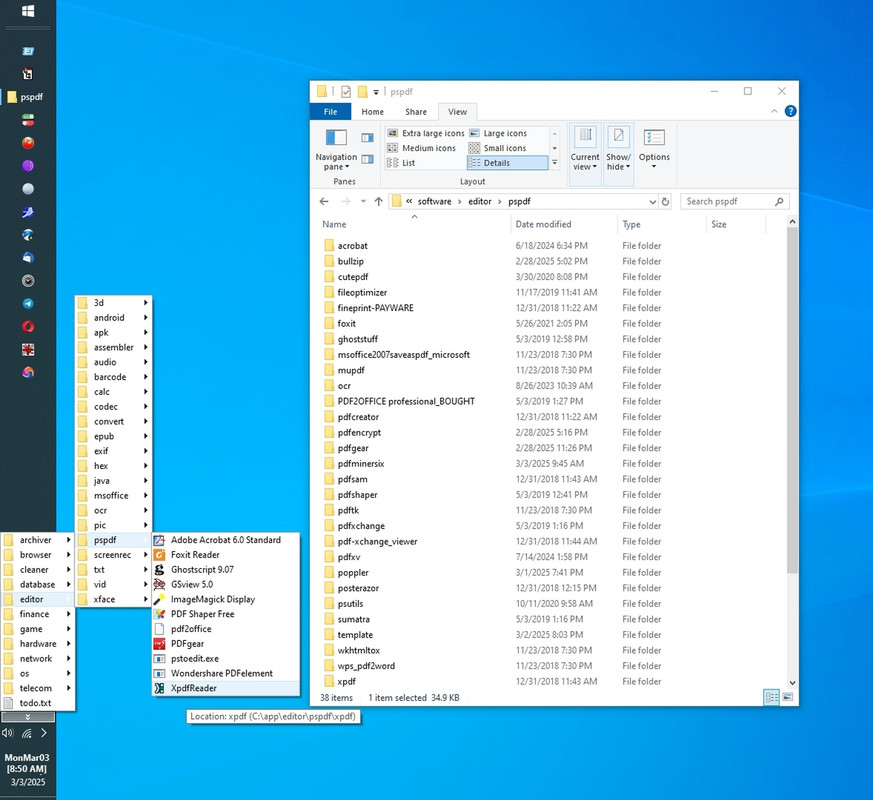
    <https://i.postimg.cc/jSNb7bkF/pspdf.jpg> pspdf 03/03/2025
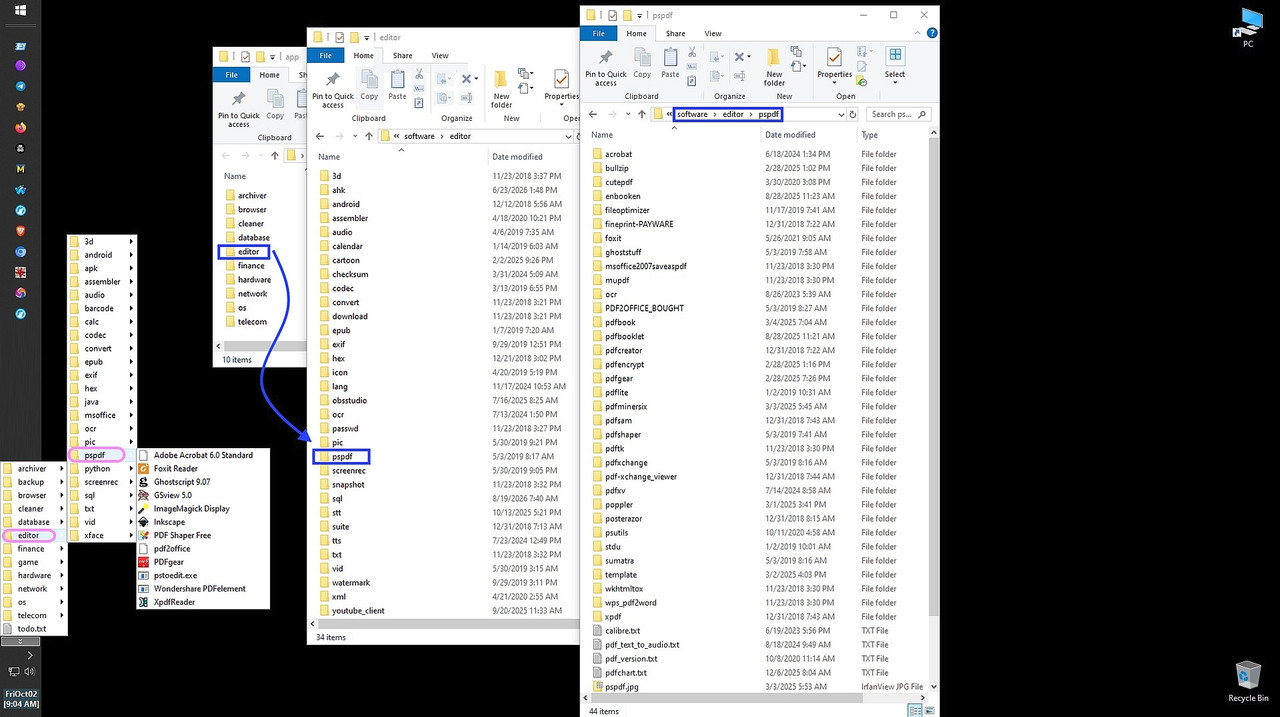
    <https://i.postimg.cc/bYRt3pLY/pspdf-2026.jpg> pspdf 10/02/2026
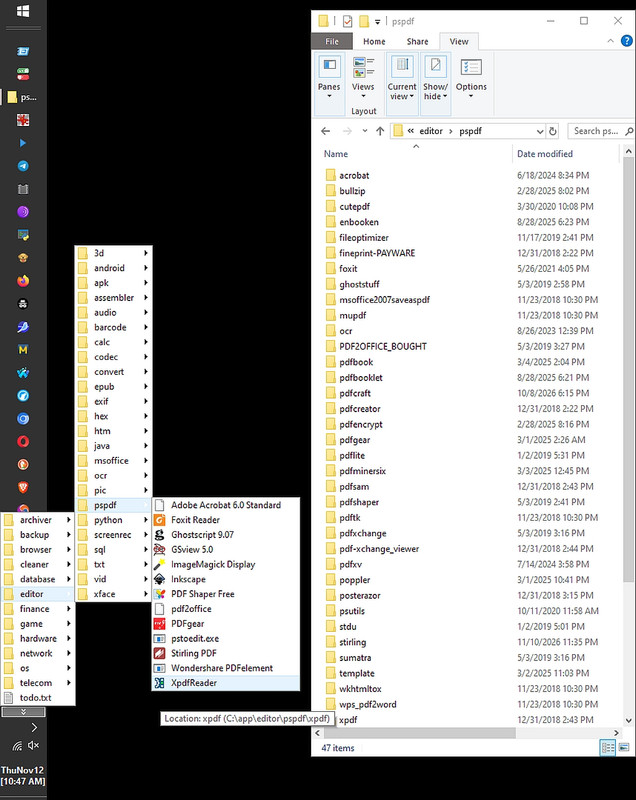
    <https://i.postimg.cc/wBycKzyF/pspdf-editors.jpg> pspdf 11/12/2026>

    Looking at what I've installed and tested, these are not yet in
    the pdfchart.txt Usenet compendium of free for us to use PDF mungers.

    pdfshaper (for converting, extracting, and merging PDFs)

    fileoptimizer (a generic file compressor that handles PDFs)

    STDU Viewer (a fast PDF reader)

    xpdf (the Xpdf viewer/toolkit suite that preceded Poppler utilities)

    And these were needed in the days before PDF printer drivers were native.
    cutepdf (an old Windows PDF printer/writer)
    bullzip (an old Windows printer driver utility)
    pdfcreator (a virtual PDF printer)
    --
    On Usenet, friendly kind-hearted people help each other out daily.
    --- Synchronet 3.22a-Linux NewsLink 1.2
  • From Maria Sophia@mariasophia@comprehension.com to comp.text.pdf,alt.comp.os.windows-10,alt.os.linux,alt.comp.freeware,comp.editors on Sun Nov 15 04:48:02 2026
    From Newsgroup: comp.text.pdf

    Latest Usenet pdfchart.txt 20261115
    <https://i.postimg.cc/jSNb7bkF/pspdf.jpg> pspdf 03/03/2025
    <https://i.postimg.cc/bYRt3pLY/pspdf-2026.jpg> pspdf 10/02/2026
    <https://i.postimg.cc/wBycKzyF/pspdf-editors.jpg> pspdf 11/12/2026>

    pdfchart.txt, Free (not payware!) PDF mungers discussed on Usenet over the decades

    1. Essentials (viewing, merging, splitting, etc.)

    Fastest PDF readers
    Sumatra, Foxit, STDU Viewer

    Merge PDF
    pdfsam, pdftk, PDFgear, Poppler, Ghostscript, muPDF, cpdf, pdfshaper

    Split PDF
    PDFgear, Poppler, Ghostscript, cpdf, pdfshaper

    Delete pages
    pdfsam, pdftk, PDF-XChange Editor, PDF Arranger, muPDF, cpdf, pdfshaper

    Reorder pages
    pdftk, PDF-XChange Editor, PDF Arranger, muPDF, cpdf, pdfshaper

    Rotate pages
    pdftk, mutool, PDF-XChange Editor, PDF Arranger, cpdf, pdfshaper

    Add or concatenate pages
    pdftk, muPDF, cpdf

    Separate a PDF into individual pages
    Poppler, pdfshaper

    2. Extraction and conversion

    Extract text
    Poppler (pdftotext), xpdf, pdfshaper

    Extract text even when in complex layout mapping
    pdfminer.six (Python library for PDF extraction & analysis)

    Convert PDF to MSWord
    Calibre, PDFgear, pdfshaper

    Extract tables inside a PDF to CSV/Excel
    Tabula, Camelot

    Convert PDF to raster
    Imagemagick, GhostScript, Poppler-pdftocairo, xpdf, pdfshaper

    Convert PDF to vector
    Inkscape, Poppler-pdftocairo

    Convert PDF to HTML
    Poppler, Calibre, xpdf

    Convert PDF to PPM/PGM/PBM image formats
    Poppler, xpdf

    Convert PDF to epub formats
    Calibre

    Convert PDF to PostScript
    Calibre, Poppler, xpdf

    Archive entire web sites to clickable PDF
    wkhtmltopdf, Fastone screen capture

    Generate PDF from Markdown or HTML
    Pandoc, wkhtmltopdf

    Generate PDF using markup language
    LaTeX via pdfTeX, LuaTeX

    Convert PDF text to an audio file
    Balabolka

    3. Forms, annotations, and markup

    Fill out active and passive (flat) PDF form fields
    PDFgear

    Minor text editing changes
    Adobe Reader commenting, PDF-XChange Editor, OnlyOffice,
    LibreOffice Draw

    Extract annotations/comments
    PDF-XChange Editor, Adobe Acrobat

    Add signature
    Adobe Reader, PDFgear, Xournal++

    Digitally sign with certificate-based signature
    Foxit PDF Editor, PDF4QT

    Create fillable forms
    LibreOffice Draw, Scribus, LaTeX (AcroTeX)

    Flatten form fields
    Ghostscript

    Add bookmarks and table of contents
    jpdfbookmarks, LaTeX (hyperref), PDF-XChange Editor, cpdf

    Add hyperlinks and buttons to a PDF
    LibreOffice, LaTeX, PDF-XChange Editor

    4. Document structure, layout, and visuals

    Edit PDF layout and content
    LibreOffice, Inkscape, Scribus, PDFEdit, PDFsam, PDFcraft, Stirling,
    OnlyOffice

    Add watermarks or background layers to a PDF
    pdftk, PDFgear, PDFsam, cpdf, pdfshaper

    Add minor text to PDF
    Irfanview or Paint.NET plugins + Ghostscript, PDFgear

    Print booklet format
    pdfbook, pdfbooklet, enbooken

    Tile PDF (e.g., to print large signs or posters from a smaller printer)
    Posterazor

    Renumber pages
    Adobe Reader

    5. OCR and scanned document processing
    OCR text recognition
    Tesseract OCR, PDF-Xchange, ABBYY FineReader, freeOCR, GOCR
    (also GOCR at jocr.sourceforge.net, freeOCR at paperfile.net)

    Enable search of scanned PDF by adding an OCR layer
    OCRmyPDF

    6. Security, optimization and maintenance
    Compress PDF
    ImageMagick, PDFgear, rlvision, BentoPDF, FileOptimizer, pdfshaper

    Online shrink PDF
    <https://adobe.com/acrobat/online/compress-pdf.html>

    Optimize PDF line endings for small screens
    K2pdfopt

    Remove restrictions
    Ghostscript, Ghostview, ps2edit, pdfwrite, pdf2djvu

    Redact sensitive information
    PDF-XChange Editor, PDF4QT

    Metadata removal
    LibreOffice Writer, PDFgear offline

    Offline encrypt PDF with a password
    pdfencrypt, cpdf

    Remove password / decrypt PDF
    Ghostscript, cpdf, pdftk

    Metadata display on command line
    Poppler, xpdf

    List fonts used in a PDF
    Poppler, xpdf

    Batch rename, convert, split PDF
    PDFsam, Poppler, Ghostscript, cpdf, pdfshaper

    Compare two PDF side-by-side, structural diff
    DiffPDF, PDF4QT DocDiff

    Globally search and replace PDF text
    LibreOffice

    Embeds files into a PDF as attachments
    Poppler

    Extract embedded files (attachments) from a PDF
    Poppler

    7. Free PDF samples and test repositories
    General test files:
    <https://examplefile.com/document/pdf>
    <https://onlinetestcase.com/pdf-file/>
    <https://sample-files.com/documents/pdf/>
    <https://graydart.com/sample/documents/pdf>
    <https://freetestdata.com/document-files/pdf/>
    <https://getsamplefiles.com/sample-document-files/pdf>
    <https://learningcontainer.com/sample-pdf-files-for-testing/>

    Sample resume PDF (thanks Paul)
    <https://cdn.uconnectlabs.com/wp-content/uploads/sites/123/2025/05/MITCAPD-PhDI.pdf>
    <https://cdn.uconnectlabs.com/wp-content/uploads/sites/123/2025/05/MITCAPD-PhDII.pdf>
    <https://cdn.uconnectlabs.com/wp-content/uploads/sites/123/2025/05/MITCAPD-PhDIII.pdf>

    8. Operating system platform compatibility
    A. Cross-platform (Windows, Linux, macOS)
    LibreOffice
    Inkscape
    Scribus
    PDFsam (Basic)
    pdftk
    muPDF / mutool
    Calibre
    Tabula
    Camelot
    Ghostscript
    Tesseract OCR
    Pandoc
    LaTeX (TeX Live / MiKTeX)
    ImageMagick
    K2pdfopt
    pdfminer.six
    PDFcraft (cross-platform Java app)
    jpdfbookmarks (cross-platform Java app)
    DiffPDF (cross-platform / source available)
    Posterazor (cross-platform Qt app)
    pdfbook / pdfbooklet (Perl/TeX scripts)
    Xournal++ (cross-platform annotation app)
    OnlyOffice Desktop (cross-platform suite with native text editing)
    cpdf (Coherent PDF command-line tool)

    B. Windows-only tools
    PDF-XChange Editor
    SumatraPDF
    Foxit PDF Editor / Reader
    Balabolka
    Irfanview
    Paint.NET
    rlvision (PDF compressor tool)
    freeOCR (paperfile.net)
    FastStone Screen Capture
    pdfencrypt (Windows binary utility)
    PDF4QT (Open-source Qt reader, editor, and diff tool)
    STDU Viewer
    PDF Shaper
    FileOptimizer
    CutePDF (virtual PDF printer driver)
    Bullzip PDF Printer (virtual PDF printer driver)
    PDFCreator (virtual PDF printer driver)

    C. Linux, macOS and web-based tools
    Poppler utilities (pdftotext, pdftocairo, pdftotoppm, etc.)
    native on Linux/macOS via package managers
    requires WSL or precompiled binaries on Windows
    xpdf (classic viewer and command-line toolkit suite)
    OCRmyPDF (Linux/macOS primary, runs via CLI/Docker)
    PDF Arranger (Linux and Windows via python/executable)
    Stirling PDF (self-hosted web application via Docker)
    BentoPDF (client-side browser processing tool)
    GOCR (jocr.sourceforge.net - Unix command-line tool)
    Ghostview, ps2edit, pdfwrite, pdf2djvu
    enbooken (Unix CLI script tool)

    D. Web-based / cloud tools referenced in the list
    PDF Compressor <https://adobe.com/acrobat/online/compress-pdf.html>
    --
    On Usenet, we can combine the vast knowledge of many people together.
    --- Synchronet 3.22a-Linux NewsLink 1.2
  • From Maria Sophia@mariasophia@comprehension.com to comp.text.pdf,alt.comp.os.windows-10,alt.os.linux,alt.comp.freeware,comp.editors on Sun Nov 15 15:05:16 2026
    From Newsgroup: comp.text.pdf

    Paul wrote:
    On Sun, 11/15/2026 7:26 AM, Carlos E.R. wrote:
    On 2026-11-15 11:13, Michael Uplawski wrote:
    Le Sat, 14 Nov 2026 04:30:36 -0500, Paul a ocrita:

    On Sat, 11/14/2026 3:55 AM, Michael Uplawski wrote:
    Free PDF Editor:

    <https://www.getfreepdf.com/en/>

    Do you have a copy at the moment ?

    As I wrote in my cited post: I do not have access to Microsoft systems
    and this will not be able to evaluate the program.

    I can evaluate SoftMaker on different scales. Also, I do not use any PDF >>> editing software other than PDFChain, pdftk and the LibTiff tools. For the >>> time being, I consider the *necessity* to edit PDF *content* as evidence >>> of a faulty work flow.

    Me too.

    If the text was handled as flows, I would think it would be
    marginally feasible to edit a PDF.

    But what I've seen of the "line at a time" editing idea,
    that's mostly useless for any real purpose. The other issue
    with such editing, is the "embedded subset fonts" are a curse.
    You might not have the characters to edit a line. Over the years,
    PDFs have degraded significantly, in terms of potential workflows.
    You don't have ATMFM and Sans and Serif replacement fonts for
    things like that.

    This is WONDERFULLY useful information that we can all benefit from!

    Since every post should add value, I must agree with everyone that it's not ideal when we have to edit PDF, but it's kind of like saying it's ideal
    that cars shouldn't have accidents, so why do we need airbags anyway.

    The "need" to edit a PDF is almost always when it's someone elses' PDF,
    which brings me back to my Fort Meade days, when we were dealing with
    someone elses' stuff, and we had to work back to the original somehow.

    Part of using someone elses' PDF is knowing how to edit it when needed.

    As for Michael's comment about tools he uses, I looked them up:
    1. PDFChain
    2. pdftk
    3. LibTiff

    So as to edify at the same time that I learn from Michael's advice,
    PDFChain is apparently a C++ GUI that sits on top of pdftk which is often considered the command-line "Swiss Army knife" for PDF manipulation.

    Michael is a purist, in that pdftk does not parse text, reflow paragraphs,
    or mess with fonts. It operates only at the page and object level.

    In addition, Michael uses LibTiff which is, apparently, a suite of command-line utilities (e.g., tiffcp, tiff2pdf, pdf2tiff, tiffinfo, etc.)
    for manipulating TIF-format files.

    Why a purist like Michael likely is would use LibTiff is he may be handling scanned documents, faxes, or legacy files where the text is locked inside a raster image. So, instead of trying to trick a PDF editor into modifying
    text layers or dealing with corrupted font subsets, Michael's workflow
    built on LibTiff perhaps converts PDF pages into high-resolution TIFF
    images, cleans them up, manipulates them as raw pixels or compressed
    bitonal pages and then bundles them back into a clean container.

    I think that's how Michael likely bypasses the font-subset curse.

    Using a pdftk GUI to munge the page assembly and using LibTiff tools to
    munge the underlying raster streams ensures he rarely has to deal with the formatting corruption caused by Paul's "line-at-time" PDF-editing issues.

    Since every single post should strive to add value, here's the updated
    listing which we started decades ago to be one-line per action, which
    now includes the tools that Michael has kindly and helpfully suggested.

    Please suggest more tools if/when you find them useful so that everyone
    can benefit from our combined tribal knowledge, which is immense.

    Latest Usenet pdfchart.txt recommended by Usenet posters 20261115
    <https://i.postimg.cc/wBycKzyF/pspdf-editors.jpg> pspdf 11/12/2026>

    pdfchart.txt
    Free (i.e., not payware) PDF mungers recommended on Usenet over the decades.

    1. Essentials (viewing, merging, splitting, etc.)

    Fastest PDF readers
    Sumatra, Foxit, STDU Viewer

    Merge PDF
    pdfsam, pdftk, PDFgear, Poppler, Ghostscript, muPDF,
    cpdf, pdfshaper, PDFChain

    Split PDF
    PDFgear, Poppler, Ghostscript, cpdf, pdfshaper, PDFChain

    Delete pages
    pdfsam, pdftk, PDF-XChange Editor, PDF Arranger, muPDF,
    cpdf, pdfshaper, PDFChain

    Reorder pages
    pdftk, PDF-XChange Editor, PDF Arranger, muPDF,
    cpdf, pdfshaper, PDFChain

    Rotate pages
    pdftk, mutool, PDF-XChange Editor, PDF Arranger,
    cpdf, pdfshaper, PDFChain

    Add or concatenate pages
    pdftk, muPDF, cpdf, PDFChain

    Separate a PDF into individual pages
    Poppler, pdfshaper

    2. Extraction and conversion

    Extract text
    Poppler (pdftotext), xpdf, pdfshaper

    Extract text even when in complex layout mapping
    pdfminer.six (Python library for PDF extraction & analysis)

    Convert PDF to MSWord
    Calibre, PDFgear, pdfshaper

    Extract tables inside a PDF to CSV/Excel
    Tabula, Camelot

    Convert PDF to raster
    Imagemagick, GhostScript, Poppler-pdftocairo, xpdf,
    pdfshaper, LibTiff tools (pdf2tiff)

    Convert PDF to vector
    Inkscape, Poppler-pdftocairo

    Convert PDF to HTML
    Poppler, Calibre, xpdf

    Convert PDF to PPM/PGM/PBM image formats
    Poppler, xpdf

    Convert PDF to epub formats
    Calibre

    Convert PDF to PostScript
    Calibre, Poppler, xpdf, LibTiff tools (tiff2ps)

    Archive entire web sites to clickable PDF
    wkhtmltopdf, Fastone screen capture

    Generate PDF from Markdown or HTML
    Pandoc, wkhtmltopdf

    Generate PDF using markup language
    LaTeX via pdfTeX, LuaTeX

    Convert PDF text to an audio file
    Balabolka

    Generate PDF via virtual printer driver (via File > Print > PDF)
    CutePDF, Bullzip PDF Printer, PDFCreator

    3. Forms, annotations and markup

    Fill out active and passive (flat) PDF form fields
    PDFgear

    Minor text editing changes
    Adobe Reader commenting, PDF-XChange Editor, OnlyOffice,
    LibreOffice Draw

    Extract annotations/comments
    PDF-XChange Editor, Adobe Acrobat

    Add signature image
    Adobe Reader, PDFgear, Xournal++

    Add signature cryptographically (digitally signed)
    Foxit PDF Editor, PDF4QT

    Create fillable forms
    LibreOffice Draw, Scribus, LaTeX (AcroTeX)

    Flatten form fields
    Ghostscript

    Add bookmarks and table of contents
    jpdfbookmarks, LaTeX (hyperref), PDF-XChange Editor, cpdf

    Add hyperlinks and buttons to a PDF
    LibreOffice, LaTeX, PDF-XChange Editor

    4. Document structure, layout and visuals

    Edit PDF layout and content
    LibreOffice, Inkscape, Scribus, PDFEdit, PDFsam, PDFcraft,
    Stirling Desktop, OnlyOffice

    Add watermarks or background layers to a PDF
    pdftk, PDFgear, PDFsam, cpdf, pdfshaper, PDFChain

    Add minor text to PDF
    Irfanview or Paint.NET plugins + Ghostscript, PDFgear

    Print booklet format
    pdfbook, pdfbooklet, enbooken

    Tile PDF (e.g., to print large signs or posters from a smaller printer)
    Posterazor

    Renumber pages (e.g., to map logical numbers to physical indices)
    Adobe Reader

    5. OCR and scanned document processing
    OCR text recognition
    Tesseract OCR, PDF-Xchange, ABBYY FineReader, freeOCR, GOCR
    (also GOCR at jocr.sourceforge.net, freeOCR at paperfile.net)

    Enable search of scanned PDF by adding an OCR layer
    OCRmyPDF

    6. Security, optimization and maintenance
    Compress PDF
    ImageMagick, PDFgear, rlvision, BentoPDF, FileOptimizer,
    pdfshaper

    Online shrink PDF
    <https://adobe.com/acrobat/online/compress-pdf.html>

    Optimize PDF line endings for small screens
    K2pdfopt

    Remove restrictions
    Ghostscript, Ghostview, ps2edit, pdfwrite, pdf2djvu

    Redact sensitive information
    PDF-XChange Editor, PDF4QT

    Metadata removal
    LibreOffice Writer, PDFgear offline

    Offline encrypt PDF with a password
    pdfencrypt, cpdf

    Remove password / decrypt PDF
    Ghostscript, cpdf, pdftk

    Metadata display on command line
    Poppler, xpdf

    List fonts used in a PDF
    Poppler, xpdf

    Batch rename, convert, split PDF
    PDFsam, Poppler, Ghostscript, cpdf, pdfshaper

    Compare two PDF side-by-side, structural diff
    DiffPDF, PDF4QT DocDiff

    Globally search and replace PDF text
    LibreOffice

    Embeds files into a PDF as attachments
    Poppler

    Extract embedded files (attachments) from a PDF
    Poppler

    7. Free PDF samples and test repositories
    General test files:
    <https://examplefile.com/document/pdf>
    <https://onlinetestcase.com/pdf-file/>
    <https://sample-files.com/documents/pdf/>
    <https://graydart.com/sample/documents/pdf>
    <https://freetestdata.com/document-files/pdf/>
    <https://getsamplefiles.com/sample-document-files/pdf>
    <https://learningcontainer.com/sample-pdf-files-for-testing/>

    Sample resume PDF (thanks Paul)
    <https://cdn.uconnectlabs.com/wp-content/uploads/sites/123/2025/05/MITCAPD-PhDI.pdf>
    <https://cdn.uconnectlabs.com/wp-content/uploads/sites/123/2025/05/MITCAPD-PhDII.pdf>
    <https://cdn.uconnectlabs.com/wp-content/uploads/sites/123/2025/05/MITCAPD-PhDIII.pdf>

    8. Operating system platform compatibility
    A. Cross-platform (Windows, Linux, macOS)
    LibreOffice
    Inkscape
    Scribus
    PDFsam (Basic)
    pdftk
    PDFChain
    muPDF / mutool
    Calibre
    Tabula
    Camelot
    Ghostscript
    Tesseract OCR
    Pandoc
    LaTeX (TeX Live / MiKTeX)
    ImageMagick
    K2pdfopt
    pdfminer.six
    PDFcraft (cross-platform Java app)
    jpdfbookmarks (cross-platform Java app)
    DiffPDF (cross-platform / source available)
    Posterazor (cross-platform Qt app)
    pdfbook / pdfbooklet (Perl/TeX scripts)
    Xournal++ (cross-platform annotation app)
    OnlyOffice Desktop (cross-platform suite with native text editing)
    cpdf (Coherent PDF command-line tool)
    LibTiff tools (libtiff command-line utilities)

    B. Windows-only tools
    PDF-XChange Editor
    SumatraPDF
    Foxit PDF Editor / Reader
    Balabolka
    Irfanview
    Paint.NET
    rlvision (PDF compressor tool)
    freeOCR (paperfile.net)
    FastStone Screen Capture
    pdfencrypt (Windows binary utility)
    PDF4QT (Open-source Qt reader, editor and diff tool)
    STDU Viewer
    PDF Shaper
    FileOptimizer
    CutePDF (virtual PDF printer driver)
    Bullzip PDF Printer (virtual PDF printer driver)
    PDFCreator (virtual PDF printer driver)

    C. Linux, macOS and web-based tools
    Poppler utilities (pdftotext, pdftocairo, pdftotoppm, etc.)
    native on Linux/macOS via package managers
    requires WSL or precompiled binaries on Windows
    xpdf (classic viewer and command-line toolkit suite)
    OCRmyPDF (Linux/macOS primary, runs via CLI/Docker)
    PDF Arranger (Linux and Windows via python/executable)
    Stirling PDF (self-hosted web application via Docker)
    BentoPDF (client-side browser processing tool)
    GOCR (jocr.sourceforge.net - Unix command-line tool)
    Ghostview, ps2edit, pdfwrite, pdf2djvu
    enbooken (Unix CLI script tool)

    D. Web-based / cloud tools referenced in the list
    PDF Compressor <https://adobe.com/acrobat/online/compress-pdf.html>
    --
    On Usenet, the goal is simple, help the next person understand a bit more.
    --- Synchronet 3.22a-Linux NewsLink 1.2