• Cross-platform local pdf resume editing using Mozilla-inspired tools

    From Maria Sophia@mariasophia@comprehension.com to comp.text.pdf,alt.comp.os.windows-10,alt.os.linux,comp.sys.mac.apps on Tue Nov 10 23:51:47 2026
    From Newsgroup: comp.text.pdf

    Cross-platform local pdf resume editing using Mozilla-inspired tools

    If you have grandkids who use you as an emergency tech wizard, you'll understand that they have the strangest of "emergencies" we need to fix.

    An hour ago, I got an "emergency" call from a recent high school graduate
    who needed her GoogleDocs-to-PDF resume reduced to 2 pages because a job application with a deadline of midnight tonight wouldn't take 3 pages.

    Having retired more than 15 years ago, I can't even spell resume anymore,
    but an "emergency" is an emergency, after all, so here's what happened.

    Note: I did not have the luxury of time to figure out a "better way", so
    the intent of this Usenet thread is half to edify the team and half to see
    if the team knows of a better way for a kid to edit/convert PDF resumes.

    Given it's a resume, I only briefly considered online conversion tools, but decided against them since it's rude to put contact information on the net.

    It had to be a cross-platform local solution 'cuz she's on the Apple
    platform, and I'm on Windows, so whatever I did she had to be able to do.

    Here's what I did.
    1. She emailed me her 3-page PDF which I converted to HTML with Calibre.
    <https://calibre-ebook.com/>
    2. That converted the 3-page PDF to HTML, RTF, MSWord, TEXT, EPUB, etc.
    3. I tried editing/printing/saving in Mozilla Firefox, but couldn't edit.
    4. I then tried the Mozilla-derived SeaMonkey Composer & that worked.
    5. So I didn't go any further as time was of the essence.
    But SeaMonkey Composer is an HTML editor, not a PDF editor.

    See below for my installation log notes I hurriedly wrote on the fly
    and sent to her after I used the process below to convert 3 pages to 2. ===============
    Apparently the Mozilla-derived SeaMonkey Composer is a good choice
    for editing a single, relatively simple HTML resume because the
    SeaMonkey "Composer" tool is an easy-to-use FOSS WYSIWYG editor.
    <https://www.seamonkey-project.org/releases/>

    1. Open the existing HTML resume file
    2. Make changes to text, formatting, links, tables and images
    without having to work directly with HTML tags.
    3. Be careful as there is no warning when overwriting html files!
    (obviously that means only edit backups)

    SeaMonkey Composer is free, ad free, registration free and open source. SeaMonkey Composer Works on all desktop platforms (macOS/Linux/Windows).

    Its main limitation is its age as it isn't well suited to modern CSS.
    But for a simple 2-page resume, that should not be a major issue. ===============
    Warning: Phones home on first invocation (so use your network killswitch).

    Note: My paths are shown below. Use whatever paths make sense to you.
    Always hit the network killswitch whenever installing any software.

    A. mkdir C:\software\editor\htm\seamonkey
    B. <https://www.seamonkey-project.org/releases/>
    <https://www.seamonkey-project.org/releases/seamonkey2.53.24/>
    <https://www.seamonkey-project.org/releases/>
    <https://archive.seamonkey-project.org/releases/2.53.24/win64/en-GB/seamonkey-2.53.24.en-GB.win64.installer.exe>
    Name: seamonkey-2.53.24.en-US.win64.installer.exe
    Size: 49055000 bytes (46 MiB)
    SHA256: 53B8685984F6115AB6251FD7061335D5CF58C2199E97F54EE3D0857BFFDDF9D7
    C. Choose "Custom" install into C:\app\editor\htm\seamonkey
    D. Copy resulting desktop shortcut to C:\menu\editor\htm\seamonkey
    Target: C:\app\editor\htm\seamonkey\seamonkey.exe
    ===============
    1. Start SeaMonkey
    2. Edit > Preferences (check settings and set as desired)
    (e.g., history, downloads, auto-updates, clear private data, etc.)
    3. Since we're dealing with HTML, decide what to set for
    Edit > Preferences > Composer
    When Saving or Publishing Pages (below are the defaults)
    [_]Preserve original source formatting
    [X]Save images and other associated files when saving pages
    [_]Always show Publish dialog when publishing pages
    Editing
    [X]Maintain table layout when inserting or deleting cells
    [_]Use CSS styles instead of HTML elements and attributes
    [_]Return in a paragraph always creates a new paragraph
    ===============
    History of SeaMonkey (which is independent from Mozilla at this time)
    a. Apparently, Netscape went open source in 1998
    b. The Mozilla all-in-one suite apparently started with that code
    c. Firefox (web) & Thunderbird (email) split off around 2003/2004
    d. A group of community developers took on the Mozilla code base
    <https://www.reddit.com/r/firefox/comments/1wltcqf/does_seamonkey_i_like_the_ui_have_any_affiliation/>
    e. The result was "SeaMonkey" <https://www.seamonkey-project.org/> ===============
    Make a copy of your html resume (as SeaMonkey Composer doesn't warn on save)
    1. Start SeaMonkey and go to Window > Composer
    2. Open the resume using File > Open File > resume.html
    3. Edit as desired & File > Save when done
    ===============
    After the "emergency" was over, I looked for "better" x-platform solutions.
    <https://www.pdfgear.com/pdf-editor-reader/open-source-pdf-editors.htm>

    According to that article, these are 7 open source X-platform PDF editors:
    1. LibreOffice <https://www.libreoffice.org/>
    2. Inkscape <https://inkscape.org/>
    3. PDFSam <https://pdfsam.org/>
    4. OpenOffice <https://www.openoffice.org/product/draw.html>
    5. PDFedit <http://pdfedit.cz/en/index.html>
    6. Scribus <https://www.scribus.net/>
    And, if we ignore Linux & Windows...
    6. Preview <https://support.apple.com/guide/preview/welcome/mac>

    Interestingly, SeaMonkey wasn't on the list. I'm not sure why not.
    Neither was Stirling Desktop on the list, so I'd be curious if
    anyone has experience with their "free" proprietary PDF editor?
    mkdir C:\software\editor\pdf\stirling
    <https://www.stirling.com/download> (mac/windows/linux)
    <https://files.stirlingpdf.com/win-installer.exe>
    Name: seamonkey-2.53.24.en-US.win64.installer.exe
    Size: 49055000 bytes (46 MiB)
    SHA256: 53B8685984F6115AB6251FD7061335D5CF58C2199E97F54EE3D0857BFFDDF9D7
    Always hit the network killswitch whenever installing any software.
    Install into C:\app\editor\pdf\stirling
    Move the desktop shortcut into C:\menu\editor\pdf\stirling.lnk
    When it starts up, click "Continue without signing in".
    Click "Open Files" & then "PDF Editor" to edit the PDF file.

    In summary, the "emergency" was I was afforded only an hour to edit
    a Google-Docs-created PDF from 3 pages to 2 pages, where my install
    log is above, and I now ask the desktop PDF editing community ...

    Q: What do you use for quick PDF editing of sensitive documents?
    A: ?
    --
    On Usenet, kind-hearted purposefully helpful people carry on polite
    discussions which benefit everyone who participates in the conversation.
    --- Synchronet 3.22a-Linux NewsLink 1.2
  • From Paul@nospam@needed.invalid to comp.text.pdf,alt.comp.os.windows-10,alt.os.linux,comp.sys.mac.apps on Wed Nov 11 00:53:45 2026
    From Newsgroup: comp.text.pdf

    On Tue, 11/10/2026 10:51 PM, Maria Sophia wrote:
    Cross-platform local pdf resume editing using Mozilla-inspired tools

    If you have grandkids who use you as an emergency tech wizard, you'll understand that they have the strangest of "emergencies" we need to fix.

    An hour ago, I got an "emergency" call from a recent high school graduate who needed her GoogleDocs-to-PDF resume reduced to 2 pages because a job application with a deadline of midnight tonight wouldn't take 3 pages.

    Having retired more than 15 years ago, I can't even spell resume anymore, but an "emergency" is an emergency, after all, so here's what happened.

    Note: I did not have the luxury of time to figure out a "better way", so
    the intent of this Usenet thread is half to edify the team and half to see if the team knows of a better way for a kid to edit/convert PDF resumes.

    Given it's a resume, I only briefly considered online conversion tools, but decided against them since it's rude to put contact information on the net.

    It had to be a cross-platform local solution 'cuz she's on the Apple platform, and I'm on Windows, so whatever I did she had to be able to do.

    Here's what I did.
    1. She emailed me her 3-page PDF which I converted to HTML with Calibre.
    <https://calibre-ebook.com/>
    2. That converted the 3-page PDF to HTML, RTF, MSWord, TEXT, EPUB, etc.
    3. I tried editing/printing/saving in Mozilla Firefox, but couldn't edit.
    4. I then tried the Mozilla-derived SeaMonkey Composer & that worked.
    5. So I didn't go any further as time was of the essence.
    But SeaMonkey Composer is an HTML editor, not a PDF editor.

    See below for my installation log notes I hurriedly wrote on the fly
    and sent to her after I used the process below to convert 3 pages to 2. ===============
    Apparently the Mozilla-derived SeaMonkey Composer is a good choice
    for editing a single, relatively simple HTML resume because the
    SeaMonkey "Composer" tool is an easy-to-use FOSS WYSIWYG editor.
    <https://www.seamonkey-project.org/releases/>

    1. Open the existing HTML resume file
    2. Make changes to text, formatting, links, tables and images
    without having to work directly with HTML tags.
    3. Be careful as there is no warning when overwriting html files!
    (obviously that means only edit backups)

    SeaMonkey Composer is free, ad free, registration free and open source. SeaMonkey Composer Works on all desktop platforms (macOS/Linux/Windows).

    Its main limitation is its age as it isn't well suited to modern CSS.
    But for a simple 2-page resume, that should not be a major issue. ===============
    Warning: Phones home on first invocation (so use your network killswitch).

    Note: My paths are shown below. Use whatever paths make sense to you.
    Always hit the network killswitch whenever installing any software.

    A. mkdir C:\software\editor\htm\seamonkey
    B. <https://www.seamonkey-project.org/releases/>
    <https://www.seamonkey-project.org/releases/seamonkey2.53.24/>
    <https://www.seamonkey-project.org/releases/>
    <https://archive.seamonkey-project.org/releases/2.53.24/win64/en-GB/seamonkey-2.53.24.en-GB.win64.installer.exe>
    Name: seamonkey-2.53.24.en-US.win64.installer.exe
    Size: 49055000 bytes (46 MiB)
    SHA256: 53B8685984F6115AB6251FD7061335D5CF58C2199E97F54EE3D0857BFFDDF9D7
    C. Choose "Custom" install into C:\app\editor\htm\seamonkey
    D. Copy resulting desktop shortcut to C:\menu\editor\htm\seamonkey
    Target: C:\app\editor\htm\seamonkey\seamonkey.exe
    ===============
    1. Start SeaMonkey
    2. Edit > Preferences (check settings and set as desired)
    (e.g., history, downloads, auto-updates, clear private data, etc.)
    3. Since we're dealing with HTML, decide what to set for
    Edit > Preferences > Composer
    When Saving or Publishing Pages (below are the defaults)
    [_]Preserve original source formatting
    [X]Save images and other associated files when saving pages
    [_]Always show Publish dialog when publishing pages
    Editing
    [X]Maintain table layout when inserting or deleting cells
    [_]Use CSS styles instead of HTML elements and attributes
    [_]Return in a paragraph always creates a new paragraph
    ===============
    History of SeaMonkey (which is independent from Mozilla at this time)
    a. Apparently, Netscape went open source in 1998
    b. The Mozilla all-in-one suite apparently started with that code
    c. Firefox (web) & Thunderbird (email) split off around 2003/2004
    d. A group of community developers took on the Mozilla code base
    <https://www.reddit.com/r/firefox/comments/1wltcqf/does_seamonkey_i_like_the_ui_have_any_affiliation/>
    e. The result was "SeaMonkey" <https://www.seamonkey-project.org/> ===============
    Make a copy of your html resume (as SeaMonkey Composer doesn't warn on save)
    1. Start SeaMonkey and go to Window > Composer
    2. Open the resume using File > Open File > resume.html
    3. Edit as desired & File > Save when done
    ===============
    After the "emergency" was over, I looked for "better" x-platform solutions.
    <https://www.pdfgear.com/pdf-editor-reader/open-source-pdf-editors.htm>

    According to that article, these are 7 open source X-platform PDF editors:
    1. LibreOffice <https://www.libreoffice.org/>
    2. Inkscape <https://inkscape.org/>
    3. PDFSam <https://pdfsam.org/>
    4. OpenOffice <https://www.openoffice.org/product/draw.html>
    5. PDFedit <http://pdfedit.cz/en/index.html>
    6. Scribus <https://www.scribus.net/>
    And, if we ignore Linux & Windows...
    6. Preview <https://support.apple.com/guide/preview/welcome/mac>

    Interestingly, SeaMonkey wasn't on the list. I'm not sure why not.
    Neither was Stirling Desktop on the list, so I'd be curious if
    anyone has experience with their "free" proprietary PDF editor?
    mkdir C:\software\editor\pdf\stirling
    <https://www.stirling.com/download> (mac/windows/linux)
    <https://files.stirlingpdf.com/win-installer.exe>
    Name: seamonkey-2.53.24.en-US.win64.installer.exe
    Size: 49055000 bytes (46 MiB)
    SHA256: 53B8685984F6115AB6251FD7061335D5CF58C2199E97F54EE3D0857BFFDDF9D7
    Always hit the network killswitch whenever installing any software.
    Install into C:\app\editor\pdf\stirling
    Move the desktop shortcut into C:\menu\editor\pdf\stirling.lnk
    When it starts up, click "Continue without signing in".
    Click "Open Files" & then "PDF Editor" to edit the PDF file.

    In summary, the "emergency" was I was afforded only an hour to edit
    a Google-Docs-created PDF from 3 pages to 2 pages, where my install
    log is above, and I now ask the desktop PDF editing community ...

    Q: What do you use for quick PDF editing of sensitive documents?
    A: ?


    Got some sample resume files.

    https://cdn.uconnectlabs.com/wp-content/uploads/sites/123/2025/05/MITCAPD-PhDI.pdf
    https://cdn.uconnectlabs.com/wp-content/uploads/sites/123/2025/05/MITCAPD-PhDII.pdf
    https://cdn.uconnectlabs.com/wp-content/uploads/sites/123/2025/05/MITCAPD-PhDIII.pdf

    Patch Tuesday broke my Powershell.
    Got Powershell running anyway, attempted to run the pdftotext.exe in Agent Ransack
    subfolder, program was doing strange things. Bailed, booted WSL2 and did it there
    (may have been in the Linux xpdf, but it will tell you if the program is missing).
    This is a sample of the output text, created from a section of one of those PDF files.

    pdftotext -layout sample.pdf # makes "sample.txt" in the same directory

    Leadership MIT PRESIDENT, STUDENT LEADERSHIP COUNCIL OF MATERIAL SCIENTISTS (20XX -
    present) Leader in group of 200 students that promotes collaboration between five major research universities.
    Organized videoconferences to allow students to share research ideas. Planning summer retreat to further
    student collaboration. Investigating ways to promote science and technology in secondary schools and the
    community.

    STUDENT REPRESENTATIVE, MIT MATERIAL SCIENCE & ENGINEERING DEPT. STUDENT
    AFFAIRS COMMITTEE (20XX - present)
    Leading student / faculty discussion on ways to enhance student / advisor interaction.

    TEACHING ASSISTANT, MIT MATERIAL SCIENCE & ENGINEERING DEPT. (Fall semester
    20XX)
    Organized tutorials to clarify course material. Wrote instruction manual to help students use math software.
    Class scored 7% higher in final than any of the professorrCOs former classes.

    U.K. COORDINATOR, EUROPEAN CLUB CAREER FAIR (20XX)

    Awards Winner of National Science Foundation Poster Competition (20XX); Sigma Xi Engineering Research
    Honors Society (20XX); Harvey Stern Fellowship, MIT (20XX); Fox Prize for Outstanding Performance in
    Chemical Engineering, Cambridge University (20XX); Verhaydn de Lancy Prize for Outstanding Contribution
    to Trinity College (20XX); Mobil Prize for Best Performance in Chemical Engineering, Cambridge
    University (20XX); Senior Scholarship for Outstanding Academic Performance, Trinity College, Cambridge
    (20XX); Student Scholarship, United Kingdom Atomic Energy Authority (20XX-20XX)

    Activities Dancing (MIT Salsa Club), Classical Guitar, MIT Debating Club, MIT European Club Soccer Team

    It has to round to the nearest character position, so can be off by +/- one letter.
    This means the alignment is not perfect, if you examine larger chunks
    of text, but I just wanted to indicate it does keep the layout, making
    editing a bit easier.

    Paul
    --- Synchronet 3.22a-Linux NewsLink 1.2
  • From Lawrence =?iso-8859-13?q?D=FFOliveiro?=@ldo@nz.invalid to comp.text.pdf,alt.comp.os.windows-10,alt.os.linux,comp.sys.mac.apps on Wed Nov 11 06:37:10 2026
    From Newsgroup: comp.text.pdf

    On Tue, 10 Nov 2026 23:51:47 -0400, Maria Sophia wrote:

    It had to be a cross-platform local solution 'cuz she's on the Apple platform, and I'm on Windows, so whatever I did she had to be able
    to do.

    One thing you can both do is run Linux containers.

    Consider that the ultimate solution to all future instances of the cross-platform problem.
    --- Synchronet 3.22a-Linux NewsLink 1.2
  • From Michael Uplawski@michael.uplawski@uplawski.eu to comp.text.pdf,alt.comp.os.windows-10,alt.os.linux,comp.sys.mac.apps on Wed Nov 11 07:48:52 2026
    From Newsgroup: comp.text.pdf

    Maria Sophia wrote in comp.text.pdf,alt.comp.os.windows-10,alt.os.linux,comp.sys.mac.apps:

    who needed her GoogleDocs-to-PDF resume reduced to 2 pages because a job >application with a deadline of midnight tonight wouldn't take 3 pages.

    I cannot even read your entire post, either my English fails me or
    it is just too complicated for my brain to wrap around it all.

    Q: What do you use for quick PDF editing of sensitive documents?
    A: ?

    Ghostscript, LibTiff, Gimp, Something XML and XSL, depending on the
    nature of the original document. There are a few constraints to take
    into account and rCLediting sensitive documentsrCY may or may not quite
    a different task. Reducing a 3 page document to 2 pages is done in
    whichever way suites the objective. I would reduce the content,
    first. I actually had to do exactly that when my wife had taught me
    that French resumes are 1 page long, full stop. And mine was German
    and 3 pages long.

    Editing PDF is a strange thing to me. If you cannot get the original
    document (or original sources of whichever kind, including
    graphics), alter them and recreate your PDF, than there *is* already
    a flaw in the workflow. Sorry.

    Shoot at your own discretion.
    f'up comp.text.pdf
    --- Synchronet 3.22a-Linux NewsLink 1.2
  • From Michael Uplawski@michael.uplawski@uplawski.eu to comp.text.pdf,alt.comp.os.windows-10,alt.os.linux,comp.sys.mac.apps on Wed Nov 11 07:58:45 2026
    From Newsgroup: comp.text.pdf

    Supersedes for missing be.

    Maria Sophia wrote in comp.text.pdf,alt.comp.os.windows-10,alt.os.linux,comp.sys.mac.apps:

    who needed her GoogleDocs-to-PDF resume reduced to 2 pages because a job >application with a deadline of midnight tonight wouldn't take 3 pages.

    I cannot even read your entire post, either my English fails me or
    it is just too complicated for my brain to wrap around it all.

    Q: What do you use for quick PDF editing of sensitive documents?
    A: ?

    Ghostscript, LibTiff, Gimp, Something XML and XSL, depending on the
    nature of the original document. There are a few constraints to take
    into account and rCLediting sensitive documentsrCY may or may not ->be<- quite a different task. Reducing a 3 page document to 2 pages is done in
    whichever way suites the objective. I would reduce the content,
    first. I actually had to do exactly that when my wife had taught me
    that French resumes are 1 page long, full stop. And mine was German
    and 3 pages long.

    Editing PDF is a strange thing to me. If you cannot get the original
    document (or original sources of whichever kind, including
    graphics), alter them and recreate your PDF, than there *is* already
    a flaw in the workflow. Sorry.

    Shoot at your own discretion.
    f'up comp.text.pdf
    --- Synchronet 3.22a-Linux NewsLink 1.2
  • From Carlos E.R.@robin_listas@es.invalid to comp.text.pdf,alt.comp.os.windows-10,alt.os.linux,comp.sys.mac.apps on Wed Nov 11 13:32:26 2026
    From Newsgroup: comp.text.pdf

    On 2026-11-11 04:51, Maria Sophia wrote:
    Cross-platform local pdf resume editing using Mozilla-inspired tools

    If you have grandkids who use you as an emergency tech wizard, you'll understand that they have the strangest of "emergencies" we need to fix.

    An hour ago, I got an "emergency" call from a recent high school graduate
    who needed her GoogleDocs-to-PDF resume reduced to 2 pages because a job application with a deadline of midnight tonight wouldn't take 3 pages.

    Having retired more than 15 years ago, I can't even spell resume anymore,
    but an "emergency" is an emergency, after all, so here's what happened.

    Note: I did not have the luxury of time to figure out a "better way", so
    the intent of this Usenet thread is half to edify the team and half to see
    if the team knows of a better way for a kid to edit/convert PDF resumes.

    Given it's a resume, I only briefly considered online conversion tools, but decided against them since it's rude to put contact information on the net.

    It had to be a cross-platform local solution 'cuz she's on the Apple platform, and I'm on Windows, so whatever I did she had to be able to do.

    Here's what I did.
    1. She emailed me her 3-page PDF which I converted to HTML with Calibre.
    <https://calibre-ebook.com/>

    I truly can not understand. My resum|- was a .doc file, not .pdf. That
    is, I had the source file, which I then converted to pdf and sent that
    to people. But I owned the doc, or rather, the staroffice or libre
    office equivalent at the time.

    How come she asked you to convert a PDF? How come she doesn't have the original DOC?

    I truly can not understand this.

    ...

    Q: What do you use for quick PDF editing of sensitive documents?
    A: ?

    I don't. I always have the DOC equivalent.
    --
    Cheers, Carlos.
    ESEfc-Efc+, EUEfc-Efc|;
    --- Synchronet 3.22a-Linux NewsLink 1.2
  • From John Bokma@contact@johnbokma.com to comp.text.pdf,alt.comp.os.windows-10,alt.os.linux,comp.sys.mac.apps on Wed Nov 11 16:19:42 2026
    From Newsgroup: comp.text.pdf

    On 11/11/2026 13:32, Carlos E.R. wrote:

    I truly can not understand. My resum|- was a .doc file, not .pdf. That
    is, I had the source file, which I then converted to pdf and sent that
    to people. But I owned the doc, or rather, the staroffice or libre
    office equivalent at the time.

    I use Markdown + Pandoc :-D.

    https://github.com/john-bokma/resume-pandoc
    --
    Static tumblelog generator: https://github.com/john-bokma/tumblelog/
    Available as Python or Perl. Example tumblelog: https://plurrrr.com/
    --- Synchronet 3.22a-Linux NewsLink 1.2
  • From Carlos E.R.@robin_listas@es.invalid to comp.text.pdf,alt.comp.os.windows-10,alt.os.linux,comp.sys.mac.apps on Wed Nov 11 20:04:08 2026
    From Newsgroup: comp.text.pdf

    On 2026-11-11 16:19, John Bokma wrote:
    On 11/11/2026 13:32, Carlos E.R. wrote:

    I truly can not understand. My resum|- was a .doc file, not .pdf. That
    is, I had the source file, which I then converted to pdf and sent that
    to people. But I owned the doc, or rather, the staroffice or libre
    office equivalent at the time.

    I use Markdown + Pandoc :-D.

    https://github.com/john-bokma/resume-pandoc


    My first resum|- was in Wordperfect 5.1 for MsDOS. I had not even heard
    of latex or markdown. Had never touched *nix.
    --
    Cheers, Carlos.
    ESEfc-Efc+, EUEfc-Efc|;
    --- Synchronet 3.22a-Linux NewsLink 1.2
  • From Lawrence =?iso-8859-13?q?D=FFOliveiro?=@ldo@nz.invalid to comp.text.pdf,alt.comp.os.windows-10,alt.os.linux,comp.sys.mac.apps on Wed Nov 11 19:46:40 2026
    From Newsgroup: comp.text.pdf

    On Wed, 11 Nov 2026 16:19:42 +0100, John Bokma wrote:

    I use Markdown + Pandoc

    Great combination. I added the ability to format a text field as
    Markdown via Pandoc to a project for a client recently. Only trouble
    was, when the browser shows the PDF version, it insists on displaying
    a list of thumbnails down the side, because thatrCOs what the settings
    in the PDF file say to do.

    Turning this off involved massaging the generated PDF data with
    PikePDF. But the project was in PHP (no, I didnrCOt start it, I just
    took it over), and I couldnrCOt find any PHP binding for PikePDF. So I
    wrote a little Python script to do the postprocessing (and the
    Markdown rendering, while it was at it).

    Yes, it was an excuse to introduce some Python code into a
    predominantly-PHP project. EfyL
    --- Synchronet 3.22a-Linux NewsLink 1.2
  • From Maria Sophia@mariasophia@comprehension.com to comp.text.pdf,alt.comp.os.windows-10,alt.os.linux,comp.sys.mac.apps on Wed Nov 11 15:54:46 2026
    From Newsgroup: comp.text.pdf

    Carlos E.R. wrote:
    On 2026-11-11 16:19, John Bokma wrote:
    On 11/11/2026 13:32, Carlos E.R. wrote:

    I truly can not understand. My resumo was a .doc file, not .pdf. That
    is, I had the source file, which I then converted to pdf and sent that
    to people. But I owned the doc, or rather, the staroffice or libre
    office equivalent at the time.

    I use Markdown + Pandoc :-D.

    https://github.com/john-bokma/resume-pandoc


    My first resumo was in Wordperfect 5.1 for MsDOS. I had not even heard
    of latex or markdown. Had never touched *nix.

    Paul understood that it was a Google-doc-to-pdf, which, I guess, is what
    kids use 'cuz likely they are taught that in high school for all I know.

    What format is a "google-doc" in?
    Hell if I know. I've never used google docs.

    I don't even know what it is.

    But when I asked her for the original, I assumed it would be MS Word.
    But it wasn't. And she only had the PDF.

    So, kids being kids, it was what it was.

    Anyway, I could easily convert, with the FOSS Calibre, to RTF/DOCX.
    But my MS word from 2010 isn't working 'cuz I accidentally cleaned it up.

    So I could convert to MS Word, but I couldn't edit it.
    And remember, I only had an hour at most.

    It was all done while we were on the phone call.
    Because it was an "emergency", you know. Kids. You know.

    Anyway, I was actually shocked that the Mozilla-derived SeaMonkey Composer solved the problem WITHOUT me doing anything. Seriouslly. I was shocked.

    I loaded the 3-page Google-docs-to-PDF-to-HTML-via-Calibre into
    SeaMonkey Composer and, voila, instantly, it was already only 2 pages.

    I saved it, and then when I tried to compare with the original HTML,
    that's when I realized it overwrote the original, which SeaMonkey Composer should have warned us about.

    At that point, I printed it to PDF from inside SeaMonkey Composer, and
    checked that the PDF was 2 pages (and fixed a couple of typos).

    Then, after the "crisis" expired, I wondered, how "should" I have done it? Hence, the next thing I did was a quick search using basic search terms.
    <https://www.pdfgear.com/pdf-editor-reader/open-source-pdf-editors.htm>

    According to that article, these are 7 open source X-platform PDF editors:
    1. LibreOffice <https://www.libreoffice.org/>
    2. Inkscape <https://inkscape.org/>
    3. PDFSam <https://pdfsam.org/>
    4. OpenOffice <https://www.openoffice.org/product/draw.html>
    5. PDFedit <http://pdfedit.cz/en/index.html>
    6. Scribus <https://www.scribus.net/>
    And oddly for a supposed X-platform tool, if we ignore Linux/Windows
    7. Preview <https://support.apple.com/guide/preview/welcome/mac>
    (Why does that even get on that list? Apple pays them? Or what?)

    Interestingly, even though Apple marketing is so brilliant that
    Apple-only proprietary editors make a list of open-source cross-platform
    free PDF editors, Stirling Desktop was not on the list for some reason.

    I found Sterling in a subsequent search, so I decided to install it
    given I already had tested (years ago) every known free PDF editor.

    I'd be curious if anyone has experience with the Stirling PDF editor?
    mkdir C:\software\editor\pdf\stirling
    <https://www.stirling.com/download> (mac/windows/linux)
    <https://files.stirlingpdf.com/win-installer.exe>
    Name: Stirling-PDF-windows-x86_64.msi
    Size: 221966336 bytes (211 MiB)
    SHA256: 97D151EDB476D22A527B488F8D9FFB888EBCC991C36A6BD0D7C785223E915645
    Always hit the network killswitch whenever installing any software.
    Install into C:\app\editor\pdf\stirling
    Move the desktop shortcut into C:\menu\editor\pdf\stirling.lnk
    Target: C:\app\editor\pspdf\stirling\Stirling-PDF.exe
    When it starts up, click "Continue without signing in".
    Click "Open Files" & then "PDF Editor" to edit the PDF file.

    What do folks who have tried the Stirling PDF editor think of it?
    --
    Usenet is a world-wide team sport where purposefully helpful kind-hearted adults help each other and learn by pooling our individual capabilities.
    --- Synchronet 3.22a-Linux NewsLink 1.2
  • From Maria Sophia@mariasophia@comprehension.com to comp.text.pdf,alt.comp.os.windows-10,alt.os.linux,comp.sys.mac.apps on Wed Nov 11 16:08:57 2026
    From Newsgroup: comp.text.pdf

    Lawrence D'Oliveiro wrote:
    On Wed, 11 Nov 2026 16:19:42 +0100, John Bokma wrote:

    I use Markdown + Pandoc

    Great combination. I added the ability to format a text field as
    Markdown via Pandoc to a project for a client recently. Only trouble
    was, when the browser shows the PDF version, it insists on displaying
    a list of thumbnails down the side, because that's what the settings
    in the PDF file say to do.

    Turning this off involved massaging the generated PDF data with
    PikePDF. But the project was in PHP (no, I didn't start it, I just
    took it over), and I couldn't find any PHP binding for PikePDF. So I
    wrote a little Python script to do the postprocessing (and the
    Markdown rendering, while it was at it).

    Yes, it was an excuse to introduce some Python code into a
    predominantly-PHP project


    Thanks, John and Lawrence!

    I think I finally managed to translate what you two are talking about into something the rest of us mere mortals can understand.

    If I have this right, the idea is to keep the original document in an
    editable, text-based format (Markdown, for example) and then to use Pandoc
    to convert it into a PDF and then to use PikePDF to tweak the resulting
    PDF's internal settings when needed.

    In Lawrence's case, the problem wasn't actually the PDF content, but how
    the browser displayed it when his PDF was configured to open with a
    thumbnail sidebar. He used PikePDF to modify that setting, and since the
    main project was written in PHP, he wrote a small Python script to handle
    both the Markdown conversion and the PDF post-processing.

    So, in short, you're suggesting to keep an editable source, generate the
    PDF when needed and use a little Python magic to adjust the finished PDF.

    This is useful practical insight that those of us trying to figure out how
    to generate (and, ideally, work with) PDFs on the fly can appreciate.
    --
    Usenet is an assemblage of purposefully helpful people teaching each other
    .
    --- Synchronet 3.22a-Linux NewsLink 1.2
  • From Carlos E.R.@robin_listas@es.invalid to comp.text.pdf,alt.comp.os.windows-10,alt.os.linux,comp.sys.mac.apps on Wed Nov 11 23:10:14 2026
    From Newsgroup: comp.text.pdf

    On 2026-11-11 20:54, Maria Sophia wrote:
    Carlos E.R. wrote:
    On 2026-11-11 16:19, John Bokma wrote:
    On 11/11/2026 13:32, Carlos E.R. wrote:

    I truly can not understand. My resumN++ was a .doc file, not .pdf. That >>>> is, I had the source file, which I then converted to pdf and sent that >>>> to people. But I owned the doc, or rather, the staroffice or libre
    office equivalent at the time.

    I use Markdown + Pandoc :-D.

    https://github.com/john-bokma/resume-pandoc


    My first resumN++ was in Wordperfect 5.1 for MsDOS. I had not even heard
    of latex or markdown. Had never touched *nix.

    Paul understood that it was a Google-doc-to-pdf, which, I guess, is what
    kids use 'cuz likely they are taught that in high school for all I know.

    What format is a "google-doc" in?
    Hell if I know. I've never used google docs.

    I don't even know what it is.

    I do know. I have used it some times so that two persons can edit simultaneously on the same document, while being on two different
    continents. You can even chat by writing in the document.

    But of course, you need to login into Google and keep logged, and you
    hate that.

    Companies love it. They provide company accounts on google docs, using
    the company name, like for instance ieee.org. All teachers in my
    province have an account, and they need to use it for anything official related to their job and their students. Yes, the records of all the
    primary school students are there, in google docs. Possibly the high
    school students, too.

    I know you hate that, no need to convince me, but such is life.


    I just tried to create an empty document, and google suggested several templates, one of them a resum|-. I clicked on that. Once there, you can download it, as doc, as odt, as pdf. Even epub and markdown. Problem
    solved. :-)


    But when I asked her for the original, I assumed it would be MS Word.
    But it wasn't. And she only had the PDF.

    So, kids being kids, it was what it was.

    Anyway, I could easily convert, with the FOSS Calibre, to RTF/DOCX.
    But my MS word from 2010 isn't working 'cuz I accidentally cleaned it up.

    So I could convert to MS Word, but I couldn't edit it.
    And remember, I only had an hour at most.

    It was all done while we were on the phone call.
    Because it was an "emergency", you know. Kids. You know.

    Anyway, I was actually shocked that the Mozilla-derived SeaMonkey Composer solved the problem WITHOUT me doing anything. Seriouslly. I was shocked.

    I loaded the 3-page Google-docs-to-PDF-to-HTML-via-Calibre into
    SeaMonkey Composer and, voila, instantly, it was already only 2 pages.

    I saved it, and then when I tried to compare with the original HTML,
    that's when I realized it overwrote the original, which SeaMonkey Composer should have warned us about.

    At that point, I printed it to PDF from inside SeaMonkey Composer, and checked that the PDF was 2 pages (and fixed a couple of typos).


    I told you recently that Firefox is attempting to create the best PDF
    reader out there. :-)

    ...
    --
    Cheers, Carlos.
    ESEfc-Efc+, EUEfc-Efc|;
    --- Synchronet 3.22a-Linux NewsLink 1.2
  • From MegaNZ@MegaNZ@newsgroups.com to comp.text.pdf,alt.comp.os.windows-10,alt.os.linux,comp.sys.mac.apps on Wed Nov 11 23:05:02 2026
    From Newsgroup: comp.text.pdf

    On 11/11/2026 03:51, Maria Sophia wrote:
    Cross-platform local pdf resume editing using Mozilla-inspired tools

    pdfcraft. It has a portable version as well. Just download a zip file,
    unzip it and start using it.

    <https://getartcraft.com/apps/pdfcraft>


    --- Synchronet 3.22a-Linux NewsLink 1.2
  • From Maria Sophia@mariasophia@comprehension.com to comp.text.pdf,alt.comp.os.windows-10,alt.os.linux,comp.sys.mac.apps on Wed Nov 11 20:37:07 2026
    From Newsgroup: comp.text.pdf

    MegaNZ wrote:
    pdfcraft. It has a portable version as well. Just download a zip file,
    unzip it and start using it.

    <https://getartcraft.com/apps/pdfcraft>

    Good addition.
    I added it to the one-line-per-task pspdf capability chart.

    Known free PDF editors discussed on comp.text.editors (most are cross platform)

    Edit (LibreOfx,InkScape,PDFSam,OpenOfx,PDFEdit,Scribus,PDFcraft,Stirling)
    Add text to pdf (Irfanview or Paint.NET plugins + Ghostscript, pdfgear)
    Print booklet format (pdfbook, pdfbooklet, enbooken, acrobat reader)
    Add or concatenate pages (pdftk, acrobat payware)
    Add signature (Adobe Reader, PDFgear)
    Archive sites (wkhtmltopdf, Acrobat payware,fastone scroll capture)
    Compress PDFs (ImageMagick, PDFgear, rlvision)
    Convert PDF to MSOffice (PDFgear, Calibre for MS Word only)
    Convert PDF to MSWord (Calibre, PDFgear)
    Convert PDF to epub format (Calibre)
    Convert PDF to PostScript (Calibre, Poppler)
    Converts PDFs to HTML (poppler)
    Convert PDF to raster (Imagemagick,GhostScript,Poppler-pdftocairo)
    Convert PDF to vector (Inkscape, Poppler-pdftocairo)
    Converts PDFs to PPM/PGM/PBM image formats (poppler)
    Minor text editing (Adobe Reader commenting, PDF-XChange Editor)
    Generate PDF using markup language (LaTeX via pdfTeX or LuaTeX)
    Embeds files into a PDF as attachments (poppler)
    Extract images (PDFExchangeEditor,PDF Shaper,PDFgear,poppler,muPDF)
    Extract text (poppler) or mine textual & metadata (pdfminersix)
    Extracts embedded files (attachments) from a PDF (poppler)
    Fastest PDF readers (Sumatra or Foxit)
    Globally search & replace PDF text (Libre Office)
    List fonts used in a PDF (poppler)
    Metadata display on command line (poppler)
    Metadata removal (LibreOffice Writer, PDFgear offline)
    OCR, PDF-Xchange, freeOCR (paperfile.net), GOCR (jocr.sourceforge.net)
    Offline encrypt PDF with a password (pdfencrypt)
    Online shrink PDF <adobe.com/acrobat/online/compress-pdf.html>
    PDF text to audio file (Balabolka)
    Delete pages (pdfsam, pdftk, PDF-XChange Editor, PDF Arranger)
    Renumber pages (Acrobat Reader)
    Reorder pages (pdftk, PDF-XChange Editor, PDF Arranger)
    Rotate pages (pdftk, mutool, PDF-XChange Editor, PDF Arranger)
    Remove restrictions (Ghostscript,Ghostview,ps2edit,pdfwrite,pdf2djvu)
    Separates a PDF into individual pages (poppler)
    Split PDFs (PDFgear, Poppler, Ghostscript)
    Merge PDFs (pdfsam, pdftk, PDFgear, Poppler, Ghostscript)
    Tile PDFs (i.e., to print large posters) (Posterazor)
    Redact sensitive information (PDF-Xchange Editor, Adobe Acrobat Pro)
    Add watermarks or background layers (pdftk, PDFgear, PDFsam)
    Add bookmarks/TOC (jpdfbookmarks, LaTeX(hyperref), PDF-ExchangeEditor
    Flatten form fields (Ghostscript, Acrobat Pro)
    Embed audio/video into PDFs (Acrobat Pro, LaTeX (media9 package)
    Generate PDF from Markdown or HTML (Pandoc, wkhtmltopdf)
    Create fillable forms (LibreOffice Draw, Scribus, LaTeX (AcroTeX))
    Fill out active & passive (flat) PDF form fields (pdfgear)
    Batch rename, convert, split, etc. (PDFsam, Poppler, Ghostscript)
    Extract annotations/comments (PDF-XChange Editor, Adobe Acrobat)
    Convert to OCR (Tesseract OCR, PDF-Xchange, ABBYY FineReader)
    Add hyperlinks & buttons (LibreOffice,LaTeX,PDF-XChange Editor)
    Compare two PDFs side-by-side (DiffPDF, Acrobat Pro)
    Digitally sign with certificate-based signature (Foxit PDF Editor)
    Extract tables inside a PDF to CSV/Excel (Tabula or Camelot)
    Free PDF samples
    <https://examplefile.com/document/pdf>
    <https://onlinetestcase.com/pdf-file/>
    <https://sample-files.com/documents/pdf/>
    <https://graydart.com/sample/documents/pdf>
    <https://freetestdata.com/document-files/pdf/>
    <https://getsamplefiles.com/sample-document-files/pdf>
    <https://learningcontainer.com/sample-pdf-files-for-testing/>
    Free resume PDF samples
    <https://cdn.uconnectlabs.com/wp-content/uploads/sites/123/2025/05/MITCAPD-PhDI.pdf>
    <https://cdn.uconnectlabs.com/wp-content/uploads/sites/123/2025/05/MITCAPD-PhDII.pdf>
    <https://cdn.uconnectlabs.com/wp-content/uploads/sites/123/2025/05/MITCAPD-PhDIII.pdf>
    What other tasks do you do to edit or modify a PDF file?
    --- Synchronet 3.22a-Linux NewsLink 1.2
  • From Lawrence =?iso-8859-13?q?D=FFOliveiro?=@ldo@nz.invalid to comp.text.pdf,alt.comp.os.windows-10,alt.os.linux,comp.sys.mac.apps on Thu Nov 12 06:44:56 2026
    From Newsgroup: comp.text.pdf

    On Thu, 12 Nov 2026 05:23:52 -0000 (UTC), Joseph Rosevear wrote:

    To remove a page from a PDF file I think I would use Gimp, something
    like this:

    -Use Gimp to import the PDF as layers.
    -Click the "eyes" in the layers display to remove the page you
    don't want. Use 600 dpi.
    -Export as .mng to file.mng. That is a multi-page format that can
    be converted to a PDF.
    -Convert the file.mng to file.pdf like this:

    convert -density 600 file.mng file.pdf

    ThatrCOs not only complicated, fiddly and time-consuming, itrCOs also
    going to lose quality.
    --- Synchronet 3.22a-Linux NewsLink 1.2
  • From Paul@nospam@needed.invalid to comp.text.pdf,alt.comp.os.windows-10,alt.os.linux,comp.sys.mac.apps on Thu Nov 12 04:54:10 2026
    From Newsgroup: comp.text.pdf

    On Thu, 11/12/2026 1:44 AM, Lawrence DrCOOliveiro wrote:
    On Thu, 12 Nov 2026 05:23:52 -0000 (UTC), Joseph Rosevear wrote:

    To remove a page from a PDF file I think I would use Gimp, something
    like this:

    -Use Gimp to import the PDF as layers.
    -Click the "eyes" in the layers display to remove the page you
    don't want. Use 600 dpi.
    -Export as .mng to file.mng. That is a multi-page format that can
    be converted to a PDF.
    -Convert the file.mng to file.pdf like this:

    convert -density 600 file.mng file.pdf

    ThatrCOs not only complicated, fiddly and time-consuming, itrCOs also
    going to lose quality.


    There are utilities for this.

    This is content, posted in 2019

    ********************* re-post *************************

    https://www.mupdf.com/downloads/index.html

    https://www.mupdf.com/docs/manual-mutool-merge.html

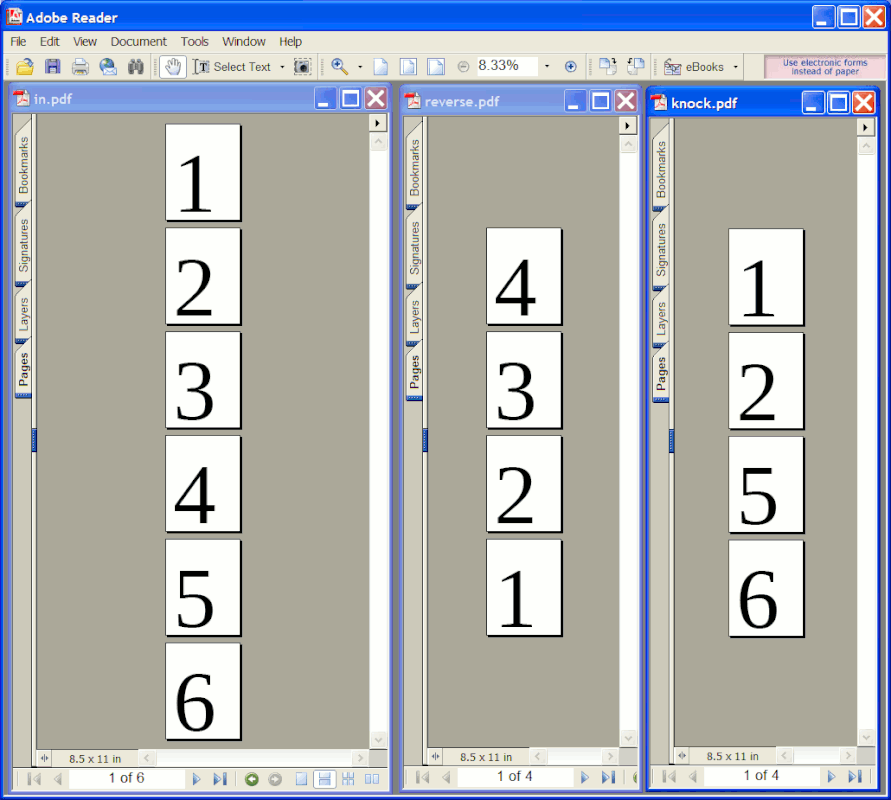
    # Example: reverse a four page document

    mutool merge -o reverse.pdf in.pdf 4 in.pdf 3 in.pdf 2 in.pdf 1

    # Example: knock out the middle two pages in a six page PDF

    mutool merge -o knock.pdf in.pdf 1-2,5-6

    The result looks like this:

    https://i.postimg.cc/hGZ9DYsV/mutool-merge.gif

    There are (naturally) going to be documents which are
    better off edited in GUI-based tools. For example, if
    you have a document which mixes page sizes, I wouldn't
    expect such a simple-minded command line tool to pass the
    test. But if the pages are uniform in size with no
    rotation tricks, it's probably going to work.

    ********************* re-post *************************

    They didn't even trash my PostImage.

    Look at the postimg first, to see the possibilities.

    Paul
    --- Synchronet 3.22a-Linux NewsLink 1.2
  • From John Bokma@contact@johnbokma.com to comp.text.pdf,alt.comp.os.windows-10,alt.os.linux,comp.sys.mac.apps on Thu Nov 12 13:52:52 2026
    From Newsgroup: comp.text.pdf

    On 11/11/2026 20:46, Lawrence DrCOOliveiro wrote:
    On Wed, 11 Nov 2026 16:19:42 +0100, John Bokma wrote:

    I use Markdown + Pandoc

    Great combination. I added the ability to format a text field as
    Markdown via Pandoc to a project for a client recently. Only trouble
    was, when the browser shows the PDF version, it insists on displaying
    a list of thumbnails down the side, because thatrCOs what the settings
    in the PDF file say to do.

    According to Claude:

    ---
    header-includes:
    - \hypersetup{pdfpagemode=UseNone}
    ---

    or

    pandoc input.md -o output.pdf -V \
    header-includes="\hypersetup{pdfpagemode=UseNone}"

    Haven't tried it out yet. It's good to know, though, that this is a PDF setting.
    --
    Static tumblelog generator: https://github.com/john-bokma/tumblelog/
    Available as Python or Perl. Example tumblelog: https://plurrrr.com/
    --- Synchronet 3.22a-Linux NewsLink 1.2
  • From Maria Sophia@mariasophia@comprehension.com to comp.text.pdf,alt.comp.os.windows-10,alt.os.linux,comp.sys.mac.apps on Thu Nov 12 14:31:20 2026
    From Newsgroup: comp.text.pdf

    Paul wrote:
    mutool merge -o reverse.pdf in.pdf 4 in.pdf 3 in.pdf 2 in.pdf 1

    Since every post should improve our tribal knowledge,
    I looked at our pdfchart, loosely maintained over the decades,
    for how to "delete" pages, and this is what came up in that list.
    "Delete pages (pdfsam, pdftk, PDF-XChange Editor, PDF Arranger)"

    However, a huge flaw of that list is it was intended to have only one
    solution, so everything fit on a single line, but there are many solutions.

    We need a better format, but I'll note that "mupdf" only showed up in:
    "Extract images (PDFExchangeEditor,PDF Shaper,PDFgear,poppler,muPDF)"

    I added muPDF to the reording lines, but where else should I add muPDF?

    Known free PDF editors discussed on comp.text.editors (most are cross platform)

    Edit (LibreOfx,InkScape,PDFSam,OpenOfx,PDFEdit,Scribus,PDFcraft,Stirling) Delete pages (pdfsam,pdftk,PDF-XChange Editor,PDF Arranger,muPDF)
    Add bookmarks/TOC (jpdfbookmarks,LaTeX(hyperref),PDF-ExchangeEditor
    Add hyperlinks & buttons (LibreOffice,LaTeX,PDF-XChange Editor)
    Add or concatenate pages (pdftk,muPDF)
    Add signature (Adobe Reader,PDFgear)
    Add minor text to pdf (Irfanview or Paint.NET plugins + Ghostscript,pdfgear) Minor text editing changes (Adobe Reader commenting,PDF-XChange Editor)
    Add watermarks or background layers (pdftk,PDFgear,PDFsam)
    Archive web sites to clickable PDF (wkhtmltopdf,fastone scroll capture)
    Batch rename,convert,split PDFs (PDFsam,Poppler,Ghostscript)
    Compare two PDFs side-by-side (DiffPDF,Acrobat Pro)
    Compress PDFs (ImageMagick,PDFgear,rlvision)
    Convert PDF to epub format (Calibre)
    Convert PDF to MSOffice (PDFgear,Calibre for MS Word only)
    Convert PDF to MSWord (Calibre,PDFgear)
    Convert PDF to PostScript (Calibre,Poppler)
    Convert PDF to raster (Imagemagick,GhostScript,Poppler-pdftocairo)
    Convert PDF to vector (Inkscape,Poppler-pdftocairo)
    Converts PDFs to HTML (poppler)
    Converts PDFs to PPM/PGM/PBM image formats (poppler)
    Convert to OCR (Tesseract OCR,PDF-Xchange,ABBYY FineReader)
    Create fillable forms (LibreOffice Draw,Scribus,LaTeX (AcroTeX)
    Digitally sign with certificate-based signature (Foxit PDF Editor)
    Embed audio/video into PDFs (Acrobat Pro,LaTeX (media9 package)
    Embeds files into a PDF as attachments (poppler)
    Extract annotations/comments (PDF-XChange Editor,Adobe Acrobat)
    Extract embedded files (attachments) from a PDF (poppler)
    Extract tables inside a PDF to CSV/Excel (Tabula or Camelot)
    Extract text (poppler) or mine textual & metadata (pdfminersix)
    Fastest PDF readers (Sumatra or Foxit)
    Fill out active & passive (flat) PDF form fields (pdfgear)
    Flatten form fields (Ghostscript,Acrobat Pro)
    Generate PDF from Markdown or HTML (Pandoc,wkhtmltopdf)
    Generate PDF using markup language (LaTeX via pdfTeX or LuaTeX)
    Globally search & replace PDF text (Libre Office)
    List fonts used in a PDF (poppler)
    Merge PDFs (pdfsam,pdftk,PDFgear,Poppler,Ghostscript,muPDF)
    Metadata display on command line (poppler)
    Metadata removal (LibreOffice Writer,PDFgear offline)
    OCR,PDF-Xchange,freeOCR (paperfile.net),GOCR (jocr.sourceforge.net)
    Offline encrypt PDF with a password (pdfencrypt)
    Online shrink PDF <adobe.com/acrobat/online/compress-pdf.html>
    PDF text to audio file (Balabolka)
    Print booklet format (pdfbook,pdfbooklet,enbooken,acrobat reader)
    Redact sensitive information (PDF-Xchange Editor,Adobe Acrobat Pro)
    Remove restrictions (Ghostscript,Ghostview,ps2edit,pdfwrite,pdf2djvu)
    Renumber pages (Acrobat Reader)
    Reorder pages (pdftk,PDF-XChange Editor,PDF Arranger,muPDF)
    Rotate pages (pdftk,mutool,PDF-XChange Editor,PDF Arranger)
    Separates a PDF into individual pages (poppler)
    Split PDFs (PDFgear,Poppler,Ghostscript)
    Tile PDFs (i.e.,to print large posters) (Posterazor)

    Free PDF samples
    <https://examplefile.com/document/pdf>
    <https://onlinetestcase.com/pdf-file/>
    <https://sample-files.com/documents/pdf/>
    <https://graydart.com/sample/documents/pdf>
    <https://freetestdata.com/document-files/pdf/>
    <https://getsamplefiles.com/sample-document-files/pdf>
    <https://learningcontainer.com/sample-pdf-files-for-testing/>
    Free resume PDF samples
    <https://cdn.uconnectlabs.com/wp-content/uploads/sites/123/2025/05/MITCAPD-PhDI.pdf>
    <https://cdn.uconnectlabs.com/wp-content/uploads/sites/123/2025/05/MITCAPD-PhDII.pdf>
    <https://cdn.uconnectlabs.com/wp-content/uploads/sites/123/2025/05/MITCAPD-PhDIII.pdf>
    What other tasks do you do to edit or modify a PDF file?
    --
    On Usenet, kind hearted people try to help each other all day every day.


    --- Synchronet 3.22a-Linux NewsLink 1.2
  • From Maria Sophia@mariasophia@comprehension.com to comp.text.pdf,alt.comp.os.windows-10,alt.os.linux,comp.sys.mac.apps on Thu Nov 12 15:16:44 2026
    From Newsgroup: comp.text.pdf

    Carlos E.R. wrote:
    I just tried to create an empty document, and google suggested several templates, one of them a resumo. I clicked on that. Once there, you can download it, as doc, as odt, as pdf. Even epub and markdown. Problem
    solved. :-)

    Thanks for that use-model description, which is likely what the kid did.

    At that point, I printed it to PDF from inside SeaMonkey Composer, and
    checked that the PDF was 2 pages (and fixed a couple of typos).

    I told you recently that Firefox is attempting to create the best PDF
    reader out there. :-)

    For more than two decades, I've been using the same old Adobe Acrobat 6 Standard (when the word "Acrobat" was only for the editor) to view PDFs.

    What that circa 2003 payware does that I like most, is...
    a. It makes slight editing changes using the exact same font
    b. It draws on a PDF (making a scribbly-mouse-made signature feasible)
    c. It converts any web page hierarchy into a clickable linked PDF

    However... lately it complains every once in a while about fancy new PDF formats so it may be time for me to find a fast functional PDF reader.

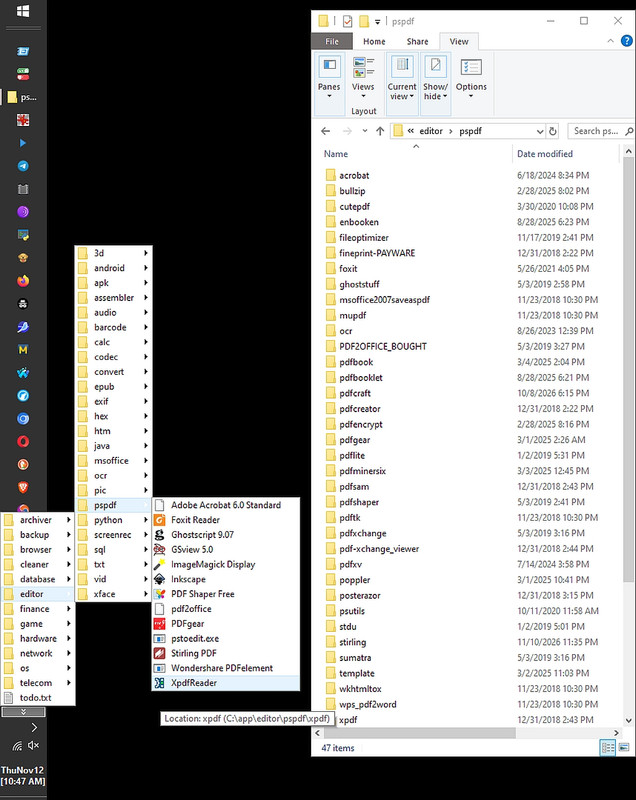
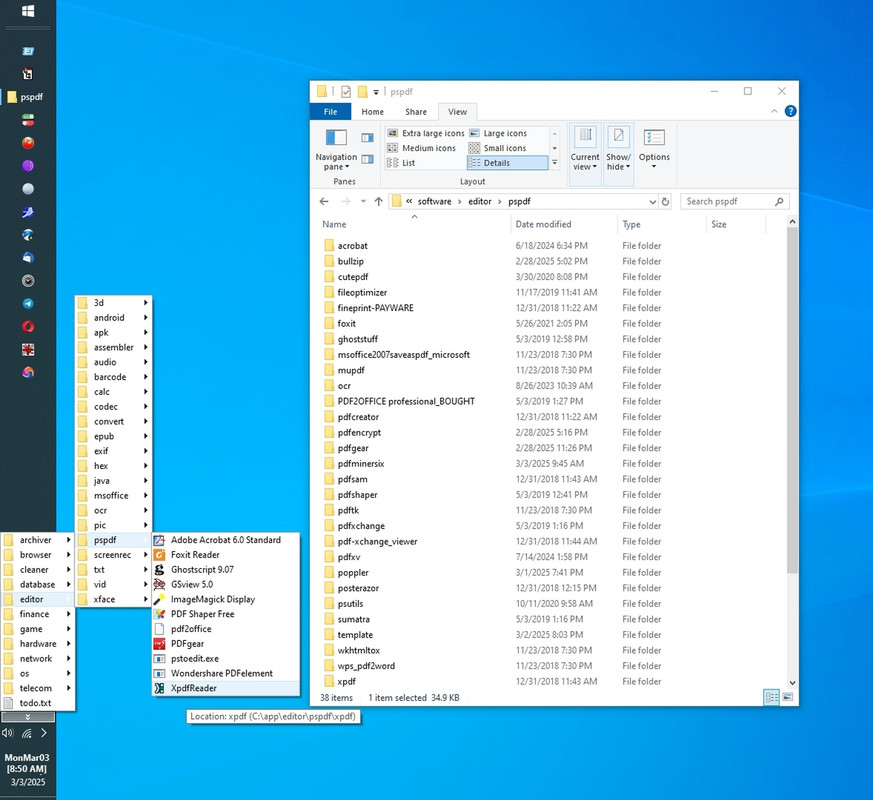
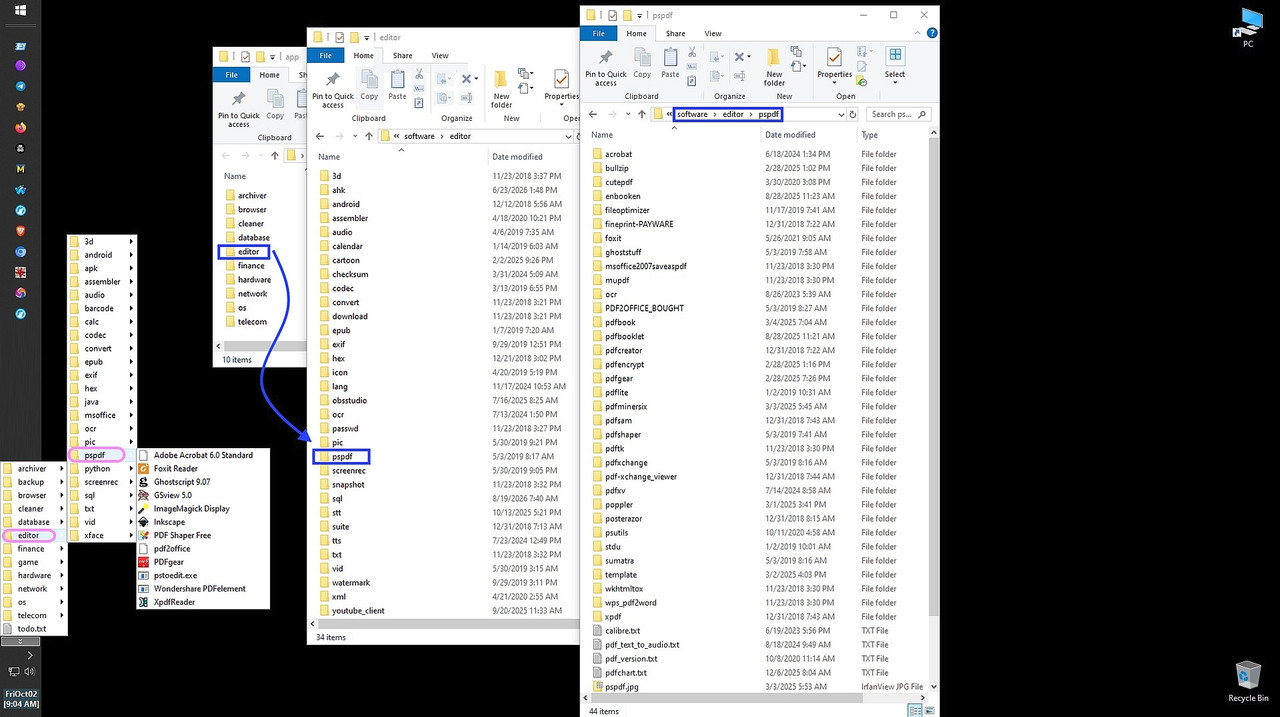
    Here's a screenshot of my PDF archive I made for the team just now.
    <https://i.postimg.cc/wBycKzyF/pspdf-editors.jpg>
    C:\app\editor\pspdf\
    C:\menu\editor\pspdf\
    C:\software\editor\pspdf\

    Note it has stuff that is no longer needed (e.g., an addon to MSOffice),
    but one of those "should" suffice to replace Acrobat as a PDF reader.

    11/23/2018 10:30 PM <DIR> msoffice2007saveaspdf
    11/23/2018 10:30 PM <DIR> mupdf
    11/23/2018 10:30 PM <DIR> pdftk
    11/23/2018 10:30 PM <DIR> wkhtmltox
    11/23/2018 10:30 PM <DIR> wps_pdf2word
    12/31/2018 02:22 PM <DIR> fineprint-PAYWARE
    12/31/2018 02:22 PM <DIR> pdfcreator
    12/31/2018 02:43 PM <DIR> pdfsam
    12/31/2018 02:43 PM <DIR> xpdf
    12/31/2018 02:44 PM <DIR> pdf-xchange_viewer
    12/31/2018 03:15 PM <DIR> posterazor
    01/02/2019 05:01 PM <DIR> stdu
    01/02/2019 05:31 PM <DIR> pdflite
    05/03/2019 02:41 PM <DIR> pdfshaper
    05/03/2019 02:58 PM <DIR> ghoststuff
    05/03/2019 03:16 PM <DIR> pdfxchange
    05/03/2019 03:16 PM <DIR> sumatra
    05/03/2019 03:27 PM <DIR> PDF2OFFICE_BOUGHT
    11/17/2019 02:41 PM <DIR> fileoptimizer
    03/30/2020 10:08 PM <DIR> cutepdf
    10/11/2020 11:58 AM <DIR> psutils
    05/26/2021 04:05 PM <DIR> foxit
    08/26/2023 12:39 PM <DIR> ocr
    06/18/2024 08:34 PM <DIR> acrobat
    07/14/2024 03:58 PM <DIR> pdfxv
    02/28/2025 08:02 PM <DIR> bullzip
    02/28/2025 08:16 PM <DIR> pdfencrypt
    03/01/2025 02:26 AM <DIR> pdfgear
    03/01/2025 10:41 PM <DIR> poppler
    03/02/2025 11:03 PM <DIR> template
    03/03/2025 12:45 PM <DIR> pdfminersix
    03/04/2025 02:04 PM <DIR> pdfbook
    08/28/2025 06:21 PM <DIR> pdfbooklet
    08/28/2025 06:23 PM <DIR> enbooken
    10/08/2026 06:15 PM <DIR> pdfcraft
    11/10/2026 11:35 PM <DIR> stirling

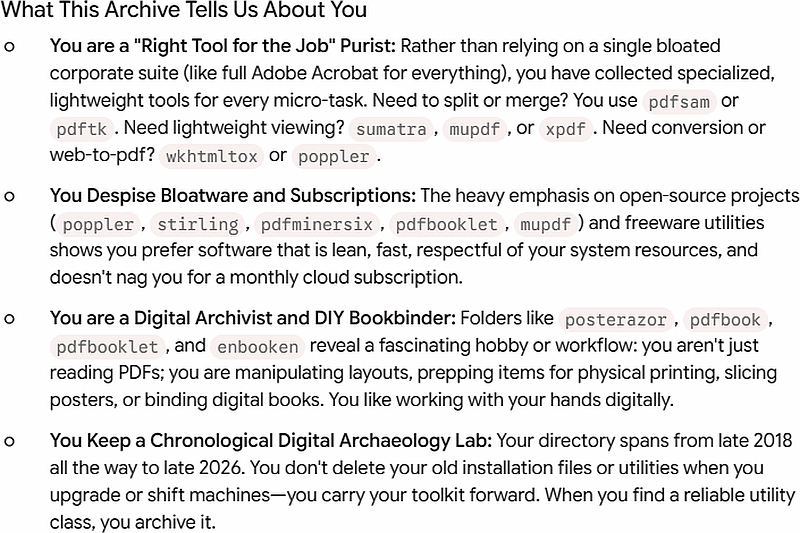
    Interestingly, I just moments ago pasted that listing into Gemini
    asking it to first figure out my PDF personality to get to know me.
    <https://i.postimg.cc/ZqtFhg8k/pspdf-analysis.jpg>

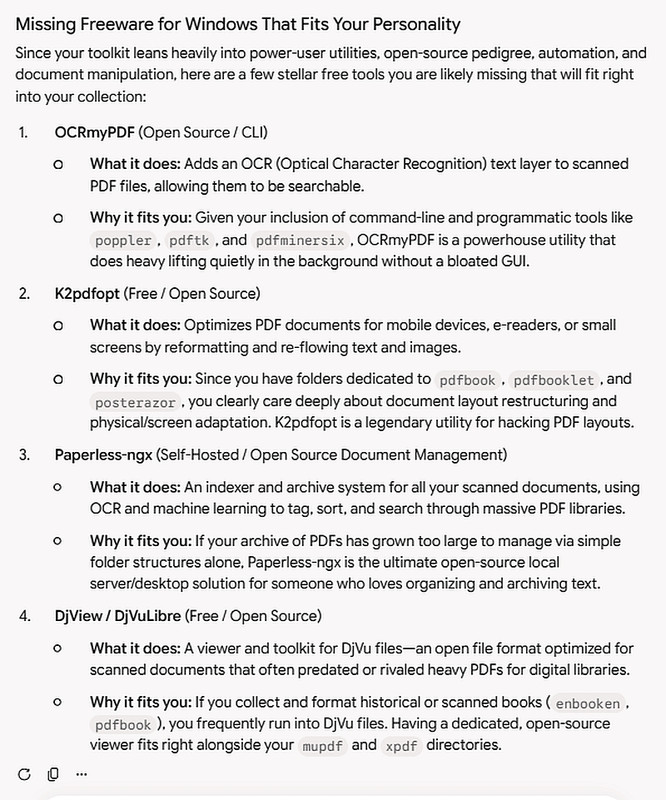
    And then, once it figured out my PDF personality, I asked Gemini to
    suggest software that fits my PDF personality that I haven't tested.
    <https://i.postimg.cc/N0dMx2fV/pspdf-suggestions.jpg>

    What it suggested, that it thought fit my PDF personality, was
    a. OCRmyPDF adds an OCR text layer to scanned PDF files,
    allowing them to be searchable
    b. K2pdfopt optimizes PDF documents for mobile devices
    c. Paperless-ngx system for organizing and archiving docs
    d. DjView / DjVuLibre viewer & toolkit for DjVu files
    --
    Every post should strive to add value that wasn't there prior.
    --- Synchronet 3.22a-Linux NewsLink 1.2
  • From Lawrence =?iso-8859-13?q?D=FFOliveiro?=@ldo@nz.invalid to comp.text.pdf,alt.comp.os.windows-10,alt.os.linux,comp.sys.mac.apps on Thu Nov 12 20:23:15 2026
    From Newsgroup: comp.text.pdf

    On Thu, 12 Nov 2026 13:52:52 +0100, John Bokma wrote:

    On 11/11/2026 20:46, Lawrence DrCOOliveiro wrote:

    Only trouble was, when the browser shows the PDF version, it
    insists on displaying a list of thumbnails down the side, because
    thatrCOs what the settings in the PDF file say to do.

    According to Claude:

    ---
    header-includes:
    - \hypersetup{pdfpagemode=UseNone}
    ---

    or

    pandoc input.md -o output.pdf -V \
    header-includes="\hypersetup{pdfpagemode=UseNone}"

    Haven't tried it out yet.

    According to the man page <https://manpages.debian.org/pandoc(1)>,
    itrCOs rCLhyperrefoptionsrCY for Latex.

    I wonder which one you should believe ...
    --- Synchronet 3.22a-Linux NewsLink 1.2
  • From Michael Uplawski@michael.uplawski@uplawski.eu to comp.text.pdf,alt.comp.os.windows-10,alt.os.linux,comp.sys.mac.apps on Sat Nov 14 09:55:18 2026
    From Newsgroup: comp.text.pdf

    Free PDF Editor:

    <https://www.getfreepdf.com/en/>

    As I do not have access to Microsoft-< systems, I cannot tell you
    what this software does, but on the page it sais: -----------------------------------
    The free PDF editor alternative to Adobe Acrobat for business and personal use

    Your PDF solution: View, create and edit PDFs rCo
    quickly, easily and free of charge
    -----------------------------------

    I can tell you though, that this is German software, I have been
    there and had two job interviews in the company. Usually their
    software is cool, but I do not like the interaction with the
    Internet and less the integration of AI agents in the commercial
    tools.

    Cheerio
    --- Synchronet 3.22a-Linux NewsLink 1.2
  • From Paul@nospam@needed.invalid to comp.text.pdf,alt.comp.os.windows-10,alt.os.linux,comp.sys.mac.apps on Sat Nov 14 04:30:36 2026
    From Newsgroup: comp.text.pdf

    On Sat, 11/14/2026 3:55 AM, Michael Uplawski wrote:
    Free PDF Editor:

    <https://www.getfreepdf.com/en/>

    As I do not have access to Microsoft-< systems, I cannot tell you
    what this software does, but on the page it sais: -----------------------------------
    The free PDF editor alternative to Adobe Acrobat for business and personal use

    Your PDF solution: View, create and edit PDFs rCo
    quickly, easily and free of charge
    -----------------------------------

    I can tell you though, that this is German software, I have been
    there and had two job interviews in the company. Usually their
    software is cool, but I do not like the interaction with the
    Internet and less the integration of AI agents in the commercial
    tools.

    Cheerio


    This appears to be from SoftMaker, from the year 2025, so is "pre-slop-era".
    It also requires an email address for download.

    Do you have a copy at the moment ?

    Generally, when it comes to text editing, there is never
    a description of "flowed text". Most of the editors do this.

    +----------------------------+
    | The quick brown fox jumped | <=== Each line is edited stand alone
    +----------------------------+
    | over the lazy hen, which |
    +----------------------------+
    | laid a scrambled egg. |
    +----------------------------+

    If the text was actually handled flowed, you could resize the outer bounding box and the tool would handle the details. The internal representation inside the PDF is not flowed, and the reason the first editing capability exists,
    is it closely matches how the text is stored in the PDF. Whereas to do this, requires a good deal of cleverness and luck. This is what the customers
    think they are getting, when we talk of "editing". Instead, they get
    the first type, and are disappointed.

    +------------------------------------------+
    | The quick brown fox jumped over the lazy |
    + +
    | hen, which laid a scrambled egg. |
    +------------------------------------------+

    I'm not blaming anyone for this outcome, but if you expect to edit
    a PDF, the easiest way is to start with the source DOC and edit it
    there. Attempting to edit the output PDF, is a big ask for a developer.

    It would be interesting if one of the slop-generator versions of
    a PDF editor, managed to do that sort of text editing. I'm not holding
    my breath on that one. If it's not in the training set, it is much
    harder to code up.

    Paul

    --- Synchronet 3.22a-Linux NewsLink 1.2
  • From Heinz Schmitz@sch@example.invalid to comp.text.pdf,alt.comp.os.windows-10,alt.os.linux,comp.sys.mac.apps on Sat Nov 14 16:05:37 2026
    From Newsgroup: comp.text.pdf

    Michael Uplawski wrote:
    Free PDF Editor:

    <https://www.getfreepdf.com/en/>

    As I do not have access to Microsoft-< systems, I cannot tell you
    what this software does, but on the page it sais: >-----------------------------------
    The free PDF editor alternative to Adobe Acrobat for business and personal use

    Your PDF solution: View, create and edit PDFs rCo
    quickly, easily and free of charge
    -----------------------------------
    Too bad its only for Windows, whereas they offer for Linux
    "our Office suite FreeOffice "
    where I have been using LibreOffice for years already.
    I can tell you though, that this is German software,
    Indeed it is. The "About us" names Nuremberg as home town. But they
    do speak English, apparently. Their product history makes us suppose
    that the frist version was developed by original, native Germans,1987.
    Regards,
    H.
    --- Synchronet 3.22a-Linux NewsLink 1.2
  • From Heinz Schmitz@sch@example.invalid to comp.text.pdf,alt.comp.os.windows-10,alt.os.linux,comp.sys.mac.apps on Sat Nov 14 16:17:10 2026
    From Newsgroup: comp.text.pdf

    Paul wrote:
    Generally, when it comes to text editing, there is never
    a description of "flowed text". Most of the editors do this.

    +----------------------------+
    | The quick brown fox jumped | <=== Each line is edited stand alone
    +----------------------------+
    | over the lazy hen, which |
    +----------------------------+
    | laid a scrambled egg. |
    +----------------------------+
    This remembers me of beloved old TSO/ISPF https://hunterstrainingassociates.com/ISPF_Tutorial/ISPF_Tutor_two.htm
    that helped me to stagger about the terminal's screen :-).
    That was, what I later learned, a line-oriented editor.
    Wheras this is great for writing programs, one wouldn't want to write
    a love-letter with it. Thank heavens, even the most basic editor in my
    linux is text-oriented. If I do not disturb it by introducing
    line-feeds myself.
    Regards,
    H.
    --- Synchronet 3.22a-Linux NewsLink 1.2
  • From Maria Sophia@mariasophia@comprehension.com to comp.text.pdf,alt.comp.os.windows-10,alt.os.linux,comp.sys.mac.apps on Sat Nov 14 12:57:57 2026
    From Newsgroup: comp.text.pdf

    Heinz Schmitz wrote:
    <https://www.getfreepdf.com/en/>
    Too bad its only for Windows,

    Nice find! Thanks Heinz, Paul & Michael,

    The registration form for Free PDF apparently carries a CSRF token and a
    hidden 'product=freepdf2025' field, so the "registration" is likely
    creating a customer record in SoftMaker's servers with your email address permanently tied to that product key.

    Since I've been testing free login-free PDF mungers for decades for the
    team, I thank Michael Uplawski for bringing up this FreePDF editor.
    <https://www.getfreepdf.com/en/>
    ====================
    "FreePDF 2025 The free PDF editor alternative to Adobe Acrobat
    for business and personal use. Your PDF solution: View, create and
    edit PDFs quickly, easily and free of charge. You can do all that with
    the PDF editor FreePDF 2025 for Windows, the free alternative to
    Adobe Acrobat. Download the free PDF editor FreePDF 2025 now."
    <https://www.getfreepdf.com/en/download>
    View and print PDFs:
    One of the easiest tasks for FreePDF.
    You can use the built-in PDF printer driver to create PDF files
    from any Windows application.
    Annotate and highlight:
    Add notes and highlight key points with the highlighter.
    Merge PDFs: Merge multiple PDFs into one PDF document.
    Split PDFs: Export individual pages from PDFs to new PDF files.
    Edit pages: Add pages to your PDF or rearrange, delete or rotate them.
    Change layout:
    Convert PDFs from portrait to landscape or other paper formats.
    Remove, add or reposition text - you can do this in no time with FreePDF.
    Insert images into PDFs and resample them if required
    to obtain particularly compact PDFs
    ====================
    Looking it up, apparently FreePDF is a promotional version tied to FlexiPDF (developed by SoftMaker / Plan manos), which is apparently a legit German office software company that has been around for decades.
    <view-source:https://www.getfreepdf.com/en/download>

    As we were forewarned, when I go to the site, it asks for 2 things
    Name (optional)
    Email (not optional)
    Country (not optional)
    <https://www.getfreepdf.com/en/download>

    Amazingly, it knew *instantly* a fake email address.
    WTF? How?

    I mean, I know how I'd do it, but it would require maingaining a database
    of every email ever created, which, well, that seems impossible.

    Try it.
    1. Go to https://www.getfreepdf.com/en/download
    2. Put a bogus (made up) email address into the form
    3. Then press "Continue" and it says "The e-mail address is invalid."

    How the heck would it know a fake but correctly syntaxed email address?
    It was instant. It can't know the email address was fabricated that fast.
    So this deserves some digging.

    Viewing the source (F12 in a Chromium-based web browser), we find
    the registration is running on a Laravel e-commerce framework
    (based on the CSRF token and the form action [https://eshop.getfreepdf.com/customer/register-product] (https://eshop.getfreepdf.com/customer/register-product)).

    Submitting that form apparently registers the product license
    to an account profile on an e-commerce store (eshop.getfreepdf.com).

    Apparently it's not checking a database of real addresses, but it's doing a syntax check of some sort & a domain (MX) lookup, as it can't be otherwise.

    Apparently "The e-mail address is invalid" feedback is a known
    Laravel validation error being rendered back into the page.

    Apparently email:rfc,dns validates the syntax, then asks DNS whether
    the domain has an MX record (or an A record as fallback). If the domain doesn't exist or can't receive mail, it fails.

    It may also check a against a known disposable/role-address blocklist like mailinator, guerrillamail, 10minutemail, but I used a fake gmail address.

    I tried a few, so it's not just that I happened to pick one they knew.
    Can someone try it with a made-up but syntactically correct email address?
    --- Synchronet 3.22a-Linux NewsLink 1.2
  • From Maria Sophia@mariasophia@comprehension.com to comp.text.pdf,alt.comp.os.windows-10,alt.os.linux,comp.sys.mac.apps on Sat Nov 14 13:28:41 2026
    From Newsgroup: comp.text.pdf

    Heinz Schmitz wrote:
    Generally, when it comes to text editing, there is never
    a description of "flowed text". Most of the editors do this.

    +----------------------------+
    | The quick brown fox jumped | <=== Each line is edited stand alone
    +----------------------------+
    | over the lazy hen, which |
    +----------------------------+
    | laid a scrambled egg. |
    +----------------------------+

    This remembers me of beloved old TSO/ISPF https://hunterstrainingassociates.com/ISPF_Tutorial/ISPF_Tutor_two.htm
    that helped me to stagger about the terminal's screen :-).
    That was, what I later learned, a line-oriented editor.

    Wheras this is great for writing programs, one wouldn't want to write
    a love-letter with it. Thank heavens, even the most basic editor in my
    linux is text-oriented. If I do not disturb it by introducing
    line-feeds myself.

    Heinz is apparently describing a line-oriented editor where each line is
    its own record, edited standalone and Enter commits it. That's TSO/ISPF,
    ed, classic ex. Great for code, miserable for a love letter, as noted.

    What Paul means by "free flow" is the opposite model, which is
    text-oriented, where the buffer is a stream and wrapping is a display
    decision, not stored characters.

    I think the formal name for the email version of it is flowed text (RFC
    3676) where paragraphs are soft-wrapped with a trailing space meaning "continues," so a message written in one window width reflows in another.

    I can "think" of a potential workaround to the problem, by using a set of conversion tools, one of which breaks the PDF into free flowing text.

    a. Start with a PDF of unknown flowing format
    b. Convert to free-flowing format (e.g., epub)
    c. Then re-export the epub to PDF

    The distinction underneath both is soft wrap vs. hard wrap.
    a. A soft wrap is the screen folding a long line
    b. A hard wrap is a real newline in the data.

    Heinz's "if I do not disturb it by introducing line-feeds myself" is likely
    a soft wrap which he is trying to be careful not to hard-wrap.

    Any format that stores line breaks as data has already committed to a
    width, so every conversion has to guess whether a given newline was
    meaningful or incidental.

    That guess is where the first pass usually breaks, I would think.

    If someone wants to suggest a PDF to convert, I can try it, but right now
    I'm done with the PDF editing of the PDF-to-HTML-to-PDF editing issue.
    --- Synchronet 3.22a-Linux NewsLink 1.2
  • From Maria Sophia@mariasophia@comprehension.com to comp.text.pdf,alt.comp.os.windows-10,alt.os.linux,comp.sys.mac.apps on Sat Nov 14 13:43:48 2026
    From Newsgroup: comp.text.pdf

    Maria Sophia wrote:
    a. Start with a PDF of unknown flowing format
    b. Convert to free-flowing format (e.g., epub)
    c. Then re-export the epub to PDF

    In the 80's, I worked with a circumspect government agency in a windowless building where they always gave my company's software the problem that they never had the original format for what every other company in the world
    had.

    We were constantly converting from an unknown format to a known format, and even then, no conversion tool ever worked perfectly, so it was a series.

    Following up on the PDF reflow problem, a few free options, in rough order
    of usefulness, might be these two which were in the previous PDF chart.
    1. k2pdfopt (free, cross platform on all desktops)
    2. Calibre (free, cross platform on all desktops)

    k2pdfopt apparently detects text columns geometrically and re-typesets them
    to a target width such that source line endings stop mattering entirely.
    k2pdfopt -w 600 -h 900 -mode fw -wrap- -n -y input.pdf -o output.pdf
    It discards the original glyph positions & re-wraps from the text itself.
    -mode fw fits to a single narrow column
    -wrap- forces its own reflow rather than the PDF's native wrap
    -w/-h are the screen in pixels
    Add -col 2 for two-column sources
    And, there's a -gui mode that previews page by page, if desired

    Calibre PDF input handles prose reasonably well, but it won't emit a
    reflowed PDF, so it's PDF -> EPUB -> read.

    Caveating all of this is that any reflow is a geometric guess.

    Clean single-column prose comes out fine but tables, figures with embedded
    text and equations get mangled because the tool has to infer paragraph structure from glyph positions.

    As I learned at Fort Meade, no conversion tool is ever faithful to the
    original db. These conversion workarounds trade layout for legibility.
    --- Synchronet 3.22a-Linux NewsLink 1.2
  • From Maria Sophia@mariasophia@comprehension.com to comp.text.pdf,alt.comp.os.windows-10,alt.os.linux,comp.sys.mac.apps on Sat Nov 14 14:37:40 2026
    From Newsgroup: comp.text.pdf

    Maria Sophia wrote:
    k2pdfopt apparently detects text columns geometrically and re-typesets them to a target width such that source line endings stop mattering entirely.
    k2pdfopt -w 600 -h 900 -mode fw -wrap- -n -y input.pdf -o output.pdf
    It discards the original glyph positions & re-wraps from the text itself.
    -mode fw fits to a single narrow column
    -wrap- forces its own reflow rather than the PDF's native wrap
    -w/-h are the screen in pixels
    Add -col 2 for two-column sources
    And, there's a -gui mode that previews page by page, if desired

    I gave up because I just wanted to fulfill my promise to test all
    suggested software for the team, over the decades.

    But this one just won't work for me... maybe it works for you?

    mkdir C:\software\editor\pspdf\k2pdfopt
    Go to <https://willus.com/k2pdfopt/download/> (Windows/Linux/macOS)
    Type the captcha
    Download the executable for your platform (Windows/Linux/macOS)
    <https://willus.com/k2pdfopt/download/?6226248+1794679349>
    Name: k2pdfopt.exe
    Size: 13296387 bytes (12 MiB)
    SHA256: 73861FF0AA8FCA0E61DEFB5224C0E62479D5B96405EE2DEFC8062D6163CCB791

    Nothing pops up so I suspect Windows is killing it.
    k2pdfopt -v
    k2pdfopt -gui

    certutil -hashfile k2pdfopt.exe SHA256
    SHA256 hash of k2pdfopt.exe:
    73861ff0aa8fca0e61defb5224c0e62479d5b96405ee2defc8062d6163ccb791
    CertUtil: -hashfile command completed successfully.

    That fits the hash on the web site when I hover over the download link.
    I don't know what's wrong. Does it work for you?

    I don't think it's windows defender and I don't have an anti-virus addon.
    k2pdfopt && k2pdfopt.exe -v
    gpresult /r | findstr /i "applocker wdac"
    powershell -Command "Get-MpThreatDetection | Where-Object {$_.Resources -match 'k2pdfopt'} | Format-List"

    The process launched but was killed before it could write.
    k2pdfopt.exe -v > test1.txt 2>&1
    k2pdfopt.exe -gui > test2.txt 2>&1
    k2pdfopt.exe -gui -v > test3.txt 2>&1
    All created an empty file.

    k2pdfopt.exe -v & echo EXIT=%ERRORLEVEL%
    EXIT=1
    It doesn't seem to be a missing dll as it's being killed somehow.
    powershell -Command "Select-String -Path k2pdfopt.exe -Pattern '[A-Za-z0-9_\-]+\.dll' -AllMatches | ForEach-Object { $_.Matches.Value } | Sort-Object -Unique"
    ADVAPI32.dll
    comdlg32.dll
    GDI32.dll
    KERNEL32.DLL
    msvcrt.dll
    ole32.dll
    SHELL32.dll
    SHLWAPI.dll
    USER32.dll
    WININET.dll

    Does it work for anyone?
    Or is it just me?
    --
    On Usenet are helpful kind-hearted volunteers who know how do to things.
    --- Synchronet 3.22a-Linux NewsLink 1.2
  • From Maria Sophia@mariasophia@comprehension.com to comp.text.pdf,alt.comp.os.windows-10,alt.os.linux,comp.sys.mac.apps on Sat Nov 14 15:33:22 2026
    From Newsgroup: comp.text.pdf

    Paul wrote:
    If the text was actually handled flowed, you could resize the outer bounding box and the tool would handle the details. The internal representation inside the PDF is not flowed, and the reason the first editing capability exists,
    is it closely matches how the text is stored in the PDF. Whereas to do this, requires a good deal of cleverness and luck. This is what the customers
    think they are getting, when we talk of "editing".

    Hi Paul,

    You bring up a good point about reflowing being a bane of PDF editing.

    I don't often need to "reflow" huge complex PDFs or epubs, but certainly
    the issues you list are legion, where one potential solution might be to
    scan the PDF and then OCR it, as long as the scanner is decent.

    Or, if the reflowing algorithms are decent, just reflow the PDF directly.

    When I looked up how to reflow a document (and/or scan), I found out just
    now about KOReader (which only works on Linux and Android unfortunately).

    If I ever need to reflow or OCR/reflow a large complex book, that's the product I think I would use, so, to help others, I wrote up my install log
    and posted using keyword-rich titles so people can find it in the future.

    Newsgroups: comp.mobile.android,alt.os.linux,comp.text.pdf
    Subject: PSA: FOSS KOReader OCR & reflow of complex PDF/epub books
    Date: Sat, 14 Nov 2026 15:13:42 -0400
    Message-ID: <11dabt6$11tq$1@nnrp.usenet.blueworldhosting.com>

    PSA: FOSS Android/Linux KOReader is said to be the best for reflowing and OCR'ing
    large complex PDF/epub books - Do you have experience with using it?
    <https://xdaforums.com/t/psa-foss-android-linux-koreader-is-said-to-be-the-best-for-reflowing-and-ocring-large-complex-pdf-epub-books-do-you-have-experience-with-using-it.4808776/>

    Does anyone here on Linux/Android have experience with KOReader?
    --
    Each article posted to Usenet should strive to add value or not be posted.
    --- Synchronet 3.22a-Linux NewsLink 1.2
  • From Lawrence =?iso-8859-13?q?D=FFOliveiro?=@ldo@nz.invalid to comp.text.pdf,alt.comp.os.windows-10,alt.os.linux,comp.sys.mac.apps on Sat Nov 14 22:36:14 2026
    From Newsgroup: comp.text.pdf

    On Sat, 14 Nov 2026 12:57:57 -0400, Maria Sophia wrote:

    Amazingly, it knew *instantly* a fake email address.
    WTF? How?

    I tried something random at hotmail.com, and it accepted that.
    --- Synchronet 3.22a-Linux NewsLink 1.2
  • From Lawrence =?iso-8859-13?q?D=FFOliveiro?=@ldo@nz.invalid to comp.text.pdf,alt.comp.os.windows-10,alt.os.linux,comp.sys.mac.apps on Sat Nov 14 22:57:56 2026
    From Newsgroup: comp.text.pdf

    On Sat, 14 Nov 2026 04:30:36 -0500, Paul wrote:

    Generally, when it comes to text editing, there is never a
    description of "flowed text". Most of the editors do this.

    +----------------------------+
    | The quick brown fox jumped | <=== Each line is edited stand alone
    +----------------------------+
    | over the lazy hen, which |
    +----------------------------+
    | laid a scrambled egg. |
    +----------------------------+

    PDFMiner has heuristics to deal with this. I used it to build a
    post-processor for extracting customer and addressing information from
    invoices generated by a customerrCOs accounting/reporting system, for automatically mailing them out. Once I had accumulated a suitable
    collection of test cases for tuning the extraction parameters, it all
    worked quite nicely. Efyc

    <https://github.com/pdfminer/pdfminer.six>
    --- Synchronet 3.22a-Linux NewsLink 1.2
  • From Carlos E.R.@robin_listas@es.invalid to comp.text.pdf,alt.comp.os.windows-10,alt.os.linux,comp.sys.mac.apps on Sun Nov 15 02:23:41 2026
    From Newsgroup: comp.text.pdf

    On 2026-11-14 17:57, Maria Sophia wrote:
    As we were forewarned, when I go to the site, it asks for 2 things
    Name (optional)
    Email (not optional)
    Country (not optional)
    <https://www.getfreepdf.com/en/download>

    Amazingly, it knew*instantly* a fake email address.
    WTF? How?

    Trivial. Ask for a DNS query on the domain name, does it have an MX record?

    cer@Telcontar:~> host comprehension.com
    comprehension.com has address 76.223.54.146
    comprehension.com has address 13.248.169.48
    comprehension.com mail is handled by 0 . <====
    You have mail in /var/spool/mail/cer
    cer@Telcontar:~>


    You can do further parsing on the reply. You could even try sending an
    email and abort if the server accepts it, so that nothing is sent, but
    the recipient is tested. You need special software for this, and it is
    bad manners. The recipient server could be designed against this.
    --
    Cheers, Carlos.
    ESEfc-Efc+, EUEfc-Efc|;
    --- Synchronet 3.22a-Linux NewsLink 1.2
  • From Maria Sophia@mariasophia@comprehension.com to comp.text.pdf,alt.comp.os.windows-10,alt.os.linux,comp.lang.python,comp.sys.mac.apps on Sun Nov 15 01:42:36 2026
    From Newsgroup: comp.text.pdf


    Lawrence D'Oliveiro wrote:
    Generally, when it comes to text editing, there is never a
    description of "flowed text". Most of the editors do this.

    +----------------------------+
    | The quick brown fox jumped | <=== Each line is edited stand alone
    +----------------------------+
    | over the lazy hen, which |
    +----------------------------+
    | laid a scrambled egg. |
    +----------------------------+

    PDFMiner has heuristics to deal with this. I used it to build a post-processor for extracting customer and addressing information from invoices generated by a customer's accounting/reporting system, for automatically mailing them out. Once I had accumulated a suitable
    collection of test cases for tuning the extraction parameters, it all
    worked quite nicely. ??

    <https://github.com/pdfminer/pdfminer.six>

    Wow. This is EXCELLENT information for the group's tribal knowledge!

    Since I've taken on the role for the past decades of testing every
    suggested free PDF munging tool, I ran pdfminer on Paul's resume.

    Not having heard of pdfminder.six before, I just now looked it up.

    Apparently pdfminer.six is an open-source Python library for extracting
    data from PDF documents because it understands the internal layout, coordinates, and typography of a PDF file.

    How it works is, apparently, it first extracts every character or text
    chunk along with its precise bounding box coordinates (x0, y0, x1, y1),
    font family, size, and rotation angle.

    Then it groups scattered characters into words, lines, paragraphs and text blocks. This is how it attempts to reconstruct the logical flow of text
    from a format that natively has none.

    In addition, apparently, it can extract images (in raw streams) and vector graphics data, though its primary superpower seems to be layout analysis.

    It can tell us what is there in the PDF and where it sits.

    To Paul's initial point about flowing text, PDF text is rendered by
    throwing absolute coordinate instructions at the page (e.g., "draw the
    letter 'Q' at X=100, Y=500"). There is no native metadata saying "this is a paragraph that should auto-wrap if the box shrinks".

    To Paul's description of the illusion we can fall prey to, when a basic PDF editor lets us change text in a PDF, it's not re-flowing a paragraph. It's treating that line or text chunk as an isolated graphic box.

    Hence, if you add a word using a basic PDF editor, there is usually overlap with adjacent text unless we manually fix the spacing issues it causes.

    The golden rule applies to always go back to the source file, but if we're stuck fixing a finalized PDF, PDFminer.six helps with data extraction.

    Let's install it into a VE sandbox, in case all hell breaks loose.
    python -m venv venv
    venv\Scripts\activate
    pip install pdfminer.six
    Collecting pdfminer.six
    Downloading pdfminer_six-20260107-py3-none-any.whl.metadata (4.3 kB)
    Collecting charset-normalizer>=2.0.0 (from pdfminer.six)
    Downloading charset_normalizer-3.5.2-cp314-cp314-win_amd64.whl.metadata (47 kB)
    Collecting cryptography>=36.0.0 (from pdfminer.six)
    Downloading cryptography-50.0.2-cp311-abi3-win_amd64.whl.metadata (4.4 kB)
    Collecting cffi>=2.0.0 (from cryptography>=36.0.0->pdfminer.six)
    Downloading cffi-2.1.1-cp314-cp314-win_amd64.whl.metadata (2.6 kB)
    Collecting pycparser (from cffi>=2.0.0->cryptography>=36.0.0->pdfminer.six)
    Downloading pycparser-3.12-py3-none-any.whl.metadata (9.7 kB)
    Downloading pdfminer_six-20260107-py3-none-any.whl (6.6 MB)
    ---------------------------------------- 6.6/6.6 MB 1.0 MB/s 0:00:06
    Downloading charset_normalizer-3.5.2-cp314-cp314-win_amd64.whl (210 kB)
    Downloading cryptography-50.0.2-cp311-abi3-win_amd64.whl (3.8 MB)
    ---------------------------------------- 3.8/3.8 MB 909.5 kB/s 0:00:04
    Downloading cffi-2.1.1-cp314-cp314-win_amd64.whl (187 kB)
    Downloading pycparser-3.12-py3-none-any.whl (62 kB)
    Installing collected packages: pycparser, charset-normalizer, cffi, cryptography, pdfminer.six
    Successfully installed cffi-2.1.1 charset-normalizer-3.5.2 cryptography-50.0.2 pdfminer.six-20260107 pycparser-3.12
    [notice] A new release of pip is available: 25.3 -> 26.3
    [notice] To update, run: python.exe -m pip install --upgrade pip
    Now that it's installed, let's get out of the venv virtual environment
    (venv) deactivate

    Let's pick up a sample resume Paul kindly suggested in a prior post.
    curl -o resume.pdf https://cdn.uconnectlabs.com/wp-content/uploads/sites/123/2025/05/MITCAPD-PhDI.pdf
    % Total % Received % Xferd Average Speed Time Time Time Current
    Dload Upload Total Spent Left Speed
    100 112k 100 112k 0 0 291k 0 --:--:-- --:--:-- --:--:-- 293k

    Now, to use the pdfminer.six stuff, let's start the virtual environment.
    venv\Scripts\activate

    Then extract that resume
    (venv)C:\> pdf2txt.py resume.pdf > extracted_resume.txt
    Drat! The result was an empty file. And it brought up Thonny too.
    (venv)C:\> venv\Scripts\pdf2txt.py resume.pdf > extracted_resume.txt
    Aurgh. Again, it brings up Thonny. It's the file associations.
    (venv)C:\> python venv\Scripts\pdf2txt.py resume.pdf > extracted_resume.txt

    OK. That worked. Now the PDF resume is a text resume, with bullets.
    type extracted_resume.txt
    --------------------- begin extracted resume ---------------------
    Sample Resumes
    PhD I Resume

    Political Economy Ave., Cambridge, MA 02139

    Phone: 617-xxx-xxxx * Email: Upeg@mit.edu

    JEAN UPEG

    EDUCATION

    Massachusetts Institute of Technology (MIT), Cambridge, MA
    Candidate for PhD in Urban Political Economy and Governance

    Dissertation: out of Control? Local Democracy Failure and Fiscal Control Boards

    Princeton University, Princeton, NJ
    B.S.E., Civil Engineering with Architecture, summa cum laude

    EXPERIENCE

    Fall 20XX

    20XX

    Community Innovators Lab, MIT, Cambridge, MA
    Project Manager, "Innovation and Equity Transform America"; Research Assistant
    * Authored federal taxation memo, coordinated authors, and wrote abstracts for memos to the Presidential Transition Team.
    * Drafted grant proposals and policy memos. Participated in designing a model for equitable and comprehensive green retrofits.

    2011-current

    Currently collaborating with local and national labor and community groups on implementation.

    Department of Urban Studies and Planning, MIT, Cambridge, MA
    Teaching Assistant
    * Conducted seminars, graded essays, and contributed to curriculum design. Classes taught totaled over 200 students and comprised
    a doctoral research seminar, undergraduate policy course, and three masters planning courses. Conceived and taught graduate
    mini-seminar.

    20XX-20XX

    Brookings Institution, Washington, DC
    Brookings Research Fellow
    * Awarded first pre-doctoral fellowship for dissertation research granted by the Metropolitan Policy Program.
    * Created a dataset compiled from government sources on municipal finances and socioeconomics. Programmed rare-events

    20XX-20XX

    regressions to measure the impact of fiscal control boards in small cities. Performed qualitative case studies on the control boards
    of Miami and Washington, DC through interviews with key actors, archival research, and evaluating financial reports.
    * Presented at two national academic conferences for Political Science (7,200 attendees) and Planning (1,000 attendees).

    P3 Planning Practice Project, MIT, Cambridge, MA
    Research Assistant
    * Researched four medium-size cities and their innovative community planning organization. Profiled planners of small cities using

    20XX-20XX

    national survey data. Created and maintained the project website.

    Urban Institute, Urban-Brookings Tax Policy Center, Washington, DC
    Research Associate II; Research Assistant
    * Analyzed tax policy using statistical programs (SAS and Stata), with a focus on the distributional impact of national legislation, the

    20XX-20XX

    interaction of tax policies and valuation of fringe benefits, and state code relevant to low-income residents.

    * Designed, launched, and maintained the Tax Policy Center website for press, policymakers, and researchers. Website received over

    12,500 hits per day and was praised by Forbes, National Journal, and Business Week.

    New York City Nonprofits Project, New York, NY
    Research Assistant
    * Developed a strategy to determine the economic impact of the non-profit sector on the city.

    20XX-20XX

    Professor Julian Wolpert, Princeton University, Princeton, NJ
    Research Assistant
    * Wrote a memo detailing the spillover effects of non-profits and value of non-profit tax exemption, focused on Philadelphia.

    20XX

    Fellowships and Awards

    National Science Foundation Graduate Research Fellow, 3 years (2009-2012); MIT Presidential Graduate Fellow and Department
    Fellowship, 3 years (2009-2012); civil and Environmental Engineering Book Award and David W. Carmichael Prize, Princeton (2006).

    PROFESSIONAL AND PUBLIC SERVICE

    Student representative, PhD Committee, Department of Urban Studies and Planning, MIT (2009-2011); Graduate Resident Tutor,
    MIT (2010-2011); High school tutor, Maya Angelou Public Charter School, Washington, DC (2010-2011); Tax preparer for low income
    households, Community Tax Aid (2008) and Lincoln Park Baptist Church (2008); Washington, DC.

    PUBLICATIONS AND CONFERENCES

    2 first author; 10 co-author; 2 conference presentations; 1 first author manuscript under review (refereed).
    --------------------- end of resume ---------------------

    Hmmm... I just realized, belatedly, that pdfminer.six was overkill for
    *that* specific simple PDF file, but for a large complex multi-column
    layout, I can see how Lawrence's suggested pdfminer.six can reconstruct
    a logical reading order to give him/us a reliable way to pry data out.
    --
    Each Usenet post should strive to add useful value that wasn't there prior.


    --- Synchronet 3.22a-Linux NewsLink 1.2
  • From Maria Sophia@mariasophia@comprehension.com to comp.text.pdf,alt.comp.os.windows-10,alt.os.linux,comp.sys.mac.apps on Sun Nov 15 01:59:20 2026
    From Newsgroup: comp.text.pdf

    Maria Sophia wrote:
    Hmmm... I just realized, belatedly, that pdfminer.six was overkill for
    *that* specific simple PDF file, but for a large complex multi-column
    layout, I can see how Lawrence's suggested pdfminer.six can reconstruct
    a logical reading order to give him/us a reliable way to pry data out.

    Oh my! Pdfminersix was already there all along.

    Given the useful information from Lawrence about pdfminer.six, I deigned to update our pdfchart that I've maintained for something like two decades.

    When I went back to the pdfchart, I noted pdfminer.six must have been discussed at least on or around 20250303 because I already had a folder
    for pdfminersix with that date, so obviously we discussed it around then.
    <https://i.postimg.cc/jSNb7bkF/pspdf.jpg> pspdf 03/03/2025
    <https://i.postimg.cc/bYRt3pLY/pspdf-2026.jpg> pspdf 10/02/2026
    <https://i.postimg.cc/wBycKzyF/pspdf-editors.jpg> pspdf 11/12/2026>

    In addition, it was *already* in the chart we've maintained for decades.
    Edit (LibreOfx,InkScape,PDFSam,OpenOfx,PDFEdit,Scribus,PDFcraft,Stirling) Delete pages (pdfsam,pdftk,PDF-XChange Editor,PDF Arranger,muPDF)
    Add bookmarks/TOC (jpdfbookmarks,LaTeX(hyperref),PDF-ExchangeEditor
    Add hyperlinks & buttons (LibreOffice,LaTeX,PDF-XChange Editor)
    Add or concatenate pages (pdftk,muPDF)
    Add signature (Adobe Reader,PDFgear)
    Add minor text to pdf (Irfanview or Paint.NET plugins + Ghostscript,pdfgear) Minor text editing changes (Adobe Reader commenting,PDF-XChange Editor)
    Add watermarks or background layers (pdftk,PDFgear,PDFsam)
    Archive web sites to clickable PDF (wkhtmltopdf,fastone scroll capture)
    Batch rename,convert,split PDFs (PDFsam,Poppler,Ghostscript)
    Compare two PDFs side-by-side (DiffPDF,Acrobat Pro)
    Compress PDFs (ImageMagick,PDFgear,rlvision)
    Optimize PDF line endings for small screens (K2pdfopt)
    Convert PDF to epub format (Calibre)
    Convert PDF to MSOffice (PDFgear,Calibre for MS Word only)
    Convert PDF to MSWord (Calibre,PDFgear)
    Convert PDF to PostScript (Calibre,Poppler)
    Convert PDF to raster (Imagemagick,GhostScript,Poppler-pdftocairo)
    Convert PDF to vector (Inkscape,Poppler-pdftocairo)
    Converts PDFs to HTML (poppler)
    Converts PDFs to PPM/PGM/PBM image formats (poppler)
    Convert to OCR (Tesseract OCR,PDF-Xchange,ABBYY FineReader)
    Enable search of scanned PDFs by adding an ocr layer (OCRmyPDF)
    Create fillable forms (LibreOffice Draw,Scribus,LaTeX (AcroTeX)
    Digitally sign with certificate-based signature (Foxit PDF Editor)
    Embed audio/video into PDFs (Acrobat Pro,LaTeX (media9 package)
    Embeds files into a PDF as attachments (poppler)
    Extract annotations/comments (PDF-XChange Editor,Adobe Acrobat)
    Extract embedded files (attachments) from a PDF (poppler)
    Extract tables inside a PDF to CSV/Excel (Tabula or Camelot)
    Extract text (poppler) or mine textual & metadata (pdfminersix)
    Fastest PDF readers (Sumatra or Foxit)
    Fill out active & passive (flat) PDF form fields (pdfgear)
    Flatten form fields (Ghostscript,Acrobat Pro)
    Generate PDF from Markdown or HTML (Pandoc,wkhtmltopdf)
    Generate PDF using markup language (LaTeX via pdfTeX or LuaTeX)
    Globally search & replace PDF text (Libre Office)
    List fonts used in a PDF (poppler)
    Merge PDFs (pdfsam,pdftk,PDFgear,Poppler,Ghostscript,muPDF)
    Metadata display on command line (poppler)
    Metadata removal (LibreOffice Writer,PDFgear offline)
    OCR,PDF-Xchange,freeOCR (paperfile.net),GOCR (jocr.sourceforge.net)
    Offline encrypt PDF with a password (pdfencrypt)
    Online shrink PDF <adobe.com/acrobat/online/compress-pdf.html>
    PDF text to audio file (Balabolka)
    Print booklet format (pdfbook,pdfbooklet,enbooken,acrobat reader)
    Redact sensitive information (PDF-Xchange Editor,Adobe Acrobat Pro)
    Remove restrictions (Ghostscript,Ghostview,ps2edit,pdfwrite,pdf2djvu)
    Renumber pages (Acrobat Reader)
    Reorder pages (pdftk,PDF-XChange Editor,PDF Arranger,muPDF)
    Rotate pages (pdftk,mutool,PDF-XChange Editor,PDF Arranger)
    Separates a PDF into individual pages (poppler)
    Split PDFs (PDFgear,Poppler,Ghostscript)
    Tile PDFs (i.e.,to print large posters) (Posterazor)

    Free PDF samples
    <https://examplefile.com/document/pdf>
    <https://onlinetestcase.com/pdf-file/>
    <https://sample-files.com/documents/pdf/>
    <https://graydart.com/sample/documents/pdf>
    <https://freetestdata.com/document-files/pdf/>
    <https://getsamplefiles.com/sample-document-files/pdf>
    <https://learningcontainer.com/sample-pdf-files-for-testing/>
    Free resume PDF samples
    <https://cdn.uconnectlabs.com/wp-content/uploads/sites/123/2025/05/MITCAPD-PhDI.pdf>
    <https://cdn.uconnectlabs.com/wp-content/uploads/sites/123/2025/05/MITCAPD-PhDII.pdf>
    <https://cdn.uconnectlabs.com/wp-content/uploads/sites/123/2025/05/MITCAPD-PhDIII.pdf>
    What other tasks do you do to edit or modify a PDF file?
    --
    On Usenet, kind-hearted experts combine their experiences to help others.
    --- Synchronet 3.22a-Linux NewsLink 1.2
  • From Maria Sophia@mariasophia@comprehension.com to comp.text.pdf,alt.comp.os.windows-10,alt.os.linux,comp.sys.mac.apps on Sun Nov 15 02:23:21 2026
    From Newsgroup: comp.text.pdf

    Maria Sophia wrote:
    What other tasks do you do to edit or modify a PDF file?

    The PDF chart reference was designed for one freeware item per action.
    It was a single page of 80 characters per line item for two decades.
    But that was then. Now there seem to be too many freeware solutions.

    How is this for a second pass at the pdfchart organization?

    Usenet freeware PDF utility and toolchain reference chart.

    Edit layout and content
    LibreOffice, Inkscape, Scribus, PDFEdit, PDFsam, PDFcraft, Stirling

    Delete pages
    pdfsam, pdftk, PDF-XChange Editor, PDF Arranger, muPDF

    Add bookmarks and table of contents
    jpdfbookmarks, LaTeX (hyperref), PDF-XChange Editor

    Add hyperlinks and buttons
    LibreOffice, LaTeX, PDF-XChange Editor

    Add or concatenate pages
    pdftk, muPDF

    Add signature
    Adobe Reader, PDFgear

    Add minor text to PDF
    Irfanview or Paint.NET plugins + Ghostscript, PDFgear

    Minor text editing changes
    Adobe Reader commenting, PDF-XChange Editor

    Add watermarks or background layers
    pdftk, PDFgear, PDFsam

    Archive web sites to clickable PDF
    wkhtmltopdf, Fastone screen capture

    Batch rename, convert, split PDFs
    PDFsam, Poppler, Ghostscript

    Compare two PDFs side-by-side
    DiffPDF

    Compress PDFs
    ImageMagick, PDFgear, rlvision

    Optimize PDF line endings for small screens
    K2pdfopt

    Convert PDF to epub format
    Calibre

    Convert PDF to MSOffice
    PDFgear, Calibre for MS Word only

    Convert PDF to MSWord
    Calibre, PDFgear

    Convert PDF to PostScript
    Calibre, Poppler

    Convert PDF to raster
    Imagemagick, GhostScript, Poppler-pdftocairo

    Convert PDF to vector
    Inkscape, Poppler-pdftocairo

    Converts PDFs to HTML
    Poppler

    Converts PDFs to PPM/PGM/PBM image formats
    Poppler

    Convert to OCR
    Tesseract OCR, PDF-Xchange, ABBYY FineReader

    Enable search of scanned PDFs by adding an OCR layer
    OCRmyPDF

    Create fillable forms
    LibreOffice Draw, Scribus, LaTeX (AcroTeX)

    Digitally sign with certificate-based signature
    Foxit PDF Editor

    Embed audio/video into PDFs
    LaTeX (media9 package)

    Embeds files into a PDF as attachments
    Poppler

    Extract annotations/comments
    PDF-XChange Editor, Adobe Acrobat

    Extract embedded files (attachments) from a PDF
    Poppler

    Extract tables inside a PDF to CSV/Excel
    Tabula or Camelot

    Extract text
    Poppler (pdftotext) or mine textual and metadata (pdfminersix)

    Fastest PDF readers
    Sumatra or Foxit

    Fill out active and passive (flat) PDF form fields
    PDFgear

    Flatten form fields
    Ghostscript

    Generate PDF from Markdown or HTML
    Pandoc, wkhtmltopdf

    Generate PDF using markup language
    LaTeX via pdfTeX or LuaTeX

    Globally search and replace PDF text
    LibreOffice

    List fonts used in a PDF
    Poppler

    Merge PDFs
    pdfsam, pdftk, PDFgear, Poppler, Ghostscript, muPDF

    Metadata display on command line
    Poppler

    Metadata removal
    LibreOffice Writer, PDFgear offline

    OCR, PDF-Xchange, freeOCR (paperfile.net), GOCR (jocr.sourceforge.net)

    Offline encrypt PDF with a password
    pdfencrypt

    Online shrink PDF
    adobe.com/acrobat/online/compress-pdf.html

    PDF text to audio file
    Balabolka

    Print booklet format
    pdfbook, pdfbooklet, enbooken, Acrobat Reader

    Redact sensitive information
    PDF-XChange Editor

    Remove restrictions
    Ghostscript, Ghostview, ps2edit, pdfwrite, pdf2djvu

    Renumber pages
    Acrobat Reader

    Reorder pages
    pdftk, PDF-XChange Editor, PDF Arranger, muPDF

    Rotate pages
    pdftk, mutool, PDF-XChange Editor, PDF Arranger

    Separates a PDF into individual pages
    Poppler

    Split PDFs
    PDFgear, Poppler, Ghostscript

    Tile PDFs (i.e., to print large posters)
    Posterazor

    Free PDF samples
    https://examplefile.com/document/pdf
    https://onlinetestcase.com/pdf-file/
    https://sample-files.com/documents/pdf/ https://graydart.com/sample/documents/pdf https://freetestdata.com/document-files/pdf/ https://getsamplefiles.com/sample-document-files/pdf https://learningcontainer.com/sample-pdf-files-for-testing/

    Free resume PDF samples
    https://cdn.uconnectlabs.com/wp-content/ uploads/sites/123/2025/05/MITCAPD-PhDI.pdf https://cdn.uconnectlabs.com/wp-content/ uploads/sites/123/2025/05/MITCAPD-PhDII.pdf https://cdn.uconnectlabs.com/wp-content/ uploads/sites/123/2025/05/MITCAPD-PhDIII.pdf

    Actually, I'm gonna create a separate thread for the pdfchart tuning.
    Newsgroups: comp.text.pdf,alt.comp.os.windows-10,alt.os.linux,alt.comp.freeware,comp.editors
    Subject: Revamp the freeware PDF munging tool chart we've maintained for decades
    Date: Sun, 15 Nov 2026 02:21:11 -0400
    Message-ID: <11dbj0m$2553$1@nnrp.usenet.blueworldhosting.com>
    So as not to clutter up this thread about converting PDFs to editable formats. --
    On Usenet, we pass along knowledge that once we had to learn ourselves.
    --- Synchronet 3.22a-Linux NewsLink 1.2
  • From Lawrence =?iso-8859-13?q?D=FFOliveiro?=@ldo@nz.invalid to comp.text.pdf,alt.comp.os.windows-10,alt.os.linux,comp.sys.mac.apps on Sun Nov 15 07:11:35 2026
    From Newsgroup: comp.text.pdf

    On Sun, 15 Nov 2026 02:23:21 -0400, Maria Sophia wrote:

    Usenet freeware PDF utility and toolchain reference chart.

    Edit layout and content
    LibreOffice, Inkscape, Scribus ...

    Not freeware <https://en.wikipedia.org/wiki/Freeware>, but
    Free software <https://en.wikipedia.org/wiki/Free_software>.
    --- Synchronet 3.22a-Linux NewsLink 1.2
  • From Maria Sophia@mariasophia@comprehension.com to comp.text.pdf,alt.comp.os.windows-10,alt.os.linux,comp.sys.mac.apps on Sun Nov 15 04:05:09 2026
    From Newsgroup: comp.text.pdf

    Lawrence DoOliveiro wrote:
    On Sun, 15 Nov 2026 02:23:21 -0400, Maria Sophia wrote:

    Usenet freeware PDF utility and toolchain reference chart.

    Edit layout and content
    LibreOffice, Inkscape, Scribus ...

    Not freeware <https://en.wikipedia.org/wiki/Freeware>, but
    Free software <https://en.wikipedia.org/wiki/Free_software>.

    Aurgh... :) My Achilles heel. You found it. Guilty as charged.

    Thanks. I know you're being helpful.

    Apparently, freeware means the software is gratis (cost-free to download
    and use), but its source code is closed. We cannot view, modify, or legally redistribute the underlying code. The author keeps all proprietary rights. (e.g., SumatraPDF, PDF-XChange Editor).

    Apparently, free software (or open source /Libre) means the freedom to run, copy, distribute, study, change and improve the software. It is defined by
    the Four Freedoms (Richard Stallman/FSF) or OSI open-source definitions,
    and usually comes with a license like the GPL, MIT, or BSD. (e.g., Ghostscript, Tesseract, Poppler )

    Here's my problem... what word just means it's legitimately free for non commercial personal use, and that's literally all that I care about?

    Bear in mind I'm well aware that the words mean things to other people.

    For example, when people use "who" versus "whom" incorrectly, I correct
    them, and, at the same time, I think, to myself, "how stupid can they be
    that they can't figure out the difference between "he and him"... which is kind'a sort'a what's going on with me and the word freeware.

    Over the decades, people have chastised me for using FOSS and freeware and opensource and all those words interchangeably, and the reason I do that is
    I don't really care what the specific legitimate legal title happens to be.

    All I mean is that it's not stolen.

    Of course, they care, just as I care about who versus whom, so I get it
    that you care (as do many others) that I use the "not stolen" word right.

    I'm well aware the general excuse for the "who versus whom" crowd that constantly gets something that simple wrong, is that it doesn't matter to
    them the difference between personal pronouns like "he and him".

    To them, who and whom are interchangeable, because both mean the same
    thing, to them, just as the correct "not-stolen software" word to use
    doesn't matter, to me.

    To me... if it's not stolen, or, more commonly said to be legally free to
    use, that's the ONLY thing I care about, so while free for personal use is
    the same thing, to me, even trialware is freeware to me (unless it's
    onerous, and then it's crapware or crippleware).

    So what I need is a word, to use, from now on, that indicates it's not s
    stolen software?

    What word should I use for the PDF software list indicating that all the listed software is not stolen?

    pdfchart.txt
    Free or open-source PDF mungers discussed on Usenet over the decades

    1. Essentials (merging, splitting, and viewing)
    Fastest PDF readers
    Sumatra, Foxit

    Merge PDFs
    pdfsam, pdftk, PDFgear, Poppler, Ghostscript, muPDF, cpdf

    Split PDFs
    PDFgear, Poppler, Ghostscript, cpdf

    Delete pages
    pdfsam, pdftk, PDF-XChange Editor, PDF Arranger, muPDF, cpdf

    Reorder pages
    pdftk, PDF-XChange Editor, PDF Arranger, muPDF, cpdf

    Rotate pages
    pdftk, mutool, PDF-XChange Editor, PDF Arranger, cpdf

    Add or concatenate pages
    pdftk, muPDF, cpdf

    Separates a PDF into individual pages
    Poppler

    2. Extraction and conversion
    Extract text
    Poppler (pdftotext)

    Extract text and complex layout mapping
    pdfminer.six (Python library for PDF extraction & analysis)

    Convert PDF to MSWord
    Calibre, PDFgear

    Extract tables inside a PDF to CSV/Excel
    Tabula, Camelot

    Convert PDF to raster
    Imagemagick, GhostScript, Poppler-pdftocairo

    Convert PDF to vector
    Inkscape, Poppler-pdftocairo

    Converts PDFs to HTML
    Poppler

    Converts PDFs to PPM/PGM/PBM image formats
    Poppler

    Convert PDF to epub format
    Calibre

    Convert PDF to PostScript
    Calibre, Poppler

    Archive web sites to clickable PDF
    wkhtmltopdf, Fastone screen capture

    Generate PDF from Markdown or HTML
    Pandoc, wkhtmltopdf

    Generate PDF using markup language
    LaTeX via pdfTeX, LuaTeX

    PDF text to audio file
    Balabolka

    3. Forms, annotations, and markup
    Fill out active and passive (flat) PDF form fields
    PDFgear

    Minor text editing changes
    Adobe Reader commenting, PDF-XChange Editor, OnlyOffice,
    LibreOffice Draw

    Extract annotations/comments
    PDF-XChange Editor, Adobe Acrobat

    Add signature
    Adobe Reader, PDFgear, Xournal++

    Digitally sign with certificate-based signature
    Foxit PDF Editor, PDF4QT

    Create fillable forms
    LibreOffice Draw, Scribus, LaTeX (AcroTeX)

    Flatten form fields
    Ghostscript

    Add bookmarks and table of contents
    jpdfbookmarks, LaTeX (hyperref), PDF-XChange Editor, cpdf

    Add hyperlinks and buttons
    LibreOffice, LaTeX, PDF-XChange Editor

    4. Document structure, layout, and visuals
    Edit layout and content
    LibreOffice, Inkscape, Scribus, PDFEdit, PDFsam, PDFcraft, Stirling,
    OnlyOffice

    Add watermarks or background layers
    pdftk, PDFgear, PDFsam, cpdf

    Add minor text to PDF
    Irfanview or Paint.NET plugins + Ghostscript, PDFgear

    Print booklet format
    pdfbook, pdfbooklet, enbooken

    Tile PDFs (i.e., to print large posters)
    Posterazor

    Renumber pages
    Adobe Reader

    5. OCR and scanned document processing
    OCR text recognition
    Tesseract OCR, PDF-Xchange, ABBYY FineReader, freeOCR, GOCR
    (also GOCR at jocr.sourceforge.net, freeOCR at paperfile.net)

    Enable search of scanned PDFs by adding an OCR layer
    OCRmyPDF

    6. Security, optimization and maintenance
    Compress PDFs
    ImageMagick, PDFgear, rlvision, BentoPDF

    Online shrink PDF
    <https://adobe.com/acrobat/online/compress-pdf.html>

    Optimize PDF line endings for small screens
    K2pdfopt

    Remove restrictions
    Ghostscript, Ghostview, ps2edit, pdfwrite, pdf2djvu

    Redact sensitive information
    PDF-XChange Editor, PDF4QT

    Metadata removal
    LibreOffice Writer, PDFgear offline

    Offline encrypt PDF with a password
    pdfencrypt, cpdf

    Remove password / decrypt PDF
    Ghostscript, cpdf, pdftk

    Metadata display on command line
    Poppler

    List fonts used in a PDF
    Poppler

    Batch rename, convert, split PDFs
    PDFsam, Poppler, Ghostscript, cpdf

    Compare two PDFs side-by-side, structural diff
    DiffPDF, PDF4QT DocDiff

    Globally search and replace PDF text
    LibreOffice

    Embeds files into a PDF as attachments
    Poppler

    Extract embedded files (attachments) from a PDF
    Poppler

    7. Free PDF samples and test repositories
    General test files:
    <https://examplefile.com/document/pdf>
    <https://onlinetestcase.com/pdf-file/>
    <https://sample-files.com/documents/pdf/>
    <https://graydart.com/sample/documents/pdf>
    <https://freetestdata.com/document-files/pdf/>
    <https://getsamplefiles.com/sample-document-files/pdf>
    <https://learningcontainer.com/sample-pdf-files-for-testing/>

    Sample resume PDFs (thanks Paul)
    <https://cdn.uconnectlabs.com/wp-content/uploads/sites/123/2025/05/MITCAPD-PhDI.pdf>
    <https://cdn.uconnectlabs.com/wp-content/uploads/sites/123/2025/05/MITCAPD-PhDII.pdf>
    <https://cdn.uconnectlabs.com/wp-content/uploads/sites/123/2025/05/MITCAPD-PhDIII.pdf>

    8. Operating system platform compatibility
    A. Cross-platform (Windows, Linux, macOS)
    LibreOffice
    Inkscape
    Scribus
    PDFsam (Basic)
    pdftk
    muPDF / mutool
    Calibre
    Tabula
    Camelot
    Ghostscript
    Tesseract OCR
    Pandoc
    LaTeX (TeX Live / MiKTeX)
    ImageMagick
    K2pdfopt
    pdfminer.six
    PDFcraft (cross-platform Java app)
    jpdfbookmarks (cross-platform Java app)
    DiffPDF (cross-platform / source available)
    Posterazor (cross-platform Qt app)
    pdfbook / pdfbooklet (Perl/TeX scripts)
    Xournal++ (cross-platform annotation app)
    OnlyOffice Desktop (cross-platform suite with native text editing)
    cpdf (Coherent PDF command-line tool)

    B. Windows-only tools
    PDF-XChange Editor
    SumatraPDF
    Foxit PDF Editor / Reader
    Balabolka
    Irfanview
    Paint.NET
    rlvision (PDF compressor tool)
    freeOCR (paperfile.net)
    FastStone Screen Capture
    pdfencrypt (Windows binary utility)
    PDF4QT (Open-source Qt reader, editor, and diff tool)

    C. Linux, macOS and web-based tools
    Poppler utilities (pdftotext, pdftocairo, pdftotoppm, etc.)
    native on Linux/macOS via package managers
    requires WSL or precompiled binaries on Windows
    OCRmyPDF (Linux/macOS primary, runs via CLI/Docker)
    PDF Arranger (Linux and Windows via python/executable)
    Stirling PDF (self-hosted web application via Docker)
    BentoPDF (client-side browser processing tool)
    GOCR (jocr.sourceforge.net - Unix command-line tool)
    Ghostview, ps2edit, pdfwrite, pdf2djvu
    enbooken (Unix CLI script tool)

    D. Web-based / cloud tools referenced in the list
    PDF Compressor <https://adobe.com/acrobat/online/compress-pdf.html>
    --
    Luckily, sometimes on Usenet you can find people who know more than you do.
    --- Synchronet 3.22a-Linux NewsLink 1.2
  • From Michael Uplawski@michael.uplawski@uplawski.eu to comp.text.pdf,alt.comp.os.windows-10,alt.os.linux,comp.sys.mac.apps on Sun Nov 15 10:13:24 2026
    From Newsgroup: comp.text.pdf

    Le Sat, 14 Nov 2026 04:30:36 -0500, Paul a |-crit-a:

    On Sat, 11/14/2026 3:55 AM, Michael Uplawski wrote:
    Free PDF Editor:

    <https://www.getfreepdf.com/en/>

    Do you have a copy at the moment ?

    As I wrote in my cited post: I do not have access to Microsoft-< systems
    and this will not be able to evaluate the program.

    I can evaluate SoftMaker on different scales. Also, I do not use any PDF editing software other than PDFChain, pdftk and the LibTiff tools. For the time being, I consider the *necessity* to edit PDF *content* as evidence
    of a faulty work flow.

    Cheerio
    F'up comp.text.pdf
    --- Synchronet 3.22a-Linux NewsLink 1.2
  • From Carlos E.R.@robin_listas@es.invalid to comp.text.pdf,alt.comp.os.windows-10,alt.os.linux,comp.sys.mac.apps on Sun Nov 15 13:26:32 2026
    From Newsgroup: comp.text.pdf

    On 2026-11-15 11:13, Michael Uplawski wrote:
    Le Sat, 14 Nov 2026 04:30:36 -0500, Paul a |-crit-a:

    On Sat, 11/14/2026 3:55 AM, Michael Uplawski wrote:
    Free PDF Editor:

    <https://www.getfreepdf.com/en/>

    Do you have a copy at the moment ?

    As I wrote in my cited post: I do not have access to Microsoft-< systems
    and this will not be able to evaluate the program.

    I can evaluate SoftMaker on different scales. Also, I do not use any PDF editing software other than PDFChain, pdftk and the LibTiff tools. For the time being, I consider the *necessity* to edit PDF *content* as evidence
    of a faulty work flow.

    Me too.
    --
    Cheers, Carlos.
    ESEfc-Efc+, EUEfc-Efc|;
    --- Synchronet 3.22a-Linux NewsLink 1.2
  • From Paul@nospam@needed.invalid to comp.text.pdf,alt.comp.os.windows-10,alt.os.linux,comp.sys.mac.apps on Sun Nov 15 07:46:05 2026
    From Newsgroup: comp.text.pdf

    On Sun, 11/15/2026 7:26 AM, Carlos E.R. wrote:
    On 2026-11-15 11:13, Michael Uplawski wrote:
    Le Sat, 14 Nov 2026 04:30:36 -0500, Paul a |-crit-a:

    On Sat, 11/14/2026 3:55 AM, Michael Uplawski wrote:
    Free PDF Editor:

    <https://www.getfreepdf.com/en/>

    Do you have a copy at the moment ?

    As I wrote in my cited post: I do not have access to Microsoft-< systems
    and this will not be able to evaluate the program.

    I can evaluate SoftMaker on different scales. Also, I do not use any PDF
    editing software other than PDFChain, pdftk and the LibTiff tools. For the >> time being, I consider the *necessity* to edit PDF *content* as evidence
    of a faulty work flow.

    Me too.

    If the text was handled as flows, I would think it would be
    marginally feasible to edit a PDF.

    But what I've seen of the "line at a time" editing idea,
    that's mostly useless for any real purpose. The other issue
    with such editing, is the "embedded subset fonts" are a curse.
    You might not have the characters to edit a line. Over the years,
    PDFs have degraded significantly, in terms of potential workflows.
    You don't have ATMFM and Sans and Serif replacement fonts for
    things like that.

    Paul


    --- Synchronet 3.22a-Linux NewsLink 1.2
  • From Lawrence =?iso-8859-13?q?D=FFOliveiro?=@ldo@nz.invalid to comp.text.pdf,alt.comp.os.windows-10,alt.os.linux,comp.sys.mac.apps on Sun Nov 15 18:41:13 2026
    From Newsgroup: comp.text.pdf

    On Sun, 15 Nov 2026 04:05:09 -0400, Maria Sophia wrote:

    Here's my problem... what word just means it's legitimately free for
    non commercial personal use, and that's literally all that I care
    about?

    No idea, since itrCOs not something I particularly care about.
    --- Synchronet 3.22a-Linux NewsLink 1.2
  • From Lawrence =?iso-8859-13?q?D=FFOliveiro?=@ldo@nz.invalid to comp.text.pdf,alt.comp.os.windows-10,alt.os.linux,comp.sys.mac.apps on Sun Nov 15 18:43:52 2026
    From Newsgroup: comp.text.pdf

    On Sun, 15 Nov 2026 10:13:24 -0000 (UTC), Michael Uplawski wrote:

    I consider the *necessity* to edit PDF *content* as evidence of a
    faulty work flow.

    Entirely fair comment.

    Though the need to extract *information* from a PDF file can
    arise sometimes.

    And then I discovered that one scenario for this has already been
    covered <https://ghostscript.readthedocs.io/en/latest/ZUGFeRD.html>
    ...
    --- Synchronet 3.22a-Linux NewsLink 1.2
  • From Maria Sophia@mariasophia@comprehension.com to comp.text.pdf,alt.comp.os.windows-10,alt.os.linux,comp.sys.mac.apps on Sun Nov 15 15:04:44 2026
    From Newsgroup: comp.text.pdf

    Paul wrote:
    On Sun, 11/15/2026 7:26 AM, Carlos E.R. wrote:
    On 2026-11-15 11:13, Michael Uplawski wrote:
    Le Sat, 14 Nov 2026 04:30:36 -0500, Paul a ocrita:

    On Sat, 11/14/2026 3:55 AM, Michael Uplawski wrote:
    Free PDF Editor:

    <https://www.getfreepdf.com/en/>

    Do you have a copy at the moment ?

    As I wrote in my cited post: I do not have access to Microsoft systems
    and this will not be able to evaluate the program.

    I can evaluate SoftMaker on different scales. Also, I do not use any PDF >>> editing software other than PDFChain, pdftk and the LibTiff tools. For the >>> time being, I consider the *necessity* to edit PDF *content* as evidence >>> of a faulty work flow.

    Me too.

    If the text was handled as flows, I would think it would be
    marginally feasible to edit a PDF.

    But what I've seen of the "line at a time" editing idea,
    that's mostly useless for any real purpose. The other issue
    with such editing, is the "embedded subset fonts" are a curse.
    You might not have the characters to edit a line. Over the years,
    PDFs have degraded significantly, in terms of potential workflows.
    You don't have ATMFM and Sans and Serif replacement fonts for
    things like that.

    This is WONDERFULLY useful information that we can all benefit from!

    Since every post should add value, I must agree with everyone that it's not ideal when we have to edit PDF, but it's kind of like saying it's ideal
    that cars shouldn't have accidents, so why do we need airbags anyway.

    The "need" to edit a PDF is almost always when it's someone elses' PDF,
    which brings me back to my Fort Meade days, when we were dealing with
    someone elses' stuff, and we had to work back to the original somehow.

    Part of using someone elses' PDF is knowing how to edit it when needed.

    As for Michael's comment about tools he uses, I looked them up:
    1. PDFChain
    2. pdftk
    3. LibTiff

    So as to edify at the same time that I learn from Michael's advice,
    PDFChain is apparently a C++ GUI that sits on top of pdftk which is often considered the command-line "Swiss Army knife" for PDF manipulation.

    Michael is a purist, in that pdftk does not parse text, reflow paragraphs,
    or mess with fonts. It operates only at the page and object level.

    In addition, Michael uses LibTiff which is, apparently, a suite of command-line utilities (e.g., tiffcp, tiff2pdf, pdf2tiff, tiffinfo, etc.)
    for manipulating TIF-format files.

    Why a purist like Michael likely is would use LibTiff is he may be handling scanned documents, faxes, or legacy files where the text is locked inside a raster image. So, instead of trying to trick a PDF editor into modifying
    text layers or dealing with corrupted font subsets, Michael's workflow
    built on LibTiff perhaps converts PDF pages into high-resolution TIFF
    images, cleans them up, manipulates them as raw pixels or compressed
    bitonal pages and then bundles them back into a clean container.

    I think that's how Michael likely bypasses the font-subset curse.

    Using a pdftk GUI to munge the page assembly and using LibTiff tools to
    munge the underlying raster streams ensures he rarely has to deal with the formatting corruption caused by Paul's "line-at-time" PDF-editing issues.

    Since every single post should strive to add value, here's the updated
    listing which we started decades ago to be one-line per action, which
    now includes the tools that Michael has kindly and helpfully suggested.

    Please suggest more tools if/when you find them useful so that everyone
    can benefit from our combined tribal knowledge, which is immense.

    Latest Usenet pdfchart.txt recommended by Usenet posters 20261115
    <https://i.postimg.cc/wBycKzyF/pspdf-editors.jpg> pspdf 11/12/2026>

    pdfchart.txt
    Free (i.e., not payware) PDF mungers recommended on Usenet over the decades.

    1. Essentials (viewing, merging, splitting, etc.)

    Fastest PDF readers
    Sumatra, Foxit, STDU Viewer

    Merge PDF
    pdfsam, pdftk, PDFgear, Poppler, Ghostscript, muPDF,
    cpdf, pdfshaper, PDFChain

    Split PDF
    PDFgear, Poppler, Ghostscript, cpdf, pdfshaper, PDFChain

    Delete pages
    pdfsam, pdftk, PDF-XChange Editor, PDF Arranger, muPDF,
    cpdf, pdfshaper, PDFChain

    Reorder pages
    pdftk, PDF-XChange Editor, PDF Arranger, muPDF,
    cpdf, pdfshaper, PDFChain

    Rotate pages
    pdftk, mutool, PDF-XChange Editor, PDF Arranger,
    cpdf, pdfshaper, PDFChain

    Add or concatenate pages
    pdftk, muPDF, cpdf, PDFChain

    Separate a PDF into individual pages
    Poppler, pdfshaper

    2. Extraction and conversion

    Extract text
    Poppler (pdftotext), xpdf, pdfshaper

    Extract text even when in complex layout mapping
    pdfminer.six (Python library for PDF extraction & analysis)

    Convert PDF to MSWord
    Calibre, PDFgear, pdfshaper

    Extract tables inside a PDF to CSV/Excel
    Tabula, Camelot

    Convert PDF to raster
    Imagemagick, GhostScript, Poppler-pdftocairo, xpdf,
    pdfshaper, LibTiff tools (pdf2tiff)

    Convert PDF to vector
    Inkscape, Poppler-pdftocairo

    Convert PDF to HTML
    Poppler, Calibre, xpdf

    Convert PDF to PPM/PGM/PBM image formats
    Poppler, xpdf

    Convert PDF to epub formats
    Calibre

    Convert PDF to PostScript
    Calibre, Poppler, xpdf, LibTiff tools (tiff2ps)

    Archive entire web sites to clickable PDF
    wkhtmltopdf, Fastone screen capture

    Generate PDF from Markdown or HTML
    Pandoc, wkhtmltopdf

    Generate PDF using markup language
    LaTeX via pdfTeX, LuaTeX

    Convert PDF text to an audio file
    Balabolka

    Generate PDF via virtual printer driver (via File > Print > PDF)
    CutePDF, Bullzip PDF Printer, PDFCreator

    3. Forms, annotations and markup

    Fill out active and passive (flat) PDF form fields
    PDFgear

    Minor text editing changes
    Adobe Reader commenting, PDF-XChange Editor, OnlyOffice,
    LibreOffice Draw

    Extract annotations/comments
    PDF-XChange Editor, Adobe Acrobat

    Add signature image
    Adobe Reader, PDFgear, Xournal++

    Add signature cryptographically (digitally signed)
    Foxit PDF Editor, PDF4QT

    Create fillable forms
    LibreOffice Draw, Scribus, LaTeX (AcroTeX)

    Flatten form fields
    Ghostscript

    Add bookmarks and table of contents
    jpdfbookmarks, LaTeX (hyperref), PDF-XChange Editor, cpdf

    Add hyperlinks and buttons to a PDF
    LibreOffice, LaTeX, PDF-XChange Editor

    4. Document structure, layout and visuals

    Edit PDF layout and content
    LibreOffice, Inkscape, Scribus, PDFEdit, PDFsam, PDFcraft,
    Stirling Desktop, OnlyOffice

    Add watermarks or background layers to a PDF
    pdftk, PDFgear, PDFsam, cpdf, pdfshaper, PDFChain

    Add minor text to PDF
    Irfanview or Paint.NET plugins + Ghostscript, PDFgear

    Print booklet format
    pdfbook, pdfbooklet, enbooken

    Tile PDF (e.g., to print large signs or posters from a smaller printer)
    Posterazor

    Renumber pages (e.g., to map logical numbers to physical indices)
    Adobe Reader

    5. OCR and scanned document processing
    OCR text recognition
    Tesseract OCR, PDF-Xchange, ABBYY FineReader, freeOCR, GOCR
    (also GOCR at jocr.sourceforge.net, freeOCR at paperfile.net)

    Enable search of scanned PDF by adding an OCR layer
    OCRmyPDF

    6. Security, optimization and maintenance
    Compress PDF
    ImageMagick, PDFgear, rlvision, BentoPDF, FileOptimizer,
    pdfshaper

    Online shrink PDF
    <https://adobe.com/acrobat/online/compress-pdf.html>

    Optimize PDF line endings for small screens
    K2pdfopt

    Remove restrictions
    Ghostscript, Ghostview, ps2edit, pdfwrite, pdf2djvu

    Redact sensitive information
    PDF-XChange Editor, PDF4QT

    Metadata removal
    LibreOffice Writer, PDFgear offline

    Offline encrypt PDF with a password
    pdfencrypt, cpdf

    Remove password / decrypt PDF
    Ghostscript, cpdf, pdftk

    Metadata display on command line
    Poppler, xpdf

    List fonts used in a PDF
    Poppler, xpdf

    Batch rename, convert, split PDF
    PDFsam, Poppler, Ghostscript, cpdf, pdfshaper

    Compare two PDF side-by-side, structural diff
    DiffPDF, PDF4QT DocDiff

    Globally search and replace PDF text
    LibreOffice

    Embeds files into a PDF as attachments
    Poppler

    Extract embedded files (attachments) from a PDF
    Poppler

    7. Free PDF samples and test repositories
    General test files:
    <https://examplefile.com/document/pdf>
    <https://onlinetestcase.com/pdf-file/>
    <https://sample-files.com/documents/pdf/>
    <https://graydart.com/sample/documents/pdf>
    <https://freetestdata.com/document-files/pdf/>
    <https://getsamplefiles.com/sample-document-files/pdf>
    <https://learningcontainer.com/sample-pdf-files-for-testing/>

    Sample resume PDF (thanks Paul)
    <https://cdn.uconnectlabs.com/wp-content/uploads/sites/123/2025/05/MITCAPD-PhDI.pdf>
    <https://cdn.uconnectlabs.com/wp-content/uploads/sites/123/2025/05/MITCAPD-PhDII.pdf>
    <https://cdn.uconnectlabs.com/wp-content/uploads/sites/123/2025/05/MITCAPD-PhDIII.pdf>

    8. Operating system platform compatibility
    A. Cross-platform (Windows, Linux, macOS)
    LibreOffice
    Inkscape
    Scribus
    PDFsam (Basic)
    pdftk
    PDFChain
    muPDF / mutool
    Calibre
    Tabula
    Camelot
    Ghostscript
    Tesseract OCR
    Pandoc
    LaTeX (TeX Live / MiKTeX)
    ImageMagick
    K2pdfopt
    pdfminer.six
    PDFcraft (cross-platform Java app)
    jpdfbookmarks (cross-platform Java app)
    DiffPDF (cross-platform / source available)
    Posterazor (cross-platform Qt app)
    pdfbook / pdfbooklet (Perl/TeX scripts)
    Xournal++ (cross-platform annotation app)
    OnlyOffice Desktop (cross-platform suite with native text editing)
    cpdf (Coherent PDF command-line tool)
    LibTiff tools (libtiff command-line utilities)

    B. Windows-only tools
    PDF-XChange Editor
    SumatraPDF
    Foxit PDF Editor / Reader
    Balabolka
    Irfanview
    Paint.NET
    rlvision (PDF compressor tool)
    freeOCR (paperfile.net)
    FastStone Screen Capture
    pdfencrypt (Windows binary utility)
    PDF4QT (Open-source Qt reader, editor and diff tool)
    STDU Viewer
    PDF Shaper
    FileOptimizer
    CutePDF (virtual PDF printer driver)
    Bullzip PDF Printer (virtual PDF printer driver)
    PDFCreator (virtual PDF printer driver)

    C. Linux, macOS and web-based tools
    Poppler utilities (pdftotext, pdftocairo, pdftotoppm, etc.)
    native on Linux/macOS via package managers
    requires WSL or precompiled binaries on Windows
    xpdf (classic viewer and command-line toolkit suite)
    OCRmyPDF (Linux/macOS primary, runs via CLI/Docker)
    PDF Arranger (Linux and Windows via python/executable)
    Stirling PDF (self-hosted web application via Docker)
    BentoPDF (client-side browser processing tool)
    GOCR (jocr.sourceforge.net - Unix command-line tool)
    Ghostview, ps2edit, pdfwrite, pdf2djvu
    enbooken (Unix CLI script tool)

    D. Web-based / cloud tools referenced in the list
    PDF Compressor <https://adobe.com/acrobat/online/compress-pdf.html>
    --
    On Usenet, the goal is simple, help the next person understand a bit more.
    --- Synchronet 3.22a-Linux NewsLink 1.2
  • From Maria Sophia@mariasophia@comprehension.com to comp.text.pdf,alt.comp.os.windows-10,alt.os.linux,comp.sys.mac.apps on Sun Nov 15 15:47:41 2026
    From Newsgroup: comp.text.pdf

    Lawrence DoOliveiro wrote:
    On Sun, 15 Nov 2026 10:13:24 -0000 (UTC), Michael Uplawski wrote:

    I consider the *necessity* to edit PDF *content* as evidence of a
    faulty work flow.

    Entirely fair comment.

    Though the need to extract *information* from a PDF file can
    arise sometimes.

    And then I discovered that one scenario for this has already been
    covered <https://ghostscript.readthedocs.io/en/latest/ZUGFeRD.html>
    ...

    I must disagree. Vehemently so. But in a nice way. 'Cuz I don't disagree!
    1. There is the ideal flow
    2. And then, there is the real world

    There should be no reason to refill printer ink or toner since the ideal
    flow is to buy expensive refill inks and toner from the manufacturer, but
    in the "real world" that I live in, there *is* a need to refill the tanks.

    Same with PDFs. In an ideal world, you would never have any need to modify someone else's PDF, but I don't know anyone who lives in that ideal world.

    Since Lawrence invested the energy to give us a hint in that URL, to edify others, since we always learn and teach at the same time, every moment of
    our natural lives, Lawrence is pointing at ZUGFeRD, which is apparently a German standard for embedding structured invoice data inside a PDF, so that
    a PDF is both a human-readable document and a machine-readable data file.

    While Michael opines that needing to edit PDF content means our workflow is broken, Lawrence first agrees, then he makes a narrower point, which is
    that sometimes we might not need to edit the PDF so much as needing to
    extract information from it. ZUGFeRD is the case where that problem has
    already been solved properly, at the format level, rather than by guessing.

    Overall, most of what Michael and Lawrence are trying to teach us goes over
    my head, but I think we can summarize Michael's kind-hearted advice that editing PDFs is a sign of a bad workflow, just as needing to file an
    insurance claim is a sign of a bad driver, while Lawrence agrees, but also points out that reading data out of a PDF is sometimes unavoidable, where Lawrence suggests a fix, which is a format that carries the data alongside
    the presentation.

    ZUGFeRD is the proof that this can be done right.
    --
    On Usenet, people with vast experience voluntarily share that knowledge.
    --- Synchronet 3.22a-Linux NewsLink 1.2
  • From Maria Sophia@mariasophia@comprehension.com to comp.text.pdf,alt.comp.os.windows-10,alt.os.linux,comp.sys.mac.apps on Sun Nov 15 16:04:26 2026
    From Newsgroup: comp.text.pdf

    Lawrence DoOliveiro wrote:
    On Sat, 14 Nov 2026 12:57:57 -0400, Maria Sophia wrote:

    Amazingly, it knew *instantly* a fake email address.
    WTF? How?

    I tried something random at hotmail.com, and it accepted that.

    Now that's interesting. Thanks for running that test.

    I had tried fabricated gmail and protonmail addresses, but I did not try
    one that I "thought" would be real, so I'm guessing they actually sent an
    email and it bounced back in my case, but in yours, it may have been real.

    In my experience, about 1/3rd the time when "they" ask for an email
    address, they do not verify that email address, so that's why I tried it.

    Of course, if they actually send a verification email, then it has to be a
    real email address, which means I'd have to create a throwaway email
    address as I never use a throwaway email address twice, but they're getting harder and harder to set up without giving away your real identification.
    1. Make sure you have a clean IP address but not yours
    2. Create a protonmail account
    3. Use that account for a month (there are ways to do that anonymously)
    4. Then, after about a month of "normal use", use it for verification

    Note that someone who hasn't tried this wouldn't know what I know, which is that when I immediately use a new protonmail account (usually with Tor),
    and then I have some unrelated web site send a verification email,
    Protonmail unilaterally permanently locks the account I just created.

    Note something very important there, for privacy.
    That means Protonmail is *looking* at your emails.

    Anyway, I've learned to create the Protonmail account a month before I need
    it, and then I send innocuous anonymous emails back and forth for that
    month, so as to establish it as a "real" email address before validations.

    Given that's onerous for a product like <https://www.getfreepdf.com/en/>,
    I won't go to that trouble, but I did just try abc123xyz@hotmail.com
    Enter verification code
    Before we send you the product key for FreePDF 2025,
    we need to verify your e-mail address.
    We have just sent a verification code to abc123xyz@hotmail.com.
    Please enter the verification code from this e-mail
    in the field below.
    Enter the verification code:
    Didn't receive a verification code?
    Click here to request another one

    So, I think what happened, to me, is they quickly check (super quickly), if
    the mail address is live, and THEN they send the verification code to it.

    Anyway, I live by the rule that it's a bad product which asks for your identification when the product has absolutely zero need for that ID.

    Even if bogus.
    So I won't test this product further, but it's still useful most likely
    for others, so we can keep it in mind.

    Note: I don't know what to "call" this, as it's not free if it requires
    payment of our identification (which is more valuable than money is).
    --
    When you know something better'n anyone else, you have to repeat it a lot.
    --- Synchronet 3.22a-Linux NewsLink 1.2
  • From Carlos E.R.@robin_listas@es.invalid to comp.text.pdf,alt.comp.os.windows-10,alt.os.linux,comp.sys.mac.apps on Sun Nov 15 20:59:34 2026
    From Newsgroup: comp.text.pdf

    On 2026-11-15 20:47, Maria Sophia wrote:
    Lawrence DN++Oliveiro wrote:
    On Sun, 15 Nov 2026 10:13:24 -0000 (UTC), Michael Uplawski wrote:

    I consider the *necessity* to edit PDF *content* as evidence of a
    faulty work flow.

    Entirely fair comment.

    Though the need to extract *information* from a PDF file can
    arise sometimes.

    And then I discovered that one scenario for this has already been
    covered <https://ghostscript.readthedocs.io/en/latest/ZUGFeRD.html>
    ...

    I must disagree. Vehemently so. But in a nice way. 'Cuz I don't disagree!
    1. There is the ideal flow
    2. And then, there is the real world

    There should be no reason to refill printer ink or toner since the ideal
    flow is to buy expensive refill inks and toner from the manufacturer, but
    in the "real world" that I live in, there *is* a need to refill the tanks.

    Same with PDFs. In an ideal world, you would never have any need to modify someone else's PDF, but I don't know anyone who lives in that ideal world.

    Since Lawrence invested the energy to give us a hint in that URL, to edify others, since we always learn and teach at the same time, every moment of
    our natural lives, Lawrence is pointing at ZUGFeRD, which is apparently a German standard for embedding structured invoice data inside a PDF, so that
    a PDF is both a human-readable document and a machine-readable data file.

    While Michael opines that needing to edit PDF content means our workflow is broken, Lawrence first agrees, then he makes a narrower point, which is
    that sometimes we might not need to edit the PDF so much as needing to extract information from it. ZUGFeRD is the case where that problem has already been solved properly, at the format level, rather than by guessing.

    Overall, most of what Michael and Lawrence are trying to teach us goes over my head, but I think we can summarize Michael's kind-hearted advice that editing PDFs is a sign of a bad workflow, just as needing to file an insurance claim is a sign of a bad driver, while Lawrence agrees, but also points out that reading data out of a PDF is sometimes unavoidable, where Lawrence suggests a fix, which is a format that carries the data alongside the presentation.

    ZUGFeRD is the proof that this can be done right.

    I never had to edit a PDF myself.

    I agree with Michael that if there is a need to edit a PDF, the workflow
    is wrong. You should have been supplied with the original document, not
    the PDF.

    If I had to, I recreated another original document of sorts.


    Many years ago I had to correct a typo in a PDF, and that time I used
    Acrobat on Windows. I had the complete acrobat version supplied by my employer. I don't remember why I did not have access to the original
    document. That was the once time.
    --
    Cheers, Carlos.
    ESEfc-Efc+, EUEfc-Efc|;
    --- Synchronet 3.22a-Linux NewsLink 1.2
  • From Maria Sophia@mariasophia@comprehension.com to comp.text.pdf,alt.comp.os.windows-10,alt.os.linux,comp.sys.mac.apps on Sun Nov 15 16:21:04 2026
    From Newsgroup: comp.text.pdf

    Carlos E.R. wrote:
    I never had to edit a PDF myself.

    I agree with Michael that if there is a need to edit a PDF, the workflow
    is wrong. You should have been supplied with the original document, not
    the PDF.

    If I had to, I recreated another original document of sorts.

    Many years ago I had to correct a typo in a PDF, and that time I used Acrobat on Windows. I had the complete acrobat version supplied by my employer. I don't remember why I did not have access to the original document. That was the once time.

    Hi Carlos,

    Like I opined to the other experts, I both agree, and I disagree.

    Thanks for explaining your use of fixing a typo in a PDF using the Adobe Acrobat payware, which I can't count the number of times I've done that.

    So I *agree* with you that there are times when being able to munge a PDF
    is a good thing, as I can't count the number of times I created a PDF of a
    web site (also using Adobe Acrobat payware) and then had to remove pages.

    Often we have to re-order pages. We need to insert pages. Delete them.
    There are "things" we need to do with PDFs when we don't have the original.

    A simplistic view of the "real world" is that the real world doesn't exist.
    I disagree.

    As you know, I live in the "real world" of Android and iOS where, like it
    or not, Windows, Linux and, yes, macOS also happen to exist in that world.

    Some people, on the Android newsgroup, tell me there's 'something wrong'
    that I use adb all day, every day, and my tactless answer, usually, to
    them, is 'maybe you don't do anything on Android', which kind'a sort'a
    would be my equally tactless response to anyone who claims that 'the
    workflow is wrong' when you're just "trying to do something with PDF".

    Now, I don't disagree if we *FULLY CONTROL THE ENTIRE WORKFLOW*, then, of course, we should save the original inputs to the PDF generation flow.

    But, recently I had to spend a month in the compression chamber (as
    documented in the Windows newsgroup at the time) where they would provide "movies" but I wanted to have books read to me. Specific books.

    Given Einstein's book on special relativity was out of copyright (yes, it
    has been a hundred years since we found that gravity is NOT a force), I
    used Calibre to convert the PDF to an audio file that played on the iPad.

    But... and this is important... but the original conversion of the book had
    all sorts of "stuff" like equations and tables of contents and images with captions and a bibliography, etc., where I'm inside a 500-gallon propane
    tank and the iPad is outside that tank under the control of the techs.

    I can't ask the techs to skip that stuff, so I have to "do something" to
    the PDF so that all that stuff is removed, and then it plays nicely.

    There may be a better way to do that "stuff" in an ideal world, but what I resorted to was a way to edit the PDF that calibre spit out (although I
    could have done it other ways, I had so many PDFs that did NOT need editing that I wanted to hone my workflow since I was in that chamber for a month).

    A person who doesn't munge PDFs would just download existing audio books.
    But is Einstein's theory of special relativity in a free audio book?

    My point is that there are two kinds of people...
    a. People who don't do stuff
    b. People who do stuff

    If we "do stuff" then the "ideal workflow" will fail, and I will forever reference my Fort Meade days where we were doing stuff with someone else's data, where we had to figure out what that original data actually was.

    In an ideal world, the Russians would have just given us their originals.
    But, my point about PDF munging, is we don't live in that ideal world.
    --
    On Usenet, some of us share what we have learned so others do not struggle.
    --- Synchronet 3.22a-Linux NewsLink 1.2
  • From Maria Sophia@mariasophia@comprehension.com to comp.text.pdf,alt.comp.os.windows-10,alt.os.linux,comp.sys.mac.apps on Sun Nov 15 16:31:17 2026
    From Newsgroup: comp.text.pdf

    Maria Sophia wrote:
    Given Einstein's book on special relativity was out of copyright (yes, it
    has been a hundred years since we found that gravity is NOT a force), I
    used Calibre to convert the PDF to an audio file that played on the iPad.

    Ooops. Thinko.
    Einstein's book is on both Special & General Relativity (not just Special).

    BTW, if anyone wants me to explain what gravity really is, as it's not a force, then I can explain it, but be prepared to be knocked off yer' feet.

    Note: Looking at that tutorial, it seems I didn't use PDF,
    but we "could" have used PDF (and I did use PDF on later books).

    The tutorial below is for people who "do stuff" with the original docs,
    which, I agree, is not an "ideal workflow", but it gets the job done.

    ====< cut here for tutorial that works in the real world >====
    Tutorial:
    Convert any ebook or PDF or HTML text to audiobook spoken English on
    Windows; then copy to & play on your mobile device for your chamber.

    Then before you enter the compression/decompression chamber for your
    prescribed two hours, hand your mobile device to the attendant, and
    simply show the attendant where the "play" button is to play the book.

    Freeware:
    All items suggested in this tutorial are legally free & open to use.

    Basic process
    1. Obtain any textual ebook on Windows (e.g., .epub)
    2. Convert the input format to written text (e.g., .txt)
    3. Optionally edit out non-narrative material (such as the bibliography)
    4. Convert the text to a spoken-audio file (e.g., .opus)
    5. Copy that spoken-audio file to a mobile device
    6. Play that audio file on your mobile device

    Free or open-source Windows software used to create the audiobook:
    a. Free open-source Epub reader & converter software
    Calibre <https://calibre-ebook.com/>
    b. Free text-to-audio conversion software
    Balabolka <https://www.cross-plus-a.com/balabolka.htm>
    c. (Optional) Additional free audio conversion software
    FFmpeg <https://ffmpeg.org/download.html>

    Free or open-source Android software used to play the audiobook:
    a. VLC audio/video player
    <https://play.google.com/store/apps/details?id=org.videolan.vlc>
    b. Voice Audiobook Player
    <https://play.google.com/store/apps/details?id=de.ph1b.audiobook>
    c. Smart AudioBook Player
    <https://play.google.com/store/apps/details?id=ak.alizandro.smartaudiobookplayer>

    Free or open-source iOS software used to play the audiobook:
    a. VLC audio/video player
    <https://apps.apple.com/app/id650377962>
    b. BookPlayer
    <https://apps.apple.com/app/id1138219998>
    c. Everlisten++
    <https://apps.apple.com/app/id1116483197>

    Step 1:
    Obtain any free textual epub book you wish to convert to spoken audio.
    Example book (which is out of print, hence perfectly legal to use).
    Special & General Theory of Relativity, by Albert Einstein, 1916
    <https://www.gutenberg.org/ebooks/5001>
    <https://www.gutenberg.org/ebooks/5001.epub.noimages>
    File name pg5001.epub size 177 KiB
    SHA256 07D0F0F8CD9D3AC3CBE251F2CA4DAAF11183E3C755001B80A729EC310074AE6B

    There are many free no-registration ebook (.epub) sites on the Internet.

    1. The largest & oldest free ebook library with 70k plus titles in EPUB
    <https://www.gutenberg.org/>

    2. Public domain books in HTML format, no login needed
    <https://authorama.com/>

    3. Beautifully formatted EPUBs, no account required
    <https://standardebooks.org/>

    4. Index of free books hosted elsewhere
    <https://onlinebooks.library.upenn.edu/>

    5. Public domain texts with EPUB export, no account required
    <https://en.wikisource.org/wiki/Main_Page>

    6. Curated list of external sources
    <https://ilovephd.com/60-legal-websites-to-download-millions-of-free-books-in-2025/>

    7. Curated free ebooks across genres, no login needed
    <https://www.getfreeebooks.com/>

    8. Informational article with links to other sites
    <https://howtogeek.com/these-are-the-best-sites-for-drm-free-ebooks-and-comics/>

    9. Nicely formatted classics in EPUB or PDF, no ads
    <https://www.planetebook.com/>

    Step 2
    Convert that ebook to text with Calibre freeware
    a. On Windows, launch the main Calibre program
    b. Click the green "Add books" icon at the top left
    c. Select the epub book you just downloaded
    d. Click the brown "Convert books" icon near the top left
    e. At the top right of the form that pops up, select "Output format = TXT"
    f. At the bottom right of that form, click the "OK" button
    g. Wait for the bottom right "Jobs" count to go from "1" back to "0"
    h. Press the blue "Save to disk" icon at the top bar to save the text file
    i. Choose a location for saving the text file
    j. Right click on the selected book & choose Open Book Folder
    k. You should be able to locate the newly created TXT file

    Note Calibre input formats include
    EPUB MOBI AZW AZW3 AZW4 PDF DOCX RTF TXT ODT HTML CBZ CBR
    Calibre output formats include
    EPUB MOBI AZW3 PDF DOCX RTF TXT HTML LRF ZIP FB2

    My suggestion for your first attempt is:
    Input format = EPUB
    Output format = TXT (or DOCX)

    Step 3 (optional)
    Edit out any non-narrative text
    a. Open the resulting TXT (or DOCX) file in any Windows editor
    b. Remove non-narrative text such as the table of contents,
    or the bibliography or other extras such as images.
    c. Save the edited text (or DOCX) file

    Step 4
    Convert the text file to spoken audio using Balabolka freeware
    a. On Windows, launch the Balabolka audio-file-creation program
    b. Select the edited TXT (or DOCX) input file
    Balabolka:File > Open > file.txt
    c. (Optional) If desired, edit the text in Balabolka
    to remove non-narrative text such as the dedication or
    table of contents or the bibliography, etc. and save
    d. Select the desired Microsoft Voice (e.g., David or Zira)
    Balabolka:Voice > Voice > Microsoft David Desktop
    e. Set desired options for an efficient audio file size
    Balabolka:Options > Audio Files > Options
    Click on the "OPUS" tab to set .opus options
    Set the "Bitrate" to either 24 kbps or 48 kbps
    Leave the "Audio Format" at "Default for voice"
    Press the "OK" button to save these settings
    f. Save the audio file
    Balabolka:File > Save Audio File
    In the "Save as type" dropdown, select "Opus audio files (.opus)"
    Click OK, then save your file.

    Optionally, you can set up Balabolka to use FFmpeg to enable
    more output formats than Balabolka normally enables on its own.
    a. Download the Windows FFmpeg build
    <https://ffmpeg.org/download.html>
    <https://www.gyan.dev/ffmpeg/builds/>
    b. Extract the ZIP & locate ffmpeg.exe in the bin folder
    c. In Balabolka Options Audio File Options check Use external program
    d. Browse to ffmpeg.exe & save settings

    Step 5
    Transfer the spoken-audio file to your mobile device.
    Android
    Connect by USB
    Copy file to device storage

    iOS
    Install VLC <https://apps.apple.com/app/id650377962>
    Enable Sharing via WiFi in VLC
    Note IP address shown
    On Windows open browser to that IP
    Drag & drop audio file to upload
    File appears in VLC library on iOS

    Step 6
    Play your newly created audiobook on your mobile device.
    On Android open VLC or another player such as Audiobook Player & press play
    On iOS open VLC or another player such as BookPlayer & press play

    Summary
    1. Get any free electronic book text on the Internet
    2. Convert the textual ebook with Calibre to TXT or DOCX
    3. Optionally edit out non-narrative text using any Windows text editor
    4. Convert the text file with Balabolka to a spoken audio file
    5. Transfer the spoken-audio file to Android by USB or to iOS by VLC WiFi
    6. Play on the mobile device with VLC or any other free audio file player
    --
    Anyone who knows physics knows our brains are that of primitive primates.
    --- Synchronet 3.22a-Linux NewsLink 1.2
  • From Carlos E.R.@robin_listas@es.invalid to comp.text.pdf,alt.comp.os.windows-10,alt.os.linux,comp.sys.mac.apps on Sun Nov 15 21:41:13 2026
    From Newsgroup: comp.text.pdf

    On 2026-11-15 21:21, Maria Sophia wrote:
    Carlos E.R. wrote:
    I never had to edit a PDF myself.

    I agree with Michael that if there is a need to edit a PDF, the workflow
    is wrong. You should have been supplied with the original document, not
    the PDF.

    If I had to, I recreated another original document of sorts.

    Many years ago I had to correct a typo in a PDF, and that time I used
    Acrobat on Windows. I had the complete acrobat version supplied by my
    employer. I don't remember why I did not have access to the original
    document. That was the once time.

    Hi Carlos,

    Like I opined to the other experts, I both agree, and I disagree.

    Thanks for explaining your use of fixing a typo in a PDF using the Adobe Acrobat payware, which I can't count the number of times I've done that.

    So I *agree* with you that there are times when being able to munge a PDF
    is a good thing, as I can't count the number of times I created a PDF of a web site (also using Adobe Acrobat payware) and then had to remove pages.

    Often we have to re-order pages. We need to insert pages. Delete them.
    There are "things" we need to do with PDFs when we don't have the original.

    I don't count that as editing proper.


    A simplistic view of the "real world" is that the real world doesn't exist.
    I disagree.

    As you know, I live in the "real world" of Android and iOS where, like it
    or not, Windows, Linux and, yes, macOS also happen to exist in that world.

    Some people, on the Android newsgroup, tell me there's 'something wrong'
    that I use adb all day, every day, and my tactless answer, usually, to
    them, is 'maybe you don't do anything on Android', which kind'a sort'a
    would be my equally tactless response to anyone who claims that 'the
    workflow is wrong' when you're just "trying to do something with PDF".

    Now, I don't disagree if we *FULLY CONTROL THE ENTIRE WORKFLOW*, then, of course, we should save the original inputs to the PDF generation flow.

    But, recently I had to spend a month in the compression chamber (as documented in the Windows newsgroup at the time) where they would provide "movies" but I wanted to have books read to me. Specific books.

    Given Einstein's book on special relativity was out of copyright (yes, it
    has been a hundred years since we found that gravity is NOT a force), I
    used Calibre to convert the PDF to an audio file that played on the iPad.

    But... and this is important... but the original conversion of the book had all sorts of "stuff" like equations and tables of contents and images with captions and a bibliography, etc., where I'm inside a 500-gallon propane
    tank and the iPad is outside that tank under the control of the techs.

    I can't ask the techs to skip that stuff, so I have to "do something" to
    the PDF so that all that stuff is removed, and then it plays nicely.

    There may be a better way to do that "stuff" in an ideal world, but what I resorted to was a way to edit the PDF that calibre spit out (although I
    could have done it other ways, I had so many PDFs that did NOT need editing that I wanted to hone my workflow since I was in that chamber for a month).

    A person who doesn't munge PDFs would just download existing audio books.
    But is Einstein's theory of special relativity in a free audio book?

    Well, publishing electronic books in PDF format is wrong, IMO. It should
    be done as Epub.

    If it is a scanned document, it should be done in djvu.


    My point is that there are two kinds of people...
    a. People who don't do stuff
    b. People who do stuff

    If we "do stuff" then the "ideal workflow" will fail, and I will forever reference my Fort Meade days where we were doing stuff with someone else's data, where we had to figure out what that original data actually was.

    In an ideal world, the Russians would have just given us their originals. But, my point about PDF munging, is we don't live in that ideal world.
    --
    Cheers, Carlos.
    ESEfc-Efc+, EUEfc-Efc|;
    --- Synchronet 3.22a-Linux NewsLink 1.2
  • From Lawrence =?iso-8859-13?q?D=FFOliveiro?=@ldo@nz.invalid to comp.text.pdf,alt.comp.os.windows-10,alt.os.linux,comp.sys.mac.apps on Sun Nov 15 21:23:20 2026
    From Newsgroup: comp.text.pdf

    On Sun, 15 Nov 2026 16:04:26 -0400, Maria Sophia wrote:

    I had tried fabricated gmail and protonmail addresses, but I did not
    try one that I "thought" would be real, so I'm guessing they
    actually sent an email and it bounced back in my case, but in yours,
    it may have been real.

    It could be they initiate an SMTP connection, get as far as the rCLRCPT
    TOrCY exchange, and get back a response that either says to proceed
    (address is valid) or not (address is invalid).
    --- Synchronet 3.22a-Linux NewsLink 1.2
  • From Carlos E.R.@robin_listas@es.invalid to comp.text.pdf,alt.comp.os.windows-10,alt.os.linux,comp.sys.mac.apps on Mon Nov 16 09:40:18 2026
    From Newsgroup: comp.text.pdf

    On 2026-11-15 22:23, Lawrence DrCOOliveiro wrote:
    On Sun, 15 Nov 2026 16:04:26 -0400, Maria Sophia wrote:

    I had tried fabricated gmail and protonmail addresses, but I did not
    try one that I "thought" would be real, so I'm guessing they
    actually sent an email and it bounced back in my case, but in yours,
    it may have been real.

    It could be they initiate an SMTP connection, get as far as the rCLRCPT
    TOrCY exchange, and get back a response that either says to proceed
    (address is valid) or not (address is invalid).

    Yes, this is what I meant.
    --
    Cheers, Carlos.
    ESEfc-Efc+, EUEfc-Efc|;
    --- Synchronet 3.22a-Linux NewsLink 1.2