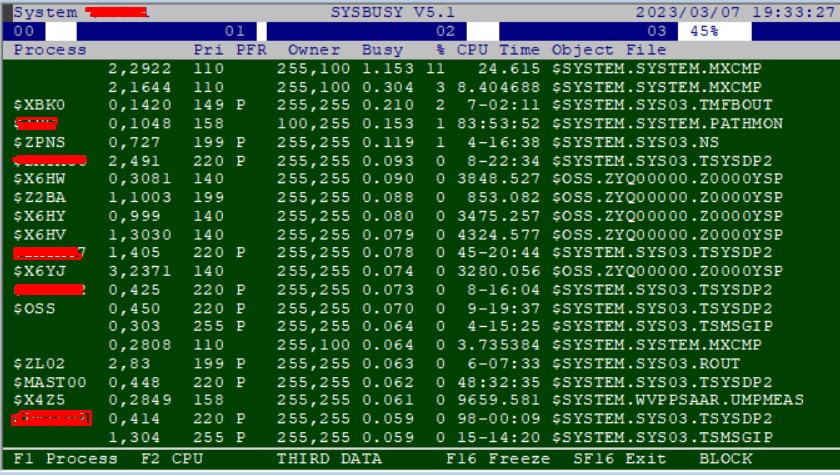
Hi,mxcmp is a resource intensive program when SQL statements are compiling, which is typical on Java program startup depending on who you have coded your application. If you compile everything at the beginning, then you should expect what you are seeing. Lazy compiles are a bit easier on startup. If you do not use prepared statements, and you have not configured your MX server properly with sufficient statement pools, you will recompile on each statement execution, which hits mxcmp.
A process with the name $SYSTEM.SYSTEM.MXCMP constantly appears above the sysbusy screen. Why does this processor work?
https://serving.photos.photobox.com/42941637a6bf364b0973789f9d8e0f359f69404338a90f8487bce9f71368c7b43dab7193.jpg
I tried to upload an image, I hope it can be opened from the link. We are developing applications with sql/mp and cobol, but recently we have started to run java applications, it connects to the database with sqmlx and makes queries and updates. I wonder if I need to do something like "mxci; update statistics on .... column".
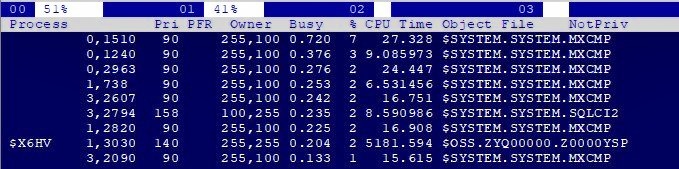
On Tuesday, March 7, 2023 at 11:46:01rC>a.m. UTC-5, Memmedaga Memmedov wrote:thank you for your response. Is it normal to use this much system on the sysbusy screen? We use "prepare statement" in java codes, then we make "execute query". I added another image.
Hi,
A process with the name $SYSTEM.SYSTEM.MXCMP constantly appears above the sysbusy screen. Why does this processor work?
https://serving.photos.photobox.com/42941637a6bf364b0973789f9d8e0f359f69404338a90f8487bce9f71368c7b43dab7193.jpg
I tried to upload an image, I hope it can be opened from the link. We are developing applications with sql/mp and cobol, but recently we have started to run java applications, it connects to the database with sqmlx and makes queries and updates. I wonder if I need to do something like "mxci; update statistics on .... column".mxcmp is a resource intensive program when SQL statements are compiling, which is typical on Java program startup depending on who you have coded your application. If you compile everything at the beginning, then you should expect what you are seeing. Lazy compiles are a bit easier on startup. If you do not use prepared statements, and you have not configured your MX server properly with sufficient statement pools, you will recompile on each statement execution, which hits mxcmp.
7 Mart 2023 Sal-# tarihinde saat 21:46:24 UTC+3 itibar-#yla Randall +funlar-# yazd-#:Please open a case with GNSC on how to use statement pooling in your environment.
On Tuesday, March 7, 2023 at 11:46:01rC>a.m. UTC-5, Memmedaga Memmedov wrote:
Hi,
A process with the name $SYSTEM.SYSTEM.MXCMP constantly appears above the sysbusy screen. Why does this processor work?
https://serving.photos.photobox.com/42941637a6bf364b0973789f9d8e0f359f69404338a90f8487bce9f71368c7b43dab7193.jpg
thank you for your response. Is it normal to use this much system on the sysbusy screen? We use "prepare statement" in java codes, then we make "execute query". I added another image.I tried to upload an image, I hope it can be opened from the link. We are developing applications with sql/mp and cobol, but recently we have started to run java applications, it connects to the database with sqmlx and makes queries and updates. I wonder if I need to do something like "mxci; update statistics on .... column".mxcmp is a resource intensive program when SQL statements are compiling, which is typical on Java program startup depending on who you have coded your application. If you compile everything at the beginning, then you should expect what you are seeing. Lazy compiles are a bit easier on startup. If you do not use prepared statements, and you have not configured your MX server properly with sufficient statement pools, you will recompile on each statement execution, which hits mxcmp.
there are several java batch applications running every 5 minutes and the mxcmp process is constantly using memory. Are we doing something wrong, how can we check it?
https://serving.photos.photobox.com/764246140cde6bb580a8a7f86ce915279b7cfb614a307bfa2f054ba0bbc7bff78ee0e05c.jpg
| Sysop: | Amessyroom |
|---|---|
| Location: | Fayetteville, NC |
| Users: | 74 |
| Nodes: | 6 (0 / 6) |
| Uptime: | 122:36:41 |
| Calls: | 1,194 |
| Files: | 1,352 |
| Messages: | 290,374 |