From Newsgroup: comp.sys.mac.advocacy
Maria Sophia wrote:
Apparently these are new for those who wish to find out ahead of time which >> apps are available in which country (useful for those who spoof countries). >>
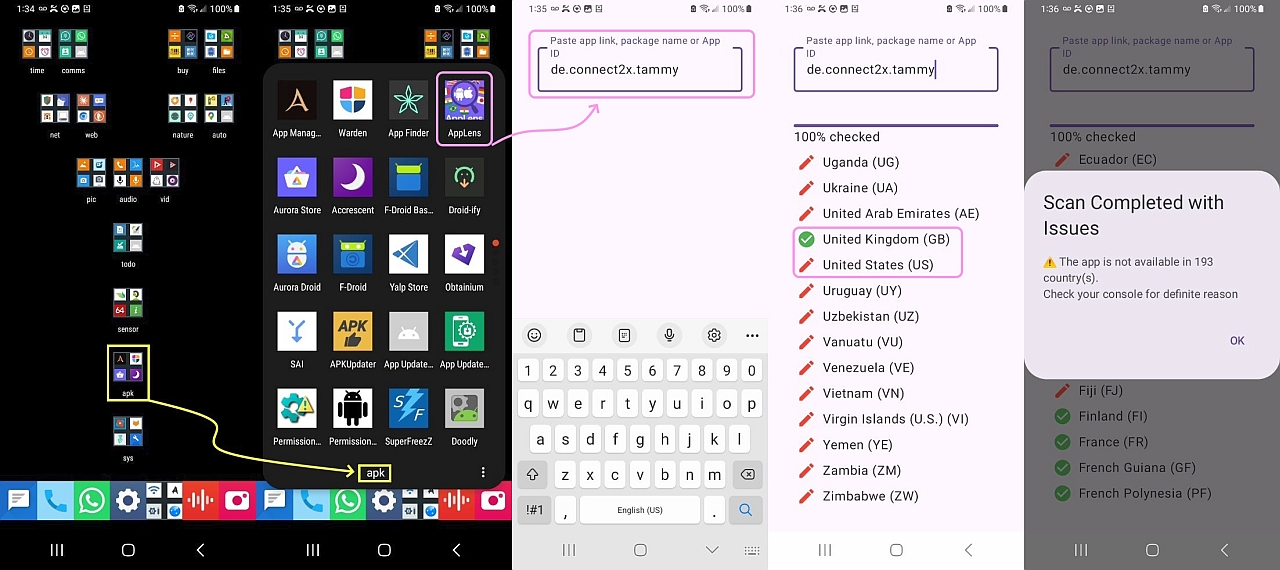
*AppLens* See App Availability, by HavejiApps (100 downloads)
<https://play.google.com/store/apps/details?id=checkapp.appinallcountries.available.showingcorrectly>
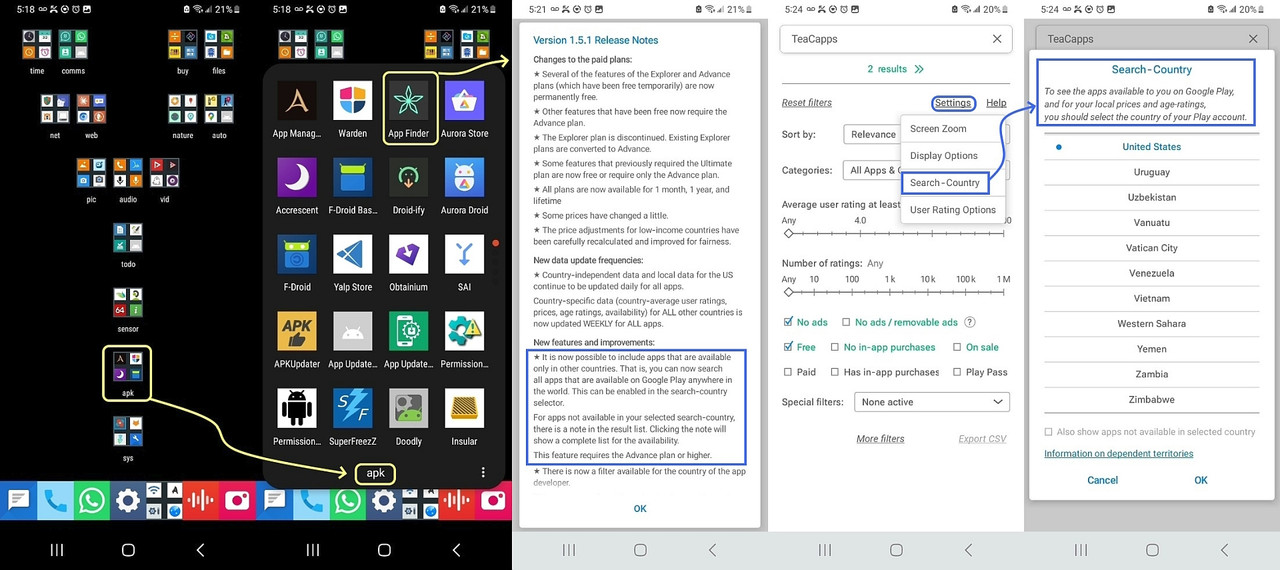
*Skyica App Finder* (country search is new in the latest version)
<https://play.google.com/store/apps/details?id=scadica.aq>
(this is a new feature so it may not be free)
Note I haven't tested out these features as I don't need 'em, but some may.
I looked up "How can an Android app technically check iOS availability?" given the Google Play Store AppLens listing claims it supports both Google Play & Apple App Store lookups (and checks availability in 150+ countries).
From what I found, AppLens appears to check iOS listings using the Apple
App Store storefronts, perhaps using Apple's public iTunes Lookup API.
<https://performance-partners.apple.com/search-api>
For iOS, the likely mechanism is querying Apple's App Store country/region storefronts on the server side, and from those results, it may be
determining whether the app's listing is available there.
Interestingly, apparently Apple itself exposes territory-level availability through App Store, while Google's app does apparently does not.
The likely method used by an app like this
1. Get the app's Apple App Store ID (Adam ID).
2. Query Apple's App Store catalog using country/storefront codes.
3. Determine whether that app exists in each storefront.
4. Mark the country available/unavailable . <https://developer.apple.com/library/archive/documentation/AudioVideo/Conceptual/iTuneSearchAPI/Searching.html>
<https://developer.apple.com/library/archive/documentation/AudioVideo/Conceptual/iTuneSearchAPI/SearchExamples.html>
By way of example, for Tammy (the Matrix client by connect2x GmbH), its iOS App Store Adam ID is 6760345615.
For Tammy (the Matrix client by connect2x GmbH), its iOS App Store Adam ID
is 6760345615.
https://itunes.apple.com/lookup?id=6760345615&country=us
https://itunes.apple.com/lookup?id=6760345615&country=gb
https://itunes.apple.com/lookup?id=6760345615&country=de
https://itunes.apple.com/lookup?id=6760345615&country=fr
https://itunes.apple.com/lookup?id=6760345615&country=jp
etc.
resultCount == 1 -> available
resultCount == 0 -> not available
Let's just take the USA and Great Britain as examples... https://itunes.apple.com/lookup?id=6760345615&country=us
{
"resultCount":0,
"results": []
}
https://itunes.apple.com/lookup?id=6760345615&country=gb
{
"resultCount":1,
"results": [
{ tons of stuff
"supportedDevices":["iPhone5s-iPhone5s", "iPadAir-iPadAir",
"iPadAirCellular-iPadAirCellular", "iPadMiniRetina-iPadMiniRetina",
"iPadMiniRetinaCellular-iPadMiniRetinaCellular", "iPhone6-iPhone6",
... and one and on and on ...
"iPadAir13M4-iPadAir13M4", "iPadAir13M4Cellular-iPadAir13M4Cellular",
"iPhone18Pro-iPhone18Pro", "iPhone18ProMax-iPhone18ProMax",
"iPhoneDuo-iPhoneDuo"], "advisories":[], "kind":"software",
tons more stuff
}
Note the future-proofing of explicitly references models like iPhone17Pro, iPhoneAir, and even unreleased or upcoming identifiers like iPhone18Pro and iPhoneDuo. Apparently Apple populates this list ahead of time with internal naming schemas so devices can download the app right out of the box
Google is attacking sideloaders with a vengeance... where I pity people who don't know how to get around their silly little tricks to make it harder...
UPDATE:
AppLens
<
https://i.postimg.cc/tC2BX0H1/tammy-applens.jpg>
Skyica:
<
https://i.postimg.cc/5ymnYTYh/skyica-country-search.jpg>
Each will show anyone on a desktop or on Android, whether any given app
is available in their country at this moment, without needing to use VPN.
Even though I don't have a Google Account set up on my Android, I was able
to install AppLens via the Aurora Store front end to the Google repository.
But, since I don't have a Google Play account set up on the phone, AppLens failed as it wanted me to log into the Google Play Store (which is new anti-sideloading that Google has started to get developers to implement).
The AppLens installer name was 'com.android.aurora' so I had to re-install
the AppLens split apk setting the installer to "-i com.android.vending"
before AppLens would come up without asking me to sign into the Google Play Store (which I can't do).
Since I always invest the energy to make ten steps one step, and since I always strive to help others whenever I need to fix something major, to
make this process of changing the installer easier in the future, I just
now wrote a Windows adb script to re-install any existing app by copying
over the base and split apks and changing only the installer (keeping all existing data).
That way, the process becomes something like this flow....
1. Install an app via the Aurora Store (which is a Google Play scraper)
2. If it complains that it wants us to log into the Google Play store...
3. Then run this code below which changes the installer to the Play Store
:: -----------------------------------------------------------------------
:: adbreinstall.bat
:: This script will fix one of Google's attempts at stopping sideloading
:: when apps have included a new Google SDK which insists that the app was
:: installed by the Google Play Store and by no other mechanisms out there.
:: -----------------------------------------------------------------------
:: What this re-installer does is take an already-installed app that has
:: an installer name that is NOT the Google Play Store, and it simply
:: changes that installer name to be the Google Play Store instead.
:: -----------------------------------------------------------------------
:: Believe it or not, that satisfies some Google SDK checks for integrity.
:: -----------------------------------------------------------------------
:: v1p2 20260927
:: Optionally launches Muntashirakon App Manager so the user can
:: find/copy the package name into the PC clipboard using scrcpy
:: (The point is never to need to type if you don't have to)
:: v1p1 20260927
:: Uses the configured ADB path for all ADB commands.
:: Exits if the installer is already set to com.android.vending.
:: v1p0 20260927
:: Asks for the unique package name of the app installed on Android
:: Then it pulls the base.apk and all splits (if any)
:: Creates/cleans a package-specific apk\<package> directory
:: Does not uninstall the app but instead, re-installs the app
:: (Using adb install -r -i to reinstall while retaining app data)
:: (When splits are present, it uses install-multiple instead)
:: And verifies the installer afterward
:: -----------------------------------------------------------------------
@echo off
setlocal EnableDelayedExpansion
:: -----------------------------------------------------------------------
:: Configuration
:: Change this value if adb.exe is located somewhere else.
:: Press ENTER at the prompt to use this default.
:: -----------------------------------------------------------------------
set "DEFAULT_ADB=C:\app\editor\android\scrcpy\adb.exe"
echo ADB APK Backup / Reinstall
echo.
:: -----------------------------------------------------------------------
:: Ask for ADB path
:: -----------------------------------------------------------------------
echo Default ADB path:
echo %DEFAULT_ADB%
echo.
set /p "ADB=Enter full path to adb.exe [press ENTER for default]: "
if "%ADB%"=="" (
set "ADB=%DEFAULT_ADB%"
)
if not exist "%ADB%" (
echo.
echo ERROR: adb.exe was not found at:
echo %ADB%
pause
exit /b 1
)
:: -----------------------------------------------------------------------
:: Check device
:: -----------------------------------------------------------------------
echo.
echo Checking device...
"%ADB%" get-state 1>nul 2>nul
if errorlevel 1 (
echo.
echo ERROR: No ADB device detected.
echo Make sure the device is connected and USB debugging is enabled.
pause
exit /b 1
)
echo Device detected.
echo.
:: -----------------------------------------------------------------------
:: Optionally open Muntashirakon App Manager
:: -----------------------------------------------------------------------
echo Do you want to open Muntashirakon App Manager?
echo You can use it to find and copy the package name of the app.
echo.
set /p "OPENAM=Open App Manager? (Y/N): "
if /i "!OPENAM!"=="Y" (
echo.
echo Launching Muntashirakon App Manager...
:: Try clean launch first
"%ADB%" shell am start io.github.muntashirakon.AppManager/.main.MainActivity >nul 2>&1
:: If that fails, try monkey as a fallback
if errorlevel 1 (
"%ADB%" shell monkey -p io.github.muntashirakon.AppManager 1 >nul 2>&1
)
echo.
echo App Manager should now be open.
echo Find the desired app and copy its package name.
echo.
echo Press ENTER when ready to continue.
pause
)
:: -----------------------------------------------------------------------
:: Ask for package name
:: -----------------------------------------------------------------------
echo.
set /p "PACKAGE=Enter package name: "
if "%PACKAGE%"=="" (
echo.
echo ERROR: Package name cannot be empty.
pause
exit /b 1
)
:: -----------------------------------------------------------------------
:: Get installer
:: -----------------------------------------------------------------------
set "INSTALLER="
set "INSTALLERFILE=%TEMP%\adbreinstall_installer.txt"
"%ADB%" shell pm list packages -i | findstr /i /c:"package:%PACKAGE%" > "%INSTALLERFILE%"
if errorlevel 1 (
echo.
echo ERROR: Package was not found:
echo %PACKAGE%
del "%INSTALLERFILE%" >nul 2>&1
pause
exit /b 1
)
for /f "tokens=2 delims==" %%A in (%INSTALLERFILE%) do (
set "INSTALLER=%%A"
)
del "%INSTALLERFILE%" >nul 2>&1
if not defined INSTALLER (
echo.
echo ERROR: Could not determine installer for %PACKAGE%.
echo Make sure the package is installed.
pause
exit /b 1
)
:: Trim leading spaces
for /f "tokens=* delims= " %%A in ("!INSTALLER!") do (
set "INSTALLER=%%A"
)
echo.
echo Package : %PACKAGE%
echo Installer: !INSTALLER!
echo.
:: -----------------------------------------------------------------------
:: If already installed by Google Play, nothing needs to be done.
:: -----------------------------------------------------------------------
if /i "!INSTALLER!"=="com.android.vending" (
echo Installer is already com.android.vending.
echo Nothing to do.
echo.
pause
exit /b 0
)
echo Installer is NOT Google Play.
echo APKs will be pulled and the package will be reinstalled.
echo Existing app data will be retained.
echo.
:: -----------------------------------------------------------------------
:: Create package-specific APK backup directory
:: -----------------------------------------------------------------------
set "APKDIR=%~dp0apk\%PACKAGE%"
if not exist "%APKDIR%" (
mkdir "%APKDIR%"
)
:: -----------------------------------------------------------------------
:: Find and pull base.apk + split APKs
:: -----------------------------------------------------------------------
set "APKCOUNT=0"
set "APKLISTFILE=%TEMP%\adbreinstall_apkpaths.txt"
echo Finding installed APKs...
echo.
:: Get APK paths from the device
"%ADB%" shell pm path "%PACKAGE%" > "%APKLISTFILE%"
if errorlevel 1 (
echo.
echo ERROR: Failed to query APK paths for %PACKAGE%.
del "%APKLISTFILE%" >nul 2>&1
pause
exit /b 1
)
:: Read each APK path from the temporary file
for /f "tokens=*" %%A in (%APKLISTFILE%) do (
set "REMOTE=%%A"
:: Remove "package:" prefix
set "REMOTE=!REMOTE:package:=!"
:: Get filename from remote path
for %%F in ("!REMOTE!") do (
set "FILENAME=%%~nxF"
)
echo Pulling !FILENAME!...
"%ADB%" pull "!REMOTE!" "%APKDIR%\!FILENAME!" >nul
if errorlevel 1 (
echo.
echo ERROR: Failed to pull !FILENAME!
del "%APKLISTFILE%" >nul 2>&1
pause
exit /b 1
)
set /a APKCOUNT+=1
)
del "%APKLISTFILE%" >nul 2>&1
if !APKCOUNT! EQU 0 (
echo.
echo ERROR: Could not find any APKs for %PACKAGE%.
pause
exit /b 1
)
echo.
echo Successfully pulled !APKCOUNT! APK file(s) to:
echo %APKDIR%
echo.
:: -----------------------------------------------------------------------
:: Verify that base.apk exists
:: -----------------------------------------------------------------------
if not exist "%APKDIR%\base.apk" (
echo.
echo ERROR: base.apk was not found.
echo Cannot reinstall the package.
pause
exit /b 1
)
:: -----------------------------------------------------------------------
:: Reinstall
:: -----------------------------------------------------------------------
echo Reinstalling with installer:
echo com.android.vending
echo.
if !APKCOUNT! EQU 1 (
echo Single APK detected.
echo Installing with data retention...
echo.
"%ADB%" install -r -i com.android.vending "%APKDIR%\base.apk"
if errorlevel 1 (
echo.
echo ERROR: Installation failed.
pause
exit /b 1
)
) else (
echo Multiple APKs detected.
echo Installing base APK and splits with data retention...
echo.
set "INSTALL_ARGS="
for %%F in ("%APKDIR%\*.apk") do (
set "INSTALL_ARGS=!INSTALL_ARGS! "%%~fF""
)
"%ADB%" install-multiple -r -i com.android.vending !INSTALL_ARGS!
if errorlevel 1 (
echo.
echo ERROR: Split APK installation failed.
pause
exit /b 1
)
)
:: -----------------------------------------------------------------------
:: Verify installer after reinstall
:: -----------------------------------------------------------------------
echo.
echo Installation completed.
echo.
echo Verifying installer...
set "NEW_INSTALLER="
set "INSTALLERFILE=%TEMP%\adbreinstall_installer.txt"
"%ADB%" shell pm list packages -i | findstr /i /c:"package:%PACKAGE%" > "%INSTALLERFILE%"
if not errorlevel 1 (
for /f "tokens=2 delims==" %%A in (%INSTALLERFILE%) do (
set "NEW_INSTALLER=%%A"
)
)
del "%INSTALLERFILE%" >nul 2>&1
if defined NEW_INSTALLER (
for /f "tokens=* delims= " %%A in ("!NEW_INSTALLER!") do (
set "NEW_INSTALLER=%%A"
)
)
echo.
echo Package : %PACKAGE%
echo Before : !INSTALLER!
echo After : !NEW_INSTALLER!
echo.
if /i "!NEW_INSTALLER!"=="com.android.vending" (
echo SUCCESS
echo.
echo Installer is now com.android.vending.
echo Existing app data was retained.
) else (
echo WARNING
echo.
echo The reinstall succeeded, but the installer
echo does not appear to be com.android.vending.
echo.
echo Actual installer:
echo !NEW_INSTALLER!
)
echo.
echo APK files:
echo %APKDIR%
echo.
pause
:: end of adbreinstall.bat
--
On Usenet, we can pool our knowledge and skills so everyong learns more.
--- Synchronet 3.22a-Linux NewsLink 1.2