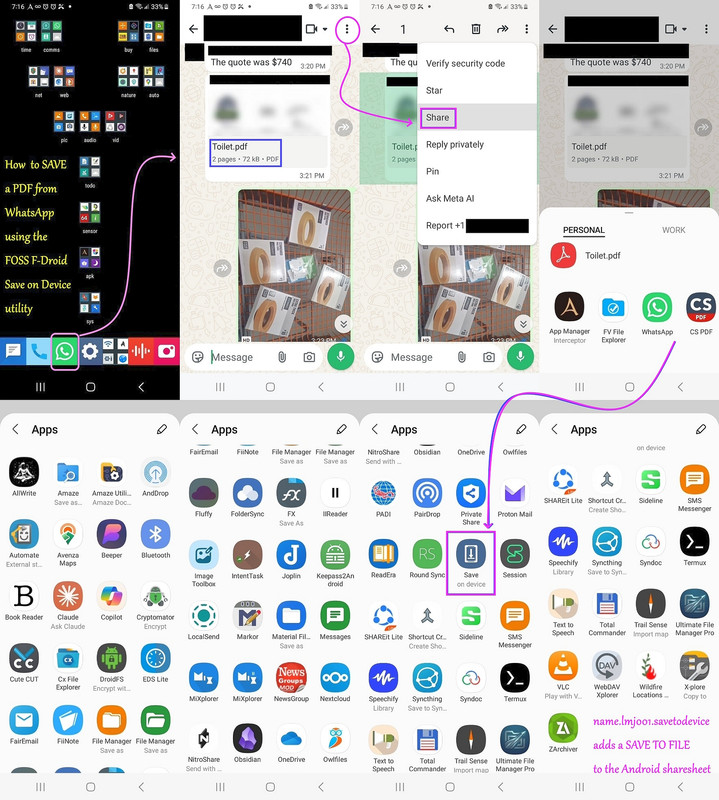
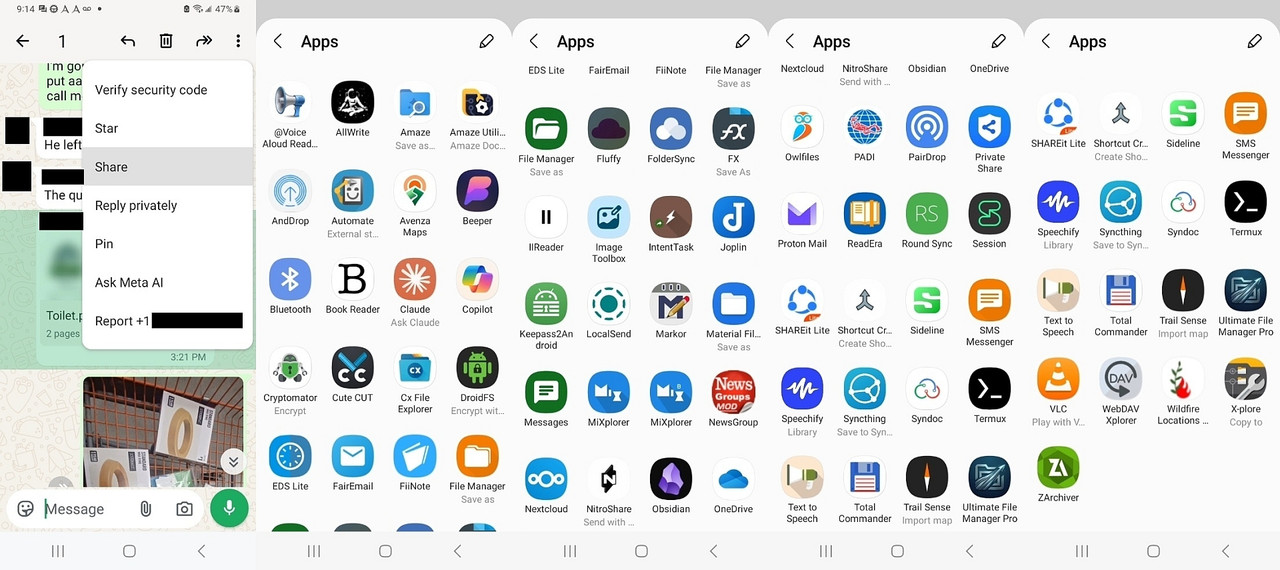
From Newsgroup: comp.mobile.android
Maria Sophia wrote:
And you'd never get the same list twice, at least on my system
(which, addmittedly, is chock full of apps that can read PDFs).
Even the 65 apps is NOT the full grid because SOME (but not all) of the
first (horizontal) set (before the "More" three dots show up) show up in
the 65 (vertical) set, and some do not.
Looking up how that can be, it turns out both the initial (horizontal) list and the expanded (vertical) grid are 100% dynamic, and to make matters
worse, they actively filter and influence each other.
If I even get a "More", the 65-app list is still being dynamically compiled
at the moment I tap "More" but if an app is slow to respond to the package manager's query when the expanded view is being drawn, Android simply
leaves it out of that specific rendering pass. Even the expanded grid is sorted by a mix of recency, app category weights, and system guesses. It is heavily filtered, not a raw dump of the app drawer.
Worse, apparently there is no command or switch in adb that controls the dynamic ranking, timeout thresholds, or layout shuffling of the system sharesheet. Unfortunately, adb cannot query the sharesheet's live UI state.
But adb does tell me there are many apps registered to handle
application/pdf via ACTION_SEND (Cx File Explorer, Simple File Manager, Nextcloud, Material Files, Total Commander, Mixplorer, etc.).
Note this adb command found 87 entries, but 54 distinct apps (64 individual activities) that are registered to handle PDFs via ACTION_SEND on my phone.
adb shell cmd package query-activities -a android.intent.action.SEND -t application/pdf --user 0 | grep -E "(packageName|name=)"
name=com.android.bluetooth.opp.BluetoothOppLauncherActivity
packageName=com.android.bluetooth
name=com.android.bluetooth.btservice.AdapterApp
packageName=com.android.bluetooth
name=com.google.android.gms.nearby.sharing.main.MainActivity
packageName=com.google.android.gms
name=co.g.App
packageName=com.google.android.gms
name=com.microsoft.skydrive.intent.actionsend.ReceiveActionSendActivity
packageName=com.microsoft.skydrive
name=com.microsoft.skydrive.SkyDriveApplication
packageName=com.microsoft.skydrive
name=com.samsung.android.privacy.view.MainActivity
packageName=com.samsung.android.privateshare
name=com.samsung.android.privacy.GlobalApplication
packageName=com.samsung.android.privateshare
name=app.fluffy.MainActivity
packageName=app.fluffy
name=app.fluffy.FluffyApplication
packageName=app.fluffy
name=app.pwhs.universalinstaller.presentation.install.DialogInstallActivity
packageName=app.pwhs.universalinstaller
name=app.pwhs.universalinstaller.App
packageName=app.pwhs.universalinstaller
name=ch.opengis.qfield.QFieldActivity
packageName=ch.opengis.qfield
name=org.qtproject.qt.android.bindings.QtApplication
packageName=ch.opengis.qfield
name=ch.protonmail.android.activities.composeMessage.ComposeMessageActivity
packageName=ch.protonmail.android
name=ch.protonmail.android.core.ProtonMailApplication
packageName=ch.protonmail.android
name=com.avenza.openfile.OpenFileWithAvenzaMapsActivity
packageName=com.Avenza
name=com.pairip.application.Application
packageName=com.Avenza
name=com.alextern.shortcuthelper.MainActivity
packageName=com.alextern.shortcuthelper
name=com.alextern.shortcuthelper.ShortcutHelperApplication
packageName=com.alextern.shortcuthelper
name=com.alpaca.android.readout.activities.MainActivity
packageName=com.alpaca.android.readout
name=com.alpaca.android.readout.process.MyApplication
packageName=com.alpaca.android.readout
name=com.amaze.filemanager.ui.activities.MainActivity
packageName=com.amaze.filemanager
name=com.amaze.filemanager.application.AppConfig
packageName=com.amaze.filemanager
name=com.artifex.mupdf.viewer.DocumentActivity
packageName=com.amaze.fileutilities
name=com.amaze.fileutilities.AppConfig
packageName=com.amaze.fileutilities
name=com.anthropic.claude.deeplink.DeepLinkActivity
packageName=com.anthropic.claude
name=com.anthropic.claude.application.ClaudeApplication
packageName=com.anthropic.claude
name=com.balda.intenttask.ShareSendActivity
packageName=com.balda.intenttask
name=com.balda.intenttask.core.IntentTask
packageName=com.balda.intenttask
name=com.balda.intenttask.ShareCommandSendActivity
packageName=com.balda.intenttask
name=com.balda.intenttask.core.IntentTask
packageName=com.balda.intenttask
name=im.vector.app.features.share.IncomingShareActivity
packageName=com.beeper.chat
name=im.vector.app.VectorApplication
packageName=com.beeper.chat
name=com.cliffweitzman.speechify2.screens.home.HomeActivity
packageName=com.cliffweitzman.speechify2
name=com.pairip.application.Application
packageName=com.cliffweitzman.speechify2
name=com.alphainventor.filemanager.activity.SaveToActivity
packageName=com.cxinventor.file.explorer
name=com.alphainventor.filemanager.FileManagerApp
packageName=com.cxinventor.file.explorer
name=com.duns.padiapp.compose.JetpackActivity
packageName=com.duns.padiapp
name=com.duns.padiapp.PadiApplication
packageName=com.duns.padiapp
name=com.fiistudio.fiinote.editor.Send2PC
packageName=com.fiistudio.fiinote
packageName=com.fiistudio.fiinote
name=com.fiistudio.fiinote.editor.ShareIn
packageName=com.fiistudio.fiinote
packageName=com.fiistudio.fiinote
name=com.fmsys.snapdrop.MainActivity
packageName=com.fmsys.snapdrop
name=com.fmsys.snapdrop.SnapdropApplication
packageName=com.fmsys.snapdrop
name=com.folderv.file.activity.SendHandlerActivity
packageName=com.folderv.file
name=com.folderv.file.vFISHv
packageName=com.folderv.file
name=com.ghisler.android.TotalCommander.DirBrowseActivity
packageName=com.ghisler.android.TotalCommander
name=com.ghisler.android.TotalCommander.TcApplication
packageName=com.ghisler.android.TotalCommander
name=com.github.axet.bookreader.activities.MainActivity
packageName=com.github.axet.bookreader
name=com.github.axet.bookreader.app.BookApplication
packageName=com.github.axet.bookreader
name=com.hyperionics.avar.StartupActivityShareAlias
packageName=com.hyperionics.avar
name=com.hyperionics.avar.TtsApp
packageName=com.hyperionics.avar
name=com.hyperionics.avar.SaveOnlyActivity
packageName=com.hyperionics.avar
name=com.hyperionics.avar.TtsApp
packageName=com.hyperionics.avar
name=com.intsig.cspdf.main.MainActivity
packageName=com.intsig.cspdf
name=s.h.e.l.l.S
packageName=com.intsig.cspdf
name=com.intsig.cspdf.main.PDFReader
packageName=com.intsig.cspdf
name=s.h.e.l.l.S
packageName=com.intsig.cspdf
name=com.intsig.cspdf.main.PDFEditor
packageName=com.intsig.cspdf
name=s.h.e.l.l.S
packageName=com.intsig.cspdf
name=com.kylecorry.trail_sense.main.MainActivity
packageName=com.kylecorry.trail_sense
name=com.kylecorry.trail_sense.main.TrailSenseApplication
packageName=com.kylecorry.trail_sense
name=com.llamalab.automate.SendDocumentStorageActivity
packageName=com.llamalab.automate
name=com.llamalab.automate.AutomateApplication
packageName=com.llamalab.automate
name=com.lonelycatgames.Xplore.ui.CopyToActivity
packageName=com.lonelycatgames.Xplore
name=com.pairip.application.Application
packageName=com.lonelycatgames.Xplore
name=com.microsoft.copilotn.features.share.ShareToCopilotActivity
packageName=com.microsoft.copilot
name=com.microsoft.copilotn.CopilotNativeApplication
packageName=com.microsoft.copilot
name=com.mixplorer.activities.ArchiveActivity
packageName=com.mixplorer
name=com.mixplorer.AppImpl
packageName=com.mixplorer
name=com.mixplorer.activities.CopyActivity
packageName=com.mixplorer
name=com.mixplorer.AppImpl
packageName=com.mixplorer
name=com.mixplorer.activities.ClipboardActivity
packageName=com.mixplorer
name=com.mixplorer.AppImpl
packageName=com.mixplorer
name=com.mixplorer.activities.CopyActivity
packageName=com.mixplorer.beta
name=com.mixplorer.AppImpl
packageName=com.mixplorer.beta
name=com.mixplorer.activities.ArchiveActivity
packageName=com.mixplorer.beta
name=com.mixplorer.AppImpl
packageName=com.mixplorer.beta
name=com.mixplorer.activities.ClipboardActivity
packageName=com.mixplorer.beta
name=com.mixplorer.AppImpl
packageName=com.mixplorer.beta
name=com.mobivio.android.qt.AppActivity
packageName=com.mobivio.android.cutecut
name=org.qtproject.qt5.android.bindings.QtApplication
packageName=com.mobivio.android.cutecut
name=com.myuniportal.android.apps.wildfirelocationsnow.MainActivity
packageName=com.myuniportal.android.apps.airwildfirelocationsnow
name=com.myuniportal.android.apps.wildfirelocationsnow.MyApplication
packageName=com.myuniportal.android.apps.airwildfirelocationsnow
name=com.neure.anddrop.ShareActivity
packageName=com.neure.anddrop
name=com.neure.anddrop.AndDropApplication
packageName=com.neure.anddrop
name=com.owncloud.android.ui.activity.ReceiveExternalFilesActivity
packageName=com.nextcloud.client
name=com.owncloud.android.MainApp
packageName=com.nextcloud.client
name=com.nutomic.syncthingandroid.activities.ShareActivity
packageName=com.nutomic.syncthingandroid
name=com.nutomic.syncthingandroid.SyncthingApp
packageName=com.nutomic.syncthingandroid
name=com.pinger.textfree.call.activities.TFSplash
packageName=com.sideline.phone.number
name=com.pairip.application.Application
packageName=com.sideline.phone.number
name=com.simplemobiletools.filemanager.pro.activities.SaveAsActivity
packageName=com.simplemobiletools.filemanager.pro
name=com.simplemobiletools.filemanager.pro.App
packageName=com.simplemobiletools.filemanager.pro
name=com.simplemobiletools.smsmessenger.activities.NewConversationActivity
packageName=com.simplemobiletools.smsmessenger
name=com.simplemobiletools.smsmessenger.App
packageName=com.simplemobiletools.smsmessenger
name=com.skyjos.fileexplorer.ui.MainActivity
packageName=com.skyjos.apps.fileexplorerfree
packageName=com.skyjos.apps.fileexplorerfree
name=com.sme.webdav.forms.StartForm
packageName=com.smestorage
packageName=com.smestorage
name=com.sovworks.eds.android.filemanager.activities.FileManagerActivity
packageName=com.sovworks.edslite
name=com.sovworks.eds.android.EdsApplication
packageName=com.sovworks.edslite
name=com.syndoc.syndoclib.ui.filemanager.FileManagerActivity
packageName=com.syndoc.merlin
name=androidx.multidex.MultiDexApplication
packageName=com.syndoc.merlin
name=com.termux.filepicker.TermuxFileReceiverActivity
packageName=com.termux
name=com.termux.app.TermuxApplication
packageName=com.termux
name=com.whatsapp.contact.ui.picker.ExternalShareAlias
packageName=com.whatsapp
name=com.whatsapp.AppShell
packageName=com.whatsapp
name=ca.pkay.rcloneexplorer.Activities.SharingActivity
packageName=de.felixnuesse.extract
packageName=de.felixnuesse.extract
name=dk.tacit.android.foldersync.activity.ShareIntentActivity
packageName=dk.tacit.android.foldersync.lite
name=dk.tacit.android.foldersync.FolderSync
packageName=dk.tacit.android.foldersync.lite
name=eu.faircode.email.ActivityCompose
packageName=eu.faircode.email
name=eu.faircode.email.ApplicationSecure
packageName=eu.faircode.email
name=io.elevenlabs.readerapp.MainActivity
packageName=io.elevenlabs.readerapp
name=io.elevenlabs.readerapp.ReaderApp
packageName=io.elevenlabs.readerapp
name=io.github.muntashirakon.AppManager.intercept.ActivityInterceptor
packageName=io.github.muntashirakon.AppManager
name=io.github.muntashirakon.AppManager.AppManager
packageName=io.github.muntashirakon.AppManager
name=crc64c98c008c0cd742cb.SelectCurrentDbActivity
packageName=keepass2android.keepass2android
name=crc64c98c008c0cd742cb.App
packageName=keepass2android.keepass2android
name=md.obsidian.MainActivity
packageName=md.obsidian
name=md.obsidian.ObsidianApp
packageName=md.obsidian
name=me.zhanghai.android.files.viewer.saveas.SaveAsActivity
packageName=me.zhanghai.android.files
packageName=me.zhanghai.android.files
name=com.piaohong.ui.activity.Activity_Post
packageName=mod.piaohong.newsgroup
name=com.piaohong.lib.CMyApp
packageName=mod.piaohong.newsgroup
name=name.lmj001.saveondevice.MainActivity
packageName=name.lmj001.savetodevice
packageName=name.lmj001.savetodevice
name=net.cozic.joplin.MainActivity
packageName=net.cozic.joplin
name=net.cozic.joplin.MainApplication
packageName=net.cozic.joplin
name=net.gsantner.markor.activity.DocumentActivity
packageName=net.gsantner.markor
name=net.gsantner.markor.ApplicationObject
packageName=net.gsantner.markor
name=net.nitroshare.android.ui.ShareActivity
packageName=net.nitroshare.android
packageName=net.nitroshare.android
name=org.thoughtcrime.securesms.ShareActivity
packageName=network.loki.messenger
name=org.thoughtcrime.securesms.ApplicationContext
packageName=network.loki.messenger
name=nextapp.fx.ui.filesave.SaveActivity
packageName=nextapp.fx
name=nextapp.fx.FX
packageName=nextapp.fx
name=org.cryptomator.presentation.ui.activity.SharedFilesActivity
packageName=org.cryptomator
name=org.cryptomator.presentation.CryptomatorApp
packageName=org.cryptomator
name=org.fossify.filemanager.activities.SaveAsActivity
packageName=org.fossify.filemanager
name=org.fossify.filemanager.App
packageName=org.fossify.filemanager
name=org.fossify.messages.activities.NewConversationActivity
packageName=org.fossify.messages
name=org.fossify.messages.App
packageName=org.fossify.messages
name=org.localsend.localsend_app.MainActivity
packageName=org.localsend.localsend_app
name=android.app.Application
packageName=org.localsend.localsend_app
name=org.readera.read.ReadActivity
packageName=org.readera
name=org.readera.App
packageName=org.readera
name=org.videolan.vlc.StartActivity
packageName=org.videolan.vlc
name=org.videolan.mobile.app.VLCApplication
packageName=org.videolan.vlc
name=rb.camere.FlowActivity
packageName=rb.camere
name=rb.camere.App
packageName=rb.camere
name=com.t8rin.imagetoolbox.app.presentation.AppActivity
packageName=ru.tech.imageresizershrinker
name=com.t8rin.imagetoolbox.app.presentation.components.ImageToolboxApplication
packageName=ru.tech.imageresizershrinker
name=ru.zdevs.zarchiver.ZArchiver
packageName=ru.zdevs.zarchiver
name=ru.zdevs.zarchiver.ZApp
packageName=ru.zdevs.zarchiver
name=com.lenovo.anyshare.PdfToPhotoActivity
packageName=shareit.lite
name=aashareit.AnyShareApp
packageName=shareit.lite
name=com.lenovo.anyshare.PdfToSplitPhotoActivity
packageName=shareit.lite
name=aashareit.AnyShareApp
packageName=shareit.lite
name=com.lenovo.anyshare.ThirdPartyDownloadActivity
packageName=shareit.lite
name=aashareit.AnyShareApp
packageName=shareit.lite
name=com.lenovo.anyshare.activity.ExternalShareActivity
packageName=shareit.lite
name=aashareit.AnyShareApp
packageName=shareit.lite
name=com.ushareit.bizlocal.transfer.ExternalPCActivity
packageName=shareit.lite
name=aashareit.AnyShareApp
packageName=shareit.lite
name=sushi.hardcore.droidfs.MainActivity
packageName=sushi.hardcore.droidfs
name=sushi.hardcore.droidfs.VolumeManagerApp
packageName=sushi.hardcore.droidfs
name=za.kilowatch.ultimatefilemanager.ui.ShareReceiverActivity
packageName=za.kilowatch.ultimatefilemanager
name=za.kilowatch.ultimatefilemanager.UfmApplication
packageName=za.kilowatch.ultimatefilemanager
name=com.android.internal.app.ForwardIntentToManagedProfile
packageName=android
packageName=android
--
On Usenet, the best ideas often come from someone else's correction.
--- Synchronet 3.22a-Linux NewsLink 1.2