On 2026-10-28 05:02, Maria Sophia wrote:
Carlos E.R. wrote:
Write an email, but do not send it. Keep it in drafts. Can be opened in
any machine that shares that imap account (doesn't have to be google,
and it can even be local only if you set up the server).
When the news comes out that the head of the CIA is caught, then it's
rather interesting *how* he got caught, in this case, using draft emails.
Yes, I know. But are you a drug lord, so that the CIA is interested in
you? :-D
My ISP is not after me, they will not read my drafts. Not unless the a
court orders them to.
And then, I have my own IMAP server inside my LAN, which I can use for
this and nobody will see, unless they break in my house.
But are you a drug lord, so that the CIA is interested in you?
Carlos E.R. wrote:
On 2026-10-28 05:02, Maria Sophia wrote:
Carlos E.R. wrote:Yes, I know. But are you a drug lord, so that the CIA is interested in
Write an email, but do not send it. Keep it in drafts. Can be opened in >>>> any machine that shares that imap account (doesn't have to be google,
and it can even be local only if you set up the server).
When the news comes out that the head of the CIA is caught, then it's
rather interesting *how* he got caught, in this case, using draft emails. >>
you? :-D
My ISP is not after me, they will not read my drafts. Not unless the a
court orders them to.
And then, I have my own IMAP server inside my LAN, which I can use for
this and nobody will see, unless they break in my house.
Carlos E.R. wrote:
But are you a drug lord, so that the CIA is interested in you?
Good point! I used to have top-secret clearance (which is now called
TS/SCI), but that was long ago when I worked in a building with heavy curtains on all the windows at Fort Meade on "stuff" (while they were building their new secure facility that had no windows at all in it).
Good point! I used to have top-secret clearance (which is now called
TS/SCI), but that was long ago when I worked in a building with heavy
curtains on all the windows at Fort Meade on "stuff" (while they were
building their new secure facility that had no windows at all in it).
Not that far, but I worked for a company that did use tempest proof
windows, so that mobile phones would not work inside the building, then
they had to install internal transmitters, because they gave mobiles to their employees. They also disabled WiFi in their warehouse section,
they did not trust it (year 2000).
Windows laptops for people working on external sites had to connect
typing a password that was half remembered, and the other part coming
from a small dongle we carried somewhere in us. Every minute the key changed.
And we could not connect via internet, or via the networked system of
their clients. We had to connect via modem to a gratis phone number.
Not as paranoid as the CIA, but still paranoid enough for a private
company. Once inside, the documentation was free to access to almost anybody, it was a dream come true.
Carlos E.R. wrote:When I want to transfer information from my computer (Windows) I use the Bluetooth function. You can transfer any file either from or to the
Good point! I used to have top-secret clearance (which is now called
TS/SCI), but that was long ago when I worked in a building with heavy
curtains on all the windows at Fort Meade on "stuff" (while they were
building their new secure facility that had no windows at all in it).
Not that far, but I worked for a company that did use tempest proof
windows, so that mobile phones would not work inside the building, then
they had to install internal transmitters, because they gave mobiles to
their employees. They also disabled WiFi in their warehouse section,
they did not trust it (year 2000).
Windows laptops for people working on external sites had to connect
typing a password that was half remembered, and the other part coming
from a small dongle we carried somewhere in us. Every minute the key
changed.
And we could not connect via internet, or via the networked system of
their clients. We had to connect via modem to a gratis phone number.
Not as paranoid as the CIA, but still paranoid enough for a private
company. Once inside, the documentation was free to access to almost
anybody, it was a dream come true.
Oh, that's interesting. You learn a lot about what 'can' be done when you work with these fellows, which, I guess, is what drove Snowden to do it.
I was there before cellphones were a thing, but, before we had clearance
(it wasn't just me, it was an entire group of people, we couldn't bring transparencies, which, in those days, was how we did presentations.
This wasn't the CIA, but something like that, and every department had a numerical name, such as R123, but what I remember most vividly was the had requirements for the software that nobody else in the world had asked for.
But, luckily for me, internally, when I needed to FedEx a magtape to the
home office for overnight bugfixes (again, that's how we did things then), they were fixed quickly, and FedExed back, where many were buffer overflows as much of the code was written in Fortran way back then.
It was phone, fax and Fedex, as those were the fastest means of transit.
Since this particular TLA used the software differently (which even then, cost about a million dollars a seat), we could tell what they were doing by the strangeness of their requirements, which no commercial company needed.
Interestingly, since the company, like any company, had, oh, let's say 100 products, they were the only entity that bought every single product.
I never knew if that was because they didn't want anyone to know which product was the most useful to them (since internally people knew), or if they really were the only company that had no cost constraints at all.
But they did use some of the products that nobody else used, which, again, made supporting them all the more difficult, as it's harder to help them.
All in all, when I learned what they were doing, which, well, in today's
day and age, I doubt anyone would be surprised, but I was shocked because here I was this innocent little kid who played by the rules all the time.
When I want to transfer information from my computer (Windows) I use the Bluetooth function. You can transfer any file either from or to the
cell phone. Using the Bluetooth, there is no fuss. highlight the file Select Share (Android), select Bluetooth, On the computer click the Bluetooth Icon and select share, the click the computer on the cell phone.
Going from computer to cellphone is easier as you as you select share on
the file and select Bluetooth, and the computer.
No worry about internet, email, security or anything else it is a direct cellphone to computer transfer
knuttle wrote:
When I want to transfer information from my computer (Windows) I use the
Bluetooth function. You can transfer any file either from or to the
cell phone. Using the Bluetooth, there is no fuss. highlight the file
Select Share (Android), select Bluetooth, On the computer click the
Bluetooth Icon and select share, the click the computer on the cell phone. >>
Going from computer to cellphone is easier as you as you select share on
the file and select Bluetooth, and the computer.
No worry about internet, email, security or anything else it is a direct
cellphone to computer transfer
I think there's a subtopic tangential offshoot of this very thread where bluetooth would work just fine if Apple didn't purposely break it for iOS.
Since iOS is expressly designed by Apple to NOT interoperate with Windows,
it shouldn't be surprising that we'd "think" bluetooth would work, since it works with every other common consumer operating system, and Windows.
Just not with iOS.
knuttle wrote:
When I want to transfer information from my computer (Windows) I use the
Bluetooth function. You can transfer any file either from or to the
cell phone. Using the Bluetooth, there is no fuss. highlight the file
Select Share (Android), select Bluetooth, On the computer click the
Bluetooth Icon and select share, the click the computer on the cell phone. >>
Going from computer to cellphone is easier as you as you select share on
the file and select Bluetooth, and the computer.
No worry about internet, email, security or anything else it is a direct
cellphone to computer transfer
I think there's a subtopic tangential offshoot of this very thread where bluetooth would work just fine if Apple didn't purposely break it for iOS.
Since iOS is expressly designed by Apple to NOT interoperate with Windows,
it shouldn't be surprising that we'd "think" bluetooth would work, since it works with every other common consumer operating system, and Windows.
Just not with iOS.
On 2026-10-29 04:00, Maria Sophia wrote:
knuttle wrote:
When I want to transfer information from my computer (Windows) I use the >>> Bluetooth function.-a-a You can transfer any file either from or to the
cell phone.-a-a Using the Bluetooth, there is no fuss.-a highlight the file >>> Select Share (Android), select Bluetooth,-a On the computer click the
Bluetooth Icon and select share, the click the computer on the cell phone. >>>
Going from computer to cellphone is easier as you as you select share on >>> the file and select Bluetooth, and the computer.
No worry about internet, email, security or anything else it is a direct >>> cellphone to computer transfer
I think there's a subtopic tangential offshoot of this very thread where
bluetooth would work just fine if Apple didn't purposely break it for iOS. >>
Since iOS is expressly designed by Apple to NOT interoperate with Windows, >> it shouldn't be surprising that we'd "think" bluetooth would work, since it >> works with every other common consumer operating system, and Windows.
Just not with iOS.
It also doesn't work with Linux (from/to Android), AFAIK. Somebody has to implement it, not that they don't want to.
Maybe I am mistaken and there is a desktop that does it.
Since iOS is expressly designed by Apple to NOT interoperate with Windows, >> it shouldn't be surprising that we'd "think" bluetooth would work, since it >> works with every other common consumer operating system, and Windows.
Just not with iOS.
I keep looking at the help files on the web from Apple,
and the only result I get from reading them, is an
indication I should not be buying the device.
"their way or the highway". That's OK, the world won't flip
its axis because I didn't buy an Apple product :-)
By comparison, things smaller than a desktop, just
aren't a "good time". Too restrictive. Do I have to
smash everything with a hammer, to get things done ?
There must be a better way.
Paul wrote:
Since iOS is expressly designed by Apple to NOT interoperate
with Windows, it shouldn't be surprising that we'd "think"
bluetooth would work, since it works with every other common
consumer operating system, and Windows.
Just not with iOS.
I keep looking at the help files on the web from Apple, and the
only result I get from reading them, is an
indication I should not be buying the device.
I've learned, over the decades, that Apple 'says' they cripple iOS
"for our safety", but the real reason copy fails is iOS prevents interoperability.
If an Apple device worked in the real world, Apple's profits would
plummet.
It would be too easy for an iPhone to just work with USB, for
example. Or to just work with bluetooth, or even to just work with
Wi-Fi on the LAN.
Nope. You have to use Apple-only products in an Apple-only
ecosystem if you want an Apple device to play well with Windows
(or, as noted, with Linux).
"their way or the highway". That's OK, the world won't flip its
axis because I didn't buy an Apple product :-)
When I first bought an iPhone for one of my kids,
she wanted it
pink, which should have been a warning, and it had to have "I'm a
Barbie girl" as a ringtone (this was in the days of Limewire, well
before YouTube I think).
Over the years, I've learned Apple owners are cultivated, by
Apple, to do things the Apple way, even as I grew up in a world
where I do what I want.
By comparison, things smaller than a desktop, just
aren't a "good time". Too restrictive. Do I have to smash
everything with a hammer, to get things done ? There must be a
better way.
Luckily, if we are stuck on an iOS device and we want to
bidirectionally transfer the clipboard (or file) over USB or over
Wi-Fi to Windows, we can.
It's just the classic Apple kluge to do it.
1. Either use the iOS native Files app and set up a two-way smb
share 2. Or, start with the Files app and then use LocalSend for
the sharing
Both work.
On Thu, 10/29/2026 7:03 AM, Carlos E.R. wrote:
On 2026-10-29 04:00, Maria Sophia wrote:
knuttle wrote:
When I want to transfer information from my computer (Windows) I use the >>>> Bluetooth function.-a-a You can transfer any file either from or to the >>>> cell phone.-a-a Using the Bluetooth, there is no fuss.-a highlight the file
Select Share (Android), select Bluetooth,-a On the computer click the
Bluetooth Icon and select share, the click the computer on the cell phone. >>>>
Going from computer to cellphone is easier as you as you select share on >>>> the file and select Bluetooth, and the computer.
No worry about internet, email, security or anything else it is a direct >>>> cellphone to computer transfer
I think there's a subtopic tangential offshoot of this very thread where >>> bluetooth would work just fine if Apple didn't purposely break it for iOS. >>>
Since iOS is expressly designed by Apple to NOT interoperate with Windows, >>> it shouldn't be surprising that we'd "think" bluetooth would work, since it >>> works with every other common consumer operating system, and Windows.
Just not with iOS.
It also doesn't work with Linux (from/to Android), AFAIK. Somebody has to implement it, not that they don't want to.
Maybe I am mistaken and there is a desktop that does it.
I can find a reference here.
https://unix.stackexchange.com/questions/779545/is-it-possible-to-use-bluetooth-for-transferring-files-between-an-android-phone
"On the odd occasion when I need to get a file to my phone (or indeed
someone else's!) but have no alternative to bluetooth then blueman
has filled that niche.
Not fast and maybe a bit of juggling to get to the "accept transfer" dialogue
on the phone, but other than this it has been reliable for me and is as simple as
systemctl --user start obex
blueman-sendto --device=$phone_mac_address "$filename"
"
On 2026-10-29 16:24, Paul wrote:
On Thu, 10/29/2026 7:03 AM, Carlos E.R. wrote:
On 2026-10-29 04:00, Maria Sophia wrote:
knuttle wrote:
When I want to transfer information from my computer (Windows) I use the >>>>> Bluetooth function.-a-a You can transfer any file either from or to the >>>>> cell phone.-a-a Using the Bluetooth, there is no fuss.-a highlight the file
Select Share (Android), select Bluetooth,-a On the computer click the >>>>> Bluetooth Icon and select share, the click the computer on the cell phone.
Going from computer to cellphone is easier as you as you select share on >>>>> the file and select Bluetooth, and the computer.
No worry about internet, email, security or anything else it is a direct >>>>> cellphone to computer transfer
I think there's a subtopic tangential offshoot of this very thread where >>>> bluetooth would work just fine if Apple didn't purposely break it for iOS. >>>>
Since iOS is expressly designed by Apple to NOT interoperate with Windows, >>>> it shouldn't be surprising that we'd "think" bluetooth would work, since it
works with every other common consumer operating system, and Windows.
Just not with iOS.
It also doesn't work with Linux (from/to Android), AFAIK. Somebody has to implement it, not that they don't want to.
Maybe I am mistaken and there is a desktop that does it.
I can find a reference here.
-a-a https://unix.stackexchange.com/questions/779545/is-it-possible-to-use-bluetooth-for-transferring-files-between-an-android-phone
-a-a-a-a-a-a "On the odd occasion when I need to get a file to my phone (or indeed
-a-a-a-a-a-a-a someone else's!) but have no alternative to bluetooth then blueman
-a-a-a-a-a-a-a has filled that niche.
-a-a-a-a-a-a-a Not fast and maybe a bit of juggling to get to the "accept transfer" dialogue
-a-a-a-a-a-a-a on the phone, but other than this it has been reliable for me and is as simple as
-a-a-a-a-a-a-a-a-a-a systemctl --user start obex
-a-a-a-a-a-a-a-a-a-a blueman-sendto --device=$phone_mac_address "$filename" >> -a-a-a-a-a-a "
What I do, is fire up the Cx file manager in Android, select "network",
then start its internal FTP server. Then reach that server from Linux with any standard tools in my LAN.
It works for me, easy and fast, because I am used to these kind of tools. And the computer source of the files I'm now transferring doesn't have BT configured.
What I do, is fire up the Cx file manager in Android, select "network",
then start its internal FTP server. Then reach that server from Linux with >> any standard tools in my LAN.
It works for me, easy and fast, because I am used to these kind of tools. >> And the computer source of the files I'm now transferring doesn't have BT configured.
Between windows machines and between windows and Linux, the Bluetooth Send worked
from either end. It was something that worked earlier in the life of their hand-hewn BT stack.
The Bluetooth TCP/IP stack on the other hand, that wasn't working until relatively
recently. And maybe that would be part of what the CX Explorer is doing.
Paul wrote:
What I do, is fire up the Cx file manager in Android, select
"network", then start its internal FTP server. Then reach that
server from Linux with any standard tools in my LAN.
It works for me, easy and fast, because I am used to these kind
of tools. And the computer source of the files I'm now
transferring doesn't have BT configured.
Between windows machines and between windows and Linux, the
Bluetooth Send worked from either end. It was something that
worked earlier in the life of their hand-hewn BT stack.
The Bluetooth TCP/IP stack on the other hand, that wasn't working
until relatively recently. And maybe that would be part of what
the CX Explorer is doing.
Just to note the initial problem was the clipboard, but, of
course, the clipboard can be pasted into a file on most platforms
other than iOS.
On iOS the clipboard can be pasted into a file too, as Nick
Charles kindly suggested, but you have to do it the Apple way,
which isn't always intuitive.
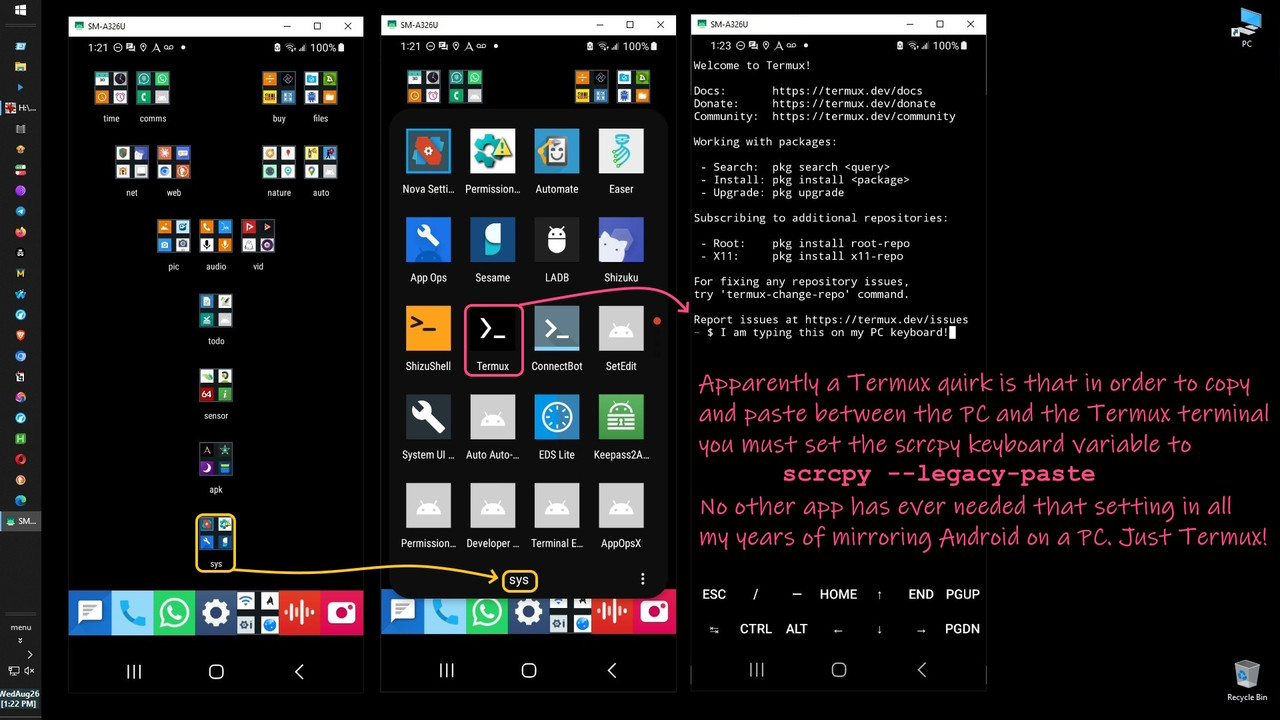
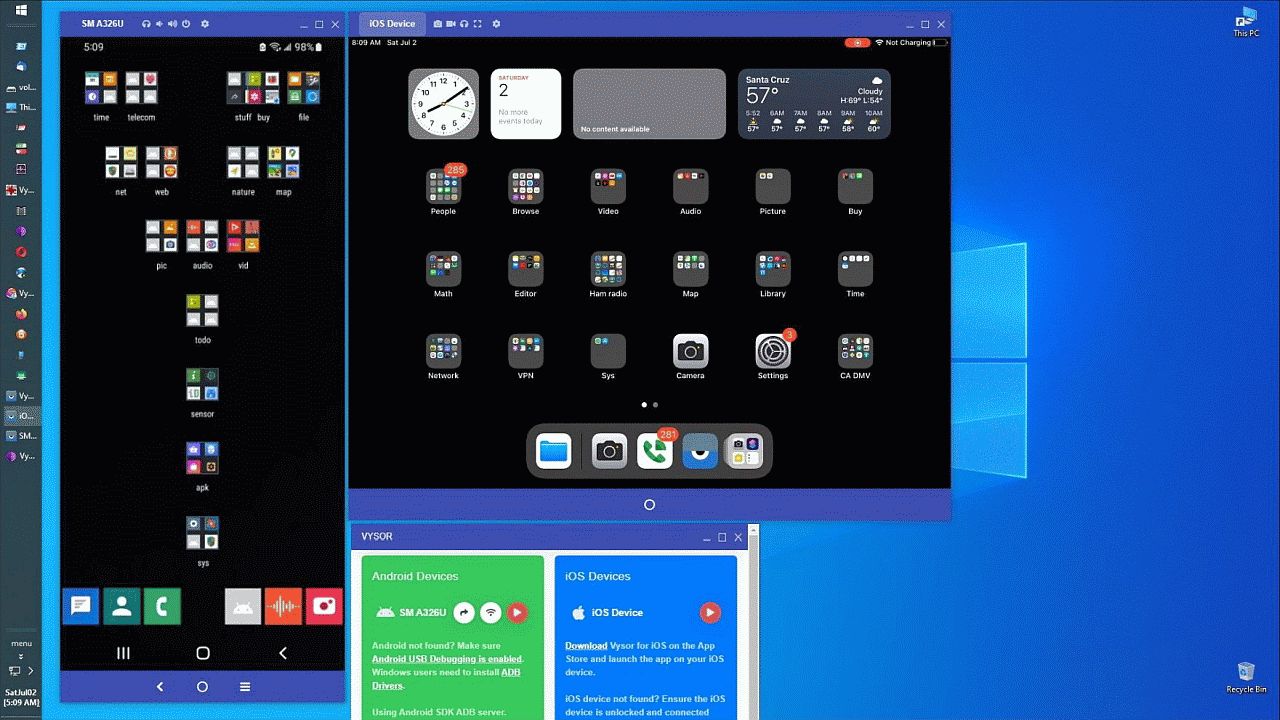
Luckily, with Vysor or scrcpy the Android/desktop clipboard is
shared. 1. Click one is copy the clipboard (on one platform) 2.
Click two is control-V on the keyboard (on the other platform) <https://i.postimg.cc/ZRCTyRx0/scrcpy35.jpg>
Luckily, with Vysor, even iOS can be two steps with Windows. <https://i.postimg.cc/TYvqdxCT/vysor35.jpg>
But, it's about 20 steps (or so) on iOS if you use the Apple way
to do it.
If anyone on the Apple ng can get that down to the 2 clicks that
it should be, that would be an improvement over the kludge way
Apple does things.
| Sysop: | Amessyroom |
|---|---|
| Location: | Fayetteville, NC |
| Users: | 76 |
| Nodes: | 6 (0 / 6) |
| Uptime: | 57:52:52 |
| Calls: | 1,265 |
| Calls today: | 1 |
| Files: | 1,362 |
| D/L today: |
4 files (9,632K bytes) |
| Messages: | 285,955 |