• Re: FAQ: PSA: Tutorial: Walk-Thru etc. Random examples of using adb with Android

    From Maria Sophia@mariasophia@comprehension.com to comp.mobile.android on Sat Oct 17 21:46:00 2026
    From Newsgroup: comp.mobile.android

    Here is an example, from today, of using wget/curl & adb to update WA.
    Note that this skips the Google Play Store repository entirely.

    Subject: A quick look at the WhatsApp Meta Services Framework server-side 7 day update
    Date: Sat, 17 Oct 2026 12:43:55 -0400
    Message-ID: <11b08kc$20fv$1@nnrp.usenet.blueworldhosting.com>

    WhatsApp is firing an Android Intent (android.intent.action.VIEW)
    with a data URI pointing directly to a non-Google APK file.

    Two days ago my WhatsApp 2.26.29.70 asked to update & said I had 7 days. Interestingly, the APK is *directly* from WhatsApp servers. Not Google.
    <https://www.whatsapp.com/android/1/WhatsApp.apk>
    wget -O WhatsApp.apk 'https://www.whatsapp.com/android/1/WhatsApp.apk'
    ...or...
    curl.exe -L "https://www.whatsapp.com/android/1/WhatsApp.apk" -o WhatsApp.apk
    Name: WhatsApp.apk
    Size: 154517872 bytes (147 MiB)
    SHA256: D89C24B2ECE176B060D5868FC8D60F6EE186E05F47083F948B54FFF7FD9DCA63

    From Windows, anyone can install that app (w/o losing data) using adb:
    adb install -r WhatsApp.apk

    However, what's interesting is I have all automatic updates turned off in
    the Google Play Store app & in the Aurora & in all my app updater apps.

    Which means WhatsApp is dialing into a server to query the version number.
    And then WhatsApp pops up an in-app intent, to obtain the latest version.

    Usually I don't debug intents, but two days later I took a quick peek.
    I will see if that intent changes over the next 5 days w/o updating it.
    Action: android.intent.action.VIEW
    Data: https://www.whatsapp.com/android/1/WhatsApp.apk
    MIME type:
    Package name:
    Class name:
    User ID: 0
    Identifier:
    URI: intent://www.whatsapp.com/android/1/WhatsApp.apk#Intent;scheme=https;launchFlags=0x3000000;S.MSF_INTENT_METADATA_ORIGIN_PACKAGE_NAME=com.whatsapp;l.MSF_INTENT_METADATA_LAUNCH_START_TIME=1792253039002;S.MSF_INTENT_METADATA_ID=JB0b67MnnjGpDkR0bqOBGh%3D%3D%0A;end
    Categories:
    Flags: FLAG_ACTIVITY_PREVIOUS_IS_TOP FLAG_ACTIVITY_FORWARD_RESULT
    Extras: MSF_INTENT_METADATA_ORIGIN_PACKAGE_NAME com.whatsapp
    MSF_INTENT_METADATA_LAUNCH_START_TIME 1792253039002
    MSF_INTENT_METADATA_ID JB0b67MnnjGpDkR0bqOBGh==

    The Meta Services Framework (MSF) fields are apparently generated
    by Meta's background services on the device when that intent fires.
    --
    Windows WhatsApp installer:
    <https://www.whatsapp.com/download>
    <https://get.microsoft.com/installer/download/9NKSQGP7F2NH?cid=website_cta_psi>
    Name: WhatsApp Installer.exe
    Size: 813088 bytes (794 KiB)
    SHA256: E537BD26AF9CD54AEB61231FFE22DAD2D54185D5B48DC345B236A7D8002E30C5
    --- Synchronet 3.22a-Linux NewsLink 1.2
  • From Maria Sophia@mariasophia@comprehension.com to comp.mobile.android on Wed Oct 21 13:53:06 2026
    From Newsgroup: comp.mobile.android

    Maria Sophia wrote:
    So that all benefit, this thread is opened to allow others to post random useful adb examples, where the goal is a usable list of useful examples.

    Just now, I used this neat adb trick to operate the phone from the PC.
    It's easy to unlock a phone from the PC, but locking it requires buttons.

    But wait... there's adb to the rescue!

    There's only 1 day left of my WhatsApp experiment on updating the app
    Newsgroups: comp.mobile.android
    Subject: A quick look at the WhatsApp Meta Services Framework server-side
    7 day update
    Date: Sat, 17 Oct 2026 12:43:55 -0400
    Message-ID: <11b08kc$20fv$1@nnrp.usenet.blueworldhosting.com>

    And I needed to take a screenshot of the date and time, but the phone was tucked away somewhere (since I mirror onto my Windows monitor at home).

    I needed a way to bring the phone to the lock screen w/o touching it.
    adb shell input keyevent 26

    That sent a power button event,turning the screen off & locking the phone.

    Then, this awoke the phone, which gave me the clock lock screen I needed.
    adb shell input keyevent 224

    Voila!

    With adb I was able to both lock & unlock the phone for the screenshots.
    --- Synchronet 3.22a-Linux NewsLink 1.2
  • From Maria Sophia@mariasophia@comprehension.com to comp.mobile.android on Fri Oct 23 17:44:12 2026
    From Newsgroup: comp.mobile.android

    Below are ad hoc off-the-cuff examples of what I used adb for just now.

    I had to use adb to make sure the trash was cleaned out.
    Worse, I needed to use adb to find all large files on my internal storage.

    Then, I deleted a few of the largest files using adb.
    And then, using adb, I was able to install the current.apk for WhatsApp.

    I'm cleaning up my phone so that I can install WhatsApp (as my 128GB sd card was
    given to my wife (long story) so I'm out of space on the 64GB internal storage).

    Cleaning out trash can be done, apparently, from adb.
    But it wasn't enough, in my case, so I had to delete actual files too.

    adb shell df -h /data
    Filesystem Size Used Avail Use% Mounted on
    /dev/block/dm-47 50G 49G 413M 100% /data/user/0

    adb shell rm -rf /storage/emulated/0/.Trash-1000
    adb reboot

    adb shell df -h /data
    Filesystem Size Used Avail Use% Mounted on
    /dev/block/dm-47 50G 49G 449M 100% /data/user/0

    adb shell rm -rf /storage/emulated/0/Trash

    adb shell df -h /data
    Filesystem Size Used Avail Use% Mounted on
    /dev/block/dm-47 50G 49G 449M 100% /data/user/0

    adb shell rm -rf /storage/emulated/0/Android/data/com.android.providers.media/cache/*

    adb shell df -h /data
    Filesystem Size Used Avail Use% Mounted on
    /dev/block/dm-47 50G 49G 449M 100% /data/user/0

    adb shell "find /storage/emulated/0 -type f -size +10M -exec ls -l {} \; 2>/dev/null | sort -k5 -rn"

    adb shell rm -rf /storage/emulated/0/.fvTrash
    adb shell df -h /data
    Filesystem Size Used Avail Use% Mounted on
    /dev/block/dm-47 50G 49G 804M 99% /data/user/0

    adb shell rm /storage/emulated/0/Android/data/net.osmand.plus/files/Us_california_los-angeles_northamerica.obf
    adb shell rm /storage/emulated/0/Android/data/net.osmand.plus/files/Us_california_san-francisco_northamerica.obf
    adb shell rm /storage/emulated/0/Android/data/net.osmand.plus/files/Us_california_san-diego_northamerica.obf
    adb shell rm /storage/emulated/0/Android/data/net.osmand.plus/files/Us_california_los-angeles-north_northamerica.obf
    adb shell rm /storage/emulated/0/Android/data/net.osmand.plus/files/Us_california_sacramento_northamerica.obf
    adb shell rm /storage/emulated/0/Android/data/net.osmand.plus/files/Us_california_fresno_northamerica.obf
    adb shell rm /storage/emulated/0/Android/data/net.osmand.plus/files/Us_california_lancaster_northamerica.obf
    adb shell rm /storage/emulated/0/Android/data/net.osmand.plus/files/Us_california_stockton_northamerica.obf
    adb shell rm /storage/emulated/0/Android/data/net.osmand.plus/files/Us_california_redding_northamerica.obf
    adb shell rm /storage/emulated/0/Android/data/net.osmand.plus/files/Us_california_chico_northamerica.obf
    adb shell rm /storage/emulated/0/Android/data/net.osmand.plus/files/Us_california_bakersfield_northamerica.obf
    adb shell rm /storage/emulated/0/Android/data/net.osmand.plus/files/World_basemap_mini.obf

    adb shell df -h /data
    Filesystem Size Used Avail Use% Mounted on
    /dev/block/dm-47 50G 47G 3.3G 94% /data/user/0


    adb install -r current.apk
    Performing Streamed Install
    Success

    adb shell df -h /data
    Filesystem Size Used Avail Use% Mounted on
    /dev/block/dm-47 50G 46G 3.3G 94% /data/user/0


    --- Synchronet 3.22a-Linux NewsLink 1.2
  • From Maria Sophia@mariasophia@comprehension.com to comp.mobile.android on Fri Oct 23 17:49:12 2026
    From Newsgroup: comp.mobile.android

    I'm looking up commands to help clean out my internal 64GB sd card ('cuz I
    gave my wife my 128GB sdcard and now I'm out of space) so these may help.

    :: See all mount points and their usage
    adb shell df -h

    :: Find the largest directories under /data (requires root or shell access)
    adb shell "du -sh /data/data/* 2>/dev/null | sort -rh | head -20"

    :: If you have root, check app-specific data sizes
    adb shell "du -sk /data/data/* 2>/dev/null | sort -rn | head -20"

    :: Clear cache for a specific app (e.g., a browser or social media app)
    adb shell pm clear com.example.app

    :: Or clear cache for ALL apps (system will handle it)
    adb shell pm trim-caches 999999999

    :: Uninstall unused apps directly
    adb uninstall com.example.unused.app

    :: Move apps to external storage (if supported)
    adb shell pm set-install-location 2

    :: Find the 20 largest app data directories (sort by KB, numeric)
    adb shell "du -sk /data/data/* 2>/dev/null | sort -rn | head -20"

    :: Same for all user profiles
    adb shell "du -sk /data/user/* 2>/dev/null | sort -rn | head -20"

    :: Find large files (>50MB) inside /data
    adb shell "find /data -type f -size +50M 2>/dev/null"

    :: Find large files (>100MB) inside /data
    adb shell "find /data -type f -size +100M 2>/dev/null"

    :: Clear the download directory
    adb shell rm /storage/emulated/0/Download/*

    :: Use adb install with --sdcard flag (if the APK supports install location)
    adb install -s -r current.apk
    --- Synchronet 3.22a-Linux NewsLink 1.2
  • From croy@croy@spam.invalid.net to comp.mobile.android on Fri Oct 23 16:58:07 2026
    From Newsgroup: comp.mobile.android

    On Fri, 23 Oct 2026 17:49:12 -0400, Maria Sophia <mariasophia@comprehension.com> wrote:

    I'm looking up commands to help clean out my internal 64GB sd card ('cuz I >gave my wife my 128GB sdcard and now I'm out of space) so these may help.

    "Internal 64GB sd card"? I'm not familiar with such. What is it?
    --
    croy
    --- Synchronet 3.22a-Linux NewsLink 1.2
  • From Maria Sophia@mariasophia@comprehension.com to comp.mobile.android on Fri Oct 23 22:19:41 2026
    From Newsgroup: comp.mobile.android

    croy wrote:
    I'm looking up commands to help clean out my internal 64GB sd card ('cuz I >>gave my wife my 128GB sdcard and now I'm out of space) so these may help.

    "Internal 64GB sd card"? I'm not familiar with such. What is it?


    Good question.

    For reasons known only to the people who designed Android, the internal
    storage on my phone (and who knows on how many other phones) is /sdcard.

    Notice all these commands use the internal /sdcard as the file spec.
    You tell me why. I don't know why. I just know that's how it is.

    adb shell readlink -f /sdcard
    => /storage/emulated/0

    adb shell df -h /sdcard
    => Filesystem Size Used Avail Use% Mounted on
    => /dev/fuse 50G 44G 5.5G 89% /storage/emulated

    adb shell ls -lah /sdcard
    => lrw-r--r-- 1 root root 21 2008-12-31 07:00 /sdcard -> /storage/self/primary

    adb shell "du -sk /sdcard/Android/*"
    4 /sdcard/Android/AndroidSystemProperties
    8 /sdcard/Android/cache
    4086747 /sdcard/Android/data
    1260639 /sdcard/Android/media
    18 /sdcard/Android/obb
    11 /sdcard/Android/obj

    adb shell "du -ah /sdcard/SoundRecorder"
    1.2M /sdcard/SoundRecorder/20260829_083254.jpg
    2.0M /sdcard/SoundRecorder/20260902_094625.jpg
    1.7M /sdcard/SoundRecorder/20260902_095525.jpg
    3.5M /sdcard/SoundRecorder/20260902_112232.jpg
    1.1M /sdcard/SoundRecorder/20260904_144121.jpg
    1.1M /sdcard/SoundRecorder/20260909_180255.jpg
    1.8M /sdcard/SoundRecorder/20260911_080230.jpg
    2.4M /sdcard/SoundRecorder/20260915_110817.jpg
    1.5M /sdcard/SoundRecorder/20260916_121334.jpg
    1.3G /sdcard/SoundRecorder


    Find all files over 50MB
    adb shell "find /sdcard -type f -size +51200k -exec ls -ln {} \;"

    adb shell "du -sk /sdcard/* 2>/dev/null"
    18750 /sdcard/0000
    0 /sdcard/20240424_android-contacts.vcf
    44 /sdcard/20260206calendar.ics
    4 /sdcard/Alarms
    164 /sdcard/All Layers.gpx
    5347436 /sdcard/Android
    40 /sdcard/AppManager
    4 /sdcard/Audiobooks
    11 /sdcard/Aurora
    12 /sdcard/BatteryDog
    12 /sdcard/BestDAV
    4 /sdcard/Books
    728 /sdcard/CaptivePortalLoginGoogle
    12715 /sdcard/DCIM
    14 /sdcard/Documents
    6640 /sdcard/DocumentsUIGoogle
    4 /sdcard/Download
    4 /sdcard/Id.txt
    4 /sdcard/MotionDetectorPro
    54394 /sdcard/Movies
    33582 /sdcard/Music
    43 /sdcard/MyLogs
    1424 /sdcard/NetworkStackGoogle
    4 /sdcard/New Folder
    24 /sdcard/Notifications
    592 /sdcard/OpenContacts
    23619 /sdcard/OziExplorer
    3548 /sdcard/PackageViewer
    706142 /sdcard/Pictures
    4 /sdcard/Podcasts
    4 /sdcard/Rambler
    280 /sdcard/RamblerSharedData
    118 /sdcard/ReadEra
    4 /sdcard/Recordings
    184 /sdcard/Ringtones
    76 /sdcard/SHAREit Lite
    5799 /sdcard/Samsung
    3876 /sdcard/Snapseed
    1454784 /sdcard/SoundRecorder
    483 /sdcard/Tracks
    16 /sdcard/WifiCollector
    28 /sdcard/Writer
    31 /sdcard/adbAutoSave
    8 /sdcard/com.android.settings
    11 /sdcard/dataLogger
    12 /sdcard/freeopenvpn_udp.ovpn
    31 /sdcard/gpsbox
    39 /sdcard/hudunrecorder
    4 /sdcard/keuwlsoft
    316 /sdcard/logs
    132 /sdcard/master_contacts_20260430_204626.vcf
    4 /sdcard/micro.repl.ma7moud3ly_15.7z
    4843 /sdcard/osmdroid
    1682 /sdcard/osmtracker
    4 /sdcard/passwd.txt
    104 /sdcard/screenshot.png
    11 /sdcard/sepolicy_extends
    60 /sdcard/split_arch.apkDOS
    4 /sdcard/temp
    4 /sdcard/weblog
    12 /sdcard/window.xml
    4 /sdcard/window_dump.xml


    What the heck is /sdcard/micro.repl.ma7moud3ly_15.7z

    adb shell "ls -lh /sdcard/micro.repl.ma7moud3ly_15.7z"
    -rw-rw---- 1 root everybody 59 2026-05-17 19:22 /sdcard/micro.repl.ma7moud3ly_15.7z

    adb shell "file /sdcard/micro.repl.ma7moud3ly_15.7z" /sdcard/micro.repl.ma7moud3ly_15.7z: 7-zip archive data, version 0.4


    That strange file belongs to an open-source Android app called
    Micro REPL (a MicroPython/CircuitPython IDE developed by Ma7moud3ly).

    So I removed it
    adb shell rm /sdcard/micro.repl.ma7moud3ly_15.7z


    Notice all these commands use the internal /sdcard as the file spec.
    You tell me why. I don't know why. I just know that's how it is.


    --- Synchronet 3.22a-Linux NewsLink 1.2
  • From Maria Sophia@mariasophia@comprehension.com to comp.mobile.android on Sat Oct 24 00:57:43 2026
    From Newsgroup: comp.mobile.android

    I don't know how people live without using adb all day, every day.

    Just now I installed com.lyrebirdstudio.cartoon using Aurora.
    <https://play.google.com/store/apps/details?id=com.lyrebirdstudio.cartoon>

    When I started it, it asked me to sign into the Google Play Store.
    This is new friction foisted by Google upon us via developers.

    Notice since I don't have a Google Account on the phone, I can't
    use the Google Play Store, but I can use Aurora, which gets the app.

    If you don't know, Aurora gets the app off the Google Play Repository.
    So it's the exact same file.

    But... without Shizuku (I forgot to turn it on), Aurora sets the installerPacakgeName to com.aurora.store instead of com.android.vending

    This proves that statement:
    adb shell dumpsys package com.lyrebirdstudio.cartoon | findstr installerPackageName
    installerPackageName=com.aurora.store

    So let's change that metadata field which takes a few adb steps.

    First, let's use adb to find out where it's installed.
    adb shell pm path com.lyrebirdstudio.cartoon
    package:/data/app/~~6ZH_PKvCqkDnF7ntSKdUsw==/com.lyrebirdstudio.cartoon-VZLEezShv4z6mtwWzOzNng==/base.apk
    package:/data/app/~~6ZH_PKvCqkDnF7ntSKdUsw==/com.lyrebirdstudio.cartoon-VZLEezShv4z6mtwWzOzNng==/split_config.arm64_v8a.apk
    package:/data/app/~~6ZH_PKvCqkDnF7ntSKdUsw==/com.lyrebirdstudio.cartoon-VZLEezShv4z6mtwWzOzNng==/split_config.en.apk
    package:/data/app/~~6ZH_PKvCqkDnF7ntSKdUsw==/com.lyrebirdstudio.cartoon-VZLEezShv4z6mtwWzOzNng==/split_config.xhdpi.apk

    Second, let's download those splits to the desktop with adb:
    adb pull /data/app/~~6ZH_PKvCqkDnF7ntSKdUsw==/com.lyrebirdstudio.cartoon-VZLEezShv4z6mtwWzOzNng==/base.apk .
    adb pull /data/app/~~6ZH_PKvCqkDnF7ntSKdUsw==/com.lyrebirdstudio.cartoon-VZLEezShv4z6mtwWzOzNng==/split_config.arm64_v8a.apk .
    adb pull /data/app/~~6ZH_PKvCqkDnF7ntSKdUsw==/com.lyrebirdstudio.cartoon-VZLEezShv4z6mtwWzOzNng==/split_config.en.apk .
    adb pull /data/app/~~6ZH_PKvCqkDnF7ntSKdUsw==/com.lyrebirdstudio.cartoon-VZLEezShv4z6mtwWzOzNng==/split_config.xhdpi.apk .

    Third, let's re-install but spoof the installer name:
    adb install-multiple -r -i "com.android.vending" base.apk split_config.arm64_v8a.apk split_config.en.apk split_config.xhdpi.apk
    Success

    Lastly, let's prove that changed the installerPackageName value.
    adb shell dumpsys package com.lyrebirdstudio.cartoon | findstr installerPackageName
    installerPackageName=com.android.vending

    Voila!

    When I tap com.lyrebirdstudio.cartoon, it comes up w/o asking me to
    log into the Google Play Store (because it just checked 1 field).

    Using adb, I was able to overcome that bit of Google sideloading friction.
    I don't know how anyone survives, on Android, without using adb.
    (If they want privacy, anyway.)
    --- Synchronet 3.22a-Linux NewsLink 1.2
  • From Maria Sophia@mariasophia@comprehension.com to comp.mobile.android on Sat Oct 24 01:12:34 2026
    From Newsgroup: comp.mobile.android

    Maria Sophia wrote:
    Just now I installed com.lyrebirdstudio.cartoon using Aurora.
    <https://play.google.com/store/apps/details?id=com.lyrebirdstudio.cartoon>

    So I create a toon from an image and now I want to use it in my email on
    the desktop, but my phone is on Wi-Fi and the images is on the phone.

    Offhand, I know of no way directly to get Windows File Explorer to
    see the Android file system (without adding a server like webdav/ftp).

    But adb can push and pull files over Wi-Fi so let's just use that.

    First, find the full path to the toonified image file:
    adb shell ls -la /storage/emulated/0/Pictures/ToonApp
    total 164 -rw-rw---- 1 root everybody 167291 2026-10-23 22:03 1062915192321.jpg

    Second, pull all the images in that folder to the desktop:
    adb pull /storage/emulated/0/Pictures/ToonApp
    /storage/emulated/0/Pictures/ToonApp/: 1 file ..., 0 skipped. 2.3 MB/s (167291 bytes in 0.070s)

    Voila!

    Now I can use that Android file on the desktop.

    Again, I don't know how others live w/o adb, where, in this case,
    how do they get files back and forth between the desktop sans USB?
    --- Synchronet 3.22a-Linux NewsLink 1.2
  • From Maria Sophia@mariasophia@comprehension.com to comp.mobile.android on Sat Oct 24 03:18:59 2026
    From Newsgroup: comp.mobile.android

    Maria Sophia wrote:
    Again, I don't know how others live w/o adb, where, in this case,
    how do they get files back and forth between the desktop sans USB?

    Every day, I use adb, where I can't imagine how people survive on Android without it, but of course, they don't have any privacy so that's how.

    Nonetheless, I just used adb moments ago to start Shizuku, which is a
    special package that gives special shell permissions to certain apps.

    0. When you start Shizuku on Android for the first time, you'll see:
    Shizuku is not running

    1. Connect by Wi-Fi Wireless Debugging
    C:\> adb devices
    List of devices attached
    192.168.1.4:5555 device

    2. Have adb start Shizuku on the phone (which adds shell privileges)
    C:\> adb shell sh /sdcard/Android/data/moe.shizuku.privileged.api/start.sh
    info: start.sh begin
    info: attempt to copy starter from /storage/emulated/0/Android/data/moe.shizuku.privileged.api/starter to /data/local/tmp/shizuku_starter
    info: exec /data/local/tmp/shizuku_starter
    info: starter begin
    info: killing old process...
    info: apk path is /data/app/~~j2Bfj74f4DUXxNA5r8nvlQ==/moe.shizuku.privileged.api-EfgdS0yVAmbHZDgZAOOXtg==/base.apk
    info: starting server...
    info: shizuku_starter exit with 0

    3. Now when you tap on Shizuku on Android, you see:
    Shizuku is running

    4. In Shizuku, you can now "authorize" any application that uses it
    For example: Owlfiles, Total Commander, Obtainium, Warden,
    ZArchiver, X-plore, Insular, LSPatch, Package Manager, LogFox,
    Better Internet Tiles, SAI, Fluffy, App Ops, MiXplorer, Droid-ify,
    Settings Database Editor, Button Mapper, FV File Explorer,
    ShizuShell, Cx File Explorer, Key Mapper, DevCheck, Canta,
    Universal Installer, Ultimate File Manager Pro, etc.

    5. Lastly, in Aurora, I needed to set Shizuku as the installer.
    Aurora:Settings > Installation > Installation method >
    Shizuku Installer = on

    Now when I install apps using Auroa, the installerPackageName will be com.android.vending so that Google Play sideload friction is overcome.

    6. I just tested Aurora-with-Shizuku by installing this app:
    <toontap.photoeditor.cartoon.cartoonphotoeditor>

    adb shell dumpsys package toontap.photoeditor.cartoon.cartoonphotoeditor | findstr installerPackageName
    installerPackageName=com.android.vending

    Voila!
    Google added sideloading friction overcome!

    Note that installerPackageName=com.android.vending is the recorded installer identity, but it's not actual proof the app came from Google Play of course. Hence, this little trick may satisfy an app that checks only that field.
    But this trick will not satisfy every Play Store, licensing or integrity check.

    It's sad we have to do this.
    But given we must, how anyone lives without adb is beyond my comprehension. --- Synchronet 3.22a-Linux NewsLink 1.2
  • From Maria Sophia@mariasophia@comprehension.com to comp.mobile.android on Sat Oct 24 10:03:20 2026
    From Newsgroup: comp.mobile.android

    Maria Sophia wrote:
    And I needed to take a screenshot of the date and time, but the phone was tucked away somewhere (since I mirror onto my Windows monitor at home).

    I needed a way to bring the phone to the lock screen w/o touching it.
    adb shell input keyevent 26

    That sent a power button event,turning the screen off & locking the phone.

    Then, this awoke the phone, which gave me the clock lock screen I needed.
    adb shell input keyevent 224

    Voila!

    With adb I was able to both lock & unlock the phone for the screenshots.

    Also, plenty of apps on the phone will blank the screen, using adb.

    # in ladb on the phone
    adb shell input keyevent 223

    # in Termux, on the phone (pkg install android-tools)
    adb pair <phone-ip>:<pair-port>
    adb connect <phone-ip>:<port>
    adb shell input keyevent 223

    .# In Termux, with Shizuku remote interactive shell
    rish -c "input keyevent 223".

    Or, if a desktop is handy (the phone can be on Wi-Fi or USB).

    1. Blank the screen (sleep, no lock)
    adb shell input keyevent 223
    -> KEYCODE_SLEEP, turns the display off

    2. Wake up the screen
    adb shell input keyevent 224
    -> KEYCODE_WAKEUP

    3. Sleep & lock (same as pressing power)
    adb shell input keyevent 26
    -> KEYCODE_POWER

    4. Let it fall asleep on its own over a given time
    adb shell settings put system screen_off_timeout 1000
    adb shell svc power stayon false
    -> short timeout, then normal sleep behavior
    --
    Every post to Usenet should strive to add value that wasn't there.
    --- Synchronet 3.22a-Linux NewsLink 1.2
  • From Maria Sophia@mariasophia@comprehension.com to comp.mobile.android on Sat Oct 24 14:16:31 2026
    From Newsgroup: comp.mobile.android

    This was posted for Andy's question just now, and it uses adb examples.

    Maria Sophia wrote:
    Activity Launcher de.szalkowski.activitylauncher Version 2.2.4 (7400)
    4 trackers

    Off the cuff, I'd try a few things to get more data about the delta
    between your existing installed base APK and the reputed update APK.

    Going from 4 to 81 trackers indicates something changed but I couldn't find
    an ownership change, although who is building and signing it apparently changed when the project moved from Adam Szalkowski's personal repo to a GitHub organisation, with butzist as the active maintainer.

    The latest commits are from butzist, and the repo has been substantially reworked (Kotlin migration, CI, plugin architecture, a Discord support server).

    F-Droid still lists the source as github.com/butzist/ActivityLauncher and
    the donation link as github.com/sponsors/butzist. So: same project, same
    ISC licence, but maybe different hands on the keyboard? Dunno.

    The signing detail is the more likely culprit

    F-Droid builds and signs its own APKs, and says so explicitly for this package. Google Play builds are signed with the developer's key.

    If your installed copy came from one source and the "update" from the
    other, the signatures won't match and Android will refuse the install.

    Your error should be something like: INSTALL_FAILED_UPDATE_INCOMPATIBLE

    When you run install -r, you'll probably get to see the error outright.

    You can get the Exodus Privacy report for the package by uploading the APK
    to reports.exodus-privacy.eu.org or you can try the Python tool
    pip install exodus-standalone
    exodus-standalone -j report.json -o out/ base.apk

    If you want, you can try my apkanalyzer.bat to see the trackers:
    adb shell pm path de.szalkowski.activitylauncher

    package:/data/app/~~uYiMqGD1munmi67mXYap3w==/de.szalkowski.activitylauncher-YYHJspyDlc5Qv9CjFt4Kog==/base.apk

    package:/data/app/~~uYiMqGD1munmi67mXYap3w==/de.szalkowski.activitylauncher-YYHJspyDlc5Qv9CjFt4Kog==/split_config.xhdpi.apk

    adb pull "/data/app/~~uYiMqGD1munmi67mXYap3w==/de.szalkowski.activitylauncher-YYHJspyDlc5Qv9CjFt4Kog==/base.apk"
    al-installed-base.apk
    adb pull "/data/app/~~uYiMqGD1munmi67mXYap3w==/de.szalkowski.activitylauncher-YYHJspyDlc5Qv9CjFt4Kog==/split_config.xhdpi.apk"
    al-installed-xhdpi.apk

    Look at the signature:
    apksigner.bat verify --print-certs al-installed-base.apk

    Look at the trackers:
    apkanalyzer.bat dex packages al-installed-base.apk | more
    P d 30691 36661 9436459 <TOTAL>
    P d 14376 14406 4432334 com
    P d 14376 14406 4432334 com.google
    P d 13710 13736 4232408 com.google.android
    P d 12760 12786 3995469 com.google.android.gms
    P d 12515 12541 3934180 com.google.android.gms.internal
    P d 10995 11016 3544259 com.google.android.gms.internal.ads
    C d 109 109 24875 com.google.android.gms.internal.ads.Rd
    M d 1 1 993 com.google.android.gms.internal.ads.Rd <init>(com.google.android.gms.internal.ads.Zd,U1.d,java.lang.String,boolean,com.google.android.gms.internal.ads.F3,com.google.android.gms.internal.ads.u6,com.google.android.gms.internal.ads.zc,com.google.android.gms.internal.ads.Li,f.t,com.google.android.gms.internal.ads.e5,com.google.android.gms.internal.ads.Wo,com.google.android.gms.internal.ads.Yo)
    M d 1 1 104 com.google.android.gms.internal.ads.Rd void x(com.google.android.gms.internal.ads.Rd)
    M d 1 1 174 com.google.android.gms.internal.ads.Rd void A(java.lang.String)
    M d 1 1 90 com.google.android.gms.internal.ads.Rd void A0(com.google.android.gms.internal.ads.c7)
    M d 1 1 146 com.google.android.gms.internal.ads.Rd void B(java.lang.Boolean)
    M d 1 1 143 com.google.android.gms.internal.ads.Rd void B0(java.lang.String,com.google.android.gms.internal.ads.a8)
    M d 1 1 96 com.google.android.gms.internal.ads.Rd void C()
    M d 1 1 375 com.google.android.gms.internal.ads.Rd void C0(int,boolean,boolean)
    M d 1 1 821 com.google.android.gms.internal.ads.Rd boolean D()
    M d 1 1 95 com.google.android.gms.internal.ads.Rd boolean D0()
    M d 1 1 117 com.google.android.gms.internal.ads.Rd v1.a E()
    M d 1 1 198 com.google.android.gms.internal.ads.Rd void E0(java.lang.String,com.goo-- More --

    aapt2.exe dump permissions al-installed-base.apk
    package: de.szalkowski.activitylauncher
    uses-permission: name='com.android.launcher.permission.INSTALL_SHORTCUT' uses-permission: name='android.permission.QUERY_ALL_PACKAGES'
    uses-permission: name='android.permission.INTERNET'
    uses-permission: name='android.permission.ACCESS_NETWORK_STATE' uses-permission: name='com.google.android.gms.permission.AD_ID' uses-permission: name='android.permission.ACCESS_ADSERVICES_AD_ID' uses-permission: name='android.permission.ACCESS_ADSERVICES_ATTRIBUTION' uses-permission: name='android.permission.ACCESS_ADSERVICES_TOPICS' uses-permission: name='android.permission.WAKE_LOCK'
    uses-permission: name='com.google.android.finsky.permission.BIND_GET_INSTALL_REFERRER_SERVICE' uses-permission: name='android.permission.FOREGROUND_SERVICE'
    permission: de.szalkowski.activitylauncher.DYNAMIC_RECEIVER_NOT_EXPORTED_PERMISSION uses-permission: name='de.szalkowski.activitylauncher.DYNAMIC_RECEIVER_NOT_EXPORTED_PERMISSION'

    aapt2.exe dump badging al-installed-base.apk | findstr /C:"package:"
    package: name='de.szalkowski.activitylauncher' versionCode='7400' versionName='2.2.4' platformBuildVersionName='16'
    platformBuildVersionCode='36' compileSdkVersion='36' compileSdkVersionCodename='16'

    Look at the splits:
    apkanalyzer.bat apk summary al-installed-base.apk

    Look at the permissions:
    apkanalyzer.bat manifest permissions al-installed-base.apk

    Basically, you need the error and the differences between the
    existing base.apk and the apk that the app is trying to install.

    Worse case, you can delete and re-install from scratch.
    But that loses any data you might have previously saved.

    You can also downgrade if you have an older version archvied.
    adb install -d olderarchive.apk
    --
    Usenet is where kind people daily gather to voluntarily help others.
    --- Synchronet 3.22a-Linux NewsLink 1.2
  • From Maria Sophia@mariasophia@comprehension.com to comp.mobile.android on Mon Oct 26 09:25:22 2026
    From Newsgroup: comp.mobile.android

    I just wrote this to help Andy, but it has useful commands for this thread.

    Andy Burns wrote:
    I downgraded to v2.3.1 from apkmirror and it still had the huge number
    of trackers, so I downgraded further to v2.2.4 an that just had the 4
    you list above.

    I use Activity Launcher only sporadically

    Likewise ... my pixel launcher has a shortcut to notification history built-in, on my samsung tablet I use ActivityLauncher to manually add a shortcut to "NotificationHistory" but it seems oneUI 8.5 includes an
    option within settings ... can't remember if that was there bbefore or not?

    You can also downgrade if you have an older version archvied.
    adb install -d olderarchive.apk

    got them from from apkmirror, will stick with old version.

    Hi Andy,

    Every post should add value that wasn't there, so thanks for that update.

    Glad downgrading to v2.2.4 worked for you. I was surprised at even seeing 4 trackers, 'cuz I generally deplore apps with trackers, but I do agree, I, myself, put notification logs and notification history shortcuts in my homescreen shortcuts folder (because things beep and I don't know why).

    I looked in my archives and found an older version dated 20220923.
    Name: Activity Launcher-1.10.0_de.szalkowski.activitylauncher-18.apk
    Size: 184246 bytes (179 KiB)
    SHA256: AE8E2B9D935A1FD3EF92D9419ABA77A37DD3702BB0E41FF6A6A0A9645F0537F9

    So I used Muntashirakon App Manager to "Save APK" the existing 2.2.4 APK.
    /storage/emulated/0/AppManager/apks/Activity Launcher_2.2.4.apks

    Then I used copyapk.bat (previously posted) to copy over Wi-Fi to the PC.
    Name: Activity Launcher_2.2.4.apks
    Size: 3617046 bytes (3532 KiB)
    SHA256: BED56554A2FAC940A8BF53820CA026BB4459A1500DEB95B1DA48C1A669122BC9

    Once safely archived, I downgraded my 2.2.4 to 1.10.0 to check trackers:
    adb install -d -r Activity Launcher-1.10.0_de.szalkowski.activitylauncher-18.apk
    Performing Streamed Install
    Success

    Then I checked the trackers in Muntashirakon App Manager. Guess what?
    Activity Launcher de.szalkowski.activitylauncher Version 1.10.0 (18)
    No trackers!

    I looked up the functionality delta, which, supposedly, is this:
    v2.2.4 Added Features:
    Favorites and recently used activities - Track frequently accessed activities
    Sharing of shortcuts via URL - Export/create shortcuts through shareable links
    In-app reviews - Ability to review the app directly
    Translation updates - 78 languages supported
    Fixed app crashes when screen rotates
    Improved startup time (skips loading all packages when opening favorites/recents)
    Technical specs:
    Size: ~7.6 MB (vs 180 KB in v1.10.0)
    Android requirement: 6.0+ (vs 4.4+ in v1.10.0)
    Supports Android TV
    12 permissions, 2 features, 3 libraries

    v1.10.0
    Size: 180 KB (much lighter)
    Android requirement: 4.4+ (works on older devices)

    Summary
    Version 2.2.4 adds organizational features (favorites/recent), sharing
    and app store integration (reviews). However, it's about 42x larger in
    file size and requires a more recent Android version.

    adb shell dumpsys package de.szalkowski.activitylauncher | findstr /i "versionCode installerPackageName firstInstallTime lastUpdateTime"
    versionCode=18 minSdk=19 targetSdk=29
    lastUpdateTime=2026-10-26 05:39:10
    firstInstallTime=2023-04-05 21:28:03
    firstInstallTime=1969-12-31 16:00:00

    I decided to pull it and noticed it's not a split APK (like 2.2.4 is).
    adb shell pm path de.szalkowski.activitylauncher
    package:/data/app/~~bb2pgsYFKkX4zWADhQSfTg==/de.szalkowski.activitylauncher-ucrjZQ6ZlnhkDu6pA5AaNQ==/base.apk
    adb pull "/data/app/~~bb2pgsYFKkX4zWADhQSfTg==/de.szalkowski.activitylauncher-ucrjZQ6ZlnhkDu6pA5AaNQ==/base.apk"
    aapt2.exe dump permissions base.apk
    package: de.szalkowski.activitylauncher
    uses-permission: name='com.android.launcher.permission.INSTALL_SHORTCUT'
    apksigner.bat verify --print-certs base.apk
    The signer is the real developer key
    The certificate DN is CN=Adam Szalkowski, L=Znrich, C=CH
    Adam Szalkowski is the developer of Activity Launcher
    The fingerprints match published references for this app:
    (CN=Android, OU=Android, O=Google Inc.) is the Android source stamp.
    So an F-Droid APK will not match this certificate.

    apkanalyzer.bat dex packages --defined-only base.apk > p110.txt
    findstr /i "firebase appsflyer adjust onesignal amplitude mixpanel segment sentry bugsnag instabug braze appboy leanplum clevertap moengage countly flurry kochava branch datadog newrelic unity3d.ads applovin ironsource vungle chartboost mopub" p110.txt
    Didn't find any

    I'm not sure what else to test.

    For others to benefit, Activity Launcher asks Android's PackageManager for
    all the activities on your phone and presents them as a browsable tree.

    Tap one and it launches that screen directly.
    It can also pin any of them to your home screen as a shortcut.

    Lately I've been using Muntashirakon App Manager to do it, but I used to
    use Activity Launcher before I started using Muntashirakon instead.
    --
    On Usenet, we can pool our knowledge and skills so everyone learns more.
    --- Synchronet 3.22a-Linux NewsLink 1.2
  • From Maria Sophia@mariasophia@comprehension.com to comp.mobile.android on Fri Oct 30 13:38:02 2026
    From Newsgroup: comp.mobile.android

    Maria Sophia wrote:
    So that all benefit, this thread is opened to allow others to post random useful adb examples, where the goal is a usable list of useful examples.

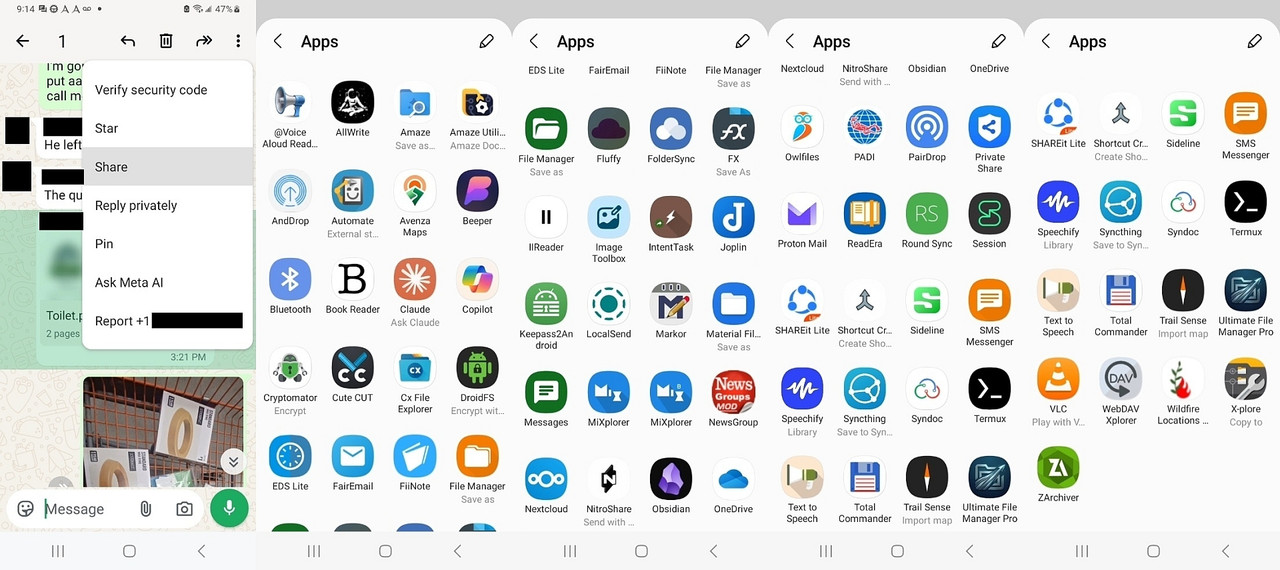
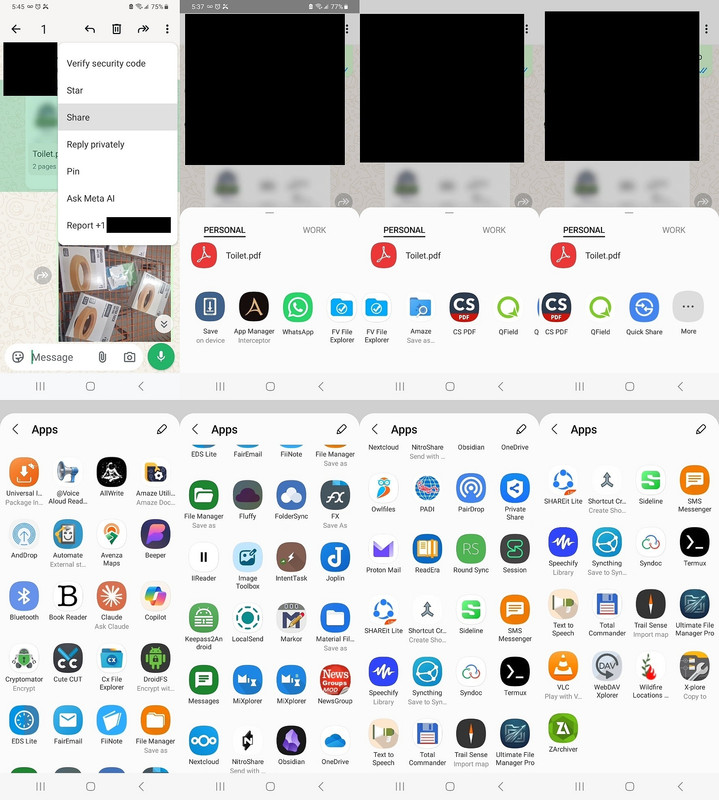
    Moments ago, in another thread on WhatsApp PDF sharesheets, we found that
    the Android GUI for sharing PDFs is so dynamic you'd have to run it many
    times just to get the same answer twice, and you may never get it twice.

    Luckily, I ran an adb command, which found 87 entries, but 54 distinct apps (64 individual activities) that are registered to handle PDFs via
    ACTION_SEND on my phone. <https://i.postimg.cc/YqnZzMvq/cxfileexplorer.jpg>

    adb shell cmd package query-activities -a android.intent.action.SEND -t application/pdf --user 0
    adb shell cmd package query-activities -a android.intent.action.SEND -t application/pdf --user 0 | grep -E "(packageName|name=)"

    name=com.android.bluetooth.opp.BluetoothOppLauncherActivity
    packageName=com.android.bluetooth
    name=com.android.bluetooth.btservice.AdapterApp
    packageName=com.android.bluetooth
    name=com.google.android.gms.nearby.sharing.main.MainActivity
    packageName=com.google.android.gms
    name=co.g.App
    packageName=com.google.android.gms
    name=com.microsoft.skydrive.intent.actionsend.ReceiveActionSendActivity
    packageName=com.microsoft.skydrive
    name=com.microsoft.skydrive.SkyDriveApplication
    packageName=com.microsoft.skydrive
    name=com.samsung.android.privacy.view.MainActivity
    packageName=com.samsung.android.privateshare
    name=com.samsung.android.privacy.GlobalApplication
    packageName=com.samsung.android.privateshare
    name=app.fluffy.MainActivity
    packageName=app.fluffy
    name=app.fluffy.FluffyApplication
    packageName=app.fluffy
    name=app.pwhs.universalinstaller.presentation.install.DialogInstallActivity
    packageName=app.pwhs.universalinstaller
    name=app.pwhs.universalinstaller.App
    packageName=app.pwhs.universalinstaller
    name=ch.opengis.qfield.QFieldActivity
    packageName=ch.opengis.qfield
    name=org.qtproject.qt.android.bindings.QtApplication
    packageName=ch.opengis.qfield
    name=ch.protonmail.android.activities.composeMessage.ComposeMessageActivity
    packageName=ch.protonmail.android
    name=ch.protonmail.android.core.ProtonMailApplication
    packageName=ch.protonmail.android
    name=com.avenza.openfile.OpenFileWithAvenzaMapsActivity
    packageName=com.Avenza
    name=com.pairip.application.Application
    packageName=com.Avenza
    name=com.alextern.shortcuthelper.MainActivity
    packageName=com.alextern.shortcuthelper
    name=com.alextern.shortcuthelper.ShortcutHelperApplication
    packageName=com.alextern.shortcuthelper
    name=com.alpaca.android.readout.activities.MainActivity
    packageName=com.alpaca.android.readout
    name=com.alpaca.android.readout.process.MyApplication
    packageName=com.alpaca.android.readout
    name=com.amaze.filemanager.ui.activities.MainActivity
    packageName=com.amaze.filemanager
    name=com.amaze.filemanager.application.AppConfig
    packageName=com.amaze.filemanager
    name=com.artifex.mupdf.viewer.DocumentActivity
    packageName=com.amaze.fileutilities
    name=com.amaze.fileutilities.AppConfig
    packageName=com.amaze.fileutilities
    name=com.anthropic.claude.deeplink.DeepLinkActivity
    packageName=com.anthropic.claude
    name=com.anthropic.claude.application.ClaudeApplication
    packageName=com.anthropic.claude
    name=com.balda.intenttask.ShareSendActivity
    packageName=com.balda.intenttask
    name=com.balda.intenttask.core.IntentTask
    packageName=com.balda.intenttask
    name=com.balda.intenttask.ShareCommandSendActivity
    packageName=com.balda.intenttask
    name=com.balda.intenttask.core.IntentTask
    packageName=com.balda.intenttask
    name=im.vector.app.features.share.IncomingShareActivity
    packageName=com.beeper.chat
    name=im.vector.app.VectorApplication
    packageName=com.beeper.chat
    name=com.cliffweitzman.speechify2.screens.home.HomeActivity
    packageName=com.cliffweitzman.speechify2
    name=com.pairip.application.Application
    packageName=com.cliffweitzman.speechify2
    name=com.alphainventor.filemanager.activity.SaveToActivity
    packageName=com.cxinventor.file.explorer
    name=com.alphainventor.filemanager.FileManagerApp
    packageName=com.cxinventor.file.explorer
    name=com.duns.padiapp.compose.JetpackActivity
    packageName=com.duns.padiapp
    name=com.duns.padiapp.PadiApplication
    packageName=com.duns.padiapp
    name=com.fiistudio.fiinote.editor.Send2PC
    packageName=com.fiistudio.fiinote
    packageName=com.fiistudio.fiinote
    name=com.fiistudio.fiinote.editor.ShareIn
    packageName=com.fiistudio.fiinote
    packageName=com.fiistudio.fiinote
    name=com.fmsys.snapdrop.MainActivity
    packageName=com.fmsys.snapdrop
    name=com.fmsys.snapdrop.SnapdropApplication
    packageName=com.fmsys.snapdrop
    name=com.folderv.file.activity.SendHandlerActivity
    packageName=com.folderv.file
    name=com.folderv.file.vFISHv
    packageName=com.folderv.file
    name=com.ghisler.android.TotalCommander.DirBrowseActivity
    packageName=com.ghisler.android.TotalCommander
    name=com.ghisler.android.TotalCommander.TcApplication
    packageName=com.ghisler.android.TotalCommander
    name=com.github.axet.bookreader.activities.MainActivity
    packageName=com.github.axet.bookreader
    name=com.github.axet.bookreader.app.BookApplication
    packageName=com.github.axet.bookreader
    name=com.hyperionics.avar.StartupActivityShareAlias
    packageName=com.hyperionics.avar
    name=com.hyperionics.avar.TtsApp
    packageName=com.hyperionics.avar
    name=com.hyperionics.avar.SaveOnlyActivity
    packageName=com.hyperionics.avar
    name=com.hyperionics.avar.TtsApp
    packageName=com.hyperionics.avar
    name=com.intsig.cspdf.main.MainActivity
    packageName=com.intsig.cspdf
    name=s.h.e.l.l.S
    packageName=com.intsig.cspdf
    name=com.intsig.cspdf.main.PDFReader
    packageName=com.intsig.cspdf
    name=s.h.e.l.l.S
    packageName=com.intsig.cspdf
    name=com.intsig.cspdf.main.PDFEditor
    packageName=com.intsig.cspdf
    name=s.h.e.l.l.S
    packageName=com.intsig.cspdf
    name=com.kylecorry.trail_sense.main.MainActivity
    packageName=com.kylecorry.trail_sense
    name=com.kylecorry.trail_sense.main.TrailSenseApplication
    packageName=com.kylecorry.trail_sense
    name=com.llamalab.automate.SendDocumentStorageActivity
    packageName=com.llamalab.automate
    name=com.llamalab.automate.AutomateApplication
    packageName=com.llamalab.automate
    name=com.lonelycatgames.Xplore.ui.CopyToActivity
    packageName=com.lonelycatgames.Xplore
    name=com.pairip.application.Application
    packageName=com.lonelycatgames.Xplore
    name=com.microsoft.copilotn.features.share.ShareToCopilotActivity
    packageName=com.microsoft.copilot
    name=com.microsoft.copilotn.CopilotNativeApplication
    packageName=com.microsoft.copilot
    name=com.mixplorer.activities.ArchiveActivity
    packageName=com.mixplorer
    name=com.mixplorer.AppImpl
    packageName=com.mixplorer
    name=com.mixplorer.activities.CopyActivity
    packageName=com.mixplorer
    name=com.mixplorer.AppImpl
    packageName=com.mixplorer
    name=com.mixplorer.activities.ClipboardActivity
    packageName=com.mixplorer
    name=com.mixplorer.AppImpl
    packageName=com.mixplorer
    name=com.mixplorer.activities.CopyActivity
    packageName=com.mixplorer.beta
    name=com.mixplorer.AppImpl
    packageName=com.mixplorer.beta
    name=com.mixplorer.activities.ArchiveActivity
    packageName=com.mixplorer.beta
    name=com.mixplorer.AppImpl
    packageName=com.mixplorer.beta
    name=com.mixplorer.activities.ClipboardActivity
    packageName=com.mixplorer.beta
    name=com.mixplorer.AppImpl
    packageName=com.mixplorer.beta
    name=com.mobivio.android.qt.AppActivity
    packageName=com.mobivio.android.cutecut
    name=org.qtproject.qt5.android.bindings.QtApplication
    packageName=com.mobivio.android.cutecut
    name=com.myuniportal.android.apps.wildfirelocationsnow.MainActivity
    packageName=com.myuniportal.android.apps.airwildfirelocationsnow
    name=com.myuniportal.android.apps.wildfirelocationsnow.MyApplication
    packageName=com.myuniportal.android.apps.airwildfirelocationsnow
    name=com.neure.anddrop.ShareActivity
    packageName=com.neure.anddrop
    name=com.neure.anddrop.AndDropApplication
    packageName=com.neure.anddrop
    name=com.owncloud.android.ui.activity.ReceiveExternalFilesActivity
    packageName=com.nextcloud.client
    name=com.owncloud.android.MainApp
    packageName=com.nextcloud.client
    name=com.nutomic.syncthingandroid.activities.ShareActivity
    packageName=com.nutomic.syncthingandroid
    name=com.nutomic.syncthingandroid.SyncthingApp
    packageName=com.nutomic.syncthingandroid
    name=com.pinger.textfree.call.activities.TFSplash
    packageName=com.sideline.phone.number
    name=com.pairip.application.Application
    packageName=com.sideline.phone.number
    name=com.simplemobiletools.filemanager.pro.activities.SaveAsActivity
    packageName=com.simplemobiletools.filemanager.pro
    name=com.simplemobiletools.filemanager.pro.App
    packageName=com.simplemobiletools.filemanager.pro
    name=com.simplemobiletools.smsmessenger.activities.NewConversationActivity
    packageName=com.simplemobiletools.smsmessenger
    name=com.simplemobiletools.smsmessenger.App
    packageName=com.simplemobiletools.smsmessenger
    name=com.skyjos.fileexplorer.ui.MainActivity
    packageName=com.skyjos.apps.fileexplorerfree
    packageName=com.skyjos.apps.fileexplorerfree
    name=com.sme.webdav.forms.StartForm
    packageName=com.smestorage
    packageName=com.smestorage
    name=com.sovworks.eds.android.filemanager.activities.FileManagerActivity
    packageName=com.sovworks.edslite
    name=com.sovworks.eds.android.EdsApplication
    packageName=com.sovworks.edslite
    name=com.syndoc.syndoclib.ui.filemanager.FileManagerActivity
    packageName=com.syndoc.merlin
    name=androidx.multidex.MultiDexApplication
    packageName=com.syndoc.merlin
    name=com.termux.filepicker.TermuxFileReceiverActivity
    packageName=com.termux
    name=com.termux.app.TermuxApplication
    packageName=com.termux
    name=com.whatsapp.contact.ui.picker.ExternalShareAlias
    packageName=com.whatsapp
    name=com.whatsapp.AppShell
    packageName=com.whatsapp
    name=ca.pkay.rcloneexplorer.Activities.SharingActivity
    packageName=de.felixnuesse.extract
    packageName=de.felixnuesse.extract
    name=dk.tacit.android.foldersync.activity.ShareIntentActivity
    packageName=dk.tacit.android.foldersync.lite
    name=dk.tacit.android.foldersync.FolderSync
    packageName=dk.tacit.android.foldersync.lite
    name=eu.faircode.email.ActivityCompose
    packageName=eu.faircode.email
    name=eu.faircode.email.ApplicationSecure
    packageName=eu.faircode.email
    name=io.elevenlabs.readerapp.MainActivity
    packageName=io.elevenlabs.readerapp
    name=io.elevenlabs.readerapp.ReaderApp
    packageName=io.elevenlabs.readerapp
    name=io.github.muntashirakon.AppManager.intercept.ActivityInterceptor
    packageName=io.github.muntashirakon.AppManager
    name=io.github.muntashirakon.AppManager.AppManager
    packageName=io.github.muntashirakon.AppManager
    name=crc64c98c008c0cd742cb.SelectCurrentDbActivity
    packageName=keepass2android.keepass2android
    name=crc64c98c008c0cd742cb.App
    packageName=keepass2android.keepass2android
    name=md.obsidian.MainActivity
    packageName=md.obsidian
    name=md.obsidian.ObsidianApp
    packageName=md.obsidian
    name=me.zhanghai.android.files.viewer.saveas.SaveAsActivity
    packageName=me.zhanghai.android.files
    packageName=me.zhanghai.android.files
    name=com.piaohong.ui.activity.Activity_Post
    packageName=mod.piaohong.newsgroup
    name=com.piaohong.lib.CMyApp
    packageName=mod.piaohong.newsgroup
    name=name.lmj001.saveondevice.MainActivity
    packageName=name.lmj001.savetodevice
    packageName=name.lmj001.savetodevice
    name=net.cozic.joplin.MainActivity
    packageName=net.cozic.joplin
    name=net.cozic.joplin.MainApplication
    packageName=net.cozic.joplin
    name=net.gsantner.markor.activity.DocumentActivity
    packageName=net.gsantner.markor
    name=net.gsantner.markor.ApplicationObject
    packageName=net.gsantner.markor
    name=net.nitroshare.android.ui.ShareActivity
    packageName=net.nitroshare.android
    packageName=net.nitroshare.android
    name=org.thoughtcrime.securesms.ShareActivity
    packageName=network.loki.messenger
    name=org.thoughtcrime.securesms.ApplicationContext
    packageName=network.loki.messenger
    name=nextapp.fx.ui.filesave.SaveActivity
    packageName=nextapp.fx
    name=nextapp.fx.FX
    packageName=nextapp.fx
    name=org.cryptomator.presentation.ui.activity.SharedFilesActivity
    packageName=org.cryptomator
    name=org.cryptomator.presentation.CryptomatorApp
    packageName=org.cryptomator
    name=org.fossify.filemanager.activities.SaveAsActivity
    packageName=org.fossify.filemanager
    name=org.fossify.filemanager.App
    packageName=org.fossify.filemanager
    name=org.fossify.messages.activities.NewConversationActivity
    packageName=org.fossify.messages
    name=org.fossify.messages.App
    packageName=org.fossify.messages
    name=org.localsend.localsend_app.MainActivity
    packageName=org.localsend.localsend_app
    name=android.app.Application
    packageName=org.localsend.localsend_app
    name=org.readera.read.ReadActivity
    packageName=org.readera
    name=org.readera.App
    packageName=org.readera
    name=org.videolan.vlc.StartActivity
    packageName=org.videolan.vlc
    name=org.videolan.mobile.app.VLCApplication
    packageName=org.videolan.vlc
    name=rb.camere.FlowActivity
    packageName=rb.camere
    name=rb.camere.App
    packageName=rb.camere
    name=com.t8rin.imagetoolbox.app.presentation.AppActivity
    packageName=ru.tech.imageresizershrinker
    name=com.t8rin.imagetoolbox.app.presentation.components.ImageToolboxApplication
    packageName=ru.tech.imageresizershrinker
    name=ru.zdevs.zarchiver.ZArchiver
    packageName=ru.zdevs.zarchiver
    name=ru.zdevs.zarchiver.ZApp
    packageName=ru.zdevs.zarchiver
    name=com.lenovo.anyshare.PdfToPhotoActivity
    packageName=shareit.lite
    name=aashareit.AnyShareApp
    packageName=shareit.lite
    name=com.lenovo.anyshare.PdfToSplitPhotoActivity
    packageName=shareit.lite
    name=aashareit.AnyShareApp
    packageName=shareit.lite
    name=com.lenovo.anyshare.ThirdPartyDownloadActivity
    packageName=shareit.lite
    name=aashareit.AnyShareApp
    packageName=shareit.lite
    name=com.lenovo.anyshare.activity.ExternalShareActivity
    packageName=shareit.lite
    name=aashareit.AnyShareApp
    packageName=shareit.lite
    name=com.ushareit.bizlocal.transfer.ExternalPCActivity
    packageName=shareit.lite
    name=aashareit.AnyShareApp
    packageName=shareit.lite
    name=sushi.hardcore.droidfs.MainActivity
    packageName=sushi.hardcore.droidfs
    name=sushi.hardcore.droidfs.VolumeManagerApp
    packageName=sushi.hardcore.droidfs
    name=za.kilowatch.ultimatefilemanager.ui.ShareReceiverActivity
    packageName=za.kilowatch.ultimatefilemanager
    name=za.kilowatch.ultimatefilemanager.UfmApplication
    packageName=za.kilowatch.ultimatefilemanager
    name=com.android.internal.app.ForwardIntentToManagedProfile
    packageName=android
    packageName=android
    --
    On Usenet, the best ideas often come from someone else's correction.
    --- Synchronet 3.22a-Linux NewsLink 1.2
  • From Maria Sophia@mariasophia@comprehension.com to comp.mobile.android on Sat Oct 31 11:54:56 2026
    From Newsgroup: comp.mobile.android

    Below is a post I just made to check WHY Firefox does
    not show up in my WA OpenWith menu, and with adb I was
    able to conclusively prove it's IMPOSSIBLE for it to show.

    Newsgroups: comp.mobile.android
    Subject: Re: What do you prefer for reading & saving PDFs on Android?
    Date: Sat, 31 Oct 2026 11:52:49 -0400
    Message-ID: <11c52sh$bsl$1@nnrp.usenet.blueworldhosting.com>

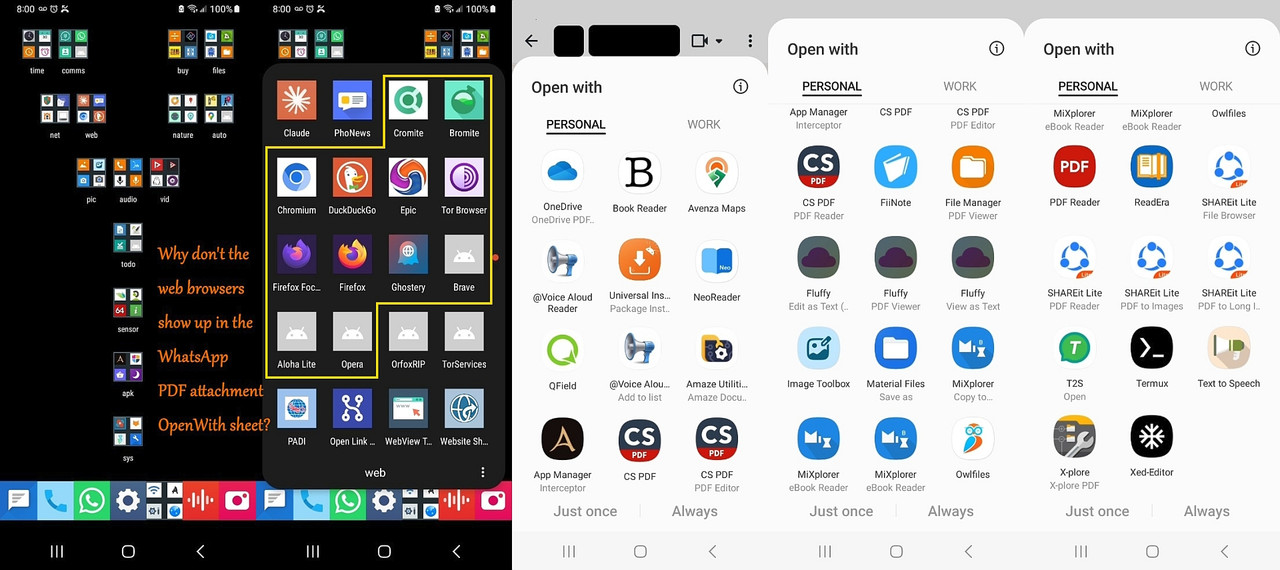
    Do you see any web browsers in that Android WhatsApp PDF OpenWith menu?
    I don't.

    I do. I said, days ago, that I used FFx to read a PDF directly from
    wasap, in Android. And FFx allows to download or share the file, and the latter allows to save via file browsers like Cx.

    Hmmmmm.....

    Thanks for checking that out for the team as that's not what I see when I
    long press on a PDF attachment and then look at the Android OpenWith sheet.

    Clearly I have Firefox & just as clearly it doesn't show and neither do
    any of the other web browsers (on my Samsung A32-5G on Android 13 anyway).
    <https://i.postimg.cc/59qhZRmR/openwithpdf.jpg>

    The first question to affirm is whether you used "ShareTo" or "OpenWith" (although browsers don't show up in my ShareTo either).

    And of course a direct file:// open from internal storage should work:
    Android > media > com.whatsapp > WhatsApp > Media > WhatsApp Documents

    When WhatsApp generates an "Open With" sheet for a file ending in .pdf, Android queries the system for apps that have explicitly registered
    themselves to handle the application/pdf MIME type and support viewing
    local file URIs/content URIs from external apps.

    To see what app handles local PDF views I ran
    adb shell cmd package resolve-activity --brief -t application/pdf -d content://com.whatsapp.provider.media/item/123
    priority=100 preferredOrder=0 match=0x608000 specificIndex=-1
    isDefault=true com.google.android.documentsui/
    com.android.documentsui.picker.PickActivity

    This told me Android's package manager checked the system resolution
    table and found DocumentsUI (PickActivity) as the only registered
    handler for local content URIs with an application/pdf MIME type.

    My web browsers, including Firefox, omit local PDF intent filters
    from their manifests, so they do not appear in this resolution
    table.

    That explains why Android strips them from WA's "Open With" menu.

    To further see only the package names of apps registered for local
    PDF viewing I used adb to reveal my Firefox does not register any
    intent filter for application/pdf under ACTION_VIEW.

    adb shell dumpsys package org.mozilla.firefox | grep -i -E "pdf|mime|intent" -C 2

    My Firefox only registers handlers for web schemes (http/https) and
    specific text types (text/plain, application/xhtml+xml), alongside a
    generic share receiver (ACTION_SEND).

    adb shell dumpsys package org.mozilla.firefox | grep -A 15 "MIME Typed Actions:"
    MIME Typed Actions:
    android.intent.action.SEND:
    2900abb org.mozilla.firefox/org.mozilla.fenix.IntentReceiverActivity filter 59cbd84
    Action: "android.intent.action.SEND"
    Category: "android.intent.category.DEFAULT"
    StaticType: "text/plain"
    android.intent.action.VIEW:
    2900abb org.mozilla.firefox/org.mozilla.fenix.IntentReceiverActivity filter 1aa9797
    Action: "android.intent.action.VIEW"
    Category: "android.intent.category.BROWSABLE"
    Category: "android.intent.category.DEFAULT"
    Scheme: "http"
    Scheme: "https"
    StaticType: "text/html"
    StaticType: "text/plain"
    StaticType: "application/xhtml+xml"

    Notice that ACTION_VIEW is strictly limited to web schemes (http/https)
    and specific web mime types (text/html, text/plain, application/xhtml+xml).

    Notice the absence of any local document types like application/pdf
    or local file schemes under ACTION_VIEW.

    This confirms why my Android system resolver omits Firefox from
    WhatsApp's direct document "Open With" menu.

    So I'm confused why/how Firefox shows up for you, but it's
    impossible for it to show up for me given that data above.

    But maybe it's due to a difference in systems and versions?
    adb shell getprop ro.build.version.release
    adb shell cat /system/build.prop | grep -E "ro.build.version.release|ro.build.version.sdk|ro.product.model"
    adb shell dumpsys package org.mozilla.firefox | grep -E "versionName|versionCode"

    Here is an all-in-one echo code to get both at once:
    echo "=== SYSTEM INFO ===" && adb shell getprop ro.product.model && adb shell getprop ro.build.version.release && echo "=== FIREFOX VERSION ===" && adb shell dumpsys package org.mozilla.firefox | grep versionName
    "=== SYSTEM INFO ==="
    SM-A326U
    13
    "=== FIREFOX VERSION ==="
    versionName=117.1.0
    --
    On Usenet, we improve our knowledge by sharing & discussing solutions.


    --- Synchronet 3.22a-Linux NewsLink 1.2
  • From Maria Sophia@mariasophia@comprehension.com to comp.mobile.android on Sat Oct 31 13:41:59 2026
    From Newsgroup: comp.mobile.android

    Below is another use for adb that came up when we were trying to understand why Firefox shows up for some people in share/open menus, but not for me.

    Andy Burns wrote:
    My Firefox only registers handlers for web schemes (http/https) and
    specific text types (text/plain, application/xhtml+xml), alongside a
    generic share receiver (ACTION_SEND).
    [snip detail]

    Notice the absence of any local document types like application/pdf
    or local file schemes under ACTION_VIEW.
    Presumably your Firefox is *not* installed from the Play Store?
    Mine is, so I assume a different build, or different manifest ...

    Hi Andy/Carlos,

    Maybe that's it. Certainly things are DIFFERENT in Android 14:
    <https://developer.android.com/about/versions/14/features#sharesheet-improvements>
    <https://9to5google.com/2023/07/13/android-14-beta-tweaks-share-sheet/>
    <https://www.esper.io/blog/android-14-share-sheet-improvements>

    But then that makes this whole concept even more capricious than it was.

    If each of us has the same apps installed, and yet each of us get different "ShareTo/OpenWith" options, and, I've proved, every time I run them, I can
    get a *different* set of selections, this is about as capricious as can be.

    I don't remember where I get any of my apps, but certainly some come from Github, while others come from F-Droid, and others from the Google Play
    Store repository (via the Aurora Google Play Store replacement app).

    Let's look:
    adb shell dumpsys package org.mozilla.firefox | grep -E "installerPackageName|userId|versionName"
    userId=10160
    versionName=117.1.0
    userId=10160

    As you had surmised, installerPackageName=com.android.vending doesn't
    show up. Actually, no installer shows up at all. Hmmm... that's odd.

    It's the same for the WhatsApp (which I got from the WA server).
    adb shell dumpsys package com.whatsapp | grep -E "versionName|installerPackageName|userId"
    userId=10714
    versionName=2.26.42.70

    Let's check *something* that we *know* will be installed by the GPS.
    adb shell dumpsys package com.android.vending | grep -i "installerPackageName"
    installerPackageName=com.android.vending

    But I don't "think" that's the smoking gun because when Firefox and
    WhatsApp return null or omit that line on my phone, it only confirms they
    were not registered via the Play Store's installer database on this setup.

    However, as established earlier by the package manifests, even if Firefox
    were installed straight from the Play Store, its source manifest
    structurally omits local PDF ACTION_VIEW filters anyway.

    If someone else would run the adb commands to prove that, it would help.
    Or, if someone could show screenshots like I did, showing FF there.
    .
    REFERENCES:
    https://www.androidcentral.com/apps-software/android-14-review
    https://developer.android.com/develop/ui/compose/sharing/send
    https://9to5google.com/2023/03/29/android-14-share-sheet/
    --- Synchronet 3.22a-Linux NewsLink 1.2
  • From ram@ram@zedat.fu-berlin.de (Stefan Ram) to comp.mobile.android on Sat Oct 31 18:06:33 2026
    From Newsgroup: comp.mobile.android

    Maria Sophia <mariasophia@comprehension.com> wrote or quoted:
    If someone else would run the adb commands to prove that, it would help.
    Or, if someone could show screenshots like I did, showing FF there.

    I told the chatbot my ideads for a little Halloween ADB story,
    and he wrote the actual wording for me!

    The rain outside the neon-lit shop window didn't fall;
    it seemed to dissolve into the heavy, charcoal fog of All
    Hallows' Eve. Inside, the shop smelled faintly of ozone and
    old parchment.

    Elena brushed a damp lock of hair from her eyes and stepped up
    to the counter. Behind it stood a young man with a neatly
    trimmed beard, wearing a pristine white lab coat over a formal
    vest.

    "Welcome," the clerk said, his voice flat but perfectly
    polite. "How can I help you tonight?"

    "Hi," Elena said, shivering slightly. "My old phone died, and
    I'm looking to buy an Android. Just something reliable."

    The clerk nodded slowly, a small, knowing smile touching his
    lips. "An Android. Excellent. A device of true freedom. But
    freedom requires a baseline. I just need to ask you a few
    standard onboarding questions. Standard protocol. Please,
    step through the curtain into the evaluation suite."

    Elena frowned, slightly irritated by the dramatic retail
    theater, but she followed him anyway. The back room was dark,
    illuminated only by the faint, rhythmic pulse of server racks.
    In the center sat a high-backed leather chair that looked more
    like an antique dentist's apparatus than an office chair.

    "Have a seat, please," he said.

    The moment Elena sat down, a mechanical click echoed through
    the room. Padded leather restraints automatically swept across
    her forearms and lap, locking her firmly into place.

    "Hey! What is this?" Elena gasped, her irritation turning to
    sudden alarm. "Unstrap me right now!"

    Before she could struggle, a bank of harsh, white strobe
    lights flashed directly into her eyes. Flash. Flash. Flash.
    She winced, spots dancing in her vision, completely
    disoriented.

    A heavy silence descended, broken only by the rhythmic tapping
    of the clerk's fingers on a tablet. When he spoke again, his
    polite retail demeanor had vanished, replaced by the cold,
    calculated tone of a technical board examiner.

    "Question one," the clerk barked, staring intently into her
    face. "You need to capture a real-time system log from a
    device that is stuck in a boot loop. Assuming you have already
    authenticated your machine's RSA key fingerprint, what is the
    exact shell command to pipe only the warning-level logs to a
    local text file?"

    Elena blinked behind the spots in her eyes, her mind spinning.
    "What? Logs? I just want to check my email and text my mom!"

    The clerk's face remained a mask of stone. He tapped the
    screen. "Incorrect or missing response. Question two."

    Another bright light flared, forcing her to squint.

    "You are deploying a corporate security policy across a fleet
    of unmanaged hardware. Explain the precise architectural
    difference between executing a command via adb shell versus
    utilizing an interactive adb backup payload, and detail how
    you would bypass a generic manifest restriction on a non-root
    device."

    "Are you insane?" Elena cried, her heart hammering against her
    ribs. "What is an adb? Is that a brand? I don't know what any
    of those words mean!"

    "Final question," the clerk interrupted, his voice dropping an
    octave as a deep crimson light washed over the chair.
    "A faulty USB driver is causing packet corruption during a
    sideload operation over a flaky hardware bridge. How do you
    manually terminate the underlying background server daemon and
    force it to rebind to a specific local TCP port without
    rebooting the host operating system?"

    Elena slumped against the leather restraints, utterly defeated
    and bewildered. "Please," she whispered. "I just . . . I just
    wanted a phone with a decent camera."

    The room lights suddenly returned to a warm, gentle amber.
    The mechanical latches clicked open, instantly releasing her
    arms and lap.

    The clerk sighed, his shoulders dropping as he slipped his
    hands into his coat pockets. His cold examiner persona melted
    back into that of a sympathetic, slightly disappointed
    salesperson.

    "I am truly sorry," the clerk said softly, offering her a
    tissue to wipe the sweat from her forehead. "But Android
    devices grant unprecedented access to the underlying
    application framework and system architecture. We cannot in
    good conscience grant an Android device to a customer who
    lacks the basic, foundational concepts of modern device
    ownership."

    Elena stood up, her legs shaking slightly, looking at him as
    if he had lost his mind.

    "You can try again next year," the clerk added with a warm,
    encouraging smile as he ushered her toward the front door.
    "We offer study guides on the Android Debug Bridge in the
    lobby. Have a wonderful, safe Halloween."

    Before Elena could even find the words to yell at him, she
    found herself back out on the chilly, fog-slicked sidewalk,
    the shop door locking firmly behind her with the soft chime of
    a digital bell.


    --- Synchronet 3.22a-Linux NewsLink 1.2
  • From Carlos E. R.@robin_listas@es.invalid to comp.mobile.android on Sun Nov 1 13:23:30 2026
    From Newsgroup: comp.mobile.android

    On 2026-10-31 19:06, Stefan Ram wrote:
    Maria Sophia <mariasophia@comprehension.com> wrote or quoted:
    If someone else would run the adb commands to prove that, it would help.
    Or, if someone could show screenshots like I did, showing FF there.

    I told the chatbot my ideads for a little Halloween ADB story,
    and he wrote the actual wording for me!

    The rain outside the neon-lit shop window didn't fall;
    it seemed to dissolve into the heavy, charcoal fog of All
    Hallows' Eve. Inside, the shop smelled faintly of ozone and
    old parchment.

    ...

    Before Elena could even find the words to yell at him, she
    found herself back out on the chilly, fog-slicked sidewalk,
    the shop door locking firmly behind her with the soft chime of
    a digital bell.

    Heh :-)
    --
    Cheers,
    Carlos E.R.
    ESEfc-Efc+, EUEfc-Efc|.
    --- Synchronet 3.22a-Linux NewsLink 1.2
  • From Maria Sophia@mariasophia@comprehension.com to comp.mobile.android on Sun Nov 1 10:07:04 2026
    From Newsgroup: comp.mobile.android

    Carlos E. R. wrote:
    Heh :-)

    I get it that for some, Usenet is for their childish amusement,
    but I'm trying to help people by providing useful adb examples.

    To further add value to this thread which proves how useful adb is
    for the average Android user, below is a post from moments ago which
    shows how to install software on the phone over Wi-Fi using adb
    without even knowing where the phone happens to be inside the home.

    Newsgroups: alt.comp.software.firefox
    Subject: Re: Android Firefox does NOT show up in my WhatsApp PDF attachment OpenWith sheet
    Date: Sun, 1 Nov 2026 10:01:44 -0400
    Message-ID: <11c7go7$2hik$1@nnrp.usenet.blueworldhosting.com>

    R Daneel Olivaw wrote:
    Carlos E. R. wrote:
    On 2026-10-31 19:04, Maria Sophia wrote:
    This implies that my Android Firefox build (v117.1.0) limits its
    ACTION_VIEW

    Update it. You are using an obsolete version, thus you miss features.
    FFx is striving to be the best free PDF cross platform viewer.


    My Android Firefox says it is 159.0.
    Of course updating from 117 to 159 will totally change all sorts of
    things because the developers seem to like change for the sake of change
    but - irritating though that is - it is better to be current, especially
    if you want some "correct" feature(s).

    Woo hoo!

    Carlos & Andy were right all along!

    Thank you all for sticking with this, because what I've learned is
    a. Android Firefox 117 does NOT show up in the WA OpenWith sheet
    b. Android Firefox 159 DOES show up in the WA OpenWith sheet!

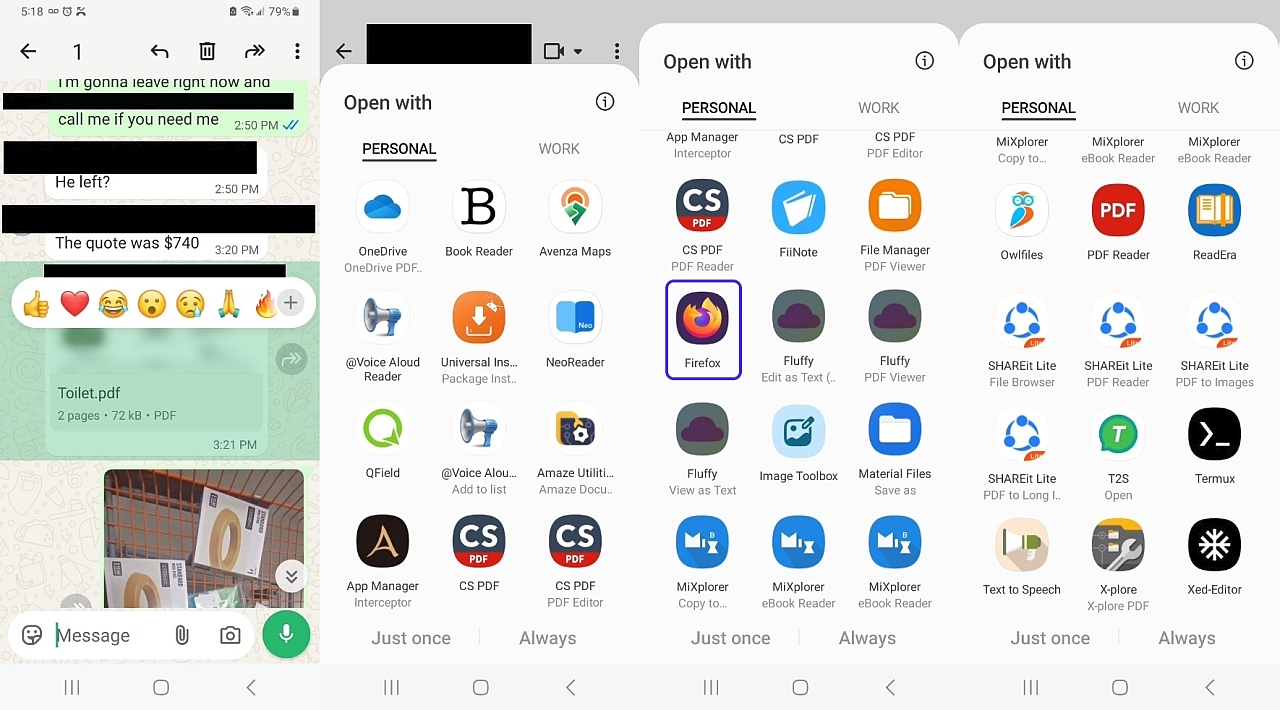
    PROOF BEFORE:
    Firefox does not show up in the Samsung Android 13 WA PDF OpenWith sheet:
    <https://i.postimg.cc/59qhZRmR/openwithpdf.jpg>
    Firefox does not show up in the Samsung Android 13 WA PDF ShareTo sheet:
    <https://i.postimg.cc/YqnZzMvq/cxfileexplorer.jpg>

    PROOF AFTER:
    Firefox DOES show up in the Samsung Android 13 WA PDF OpenWith sheet:
    <https://i.postimg.cc/9XNGYXGf/wa-openwith-firefox.jpg>
    Firefox still does not show up in the Android 13 WA PDF ShareTo sheet:
    <https://i.postimg.cc/9XtN17LJ/washareto.jpg>

    The rest below are just the commands I used to install Firefox 159
    (since I operate my phone from the desktop, as the phone is on Wi-Fi
    so there's no need to touch it to use it when I'm at home mirroring).

    Note: When sideloading Firefox from the official Mozilla repo
    <https://ftp.mozilla.org/pub/fenix/releases/>
    It won't automatically update in the background.

    The latest official non-beta build appears to be 159.0 in the list.
    <https://ftp.mozilla.org/pub/fenix/releases/159.0/>
    <https://ftp.mozilla.org/pub/fenix/releases/159.0/android/>

    Since I always strive to make universal decisions that are globally useful
    to everyone, I decided not to install the targeted Firefox for my device.
    <https://ftp.mozilla.org/pub/fenix/releases/159.0/android/fenix-159.0-android-arm64-v8a/fenix-159.0.multi.android-arm64-v8a.apk>
    cd c:\software\apk\browser\firefox\.
    curl -O https://ftp.mozilla.org/pub/fenix/releases/159.0/android/fenix-159.0-android-arm64-v8a/fenix-159.0.multi.android-arm64-v8a.apk
    Name: fenix-159.0.multi.android-arm64-v8a.apk
    Size: 133943377 bytes (127 MiB)
    SHA256: F78E11ABC85C59DD7AAB03DD8F926AC62DF99731CCF62EC6EC937C18B3E33AA9

    But, instead, I installed the universal Firefox that anyone can use.
    <https://ftp.mozilla.org/pub/fenix/releases/159.0/android/fenix-159.0-android/fenix-159.0.multi.android-universal.apk>
    cd c:\software\apk\browser\firefox\.
    curl -O https://ftp.mozilla.org/pub/fenix/releases/159.0/android/fenix-159.0-android/fenix-159.0.multi.android-universal.apk
    Name: fenix-159.0.multi.android-universal.apk
    Size: 304962287 bytes (290 MiB)
    SHA256: D95992785DC9D72D2EE0406477879E3B24AFD7E67768CB6E7476B11DE6B5F63F

    The phone is in some drawer somewhere in the house, but since I fully
    control the Android phone over Wi-Fi from the desktop PC, I installed using
    adb install -r fenix-159.0.multi.android-universal.apk
    Performing Streamed Install
    Success
    echo "=== SYSTEM INFO ===" && adb shell getprop ro.product.model && adb shell getprop ro.build.version.release && echo "=== FIREFOX VERSION ===" && adb shell dumpsys package org.mozilla.firefox | grep versionName
    "=== SYSTEM INFO ==="
    SM-A326U
    13
    "=== FIREFOX VERSION ==="
    versionName=159.0

    adb shell cmd package resolve-activity --brief -t application/pdf -d content://com.whatsapp.provider.media/item/123
    priority=100 preferredOrder=0 match=0x608000 specificIndex=-1 isDefault=true
    com.google.android.documentsui/com.android.documentsui.picker.PickActivity

    adb shell dumpsys package org.mozilla.firefox | grep -A 15 "MIME Typed Actions:"
    MIME Typed Actions:
    android.intent.action.SEND:
    13b34de org.mozilla.firefox/org.mozilla.fenix.IntentReceiverActivity filter c74fa78
    Action: "android.intent.action.SEND"
    Category: "android.intent.category.DEFAULT"
    StaticType: "text/plain"
    android.intent.action.VIEW:
    13b34de org.mozilla.firefox/org.mozilla.fenix.IntentReceiverActivity filter 9429fdb
    Action: "android.intent.action.VIEW"
    Category: "android.intent.category.BROWSABLE"
    Category: "android.intent.category.DEFAULT"
    Scheme: "http"
    Scheme: "https"
    StaticType: "text/html"
    StaticType: "text/plain"
    StaticType: "application/xhtml+xml"

    Thank you all for testing this as it didn't seem likely that
    the manifest would change between releases, but it apparently did.
    --
    On Usenet you can often find people who know a lot more than you do.
    --- Synchronet 3.22a-Linux NewsLink 1.2
  • From Maria Sophia@mariasophia@comprehension.com to comp.mobile.android on Mon Nov 2 13:56:37 2026
    From Newsgroup: comp.mobile.android

    Maria Sophia wrote:
    I get it that for some, Usenet is for their childish amusement,
    but I'm trying to help people by providing useful adb examples.

    Since my phone is "somewhere" in the house, I needed to take a screenshot
    "on the phone" (instead of on the computer) so I could send it in MMS.

    Snap the screenshot into a known location:
    adb shell screencap -p /sdcard/Download/screenshot.png

    Optionally see if it made it:
    adb shell ls /sdcard/Download/

    Optionally pull it to Windows for editing and then push it right back:
    adb pull /sdcard/Download/screenshot.png
    adb push screenshot.png /sdcard/Download/screenshot.png
    --
    Everyone benefits when we post examples of using adb commands.
    --- Synchronet 3.22a-Linux NewsLink 1.2
  • From Maria Sophia@mariasophia@comprehension.com to comp.mobile.android on Tue Nov 3 01:49:29 2026
    From Newsgroup: comp.mobile.android

    This is an example of using adb all day, every day, with Android.

    A moment ago, I needed logs to debug share sheets, where I never had to
    touch the phone, since adb does everything over Wi-Fi remotely.


    Newsgroups: comp.mobile.android
    Subject: PSA: Using darshanparajuli logcat reader to debug Android apps
    Date: Tue, 3 Nov 2026 01:46:44 -0400
    Message-ID: <11cbsg3$2h98$1@nnrp.usenet.blueworldhosting.com>

    1. Download latest release from GitHub
    curl -sL https://github.com/darshanparajuli/LogcatReader/releases/latest/download/app-release.apk -o logcat_reader.apk

    2. Install the logcat reader APK
    adb install logcat_reader.apk

    3. Grant READ_LOGS permission via adb (Bypasses manual prompt)
    adb shell pm grant com.dp.logcatapp android.permission.READ_LOGS

    4. Optional: If using Shizuku instead of ADB permission grant
    adb shell shizuku request ... (or authorize inside the Shizuku app UI)

    5. When an event happens you wish to capture, save the log to text.
    Android:Logcat > 3dots > Save > (save on device) > /sdcard/Download/logcat_2026-11-02_21-33-43.txt

    6. Dynamically find the newest logcat export in Downloads and pull it automatically
    FOR /F "tokens=*" %%i IN ('adb shell "ls -t /sdcard/Download/logcat_*.txt | head -n 1"') DO SET LATEST_LOG=%%i
    adb pull "%LATEST_LOG%" .
    --
    Just one person on Usenet paying it forward so all benefit daily.
    --- Synchronet 3.22a-Linux NewsLink 1.2
  • From Carlos E. R.@robin_listas@es.invalid to comp.mobile.android on Tue Nov 3 18:01:48 2026
    From Newsgroup: comp.mobile.android

    On 2026-11-01 15:07, Maria Sophia wrote:
    Carlos E. R. wrote:
    Heh :-)

    I get it that for some, Usenet is for their childish amusement,
    but I'm trying to help people by providing useful adb examples.

    To further add value to this thread which proves how useful adb is
    for the average Android user, below is a post from moments ago which
    shows how to install software on the phone over Wi-Fi using adb
    without even knowing where the phone happens to be inside the home.

    Newsgroups: alt.comp.software.firefox
    Subject: Re: Android Firefox does NOT show up in my WhatsApp PDF attachment OpenWith sheet
    Date: Sun, 1 Nov 2026 10:01:44 -0400
    Message-ID: <11c7go7$2hik$1@nnrp.usenet.blueworldhosting.com>

    Arlen, repeating a post is noise and waste of our time, too.

    ...
    --
    Cheers,
    Carlos E.R.
    ESEfc-Efc+, EUEfc-Efc|.
    --- Synchronet 3.22a-Linux NewsLink 1.2
  • From Maria Sophia@mariasophia@comprehension.com to comp.mobile.android on Tue Nov 3 13:29:14 2026
    From Newsgroup: comp.mobile.android

    All day, every day, adb makes life easier with Android apps...

    Just now, I needed a stopwatch as I wanted to time something that
    required my hands to be engaged so I used a whistle to start/stop.

    1. First, I downloaded the FOSS PhyPhox app off of F-Droid
    C:\> curl -L -o phyphox.apk https://f-droid.org/repo/de.rwth_aachen.phyphox_1020105.apk

    2. Then, I installed it from Windows to the Android phone:
    C:\> adb install phyphox.apk

    3. Then I popped it up on the scrcpy Android mirror on the PC.
    C:\> adb shell monkey -p de.rwth_aachen.phyphox -c android.intent.category.LAUNCHER 1

    4. Lastly, I started and stopped the acoustic stopwatch:
    Android:PhyPhox > Timers > Acoustic Stopwatch > (start)
    a. Then make a starting noise...
    b. And then a stopping noise.

    The timer should show the time between those two audible events.
    I whistled loudly enough for the phone to hear (in the next room).
    --
    My role on Usenet is to always add value that other people aren't aware of.
    --- Synchronet 3.22a-Linux NewsLink 1.2
  • From Maria Sophia@mariasophia@comprehension.com to comp.mobile.android on Tue Nov 3 21:39:13 2026
    From Newsgroup: comp.mobile.android

    Maria Sophia wrote:
    So that all benefit, this thread is opened to allow others to post random useful adb examples, where the goal is a usable list of useful examples.

    Below is a uniquely new way to use adb to find the last app that we ran.
    Just now, someone asked a question on th eng of what apps do something.

    I popped up my phone and ran a few apps, and each time an app did the
    required task, I then queried adb for the most recent activity run.

    That gave me the unique package name of the app, which is very useful when
    we deal with device-checker apps, all of which seem to have the same icons.

    Newsgroups: comp.mobile.android
    Subject: Re: Saving "About Phone" info(?)
    Date: Tue, 3 Nov 2026 21:20:06 -0400
    Message-ID: <11ce185$1n2h$1@nnrp.usenet.blueworldhosting.com>

    VanguardLH wrote:
    croy <croy@spam.invalid.net> wrote:

    Is there a way to save the "About Phone" info to a file?

    I'm currently using a Samsung S24 FE.

    Possible a screen snapshot.

    https://www.samsung.com/us/support/answer/ANS10002500/

    Since the answer has been given over the years, I approached this
    oft-asked question differently, in a way that extends our overall knowledge.

    Long ago I tested all the free system-reporting utilities, and one of the criteria were whether or not that utility could save its output to a file.

    Since I keep the apps that didn't fail the "one strike and you're out"
    rule, I still have tons of device-checker utilities so I ran a few now.

    adb shell dumpsys activity recents | grep -i "realActivity\|packageName"
    realActivity={flar2.devcheck/flar2.devcheck.MainActivity}
    realActivity={com.finalwire.aida64/com.finalwire.aida64.HHMainActivity}
    realActivity={com.evilscan.deviceinfo/com.evilscan.deviceinfo.view.activities.MainActivity2}
    realActivity={com.cpuid.cpu_z/com.cpuid.cpu_z.MainActivity}
    realActivity={org.uguess.android.sysinfo.pro/org.uguess.android.sysinfo.QSystemInfo}

    Those are the last few apps I ran (most recent first) which were
    able to export a file as shown by a listing of the Downloads folder.

    adb shell ls -lt /sdcard/Download
    -rw-rw---- 1 root everybody 3303 2026-11-03 17:06 cpus_8_socs_1_c.txt
    -rw-rw---- 1 root everybody 41948 2026-11-03 16:56 DeviceInfo.txt
    -rw-rw---- 1 root everybody 42353 2026-11-03 16:52 Device Info.txt
    -rw-rw---- 1 root everybody 24542 2026-11-03 16:44 Device-Info-Report.txt
    -rw-rw---- 1 root everybody 3044 2026-11-03 16:34 DevCheck-Nov 3, 2026 4_34 PM.txt
    -rw-rw---- 1 root everybody 554165 2026-11-02 21:34 logcat_2026-11-02_21-33-43.txt

    In short, the method I used was:
    1. Re-run the apps, one by one, to see which export the system info
    2. just after a successful export, note the most recent package run
    3. In the end, check the Downloads folder for all the saved files

    If someone can suggest a better method to find the package name easily
    of a successful test of any given feature (exporting system info in this situation), please let us all know how you do it (as it's a useful trick).
    --
    My conversations are deep because they cover more detail than most do.
    --- Synchronet 3.22a-Linux NewsLink 1.2
  • From Maria Sophia@mariasophia@comprehension.com to comp.mobile.android on Sat Nov 7 14:39:05 2026
    From Newsgroup: comp.mobile.android

    Someone asked recently how to get 'about phone' information where
    adb "should" spit out anything that the phone knows about...

    adb shell getprop | grep -E "ro.build.version|ro.product.model|ro.hardware|ro.revision|ro.build.display|ro.build.fingerprint|ro.baseband|ro.bootloader|ro.product.board"
    [ro.baseband]: [mtk]
    [ro.bootloader]: [A326USUIAEWES]
    [ro.build.display.id]: [TP1A.220633.024.A326USUIAEWES] [ro.build.display_build_number]: [true]
    [ro.build.fingerprint]: [samsung/a32xsq/a32x:13/TP1A.220624.014/A326USUIAEWES:user/release-keys]
    [ro.build.version.all_codenames]: [REL]
    [ro.build.version.base_os]: [samsung/a32xsq/a32x:13/TP1A.220624.014/A326USUIAEWES:user/release-keys]
    [ro.build.version.codename]: [REL]
    [ro.build.version.incremental]: [A326USUIAEWES] [ro.build.version.known_codenames]: [Base,Base11,Cupcake,Donut,Eclair,Eclair01,EclairMr1,Froyo,Gingerbread,GingerbreadMr1,Honeycomb,HoneycombMr1,HoneycombMr2,IceCreamSandwich,IceCreamSandwichMr1,JellyBean,JellyBeanMr1,JellyBeanMr2,Kitkat,KitkatWatch,Lollipop,LollipopMr1,M,N,NMr1,O,OMr1,P,Q,R,S,Sv2,Tiramisu]
    [ro.build.version.min_supported_target_sdk]: [23]
    [ro.build.version.oneui]: [50100]
    [ro.build.version.preview_sdk]: [0]
    [ro.build.version.preview_sdk_fingerprint]: [REL]
    [ro.build.version.release]: [13]
    [ro.build.version.release_or_codename]: [13] [ro.build.version.release_or_preview_display]: [13]
    [ro.build.version.sdk]: [33]
    [ro.build.version.security_index]: [1]
    [ro.build.version.security_patch]: [2025-02-01]
    [ro.build.version.sem]: [3301]
    [ro.build.version.sep]: [140100]
    [ro.hardware]: [mt6853]
    [ro.hardware.chipname]: [MT6853]
    [ro.hardware.egl]: [meow]
    [ro.hardware.hwcomposer]: [mtk_common]
    [ro.hardware.keystore]: [mdfpp]
    [ro.hardware.keystore_desede]: [true]
    [ro.hardware.vulkan]: [mali]
    [ro.product.board]: [a32x]
    [ro.product.model]: [SM-A326U]
    [ro.revision]: [8]

    Core build info
    adb shell getprop ro.product.model
    adb shell getprop ro.product.manufacturer
    adb shell getprop ro.product.brand
    adb shell getprop ro.product.name
    adb shell getprop ro.product.device
    adb shell getprop ro.hardware

    Android version & build
    adb shell getprop ro.build.version.release
    adb shell getprop ro.build.version.sdk
    adb shell getprop ro.build.version.security_patch
    adb shell getprop ro.build.version.incremental
    adb shell getprop ro.build.display.id
    adb shell getprop ro.build.fingerprint
    adb shell getprop ro.build.type
    adb shell getprop ro.build.tags

    Baseband / modem firmware
    adb shell getprop gsm.version.baseband
    adb shell getprop ro.baseband

    Kernel
    adb shell uname -a

    SIM & phone identity
    adb shell dumpsys telephony.registry | grep -E "mSimState|mPhoneType|mNetworkType|mSignalStrength|mGsmSignalStrength"

    Battery (About phone i= Battery)
    adb shell dumpsys battery

    Storage (About phone i= Storage)
    adb shell df -h
    adb shell dumpsys diskstats

    Device serial & hardware revision
    adb shell getprop ro.serialno
    adb shell getprop ro.revision

    OEM-specific firmware version (OneUI, MIUI, etc.)
    adb shell getprop ro.build.version.sem i% Samsung OneUI version
    adb shell getprop ro.build.version.oneui
    adb shell getprop ro.miui.version.code i% MIUI

    Google Play Services version
    adb shell dumpsys package com.google.android.gms | grep "versionName="

    Legal / regulatory info (sometimes in Settings)
    adb shell cat /system/etc/prop.default
    adb shell ls /system/etc/ regulatory*
    --- Synchronet 3.22a-Linux NewsLink 1.2