• Finding Things in Android

    From Jeff Gaines@jgnewsid@outlook.com to comp.mobile.android on Fri Sep 11 16:56:13 2026
    From Newsgroup: comp.mobile.android


    I am setting up a new device with Android 16, Android programmers seem to
    have reached the sane state as Windows programmers, fiddling round hiding things because they are bored.

    Can anybody help with:

    Getting rid of the "Google" box on the home screen, sometimes you can turn
    it off in settings, sometimes you can drag it to a delete icon, in 16 I
    just can't see how to get rid of it.

    Changing the order of home screens, I used to be able to give a long press
    on a home screen and then change the order, I can't see how to do that now.

    Stop odd app icons appearing at the bottom of the home screen, I used to
    be able to turn that off but can't find that option now.

    Is there any way to bring the old navigation marker back? I can get to
    places by wiping upwards on the screen but I can's see what apps are
    running.

    Any help much appreciated :-)
    --
    Jeff Gaines Dorset UK
    It may be that your sole purpose in life is to serve as a warning to others. --- Synchronet 3.22a-Linux NewsLink 1.2
  • From Andy Burns@usenet@andyburns.uk to comp.mobile.android on Fri Sep 11 18:04:25 2026
    From Newsgroup: comp.mobile.android

    Jeff Gaines wrote:

    Getting rid of the "Google" box on the home screen, sometimes you can
    turn it off in settings, sometimes you can drag it to a delete icon, in
    16 I just can't see how to get rid of it.

    You'll probably need to install a 3rd party launcher

    Changing the order of home screens, I used to be able to give a long
    press on a home screen and then change the order, I can't see how to do
    that now.

    I never remember being able to do that, again find a launcher that
    allows it
    Stop odd app icons appearing at the bottom of the home screen, I used to
    be able to turn that off but can't find that option now.

    Normally they appear after installing apps, there's a setting "add new
    apps to home screen" search for that within settings

    Is there any way to bring the old navigation marker back? I can get to places by wiping upwards on the screen but I can's see what apps are running.

    turn off gesture navigation, again search in settings for for gesture or navigation

    --- Synchronet 3.22a-Linux NewsLink 1.2
  • From Frank Slootweg@this@ddress.is.invalid to comp.mobile.android on Fri Sep 11 17:17:42 2026
    From Newsgroup: comp.mobile.android

    Jeff Gaines <jgnewsid@outlook.com> wrote:

    I am setting up a new device with Android 16, Android programmers seem to have reached the sane state as Windows programmers, fiddling round hiding things because they are bored.

    Can anybody help with:

    First tell us which brand and model you have, then we might be able to
    help.

    What you're asking is probably brand/model dependent, because most
    (all?) what you're asking is no problem on my Samsung Galaxy A56 (also
    with Android 16).

    Getting rid of the "Google" box on the home screen, sometimes you can turn it off in settings, sometimes you can drag it to a delete icon, in 16 I just can't see how to get rid of it.

    *Which* "Google' box? The *search* one (wide ellips form box) or the
    *news* one (which has 'news' items you can doomscroll) or yet another? Remember, 'Google' is many different things.

    Changing the order of home screens, I used to be able to give a long press on a home screen and then change the order, I can't see how to do that now.

    Stop odd app icons appearing at the bottom of the home screen, I used to
    be able to turn that off but can't find that option now.

    Is there any way to bring the old navigation marker back? I can get to places by wiping upwards on the screen but I can's see what apps are running.

    Any help much appreciated :-)
    --- Synchronet 3.22a-Linux NewsLink 1.2
  • From Jeff Gaines@jgnewsid@outlook.com to comp.mobile.android on Fri Sep 11 17:32:35 2026
    From Newsgroup: comp.mobile.android

    On 11/09/2026 in message <1181k4b.848.1@ID-201911.user.individual.net>
    Frank Slootweg wrote:

    Jeff Gaines <jgnewsid@outlook.com> wrote:

    I am setting up a new device with Android 16, Android programmers seem to >>have reached the sane state as Windows programmers, fiddling round hiding >>things because they are bored.

    Can anybody help with:

    First tell us which brand and model you have, then we might be able to
    help.

    Sorry, TABWEE T60 12 Inch Android 16 with LTE. Supposed to have 8 GB RAM +
    16 GB virtual but only seems to have 6 GB so thinking about that :-(


    What you're asking is probably brand/model dependent, because most
    (all?) what you're asking is no problem on my Samsung Galaxy A56 (also
    with Android 16).

    It is supposed to be vanilla Android without anything like MUI sitting on
    top of it.


    Getting rid of the "Google" box on the home screen, sometimes you can turn >>it off in settings, sometimes you can drag it to a delete icon, in 16 I >>just can't see how to get rid of it.

    Which "Google' box? The search one (wide ellips form box) or the
    news one (which has 'news' items you can doomscroll) or yet another? >Remember, 'Google' is many different things.

    It's the search box, no idea why it has pride of place


    Changing the order of home screens, I used to be able to give a long press >>on a home screen and then change the order, I can't see how to do that >>now.

    Stop odd app icons appearing at the bottom of the home screen, I used to
    be able to turn that off but can't find that option now.

    Is there any way to bring the old navigation marker back? I can get to >>places by wiping upwards on the screen but I can's see what apps are >>running.

    Found these now!
    --
    Jeff Gaines Dorset UK
    This joke was so funny when I heard it for the first time I fell of my dinosaur.
    --- Synchronet 3.22a-Linux NewsLink 1.2
  • From Jeff Gaines@jgnewsid@outlook.com to comp.mobile.android on Fri Sep 11 17:36:45 2026
    From Newsgroup: comp.mobile.android

    On 11/09/2026 in message <ngiqkqFhv8qU1@mid.individual.net> Andy Burns
    wrote:

    Jeff Gaines wrote:

    Getting rid of the "Google" box on the home screen, sometimes you can >>turn it off in settings, sometimes you can drag it to a delete icon, in >>16 I just can't see how to get rid of it.

    You'll probably need to install a 3rd party launcher

    I have used Nova Launcher in the past but didn't something odd happen to it?


    Changing the order of home screens, I used to be able to give a long >>press on a home screen and then change the order, I can't see how to do >>that now.

    I never remember being able to do that, again find a launcher that allows
    it
    Stop odd app icons appearing at the bottom of the home screen, I used to >>be able to turn that off but can't find that option now.

    Normally they appear after installing apps, there's a setting "add new
    apps to home screen" search for that within settings

    After I have used an app it's appearing in the launch bar at the bottom of
    the screen I think it is called preferred apps or suggested apps.


    Is there any way to bring the old navigation marker back? I can get to >>places by wiping upwards on the screen but I can's see what apps are >>running.

    turn off gesture navigation, again search in settings for for gesture or >navigation

    Thanks found it!
    --
    Jeff Gaines Dorset UK
    The only thing Flat Earthers fear is sphere itself.
    --- Synchronet 3.22a-Linux NewsLink 1.2
  • From Frank Slootweg@this@ddress.is.invalid to comp.mobile.android on Fri Sep 11 17:48:28 2026
    From Newsgroup: comp.mobile.android

    A little earlier, I wrote:
    Jeff Gaines <jgnewsid@outlook.com> wrote:
    [...]

    Getting rid of the "Google" box on the home screen, sometimes you can turn it off in settings, sometimes you can drag it to a delete icon, in 16 I just can't see how to get rid of it.

    *Which* "Google' box? The *search* one (wide ellips form box) or the
    *news* one (which has 'news' items you can doomscroll) or yet another? Remember, 'Google' is many different things.

    This news-type 'Google' app is apparently also known as 'Google
    Discover'. Search on 'Discover' in your Settings. (On my phone it's set
    to appear by swiping the Home screen to the right. In my Settings it's
    under 'Add media page to home screen'.)

    [...]
    --- Synchronet 3.22a-Linux NewsLink 1.2
  • From Frank Slootweg@this@ddress.is.invalid to comp.mobile.android on Fri Sep 11 18:05:32 2026
    From Newsgroup: comp.mobile.android

    Jeff Gaines <jgnewsid@outlook.com> wrote:
    On 11/09/2026 in message <1181k4b.848.1@ID-201911.user.individual.net>
    Frank Slootweg wrote:
    [...]
    First tell us which brand and model you have, then we might be able to
    help.

    Sorry, TABWEE T60 12 Inch Android 16 with LTE. Supposed to have 8 GB RAM + 16 GB virtual but only seems to have 6 GB so thinking about that :-(

    OK. Can't help with that one. A bit out of the ordinary. Perhaps
    someone else can help.

    What you're asking is probably brand/model dependent, because most
    (all?) what you're asking is no problem on my Samsung Galaxy A56 (also
    with Android 16).

    It is supposed to be vanilla Android without anything like MUI sitting on top of it.

    As far as the 'launcher' ('MUI' in your case?) and (general)
    'Settings' are concerned, there is no such thing as "vanilla Android".

    Samsung phones are different from Motorola phones which are different
    from (Google) Pixel phones, etc., ad infinitum.

    So for all configuration/settings/UI/etc. questions, you always need
    to mention the brand and model (and Android version, which you did
    mention).

    Getting rid of the "Google" box on the home screen, sometimes you can turn >>it off in settings, sometimes you can drag it to a delete icon, in 16 I >>just can't see how to get rid of it.

    Which "Google' box? The search one (wide ellips form box) or the
    news one (which has 'news' items you can doomscroll) or yet another? >Remember, 'Google' is many different things.

    It's the search box, no idea why it has pride of place

    On my phone, I can just long-press the icon and then get (amongst
    others) 'Remove'.

    [...]
    --- Synchronet 3.22a-Linux NewsLink 1.2
  • From Maria Sophia@mariasophia@comprehension.com to comp.mobile.android on Fri Sep 11 12:18:29 2026
    From Newsgroup: comp.mobile.android

    Jeff Gaines wrote:
    Jeff Gaines wrote:

    Getting rid of the "Google" box on the home screen, sometimes you can >>>turn it off in settings, sometimes you can drag it to a delete icon, in >>>16 I just can't see how to get rid of it.

    You'll probably need to install a 3rd party launcher

    I have used Nova Launcher in the past but didn't something odd happen to it?

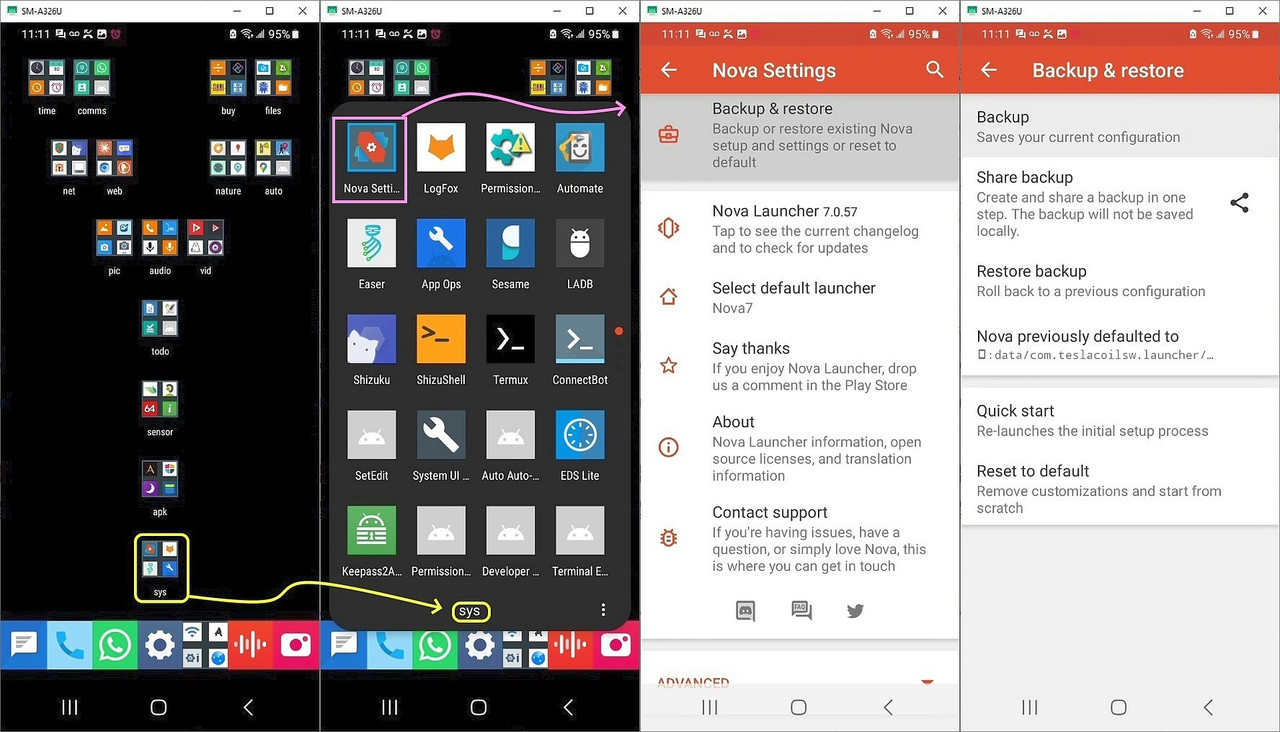
    I made this screenshot for you today.
    <https://i.postimg.cc/jj5n5Kkg/nova-backup.jpg>
    a. You don't see no stinkin' Google search bar, right?
    b. You see that I have full control of the icon locations
    c. New icons don't pollute my home screen
    d. It's Nova but without the 'odd' stuff (that happened to it)

    There's still no better launcher on the planet, AFAIK, than Nova Launcher.
    Newsgroups: comp.mobile.android
    Subject: What does your Android app launcher do that Nova Launcher doesn't do?
    Date: Sat, 1 Aug 2026 12:42:24 -0800
    Message-ID: <114llnh$2i0t$1@nnrp.usenet.blueworldhosting.com>

    I use Nova Launcher and yes, something "odd" happened to it, but the trick
    is to use the last known good version and to prevent it from updating.

    Newsgroups: comp.mobile.android
    Subject: Nova launcher - wiped out my homescreen & can't find apps like Muntashirakon
    Date: Thu, 30 Jul 2026 23:44:25 -0800
    Message-ID: <114hjop$13f6$1@nnrp.usenet.blueworldhosting.com>

    Last known good version of Nova free/adfree launcher 7.0.57 by TeslaCoil
    <https://tinyurl.com/nova-launcher> last known good version
    <https://mobile.softpedia.com/apk/nova-launcher/7.0.57/>
    <https://mobile.softpedia.com/apk/dyn-postdownload.php/8b21f6f729320222bb5f58052aa5045a/6a6c4ad0/d0/4/1d915>
    <https://us.softpedia-secure-download.com/dl/e225364b176a7e7fdb683772e4081e74/6a6c3cdf/800000208/apk/Nova7-7.0.57.apk>

    Note I'm told that Nova Launcher 8.0.6 (Beta, still TeslaCoil) is still
    good, but I've been using 7.0.57 since, oh, since forever, so it's what I
    know.

    Getting rid of the Google Search is easy though, as it's a package in and
    of itself. I forget the name of that package but you can just delete it.

    Changing the order of home screens, I used to be able to give a long >>>press on a home screen and then change the order, I can't see how to do >>>that now.

    I never remember being able to do that, again find a launcher that allows >>it
    Stop odd app icons appearing at the bottom of the home screen, I used to >>>be able to turn that off but can't find that option now.

    Normally they appear after installing apps, there's a setting "add new >>apps to home screen" search for that within settings

    After I have used an app it's appearing in the launch bar at the bottom of the screen I think it is called preferred apps or suggested apps.

    Nova has a setting for whether new app icons should appear or not.
    Here are some random screenshots of my setup using Nova Launcher.

    One hint is to back up your homescreen once you set it up, so that you can
    port it to the same phone (after a factory reset) or to any other phone.
    --
    Only the best of the Usenet posters can add value in every single article.
    --- Synchronet 3.22a-Linux NewsLink 1.2
  • From Maria Sophia@mariasophia@comprehension.com to comp.mobile.android on Fri Sep 11 12:47:21 2026
    From Newsgroup: comp.mobile.android

    Frank Slootweg wrote:
    As far as the 'launcher' ('MUI' in your case?) and (general)
    'Settings' are concerned, there is no such thing as "vanilla Android".
    Samsung phones are different from Motorola phones which are different
    from (Google) Pixel phones, etc., ad infinitum.

    So for all configuration/settings/UI/etc. questions, you always need
    to mention the brand and model (and Android version, which you did
    mention).

    Both Frank and I have Samsungs, where it's so far from the AOSP android
    that it's not funny. Samsung changed a trillion things it didn't have to.

    So I agree with Frank that a *lot* of questions, for us to help the OP,
    require us knowing the make and model and often the Android version &
    launcher (although most people seem to keep the stock launcher in place).

    While I will not dispute that statement that there is no such thing as
    Vanilla Android, I suspect the "closest thing to it" might be, oh, maybe
    the Pixel or Nothing phone. Supposedly Motorola phones, and OnePlus
    OxygenOS is closer to stock, but Frank is correct, there is no such thing
    as vanilla Android.

    Without unlocking the bootloader anyway...


    Getting rid of the "Google" box on the home screen, sometimes you can turn >>>>it off in settings, sometimes you can drag it to a delete icon, in 16 I >>>>just can't see how to get rid of it.

    Which "Google' box? The search one (wide ellips form box) or the
    news one (which has 'news' items you can doomscroll) or yet another? >>>Remember, 'Google' is many different things.

    It's the search box, no idea why it has pride of place

    On my phone, I can just long-press the icon and then get (amongst
    others) 'Remove'.

    One of the first things I removed was the google-search package.
    adb shell pm uninstall --user 0 com.google.android.googlequicksearchbox

    But I saw Frank also posted there are some new google "things", so if it's
    not that package, the OP simply needs to figure out what package it is that
    he wants to remove and then remove it (or disable it if it won't remove).
    adb shell pm disable-user --user 0 com.google.android.googlequicksearchbox
    --
    Each post to Usenet should strive to add value to what people already said.
    --- Synchronet 3.22a-Linux NewsLink 1.2
  • From Nuno Silva@nunojsilva@invalid.invalid to comp.mobile.android on Sat Sep 12 00:39:22 2026
    From Newsgroup: comp.mobile.android

    On 2026-09-11, Frank Slootweg wrote:

    Jeff Gaines <jgnewsid@outlook.com> wrote:
    On 11/09/2026 in message <1181k4b.848.1@ID-201911.user.individual.net>
    Frank Slootweg wrote:
    [...]
    First tell us which brand and model you have, then we might be able to
    help.

    Sorry, TABWEE T60 12 Inch Android 16 with LTE. Supposed to have 8 GB RAM + >> 16 GB virtual but only seems to have 6 GB so thinking about that :-(

    OK. Can't help with that one. A bit out of the ordinary. Perhaps
    someone else can help.

    What you're asking is probably brand/model dependent, because most
    (all?) what you're asking is no problem on my Samsung Galaxy A56 (also
    with Android 16).

    It is supposed to be vanilla Android without anything like MUI sitting on >> top of it.

    As far as the 'launcher' ('MUI' in your case?) and (general)
    'Settings' are concerned, there is no such thing as "vanilla
    Android".

    I suppose Jeff may have meant MIUI, one of the few systems referred to
    with a different name (not sure how different from AOSP it is),
    although, yes, it's quite common for manufacturers to have modified
    builds, sometimes more heavily modified, and this is not just about
    bundled apps, but parts of the system interface itself, like settings
    (although that technically is likely a bundled app too...)

    Samsung phones are different from Motorola phones which are different
    from (Google) Pixel phones, etc., ad infinitum.

    So for all configuration/settings/UI/etc. questions, you always need
    to mention the brand and model (and Android version, which you did
    mention).

    Getting rid of the "Google" box on the home screen, sometimes you can turn >> >>it off in settings, sometimes you can drag it to a delete icon, in 16 I
    just can't see how to get rid of it.

    Which "Google' box? The search one (wide ellips form box) or the
    news one (which has 'news' items you can doomscroll) or yet another?
    Remember, 'Google' is many different things.

    It's the search box, no idea why it has pride of place

    On my phone, I can just long-press the icon and then get (amongst
    others) 'Remove'.

    [...]

    Yeah, but this is indeed launcher-dependent, so you'd need to at least
    find out which launcher it is to look up how to configure it.

    I suppose some may also have an option to prevent changing the home
    screens accidentally.
    --
    Nuno Silva
    --- Synchronet 3.22a-Linux NewsLink 1.2
  • From Jeff Gaines@jgnewsid@outlook.com to comp.mobile.android on Sat Sep 12 07:51:29 2026
    From Newsgroup: comp.mobile.android

    On 12/09/2026 in message <11823fa$39udm$3@dont-email.me> Nuno Silva wrote:

    On 2026-09-11, Frank Slootweg wrote:

    Jeff Gaines <jgnewsid@outlook.com> wrote:
    On 11/09/2026 in message <1181k4b.848.1@ID-201911.user.individual.net> >>>Frank Slootweg wrote:
    [...]
    First tell us which brand and model you have, then we might be able to >>>>help.

    Sorry, TABWEE T60 12 Inch Android 16 with LTE. Supposed to have 8 GB RAM >>>+
    16 GB virtual but only seems to have 6 GB so thinking about that :-(

    OK. Can't help with that one. A bit out of the ordinary. Perhaps
    someone else can help.

    What you're asking is probably brand/model dependent, because most >>>>(all?) what you're asking is no problem on my Samsung Galaxy A56 (also >>>>with Android 16).

    It is supposed to be vanilla Android without anything like MUI sitting on >>>top of it.

    As far as the 'launcher' ('MUI' in your case?) and (general)
    'Settings' are concerned, there is no such thing as "vanilla
    Android".

    I suppose Jeff may have meant MIUI, one of the few systems referred to
    with a different name (not sure how different from AOSP it is),
    although, yes, it's quite common for manufacturers to have modified
    builds, sometimes more heavily modified, and this is not just about
    bundled apps, but parts of the system interface itself, like settings >(although that technically is likely a bundled app too...)

    Android reviews always mention the interface sitting on top of Android and praise those devices where it is pure Android.

    Samsung uses OneUI, Huawei uses EMUI etc.

    The TABWEE said in the blurb:
    Latest Native Android 16 & Gemini AI Assistant: Step into the future with
    the newest Native Android 16 OS. Our clean, fast, and privacy-optimised
    system is completely free of bloatware. Integrated with Google Gemini AI

    The bit about no bloatware is crap of course!


    Samsung phones are different from Motorola phones which are different >>from (Google) Pixel phones, etc., ad infinitum.

    So for all configuration/settings/UI/etc. questions, you always need
    to mention the brand and model (and Android version, which you did >>mention).

    Getting rid of the "Google" box on the home screen, sometimes you can >>>>>turn
    it off in settings, sometimes you can drag it to a delete icon, in 16 I >>>>>just can't see how to get rid of it.

    Which "Google' box? The search one (wide ellips form box) or the
    news one (which has 'news' items you can doomscroll) or yet another? >>>>Remember, 'Google' is many different things.

    It's the search box, no idea why it has pride of place

    On my phone, I can just long-press the icon and then get (amongst >>others) 'Remove'.

    [...]

    Yeah, but this is indeed launcher-dependent, so you'd need to at least
    find out which launcher it is to look up how to configure it.

    I suppose some may also have an option to prevent changing the home
    screens accidentally.

    Nova gives the option to replace it with something else, previous devices respond to a long click and would remove it.
    --
    Jeff Gaines Dorset UK
    I can please only one person per day. Today is not your day.
    Tomorrow, isn't looking good either.
    --- Synchronet 3.22a-Linux NewsLink 1.2
  • From Jeff Gaines@jgnewsid@outlook.com to comp.mobile.android on Sat Sep 12 09:18:12 2026
    From Newsgroup: comp.mobile.android

    On 11/09/2026 in message <xn0pung9d3o00ty006@news.individual.net> Jeff
    Gaines wrote:

    Sorry, TABWEE T60 12 Inch Android 16 with LTE. Supposed to have 8 GB RAM + >16 GB virtual but only seems to have 6 GB so thinking about that :-(

    Return started, if they can't get the memory right there s no knowing what else might be wrong. It's an Evri collection (free), wonder if that's as
    good as their deliveries...
    --
    Jeff Gaines Dorset UK
    You know it's cold outside when you go outside and it's cold.
    --- Synchronet 3.22a-Linux NewsLink 1.2
  • From Jeff Layman@Jeff@invalid.invalid to comp.mobile.android on Sat Sep 12 11:43:04 2026
    From Newsgroup: comp.mobile.android

    On 12/09/2026 10:18, Jeff Gaines wrote:
    On 11/09/2026 in message <xn0pung9d3o00ty006@news.individual.net> Jeff
    Gaines wrote:

    Sorry, TABWEE T60 12 Inch Android 16 with LTE. Supposed to have 8 GB RAM + >> 16 GB virtual but only seems to have 6 GB so thinking about that :-(

    Return started, if they can't get the memory right there s no knowing what else might be wrong. It's an Evri collection (free), wonder if that's as
    good as their deliveries...
    Why don't you post back here in a year or so and let us know. ;-)
    --
    Jeff
    --- Synchronet 3.22a-Linux NewsLink 1.2
  • From Jeff Gaines@jgnewsid@outlook.com to comp.mobile.android on Sat Sep 12 11:04:18 2026
    From Newsgroup: comp.mobile.android

    On 12/09/2026 in message <1183abo$3lv18$1@dont-email.me> Jeff Layman wrote:

    On 12/09/2026 10:18, Jeff Gaines wrote:
    On 11/09/2026 in message <xn0pung9d3o00ty006@news.individual.net> Jeff >>Gaines wrote:

    Sorry, TABWEE T60 12 Inch Android 16 with LTE. Supposed to have 8 GB RAM >>>+
    16 GB virtual but only seems to have 6 GB so thinking about that :-(

    Return started, if they can't get the memory right there s no knowing what >>else might be wrong. It's an Evri collection (free), wonder if that's as >>good as their deliveries...
    Why don't you post back here in a year or so and let us know. ;-)

    :-)
    --
    Jeff Gaines Dorset UK
    The world will not be destroyed by those who do evil but by those who
    watch them without doing anything. (Albert Einstein)
    --- Synchronet 3.22a-Linux NewsLink 1.2
  • From Maria Sophia@mariasophia@comprehension.com to comp.mobile.android on Sun Sep 13 00:01:01 2026
    From Newsgroup: comp.mobile.android

    Jeff Gaines wrote:
    Android reviews always mention the interface sitting on top of Android and praise those devices where it is pure Android.

    Hi Jeff,

    It's my understanding (which can be wrong) that the Pixel is the most
    vanilla of Android, and, since a Pixel bootloader can be unlocked, that's
    even better as AOSP Android can be installed by the user if they want to.

    My USA-spec Samsung bootloader is not known to be unlockable so I'm stuck.

    Samsung uses OneUI, Huawei uses EMUI etc.

    The Samsung OneUI is, in my humble opinion, a whole 'nuther Android.
    It's that different. At least, to me it is.

    If I dig up instructions for how to do something in Android 13, for
    example, on a Pixel, it's often COMPLETELY DIFFERENT on my Samsung Galaxy.

    The TABWEE said in the blurb:
    Latest Native Android 16 & Gemini AI Assistant: Step into the future with the newest Native Android 16 OS. Our clean, fast, and privacy-optimised system is completely free of bloatware. Integrated with Google Gemini AI

    The bit about no bloatware is crap of course!

    I have had a Samsung since 2021 where there's tons of bloatware, but,
    luckily, there are well-curated lists out there of what can be removed.

    While I debloated over a period of years, removing one app a day, and
    testing the implications, nowadays there are universal debloaters that run
    on the PC such as the Universal Android Debloater (UAD) which use curated lists, I'm told, for each device.

    There are also on-device Android curated-list debloaters such as Canta,
    which work with Shizuku to debloat devices, although I don't use it.

    I've tested both. But I did my debloating manually.

    The funny thing is by debloating, I made my phone physically incapable of showing advertisements, which, well, that result surprised even me. :)

    I suppose some may also have an option to prevent changing the home
    screens accidentally.

    Nova gives the option to replace it with something else, previous devices respond to a long click and would remove it.

    I have been using Nova for, oh, I don't know, since Android 4.0 long ago.

    I've tested every free app launcher (and wrote up reports on this ng long
    ago), where nothing, at the time, even came close to what Nova does.

    I still use it today, but I use the last known Tesla Coils version.
    --
    On Usenet, some of us share what we have learned so others do not struggle.
    --- Synchronet 3.22a-Linux NewsLink 1.2
  • From Jeff Gaines@jgnewsid@outlook.com to comp.mobile.android on Thu Sep 17 20:59:17 2026
    From Newsgroup: comp.mobile.android

    On 12/09/2026 in message <xn0puohtw4ls1ff009@news.individual.net> Jeff
    Gaines wrote:

    On 11/09/2026 in message <xn0pung9d3o00ty006@news.individual.net> Jeff >Gaines wrote:

    Sorry, TABWEE T60 12 Inch Android 16 with LTE. Supposed to have 8 GB RAM + >>16 GB virtual but only seems to have 6 GB so thinking about that :-(

    Return started, if they can't get the memory right there s no knowing what >else might be wrong. It's an Evri collection (free), wonder if that's as >good as their deliveries...

    Just to close this with a bit or irony.

    Evri didn't turn up Monday or Tuesday so I had a "chat" with Amazon who
    said they would re-schedule for today (Thursday). Evri delivered something else yesterday and I asked the chap if he wanted to take the return
    although it wasn't scheduled until Thursday, he said yes, it would save
    him a trip so of it went.

    He turned up to collect it again today, forgot he took it yesterday!
    --
    Jeff Gaines Dorset UK
    If Bj%rn & Benny had been called Syd and Dave then ABBA would have been
    called ASDA.
    --- Synchronet 3.22a-Linux NewsLink 1.2