From Newsgroup: comp.mobile.android
Q: Has anybody on this Android ng tested the privacy-aware
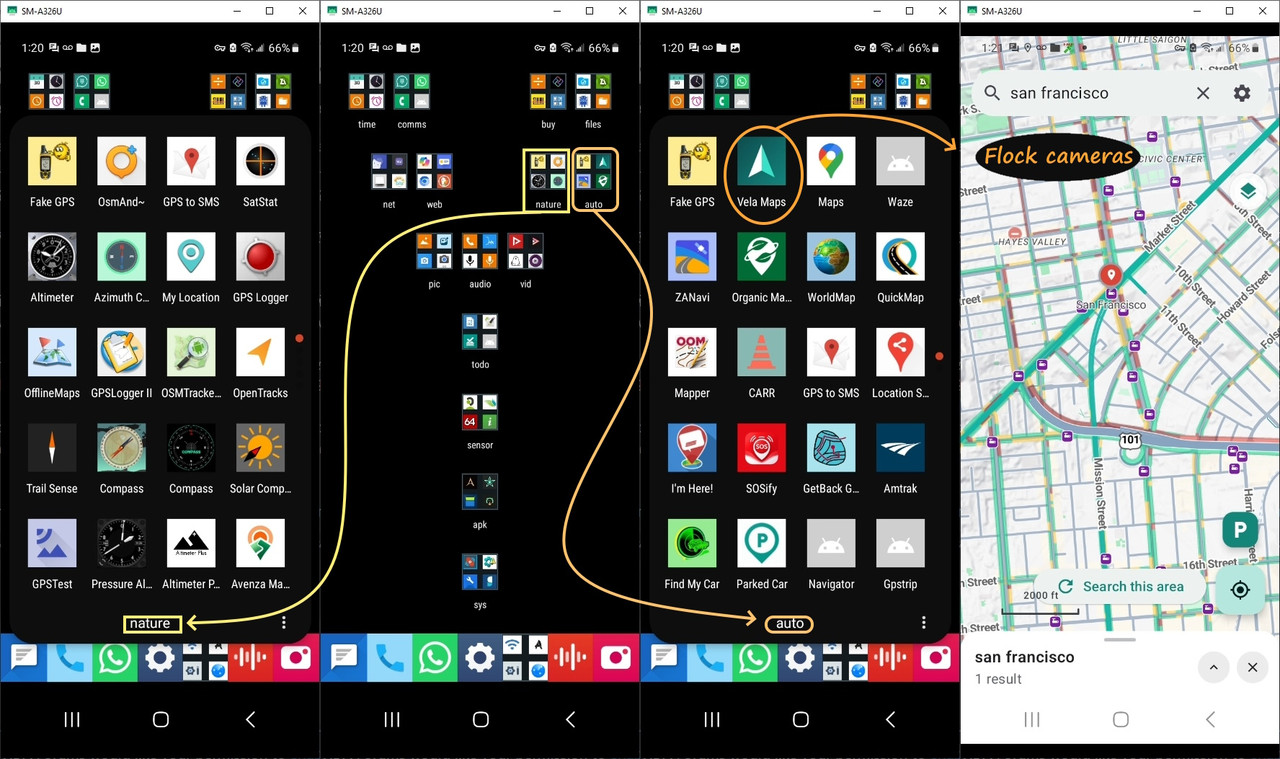
FOSS Google Maps replacement, Vela Maps?
A: ???
The link which was provided to me is this, but it's for the F-Droid repo. <
https://pimpinpumpkin.github.io/Vela/repo?fingerprint=F374920F2F5F38D7508D0B042125B8EAF23CF0F06FA7490280FB77115BB091DE>
I never use the F-Droid app since I download all my apps on the desktop.
The Github link to the Vela repo appears to be
<
https://pimpinpumpkin.github.io/Vela/>
"Vela is a maps and navigation app for Android
that pulls the data you actually rely on, live hours,
traffic, transit and reviews, straight from your own device.
No account. No API key. No Play Services."
<
https://github.com/PimpinPumpkin/Vela/releases/latest>
<
https://github.com/PimpinPumpkin/Vela/releases/download/v0.4.935/vela-maps-v0.4.935.apk>
Docs...
<
https://github.com/PimpinPumpkin/Vela/blob/main/FEATURES.md>
<
https://github.com/PimpinPumpkin/Vela/blob/main/docs/HOW-IT-WORKS.md>
Blurbs...
A degoogled maps & navigation client for Android - what NewPipe is to
YouTube, for Google Maps. Open vector tiles for the basemap, the device
itself scraping Google's public web endpoints (per-user, no backend) for
the things only Google does well: POI quality, routing, and traffic-aware
ETAs.
Turn-by-turn with lane guidance, route shields and the speedometer; the
keyless OpenFreeMap basemap wearing Google's own sampled colors and Roboto labels, with rated POI icons and the tiered dots; live place data; the directions panel with alternates, traffic in plain words and the avoid
toggles; live departure boards with a tap-through stop list for every
route; and the in-app light/dark themes (decoupled from the OS).
What you get
Live traffic, straight from Google. Vela reads the same real-time traffic Google Maps shows, so ETAs are traffic-aware, the fastest route leads the
list, and every option says light, moderate or heavy traffic in plain words next to its green/amber/red time. Turn-by-turn navigation rides on it: lane diagrams, exit shields, a speedometer with the posted limit, and automatic reroutes when a jam builds ahead.
Real info about places (points of interest, or POIs). Hours with holidays included, reviews you can search, photo galleries, busy times, phone and website, with a warning if a place would be closed when you arrive.
Zero Google on your phone, and almost zero in your life. No Play Services,
no account, no app key, no ads, no GCM/FCM, no Play Integrity. Google never sees your map browsing, your saved places, or who you are; your GPS trail
stays on the phone, with only anonymous re-route and traffic checks
carrying a position while you navigate. The full breakdown is in the
Privacy section below.
Flock cameras, on the map. Mapped ALPR surveillance cameras (the community DeFlock project's OpenStreetMap data) draw out of the box, and the optional Settings -> Map -> Avoid surveillance cameras counts the cameras on each
route and quietly picks a lower-camera option when the detour is small. The dataset lives on your phone and refreshes itself weekly.
Vela Voice. Spoken turn-by-turn from a neural voice that runs entirely on
your phone, and a mic that transcribes your search on-device too. Nothing
you say ever touches a cloud speech service.
Parking memory. Tap P when you park, tap the pin later for walking
directions back, long-press for your parking history.
Material You theming, if you want it. An optional toggle tints Vela's
chrome with your wallpaper colors (Android 12+); off by default, and the
map itself stays clean either way.
Offline maps and routing. Download a state or country once and its maps, turn-by-turn routing, and every place in it stay searchable with no signal
- typed street addresses included.
Live gas prices. Search for gas and every station's current price is right
on its map marker, in the result list, and on the place page.
Live public transit. Departure boards and station-by-station stop timelines come from open GTFS feeds (the schedules and realtime updates transit
agencies publish, served by the community Transitous project), supplemented with Google for traffic-aware transit directions. Tap a stop for live
times, tap a route for every stop it makes.
Satellite imagery map:
See the world from a birds-eye view, powered by Esri.
Street View: real panoramas in-app, keyless - open on a place, look around, walk the street with arrows, and go back in time through older captures; half-screen over the live map or full screen.
Lists: the bookmark button next to the category chips opens Your lists.
Create one there, or add any place from its page (ri< -> Save to list), with
a note per place. Lists back up to a file from Settings.
Import a Google Maps list: paste a maps.app.goo.gl share link into the
search bar. The list's places show up as results with the owner's notes;
tap Save list to keep a local copy.
Fixes itself when Google moves things. The scraping recipes live in a
signed config the app checks at launch - when Google shifts a field or an endpoint, a repair ships to every install in minutes, no update needed. The same channel can push a heads-up notice ("search is down, fix coming")
straight onto the map. See docs/CALIBRATION.md: for details.
The rest. Android Auto, 15 languages, in-app light/dark, full D-pad
operation for keypad phones, place lists, and a built-in updater with weekly-stable or nightly channels.
Why a degoogled app uses Google
A phone without Google Play Services cannot run Google Maps, and the open
map datasets fall well short on search, reviews, hours, and live traffic.
So Vela is a thin client over Google's public web endpoints. It asks them
the same way a logged-out browser does, once per user, with no account, no shared API key, and no server in the middle. NewPipe does the same for
YouTube. There are no ads, and your searches, saved places, and history
stay on the phone. If you run GrapheneOS or another no-GMS ROM, this gets
you working maps back.
The map itself, the streets, the labels, and the house numbers all come
from OpenStreetMap. Google is only used for places, search, routing, and traffic. So street names and house numbers can differ from what Google Maps shows, and how much detail you see offline depends on how well
OpenStreetMap covers your area. I'm thinking of ways to improve OSM and
fill the gaps in the data. Stay tuned.
Privacy
There is no Vela backend, no account, and no telemetry. Vela fetches from Google directly from your phone like a logged-out browser - Google sees
your IP, query, and map area, but not a Google account or any app key, much like using google.com/maps in an incognito window. Your saved places,
history, and settings never leave the device. Read the full breakdown of exactly what each service receives -> PRIVACY.md.
The short version:
Google shrinks from knowing who you are and everywhere you go to
occasionally answering an anonymous question. Your map browsing never
reaches Google at all, and your GPS trace is never uploaded anywhere. While you're actively navigating, Vela does ask Google for fresh traffic from
your current position every couple of minutes - that's what powers the faster-route offers and the live arrival time - and that re-check can be
turned off in Settings -> Data & privacy ("Live traffic re-checks");
off-course re-routes remain, since turn-by-turn can't work without them.
--
Vela Maps (app.vela) - the navigator's constellation "the Sails", and
"sail" in several languages.
--- Synchronet 3.22a-Linux NewsLink 1.2