From Newsgroup: comp.mobile.android
Which free/ad-free Android file managers adhere to modern Android 12+
Scoped Storage and Storage Access Framework?
<
https://www.androidpolice.com/2021/01/29/x-plore-is-one-of-the-first-file-managers-to-bypass-scoped-storages-drastic-limitations-on-android-11/>
These apps apparently utilized workarounds (such as targeting older
Android API levels or requesting special manifest exemptions) to
prompt users for "All Files Access" (MANAGE_EXTERNAL_STORAGE).
This forces Android to grant a special permission bypass so they
can still see Android/data and other hidden directories.
They also integrated Android's document provider pickers as
a fallback, allowing us to manually grant permission to specific
restricted folders directory-by-directory when the system blocks
direct path access.
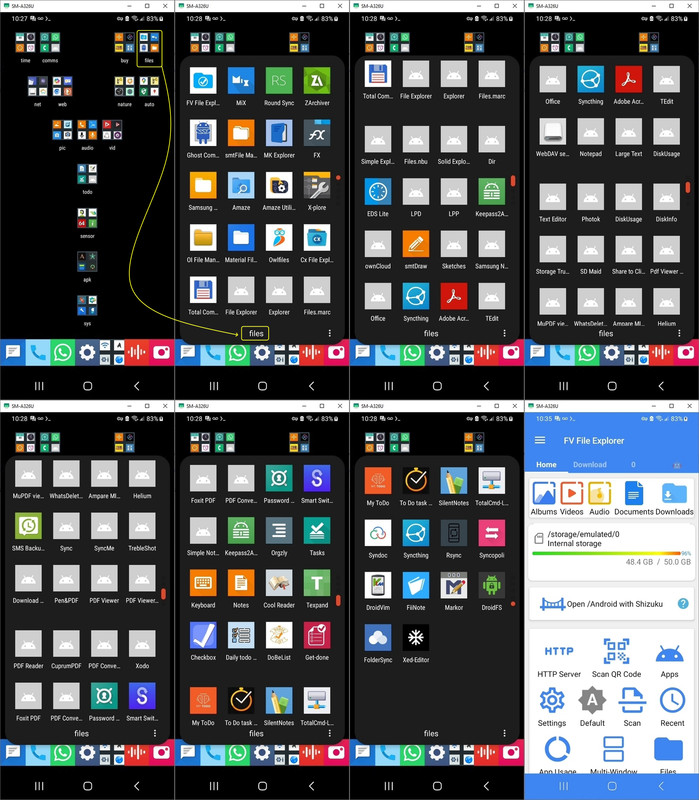
I have the following file managers as "leftovers" from a test years
ago of all free ad-free non-OEM file managers available on the Android platform.
<
https://i.postimg.cc/PrPv8NRD/filemanager.jpg>
In addition to the following file managers, I also have Shizuku
(which gives non-rooted Android minor privileged access to some
related APIs).
FV File Explorer <com.folderv.file>
Zarchiver <ru.zdevs.zarchiver>
MiX Explorer <com.mixplorer> <com.mixplorer.beta>
RoundSync <de.felixnuesse.extract>
Ghost Commander <com.ghostsq.commander>
SMT File Manager <com.simplemobiletools.filemanager.pro> (orange icon)
MK Explorer File Manager <pl.mkexplorer.kormateusz>
FX File Manager <nextapp.fx>
Amaze <com.amaze.filemanager>
X-Plore (unix like, confusing) <com.lonelycatgames.Xplore>
OI File Manager <org.openintents.filemanager> (yellow folder icon)
Material Files <me.zhanghai.android.files> sucks at long filespecs (blue icon)
Owl Files <com.skyjos.apps.fileexplorerfree>
CX File Explorer <com.cx.file.explorer> SMB support
Total Commander <com.ghisler.android.TotalCommander>
My Files <com.sec.android.app.myfiles> Samsung, can use SMB (yellow icon)
Google Files <com.google.android.documentsui>
MiCode FileExplorer <net.micode.fileexplorer> derived from Xiaomi MIUI
Explorer <com.spedsoftware.explorer> Speed Software file manager
Files <com.marc.files> lightweight file manager
Simple Explorer <com.dnielfe.manager> minimalist file manager
But, being old, most do not act as the Android system file picker
unless they explicitly implement a DocumentsProvider or a Storage
Access Framework (SAF) picker.
Apps like MiXplorer, X-Plore, Total Commander, CX File Explorer, and
ZArchiver didn't just "handle" scoped storage as they actively had to
find ways around its limitations so they wouldn't become useless.
Of those 21 file managers, a key question is which handle scoped storage ?
--- Synchronet 3.22a-Linux NewsLink 1.2