• Archive support

    From Nuno Silva@user17785@newsgrouper.org.invalid to comp.mobile.android on Wed Aug 12 11:10:15 2026
    From Newsgroup: comp.mobile.android


    Is archive support really such a rare feature in
    Android file managers? Or did I just pick a less
    capable one?

    Fossify File Manager doesn't want to handle a tarball.

    Fortunately, eshell has access to some tar, so it's
    extracted now thanks to Emacs (which could also
    parse the file but seemed to have no binding to extract .*).

    But I guess I should see what else is there on f-droid.
    --
    Nuno Silva

    --- Synchronet 3.22a-Linux NewsLink 1.2
  • From s|b@me@privacy.invalid to comp.mobile.android on Wed Aug 12 17:04:25 2026
    From Newsgroup: comp.mobile.android

    On Wed, 12 Aug 2026 11:10:15 GMT, Nuno Silva wrote:

    Is archive support really such a rare feature in
    Android file managers? Or did I just pick a less
    capable one?

    Fossify File Manager doesn't want to handle a tarball.

    Fortunately, eshell has access to some tar, so it's
    extracted now thanks to Emacs (which could also
    parse the file but seemed to have no binding to extract .*).

    But I guess I should see what else is there on f-droid.

    Have you taken a look at Total Commander?
    --
    s|b
    --- Synchronet 3.22a-Linux NewsLink 1.2
  • From Maria Sophia@mariasophia@comprehension.com to comp.mobile.android on Wed Aug 12 09:47:52 2026
    From Newsgroup: comp.mobile.android

    Nuno Silva wrote:
    Is archive support really such a rare feature in
    Android file managers? Or did I just pick a less
    capable one?

    Fossify File Manager doesn't want to handle a tarball.

    Fortunately, eshell has access to some tar, so it's
    extracted now thanks to Emacs (which could also
    parse the file but seemed to have no binding to extract .*).

    But I guess I should see what else is there on f-droid.

    Hi Nuno Silva,

    I'm sure Termux can do any archival/unarchival format Linux can do.
    But since your question asked specifically about Android file managers...

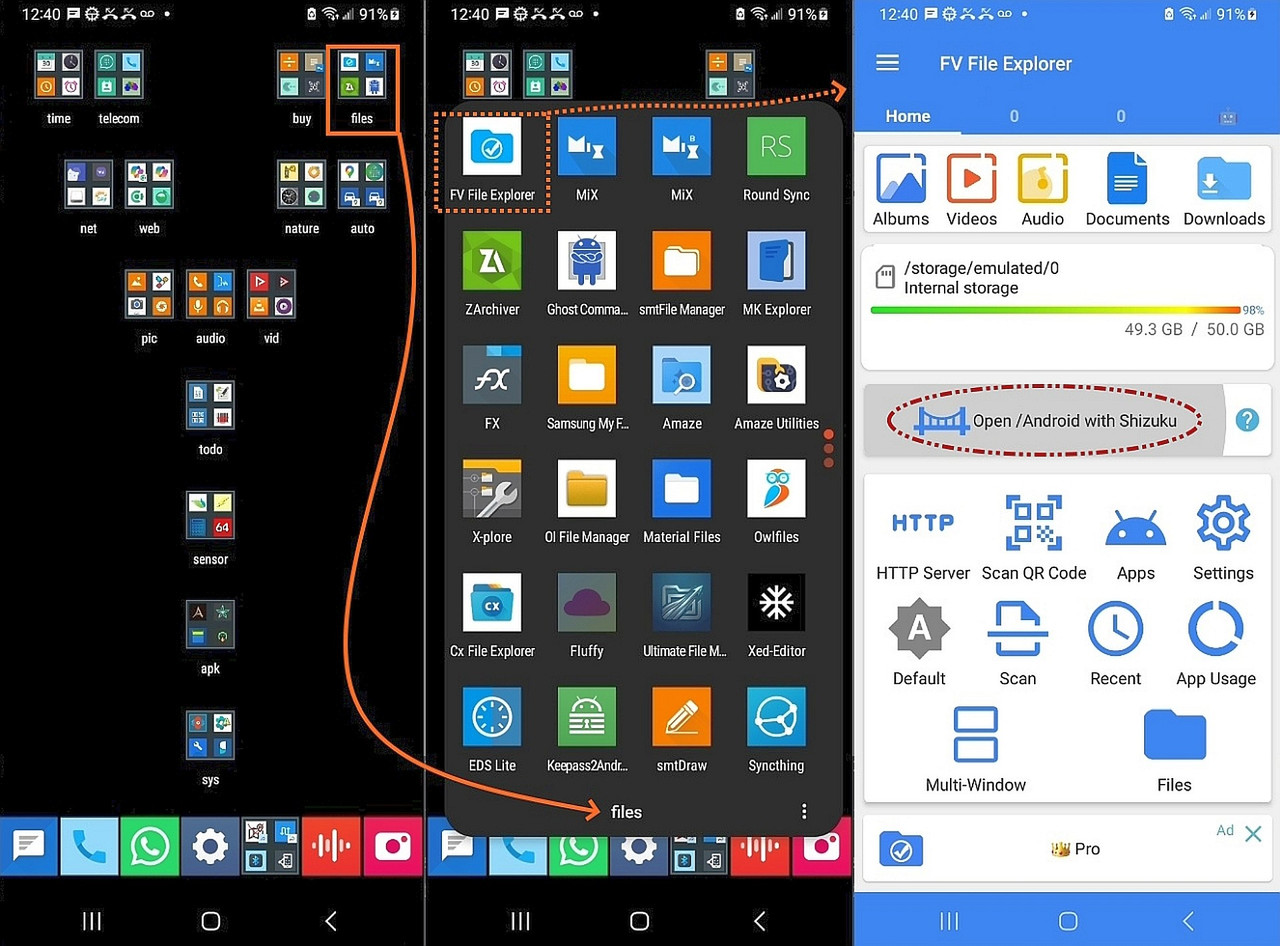
    I have tested every free file manager on Android and reported on them in
    the past, where my favorite is FV File Explorer but many others exist.
    <https://i.postimg.cc/KjrxmJY8/fv-file-explorer.jpg>

    I order my icons in best-to-worst order, so you can see what I like here.
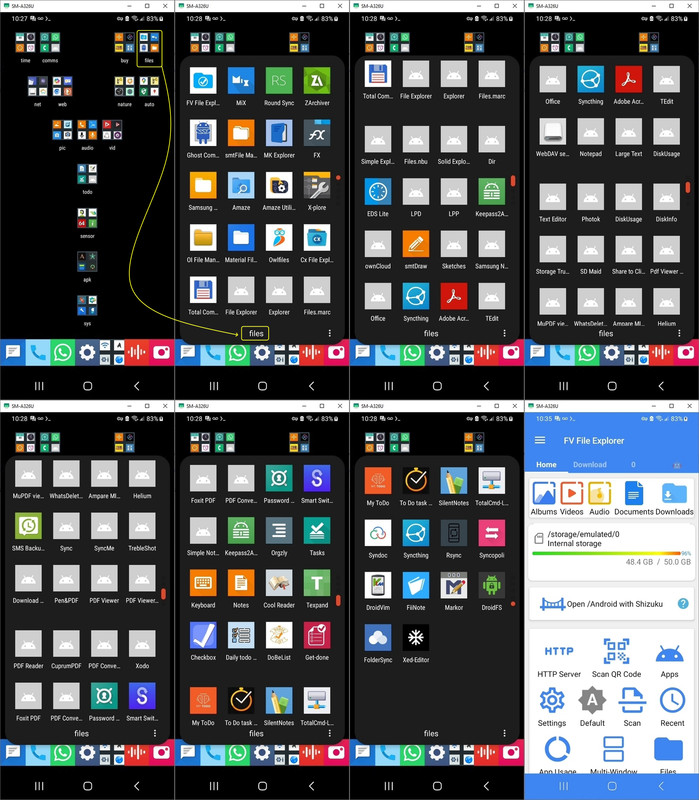
    <https://i.postimg.cc/PrPv8NRD/filemanager.jpg>

    If you're interested in any particular file manager that I have installed
    (as can be seen from that screenshot), let me know & I can test it for its archival/restore capability for the various Linux archival formats.
    --
    It takes a different kind of person to notice what nobody else can see.
    --- Synchronet 3.22a-Linux NewsLink 1.2
  • From Maria Sophia@mariasophia@comprehension.com to comp.mobile.android on Wed Aug 12 16:26:41 2026
    From Newsgroup: comp.mobile.android

    Nuno Silva wrote:
    Fossify File Manager doesn't want to handle a tarball.

    Material Files readme implies that it handles tarballs...
    <https://github.com/zhanghai/materialfiles>
    --- Synchronet 3.22a-Linux NewsLink 1.2
  • From Frank Slootweg@this@ddress.is.invalid to comp.mobile.android on Thu Aug 13 17:49:02 2026
    From Newsgroup: comp.mobile.android

    Nuno Silva <user17785@newsgrouper.org.invalid> wrote:

    Is archive support really such a rare feature in
    Android file managers? Or did I just pick a less
    capable one?

    Fossify File Manager doesn't want to handle a tarball.

    FX File Explorer claims tar support.

    <https://play.google.com/store/apps/details?id=nextapp.fx>
    (see the 'About this app' section)

    FWIW, I've used FX File Explorer in the past. Currently I get by with Samsung's native 'My Files' file manager, until I stumble into some
    proble and the install something 'better'.

    Fortunately, eshell has access to some tar, so it's
    extracted now thanks to Emacs (which could also
    parse the file but seemed to have no binding to extract .*).

    But I guess I should see what else is there on f-droid.

    FX File Explorer is No Ads, No annoyances, No analytics. No tracking.
    --- Synchronet 3.22a-Linux NewsLink 1.2
  • From AJL@noemail@none.com to comp.mobile.android on Thu Aug 13 18:34:50 2026
    From Newsgroup: comp.mobile.android

    On 8/13/26 1:49 PM, Frank Slootweg wrote:

    FWIW, I've used FX File Explorer in the past. Currently I get by with
    Samsung's native 'My Files' file manager, until I stumble into some
    proble and the install something 'better'.

    On my Android toys I generally use the (usually) built in Google Files app.
    I find it handy because it shows my internal, SD, and online Google Drive
    storage all in the same app...


    --- Synchronet 3.22a-Linux NewsLink 1.2
  • From Maria Sophia@mariasophia@comprehension.com to comp.mobile.android on Thu Aug 13 10:40:10 2026
    From Newsgroup: comp.mobile.android

    Frank Slootweg wrote:
    But I guess I should see what else is there on f-droid.

    FX File Explorer is No Ads, No annoyances, No analytics. No tracking.

    I think the OP has FX File Explorer & Material Files to look at.
    And if that doesn't work, I'm sure we'll find others.

    My two more points for the OP with respect to the two quoted sentences is
    1. I wouldn't limit the search to "only" FOSS apps on F-Droid, and,
    2. I wouldn't worry about ads since a phone can't even display ads
    if it's set up right.

    For example, I can load any adware I want to load, and I won't see ads.
    But I do realize that most people won't modify their phones that way.

    So I just want folks to know that they 'can' make ads impossible.
    Without rooting.

    Which opens up, to them, almost any free app that exists out there.

    Although, most of the time, apps with ads tend to suck in general.
    Since many of them are copies of FOSS apps with the ads added later.
    --
    Usenet allows purposefully helpful people to pool their experiences.
    --- Synchronet 3.22a-Linux NewsLink 1.2
  • From AJL@noemail@none.com to comp.mobile.android on Thu Aug 13 18:45:40 2026
    From Newsgroup: comp.mobile.android

    On 8/13/26 11:34 AM, AJL wrote:
    On 8/13/26 1:49 PM, Frank Slootweg wrote:

    FWIW, I've used FX File Explorer in the past. Currently I get by with >>Samsung's native 'My Files' file manager, until I stumble into some
    proble and the install something 'better'.

    On my Android toys I generally use the (usually) built in Google Files app.
    I find it handy because it shows my internal, SD, and online Google Drive storage all in the same app...

    I probably should have looked before posting. I just checked my Phone's
    Samsung 'My Files' app and see that it has the same capability of using
    Google Drive plus OneDrive. I don't use OneDrive but see where that would
    be even handier for those who do...


    --- Synchronet 3.22a-Linux NewsLink 1.2
  • From Maria Sophia@mariasophia@comprehension.com to comp.mobile.android on Thu Aug 13 11:08:48 2026
    From Newsgroup: comp.mobile.android

    AJL wrote:
    On 8/13/26 1:49 PM, Frank Slootweg wrote:

    FWIW, I've used FX File Explorer in the past. Currently I get by with >>Samsung's native 'My Files' file manager, until I stumble into some
    proble and the install something 'better'.

    On my Android toys I generally use the (usually) built in Google Files app.
    I find it handy because it shows my internal, SD, and online Google Drive
    storage all in the same app...

    Hi AJL,

    I think Frank's point, other than FX File Explorer <nextapp.fx> likely
    handles the tarballs the OP is interested in, is that we all need more than
    a single file manager because none of them do everything that we need.

    I have, oh, let me count... 21 file managers.
    <https://i.postimg.cc/PrPv8NRD/filemanager.jpg>

    These are on my system, where the bottom few are grayed out.
    FV File Explorer <com.folderv.file>
    Zarchiver <ru.zdevs.zarchiver>
    MiX Explorer <com.mixplorer> <com.mixplorer.beta>
    RoundSync <de.felixnuesse.extract>
    Ghost Commander <com.ghostsq.commander>
    SMT File Manager <com.simplemobiletools.filemanager.pro> (orange icon)
    MK Explorer File Manager <pl.mkexplorer.kormateusz>
    FX File Chooser (X-plore access was denied)
    Amaze <com.amaze.filemanager>
    X-Plore (unix like, confusing) <com.lonelycatgames.Xplore>
    OI File Manager <org.openintents.filemanager> (yellow folder icon)
    Material Files <me.zhanghai.android.files> sucks at long file names
    Owl Files <com.skyjos.apps.fileexplorerfree>
    CX File Explorer <com.cx.file.explorer> SMB support
    Total Commander <com.ghisler.android.TotalCommander>
    My Files <com.sec.android.app.myfiles> (yellow generic folder icon)
    Google Files <com.google.android.documentsui>
    MiCode FileExplorer <net.micode.fileexplorer> derived from Xiaomi MIUI
    Explorer <com.spedsoftware.explorer> Speed Software file manager
    Files <com.marc.files> lightweight file manager
    Simple Explorer <com.dnielfe.manager> minimalist file manager

    Those are leftovers from when I long ago tested every non-OEM free ad free
    file manager, where some have SMB support, some suck at long file names,
    some show far more of the file system than others do, some have plugins,
    some do tarballs, etc.

    I've never found the perfect file manager yet.
    --- Synchronet 3.22a-Linux NewsLink 1.2
  • From Frank Slootweg@this@ddress.is.invalid to comp.mobile.android on Thu Aug 13 19:15:13 2026
    From Newsgroup: comp.mobile.android

    AJL <noemail@none.com> wrote:
    On 8/13/26 11:34 AM, AJL wrote:
    On 8/13/26 1:49 PM, Frank Slootweg wrote:

    FWIW, I've used FX File Explorer in the past. Currently I get by with >>Samsung's native 'My Files' file manager, until I stumble into some >>proble and the install something 'better'.

    On my Android toys I generally use the (usually) built in Google Files app.
    I find it handy because it shows my internal, SD, and online Google Drive storage all in the same app...

    I probably should have looked before posting. I just checked my Phone's
    Samsung 'My Files' app and see that it has the same capability of using
    Google Drive plus OneDrive. I don't use OneDrive but see where that would
    be even handier for those who do...

    Yes, I was about to mention that. In addition, the Samsung 'My Files'
    app can access 'Network storage', i.e. SMB-type Network Shares, which
    sometimes comes in handy. Perhaps/probably the Google Files app can do
    the same.

    So many choices! :-)
    --- Synchronet 3.22a-Linux NewsLink 1.2
  • From Frank Slootweg@this@ddress.is.invalid to comp.mobile.android on Thu Aug 13 19:23:20 2026
    From Newsgroup: comp.mobile.android

    AJL <noemail@none.com> wrote:

    Subject: Re: Archive suppo

    You may want to have a look at what caused the 'Subject:' header
    truncation.

    It wasn't me! :-)

    [...]
    --- Synchronet 3.22a-Linux NewsLink 1.2
  • From AJL@noemail@none.com to comp.mobile.android on Thu Aug 13 20:14:18 2026
    From Newsgroup: comp.mobile.android

    On 8/13/26 12:23 PM, Frank Slootweg wrote:
    AJL <noemail@none.com> wrote:

    Subject: Re: Archive suppo

    You may want to have a look at what caused the 'Subject:' header
    truncation.

    It wasn't me! :-)

    Yep. My screw-up. I was posting for the first time with a new 7" Android toy
    (a cheapie-$39 USD) and my fat fingers did bad things. I didn't notice.
    Thanks for the sharp eyes. My apologies to the group...


    --- Synchronet 3.22a-Linux NewsLink 1.2
  • From AJL@noemail@none.com to comp.mobile.android on Thu Aug 13 21:02:33 2026
    From Newsgroup: comp.mobile.android

    On 8/13/26 12:08 PM, Maria Sophia wrote:

    I've never found the perfect file manager yet.

    I suppose it's like choosing clothes or cars. It's a YMMV thing...


    --- Synchronet 3.22a-Linux NewsLink 1.2
  • From Maria Sophia@mariasophia@comprehension.com to comp.mobile.android on Thu Aug 13 19:20:41 2026
    From Newsgroup: comp.mobile.android

    AJL wrote:
    I've never found the perfect file manager yet.

    I suppose it's like choosing clothes or cars. It's a YMMV thing...

    Yup. Most people, I would think, don't even *know* they have a file
    manager, while others,I would think, can do with the default "My Files".

    The three key things I use most from the powerful file managers are
    1. The most important is the ability to see the entire filespec!
    2. It's also important that some show the slash (/) partition!
    3. And finally, some show the sd card as 0000-0000 (formatted volume name)
    (while others use the completely random label Android gives it)

    Of course there are other features such as tarballs, SMB, bookmarks, etc.
    It will be nice when the OP reports back on which he used for a tarball.
    --- Synchronet 3.22a-Linux NewsLink 1.2