• Loading apps in logical arrangement.

    From micky@NONONOmisc07@fmguy.com to comp.mobile.android on Fri Aug 7 10:06:19 2026
    From Newsgroup: comp.mobile.android

    How to load apps in the right order, the right arrangement, on a new
    phone.

    Is there a way to stop the automatic installation of apps by Android, so
    that I can do it myself one at a time to the page and location I want
    for each?

    When I got my 2nd smart phone, it loaded all or almost all the apps I
    had on my previous phone without my doing anything. Great, except I
    would have liked to arranged them logically. Utilities in one
    place/page. Music, talk, and video in another. Apps useful in foreign countries all together on page three or four.

    I had 207 apps, and I just made a list of all of them. Sure I don't need
    or use them all, but only about 5 am I certain I'll never want again. So arranging them by moving them around after installation woudl be a lot
    of work. I never did it for the previous phone.

    Or is there a what, a launcher?, that would make rearranging easier. Is
    there a way
    --- Synchronet 3.22a-Linux NewsLink 1.2
  • From Maria Sophia@mariasophia@comprehension.com to comp.mobile.android on Fri Aug 7 07:55:25 2026
    From Newsgroup: comp.mobile.android

    micky wrote:
    Or is there a what, a launcher?, that would make rearranging easier. Is
    there a way

    There are launchers which will save the organization into a backup/restore file, one of which is the last-known-good-version of the Nova Launcher.
    <https://tinyurl.com/nova-launcher>

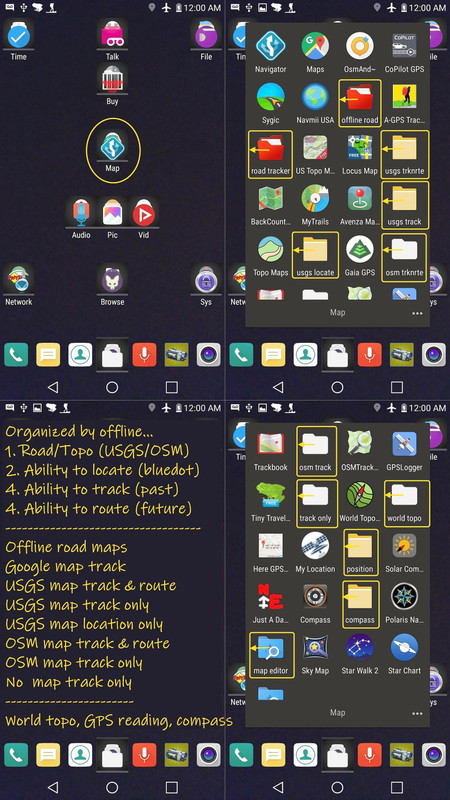
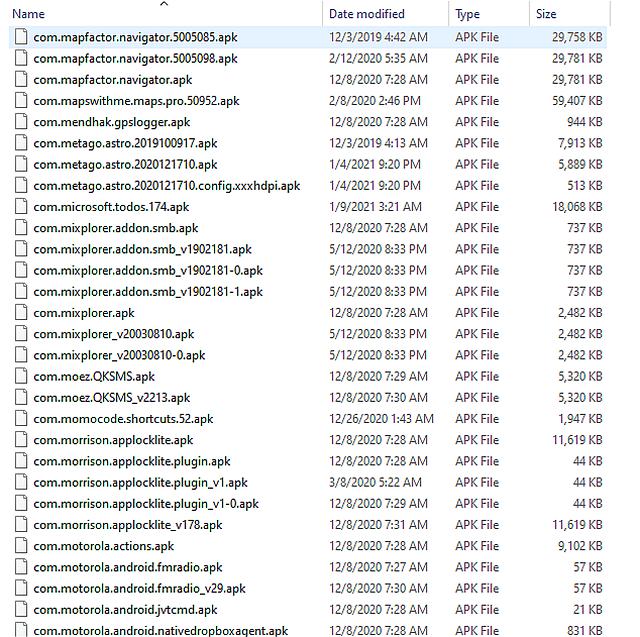
    However... the easiest way I can think of, which is rather low tech but it works beautifully, is to save the APKs on a desktop/laptop in the desired folder organization (same as Android), such as your Android map folder.
    <https://i.postimg.cc/pLFpXfMP/maps07.jpg>

    So, for example, you create a "maps" folder on a desktop/laptop PC.
    And then we save map APKs from Android into that maps folder on the PC.
    <https://i.postimg.cc/FFYqg9Dv/maps05.jpg>
    --- Synchronet 3.22a-Linux NewsLink 1.2
  • From Carlos E.R.@robin_listas@es.invalid to comp.mobile.android on Fri Aug 7 19:19:02 2026
    From Newsgroup: comp.mobile.android

    On 2026-08-07 16:06, micky wrote:
    How to load apps in the right order, the right arrangement, on a new
    phone.

    Is there a way to stop the automatic installation of apps by Android, so
    that I can do it myself one at a time to the page and location I want
    for each?

    When I got my 2nd smart phone, it loaded all or almost all the apps I
    had on my previous phone without my doing anything. Great, except I
    would have liked to arranged them logically. Utilities in one
    place/page. Music, talk, and video in another. Apps useful in foreign countries all together on page three or four.

    I had 207 apps, and I just made a list of all of them. Sure I don't need
    or use them all, but only about 5 am I certain I'll never want again. So arranging them by moving them around after installation woudl be a lot
    of work. I never did it for the previous phone.

    Or is there a what, a launcher?, that would make rearranging easier. Is
    there a way

    There is a setting for placing, or not, the icon of the app in the
    screen when fresh installed.

    Problem is accessing this setting before the automated app restore on a
    new phone.
    --
    Cheers, Carlos.
    ESEfc-Efc+, EUEfc-Efc|;
    --- Synchronet 3.22a-Linux NewsLink 1.2
  • From Jim Jackson@jj@franjam.org.uk to comp.mobile.android on Fri Aug 7 19:45:50 2026
    From Newsgroup: comp.mobile.android

    On 2026-08-07, micky <NONONOmisc07@fmguy.com> wrote:
    How to load apps in the right order, the right arrangement, on a new
    phone.

    Is there a way to stop the automatic installation of apps by Android, so
    that I can do it myself one at a time to the page and location I want
    for each?

    When I got my 2nd smart phone, it loaded all or almost all the apps I
    had on my previous phone without my doing anything. Great, except I
    would have liked to arranged them logically. Utilities in one
    place/page. Music, talk, and video in another. Apps useful in foreign countries all together on page three or four.

    I had 207 apps, and I just made a list of all of them. Sure I don't need
    or use them all, but only about 5 am I certain I'll never want again. So arranging them by moving them around after installation woudl be a lot
    of work. I never did it for the previous phone.

    Or is there a what, a launcher?, that would make rearranging easier. Is
    there a way

    This seems a bit elementary, so I may have misunderstood what the
    problem is.

    I have a fairphone5 on Android15 and use the default launcher Quickstep,
    which I understand is the default launcher on some other phones too.

    It has the ability for the app icons to be placed in any position on any "page" (screens you get to when you swipe left or right?). You press and
    hold the icon for a little while and then as keeping your finger on
    screen and move your finger to where you want the icon placed. It can be placed elsewhere on the current page, or moved across to another screen,
    or removed (the app isn't removed, just the iconf rom the screen).

    You can get a full list of installed app icons in alphabetic order by
    swiping up from the bottom of the screen.


    --- Synchronet 3.22a-Linux NewsLink 1.2
  • From micky@NONONOmisc07@fmguy.com to comp.mobile.android on Sat Aug 8 22:07:27 2026
    From Newsgroup: comp.mobile.android

    In comp.mobile.android, on Fri, 7 Aug 2026 07:55:25 -0800, Maria Sophia <mariasophia@comprehension.com> wrote:

    micky wrote:
    Or is there a what, a launcher?, that would make rearranging easier. Is
    there a way

    There are launchers which will save the organization into a backup/restore >file, one of which is the last-known-good-version of the Nova Launcher.
    <https://tinyurl.com/nova-launcher>

    However... the easiest way I can think of, which is rather low tech but it >works beautifully, is to save the APKs on a desktop/laptop in the desired

    You think that's low tech but I don't even knwo what the names of the
    APKs are, where to find them, or where to put them.

    And I think I'm too tired to learn.

    folder organization (same as Android), such as your Android map folder.
    <https://i.postimg.cc/pLFpXfMP/maps07.jpg>

    So, for example, you create a "maps" folder on a desktop/laptop PC.
    And then we save map APKs from Android into that maps folder on the PC.
    <https://i.postimg.cc/FFYqg9Dv/maps05.jpg>

    Maybe the problem is that any way I want to do it will take appreciable
    time. If I'd done it a little at a time using Jim's method as I added
    apps, it might have seemed easier.
    --- Synchronet 3.22a-Linux NewsLink 1.2
  • From Maria Sophia@mariasophia@comprehension.com to comp.mobile.android on Sun Aug 9 19:56:20 2026
    From Newsgroup: comp.mobile.android

    micky wrote:
    However... the easiest way I can think of, which is rather low tech but it >>works beautifully, is to save the APKs on a desktop/laptop in the desired

    You think that's low tech but I don't even knwo what the names of the
    APKs are, where to find them, or where to put them.

    And I think I'm too tired to learn.

    One statement above negates solving the other, but for the benefit of the
    team, the low-tech method would be to choose any given folder on the
    homescreen and write down on a piece of paper the app icons in that folder.

    Then in Muntashirakon App Manager or SAI, you search for the app names, and
    you save the APK/APKs into a folder on your device and now they're backed
    up to the device. Copy that backup folder to your desktop and you're done.

    Now you have a perfect archive of all your apps in a folder the same as on
    the homescreen. With the new phone, you just install them one by one.

    folder organization (same as Android), such as your Android map folder.
    <https://i.postimg.cc/pLFpXfMP/maps07.jpg>

    So, for example, you create a "maps" folder on a desktop/laptop PC.
    And then we save map APKs from Android into that maps folder on the PC.
    <https://i.postimg.cc/FFYqg9Dv/maps05.jpg>

    Maybe the problem is that any way I want to do it will take appreciable
    time. If I'd done it a little at a time using Jim's method as I added apps, it might have seemed easier.

    Um, you can back up every APK on your device in a single step.

    The installer is never deleted for any app you've installed until/unless
    you delete the app.

    So it's always there.
    You can back it up any time.

    The two apps I suggest are SAI and/or Muntashirakon.
    There's a reason they exist.
    --- Synchronet 3.22a-Linux NewsLink 1.2
  • From Maria Sophia@mariasophia@comprehension.com to comp.mobile.android on Mon Aug 10 22:37:13 2026
    From Newsgroup: comp.mobile.android

    Jim Jackson wrote:
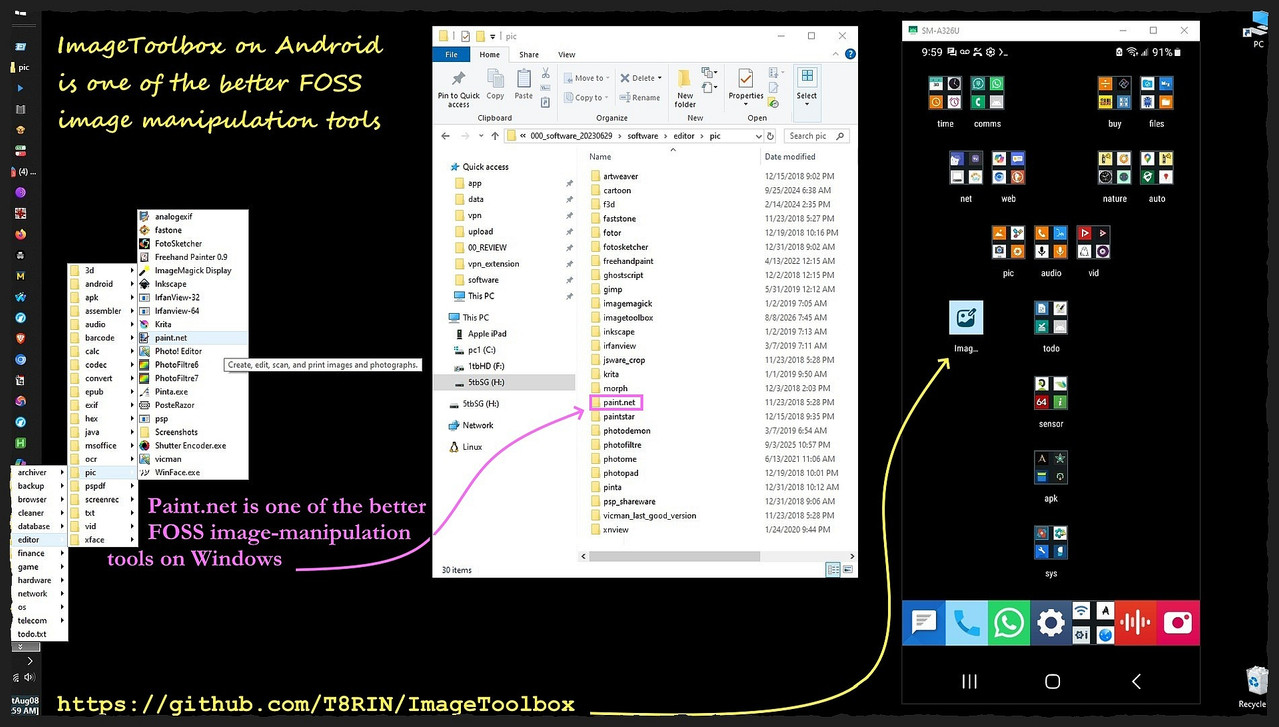
    You can get a full list of installed app icons in alphabetic order by swiping up from the bottom of the screen.

    What we do on computers never changes, so the menus we used a decade ago, copied over, still work just fine on our desktop and mobile devices today.
    <https://i.postimg.cc/pTnPx2j4/imagetoolbox.jpg>

    Some app launchers will save the homescreen to a file which can be copied
    over to a second (or third or fourth, etc.) phone, which is what I do.

    My homescreen started a decade ago, and it keeps getting ported over.
    Of course, it changes slightly but it is essentially the same for years.

    The simplest low-tech suggest for porting over the apps is to make a folder
    on the desktop for each folder on Android, such as the following for mine:

    C:\homescreen\{archiver,browser,calendar,editor,finance,games,etc.}

    Then, use SAI or Muntashirakon App Manager to archive the APKs in each
    folder on Android to the folders on your desktop of the same name.

    Voila!

    You hve an instant archive of all your installers in the same organization
    that they are installed on your Android phone. It's really that easy.
    --
    It takes a different kind of person to notice what nobody else can see.
    --- Synchronet 3.22a-Linux NewsLink 1.2
  • From Maria Sophia@mariasophia@comprehension.com to comp.mobile.android on Mon Aug 10 22:42:24 2026
    From Newsgroup: comp.mobile.android

    Carlos E.R. wrote:
    Or is there a what, a launcher?, that would make rearranging easier. Is
    there a way

    There is a setting for placing, or not, the icon of the app in the
    screen when fresh installed.

    Problem is accessing this setting before the automated app restore on a
    new phone.

    I don't use the Google mechanism for porting from one phone to another, but
    I think I saw somewhere that the Google method brings over the home screen.

    Dunno if that's true though.
    But IMHO, any good app launcher should backup/restore the home screen.

    If an app isn't installed at the time of the home screen restoral, then the home screen should just show gray icons of the name of the app that isn't
    yet installed, which, when tapped, goes to Google Play store to get 'em.

    That's how the Nova Launcher backup/restore works.
    --- Synchronet 3.22a-Linux NewsLink 1.2