Hi,
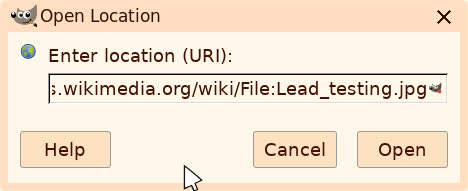
Choosing File > Open Location and submitting https://commons.wikimedia.org/wiki/File:Lead_testing.jpg gives the
window you can see at https://easthope.ca/GimpOpenLocation0.jpg .
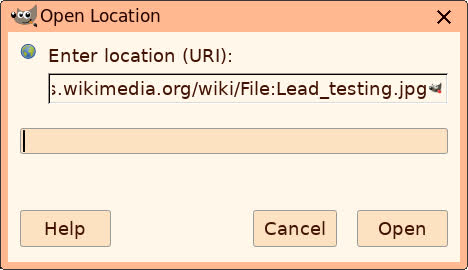
A click on Open gives the window you can see at https://easthope.ca/GimpOpenLocation1.jpg .
That window appears to have an addtional text input area but keyboard
input isn't accepted.
Ideas?
Choosing File > Open Location and submitting https://commons.wikimedia.org/wiki/File:Lead_testing.jpg gives the
window you can see at https://easthope.ca/GimpOpenLocation0.jpg .
On 13 May 2026 07:14:09 -0700, peter wrote:
Choosing File > Open Location and submitting
https://commons.wikimedia.org/wiki/File:Lead_testing.jpg gives the
window you can see at https://easthope.ca/GimpOpenLocation0.jpg .
Trying this in GIMP 3.2.4 shows an error dialog with two different
messages. In the first section, titled rCLJPEG Image MessagerCY, it says rCLNot a JPEG file: starts with 0x3c 0x21rCY. In the second section,
titled rCLGIMP MessagerCY, it says rCLOpening 'https://commons.wikimedia.org/wiki/File:Lead_testing.jpg' failed:
JPEG image plug-in could not open imagerCY.
In GIMP 2.10.36 on Linux Mint, that extra bar is a progress bar that
fills as the image is loaded. I'm not sure if the narrow bar in your
image is a text cursor or a progress bar that's barely started.
My version of GIMP is what's provided in the Ubuntu repositories, which are used by Mint being based on Ubuntu.
GIMP fails to load the URL you gave, because it returns a web page with information about the image, not just the image itself. Using <https://upload.wikimedia.org/wikipedia/commons/c/c7/Lead_testing.jpg> instead loads the image.
| Sysop: | Amessyroom |
|---|---|
| Location: | Fayetteville, NC |
| Users: | 74 |
| Nodes: | 6 (0 / 6) |
| Uptime: | 05:08:19 |
| Calls: | 1,194 |
| Files: | 1,353 |
| D/L today: |
2 files (1,590K bytes) |
| Messages: | 291,507 |