• Win7 Eudora fight

    From crasso@crasso@nycap.rr.com to alt.windows7.general on Tue Feb 3 10:06:35 2026
    From Newsgroup: alt.windows7.general

    This is pretty long-winded but I'd really like some help so tried to
    provide plenty of clues.

    Recently my ISP prevented me from getting my email in Winxp, so
    spending my main time in Win7 now. I have to get my email via Firefox
    browser.

    I am struggling with Eudora, an obsolete email client I've been using
    in WinXP forever. I installed Eudora in Win7 and it never worked
    right, BUT Eudora has the capability of creating mailboxes and
    sub-mailboxes (like sub folders, tiers, the only email client that can
    do it) that are useful for remembering much useful info. I USED to be
    able to create/edit Eudora mailboxes in Winxp's Eudora, then
    copy/paste these xp mailboxes into Win7's Eudora folders when I was
    booted into Win7. And Win7's Eudora could deal with it.

    Until it couldn't. For some reason this little operation wrecks Win7
    Eudora now. Also I can't create a mailbox from within Win7's Eudora,
    that also wrecks Eudora.
    Eudora's complaint is: "Error accessing file C:\users\earl\AppData\local\Temp\eudxxxx.tmp"
    "Cause: No such file or directory exists"

    A search on C: drive finds no such file except in that above location.

    Deleting the offending mailbox USUALLY allows Eudora to start up
    again, but not always, sometimes Eudora in dead in the water and won't
    start up. Uninstalling/reinstalling Eudora doesn't help.

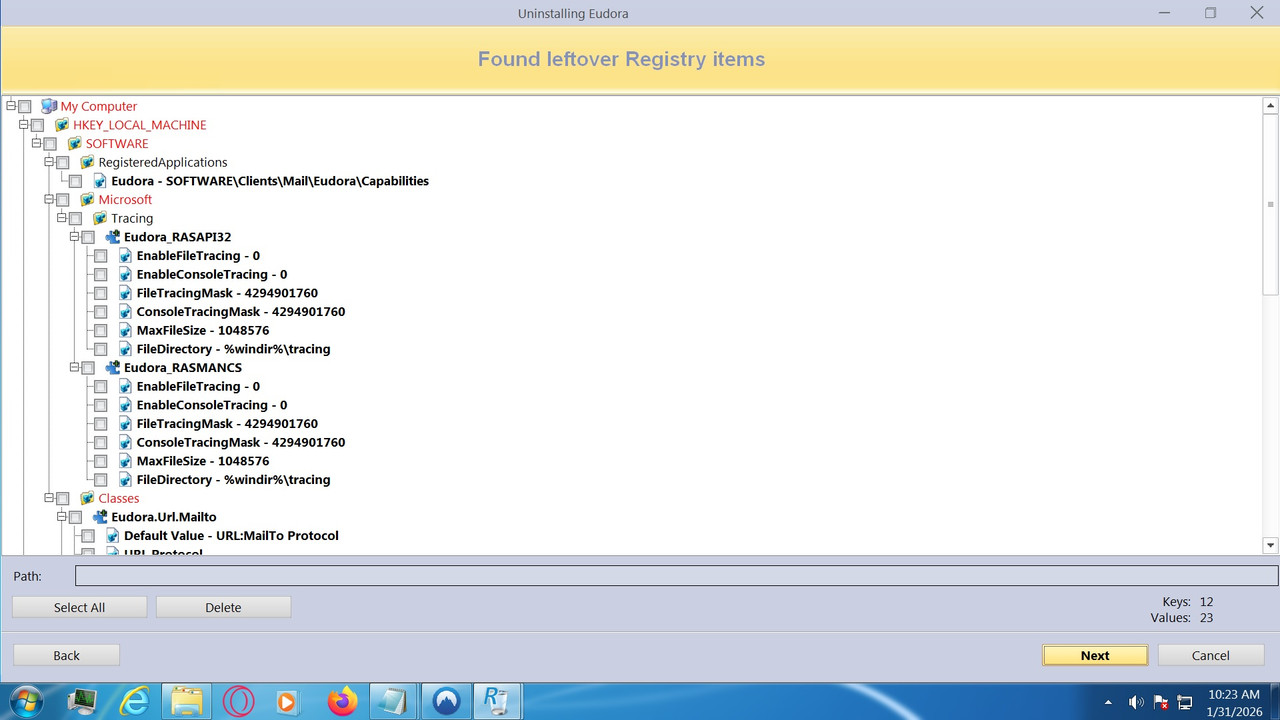
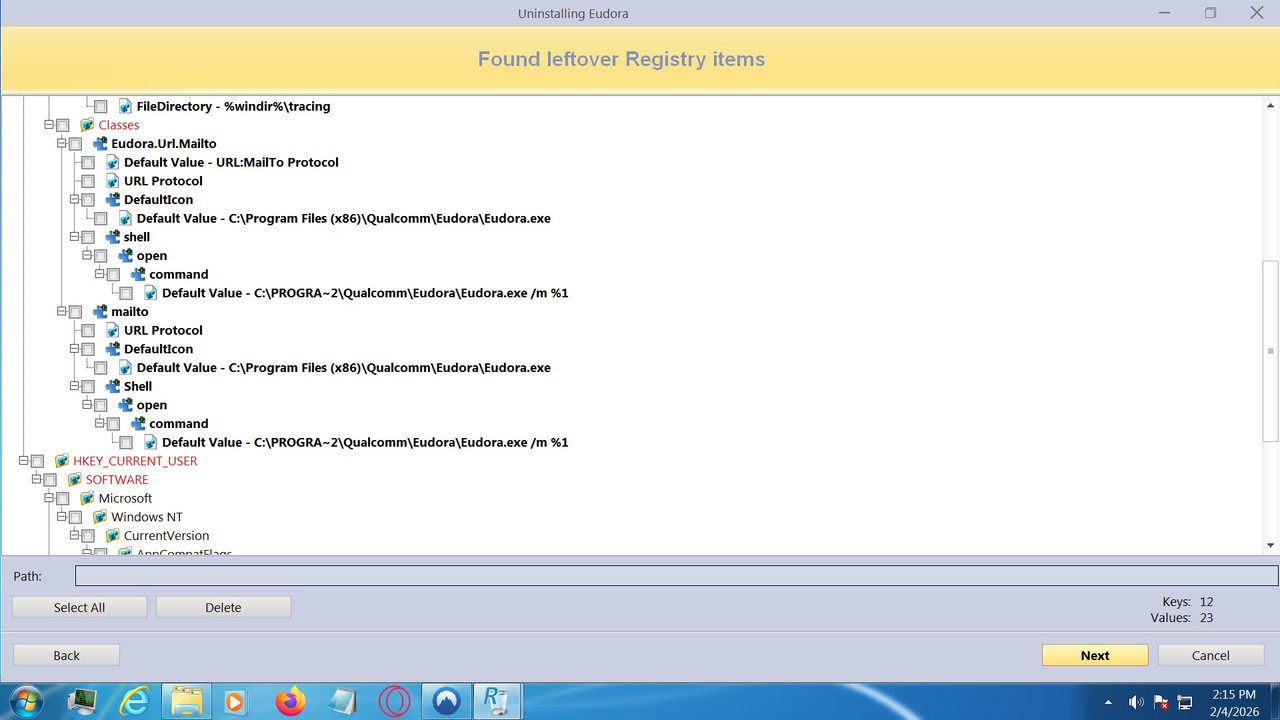
    Downloaded REVO supposedly a powerful uninstaller to get rid of
    remnants of Eudora, no help. It does show me Eudora-related stuff in
    Registry it recommends deleting with its Uninstall. (possibility for
    editing?). Took some screen shots, but there's a hell of a lot of
    them.
    https://i.postimg.cc/DwPHs96H/Eudora-Registry1.jpg
    Can't figure how to PrtScrn all of them into Paint without multiple
    Revo Uninstalls and reinstalls of Eudora.

    Only way I can get Win7's Eudora to run again when its completey
    f**ked is to Macrium Restore a recent backup image of the C: drive for
    Win7. Tried usingSystem Restore just f**ked things up. Try Registry
    restore next time.

    I did a Macrium8 folder Backup of WinXP's Eudora mydata folder (this
    is the folder that contains all of its mailboxes [a couple hundred])
    plus 2 new mailboxes I added.
    Then I did a Macrium8 Restore of that backup image while booted into
    Win7, and Restored it into mydata1, which the name of Eudora's mailbox
    folder in Win7's Eudora. I can "pick a folder to Restore to" , every
    thing LOOKED to behave normally and Mac reported success. BUT the two
    new mailboxes I'd added to Winxp's Eudora didn't get added into
    mydata1. Either Mac8 knew, somehow, not to copy it or Mac8 Restore
    operation failed somehow.

    Hand copied to two new mailboxes into mydata1, then reinstalled Eudora
    (an Uninstall doesn't wipe out this folder). Eudora installs, then
    barfs on the two added mailboxes until I remove them.

    I have Win7 installed twice on this Abit machine, one on the hard
    drive and one on an ssd, where it's about 10%? faster. I've been
    mostly using the ssd one for a couple of years. So I went back to Win7
    on the hard drive, but it gives me the same Eudora errors, BUT I USED
    TO BE ABLE TO COPY MAILBOXES OVER AND ADD NEW ONES IN WIN7 AND NOW I
    CAN'T. (screaming in frustration)

    On Win11, the Asus build, I find I CAN copy a new mailbox into its
    mydata folder and its Eudora starts up successfully afterward. Can't
    send or receive email, which has been the case for years, have to use
    browser, but I AM able to utilize its mailboxes. Interestingly a
    Restore of a Macrium8 folder backup fails the same way it did in Win7.
    I think Mac8 has a bug .

    Does all this malarkey strike a chord with anyone? I'd sure like to
    have my Win7 Eudora back.


    This is pretty long-winded but I'd really like some help so tried to
    provide plenty of clues.


    Recently my ISP prevented me from getting my email in Winxp, so
    spending my main time in Win7 now. I have to get my email via Firefox
    browser.

    I am struggling with Eudora, an obsolete email client I've been using
    in WinXP forever. I installed in Win7 and it never worked right, BUT
    Eudora has the capability of creating mailboxes and sub-mailboxes
    (like sub folders, tiers, the only email client that can do it) that
    are useful for remembering much useful info. I USED to be able to
    create/edit Eudora mailboxes in Winxp's Eudora, then copy/paste these
    xp mailboxes into Win7's Eudora folders when I was booted into Win7.
    And Win7's Eudora could deal with it.

    Until it couldn't. For some reason this little operation wrecks Win7
    Eudora now. Also I can't create a mailbox from within Win7's Eudora,
    that also wrecks Eudora.
    Eudora's complaint is: "Error accessing file C:\users\earl\AppData\local\Temp\eudxxxx.tmp"
    "Cause: No such file or directory exists"

    A search on C: drive finds no such file except in that above location.

    Deleting the offending mailbox USUALLY allows Eudora to start up
    again, but not always, sometimes Eudora in dead in the water and won't
    start up. Uninstalling/reinstalling Eudora doesn't help.

    Downloaded REVO supposedly a powerful uninstaller to get rid of
    remnants of Eudora, no help. It does show me Eudora-related stuff in
    Registry it recommends deleting with its Uninstall. (possibility for
    editing?). Took some screen shots, but there's a hell of a lot of
    them.
    https://i.postimg.cc/DwPHs96H/Eudora-Registry1.jpg
    Can't figure how to PrtScrn all of them into Paint without multiple
    Revo Uninstalls and reinstalls of Eudora.

    Only way I can get Win7's Eudora to run again when its completey
    f**ked is to Macrium Restore a recent backup image of the C: drive for
    Win7. Tried usingSystem Restore just f**ked things up. Try Registry
    restore next time.

    I did a Macrium8 folder Backup of WinXP's Eudora mydata folder (this
    is the folder that contains all of its mailboxes [a couple hundred])
    plus 2 new mailboxes I added.
    Then I did a Macrium8 Restore of that backup image while booted into
    Win7, and Restored it into mydata1, which the name of Eudora's mailbox
    folder in Win7's Eudora. I can "pick a folder to Restore to" , every
    thing LOOKED to behave normally and Mac reported success. BUT the two
    new mailboxes I'd added to Winxp's Eudora didn't get added into
    mydata1. Either Mac8 knew, somehow, not to copy it or Mac8 Restore
    operation failed somehow.

    Hand copied to two new mailboxes into mydata1, then reinstalled Eudora
    (an Uninstall doesn't wipe out this folder). Eudora installs, then
    barfs on the two added mailboxes until I remove them.

    I have Win7 installed twice on this Abit machine, one on the hard
    drive and one on an ssd, where it's about 10%? faster. I've been
    mostly using the ssd one for a couple of years. So I went back to Win7
    on the hard drive, but it gives me the same Eudora errors, BUT I USED
    TO BE ABLE TO COPY MAILBOXES OVER AND ADD NEW ONES IN WIN7 AND NOW I
    CAN'T. (screaming in frustration)

    On Win11, the Asus build, I find I CAN copy a new mailbox into its
    mydata folder and its Eudora starts up successfully afterward. Can't
    send or receive email, which has been the case for years, have to use
    browser, but I AM able to utilize its mailboxes. Interestingly a
    Restore of a Macrium8 folder backup fails the same way it did in Win7.
    I think Mac8 has a bug .

    Does all this malarkey strike a chord with anyone? I'd sure like to
    have my Win7 Eudora back.


    --- Synchronet 3.21b-Linux NewsLink 1.2
  • From David E. Ross@nobody@nowhere.invalid to alt.windows7.general on Tue Feb 3 08:33:15 2026
    From Newsgroup: alt.windows7.general

    On 2/3/2026 7:06 AM, crasso@nycap.rr.com wrote:
    This is pretty long-winded but I'd really like some help so tried to
    provide plenty of clues.

    Recently my ISP prevented me from getting my email in Winxp, so
    spending my main time in Win7 now. I have to get my email via Firefox browser.

    I am struggling with Eudora, an obsolete email client I've been using
    in WinXP forever. I installed Eudora in Win7 and it never worked
    right, BUT Eudora has the capability of creating mailboxes and
    sub-mailboxes (like sub folders, tiers, the only email client that can
    do it) that are useful for remembering much useful info. I USED to be
    able to create/edit Eudora mailboxes in Winxp's Eudora, then
    copy/paste these xp mailboxes into Win7's Eudora folders when I was
    booted into Win7. And Win7's Eudora could deal with it.

    [snipped]

    Does all this malarkey strike a chord with anyone? I'd sure like to
    have my Win7 Eudora back.

    I was a long time user of Eudora. When my PC showed signs of dying,
    however, my new PC with Windows 7 was not compatible with Eudora. I
    then switched to Thunderbird. Thunderbird has many of the features you
    seek.

    I am now using an old version (52.9.1) of Thunderbird because some
    features that I like have been removed. That version should still have
    the ability to import existing E-mail messages and address books from
    Eudora. Download it from <https://ftp.mozilla.org/pub/thunderbird/releases/52.9.1/win32/>,
    selecting your preferred language.
    --
    David E. Ross
    <http://www.rossde.com/>
    --- Synchronet 3.21b-Linux NewsLink 1.2
  • From J. P. Gilliver@G6JPG@255soft.uk to alt.windows7.general on Tue Feb 3 19:36:03 2026
    From Newsgroup: alt.windows7.general

    On 2026/2/3 15:6:35, crasso@nycap.rr.com wrote:
    This is pretty long-winded but I'd really like some help so tried to
    provide plenty of clues.

    Recently my ISP prevented me from getting my email in Winxp, so

    I doubt that, unless they've specifically told you so, or you've been
    told that by a reliable source. However, it's possible they've made some
    change which won't work with something you only have in XP, which would
    in practice have the same effect.

    The commonest change ISPs have made in the last few years is the
    requirement of certain encryptions, which some older email clients do
    not implememnt. A third-party piece of software called stunnel can be
    inserted between the old email client and the mail server(s). Stunnel is
    now officially 64-bit only, though an individual (German or Austrian, I
    think) has kindly been continuing to compile it for 32-bit users. (This
    may or may not be relevant.) The latest ISP I am aware of that has made
    this change is PlusNet (a UK ISP), who are in the process of outsourcing
    their mail services; they seemed to be of the impression (or presented
    as if they were) that nothing needed changing, but I've heard from other
    users that the outsourced company requires what stunnel provides whereas
    their own didn't. This may or may not be what your ISP has done.

    spending my main time in Win7 now. I have to get my email via Firefox browser.

    I am struggling with Eudora, an obsolete email client I've been using
    in WinXP forever. I installed Eudora in Win7 and it never worked
    right, BUT Eudora has the capability of creating mailboxes and
    sub-mailboxes (like sub folders, tiers, the only email client that can

    By no means; AFAIK lots of email clients have that ability. Certainly Thunderbird, which I am now using (after I think decades with Turnpike).
    I'd say go for Thunderbird: it may not be the best, but it's widely used
    (and has a newsgroup), so there are lots of people to ask about
    problems. Does Eudora have a newsgroup? I can see comp.mail.eudora.mac (probably not for you), comp.mail.eudora.ms-windows (sounds like where
    you should go), and it.comp.appl.eudora (probably not unless you speak Italian!).

    [rest deleted; I don't know that much about Eudora. I have helped others
    who use it, though.]

    Does all this malarkey strike a chord with anyone? I'd sure like to
    have my Win7 Eudora back.


    This is pretty long-winded but I'd really like some help so tried to
    provide plenty of clues.

    [snip]

    Does all this malarkey strike a chord with anyone? I'd sure like to
    have my Win7 Eudora back.

    Your post appeared to contain the same text (well, I didn't actually
    check it) twice.


    My recommendation _would_ be to bite the bullet and switch to something
    still current (such as Thunderbird). But I'm pretty certain that, in
    your position, I'd continue the fight too!
    --
    J. P. Gilliver. UMRA: 1960/<1985 MB++G()ALIS-Ch++(p)Ar++T+H+Sh0!:`)DNAf

    ... a series about a grumpy old man who lives in a phone box is
    unlikely to have been commissioned these days. 798 episodes later ...
    --- Synchronet 3.21b-Linux NewsLink 1.2
  • From Paul@nospam@needed.invalid to alt.windows7.general on Tue Feb 3 15:55:03 2026
    From Newsgroup: alt.windows7.general

    On Tue, 2/3/2026 10:06 AM, crasso@nycap.rr.com wrote:
    This is pretty long-winded but I'd really like some help so tried to
    provide plenty of clues.

    Recently my ISP prevented me from getting my email in Winxp, so
    spending my main time in Win7 now. I have to get my email via Firefox browser.

    I am struggling with Eudora, an obsolete email client I've been using
    in WinXP forever. I installed Eudora in Win7 and it never worked
    right, BUT Eudora has the capability of creating mailboxes and
    sub-mailboxes (like sub folders, tiers, the only email client that can
    do it) that are useful for remembering much useful info. I USED to be
    able to create/edit Eudora mailboxes in Winxp's Eudora, then
    copy/paste these xp mailboxes into Win7's Eudora folders when I was
    booted into Win7. And Win7's Eudora could deal with it.

    Until it couldn't. For some reason this little operation wrecks Win7
    Eudora now. Also I can't create a mailbox from within Win7's Eudora,
    that also wrecks Eudora.
    Eudora's complaint is: "Error accessing file C:\users\earl\AppData\local\Temp\eudxxxx.tmp"
    "Cause: No such file or directory exists"

    A search on C: drive finds no such file except in that above location.

    Deleting the offending mailbox USUALLY allows Eudora to start up
    again, but not always, sometimes Eudora in dead in the water and won't
    start up. Uninstalling/reinstalling Eudora doesn't help.

    Downloaded REVO supposedly a powerful uninstaller to get rid of
    remnants of Eudora, no help. It does show me Eudora-related stuff in
    Registry it recommends deleting with its Uninstall. (possibility for editing?). Took some screen shots, but there's a hell of a lot of
    them.
    https://i.postimg.cc/DwPHs96H/Eudora-Registry1.jpg
    Can't figure how to PrtScrn all of them into Paint without multiple
    Revo Uninstalls and reinstalls of Eudora.

    Only way I can get Win7's Eudora to run again when its completey
    f**ked is to Macrium Restore a recent backup image of the C: drive for
    Win7. Tried usingSystem Restore just f**ked things up. Try Registry
    restore next time.

    I did a Macrium8 folder Backup of WinXP's Eudora mydata folder (this
    is the folder that contains all of its mailboxes [a couple hundred])
    plus 2 new mailboxes I added.
    Then I did a Macrium8 Restore of that backup image while booted into
    Win7, and Restored it into mydata1, which the name of Eudora's mailbox
    folder in Win7's Eudora. I can "pick a folder to Restore to" , every
    thing LOOKED to behave normally and Mac reported success. BUT the two
    new mailboxes I'd added to Winxp's Eudora didn't get added into
    mydata1. Either Mac8 knew, somehow, not to copy it or Mac8 Restore
    operation failed somehow.

    Hand copied to two new mailboxes into mydata1, then reinstalled Eudora
    (an Uninstall doesn't wipe out this folder). Eudora installs, then
    barfs on the two added mailboxes until I remove them.

    I have Win7 installed twice on this Abit machine, one on the hard
    drive and one on an ssd, where it's about 10%? faster. I've been
    mostly using the ssd one for a couple of years. So I went back to Win7
    on the hard drive, but it gives me the same Eudora errors, BUT I USED
    TO BE ABLE TO COPY MAILBOXES OVER AND ADD NEW ONES IN WIN7 AND NOW I
    CAN'T. (screaming in frustration)

    On Win11, the Asus build, I find I CAN copy a new mailbox into its
    mydata folder and its Eudora starts up successfully afterward. Can't
    send or receive email, which has been the case for years, have to use browser, but I AM able to utilize its mailboxes. Interestingly a
    Restore of a Macrium8 folder backup fails the same way it did in Win7.
    I think Mac8 has a bug .

    Does all this malarkey strike a chord with anyone? I'd sure like to
    have my Win7 Eudora back.

    This is pretty long-winded but I'd really like some help so tried to
    provide plenty of clues.


    Recently my ISP prevented me from getting my email in Winxp, so
    spending my main time in Win7 now. I have to get my email via Firefox browser.

    I am struggling with Eudora, an obsolete email client I've been using
    in WinXP forever. I installed in Win7 and it never worked right, BUT
    Eudora has the capability of creating mailboxes and sub-mailboxes
    (like sub folders, tiers, the only email client that can do it) that
    are useful for remembering much useful info. I USED to be able to
    create/edit Eudora mailboxes in Winxp's Eudora, then copy/paste these
    xp mailboxes into Win7's Eudora folders when I was booted into Win7.
    And Win7's Eudora could deal with it.

    Until it couldn't. For some reason this little operation wrecks Win7
    Eudora now. Also I can't create a mailbox from within Win7's Eudora,
    that also wrecks Eudora.
    Eudora's complaint is: "Error accessing file C:\users\earl\AppData\local\Temp\eudxxxx.tmp"
    "Cause: No such file or directory exists"

    A search on C: drive finds no such file except in that above location.

    Deleting the offending mailbox USUALLY allows Eudora to start up
    again, but not always, sometimes Eudora in dead in the water and won't
    start up. Uninstalling/reinstalling Eudora doesn't help.

    Downloaded REVO supposedly a powerful uninstaller to get rid of
    remnants of Eudora, no help. It does show me Eudora-related stuff in
    Registry it recommends deleting with its Uninstall. (possibility for editing?). Took some screen shots, but there's a hell of a lot of
    them.
    https://i.postimg.cc/DwPHs96H/Eudora-Registry1.jpg
    Can't figure how to PrtScrn all of them into Paint without multiple
    Revo Uninstalls and reinstalls of Eudora.

    Only way I can get Win7's Eudora to run again when its completey
    f**ked is to Macrium Restore a recent backup image of the C: drive for
    Win7. Tried usingSystem Restore just f**ked things up. Try Registry
    restore next time.

    I did a Macrium8 folder Backup of WinXP's Eudora mydata folder (this
    is the folder that contains all of its mailboxes [a couple hundred])
    plus 2 new mailboxes I added.
    Then I did a Macrium8 Restore of that backup image while booted into
    Win7, and Restored it into mydata1, which the name of Eudora's mailbox
    folder in Win7's Eudora. I can "pick a folder to Restore to" , every
    thing LOOKED to behave normally and Mac reported success. BUT the two
    new mailboxes I'd added to Winxp's Eudora didn't get added into
    mydata1. Either Mac8 knew, somehow, not to copy it or Mac8 Restore
    operation failed somehow.

    Hand copied to two new mailboxes into mydata1, then reinstalled Eudora
    (an Uninstall doesn't wipe out this folder). Eudora installs, then
    barfs on the two added mailboxes until I remove them.

    I have Win7 installed twice on this Abit machine, one on the hard
    drive and one on an ssd, where it's about 10%? faster. I've been
    mostly using the ssd one for a couple of years. So I went back to Win7
    on the hard drive, but it gives me the same Eudora errors, BUT I USED
    TO BE ABLE TO COPY MAILBOXES OVER AND ADD NEW ONES IN WIN7 AND NOW I
    CAN'T. (screaming in frustration)

    On Win11, the Asus build, I find I CAN copy a new mailbox into its
    mydata folder and its Eudora starts up successfully afterward. Can't
    send or receive email, which has been the case for years, have to use browser, but I AM able to utilize its mailboxes. Interestingly a
    Restore of a Macrium8 folder backup fails the same way it did in Win7.
    I think Mac8 has a bug .

    Does all this malarkey strike a chord with anyone? I'd sure like to
    have my Win7 Eudora back.

    Google search: running legacy eudora on Windows 7

    Google AI answer (the little snippet at the top):

    "Eudora, originally designed for older Windows versions, can encounter
    compatibility problems on Windows 7. To run it smoothly,

    use Windows XP compatibility mode during installation

    Ensure you have the latest Eudora patches applied. If emails fail to
    sync, check your mail server settings and firewall permissions.
    "

    When you do Properties on an executable, there is a compatibility tab,
    and you can set the execution environment of such to a particular OS,
    such as WinXP.

    *******

    You will be expected to use encryption-in-flight. This is
    SSL/TLS. SSL is all but discontinued. TLS comes in
    several release numbers, with TLS 1.3 being the absolute latest.

    The use of encryption is exemplified by the port number selected
    when configuring the client. One of the port numbers will be unencrypted. Another, will indicate encryption, then the TLS version number has to be
    high enough to work with that particular server (and its settings at
    the other end).

    Client programs come in two kinds. Programs which use the OS "SChannel"
    for encryption. And programs which carry their own up-to-date
    SSL/TLS (as provided by OpenSSL or so). Modern Thunderbird, the last
    release for Windows 7 (still had support last year), was around 115ESR or so. "Certificates" such as LetsEncrypt, have helped client softwares on
    WinXP, participate a little bit in modern communications.

    http://releases.mozilla.org/pub/thunderbird/releases/115.18.0/win64/en-US/

    Thunderbird Setup 115.18.0.exe 57M 10-Jun-2025 20:44

    The info (could be from Wikipedia) says:

    Windows 7, 8, 8.1 Thunderbird 115.18.0esr (IA-32)
    WinXP, Vista Thunderbird 52.9.1 (IA-32)
    Win2000 12.0.1 or 10.0.12esr

    If your provider tapes-off the TLS version and expects TLS 1.3,
    then legacy clients are unlikely to support that. Yet some
    of the TLS versions, the crypto suite isn't really good enough.

    That's only to highlight, if your Eudora was "unable to connect",
    that could contribute to the root cause.

    *******

    I have my own mailserver here, which I run in a VM for test. As an administrator, I'm shown unencrypted ports and encrypted ones. And
    if I want to run unencrypted ones, the software on the server
    simply refuses to comply! It will only accept connections on the
    encrypted ports. That means the software is buggered to give a
    WinXP user a "hard time". So if you think an administrator is
    "being mean on purpose", if you look at the software offerings,
    the software dev is taking the issue out of the administrators hands.
    We're stuck with all this bullshit.

    It took me forever, to make a self-signed certificate. When I run
    that against Thunderbird, Thunderbird does not like my self-signed
    certificate. But the last time I tried it, Thunderbird did pull
    email from my cranky little setup. But it's barely working. If I
    contacted LetsEncrypt and asked for a certificate to be cut, they
    won't cut one for mail.local (127.0.0.1) :-) I cannot rely on
    the certificate community, to make me a certificate that
    can be installed on *both* ends of the email comm channel.

    Sorry this isn't much of an answer, but this topic is just
    a crap-festival. It stinks from end to end.

    Legacy softwares should be able to work with the Program Files
    redirect into AppData. I don't know what to suggest to help
    you improve the handling there. Perhaps you have done something
    to elevate the user account ? Like you're logged in as the
    actual Administrator and running Eudora ? That's about the
    only thing that comes to mind, that might have something to do
    with the Program Files storage-redirection not working, something
    along those lines. Old programs used to store their goods in
    Program Files, but you cannot do that today because Program
    Files is owned by "TrustedInstaller", and Microsoft put a
    redirect in the OS so that attempts to store in Program Files
    are sent to the useraccount AppData tree instead.

    Paul
    --- Synchronet 3.21b-Linux NewsLink 1.2
  • From crasso@crasso@nycap.rr.com to alt.windows7.general on Thu Feb 5 14:44:40 2026
    From Newsgroup: alt.windows7.general

    On Tue, 3 Feb 2026 15:55:03 -0500, Paul <nospam@needed.invalid> wrote:

    On Tue, 2/3/2026 10:06 AM, crasso@nycap.rr.com wrote:
    This is pretty long-winded but I'd really like some help so tried to
    provide plenty of clues.

    Recently my ISP prevented me from getting my email in Winxp, so
    spending my main time in Win7 now. I have to get my email via Firefox
    browser.

    I am struggling with Eudora, an obsolete email client I've been using
    in WinXP forever. I installed Eudora in Win7 and it never worked
    right, BUT Eudora has the capability of creating mailboxes and
    sub-mailboxes (like sub folders, tiers, the only email client that can
    do it) that are useful for remembering much useful info. I USED to be
    able to create/edit Eudora mailboxes in Winxp's Eudora, then
    copy/paste these xp mailboxes into Win7's Eudora folders when I was
    booted into Win7. And Win7's Eudora could deal with it.

    Until it couldn't. For some reason this little operation wrecks Win7
    Eudora now. Also I can't create a mailbox from within Win7's Eudora,
    that also wrecks Eudora.
    Eudora's complaint is: "Error accessing file
    C:\users\earl\AppData\local\Temp\eudxxxx.tmp"
    "Cause: No such file or directory exists"

    A search on C: drive finds no such file except in that above location.

    Deleting the offending mailbox USUALLY allows Eudora to start up
    again, but not always, sometimes Eudora in dead in the water and won't
    start up. Uninstalling/reinstalling Eudora doesn't help.

    Downloaded REVO supposedly a powerful uninstaller to get rid of
    remnants of Eudora, no help. It does show me Eudora-related stuff in
    Registry it recommends deleting with its Uninstall. (possibility for
    editing?). Took some screen shots, but there's a hell of a lot of
    them.
    https://i.postimg.cc/DwPHs96H/Eudora-Registry1.jpg https://i.postimg.cc/SKvBtv9h/Eudora-Registry2.jpg
    Can't figure how to PrtScrn all of them into Paint without multiple
    Revo Uninstalls and reinstalls of Eudora.

    Only way I can get Win7's Eudora to run again when its completey
    f**ked is to Macrium Restore a recent backup image of the C: drive for
    Win7. Tried usingSystem Restore just f**ked things up. Try Registry
    restore next time.

    I did a Macrium8 folder Backup of WinXP's Eudora mydata folder (this
    is the folder that contains all of its mailboxes [a couple hundred])
    plus 2 new mailboxes I added.
    Then I did a Macrium8 Restore of that backup image while booted into
    Win7, and Restored it into mydata1, which the name of Eudora's mailbox
    folder in Win7's Eudora. I can "pick a folder to Restore to" , every
    thing LOOKED to behave normally and Mac reported success. BUT the two
    new mailboxes I'd added to Winxp's Eudora didn't get added into
    mydata1. Either Mac8 knew, somehow, not to copy it or Mac8 Restore
    operation failed somehow.

    Hand copied to two new mailboxes into mydata1, then reinstalled Eudora
    (an Uninstall doesn't wipe out this folder). Eudora installs, then
    barfs on the two added mailboxes until I remove them.

    I have Win7 installed twice on this Abit machine, one on the hard
    drive and one on an ssd, where it's about 10%? faster. I've been
    mostly using the ssd one for a couple of years. So I went back to Win7
    on the hard drive, but it gives me the same Eudora errors, BUT I USED
    TO BE ABLE TO COPY MAILBOXES OVER AND ADD NEW ONES IN WIN7 AND NOW I
    CAN'T. (screaming in frustration)

    On Win11, the Asus build, I find I CAN copy a new mailbox into its
    mydata folder and its Eudora starts up successfully afterward. Can't
    send or receive email, which has been the case for years, have to use
    browser, but I AM able to utilize its mailboxes. Interestingly a
    Restore of a Macrium8 folder backup fails the same way it did in Win7.
    I think Mac8 has a bug .

    Does all this malarkey strike a chord with anyone? I'd sure like to
    have my Win7 Eudora back.


    Google search: running legacy eudora on Windows 7

    Google AI answer (the little snippet at the top):

    "Eudora, originally designed for older Windows versions, can encounter
    compatibility problems on Windows 7. To run it smoothly,

    use Windows XP compatibility mode during installation

    Ensure you have the latest Eudora patches applied. If emails fail to
    sync, check your mail server settings and firewall permissions.
    "

    When you do Properties on an executable, there is a compatibility tab,
    and you can set the execution environment of such to a particular OS,
    such as WinXP.

    I did try the compatibility tab - set to winxp but no help. You said
    something about Eudora might have upgraded itself to be run as
    Administrator, which you hinted was a bad thing? I installed Eudora
    (and everything else) as an Administrator, but Eudora did run ok that
    way, for a time. I noticed in those setup.exe Properties there was a
    box to check "Run this program (the setup program) as an
    Administrator" so I checked it and again Uninstalled/Reinstalled
    Eudora, but no help.

    At long last I tried RUNNING Eudora as an Adminstrator. (RH click and
    choose it) and miracle it ran without the errors. Why didn't I do that first????????? Seems like something any techie would try?

    You got me there Paul with that hint, thank you a bunch.

    Re the Thunderbird suggestions, thanks guys but I struggled with it a
    couple years ago when my ISP started giving me shit, and it worked
    somewhat, but it can't hold a candle to Eudora mailbox-wise.


    *******

    You will be expected to use encryption-in-flight. This is
    SSL/TLS. SSL is all but discontinued. TLS comes in
    several release numbers, with TLS 1.3 being the absolute latest.

    The use of encryption is exemplified by the port number selected
    when configuring the client. One of the port numbers will be unencrypted. >Another, will indicate encryption, then the TLS version number has to be
    high enough to work with that particular server (and its settings at
    the other end).

    Client programs come in two kinds. Programs which use the OS "SChannel"
    for encryption. And programs which carry their own up-to-date
    SSL/TLS (as provided by OpenSSL or so). Modern Thunderbird, the last
    release for Windows 7 (still had support last year), was around 115ESR or so. >"Certificates" such as LetsEncrypt, have helped client softwares on
    WinXP, participate a little bit in modern communications.

    http://releases.mozilla.org/pub/thunderbird/releases/115.18.0/win64/en-US/

    Thunderbird Setup 115.18.0.exe 57M 10-Jun-2025 20:44

    The info (could be from Wikipedia) says:

    Windows 7, 8, 8.1 Thunderbird 115.18.0esr (IA-32)
    WinXP, Vista Thunderbird 52.9.1 (IA-32)
    Win2000 12.0.1 or 10.0.12esr

    If your provider tapes-off the TLS version and expects TLS 1.3,
    then legacy clients are unlikely to support that. Yet some
    of the TLS versions, the crypto suite isn't really good enough.

    That's only to highlight, if your Eudora was "unable to connect",
    that could contribute to the root cause.

    *******

    I have my own mailserver here, which I run in a VM for test. As an >administrator, I'm shown unencrypted ports and encrypted ones. And
    if I want to run unencrypted ones, the software on the server
    simply refuses to comply! It will only accept connections on the
    encrypted ports. That means the software is buggered to give a
    WinXP user a "hard time". So if you think an administrator is
    "being mean on purpose", if you look at the software offerings,
    the software dev is taking the issue out of the administrators hands.
    We're stuck with all this bullshit.

    It took me forever, to make a self-signed certificate. When I run
    that against Thunderbird, Thunderbird does not like my self-signed >certificate. But the last time I tried it, Thunderbird did pull
    email from my cranky little setup. But it's barely working. If I
    contacted LetsEncrypt and asked for a certificate to be cut, they
    won't cut one for mail.local (127.0.0.1) :-) I cannot rely on
    the certificate community, to make me a certificate that
    can be installed on *both* ends of the email comm channel.

    Sorry this isn't much of an answer, but this topic is just
    a crap-festival. It stinks from end to end.

    Legacy softwares should be able to work with the Program Files
    redirect into AppData. I don't know what to suggest to help
    you improve the handling there. Perhaps you have done something
    to elevate the user account ? Like you're logged in as the
    actual Administrator and running Eudora ? That's about the
    only thing that comes to mind, that might have something to do
    with the Program Files storage-redirection not working, something
    along those lines. Old programs used to store their goods in
    Program Files, but you cannot do that today because Program
    Files is owned by "TrustedInstaller", and Microsoft put a
    redirect in the OS so that attempts to store in Program Files
    are sent to the useraccount AppData tree instead.

    Paul
    --- Synchronet 3.21b-Linux NewsLink 1.2
  • From J. P. Gilliver@G6JPG@255soft.uk to alt.windows7.general,alt.comp.software.thunderbird on Thu Feb 5 23:04:50 2026
    From Newsgroup: alt.windows7.general

    On 2026/2/5 19:44:40, crasso@nycap.rr.com wrote:
    []
    Re the Thunderbird suggestions, thanks guys but I struggled with it a
    couple years ago when my ISP started giving me shit, and it worked
    somewhat, but it can't hold a candle to Eudora mailbox-wise.
    []
    Just out of curiosity, what can you do with mailboxes in Eudora that you
    can't in Thunderbird?
    (I'm not disagreeing with you, just wondering.)
    --
    J. P. Gilliver. UMRA: 1960/<1985 MB++G()ALIS-Ch++(p)Ar++T+H+Sh0!:`)DNAf
    --- Synchronet 3.21b-Linux NewsLink 1.2
  • From crasso@crasso@nycap.rr.com to alt.windows7.general on Fri Feb 6 16:16:13 2026
    From Newsgroup: alt.windows7.general

    On Thu, 5 Feb 2026 23:04:50 +0000, "J. P. Gilliver" <G6JPG@255soft.uk>
    wrote:

    On 2026/2/5 19:44:40, crasso@nycap.rr.com wrote:

    []

    Re the Thunderbird suggestions, thanks guys but I struggled with it a
    couple years ago when my ISP started giving me shit, and it worked
    somewhat, but it can't hold a candle to Eudora mailbox-wise.

    []

    Just out of curiosity, what can you do with mailboxes in Eudora that you >can't in Thunderbird?

    (I'm not disagreeing with you, just wondering.)


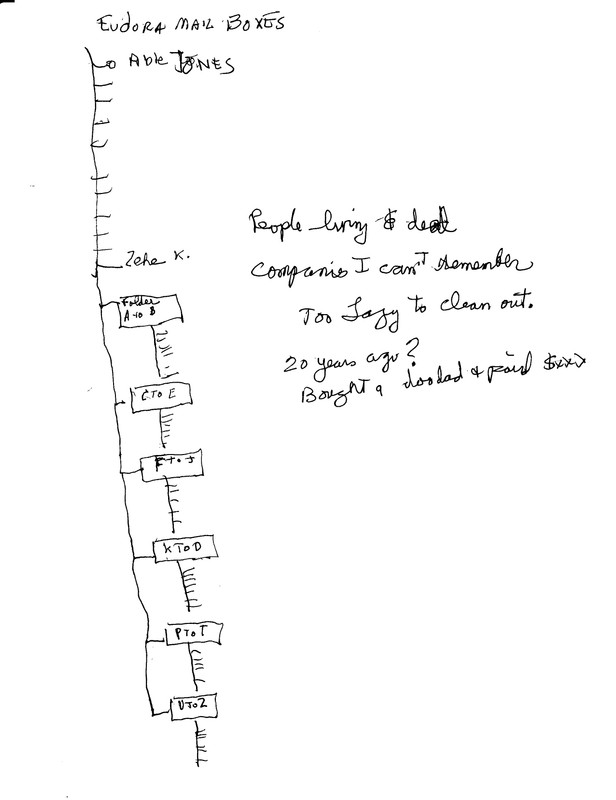
    Here's a drawing of my Eudora folders, going back 20? years.

    Eudora tiered folder scheme: https://i.postimg.cc/HsBdYR9t/Eudora-Mailbox-Folders.jpg

    I couldn't make Thunderbird do that. Maybe I'm too dumb.
    --- Synchronet 3.21b-Linux NewsLink 1.2
  • From Paul@nospam@needed.invalid to alt.windows7.general on Fri Feb 6 17:40:48 2026
    From Newsgroup: alt.windows7.general

    On Fri, 2/6/2026 4:16 PM, crasso@nycap.rr.com wrote:
    On Thu, 5 Feb 2026 23:04:50 +0000, "J. P. Gilliver" <G6JPG@255soft.uk>
    wrote:

    On 2026/2/5 19:44:40, crasso@nycap.rr.com wrote:

    []

    Re the Thunderbird suggestions, thanks guys but I struggled with it a
    couple years ago when my ISP started giving me shit, and it worked
    somewhat, but it can't hold a candle to Eudora mailbox-wise.

    []

    Just out of curiosity, what can you do with mailboxes in Eudora that you
    can't in Thunderbird?

    (I'm not disagreeing with you, just wondering.)


    Here's a drawing of my Eudora folders, going back 20? years.

    Eudora tiered folder scheme: https://i.postimg.cc/HsBdYR9t/Eudora-Mailbox-Folders.jpg

    I couldn't make Thunderbird do that. Maybe I'm too dumb.


    Mail\
    Local Folders\
    Sent
    Sent.msf
    Draft
    Draft.msf
    Trash
    Trash.msf
    Archives.sbd\
    2015
    2015.msf
    ...
    2025
    2025.msf

    Notice how a folder with an extension
    on the end of "SubDirectory", allows
    hierarchical arrangement of boxes. The
    archiving system in Thunderbird, is partially
    done via automation. (In a given year, if you
    ask for something to be archived, it creates a
    box file for it and puts the message there.)

    When the folder is displayed on the upper left
    in Thunderbird, the .sbd is suppressed and just
    the "Archives" string shows in the interface.

    This means you can have a "tree" in the Mail if you want.

    Paul
    --- Synchronet 3.21b-Linux NewsLink 1.2
  • From J. P. Gilliver@G6JPG@255soft.uk to alt.windows7.general on Sat Feb 7 00:25:14 2026
    From Newsgroup: alt.windows7.general

    On 2026/2/6 21:16:13, crasso@nycap.rr.com wrote:
    On Thu, 5 Feb 2026 23:04:50 +0000, "J. P. Gilliver" <G6JPG@255soft.uk>
    wrote:

    On 2026/2/5 19:44:40, crasso@nycap.rr.com wrote:

    []

    Re the Thunderbird suggestions, thanks guys but I struggled with it a
    couple years ago when my ISP started giving me shit, and it worked
    somewhat, but it can't hold a candle to Eudora mailbox-wise.

    []

    Just out of curiosity, what can you do with mailboxes in Eudora that you
    can't in Thunderbird?

    (I'm not disagreeing with you, just wondering.)


    Here's a drawing of my Eudora folders, going back 20? years.

    Eudora tiered folder scheme: https://i.postimg.cc/HsBdYR9t/Eudora-Mailbox-Folders.jpg

    I couldn't make Thunderbird do that. Maybe I'm too dumb.

    I see a mailbox with sub-boxes, some of which have sub-boxes of their own.

    Here's my inbox (some names blanked): https://255soft.uk/temp/Clipboard_02-07-2026_01%20mailboxes.gif

    Created in Thunderbird, over somewhat less than a year. (FWIW, note that
    it allows certain characters in sub-box names that you can't have in directories/folders, such as / and *.)
    --
    J. P. Gilliver. UMRA: 1960/<1985 MB++G()ALIS-Ch++(p)Ar++T+H+Sh0!:`)DNAf

    ... the pleasure of the mind is an amazing thing. My life has been
    driven by the satisfaction of curiosity. - Jeremy Paxman (being
    interviewed by Anne Widdecombe), Radio Times, 2-8 July 2011.
    --- Synchronet 3.21b-Linux NewsLink 1.2
  • From J. P. Gilliver@G6JPG@255soft.uk to alt.windows7.general on Sat Feb 7 00:31:20 2026
    From Newsgroup: alt.windows7.general

    On 2026/2/7 0:25:14, J. P. Gilliver wrote:
    On 2026/2/6 21:16:13, crasso@nycap.rr.com wrote:
    On Thu, 5 Feb 2026 23:04:50 +0000, "J. P. Gilliver" <G6JPG@255soft.uk>
    wrote:

    On 2026/2/5 19:44:40, crasso@nycap.rr.com wrote:

    []

    Re the Thunderbird suggestions, thanks guys but I struggled with it a
    couple years ago when my ISP started giving me shit, and it worked
    somewhat, but it can't hold a candle to Eudora mailbox-wise.

    []

    Just out of curiosity, what can you do with mailboxes in Eudora that you >>> can't in Thunderbird?

    (I'm not disagreeing with you, just wondering.)


    Here's a drawing of my Eudora folders, going back 20? years.

    Eudora tiered folder scheme:
    https://i.postimg.cc/HsBdYR9t/Eudora-Mailbox-Folders.jpg

    I couldn't make Thunderbird do that. Maybe I'm too dumb.

    I see a mailbox with sub-boxes, some of which have sub-boxes of their own.

    Here's my inbox (some names blanked): https://255soft.uk/temp/Clipboard_02-07-2026_01%20mailboxes.gif

    Created in Thunderbird, over somewhat less than a year. (FWIW, note that
    it allows certain characters in sub-box names that you can't have in directories/folders, such as / and *.)

    I've just seen Paul's response: he and I chose to reply to you in
    different ways - I showed how my mailbox (and sub-boxes) appear from
    within Thunderbird, Paul showed how it actually implements them within
    the underlying file structure.
    --
    J. P. Gilliver. UMRA: 1960/<1985 MB++G()ALIS-Ch++(p)Ar++T+H+Sh0!:`)DNAf

    ... the pleasure of the mind is an amazing thing. My life has been
    driven by the satisfaction of curiosity. - Jeremy Paxman (being
    interviewed by Anne Widdecombe), Radio Times, 2-8 July 2011.
    --- Synchronet 3.21b-Linux NewsLink 1.2
  • From crasso@crasso@nycap.rr.com to alt.windows7.general on Fri Feb 6 20:04:41 2026
    From Newsgroup: alt.windows7.general

    On Sat, 7 Feb 2026 00:31:20 +0000, "J. P. Gilliver" <G6JPG@255soft.uk>
    wrote:

    On 2026/2/7 0:25:14, J. P. Gilliver wrote:
    On 2026/2/6 21:16:13, crasso@nycap.rr.com wrote:
    On Thu, 5 Feb 2026 23:04:50 +0000, "J. P. Gilliver" <G6JPG@255soft.uk>
    wrote:

    On 2026/2/5 19:44:40, crasso@nycap.rr.com wrote:

    []

    Re the Thunderbird suggestions, thanks guys but I struggled with it a >>>>> couple years ago when my ISP started giving me shit, and it worked
    somewhat, but it can't hold a candle to Eudora mailbox-wise.

    []

    Just out of curiosity, what can you do with mailboxes in Eudora that you >>>> can't in Thunderbird?

    (I'm not disagreeing with you, just wondering.)


    Here's a drawing of my Eudora folders, going back 20? years.

    Eudora tiered folder scheme:
    https://i.postimg.cc/HsBdYR9t/Eudora-Mailbox-Folders.jpg

    I couldn't make Thunderbird do that. Maybe I'm too dumb.

    I see a mailbox with sub-boxes, some of which have sub-boxes of their own. >>
    Here's my inbox (some names blanked):
    https://255soft.uk/temp/Clipboard_02-07-2026_01%20mailboxes.gif

    Created in Thunderbird, over somewhat less than a year. (FWIW, note that
    it allows certain characters in sub-box names that you can't have in
    directories/folders, such as / and *.)

    I've just seen Paul's response: he and I chose to reply to you in
    different ways - I showed how my mailbox (and sub-boxes) appear from
    within Thunderbird, Paul showed how it actually implements them within
    the underlying file structure.

    EXCELLENT guys Thank you both. Maybe I didn't give Thunderbird enough
    of a chance. ( remember I really looked for a way to create a
    "hierarchical arrangement of boxes: tree" [classy term thanks Paul]
    but couldn't find it) Possibly I'll revist. For now my beloved Eudora
    is usable enough.
    --- Synchronet 3.21b-Linux NewsLink 1.2