• Add Win 11 VM to Win 7?

    From jetjock@jetjock@unkown.com to alt.windows7.general on Thu Jan 29 13:25:57 2026
    From Newsgroup: alt.windows7.general

    First of all, is it even possible? Second, if it is, are there still
    any Sites where one can get a free copy of Win 11 to use? Third, just
    how difficult is it set up a VM and install Win 11 to it?

    Since Intuit's greed has now forced Turbo Tax users to use Win 11 if
    they want to keep using TT, I'm afraid I'm being forced into it! TT is
    the ONLY thing I'll be using it for. I'll almost assuredly delete it
    all after tax season.

    >>>>>>>>>>jetjock<<<<<<<<<<
    --- Synchronet 3.21b-Linux NewsLink 1.2
  • From JJ@jj4public@gmail.com to alt.windows7.general on Fri Jan 30 04:04:42 2026
    From Newsgroup: alt.windows7.general

    On Thu, 29 Jan 2026 13:25:57 -0600, jetjock wrote:
    First of all, is it even possible? Second, if it is, are there still
    any Sites where one can get a free copy of Win 11 to use? Third, just
    how difficult is it set up a VM and install Win 11 to it?

    Since Intuit's greed has now forced Turbo Tax users to use Win 11 if
    they want to keep using TT, I'm afraid I'm being forced into it! TT is
    the ONLY thing I'll be using it for. I'll almost assuredly delete it
    all after tax season.

    >>>>>>>>>>jetjock<<<<<<<<<<

    It's possible.

    Windows 11, the software copy, is free, but its license is not.

    https://www.microsoft.com/en-us/software-download/windows11

    Difficulty on setting up a VM will depend on your familiarity with internal
    PC components. There are many guides to do it on the net already.
    --- Synchronet 3.21b-Linux NewsLink 1.2
  • From Paul@nospam@needed.invalid to alt.windows7.general on Fri Jan 30 03:31:52 2026
    From Newsgroup: alt.windows7.general

    On Thu, 1/29/2026 2:25 PM, jetjock wrote:
    First of all, is it even possible? Second, if it is, are there still
    any Sites where one can get a free copy of Win 11 to use? Third, just
    how difficult is it set up a VM and install Win 11 to it?

    Since Intuit's greed has now forced Turbo Tax users to use Win 11 if
    they want to keep using TT, I'm afraid I'm being forced into it! TT is
    the ONLY thing I'll be using it for. I'll almost assuredly delete it
    all after tax season.

    >>>>>>>>>>jetjock<<<<<<<<<<


    I tested some VMs, and could not close all the requirements on
    any of them.

    I do have a Win11 complete with swtpm TPM emulation
    running in Linux, in QEMU-KVM, but that doesn't count.
    For one thing, the networking sucks. It's very hard to get
    an IP address that sits within the usual 255.255.255.0 netmask.
    That NAT mode works, but you can only surf the web, you can't
    use Windows File Sharing. I tried a hotspot from inside the VM,
    and got that working, but it was slower than Molasses on a Friday.
    The "Bridged" option in QEMU-KVM, requires you to trot open
    a terminal and issue magic commands -- which in my case, weren't
    so magic and stuff broke. Anyway, that's about as close as I can
    get for a brand new adventure that sorta works.

    *******

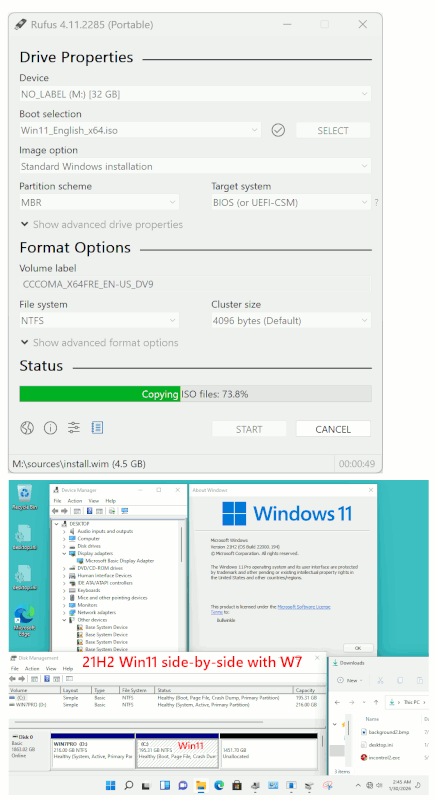
    Rufus 4.11p (rufus.ie/en) plus Oct5,2021 21H2 Win11 should work.
    It can be installed side-by-side on your Win7 disk, using the
    Custom install option and making a partition on the spare space to the right. The installer didn't even mention making a System Reserved, but
    we'll see in a moment how things work out.

    Do the install with the network cable disconnected. This prevents
    "Checking for Updates" and the opportunity to hijack the install
    and drive you to a bad place with a dark alley.

    Name: Win11_English_x64.iso # Selecting this, as a "bridge to the past", less restricted
    Size: 5497985024 bytes (5243 MiB) # This happens to be the 11 flavors disc, not the 7 flavors.
    SHA256: 667BD113A4DEB717BC49251E7BDC9F09C2DB4577481DDFBCE376436BEB9D1D2F October rCA5, rCA2021

    If you "taste" this one, do a SHA256 and verify. It is 11 flavors.
    I can never be sure about these until they're downloaded -- you'll
    have to give it a try.

    https://archive.org/details/win-11-english-x-64_202111

    There is always UUPDUMP. I don't know if Microsoft is hiding
    a collection of old revisions or not (TechBench?).

    Here is a picture of the side-by-side install, with custom partition
    created to the right of Windows 7. It doesn't have all the drivers yet.
    It's fresh off the press.

    [Picture] Use Download Original to get original size picture

    https://i.postimg.cc/DZKzVh1v/Turbo-Tax-Win11-Solution.gif

    Paul


    --- Synchronet 3.21b-Linux NewsLink 1.2
  • From jetjock@jetjock@unkown.com to alt.windows7.general on Fri Jan 30 09:11:25 2026
    From Newsgroup: alt.windows7.general

    On Thu, 29 Jan 2026 20:43:41 +0000, "J. P. Gilliver"
    <G6JPG@255soft.uk> wrote:

    On 2026/1/29 19:25:57, jetjock wrote:
    First of all, is it even possible? Second, if it is, are there still
    any Sites where one can get a free copy of Win 11 to use? Third, just
    how difficult is it set up a VM and install Win 11 to it?

    I can't answer your main questions, but I think any "free" W11 was an
    upgrade from a validated W10; although you may find places where free
    W11 can be downloaded, you probably can't use them on a new machine
    (which includes VMs) without an authentication mechanism.

    Of course, (a) there are probably hacks around, (b) it may let you run
    for a limited time per go - maybe with black wallpaper or similar, which
    may ...


    Since Intuit's greed has now forced Turbo Tax users to use Win 11 if
    they want to keep using TT, I'm afraid I'm being forced into it! TT is
    the ONLY thing I'll be using it for. I'll almost assuredly delete it
    all after tax season.

    ... be sufficient to get the tax stuff done.

    Is it Intuit's greed? What do _they_ get out of insisting on W11?

    Force you into using their "free" online program. Yes, it's free
    (mostly) to use but they then have all of your personal info stored on
    their server and can do whatever they want with it.


    >>>>>>>>>>jetjock<<<<<<<<<<

    >>>>>>>>>>jetjock<<<<<<<<<<
    --- Synchronet 3.21b-Linux NewsLink 1.2
  • From jetjock@jetjock@unkown.com to alt.windows7.general on Fri Jan 30 09:13:53 2026
    From Newsgroup: alt.windows7.general

    On Fri, 30 Jan 2026 04:04:42 +0700, JJ <jj4public@gmail.com> wrote:

    On Thu, 29 Jan 2026 13:25:57 -0600, jetjock wrote:
    First of all, is it even possible? Second, if it is, are there still
    any Sites where one can get a free copy of Win 11 to use? Third, just
    how difficult is it set up a VM and install Win 11 to it?

    Since Intuit's greed has now forced Turbo Tax users to use Win 11 if
    they want to keep using TT, I'm afraid I'm being forced into it! TT is
    the ONLY thing I'll be using it for. I'll almost assuredly delete it
    all after tax season.

    >>>>>>>>>>jetjock<<<<<<<<<<

    It's possible.

    Windows 11, the software copy, is free, but its license is not.

    https://www.microsoft.com/en-us/software-download/windows11

    Difficulty on setting up a VM will depend on your familiarity with internal >PC components. There are many guides to do it on the net already.

    Thanks! If it still allows install and a "trial" period like 7 did,
    that should be enough to do my taxes.

    >>>>>>>>>>jetjock<<<<<<<<<<
    --- Synchronet 3.21b-Linux NewsLink 1.2
  • From jetjock@jetjock@unkown.com to alt.windows7.general on Fri Jan 30 09:24:35 2026
    From Newsgroup: alt.windows7.general

    On Fri, 30 Jan 2026 03:31:52 -0500, Paul <nospam@needed.invalid>
    wrote:

    On Thu, 1/29/2026 2:25 PM, jetjock wrote:
    First of all, is it even possible? Second, if it is, are there still
    any Sites where one can get a free copy of Win 11 to use? Third, just
    how difficult is it set up a VM and install Win 11 to it?

    Since Intuit's greed has now forced Turbo Tax users to use Win 11 if
    they want to keep using TT, I'm afraid I'm being forced into it! TT is
    the ONLY thing I'll be using it for. I'll almost assuredly delete it
    all after tax season.

    >>>>>>>>>>jetjock<<<<<<<<<<


    I tested some VMs, and could not close all the requirements on
    any of them.

    I do have a Win11 complete with swtpm TPM emulation
    running in Linux, in QEMU-KVM, but that doesn't count.
    For one thing, the networking sucks. It's very hard to get
    an IP address that sits within the usual 255.255.255.0 netmask.
    That NAT mode works, but you can only surf the web, you can't
    use Windows File Sharing. I tried a hotspot from inside the VM,
    and got that working, but it was slower than Molasses on a Friday.
    The "Bridged" option in QEMU-KVM, requires you to trot open
    a terminal and issue magic commands -- which in my case, weren't
    so magic and stuff broke. Anyway, that's about as close as I can
    get for a brand new adventure that sorta works.

    *******

    Rufus 4.11p (rufus.ie/en) plus Oct5,2021 21H2 Win11 should work.
    It can be installed side-by-side on your Win7 disk, using the
    Custom install option and making a partition on the spare space to the right. >The installer didn't even mention making a System Reserved, but
    we'll see in a moment how things work out.

    Do the install with the network cable disconnected. This prevents
    "Checking for Updates" and the opportunity to hijack the install
    and drive you to a bad place with a dark alley.

    Name: Win11_English_x64.iso # Selecting this, as a "bridge to the past", less restricted
    Size: 5497985024 bytes (5243 MiB) # This happens to be the 11 flavors disc, not the 7 flavors.
    SHA256: 667BD113A4DEB717BC49251E7BDC9F09C2DB4577481DDFBCE376436BEB9D1D2F >October ?5, ?2021

    If you "taste" this one, do a SHA256 and verify. It is 11 flavors.
    I can never be sure about these until they're downloaded -- you'll
    have to give it a try.

    https://archive.org/details/win-11-english-x-64_202111

    There is always UUPDUMP. I don't know if Microsoft is hiding
    a collection of old revisions or not (TechBench?).

    Here is a picture of the side-by-side install, with custom partition
    created to the right of Windows 7. It doesn't have all the drivers yet.
    It's fresh off the press.

    [Picture] Use Download Original to get original size picture

    https://i.postimg.cc/DZKzVh1v/Turbo-Tax-Win11-Solution.gif

    Paul

    Thank, Paul. You did not mention whether this could be done on an
    older machine, as I have, that doesn't have TPM.

    >>>>>>>>>>jetjock<<<<<<<<<<
    --- Synchronet 3.21b-Linux NewsLink 1.2
  • From Paul@nospam@needed.invalid to alt.windows7.general on Fri Jan 30 14:37:02 2026
    From Newsgroup: alt.windows7.general

    On Fri, 1/30/2026 10:24 AM, jetjock wrote:

    Thank, Paul. You did not mention whether this could be done on an
    older machine, as I have, that doesn't have TPM.

    >>>>>>>>>>jetjock<<<<<<<<<<

    That was done on my 4930K 4th generation CPU, no TPM, I emulated
    a BIOS boot machine (no UEFI!), no GPT on the disk you will notice.
    The Win7 has the Active (boot) flag on it, and the Win11 installer
    puts the BCD material into a Win7 folder.

    That's about as old-old-school as you can manage.

    Will that work on my Optiplex with E8400 Core2Duo processor ? NO.
    The missing POPCNT instruction will cause the side-by-side partner
    to crash. It would not work on a Phenom or on a Pentium IV with
    2MB cache. Or an AthlonXP (a 32-bit only processor, as Win11 is
    64-bit only).

    But within a reasonable range of equipment (like a Skylake processor
    a Win7 user might own on average), it can work "without wheels nor wings" :-) And it still flies as if magic. And by using 21H2 as the DVD, that's
    to take maximal advantage of "fewer traps to fall into", yet still
    have a W11 kernel TurboTax can "sniff". When you install with the
    network cable disconnected, there can be an "I don't have a network"
    button so you can set up a local account.

    For more info, dump some hardware info into the post.

    The thing that makes this possible, is Rufus neutering stuff.

    But compared to the hair loss from trying to make a VM host
    run on Win7, this is *infinitely* easier. I mean really, I was
    exhausted from trying three levels of version sampling
    to try to get alignment on broken-softwares. The idea of
    getting a W11-capable VM running on W7, that's a stretch-drive
    that could take a solid week of hacking.

    Paul
    --- Synchronet 3.21b-Linux NewsLink 1.2
  • From Schugo@schugo@schugo.de to alt.windows7.general on Sat Jan 31 14:36:41 2026
    From Newsgroup: alt.windows7.general

    On 29.01.2026 20:25, jetjock wrote:
    First of all, is it even possible? Second, if it is, are there still
    any Sites where one can get a free copy of Win 11 to use? Third, just
    how difficult is it set up a VM and install Win 11 to it?
    ...

    Not tested yet, but this also looks like something to try:

    tiny10, tiny11 and nano11 by NTDEV

    https://ntdotdev.wordpress.com/2024/01/08/the-complete-tiny10-and-tiny11-list/

    ciao...

    --- Synchronet 3.21b-Linux NewsLink 1.2
  • From Schugo@schugo@schugo.de to alt.windows7.general on Sat Jan 31 14:43:15 2026
    From Newsgroup: alt.windows7.general

    On 31.01.2026 14:36, Schugo wrote:
    On 29.01.2026 20:25, jetjock wrote:
    First of all, is it even possible? Second, if it is, are there still
    any Sites where one can get a free copy of Win 11 to use? Third, just
    how difficult is it set up a VM and install Win 11 to it?
    ...

    Not tested yet, but this also looks like something to try:

    tiny10, tiny11 and nano11 by NTDEV

    https://ntdotdev.wordpress.com/2024/01/08/the-complete-tiny10-and-tiny11-list/

    haha.. there's always an indian dev on YT to the rescue:

    Tiny11 in Virtual Box | No TPM / Secure Boot | Less than 2 GB RAM | Windows 7 https://www.youtube.com/watch?v=f-TuLP0MxdA

    should try this out.

    ciao..
    --- Synchronet 3.21b-Linux NewsLink 1.2
  • From jetjock@jetjock@unkown.com to alt.windows7.general on Sat Jan 31 09:51:57 2026
    From Newsgroup: alt.windows7.general

    On Fri, 30 Jan 2026 14:37:02 -0500, Paul <nospam@needed.invalid>
    wrote:

    On Fri, 1/30/2026 10:24 AM, jetjock wrote:

    Thank, Paul. You did not mention whether this could be done on an
    older machine, as I have, that doesn't have TPM.

    >>>>>>>>>>jetjock<<<<<<<<<<

    That was done on my 4930K 4th generation CPU, no TPM, I emulated
    a BIOS boot machine (no UEFI!), no GPT on the disk you will notice.
    The Win7 has the Active (boot) flag on it, and the Win11 installer
    puts the BCD material into a Win7 folder.

    That's about as old-old-school as you can manage.

    Will that work on my Optiplex with E8400 Core2Duo processor ? NO.
    The missing POPCNT instruction will cause the side-by-side partner
    to crash. It would not work on a Phenom or on a Pentium IV with
    2MB cache. Or an AthlonXP (a 32-bit only processor, as Win11 is
    64-bit only).

    But within a reasonable range of equipment (like a Skylake processor
    a Win7 user might own on average), it can work "without wheels nor wings" :-) >And it still flies as if magic. And by using 21H2 as the DVD, that's
    to take maximal advantage of "fewer traps to fall into", yet still
    have a W11 kernel TurboTax can "sniff". When you install with the
    network cable disconnected, there can be an "I don't have a network"
    button so you can set up a local account.

    For more info, dump some hardware info into the post.

    The thing that makes this possible, is Rufus neutering stuff.

    But compared to the hair loss from trying to make a VM host
    run on Win7, this is *infinitely* easier. I mean really, I was
    exhausted from trying three levels of version sampling
    to try to get alignment on broken-softwares. The idea of
    getting a W11-capable VM running on W7, that's a stretch-drive
    that could take a solid week of hacking.

    Paul

    If YOU couldn't do it, it's damn sure I'D never get it done. Many
    thanks!

    >>>>>>>>>>jetjock<<<<<<<<<<
    --- Synchronet 3.21b-Linux NewsLink 1.2
  • From jetjock@jetjock@unkown.com to alt.windows7.general on Sat Jan 31 10:01:42 2026
    From Newsgroup: alt.windows7.general

    On Sat, 31 Jan 2026 14:43:15 +0100, Schugo <schugo@schugo.de> wrote:

    On 31.01.2026 14:36, Schugo wrote:
    On 29.01.2026 20:25, jetjock wrote:
    First of all, is it even possible? Second, if it is, are there still
    any Sites where one can get a free copy of Win 11 to use? Third, just
    how difficult is it set up a VM and install Win 11 to it?
    ...

    Not tested yet, but this also looks like something to try:

    tiny10, tiny11 and nano11 by NTDEV

    https://ntdotdev.wordpress.com/2024/01/08/the-complete-tiny10-and-tiny11-list/

    haha.. there's always an indian dev on YT to the rescue:

    Tiny11 in Virtual Box | No TPM / Secure Boot | Less than 2 GB RAM | Windows 7 >https://www.youtube.com/watch?v=f-TuLP0MxdA

    should try this out.

    ciao..

    Thanks!

    >>>>>>>>>>jetjock<<<<<<<<<<
    --- Synchronet 3.21b-Linux NewsLink 1.2
  • From Paul@nospam@needed.invalid to alt.windows7.general on Sat Jan 31 17:33:25 2026
    From Newsgroup: alt.windows7.general

    On Sat, 1/31/2026 8:43 AM, Schugo wrote:
    On 31.01.2026 14:36, Schugo wrote:
    On 29.01.2026 20:25, jetjock wrote:
    First of all, is it even possible? Second, if it is, are there still
    any Sites where one can get a free copy of Win 11 to use? Third, just
    how difficult is it set up a VM and install Win 11 to it?
    ...

    Not tested yet, but this also looks like something to try:

    tiny10, tiny11 and nano11 by NTDEV

    https://ntdotdev.wordpress.com/2024/01/08/the-complete-tiny10-and-tiny11-list/

    haha.. there's always an indian dev on YT to the rescue:

    Tiny11 in Virtual Box | No TPM / Secure Boot | Less than 2 GB RAM | Windows 7 https://www.youtube.com/watch?v=f-TuLP0MxdA

    should try this out.

    ciao..


    Yes, it works. You're using a modified version of a Windows 11 DVD.
    The missing part of the virtualbox link would be pointed at the Old_Version portion of the virtualbox.org site. Maybe a 6.1.44 or 6.1.46 would work.

    "Virtual Box : https://www.virtualbox.org/wiki/Downloads

    Virtual Box 6.0 [For Windows 7 64-bit] : https://www.virtualbox.org/wiki/Download_O...

    Virtual Box 5.2 [For Windows 7 32-bit] : https://www.virtualbox.org/wiki/Download_O...

    Tiny11 : https://archive.org/details/tiny-11-NTDEV
    "

    You could try 6.1.50 (I'm running 6.1.44 on the daily driver). The 7 stream promised
    a TPM solution, but it was touted as TPM passthru, and I only have the one physical TPM module on this machine (the other machines don't have modules). And
    that means I have to do my Vboz7 experiments on this machine, whereas normally I do them
    on the other machines in the room, to not screw up anything on the daily driver.

    https://www.virtualbox.org/wiki/Download_Old_Builds_6_1

    Windows Hosts 6.1.50 -- run as Administrator 111,780,872 bytes
    Extension Pack (double click after other package is installed) 11,175,855 bytes

    I was trying to do it with 7.2.6 VirtualBox, on the premise that maybe they've fixed the missing swtpm in their implementation. This would have allowed a relatively frictionless installation of W11 (more DVD discs would work). Like, I'm trying
    to remove Rufus from the picture when doing a VM, because you have to convert your
    Rufus USB stick back to an ISO before loading the ISO into VirtualBox. The VM softwares
    tend to not like booting from USB (a USB passthru stick), as that may not be included in the shell BIOS/UEFI that is inside the virtualbox guest. The UEFI support
    is more like an EFI support.

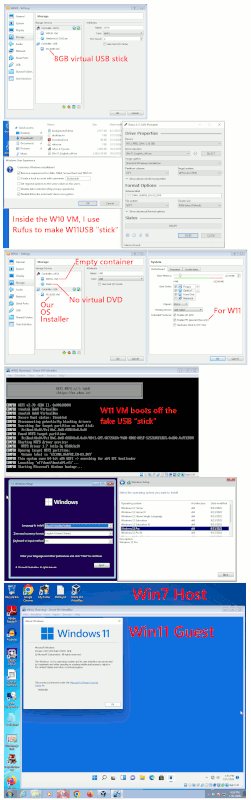
    You can make a virtual USB stick, by running Rufus in a "lesser VM" first, and have Rufus dump that into a .vhd . But then it's a question of whether that will
    boot. Generally an ISO or a physical DVD drive works well, but anything else
    is asking for trouble (booting off a kludge).

    *******

    The good news, is 6.1.50 booted from a virtual USB stick (which is backed with a VHD file). Shocking. It didn't even think it was going to do that, but once the UEFI BIOS in 6.1.50 decided there was no media in the optical drive,
    and the HDD was all zeros (no MBR), it "sniffed" the USB virtual stick
    and actually mounted the partitions on it. The text looked a little
    different while it was doing that.

    Summary: I'm in. W11 21H2 with Rufus treatment to remove TPM ticky box,
    and the virtual USB VHD (8GB) worked to install Windows 11.
    With the virtual W11 network cable disconnected in the VM,
    it didn't have any opportunity to call home or anything.
    Since Rufus had messed with it, when it found no network cable,
    it allowed the "I have no Internet" to work, and it set up with
    a local account.

    [Picture] Use "Download Original" for a full-resolution copy

    https://i.postimg.cc/g2tXYXmj/W7-Vbox-6150-W11-Guest.gif

    Paul
    --- Synchronet 3.21b-Linux NewsLink 1.2
  • From Char Jackson@none@none.invalid to alt.windows7.general on Sat Jan 31 17:18:26 2026
    From Newsgroup: alt.windows7.general

    On Fri, 30 Jan 2026 03:31:52 -0500, Paul <nospam@needed.invalid> wrote:

    I tested some VMs, and could not close all the requirements on
    any of them.

    I do have a Win11 complete with swtpm TPM emulation
    running in Linux, in QEMU-KVM, but that doesn't count.
    For one thing, the networking sucks. It's very hard to get
    an IP address that sits within the usual 255.255.255.0 netmask.

    What does that mean? Is it a DHCP thing? If so, you could spin up a
    virtual DHCP server on that network segment. I rarely do that, but only
    because I rarely use DHCP. It's much easier not to.


    That NAT mode works, but you can only surf the web, you can't
    use Windows File Sharing. I tried a hotspot from inside the VM,
    and got that working, but it was slower than Molasses on a Friday.
    The "Bridged" option in QEMU-KVM, requires you to trot open
    a terminal and issue magic commands -- which in my case, weren't
    so magic and stuff broke. Anyway, that's about as close as I can
    get for a brand new adventure that sorta works.

    --- Synchronet 3.21b-Linux NewsLink 1.2
  • From Schugo@schugo@schugo.de to alt.windows7.general on Sun Feb 1 02:29:52 2026
    From Newsgroup: alt.windows7.general

    On 31.01.2026 23:33, Paul wrote:
    On Sat, 1/31/2026 8:43 AM, Schugo wrote:
    On 31.01.2026 14:36, Schugo wrote:
    On 29.01.2026 20:25, jetjock wrote:
    First of all, is it even possible? Second, if it is, are there still
    any Sites where one can get a free copy of Win 11 to use? Third, just
    how difficult is it set up a VM and install Win 11 to it?
    ...

    Not tested yet, but this also looks like something to try:

    tiny10, tiny11 and nano11 by NTDEV

    https://ntdotdev.wordpress.com/2024/01/08/the-complete-tiny10-and-tiny11-list/

    haha.. there's always an indian dev on YT to the rescue:

    Tiny11 in Virtual Box | No TPM / Secure Boot | Less than 2 GB RAM | Windows 7
    https://www.youtube.com/watch?v=f-TuLP0MxdA

    should try this out.

    ciao..


    Yes, it works. You're using a modified version of a Windows 11 DVD.
    The missing part of the virtualbox link would be pointed at the Old_Version portion of the virtualbox.org site. Maybe a 6.1.44 or 6.1.46 would work.
    ...

    just checked my version: Virtual Box 7.0, (c) 2024

    ciao...

    --- Synchronet 3.21b-Linux NewsLink 1.2