From Newsgroup: alt.os.linux.ubuntu
On Tue, 8/18/2026 12:20 AM, Simon wrote:
My desktop computer is 64-bit and has 8 GB of RAM. Unfortunately, it is still running an old BIOS and it is not possible to upgrade to UEFI. Consequently, the hard disk storage is limited to 2 TB.
Is there any way I can bypass this limitation? In Windows, I could use GParted and MBR to partition the hard disk into two 2 TB partitions (on
a 4TB HDD). Would I need to do something similar in Linux?
The machine too slow to run Windows 11 and I have no plans to start
using Windows 10 ever again. The best option for me is to install Ubuntu
or Mint and use it for what I normally do. I can run dot net, MSSQL and
VS Code on ubuntu so there is no need for windows on it.
You can do a GPT disk, with a BIOS_Boot GRUB installation.
https://support.scc.suse.com/s/kb/When-is-the-bios-boot-partition-required?language=en_US
One of the problems, is getting this explained in plain English.
https://askubuntu.com/questions/705055/gpt-detected-please-create-a-bios-boot-partition
Let's start by "doing it wrong". That's always a quick way to arrive at the right answer :-) OK ?
If Chuckles The Clown enters the room, he uses a "one size fits all" approach in 2026,
to installing software. He *insists* on doing a UEFI installation, even when he *knows*
a machine is BIOS only. Now, how stupid is this ???
+-----------------------+--------------------------+-------------------+
| EFI System Partition | Single partition install | Swap Partition |
| (ESP) | Slash partition EXT4 | for argument sake |
+-----------------------+--------------------------+-------------------+
The pig-headed installer is going to try to do that. Even if the LiveDVD senses the conditions are wrong, it still does that. Even though the LiveDVD KNOWS this is not going to boot! Now, how stupid can you be. There's no point installing, unless the install is going to be successful. To a first approximation.
OK, now let us say we make a modification (manually, during install). The installer
usually has a "Do something else" option. But, we cannot be sure the "Do something else"
has all the features we need, to add the dotted-line partition. An alternative, is before using the installer, prepare the disk yourself using Gparted, and then
the "form" of the disk is correct, and we only have to "tease" the installer when we actually use the installer.
+-----------------------+ - - - - - - - - - - - - - +--------------------------+-------------------+
| EFI System Partition | BIOS_Boot partition | Single partition install | Swap Partition |
| (ESP) | Use flag to set GPT type | Slash partition EXT4 | for argument sake |
+-----------------------+ - - - - - - - - - - - - - +--------------------------+-------------------+
OK, maybe the installer *still* insists on doing it wrong. It refuses to ask GRUB to do a BIOS boot installation, using the extra partition as the magic sauce.
It does a UEFI install. The dotted line partition, is not initialized by the installer
at all.
We use the Boot Repair DVD from Yannbuntu. With the properly prepared additional
partition in place, we do a Boot Repair. The Boot Repair is not pig-headed.
It sees the attempt on the BIOS machine, to do a BIOS boot, because that
is all the machine has. It installs whatever is required, in the extra partition.
As a first hint then, I can tell you that:
1) What you want, can be done. GPT disk. Very large partition. Boot from BIOS.
Now, if you're at all clumsy, you can push the materials too far to the right,
and exceed whatever trick it uses to boot. If the boot materials are more than
2.2TB from the right, it might not work. As shown above, we are not even remotely
close to making it un-bootable. Only the swap is way off in the woods, and that's
not a problem.
2) Must install the relatively small extra partition, set the flag on it.
Once *any* GRUB installer sees that, that partition has a meaning.
On materials such as the Yannbuntu Boot Repair, it does not have an axe to
grind, and it can see you want a BIOS boot of a GPT disk. If you do not install
the small (one or two partitions) for the job, then *no* utility is smart enough
in 2026, to add it for you, as the "industry" wants to support only UEFI boot.
But the humans, with real computers, can't always do that.
So, we try to tell them about the small partition required, the "bios_grub" flag
in gparted, and how that partition functions as the "attractant" for a solution
to attach itself to your stuff :-)
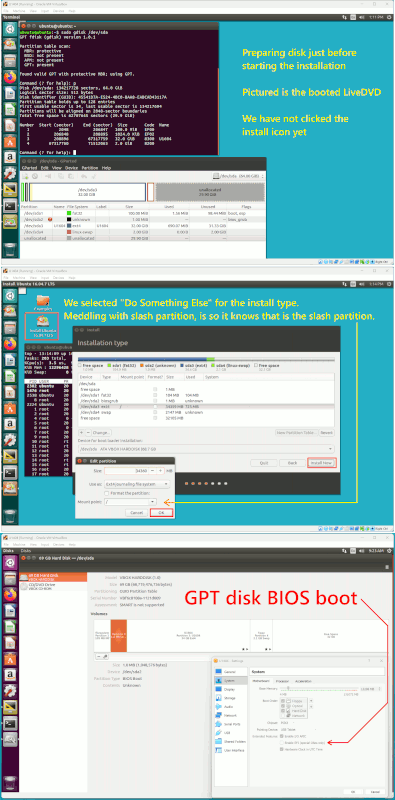
Here is a picture, of a test, using a 16.04.7 DVD (that's the oldest DVD on this machine).
The virtual machine settings does NOT have the EFI box ticked, this means the OS can
only boot in BIOS mode. The picture depicts a GPT disk.
That's a "demo", not exactly a recipe.
I did it this way, as the current Ubuntu DVD would be hopelessly slow at installing and some of my hair would fall out. The older discs are a bit
more efficient (less SNAP). This vintage of DVD, did the job we expected.
[Picture]
https://imgur.com/a/DIy4LDZ
https://postimg.cc/dhgNJTFL
https://i.postimg.cc/pdLwYD1Y/Ubuntu-Bios-Boot-Preparation.gif
Paul
--- Synchronet 3.22a-Linux NewsLink 1.2