• had my first major LM issue today :(

    From Axel@none@not.here to alt.os.linux.mint on Sat Oct 17 23:04:17 2026
    From Newsgroup: alt.os.linux.mint


    One of the PC's running 21.3 failed to boot after the latest update
    manager software install. I tried dropping back to an older kernal, then recovery mode, but no joy, so I did a timeshift which worked. however,
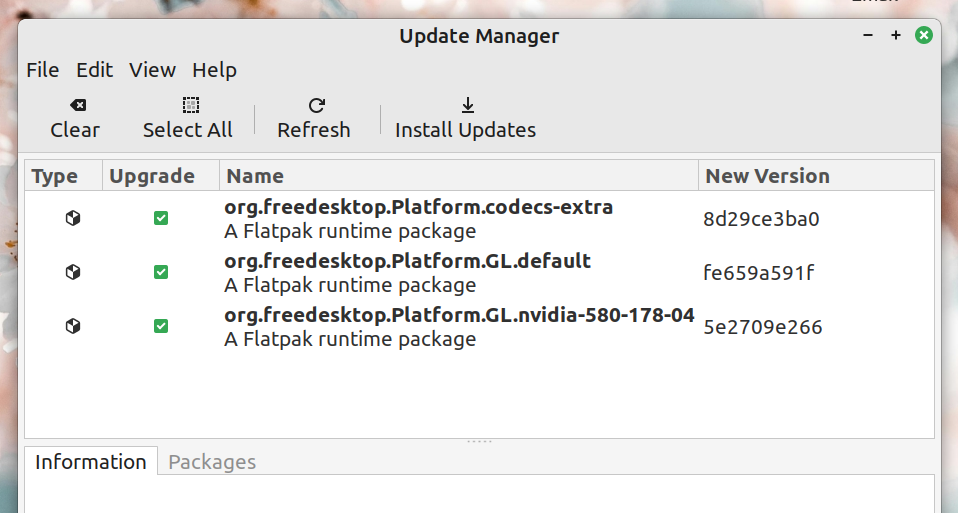
    Update Manager now shows three packages that won't install and remain
    there... https://auslink.info/linux/updates.png ...so I clicked
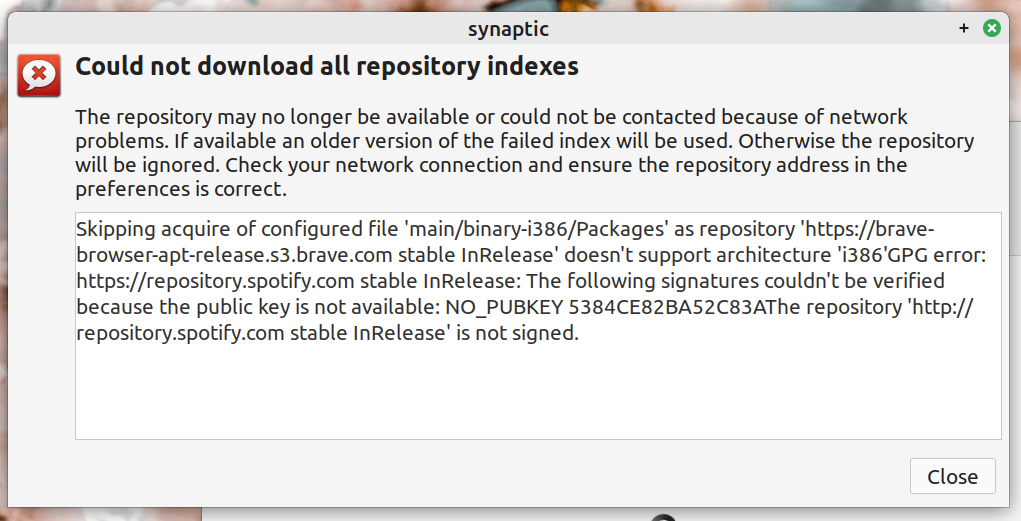
    'refresh' and I got this... https://auslink.info/linux/refreshed.png
    ...can I safely ignore them, or remove them somehow, or are they
    necessary? also, the timeshift file was 10 days old so I expected lots
    of updates, but only those three are there. ??
    --
    Linux Mint 22.3

    --- Synchronet 3.22a-Linux NewsLink 1.2
  • From George@invalid@invalid.invalid to alt.os.linux.mint on Sat Oct 17 19:27:23 2026
    From Newsgroup: alt.os.linux.mint

    On 17/10/2026 13:04, Axel wrote:

    One of the PC's running 21.3 failed to boot after the latest update
    manager software install. I tried dropping back to an older kernal,
    then recovery mode, but no joy, so I did a timeshift which worked.
    however, Update Manager now shows three packages that won't install
    and remain there... https://auslink.info/linux/updates.png ...so I
    clicked 'refresh' and I got this...
    https://auslink.info/linux/refreshed.png ...can I safely ignore them,
    or remove them somehow, or are they necessary? also, the timeshift
    file was 10 days old so I expected lots of updates, but only those
    three are there. ??


    Every month, I run the following commands in the Terminal:

    sudo apt-get update
    sudo apt-get upgrade
    sudo apt autoremove
    sudo apt purge --autoremove
    sudo apt autoclean
    sudo apt clean

    This ensures that the system is updated and that old, useless files are removed. It's all manual work, but it only takes five minutes!


    --- Synchronet 3.22a-Linux NewsLink 1.2
  • From Alan K.@alan@invalid.com to alt.os.linux.mint on Sat Oct 17 14:47:58 2026
    From Newsgroup: alt.os.linux.mint

    On 10/17/26 2:27 PM, George wrote:
    On 17/10/2026 13:04, Axel wrote:

    One of the PC's running 21.3 failed to boot after the latest update
    manager software install. I tried dropping back to an older kernal,
    then recovery mode, but no joy, so I did a timeshift which worked.
    however, Update Manager now shows three packages that won't install
    and remain there... https://auslink.info/linux/updates.png ...so I
    clicked 'refresh' and I got this...
    https://auslink.info/linux/refreshed.png ...can I safely ignore them,
    or remove them somehow, or are they necessary? also, the timeshift
    file was 10 days old so I expected lots of updates, but only those
    three are there. ??


    Every month, I run the following commands in the Terminal:

    sudo apt-get update
    sudo apt-get upgrade
    sudo apt autoremove
    sudo apt purge --autoremove
    sudo apt autoclean
    sudo apt clean

    This ensures that the system is updated and that old, useless files are removed. It's all manual work, but it only takes five minutes!


    You could just copy and paste that into a batch file and it's one click.
    Not a lot of manual work then.
    --
    Mint 22.3, Thunderbird 153.4.0esr, Firefox 158.0
    Alan K.
    --- Synchronet 3.22a-Linux NewsLink 1.2
  • From Lawrence =?iso-8859-13?q?D=FFOliveiro?=@ldo@nz.invalid to alt.os.linux.mint on Sat Oct 17 20:11:37 2026
    From Newsgroup: alt.os.linux.mint

    On Sat, 17 Oct 2026 23:04:17 +1100, Axel wrote:

    https://auslink.info/linux/refreshed.png

    It says no rCLi386rCY available ... sounds like you are trying to run a
    32-bit installation, which might no longer be supported.

    Yup, checking further, <https://linuxmint-installation-guide.readthedocs.io/en/latest/choose.html#bit-or-64-bit>
    says: rCLFrom version 20 onward, only 64-bit is availablerCY. Given that
    you are already up to 21.3, itrCOs surprising you didnrCOt hit this
    roadblock earlier ...
    --- Synchronet 3.22a-Linux NewsLink 1.2
  • From Axel@none@not.here to alt.os.linux.mint on Sun Oct 18 16:20:25 2026
    From Newsgroup: alt.os.linux.mint

    Alan K. wrote:
    On 10/17/26 2:27 PM, George wrote:
    On 17/10/2026 13:04, Axel wrote:

    One of the PC's running 21.3 failed to boot after the latest update
    manager software install. I tried dropping back to an older kernal,
    then recovery mode, but no joy, so I did a timeshift which worked.
    however, Update Manager now shows three packages that won't install
    and remain there... https://auslink.info/linux/updates.png ...so I
    clicked 'refresh' and I got this...
    https://auslink.info/linux/refreshed.png ...can I safely ignore them,
    or remove them somehow, or are they necessary? also, the timeshift
    file was 10 days old so I expected lots of updates, but only those
    three are there. ??


    Every month, I run the following commands in the Terminal:

    sudo apt-get update
    sudo apt-get upgrade
    sudo apt autoremove
    sudo apt purge --autoremove
    sudo apt autoclean
    sudo apt clean

    This ensures that the system is updated and that old, useless files are
    removed. It's all manual work, but it only takes five minutes!


    You could just copy and paste that into a batch file and it's one click.
    Not a lot of manual work then.


    what would be the code for that?
    --
    Linux Mint 22.3

    --- Synchronet 3.22a-Linux NewsLink 1.2
  • From Axel@none@not.here to alt.os.linux.mint on Sun Oct 18 16:23:57 2026
    From Newsgroup: alt.os.linux.mint

    Lawrence DrCOOliveiro wrote:
    On Sat, 17 Oct 2026 23:04:17 +1100, Axel wrote:

    https://auslink.info/linux/refreshed.png
    It says no rCLi386rCY available ... sounds like you are trying to run a 32-bit installation, which might no longer be supported.

    I guess but I don't know which app it would be.-a I'm getting the message
    that the repository cannot be accessed, and last try it won't boot
    again. I've given up. I wiped the hard drive, and I'm checking it for
    bad sectors, then I'll install LM 22.3 from scratch


    Yup, checking further, <https://linuxmint-installation-guide.readthedocs.io/en/latest/choose.html#bit-or-64-bit>
    says: rCLFrom version 20 onward, only 64-bit is availablerCY. Given that
    you are already up to 21.3, itrCOs surprising you didnrCOt hit this
    roadblock earlier ...
    --
    Linux Mint 22.3

    --- Synchronet 3.22a-Linux NewsLink 1.2
  • From Axel@none@not.here to alt.os.linux.mint on Sun Oct 18 16:24:13 2026
    From Newsgroup: alt.os.linux.mint

    George wrote:
    On 17/10/2026 13:04, Axel wrote:

    One of the PC's running 21.3 failed to boot after the latest update
    manager software install. I tried dropping back to an older kernal,
    then recovery mode, but no joy, so I did a timeshift which worked.
    however, Update Manager now shows three packages that won't install
    and remain there... https://auslink.info/linux/updates.png ...so I
    clicked 'refresh' and I got this...
    https://auslink.info/linux/refreshed.png ...can I safely ignore them,
    or remove them somehow, or are they necessary? also, the timeshift
    file was 10 days old so I expected lots of updates, but only those
    three are there. ??


    Every month, I run the following commands in the Terminal:

    sudo apt-get update
    sudo apt-get upgrade
    sudo apt autoremove
    sudo apt purge --autoremove
    sudo apt autoclean
    sudo apt clean

    This ensures that the system is updated and that old, useless files
    are removed. It's all manual work, but it only takes five minutes!


    thanks for this, but it didn't fix the problem. I will follow your
    suggestion tho and do this regularly on my main PC.
    --
    Linux Mint 22.3

    --- Synchronet 3.22a-Linux NewsLink 1.2
  • From Paul@nospam@needed.invalid to alt.os.linux.mint on Sun Oct 18 03:27:17 2026
    From Newsgroup: alt.os.linux.mint

    On Sun, 10/18/2026 1:20 AM, Axel wrote:
    Alan K. wrote:
    On 10/17/26 2:27 PM, George wrote:
    On 17/10/2026 13:04, Axel wrote:

    One of the PC's running 21.3 failed to boot after the latest update
    manager software install. I tried dropping back to an older kernal,
    then recovery mode, but no joy, so I did a timeshift which worked.
    however, Update Manager now shows three packages that won't install
    and remain there... https://auslink.info/linux/updates.png ...so I
    clicked 'refresh' and I got this...
    https://auslink.info/linux/refreshed.png ...can I safely ignore them,
    or remove them somehow, or are they necessary? also, the timeshift
    file was 10 days old so I expected lots of updates, but only those
    three are there. ??


    Every month, I run the following commands in the Terminal:

    sudo apt-get update
    sudo apt-get upgrade
    sudo apt autoremove
    sudo apt purge --autoremove
    sudo apt autoclean
    sudo apt clean

    This ensures that the system is updated and that old, useless files are
    removed. It's all manual work, but it only takes five minutes!


    You could just copy and paste that into a batch file and it's one click.
    Not a lot of manual work then.


    what would be the code for that?


    When you write your first bash script "autoclean.sh" it might look like this. The first line identifies the shell which will be interpreting the code.

    #!/bin/bash
    # A simple script
    sudo apt-get update
    sudo apt-get upgrade
    sudo apt autoremove
    sudo apt purge --autoremove
    sudo apt autoclean
    sudo apt clean

    To determine what shells are available, you can do this.
    The /bin/sh is the Bourne Shell, but most of the time
    this is aliased to the Bourne Again Shell (bash), so there
    aren't actually two shells there, just the one shell, and the
    /bin/sh line exists for "backward compatibility".

    $ cat /etc/shells
    # /etc/shells: valid login shells
    /bin/sh
    /bin/bash
    /usr/bin/bash
    /bin/rbash
    /usr/bin/rbash
    /bin/dash
    /usr/bin/dash
    /usr/bin/tmux
    /usr/bin/screen

    When writing any programmable materials, you include error
    handlers, because you have to "expect the unexpected". Each
    command returns a $status or so, which can be conditionally checked.
    With the sequence above, you don't actually want to drop through
    all those, neither would you want those to "execute in parallel".
    This captures the return code from the "date" command, before
    the execution of any other command stomps on that return code.

    #! /bin/bash
    date
    status=$?
    echo "The date command exit status : ${status}"

    # Conditional check that some arg list is present, includes exiting with a "status code"
    # That's in case some other script.sh calls your date.sh script. The conditional
    # logic execution, the second clause does not execute if the first one fails.
    # Even if you don't *write* code like this, you still have to be able to *read* it.

    files="$@"
    [[ "$_files" == "" ]] && { echo "Usage: $0 file1.png file2.png"; exit 1; }

    If you do this in a shell

    ls &
    ls &

    then there will be at least two copies of listdir running
    at the same time. If you want them to run sequentially and
    one not proceeding until the one before it is finished, then
    you don't include the & to cause them to be forked.

    Not everyone will agree, but generally speaking, you want a
    thin book from the computer store, on each individual shell.
    There was the "Sea Shell Book" for the csh shell. To get a Bourne book (/bin/sh)
    I had to accept a single chapter in a book that had more topics in it.
    Like any programming language, you get the best results when you know
    what all the commands do :-)

    This is not to dissuade you from trying stuff. And this does not
    even constitute a "primer". I don't remember enough to write a primer.

    The /bin/bash line can include parameters like -e after it.
    There are some global properties you can assign, like echoing
    the execution of the lines so you know where the script is
    right now.

    If you look around, you can find articles for people new to the topic.
    But this still isn't nearly enough, as it has not addressed "defensive programming"
    and the things you should be doing in a script.

    https://www.linuxfoundation.org/blog/blog/classic-sysadmin-writing-a-simple-bash-script

    The above script, one without any error status checks, you can do that if you don't really care about what happens. For example

    #!/bin/bash
    # A simple script
    # We specify absolute paths for executable, if "we don't want surprises" :-) /bin/ls a*
    /bin/ls b*
    /bin/ls c*
    exit(0)

    That script has very little in the way of "side effects".
    If the directory doesn't exist, if the files aren't there,
    nobody is harmed, the wheels do not fall of the computer.

    On the other hand, if the second command critically depends
    on the first command completing, then you had better check for that.
    That the first command completed.

    Even efforts like this are not enough, as there isn't enough
    reinforcement here.

    https://indico.cism.ucl.ac.be/event/149/contributions/162/attachments/242/516/Bash-1.pdf

    When I was at work, one day some commercial UNIX software showed up.
    There was a 2000 line Bourne shell script which was their installer.
    I didn't get too curious at first, as getting the thing installed
    was the priority. But a few hours later, I started looking at that
    file, and that was the single best .sh I'd ever seen. A real pro wrote
    it. Nicely structured. Good reuse of subroutines. Usage of all
    the features the shell had, *without* resorting to thousand character
    "sed magic" to hide what they were doing :-) I made multiple references
    to that, when I had to write something, as there was bound to be
    a similar programming pattern in that file. If you couldn't get a
    book, that's the kind of material you'd want to acquire. I regret
    not bringing a copy of that script home :-)

    Paul
    --- Synchronet 3.22a-Linux NewsLink 1.2
  • From Paul@nospam@needed.invalid to alt.os.linux.mint on Sun Oct 18 04:00:11 2026
    From Newsgroup: alt.os.linux.mint

    On Sun, 10/18/2026 1:23 AM, Axel wrote:
    Lawrence DrCOOliveiro wrote:
    On Sat, 17 Oct 2026 23:04:17 +1100, Axel wrote:

    https://auslink.info/linux/refreshed.png
    It says no rCLi386rCY available ... sounds like you are trying to run a
    32-bit installation, which might no longer be supported.

    I guess but I don't know which app it would be.-a I'm getting the message that the repository cannot be accessed, and last try it won't boot again. I've given up. I wiped the hard drive, and I'm checking it for bad sectors, then I'll install LM 22.3 from scratch


    Yup, checking further,
    <https://linuxmint-installation-guide.readthedocs.io/en/latest/choose.html#bit-or-64-bit>
    says: rCLFrom version 20 onward, only 64-bit is availablerCY. Given that
    you are already up to 21.3, itrCOs surprising you didnrCOt hit this
    roadblock earlier ...


    I don't think I'm following this entirely, but there's some kind of answer here for the first one.

    https://askubuntu.com/questions/1453435/apt-update-gives-error-on-brave-browser

    As for "OS-ness", there are 32-bit OSes and 64-bit OSes, and a
    64-bit OS can be "pure" or it can be "multilib". For example, you might
    notice wine mentions wine64 and wine32. Yet, when you start installing
    WINE packages, hoping for an "easy time of it", only wine64 seems to be available. If you were working with a 32-bit Windows program, you might
    not be able to work with it, without wine32 being part of the install.
    At the time, some Googling indicated I needed to turn on "multilib".
    And what that does, is it makes sure that both i386 and amd64 libraries
    are present (on an amd64 OS), and when they are present, a wine32 installation will work,
    as it has the support it expects. This is one thing I like about WINE -- teasing
    out the details costs you "one morning, per day" :-) I always do a backup before attempting WINE, as I know I will screw it up and have to start
    over again.

    If there was still such a thing as a 32-bit OS in Linux, then all you
    would get there is wine32, and no attempt is made to try to make
    Windows 64-bit executables (a PE32+), work on a 32 bit OS.

    But on a 64-bit OS, normally you can run 64-bit native things
    or 32-bit native things. Adding back "multilib" as a setting,
    is for when the OS company removed it on you. And you have to
    add it back.

    Paul
    --- Synchronet 3.22a-Linux NewsLink 1.2