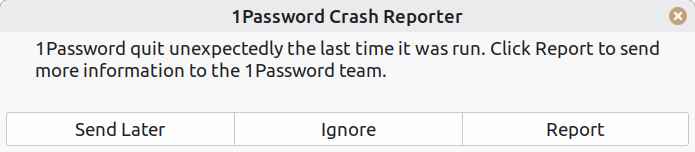
every time the computer boots I get a message that 1Password was not shutdown properly,
greetings to all. :) every time the computer boots I get a message
that 1Password was not shutdown properly, regardless whether or not it
was running when I last shutdown. I have uninstalled and reinstalled
it, but I still get the message. I have tried both the system and
flatpack versions with the same result. so I want to completely remove
it and all of it's associated files so I can do a completely clean
install. I asked google AI but I get various answers depending on how
I ask the question, so I don't trust it.
Axel wrote:
every time the computer boots I get a message that 1Password was not
shutdown properly,
Does it show up in System Monitor? Menu/Admin/System Monitor
Default mode/ Processes section is in alphabetical order
If it is there, you could shut it down.
I've never installed it, so I don't know anything about installing or removing it or where it puts its files. Tomorrow I may install in on a
live Mint and see how it behaves.
greetings to all. :) every time the computer boots I get a message that 1Password was not shutdown properly, regardless whether or not it was running when I last shutdown. I have uninstalled and reinstalled it, but I still get the message. I have tried both the system and flatpack versions with the same result. so I want to completely remove it and all of it's associated files so I can do a completely clean install. I asked google AI but I get various answers depending on how I ask the question, so I don't trust it.
On Thu, 10/8/2026 11:21 PM, Axel wrote:
greetings to all. :) every time the computer boots I get a message that 1Password was not shutdown properly, regardless whether or not it was running when I last shutdown. I have uninstalled and reinstalled it, but I still get the message. I have tried both the system and flatpack versions with the same result. so I want to completely remove it and all of it's associated files so I can do a completely clean install. I asked google AI but I get various answers depending on how I ask the question, so I don't trust it.If you look at some of the comments when working on problems with it, it seems to be an over-the-top kind of project. It has hardware acceleration. For a password manager. It might use SSE4.1 or AVX2. On one OS,
it was reported to have files in /opt. It has files in ~/.config .
https://dteare.medium.com/behind-the-scenes-of-1password-for-linux-d59b19143a23
When you used a browser plugin, it's possible that triggered some
kind of sync behavior.
It's surprising it doesn't have a repair capability.
What should happen, is even if you aren't using it, it should operate
as a service. During boot, that service may be attempting to start,
it crashes, then it reports it was not shutdown properly. It could
detect this (among other ways), by the fact it is using sqlite database,
and the database leaves three files (one of them likely a playback
journal) as evidence it was not shut down properly (a .wal) . On a "clean
and orderly" shutdown, only the database file will be sitting there.
On a crash, at the time, it would be running, and the three files
would be collecting data to allow "recovery" if it crashes. Then,
when the three files are located, it knows the last session was
dirty, so it uses the playback journal to figure out how to repair it.
I don't know enough about systemd, to know how many times it might
try to start, and how many reports it would put in a system log
about the problems it sees.
Maybe the reason Google Gemma cannot give a straight answer, is
it might have been rewritten more than once, there might be
version specific details. When you ask Google for help, you
should make it clear it's the Linux one, you're on Linux Mint 223,
the version of 1password package is a.b.c.d and so on. Try to be
very specific about your config and that will make it very
specific on the instructions for removal.
If it was a deb, you'd be looking for an uninstall command
or a purge command, depending on your plan.
https://forums.linuxmint.com/viewtopic.php?t=97526
This is the deb. It unpacks to a 600MB thing, which is mostly
contained in /opt/1Password . The contents of the directory look
like a chrome web browser (which is likely Electron), plus in
resources there is a 185MB index.node file.
https://downloads.1password.com/linux/debian/amd64/stable/1password-latest.deb
Name: 1password-latest.deb
Size: 170095530 bytes (162 MiB)
SHA256: E0AEADEAF3EB3705B549CFB84FE50736D5380BEDDB284CA39DA96141163C0FCB
This is the index.node file. Feeding the sha256 into virustotal.com search, the file seems to be a RUST program compiled to x86_64 Intel. Not that
this is important. Just to give some additional info about what is in the .deb .
Name: index.node
Size: 185486512 bytes (176 MiB)
SHA256: 81903BF3B5348698B911AE9B656E52B7392A4844EC8BED81F6D333C698A2DE36
In the index.node, you can see sequences of sqlite test commands for massaging
and removing incomplete entries or the like.
I'm sure you can cook up some queries for your friend at Google :-)
I can just poke at the outside of it.
Paul--
thanks. it wasn't a difficult as I thought. I just followed the
instructions in this video
https://www.youtube.com/watch?v=YZb5tP13xSw
Unlike a lot of other people, I (generally) don't like YTs, in that
I don't know if a yt is going to be helpful or not before I spend 'a
lot of time' watching it ...
Mike Easter wrote:
Unlike a lot of other people, I (generally) don't like YTs, in that
I don't know if a yt is going to be helpful or not before I spend 'a
lot of time' watching it ...
You can play it back at higher speed, to get an idea of what itrCOs
about in minimal time.
Axel wrote:
thanks. it wasn't a difficult as I thought. I just followed the
instructions in this video
https://www.youtube.com/watch?v=YZb5tP13xSw
Unlike a lot of other people, I (generally) don't like YTs, in that I
don't know if a yt is going to be helpful or not before I spend 'a lot
of time' watching it; so I /prefer/ a transcript that I can quickly skim
and learn what I want to learn (or not) and not bother w/ watching the vid.
Of course, there are a few things in which the 'picture/vid' is not only worthwhile but essential.
In any case, there is an online tool/site for creating a transcript of
the YT links that don't feature a transcript, which is most of them.
https://youtubetotranscript.com/
Paul wrote:
On Thu, 10/8/2026 11:21 PM, Axel wrote:
greetings to all. :) every time the computer boots I get a messageIf you look at some of the comments when working on problems with it, it
that 1Password was not shutdown properly, regardless whether or not
it was running when I last shutdown. I have uninstalled and
reinstalled it, but I still get the message. I have tried both the
system and flatpack versions with the same result. so I want to
completely remove it and all of it's associated files so I can do a
completely clean install. I asked google AI but I get various
answers depending on how I ask the question, so I don't trust it.
seems to be an over-the-top kind of project. It has hardware
acceleration.
For a password manager. It might use SSE4.1 or AVX2. On one OS,
it was reported to have files in /opt. It has files in ~/.config .
https://dteare.medium.com/behind-the-scenes-of-1password-for-linux-d59b19143a23
When you used a browser plugin, it's possible that triggered some
kind of sync behavior.
It's surprising it doesn't have a repair capability.
What should happen, is even if you aren't using it, it should operate
as a service. During boot, that service may be attempting to start,
it crashes, then it reports it was not shutdown properly. It could
detect this (among other ways), by the fact it is using sqlite database,
and the database leaves three files (one of them likely a playback
journal) as evidence it was not shut down properly (a .wal) . On a
"clean
and orderly" shutdown, only the database file will be sitting there.
On a crash, at the time, it would be running, and the three files
would be collecting data to allow "recovery" if it crashes. Then,
when the three files are located, it knows the last session was
dirty, so it uses the playback journal to figure out how to repair it.
I don't know enough about systemd, to know how many times it might
try to start, and how many reports it would put in a system log
about the problems it sees.
Maybe the reason Google Gemma cannot give a straight answer, is
it might have been rewritten more than once, there might be
version specific details. When you ask Google for help, you
should make it clear it's the Linux one, you're on Linux Mint 223,
the version of 1password package is a.b.c.d and so on. Try to be
very specific about your config and that will make it very
specific on the instructions for removal.
OK
If it was a deb, you'd be looking for an uninstall command
or a purge command, depending on your plan.
-a-a-a-a https://forums.linuxmint.com/viewtopic.php?t=97526
This is the deb. It unpacks to a 600MB thing, which is mostly
contained in /opt/1Password . The contents of the directory look
like a chrome web browser (which is likely Electron), plus in
resources there is a 185MB index.node file.
https://downloads.1password.com/linux/debian/amd64/stable/1password-latest.deb
Name: 1password-latest.deb
Size: 170095530 bytes (162 MiB)
SHA256: E0AEADEAF3EB3705B549CFB84FE50736D5380BEDDB284CA39DA96141163C0FCB
This is the index.node file. Feeding the sha256 into virustotal.com
search,
the file seems to be a RUST program compiled to x86_64 Intel. Not that
this is important. Just to give some additional info about what is in
the .deb .
Name: index.node
Size: 185486512 bytes (176 MiB)
SHA256: 81903BF3B5348698B911AE9B656E52B7392A4844EC8BED81F6D333C698A2DE36
In the index.node, you can see sequences of sqlite test commands for
massaging
and removing incomplete entries or the like.
I'm sure you can cook up some queries for your friend at Google :-)
I can just poke at the outside of it.
thanks. it wasn't a difficult as I thought. I just followed the
instructions in this video
https://www.youtube.com/watch?v=YZb5tP13xSw
-a-a-a Paul
thanks. it wasn't a difficult as I thought. I just followed the instructions in this video
https://www.youtube.com/watch?v=YZb5tP13xSw
I spoke to soon. the problem still exists. I have reported it many times. back to square one-a :(
https://auslink.info/linux/1pass.png
I have tried both the system and flatpack versions with the same
result.
Try FREE for 14 days No credit card required.rC?Cancel anytime.
Download and install the .deb package to get 1Password for Debian or
Ubuntu. Installing the .deb package will configure the signing key
and apt repository for automatic updates.
Or install 1Password manually:
On Fri, 10/9/2026 7:28 PM, Axel wrote:
After the package is uninstalled, did you clean out the appropriatethanks. it wasn't as difficult as I thought. I just followed the instructions in this videoI spoke to soon. the problem still exists. I have reported it many times. back to square one-a :(
https://www.youtube.com/watch?v=YZb5tP13xSw
https://auslink.info/linux/1pass.png
section of ~/.config ? There should be a 1Password folder in there somewhere.
Paul
On Fri, 9 Oct 2026 11:36:23 -0700, Mike Easter wrote:
Unlike a lot of other people, I (generally) don't like YTs, in thatYou can play it back at higher speed, to get an idea of what itrCOs
I don't know if a yt is going to be helpful or not before I spend 'a
lot of time' watching it ...
about in minimal time.
Axel wrote:
I have tried both the system and flatpack versions with the same
result.
I booted a live LM 22.3 and installed synaptic. There is no 1Password in
the conventional repo/s;
there IS at flathub and there IS a .deb at the
website. It is a subscription plan w/ a 14d free trial.
https://1password.com/pricing/personal
Try FREE for 14 days No credit card required.rC?Cancel anytime.
There's an interesting page at the site comparing other pw mgr/s. https://1password.com/compare/password-manager
There is also an interesting page at the site describing alternate ways
of installing the .deb on linux
https://support.1password.com/install-linux/
Download and install the .deb package to get 1Password for Debian or
Ubuntu. Installing the .deb package will configure the signing key
and apt repository for automatic updates.
Or install 1Password manually:
install repo key > add repo > debsig verify policy > install 1 pw
I decided to do it 'partially' manually so that synaptic would hold
the repo, and then synaptic could 'inform' me about its handling of
the package (because I don't know how to do all of that manually to
get the same info).
Most often I installed repo/s at a .ppa, but that is less commonly
available these days.
I decided to do it 'partially' manually so that synaptic would hold the repo, and then synaptic could 'inform' me about its handling of the
package (because I don't know how to do all of that manually to get the
same info).
Mike Easter wrote:
Axel wrote:
I have tried both the system and flatpack versions with the same
result.
I booted a live LM 22.3 and installed synaptic. There is no 1Password in
the conventional repo/s;
I'm using LM 22.3 and 1Password is in the software manager as a system package version 8.12.40 or as a flatpak version 8.12.12
maybe change your software sources link?
btw proton mail now has a free password manager, as well as free cloud storage, etc., , in case anyone is unaware and interested
https://proton.me/
Axel wrote:
btw proton mail now has a free password manager, as well as free cloudI'm a big proton fan, but I just use their free stuff such as the vpn,
storage, etc., , in case anyone is unaware and interested
https://proton.me/
and that only 'experimentally' as I'm not a vpn fan, except to investigate.
The Proton pw mgr is 'cloud-based' instead of an app.
Mike Easter wrote:
The Proton pw mgr is 'cloud-based' instead of an app.
More specifically, via a browser extension.
Proton Pass stores your passwords in end-to-end encrypted digital
vaults on your local device first, and then syncs them to ProtonrCOs encrypted cloud servers using zero-knowledge architecture.
Pass offers more than other free password managers and has no ads or
data collection. You can use it for free forever on all your devices
to create and store unlimited passwords, autofill logins, generate
2FA codes, create email aliases, secure your notes, and more.
Paul wrote:
On Fri, 10/9/2026 7:28 PM, Axel wrote:
After the package is uninstalled, did you clean out the appropriatethanks. it wasn't as difficult as I thought. I just followed theI spoke to soon. the problem still exists. I have reported it many
instructions in this video
https://www.youtube.com/watch?v=YZb5tP13xSw
times. back to square one-a :(
https://auslink.info/linux/1pass.png
section of ~/.config ? There should be a 1Password folder in there
somewhere.
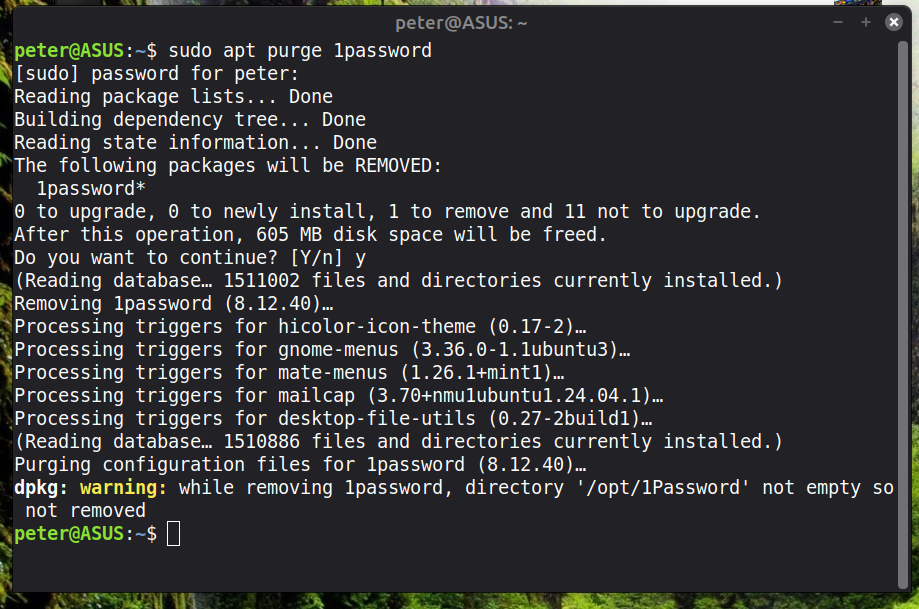
yes I did. I've tried this now, after googling...
sudo apt purge 1password
sudo apt autoremove --purge
deleted ~/.config/1Password
deleted the browser extension
I'll see how that goes-a :)
-a-a-a Paul
Mike Easter wrote:
Mike Easter wrote:Even /more/ specifically...
The Proton pw mgr is 'cloud-based' instead of an app.
More specifically, via a browser extension.
Proton Pass stores your passwords in end-to-end encrypted digital
vaults on your local device first, and then syncs them to ProtonrCOs
encrypted cloud servers using zero-knowledge architecture.
I concede that Proton has some clever security strategies.
Pass offers more than other free password managers and has no ads or
data collection. You can use it for free forever on all your devices
to create and store unlimited passwords, autofill logins, generate
2FA codes, create email aliases, secure your notes, and more.
On the one hand, while someone may 'fret' about their 'sekrit' info
being (also) stored elsewhere, it does represent (assuming security is all-powerful)
a robust backup against lost pw/s.
having so many passwords and logins I have to use a password manager.Have a separate pw for the three important items, and one pw for all
seems most sites these days want an account and login. the alternative
is to use the same password, or just a select few, everywhere.
I seem to have nailed it now. the above, plus the directory /
opt/1Password has to be removed
https://auslink.info/linux/1Password_removal.png
| Sysop: | Amessyroom |
|---|---|
| Location: | Fayetteville, NC |
| Users: | 76 |
| Nodes: | 6 (0 / 6) |
| Uptime: | 54:18:25 |
| Calls: | 1,265 |
| Calls today: | 1 |
| Files: | 1,362 |
| D/L today: |
3 files (2,684K bytes) |
| Messages: | 285,563 |