Rephrased original sentence:
I would like to be able to right click any image open in XnView MP *and be able to have a functional "set as wallpaper" option* in
the same way that you can do this in the Pix image viewer.
Currently, there is a set as wallpaper function available in XnView MP but
it doesn't work using Linux Mint Cinnamon.
That sounds like something is slightly b0rken.
XnViewMP has a config file called config.ini perhaps in an xnview dir in
your .config dir.
I don't know how to determine if it is Nemo's 'fault' (since your Nemo
works ok for Pix) or xnview's fault, since nemo doesn't work properly
for it.
Or xnview doesn't like something about Cinn/Nemo.
Can anyone create a bash script for XnView MP using Nemo as the file
manager to enable XnView MP to set wallpaper on Linux Mint Cinnamon.
I would like to be able to right click any image open in XnView MP in the same way that you can do this in the Pix image viewer.
Thanks for any help with this; I'm woefully incompetent pertaining to anything to do with even the simplest of coding.
On 29/07/2026 20:02, CtrlAltDel wrote:
Can anyone create a bash script for XnView MP using Nemo as the file
manager to enable XnView MP to set wallpaper on Linux Mint Cinnamon.
I would like to be able to right click any image open in XnView MP in
the same way that you can do this in the Pix image viewer.
Thanks for any help with this; I'm woefully incompetent pertaining to
anything to do with even the simplest of coding.
Out of interest, which version of XnView MP and which version of LM? I
have not found it possible to update XnView for almost a year without
running a force-all script every time because of a missing dependency.
Can anyone create a bash script for XnView MP using Nemo as the file
manager to enable XnView MP to set wallpaper on Linux Mint Cinnamon.
I would like to be able to right click any image open in XnView MP in the same way that you can do this in the Pix image viewer.
Thanks for any help with this; I'm woefully incompetent pertaining to anything to do with even the simplest of coding.
On Wed, 29 Jul 2026 22:24:36 +0100, Jeff Layman wrote:
On 29/07/2026 20:02, CtrlAltDel wrote:
Can anyone create a bash script for XnView MP using Nemo as the file
manager to enable XnView MP to set wallpaper on Linux Mint Cinnamon.
I would like to be able to right click any image open in XnView MP in
the same way that you can do this in the Pix image viewer.
Thanks for any help with this; I'm woefully incompetent pertaining to
anything to do with even the simplest of coding.
Out of interest, which version of XnView MP and which version of LM? I
have not found it possible to update XnView for almost a year without
running a force-all script every time because of a missing dependency.
Hello, Jeff.
It's Mint 22.3 and the latest version of XnView Mp, which is 1.11.5 (2026-06-29)
That's unfortunate that you can't update. On my setup, XnView will notify
me when an update is available and then I go to:
https://www.xnview.com/en/xnview-mp/
and select the Linux DEB 64bit option and reinstall over what I already
have. After this, restoring the entire saved /opt/XnView/UI folder
reapplies all the customization's that are lost with an update.
Interesting. I have updated several times (the latest to 1.11.5) and am
also on LM22.3. I also use the Linux DEB 64bit option when XnViewMP
informs me there's an update available. When I try to install that I
always get:
Error: Dependency is not satisfiable: libglig2.0-0 (>= 2.33.14)
I then have to run:
sudo dpkg -i --force-all XnViewMP-linux-x64.deb (that's the name of the
deb on my desktop)
The update then installs without any further problem.
Can anyone create a bash script for XnView MP using Nemo as the file
manager to enable XnView MP to set wallpaper on Linux Mint Cinnamon.
I would like to be able to right click any image open in XnView MP in the same way that you can do this in the Pix image viewer.
Thanks for any help with this; I'm woefully incompetent pertaining to anything to do with even the simplest of coding.
On Thu, 30 Jul 2026 12:11:22 +0100, Jeff Layman wrote:
Interesting. I have updated several times (the latest to 1.11.5) and am
also on LM22.3. I also use the Linux DEB 64bit option when XnViewMP
informs me there's an update available. When I try to install that I
always get:
Error: Dependency is not satisfiable: libglig2.0-0 (>= 2.33.14)
I then have to run:
sudo dpkg -i --force-all XnViewMP-linux-x64.deb (that's the name of the
deb on my desktop)
The update then installs without any further problem.
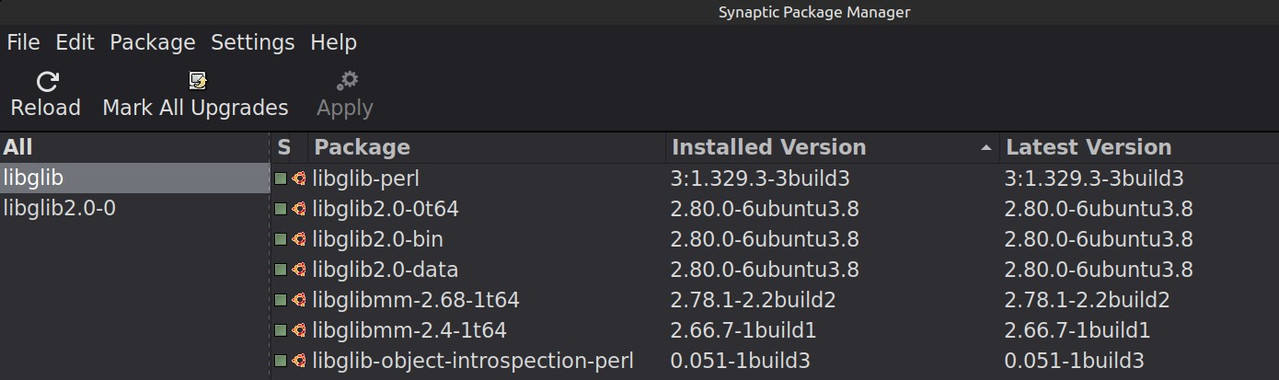
Check Synaptic to see what versions of libglib you have installed. I think you misspelled libglib as libgli"G", so be sure to search with the correct name.
This:
https://i.postimg.cc/VL4PHhks/Selection-001.jpg
is what I have.
| Sysop: | Amessyroom |
|---|---|
| Location: | Fayetteville, NC |
| Users: | 74 |
| Nodes: | 6 (0 / 6) |
| Uptime: | 50:07:30 |
| Calls: | 1,100 |
| Files: | 1,339 |
| Messages: | 275,859 |