Hi
Is there any particular trick to getting a Bluetooth keyboard to work with Linux?
I am trying to get a Thomann Pageturn pedal to work with my laptop. The laptop is a Dell Latitude 7390 running Linux Mint 20.3. The Pageturn device is a pedal that connects with bluetooth. The laptop should look on it as a keyboard.
If I step onto the right side it should send a "right arrow" keypress to the computer, step on the left and it should send "left arrow". Or there are other pairs of keys that can be chosen: PgUp/PgDown or like that. So I could make the computer switch to the next page of music without taking my hands off the guitar.
Now, if I switch the PageTurn on, and click on the Bluetooth icon on my taskbar, the little dialog that pops up lists the Thomann Pageturn, and I tell it to connect. The laptop says it is connected. The LED on the Pageturn goes from flashing to just being lit, indicating a connection. But regardless which side of the pedal I press, or which pair of keys I select on the device, no keypresses are happening, and OpenOffice Impress does not switch to the next slide.
Is there anything else I should do to enable that device as a keyboard on the laptop?
Thanks
Frank
Hi
Is there any particular trick to getting a Bluetooth keyboard to work
with Linux?
I am trying to get a Thomann Pageturn pedal to work with my laptop. The laptop is a Dell Latitude 7390 running Linux Mint 20.3. The Pageturn
device is a pedal that connects with bluetooth. The laptop should look
on it as a keyboard.
If I step onto the right side it should send a "right arrow" keypress to
the computer, step on the left and it should send "left arrow". Or there
are other pairs of keys that can be chosen: PgUp/PgDown or like that. So
I could make the computer switch to the next page of music without
taking my hands off the guitar.
Now, if I switch the PageTurn on, and click on the Bluetooth icon on my taskbar, the little dialog that pops up lists the Thomann Pageturn, and
I tell it to connect. The laptop says it is connected. The LED on the Pageturn goes from flashing to just being lit, indicating a connection.
But regardless which side of the pedal I press, or which pair of keys I select on the device, no keypresses are happening, and OpenOffice
Impress does not switch to the next slide.
Is there anything else I should do to enable that device as a keyboard
on the laptop?
Thanks
Frank
Hi
Is there any particular trick to getting a Bluetooth keyboard to work
with Linux?
I am trying to get a Thomann Pageturn pedal to work with my laptop. The laptop is a Dell Latitude 7390 running Linux Mint 20.3. The Pageturn
device is a pedal that connects with bluetooth. The laptop should look
on it as a keyboard.
If I step onto the right side it should send a "right arrow" keypress to
the computer, step on the left and it should send "left arrow". Or there
are other pairs of keys that can be chosen: PgUp/PgDown or like that. So
I could make the computer switch to the next page of music without
taking my hands off the guitar.
Now, if I switch the PageTurn on, and click on the Bluetooth icon on my taskbar, the little dialog that pops up lists the Thomann Pageturn, and
I tell it to connect. The laptop says it is connected. The LED on the Pageturn goes from flashing to just being lit, indicating a connection.
But regardless which side of the pedal I press, or which pair of keys I select on the device, no keypresses are happening, and OpenOffice
Impress does not switch to the next slide.
Is there anything else I should do to enable that device as a keyboard
on the laptop?
Thanks--
Frank
Hi
Is there any particular trick to getting a Bluetooth keyboard to work
with Linux?
I am trying to get a Thomann Pageturn pedal to work with my laptop. The laptop is a Dell Latitude 7390 running Linux Mint 20.3. The Pageturn--
device is a pedal that connects with bluetooth. The laptop should look
on it as a keyboard.
If I step onto the right side it should send a "right arrow" keypress to
the computer, step on the left and it should send "left arrow". Or there
are other pairs of keys that can be chosen: PgUp/PgDown or like that. So
I could make the computer switch to the next page of music without
taking my hands off the guitar.
Now, if I switch the PageTurn on, and click on the Bluetooth icon on my taskbar, the little dialog that pops up lists the Thomann Pageturn, and
I tell it to connect. The laptop says it is connected. The LED on the Pageturn goes from flashing to just being lit, indicating a connection.
But regardless which side of the pedal I press, or which pair of keys I select on the device, no keypresses are happening, and OpenOffice
Impress does not switch to the next slide.
Is there anything else I should do to enable that device as a keyboard
on the laptop?
Thanks
Frank
On Thu, 7/23/2026 5:55 PM, FrankP wrote:
Hi
Is there any particular trick to getting a Bluetooth keyboard to work with Linux?
I am trying to get a Thomann Pageturn pedal to work with my laptop.
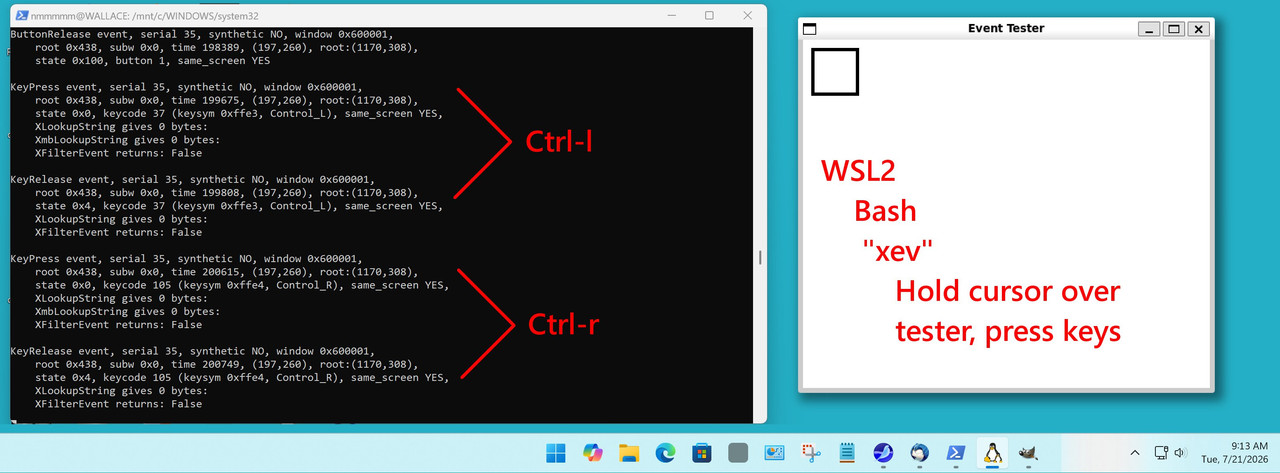
"xev" is a utility from the X11 (Xorg) era.
I don't know if there is a utility like it, for a native-Wayland yet.
Your device could be generating no code at all, or it could
be generating a code that is not recognized or action-able.
On 7/23/26 11:55 PM, FrankP wrote:
Hi
Is there any particular trick to getting a Bluetooth keyboard to work
with Linux?
Found it![...]
Follow these steps, I wasted weeks with a bluetooth mouse and keyboard
until I found this, which actually and finally worked!
1) Open terminal and type 'sudo bluetoothctl'[...]
trust[...]
On 24/07/2026 08:20, Edmund wrote:
On 7/23/26 11:55 PM, FrankP wrote:[...]
Hi
Is there any particular trick to getting a Bluetooth keyboard to work
with Linux?
Found it!
Follow these steps, I wasted weeks with a bluetooth mouse and keyboard
until I found this, which actually and finally worked!
1) Open terminal and type 'sudo bluetoothctl'[...]
trust[...]
Thanks Edmund. You're very good to look it up, I doubt I would have been able to find it, I've not been on Eternal September long so Thunderbird would not have it cached anywhere.
I followed the steps, and got as far as the trust step, and bluetoothctl reported success.
Unfortunately there was still no response when I pressed the pedal. I
tried a couple of apps including xev as mentioned by Paul, and if the
device is sending keypress events, they are not getting as far as the computer.
After bluetoothctl said "Changing 0D:7D:EE:69:CA:E9 trust succeeded", it went "ServicesResolved: no" -> "Connected: no" -> "Connected: yes" -> "ServicesResolved: yes". But then whatever I press on the device, there
are no more messages until I power the device down, then it's "ServicesResolved: no", then "Connected: no" and the prompt changes back from "[Thomann Pageturn]" to "[bluetooth]". That makes sense.
But there were no other messages, no keyboard events in xev, no cursor movement or changing the slide in OpenOffice Impress. AND to put salt in
it, after connecting and disconnecting the device, the laptop no longer wakes up if the screen is closed and opened again.
Returning the device and going for another option is looking like the
most attractive option at this point!
Thanks again
Frank
Returning the device and going for another option is looking like the
most attractive option at this point!
On 24/07/2026 08:20, Edmund wrote:
On 7/23/26 11:55 PM, FrankP wrote:[...]
Hi
Is there any particular trick to getting a Bluetooth keyboard to work with Linux?
Found it!
Follow these steps, I wasted weeks with a bluetooth mouse and keyboard until I found this, which actually and finally worked!
1) Open terminal and type 'sudo bluetoothctl'[...]
trust[...]
Thanks Edmund. You're very good to look it up, I doubt I would have been able to find it, I've not been on Eternal September long so Thunderbird would not have it cached anywhere.
I followed the steps, and got as far as the trust step, and bluetoothctl reported success.
Unfortunately there was still no response when I pressed the pedal. I tried a couple of apps including xev as mentioned by Paul, and if the device is sending keypress events, they are not getting as far as the computer.
After bluetoothctl said "Changing 0D:7D:EE:69:CA:E9 trust succeeded", it went "ServicesResolved: no" -> "Connected: no" -> "Connected: yes" -> "ServicesResolved: yes". But then whatever I press on the device, there are no more messages until I power the device down, then it's "ServicesResolved: no", then "Connected: no" and the prompt changes back from "[Thomann Pageturn]" to "[bluetooth]". That makes sense.
But there were no other messages, no keyboard events in xev, no cursor movement or changing the slide in OpenOffice Impress. AND to put salt in it, after connecting and disconnecting the device, the laptop no longer wakes up if the screen is closed and opened again.
Returning the device and going for another option is looking like the most attractive option at this point!
Thanks again
Frank
On 7/24/26 11:47 PM, FrankP wrote:
On 24/07/2026 08:20, Edmund wrote:Sorry to hear that, strange.
On 7/23/26 11:55 PM, FrankP wrote:[...]
Hi
Is there any particular trick to getting a Bluetooth keyboard to
work with Linux?
Found it!
Follow these steps, I wasted weeks with a bluetooth mouse and
keyboard until I found this, which actually and finally worked!
1) Open terminal and type 'sudo bluetoothctl'[...]
trust[...]
Thanks Edmund. You're very good to look it up, I doubt I would have
been able to find it, I've not been on Eternal September long so
Thunderbird would not have it cached anywhere.
I followed the steps, and got as far as the trust step, and
bluetoothctl reported success.
Unfortunately there was still no response when I pressed the pedal. I
tried a couple of apps including xev as mentioned by Paul, and if the
device is sending keypress events, they are not getting as far as the
computer.
After bluetoothctl said "Changing 0D:7D:EE:69:CA:E9 trust succeeded",
it went "ServicesResolved: no" -> "Connected: no" -> "Connected: yes"
"ServicesResolved: yes". But then whatever I press on the device,there are no more messages until I power the device down, then it's
"ServicesResolved: no", then "Connected: no" and the prompt changes
back from "[Thomann Pageturn]" to "[bluetooth]". That makes sense.
But there were no other messages, no keyboard events in xev, no cursor
movement or changing the slide in OpenOffice Impress. AND to put salt
in it, after connecting and disconnecting the device, the laptop no
longer wakes up if the screen is closed and opened again.
Returning the device and going for another option is looking like the
most attractive option at this point!
Thanks again
Frank
I found that it does give keyboard events IF it is connected with a USB cable rather than bluetooth.
So I tried using it on Sunday. Borrowed a long USB cable from my daughter -- the cable that came with the device only reaches up to my kneebone, which is not great for operating the computer with my toes. Turns out it goes to sleep to save the battery -- at inconvenient times. Maybe it would have more patience when connected with Bluetooth, but I think mine has run out; I am not expecting to have a long-term relationship with this device :-/
Frank
| Sysop: | Amessyroom |
|---|---|
| Location: | Fayetteville, NC |
| Users: | 74 |
| Nodes: | 6 (0 / 6) |
| Uptime: | 02:29:20 |
| Calls: | 1,194 |
| Files: | 1,353 |
| D/L today: |
2 files (1,590K bytes) |
| Messages: | 291,157 |