• Exquisite 64 GB Kingson SD Memory card found

    From CtrlAltDel@Altie@BHam.com to alt.os.linux.mint on Mon Jul 20 01:18:00 2026
    From Newsgroup: alt.os.linux.mint

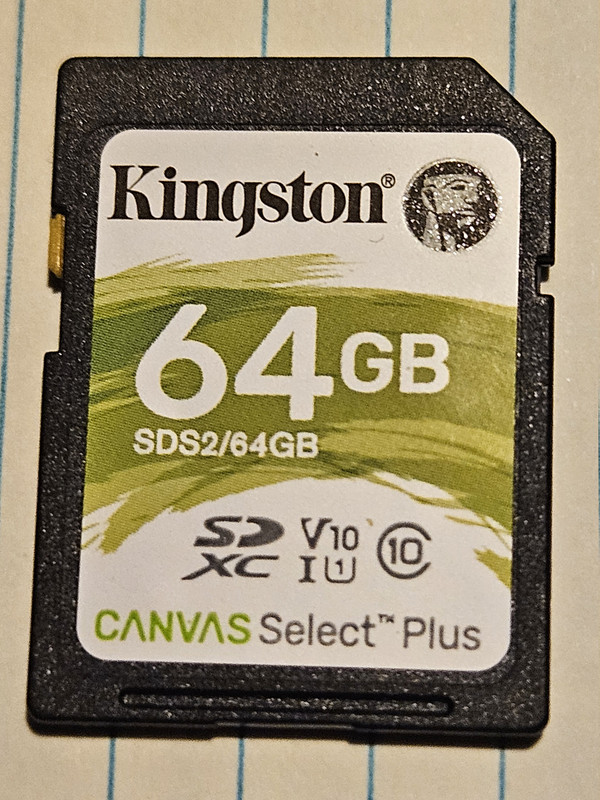
    Looking through some old boxes today I found an extremely rare and
    valuable Kingston 64GB SDHC Canvas Select Plus 100MB/s Read Class 10 UHS-I
    U1 V10 Memory Card (SDS2/64GB). The way memory prices are today, it's
    probably worth about a thousand dollars.

    In my desktop computer, I have 16GB of DDR3 SDRAM. I need to know how to convert this newfound memory card into DDR3 SDRAM so that I will have 80GB
    of DDR3 memory. That would be great.

    This card needs to perform at the same speed as the ram I have installed
    on the motherboard of the computer. What command can I use to achieve
    this?

    I don't want to use it as swap space or zram; that is too slow. I realize
    it is a storage medium and not volatile memory but, I know that there is probably a command of some type to overwrite this and convert it. Maybe a program of some type to convert it?

    If it's a converter program that costs a small amount of money, perhaps
    under $10 U.S., I'll gladly pay it if someone would be kind enough to
    direct me to it.

    Thanks.
    --- Synchronet 3.22a-Linux NewsLink 1.2
  • From Paul@nospam@needed.invalid to alt.os.linux.mint on Sun Jul 19 22:38:39 2026
    From Newsgroup: alt.os.linux.mint

    On Sun, 7/19/2026 9:18 PM, CtrlAltDel wrote:
    Looking through some old boxes today I found an extremely rare and
    valuable Kingston 64GB SDHC Canvas Select Plus 100MB/s Read Class 10 UHS-I U1 V10 Memory Card (SDS2/64GB). The way memory prices are today, it's probably worth about a thousand dollars.

    In my desktop computer, I have 16GB of DDR3 SDRAM. I need to know how to convert this newfound memory card into DDR3 SDRAM so that I will have 80GB of DDR3 memory. That would be great.

    This card needs to perform at the same speed as the ram I have installed
    on the motherboard of the computer. What command can I use to achieve
    this?

    I don't want to use it as swap space or zram; that is too slow. I realize
    it is a storage medium and not volatile memory but, I know that there is probably a command of some type to overwrite this and convert it. Maybe a program of some type to convert it?

    If it's a converter program that costs a small amount of money, perhaps under $10 U.S., I'll gladly pay it if someone would be kind enough to
    direct me to it.

    Thanks.


    There is an expansion scheme for computers, but it is only for servers.
    No consumer motherboards have CXL to be able to use one of these.
    And then, we haven't seen the price of the CXL either, which is
    likely priced for TechBro to buy.

    https://www.kad8.com/hardware/install-and-configure-cxl-memory-expansion-card-on-server/

    Don't worry. The price of memory will start to come down
    around 2030 or so :-) It's a race to see whether Fusion is
    perfected, before RAM becomes cheap again. I'm betting
    on Fusion right now. They're very close. Only another
    fifty years for Fusion power plants. The cheap RAM
    will be right after that.

    Paul


    --- Synchronet 3.22a-Linux NewsLink 1.2
  • From CtrlAltDel@Altie@BHam.com to alt.os.linux.mint on Mon Jul 20 03:51:35 2026
    From Newsgroup: alt.os.linux.mint

    On Sun, 19 Jul 2026 22:38:39 -0400, Paul wrote:

    There is an expansion scheme for computers, but it is only for servers.
    No consumer motherboards have CXL to be able to use one of these.
    And then, we haven't seen the price of the CXL either, which is likely
    priced for TechBro to buy.

    https://www.kad8.com/hardware/install-and-configure-cxl-memory-
    expansion-card-on-server/

    Don't worry. The price of memory will start to come down around 2030 or
    so :-) It's a race to see whether Fusion is perfected, before RAM
    becomes cheap again. I'm betting on Fusion right now. They're very
    close. Only another fifty years for Fusion power plants. The cheap RAM
    will be right after that.

    Thanks, Paul. That is interesting concerning Fusion; I've been reading
    about it after you mentioned it.

    Right now, though, take a look at this:

    https://i.postimg.cc/wjZ3TpsT/20260719-183637.jpg

    It's an image of the card I found today; it was like a miracle. Now you
    can see what I am talking about and probably will understand better how to direct me in the right direction.

    --- Synchronet 3.22a-Linux NewsLink 1.2
  • From yossarian@alt.os.linux.mint on Mon Jul 20 09:24:26 2026
    From Newsgroup: alt.os.linux.mint

    On Sun, 19 Jul 2026 22:38:39 -0400
    Paul <nospam@needed.invalid> wrote:
    valuable Kingston 64GB SDHC Canvas Select Plus 100MB/s Read Class 10 UHS-I
    U1 V10 Memory Card (SDS2/64GB). The way memory prices are today, it's probably worth about a thousand dollars.
    26.34re4 https://www.amazon.de/-/en/Kingston-Canvas-Select-Memory-64GB/dp/B0FD1DWQSF?crid=2ZDEB95HN2VKI&dib=eyJ2IjoiMSJ9.N-IVlZz2ZL4uRZ7kPMwZH4ngrKLLIR1awHU8vzTS_WL12IfzohWPfzlWCJZduoniKMk53ipDTefwHxpNw2wDTIjW7e2SmXSVy0MQaZyP5dL_GXavYA90bF_4qy97Ovi8yTnQ3ydKsMvnRKtxnIqvadUXj0aAuniwt9NwpvYx5xJR22ScxPjGIvlErhLd5YhafsNbtKOO4kQ3Wc2_ierB38dZyKgCJF29tPzGyJE_rvg.xssogzpOZPFqRMbasP6chQJr1EH-OvsBftqUlz7qhN4&dib_tag=se&keywords=Kingston%2B64GB%2BSDHC&qid=1784532242&sprefix=vw%2Bup%2Blampe%2Caps%2C133&sr=8-4&th=1
    --
    Linux Mint 22.2 kernel version 6.14.0-36-generic Cinnamon 6.4.8 AMD
    Ryzen 7 5700G, Radeon RX9060XT, 32GB of DRAM.
    --- Synchronet 3.22a-Linux NewsLink 1.2
  • From german newsgroups@usualsuspectrider@gmail.com to alt.os.linux.mint on Mon Jul 20 10:10:32 2026
    From Newsgroup: alt.os.linux.mint

    you are MAD.


    Amicalement,

    Frenchy Friendly, & French touch !

    german
    --- Synchronet 3.22a-Linux NewsLink 1.2
  • From Paul@nospam@needed.invalid to alt.os.linux.mint on Mon Jul 20 04:57:10 2026
    From Newsgroup: alt.os.linux.mint

    On Sun, 7/19/2026 11:51 PM, CtrlAltDel wrote:
    On Sun, 19 Jul 2026 22:38:39 -0400, Paul wrote:

    There is an expansion scheme for computers, but it is only for servers.
    No consumer motherboards have CXL to be able to use one of these.
    And then, we haven't seen the price of the CXL either, which is likely
    priced for TechBro to buy.

    https://www.kad8.com/hardware/install-and-configure-cxl-memory-
    expansion-card-on-server/

    Don't worry. The price of memory will start to come down around 2030 or
    so :-) It's a race to see whether Fusion is perfected, before RAM
    becomes cheap again. I'm betting on Fusion right now. They're very
    close. Only another fifty years for Fusion power plants. The cheap RAM
    will be right after that.

    Thanks, Paul. That is interesting concerning Fusion; I've been reading about it after you mentioned it.

    Right now, though, take a look at this:

    https://i.postimg.cc/wjZ3TpsT/20260719-183637.jpg

    It's an image of the card I found today; it was like a miracle. Now you
    can see what I am talking about and probably will understand better how to direct me in the right direction.


    Well, let us pretend it is a HDD for a moment.
    The specs say it reads at 100MB/sec and writes at 85MB/sec.

    https://www.kingston.com/datasheets/SDS2_us.pdf

    If you had an 85MB/sec HDD and you made a 64GB swap file from
    it, what would you have and what would that feel like ? It would
    feel a bit slow, I would guess.

    The difference would be, the HDD has a relatively long life and
    lots of write cycles. The SD flash device, has some limit. Maybe
    600 writes per cell. It may not have Wear Leveling, not the
    two good kinds required. SSD and NVMe tend to have wear leveling.

    *******

    If you want to try something out, you could try ZRAM, which would
    be similar in some way to the Windows Memory Compressor. I expect
    all OSes have played with this, at one time or another. I don't
    really know who "invented" this idea. But OSes definitely copy
    from one another, so ideas eventually appear in disguise, everywhere.

    https://en.wikipedia.org/wiki/Zram

    ZRAM is a memory compression scheme, and under memory pressure,
    it slows your computations slightly, by RAM compression running
    while you compute. You could think of it as tiered memory,
    in that first ZRAM tries to meet the challenge of finding
    memory on a malloc(), and if compression has not freed up
    enough RAM, then allocations could "spill" to your SD card.

    Your SD card would be slow enough at this process, to perceptibly
    affect your session. If your web browser was opening a tab you
    would be saying "why is this so slooow". And that would be the
    necessary RAM being derived from your SD swap.

    If you wanted to buy a flash device, an NVMe 64GB device would
    have been a bit better, in the sense it could have a bit
    more write bandwidth. The NVMe would have Wear Leveling, so the
    cells wear out uniformly and you get better usage of the wear life
    of the flash cells. In modern times, the stacked flash dies are
    getting big enough, it's hard to make a stacked flash that is
    as small as 64GB. Typical flash chips can be 1TB or 2TB when
    using stacked silicon dies. The last small devices might have
    been Robson cache, as an example of a "tiny storage". Your
    SD is similar then, to the old Robson cache, in terms of size.

    SD can be used on digital camera, on a Raspberry PI (now relatively
    expensive), and it can be used as a USB stick kind of storage
    (using a USB to SD adapter). Those are conventional applications.
    If you want to use it as swap, go right ahead, as it is unlikely
    to get hit hard on a per session basis (like when tiered with ZRAM).
    If you have set swap for a "security erase" at the end of a session,
    you'll want to turn that off, as that will burn up the SD after a while.
    Say a couple of years, to toast it.

    But to start with, you can also use a convention HDD as the swap device
    while you test ZRAM. I would test with conventional HDD first, while
    you tune things, and test with various work loads. One reason for
    doing this, is you get a "blinking LED" signaling that "something
    is going on". The SD does not tend to have a LED for monitoring.

    Some usages of RAM, have a fairly random fill to them, and ZRAM
    won't necessarily be able to compress the RAM all that well.
    But typical applications aren't nearly that bad, and the ZRAM will
    buy you something. Only a Verilog or VHDL chip simulation, would
    be a challenge for a ZRAM.

    Intel had a scheme, to use their Optane modules as RAM. There
    was a "license" available for some servers, to use Optane as
    actual RAM. Optane was a kind of Flash, with more wear capability,
    so you would get more than 600 writes per cell. An Optane module,
    some of them cost $3000, but they could give a server 5x as much RAM,
    and at least in Intel's clever mind, this was a good deal. I never
    saw any field reports, from people trying this, and finding it
    good or bad. To have my system report, that a $3000 device
    was now "burned up", that would be a bit hard to take, and the
    Optane can't last forever in such an application. But give
    Intel credit, they tried this and put it on offer. For some
    workloads, that is likely a good deal, as the workload would
    not spill to the Optane all that often. It would be like
    a $3000 insurance policy, rather than a $3000 bog roll.
    It requires of the user, they understand the daily consumption
    pattern very well, before deploying that. The Optane could
    likely manage 3GB per second kind of thing. I don't think
    ZRAM could go quite that fast. It would depend on how many
    cores ZRAM runs on (the Microsoft Windows version only
    runs on one core, I don't know the Linux characteristic
    of their scheme).

    As long as you remember the base capabilities of the hardware
    devices, there will be no surprises :-) An 85MB/sec device
    is an 85MB/sec device. It's not Superman. But in a pinch,
    it will work.

    I once did a calculation, with a 128GB swap declared. I didn't
    really know what the actual size of the memory usage would be,
    but it turned out to be 30GB of swap occupied. The calc ran
    for days (boring), and eventually finished. The application
    itself was stoopid, as it should have been doing garbage
    collection and cleaning up after itself. I actually had
    to use a method to "flush" the application memory, to
    improve how it was using swap. And that was a thing I was
    only doing one time, so it's not a thing I would be doing
    today. For my personal use then, I haven't really run
    in "swap country", all that often. Only a one-off, which
    was a panorama run using 75 images. And the result was
    pretty ugly, as panoramas go.

    Paul
    --- Synchronet 3.22a-Linux NewsLink 1.2
  • From CtrlAltDel@Altie@BHam.com to alt.os.linux.mint on Mon Jul 20 22:46:28 2026
    From Newsgroup: alt.os.linux.mint

    Paul, you are a treasure to this group and to Usenet in general. You
    provide information in easy to understand language and tailor it
    specifically for the person you are responding to.

    Unlike many Google searches and certainly many AI inquiries, I feel I can trust any information you provide and you seem to genuinely care about computer issues people have.

    Your depth of knowledge concerning seemingly any computer related topic is impressive. You aren't sarcastic, belittling to those without the breadth
    of experience you have, and most surprisingly, have patience enough to
    persist with a topic until someone clearly understands what path to
    proceed down.

    Thank you,

    Altie
    --- Synchronet 3.22a-Linux NewsLink 1.2