• Linux started vs Windows started !

    From german newsgroups@usualsuspectrider@gmail.com to alt.os.linux.mint on Fri Jun 19 17:45:08 2026
    From Newsgroup: alt.os.linux.mint


    i don't why...but i feel windows 11 start quickly !

    can we say when windows 11 is off, is really off or they are
    a tip, it stay sleeping not really sleep !!!

    i'm very happy with the laptop's webcam ! is not 1080p...but
    i have a very very large image with windows !?" may be a...
    panoramique software result ???
    --
    Amicalement,

    Frenchy Friendly, & French touch !

    german

    --- Synchronet 3.22a-Linux NewsLink 1.2
  • From Paul@nospam@needed.invalid to alt.os.linux.mint on Fri Jun 19 21:52:15 2026
    From Newsgroup: alt.os.linux.mint

    On Fri, 6/19/2026 11:45 AM, german newsgroups wrote:

    i don't why...but i feel windows 11 start quickly !

    can we say when windows 11 is off, is really off or they are
    a tip, it stay sleeping not really sleep !!!

    i'm very happy with the laptop's webcam ! is not 1080p...but
    i have a very very large image with windows !?" may be a...
    panoramique software result ???

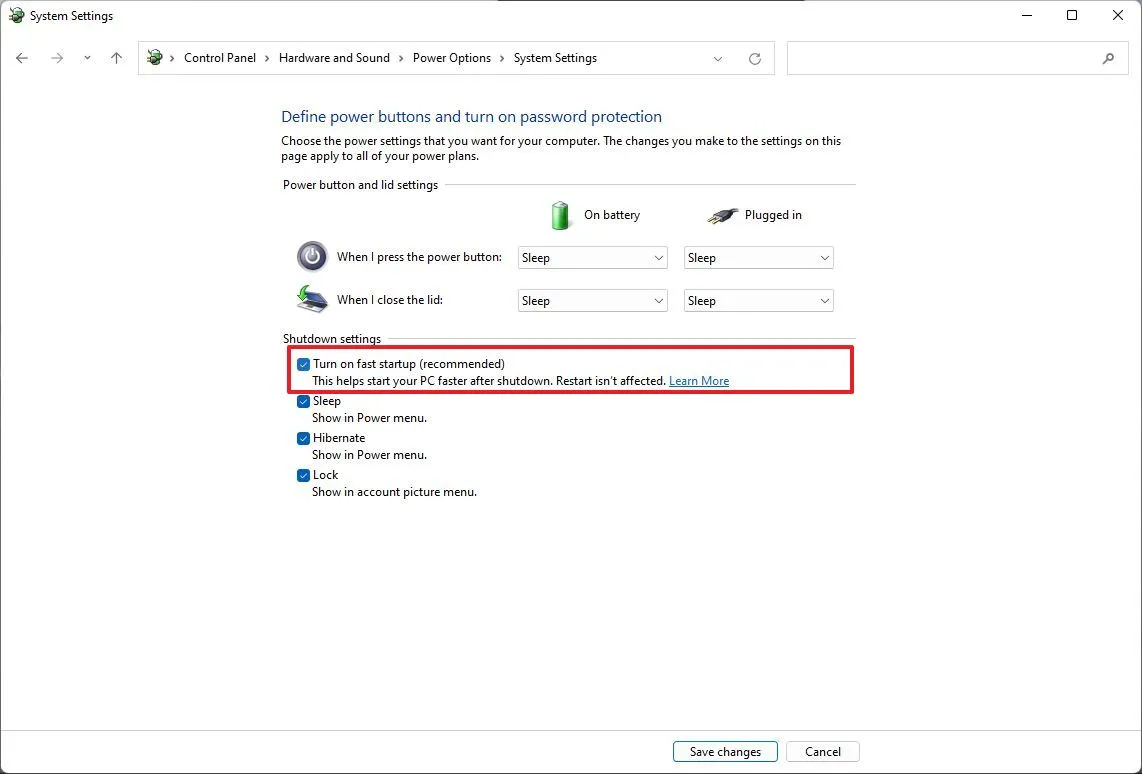
    That's fast startup with a hibernated Windows kernel and drivers.
    That can interfere with dual booting.

    https://www.windowscentral.com/software-apps/windows-11/how-to-enable-or-disable-fast-startup-on-windows-11

    https://cdn.mos.cms.futurecdn.net/8hmY5djtsvVnXEFsVQ5gpF-1142-80.jpg.webp # control panel, with button

    Paul


    --- Synchronet 3.22a-Linux NewsLink 1.2
  • From Lawrence =?iso-8859-13?q?D=FFOliveiro?=@ldo@nz.invalid to alt.os.linux.mint on Sat Jun 20 02:47:08 2026
    From Newsgroup: alt.os.linux.mint

    On Fri, 19 Jun 2026 17:45:08 +0200, german newsgroups wrote:

    i don't why...but i feel windows 11 start quickly !

    From power-on (or hard reset) to a logged-in desktop ... how long?
    (Linux vs Windows)
    --- Synchronet 3.22a-Linux NewsLink 1.2
  • From german usenet@usualsuspectrider@gmail.com to alt.os.linux.mint on Sat Jun 20 07:06:16 2026
    From Newsgroup: alt.os.linux.mint

    Le 20/06/2026 |a 04:47, Lawrence DrCOOliveiro a |-crit-a:
    On Fri, 19 Jun 2026 17:45:08 +0200, german newsgroups wrote:

    i don't why...but i feel windows 11 start quickly !

    From power-on (or hard reset) to a logged-in desktop ... how long?
    (Linux vs Windows)

    i'm logged in 7" seconde on windows 11 desktop !
    --
    Amicalement,

    german
    --- Synchronet 3.22a-Linux NewsLink 1.2
  • From german usenet@usualsuspectrider@gmail.com to alt.os.linux.mint on Sat Jun 20 07:06:49 2026
    From Newsgroup: alt.os.linux.mint

    Le 20/06/2026 |a 03:52, Paul a |-crit-a:
    On Fri, 6/19/2026 11:45 AM, german newsgroups wrote:

    i don't why...but i feel windows 11 start quickly !

    can we say when windows 11 is off, is really off or they are
    a tip, it stay sleeping not really sleep !!!

    i'm very happy with the laptop's webcam ! is not 1080p...but
    i have a very very large image with windows !?" may be a...
    panoramique software result ???

    That's fast startup with a hibernated Windows kernel and drivers.
    That can interfere with dual booting.

    https://www.windowscentral.com/software-apps/windows-11/how-to-enable-or-disable-fast-startup-on-windows-11

    https://cdn.mos.cms.futurecdn.net/8hmY5djtsvVnXEFsVQ5gpF-1142-80.jpg.webp # control panel, with button

    Paul


    merci paul !

    c'est super la lutte contre PEGASUS
    --
    Amicalement,

    german
    --- Synchronet 3.22a-Linux NewsLink 1.2
  • From Monsieur@Monsieur@notreal.invalid to alt.os.linux.mint on Sat Jun 20 07:54:03 2026
    From Newsgroup: alt.os.linux.mint

    Lawrence DrCOOliveiro wrote:
    On Fri, 19 Jun 2026 17:45:08 +0200, german newsgroups wrote:

    i don't why...but i feel windows 11 start quickly !

    From power-on (or hard reset) to a logged-in desktop ... how long?
    (Linux vs Windows)


    My personal situation, from pushing the ON button to being completely
    logged into the session:

    - Linux Mint (on an old Dell Optiplex 5070): 56 seconds (minus a few
    secs for typing in my password). Fully ready and usable after that.

    - Windows 11 Enterprise (on a brand new HP laptop): About two minutes
    "Please wait..." before login screen appears(*), 30 more seconds after
    that before desktop appears, then 30 or more seconds before icons
    appear. Add three or more minutes to this when there are "updates
    underway - Please keep your computer on". Even shutting the thing down
    can take up to two minutes.

    (*) Sometimes there's an overlay on the login screen that can last up to
    one minute before it disappears and the actual login fields appear.

    Windows is for work only, so it's not that important. I can't imagine
    having to deal with this on my personal pc however.

    --- Synchronet 3.22a-Linux NewsLink 1.2
  • From Axel@none@not.here to alt.os.linux.mint on Sat Jun 20 16:58:50 2026
    From Newsgroup: alt.os.linux.mint

    Monsieur wrote:
    Lawrence DrCOOliveiro wrote:
    On Fri, 19 Jun 2026 17:45:08 +0200, german newsgroups wrote:

    i don't why...but i feel windows 11 start quickly !

    -aFrom power-on (or hard reset) to a logged-in desktop ... how long?
    (Linux vs Windows)


    My personal situation, from pushing the ON button to being completely
    logged into the session:

    - Linux Mint (on an old Dell Optiplex 5070): 56 seconds (minus a few
    secs for typing in my password). Fully ready and usable after that.

    my LM 22.3, auto login, 32 seconds from turn on to desktop fully functional


    - Windows 11 Enterprise (on a brand new HP laptop): About two minutes "Please wait..." before login screen appears(*), 30 more seconds after
    that before desktop appears, then 30 or more seconds before icons
    appear. Add three or more minutes to this when there are "updates
    underway - Please keep your computer on". Even shutting the thing down
    can take up to two minutes.

    I used to hate that with windows (among other thing). press the off
    button and then sit there waiting and wondering how long will it take
    this time to shut down. LM almost instant off every time. always consistent.


    (*) Sometimes there's an overlay on the login screen that can last up
    to one minute before it disappears and the actual login fields appear.

    Windows is for work only, so it's not that important. I can't imagine
    having to deal with this on my personal pc however.

    --
    Linux Mint 22.3

    --- Synchronet 3.22a-Linux NewsLink 1.2
  • From Heinz Schmitz@sch@example.invalid to alt.os.linux.mint on Sat Jun 20 09:01:23 2026
    From Newsgroup: alt.os.linux.mint

    Monsieur wrote:
    My personal situation, from pushing the ON button to being completely
    logged into the session:

    - Linux Mint (on an old Dell Optiplex 5070): 56 seconds (minus a few
    secs for typing in my password). Fully ready and usable after that.
    ...
    - Windows 11 Enterprise (on a brand new HP laptop): About two minutes
    The shut-down durations are different, too.
    Regards,
    H.
    --- Synchronet 3.22a-Linux NewsLink 1.2
  • From Mike Scott@usenet.16@scottsonline.org.uk.invalid to alt.os.linux.mint on Sat Jun 20 08:56:21 2026
    From Newsgroup: alt.os.linux.mint

    On 20/06/2026 07:58, Axel wrote:
    LM almost instant off every time. always consistent.

    OR not.... my lappy (mint 22.2) uses wifi and nfs automounted file
    systems. It all too frequently hangs during shutdown waiting for an
    unmount job to time out. It can be stuck for a couple of minutes. (My suspicion is the network shuts down too early; I tend to resort to
    'leaning' on the 'off' button.)
    --
    Mike Scott
    Harlow, England
    --- Synchronet 3.22a-Linux NewsLink 1.2
  • From Paul@nospam@needed.invalid to alt.os.linux.mint on Sat Jun 20 10:34:14 2026
    From Newsgroup: alt.os.linux.mint

    On Fri, 6/19/2026 10:47 PM, Lawrence DrCOOliveiro wrote:
    On Fri, 19 Jun 2026 17:45:08 +0200, german newsgroups wrote:

    i don't why...but i feel windows 11 start quickly !

    From power-on (or hard reset) to a logged-in desktop ... how long?
    (Linux vs Windows)


    This is a game-able benchmark, as benchmarks go.

    I can probably pick a set of conditions to make
    either platform look bad.

    For this, I used the fastest box I've got (16C 32T), an NVMe,
    and cloned over some OSes onto the NVMe (in case you think
    this is easy, it was not easy, it took hours). the NVMe is to
    take laggard storage out of the picture. Windows loses
    the boat race pretty well instantly, if it has to use
    slow storage like a HDD. I don't even need to test that.
    The Windows Defender scan then slows things down (all those seeks).

    Here are some results:

    Linux Mint Cinnamon NVidia 535 DKMS 11 seconds
    Win11 Pro 25H2 (no Fast Start) 11 seconds [powercfg /h off, removes hiberfile, no fast start]

    Those two, were set up to blow through the password prompt,
    so neither OS requires typing the password. When the desktop
    appears, the stopwatch stops.

    If you run Windows 11 on a 4th gen machine, Windows loses
    again, as the missing MBEC support, sucks the life out of performance.

    Win10 22H2 was also tested, and because it blocks waiting
    for the password, the number is only approximate and
    it could be around 10 to 11 seconds. There used to be a
    tick box on netplwiz to remove the password prompt, but the tick box was removed some time ago.

    Summary: A shocker, but they're the same. 11 seconds.

    Fast start might shave a bit off the Windows time, but then
    it would be a test of Hibernation behaviors in both camps. And
    at that point, the time is really too short to care.

    Tomshardware claimed years ago, they had achieved 5 seconds on Windows tests,
    but that might have been Fast Start.

    Paul
    --- Synchronet 3.22a-Linux NewsLink 1.2
  • From Paul@nospam@needed.invalid to alt.os.linux.mint on Sat Jun 20 10:57:30 2026
    From Newsgroup: alt.os.linux.mint

    On Sat, 6/20/2026 2:58 AM, Axel wrote:
    Monsieur wrote:
    Lawrence DrCOOliveiro wrote:
    On Fri, 19 Jun 2026 17:45:08 +0200, german newsgroups wrote:

    i don't why...but i feel windows 11 start quickly !

    -aFrom power-on (or hard reset) to a logged-in desktop ... how long?
    (Linux vs Windows)


    My personal situation, from pushing the ON button to being completely logged into the session:

    - Linux Mint (on an old Dell Optiplex 5070): 56 seconds (minus a few secs for typing in my password). Fully ready and usable after that.

    my LM 22.3, auto login, 32 seconds from turn on to desktop fully functional


    - Windows 11 Enterprise (on a brand new HP laptop): About two minutes "Please wait..." before login screen appears(*), 30 more seconds after that before desktop appears, then 30 or more seconds before icons appear. Add three or more minutes to this when there are "updates underway - Please keep your computer on". Even shutting the thing down can take up to two minutes.

    I used to hate that with windows (among other thing). press the off button and then sit there waiting and wondering how long will it take this time to shut down. LM almost instant off every time. always consistent.


    (*) Sometimes there's an overlay on the login screen that can last up to one minute before it disappears and the actual login fields appear.

    Windows is for work only, so it's not that important. I can't imagine having to deal with this on my personal pc however.


    You can shut Windows down by dropping the power :-)

    There's a reason it has two levels of journaling.

    At one time, holding down the power button (on say Windows 98),
    that would corrupt the file system (FAT32) or it could damage
    the Registry (parts of which might be in memory).

    The modern registry is journaled, NTFS is journaled. And you can
    turn off the power if you like. Depending on whether you think
    your storage device likes that or not (I don't like to do that
    to SSDs particularly, there is a small chance there could be a
    hardware surprise later). For the cases where I've dropped power,
    the system started just fine the next time.

    Windows has denied shutdown before, when it wants to do Patch Tuesday,
    and it also wants to "wait until later to finish it", and it
    just sits there doing nothing. I'm pretty sure Windows was surprised
    when I hit the power button :-) That's one time that the power button
    may be applied. It can still clean up the broken/unfinished update later.
    So while it says "leave your machine on" or something, it gets a
    swift kick in the ass if it is holding the machine hostage.

    If I damage my SSD now, it would cost a small fortune to replace it...
    We can no longer have nice things.

    Paul
    --- Synchronet 3.22a-Linux NewsLink 1.2
  • From german newsgroups@usualsuspectrider@gmail.com to alt.os.linux.mint on Sat Jun 20 17:38:28 2026
    From Newsgroup: alt.os.linux.mint

    Le 20/06/2026 |a 16:34, Paul a |-crit-a:
    On Fri, 6/19/2026 10:47 PM, Lawrence DrCOOliveiro wrote:
    On Fri, 19 Jun 2026 17:45:08 +0200, german newsgroups wrote:

    i don't why...but i feel windows 11 start quickly !

    From power-on (or hard reset) to a logged-in desktop ... how long?
    (Linux vs Windows)


    This is a game-able benchmark, as benchmarks go.

    I can probably pick a set of conditions to make
    either platform look bad.

    For this, I used the fastest box I've got (16C 32T), an NVMe,
    and cloned over some OSes onto the NVMe (in case you think
    this is easy, it was not easy, it took hours). the NVMe is to
    take laggard storage out of the picture. Windows loses
    the boat race pretty well instantly, if it has to use
    slow storage like a HDD. I don't even need to test that.
    The Windows Defender scan then slows things down (all those seeks).

    Here are some results:

    Linux Mint Cinnamon NVidia 535 DKMS 11 seconds
    Win11 Pro 25H2 (no Fast Start) 11 seconds [powercfg /h off, removes hiberfile, no fast start]

    Those two, were set up to blow through the password prompt,
    so neither OS requires typing the password. When the desktop
    appears, the stopwatch stops.

    If you run Windows 11 on a 4th gen machine, Windows loses
    again, as the missing MBEC support, sucks the life out of performance.

    Win10 22H2 was also tested, and because it blocks waiting
    for the password, the number is only approximate and
    it could be around 10 to 11 seconds. There used to be a
    tick box on netplwiz to remove the password prompt, but the tick box was removed some time ago.

    Summary: A shocker, but they're the same. 11 seconds.

    Fast start might shave a bit off the Windows time, but then
    it would be a test of Hibernation behaviors in both camps. And
    at that point, the time is really too short to care.

    Tomshardware claimed years ago, they had achieved 5 seconds on Windows tests,
    but that might have been Fast Start.

    Paul

    for w11

    powercfg /hibernate off

    ??
    --
    Amicalement,

    Frenchy Friendly, & French touch !

    german
    --- Synchronet 3.22a-Linux NewsLink 1.2
  • From Paul@nospam@needed.invalid to alt.os.linux.mint on Sat Jun 20 14:13:08 2026
    From Newsgroup: alt.os.linux.mint

    On Sat, 6/20/2026 11:38 AM, german newsgroups wrote:


    for w11

    powercfg /hibernate off

    ??


    You can shorten the command to

    powercfg /h off

    That disables both hibernation and fast start, using only one command.

    It is faster than finding that GUI dialog.

    I don't typically use hibernate.
    And Fast Start is just a bad idea, when dual booting is the objective.

    Any hibernation operation can interfere with dual booting.
    So I turn them all off at once.

    Paul
    --- Synchronet 3.22a-Linux NewsLink 1.2
  • From german usenet@usualsuspectrider@gmail.com to alt.os.linux.mint on Sat Jun 20 20:47:25 2026
    From Newsgroup: alt.os.linux.mint

    Le 20/06/2026 |a 20:13, Paul a |-crit-a:
    On Sat, 6/20/2026 11:38 AM, german newsgroups wrote:


    for w11

    powercfg /hibernate off

    ??


    You can shorten the command to

    powercfg /h off

    That disables both hibernation and fast start, using only one command.

    It is faster than finding that GUI dialog.

    I don't typically use hibernate.
    And Fast Start is just a bad idea, when dual booting is the objective.

    Any hibernation operation can interfere with dual booting.
    So I turn them all off at once.

    Paul

    ok if you are saying it's work it's work !

    hard to remember the command win...
    --
    Amicalement,

    german
    --- Synchronet 3.22a-Linux NewsLink 1.2
  • From Lawrence =?iso-8859-13?q?D=FFOliveiro?=@ldo@nz.invalid to alt.os.linux.mint on Sat Jun 20 22:28:02 2026
    From Newsgroup: alt.os.linux.mint

    On Sat, 20 Jun 2026 07:06:16 +0200, german usenet wrote:

    Le 20/06/2026 |a 04:47, Lawrence DrCOOliveiro a |-crit-a:

    On Fri, 19 Jun 2026 17:45:08 +0200, german newsgroups wrote:

    i don't why...but i feel windows 11 start quickly !

    From power-on (or hard reset) to a logged-in desktop ... how long?
    (Linux vs Windows)

    i'm logged in 7" seconde on windows 11 desktop !

    I open the lid on my Linux laptop, and itrCOs ready to use just a second
    or two later.

    Why does yours take so long?
    --- Synchronet 3.22a-Linux NewsLink 1.2
  • From Lawrence =?iso-8859-13?q?D=FFOliveiro?=@ldo@nz.invalid to alt.os.linux.mint on Sat Jun 20 22:29:16 2026
    From Newsgroup: alt.os.linux.mint

    On Sat, 20 Jun 2026 10:34:14 -0400, Paul wrote:

    Here are some results:

    Linux Mint Cinnamon NVidia 535 DKMS 11 seconds
    Win11 Pro 25H2 (no Fast Start) 11 seconds [powercfg /h off, removes hiberfile, no fast start]

    Those two, were set up to blow through the password prompt, so
    neither OS requires typing the password. When the desktop appears,
    the stopwatch stops.

    I would count to rCLwhen the desktop is responsive to clicks, the
    stopwatch stopsrCY.
    --- Synchronet 3.22a-Linux NewsLink 1.2
  • From Lawrence =?iso-8859-13?q?D=FFOliveiro?=@ldo@nz.invalid to alt.os.linux.mint on Sun Jun 21 02:03:44 2026
    From Newsgroup: alt.os.linux.mint

    On Sat, 20 Jun 2026 08:56:21 +0100, Mike Scott wrote:

    OR not.... my lappy (mint 22.2) uses wifi and nfs automounted file
    systems. It all too frequently hangs during shutdown waiting for an
    unmount job to time out. It can be stuck for a couple of minutes.
    (My suspicion is the network shuts down too early; I tend to resort
    to 'leaning' on the 'off' button.)

    The man page for systemd.mount says that network mounts automatically
    acquire the appropriate dependencies on network-related targets,
    precisely to keep that sort of thing in the right sequence.

    Does systemd automatically process /etc/fstab entries in a way thatrCOs logically equivalent to systemd.mount setups? Maybe on your distro
    version, it doesnrCOt ...
    --- Synchronet 3.22a-Linux NewsLink 1.2
  • From Mr. Man-wai Chang@toylet.toylet@gmail.com to alt.os.linux.mint,alt.comp.os.windows-11,alt.comp.os.windows-10,alt.windows7.general,alt.comp.hardware.pc-homebuilt on Sun Jun 21 10:41:06 2026
    From Newsgroup: alt.os.linux.mint

    On 6/19/2026 11:45 PM, german newsgroups wrote:

    i don't why...but i feel windows 11 start quickly !


    A normal Windows startup-up is slower than restoring a system state (aka sleep).

    Did you just fold the laptop's lid? That's a hidden button to make
    Windows sleep. :)

    can we say when windows 11 is off, is really off or they are
    a tip, it stay sleeping not really sleep !!!

    Did you mixed up Shutdown vs Sleep vs Hibernate?

    i'm very happy with the laptop's webcam ! is not 1080p...but
    i have a very very large image with windows !?" may be a...
    panoramique software result ???
    Not sure about what you said! Elaborate!!
    --

    @~@ Simplicity is Beauty! Remain silent! Drink, Blink, Stretch!
    / v \ May the Force and farces be with you! Live long and prosper!!
    /( _ )\ https://sites.google.com/site/changmw/
    ^ ^ https://github.com/changmw/changmw
    --- Synchronet 3.22a-Linux NewsLink 1.2
  • From german newsgroups@usualsuspectrider@gmail.com to alt.os.linux.mint on Sun Jun 21 06:35:01 2026
    From Newsgroup: alt.os.linux.mint

    Le 21/06/2026 |a 00:28, Lawrence DrCOOliveiro a |-crit-a:
    I open the lid on my Linux laptop, and itrCOs ready to use just a second
    or two later.

    Why does yours take so long?

    :)

    it's not a sleep mode !
    --
    Amicalement,

    Frenchy Friendly, & French touch !

    german
    --- Synchronet 3.22a-Linux NewsLink 1.2
  • From german newsgroups@usualsuspectrider@gmail.com to alt.os.linux.mint on Sun Jun 21 06:37:05 2026
    From Newsgroup: alt.os.linux.mint

    Le 21/06/2026 |a 00:29, Lawrence DrCOOliveiro a |-crit-a:
    I would count to rCLwhen the desktop is responsive to clicks, the
    stopwatch stopsrCY.

    shutdown the ACER logo !
    --
    Amicalement,

    Frenchy Friendly, & French touch !

    german
    --- Synchronet 3.22a-Linux NewsLink 1.2
  • From Lawrence =?iso-8859-13?q?D=FFOliveiro?=@ldo@nz.invalid to alt.os.linux.mint on Sun Jun 21 07:40:58 2026
    From Newsgroup: alt.os.linux.mint

    On Sun, 21 Jun 2026 06:35:01 +0200, german newsgroups wrote:

    Le 21/06/2026 |a 00:28, Lawrence DrCOOliveiro a |-crit-a:

    I open the lid on my Linux laptop, and itrCOs ready to use just a second
    or two later.

    Why does yours take so long?

    :)

    it's not a sleep mode !

    LOL!
    --- Synchronet 3.22a-Linux NewsLink 1.2
  • From Paul@nospam@needed.invalid to alt.os.linux.mint on Sun Jun 21 06:54:47 2026
    From Newsgroup: alt.os.linux.mint

    On Sat, 6/20/2026 6:29 PM, Lawrence DrCOOliveiro wrote:
    On Sat, 20 Jun 2026 10:34:14 -0400, Paul wrote:

    Here are some results:

    Linux Mint Cinnamon NVidia 535 DKMS 11 seconds
    Win11 Pro 25H2 (no Fast Start) 11 seconds [powercfg /h off, removes hiberfile, no fast start]

    Those two, were set up to blow through the password prompt, so
    neither OS requires typing the password. When the desktop appears,
    the stopwatch stops.

    I would count to rCLwhen the desktop is responsive to clicks, the
    stopwatch stopsrCY.


    There are other definitions of "boot complete", provided
    by Microsoft analysis programs.

    That is useful for comparing "like to like" within a Microsoft shop.

    Pretending to test for click responses, is not a very precise
    analysis method.

    If we wanted to "wait until all disk I/O stopped" or
    "wait until power drops to 33.7 watts", then those
    are different metrics.

    There are lots of hard to reproduce or pointless reference
    points you can make up for this sort of benching activity.

    All I can claim, is it doesn't have to take 2 minutes to boot Windows.
    You can do better than that. Older equipment, slower equipment,
    the effects are not always linear. And I would lose all my races,
    if using my 4th gen machine for this. It doesn't even have
    NVMe support, so a SATA III SSD is the best I could do. And it
    suffers from a lack of MBEC. It currently has a copy of both
    Win10 and Win11 on it. The behavior is not "snappy" on the thing.
    The main storage devices for that machine, are set up for Win7 and Win10.
    The W10/W11 disk is just for demos and such.

    Paul
    --- Synchronet 3.22a-Linux NewsLink 1.2
  • From Axel@none@not.here to alt.os.linux.mint on Mon Jun 22 11:46:25 2026
    From Newsgroup: alt.os.linux.mint

    Mike Scott wrote:
    On 20/06/2026 07:58, Axel wrote:
    LM almost instant off every time. always consistent.

    OR not.... my-a lappy (mint 22.2) uses wifi and nfs automounted file systems. It all too frequently hangs during shutdown waiting for an
    unmount job to time out. It can be stuck for a couple of minutes. (My suspicion is the network shuts down too early; I tend to resort to
    'leaning' on the 'off' button.)


    my LM box is just a home PC so no such issues
    --
    Linux Mint 22.3

    --- Synchronet 3.22a-Linux NewsLink 1.2
  • From Paul@nospam@needed.invalid to alt.os.linux.mint on Mon Jun 22 02:28:47 2026
    From Newsgroup: alt.os.linux.mint

    On Sun, 6/21/2026 6:05 PM, Lawrence DrCOOliveiro wrote:
    On Sun, 21 Jun 2026 06:54:47 -0400, Paul wrote:

    Pretending to test for click responses, is not a very precise
    analysis method.

    It proves that the desktop is not only visible, but actually working.


    On a slow Windows machine, the taskbar is the last thing to paint.

    On a fast Windows machine, they all appear at the same time
    (desktop background, taskbar and its icons).

    So if we were testing older machines, I would be waiting
    for the Taskbar to show up. At least they can make that
    now, so the Taskbar all appears when it is ready to make an appearance.

    Some of those icons on the taskbar are just pinned, and
    it's a matter of looking up their icon and plunking it down.
    For example, I have one Snippingtool icon (which is a blank)
    and if you click it, nothing happens. This was left behind
    by some sort of failed uninstall thing :-)

    Paul
    --- Synchronet 3.22a-Linux NewsLink 1.2
  • From Lawrence =?iso-8859-13?q?D=FFOliveiro?=@ldo@nz.invalid to alt.os.linux.mint on Mon Jun 22 07:25:06 2026
    From Newsgroup: alt.os.linux.mint

    On Mon, 22 Jun 2026 02:28:47 -0400, Paul wrote:

    On Sun, 6/21/2026 6:05 PM, Lawrence DrCOOliveiro wrote:

    On Sun, 21 Jun 2026 06:54:47 -0400, Paul wrote:

    Pretending to test for click responses, is not a very precise
    analysis method.

    It proves that the desktop is not only visible, but actually
    working.

    On a slow Windows machine, the taskbar is the last thing to paint.

    How long before it becomes clickable?
    --- Synchronet 3.22a-Linux NewsLink 1.2
  • From Axel@none@not.here to alt.os.linux.mint on Mon Jun 22 19:21:57 2026
    From Newsgroup: alt.os.linux.mint

    Paul wrote:
    On Sun, 6/21/2026 6:05 PM, Lawrence DrCOOliveiro wrote:
    On Sun, 21 Jun 2026 06:54:47 -0400, Paul wrote:

    Pretending to test for click responses, is not a very precise
    analysis method.
    It proves that the desktop is not only visible, but actually working.

    On a slow Windows machine, the taskbar is the last thing to paint.

    On a fast Windows machine, they all appear at the same time
    (desktop background, taskbar and its icons).

    So if we were testing older machines, I would be waiting
    for the Taskbar to show up. At least they can make that
    now, so the Taskbar all appears when it is ready to make an appearance.

    Some of those icons on the taskbar are just pinned, and
    it's a matter of looking up their icon and plunking it down.
    For example, I have one Snippingtool icon (which is a blank)
    and if you click it, nothing happens. This was left behind
    by some sort of failed uninstall thing :-)

    this software is good at cleaning up windows .. https://www.iobit.com/
    They have free and paid versions


    Paul
    --
    Linux Mint 22.3

    --- Synchronet 3.22a-Linux NewsLink 1.2
  • From Paul@nospam@needed.invalid to alt.os.linux.mint on Mon Jun 22 09:39:19 2026
    From Newsgroup: alt.os.linux.mint

    On Mon, 6/22/2026 5:21 AM, Axel wrote:
    Paul wrote:
    On Sun, 6/21/2026 6:05 PM, Lawrence DrCOOliveiro wrote:
    On Sun, 21 Jun 2026 06:54:47 -0400, Paul wrote:

    Pretending to test for click responses, is not a very precise
    analysis method.
    It proves that the desktop is not only visible, but actually working.

    On a slow Windows machine, the taskbar is the last thing to paint.

    On a fast Windows machine, they all appear at the same time
    (desktop background, taskbar and its icons).

    So if we were testing older machines, I would be waiting
    for the Taskbar to show up. At least they can make that
    now, so the Taskbar all appears when it is ready to make an appearance.

    Some of those icons on the taskbar are just pinned, and
    it's a matter of looking up their icon and plunking it down.
    For example, I have one Snippingtool icon (which is a blank)
    and if you click it, nothing happens. This was left behind
    by some sort of failed uninstall thing :-)

    this software is good at cleaning up windows .. https://www.iobit.com/ They have free and paid versions

    Yikes <he said>

    I am good at cleaning up Windows too, and I work for nothing.

    Paul

    --- Synchronet 3.22a-Linux NewsLink 1.2
  • From Lawrence =?iso-8859-13?q?D=FFOliveiro?=@ldo@nz.invalid to alt.os.linux.mint on Mon Jun 22 22:31:03 2026
    From Newsgroup: alt.os.linux.mint

    On Mon, 22 Jun 2026 09:39:19 -0400, Paul wrote:

    I am good at cleaning up Windows too, and I work for nothing.

    Windows does need a lot of cleaning up, doesnrCOt it. Yet nobody wants
    to pay for that.
    --- Synchronet 3.22a-Linux NewsLink 1.2
  • From Paul@nospam@needed.invalid to alt.os.linux.mint on Tue Jun 23 00:25:52 2026
    From Newsgroup: alt.os.linux.mint

    On Mon, 6/22/2026 6:31 PM, Lawrence DrCOOliveiro wrote:
    On Mon, 22 Jun 2026 09:39:19 -0400, Paul wrote:

    I am good at cleaning up Windows too, and I work for nothing.

    Windows does need a lot of cleaning up, doesnrCOt it. Yet nobody wants
    to pay for that.


    Point of fact, anything which is a "rolling release"
    needs cleaning up.

    It doesn't matter what the ecosystem is, if your aim
    is to make everything be unstable, guess what Timmy,
    it will be unstable.

    Paul
    --- Synchronet 3.22a-Linux NewsLink 1.2
  • From Lawrence =?iso-8859-13?q?D=FFOliveiro?=@ldo@nz.invalid to alt.os.linux.mint on Tue Jun 23 07:15:49 2026
    From Newsgroup: alt.os.linux.mint

    On Tue, 23 Jun 2026 00:25:52 -0400, Paul wrote:

    On Mon, 6/22/2026 6:31 PM, Lawrence DrCOOliveiro wrote:

    On Mon, 22 Jun 2026 09:39:19 -0400, Paul wrote:

    I am good at cleaning up Windows too, and I work for nothing.

    Windows does need a lot of cleaning up, doesnrCOt it. Yet nobody
    wants to pay for that.

    Point of fact, anything which is a "rolling release" needs cleaning
    up.

    It doesn't matter what the ecosystem is, if your aim is to make
    everything be unstable, guess what Timmy, it will be unstable.

    I run Debian Unstable, because I like being on the bleeding edge. I
    run it on my main machine, on my backup machine, and on my laptop. All
    with regular dist-upgrade runs.

    Guess how much rCLcleaning uprCY IrCOve had to do across all those systems
    in the past year?

    None. Even in an rCLunstablerCY state, Debian still maintains enough
    system integrity to manage its usual level of consistency and lack of
    leftover clutter.

    Windows is supposed to be a stable, production system. YourCOre saying
    it has to be excused its foibles, because it is unstable. ThatrCOs a
    stupid excuse, because itrCOs *not* supposed to be unstable, and its
    users are *not* choosing to run an unstable system.
    --- Synchronet 3.22a-Linux NewsLink 1.2
  • From Paul@nospam@needed.invalid to alt.os.linux.mint on Tue Jun 23 04:14:36 2026
    From Newsgroup: alt.os.linux.mint

    On Tue, 6/23/2026 3:15 AM, Lawrence DrCOOliveiro wrote:
    On Tue, 23 Jun 2026 00:25:52 -0400, Paul wrote:

    On Mon, 6/22/2026 6:31 PM, Lawrence DrCOOliveiro wrote:

    On Mon, 22 Jun 2026 09:39:19 -0400, Paul wrote:

    I am good at cleaning up Windows too, and I work for nothing.

    Windows does need a lot of cleaning up, doesnrCOt it. Yet nobody
    wants to pay for that.

    Point of fact, anything which is a "rolling release" needs cleaning
    up.

    It doesn't matter what the ecosystem is, if your aim is to make
    everything be unstable, guess what Timmy, it will be unstable.

    I run Debian Unstable, because I like being on the bleeding edge. I
    run it on my main machine, on my backup machine, and on my laptop. All
    with regular dist-upgrade runs.

    Guess how much rCLcleaning uprCY IrCOve had to do across all those systems
    in the past year?

    None. Even in an rCLunstablerCY state, Debian still maintains enough
    system integrity to manage its usual level of consistency and lack of leftover clutter.

    Windows is supposed to be a stable, production system. YourCOre saying
    it has to be excused its foibles, because it is unstable. ThatrCOs a
    stupid excuse, because itrCOs *not* supposed to be unstable, and its
    users are *not* choosing to run an unstable system.


    I've run vanilla Debian too pal, and it's not a picnic.
    Packages are just not as well curated, as on the downstream distros.
    That's why I'm hanging out in a Mint group :-)
    To get the benefits of "many eyes".

    On an average day, I can waste 8 hours fixing stuff.
    That's part of the reason I'm snippy.
    I'm working on something right now. So far, four hours wasted.
    We will see how the next four hours goes.

    Paul
    --- Synchronet 3.22a-Linux NewsLink 1.2
  • From Lawrence =?iso-8859-13?q?D=FFOliveiro?=@ldo@nz.invalid to alt.os.linux.mint on Tue Jun 23 08:28:43 2026
    From Newsgroup: alt.os.linux.mint

    On Tue, 23 Jun 2026 04:14:36 -0400, Paul wrote:

    I've run vanilla Debian too pal, and it's not a picnic.

    On an average day, I can waste 8 hours fixing stuff.

    Some people might be disaster-prone without realizing it ...
    --- Synchronet 3.22a-Linux NewsLink 1.2
  • From Paul@nospam@needed.invalid to alt.os.linux.mint on Tue Jun 23 07:14:36 2026
    From Newsgroup: alt.os.linux.mint

    On Tue, 6/23/2026 4:28 AM, Lawrence DrCOOliveiro wrote:
    On Tue, 23 Jun 2026 04:14:36 -0400, Paul wrote:

    I've run vanilla Debian too pal, and it's not a picnic.

    On an average day, I can waste 8 hours fixing stuff.

    Some people might be disaster-prone without realizing it ...


    Yes, the kernel tipped over because I kicked it in the nuts.

    That was an OS that hasn't been used for 6-8 months or so.

    It's on a Samsung SSD, not on one of my el-cheapo SSDs.
    There is another OS on that SSD, and it boots fine.

    So far, I have traced it to some sort of problem in the
    UEFI System Partition. It may not actually be a problem
    on the C: drive itself. For chuckles, I am now doing a
    restore onto a scratch drive (March 2026), which should be
    more or less the same materials, and we'll see if this
    one also tips over after the restore finishes.

    It seems the thing had two Windows Boot Manager entries,
    and it was alternating between them. If you select the
    "old" Boot Manager entry, the kernel on Windows tips over.
    The AI tells me "this is normal", in other words, it happens
    frequently enough for the AI to recognize the pattern. Yet
    the AI recipe for fixing it, is far from convincing.

    Whatever was wrong with the "two" Windows Boot Manager entries,
    also affected the ability to do a Repair Install. At the point
    where the Repair Install blew out, would be roughly where the
    installer of Windows, edits the BCD and modifies it so only
    the "new" Windows comes up on the reboot. So whatever this
    "two Boot Manager" thing means, it also has the side effect
    of preventing the Repair Install from moving to the next phase.

    I think you can see, this kind of fun is worth every penny...

    Paul

    --- Synchronet 3.22a-Linux NewsLink 1.2
  • From Lawrence =?iso-8859-13?q?D=FFOliveiro?=@ldo@nz.invalid to alt.os.linux.mint on Wed Jun 24 01:38:32 2026
    From Newsgroup: alt.os.linux.mint

    On Tue, 23 Jun 2026 07:14:36 -0400, Paul wrote:

    On Tue, 6/23/2026 4:28 AM, Lawrence DrCOOliveiro wrote:

    On Tue, 23 Jun 2026 04:14:36 -0400, Paul wrote:

    I've run vanilla Debian too pal, and it's not a picnic.

    On an average day, I can waste 8 hours fixing stuff.

    Some people might be disaster-prone without realizing it ...

    It seems the thing had two Windows Boot Manager entries, and it was alternating between them. If you select the "old" Boot Manager
    entry, the kernel on Windows tips over.

    So, nothing to do with Debian, then.

    The AI tells me "this is normal", in other words, it happens
    frequently enough for the AI to recognize the pattern. Yet the AI
    recipe for fixing it, is far from convincing.

    AI is like a holy book, isnrCOt it? You believe the parts that you like,
    and disregard the parts you donrCOt like.
    --- Synchronet 3.22a-Linux NewsLink 1.2
  • From Paul@nospam@needed.invalid to alt.os.linux.mint on Wed Jun 24 01:01:22 2026
    From Newsgroup: alt.os.linux.mint

    On Tue, 6/23/2026 9:38 PM, Lawrence DrCOOliveiro wrote:
    On Tue, 23 Jun 2026 07:14:36 -0400, Paul wrote:

    On Tue, 6/23/2026 4:28 AM, Lawrence DrCOOliveiro wrote:

    On Tue, 23 Jun 2026 04:14:36 -0400, Paul wrote:

    I've run vanilla Debian too pal, and it's not a picnic.

    On an average day, I can waste 8 hours fixing stuff.

    Some people might be disaster-prone without realizing it ...

    It seems the thing had two Windows Boot Manager entries, and it was
    alternating between them. If you select the "old" Boot Manager
    entry, the kernel on Windows tips over.

    So, nothing to do with Debian, then.

    The AI tells me "this is normal", in other words, it happens
    frequently enough for the AI to recognize the pattern. Yet the AI
    recipe for fixing it, is far from convincing.

    AI is like a holy book, isnrCOt it? You believe the parts that you like,
    and disregard the parts you donrCOt like.


    Well, I fixed it.

    I restored from backup, and the backup was similarly broken.
    For the test, I used a hard drive that had been zeroed from
    end to end. I only needed to restore the partitions used for
    OS function, and not the data partitions on the original disk.
    Here, the diskpart recipe, is a way to assign a partition letter
    to a "hidden" partition.

    diskpart.exe
    select disk 0
    select partition 1
    assign letter=K # K: is the ESP
    exit

    format K: /fs:fat32 /q # the /q is for Quick format, boot materials... wiped
    # (for dual booters, you would need your YannBuntu Repair DVD next)
    bcdboot c:\Windows /s K: /f uefi # Repopulated K:\EFI\Microsoft\Boot mainly,
    # That's the important function carried out by /f

    I have no idea whatsoever, how a boot menu can cause a kernel to crash.
    Maybe I should ask an AI <snicker>. But seeing two Windows Boot Manager
    entries in my computer Popup Boot menu, that set off my spider sense.
    I knew I'd done one of these paving jobs before, but I hadn't added
    that last line to my Notes file.

    The purpose of an AI, is to generate lists of ideas and proportionalities. Because the AI does not think, the fact it is a text-completion savant
    means it cannot "think outside the box". If I were to play back my
    solution to the AI, it would confidently tell me it knew this all along.
    So if I wanted a potential technical explanation, it could deliver it.
    It could examine ideas along the new trajectory. You have to decide
    whether this is important to the problem solving process.

    Paul
    --- Synchronet 3.22a-Linux NewsLink 1.2
  • From Lawrence =?iso-8859-13?q?D=FFOliveiro?=@ldo@nz.invalid to alt.os.linux.mint on Wed Jun 24 07:07:34 2026
    From Newsgroup: alt.os.linux.mint

    On Wed, 24 Jun 2026 01:01:22 -0400, Paul wrote:

    The purpose of an AI, is to generate lists of ideas and
    proportionalities. Because the AI does not think, the fact it is a text-completion savant means it cannot "think outside the box". If I
    were to play back my solution to the AI, it would confidently tell
    me it knew this all along.

    Regardless of what you think its purpose should be, its effect in
    practice is to be a stupidity amplifier.
    --- Synchronet 3.22a-Linux NewsLink 1.2
  • From Heinz Schmitz@sch@example.invalid to alt.os.linux.mint on Thu Jun 25 11:22:44 2026
    From Newsgroup: alt.os.linux.mint

    Lawrence D|+Oliveiro wrote:
    On Wed, 24 Jun 2026 01:01:22 -0400, Paul wrote:

    The purpose of an AI, is to generate lists of ideas and
    proportionalities. Because the AI does not think, the fact it is a
    text-completion savant means it cannot "think outside the box". If I
    were to play back my solution to the AI, it would confidently tell
    me it knew this all along.
    Regardless of what you think its purpose should be, its effect in
    practice is to be a stupidity amplifier.
    Imho that's too hard a judgement. Think of AI as the guy resposible
    for a library, knowing every single line of text in it by heart, and
    gifted to answer even the stupidest question about the content.
    I wonder, who came up with the "intelligence".
    Regards,
    H.
    --- Synchronet 3.22a-Linux NewsLink 1.2
  • From Paul@nospam@needed.invalid to alt.os.linux.mint on Thu Jun 25 08:22:00 2026
    From Newsgroup: alt.os.linux.mint

    On Thu, 6/25/2026 5:22 AM, Heinz Schmitz wrote:
    Lawrence D|+Oliveiro wrote:

    On Wed, 24 Jun 2026 01:01:22 -0400, Paul wrote:

    The purpose of an AI, is to generate lists of ideas and
    proportionalities. Because the AI does not think, the fact it is a
    text-completion savant means it cannot "think outside the box". If I
    were to play back my solution to the AI, it would confidently tell
    me it knew this all along.

    Regardless of what you think its purpose should be, its effect in
    practice is to be a stupidity amplifier.

    Imho that's too hard a judgement. Think of AI as the guy resposible
    for a library, knowing every single line of text in it by heart, and
    gifted to answer even the stupidest question about the content.
    I wonder, who came up with the "intelligence".

    Regards,
    H.

    It's the wrong kind of tool for the job.

    But some day, it will be helping your robot fold towels
    and putting a Keurig pod in the coffee maker. Um, Nirvana.
    If it's one thing I could never figure out, it was how
    to fold a towel. Now, that's a solved problem. A $20,000 robot
    and a 500 watt power supply.

    Paul
    --- Synchronet 3.22a-Linux NewsLink 1.2
  • From Lawrence =?iso-8859-13?q?D=FFOliveiro?=@ldo@nz.invalid to alt.os.linux.mint on Thu Jun 25 23:15:58 2026
    From Newsgroup: alt.os.linux.mint

    On Thu, 25 Jun 2026 11:22:44 +0200, Heinz Schmitz wrote:

    On Wed, 24 Jun 2026 07:07:34 -0000 (UTC), Lawrence DrCOOliveiro wrote:

    Regardless of what you think [AIrCOs] purpose should be, its effect in
    practice is to be a stupidity amplifier.

    Imho that's too hard a judgement. Think of AI as the guy resposible
    for a library, knowing every single line of text in it by heart, and
    gifted to answer even the stupidest question about the content.

    ItrCOs worse than that. Instead of merely quoting bits of the book back
    at you, it makes up entire new passages from putting together text at
    random, making them sound so plausible that you believe they are true.
    --- Synchronet 3.22a-Linux NewsLink 1.2
  • From Paul@nospam@needed.invalid to alt.os.linux.mint on Fri Jun 26 01:04:05 2026
    From Newsgroup: alt.os.linux.mint

    On Thu, 6/25/2026 7:15 PM, Lawrence DrCOOliveiro wrote:
    On Thu, 25 Jun 2026 11:22:44 +0200, Heinz Schmitz wrote:

    On Wed, 24 Jun 2026 07:07:34 -0000 (UTC), Lawrence DrCOOliveiro wrote:

    Regardless of what you think [AIrCOs] purpose should be, its effect in
    practice is to be a stupidity amplifier.

    Imho that's too hard a judgement. Think of AI as the guy resposible
    for a library, knowing every single line of text in it by heart, and
    gifted to answer even the stupidest question about the content.

    ItrCOs worse than that. Instead of merely quoting bits of the book back
    at you, it makes up entire new passages from putting together text at
    random, making them sound so plausible that you believe they are true.


    If you're seeing that, try this.

    <contents of question>
    Work slowly and carefully, providing a precise answer <=== request for simulated reasoning,
    strategy planner picks this up
    This allows the LLM-AI to explain why the answer
    is of poor quality. No, it won't mention its training set,
    it has no concept of its own internal workings.

    If the machine mentioned "I have the entire Bee Gees Greatest Hits
    stored inside me", then that would trigger legal cases. That's
    why it cannot mention details about itself. It has to function
    as a black box.

    Paul
    --- Synchronet 3.22a-Linux NewsLink 1.2