Lawrence DrCOOliveiro wrote:
On Sun, 3 May 2026 14:00:45 +1000, Axel wrote:
I want a full back up of my 500Gb NVME disk. I tried Foxclone, but IUse rsync.
found that the image can only be written back to the original drive,
which pretty much negates it's usefulness. I want an image of the
NVME drive I can use on any disk to create a working drive.
<https://manpages.debian.org/rsync(1)>
I don't want to use the terminal. I won't know what I'm doing
german newsgroups wrote:
Le 03/05/2026 |a 06:00, Axel a |-crit-a:
I want a full back up of my 500Gb NVME disk. I tried Foxclone, but I
found that the image can only be written back to the original drive,
which pretty much negates it's usefulness. I want an image of the
NVME drive I can use on any disk to create a working drive. I tried
the Disks app, and discovered it doesn't compress the image, and
since the image created is a bit over 500 Gb, I can only write it to
a drive larger than 500Gb. (sigh) I think the problem is that the
NVME drive is actually a fraction over 500Gb, since if I try to clone
it to a 500Gb drive I get a message that the receptor drive is too
small. I was told I can reduce the partition on the NVME drive to
make a smaller image, but I'm afraid to do that in case I lose data.
I will try Rescuezilla, but if that doesn't compress the image
there's no gain from that. Does anyone have any better suggestions
for what I can do? thanks to all. :)
why this image ?
when you install...the time stamps is correct ! the time stamps
software install too !
so, after what we need ? a skeleton about yours folder with the config
files ? yes, the name user is not the sometimes...
what is your feel ?
Je ne comprends pas votre anglais
George wrote:
You could try Clonezilla, or ask Windows users to provide an Acronis or
Macrium ISO. These ISOs can be booted with Ventoy, and both Acronis and
Macrium will allow you to create an exact replica of your hard disk.
Hiren's PE (the W11 one) has Macrium Reflect v7.3.5925 which isn't quite as new as the one at Macrium which free trial has limitations.
Also some older Hiren's have old Acronis.
Those Hiren's .iso/s do fine w/ Ventoy.-a I used to keep a USB Ventoy stick w/ the Hiren's from Win XP to W10 & W11.-a The XP Hiren's also has linux tools.
I want a full back up of my 500Gb NVME disk. I tried Foxclone, but I
found that the image can only be written back to the original drive,
which pretty much negates it's usefulness. I want an image of the NVME
drive I can use on any disk to create a working drive. I tried the
Disks app, and discovered it doesn't compress the image, and since the
image created is a bit over 500 Gb, I can only write it to a drive
larger than 500Gb. (sigh) I think the problem is that the NVME drive
is actually a fraction over 500Gb, since if I try to clone it to a
500Gb drive I get a message that the receptor drive is too small. I
was told I can reduce the partition on the NVME drive to make a
smaller image, but I'm afraid to do that in case I lose data. I will
try Rescuezilla, but if that doesn't compress the image there's no
gain from that. Does anyone have any better suggestions for what I can
do? thanks to all. :)
I want a full back up of my 500Gb NVME disk. I tried Foxclone, but I
found that the image can only be written back to the original drive,
which pretty much negates it's usefulness.
I want an image of the NVME
drive I can use on any disk to create a working drive.
I tried the Disks
app, and discovered it doesn't compress the image, and since the image created is a bit over 500 Gb, I can only write it to a drive larger than 500Gb. (sigh) I think the problem is that the NVME drive is actually a fraction over 500Gb, since if I try to clone it to a 500Gb drive I get a message that the receptor drive is too small. I was told I can reduce
the partition on the NVME drive to make a smaller image, but I'm afraid
to do that in case I lose data.
I will try Rescuezilla, but if that
doesn't compress the image there's no gain from that. Does anyone have
any better suggestions for what I can do? thanks to all. :)
Axel wrote:
I want a full back up of my 500Gb NVME disk. I tried Foxclone, but I
found that the image can only be written back to the original drive,
which pretty much negates it's usefulness. I want an image of the
NVME drive I can use on any disk to create a working drive. I tried
the Disks app, and discovered it doesn't compress the image, and
since the image created is a bit over 500 Gb, I can only write it to
a drive larger than 500Gb. (sigh) I think the problem is that the
NVME drive is actually a fraction over 500Gb, since if I try to clone
it to a 500Gb drive I get a message that the receptor drive is too
small. I was told I can reduce the partition on the NVME drive to
make a smaller image, but I'm afraid to do that in case I lose data.
I will try Rescuezilla, but if that doesn't compress the image
there's no gain from that. Does anyone have any better suggestions
for what I can do? thanks to all. :)
thanks for all replies, I will investigate them. for now, this is what
I have done. successfully created an image of the NVME using
rescuezilla. successfully wrote that to a 500Gb SSD, but it won't
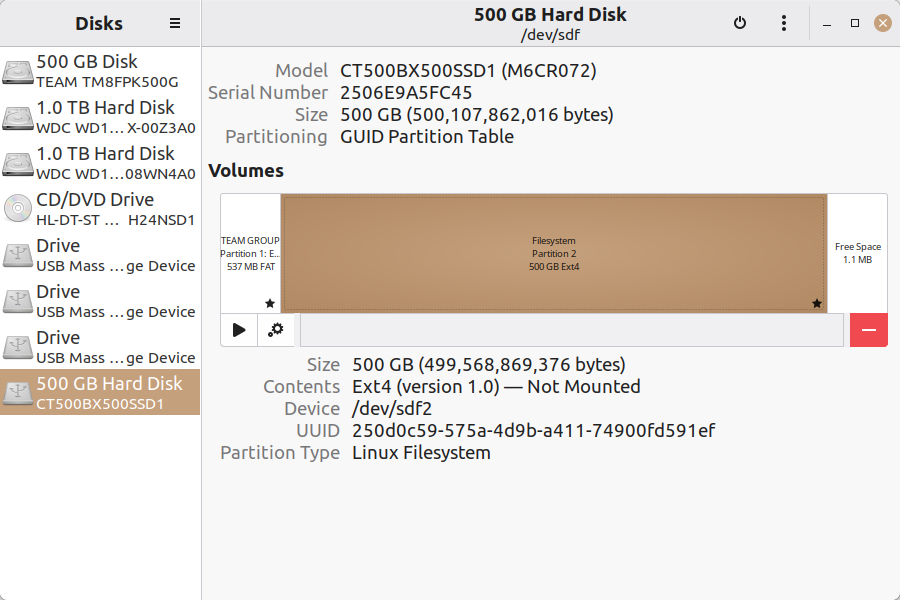
boot. Disks shows there are no files in the main partition: https://auslink.info/linux/copy.png
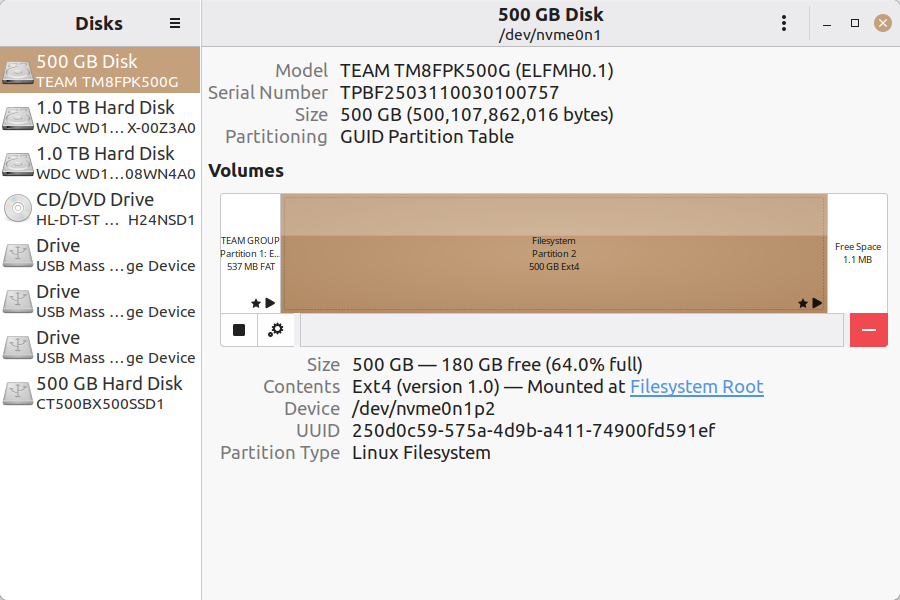
this is the nvme i copied from: https://auslink.info/linux/nvme.png
???
Axel wrote:
I want a full back up of my 500Gb NVME disk. I tried Foxclone, but I found that the image can only be written back to the original drive, which pretty much negates it's usefulness. I want an image of the NVME drive I can use on any disk to create a working drive. I tried the Disks app, and discovered it doesn't compress the image, and since the image created is a bit over 500 Gb, I can only write it to a drive larger than 500Gb. (sigh) I think the problem is that the NVME drive is actually a fraction over 500Gb, since if I try to clone it to a 500Gb drive I get a message that the receptor drive is too small. I was told I can reduce the partition on the NVME drive to make a smaller image, but I'm afraid to do that in case I lose data. I will try Rescuezilla, but if that doesn't compress the image there's no gain from that. Does anyone have any better suggestions for what I can do? thanks to all. :)
thanks for all replies, I will investigate them. for now, this is what I have done. successfully created an image of the NVME using rescuezilla. successfully wrote that to a 500Gb SSD, but it won't boot. Disks shows there are no files in the main partition: https://auslink.info/linux/copy.png
this is the nvme i copied from: https://auslink.info/linux/nvme.png
???
On 2026-05-03, Axel <none@not.here> wrote:
I want a full back up of my 500Gb NVME disk. I tried Foxclone, but ITo be correct the image needs to be written to the same size or larger disk/partition, and yes down to the byte.
found that the image can only be written back to the original drive,
which pretty much negates it's usefulness.
I want an image of the NVMEIf you accept the size limitation then you will get a working drive after
drive I can use on any disk to create a working drive.
the copy is done.
Bork your HD and you can install the backup image and be away right from the reboot after the copy.
You need to understand the tool(s). It is somewhat frustrating the the copy partition/disk needs to be larger(or the exact size) than the backup.
I tried the DisksWell, have about you do an image backup of the disk before you try reducing the NVMe partition? then if you lose data all you need to do is to restore the NVMe partition from the backup and try again.
app, and discovered it doesn't compress the image, and since the image
created is a bit over 500 Gb, I can only write it to a drive larger than
500Gb. (sigh) I think the problem is that the NVME drive is actually a
fraction over 500Gb, since if I try to clone it to a 500Gb drive I get a
message that the receptor drive is too small. I was told I can reduce
the partition on the NVME drive to make a smaller image, but I'm afraid
to do that in case I lose data.
Just keep in mind that a partion is not the whole disk in some cases.
I will try Rescuezilla, but if thatClonezilla, and others use partclone as the engine.
doesn't compress the image there's no gain from that. Does anyone have
any better suggestions for what I can do? thanks to all. :)
Regarding compression. Clonezilla does not copy the unused space on the orginal, it then compresses the copied parts. The issue is that clonezilla *demands* that it needs a space as large as the orginal to copy it back to.
Axel wrote:
Axel wrote:
I want a full back up of my 500Gb NVME disk. I tried Foxclone, but I
found that the image can only be written back to the original drive,
which pretty much negates it's usefulness. I want an image of the
NVME drive I can use on any disk to create a working drive. I tried
the Disks app, and discovered it doesn't compress the image, and
since the image created is a bit over 500 Gb, I can only write it to
a drive larger than 500Gb. (sigh) I think the problem is that the
NVME drive is actually a fraction over 500Gb, since if I try to
clone it to a 500Gb drive I get a message that the receptor drive is
too small. I was told I can reduce the partition on the NVME drive
to make a smaller image, but I'm afraid to do that in case I lose
data. I will try Rescuezilla, but if that doesn't compress the image
there's no gain from that. Does anyone have any better suggestions
for what I can do? thanks to all. :)
thanks for all replies, I will investigate them. for now, this is
what I have done. successfully created an image of the NVME using
rescuezilla. successfully wrote that to a 500Gb SSD, but it won't
boot. Disks shows there are no files in the main partition:
https://auslink.info/linux/copy.png
this is the nvme i copied from: https://auslink.info/linux/nvme.png
???
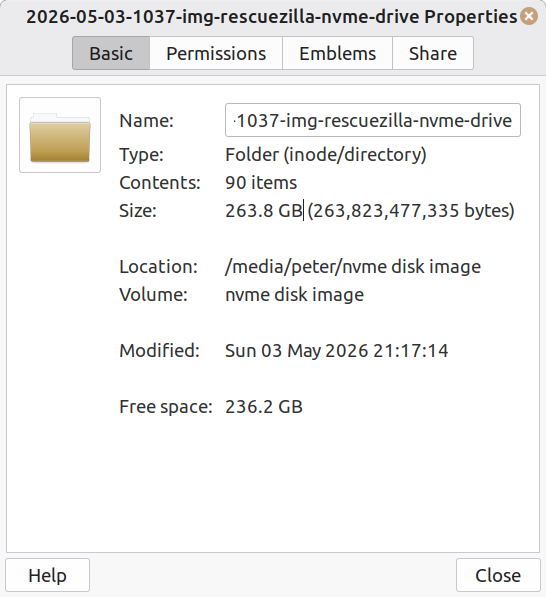
p.s. this is the image I made. if that helps? https://auslink.info/linux/image.png
On Sun, 5/3/2026 7:59 PM, Axel wrote:
Axel wrote:Directory: 2026-05-03-1942-img-rescuezilla # This is a backup of a 200GB LLM223 UEFI/GPT install
I want a full back up of my 500Gb NVME disk. I tried Foxclone, but I found that the image can only be written back to the original drive, which pretty much negates it's usefulness. I want an image of the NVME drive I can use on any disk to create a working drive. I tried the Disks app, and discovered it doesn't compress the image, and since the image created is a bit over 500 Gb, I can only write it to a drive larger than 500Gb. (sigh) I think the problem is that the NVME drive is actually a fraction over 500Gb, since if I try to clone it to a 500Gb drive I get a message that the receptor drive is too small. I was told I can reduce the partition on the NVME drive to make a smaller image, but I'm afraid to do that in case I lose data. I will try Rescuezilla, but if that doesn't compress the image there's no gain from that. Does anyone have any better suggestions for what I can do? thanks to all. :)thanks for all replies, I will investigate them. for now, this is what I have done. successfully created an image of the NVME using rescuezilla. successfully wrote that to a 500Gb SSD, but it won't boot. Disks shows there are no files in the main partition: https://auslink.info/linux/copy.png
this is the nvme i copied from: https://auslink.info/linux/nvme.png
???
# sda1 = ESP, sda2 = main ext4, sda3 = swap
Mode LastWriteTime Length Name
---- ------------- ------ ----
-a---- Sun, 5, 3, 2026 3:43 PM 233 blkdev.list
-a---- Sun, 5, 3, 2026 3:43 PM 632 blkid.list
-a---- Sun, 5, 3, 2026 3:45 PM 51220 clonezilla-img
-a---- Sun, 5, 3, 2026 3:43 PM 198 dev-fs.list
-a---- Sun, 5, 3, 2026 3:43 PM 4 disk
-a---- Sun, 5, 3, 2026 3:43 PM 1894 Info-dmi.txt
-a---- Sun, 5, 3, 2026 3:45 PM 235 Info-img-id.txt
-a---- Sun, 5, 3, 2026 3:43 PM 14682 Info-lshw.txt
-a---- Sun, 5, 3, 2026 3:43 PM 1288 Info-lspci.txt
-a---- Sun, 5, 3, 2026 3:43 PM 912 Info-OS-prober.txt
-a---- Sun, 5, 3, 2026 3:43 PM 182 Info-packages.txt
-a---- Sun, 5, 3, 2026 3:43 PM 868 Info-smart.txt
-a---- Sun, 5, 3, 2026 3:43 PM 11 parts
-a---- Sun, 5, 3, 2026 3:43 PM 37 sda-chs.sf
-a---- Sun, 5, 3, 2026 3:43 PM 17408 sda-gpt-1st
-a---- Sun, 5, 3, 2026 3:43 PM 16384 sda-gpt-2nd
-a---- Sun, 5, 3, 2026 3:43 PM 17920 sda-gpt.gdisk
-a---- Sun, 5, 3, 2026 3:43 PM 676 sda-gpt.sgdisk
-a---- Sun, 5, 3, 2026 3:43 PM 512 sda-mbr
-a---- Sun, 5, 3, 2026 3:43 PM 392 sda-pt.parted
-a---- Sun, 5, 3, 2026 3:43 PM 351 sda-pt.parted.compact -a---- Sun, 5, 3, 2026 3:43 PM 549 sda-pt.sf
-a---- Sun, 5, 3, 2026 3:43 PM 7118216 sda1.vfat-ptcl-img.uncomp.aa
-a---- Sun, 5, 3, 2026 3:44 PM 4000000000 sda2.ext4-ptcl-img.uncomp.aa
-a---- Sun, 5, 3, 2026 3:44 PM 4000000000 sda2.ext4-ptcl-img.uncomp.ab
-a---- Sun, 5, 3, 2026 3:44 PM 762122082 sda2.ext4-ptcl-img.uncomp.ac
-a---- Sun, 5, 3, 2026 3:45 PM 53 swappt-sda3.info
The swap info file says:
UUID="d87e9ab3-7db2-4bfd-87ae-016f1a3fd208"
LABEL=""
so no space is used backing up swap.
Does your backup resemble that ? The sda2.ext4-ptcl files are PartClone files so
only the used portion of the partition is stored in there. I specifically turned
off compression, as I was expecting to be able to use Image Explorer.
*******
For any data-full partitions, you can use the fsarchiver program to back
up the partitions. If RescueZilla seems incapable of populating your main partition properly, you can overwrite your main partition with an fsarchiver run.
I was hoping to build my own backup solution, if I could find a "skeletal" backup function
for the non-partition parts. The sda-mbr file, the sda-gpt-1st and sda-gpt-2nd files, are
items to be restored via "dd". Booting is via sda1.vfat-ptcl (which is the ESP partition).
Those would all be examples of skeletal bits. Macrium would have backed up my SWAP
as a 2GB "dd" file, whereas RescueZilla just creates a new SWAP using the appropriate
GPT GUID-type for the job. And maybe a mkswap for the filesystem part.
If the main partition part does not work, you can attempt to use fsarchiver in its
place (to fill the partition manually after RescueZilla is "finished").
At this point, it's all experiments. The RescueZilla really should have worked.
Paul--
Axel wrote:
Axel wrote:
Axel wrote:
I want a full back up of my 500Gb NVME disk. I tried Foxclone, but I found that the image can only be written back to the original drive, which pretty much negates it's usefulness. I want an image of the NVME drive I can use on any disk to create a working drive. I tried the Disks app, and discovered it doesn't compress the image, and since the image created is a bit over 500 Gb, I can only write it to a drive larger than 500Gb. (sigh) I think the problem is that the NVME drive is actually a fraction over 500Gb, since if I try to clone it to a 500Gb drive I get a message that the receptor drive is too small. I was told I can reduce the partition on the NVME drive to make a smaller image, but I'm afraid to do that in case I lose data. I will try Rescuezilla, but if that doesn't compress the image there's no gain from that. Does anyone have any better suggestions for what I can do? thanks to all. :)
thanks for all replies, I will investigate them. for now, this is what I have done. successfully created an image of the NVME using rescuezilla. successfully wrote that to a 500Gb SSD, but it won't boot. Disks shows there are no files in the main partition: https://auslink.info/linux/copy.png
this is the nvme i copied from: https://auslink.info/linux/nvme.png
???
p.s. this is the image I made. if that helps? https://auslink.info/linux/image.png
solved! I mounted the 'empty' partition using Disks and the files are all there https://auslink.info/linux/mounted.png, so I tried the disk in a different PC, and it works perfectly. issue was the first PC I tried was using legacy bios. thanks everyone,
On 2026-05-03, Axel <none@not.here> wrote:
I want a full back up of my 500Gb NVME disk. I tried Foxclone, but I
found that the image can only be written back to the original drive,
which pretty much negates it's usefulness.
To be correct the image neds to be written to the same size or larger disk/partition, and yes down to the byte.
I want an image of the NVME
drive I can use on any disk to create a working drive.
If you accept the size limitation then you will get a working drive after
the copy is done.
Bork your HD and you can install the backup image and be away right from the reboot after the copy.
You need to understand the tool(s). It is some what frustrating the the copy partition/disk needs to be larger(or the exact size) than the backup.
I tried the Disks
app, and discovered it doesn't compress the image, and since the image
created is a bit over 500 Gb, I can only write it to a drive larger than
500Gb. (sigh) I think the problem is that the NVME drive is actually a
fraction over 500Gb, since if I try to clone it to a 500Gb drive I get a
message that the receptor drive is too small. I was told I can reduce
the partition on the NVME drive to make a smaller image, but I'm afraid
to do that in case I lose data.
Well, have about you do an image backup of the disk before you try reducing the NVMe partition? then if you lose data all you need to do is to restore the NVMe partition from the backup and try again.
Just keep in mind that a partion is not the whole disk in some cases.
I will try Rescuezilla, but if thatClonezilla, and others use partclone as the engine.
doesn't compress the image there's no gain from that. Does anyone have
any better suggestions for what I can do? thanks to all. :)
Regarding compression. Clonezilla does not copy the unused space on the orginal, it then compresses the copied parts. The issue is that clonezilla *demands* that it needs a space as large as the orginal to copy it back to.
And bravo to Cherie DeVaux; first woman trainer to win the Kentucky
Derby.
Cherie didn't just fall off the training turnip truck; she spent 14 y
working for other trainers and has had her own training biz for 8 more.
On 5/3/26 12:21 PM, Axel wrote:
german newsgroups wrote:
Le 03/05/2026 |a 06:00, Axel a |-crit-a:
I want a full back up of my 500Gb NVME disk. I tried Foxclone, but
I found that the image can only be written back to the original
drive, which pretty much negates it's usefulness. I want an image
of the NVME drive I can use on any disk to create a working drive.
I tried the Disks app, and discovered it doesn't compress the
image, and since the image created is a bit over 500 Gb, I can only
write it to a drive larger than 500Gb. (sigh) I think the problem
is that the NVME drive is actually a fraction over 500Gb, since if
I try to clone it to a 500Gb drive I get a message that the
receptor drive is too small. I was told I can reduce the partition
on the NVME drive to make a smaller image, but I'm afraid to do
that in case I lose data. I will try Rescuezilla, but if that
doesn't compress the image there's no gain from that. Does anyone
have any better suggestions for what I can do? thanks to all. :)
why this image ?
when you install...the time stamps is correct ! the time stamps
software install too !
so, after what we need ? a skeleton about yours folder with the
config files ? yes, the name user is not the sometimes...
what is your feel ?
Je ne comprends pas votre anglais
Ignore this idiot.
Clonezilla will work fine for you.
One thing to be aware of, is the GUID of the two EXT4 partitions are
the same. This could cause problems with attempting to mount the
item.
Axel wrote:
Axel wrote:
Axel wrote:
I want a full back up of my 500Gb NVME disk. I tried Foxclone, but
I found that the image can only be written back to the original
drive, which pretty much negates it's usefulness. I want an image
of the NVME drive I can use on any disk to create a working drive.
I tried the Disks app, and discovered it doesn't compress the
image, and since the image created is a bit over 500 Gb, I can only
write it to a drive larger than 500Gb. (sigh) I think the problem
is that the NVME drive is actually a fraction over 500Gb, since if
I try to clone it to a 500Gb drive I get a message that the
receptor drive is too small. I was told I can reduce the partition
on the NVME drive to make a smaller image, but I'm afraid to do
that in case I lose data. I will try Rescuezilla, but if that
doesn't compress the image there's no gain from that. Does anyone
have any better suggestions for what I can do? thanks to all. :)
thanks for all replies, I will investigate them. for now, this is
what I have done. successfully created an image of the NVME using
rescuezilla. successfully wrote that to a 500Gb SSD, but it won't
boot. Disks shows there are no files in the main partition:
https://auslink.info/linux/copy.png
this is the nvme i copied from: https://auslink.info/linux/nvme.png
???
p.s. this is the image I made. if that helps?
https://auslink.info/linux/image.png
solved! I mounted the 'empty' partition using Disks and the files are
all there https://auslink.info/linux/mounted.png, so I tried the disk
in a different PC, and it works perfectly. issue was the first PC I
tried was using legacy bios. thanks everyone,
On 5/3/26 12:21 PM, Axel wrote:
german newsgroups wrote:
Le 03/05/2026 |a 06:00, Axel a |-crit-a:
I want a full back up of my 500Gb NVME disk. I tried Foxclone, but I
found that the image can only be written back to the original drive,
which pretty much negates it's usefulness. I want an image of the
NVME drive I can use on any disk to create a working drive. I tried
the Disks app, and discovered it doesn't compress the image, and
since the image created is a bit over 500 Gb, I can only write it to
a drive larger than 500Gb. (sigh) I think the problem is that the
NVME drive is actually a fraction over 500Gb, since if I try to
clone it to a 500Gb drive I get a message that the receptor drive is
too small. I was told I can reduce the partition on the NVME drive
to make a smaller image, but I'm afraid to do that in case I lose
data. I will try Rescuezilla, but if that doesn't compress the image
there's no gain from that. Does anyone have any better suggestions
for what I can do? thanks to all. :)
why this image ?
when you install...the time stamps is correct ! the time stamps
software install too !
so, after what we need ? a skeleton about yours folder with the
config files ? yes, the name user is not the sometimes...
what is your feel ?
Je ne comprends pas votre anglais
Ignore this idiot.
Clonezilla will work fine for you.
german newsgroups wrote:
Le 03/05/2026 |a 06:00, Axel a |-crit-a:
I want a full back up of my 500Gb NVME disk. I tried Foxclone, but I
found that the image can only be written back to the original drive,
which pretty much negates it's usefulness. I want an image of the
NVME drive I can use on any disk to create a working drive. I tried
the Disks app, and discovered it doesn't compress the image, and
since the image created is a bit over 500 Gb, I can only write it to
a drive larger than 500Gb. (sigh) I think the problem is that the
NVME drive is actually a fraction over 500Gb, since if I try to clone
it to a 500Gb drive I get a message that the receptor drive is too
small. I was told I can reduce the partition on the NVME drive to
make a smaller image, but I'm afraid to do that in case I lose data.
I will try Rescuezilla, but if that doesn't compress the image
there's no gain from that. Does anyone have any better suggestions
for what I can do? thanks to all. :)
why this image ?
when you install...the time stamps is correct ! the time stamps
software install too !
so, after what we need ? a skeleton about yours folder with the config
files ? yes, the name user is not the sometimes...
what is your feel ?
Je ne comprends pas votre anglais
On Sun, 5/3/2026 9:37 PM, Axel wrote:
Axel wrote:One thing to be aware of, is the GUID of the two EXT4 partitions the same.
Axel wrote:solved! I mounted the 'empty' partition using Disks and the files are all there https://auslink.info/linux/mounted.png, so I tried the disk in a different PC, and it works perfectly. issue was the first PC I tried was using legacy bios. thanks everyone,
Axel wrote:p.s. this is the image I made. if that helps? https://auslink.info/linux/image.png
I want a full back up of my 500Gb NVME disk. I tried Foxclone, but I found that the image can only be written back to the original drive, which pretty much negates it's usefulness. I want an image of the NVME drive I can use on any disk to create a working drive. I tried the Disks app, and discovered it doesn't compress the image, and since the image created is a bit over 500 Gb, I can only write it to a drive larger than 500Gb. (sigh) I think the problem is that the NVME drive is actually a fraction over 500Gb, since if I try to clone it to a 500Gb drive I get a message that the receptor drive is too small. I was told I can reduce the partition on the NVME drive to make a smaller image, but I'm afraid to do that in case I lose data. I will try Rescuezilla, but if that doesn't compress the image there's no gain from that. Does anyone have any better suggestions for what I can do? thanks to all. :)thanks for all replies, I will investigate them. for now, this is what I have done. successfully created an image of the NVME using rescuezilla. successfully wrote that to a 500Gb SSD, but it won't boot. Disks shows there are no files in the main partition: https://auslink.info/linux/copy.png
this is the nvme i copied from: https://auslink.info/linux/nvme.png
???
This could cause problems with attempting to mount the item. I don't
know if I've ever tested that (what happens when the two partitions
are exactly the same, being on the machine at the same time).
A legacy BIOS would certainly cause no end of problems, such as having
no NVMe driver. But then, you would be less likely to have a slot
for the NVMe drive to plug into.
Another weirdness I notice, is the CT500BX500SSD1 has the same "title string" on its ESP partition, as the Team Group drive is using.
Is that title
string the actual volume name of the ESP ?
If the volumes in GRUB are
identified by the GUID, there could be a wee bit of confusion there too.
I've had trouble in the past, just with two Windows Boot Managers interacting,
and selecting one thing and "something else boots". I haven't seen one of those incidents in some time. It tends to happen when I have two identical brand and size drives, like two WD Black 1TB in the machine at the same time, one on Port 2, the other on Port 4. And the content on the drives, consisted of separate installs and no copying involved.
But at least you're finally seeing a backup and restore that seems to have worked.
You're now the expert on backup and restore :-)
Paul
Axel wrote:
Axel wrote:
Axel wrote:
Axel wrote:
I want a full back up of my 500Gb NVME disk. I tried Foxclone, but I found that the image can only be written back to the original drive, which pretty much negates it's usefulness. I want an image of the NVME drive I can use on any disk to create a working drive. I tried the Disks app, and discovered it doesn't compress the image, and since the image created is a bit over 500 Gb, I can only write it to a drive larger than 500Gb. (sigh) I think the problem is that the NVME drive is actually a fraction over 500Gb, since if I try to clone it to a 500Gb drive I get a message that the receptor drive is too small. I was told I can reduce the partition on the NVME drive to make a smaller image, but I'm afraid to do that in case I lose data. I will try Rescuezilla, but if that doesn't compress the image there's no gain from that. Does anyone have any better suggestions for what I can do? thanks to all. :)
thanks for all replies, I will investigate them. for now, this is what I have done. successfully created an image of the NVME using rescuezilla. successfully wrote that to a 500Gb SSD, but it won't boot. Disks shows there are no files in the main partition: https://auslink.info/linux/copy.png
this is the nvme i copied from: https://auslink.info/linux/nvme.png
???
p.s. this is the image I made. if that helps? https://auslink.info/linux/image.png
solved! I mounted the 'empty' partition using Disks and the files are all there https://auslink.info/linux/mounted.png, so I tried the disk in a different PC, and it works perfectly. issue was the first PC I tried was using legacy bios. thanks everyone,
I still have a problem. :( The PC I want to use the copy drive in has only legacy bios. is there anyway I can make this disk boot in that PC? thanks,
Edmund wrote:
On 5/3/26 12:21 PM, Axel wrote:
german newsgroups wrote:
Le 03/05/2026 |a 06:00, Axel a |-crit-a:
I want a full back up of my 500Gb NVME disk. I tried Foxclone, but
I found that the image can only be written back to the original
drive, which pretty much negates it's usefulness. I want an image
of the NVME drive I can use on any disk to create a working drive.
I tried the Disks app, and discovered it doesn't compress the
image, and since the image created is a bit over 500 Gb, I can only >>>>> write it to a drive larger than 500Gb. (sigh) I think the problem
is that the NVME drive is actually a fraction over 500Gb, since if
I try to clone it to a 500Gb drive I get a message that the
receptor drive is too small. I was told I can reduce the partition
on the NVME drive to make a smaller image, but I'm afraid to do
that in case I lose data. I will try Rescuezilla, but if that
doesn't compress the image there's no gain from that. Does anyone
have any better suggestions for what I can do? thanks to all. :)
why this image ?
when you install...the time stamps is correct ! the time stamps
software install too !
so, after what we need ? a skeleton about yours folder with the
config files ? yes, the name user is not the sometimes...
what is your feel ?
Je ne comprends pas votre anglais
Ignore this idiot.
sound advice
Clonezilla will work fine for you.
It did!
Axel wrote:
Axel wrote:I still have a problem. :( The PC I want to use the copy drive in has only legacy bios.
Axel wrote:
Axel wrote:
I want a full back up of my 500Gb NVME disk. I tried Foxclone, but I found that the image can only be written back to the original drive, which pretty much negates it's usefulness. I want an image of the NVME drive I can use on any disk to create a working drive. I tried the Disks app, and discovered it doesn't compress the image, and since the image created is a bit over 500 Gb, I can only write it to a drive larger than 500Gb. (sigh) I think the problem is that the NVME drive is actually a fraction over 500Gb, since if I try to clone it to a 500Gb drive I get a message that the receptor drive is too small. I was told I can reduce the partition on the NVME drive to make a smaller image, but I'm afraid to do that in case I lose data. I will try Rescuezilla, but if that doesn't compress the image there's no gain from that. Does anyone have any better suggestions for what I can do? thanks to all. :)
thanks for all replies, I will investigate them. for now, this is what I have done. successfully created an image of the NVME using rescuezilla. successfully wrote that to a 500Gb SSD, but it won't boot. Disks shows there are no files in the main partition: https://auslink.info/linux/copy.png
this is the nvme i copied from: https://auslink.info/linux/nvme.png
???
p.s. this is the image I made. if that helps? https://auslink.info/linux/image.png
solved! I mounted the 'empty' partition using Disks and the files are all there
https://auslink.info/linux/mounted.png>>
so I tried the disk in a different PC, and it works perfectly. issue was the first
PC I tried was using legacy bios. thanks everyone,
is there anyway I can make this disk boot in that PC? thanks,
Summary: You can get there. It's the usual amount of annoyance.
On Tue, 5 May 2026 18:52:56 -0400, Paul wrote:
Summary: You can get there. It's the usual amount of annoyance.
Would be a lot simpler if you had done a file copy onto a new volume.
The rCLamount of annoyancerCY is only rCLusualrCY if you donrCOt know any better
...
You also do these things when you move a UEFI boot drive to a Legacy
machine.
| Sysop: | Amessyroom |
|---|---|
| Location: | Fayetteville, NC |
| Users: | 65 |
| Nodes: | 6 (0 / 6) |
| Uptime: | 08:03:18 |
| Calls: | 862 |
| Files: | 1,311 |
| D/L today: |
1 files (1,366K bytes) |
| Messages: | 264,936 |