From Newsgroup: alt.os.linux
PSA: Updated adbcopy.bat bidirectional Android:Windows copy over Wi-Fi
BACKGROUND:
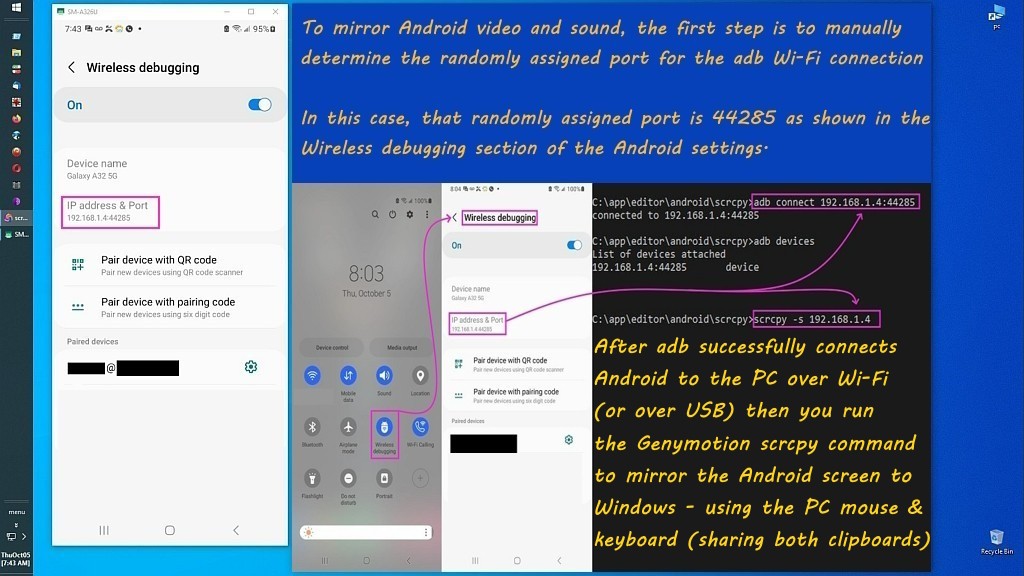
My Android phone's USB data pins have been broken for months, so while
most people would trash the phone, I simply use it over Wi-Fi instead.
<
https://i.postimg.cc/pr8NPNKs/scrcpy33.jpg>
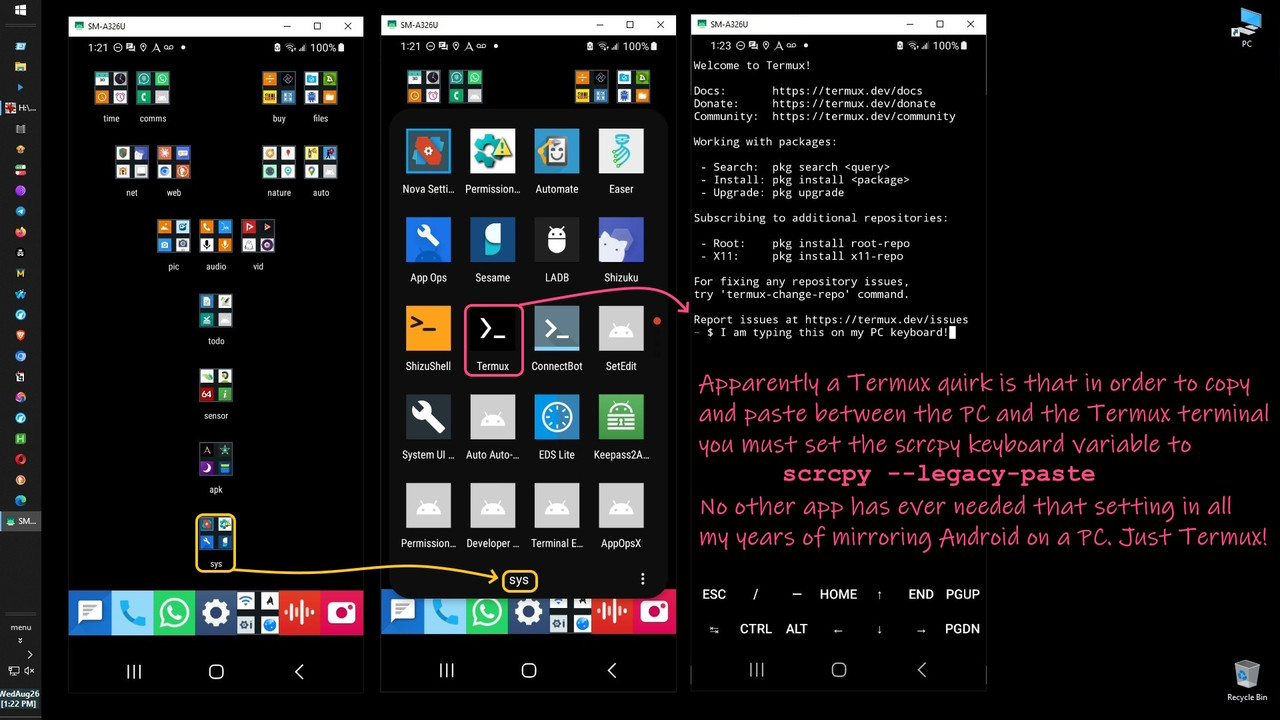
The phone becomes about 2 feet tall as I can work it from the desktop
keyboard where even the clipboard is shared between the two platforms.
<
https://i.postimg.cc/ZRCTyRx0/scrcpy35.jpg>
Bidirectional copy over USB with Android:Windows is trivial, but it's
less trivial to use the Windows File Explorer over Wi-Fi without adding
a server (e.g., a WebDAV or FTP server) that Windows can network with.
Therefore, I wrote this script below, called "adbcopy.bat" for that.
Since adb is on all desktops, there's no reason this can't be ported
to macOS or Linux since it's just setting paths and moving files.
As always, if you make improvements, please pay it back to the team.
:: adbcopy.bat
:: -------------------------------------------------------------------------
:: Uses desktop adb to copy image files to/from Android:Windows Wi-Fi:USB
:: Porting to macOS/Linux is trivial given adb works on all desktop PC's.
:: -------------------------------------------------------------------------
:: v4p3 20261027 Fixed Windows push prompt to reflect directory support
:: v4p2 20261027 Added option to copy an Android directory to Windows
:: v4p1 20261023 Added a more graceful exit option to the pull menu
:: v4p0 20261023 Added option to find the largest files on the system
:: v3p9 20261023 Fixed directory structure preservation for full DCIM pulls
:: v3p8 20261023 Added option to pull entire internal DCIM, all subdirs
:: and entire external DCIM, all subdirs, no date filter
:: v3p7 20260928 Allowed paths to have doublequotes in them when copied
:: v3p6 20260728 Improved comments for easier re-use leverage by others.
:: v3p5 20260727 Fixed errors which occur only when no APK files are found
:: v3p4 20260727 Added checks for typos when inputting Windows file paths
:: v3p3 20260727 Added Windows browsing capability if full path is not known
:: v3p2 20260726 Added choice of known Android destinations for convenience
:: v3p1 20260725 Added Windows push to Android using a known full path
:: Added broadcast registration so images can quickly be found
:: v3p0 20260708 added dual-layer deletion, filesystem + mediastore
:: which prevents FUSE from repeatedly restoring ghost files
:: and which handles private-app sandbox directories
:: v2p9 20260707 fixed quoting and path issues caused by filenames with spaces
:: v2p8 20260708 added skipping of empty directories before prompting user
:: v2p7 20260702 changed to delete only files, not folders
:: v2p6 20260701 added auto-detect all DCIM subdirectories
:: v2p5 20260701 expanded image file matching
:: v2p4 20260701 added internal DCIM/Camera option
:: v2p3 20260621 open destination folder when done
:: v2p2 20260617 added screenshot directory detection
:: v2p2 20260612 fixed quoting bug in DCIM ls command
:: v2p1 20260607 added Windows-to-Android APK install mode
:: v2p0 20260603 added Screenshot directory support
:: v1p9 20260528 trim trailing spaces from destination path
:: v1p8 20260528 replaced destructive path truncation with CR stripping
:: v1p7 20260528 escaped redirection character in backtick loop
:: v1p6 20260528 updated external SD card path handling
:: v1p5 20260528 fixed null-redirection error and stabilized extraction
:: v1p4 20260528 fixed "unexpected at this time" crash
:: v1p3 20260528 fixed crash on empty variable comparison
:: v1p2 20260528 fixed multi-device detection and nested quoting
:: v1p1 20260528 added debug output for failure cases
:: v1p0 20260528 initial version: copy images by date
:: -------------------------------------------------------------------------
@echo off
setlocal enabledelayedexpansion
cd /d "%~dp0"
:: Define the path to the adb executable
set "ADB_EXE=c:\app\editor\android\scrcpy\adb.exe"
:: Detect whether the device is already connected to adb
for /f "skip=1 tokens=1" %%g in ('"%ADB_EXE%" devices') do (
if not "%%g"=="" (
if "!ADB_TARGET!"=="" set "ADB_TARGET=%%g"
)
)
if "!ADB_TARGET!"=="" (
echo [ERROR] No connected ADB devices found.
pause
exit /b
)
echo Targeting device: %ADB_TARGET%
echo ----------------
:: --- Main menu --- default is [1] ---
echo Select Direction:
echo [1] Android to Windows (Pull Images/Screenshots) [Default]
echo [2] Windows to Android (Copy/Install APK)
echo.
set "CHOICE=1"
set /p "CHOICE=Enter choice [1 or 2]: "
if "%CHOICE%"=="2" goto :windows_to_android
if "%CHOICE%"=="1" goto :android_to_windows
goto :android_to_windows
:windows_to_android
echo.
echo --- Windows to Android Push Mode ---
:: begin file selection
echo Select file input mode:
echo [0] Browse for file (no full path needed)
echo [1] Enter full path manually
echo.
set /p "FILE_MODE=Enter choice [0 or 1]: "
if "%FILE_MODE%"=="0" (
echo Opening file browser...
for /f "delims=" %%F in ('powershell -command "Add-Type -AssemblyName System.Windows.Forms; $f=New-Object System.Windows.Forms.OpenFileDialog; $f.Filter='Images|*.jpg;*.jpeg;*.png;*.gif'; if($f.ShowDialog() -eq 'OK'){Write-Output $f.FileName}"') do set "SRC_FILE=%%F"
) else (
:ask_path
set "SRC_FILE="
set /p "SRC_FILE=Enter full path of file or directory to push: "
if "!SRC_FILE!"=="" (
echo You must enter a full path or choose option 0.
goto ask_path
)
:: Remove any double quotes the user may have included when typing or pasting
set "SRC_FILE=!SRC_FILE:"=!"
:: Normalize the path cleanly
for %%A in ("!SRC_FILE!") do set "SRC_FILE=%%~fA"
)
if not exist "%SRC_FILE%" (
echo [ERROR] Path not found: %SRC_FILE%
pause
exit /b
)
:: end file selection
:: Extract just the filename or dirname (e.g., toilet)
for %%F in ("%SRC_FILE%") do set "SRC_NAME=%%~nxF"
echo.
echo Select Android destination:
echo [1] /storage/emulated/0/DCIM/Camera
echo [2] /storage/emulated/0/DCIM/Screenshots
echo [3] /storage/emulated/0/Pictures
echo [4] /storage/emulated/0/Pictures/Screenshots
echo [5] /storage/emulated/0/Download
echo [6] /storage/emulated/0/Snapseed
echo [7] /storage/emulated/0/Samsung
echo [8] /storage/emulated/0/Android/media/com.whatsapp/WhatsApp/Media/WhatsApp
Images
echo.
set /p "DEST_CHOICE=Enter choice [1-8]: "
if "%DEST_CHOICE%"=="1" set "DEST_DIR=/storage/emulated/0/DCIM/Camera"
if "%DEST_CHOICE%"=="2" set
"DEST_DIR=/storage/emulated/0/DCIM/Screenshots"
if "%DEST_CHOICE%"=="3" set "DEST_DIR=/storage/emulated/0/Pictures"
if "%DEST_CHOICE%"=="4" set "DEST_DIR=/storage/emulated/0/Pictures/Screenshots"
if "%DEST_CHOICE%"=="5" set "DEST_DIR=/storage/emulated/0/Download"
if "%DEST_CHOICE%"=="6" set "DEST_DIR=/storage/emulated/0/Snapseed"
if "%DEST_CHOICE%"=="7" set "DEST_DIR=/storage/emulated/0/Samsung"
if "%DEST_CHOICE%"=="8" set "DEST_DIR=/storage/emulated/0/Android/media/com.whatsapp/WhatsApp/Media/WhatsApp
Images"
echo.
echo Pushing "%SRC_FILE%" to "%DEST_DIR%"
"%ADB_EXE%" -s %ADB_TARGET% push "%SRC_FILE%" "%DEST_DIR%"
echo Forcing media scan...
"%ADB_EXE%" -s %ADB_TARGET% shell am broadcast -a android.intent.action.MEDIA_SCANNER_SCAN_FILE -d
file://%DEST_DIR%/%SRC_NAME%
echo Done.
pause
exit /b
:: ROUTINE: ANDROID TO WINDOWS
:android_to_windows
echo.
echo --- Running Android to Windows Pull ---
echo.
echo What do you want to pull?
echo [1] Camera photos (SD Card DCIM/Camera)
echo [2] Screenshots
echo [3] Camera photos (Internal Storage DCIM/Camera)
echo [4] Pull directories one-by-one (user selected)
echo [5] Entire Internal DCIM (all subdirectories, all files)
echo [6] Entire External DCIM (SD Card, all subdirectories, all files)
echo [7] Find largest files on device (diagnostic)
echo [8] Exit
echo [9] Custom Android Directory (recursive pull)
set "PULL_CHOICE=1"
set /p "PULL_CHOICE=Enter choice [1-9]: "
:: Exit option
if "%PULL_CHOICE%"=="8" goto :exit_script
:: Only ask for date if pulling dated files (options 1-4)
if "%PULL_CHOICE%"=="5" goto :skip_date
if "%PULL_CHOICE%"=="6" goto :skip_date
if "%PULL_CHOICE%"=="4" goto :skip_date
if "%PULL_CHOICE%"=="7" goto :find_largest
if "%PULL_CHOICE%"=="9" goto :skip_date
:: --- DATE DETECTION ---
for /f "tokens=2 delims==" %%i in ('wmic os get localdatetime /value') do
set "dt=%%i"
set "DETECTED_DATE=%dt:~0,8%"
echo Detected Date: %DETECTED_DATE%
set /p "USER_DATE=Press Enter to confirm, or type a different date
(YYYYMMDD): "
if "%USER_DATE%"=="" (
set "TARGET_DATE=%DETECTED_DATE%"
) else (
set "TARGET_DATE=%USER_DATE%"
)
:skip_date
echo.
if "%PULL_CHOICE%"=="4" (
rem Interactive, pulling everything iX no date-based subfolder
set "DEST_DIR=H:\003_camera\20260701"
) else if "%PULL_CHOICE%"=="9" (
set "DEST_DIR=H:\004_upload\home\pool\assay\custom_pull"
) else (
rem Date-based pulls still go into YYYYMMDD subfolder
set "DEST_DIR=H:\004_upload\home\pool\assay\%TARGET_DATE%"
)
set /p "USER_DIR=Enter destination directory [Default: %DEST_DIR%]: "
if not "%USER_DIR%"=="" set "DEST_DIR=%USER_DIR%"
:: Remove quotes
set "DEST_DIR=%DEST_DIR:"=%"
:: Trim trailing spaces
:trim
if "!DEST_DIR:~-1!"==" " (
set "DEST_DIR=!DEST_DIR:~0,-1!"
goto trim
)
if not exist "%DEST_DIR%" (
echo Creating directory: %DEST_DIR%
mkdir "%DEST_DIR%"
)
if "%PULL_CHOICE%"=="1" goto :pull_camera
if "%PULL_CHOICE%"=="2" goto :pull_screenshots
if "%PULL_CHOICE%"=="3" goto :pull_camera_internal
if "%PULL_CHOICE%"=="4" goto :pull_interactive_dirs
if "%PULL_CHOICE%"=="5" goto :pull_internal_dcim_all
if "%PULL_CHOICE%"=="6" goto :pull_external_dcim_all
if "%PULL_CHOICE%"=="7" goto :find_largest
if "%PULL_CHOICE%"=="9" goto :pull_custom_android_dir
goto :pull_camera
:: PULL CAMERA (SD CARD DCIM)
:pull_camera
echo.
echo Pulling CAMERA images matching *%TARGET_DATE%*.jpg ...
echo Sending files to: "%DEST_DIR%"
echo ----------------
"%ADB_EXE%" -s !ADB_TARGET! shell ls /storage/0CA4-352D/DCIM/Camera/*%TARGET_DATE%*.jpg 2>nul >
"%TEMP%\cam_sd.txt"
for /f "usebackq delims=" %%i in ("%TEMP%\cam_sd.txt") do (
set "FILE_PATH=%%i"
if not "!FILE_PATH!"=="" (
echo Pulling: !FILE_PATH!
"%ADB_EXE%" -s !ADB_TARGET! pull "!FILE_PATH!" "%DEST_DIR%"
)
)
goto :complete
:: PULL SCREENSHOTS (handle both directories explicitly)
:pull_screenshots
echo.
echo Pulling SCREENSHOTS matching *%TARGET_DATE%*.jpg ...
echo Sending files to: "%DEST_DIR%"
echo ----------------
:: Directory A Android 11 legacy
"%ADB_EXE%" -s !ADB_TARGET! shell ls /sdcard/DCIM/Screenshots/*%TARGET_DATE%*.jpg 2>nul > "%TEMP%\ss_legacy.txt"
for /f "usebackq delims=" %%i in ("%TEMP%\ss_legacy.txt") do (
set "FILE_PATH=%%i"
if not "!FILE_PATH!"=="" (
echo Pulling (legacy): !FILE_PATH!
"%ADB_EXE%" -s !ADB_TARGET! pull "!FILE_PATH!" "%DEST_DIR%"
)
)
:: Directory B Android 13 modern
"%ADB_EXE%" -s !ADB_TARGET! shell ls /storage/emulated/0/DCIM/Screenshots/*%TARGET_DATE%*.jpg 2>nul > "%TEMP%\ss_modern.txt"
for /f "usebackq delims=" %%i in ("%TEMP%\ss_modern.txt") do (
set "FILE_PATH=%%i"
if not "!FILE_PATH!"=="" (
echo Pulling (modern): !FILE_PATH!
"%ADB_EXE%" -s !ADB_TARGET! pull "!FILE_PATH!" "%DEST_DIR%"
)
)
goto :complete
:: PULL CAMERA (INTERNAL STORAGE DCIM)
:pull_camera_internal
echo.
echo Pulling CAMERA images from INTERNAL STORAGE matching
*%TARGET_DATE%*.jpg ...
echo Sending files to: "%DEST_DIR%"
echo ----------------
"%ADB_EXE%" -s !ADB_TARGET! shell ls /storage/emulated/0/DCIM/Camera/*%TARGET_DATE%*.jpg 2>nul > "%TEMP%\cam_internal.txt"
for /f "usebackq delims=" %%i in ("%TEMP%\cam_internal.txt") do (
set "FILE_PATH=%%i"
if not "!FILE_PATH!"=="" (
echo Pulling: !FILE_PATH!
"%ADB_EXE%" -s !ADB_TARGET! pull "!FILE_PATH!" "%DEST_DIR%"
)
)
goto :complete
:: PULL ENTIRE INTERNAL DCIM (preserves directory structure)
:pull_internal_dcim_all
echo.
echo Pulling ENTIRE INTERNAL DCIM directory (preserving folder
structure)...
echo No date filter applied iX every file under /storage/emulated/0/DCIM/
will be pulled.
echo Sending to: "%DEST_DIR%"
echo ----------------
:: Use adb pull with directory path to preserve structure
"%ADB_EXE%" -s !ADB_TARGET! pull -a /storage/emulated/0/DCIM "%DEST_DIR%\DCIM_Internal"
echo.
goto :complete
:: PULL ENTIRE EXTERNAL DCIM (preserves directory structure)
:pull_external_dcim_all
echo.
echo Pulling ENTIRE EXTERNAL DCIM directory (SD Card, preserving folder structure)...
echo NOTE: No SD card is currently in this device. This option will only
work when
echo an external SD card is inserted and mounted at
/storage/0CA4-352D/.
echo No date filter applied iX every file under the external DCIM/ will be pulled.
echo Sending to: "%DEST_DIR%"
echo ----------------
:: Use adb pull with directory path to preserve structure
"%ADB_EXE%" -s !ADB_TARGET! pull -a /storage/0CA4-352D/DCIM "%DEST_DIR%\DCIM_External"
echo.
goto :complete
:: PULL CUSTOM ANDROID DIRECTORY RECURSIVELY
:pull_custom_android_dir
echo.
echo --- Custom Android Directory Pull Mode ---
echo.
set "SRC_ANDROID_DIR="
set /p "SRC_ANDROID_DIR=Enter full Android source directory path (e.g. /storage/emulated/0/Download/MyFolder): "
if "!SRC_ANDROID_DIR!"=="" (
echo [ERROR] No path provided.
goto :android_to_windows
)
:: Remove quotes if pasted
set "SRC_ANDROID_DIR=!SRC_ANDROID_DIR:"=!"
echo.
echo Pulling entire directory recursively from: "!SRC_ANDROID_DIR!"
echo Sending to Windows destination: "%DEST_DIR%"
echo ----------------
:: Extract last folder name to create a sub-folder if desired, or pull directly into DEST_DIR
"%ADB_EXE%" -s !ADB_TARGET! pull -a "!SRC_ANDROID_DIR!" "%DEST_DIR%"
echo.
goto :complete
:: FIND LARGEST FILES ON DEVICE (diagnostic)
:find_largest
echo.
echo --- Find Largest Files on Device ---
echo.
set "MIN_SIZE=10M"
set /p "MIN_SIZE=Enter minimum file size [Default: 10M, e.g. 50M 100M]: "
if "%MIN_SIZE%"=="" set "MIN_SIZE=10M"
echo.
echo Searching for files larger than %MIN_SIZE% on internal storage...
echo This may take a moment...
echo.
"%ADB_EXE%" -s !ADB_TARGET! shell "find /storage/emulated/0 -type f -size +%MIN_SIZE% -exec ls -l {} \; 2>/dev/null | sort -k5 -rn" > "%TEMP%\largest_files.txt"
:: Check if any results were found
set "HAS_RESULTS="
for /f "usebackq delims=" %%L in ("%TEMP%\largest_files.txt") do set "HAS_RESULTS=1"
if not defined HAS_RESULTS (
echo No files larger than %MIN_SIZE% found.
del "%TEMP%\largest_files.txt" >nul 2>&1
goto :find_complete
)
echo.
echo --- Results (sorted by size, largest first) ---
echo.
type "%TEMP%\largest_files.txt"
echo.
:: Save a copy to the script's directory for reference
for /f "tokens=2 delims==" %%i in ('wmic os get localdatetime /value') do
set "dt_now=%%i"
set "SAVE_NAME=%~dp0largest_files_%dt_now:~0,8%_%dt_now:~8,6%.txt"
copy "%TEMP%\largest_files.txt" "%SAVE_NAME%" >nul
echo Results also saved to: "%SAVE_NAME%"
:find_complete
echo.
echo Return to main pull menu...
echo.
goto :android_to_windows
:: FINALIZE
:complete
start "" "%DEST_DIR%"
echo Process complete
pause
exit /b
:: EXIT
:exit_script
echo.
echo Exiting adbcopy. Goodbye.
exit /b
:pull_interactive_dirs
echo.
echo --- Interactive Directory Pull Mode ---
echo Destination: "%DEST_DIR%"
echo.
:: --- Detect ALL folders under /storage/emulated/0/DCIM ---
echo Detecting DCIM folders...
rem Correct quoting: do NOT quote the ls command
"%ADB_EXE%" -s %ADB_TARGET% shell ls -d /storage/emulated/0/DCIM/*/ > "%TEMP%\dcimdirs.txt" 2>&1
echo.
echo --- Interactive Directory Pull Mode (adb uses the FUSE layer) ---
echo Destination: "%DEST_DIR%"
echo.
:: First pull all DCIM subfolders dynamically
for /f "usebackq delims=" %%D in ("%TEMP%\dcimdirs.txt") do (
echo Found DCIM folder: %%D
call :pull_dir "%%D"
)
:: Then pull the other known directories
call :pull_dir "/storage/emulated/0/Pictures"
call :pull_dir "/storage/emulated/0/Download"
call :pull_dir "/storage/emulated/0/Android/media/com.whatsapp/WhatsApp/Media/WhatsApp
Images"
call :pull_dir "/storage/emulated/0/Android/media/net.psyberia.offlinemaps/OfflineMaps Exports"
call :pull_dir "/storage/emulated/0/ReadEra/Covers"
call :pull_dir "/storage/emulated/0/OziExplorer/System Data"
call :pull_dir "/storage/0CA4-352D/DCIM/Camera"
call :pull_dir "/sdcard/DCIM/Screenshots"
goto :eod
:pull_dir
set "DIR=%~1"
echo.
echo Directory: %DIR%
echo Listing files in %DIR% ...
%ADB_EXE% -s %ADB_TARGET% shell ls "%DIR%" > "%TEMP%\filelist_raw.txt"
:: Filter out directories so as to keep only real files
"%TEMP%\filelist.txt" (
for /f "usebackq delims=" %%Z in ("%TEMP%\filelist_raw.txt") do (
%ADB_EXE% -s %ADB_TARGET% shell "[ -f \"%DIR%/%%Z\" ]" && echo %%Z
)
)
:: Check if any real files exist
set "HASFILES="
for /f "usebackq delims=" %%Z in ("%TEMP%\filelist.txt") do set
"HASFILES=1"
if not defined HASFILES (
echo No files found in %DIR%. Skipping.
goto :eod
)
:: Print the actual file list (Option A)
echo Files found:
type "%TEMP%\filelist.txt"
echo.
:: Ask user only if real files exist
set /p "ANS=Pull this directory? [y/N]: "
if /i not "%ANS%"=="y" goto :eod
echo Checking directory: %DIR%
:: Count files
set "COUNT=0"
for /f "usebackq delims=" %%C in ("%TEMP%\filelist.txt") do set /a
COUNT+=1
echo Found %COUNT% files in %DIR%.
echo Pulling files...
for /f "usebackq delims=" %%F in ("%TEMP%\filelist.txt") do (
echo Pulling: %DIR%/%%F
%ADB_EXE% -s %ADB_TARGET! pull "%DIR%/%%F" "%DEST_DIR%"
)
:: delete the file and the MediaStore entry and handle space differences
:: Take into account many mediastore naming syntax and access intricacies
set /p "DEL=Delete original files from phone (and MediaStore)? [y/N]: "
if /i "%DEL%"=="y" (
echo Deleting originals and MediaStore entries...
for /f "usebackq delims=" %%F in ("%TEMP%\filelist.txt") do (
rem --- Delete file (handles spaces correctly) ---
echo Deleting file: %DIR%/%%F
"%ADB_EXE%" -s %ADB_TARGET! shell rm "\"%DIR%/%%F\""
rem --- Delete MediaStore entry using full filename (with spaces)
---
echo Deleting MediaStore entry for: %%F
"%ADB_EXE%" -s %ADB_TARGET! shell content delete --uri content://media/external/images/media --where "\"_data LIKE '%/%%F'\""
)
)
:eod
exit /b
:: end of adbcopy.bat
--- Synchronet 3.22a-Linux NewsLink 1.2