From Newsgroup: alt.os.linux
Lawrence DoOliveiro wrote:
It shouldn't have crashed, but it's probably a database schema
mismatch.
I see no mention of what errors appear in the logcat.
Hi Lawrence,
Wow!
Thank you for asking! You are simply amazing. And I mean that very much.
Nobody is like you in terms of understanding what I would have done.
Because I didn't even mention I had run a logcat.
You simply *knew* that I would have run it.
Because it's the normal way to debug when using adb every day.
Wow! 99% of the time, people don't understand much about any Usenet post.
But you understood fully.
Very clever of you to ask for logcat results. I don't think I even
mentioned the logcat, but of course I ran it as part of my debugging.
adb logcat -d -s AndroidRuntime:E
But I didn't include the results which implied the sqlite schema was off. Because of two reasons:
a. Most people would never have understood a word of it, and,
b. In th eend, I ditched PulseSMS in favor of Google Messages for her.
Note: I still use PulseSMS 5.4.6.2816 & it works fine on the same
A32-5G model phone with the same Android 13 software.
Luckily, I had kept a running log of my debugging, as I was gonna write a tutorial to help others install the best version of PulseSMS out there.
Here are my logcat results that I had put into my debug log at the time.
adb logcat -d -s AndroidRuntime:E
--------- beginning of crash
10-06 21:17:37.628 6301 6301 E AndroidRuntime: FATAL EXCEPTION: main
10-06 21:17:37.628 6301 6301 E AndroidRuntime: Process: xyz.klinker.messenger, PID: 6301
10-06 21:17:37.628 6301 6301 E AndroidRuntime: java.lang.RuntimeException: Unable to create application xyz.klinker.messenger.MessengerApplication: android.database.sqlite.SQLiteException: Can't downgrade database from version 20 to 18
10-06 21:17:37.628 6301 6301 E AndroidRuntime: at android.app.ActivityThread.handleBindApplication(ActivityThread.java:7624)
10-06 21:17:37.628 6301 6301 E AndroidRuntime: at android.app.ActivityThread.-$$Nest$mhandleBindApplication(Unknown Source:0)
10-06 21:17:37.628 6301 6301 E AndroidRuntime: at android.app.ActivityThread$H.handleMessage(ActivityThread.java:2400)
10-06 21:17:37.628 6301 6301 E AndroidRuntime: at android.os.Handler.dispatchMessage(Handler.java:106)
10-06 21:17:37.628 6301 6301 E AndroidRuntime: at android.os.Looper.loopOnce(Looper.java:226)
10-06 21:17:37.628 6301 6301 E AndroidRuntime: at android.os.Looper.loop(Looper.java:313)
10-06 21:17:37.628 6301 6301 E AndroidRuntime: at android.app.ActivityThread.main(ActivityThread.java:8762)
10-06 21:17:37.628 6301 6301 E AndroidRuntime: at java.lang.reflect.Method.invoke(Native Method)
10-06 21:17:37.628 6301 6301 E AndroidRuntime: at com.android.internal.os.RuntimeInit$MethodAndArgsCaller.run(RuntimeInit.java:604)
10-06 21:17:37.628 6301 6301 E AndroidRuntime: at com.android.internal.os.ZygoteInit.main(ZygoteInit.java:1067)
10-06 21:17:37.628 6301 6301 E AndroidRuntime: Caused by: android.database.sqlite.SQLiteException: Can't downgrade database from version 20 to 18
10-06 21:17:37.628 6301 6301 E AndroidRuntime: at android.database.sqlite.SQLiteOpenHelper.onDowngrade(SQLiteOpenHelper.java:640)
10-06 21:17:37.628 6301 6301 E AndroidRuntime: at android.database.sqlite.SQLiteOpenHelper.getDatabaseLocked(SQLiteOpenHelper.java:512)
10-06 21:17:37.628 6301 6301 E AndroidRuntime: at android.database.sqlite.SQLiteOpenHelper.getWritableDatabase(SQLiteOpenHelper.java:413)
10-06 21:17:37.628 6301 6301 E AndroidRuntime: at xyz.klinker.messenger.shared.data.DataSource.database(Unknown Source:22)
10-06 21:17:37.628 6301 6301 E AndroidRuntime: at xyz.klinker.messenger.shared.data.DataSource.getScheduledMessages(Unknown Source:31)
10-06 21:17:37.628 6301 6301 E AndroidRuntime: at xyz.klinker.messenger.shared.data.DataSource.getScheduledMessagesAsList(Unknown Source:5)
10-06 21:17:37.628 6301 6301 E AndroidRuntime: at xyz.klinker.messenger.shared.service.jobs.ScheduledMessageJob$Companion.scheduleNextRun(Unknown Source:25)
10-06 21:17:37.628 6301 6301 E AndroidRuntime: at xyz.klinker.messenger.shared.service.jobs.ScheduledMessageJob$Companion.scheduleNextRun$default(Unknown Source:6)
10-06 21:17:37.628 6301 6301 E AndroidRuntime: at xyz.klinker.messenger.shared.util.UpdateUtils$Companion.rescheduleWork(:4)
10-06 21:17:37.628 6301 6301 E AndroidRuntime: at xyz.klinker.messenger.MessengerApplication.onCreate(Unknown Source:15)
10-06 21:17:37.628 6301 6301 E AndroidRuntime: at android.app.Instrumentation.callApplicationOnCreate(Instrumentation.java:1266)
10-06 21:17:37.628 6301 6301 E AndroidRuntime: at android.app.ActivityThread.handleBindApplication(ActivityThread.java:7619)
10-06 21:17:37.628 6301 6301 E AndroidRuntime: ... 9 more
10-06 21:19:50.939 18207 18207 E AndroidRuntime: FATAL EXCEPTION: main
10-06 21:19:50.939 18207 18207 E AndroidRuntime: Process: xyz.klinker.messenger, PID: 18207
10-06 21:19:50.939 18207 18207 E AndroidRuntime: java.lang.RuntimeException: Unable to create application xyz.klinker.messenger.MessengerApplication: android.database.sqlite.SQLiteException: Can't downgrade database from version 20 to 18
10-06 21:19:50.939 18207 18207 E AndroidRuntime: at android.app.ActivityThread.handleBindApplication(ActivityThread.java:7624)
10-06 21:19:50.939 18207 18207 E AndroidRuntime: at android.app.ActivityThread.-$$Nest$mhandleBindApplication(Unknown Source:0)
10-06 21:19:50.939 18207 18207 E AndroidRuntime: at android.app.ActivityThread$H.handleMessage(ActivityThread.java:2400)
10-06 21:19:50.939 18207 18207 E AndroidRuntime: at android.os.Handler.dispatchMessage(Handler.java:106)
10-06 21:19:50.939 18207 18207 E AndroidRuntime: at android.os.Looper.loopOnce(Looper.java:226)
10-06 21:19:50.939 18207 18207 E AndroidRuntime: at android.os.Looper.loop(Looper.java:313)
10-06 21:19:50.939 18207 18207 E AndroidRuntime: at android.app.ActivityThread.main(ActivityThread.java:8762)
10-06 21:19:50.939 18207 18207 E AndroidRuntime: at java.lang.reflect.Method.invoke(Native Method)
10-06 21:19:50.939 18207 18207 E AndroidRuntime: at com.android.internal.os.RuntimeInit$MethodAndArgsCaller.run(RuntimeInit.java:604)
10-06 21:19:50.939 18207 18207 E AndroidRuntime: at com.android.internal.os.ZygoteInit.main(ZygoteInit.java:1067)
10-06 21:19:50.939 18207 18207 E AndroidRuntime: Caused by: android.database.sqlite.SQLiteException: Can't downgrade database from version 20 to 18
10-06 21:19:50.939 18207 18207 E AndroidRuntime: at android.database.sqlite.SQLiteOpenHelper.onDowngrade(SQLiteOpenHelper.java:640)
10-06 21:19:50.939 18207 18207 E AndroidRuntime: at android.database.sqlite.SQLiteOpenHelper.getDatabaseLocked(SQLiteOpenHelper.java:512)
10-06 21:19:50.939 18207 18207 E AndroidRuntime: at android.database.sqlite.SQLiteOpenHelper.getWritableDatabase(SQLiteOpenHelper.java:413)
10-06 21:19:50.939 18207 18207 E AndroidRuntime: at xyz.klinker.messenger.shared.data.DataSource.database(Unknown Source:22)
10-06 21:19:50.939 18207 18207 E AndroidRuntime: at xyz.klinker.messenger.shared.data.DataSource.getScheduledMessages(Unknown Source:31)
10-06 21:19:50.939 18207 18207 E AndroidRuntime: at xyz.klinker.messenger.shared.data.DataSource.getScheduledMessagesAsList(Unknown Source:5)
10-06 21:19:50.939 18207 18207 E AndroidRuntime: at xyz.klinker.messenger.shared.service.jobs.ScheduledMessageJob$Companion.scheduleNextRun(Unknown Source:25)
10-06 21:19:50.939 18207 18207 E AndroidRuntime: at xyz.klinker.messenger.shared.service.jobs.ScheduledMessageJob$Companion.scheduleNextRun$default(Unknown Source:6)
10-06 21:19:50.939 18207 18207 E AndroidRuntime: at xyz.klinker.messenger.shared.util.UpdateUtils$Companion.rescheduleWork(:4)
10-06 21:19:50.939 18207 18207 E AndroidRuntime: at xyz.klinker.messenger.MessengerApplication.onCreate(Unknown Source:15)
10-06 21:19:50.939 18207 18207 E AndroidRuntime: at android.app.Instrumentation.callApplicationOnCreate(Instrumentation.java:1266)
10-06 21:19:50.939 18207 18207 E AndroidRuntime: at android.app.ActivityThread.handleBindApplication(ActivityThread.java:7619)
10-06 21:19:50.939 18207 18207 E AndroidRuntime: ... 9 more
From that, I had tentatively deduced the issue was likely
java.lang.RuntimeException:
Unable to create application xyz.klinker.messenger.MessengerApplication:
android.database.sqlite.SQLiteException:
Can't downgrade database from version 20 to 18
From that I had tentatively concluded when I downgraded PulseSMS 6.6.1.3018
to version 5.4.6.2816 (which expects SQLite database version 18), the app immediately encountered the database file left behind by the newer version (which is at version 20).
I assumed because Android's default SQLiteOpenHelper throws a fatal exception when
attempting a downgrade without a custom migration path, the application
crashes instantly on launch before it can even build its interface.
To fix this crash and allow version 5.4.6.2816 to launch cleanly while preserving
local files, the database version metadata flag inside the SQLite file needs to be adjusted from version 20 down to version 18, matching what the older app code expects.
I skipped mentioning in the Usenet post that I also installed 5.4.11.2831, which had different issues, so that's really the point at which I punted.
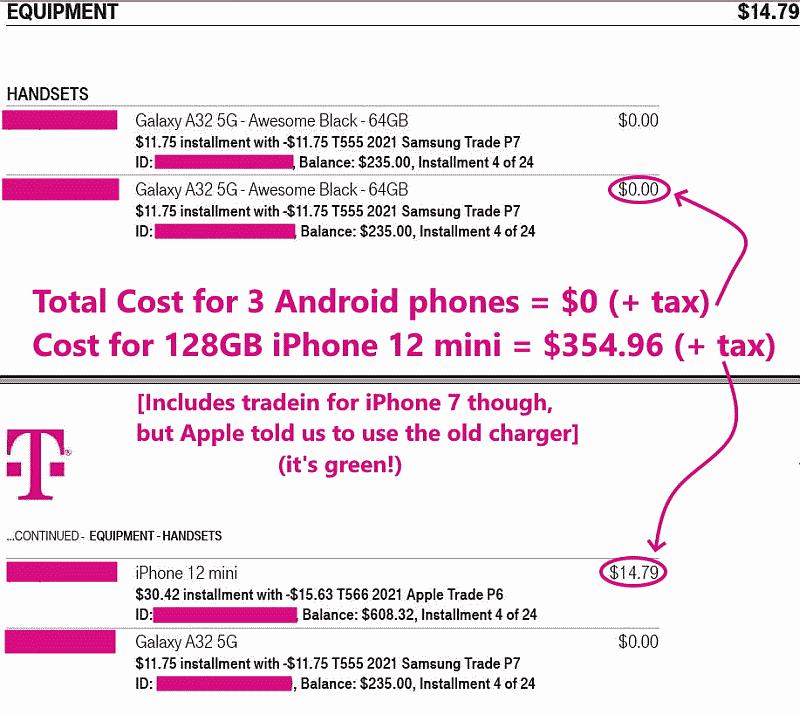
Given both my wife and I have the same free Samsung A32-5G from T-Mobile.
<
https://i.postimg.cc/Xq5SpS4D/tmopromo02.jpg>
What's interesting is by me *staying* on the last known good version
<
https://tinyurl.com/pulsesms>
I avoided all the problems with the database schema uprevving, apparently.
But she had allowd the Google Play Store to update her PulseSMS to the
evil versions (which have advertisements) and that up-revved the schema.
(I think)
Once she up-rev'd the schema, I didn't have the skills to down-rev it.
So, at this point, my A32-5G is working fine with the last known good
version of Pulse SMS, but I couldn't get it to work on her same phone.
The good news is when she "noticed" she had Google Messages instead of PulseSMS, she asked why, and I told her that PulseSMS is no good anymore.
She accepted that over simplification.
You didn't.
To your credit, you looked for evidence that the schema had changed.
I'm really not sure if it did, but I "think" it did from logcat results.
Thanks for asking as it showed two things about you:
1. You were thinking about the issues in an engineering way, and,
2. You knew that I would have been doing the same (even as I didn't say so)
That's really nice to know how much you're on the ball.
I appreciate that.
--
My goal on these Usenet newsgroups is to teach, learn and to help others.
--- Synchronet 3.22a-Linux NewsLink 1.2