• Re: PSA: A python script to clone your phone exactly, over Wi-Fi or USB

    From Lawrence =?iso-8859-13?q?D=FFOliveiro?=@ldo@nz.invalid to comp.sys.mac.system,alt.os.linux,alt.comp.os.windows-11,comp.lang.python on Thu Aug 20 07:46:26 2026
    From Newsgroup: alt.os.linux

    On Wed, 19 Aug 2026 22:33:27 -0800, Maria Sophia wrote:

    # Prerequisite: "nova.db" SQL database file created using the
    # last-known-good-version of the Tesla Coil Nova Launcher 7.0.57
    # <https://mobile.softpedia.com/apk/nova-launcher/7.0.57/>

    Why not provide your own commands for initializing a new database
    if it doesnrCOt already exist? Save the user some work.

    If you want to see an example of how itrCOs done, have look at the rCLproject-tagsrCY script (yes, itrCOs a Python script) here <https://gitlab.com/ldo/emacs-prefs>.

    cursor.execute(
    "SELECT DISTINCT screen FROM favorites WHERE container = -100 ORDER BY screen ASC;"
    )
    screens = cursor.fetchall()

    You do this sequence of execute/fetch calls 4 times in your script. I
    see you reuse the same cursor to save some extra setup work each time.
    You can make things a little less fiddly with the help of this routine
    (also to be found in the above script):

    def db_iter(conn, cmd, mapfn = lambda x : x) :
    "executes cmd on a new cursor from connection conn and yields the results in turn."
    for item in conn.cursor().execute(cmd) :
    yield mapfn(item)
    #end for
    #end db_iter

    With this routine, the above sequence becomes

    screens = list(db_iter \
    (
    conn,
    "SELECT DISTINCT screen FROM favorites WHERE container = -100 ORDER BY screen ASC"
    ))

    for (screen_num,) in screens:

    or better still, put the lookup directly into the loop expression:

    for screen_num in db_iter \
    (
    conn,
    "SELECT DISTINCT screen FROM favorites WHERE container = -100 ORDER BY screen ASC",
    mapfn = lambda x : x[0]
    ) :

    cursor.execute(
    "SELECT _id, title FROM favorites WHERE container = -100 AND screen = ?"
    " AND intent IS NULL AND title IS NOT NULL AND TRIM(title) != '';",
    (screen_num,),
    )
    folders = cursor.fetchall()
    for folder_id, folder_name in folders:

    Again, this can be simplified to

    for folder_id, folder_name in db_iter \
    (
    conn,
    "SELECT _id, title FROM favorites WHERE container = -100 AND screen = %d"
    " AND intent IS NULL AND title IS NOT NULL AND TRIM(title) != '';"
    %
    screen_num
    ) :

    and so on.
    --- Synchronet 3.22a-Linux NewsLink 1.2
  • From Maria Sophia@mariasophia@comprehension.com to comp.sys.mac.system,alt.os.linux,alt.comp.os.windows-11,comp.lang.python on Thu Aug 20 08:14:46 2026
    From Newsgroup: alt.os.linux

    Lawrence wrote:
    On Wed, 19 Aug 2026 22:33:27 -0800, Maria Sophia wrote:

    # Prerequisite: "nova.db" SQL database file created using the
    # last-known-good-version of the Tesla Coil Nova Launcher 7.0.57
    # <https://mobile.softpedia.com/apk/nova-launcher/7.0.57/>

    Why not provide your own commands for initializing a new database
    if it doesn't already exist? Save the user some work.

    If you want to see an example of how it's done, have look at the
    project-tags script (yes, it's a Python script) here <https://gitlab.com/ldo/emacs-prefs>.

    Hi Lawrence,

    Thanks for taking a look at the code and for making positive suggestions.

    I'll take your two sets of suggestions separately, as they're different.
    1. Determining the homescreen pane/folder/package hierarchy
    3. Stylistically using a more Pythonic coding philosophy

    I'm only responding to the first item above, as I can't possibly have any qualms with your second suggestion, which is to improve the efficiency.

    Almost always I aim for the most general solution to any specific problem
    set, but in this case, the issue is non-root access to protected data.

    As you noted, python is just about perfect for cross-platform needs, as I'd wager the script likely will work on any platform, including on Android.

    However, you've no doubt noticed that the Nova Launcher, while originally
    well acclaimed as the best app launcher on Android, suffered from success
    in that it was sold (twice!) which is why I use a last known good version.

    Hence, I agree fully that it would be better to "build" the homescreen
    layout using anything but a proprietary launcher such as Nova Launcher.

    If we were simply archiving every single app the user has installed, then
    we wouldn't need the Nova Launcher layout structure, since it would be
    trivial to use adb to find all the packages installed & archive the APK(s).

    But the goal of this thread is to exactly duplicate the exact layout
    perfectly, so that a perfect migration can occur from one phone to another.
    a. Every homescreen panel is reproduced
    b. Every folder in every panel is reproduced
    c. Every app icon in every folder is reproduced
    etc.

    How do we do get a list of panes, folders and app icons inside the folders?

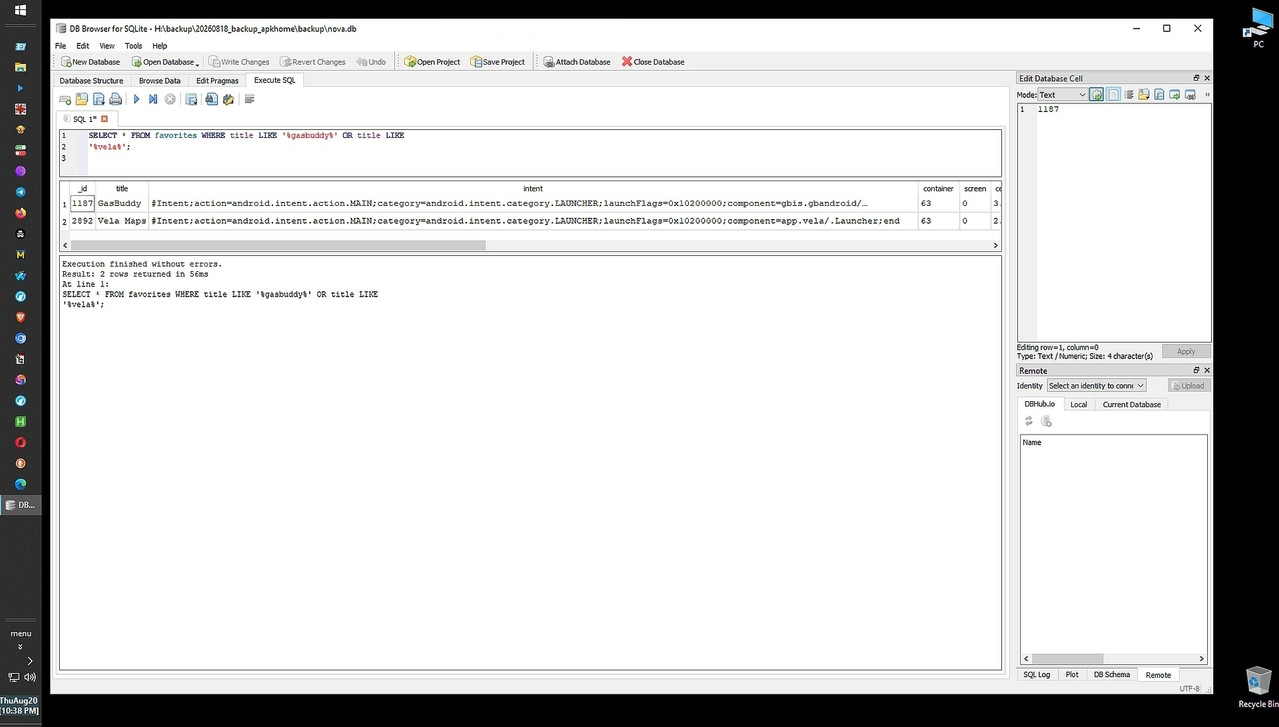
    At first, I used a FOSS cross-platform SQL browser to parse the SQL data.
    <https://sqlitebrowser.org/>
    Where I ditched that methodology early on as I lack SQL query experience.
    Message-ID: <1164ul5$i$1@nnrp.usenet.blueworldhosting.com>

    Then, I tried the (deprecated but very powerful) adb backup command.
    adb backup -f novadata.ab -noapk com.teslacoilsw.launcher
    Where I was pleasantly surprised that allowed access to protected files.
    Message-ID: <116513t$m0k$1@nnrp.usenet.blueworldhosting.com>

    So one possible general-purpose solution is to craft an adb backup
    process for each and every app launcher that anyone may use on Android.

    But, even then, we have to learn how to parse each & every launcher db.
    As the initial problem is knowing the exact organization of the homescreen.

    Of course, we can "manually" create the pane/folder/app list & once we do
    that, we can populate that manual folder hierarchy with the relevant APKs.

    But how do we obtain the list of panes/folders/packages on any homescreen?

    The answer to that question, as far as I'm aware anyway, is that every
    single Android app launcher stores its homescreen structure differently.

    Worse, much worse, in fact, everything I write is for non-rooted phones.
    So the app launcher must store that structure in an accessible location.

    Nova does that.
    Nova stores the homescreen structure in an SQL database accessible to adb.

    But how do the myriad other app launchers store the homescreen structure?

    Samsung One UI Home, Google Pixel Launcher and open-source alternatives
    each likely store the homescreen structure in their own proprietary way.

    Worse, for the proprietary launchers, we likely don't have access to that structure without being rooted, which is, for sure, why you suggested we determine the homescreen hierarchy some other way (using Python, perhaps).

    But how?

    If we resort to FOSS launchers (e.g., Lawnchair, Librechair, etc.), we
    probably can solve that problem, but we still have to ask the general user
    to use one of those launchers, which is likely not better than using Nova.

    In summary, I can't help but agree fully with your quite reasonable
    suggestion to generalize the solution so that it works with any launcher.

    It would be wonderful to build a universal homescreen parser for any
    launcher, but the security sandboxing of modern Android makes it difficult.

    Any and all ideas will be considered since your objections are on target.
    --
    We learn best from helpful people who know a hellova lot more than we do.
    --- Synchronet 3.22a-Linux NewsLink 1.2
  • From Maria Sophia@mariasophia@comprehension.com to comp.sys.mac.system,alt.os.linux,alt.comp.os.windows-11,comp.lang.python on Thu Aug 20 08:32:58 2026
    From Newsgroup: alt.os.linux

    Lawrence DoOliveiro wrote:
    You do this sequence of execute/fetch calls 4 times in your script.

    Now, turning to your second set of suggestions regarding a more Pythonic
    coding philosophy and perhaps making use of the db_iter helper: ...

    It's a good idea where using a generator function to wrap repetitive
    execute() and fetching patterns certainly keeps code DRY (Don't Repeat Yourself) & I can see the advantage of putting the lookup in the loop.

    It will take a while for me to fully digest your helpful suggestions, as I noted in the prior response that I suffer from lack of SQL experience.

    In fact, in the original thread, I originally tried to disassemble the homescreen using SQL queries in DB Browser for SQLite v3.13.1 but gave up.
    Message-ID: <1165rqh$163h$1@nnrp.usenet.blueworldhosting.com>

    If I were to adapt your db_iter concept while keeping parameterized queries safe, I'd probably modify it to accept a parameters tuple like this:

    Python
    def db_iter(conn, cmd, params=(), mapfn=lambda x: x):
    """Executes cmd with parameters and yields mapped results."""
    for item in conn.cursor().execute(cmd, params):
    yield mapfn(item)

    That way, I get the clean generator loop style you recommended and maintain strict parameter safety. Thanks again for taking the time to review the
    code and thank you for offering suggestions such as that refactoring idea.
    --- Synchronet 3.22a-Linux NewsLink 1.2
  • From Lawrence =?iso-8859-13?q?D=FFOliveiro?=@ldo@nz.invalid to comp.sys.mac.system,alt.os.linux,alt.comp.os.windows-11,comp.lang.python on Thu Aug 20 22:57:43 2026
    From Newsgroup: alt.os.linux

    On Thu, 20 Aug 2026 08:32:58 -0800, Maria Sophia wrote:

    If I were to adapt your db_iter concept while keeping parameterized
    queries safe, I'd probably modify it to accept a parameters tuple
    like this:

    Python
    def db_iter(conn, cmd, params=(), mapfn=lambda x: x):
    """Executes cmd with parameters and yields mapped results."""
    for item in conn.cursor().execute(cmd, params):
    yield mapfn(item)

    Yes, fair enough. I prefer to use APSW rather than the SQLite binding
    in the standard library; that seems nicer in some ways, providing more flexibility in placeholders for parameter substitution <https://rogerbinns.github.io/apsw/example.html#why-you-use-bindings-to-provide-values>.

    I tend to fall out of the habit of using placeholder mechanisms,
    because they donrCOt cope with more advanced cases.
    --- Synchronet 3.22a-Linux NewsLink 1.2
  • From Lawrence =?iso-8859-13?q?D=FFOliveiro?=@ldo@nz.invalid to comp.sys.mac.system,alt.os.linux,comp.lang.python on Fri Aug 21 07:04:20 2026
    From Newsgroup: alt.os.linux

    On Fri, 21 Aug 2026 04:20:33 -0000 (UTC), Chris wrote:

    Especially python where the lack of whitespace consistency completely
    breaks the code.

    However:

    def netstring_encode(s, as_str = False) :
    "encodes a string or bytes object as a netstring. Returns the encoded" \
    " format as a string or bytes object, depending on as_str."
    if isinstance(s, str) :
    sb = s.encode()
    elif isinstance(s, (bytes, bytearray)) :
    sb = s
    else :
    raise TypeError("input value should be str or bytes")
    if len(sb) > MAX_NETSTRING_LEN :
    raise ValueError("netstring length of %d exceeds %d bytes" % (len(sb), MAX_NETSTRING_LEN))
    result = b"%d:%s," % (len(sb), sb)
    if as_str :
    result = result.decode()
    return \
    result

    Hopeless gibberish. But:

    def netstring_encode(s, as_str = False) :
    "encodes a string or bytes object as a netstring. Returns the encoded" \
    " format as a string or bytes object, depending on as_str."
    if isinstance(s, str) :
    sb = s.encode()
    elif isinstance(s, (bytes, bytearray)) :
    sb = s
    else :
    raise TypeError("input value should be str or bytes")
    #end if
    if len(sb) > MAX_NETSTRING_LEN :
    raise ValueError("netstring length of %d exceeds %d bytes" % (len(sb), MAX_NETSTRING_LEN))
    #end if
    result = b"%d:%s," % (len(sb), sb)
    if as_str :
    result = result.decode()
    #end if
    return \
    result
    #end netstring_encode

    Some chance of restoring meaning.
    --- Synchronet 3.22a-Linux NewsLink 1.2
  • From Maria Sophia@mariasophia@comprehension.com to comp.sys.mac.system,alt.os.linux,alt.msdos.batch,alt.comp.os.windows-11,alt.privacy on Fri Aug 21 00:30:21 2026
    From Newsgroup: alt.os.linux

    Maria Sophia wrote:
    Updates will go into the aforementioned thread, but I wanted those on
    these related operating system newsgroups to be able to benefit also.

    As far as I'm aware, this functionality exists nowhere else on earth, so
    it's worth summarizing what it does, for those who didn't read the code.

    Imagine you want to take a snapshot of your exact home screen setup, which exactly reproduces every single pane/page in the same order, the folders
    you've organized your app icons into, and in the same order including the
    names and locations of any loose app icons, and then it reproduces the
    actual app installers (APKs) themselves, in that order onto your PC.
    a. Same homescreen panels
    b. Same homescreen folders
    c. Same app icons
    d. Same versions too
    e. All over your local LAN (or connected via USB to your PC)
    f. Without any need for any mothership or cloud or Internet account

    That would be a pretty neat APK archival & restoral process, right?

    That is what this Python script (apkhome.py) does, in addition to creating
    an adb batch script (which can run on any platform) to re-install the apps, such that the script allows a perfect clone of the original visual setup.

    Note that the script does not back up every single app on the phone.

    While that would be so trivial as to not need this much coding to do, the
    focus of this script is on replicating the home screen look and feel,
    including bringing over every single app subversion to the new phone.

    Specifically, if a package is installed on the phone, but if there is no
    app launcher icon sitting on the home screen, then it's not replicated.

    An overarching goal of this script is to require nothing on the net.

    Instead of relying on cloud backups (like Google Drive) or proprietary manufacturer software, this script uses a home screen app backup
    (specifically from TeslaCoils' last known good version of Nova Launcher)
    and a developer tool called ADB (Android Debug Bridge) to copy everything locally over your Wi-Fi network or a USB cable onto your desktop PC.

    The first thing it does is read your homescreen layout from the nova db.
    That layout includes everything needed to exactly replicate the homescreen. Then adb finds every app installer on your phone for every app icon.
    The script re-creates the exact folder hierarchy on your PC with the APK. Lastly, it generates a restoration script to restore on a new phone.

    Optionally, the script features a debug mode to test in shorter time.
    And the script has smart APK handling for the modern split APK structure.
    The script handles visual version tracking and it keeps a detailed log.
    Since it could take a while to run, a Control+C was gracefully added.

    The only prerequisites (other than the phone being on the LAN) are:
    a. A nova backup file
    b. ADB on a PC
    c. Python

    As far as I'm aware, this functionality exists nowhere else on earth.
    However, I only tested it with my phone and my PC, which are:
    Android 13, Samsung Galaxy A32-5G, locked bootloader, de-googled
    (i.e., there is no account for any OEM, not Google, not Samsung)
    Windows 10, Python 3.14.1

    Of course, the major disadvantage of this methodology is the requirement
    for the Nova Launcher (which is free) but at this point in time, I know of
    no other way to programmatically obtain the exact homescreen layout without being rooted, than to access the internal database of 'some' launcher app.

    Therefore, a major obvious possible improvement in this replication process would be for us to collectively figure out HOW to obtain the names, targets
    and positions of the panes, folders and app-launcher icons WITHOUT having
    to use any specific launcher on the phone (& without needing to be rooted).
    --- Synchronet 3.22a-Linux NewsLink 1.2
  • From Maria Sophia@mariasophia@comprehension.com to comp.sys.mac.system,alt.os.linux,alt.comp.os.windows-11,comp.lang.python on Fri Aug 21 01:37:32 2026
    From Newsgroup: alt.os.linux

    Lawrence D'Oliveiro wrote:
    Yes, fair enough. I prefer to use APSW rather than the SQLite binding
    in the standard library; that seems nicer in some ways, providing more flexibility in placeholders for parameter substitution <https://rogerbinns.github.io/apsw/example.html#why-you-use-bindings-to-provide-values>.

    I tend to fall out of the habit of using placeholder mechanisms,
    because they donot cope with more advanced cases.

    Agreed. All good ideas. All worthwhile to consider.

    In fact, all your points are valid and worthwhile to consider, especially
    your point that we should strive to figure out a way to eliminate Nova.db!

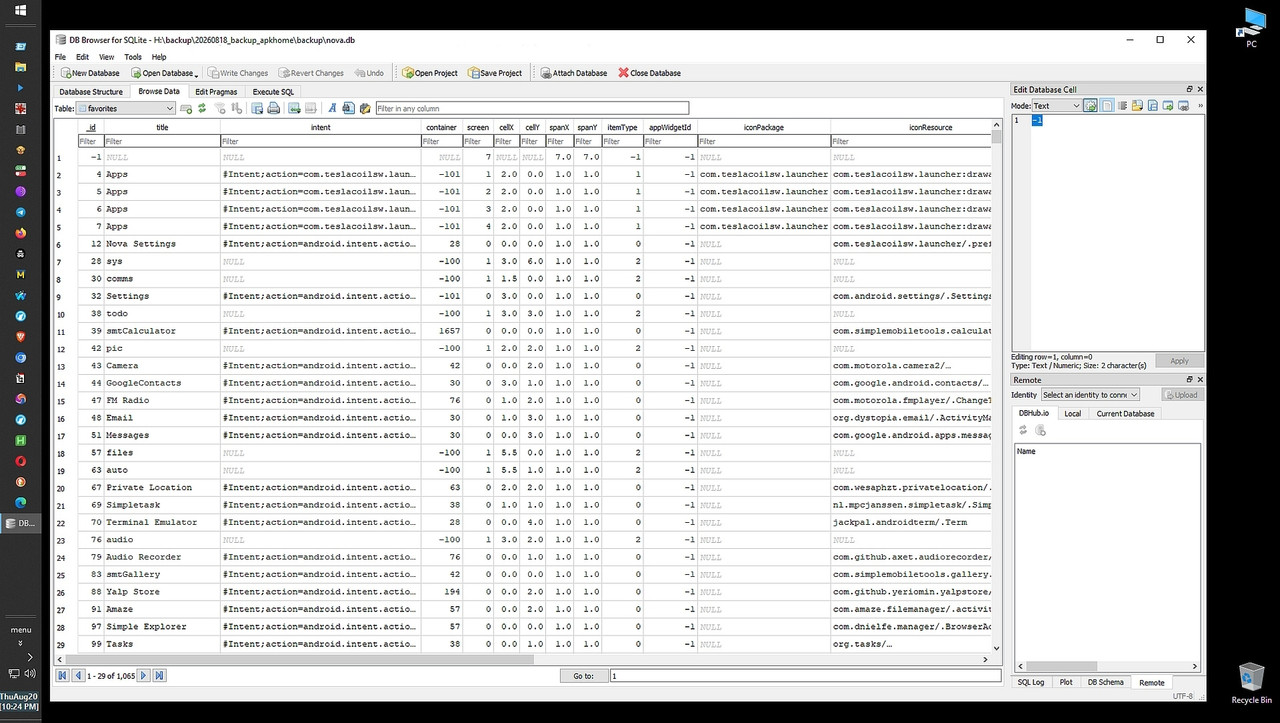
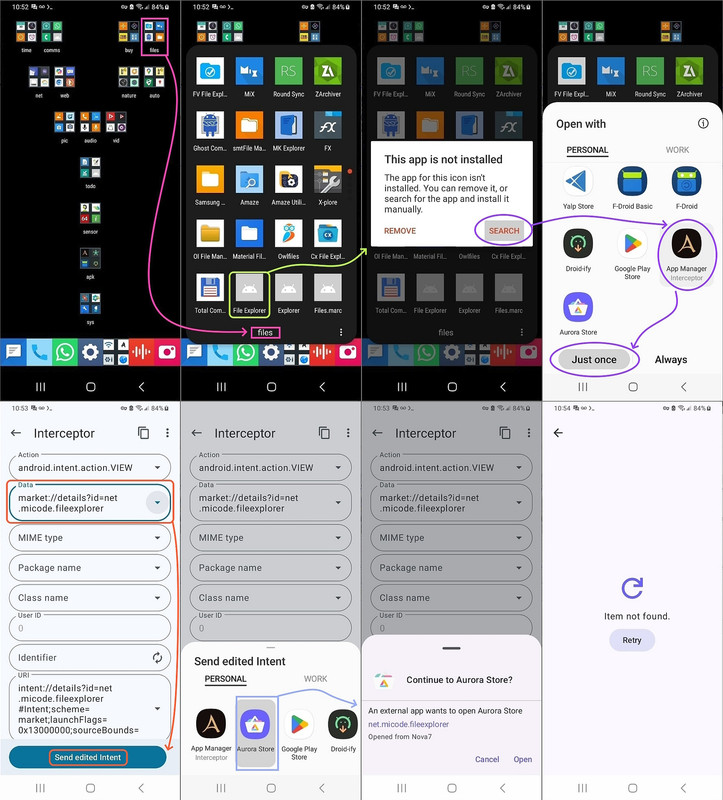
    I agree with you that there "should be a way" to query Android for
    homescreen folders, app icons & intents, such as using this manual method (using Muntashirakon App Manager, which is one of the finest Android apps)
    <https://i.postimg.cc/zvKdH4PX/homescreen-intent.jpg>

    Note that Muntashirakon knows much of what we'd need for that script.
    a. It knows the package name (e.g., com.simplemobiletools.clock)
    b. It knows the action (e.g., android.intent.action.MAIN)
    c. And the category (e.g., android.intent.category.LAUNCHER)

    So maybe we can use Muntashirakon to list all the apps that are capable
    of being launched on the homescreen, whether or not they've been placed.

    But forcing folks to install anything on Android, is, I agree, sub optimal.
    We "should" be able to obtain the necessary data simply by running queries.

    I'm sure adb can, in and of itself, also list packages for every app on the phone which has an icon capable of appearing on the home screen.
    adb shell cmd package resolve-activity --brief -a android.intent.action.MAIN -c android.intent.category.LAUNCHER

    While Python comes with sqlite3, APSW (aka another python sqlite wrapper)
    is certainly worthy to consider given it allows far more advanced control.

    Certainly APSW allows more freedom and fewer restrictions, as you noted.

    The real hurdle, as I see it, is creating the SQL db in the first place.
    My script punts and simply reads from the Nova Launcher exported output.
    <https://i.postimg.cc/28w4VzSk/sql-query.jpg>

    If I could figure out how to query the Android phone to build that SQL database, that would be the holy grail in replicating the homescreen.

    a. We'd have to query the phone to find all the panes (aka screens)
    b. Then, we'd find the folders including their names and locations
    c. Inside those folders, we'd find the app icons, locations & intents
    d. Where the intents reveal the "target" of the app icon by package name
    e. We then query the phone for those package names & their sub versions
    f. And we build a duplicate hierarchy of pane/folder/app on the PC disk
    g. Then we copy the base/split APK into that pane/folder/app PC hierarchy
    h. And lastly, we build the adb command batch file to re-install

    I'll keep thinking about how to query Android for that information.

    Along the vein of ditching the need for any given launcher, it would be
    trivial to just archive every app on the phone, with or w/o a launcher.

    a. We'd query the user-installed package list using adb on the PC
    C:\> adb shell pm list packages -f
    b. We'd extract the app manifest, metadata and launcher-intent filters
    C:\> cmd package resolve-activity
    c. We might even organize apps by the built-in "system roles" or "app tags"
    C:\> adb shell pm path <package>
    (e.g., system-defined categories like Audio, Games, Productivity)
    d. And then we'd pull the APKs to a hierarchy of those roles on the PC
    C:\> adb pull <package>
    e. Lastly, we'd write a script to re-install the APks back to the phone
    C:\> adb install-multiple

    The only hard part is getting the exact homescreen panes, folder names and positions and the app names & locations inside of each folder (or loose).

    Everything else is literally trivial to do.
    Which is why I punted and used the Nova.db to get the position information.

    Now that the backup script is already working, for me, I'll consider
    writing a script that just gets all user-installed apps and puts them in
    known categories, where it should be doable to get those app categories.

    I know from helping the Skyica App Finder developer that there is a python library "google-play-scraper" which might be able to pull from the Google
    Play repository the developer-assigned app category for any given package.
    from google_play_scraper import app

    result = app(
    'com.whatsapp',
    lang='en', # optional
    country='us' # optional
    )
    print(result['genre']) # or result['category'] depending on the library version

    Likewise, F-Droid hosts structured metadata files (in XML or JSON) for
    every app in its repository, which explicitly list the app's designated category (e.g., "System," "Internet," "Multimedia"), which we can query.

    In summary, it's worthwhile to organize the apps by some method, where the script I wrote uses the organization that the user employed on his
    homescreen, but the downside is it only works for one known app launcher.

    However, if we don't organize the apps, backup/restore becomes trivial.
    --- Synchronet 3.22a-Linux NewsLink 1.2
  • From Kerr-Mudd, John@admin@127.0.0.1 to comp.sys.mac.system,alt.os.linux,alt.msdos.batch,alt.comp.os.windows-11,alt.privacy on Fri Aug 21 17:42:40 2026
    From Newsgroup: alt.os.linux

    On Fri, 21 Aug 2026 00:30:21 -0800
    Maria Sophia <mariasophia@comprehension.com> wrote:

    Maria Sophia wrote:

    I see you're still at it. Please only post code that applies to relevant
    groups once it's been thoroughly tested, TIA.
    --
    Bah, and indeed Humbug.
    --- Synchronet 3.22a-Linux NewsLink 1.2
  • From Lawrence =?iso-8859-13?q?D=FFOliveiro?=@ldo@nz.invalid to alt.os.linux,alt.msdos.batch,alt.comp.os.windows-11,comp.lang.python on Fri Aug 21 22:32:25 2026
    From Newsgroup: alt.os.linux

    On Wed, 19 Aug 2026 22:33:27 -0800, Maria Sophia wrote:

    CUSTOM_ADB_PATH = r"C:\app\editor\android\scrcpy\adb.exe"

    By the way, I think Python lets you write rCL/rCY instead of rCL\rCY, which saves trouble with r-strings.
    --- Synchronet 3.22a-Linux NewsLink 1.2
  • From Keith Thompson@Keith.S.Thompson+u@gmail.com to alt.os.linux,alt.msdos.batch,alt.comp.os.windows-11,comp.lang.python on Fri Aug 21 19:11:29 2026
    From Newsgroup: alt.os.linux

    Lawrence DrCOOliveiro <ldo@nz.invalid> writes:
    On Wed, 19 Aug 2026 22:33:27 -0800, Maria Sophia wrote:
    CUSTOM_ADB_PATH = r"C:\app\editor\android\scrcpy\adb.exe"

    By the way, I think Python lets you write rCL/rCY instead of rCL\rCY, which saves trouble with r-strings.

    File paths are interpreted by the OS. If an open() call succeeds
    with "C:/app/editor/android/scrcpy/adb.exe", I don't think that has
    anything to do with Python (other than Python not going out of its
    way to make it fail).

    See also the pathlib module.
    --
    Keith Thompson (The_Other_Keith) Keith.S.Thompson+u@gmail.com
    void Void(void) { Void(); } /* The recursive call of the void */
    --- Synchronet 3.22a-Linux NewsLink 1.2
  • From Maria Sophia@mariasophia@comprehension.com to alt.os.linux,alt.msdos.batch,alt.comp.os.windows-11,comp.lang.python on Sun Aug 23 11:33:40 2026
    From Newsgroup: alt.os.linux

    Keith Thompson wrote:
    Lawrence D Oliveiro <ldo@nz.invalid> writes:
    On Wed, 19 Aug 2026 22:33:27 -0800, Maria Sophia wrote:
    CUSTOM_ADB_PATH = r"C:\app\editor\android\scrcpy\adb.exe"

    By the way, I think Python lets you write |/i instead of |\i, which
    saves trouble with r-strings.

    File paths are interpreted by the OS. If an open() call succeeds
    with "C:/app/editor/android/scrcpy/adb.exe", I don't think that has
    anything to do with Python (other than Python not going out of its
    way to make it fail).

    See also the pathlib module.

    Thank you for both those suggestions, each of which impacts portability
    since the goal is that anyone on any desktop platform should be able to exactly backup and restore their phone apps down to the exact location
    on the homescreen panes and the exact subversions without the Internet.

    Taking the pathlib module suggestion separately, below is Keith's
    suggestion taken into account for the path-direction separator.

    This is more portable (or less non-portable, as the case may be).
    Thanks for improving the script so more people can leverage it!

    Note the adb.exe is hard coded in this example, but that's because
    it's not in my path since I don't modify the path on Windows.

    # -------------------------------------------------------------------
    # apkhome.py
    # Creates a perfect app archive replica from the phone to the desktop
    # a. Exactly replicates Android homescreen panes/folders/apps/apk(s)
    # b. Into a replicated desktop-folder hierarchy, including apk(s)
    # c. And to a batch file (to install onto another phone that archive)
    # d. Replicating the exact icon names, locations and app subversions
    # e. Over Wi-Fi or USB on the LAN (without any account or Internet use)
    # f. Designed to be easily ported to macOS and/or Linux when needed.
    # -------------------------------------------------------------------
    # Usage: python apkhome.py
    # -------------------------------------------------------------------
    # v2p3 20260823 Changed backslash to forwardslash for improved portability
    # v2p2 20260820 Added strict return-code validation for adb pull transfers
    # v2p1 20260819 Added automated batch-restoration-script generator
    # v2p0 20260819 Added re-installation reference guide & ADB syntax options
    # v1p9 20260819 Added missing/uninstalled app tracking list and report
    # v1p8 20260819 Added _versio_ naming convention for package versioning
    # v1p7 20260819 Added end-of-run execution summary and tracking metrics
    # v1p6 20260819 Added cleanup prompt for existing ./apkhome directory
    # v1p5 20260819 Added custom fallback path for scrcpy's bundled adb.exe
    # v1p4 20260819 Added log file output (apkhome.log) alongside console
    # v1p3 20260819 Added Ctrl+C (KeyboardInterrupt) handling & cleanup
    # v1p2 20260819 Added interactive debug mode toggle for dry runs
    # v1p1 20260819 Added automated ADB split/monolithic APK pulling
    # v1p0 20260819 Combined SQL parsing and direct directory tree generation
    # -------------------------------------------------------------------
    # Creates a duplicate inventory of Android homescreen panels, folders,
    # app icons, loose desktop shortcuts and Android application packages
    # extracted from the Nova Launcher internal databases (nova.db).
    #
    # Reads nova.db, re-creates the homescreen folder and package hierarchy,
    # checks for a connected ADB device, runs adb shell pm path <package>
    # to dynamically locate and pull component files (base.apk plus splits)
    # feeding results into the newly created matching homescreen hierarchy.
    # -------------------------------------------------------------------
    # Prerequisite: "nova.db" SQL database file created using the
    # last-known-good-version of the Tesla Coil Nova Launcher 7.0.57
    # <https://mobile.softpedia.com/apk/nova-launcher/7.0.57/>
    #
    # A. On Android, Nova Settings > Backup & restore > Backup > Save
    # /storage/emulated/0/0000/bck/nova_backup/2026-08-19_11-31.novabackup
    # B. Copy the nova backup to the desktop & rename it to a zip extension
    # adb pull 2026-08-19_11-31.novabackup 2026-08-19_11-31.novabackup.zip
    # C. Unzip using 7-zip (or equivalent)
    # 08/19/2026 11:31 AM 7,430,144 nova.db
    # 08/19/2026 11:31 AM 6,455 nova.xml
    # 08/19/2026 11:31 AM 4,818 supportDetails.txt
    #
    # Tested on Android 13 USA-spec Samsung Galaxy A32-5G (locked bootloader)
    # Tested on Windows 10, Python 3.14.1, with the phone on the Wi-Fi LAN
    # -------------------------------------------------------------------
    # Sample output (note that system apps may have defined APK names)
    #
    # com.android.systemui_versio_13
    # 08/19/2026 09:14 PM 38,323,407 SystemUI.apk
    # 1 File(s) 38,323,407 bytes
    #
    # com.simplemobiletools.clock_versio_5.11.2
    # 08/19/2026 09:04 PM 10,004,630 base.apk
    # 1 File(s) 10,004,630 bytes
    #
    # com.trianguloy.instantintent_versio_0.1
    # 08/19/2026 09:06 PM 47,835 base.apk
    # 08/19/2026 09:06 PM 10,221 split_config.xhdpi.apk
    # 2 File(s) 58,056 bytes
    #
    # com.chibatching.worldclockwidget_versio_20260316.0
    # 08/19/2026 09:04 PM 12,027,785 base.apk
    # 08/19/2026 09:04 PM 57,672 split_config.arm64_v8a.apk
    # 08/19/2026 09:04 PM 58,511 split_config.xhdpi.apk
    # 3 File(s) 12,143,968 bytes
    #
    # com.neuracle.zulutime_versio_1.5
    # 08/19/2026 09:03 PM 21,619,972 base.apk
    # 08/19/2026 09:03 PM 25,650,697 split_config.arm64_v8a.apk
    # 08/19/2026 09:03 PM 45,465 split_config.en.apk
    # 08/19/2026 09:03 PM 67,159 split_config.xhdpi.apk
    # 4 File(s) 47,383,293 bytes
    #
    # pixer.worldclock_versio_1.0.29
    # 08/19/2026 09:03 PM 6,161,133 base.apk
    # 08/19/2026 09:03 PM 14,546,665 split_config.arm64_v8a.apk
    # 08/19/2026 09:03 PM 29,018 split_config.en.apk
    # 08/19/2026 09:03 PM 16,730 split_config.es.apk
    # 08/19/2026 09:03 PM 68,714 split_config.xhdpi.apk
    # 5 File(s) 20,822,260 bytes
    # -------------------------------------------------------------------
    # To re-install the exact package subversion using adb over Wi-Fi,
    # navigate into any specific app folder containing your pulled APKs,
    # and then run the appropriate "adb install" command as shown below.
    #
    # For a single APK such as com.simplemobiletools.gallery.pro:
    # adb install -r -d -i "com.android.vending" base.apk
    #
    # For multi-split install files:
    # adb install-multiple base.apk split_config.arm64_v8a.apk split_config.en.apk
    #
    # Advanced flags for system migration / restores:
    # -r : Replace existing application (updates/overwrites cleanly)
    # -d : Allow version code downgrade (if the current device has a newer app)
    # -i : Specify any desired custom installer package identifier tag
    #
    # Combined Example:
    # adb install-multiple -r -d -i "adb" base.apk split_config.arm64_v8a.apk
    # -------------------------------------------------------------------

    import os
    import re
    import shutil
    import sqlite3
    import subprocess

    db_file = "nova.db"
    base_dir = "./apkhome"
    log_filename = "apkhome.log"

    # Explicit fallback path for ADB based on a typical scrcpy setup
    # CUSTOM_ADB_PATH = r"C:\app\editor\android\scrcpy\adb.exe"

    # Modified slash direction for portability to macOS, Linux & Windows
    CUSTOM_ADB_PATH = r"C:\app\editor\android\scrcpy\adb.exe"

    # Tracking metrics for summary
    stats = {
    "screens_processed": 0,
    "folders_processed": 0,
    "loose_apps_processed": 0,
    "apps_attempted": 0,
    "apps_success": 0,
    "apps_failed": 0
    }

    # List to track missing/uninstalled packages for the final report
    missing_apps_list = []

    if not os.path.exists(db_file):
    print(f"Error: {db_file} not found. Please place it in the working directory.")
    exit(1)

    # Open log file for writing
    log_file = open(log_filename, "w", encoding="utf-8")

    def log_print(message):
    """Prints to console and writes to the log file simultaneously."""
    print(message)
    log_file.write(message + "\n")
    log_file.flush()

    # Helper to find the correct adb executable command/path
    def get_adb_binary():
    # 1. Try global 'adb' command first
    try:
    subprocess.run(["adb", "version"], capture_output=True, text=True, check=True)
    return "adb"
    except (subprocess.SubprocessError, FileNotFoundError):
    pass

    # 2. Try the custom scrcpy path fallback
    if os.path.exists(CUSTOM_ADB_PATH):
    return CUSTOM_ADB_PATH

    return None

    def get_app_version(binary, pkg):
    """Queries package version name via ADB, returns 'unknown' if it fails."""
    try:
    res = subprocess.run(
    [binary, "shell", "dumpsys", "package", pkg],
    capture_output=True, text=True, timeout=5
    )
    for line in res.stdout.splitlines():
    if "versionName=" in line:
    parts = line.strip().split("versionName=")
    if len(parts) > 1:
    raw_ver = parts[1].split()[0]
    return re.sub(r'[\\/*?:"<>|]', "", raw_ver)
    except Exception:
    pass
    return "unknown"

    # --- Setup & modes prompt ---
    log_print("--- Setup Mode ---")
    mode_choice = input("Run in [D]ebug mode (mock files, no phone needed) or [L]ive mode (real ADB pull)? [d/l]: ").strip().lower()
    log_file.write(f"User selected mode choice: {mode_choice}\n")
    DEBUG_MODE = mode_choice.startswith('d')

    # --- Existing directory handling ---
    if os.path.exists(base_dir):
    clean_choice = input(f"Existing '{base_dir}' folder detected. [C]lean/wipe it completely or [K]eep existing files? [c/k]: ").strip().lower()
    log_file.write(f"User selected directory cleanup choice: {clean_choice}\n")
    if clean_choice.startswith('c'):
    try:
    shutil.rmtree(base_dir)
    log_print(f"[i] Successfully wiped existing '{base_dir}' directory.")
    except Exception as e:
    log_print(f"[!] Warning: Failed to fully remove '{base_dir}': {e}")
    else:
    log_print(f"[i] Keeping existing '{base_dir}' directory (merging/updating content).")

    adb_binary = None
    adb_active = False

    if DEBUG_MODE:
    log_print("\n[!] Running in DEBUG mode. ADB will be bypassed, and dummy APKs will be created.")
    else:
    log_print("\n[i] Running in LIVE mode. Locating ADB binary...")
    adb_binary = get_adb_binary()

    if not adb_binary:
    log_print(f"Warning: 'adb' not found in PATH or at custom path ({CUSTOM_ADB_PATH}). Skipping APK pulling.")
    adb_active = False
    else:
    log_print(f"Using ADB binary at: {adb_binary}")
    try:
    adb_check = subprocess.run([adb_binary, "devices"], capture_output=True, text=True, check=True)
    devices = [line for line in adb_check.stdout.splitlines() if "\tdevice" in line]
    if not devices:
    log_print("Warning: No active ADB devices found. Directory skeleton will be built, but APK pulling will be skipped.")
    adb_active = False
    else:
    log_print(f"ADB device detected: {devices[0].split()[0]}")
    adb_active = True
    except (subprocess.SubprocessError, FileNotFoundError):
    log_print("Warning: Failed to execute ADB. Skipping APK pulling.")
    adb_active = False

    log_print(f"\nConnecting to {db_file} and processing layout...")

    conn = sqlite3.connect(db_file)
    cursor = conn.cursor()

    try:
    # 1. Fetch distinct screen indices associated with desktop items
    cursor.execute(
    "SELECT DISTINCT screen FROM favorites WHERE container = -100 ORDER BY screen ASC;"
    )
    screens = cursor.fetchall()

    for (screen_num,) in screens:
    stats["screens_processed"] += 1
    current_panel = f"panel_{screen_num}"
    log_print(f"\n--- Processing: {current_panel} ---")

    # 2. Find folders located directly on this specific screen (ignoring blank titles)
    cursor.execute(
    "SELECT _id, title FROM favorites WHERE container = -100 AND screen = ?"
    " AND intent IS NULL AND title IS NOT NULL AND TRIM(title) != '';",
    (screen_num,),
    )
    folders = cursor.fetchall()

    for folder_id, folder_name in folders:
    stats["folders_processed"] += 1
    clean_folder_name = re.sub(r'[\\/*?:"<>|]', "", folder_name).strip()
    if not clean_folder_name:
    clean_folder_name = "unnamed_folder"

    cursor.execute(
    "SELECT title, intent FROM favorites WHERE container = ?;",
    (folder_id,),
    )
    items = cursor.fetchall()

    if items:
    for app_title, intent in items:
    stats["apps_attempted"] += 1
    pkg = "Unknown"
    if intent and "component=" in intent:
    try:
    part = intent.split("component=")[1]
    pkg = part.split("/")[0]
    except IndexError:
    pkg = intent

    # Fetch version if possible to build _versio_ suffix
    version_str = "unknown"
    if pkg != "Unknown":
    if DEBUG_MODE:
    version_str = "1.0.0-debug"
    elif adb_active:
    version_str = get_app_version(adb_binary, pkg)

    pkg_folder_name = f"{pkg}_versio_{version_str}" if pkg != "Unknown" else pkg

    target_path = os.path.join(
    base_dir, current_panel, clean_folder_name, pkg_folder_name
    )
    os.makedirs(target_path, exist_ok=True)
    log_print(f" [Folder] {clean_folder_name} -> App: {pkg} (v:{version_str})")

    # Pull APK or generate mock file depending on mode
    if DEBUG_MODE and pkg != "Unknown":
    dummy_apk_path = os.path.join(target_path, "base.apk")
    with open(dummy_apk_path, "w") as f:
    f.write("mock apk content")
    log_print(f" [Mock ADB] Created test file at {dummy_apk_path}")
    stats["apps_success"] += 1
    elif adb_active and pkg != "Unknown":
    path_cmd = subprocess.run(
    [adb_binary, "shell", "pm", "path", pkg],
    capture_output=True, text=True
    )
    paths_found = 0
    pull_success_count = 0

    for line in path_cmd.stdout.splitlines():
    if line.startswith("package:"):
    remote_path = line.replace("package:", "").strip()
    if remote_path:
    paths_found += 1
    pull_result = subprocess.run(
    [adb_binary, "pull", remote_path, target_path],
    stdout=subprocess.DEVNULL, stderr=subprocess.DEVNULL
    )
    if pull_result.returncode == 0:
    pull_success_count += 1

    if paths_found > 0 and pull_success_count == paths_found:
    stats["apps_success"] += 1
    else:
    stats["apps_failed"] += 1
    missing_apps_list.append(f"{current_panel} / {clean_folder_name} / {pkg}")
    log_print(f" [ADB] Warning: Failed to fully pull APK(s) for package: {pkg}")
    else:
    stats["apps_failed"] += 1
    else:
    target_path = os.path.join(base_dir, current_panel, clean_folder_name)
    os.makedirs(target_path, exist_ok=True)

    # 3. Find loose/top-level apps sitting directly on this screen
    cursor.execute(
    "SELECT title, intent FROM favorites WHERE container = -100 AND screen = ?"
    " AND intent IS NOT NULL;",
    (screen_num,),
    )
    loose_apps = cursor.fetchall()

    if loose_apps:
    for app_title, intent in loose_apps:
    stats["loose_apps_processed"] += 1
    stats["apps_attempted"] += 1
    pkg = "Unknown"
    if intent and "component=" in intent:
    try:
    part = intent.split("component=")[1]
    pkg = part.split("/")[0]
    except IndexError:
    pkg = intent

    version_str = "unknown"
    if pkg != "Unknown":
    if DEBUG_MODE:
    version_str = "1.0.0-debug"
    elif adb_active:
    version_str = get_app_version(adb_binary, pkg)

    pkg_folder_name = f"{pkg}_versio_{version_str}" if pkg != "Unknown" else pkg

    target_path = os.path.join(
    base_dir, current_panel, "loose_apps", pkg_folder_name
    )
    os.makedirs(target_path, exist_ok=True)
    log_print(f" [Loose App] {pkg} (v:{version_str})")

    if DEBUG_MODE and pkg != "Unknown":
    dummy_apk_path = os.path.join(target_path, "base.apk")
    with open(dummy_apk_path, "w") as f:
    f.write("mock apk content")
    log_print(f" [Mock ADB] Created test file at {dummy_apk_path}")
    stats["apps_success"] += 1
    elif adb_active and pkg != "Unknown":
    path_cmd = subprocess.run(
    [adb_binary, "shell", "pm", "path", pkg],
    capture_output=True, text=True
    )
    paths_found = 0
    pull_success_count = 0

    for line in path_cmd.stdout.splitlines():
    if line.startswith("package:"):
    remote_path = line.replace("package:", "").strip()
    if remote_path:
    paths_found += 1
    pull_result = subprocess.run(
    [adb_binary, "pull", remote_path, target_path],
    stdout=subprocess.DEVNULL, stderr=subprocess.DEVNULL
    )
    if pull_result.returncode == 0:
    pull_success_count += 1

    if paths_found > 0 and pull_success_count == paths_found:
    stats["apps_success"] += 1
    else:
    stats["apps_failed"] += 1
    missing_apps_list.append(f"{current_panel} / loose_apps / {pkg}")
    log_print(f" [ADB] Warning: Failed to fully pull APK(s) for package: {pkg}")
    else:
    stats["apps_failed"] += 1

    # --- Execution summary block ---
    summary_text = (
    "\n"
    "========================================\n"
    " Execution summary\n"
    "========================================\n"
    f"Panels/Screens Processed: {stats['screens_processed']}\n"
    f"Folders Discovered: {stats['folders_processed']}\n"
    f"Loose Apps Discovered: {stats['loose_apps_processed']}\n"
    f"----------------------------------------\n"
    f"Total App References: {stats['apps_attempted']}\n"
    f"Successfully Pulled APKs: {stats['apps_success']}\n"
    f"Missing / Uninstalled: {stats['apps_failed']}\n"
    "========================================\n"
    )
    log_print(summary_text)

    # --- Missing apps detailed report ---
    if missing_apps_list:
    missing_report = "Missing / Uninstalled Apps Breakdown:\n"
    for item in missing_apps_list:
    missing_report += f" - {item}\n"
    missing_report += "========================================\n"
    log_print(missing_report)

    # --- Optional Restoration Script Generation ---
    gen_script_choice = input("Would you like to generate an ADB batch restoration script for these pulled apps? [y/n]: ").strip().lower()
    log_file.write(f"User selected restoration script generation choice: {gen_script_choice}\n")

    if gen_script_choice.startswith('y'):
    restore_script_filename = "restore_apps.bat"
    commands = []

    if os.path.exists(base_dir):
    for root, dirs, files in os.walk(base_dir):
    apks = [f for f in files if f.endswith(".apk")]
    if apks:
    # Sort so base.apk always comes first
    apks.sort(key=lambda x: 0 if x == "base.apk" else 1)
    apk_paths = [os.path.join(root, apk) for apk in apks]

    binary_to_use = adb_binary if adb_binary else "adb"

    if len(apk_paths) == 1:
    cmd = f'"{binary_to_use}" install -r -d -i "com.android.vending" "{apk_paths[0]}"'
    else:
    joined_apks = '" "'.join(apk_paths)
    cmd = f'"{binary_to_use}" install-multiple -r -d -i "com.android.vending" "{joined_apks}"'

    commands.append(cmd)

    with open(restore_script_filename, "w", encoding="utf-8") as r_file:
    r_file.write("@echo off\n")
    r_file.write(":: Generated by apkhome.py Restoration Script Generator\n")
    r_file.write("echo Starting batch app restoration...\n\n")
    for cmd in commands:
    r_file.write(cmd + "\n")
    r_file.write("\necho Restoration script completed.\n")
    r_file.write("pause\n")

    log_print(f"[i] Successfully generated restoration script: {restore_script_filename} ({len(commands)} apps targeted).")

    except KeyboardInterrupt:
    log_print("\n\n[!] Operation cancelled by user (Ctrl+C). Exiting safely...")

    finally:
    # Ensure database connection and log file are cleanly closed
    conn.close()
    log_file.close()

    # end of apkhome.py
    --
    The great thing about Usenet is people work together to help everyone learn. --- Synchronet 3.22a-Linux NewsLink 1.2
  • From Maria Sophia@mariasophia@comprehension.com to comp.sys.mac.system,alt.os.linux,alt.msdos.batch,alt.comp.os.windows-11,comp.lang.python on Sun Aug 23 12:05:01 2026
    From Newsgroup: alt.os.linux

    Keith Thompson wrote:
    Lawrence D'Oliveiro <ldo@nz.invalid> writes:
    On Wed, 19 Aug 2026 22:33:27 -0800, Maria Sophia wrote:
    CUSTOM_ADB_PATH = r"C:\app\editor\android\scrcpy\adb.exe"

    By the way, I think Python lets you write "/" instead of "\", which
    saves trouble with r-strings.

    File paths are interpreted by the OS. If an open() call succeeds
    with "C:/app/editor/android/scrcpy/adb.exe", I don't think that has
    anything to do with Python (other than Python not going out of its
    way to make it fail).

    See also the pathlib module.

    Thank you for making both suggestions above, which have been incorporated
    into the latest two versions, which each further improve the eventual portability to the other desktop platforms (namely macOS & Linux).

    v2p4 20260823 Adopted pathlib module for cross-platform path handling
    v2p3 20260823 Changed backslash to forwardslash for improved portability

    As an unrelated aside, the common Apple trolls who infested this thread
    clearly didn't read the script (nor understand it) so they weren't aware
    it creates a batch file (which handles the desktop-to-device restoration).

    Back to improving the script for portability, it's a worthwhile endeavor
    as I'm not aware this functionality exists anywhere else on the Internet.

    Currently, restore_apps.bat relies on Windows syntax (@echo off, pause, backslashes/quotes), but if we ever decide to port the entire workflow
    to macOS or Linux in the future, we could expand version v2p4 to generate
    an additional companion shell script (e.g., restore_apps.sh using chmod +x) alongside the batch file which the script outputs for replication.

    Here's the latest version taking into account both of Keith's suggestions!
    # -------------------------------------------------------------------
    # apkhome.py
    # Creates a perfect app archive replica of the phone to the desktop
    # 1. Exactly replicates Android homescreen panes/folders/apps/apk(s)
    # 2. Into a perfect duplicate on the desktop
    # 3. And also to a batch file
    # 4. Which can be used to restore that perfect archive to any phone
    # Note that
    # A. The exact homescreen panes are replicated in the same order
    # B. Using the exact folder names replicated in the same locations
    # C. And using the exact icon launcher names and exact placement
    # D. Along with each icon calling the exact same actionable intent
    # E. Which launches the exact same app versions as the original
    # Also note
    # a. This works without the cloud, any accounts or the Internet
    # b. As it works over Wi-Fi on the LAN or with the phone on USB
    # c. Built using pathlib for native macOS, Linux and Windows support
    # WIP: Perhaps add a companion macOS/Linux script to the Windows batch
    # -------------------------------------------------------------------
    # Usage: python apkhome.py
    # -------------------------------------------------------------------
    # v2p4 20260823 Adopted pathlib module for cross-platform path handling
    # v2p3 20260823 Changed backslash to forwardslash for improved portability
    # v2p2 20260820 Added strict return-code validation for adb pull transfers
    # v2p1 20260819 Added automated batch-restoration-script generator
    # v2p0 20260819 Added re-installation reference guide & ADB syntax options
    # v1p9 20260819 Added missing/uninstalled app tracking list and report
    # v1p8 20260819 Added _versio_ naming convention for package versioning
    # v1p7 20260819 Added end-of-run execution summary and tracking metrics
    # v1p6 20260819 Added cleanup prompt for existing ./apkhome directory
    # v1p5 20260819 Added custom fallback path for scrcpy's bundled adb.exe
    # v1p4 20260819 Added log file output (apkhome.log) alongside console
    # v1p3 20260819 Added Ctrl+C (KeyboardInterrupt) handling & cleanup
    # v1p2 20260819 Added interactive debug mode toggle for dry runs
    # v1p1 20260819 Added automated ADB split/monolithic APK pulling
    # v1p0 20260819 Combined SQL parsing and direct directory tree generation
    # -------------------------------------------------------------------
    # Creates a duplicate inventory of Android homescreen panels, folders,
    # app icons, loose desktop shortcuts and Android application packages
    # extracted from the Nova Launcher internal databases (nova.db).
    #
    # Reads nova.db, re-creates the homescreen folder and package hierarchy,
    # checks for a connected ADB device, runs adb shell pm path <package>
    # to dynamically locate and pull component files (base.apk plus splits)
    # feeding results into the newly created matching homescreen hierarchy.
    # -------------------------------------------------------------------
    # Prerequisite: "nova.db" SQL database file created using the
    # last-known-good-version of the Tesla Coil Nova Launcher 7.0.57
    # <https://mobile.softpedia.com/apk/nova-launcher/7.0.57/>
    #
    # A. On Android, Nova Settings > Backup & restore > Backup > Save
    # /storage/emulated/0/0000/bck/nova_backup/2026-08-19_11-31.novabackup
    # B. Copy the nova backup to the desktop & rename it to a zip extension
    # adb pull 2026-08-19_11-31.novabackup 2026-08-19_11-31.novabackup.zip
    # C. Unzip using 7-zip (or equivalent)
    # 08/19/2026 11:31 AM 7,430,144 nova.db
    # 08/19/2026 11:31 AM 6,455 nova.xml
    # 08/19/2026 11:31 AM 4,818 supportDetails.txt
    #
    # Tested on Android 13 USA-spec Samsung Galaxy A32-5G (locked bootloader)
    # Tested on Windows 10, Python 3.14.1, with the phone on the Wi-Fi LAN
    # -------------------------------------------------------------------
    # Sample output (note that system apps may have defined APK names)
    #
    # com.android.systemui_versio_13
    # 08/19/2026 09:14 PM 38,323,407 SystemUI.apk
    # 1 File(s) 38,323,407 bytes
    #
    # com.simplemobiletools.clock_versio_5.11.2
    # 08/19/2026 09:04 PM 10,004,630 base.apk
    # 1 File(s) 10,004,630 bytes
    #
    # com.trianguloy.instantintent_versio_0.1
    # 08/19/2026 09:06 PM 47,835 base.apk
    # 08/19/2026 09:06 PM 10,221 split_config.xhdpi.apk
    # 2 File(s) 58,056 bytes
    #
    # com.chibatching.worldclockwidget_versio_20260316.0
    # 08/19/2026 09:04 PM 12,027,785 base.apk
    # 08/19/2026 09:04 PM 57,672 split_config.arm64_v8a.apk
    # 08/19/2026 09:04 PM 58,511 split_config.xhdpi.apk
    # 3 File(s) 12,143,968 bytes
    #
    # com.neuracle.zulutime_versio_1.5
    # 08/19/2026 09:03 PM 21,619,972 base.apk
    # 08/19/2026 09:03 PM 25,650,697 split_config.arm64_v8a.apk
    # 08/19/2026 09:03 PM 45,465 split_config.en.apk
    # 08/19/2026 09:03 PM 67,159 split_config.xhdpi.apk
    # 4 File(s) 47,383,293 bytes
    #
    # pixer.worldclock_versio_1.0.29
    # 08/19/2026 09:03 PM 6,161,133 base.apk
    # 08/19/2026 09:03 PM 14,546,665 split_config.arm64_v8a.apk
    # 08/19/2026 09:03 PM 29,018 split_config.en.apk
    # 08/19/2026 09:03 PM 16,730 split_config.es.apk
    # 08/19/2026 09:03 PM 68,714 split_config.xhdpi.apk
    # 5 File(s) 20,822,260 bytes
    # -------------------------------------------------------------------
    # To re-install the exact package subversion using adb over Wi-Fi,
    # navigate into any specific app folder containing your pulled APKs,
    # and then run the appropriate "adb install" command as shown below.
    #
    # For a single APK such as com.simplemobiletools.gallery.pro:
    # adb install -r -d -i "com.android.vending" base.apk
    #
    # For multi-split install files:
    # adb install-multiple base.apk split_config.arm64_v8a.apk split_config.en.apk
    #
    # Advanced flags for system migration / restores:
    # -r : Replace existing application (updates/overwrites cleanly)
    # -d : Allow version code downgrade (if the current device has a newer app)
    # -i : Specify any desired custom installer package identifier tag
    #
    # Combined Example:
    # adb install-multiple -r -d -i "adb" base.apk split_config.arm64_v8a.apk
    # -------------------------------------------------------------------

    import re
    import shutil
    import sqlite3
    import subprocess
    from pathlib import Path

    db_file = Path("nova.db")
    base_dir = Path("./apkhome")
    log_filename = Path("apkhome.log")

    # Custom fallback path for ADB using pathlib for universal OS interpretation
    CUSTOM_ADB_PATH = Path("C:/app/editor/android/scrcpy/adb.exe")

    # Tracking metrics for summary
    stats = {
    "screens_processed": 0,
    "folders_processed": 0,
    "loose_apps_processed": 0,
    "apps_attempted": 0,
    "apps_success": 0,
    "apps_failed": 0
    }

    # List to track missing/uninstalled packages for the final report
    missing_apps_list = []

    if not db_file.exists():
    print(f"Error: {db_file} not found. Please place it in the working directory.")
    exit(1)

    # Open log file for writing via pathlib
    log_file = log_filename.open("w", encoding="utf-8")

    def log_print(message):
    """Prints to console and writes to the log file simultaneously."""
    print(message)
    log_file.write(message + "\n")
    log_file.flush()

    # Helper to find the correct adb executable command/path using pathlib
    def get_adb_binary():
    # 1. Try global 'adb' command first
    try:
    subprocess.run(["adb", "version"], capture_output=True, text=True, check=True)
    return "adb"
    except (subprocess.SubprocessError, FileNotFoundError):
    pass

    # 2. Try the custom scrcpy path fallback
    if CUSTOM_ADB_PATH.exists():
    return str(CUSTOM_ADB_PATH)

    return None

    def get_app_version(binary, pkg):
    """Queries package version name via ADB, returns 'unknown' if it fails."""
    try:
    res = subprocess.run(
    [binary, "shell", "dumpsys", "package", pkg],
    capture_output=True, text=True, timeout=5
    )
    for line in res.stdout.splitlines():
    if "versionName=" in line:
    parts = line.strip().split("versionName=")
    if len(parts) > 1:
    raw_ver = parts[1].split()[0]
    return re.sub(r'[\\/*?:"<>|]', "", raw_ver)
    except Exception:
    pass
    return "unknown"

    # --- Setup & modes prompt ---
    log_print("--- Setup Mode ---")
    mode_choice = input("Run in [D]ebug mode (mock files, no phone needed) or [L]ive mode (real ADB pull)? [d/l]: ").strip().lower()
    log_file.write(f"User selected mode choice: {mode_choice}\n")
    DEBUG_MODE = mode_choice.startswith('d')

    # --- Existing directory handling ---
    if base_dir.exists():
    clean_choice = input(f"Existing '{base_dir}' folder detected. [C]lean/wipe it completely or [K]eep existing files? [c/k]: ").strip().lower()
    log_file.write(f"User selected directory cleanup choice: {clean_choice}\n")
    if clean_choice.startswith('c'):
    try:
    shutil.rmtree(base_dir)
    log_print(f"[i] Successfully wiped existing '{base_dir}' directory.")
    except Exception as e:
    log_print(f"[!] Warning: Failed to fully remove '{base_dir}': {e}")
    else:
    log_print(f"[i] Keeping existing '{base_dir}' directory (merging/updating content).")

    adb_binary = None
    adb_active = False

    if DEBUG_MODE:
    log_print("\n[!] Running in DEBUG mode. ADB will be bypassed, and dummy APKs will be created.")
    else:
    log_print("\n[i] Running in LIVE mode. Locating ADB binary...")
    adb_binary = get_adb_binary()

    if not adb_binary:
    log_print(f"Warning: 'adb' not found in PATH or at custom path ({CUSTOM_ADB_PATH}). Skipping APK pulling.")
    adb_active = False
    else:
    log_print(f"Using ADB binary at: {adb_binary}")
    try:
    adb_check = subprocess.run([adb_binary, "devices"], capture_output=True, text=True, check=True)
    devices = [line for line in adb_check.stdout.splitlines() if "\tdevice" in line]
    if not devices:
    log_print("Warning: No active ADB devices found. Directory skeleton will be built, but APK pulling will be skipped.")
    adb_active = False
    else:
    log_print(f"ADB device detected: {devices[0].split()[0]}")
    adb_active = True
    except (subprocess.SubprocessError, FileNotFoundError):
    log_print("Warning: Failed to execute ADB. Skipping APK pulling.")
    adb_active = False

    log_print(f"\nConnecting to {db_file} and processing layout...")

    conn = sqlite3.connect(db_file)
    cursor = conn.cursor()

    try:
    # 1. Fetch distinct screen indices associated with desktop items
    cursor.execute(
    "SELECT DISTINCT screen FROM favorites WHERE container = -100 ORDER BY screen ASC;"
    )
    screens = cursor.fetchall()

    for (screen_num,) in screens:
    stats["screens_processed"] += 1
    current_panel = f"panel_{screen_num}"
    log_print(f"\n--- Processing: {current_panel} ---")

    # 2. Find folders located directly on this specific screen (ignoring blank titles)
    cursor.execute(
    "SELECT _id, title FROM favorites WHERE container = -100 AND screen = ?"
    " AND intent IS NULL AND title IS NOT NULL AND TRIM(title) != '';",
    (screen_num,),
    )
    folders = cursor.fetchall()

    for folder_id, folder_name in folders:
    stats["folders_processed"] += 1
    clean_folder_name = re.sub(r'[\\/*?:"<>|]', "", folder_name).strip()
    if not clean_folder_name:
    clean_folder_name = "unnamed_folder"

    cursor.execute(
    "SELECT title, intent FROM favorites WHERE container = ?;",
    (folder_id,),
    )
    items = cursor.fetchall()

    if items:
    for app_title, intent in items:
    stats["apps_attempted"] += 1
    pkg = "Unknown"
    if intent and "component=" in intent:
    try:
    part = intent.split("component=")[1]
    pkg = part.split("/")[0]
    except IndexError:
    pkg = intent

    # Fetch version if possible to build _versio_ suffix
    version_str = "unknown"
    if pkg != "Unknown":
    if DEBUG_MODE:
    version_str = "1.0.0-debug"
    elif adb_active:
    version_str = get_app_version(adb_binary, pkg)

    pkg_folder_name = f"{pkg}_versio_{version_str}" if pkg != "Unknown" else pkg

    target_path = base_dir / current_panel / clean_folder_name / pkg_folder_name
    target_path.mkdir(parents=True, exist_ok=True)
    log_print(f" [Folder] {clean_folder_name} -> App: {pkg} (v:{version_str})")

    # Pull APK or generate mock file depending on mode
    if DEBUG_MODE and pkg != "Unknown":
    dummy_apk_path = target_path / "base.apk"
    dummy_apk_path.write_text("mock apk content")
    log_print(f" [Mock ADB] Created test file at {dummy_apk_path}")
    stats["apps_success"] += 1
    elif adb_active and pkg != "Unknown":
    path_cmd = subprocess.run(
    [adb_binary, "shell", "pm", "path", pkg],
    capture_output=True, text=True
    )
    paths_found = 0
    pull_success_count = 0

    for line in path_cmd.stdout.splitlines():
    if line.startswith("package:"):
    remote_path = line.replace("package:", "").strip()
    if remote_path:
    paths_found += 1
    pull_result = subprocess.run(
    [adb_binary, "pull", remote_path, str(target_path)],
    stdout=subprocess.DEVNULL, stderr=subprocess.DEVNULL
    )
    if pull_result.returncode == 0:
    pull_success_count += 1

    if paths_found > 0 and pull_success_count == paths_found:
    stats["apps_success"] += 1
    else:
    stats["apps_failed"] += 1
    missing_apps_list.append(f"{current_panel} / {clean_folder_name} / {pkg}")
    log_print(f" [ADB] Warning: Failed to fully pull APK(s) for package: {pkg}")
    else:
    stats["apps_failed"] += 1
    else:
    target_path = base_dir / current_panel / clean_folder_name
    target_path.mkdir(parents=True, exist_ok=True)

    # 3. Find loose/top-level apps sitting directly on this screen
    cursor.execute(
    "SELECT title, intent FROM favorites WHERE container = -100 AND screen = ?"
    " AND intent IS NOT NULL;",
    (screen_num,),
    )
    loose_apps = cursor.fetchall()

    if loose_apps:
    for app_title, intent in loose_apps:
    stats["loose_apps_processed"] += 1
    stats["apps_attempted"] += 1
    pkg = "Unknown"
    if intent and "component=" in intent:
    try:
    part = intent.split("component=")[1]
    pkg = part.split("/")[0]
    except IndexError:
    pkg = intent

    version_str = "unknown"
    if pkg != "Unknown":
    if DEBUG_MODE:
    version_str = "1.0.0-debug"
    elif adb_active:
    version_str = get_app_version(adb_binary, pkg)

    pkg_folder_name = f"{pkg}_versio_{version_str}" if pkg != "Unknown" else pkg

    target_path = base_dir / current_panel / "loose_apps" / pkg_folder_name
    target_path.mkdir(parents=True, exist_ok=True)
    log_print(f" [Loose App] {pkg} (v:{version_str})")

    if DEBUG_MODE and pkg != "Unknown":
    dummy_apk_path = target_path / "base.apk"
    dummy_apk_path.write_text("mock apk content")
    log_print(f" [Mock ADB] Created test file at {dummy_apk_path}")
    stats["apps_success"] += 1
    elif adb_active and pkg != "Unknown":
    path_cmd = subprocess.run(
    [adb_binary, "shell", "pm", "path", pkg],
    capture_output=True, text=True
    )
    paths_found = 0
    pull_success_count = 0

    for line in path_cmd.stdout.splitlines():
    if line.startswith("package:"):
    remote_path = line.replace("package:", "").strip()
    if remote_path:
    paths_found += 1
    pull_result = subprocess.run(
    [adb_binary, "pull", remote_path, str(target_path)],
    stdout=subprocess.DEVNULL, stderr=subprocess.DEVNULL
    )
    if pull_result.returncode == 0:
    pull_success_count += 1

    if paths_found > 0 and pull_success_count == paths_found:
    stats["apps_success"] += 1
    else:
    stats["apps_failed"] += 1
    missing_apps_list.append(f"{current_panel} / loose_apps / {pkg}")
    log_print(f" [ADB] Warning: Failed to fully pull APK(s) for package: {pkg}")
    else:
    stats["apps_failed"] += 1

    # --- Execution summary block ---
    summary_text = (
    "\n"
    "========================================\n"
    " Execution summary\n"
    "========================================\n"
    f"Panels/Screens Processed: {stats['screens_processed']}\n"
    f"Folders Discovered: {stats['folders_processed']}\n"
    f"Loose Apps Discovered: {stats['loose_apps_processed']}\n"
    f"----------------------------------------\n"
    f"Total App References: {stats['apps_attempted']}\n"
    f"Successfully Pulled APKs: {stats['apps_success']}\n"
    f"Missing / Uninstalled: {stats['apps_failed']}\n"
    "========================================\n"
    )
    log_print(summary_text)

    # --- Missing apps detailed report ---
    if missing_apps_list:
    missing_report = "Missing / Uninstalled Apps Breakdown:\n"
    for item in missing_apps_list:
    missing_report += f" - {item}\n"
    missing_report += "========================================\n"
    log_print(missing_report)

    # --- Optional Restoration Script Generation ---
    gen_script_choice = input("Would you like to generate an ADB batch restoration script for these pulled apps? [y/n]: ").strip().lower()
    log_file.write(f"User selected restoration script generation choice: {gen_script_choice}\n")

    if gen_script_choice.startswith('y'):
    restore_script_filename = Path("restore_apps.bat")
    commands = []

    if base_dir.exists():
    for root, dirs, files in base_dir.walk():
    apks = [f for f in files if f.endswith(".apk")]
    if apks:
    # Sort so base.apk always comes first
    apks.sort(key=lambda x: 0 if x == "base.apk" else 1)
    apk_paths = [root / apk for apk in apks]

    binary_to_use = adb_binary if adb_binary else "adb"

    if len(apk_paths) == 1:
    cmd = f'"{binary_to_use}" install -r -d -i "com.android.vending" "{apk_paths[0]}"'
    else:
    joined_apks = '" "'.join([str(p) for p in apk_paths])
    cmd = f'"{binary_to_use}" install-multiple -r -d -i "com.android.vending" "{joined_apks}"'

    commands.append(cmd)

    with restore_script_filename.open("w", encoding="utf-8") as r_file:
    r_file.write("@echo off\n")
    r_file.write(":: Generated by apkhome.py Restoration Script Generator\n")
    r_file.write("echo Starting batch app restoration...\n\n")
    for cmd in commands:
    r_file.write(cmd + "\n")
    r_file.write("\necho Restoration script completed.\n")
    r_file.write("pause\n")

    log_print(f"[i] Successfully generated restoration script: {restore_script_filename} ({len(commands)} apps targeted).")

    except KeyboardInterrupt:
    log_print("\n\n[!] Operation cancelled by user (Ctrl+C). Exiting safely...")

    finally:
    # Ensure database connection and log file are cleanly closed
    conn.close()
    log_file.close()

    # end of apkhome.py
    --
    Usenet is a team where every player tries to move the ball forward.
    --- Synchronet 3.22a-Linux NewsLink 1.2
  • From Maria Sophia@mariasophia@comprehension.com to comp.sys.mac.system,alt.os.linux,alt.comp.os.windows-11,comp.lang.python on Sun Aug 23 12:36:06 2026
    From Newsgroup: alt.os.linux

    Lawrence D'Oliveiro wrote:
    Why not provide your own commands for initializing a new database
    if it doesn't already exist? Save the user some work.

    Hi Lawrence,

    Regarding launcher-agnostic layout replication without root privileges.

    I've been thinking about your suggestion, because it would be the holy
    grail in an exact perfect replica of any Android phone to another.

    Of course, it's trivial to find every user-installed single package...
    adb shell pm list packages -f

    But replicating the homescreen layout is a non-trivial database problem.
    <https://i.postimg.cc/zvKdH4PX/homescreen-intent.jpg>

    Q: How do we obtain the homescreen {pane/folder/app/apk} location & order?
    A: ???

    I punted, as you noted, by using an SQL database output by Nova Launcher.
    <https://i.postimg.cc/hvrv2tXL/nova-db.jpg>

    But I agree, we'd rather create our own database of the Android homescreen.

    The question is how to query Android homescreen pane names, locations, and folder names, locations, and app-icon names locations and action intents...
    ... without root privileges?

    We "might" find that information in a dump of the current activities.
    adb shell dumpsys activity activities

    But, if we want a layout-aware snapshot (folders, icons, positions) without relying on a launcher database file, maybe, just maybe, an uiautomator
    dump via ADB + Python XML parsing might be our best non-root alternative?
    <https://help.duoplus.net/docs/uiautomator-dump>

    Try this on your desktop with the phone connected over Wi-Fi to adb:
    adb shell uiautomator dump /sdcard/window_dump.xml
    => UI hierchary dumped to: /sdcard/window_dump.xml

    adb pull /sdcard/window_dump.xml ./window_dump.xml
    => /sdcard/window_dump.xml: 1 file pulled, 0 skipped. 0.1 MB/s (1433 bytes in 0.012s)

    However, uiautomator dump only captures what is currently rendered on the screen at that exact millisecond, but maybe we can find the apps and their locastions hidden inside closed folders by programmatically swiping through every single pane and opening every folder via ADB clicks during the dump?

    In addition, UI Automator only gives us bounding boxes (pixel coordinates) rather than a clean relational grid or database model, so we'd have to
    infer the final layout based on knowledge of the launcher's grid geometry.

    In summary, while parsing the launcher's layout database was essentially trivial
    <https://i.postimg.cc/28w4VzSk/sql-query.jpg>
    rebuilding that layout database from scratch, is not something I know how to do.
    --
    Sometimes, together, with help from others, we can accomplish the impossible. --- Synchronet 3.22a-Linux NewsLink 1.2