• Re: PSA: Using the PC adb to save a list of all Android apps installed by the user in order

    From Ch1ffr3punk@ch1ffr3punk@gmail.com to comp.mobile.android,alt.comp.os.windows-10,alt.os.linux on Mon Jun 1 20:12:32 2026
    From Newsgroup: alt.os.linux

    Skeptic wrote:

    Is messing around with Android phones one of your hobbies? Android OS is owned by Google but used mostly by people who care about privacy! The meaning of privacy must have changed recently.

    Android, when used with PlugOS [1], is a super awesome privacy device,
    when additionally used with AEC [2] = Air Gapped Encrypted Communications
    and a little air gapped GPD MicroPC [3] *with Windows 11*, which beats any online Linux box with outdated GnuPG or OpenPGP, when it comes to first
    class secure and anonymous email communications, via the Nym Mixnet [4].

    [1] https://plugos.net/plugmate
    [2] coming soon
    [3] https://www.gpd.hk/gpdmicropc2345345345
    [4] https://nym.com/mixnet

    Best regards
    Ch1ffr3punk
    --
    https://oc2mx.net
    --- Synchronet 3.22a-Linux NewsLink 1.2
  • From Jeff Layman@Jeff@invalid.invalid to comp.mobile.android,alt.comp.os.windows-10,alt.os.linux on Mon Jun 1 21:17:20 2026
    From Newsgroup: alt.os.linux

    On 01/06/2026 04:28, Maria Sophia wrote:
    Maria Sophia wrote:
    I guess I'll try running Canta (with Shizuku) on the phone next.

    Since I operate the phone 100% from the PC, on the PC I downloaded the
    Canta APK which comes from F-Droid so I could debloat without the PC.
    <https://f-droid.org/en/packages/io.github.samolego.canta/>
    <https://f-droid.org/repo/io.github.samolego.canta_225.apk>
    Name: io.github.samolego.canta_225.apk
    Size: 4698310 bytes (4588 KiB)
    SHA256: 5A646D366905C0BE2033AA270B008B3EF79FDA99FBC95988445B0F430283A1ED

    I already had Shizuku, but for others, you can pick it up over here.
    <https://github.com/rikkaapps/shizuku>
    <https://github.com/RikkaApps/Shizuku/releases/tag/v13.6.0>
    <https://github.com/RikkaApps/Shizuku/releases/download/v13.6.0/shizuku-v13.6.0.r1086.2650830c-release.apk>
    Name: shizuku-v13.6.0.r1086.2650830c-release.apk
    Size: 2571773 bytes (2511 KiB)
    SHA256: 6E273AB0E991C4E79BC8B1BBB9B9DD739CCAC1A8712A541A214078886B7B790F

    Or, you can pick it up on the Google Play store if you like.
    <https://play.google.com/store/apps/details?hl=en_US&id=moe.shizuku.privileged.api>
    Here is the Shizuku User Guide (which I've never read myself).
    <https://shizuku.rikka.app/guide/setup.html>

    Since you control the phone completely from the PC, run this
    adb shell pm trim-caches 999G
    adb install "C:\canta\io.github.samolego.canta_225.apk"
    adb install "C:\canta\shizuku-v13.6.0.r1086.2650830c-release.apk"

    Now you can run Canta on the phone from the mirrored image on the PC:
    C:\> scrcpy-noconsole.vbs
    Then operate Canta & Shizuku from the mirror image on your PC monitor.

    The funny thing, surprisingly, is a *lot* more stuff was highlighted
    in the Canta running on Android than in the Canta running on Windows.

    I arbitrarily clicked on BBCAgent <com.samsung.android.bbc.bcagent>
    and up popped "Shizuku Required" saying
    "Canta uses Shizuku to uninstall apps without requiring root access.
    Shizuku provides a secure way to access system=-level SDKs."
    a. Start Shizuku service
    b. Grant permission to Canta in Shizuku

    When I pressed "Start Shizuku service" it gave me this command.
    Which I ran in Windows, which started the Android Shizuku service.
    C:\> adb shell sh /storage/emulated/0/Android/data/moe.shizuku.privileged.api/start.sh

    Then I pressed "Grant permission to Canta in Shizuku" and it
    removed the selected BBCAgent package from the Android device.

    Unfortunately each time you delete an app, it asks you to
    Donate, which is kind of a pain, but other than that, the
    Android version of Canta seems to be just as easy to use
    as the PC version of Canta, the only difference, apparently,
    being that the Android version of Canta has a different GUI.

    I'm pretty surprised that the Android Canta found more stuff
    to debloat than did the Windows Canta, but other than that,
    they're both easy to use to debloat your Android safely.

    Both seem to work well, so I thank Jeff for his great ideas.
    a. Canta on Android + Shizuku on Android
    b. Canta on the PC + adb on the PC

    Well you did all the work! I meant to ask about Canta a month or two ago
    when I saw it in the F-Droid "Latest" list. It looked interesting and I thought it had said that adb wasn't required. Unfortunately when I
    checked after seeing your OP in this thread, it had already disappeared
    from the latest list, and the current entry for Canta doesn't mention
    adb, only Shizuku.
    --
    Jeff
    --- Synchronet 3.22a-Linux NewsLink 1.2
  • From Jeff Layman@Jeff@invalid.invalid to comp.mobile.android,alt.comp.os.windows-10,alt.os.linux on Mon Jun 1 22:39:25 2026
    From Newsgroup: alt.os.linux

    On 01/06/2026 21:12, Ch1ffr3punk wrote:
    Skeptic wrote:

    Is messing around with Android phones one of your hobbies? Android OS is
    owned by Google but used mostly by people who care about privacy! The
    meaning of privacy must have changed recently.

    I would guess that most people who use a cellphone have no interest in privacy.

    Android, when used with PlugOS [1], is a super awesome privacy device,
    when additionally used with AEC [2] = Air Gapped Encrypted Communications
    and a little air gapped GPD MicroPC [3] *with Windows 11*, which beats any online Linux box with outdated GnuPG or OpenPGP, when it comes to first
    class secure and anonymous email communications, via the Nym Mixnet [4].

    [1] https://plugos.net/plugmate

    Recent reviews:

    <https://uk.pcmag.com/security/165179/i-was-sick-of-android-apps-spying-on-me-so-i-tried-grapheneos-and-plugos>

    <https://www.clubic.com/actualite-598732-plugos-un-pc-android-dans-une-cle-usb-c-securisee-ne-tombez-pas-dans-le-piege.html>
    (In French, but translatable with Firefox, or using DeepL or Google
    Translate)
    --
    Jeff
    --- Synchronet 3.22a-Linux NewsLink 1.2
  • From Carlos E.R.@robin_listas@es.invalid to comp.mobile.android,alt.comp.os.windows-10,alt.os.linux on Mon Jun 1 23:45:26 2026
    From Newsgroup: alt.os.linux

    On 2026-06-01 23:39, Jeff Layman wrote:
    On 01/06/2026 21:12, Ch1ffr3punk wrote:
    Skeptic wrote:

    Is messing around with Android phones one of your hobbies? Android OS is >>> owned by Google but used mostly by people who care about privacy! The
    meaning of privacy must have changed recently.

    I would guess that most people who use a cellphone have no interest in privacy.

    I would certainly use a phone with neither Android nor Iphone.
    --
    Cheers, Carlos.
    ESEfc-Efc+, EUEfc-Efc|;
    --- Synchronet 3.22a-Linux NewsLink 1.2
  • From Maria Sophia@mariasophia@comprehension.com to comp.mobile.android,alt.comp.os.windows-10,alt.os.linux on Mon Jun 1 15:56:51 2026
    From Newsgroup: alt.os.linux

    Skeptic wrote:
    On 01/06/2026 04:28, Maria Sophia wrote:
    Since I operate the phone 100% from the PC, on the PC I downloaded the
    Canta APK which comes from F-Droid so I could debloat without the PC.

    Deboating a phone is new to me, and perhaps alien to many her

    I think everyone has removed the crapware that comes with a new device.
    --- Synchronet 3.22a-Linux NewsLink 1.2
  • From Maria Sophia@mariasophia@comprehension.com to comp.mobile.android,alt.comp.os.windows-10,alt.os.linux on Mon Jun 1 16:26:00 2026
    From Newsgroup: alt.os.linux

    Just for the record, I keep an archive of every single app I've ever
    installed so it can be done, but since APKs come from different places, it
    has to be done with an overall tactical plan in mind.

    The strategy, of course, is save every APK before it's installed.
    The tactics can vary.

    My tactics are to put all the APKs on a separate USB drive, for the obvious reasons of portability and because they serve no purpose on a computer.

    My download tactics are to use a PC web browser (any browser I want) to download the APK for all APKs which are not on the Google Play Store repo.

    If they're on the Google Play Store repo, then my tactic is to use any replacement FOSS Google Play Store app to *download* the split APK.

    Notice you'll almost always, if not always get a split APK from the Google
    Play Store repo, while you'll almost always, if not always NOT get a split
    APK from all the other repositories, so you have to learn how to handle
    split APKs (because Android doesn't come with a native split-apk
    installer).

    The split APKs are saved as "apks" while the regular APKs are saved as
    "apk" so you know which are which (sometimes split APKs are saved as a zip file, which is what they are anyway).

    The strategy is to first save the APK(s) and then install them.
    The tactic to install them is as simple as copying them temporarily to the Android phone and tapping on them in Android to install them, or, since
    they serve no purpose on the Android phone, just installing them from the
    PC on the Android phone, over Wi-Fi (or USB) using adb on the desktop.

    I jsut did that, for example, when I downloaded Canta & Shizuku.

    1. Download the Canta/Shizuku APK onto the desktop using a PC browser
    <https://f-droid.org/en/packages/io.github.samolego.canta/>
    <https://f-droid.org/repo/io.github.samolego.canta_225.apk>
    Name: io.github.samolego.canta_225.apk
    Size: 4698310 bytes (4588 KiB)
    SHA256: 5A646D366905C0BE2033AA270B008B3EF79FDA99FBC95988445B0F430283A1ED

    <https://github.com/rikkaapps/shizuku>
    <https://github.com/RikkaApps/Shizuku/releases/tag/v13.6.0>
    <https://github.com/RikkaApps/Shizuku/releases/download/v13.6.0/shizuku-v13.6.0.r1086.2650830c-release.apk>
    Name: shizuku-v13.6.0.r1086.2650830c-release.apk
    Size: 2571773 bytes (2511 KiB)
    SHA256: 6E273AB0E991C4E79BC8B1BBB9B9DD739CCAC1A8712A541A214078886B7B790F

    2. Install the Canta/Shizuku APK onto the phone using the PC adb
    adb install "C:\temp\io.github.samolego.canta_225.apk"
    adb install "C:\temp\shizuku-v13.6.0.r1086.2650830c-release.apk"

    It's that easy to implement the strategy of saving every APK before you
    install it on the phone. The tactics vary depending on how much you know.
    --
    Sharing what I learn so others do not have to dig as hard.
    --- Synchronet 3.22a-Linux NewsLink 1.2
  • From Ch1ffr3punk@ch1ffr3punk@gmail.com to comp.mobile.android,alt.comp.os.windows-10,alt.os.linux on Tue Jun 2 09:33:24 2026
    From Newsgroup: alt.os.linux

    Jeff Layman wrote:

    Recent reviews:

    <https://uk.pcmag.com/security/165179/i-was-sick-of-android-apps-spying-on-me-so-i-tried-grapheneos-and-plugos>

    Well, the author does not mention that it works also on Linux,
    Windows and macOS... Does Graphene supports this? And my new
    smartphone had cost me only 135 re4 compared to a Pixels...

    Regards
    Ch1ffr3punk
    --
    https://oc2mx.net
    --- Synchronet 3.22a-Linux NewsLink 1.2
  • From Jeff Layman@Jeff@invalid.invalid to comp.mobile.android,alt.comp.os.windows-10,alt.os.linux on Tue Jun 2 12:49:01 2026
    From Newsgroup: alt.os.linux

    On 01/06/2026 22:55, Maria Sophia wrote:
    Jeff Layman wrote:
    Is messing around with Android phones one of your hobbies? Android OS is >>>> owned by Google but used mostly by people who care about privacy! The
    meaning of privacy must have changed recently.

    I would guess that most people who use a cellphone have no interest in
    privacy.


    Hi Jeff,

    I would disagree but I would half agree that 99 out of 100 people don't
    know the first thing about privacy, so, half of those 99 buy Apple devices because Apple told them it's more private, even as iOS is not private.

    My point is they care, but they don't know how to obtain any privacy.

    By far, the most important act anyone could do on any computing device, is NOT put a mothership account on that device, which is easy for Android.

    Android works better without the Google account than it does with it.

    If we only talk about Android phones, at least at the start, with
    probably little knowledge, they buy them on recommendation by the sales assistant in the phone shop based on price and (perhaps) what they want
    to use the phone for. Maybe the customer has specific interests such as wanting a good camera and screen for viewing.

    I'm pretty sure that if they don't have a Google account when they walk
    in, by the time they leave the shop they'll have one with the help of
    the sales assistant! They'll then be shown how to use Google's cloud
    storage and how to backup to it. Location, wifi, and Bluetooth will be switched on.

    I really doubt that privacy will be mentioned (and the way some people
    talk on their phone with the volume on full so you have no problem
    hearing what they and the other party are saying, means they have no
    interest in spoken privacy either!).


    Android, when used with PlugOS [1], is a super awesome privacy device,
    when additionally used with AEC [2] = Air Gapped Encrypted Communications >>> and a little air gapped GPD MicroPC [3] *with Windows 11*, which beats any >>> online Linux box with outdated GnuPG or OpenPGP, when it comes to first
    class secure and anonymous email communications, via the Nym Mixnet [4]. >>>
    [1] https://plugos.net/plugmate

    Recent reviews:

    <https://uk.pcmag.com/security/165179/i-was-sick-of-android-apps-spying-on-me-so-i-tried-grapheneos-and-plugos>

    <https://www.clubic.com/actualite-598732-plugos-un-pc-android-dans-une-cle-usb-c-securisee-ne-tombez-pas-dans-le-piege.html>
    (In French, but translatable with Firefox, or using DeepL or Google
    Translate)

    Since most USA-spec Samsung devices can't be rooted, GrapheneOS isn't available, but I didn't know about PlugOS until it was mentioned above.
    a. You plug the PlugOS USB-C stick into your phone.
    b. The phone treats it like an external display + input device.
    c. PlugOS runs on the stick, not on the phone.
    d. The phone is basically just a screen + power source .
    So it doesn't matter that USA Samsung's can't unlock the bootloader.

    PlusOS won't work for my Samsung because the phone must support DisplayPort Alt Mode, which mine doesn't support. But PlugOS even works on iOS so it's
    a nice idea for those whose USB port supports it.

    If you read those reviews of PlugOS, particularly the second one, you'll
    soon have doubts as to just how private PlugOS is:

    "A proprietary system without transparency

    The main problem is that PlugOS is completely closed. TrustKernel does
    not communicate the exact model of the processor or the source code of
    the system. The OS would be based on Android, but impossible to check
    what actually runs inside. The security white paper mentions "regular
    audits by independent third-party companies", but does not cite any
    auditor, publishes any reports and does not specify any date."

    Note also the sections "Your data quietly stored in China" and "A kick
    to the GDPR".

    If it is possible to run GrapheneOS that seems to be a better choice.
    --
    Jeff
    --- Synchronet 3.22a-Linux NewsLink 1.2
  • From Jeff Layman@Jeff@invalid.invalid to comp.mobile.android,alt.comp.os.windows-10,alt.os.linux on Tue Jun 2 12:55:00 2026
    From Newsgroup: alt.os.linux

    On 02/06/2026 10:33, Ch1ffr3punk wrote:
    Jeff Layman wrote:

    Recent reviews:

    <https://uk.pcmag.com/security/165179/i-was-sick-of-android-apps-spying-on-me-so-i-tried-grapheneos-and-plugos>

    Well, the author does not mention that it works also on Linux,
    Windows and macOS... Does Graphene supports this? And my new
    smartphone had cost me only 135 re4 compared to a Pixels...

    To be fair to the author the title only refers to him being concerned
    about /Android/ apps spying.

    Also, just over halfway down he states "At first glance, the advertising suggests you can simply plug the PlugMate into a Windows or macOS
    desktop device, but that isn't the case...".So Windows and macOS are
    mentioned (but not Linux).
    --
    Jeff
    --- Synchronet 3.22a-Linux NewsLink 1.2
  • From Ch1ffr3punk@ch1ffr3punk@gmail.com to comp.mobile.android,alt.comp.os.windows-10,alt.os.linux on Tue Jun 2 11:58:37 2026
    From Newsgroup: alt.os.linux

    Jeff Layman wrote:

    To be fair to the author the title only refers to him being concerned
    about /Android/ apps spying.

    Also, just over halfway down he states "At first glance, the advertising suggests you can simply plug the PlugMate into a Windows or macOS
    desktop device, but that isn't the case...".So Windows and macOS are mentioned (but not Linux).

    I use it with Windows 11 too, so that it can be used in an Internet Caf|-, public libraries and a screenshot, for security reasons, can't be done.

    Regards
    Ch1ffr3punk
    --
    https://oc2mx.net
    --- Synchronet 3.22a-Linux NewsLink 1.2
  • From Maria Sophia@mariasophia@comprehension.com to comp.mobile.android,alt.comp.os.windows-10,alt.os.linux on Tue Jun 2 06:41:35 2026
    From Newsgroup: alt.os.linux

    Ch1ffr3punk wrote:
    To be fair to the author the title only refers to him being concerned
    about /Android/ apps spying.

    Also, just over halfway down he states "At first glance, the advertising
    suggests you can simply plug the PlugMate into a Windows or macOS
    desktop device, but that isn't the case...".So Windows and macOS are
    mentioned (but not Linux).

    I use it with Windows 11 too, so that it can be used in an Internet Cafo, public libraries and a screenshot, for security reasons, can't be done.

    I like the concept of PlusOS, even as I never heard of it until now.

    I never installed Tails, but if I were to consider spending a couple
    hundred bucks on a USB stick to run PlugOS, I might try Tails first.
    --- Synchronet 3.22a-Linux NewsLink 1.2
  • From Carlos E.R.@robin_listas@es.invalid to comp.mobile.android,alt.comp.os.windows-10,alt.os.linux on Tue Jun 2 17:50:35 2026
    From Newsgroup: alt.os.linux

    On 2026-06-02 13:49, Jeff Layman wrote:
    On 01/06/2026 22:55, Maria Sophia wrote:
    Jeff Layman wrote:
    Is messing around with Android phones one of your hobbies? Android
    OS is
    owned by Google but used mostly by people who care about privacy! The >>>>> meaning of privacy must have changed recently.

    I would guess that most people who use a cellphone have no interest in
    privacy.


    Hi Jeff,

    I would disagree but I would half agree that 99 out of 100 people don't
    know the first thing about privacy, so, half of those 99 buy Apple
    devices
    because Apple told them it's more private, even as iOS is not private.

    My point is they care, but they don't know how to obtain any privacy.

    By far, the most important act anyone could do on any computing
    device, is
    NOT put a mothership account on that device, which is easy for Android.

    Android works better without the Google account than it does with it.

    If we only talk about Android phones, at least at the start, with
    probably little knowledge, they buy them on recommendation by the sales assistant in the phone shop based on price and (perhaps) what they want
    to use the phone for. Maybe the customer has specific interests such as wanting a good camera and screen for viewing.

    I'm pretty sure that if they don't have a Google account when they walk
    in, by the time they leave the shop they'll have one with the help of
    the sales assistant! They'll then be shown how to use Google's cloud
    storage and how to backup to it. Location, wifi, and Bluetooth will be switched on.

    Some people, when they buy their second phone, have forgotten that they
    have a google account, and the shop assistant will create a second one
    and tell them, again, not to forget it.

    I have seen it.


    I really doubt that privacy will be mentioned (and the way some people
    talk on their phone with the volume on full so you have no problem
    hearing what they and the other party are saying, means they have no interest in spoken privacy either!).

    :-D

    ...
    --
    Cheers, Carlos.
    ESEfc-Efc+, EUEfc-Efc|;
    --- Synchronet 3.22a-Linux NewsLink 1.2
  • From Ch1ffr3punk@ch1ffr3punk@gmail.com to comp.mobile.android,alt.comp.os.windows-10,alt.os.linux on Tue Jun 2 19:28:21 2026
    From Newsgroup: alt.os.linux

    Maria Sophia wrote:
    Ch1ffr3punk wrote:
    To be fair to the author the title only refers to him being concerned about /Android/ apps spying.

    Also, just over halfway down he states "At first glance, the advertising suggests you can simply plug the PlugMate into a Windows or macOS
    desktop device, but that isn't the case...".So Windows and macOS are mentioned (but not Linux).

    I use it with Windows 11 too, so that it can be used in an Internet Caf?, public libraries and a screenshot, for security reasons, can't be done.

    I like the concept of PlusOS, even as I never heard of it until now.

    I never installed Tails, but if I were to consider spending a couple
    hundred bucks on a USB stick to run PlugOS, I might try Tails first.

    Problem with Tails is that you can't use it in an Internet Caf|- etc.
    with Android, hence the reason why I purchased PlugOS where I can use
    the Nym Mixnet or Tor Network.

    Regards
    Ch1ffr3punk
    --
    https://oc2mx.net
    --- Synchronet 3.22a-Linux NewsLink 1.2
  • From Maria Sophia@mariasophia@comprehension.com to comp.mobile.android,alt.comp.os.windows-10,alt.os.linux on Tue Jun 2 18:45:13 2026
    From Newsgroup: alt.os.linux

    Carlos E.R. wrote:
    I'm pretty sure that if they don't have a Google account when they walk
    in, by the time they leave the shop they'll have one with the help of
    the sales assistant! They'll then be shown how to use Google's cloud
    storage and how to backup to it. Location, wifi, and Bluetooth will be
    switched on.

    Some people, when they buy their second phone, have forgotten that they
    have a google account, and the shop assistant will create a second one
    and tell them, again, not to forget it.

    I'm gonna discuss something that likely .001% of people on earth know.

    I would agree with everyone that the common experience is the shop
    personnel (who migrate phones all day, every day) will be using their
    Google account to migrate the apps over.

    They even tried that with me when I had my free phone replaced (twice!)
    under warranty due to me screwing it up by sleeping on it & bricking it.

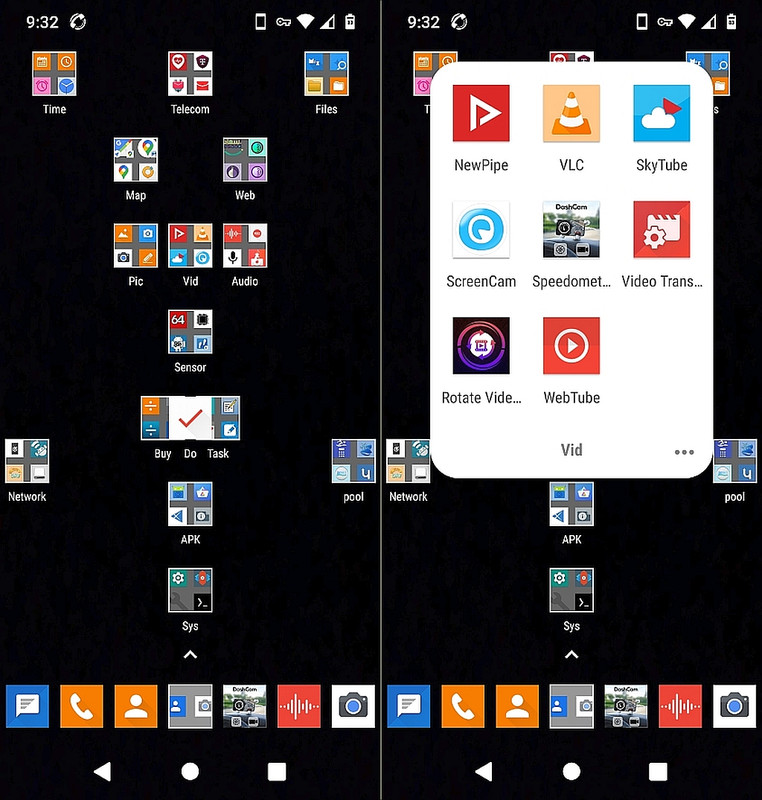
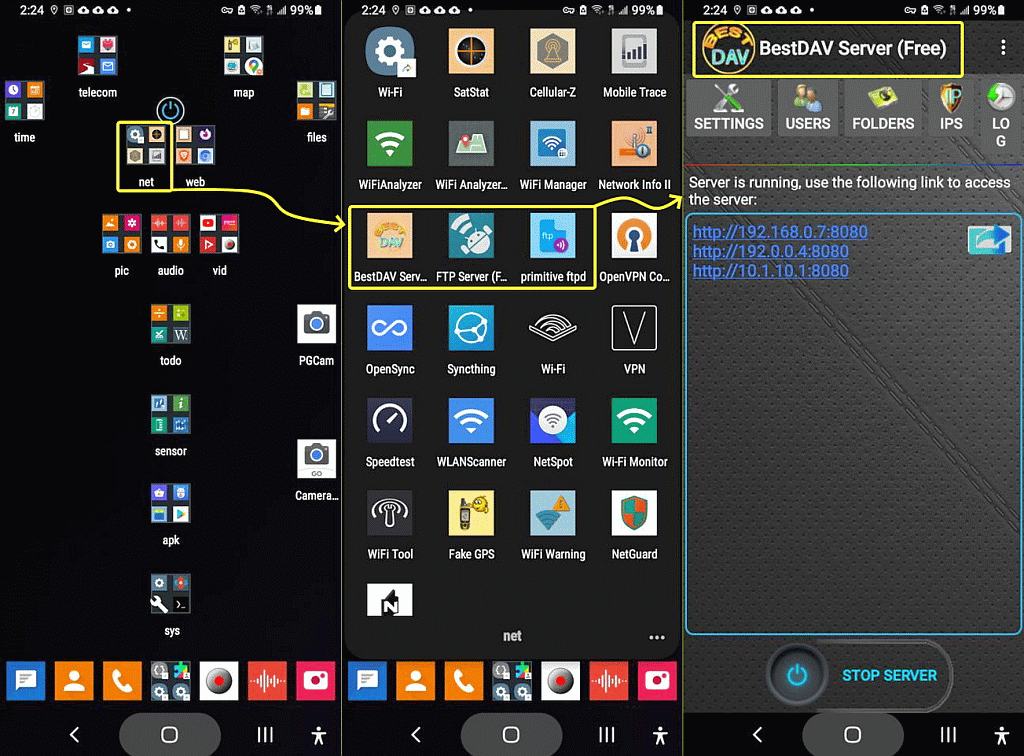
    Bear in mind when I transfer a phone's apps, I transfer the exact
    homescreen (icon names and locations exactly) which people will never get
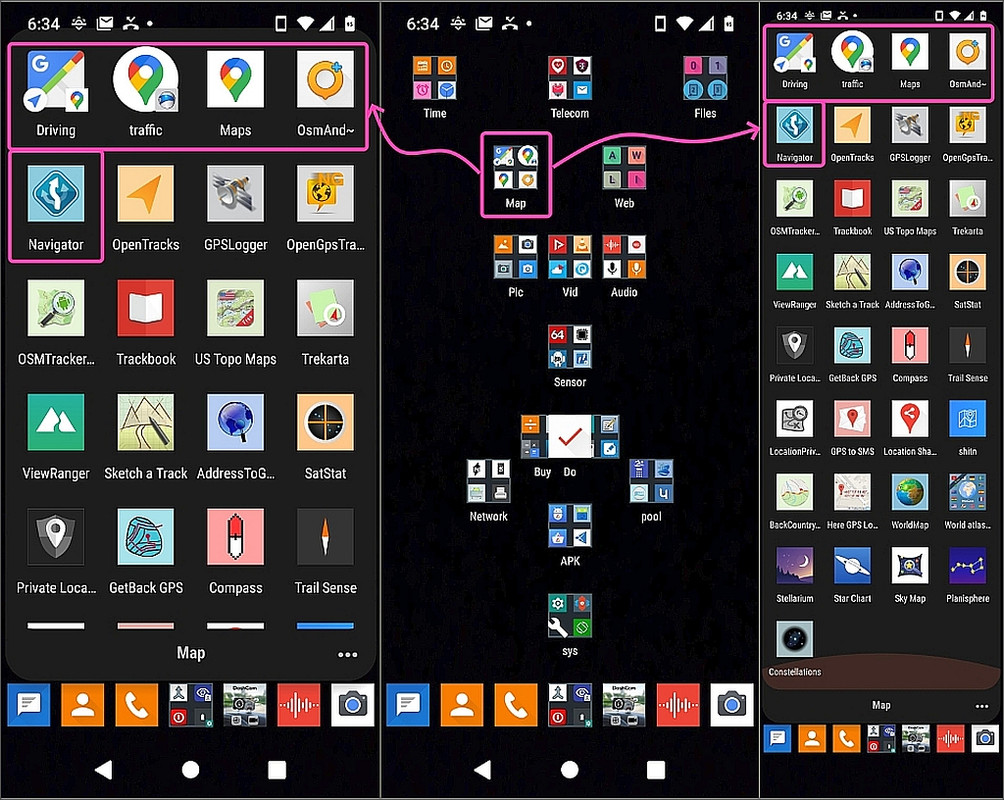
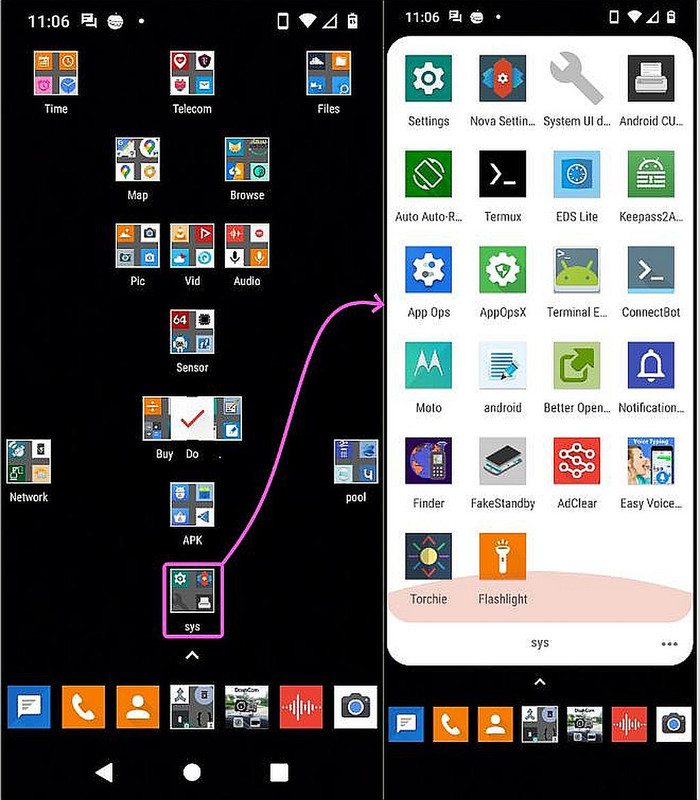
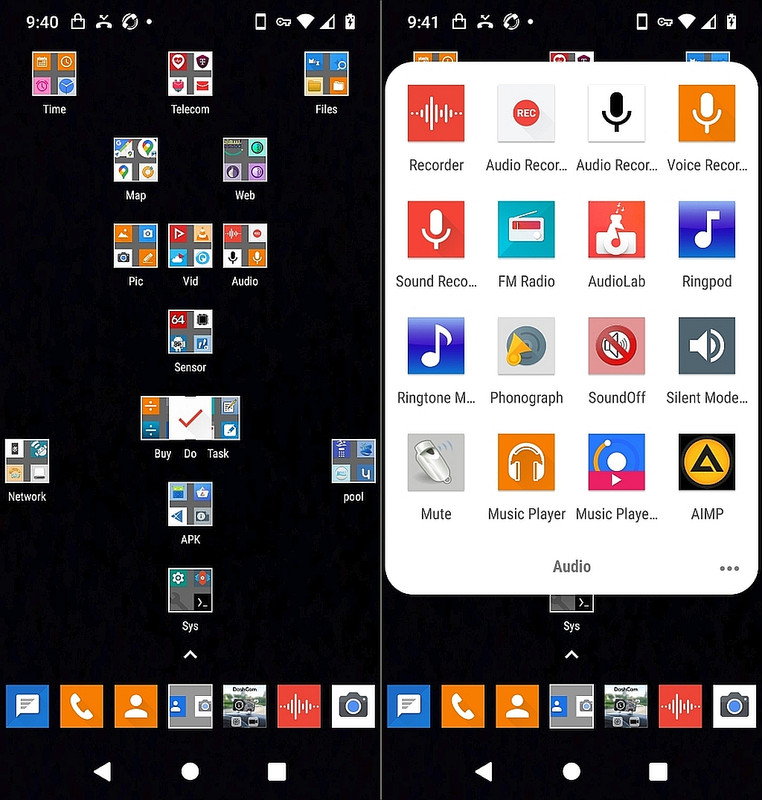
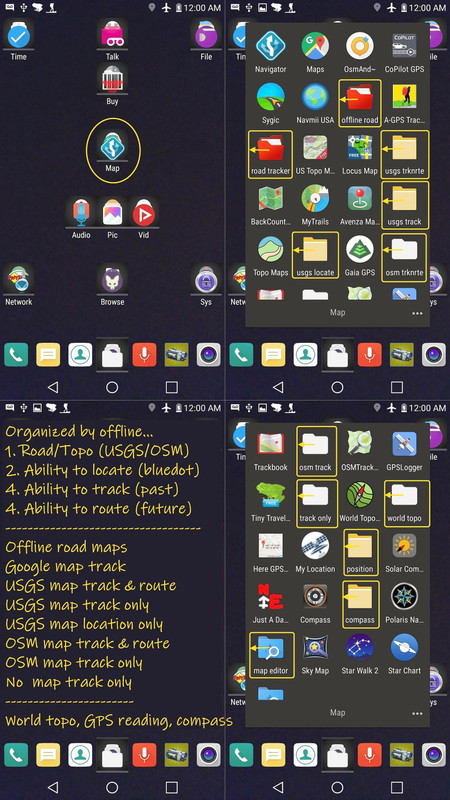
    with the Google transfer.
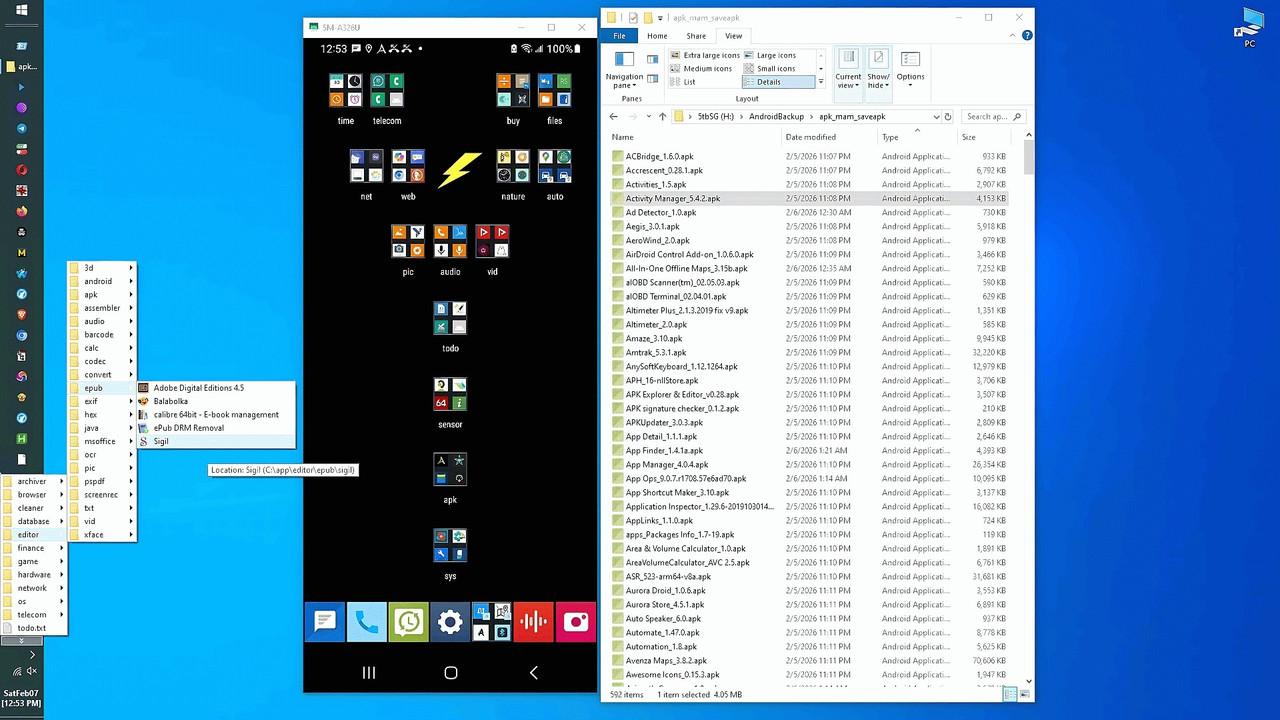
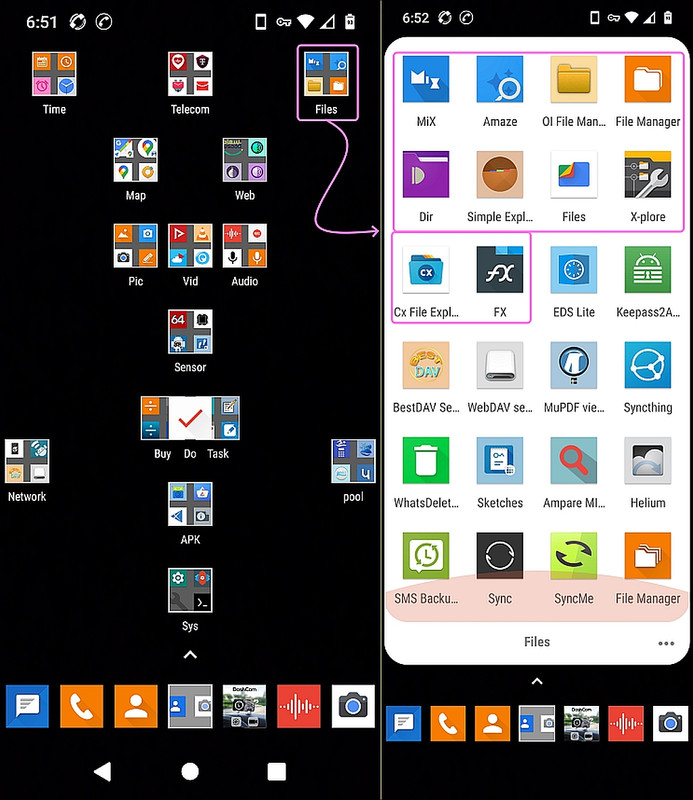
    <https://i.postimg.cc/Gmbyp807/windows-android.jpg>

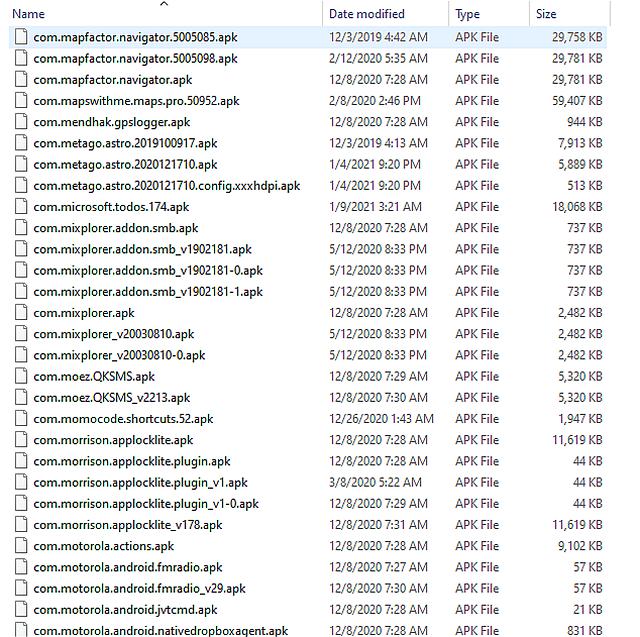
    I also transfer the exact sub versions (if I want to), which, again, people don't get with the Google transfer.
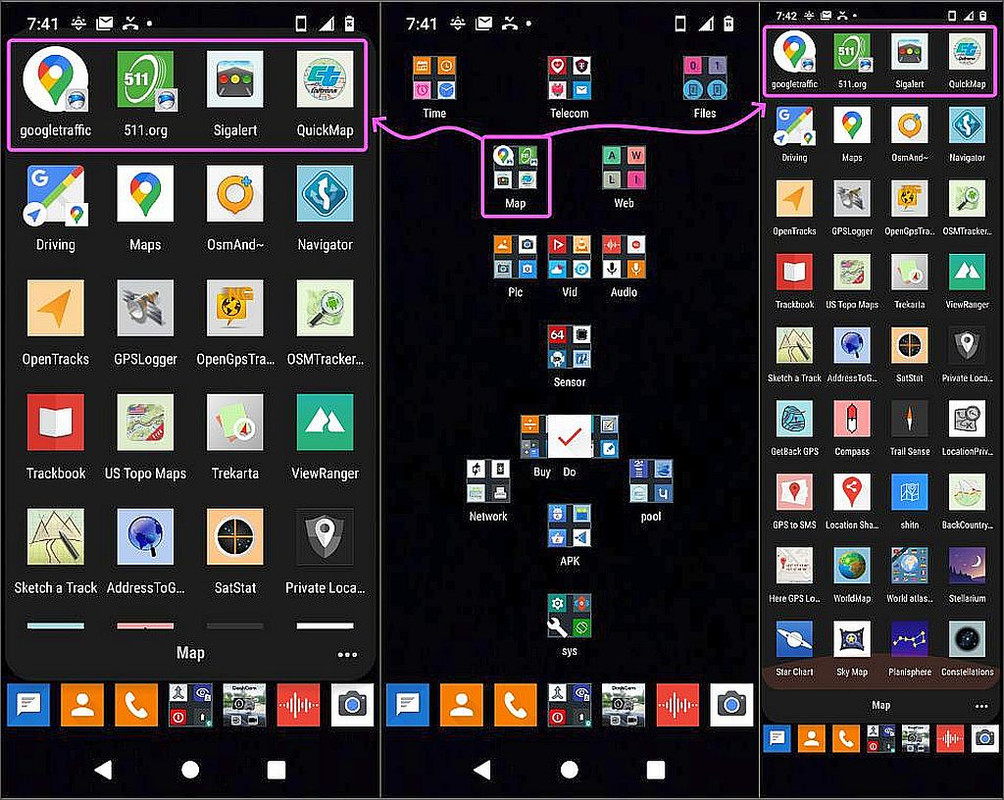
    <https://i.postimg.cc/FFYqg9Dv/maps05.jpg> map tools apk archive

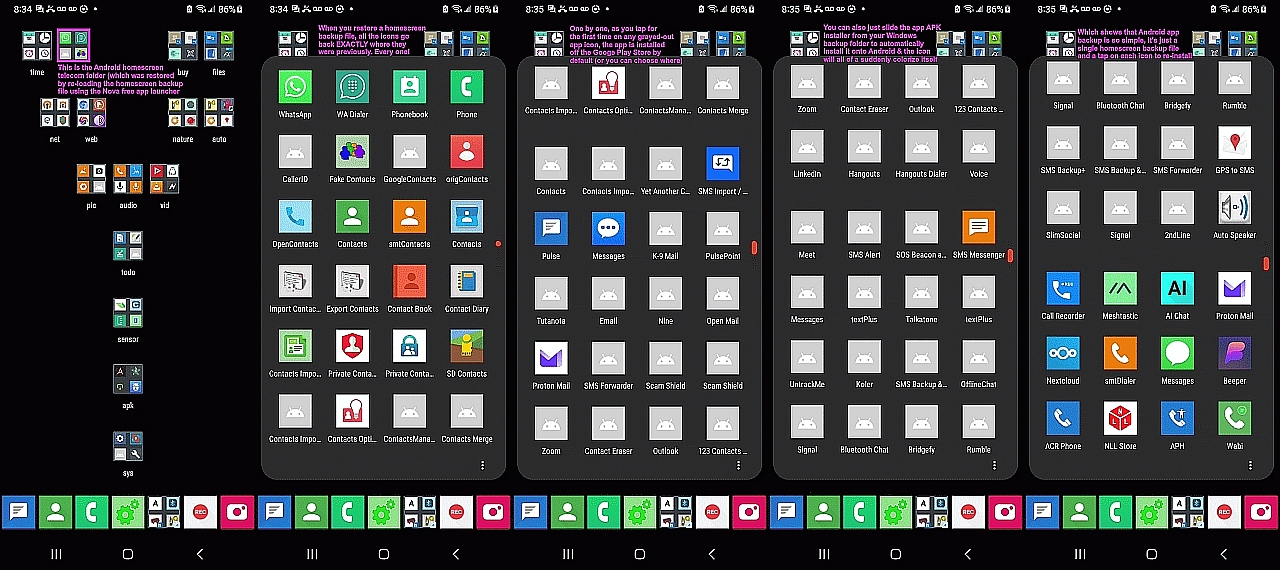
    Since the app isn't installed at first, when that homescreen is copied
    over, most of the app icons are grayed out, but I only have to tap them.
    <https://i.postimg.cc/Kv8RmGT3/telecom.jpg> homescreen gray icons

    Likely 0.001% of the people on earth can even understand what I just said.
    If they use the Google method, they lose out on all this simplicity.

    I'll wager no clerk in any phone store has any clue of what I just said.
    --
    On Usenet, old men with vast experience voluntarily share that knowledge.
    --- Synchronet 3.22a-Linux NewsLink 1.2
  • From Maria Sophia@mariasophia@comprehension.com to comp.mobile.android,alt.comp.os.windows-10,alt.os.linux on Tue Jun 2 20:53:12 2026
    From Newsgroup: alt.os.linux

    Ch1ffr3punk wrote:
    I like the concept of PlusOS, even as I never heard of it until now.

    I never installed Tails, but if I were to consider spending a couple
    hundred bucks on a USB stick to run PlugOS, I might try Tails first.

    Problem with Tails is that you can't use it in an Internet Cafo etc.
    with Android, hence the reason why I purchased PlugOS where I can use
    the Nym Mixnet or Tor Network.

    Good point.
    I just checked and PlugOS doesn't work with Android, as you noted.

    Given Andronix puts Linux on Android for free <https://andronix.app/>,
    I checked if Tails would work with Linux on Android, but it won't.

    Drat.

    For a non-rooted Android, about the best you can do that PlugOS does
    is Tor browsing and Orbot routing (unlike LineageOS which requires root).

    For Pixels, there's also GrapheneOS/CalyxOS which works without rooting.
    But USA-spec Samsung bootloaders are locked (as far as anyone knows).

    The only downside, I see, of PlugOS is the cost as those above are free.

    I don't know if it requires an account, but once you pay for anything,
    using an account, then your privacy using that thing, is usually toast.
    --- Synchronet 3.22a-Linux NewsLink 1.2
  • From Maria Sophia@mariasophia@comprehension.com to comp.mobile.android,alt.comp.os.windows-10,alt.os.linux on Tue Jun 2 20:55:00 2026
    From Newsgroup: alt.os.linux

    Maria Sophia wrote:
    I just checked and PlugOS doesn't work with Android, as you noted.

    correction
    I just checked and *TAILS* doesn't work with Android/Andronix,
    as you noted.
    --- Synchronet 3.22a-Linux NewsLink 1.2
  • From Carlos E.R.@robin_listas@es.invalid to comp.mobile.android,alt.comp.os.windows-10,alt.os.linux on Wed Jun 3 11:21:15 2026
    From Newsgroup: alt.os.linux

    On 2026-06-03 02:45, Maria Sophia wrote:
    Bear in mind when I transfer a phone's apps, I transfer the exact
    homescreen (icon names and locations exactly) which people will never get with the Google transfer.

    But this depends on you using a different home screen app.
    --
    Cheers, Carlos.
    ESEfc-Efc+, EUEfc-Efc|;
    --- Synchronet 3.22a-Linux NewsLink 1.2
  • From Maria Sophia@mariasophia@comprehension.com to comp.mobile.android,alt.comp.os.windows-10,alt.os.linux on Wed Jun 3 06:59:12 2026
    From Newsgroup: alt.os.linux

    Carlos E.R. wrote:
    On 2026-06-03 02:45, Maria Sophia wrote:
    Bear in mind when I transfer a phone's apps, I transfer the exact
    homescreen (icon names and locations exactly) which people will never get
    with the Google transfer.

    But this depends on you using a different home screen app.

    Yes. You understood. You're in the top 0.001% as a result of understanding.

    You bring up a good point because you understood.
    I build the solutions from the moment a computing device is in my control.

    My strategy is to use tactics to preserve the homescreen between phones.
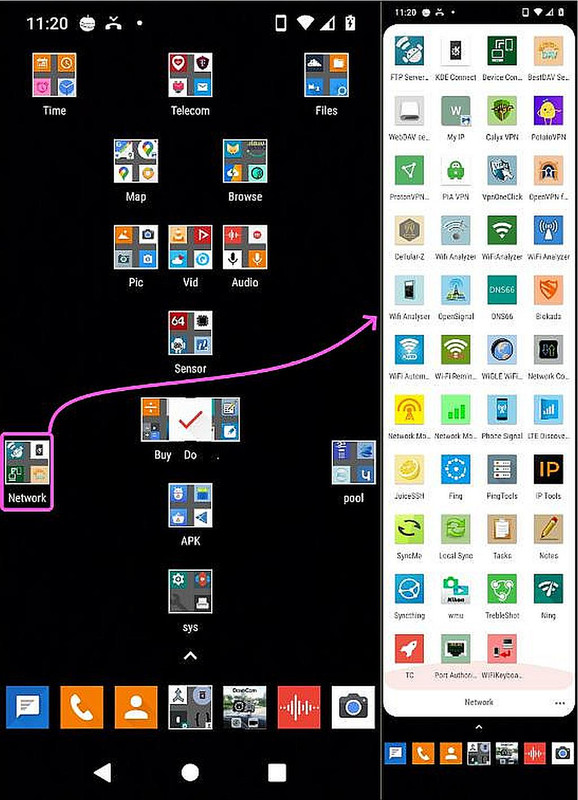
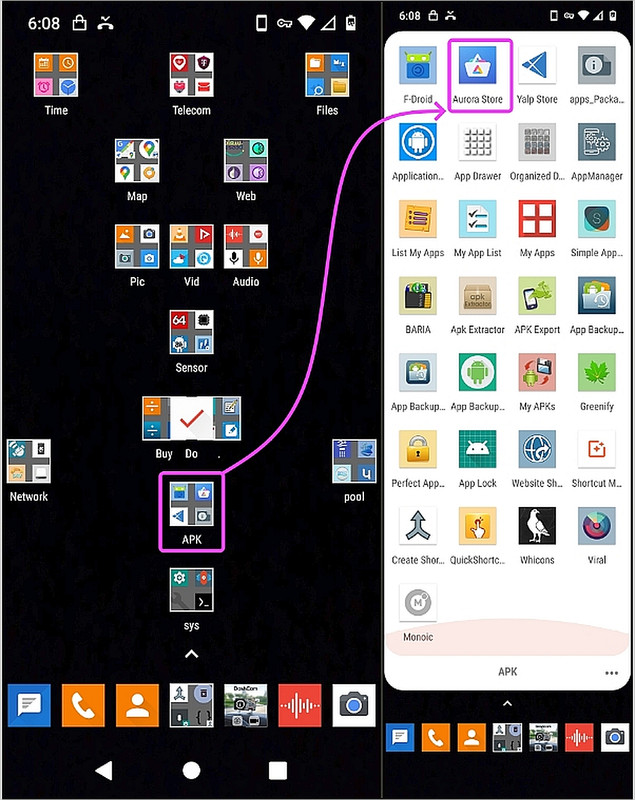
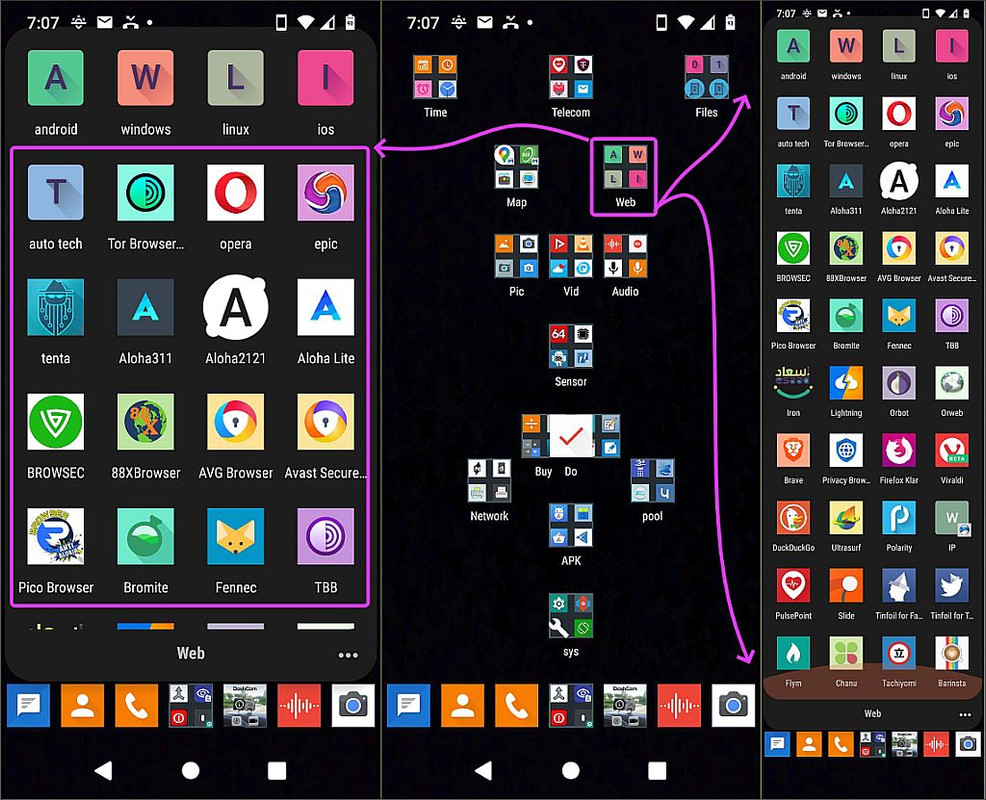
    <https://i.postimg.cc/3r0yNRcT/network02.jpg> network tools folder
    <https://i.postimg.cc/BZwR6gXc/buy02.jpg> shopping tools folder
    <https://i.postimg.cc/CMmSsgtN/maps01.jpg> map tools folder
    <https://i.postimg.cc/CxTxzsfC/sys01.jpg> system tools folder
    <https://i.postimg.cc/FFYqg9Dv/maps05.jpg> map tools apk archive
    <https://i.postimg.cc/fRNg5hn0/audio01.jpg> audio tools folder
    <https://i.postimg.cc/fTFcQ5d4/dock.jpg> dock tools folder
    <https://i.postimg.cc/pLFpXfMP/maps07.jpg> maps offline/online sections
    <https://i.postimg.cc/rmvDBN8Q/files01.jpg> file management tools folder
    <https://i.postimg.cc/vTQ13DcK/apk01.jpg> installation tools folder
    <https://i.postimg.cc/vZmTvPZx/maps02.jpg> map folder traffic section
    <https://i.postimg.cc/WpM4FM5t/web01.jpg> web tools folder
    <https://i.postimg.cc/XvN1Scvj/video01.jpg> video tools folder
    <https://i.postimg.cc/Zn73yqm1/network03.jpg> network tools server section
    etc.

    Given your understanding, you also made me think about a solution...
    The home screen app (aka, launcher) is easily changed on demand.

    So, while I use the last known good version of the free Nova launcher,
    <https://tinyurl.com/nova-launcher>
    any launcher that backs up the homescreen can be used to do it.

    In addition, anyone could install a suitable backup launcher moments before backing up their home screen. I haven't tested what happens when you switch home screens, but it could be that the home screen is also then preserved.

    So this is what could be tested by someone who cares to test for the team.

    1. Set up your folders & icons on your current launcher as you wish
    2. Temporarily, switch to the Nova (or similar) backup-capable launcher
    3. Save the homescreen to a backup file
    4. Switch back to your current launcher

    This "should" save the position of the folders and apps.
    But I haven't tested if folder contents, position & names are preserved.
    --- Synchronet 3.22a-Linux NewsLink 1.2