From Newsgroup: alt.msdos.batch
Maria Sophia wrote:
adbconnect.bat
UPDATE
<
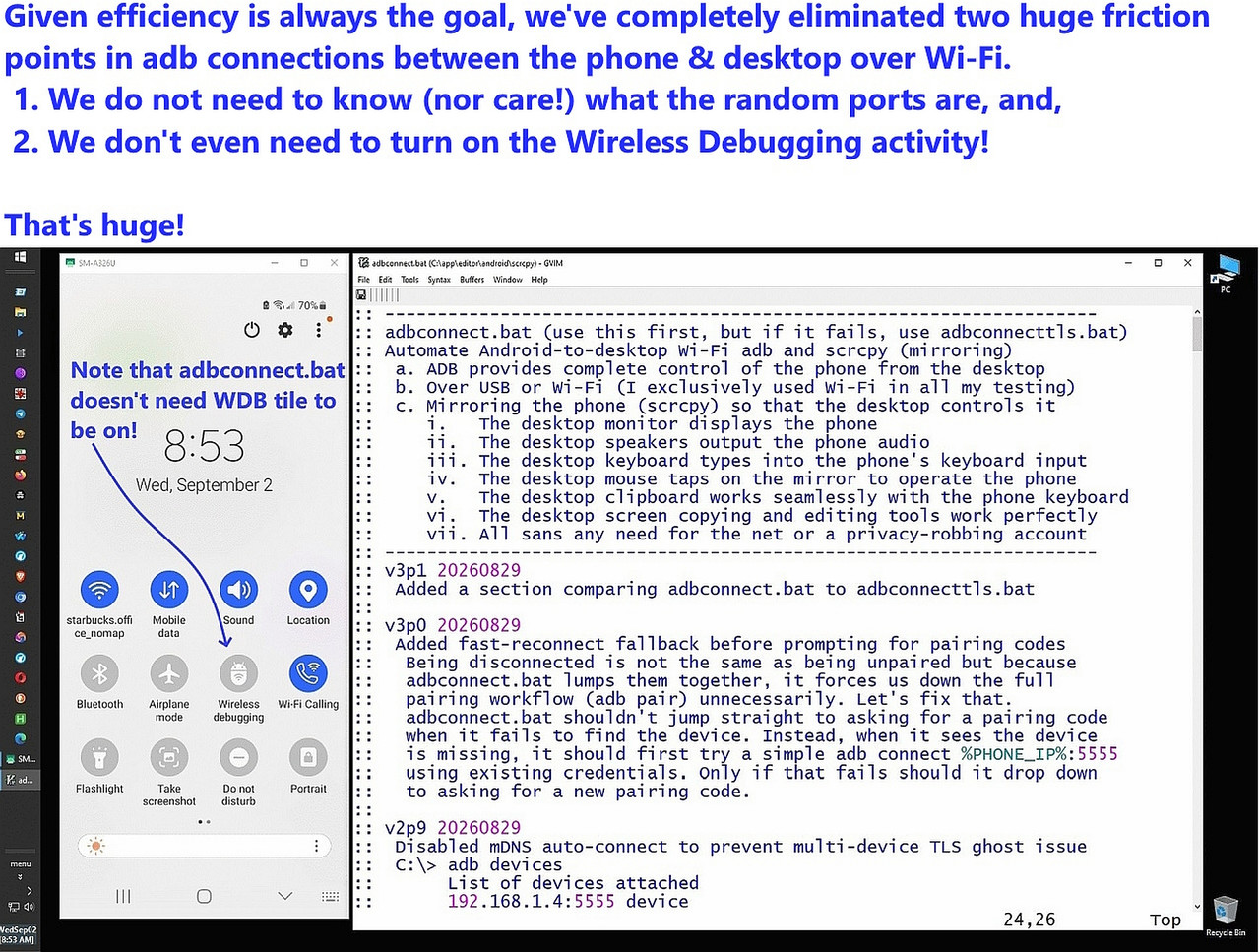
https://i.postimg.cc/BQh6yhyK/adbconnect.jpg>
Given efficiency is always the goal, we've completely eliminated two huge friction points in adb connections between the phone & desktop over Wi-Fi.
1. We do not need to know (nor care!) what the random ports are, and,
2. We don't even need to turn on the Wireless Debugging activity!
That's huge!
This solution is brilliantly elegant, if I do say so myself. </humble>
It doesn't exist anywhere on the planet, as far as I'm currently aware.
(If you know of where it exists elsewhere, let us all know as I wouldn't
have had to write it had it already existed for all of us to easily use.)
It used to be I had to run adbconnect.bat first, which connected my phone
to the LAN over Wi-Fi (as my USB port is busted for data), but recently, I found a loophole which I fixed, and now I haven't needed to run the adjunct adbconnecttls.bat for a while, so I think I've finally (hopefully) worked
out most of the rather long list of complexities involved in connecting a smartphone to the desktop using only Wi-Fi but without knowing the ports.
Interestingly, I don't even have to turn on Wireless Debugging anymore.
That was a surprise, even to me, but remember, we connected once before.
But note, USB was *never* used, so all the authentication was done over
Wi-Fi (where USB could have been used had my data pins not been broken).
Below is both adbconnect.bat & adbconnecttls.bat but not included is the
far more complex adbdebugtls.bat since it's rarely needed now that the adbconnect.bat is as robust as it is after about a month of daily testing.
:: --------------------------------------------------------------------
:: adbconnect.bat (use this first, but if it fails, use adbconnecttls.bat)
:: Automate Android-to-desktop Wi-Fi adb and scrcpy (mirroring)
:: a. ADB provides complete control of the phone from the desktop
:: b. Over USB or Wi-Fi (I exclusively used Wi-Fi in all my testing)
:: c. Mirroring the phone (scrcpy) so that the desktop controls it
:: i. The desktop monitor displays the phone
:: ii. The desktop speakers output the phone audio
:: iii. The desktop keyboard types into the phone's keyboard input
:: iv. The desktop mouse taps on the mirror to operate the phone
:: v. The desktop clipboard works seamlessly with the phone keyboard
:: vi. The desktop screen copying and editing tools work perfectly
:: vii. All sans any need for the net or a privacy-robbing account
:: --------------------------------------------------------------------
:: v3p1 20260829
:: Added a section comparing adbconnect.bat to adbconnecttls.bat
::
:: v3p0 20260829
:: Added fast-reconnect fallback before prompting for pairing codes
:: Being disconnected is not the same as being unpaired but because
:: adbconnect.bat lumps them together, it forces us down the full
:: pairing workflow (adb pair) unnecessarily. Let's fix that.
:: adbconnect.bat shouldn't jump straight to asking for a pairing code
:: when it fails to find the device. Instead, when it sees the device
:: is missing, it should first try a simple adb connect %PHONE_IP%:5555
:: using existing credentials. Only if that fails should it drop down
:: to asking for a new pairing code.
::
:: v2p9 20260829
:: Disabled mDNS auto-connect to prevent multi-device TLS ghost issue
:: C:\> adb devices
:: List of devices attached
:: 192.168.1.4:5555 device
:: adb-ABCDEFG1234-ABCDEF._adb-tls-connect._tcp device
:: set ADB_MDNS_AUTO_CONNECT=0
::
:: v2p8 20260809
:: Improved comments for general use by others on any desktop platform
::
:: v2p7 20260807
:: Added a disconnect for the old debug port right after
:: adb connect %PHONE_IP%:5555, using the DEBUG_PORT captured
::
:: v2p6 20260730
:: Added detailed overview in the comments section for easy re-use
::
:: v2p5 20260630
:: Cleaned up the descriptions by summarizing the version comments.
::
:: v2p4 20260630
:: Added version output string and improved explanations
::
:: v2p3 20260624
:: Added ability to detect if USB authentication was already done
::
:: v2p2 20260622
:: Improved handling of offline and unauthorized states
::
:: v2p1 20260621
:: Added SUMMARY system for executed commands
::
:: v2p0 20260621
:: Restored working version from v1p7
::
:: v1p9 20260620
:: Removed debug-port connect step which broke Wireless Debugging
::
:: v1p8 20260619
:: Removed debug-port connect step which broke Wireless Debugging
::
:: v1p7 20260615
:: Removed requirement for scrcpy-noconsole.vbs
::
:: v1p6 20260614
:: Added VBS no-console launcher fallback
::
:: v1p5 20260613
:: Added query asking for phone LAN IP address
::
:: v1p4 20260612
:: Eliminated need for scrcpy console window (using no-console vbs)
::
:: v1p3 20260612
:: Improved reliability of adb devices parsing
::
:: v1p2 20260611
:: Added retry logic and improved device-id handling
::
:: v1p1 20260611
:: Improved device lookup and reliability
::
:: v1p0 20260611
:: Converted adbconnect.vbs from Genymotion scrcpy to adbconnect.bat
:: Mirrors phone onto desktop over Wi-Fi (or USB) using adb and scrcpy
:: --------------------------------------------------------------------
:: Connects Android 11 and Android 12+ devices to adb and scrcpy using
:: pairing mode and classic TCPIP mode. This script uses the Android
:: Wireless Debugging pairing workflow to obtain the pairing port,
:: pairing code and debug port from the phone. It then performs adb
:: pair and adb connect with retry logic, switches the device to TCPIP
:: port 5555 and launches scrcpy silently. This script does not use TLS
:: for the scrcpy connection, but it depends on Wireless Debugging
:: being active because Wireless Debugging controls whether adbd is
:: reachable. Once TCPIP mode is enabled, the script reconnects to
:: port 5555 and starts scrcpy over classic TCPIP mode.
::
:: 1. Eliminates the useless scrcpy console window which takes up space
:: 2. Eliminates random security steps in Wi-Fi adb connections
:: 3. Solves reconnection problems when
:: a. The phone leaves the LAN and returns
:: b. The PC is rebooted
:: c. The phone is rebooted
:: d. A connection is attempted when already connected
:: Uses Wireless Debugging mode plus classic TCPIP ADB mode.
:: Wireless Debugging does not open port 5555 by itself.
:: Classic ADB-over-WiFi can use port 5555 to simplify reconnects.
:: Running adb tcpip 5555 forces Android to open port 5555 even in
:: Wireless Debugging mode. This makes reconnections simpler because
:: the phone stays open on port 5555 even if
:: a. the phone leaves and rejoins the LAN
:: b. the PC reboots
:: c. scrcpy drops and reconnects
:: Port 5555 remains active until the phone reboots because Android
:: rebooting disables Wireless Debugging and closes the TCPIP daemon.
::
:: USB authorization can eliminate pairing codes
:: i. Connect via USB
:: ii. adb connect PHONE_IP:5555
:: iii. scrcpy --tcpip=PHONE_IP
::
:: If a USB device is present and authorized, adb devices will show
:: PHONE_IP:5555 device
:: You cannot get device state without USB authorization
::
:: Android 12+ introduced ADB-over-TLS auto-advertised via mDNS.
:: It auto-connects over encrypted channels without pairing or ports.
:: It appears as adb-SERIAL-GUID._adb-tls-connect._tcp
:: Wireless Debugging controls whether this TLS service is awake.
:: scrcpy cannot use the TLS auto-connect device directly.
::
:: This script uses pairing mode and TCPIP mode only.
:: TLS auto-connect is not used for scrcpy, but TLS must be awake
:: for adbd to be reachable.
::
:: This design removes all typical friction points:
:: a. No USB cable
:: b. No scrcpy console window
:: c. No repeated pairing
:: d. No manual port switching
:: e. No manual IP entry (if static)
:: f. No TLS scrcpy complications
:: g. No adb-offline / unauthorized headaches
::
:: There's the following in the script below:
:: A. Reliable adb discovery
:: a. finding adb across $PATH
:: b. And forcing the exe to ensure reliability
:: B. Reliable device-state detection
:: a. Handling pairing failures
:: b. retry timing
:: c. debug-port connection
:: d. fallback device-ID detection
:: C. TCPIP mode forcing
:: a. Which exploits adb tcpip 5555 classic TCPIP mode
:: b. Such that the port stays open until the phone reboots
:: c. Which is the key to making reconnection trivial.
:: D. Silent scrcpy launch
:: a. exploiting vbs capabilities
:: b. For a no-console hassle-free experience
:: E. Summary logging
:: a. By appending only successful commands
:: b. Which is useful for debugging intermittent Wireless Debugging behavior
:: F. LAN-wide complete control
:: a. Becuse it uses a static IP
:: b. and a forced TCPIP mode with scrcpy over 5555
:: c. We can operate the phone even if:
:: i. it's asleep
:: ii. it's locked
:: iii. it's physically inaccessible
:: G. Automatic recovery
:: a. The script handles the phone leaving/rejoining LAN
:: b. and/or a PC reboot
:: c. and/or a phone reboot
:: d. and/or a scrcpy reconnect
:: e. and various adb offline states
::
:: This is extremely powerful, as, for example, if you're at your desktop
:: and you need to text someone from a phone on the LAN, it's easy to do.
::
:: Of course there's always more to add, such as:
:: 1. adding auto-IP discovery via ARP scan
:: 2. adding auto-TLS detection for Android 12+
:: 3. adding an auto-reconnect daemon
:: 4. adding scrcpy overlay controls
:: 5. adding phone battery/temperature polling
:: 6. adding multi-device support
:: 7. adding LAN broadcast discovery
:: --------------------------------------------------------------------
:: To integrate this script into a Windows quick-reaction command...
:: 1. Test that your command is not yet known to Windows' special paths.
:: Win+R > mirror
:: You should see "Windows cannot find mirror..."
:: NB: I don't use Win+R because I have a runbox pinned to the taskbar.
::
:: 2. Create a shortcut that calls the batch file that does all the work.
:: C:\path-to\lnk\mirror.lnk
:: target=%comspec% /k cd C:\path-to\bat & C:\path-to\bat\adbconnect.bat
::
:: 3. Add a registry key, making sure to name the key with an 'exe' extension.
:: HKLM\SOFTWARE\Microsoft\Windows\CurrentVersion\App Paths\mirror.exe
:: Default=C:\path-to\lnk\mirror.lnk
:: NB : The destination must exist for this quick reaction key to work.
::
:: 4. Test that your quick-reaction command is working to mirror Android.
:: Win+R > mirror
::
:: What should happen is:
:: a. The runbox command finds "mirror.exe" in the App Paths key
:: b. Which finds mirror.lnk in your shortcuts folder
:: c. Which runs adbconnect.bat in your batch folder
::
:: Note that this design makes use of App Paths as an instant global command
:: a. App Paths works with shortcuts, not just executables
:: b. It works with Win+R, Start menu search, and Explorer
:: c. It allows naming the command anything (mirror.exe -> adbconnect.bat)
:: d. It avoids $PATH pollution
:: e. It eliminates %PATH duplication mistakes
:: --------------------------------------------------------------------
:: Comparison of adbconnect.bat vs adbconnecttls.bat
::
:: adbconnect.bat (initial heavy hitter)
:: a. Designed for everyday automation, pairing and TCPIP port mapping
:: b. First uses a dynamic Wireless Debugging debug port to initialize
:: c. Then forces a classic TCP/IP port 5555 connection, for persistence
:: d. Includes a full pairing workflow fallback (pair port, pairing code)
:: e. Features fast-reconnect logic to prevent false pairing prompts
::
:: adbconnecttls.bat (later rescue, if needed)
:: a. Designed as a safety net when the primary adbconnect.bat fails
:: b. Has no pairing logic (assumes cryptographic keys are already trusted)
:: c. Connects directly to port 5555 without touching debug ports
:: e. Focuses on mDNS TLS advertiser checks to detect "ADB Deep Sleep"
:: f. Instructs the user on physical actions instead of asking for codes
::
:: Why the tag team of adbconnect.bat and then adbconnecttls (if needed)?
:: a. adbconnect.bat handles routine connections and setup seamlessly
:: b. But if the flaky Android adbd daemon locks up or goes dormant...
:: c. Then adbconnecttls.bat diagnoses the sleep state and resets the
:: server cleanly without disrupting saved pairing keys.
:: --------------------------------------------------------------------
@echo off
:: vi. debugging can be removed later
:: echo MARK 1
setlocal enabledelayedexpansion
:: Disable automatic TLS ghost connections
set ADB_MDNS_AUTO_CONNECT=0
:: Version string
set SCRIPT_VERSION=v3p1
set SCRIPT_DATE=20260829
echo ============================================
echo ADB-over-TLS to TCPIP Launcher Debug Mode
echo Running adbconnect.bat %SCRIPT_VERSION% %SCRIPT_DATE%
echo ============================================
echo.
:: initialize temp summary file
set SUMMARY_FILE=%TEMP%\adbconnect_summary.txt
if exist "%SUMMARY_FILE%" del "%SUMMARY_FILE%"
:: On phones with static IP addresses, change the next line
set PHONE_IP=192.168.1.4
:: set SCRCPY_OPTS=--keyboard=sdk --always-on-top
:: For whatever reason, "--keyboard=sd" makes Termux not accept Ctrl+V paste
:: set SCRCPY_OPTS=--keyboard=sdk
:: For whatever reason, "--legacy-paste" allows Termux to accept Ctrl+V paste
set SCRCPY_OPTS=--legacy-paste
echo.
echo === ADB Wireless Auto-Connect ===
echo === [Developer options > Wireless debugging > on] ===
echo.
REM 1. Find adb
:: REM ii. debugging (can be removed later)
:: if defined TRACE echo BEFORE FIRST FOR
:: REM vii. debugging can be removed later
:: echo MARK 2
for /f "delims=" %%A in ('where adb 2^>nul') do (
if not defined ADB set ADB=%%A
)
:: REM viii. debugging can be removed later
:: echo MARK 3
:: REM iii. debugging (can be removed later)
:: if defined TRACE echo AFTER FIRST FOR
if not defined ADB (
echo [ERROR] adb.exe not found.
exit /b
)
REM Ensure .exe extension
if /i not "%ADB:~-4%"==".exe" set ADB=%ADB%.exe
echo Using ADB: "%ADB%"
echo.
REM 2. Check if already connected
echo Checking existing ADB devices...
:: REM i. debugging (can be removed later)
:: set TRACE=1
set DEVICE_ID=
set DEVICE_STATE=
REM Do not add extra quotes here as all these break batch parsing!
:: '"%ADB%" devices'
:: "%ADB%" devices
:: '"%ADB%" devices"'
:: '"%ADB%" devices"'
:: REM iv. debugging can be removed later
:: if defined TRACE echo BEFORE SECOND FOR
:: REM ix. debugging can be removed later
:: echo MARK 4
for /f "skip=1 tokens=1,2" %%I in ('%ADB% devices') do (
echo %%I | findstr /I "%PHONE_IP%" >nul && (
if not defined DEVICE_ID (
set DEVICE_ID=%%I
set DEVICE_STATE=%%J
)
)
)
:: REM x. debugging can be removed later
:: echo MARK 5
:: REM v. debugging can be removed later
:: if defined TRACE echo AFTER SECOND FOR
REM treat only "device" as connected
:: echo MARK 6
echo DEVICE_ID="%DEVICE_ID%" DEVICE_STATE="%DEVICE_STATE%"
REM if no device id, try a quick reconnect before giving up and pairing
if "%DEVICE_ID%"=="" goto TRY_RECONNECT
REM if state is not "device", skip to NOT_CONNECTED
if /I not "%DEVICE_STATE%"=="device" goto NOT_CONNECTED
echo Already connected on %DEVICE_ID%
echo adb devices>>"%SUMMARY_FILE%"
REM skip redundant tcpip if already on 5555
if /I "%DEVICE_ID:~-5%"==":5555" (
echo Device already on port 5555. Skipping tcpip switch.
goto RUN_SCRCPY
)
goto RUN_TCPIP
:TRY_RECONNECT
echo Device not found in active list. Attempting fast reconnect to %PHONE_IP%:5555...
"%ADB%" connect %PHONE_IP%:5555 >nul 2>&1
:: Check if the fast reconnect worked
set DEVICE_ID=
for /f "tokens=1" %%I in ('%ADB% devices ^| findstr /C:"%PHONE_IP%:"') do (
if not defined DEVICE_ID set DEVICE_ID=%%I
)
if defined DEVICE_ID (
echo Fast reconnect successful!
echo adb connect %PHONE_IP%:5555>>"%SUMMARY_FILE%"
goto RUN_TCPIP
)
echo Fast reconnect failed. Falling back to full pairing workflow...
echo.
:NOT_CONNECTED
:: echo MARK 8
echo Not connected. Need to pair.
echo.
REM 3. Ask user for pairing info
echo Necessary pairing information will be shown on the phone:
set /p PHONE_IP=Phone IP [%PHONE_IP%] :
set /p PAIR_PORT=Wireless debugging pairing port:
set /p PAIR_CODE=Wireless debugging pairing code:
set /p DEBUG_PORT=Wireless debugging debug port:
echo.
echo Pairing with: %PHONE_IP%:%PAIR_PORT%
REM Retry logic for adb pair (3 attempts)
set ATTEMPTS_PAIR=0
:PAIR_RETRY
set /a ATTEMPTS_PAIR+=1
"%ADB%" pair %PHONE_IP%:%PAIR_PORT% %PAIR_CODE%
if not errorlevel 1 (
echo adb pair %PHONE_IP%:%PAIR_PORT% %PAIR_CODE%>>"%SUMMARY_FILE%"
)
if errorlevel 1 (
if !ATTEMPTS_PAIR! lss 3 (
echo Pair failed, retrying...
timeout /t 2 >nul
goto PAIR_RETRY
) else (
echo [ERROR] adb pair failed after %ATTEMPTS_PAIR% attempts.
exit /b 1
)
)
echo.
echo Connecting to debug port: %PHONE_IP%:%DEBUG_PORT%
REM Retry logic for adb connect (3 attempts)
set ATTEMPTS_CONN=0
:CONNECT_RETRY
set /a ATTEMPTS_CONN+=1
"%ADB%" connect %PHONE_IP%:%DEBUG_PORT%
if not errorlevel 1 (
echo adb connect %PHONE_IP%:%DEBUG_PORT%>>"%SUMMARY_FILE%"
)
REM wait a few seconds for the Android adb daemon to be ready
timeout /t 2 >nul
if errorlevel 1 (
if !ATTEMPTS_CONN! lss 3 (
echo Connect failed, retrying...
timeout /t 2 >nul
goto CONNECT_RETRY
) else (
echo [ERROR] adb connect %PHONE_IP%:%DEBUG_PORT% failed after %ATTEMPTS_CONN% attempts.
exit /b 2
)
)
echo.
REM Do not add extra quotes here as all these break batch parsing!
:: '"%ADB%" devices'
:: "%ADB%" devices
:: '"%ADB%" devices"'
:: '"%ADB%" devices"'
REM After connect, get the actual device id
set DEVICE_ID=
for /f "tokens=1" %%I in ('%ADB% devices ^| findstr /C:"%PHONE_IP%:"') do (
if not defined DEVICE_ID set DEVICE_ID=%%I
)
if defined DEVICE_ID (
echo Found device id: "%DEVICE_ID%"
) else (
echo [WARN] No device id found after connect.
set DEVICE_ID=%PHONE_IP%:%DEBUG_PORT%
)
goto RUN_TCPIP
:RUN_TCPIP
echo Switching device %DEVICE_ID% to TCP/IP 5555...
"%ADB%" -s "%DEVICE_ID%" tcpip 5555
if not errorlevel 1 echo adb -s %DEVICE_ID% tcpip 5555>>"%SUMMARY_FILE%"
echo Connecting final port: %PHONE_IP%:5555
"%ADB%" connect %PHONE_IP%:5555
if not errorlevel 1 echo adb connect %PHONE_IP%:5555>>"%SUMMARY_FILE%"
echo Disconnecting stale debug port: %PHONE_IP%:%DEBUG_PORT%
"%ADB%" disconnect %PHONE_IP%:%DEBUG_PORT% >nul 2>&1
if not errorlevel 1 echo adb disconnect %PHONE_IP%:%DEBUG_PORT%>>"%SUMMARY_FILE%"
set DEVICE_ID=%PHONE_IP%:5555
:RUN_SCRCPY
echo Launching scrcpy completely silent...
set "VBS_TEMP=%TEMP%\scrcpy_runner.vbs"
echo strCommand = "cmd /c scrcpy.exe --tcpip=%PHONE_IP% %SCRCPY_OPTS%" > "%VBS_TEMP%"
echo CreateObject("Wscript.Shell").Run strCommand, 0, false >> "%VBS_TEMP%"
echo scrcpy --tcpip=%PHONE_IP% %SCRCPY_OPTS%>>"%SUMMARY_FILE%"
wscript.exe "%VBS_TEMP%"
timeout /t 1 >nul
if exist "%VBS_TEMP%" del "%VBS_TEMP%"
echo Done.
echo.
echo Summary of steps run in this instance:
type "%SUMMARY_FILE%"
echo.
echo.
echo.
exit /b
REM end of adbconnect.bat
:: adbconnecttls.bat
:: Connects Android 12+ to adb & scrcpy WITHOUT needing port information
:: ------------------------------------------------------------------------
:: This script launches scrcpy over classic TCPIP mode on Android 12
:: and newer devices. It does not use TLS for the scrcpy connection,
:: but it depends on the Wireless Debugging TLS service being awake
:: because TLS controls whether adbd is reachable. The script resets
:: the ADB server, removes stale TLS ghost sessions, checks TLS
:: advertiser state, tests TCPIP reachability, verifies USB debugging
:: authorization and attempts a direct connection to port 5555. It
:: then launches scrcpy silently and detects whether the connection
:: succeeded. If TLS is asleep, TCPIP is active but refusing
:: connections, USB debugging is authorized and scrcpy fails, the
:: script reports that the phone is in ADB Deep Sleep and instructs
:: the user to toggle Wireless debugging or reboot the phone to wake
:: adbd.
::
:: v1p6 20260829
:: Added a section comparing adbconnect.bat to adbconnecttls.bat
::
:: v1p5 20260829
:: Disabled mDNS auto-connect to prevent multi-device TLS ghost issue
:: C:\> adb devices
:: List of devices attached
:: 192.168.1.4:5555 device
:: adb-ABCDEFG1234-ABCDEF._adb-tls-connect._tcp device
:: set ADB_MDNS_AUTO_CONNECT=0
:: v1p4 20260630
:: Added deep sleep detector
:: v1p3 20260630
:: Added TCP/IP sleep detector and USB authorization detector
:: v1p2 20260630
:: Added detection and reporting if scrcpy didn't launch
:: v1p1 20260630
:: Added version string
:: Added TLS sleep detection
:: Added user guidance when TLS is asleep
:: Removed parentheses and arrows from comments
:: Cleaned formatting for stability
:: v1p0 20260601
:: Simplest possible Wi-Fi scrcpy launcher for Android 12+ devices that
:: auto-advertise ADB-over-TLS. This script avoids pairing, avoids USB,
:: avoids debug ports, and avoids the TLS "ghost device" problem.
:: Android 12+ added a new ADB system called ADB-over-TLS Auto-Discovery.
:: It broadcasts on the LAN using mDNS as:
:: _adb-tls-connect._tcp
:: The desktop ADB server auto-connects to this TLS service with:
:: adb-SERIAL-GUID._adb-tls-connect._tcp
:: This TLS connection:
:: a. bypasses pairing
:: b. bypasses USB authorization
:: c. bypasses debug ports
:: d. auto-connects whenever ADB restarts
:: BUT scrcpy cannot use TLS directly. It only supports:
:: a. USB
:: b. Classic TCP/IP ADB (port 5555)
:: ------------------------------------------------------------------------
:: Note this script has no need for pairing or debug ports.
:: This script does not require USB nor does it depend on TLS being awake.
:: But Android's TLS ADB service is rather flaky in that it can:
:: a. go idle
:: b. stop advertising
:: c. return as "offline"
:: d. require Wireless Debugging toggle OFF->ON to wake up
:: So this script avoids TLS entirely by connecting only to port 5555.
:: This script:
:: 1. Kills the ADB server (removes stale TLS sessions)
:: 2. Starts the ADB server cleanly
:: 3. Disconnects all devices (removes TLS ghost device)
:: 4. Connects directly to PHONE_IP:5555
:: 5. Launches scrcpy silently using classic TCP/IP mode
:: Running "adb -s <tls-id> tcpip 5555" forces Android to open port 5555
:: even when Wireless Debugging is ON. Once opened, port 5555 stays active
:: until the PHONE reboots. This makes reconnections simple and stable.
:: ----------------------------------------------------------------------
:: Comparison of adbconnect.bat vs adbconnecttls.bat
::
:: adbconnect.bat (initial heavy hitter)
:: a. Designed for everyday automation, pairing and TCPIP port mapping
:: b. First uses a dynamic Wireless Debugging debug port to initialize
:: c. Then forces a classic TCP/IP port 5555 connection, for persistence
:: d. Includes a full pairing workflow fallback (pair port, pairing code)
:: e. Features fast-reconnect logic to prevent false pairing prompts
::
:: adbconnecttls.bat (later rescue, if needed)
:: a. Designed as a safety net when the primary adbconnect.bat fails
:: b. Has no pairing logic (assumes cryptographic keys are already trusted)
:: c. Connects directly to port 5555 without touching debug ports
:: e. Focuses on mDNS TLS advertiser checks to detect "ADB Deep Sleep"
:: f. Instructs the user on physical actions instead of asking for codes
::
:: Why the tag team of adbconnect.bat and then adbconnecttls (if needed)?
:: a. adbconnect.bat handles routine connections and setup seamlessly
:: b. But if the flaky Android adbd daemon locks up or goes dormant...
:: c. Then adbconnecttls.bat diagnoses the sleep state and resets the
:: server cleanly without disrupting saved pairing keys.
:: ----------------------------------------------------------------------
@echo off
setlocal enabledelayedexpansion
:: Version string
set SCRIPT_VERSION=v1p4
set SCRIPT_DATE=20260630
echo ============================================
echo ADB-over-TLS to TCPIP Launcher Debug Mode
echo Running adbconnecttls.bat %SCRIPT_VERSION% %SCRIPT_DATE%
echo ============================================
echo.
:: Set your phone IP here
set PHONE_IP=192.168.1.4
set SCRCPY_OPTS=--keyboard=sdk
:: Added this to prevent mDNS from creating second TLS connections
set ADB_MDNS_AUTO_CONNECT=0
echo STEP 1: adb kill-server
echo adb kill-server
adb kill-server
echo.
echo STEP 2: adb start-server
echo adb start-server
adb start-server
echo.
echo STEP 3: adb disconnect to remove TLS ghost
echo adb disconnect
adb disconnect
echo.
echo STEP 4: Check TLS advertiser status
echo Command: adb mdns services
adb mdns services | findstr /I "_adb-tls-connect._tcp" >nul
if errorlevel 1 (
echo.
echo TLS advertiser is ASLEEP.
echo Wireless Debugging is ON but the phone is not broadcasting TLS.
echo.
echo Meaning:
echo The phone cannot auto-connect over TLS.
echo The PC cannot wake the phone via TLS.
echo.
echo Fix:
echo On the phone, toggle Wireless debugging OFF then ON.
echo Or reboot the phone to restart Wireless Debugging.
echo.
echo After waking TLS, re-run adbconnecttls.bat.
echo.
) else (
echo TLS advertiser is ACTIVE.
echo The phone is broadcasting TLS normally.
)
echo.
echo STEP 5: adb connect %PHONE_IP%:5555
echo adb connect %PHONE_IP%:5555
adb connect %PHONE_IP%:5555
echo.
echo Checking TCPIP mode...
adb connect %PHONE_IP%:5555 >nul
:: Added TCP/IP sleep detector and USB authorization detector in v1p3
if errorlevel 1 (
echo.
echo TCPIP mode is ASLEEP.
echo The phone refused the TCPIP connection.
echo adbd is asleep or Wireless Debugging is asleep.
echo.
echo Fix:
echo On the phone, toggle Wireless debugging OFF then ON.
echo Or reboot the phone to restart Wireless Debugging.
echo.
echo After waking TLS, re-run adbconnecttls.bat.
echo.
) else (
echo TCPIP mode is ACTIVE.
)
echo Checking USB authorization...
adb devices | findstr /I "device" | findstr /V ":" >nul
if errorlevel 1 (
echo.
echo USB debugging is NOT authorized.
echo USB is connected but the phone is not authorized for ADB.
echo.
echo Fix:
echo Unlock the phone and press Allow USB debugging.
echo.
) else (
echo USB debugging is authorized.
)
echo STEP 6: Launch scrcpy silently
set VBS_TEMP=%TEMP%\scrcpy_tls_runner.vbs
echo strCommand = "cmd /c scrcpy.exe --tcpip=%PHONE_IP% %SCRCPY_OPTS%" > "%VBS_TEMP%"
echo CreateObject("Wscript.Shell").Run strCommand, 0, false >> "%VBS_TEMP%"
echo Running: scrcpy.exe --tcpip=%PHONE_IP% %SCRCPY_OPTS%
wscript.exe "%VBS_TEMP%"
:: Detect if scrcpy didn't launch and suggest a fix v1p2
echo Checking if scrcpy connected...
adb devices | findstr /I "%PHONE_IP%" >nul
if errorlevel 1 (
echo.
echo scrcpy did NOT connect.
echo.
echo Meaning:
echo The phone did not accept TCPIP connection.
echo adbd is asleep or Wireless Debugging is asleep.
echo.
echo Fix:
echo On the phone, toggle Wireless debugging OFF then ON.
echo Or reboot the phone to restart Wireless Debugging.
echo.
echo After waking TLS, re-run adbconnecttls.bat.
echo.
) else (
echo scrcpy connected successfully.
echo.
echo scrcpy is running over TCP/IP.
echo Connection successful.
echo.
goto :EOF
)
echo.
echo Done.
echo.
endlocal
exit /b
:: end of adbconnecttls.bat
--
Sometimes the only way to garner efficiency is to write it yourself.
--- Synchronet 3.22a-Linux NewsLink 1.2