• How to obtain other colors with the COLOR command

    From Jean-Pierre Coulon@coulon@cacas.pam.oca.eu to alt.msdos.batch on Thu Nov 21 09:30:40 2024
    From Newsgroup: alt.msdos.batch

    Since last window update, my shortcut to CMD.EXE yields stupid text and background colors, instead of those I had chosen with Properties of this icon.

    How can I obtain a text color other than the 16 available with the COLOR command? e.g. red-green-blue = 0-255-128

    Bye,
    --
    Jean-Pierre Coulon

    --- Synchronet 3.21d-Linux NewsLink 1.2
  • From JJ@jj4public@outlook.com to alt.msdos.batch on Fri Nov 22 11:28:47 2024
    From Newsgroup: alt.msdos.batch

    On Thu, 21 Nov 2024 09:30:40 +0100, Jean-Pierre Coulon wrote:
    Since last window update, my shortcut to CMD.EXE yields stupid text and background colors, instead of those I had chosen with Properties of this icon.

    How can I obtain a text color other than the 16 available with the COLOR command? e.g. red-green-blue = 0-255-128

    Bye,

    Not possible using the COLOR command. You'll have to use a separate tool
    which changes the current console's color table - like the one shown on the "Colors" tab of the console's Properties dialog. Note: native console. NOT Terminal console (crap).

    e.g. Microsoft's ColorTool

    https://github.com/microsoft/terminal/releases/tag/1904.29002

    Use the `.ini` file based color scheme, since it's a lot simpler than the `.itemcolors` file based (but it support color calibration).

    Note: may require at least Windows Vista.
    --- Synchronet 3.21d-Linux NewsLink 1.2
  • From Jean-Pierre Coulon@coulon@cacas.pam.oca.eu to alt.msdos.batch on Fri Nov 22 10:09:52 2024
    From Newsgroup: alt.msdos.batch

    Thanks. When I right click my command-prompt icon and run it as administrator, everything is OK.
    --
    Jean-Pierre Coulon

    --- Synchronet 3.21d-Linux NewsLink 1.2
  • From Jean-Pierre Coulon@coulon@cacas.pam.obs-nice.fr to alt.msdos.batch on Fri Nov 22 18:50:11 2024
    From Newsgroup: alt.msdos.batch

    After I obtained the command-prompt window, when I right click in the
    title bar, it shows a hell lot of off-topic tabs, instead of the usual
    tabs to change font, buffer size, colors etc.

    Is it a bug of the last Windows version?
    --
    Jean-Pierre Coulon
    --- Synchronet 3.21d-Linux NewsLink 1.2
  • From JJ@jj4public@outlook.com to alt.msdos.batch on Sat Nov 23 13:12:56 2024
    From Newsgroup: alt.msdos.batch

    On Fri, 22 Nov 2024 18:50:11 +0100, Jean-Pierre Coulon wrote:
    After I obtained the command-prompt window, when I right click in the
    title bar, it shows a hell lot of off-topic tabs, instead of the usual
    tabs to change font, buffer size, colors etc.

    Is it a bug of the last Windows version?

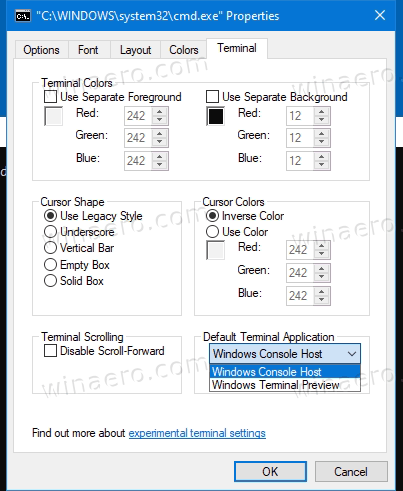
    The latest Windows version, replaced the native console window with Windows Terminal (crap).

    You can change it back to original as show in below screenshots. (long URLs warning)

    https://winaero.com/blog/wp-content/uploads/2021/05/Change-Default-Terminal-Application-in-Windows-10.png

    https://cdn.neowin.com/news/images/uploaded/2021/12/1639552800_terminal.jpg
    --- Synchronet 3.21d-Linux NewsLink 1.2
  • From Jean-Pierre Coulon@coulon@cacas.pam.obs-nice.fr to alt.msdos.batch on Sat Nov 23 09:21:31 2024
    From Newsgroup: alt.msdos.batch

    On Sat, 23 Nov 2024, JJ wrote:

    The latest Windows version, replaced the native console window with Windows Terminal (crap).

    You can change it back to original as show in below screenshots. (long URLs warning) [...]

    Thanks. I had to do it with my new "admin" command-prompt because the
    title bar of the present window does not give access to the good old Properties, Terminal window.

    And I had to put back Colors, Buffer size etc. as I like.
    --
    Jean-Pierre Coulon
    --- Synchronet 3.21d-Linux NewsLink 1.2
  • From Jean-Pierre Coulon@coulon@cacas.pam.obs-nice.fr to alt.msdos.batch on Sat Nov 23 17:19:30 2024
    From Newsgroup: alt.msdos.batch

    On Sat, 23 Nov 2024, JJ wrote:

    The latest Windows version, replaced the native console window with Windows Terminal (crap).

    You can change it back to original as show in below screenshots. (long URLs warning) [...]

    Thanks. I had to do it with my new "admin" command-prompt because the
    title bar of the present window does not give access to the good old Properties, Terminal window.

    And I had to put back Colors, Buffer size etc. as I like.
    --
    Jean-Pierre Coulon
    --- Synchronet 3.21d-Linux NewsLink 1.2