• Android Firefox does NOT show up in my WhatsApp PDF attachment OpenWith sheet

    From Maria Sophia@mariasophia@comprehension.com to alt.comp.software.firefox on Sat Oct 31 12:11:53 2026
    From Newsgroup: alt.comp.software.firefox

    Android Firefox does NOT show up in my WhatsApp
    PDF attachment OpenWith sheet

    I was on the road, and one of my kids who is on iOS
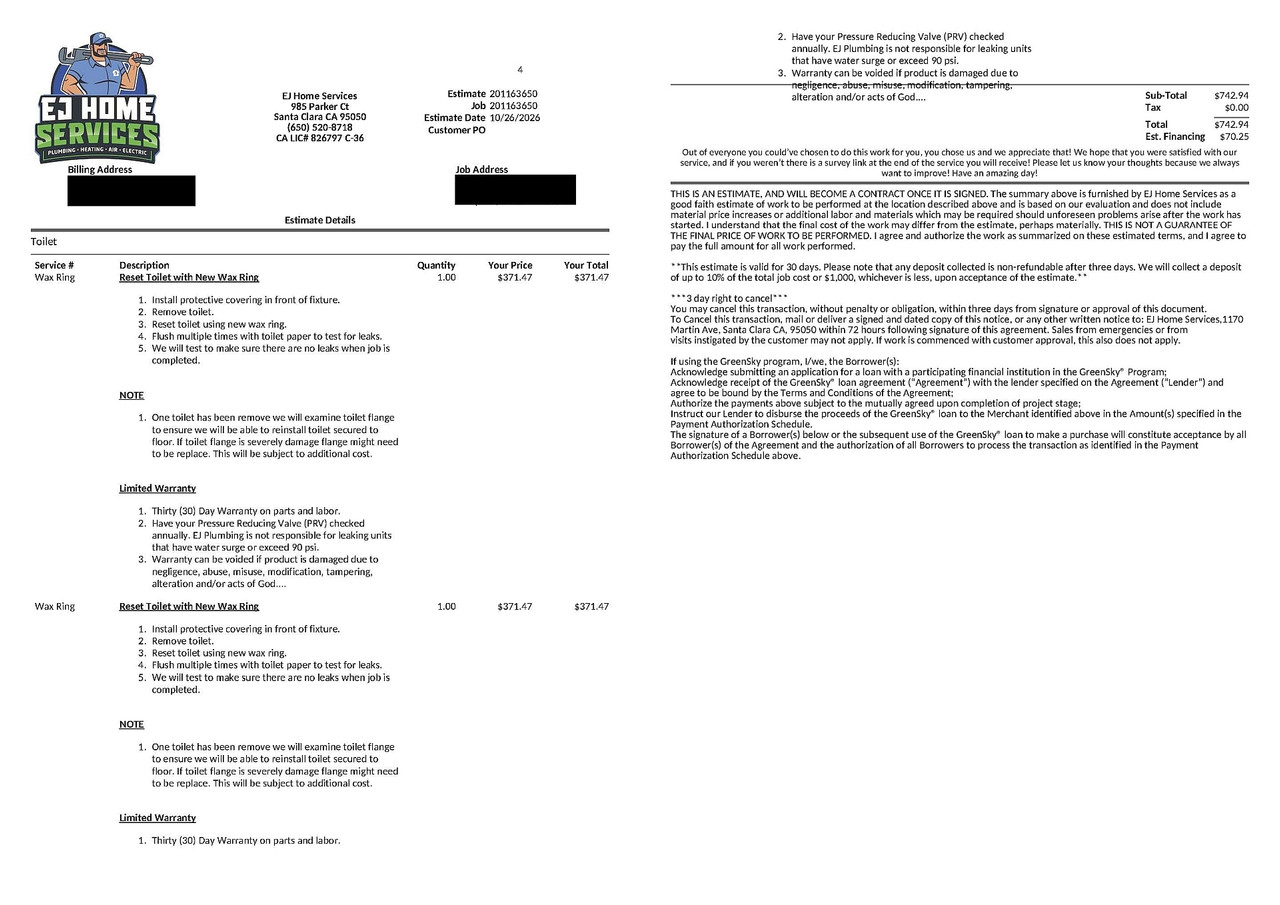
    needed plumbing help and sent me a PDF quote in WA.
    <https://i.postimg.cc/g2kQdrwY/toilet.jpg>

    After fumbling a bit, I was able to save & open it,
    but that begs the question of how best to do that,
    so I asked the Android newsgroup and one suggestion
    that came back more than once was to use Firefox.

    But Firefox doesn't show up in any of my menus when
    I press on it (short press or longpress) in WA.
    a. short: Firefox doesn't show up in my OpenWith
    b. long: Firefox doesn't show up in my ShareTo

    Yet, for others, apparently, Firefox does show up.
    WTF?

    Note this is about the Android Firefox. Not desktop.
    What happens when YOU press on a PDF attachment in WA?

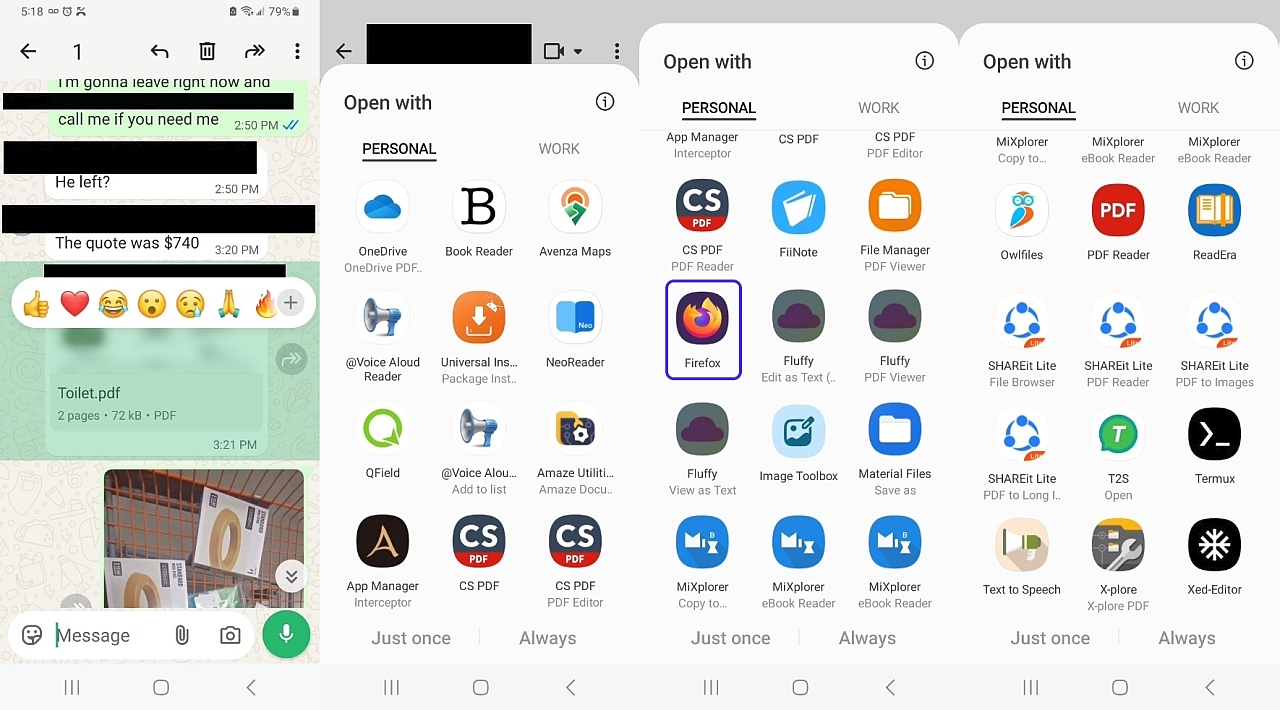
    When I receive a PDF attachment in Android WhatsApp,
    and when I click on the PDF attachment to open it up
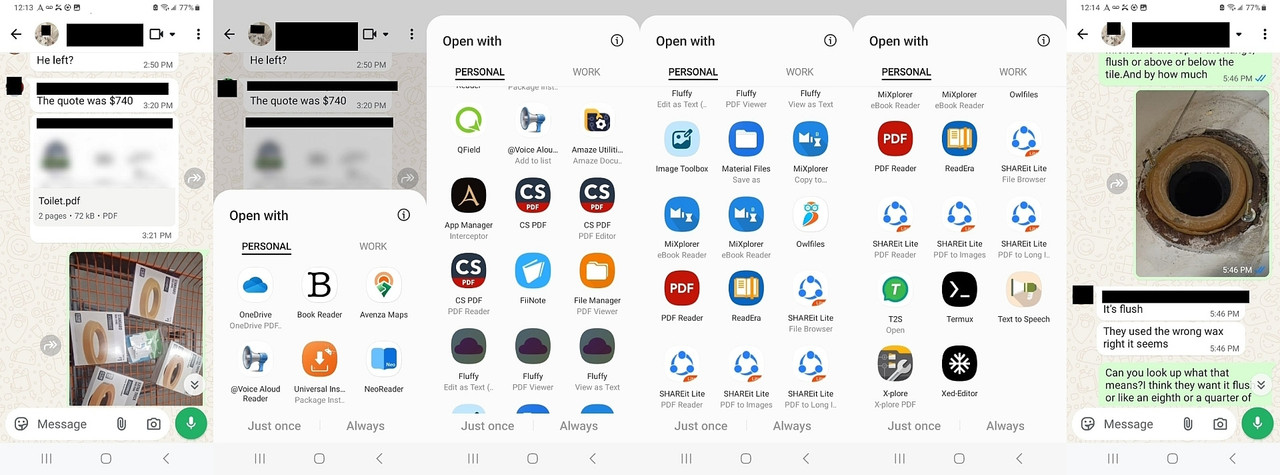
    Android brings up an "Open with" form with an app list.
    <https://i.postimg.cc/tRmWnpFP/whatsappshare.jpg>

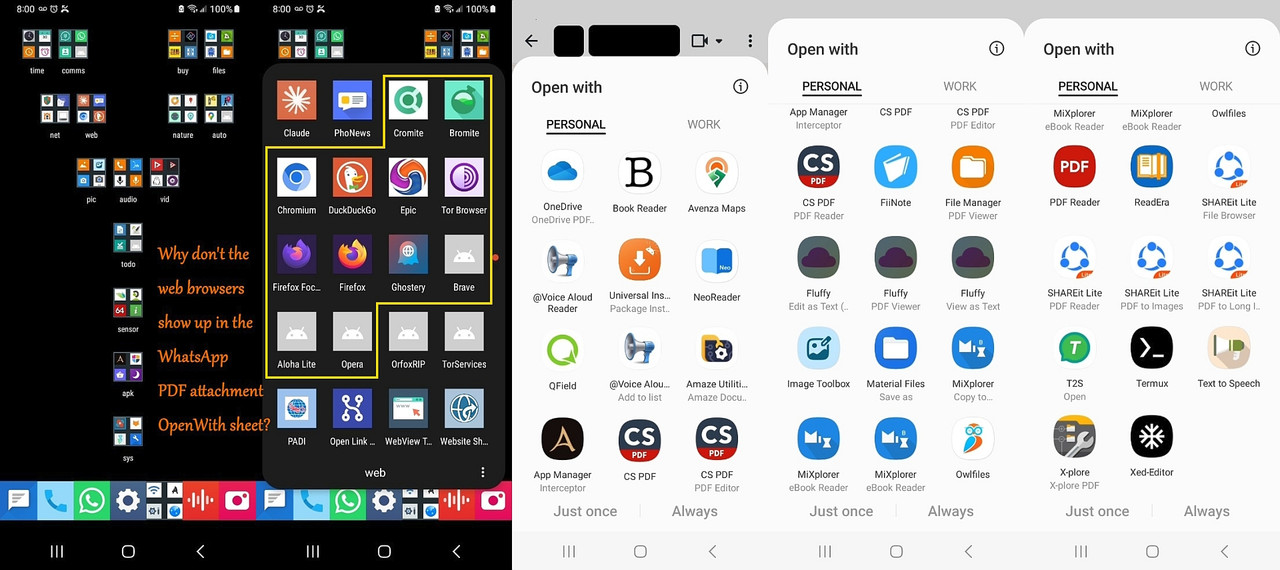
    In the Android newsgroup, Firefox was one suggestion to
    open up the PDF (and then save it to the sdcard), but
    for me, Firefox simply does not show up as an option.
    <https://i.postimg.cc/59qhZRmR/openwithpdf.jpg>

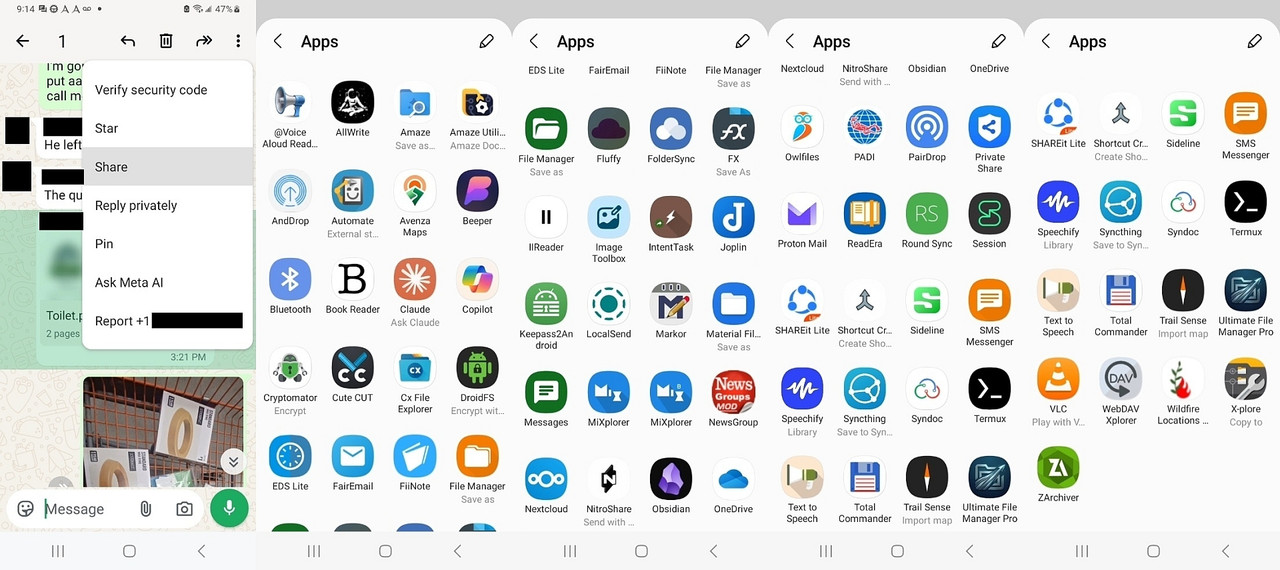
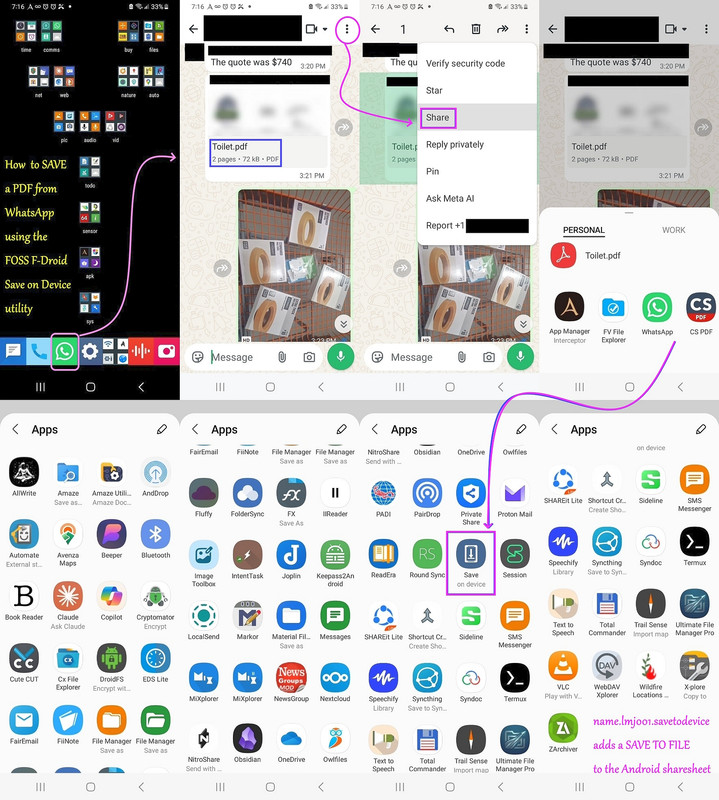
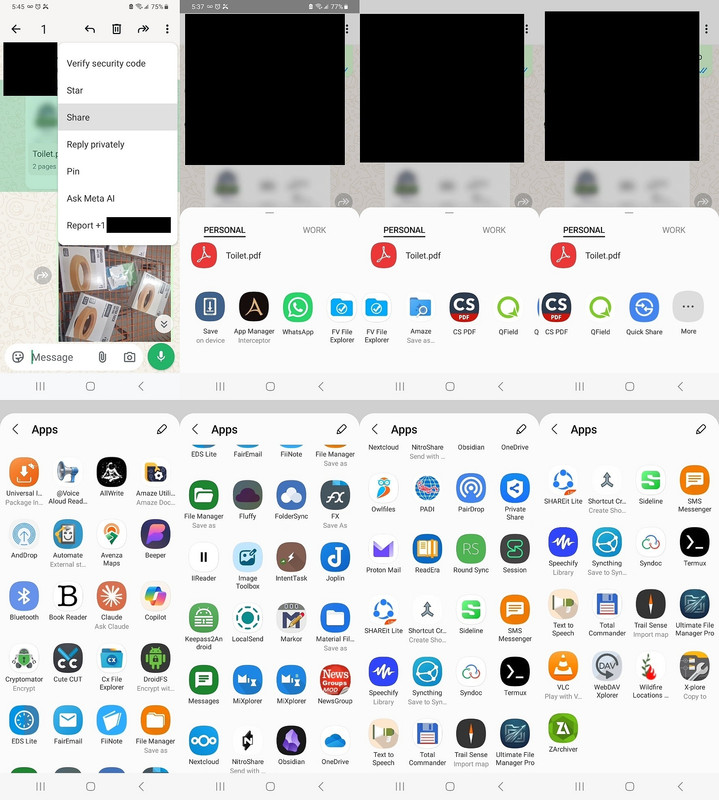
    Even if I use the "Share to" (after tapping the three dots
    and selecting "Share" from the WhatsApp menu selections)
    I *still* don't get the choice to "Share to" Firefox.
    <https://i.postimg.cc/YqnZzMvq/cxfileexplorer.jpg>

    Of course, I can file:/// open the PDF attachment in
    Firefox by knowing where it is stored or, more universally,
    by adding a "Save on device" choice to the Share Sheet.
    <https://i.postimg.cc/B6ryMZpn/saveasfile.jpg>

    But *multiple* others who kindly tested opening with
    Firefox said they saw the option to open with Firefox.

    Q: Does Firefox show up as an option for YOU on Android?
    A: ?

    Note: This is my related system & Firefox information:
    echo "=== SYSTEM INFO ===" && adb shell getprop ro.product.model && adb shell getprop ro.build.version.release && echo "=== FIREFOX VERSION ===" && adb shell dumpsys package org.mozilla.firefox | grep versionName
    "=== SYSTEM INFO ==="
    SM-A326U
    13
    "=== FIREFOX VERSION ==="
    versionName=117.1.0
    --
    On Usenet, we improve our knowledge by sharing & discussing solutions.


    --- Synchronet 3.22a-Linux NewsLink 1.2
  • From Andy Burns@usenet@andyburns.uk to alt.comp.software.firefox on Sat Oct 31 16:51:19 2026
    From Newsgroup: alt.comp.software.firefox

    Maria Sophia wrote:

    Android Firefox does NOT show up in my WhatsApp
    PDF attachment OpenWith sheet
    As said, I can't test PDF from WhatsApp, but just sent myself an email
    with to Thunderbird Android, and launching the PDF attachment offers to
    open it with firefox/mupdf/gdrive-pdf-viewer/etc
    --- Synchronet 3.22a-Linux NewsLink 1.2
  • From Maria Sophia@mariasophia@comprehension.com to alt.comp.software.firefox on Sat Oct 31 14:04:09 2026
    From Newsgroup: alt.comp.software.firefox

    Andy Burns wrote:
    Maria Sophia wrote:

    Android Firefox does NOT show up in my WhatsApp
    PDF attachment OpenWith sheet
    As said, I can't test PDF from WhatsApp, but just sent myself an email
    with to Thunderbird Android, and launching the PDF attachment offers to
    open it with firefox/mupdf/gdrive-pdf-viewer/etc

    Hi Andy,

    I appreciate your response 'cuz I'm aware every response comes at a cost.
    But, at least I always strive to make the value greater than the effort.

    Thanks for testing it, as the goal is simply to get Firefox to be an option when we receive a PDF attachment in WhatsApp on Android (given, until RCS,
    we couldn't normally receive PDF attachments in our default text clients).

    While Firefox & Thunderbird certainly might share ways of doing things, I think testing via Thunderbird (or email clients generally) may invoke
    broader MIME-type or generic file-sharing intent filters than the
    restricted set that WhatsApp's isolated document picker apparently uses.

    When WhatsApp generates an "Open With" sheet for a local PDF, it's my understanding that Android queries the system resolver table to find apps
    that explicitly handle local content URIs and MIME types:

    Testing that hypothesis, this says DocumentsUI is the sole default picker 0#ac:\> adb shell cmd package resolve-activity --brief -t application/pdf -d content://com.whatsapp.provider.media/item/123
    priority=100 preferredOrder=0 match=0x608000 specificIndex=-1
    isDefault=true com.google.android.documentsui/
    com.google.android.documentsui.picker.PickActivity
    So I think my Samsung on Android13 is stripping out browsers that don't
    match local document views, which includes the installed Firefox browser.

    To see why Firefox misses out on being an option for WA-attached PDFs,
    we can inspect its registered intent filters directly via adb:

    0#ac:\> adb shell dumpsys package org.mozilla.firefox | grep -A 15 "MIME Typed Actions:"
    MIME Typed Actions:
    android.intent.action.SEND:
    2900abb org.mozilla.firefox/org.mozilla.fenix.IntentReceiverActivity filter 59cbd84
    Action: "android.intent.action.SEND"
    Category: "android.intent.category.DEFAULT"
    StaticType: "text/plain"
    android.intent.action.VIEW:
    2900abb org.mozilla.firefox/org.mozilla.fenix.IntentReceiverActivity filter 1aa9797
    Action: "android.intent.action.VIEW"
    Category: "android.intent.category.BROWSABLE"
    Category: "android.intent.category.DEFAULT"
    Scheme: "http"
    Scheme: "https"
    StaticType: "text/html"
    StaticType: "text/plain"
    StaticType: "application/xhtml+xml"

    This implies that my Android Firefox build (v117.1.0) limits its ACTION_VIEW filters to web schemes (http/https) and web MIME types. If this is true, Firefox is omitting local document types like application/pdf.

    So while an email client or general file manager hand-off might pass
    things differently or trigger a secondary share sheet, Android's package manager apparently restricts Firefox from showing up in WhatsApp's native
    PDF document picker on my phone because the filter isn't in the manifest.

    Yet, others say it shows up in theirs.
    So I'm confused.
    --
    Sometimes it takes a group of people to come up with the perfect solution .
    --- Synchronet 3.22a-Linux NewsLink 1.2
  • From Carlos E. R.@robin_listas@es.invalid to alt.comp.software.firefox on Sat Oct 31 20:34:36 2026
    From Newsgroup: alt.comp.software.firefox

    On 2026-10-31 19:04, Maria Sophia wrote:
    This implies that my Android Firefox build (v117.1.0) limits its ACTION_VIEW

    Update it. You are using an obsolete version, thus you miss features.
    FFx is striving to be the best free PDF cross platform viewer.
    --
    Cheers,
    Carlos E.R.
    ESEfc-Efc+, EUEfc-Efc|.
    --- Synchronet 3.22a-Linux NewsLink 1.2
  • From R Daneel Olivaw@desonbalon@mail.com to alt.comp.software.firefox on Sat Oct 31 21:24:24 2026
    From Newsgroup: alt.comp.software.firefox

    Carlos E. R. wrote:
    On 2026-10-31 19:04, Maria Sophia wrote:
    This implies that my Android Firefox build (v117.1.0) limits its
    ACTION_VIEW

    Update it. You are using an obsolete version, thus you miss features.
    FFx is striving to be the best free PDF cross platform viewer.


    My Android Firefox says it is 159.0.
    Of course updating from 117 to 159 will totally change all sorts of
    things because the developers seem to like change for the sake of change
    but - irritating though that is - it is better to be current, especially
    if you want some "correct" feature(s).
    --- Synchronet 3.22a-Linux NewsLink 1.2
  • From Maria Sophia@mariasophia@comprehension.com to alt.comp.software.firefox on Sun Nov 1 10:01:44 2026
    From Newsgroup: alt.comp.software.firefox

    R Daneel Olivaw wrote:
    Carlos E. R. wrote:
    On 2026-10-31 19:04, Maria Sophia wrote:
    This implies that my Android Firefox build (v117.1.0) limits its
    ACTION_VIEW

    Update it. You are using an obsolete version, thus you miss features.
    FFx is striving to be the best free PDF cross platform viewer.


    My Android Firefox says it is 159.0.
    Of course updating from 117 to 159 will totally change all sorts of
    things because the developers seem to like change for the sake of change
    but - irritating though that is - it is better to be current, especially
    if you want some "correct" feature(s).

    Woo hoo!

    Carlos & Andy were right all along!

    Thank you all for sticking with this, because what I've learned is
    a. Android Firefox 117 does NOT show up in the WA OpenWith sheet
    b. Android Firefox 159 DOES show up in the WA OpenWith sheet!

    PROOF BEFORE:
    Firefox does not show up in the Samsung Android 13 WA PDF OpenWith sheet:
    <https://i.postimg.cc/59qhZRmR/openwithpdf.jpg>
    Firefox does not show up in the Samsung Android 13 WA PDF ShareTo sheet:
    <https://i.postimg.cc/YqnZzMvq/cxfileexplorer.jpg>

    PROOF AFTER:
    Firefox DOES show up in the Samsung Android 13 WA PDF OpenWith sheet:
    <https://i.postimg.cc/9XNGYXGf/wa-openwith-firefox.jpg>
    Firefox still does not show up in the Android 13 WA PDF ShareTo sheet:
    <https://i.postimg.cc/9XtN17LJ/washareto.jpg>

    The rest below are just the commands I used to install Firefox 159
    (since I operate my phone from the desktop, as the phone is on Wi-Fi
    so there's no need to touch it to use it when I'm at home mirroring).

    Note: When sideloading Firefox from the official Mozilla repo
    <https://ftp.mozilla.org/pub/fenix/releases/>
    It won't automatically update in the background.

    The latest official non-beta build appears to be 159.0 in the list.
    <https://ftp.mozilla.org/pub/fenix/releases/159.0/>
    <https://ftp.mozilla.org/pub/fenix/releases/159.0/android/>

    Since I always strive to make universal decisions that are globally useful
    to everyone, I decided not to install the targeted Firefox for my device.
    <https://ftp.mozilla.org/pub/fenix/releases/159.0/android/fenix-159.0-android-arm64-v8a/fenix-159.0.multi.android-arm64-v8a.apk>
    cd c:\software\apk\browser\firefox\.
    curl -O https://ftp.mozilla.org/pub/fenix/releases/159.0/android/fenix-159.0-android-arm64-v8a/fenix-159.0.multi.android-arm64-v8a.apk
    Name: fenix-159.0.multi.android-arm64-v8a.apk
    Size: 133943377 bytes (127 MiB)
    SHA256: F78E11ABC85C59DD7AAB03DD8F926AC62DF99731CCF62EC6EC937C18B3E33AA9

    But, instead, I installed the universal Firefox that anyone can use.
    <https://ftp.mozilla.org/pub/fenix/releases/159.0/android/fenix-159.0-android/fenix-159.0.multi.android-universal.apk>
    cd c:\software\apk\browser\firefox\.
    curl -O https://ftp.mozilla.org/pub/fenix/releases/159.0/android/fenix-159.0-android/fenix-159.0.multi.android-universal.apk
    Name: fenix-159.0.multi.android-universal.apk
    Size: 304962287 bytes (290 MiB)
    SHA256: D95992785DC9D72D2EE0406477879E3B24AFD7E67768CB6E7476B11DE6B5F63F

    The phone is in some drawer somewhere in the house, but since I fully
    control the Android phone over Wi-Fi from the desktop PC, I installed using
    adb install -r fenix-159.0.multi.android-universal.apk
    Performing Streamed Install
    Success
    echo "=== SYSTEM INFO ===" && adb shell getprop ro.product.model && adb shell getprop ro.build.version.release && echo "=== FIREFOX VERSION ===" && adb shell dumpsys package org.mozilla.firefox | grep versionName
    "=== SYSTEM INFO ==="
    SM-A326U
    13
    "=== FIREFOX VERSION ==="
    versionName=159.0

    adb shell cmd package resolve-activity --brief -t application/pdf -d content://com.whatsapp.provider.media/item/123
    priority=100 preferredOrder=0 match=0x608000 specificIndex=-1 isDefault=true
    com.google.android.documentsui/com.android.documentsui.picker.PickActivity

    adb shell dumpsys package org.mozilla.firefox | grep -A 15 "MIME Typed Actions:"
    MIME Typed Actions:
    android.intent.action.SEND:
    13b34de org.mozilla.firefox/org.mozilla.fenix.IntentReceiverActivity filter c74fa78
    Action: "android.intent.action.SEND"
    Category: "android.intent.category.DEFAULT"
    StaticType: "text/plain"
    android.intent.action.VIEW:
    13b34de org.mozilla.firefox/org.mozilla.fenix.IntentReceiverActivity filter 9429fdb
    Action: "android.intent.action.VIEW"
    Category: "android.intent.category.BROWSABLE"
    Category: "android.intent.category.DEFAULT"
    Scheme: "http"
    Scheme: "https"
    StaticType: "text/html"
    StaticType: "text/plain"
    StaticType: "application/xhtml+xml"

    Thank you all for testing this as it didn't seem likely that
    the manifest would change between releases, but it apparently did.
    --
    On Usenet you can often find people who know a lot more than you do.
    --- Synchronet 3.22a-Linux NewsLink 1.2