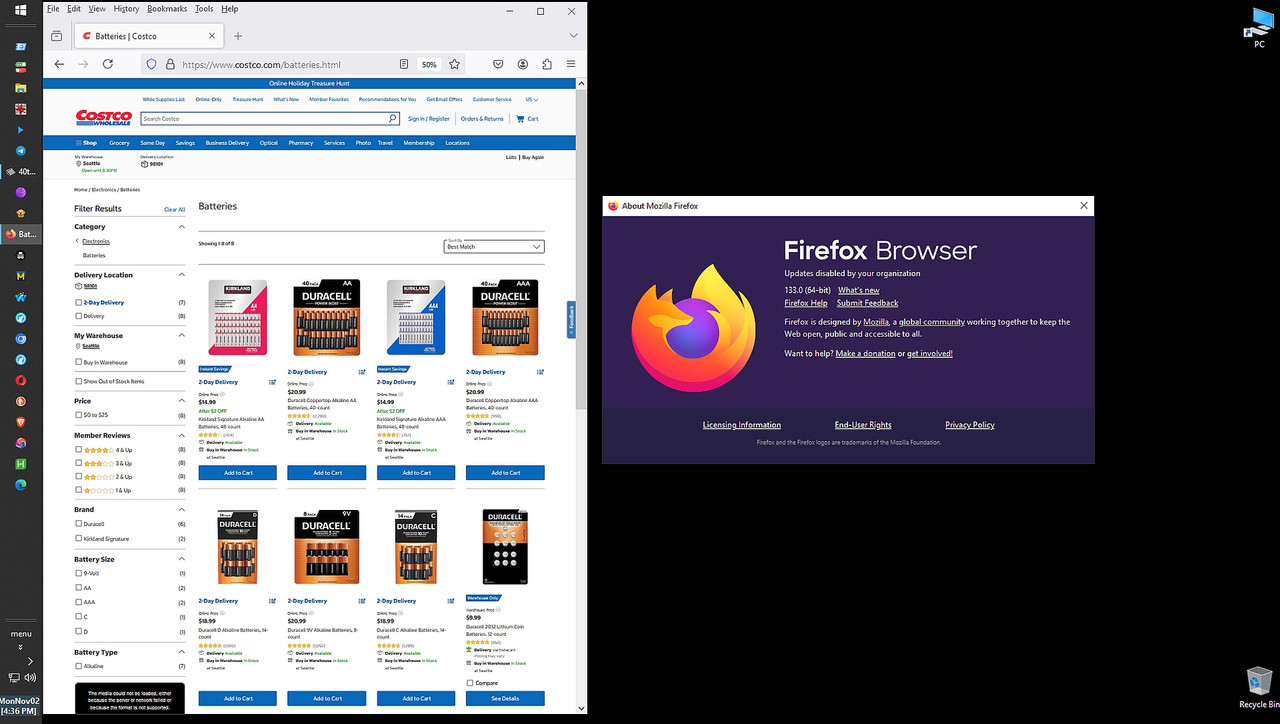
Example: https://www.costco.com/s?keyword=batteries
Private window and clearing cookies didn't help. Edge v156 had no problems. This was in my old, updated 64-bit W10 Pro. PC. It was fine before v159 a few days ago. Is anyone else seeing this too?
Thank you for reading and hopefully answering soon. :)
Example: https://www.costco.com/s?keyword=batteriesI would say that yes, they have a problem. Even if you go directly to batteries, it comes up a mess
Private window and clearing cookies didn't help. Edge v156 had no problems. This was in my old, updated 64-bit W10 Pro. PC. It was fine before v159 a few days ago. Is anyone else seeing this too?
On 10/29/2026 10:03 AM, Ant wrote:
Example: https://www.costco.com/s?keyword=batteriesI would say that yes, they have a problem.-a Even if you go directly to batteries, it comes up a mess
Private window and clearing cookies didn't help. Edge v156 had no
problems. This was in my old, updated 64-bit W10 Pro. PC. It was fine
before v159 a few days ago. Is anyone else seeing this too?
<https://www.costco.com/batteries.html>
<https://www.costco.com/s?keyword=batteries>
On 10/29/2026 10:03 AM, Ant wrote:
Example: https://www.costco.com/s?keyword=batteriesI would say that yes, they have a problem. Even if you go directly to batteries, it comes up a mess
Private window and clearing cookies didn't help. Edge v156 had no problems. This was in my old, updated 64-bit W10 Pro. PC. It was fine before v159 a few days ago. Is anyone else seeing this too?
<https://www.costco.com/batteries.html>
On 10/29/2026 10:20 AM, sticks wrote:
On 10/29/2026 10:03 AM, Ant wrote:
Example: https://www.costco.com/s?keyword=batteriesI would say that yes, they have a problem.-a Even if you go directly to
Private window and clearing cookies didn't help. Edge v156 had no
problems. This was in my old, updated 64-bit W10 Pro. PC. It was fine
before v159 a few days ago. Is anyone else seeing this too?
batteries, it comes up a mess
<https://www.costco.com/batteries.html>
But, that was on version 158 for me. After updating to 159.0 it works
just fine. Dunno what's going on
Example: https://www.costco.com/s?keyword=batteries
Private window and clearing cookies didn't help. Edge v156 had no problems. This was in my old, updated 64-bit W10 Pro. PC. It was fine before v159 a few days ago. Is anyone else seeing this too?
Thank you for reading and hopefully answering soon. :)
Example:https://www.costco.com/s?keyword=batteries
Private window and clearing cookies didn't help. Edge v156 had no problems. This was in my old, updated 64-bit W10 Pro. PC. It was fine before v159 a few days ago. Is anyone else seeing this too?
Thank you for reading and hopefully answering soon. :)
On 10/29/2026 8:20 AM, sticks wrote:
On 10/29/2026 10:03 AM, Ant wrote:
Example: https://www.costco.com/s?keyword=batteriesI would say that yes, they have a problem. Even if you go directly to
Private window and clearing cookies didn't help. Edge v156 had no problems. This was in my old, updated 64-bit W10 Pro. PC. It was fine before v159 a few days ago. Is anyone else seeing this too?
batteries, it comes up a mess
<https://www.costco.com/batteries.html>
I had the same problem for a couple of weeks, but updating to 159 fixed
it for me.
On 10/29/2026 8:46 AM, Bill H wrote:
On 10/29/2026 8:20 AM, sticks wrote:
On 10/29/2026 10:03 AM, Ant wrote:
Example: https://www.costco.com/s?keyword=batteries Private windowI would say that yes, they have a problem. Even if you go directly
and clearing cookies didn't help. Edge v156 had no problems. This
was in my old, updated 64-bit W10 Pro. PC. It was fine before v159 a
few days ago. Is anyone else seeing this too?
to batteries, it comes up a mess
<https://www.costco.com/batteries.html>
I had the same problem for a couple of weeks, but updating to 159 fixed
it for me.
Now it is broken for me even with FF 159. No images will display,
search always gives me his result... "We're sorry. We were not able to
find a match.", and I can't even get any images even if I navigate using there menus. I thought FF 158 had fixed the problem.
On 10/29/2026 8:46 AM, Bill H wrote:
On 10/29/2026 8:20 AM, sticks wrote:
On 10/29/2026 10:03 AM, Ant wrote:
Example: https://www.costco.com/s?keyword=batteriesI would say that yes, they have a problem. Even if you go directly to
Private window and clearing cookies didn't help. Edge v156 had no problems. This was in my old, updated 64-bit W10 Pro. PC. It was fine before v159 a few days ago. Is anyone else seeing this too?
batteries, it comes up a mess
<https://www.costco.com/batteries.html>
I had the same problem for a couple of weeks, but updating to 159 fixed
it for me.
Now it is broken for me even with FF 159. No images will display,
search always gives me his result... "We're sorry. We were not able to
find a match.", and I can't even get any images even if I navigate using there menus. I thought FF 158 had fixed the problem.
On 11/1/2026 11:27 PM, Bill H wrote:
On 10/29/2026 8:46 AM, Bill H wrote:
On 10/29/2026 8:20 AM, sticks wrote:
On 10/29/2026 10:03 AM, Ant wrote:
Example: https://www.costco.com/s?keyword=batteriesI would say that yes, they have a problem. Even if you go directly to >>>> batteries, it comes up a mess
Private window and clearing cookies didn't help. Edge v156 had no problems. This was in my old, updated 64-bit W10 Pro. PC. It was fine before v159 a few days ago. Is anyone else seeing this too?
<https://www.costco.com/batteries.html>
I had the same problem for a couple of weeks, but updating to 159 fixed
it for me.
Now it is broken for me even with FF 159. No images will display,
search always gives me his result... "We're sorry. We were not able to
find a match.", and I can't even get any images even if I navigate using
there menus. I thought FF 158 had fixed the problem.
Did you try v159 with Help>Troubleshoot Mode ?? Your link renders
perfectly for me on Win 11 home FF159 even when I'm not signed in to Costco.
On 11/1/2026 11:27 PM, Bill H wrote:
On 10/29/2026 8:46 AM, Bill H wrote:
On 10/29/2026 8:20 AM, sticks wrote:
On 10/29/2026 10:03 AM, Ant wrote:
Example: https://www.costco.com/s?keyword=batteriesI would say that yes, they have a problem. Even if you go directly to >>>> batteries, it comes up a mess
Private window and clearing cookies didn't help. Edge v156 had no problems. This was in my old, updated 64-bit W10 Pro. PC. It was fine before v159 a few days ago. Is anyone else seeing this too?
<https://www.costco.com/batteries.html>
I had the same problem for a couple of weeks, but updating to 159 fixed
it for me.
Now it is broken for me even with FF 159. No images will display,
search always gives me his result... "We're sorry. We were not able to
find a match.", and I can't even get any images even if I navigate using
there menus. I thought FF 158 had fixed the problem.
Did you try v159 with Help>Troubleshoot Mode ?? Your link renders
perfectly for me on Win 11 home FF159 even when I'm not signed in to Costco.
On 11/2/2026 6:38 AM, Retirednoguilt wrote:
On 11/1/2026 11:27 PM, Bill H wrote:
On 10/29/2026 8:46 AM, Bill H wrote:
On 10/29/2026 8:20 AM, sticks wrote:
On 10/29/2026 10:03 AM, Ant wrote:
Example: https://www.costco.com/s?keyword=batteriesI would say that yes, they have a problem.-a Even if you go directly to >>>>> batteries, it comes up a mess
Private window and clearing cookies didn't help. Edge v156 had no >>>>>> problems. This was in my old, updated 64-bit W10 Pro. PC. It was
fine before v159 a few days ago. Is anyone else seeing this too?
<https://www.costco.com/batteries.html>
I had the same problem for a couple of weeks, but updating to 159 fixed >>>> it for me.
Now it is broken for me even with FF 159.-a No images will display,
search always gives me his result... "We're sorry. We were not able
to find a match.", and I can't even get any images even if I navigate
using there menus.-a I thought FF 158 had fixed the problem.
Did you try v159 with Help>Troubleshoot Mode-a ??-a Your link renders
perfectly for me on Win 11 home FF159 even when I'm not signed in to
Costco.
Still broken for me today... even in troubleshoot mode.
On 11/2/2026 10:23 AM, Bill H wrote:
On 11/2/2026 6:38 AM, Retirednoguilt wrote:
On 11/1/2026 11:27 PM, Bill H wrote:
On 10/29/2026 8:46 AM, Bill H wrote:
On 10/29/2026 8:20 AM, sticks wrote:
On 10/29/2026 10:03 AM, Ant wrote:
Example: https://www.costco.com/s?keyword=batteriesI would say that yes, they have a problem.-a Even if you go directly to >>>>>> batteries, it comes up a mess
Private window and clearing cookies didn't help. Edge v156 had no >>>>>>> problems. This was in my old, updated 64-bit W10 Pro. PC. It was >>>>>>> fine before v159 a few days ago. Is anyone else seeing this too?
<https://www.costco.com/batteries.html>
I had the same problem for a couple of weeks, but updating to 159 fixed >>>>> it for me.
Now it is broken for me even with FF 159.-a No images will display,
search always gives me his result... "We're sorry. We were not able
to find a match.", and I can't even get any images even if I navigate >>>> using there menus.-a I thought FF 158 had fixed the problem.
Did you try v159 with Help>Troubleshoot Mode-a ??-a Your link renders
perfectly for me on Win 11 home FF159 even when I'm not signed in to
Costco.
Still broken for me today... even in troubleshoot mode.
I really don't think this is a problem per se with Firefox. I believe
it has to do with the sites internal methods of dealing with things like
Ad Blockers, java scripts and setting for it, temporary blocking of IP addresses, and similar such crap that screws things up unless you
navigate to their page in the manner THEY want you to. Sometimes it
works, sometimes it don't. Kind of a stupid way to sell things IMO
<https://www.costco.com/s?keyword=batteries>
Works here, though I usually use their .co.uk site ...
On 11/2/2026 6:38 AM, Retirednoguilt wrote:
On 11/1/2026 11:27 PM, Bill H wrote:
On 10/29/2026 8:46 AM, Bill H wrote:
On 10/29/2026 8:20 AM, sticks wrote:
On 10/29/2026 10:03 AM, Ant wrote:
Example: https://www.costco.com/s?keyword=batteriesI would say that yes, they have a problem. Even if you go directly to >>>>> batteries, it comes up a mess
Private window and clearing cookies didn't help. Edge v156 had no problems. This was in my old, updated 64-bit W10 Pro. PC. It was fine before v159 a few days ago. Is anyone else seeing this too?
<https://www.costco.com/batteries.html>
I had the same problem for a couple of weeks, but updating to 159 fixed >>>> it for me.
Now it is broken for me even with FF 159. No images will display,
search always gives me his result... "We're sorry. We were not able to
find a match.", and I can't even get any images even if I navigate using >>> there menus. I thought FF 158 had fixed the problem.
Did you try v159 with Help>Troubleshoot Mode ?? Your link renders
perfectly for me on Win 11 home FF159 even when I'm not signed in to Costco.
Still broken for me today... even in troubleshoot mode.
On 11/2/2026 11:23 AM, Bill H wrote:
On 11/2/2026 6:38 AM, Retirednoguilt wrote:
On 11/1/2026 11:27 PM, Bill H wrote:
On 10/29/2026 8:46 AM, Bill H wrote:
On 10/29/2026 8:20 AM, sticks wrote:
On 10/29/2026 10:03 AM, Ant wrote:
Example: https://www.costco.com/s?keyword=batteriesI would say that yes, they have a problem. Even if you go directly to >>>>>> batteries, it comes up a mess
Private window and clearing cookies didn't help. Edge v156 had no problems. This was in my old, updated 64-bit W10 Pro. PC. It was fine before v159 a few days ago. Is anyone else seeing this too?
<https://www.costco.com/batteries.html>
I had the same problem for a couple of weeks, but updating to 159 fixed >>>>> it for me.
Now it is broken for me even with FF 159. No images will display,
search always gives me his result... "We're sorry. We were not able to >>>> find a match.", and I can't even get any images even if I navigate using >>>> there menus. I thought FF 158 had fixed the problem.
Did you try v159 with Help>Troubleshoot Mode ?? Your link renders
perfectly for me on Win 11 home FF159 even when I'm not signed in to Costco.
Still broken for me today... even in troubleshoot mode.
Sounds as if it may be time for a full uninstall/reboot/reinstall.
Something in your current installation is likely to be corrupted.
I cleared cached data and the cookies for costco.com and that didn't
help.-a I tried in troubleshoot mode and still had the problem.-a However, if I try in a private window it works.-a Does that help in discovering
what is causing the problem?-a What is different in a private window compared to troubleshoot mode?
On 11/3/2026 10:16 AM, Bill H wrote:
I cleared cached data and the cookies for costco.com and that didn't
help.-a I tried in troubleshoot mode and still had the problem.-a However, >> if I try in a private window it works.-a Does that help in discovering
what is causing the problem?-a What is different in a private window
compared to troubleshoot mode?
rCo Test in a New Firefox Profile: If you don't want to log out of every website yet, type about:profiles in your URL bar. Click Create a New
Profile. Launch it in a new browser window.
On 11/3/2026 9:01 AM, sticks wrote:
On 11/3/2026 10:16 AM, Bill H wrote:
I cleared cached data and the cookies for costco.com and that didn't
help.-a I tried in troubleshoot mode and still had the problem.
However, if I try in a private window it works.-a Does that help in
discovering what is causing the problem?-a What is different in a
private window compared to troubleshoot mode?
rCo Test in a New Firefox Profile: If you don't want to log out of every
website yet, type about:profiles in your URL bar. Click Create a New
Profile. Launch it in a new browser window.
This is the one that worked.-a I guess my profile did get corrupted somehow.
Thanks for your help!
On 11/3/2026 4:16 PM, Bill H wrote:
On 11/3/2026 9:01 AM, sticks wrote:
On 11/3/2026 10:16 AM, Bill H wrote:
I cleared cached data and the cookies for costco.com and that didn't
help.a I tried in troubleshoot mode and still had the problem.
However, if I try in a private window it works.a Does that help in
discovering what is causing the problem?a What is different in a
private window compared to troubleshoot mode?
? Test in a New Firefox Profile: If you don't want to log out of every
website yet, type about:profiles in your URL bar. Click Create a New
Profile. Launch it in a new browser window.
This is the one that worked.a I guess my profile did get corrupted somehow.
Thanks for your help!
That's good to hear!
I still think the problem is partially generated by something on
Costco's part. It works sometimes, sometimes not.
| Sysop: | Amessyroom |
|---|---|
| Location: | Fayetteville, NC |
| Users: | 76 |
| Nodes: | 6 (0 / 6) |
| Uptime: | 54:13:14 |
| Calls: | 1,265 |
| Calls today: | 1 |
| Files: | 1,362 |
| D/L today: |
3 files (2,684K bytes) |
| Messages: | 285,449 |