I have had Outlook 2021 for some time, but seldom attempted to use it.
When I did, I preferred the 'new' version.
I thought I might try it again, but now it will only open as the
'classic' version, with no option to switch.
Can anyone help?
Jim the Geordie wrote:
I have had Outlook 2021 for some time, but seldom attempted to use it.
When I did, I preferred the 'new' version.
I thought I might try it again, but now it will only open as the
'classic' version, with no option to switch.
Can anyone help?
https://support.microsoft.com/en-us/outlook/toggle-out-of-the-new-outlook-for-windows
Regedit
Computer\HKEY_CURRENT_USER\Software\Microsoft\Office\16.0\Outlook\Preferences
UseNewOutlook DWORD 1
It would be something like that.
Sometimes "offers" like the toggle switch, are removed by a later
update of the Outlook 2021 product. And that can be the reason
the integration is missing. Or, there could even be a separate
registry entry, that controls whether the "offer toggle" is made visible (see next link).
https://learn.microsoft.com/en-us/answers/questions/5922178/the-toggle-on-new-outlook-to-go-back-to-old-outloo
"The HideNewOutlookToggle registry key controls visibility of the toggle:
Path: HKEY_CURRENT_USER\Software\Microsoft\Office\16.0\Outlook\Options\General
If HideNewOutlookToggle is set to 1, the toggle is hidden.
Set it to 0 (or delete the value) and restart Outlook to show the toggle again.
"
So, indeed, it's down in the same area of the registry, the option to
put the toggle back in the corner like it was.
Paul
On Sat, 10/31/2026 10:43 AM, Jim the Geordie wrote:
I have had Outlook 2021 for some time, but seldom attempted to use it.
When I did, I preferred the 'new' version.
I thought I might try it again, but now it will only open as the
'classic' version, with no option to switch.
Can anyone help?
https://support.microsoft.com/en-us/outlook/toggle-out-of-the-new-outlook-for-windows
Regedit
Computer\HKEY_CURRENT_USER\Software\Microsoft\Office\16.0\Outlook\Preferences
UseNewOutlook DWORD 1
It would be something like that.
Sometimes "offers" like the toggle switch, are removed by a later
update of the Outlook 2021 product. And that can be the reason
the integration is missing. Or, there could even be a separate
registry entry, that controls whether the "offer toggle" is made visible (see next link).
https://learn.microsoft.com/en-us/answers/questions/5922178/the-toggle-on-new-outlook-to-go-back-to-old-outloo
"The HideNewOutlookToggle registry key controls visibility of the toggle:
Path: HKEY_CURRENT_USER\Software\Microsoft\Office\16.0\Outlook\Options\General
If HideNewOutlookToggle is set to 1, the toggle is hidden.
Set it to 0 (or delete the value) and restart Outlook to show the toggle again.
"
So, indeed, it's down in the same area of the registry, the option to
put the toggle back in the corner like it was.
Paul
Thanks. I seem to have solved the problem although my Windows 10
registry settings are different.
FWIW in the meanwhile I have discovered Em Client and since I only have
two email addresses, it is free. It does not have the Ad that outlook
has and the look is tidier.
Decisions, decisions :-)
On Sat, 10/31/2026 10:43 AM, Jim the Geordie wrote:
I have had Outlook 2021 for some time, but seldom attempted to use it.
When I did, I preferred the 'new' version.
I thought I might try it again, but now it will only open as the
'classic' version, with no option to switch.
Can anyone help?
https://support.microsoft.com/en-us/outlook/toggle-out-of-the-new-outlook-for-windows
Regedit
Computer\HKEY_CURRENT_USER\Software\Microsoft\Office\16.0\Outlook\Preferences
UseNewOutlook DWORD 1
It would be something like that.
Sometimes "offers" like the toggle switch, are removed by a later
update of the Outlook 2021 product. And that can be the reason
the integration is missing. Or, there could even be a separate
registry entry, that controls whether the "offer toggle" is made visible (see next link).
https://learn.microsoft.com/en-us/answers/questions/5922178/the-toggle-on-new-outlook-to-go-back-to-old-outloo
"The HideNewOutlookToggle registry key controls visibility of the toggle:
Path: HKEY_CURRENT_USER\Software\Microsoft\Office\16.0\Outlook\Options\General
If HideNewOutlookToggle is set to 1, the toggle is hidden.
Set it to 0 (or delete the value) and restart Outlook to show the toggle again.
"
So, indeed, it's down in the same area of the registry, the option to
put the toggle back in the corner like it was.
Jim the Geordie <jim@geordieland.co.uk> wrote:
Thanks. I seem to have solved the problem although my Windows 10
registry settings are different.
FWIW in the meanwhile I have discovered Em Client and since I only have two email addresses, it is free. It does not have the Ad that outlook
has and the look is tidier.
Decisions, decisions :-)
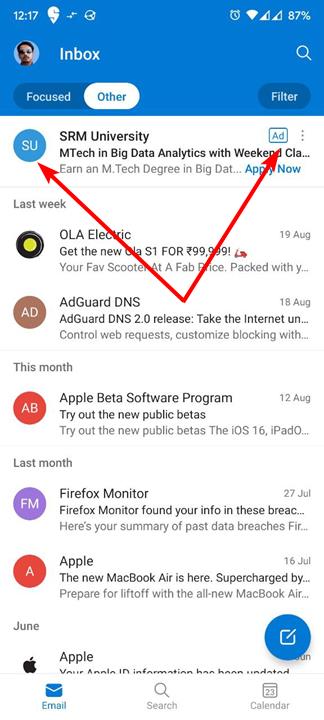
The ads you see in [new] Outlook are sponsored ads that Microsoft deliberately presents in the Inbox. Those are not e-mails at all. They
are not delivered via SMTP, Exchange, or other e-mail transport from the sponsor to your Inbox. Microsoft is paid to show those sponsored ads,
and injects them at their mail server to *pretend* they are e-mails. In fact, they are in-app ads, not e-mails. Next to those injected ads you
will see an "Ad" icon notifying you those are ads, not e-mails. Below
is an example screenshot of a Microsoft-injected sponsored ad presented
as a fake e-mail:
https://www.ghacks.net/wp-content/uploads/2022/08/Microsoft-is-displaying-more-ads-in-its-Outlook-app.jpg
Since new Outlook, the UWP (Universal Windows Platform) app is a web app
(an interface to their webmail service, not a full-service standalone client-side only e-mail client), the only way to hide those sponsored ad-injected fake e-mails from Microsoft is to use Focus view. The ads
then show up in the Other tab. Same when you use their webmail service: Focus view shows the sponsored fake e-mail ads under the Other tab.
Since new Outlook is a web app, it reflects the same options available
in their webmail service. Notice in the above pic that user is using
Focused view mode on his Inbox, so the ads show up under the Other tab. However, other desirable e-mails may also show up only under the Other
tab, so you have to keep monitoring the Other tab to see if Microsoft
moved what is important to you but what Microsoft thought was not
important. If you don't use Focused Inbox view, you see the ads in what
you thought was just an Inbox for e-mails, as in:
https://tinyurl.com/mssponsoredads
Focused Inbox is described at:
https://support.microsoft.com/en-us/outlook/mail/focused-inbox-for-outlook
The problem with Focused Inbox is Microsoft has not clearly published
how they differentiate important e-mails shown in Focused Inbox from
those shown under Other. The sponsored ads go under Other, but what
else? That the article says "The more you use it, the better it gets",
but no mention just what actions you take to reflect importance.
While the standalone Outlook 2*** client-side e-mail *program* (not the
The reason I am browsing the email market is that although I really like Thunderbird or Betterbird, I do find they both tend to slow my aging m/c
and have a habit of not wanting to come out of minimised if left too
long.
The reason I am browsing the email market is that although I really like >Thunderbird or Betterbird, I do find they both tend to slow my aging m/c
and have a habit of not wanting to come out of minimised if left too
long.
On 02/11/2026 in message <MPG.4551e6a442e523749896a7@news.eternal-september.org> Jim the Geordie wrote:
The reason I am browsing the email market is that although I really like >Thunderbird or Betterbird, I do find they both tend to slow my aging m/c >and have a habit of not wanting to come out of minimised if left too
long.
A couple worth trying:
Essential PIM
https://www.epim.com/
eMClient
https://www.emclient.com/
They have a mix of paid/free depending on how many accounts you need.
On 2026/11/2 0:16:15, Jim the Geordie wrote:
[]
The reason I am browsing the email market is that although I really like Thunderbird or Betterbird, I do find they both tend to slow my aging m/c and have a habit of not wanting to come out of minimised if left too
long.
Interesting; TB added in case anyone there knows why (though I think
you've mentioned it there before).
Have you considered just not minimising? I hardly ever do. Mind, I don't
run it full-screen (I don't run _anything_ full-screen apart from one or
two softwares that don't "play nice" unless I do, like Brother's Keeper).
I /have/ found an oddity with TB - if I do a "Switch user", as I do when
the keyboard bug shows itself, TB comes back postage-stamp size. So I
usually close it when I'm going to do that.
In article <11c9ii6$2mm9e$1@dont-email.me>, G6JPG@255soft.uk says...[]
Have you considered just not minimising? I hardly ever do. Mind, I don't
run it full-screen (I don't run _anything_ full-screen apart from one or
two softwares that don't "play nice" unless I do, like Brother's Keeper).
You sound like a doctor I had once, who if you said eg "it hurts when I
do this", said "well don't do that" :-)
I /have/ found an oddity with TB - if I do a "Switch user", as I do when
the keyboard bug shows itself, TB comes back postage-stamp size. So I
usually close it when I'm going to do that.
Sometimes when I eventually get it to come out of minimised, I too get a postage stamp in the top left corner that needs to be stretched. Not
ideal and one of the reasons for my post.
You sound like a doctor I had once, who if you said eg "it hurts when I
do this", said "well don't do that" EfOe
(genealogy removed from followup!)
On 2026/11/2 11:36:59, Jim the Geordie wrote:
In article <11c9ii6$2mm9e$1@dont-email.me>, G6JPG@255soft.uk says...[]
Have you considered just not minimising? I hardly ever do. Mind, I don't >> run it full-screen (I don't run _anything_ full-screen apart from one or >> two softwares that don't "play nice" unless I do, like Brother's Keeper).
You sound like a doctor I had once, who if you said eg "it hurts when I
do this", said "well don't do that" :-)
:-)
I /have/ found an oddity with TB - if I do a "Switch user", as I do when >> the keyboard bug shows itself, TB comes back postage-stamp size. So I
usually close it when I'm going to do that.
Sometimes when I eventually get it to come out of minimised, I too get a postage stamp in the top left corner that needs to be stretched. Not
ideal and one of the reasons for my post.
OK, being that doctor again: how about closing rather than minimising?
In article <11c9tqa$2qoeh$1@dont-email.me>, G6JPG@255soft.uk says...
(genealogy removed from followup!)
On 2026/11/2 11:36:59, Jim the Geordie wrote:
In article <11c9ii6$2mm9e$1@dont-email.me>, G6JPG@255soft.uk says...[]
Have you considered just not minimising? I hardly ever do. Mind, I don't >>>> run it full-screen (I don't run _anything_ full-screen apart from one or >>>> two softwares that don't "play nice" unless I do, like Brother's Keeper). >>>You sound like a doctor I had once, who if you said eg "it hurts when I >>> do this", said "well don't do that" :-)
:-)
OK, being that doctor again: how about closing rather than minimising?
I /have/ found an oddity with TB - if I do a "Switch user", as I do when >>>> the keyboard bug shows itself, TB comes back postage-stamp size. So I
usually close it when I'm going to do that.
Sometimes when I eventually get it to come out of minimised, I too get a >>> postage stamp in the top left corner that needs to be stretched. Not
ideal and one of the reasons for my post.
Usually that's the option although opening the 'other', eg Thunderbird
is usually faster.
In article <11c9tqa$2qoeh$1@dont-email.me>, G6JPG@255soft.uk says...[]
OK, being that doctor again: how about closing rather than minimising?
Usually that's the option although opening the 'other', eg Thunderbird
is usually faster.
On 2026/11/2 12:59:50, Jim the Geordie wrote:
In article <11c9tqa$2qoeh$1@dont-email.me>, G6JPG@255soft.uk says...[]
I just tried; on this fairly limited laptop (though I suspect it's moreOK, being that doctor again: how about closing rather than minimising?
Usually that's the option although opening the 'other', eg Thunderbird
is usually faster.
the number of posts/emails that has more effect than the CPUs),
Thunderbird closes more or less instantly, and opens in 5 to 10 seconds.
I just tried; on this fairly limited laptop (though I suspect it's more
the number of posts/emails that has more effect than the CPUs),
Thunderbird closes more or less instantly, and opens in 5 to 10 seconds.
On Mon, 11/2/2026 5:09 PM, J. P. Gilliver wrote:
On 2026/11/2 12:59:50, Jim the Geordie wrote:
In article <11c9tqa$2qoeh$1@dont-email.me>, G6JPG@255soft.uk says...[]
I just tried; on this fairly limited laptop (though I suspect it's moreOK, being that doctor again: how about closing rather than minimising?
Usually that's the option although opening the 'other', eg Thunderbird
is usually faster.
the number of posts/emails that has more effect than the CPUs),
Thunderbird closes more or less instantly, and opens in 5 to 10 seconds.
It should depend on the size of the profile and the
amount of material that gets parsed at startup.
On Windows, you can use procmon.exe to trace what is
being parsed. On Linux, it would be strace (as it can
indicate file activity), but strace isn't as pretty
as procmon output.
You could turn off GLODA, as that isn't absolutely necessary to
a basic set of functions on the thing. Maybe it's a 32 bit system,
it only has 2GB of RAM, there must be some explanations in there
somewhere. Could be a single core computer, like my laptop.
Paul
It's fast enough for me. My
C:\Users\<username>\AppData\Roaming\thunderbird folder (that's what I
back up, though I think it may include more than one profile - but only
one is of any size) is 731 MBytes. (Yes, the main one is 671 MB.)
| Sysop: | Amessyroom |
|---|---|
| Location: | Fayetteville, NC |
| Users: | 76 |
| Nodes: | 6 (0 / 6) |
| Uptime: | 55:40:38 |
| Calls: | 1,265 |
| Calls today: | 1 |
| Files: | 1,362 |
| D/L today: |
3 files (2,684K bytes) |
| Messages: | 285,687 |