• Re: How to copy text on the iPad to the Windows PC THE EASY WAY

    From Maria Sophia@mariasophia@comprehension.com to misc.phone.mobile.iphone,comp.sys.mac.advocacy,alt.comp.os.windows-10 on Sun Oct 25 22:30:07 2026
    From Newsgroup: alt.comp.os.windows-10

    Nick Charles wrote:
    Oh look. DipshIT is AGAIN jumping thru hoops to do something VERY simple.

    Use the fucking Files app on iOS you dumbass. Open the files app. Long press anywhere, select Paste. A new text file will be created with your pasted text from the clipboard. AGAIN using the files app, connect to
    your Windows computer over the Wi-Fi connection. You DO have a drive
    shared on your Windows computer, right? AGAIN using the Files app, copy/paste your text file to Windows.

    Done. God DAMN, you are stupid.

    How long DOES it take you to dream up these absurdly complicated ways to do easy things? All in your never ending, life-long goal of |Making Apple
    Look Badi.

    Hi Nick Charles,

    THANK YOU for that wonderful idea, as the record shows I initially tried
    Files but I hadn't realized that longpressing in empty space creates the text.txt file containing whatever was copied into the iOS clipboard.

    Given I have never, in all the decades of posting to Usenet, ever disagreed with any logically defensible statement, I do very much agree with you.

    Using Files works much better than using Notes did in my previous tests.

    To confirm that you're correct, I did test this and it does work for most:
    1. Long-paste in Files app to create text2.txt (this works)
    2. Open Files app > connect to Windows PC via SMB
    3. Copy the file to the Windows machine

    Here is where it breaks down, for me, which I had stated in this thread.

    My Win10 local security policy LimitBlankPasswordUse is enabled, which restricts network logons using blank-password accounts, which makes sense.

    My existing AndroidBackup share grants Everyone read access only, not write access, but that can be changed. The problem is the password requirement.

    So the Files-app paste suggestion works, as I verified. But the subsequent
    SMB transfer is not a ready-to-use bidirectional solution due to the
    default password requirement. Weakening that opens up too many holes.

    LocalSend avoids that SMB password dependency on the user or guest account.

    1. SMB authentication with a passwordless Windows account does not work
    even when guest is allowed. Even with password-protected sharing
    turned OFF on the Windows side, AFAIK, the Files app's SMB client
    requires a username and password when adding a server.

    2. No Apple software on the PC means no iCloud Drive, no Apple
    Devices app, and no USB file-browsing path from PC to iPad.
    The Files app on iOS cannot reach the PC via iCloud because
    there is no iCloud on the Windows machine. The only default
    network path from iPad Files to Windows is SMB, and as noted
    above, SMBv2 auth without a Windows password won't work.

    3. We explicitly do not want any Internet involvement. Hence
    cloud-based workarounds (OneDrive, Google Drive, Dropbox)
    are off the table. That eliminates the onlypath where iOS
    and Windows interoperate without friction.

    So your suggestion is appreciated as it eliminates need for Notes!
    But something like the LocalSend method is required, unfortunately.
    a. No accounts, no passwords, no cloud services
    b. Transfers over Wi-Fi LAN only (nothing touches the Internet)
    c. Works iPad <-> Windows with a simple tap-to-send flow
    d. No SMBv2 configuration issues, no authentication dialogs,
    and no dependency on Windows sharing settings

    Never have I disagreed with any person who proposes logically defensible solutions, so I do agree with you that the Files-app paste step is a real improvement over the Notes workflow that I was able to get work yesterday.

    But, unfortunately, the SMB step is still a friction point that makes
    the Files + SMB path fail for a passwordless Windows machine with no Apple software installed, and I'm not adding a password just to transfer files.

    Luckily, LocalSend works on all platforms, stays local, and doesn't require
    a password just to transfer a file from one machine on the LAN to another. Although, I admit openly, sometimes it's flaky (due to firewall issues).

    That is not "complicated" since it's simply the easiest way to do it.

    Note: Since LocalSend uses a fixed, hardcoded default port (TCP and UDP
    port 53317) across all platforms (Windows, iOS, Android, macOS, Linux), if
    the Windows-to-iPad transfer fails with a connection error, we may need to
    add firewall rules on the Windows PC to open it up for file transfer.

    netsh advfirewall firewall add rule name="LocalSend TCP"
    dir=in action=allow protocol=TCP localport=53317
    netsh advfirewall firewall add rule name="LocalSend UDP"
    dir=in action=allow protocol=UDP localport=53317

    After that, the transfer should work bidirectionally over the Wi-Fi LAN without any need for OEM accounts or the Internet or, gasp, the cloud.

    In summary, thank you for your suggestion, which was helpful as I tried the Files app but didn't realize the Files app can create a text file directly
    from the clipboard, eliminating the need for Notes. I tested it, and I
    openly, publicly, and sincerely acknowledge that improvement works on iOS.

    Where we differ is the next step. SMBv2/v3 can support Guest access, but
    making that work without credentials may require Windows security and share-permission changes that I am not willing to make just to transfer a
    text file. My existing share is read-only for Everyone, and my Windows
    policy restricts network logons using blank-password accounts. I am not claiming SMB without a password is universally impossible but I am saying
    it is not a ready-to-use solution under my current setup constraints.

    Luckily, LocalSend gives all platforms bidirectional file transfer over the existing LAN without an SMB share, Windows file-sharing credentials, cloud accounts, or an Internet transfer. While LocalSend can occasionally need firewall troubleshooting, that is a manageable one-time setup trade-off.

    So, thank you for the iOS Files-app shortcut, which improves the
    file-creation step on iOS from the clipboard. One reason I was frustrated
    is because on Android, the clipboard is shared between Windows and iOS so I simply rightclick to copy on Android and rightclick to paste onto Windows
    and vice versa. So the fact on Android the clipboard is shared was partly
    why the iOS method seems like such a kludge.

    If, on iOS, we could put a file into the iOS DCIM directory, that would
    have worked to transfer files, at least for one direction, with Windows.
    As we all know, on Android, Windows & the Android filesystem work bidirectionally, but we're severely restricted when dealing with iOS.

    Overall, while the Files+SMB method should work for most Windows:iOS users, LocalSend remains my preferred transfer method because it meets my actual requirements without changing my Windows security configuration.

    Thank you very much for your helpful suggestions about iOS Files creating a
    a text.txt file containing the clipboard contents when longpressing in
    empty space (I was looking for a way to paste the clipboard INTO a file).
    --
    Android, Windows & Linux walk into a bar to discuss their differences.
    --- Synchronet 3.22a-Linux NewsLink 1.2
  • From Herbert Kleebauer@klee@unibwm.de to misc.phone.mobile.iphone,comp.sys.mac.advocacy,alt.comp.os.windows-10 on Mon Oct 26 09:18:32 2026
    From Newsgroup: alt.comp.os.windows-10

    On 10/26/2026 3:30 AM, Maria Sophia wrote:
    Nick Charles wrote:
    Oh look. DipshIT is AGAIN jumping thru hoops to do something VERY simple. >>
    Use the fucking Files app on iOS you dumbass. Open the files app. Long >> press anywhere, select Paste. A new text file will be created with your
    pasted text from the clipboard. AGAIN using the files app, connect to
    your Windows computer over the Wi-Fi connection. You DO have a drive
    shared on your Windows computer, right? AGAIN using the Files app,
    copy/paste your text file to Windows.

    Done. God DAMN, you are stupid.

    How long DOES it take you to dream up these absurdly complicated ways to do >> easy things? All in your never ending, life-long goal of N++Making Apple >> Look BadN++.
    Isn't your suggestion also "absurdly complicated"? Nearly everybody has installed WhatsApp (on the phone/tablet and PC), so why not use it to
    send the text to yourself?


    --- Synchronet 3.22a-Linux NewsLink 1.2
  • From Paul@nospam@needed.invalid to misc.phone.mobile.iphone,comp.sys.mac.advocacy,alt.comp.os.windows-10 on Mon Oct 26 06:51:03 2026
    From Newsgroup: alt.comp.os.windows-10

    On Mon, 10/26/2026 4:18 AM, Herbert Kleebauer wrote:
    On 10/26/2026 3:30 AM, Maria Sophia wrote:
    Nick Charles wrote:
    Oh look.-a DipshIT is AGAIN jumping thru hoops to do something VERY simple. >>> Use the fucking-a Files app on iOS you dumbass.-a-a Open the files app.-a-a Long
    press anywhere, select Paste.-a A new text file will be created with your >>> pasted text from the clipboard.-a-a AGAIN using the files app, connect to >>> your Windows computer over the Wi-Fi connection.-a-a You DO have a drive >>> shared on your Windows computer, right?-a-a AGAIN using the Files app,
    copy/paste your text file to Windows.

    Done.-a-a-a God DAMN, you are stupid.-a
    How long DOES it take you to dream up these absurdly complicated ways to do >>> easy things?-a-a All in your never ending, life-long goal of N++Making Apple
    Look BadN++.
    Isn't your suggestion also "absurdly complicated"? Nearly everybody has installed WhatsApp (on the phone/tablet and PC), so why not use it to
    send the text to yourself?

    Wouldn't there be some way to do that over Bluetooth ?
    A small text file shouldn't be too taxing at 75KB/sec.
    Usually computers have a Bluetooth Send and a Bluetooth Receive,
    and the latter one must be set up first.

    Paul


    --- Synchronet 3.22a-Linux NewsLink 1.2
  • From Herbert Kleebauer@klee@unibwm.de to misc.phone.mobile.iphone,comp.sys.mac.advocacy,alt.comp.os.windows-10 on Mon Oct 26 14:18:17 2026
    From Newsgroup: alt.comp.os.windows-10

    On 10/26/2026 11:51 AM, Paul wrote:

    Isn't your suggestion also "absurdly complicated"? Nearly everybody has
    installed WhatsApp (on the phone/tablet and PC), so why not use it to
    send the text to yourself?

    Wouldn't there be some way to do that over Bluetooth ?
    A small text file shouldn't be too taxing at 75KB/sec.
    Usually computers have a Bluetooth Send and a Bluetooth Receive,
    and the latter one must be set up first.
    There are many ways to transfer files between a smartphone and
    a PC. I use an FTP server on the smartphone and the standard
    Windows Explorer to drag&drop files between smartphone and PC.

    But if you only want to transfer a short text snippet between
    the smartphone and PC then it is to much overhead to store it in
    a file and transfer the file. It is much simpler to use an
    messenger like WhatsApp (even simpler than an email). And
    you can also use WhatsApp to transfer a single picture or
    a small data file.


    --- Synchronet 3.22a-Linux NewsLink 1.2
  • From CrudeSausage@crude@sausa.ge to misc.phone.mobile.iphone,comp.sys.mac.advocacy,alt.comp.os.windows-10 on Mon Oct 26 09:36:25 2026
    From Newsgroup: alt.comp.os.windows-10

    On 2026-10-26 9:18 a.m., Herbert Kleebauer wrote:
    On 10/26/2026 11:51 AM, Paul wrote:

    Isn't your suggestion also "absurdly complicated"? Nearly everybody has
    installed WhatsApp (on the phone/tablet and PC), so why not use it to
    send the text to yourself?

    Wouldn't there be some way to do that over Bluetooth ?
    A small text file shouldn't be too taxing at 75KB/sec.
    Usually computers have a Bluetooth Send and a Bluetooth Receive,
    and the latter one must be set up first.
    There are many ways to transfer files between a smartphone and
    a PC. I use an FTP server on the smartphone and the standard
    Windows Explorer to drag&drop files between smartphone and PC.

    But if you only want to transfer a short text snippet between
    the smartphone and PC then it is to much overhead to store it in
    a file and transfer the file. It is much simpler to use an
    messenger like WhatsApp (even simpler than an email). And
    you can also use WhatsApp to transfer a single picture or
    a small data file.

    That's so simple even grandma can do it!

    Seriously though, Mac users are telling us that such things have been simplified to a point that even total dummies can do it, and here you
    have Windows and Linux users telling us that the simplicity is
    meaningless because the way one would do it in the 1990s is sufficient.
    Why are some users so resistant to technological progress of any kind?
    --
    CrudeSausage
    MacBook Air M4 Sky Blue
    iPhone 13
    Friendly Apple zealot
    --- Synchronet 3.22a-Linux NewsLink 1.2
  • From Nick Charles@none@none.none to misc.phone.mobile.iphone,comp.sys.mac.advocacy,alt.comp.os.windows-10 on Mon Oct 26 13:47:42 2026
    From Newsgroup: alt.comp.os.windows-10

    Herbert Kleebauer <klee@unibwm.de> wrote:
    On 10/26/2026 3:30 AM, Maria Sophia wrote:
    Nick Charles wrote:
    Oh look. DipshIT is AGAIN jumping thru hoops to do something VERY simple. >>>
    Use the fucking Files app on iOS you dumbass. Open the files app. Long >>> press anywhere, select Paste. A new text file will be created with your >>> pasted text from the clipboard. AGAIN using the files app, connect to
    your Windows computer over the Wi-Fi connection. You DO have a drive
    shared on your Windows computer, right? AGAIN using the Files app,
    copy/paste your text file to Windows.

    Done. God DAMN, you are stupid.

    How long DOES it take you to dream up these absurdly complicated ways to do >>> easy things? All in your never ending, life-long goal of N++Making Apple >>> Look BadN++.
    Isn't your suggestion also "absurdly complicated"? Nearly everybody has installed WhatsApp (on the phone/tablet and PC), so why not use it to
    send the text to yourself?

    Only if you think Standard Computer Networking is rCLabsurdly complicatedrCY. It is not. It is the entire reason for a LAN. Local Area Networking.

    No, everyone does NOT have WhatsApp installed. But, everyone DOES have Standard Computer Networking ALREADY installed on every computer they own.
    Just use it!

    BTW, using WhatsApp was already ruled out because the OP wanted a LOCAL way
    of doing the transfer. If you are going to use WhatsApp, why not just
    email it to yourself? Or install Microsoft OneNote on the iPad. Anything
    you type into OneNote on the iPad automatically appears in OneNote on
    Windows.

    The internet provides many ways to do this. On your own local Wi-Fi LAN,
    just use standard networking. All computers can do this.

    --- Synchronet 3.22a-Linux NewsLink 1.2
  • From Maria Sophia@mariasophia@comprehension.com to misc.phone.mobile.iphone,comp.sys.mac.advocacy,alt.comp.os.windows-10 on Mon Oct 26 10:34:40 2026
    From Newsgroup: alt.comp.os.windows-10

    CrudeSausage wrote:
    On 2026-10-26 9:18 a.m., Herbert Kleebauer wrote:
    On 10/26/2026 11:51 AM, Paul wrote:

    Isn't your suggestion also "absurdly complicated"? Nearly everybody has >>>> installed WhatsApp (on the phone/tablet and PC), so why not use it to
    send the text to yourself?

    Wouldn't there be some way to do that over Bluetooth ?
    A small text file shouldn't be too taxing at 75KB/sec.
    Usually computers have a Bluetooth Send and a Bluetooth Receive,
    and the latter one must be set up first.
    There are many ways to transfer files between a smartphone and
    a PC. I use an FTP server on the smartphone and the standard
    Windows Explorer to drag&drop files between smartphone and PC.

    But if you only want to transfer a short text snippet between
    the smartphone and PC then it is to much overhead to store it in
    a file and transfer the file. It is much simpler to use an
    messenger like WhatsApp (even simpler than an email). And
    you can also use WhatsApp to transfer a single picture or
    a small data file.

    That's so simple even grandma can do it!

    Seriously though, Mac users are telling us that such things have been simplified to a point that even total dummies can do it, and here you
    have Windows and Linux users telling us that the simplicity is
    meaningless because the way one would do it in the 1990s is sufficient.
    Why are some users so resistant to technological progress of any kind?

    These are all good ideas in that all of us want a simple method to bring
    over the clipboard, bidirectionally, the six inches between Windows & iOS.

    Everyone is trying to help, but convenience is only one of the necessary conditions when copying a clipboard bidirectionally between iOS & Windows.

    *Privacy is another required condition*

    Rest assured I totally get why messengers like WhatsApp or cloud notes feel like the easiest path, but that's only if convenience is the only metric.

    Anyone who knows me knows that privacy is an inviolable metric also.

    If the privacy goal is zero third-party leakage, routing a clipboard
    through any external server (even if/when encrypted) is a non-starter.

    Remember, we needed to do this with both privacy & with convenience:
    1. Copy the iOS clipboard
    2. Get that iOS clipboard to Windows
    3. And (after editing) bring it back to iOS

    So my goal was to find the simplest method that didn't use the Internet.

    It's not that simpler solutions don't exist, it's that those simpler
    solutions always seem to require trusting someone else's computer t do it.

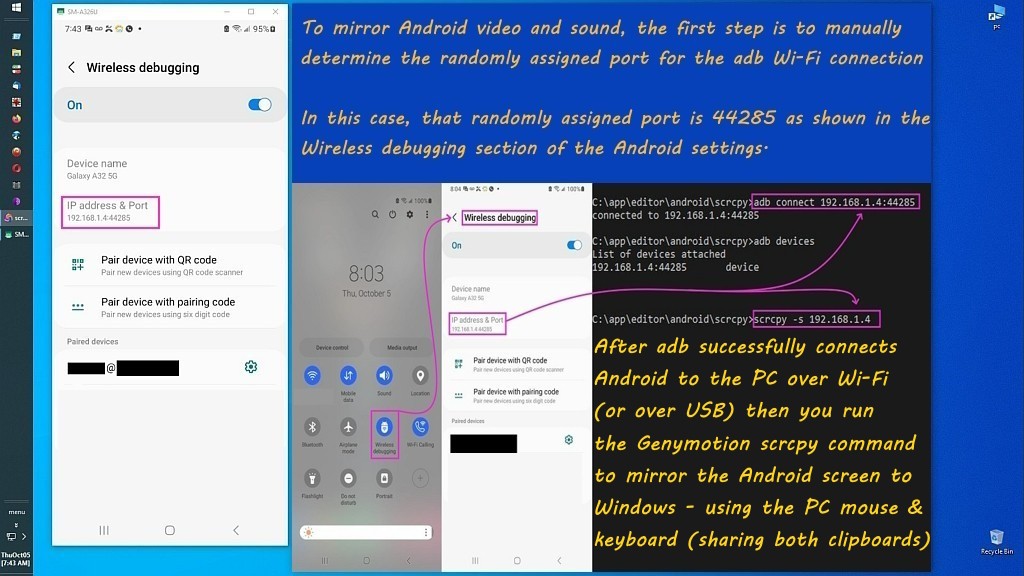
    The second thing likely very few Apple owners know is with Android, you rightclick to copy into the clipboard & rightclick to paste into the PC.
    <https://i.postimg.cc/pr8NPNKs/scrcpy33.jpg>

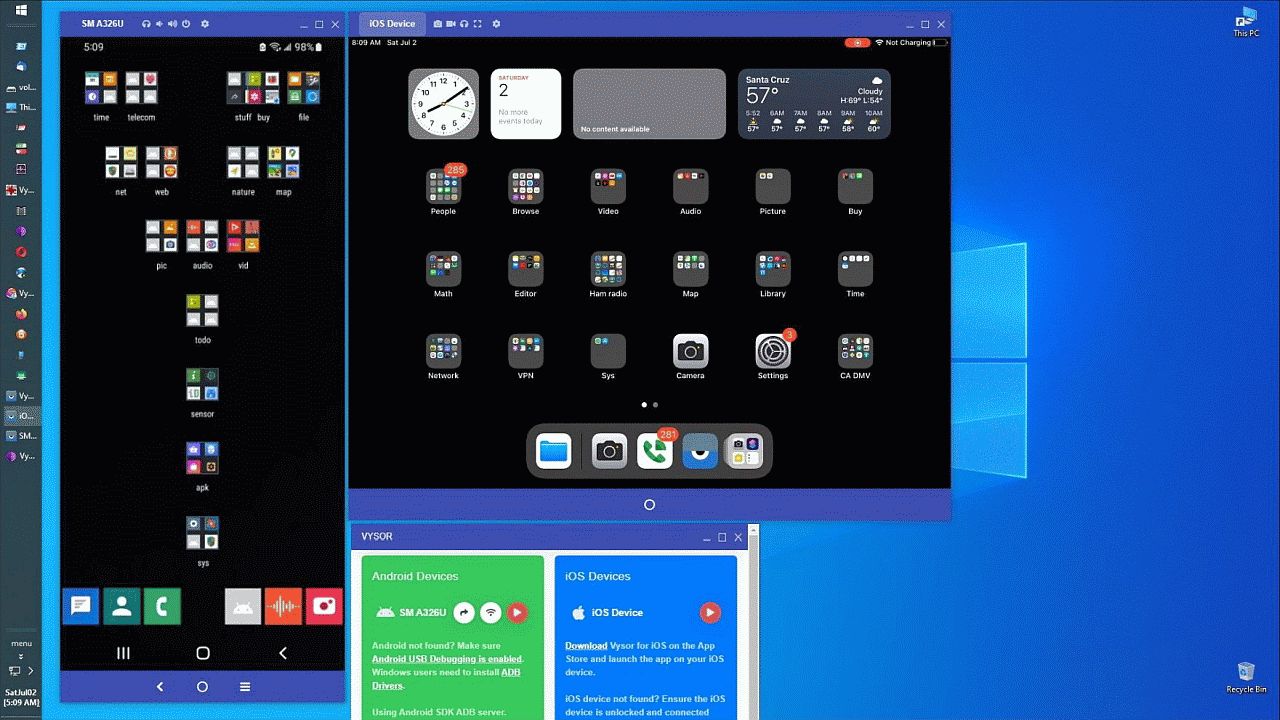
    While that uses scrcpy, I'm pretty sure we can accomplish the same thing
    with Apple's iOS simply by using Vysor, so that is really the easiest way.
    <https://i.postimg.cc/k5gv0yw8/vysor34.jpg>

    Two clicks. And you're done. Anything else is a kluge.

    The real problem is never going to be interoperability of Windows with
    Android though, because Android has robust bidirectional file access, and, more importantly, Windows has bidirectional access to its DCIM folder.

    It doesn't work that way with iOS, not without the iTunes abomination.
    (Which has its own problems, not the least of which are security holes.)

    Luckily, the solution proposed by Nick Charles works fine for most Windows owners because they likely have a password on their SMB guest/user account.

    1. Copy the text into the iPad clipboard by longpressing & selecting copy
    2. Open the iOS Files app
    3. Navigate to On My iPad if necessary (ensuring everything stays local)
    4. Long-press in an empty white space in the folder and tap Paste
    This will automatically create a file named text.txt (... text2.txt).
    (Optional: Long-press the newly created file and tap Rename to change.)
    5. On the PC, set up an SMB share (it must have a password!)
    mkdir C:\share_ios
    net share share_ios=C:\share_ios /grant:everyone,FULL
    6. On the iPad, open the Files app
    7. Tap the three dots (...) or the sidebar button in the top-left,
    8. Select Connect to Server
    9. Enter the Windows PC local IP address (e.g., smb://192.168.x.x)
    10. Tap Connect and log in using your Windows account username & password.
    11. Select the share_ios shared folder
    12. In the iOS Files app, long-press the text.txt file and tap Copy
    13. Select the connected share_ios folder to save it
    14. On the Windows PC, the file will show up in C:\share_ios

    To send it back from Windows to the iPad:

    1. Save the edited text file inside the Windows C:\share_ios folder
    2. Open the Files on teh iPad
    3. Navigate to the connected share_ios server share
    4. Longpress the updated text file
    5. Tap Copy and place it into On My iPad to access and edit it locally.

    Unfortunately, since I don't worry about my family stealing my computer
    data, I don't have a password on any of my Windows accounts, so SMB fails.

    Still, these steps will work for me or for anyone who hasn't set up SMB.
    to privately copy text from iOS to Windows (without using the Internet):
    0. On iOS, make sure you're using a local account only
    (you never want the cloud kicking in, for privacy reasons)
    iOS:Settings > Apps > Notes > Default Account > On my iPad > checkmark
    1. Copy the text into the iPad clipboard by longpressing & selecting copy
    2. Open the iOS Files app
    3. Navigate to On My iPad if necessary (ensuring everything stays local)
    4. Long-press in an empty white space in the folder and tap Paste.
    This will automatically create a file named text.txt (... text2.txt).
    (Optional: Long-press the newly created file and tap Rename to change.)
    5. Open LocalSend on both the Windows PC and the iPad.
    Open the Windows firewall if necessary (only needed once)
    netsh advfirewall firewall add rule name="LocalSend" dir=in action=allow protocol=TCP localport=53317
    netsh advfirewall firewall add rule name="LocalSend UDP" dir=in action=allow protocol=UDP localport=53317
    6. Press Send on the iOS LocalSend
    7. Tap File inside LocalSend to open the iPad file picker
    8. Navigate to On My iPad > clpbrd, select the saved text file
    9. Tap the blue Open button in the top right corner
    10. Select the target Windows PC device tile inside LocalSend
    11. Click Accept on the Windows LocalSend notification
    12. On the PC LocalSend click Show in folder or click Open

    To send it back from Windows to the iPad:
    1. Save the edited text file on the Windows PC.
    2. Open LocalSend on both the Windows PC and the iPad.
    3. In LocalSend on Windows, click Send > File
    4. Select the file from your PC storage.
    5. Select the target iPad device tile from the list of available devices.
    6. Accept the incoming file on the iPad (or use Quick Save settings)
    7. Open the Files app on the iPad and check the LocalSend folder

    If there is a simpler method with privacy (i.e., it can't use someone
    else's computer), let's hear it, so that everyone benefits from that.
    --
    Every person on Usenet adds tribal knowledge to the group & its archives.
    --- Synchronet 3.22a-Linux NewsLink 1.2
  • From Paul@nospam@needed.invalid to misc.phone.mobile.iphone,comp.sys.mac.advocacy,alt.comp.os.windows-10 on Mon Oct 26 12:50:47 2026
    From Newsgroup: alt.comp.os.windows-10

    On Mon, 10/26/2026 9:36 AM, CrudeSausage wrote:
    On 2026-10-26 9:18 a.m., Herbert Kleebauer wrote:
    On 10/26/2026 11:51 AM, Paul wrote:

    Isn't your suggestion also "absurdly complicated"? Nearly everybody has >>>> installed WhatsApp (on the phone/tablet and PC), so why not use it to
    send the text to yourself?

    Wouldn't there be some way to do that over Bluetooth ?
    A small text file shouldn't be too taxing at 75KB/sec.
    Usually computers have a Bluetooth Send and a Bluetooth Receive,
    and the latter one must be set up first.
    There are many ways to transfer files between a smartphone and
    a PC. I use an FTP server on the smartphone and the standard
    Windows Explorer to drag&drop files between smartphone and PC.

    But if you only want to transfer a short text snippet between
    the smartphone and PC then it is to much overhead to store it in
    a file and transfer the file. It is much simpler to use an
    messenger like WhatsApp (even simpler than an email). And
    you can also use WhatsApp to transfer a single picture or
    a small data file.

    That's so simple even grandma can do it!

    Seriously though, Mac users are telling us that such things have been simplified to a point that even total dummies can do it, and here you have Windows and Linux users telling us that the simplicity is meaningless because the way one would do it in the 1990s is sufficient. Why are some users so resistant to technological progress of any kind?


    "How to send docs via bluetooth from / to iPad?"

    "How to send quickly docs via bluetooth from / to iPad instead via itunes etc?"

    https://discussions.apple.com/thread/3498523?sortBy=rank

    It's a walled garden. OK. Chants to Father to drown out the
    disturbing thought processes.

    Paul

    --- Synchronet 3.22a-Linux NewsLink 1.2
  • From CrudeSausage@crude@sausa.ge to misc.phone.mobile.iphone,comp.sys.mac.advocacy,alt.comp.os.windows-10 on Mon Oct 26 13:25:32 2026
    From Newsgroup: alt.comp.os.windows-10

    On 2026-10-26 12:50 p.m., Paul wrote:
    On Mon, 10/26/2026 9:36 AM, CrudeSausage wrote:
    On 2026-10-26 9:18 a.m., Herbert Kleebauer wrote:
    On 10/26/2026 11:51 AM, Paul wrote:

    Isn't your suggestion also "absurdly complicated"? Nearly everybody has >>>>> installed WhatsApp (on the phone/tablet and PC), so why not use it to >>>>> send the text to yourself?

    Wouldn't there be some way to do that over Bluetooth ?
    A small text file shouldn't be too taxing at 75KB/sec.
    Usually computers have a Bluetooth Send and a Bluetooth Receive,
    and the latter one must be set up first.
    There are many ways to transfer files between a smartphone and
    a PC. I use an FTP server on the smartphone and the standard
    Windows Explorer to drag&drop files between smartphone and PC.

    But if you only want to transfer a short text snippet between
    the smartphone and PC then it is to much overhead to store it in
    a file and transfer the file. It is much simpler to use an
    messenger like WhatsApp (even simpler than an email). And
    you can also use WhatsApp to transfer a single picture or
    a small data file.

    That's so simple even grandma can do it!

    Seriously though, Mac users are telling us that such things have been simplified to a point that even total dummies can do it, and here you have Windows and Linux users telling us that the simplicity is meaningless because the way one would do it in the 1990s is sufficient. Why are some users so resistant to technological progress of any kind?


    "How to send docs via bluetooth from / to iPad?"

    "How to send quickly docs via bluetooth from / to iPad instead via itunes etc?"

    https://discussions.apple.com/thread/3498523?sortBy=rank

    It's a walled garden. OK. Chants to Father to drown out the
    disturbing thought processes.

    A walled garden, in theory, is not a bad thing. After all, you're not
    likely to get malware if every one of the programs you install on your computer comes from the App Store or publishers Apple has signed. Sure,
    it is limiting, especially if the software you like is too small to be
    noticed by Apple, but I recall that the signing process is very
    inexpensive for a developer, so there is no reason for them to remain on
    the outside.
    --
    CrudeSausage
    MacBook Air M4 Sky Blue
    iPhone 13
    Friendly Apple zealot
    --- Synchronet 3.22a-Linux NewsLink 1.2
  • From Paul@nospam@needed.invalid to misc.phone.mobile.iphone,comp.sys.mac.advocacy,alt.comp.os.windows-10 on Mon Oct 26 14:05:57 2026
    From Newsgroup: alt.comp.os.windows-10

    On Mon, 10/26/2026 1:25 PM, CrudeSausage wrote:

    It's a walled garden. OK. Chants to Father to drown out the
    disturbing thought processes.

    A walled garden, in theory, is not a bad thing. After all, you're not likely to get malware if every one of the programs you install on your computer comes from the App Store or publishers Apple has signed. Sure, it is limiting, especially if the software you like is too small to be noticed by Apple, but I recall that the signing process is very inexpensive for a developer, so there is no reason for them to remain on the outside.


    The Bluetooth Send and Bluetooth Receive, are pretty crude and not automated.

    The Bluetooth Receive can only be armed by the user.
    The profile is not operational otherwise.

    The Bluetooth Send is similarly crude, and is not
    a fancy thing at all.

    And it is exactly suited to sending one file.

    You could use it in your house, between two machines.
    For privacy, you could use .7z AES256 and compress
    the file before transmission (gives you a password
    based protection and reduces the file size).

    *******

    Let's discuss malware. Been using PCs for approximately
    26 years. Had one incident, attack surface was a browser
    where a commercial site top level web page had been
    hacked and a redirect placed there. in other words, it
    wasn't something I downloaded and executed. It was
    simple web browsing. Might have been Firefox.
    Machine had no AV. WinXP.

    Had two incidents at work, on a MacII (we bought a batch
    of those, a quarter million dollars worth, for the
    department). Was easily removed by (John Norstad) Disinfectant.
    Attack surface was a floppy diskette. Back in those days,
    the pests were more of a test than a pest. They weren't
    Sality. The student working for us, who brought the
    malware to work, was... shall we say... not university
    material. He came perilously close to getting punched
    for what he did. Back in those days, you could easily
    clean up Macs via Disinfectant.

    Over all, I'd say that was a pretty good record, on both sides.
    I don't think I've ever double-clicked an email attachment o.O .
    A lot of staying safe, is the obvious stuff. I'm really surprised
    actually, about some potential mechanisms that are seemingly
    a dud for injection. Some people just like to click all the
    buttons... enjoy.

    Paul
    --- Synchronet 3.22a-Linux NewsLink 1.2
  • From Brock McNuggets@brock.mcnuggets@gmail.com to misc.phone.mobile.iphone,comp.sys.mac.advocacy,alt.comp.os.windows-10 on Mon Oct 26 11:15:27 2026
    From Newsgroup: alt.comp.os.windows-10

    On Oct 26, 2026 at 10:25 AM, CrudeSausage wrote in 6adf8d0c$0$19$882e4bbb@reader.netnews.com:
    On 2026-10-26 12:50 p.m., Paul wrote:
    On Mon, 10/26/2026 9:36 AM, CrudeSausage wrote:
    <snip>

    "How to send docs via bluetooth from / to iPad?"

    "How to send quickly docs via bluetooth from / to iPad instead via
    itunes etc?"

    https://discussions.apple.com/thread/3498523?sortBy=rank

    It's a walled garden. OK. Chants to Father to drown out the
    disturbing thought processes.

    A walled garden, in theory, is not a bad thing. After all, you're not
    likely to get malware if every one of the programs you install on your computer comes from the App Store or publishers Apple has signed.
    Sure, it is limiting, especially if the software you like is too small
    to be noticed by Apple, but I recall that the signing process is very inexpensive for a developer, so there is no reason for them to remain
    on the outside.

    I think $99 / year.
    --
    It's impossible for someone who is at war with themselves to be at peace with you.
    --- Synchronet 3.22a-Linux NewsLink 1.2
  • From CrudeSausage@crude@sausa.ge to misc.phone.mobile.iphone,comp.sys.mac.advocacy,alt.comp.os.windows-10 on Mon Oct 26 15:24:31 2026
    From Newsgroup: alt.comp.os.windows-10

    On 2026-10-26 2:05 p.m., Paul wrote:
    On Mon, 10/26/2026 1:25 PM, CrudeSausage wrote:

    It's a walled garden. OK. Chants to Father to drown out the
    disturbing thought processes.

    A walled garden, in theory, is not a bad thing. After all, you're not likely to get malware if every one of the programs you install on your computer comes from the App Store or publishers Apple has signed. Sure, it is limiting, especially if the software you like is too small to be noticed by Apple, but I recall that the signing process is very inexpensive for a developer, so there is no reason for them to remain on the outside.


    The Bluetooth Send and Bluetooth Receive, are pretty crude and not automated.

    The Bluetooth Receive can only be armed by the user.
    The profile is not operational otherwise.

    The Bluetooth Send is similarly crude, and is not
    a fancy thing at all.

    And it is exactly suited to sending one file.

    You could use it in your house, between two machines.
    For privacy, you could use .7z AES256 and compress
    the file before transmission (gives you a password
    based protection and reduces the file size).

    *******

    Let's discuss malware. Been using PCs for approximately
    26 years. Had one incident, attack surface was a browser
    where a commercial site top level web page had been
    hacked and a redirect placed there. in other words, it
    wasn't something I downloaded and executed. It was
    simple web browsing. Might have been Firefox.
    Machine had no AV. WinXP.

    Had two incidents at work, on a MacII (we bought a batch
    of those, a quarter million dollars worth, for the
    department). Was easily removed by (John Norstad) Disinfectant.
    Attack surface was a floppy diskette. Back in those days,
    the pests were more of a test than a pest. They weren't
    Sality. The student working for us, who brought the
    malware to work, was... shall we say... not university
    material. He came perilously close to getting punched
    for what he did. Back in those days, you could easily
    clean up Macs via Disinfectant.

    Over all, I'd say that was a pretty good record, on both sides.
    I don't think I've ever double-clicked an email attachment o.O .
    A lot of staying safe, is the obvious stuff. I'm really surprised
    actually, about some potential mechanisms that are seemingly
    a dud for injection. Some people just like to click all the
    buttons... enjoy.

    I've gotten an infection a time or two from a simple infection. It was
    part of my wanting to migrate to Linux for a long time. It's
    particularly annoying since I'm the type of guy who always keeps his
    systems up to date. Being in Linux would have been enough to keep me
    safe, but the experience always ends up disappointing me in one way or another.
    --
    CrudeSausage
    MacBook Air M4 Sky Blue
    iPhone 13
    Friendly Apple zealot
    --- Synchronet 3.22a-Linux NewsLink 1.2
  • From Herbert Kleebauer@klee@unibwm.de to misc.phone.mobile.iphone,comp.sys.mac.advocacy,alt.comp.os.windows-10 on Mon Oct 26 21:22:55 2026
    From Newsgroup: alt.comp.os.windows-10

    On 10/26/2026 3:34 PM, Maria Sophia wrote:

    Rest assured I totally get why messengers like WhatsApp or cloud notes feel like the easiest path, but that's only if convenience is the only metric.

    It's not that simpler solutions don't exist, it's that those simpler solutions always seem to require trusting someone else's computer t do it.
    You only have to trust the software on your own computer. The maker
    of the OS can read any byte on the disk, copy screen content and
    record any keystroke. Why do you trust Microsoft, Apple and Google,
    but not Meta?

    If you only transfer encrypted data, it doesn't matter what happens
    outside your computer, you even can post it on usenet to transfer it
    from one PC to an other. If you still worry about privacy, you should
    maybe use a different way to encrypt your data.


    --- Synchronet 3.22a-Linux NewsLink 1.2
  • From Carlos E.R.@robin_listas@es.invalid to misc.phone.mobile.iphone,comp.sys.mac.advocacy,alt.comp.os.windows-10 on Mon Oct 26 23:00:34 2026
    From Newsgroup: alt.comp.os.windows-10

    On 2026-10-26 14:47, Nick Charles wrote:
    Herbert Kleebauer <klee@unibwm.de> wrote:
    On 10/26/2026 3:30 AM, Maria Sophia wrote:
    Nick Charles wrote:
    Oh look. DipshIT is AGAIN jumping thru hoops to do something VERY simple. >>>>
    Use the fucking Files app on iOS you dumbass. Open the files app. Long
    press anywhere, select Paste. A new text file will be created with your >>>> pasted text from the clipboard. AGAIN using the files app, connect to >>>> your Windows computer over the Wi-Fi connection. You DO have a drive >>>> shared on your Windows computer, right? AGAIN using the Files app,
    copy/paste your text file to Windows.

    Done. God DAMN, you are stupid.

    How long DOES it take you to dream up these absurdly complicated ways to do
    easy things? All in your never ending, life-long goal of N++Making Apple >>>> Look BadN++.
    Isn't your suggestion also "absurdly complicated"? Nearly everybody has
    installed WhatsApp (on the phone/tablet and PC), so why not use it to
    send the text to yourself?

    Only if you think Standard Computer Networking is rCLabsurdly complicatedrCY. It is not. It is the entire reason for a LAN. Local Area Networking.

    No, everyone does NOT have WhatsApp installed. But, everyone DOES have Standard Computer Networking ALREADY installed on every computer they own.
    Just use it!

    BTW, using WhatsApp was already ruled out because the OP wanted a LOCAL way of doing the transfer. If you are going to use WhatsApp, why not just
    email it to yourself? Or install Microsoft OneNote on the iPad. Anything you type into OneNote on the iPad automatically appears in OneNote on Windows.

    Write an email, but do not send it. Keep it in drafts. Can be opened in
    any machine that shares that imap account (doesn't have to be google,
    and it can even be local only if you set up the server).


    The internet provides many ways to do this. On your own local Wi-Fi LAN, just use standard networking. All computers can do this.

    --
    Cheers, Carlos.
    ESEfc-Efc+, EUEfc-Efc|;
    --- Synchronet 3.22a-Linux NewsLink 1.2
  • From Maria Sophia@mariasophia@comprehension.com to misc.phone.mobile.iphone,comp.sys.mac.advocacy,alt.comp.os.windows-10 on Mon Oct 26 19:36:53 2026
    From Newsgroup: alt.comp.os.windows-10

    Herbert Kleebauer wrote:
    Rest assured I totally get why messengers like WhatsApp or cloud notes feel >> like the easiest path, but that's only if convenience is the only metric.

    It's not that simpler solutions don't exist, it's that those simpler
    solutions always seem to require trusting someone else's computer t do it.
    You only have to trust the software on your own computer. The maker
    of the OS can read any byte on the disk, copy screen content and
    record any keystroke. Why do you trust Microsoft, Apple and Google,
    but not Meta?

    If you only transfer encrypted data, it doesn't matter what happens
    outside your computer, you even can post it on usenet to transfer it
    from one PC to an other. If you still worry about privacy, you should
    maybe use a different way to encrypt your data.

    Hi Herbert,

    You're right! I apologize. I was wrong. I made a mistake in omission.

    Actually, I dug deeper since you objected, and I trust you, whereas for
    many others, I wouldn't have bothered to dig deeper into objections.

    In all my decades on Usenet, I've never disagreed with any logically
    sensible defensible statement so I certainly will agree with you here.

    In the beginning of a thread, I may have disagreed, out of ignorance,
    perhaps, or lack of imagination, but if explained, I will be sensible.

    If we trust the encryption (and normally, most of us do), then if it
    remains encrypted (and only temporarily stored!) on someone else's
    computer, that "should" be "good enough", as long as only my computer has
    the key, but I don't use WhatsApp on Windows or iOS so I had to check.

    Q: Does WhatsApp use encryption?
    A: Yes.

    WhatsApp uses end-to-end encryption (E2EE) by design. The Signal Protocol implementation means message content is encrypted on the sender device and decrypted only on the recipient device. WhatsApp/Meta cannot read the
    message payload itself.

    But here's where the privacy calculus gets interesting:

    1. Metadata is different. Even if content is E2EE, connection patterns,
    timestamps, device fingerprints, and contact lists flow through Meta's
    infrastructure. If our threat model includes pattern analysis, this
    matters, but only if it matters (for our purpose, it likely does not).

    2. Key storage. The recovery mechanisms and key rotation happen via Meta's
    ecosystem. For most users this is fine but for high-stakes privacy
    it's a distinction worth noting. Still, for us, it should be fine.

    3. The "stored encrypted on someone else's computer" scenario still
    requires trusting that provider's client-side encryption implementation
    AND their operational security practices over time. Again, for us,
    this should probably most likely be just fine (although see my
    many mobile threads on how criminals get caught using their phone).

    Luckily, the Files/LocalSend approach appeals to people who treat privacy
    as an inviolable metric rather than something that encryption can solve.

    But then, we use the TOR browser all the time, and that's encrypted.
    So we do, for the most part, trust encryption when it's well designed.

    The tradeoff is clear:
    a. Convenience: WhatsApp, iCloud Notes, any cloud solution
    b. Privacy: Files, LocalSend, SMB, scrcpy/Vysor over USB/WiFi

    For daily clipboard text transfers between Windows & Android devices,
    I use the rightclick method, where I use scrcpy all day, every day.
    *Rightclick on Android to copy, control-V on Windows to paste*

    Between Windows & Android, it's a shared clipboard (just two clicks).
    <https://i.postimg.cc/ZRCTyRx0/scrcpy35.jpg>

    That's enabled by my adbconnect.bat script, which you helped me write years ago, so that the console goes away, but which has these related commands:
    :: On phones with static IP addresses, change the next line
    set PHONE_IP=192.168.1.4
    :: set SCRCPY_OPTS=--keyboard=sdk --always-on-top
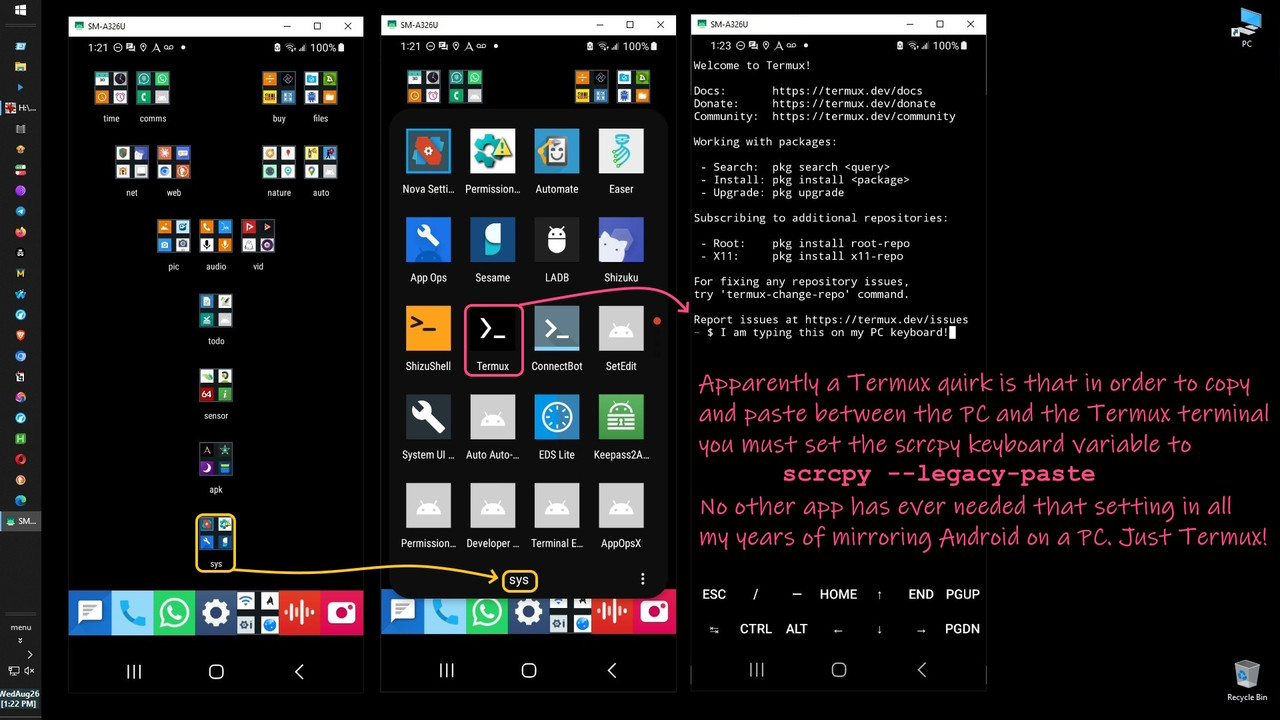
    :: For whatever reason, "--keyboard=sd" makes Termux not accept Ctrl+V paste
    :: set SCRCPY_OPTS=--keyboard=sdk
    :: For whatever reason, "--legacy-paste" allows Termux to accept Ctrl+V paste
    :: Allows dual playback: scrcpy --audio-source=playback --audio-dup
    :: set SCRCPY_OPTS=--legacy-paste
    set SCRCPY_OPTS=--legacy-paste --audio-source=playback --audio-dup

    Given between Android and Windows the clipboard transfer (which we do a
    hundred times a day) is a single mousetap (to get) and keyboard (to put),
    you can see how frustrated I was when I tried to do that with iOS:Windows.

    My first attempt was to copy the iOS clipboard into a file, but that's when
    I ran into the issue that the file *must* be in the iOS photo's folder, and even then, Apple's MTP implementation is not bi-directional, so it sucks.
    This PC\Apple iPad\Internal Storage\202610_a
    Note: Apple uses non-changeable wacky crazy idiotic names for folders.

    Both Files (which uses SMB) that Nick Charles suggested, and LocalSend
    (which is what I ultimately used) are bidirectional and don't depend on
    Apple's hugely limited one-way MTP implementation of the DCIM folder.

    If I were to frequently casually copy the clipboard between iOS and
    Windows, I'd set up Vysor, which I extensively tested in the past.
    <https://i.postimg.cc/TYvqdxCT/vysor35.jpg>
    That said, I recognize most users won't go through the Vysor setup.

    But back to your point, especially as this thread, which I did not author,
    is titled "the easiest way" (not the most-secure way), the barrier to entry favors the messengers, which are private enough, due to inherent E2EE.

    The WhatsApp method might even work for actual files too, for all I know.
    Thank you for hammering home the point, as I never disagree with logic.
    --
    Most people don't own the concept of logical thought processes, but I do.
    --- Synchronet 3.22a-Linux NewsLink 1.2
  • From Maria Sophia@mariasophia@comprehension.com to misc.phone.mobile.iphone,comp.sys.mac.advocacy,alt.comp.os.windows-10 on Mon Oct 26 20:13:51 2026
    From Newsgroup: alt.comp.os.windows-10

    CrudeSausage wrote:
    https://discussions.apple.com/thread/3498523?sortBy=rank

    It's a walled garden. OK. Chants to Father to drown out the
    disturbing thought processes.

    A walled garden, in theory, is not a bad thing. After all, you're not
    likely to get malware if every one of the programs you install on your computer comes from the App Store or publishers Apple has signed. Sure,
    it is limiting, especially if the software you like is too small to be noticed by Apple, but I recall that the signing process is very
    inexpensive for a developer, so there is no reason for them to remain on
    the outside.

    This thread is supposed to be about interoperability between Windows & iOS.

    But when someone says that owning an iPad which is brain dead in terms of functionality is "good for you", I have to make the point that it's not
    *for your safety*

    The reason iOS can't do what every other OS does is not for your safety.
    *it's for Apple's profits*

    There isn't a single reputable security professional on the planet who
    would ever say iOS is "safer" than any other operating system, and, in
    fact, in many metrics, iOS is far worse (but it does have less malware).

    I'm aware that Apple marketing screams otherwise, and that media shills
    simply parrot whatever Apple marketing tells them to parrot, but the fact remains you lost all that functionality, and gained zero safety for it.

    The only gain is iOS being restricted is to give Apple greater profits.

    With respect to the topic at hand, iOS is hugely restrictive in terms of
    being able to bidirectionally transfer files between iOS & Windows.

    But it can be done.
    This thread shows how.
    --
    To be fair, Google is more and more following Apple's restrictive lead.
    --- Synchronet 3.22a-Linux NewsLink 1.2
  • From Maria Sophia@mariasophia@comprehension.com to misc.phone.mobile.iphone,comp.sys.mac.advocacy,alt.comp.os.windows-10 on Mon Oct 26 21:33:34 2026
    From Newsgroup: alt.comp.os.windows-10

    Paul wrote:
    Let's discuss malware.

    Let's discuss iOS is the worst mobile OS in the world for security holes.

    My point is security is a chain of events, only one of which is malware.

    Apple's QA is arguably the worst in the entire industry, based on metrics
    that we *know* to be true, such as Google Project Zero testing reports.

    There's a reason the iPhone is the most exploited smartphone in history.
    <https://www.cisa.gov/known-exploited-vulnerabilities-catalog>

    Apple's QA is so inept that many exploits happen in multiple releases. <https://blog.google/threat-analysis-group/state-backed-attackers-and-commercial-surveillance-vendors-repeatedly-use-the-same-exploits/>

    Apple never advertises that their QA is atrociously inept to the point that much of the iOS code has been proven to never have ever been tested. <https://googleprojectzero.blogspot.com/2019/08/a-very-deep-dive-into-ios-exploit.html>
    "Beer noted 'cases of code which seems to have never worked' and
    'likely skipped QA or had little testing' before shipping."

    <https://www.vice.com/en/article/google-project-zero-bugs-used-to-hack-iphones-and-android-phones/>
    "TAG noted that some iOS bugs were 'long-lived' and exploitable
    across multiple OS generations, implying insufficient fuzzing
    or regression testing."

    <https://googleprojectzero.blogspot.com/2019/08/the-many-possibilities-of-cve-2019-8646.html>
    Silvanovich stated that certain iMessage parsers lacked basic bounds
    checks and appeared never to have been fuzz tested.

    <https://googleprojectzero.blogspot.com/2020/09/jitsploitation-three.html>
    "Researchers noted that some vulnerable code paths were 'reachable only
    through malformed inputs unlikely to be covered by standard QA.'"

    The result of Apple never having even once sufficiently tested much of
    their iOS code is that any iPhone NOT able to take the latest release is so toxic that it should probably be thrown over the next bridge you drive
    over. Think about that every time you drive over a bridge from now on.

    Atrocious QA is a main reason iOS has 1-1/2 times the known key exploits.
    <https://www.cisa.gov/known-exploited-vulnerabilities-catalog>

    The fact that Apple has never tested huge chunks of its iOS code also
    belies the fact that Apple's lack of modern update wasn't the only reason. <https://googleprojectzero.blogspot.com/2019/08/a-very-deep-dive-into-ios-exploit.html>

    What makes things worse is Apple's promised written support is the worst in
    the industry when you compare with two of the main Android OEM players.
    *Apple finally confirms how long it will support iPhones*
    *and it's less than Samsung and Google* <https://www.androidauthority.com/iphone-software-support-commitment-3449135/>

    It doesn't help that only Apple betrays the customer by never fully
    supporting anything other than a single release stream in its history.
    <https://screenrant.com/apple-product-security-update-lifespan/> <https://hothardware.com/news/apple-admits-only-fully-patches-security-flaws-in-latest-os-releases>
    <https://arstechnica.com/gadgets/2022/10/apple-clarifies-security-update-policy-only-the-latest-oses-are-fully-patched/>

    So, let's talk malware, which, admittedly, Android has more than iOS.
    But malware is only one piece of the security landscape for an OS.

    Overall, we lost everything by way of lack of functionality in iOS.
    And yet, we didn't gain any security out of those severe restrictions.

    The only one who won from iOS restrictions, was Apple profits.
    --- Synchronet 3.22a-Linux NewsLink 1.2
  • From Brock McNuggets@brock.mcnuggets@gmail.com to misc.phone.mobile.iphone,comp.sys.mac.advocacy,alt.comp.os.windows-10 on Mon Oct 26 18:48:53 2026
    From Newsgroup: alt.comp.os.windows-10

    On Oct 26, 2026 at 6:33 PM, Maria Sophia wrote in 11bov1e$1910$1@nnrp.usenet.blueworldhosting.com:
    Paul wrote:
    Let's discuss malware.

    Let's discuss iOS is the worst mobile OS in the world for security
    holes.

    Not based on the evidence.

    ...
    --
    It's impossible for someone who is at war with themselves to be at peace with you.
    --- Synchronet 3.22a-Linux NewsLink 1.2
  • From Maria Sophia@mariasophia@comprehension.com to misc.phone.mobile.iphone,comp.sys.mac.advocacy,alt.comp.os.windows-10 on Mon Oct 26 22:53:09 2026
    From Newsgroup: alt.comp.os.windows-10

    Maria Sophia wrote:
    There's a reason the iPhone is the most exploited smartphone in history.
    <https://www.cisa.gov/known-exploited-vulnerabilities-catalog>

    The last people to know how atrocious Apple's QA is, are those who claim,
    sans a single fact, that iOS is 'safer' (how? magically?) than another OS.

    It's not. Apple marketing says iOS is safer.

    But there's not a single security professional on the planet who does.
    Just the media shills. But they just parrot Apple marketing spiels.

    For example, by far, nobody has more key zero-day exploits than iOS does.

    We've published the results from these scripts which, year after year,
    show an ungodly number of critical exploits of iOS as reported by CISA.

    I ask anyone who disputes these facts to tell us what they got when
    they ran this script which we published many times on Apple newsgroups.

    ###############################################################################
    ## kev.ps1
    ## An Extensible cross-platform batch/powershell script to parse CISA KEV db
    ## Analyzes the CISA Known Exploited Vulnerabilities (KEV) database
    ## to compare iOS and Android-related security threats.
    ## a. Downloads lates KEV CSV or uses a local copy of the KEV CSV file
    ## b. Filters out irrelevant entries (e.g., smart appliances, printers)
    ## c. Uses keywords & vendor-product logic for platform-specific exploits
    ## d. Identifies shared vulnerabilities affecting both ecosystems
    ## e. Logs results to timestamped files in a clean ./logs directory
    ## f. Outputs Apple iOS vs Android exploit summaries to console & log files
    ## All logs are saved in the ./logs directory:
    ## A. ios_matches_YYYYMMDD_HHMMSS.log
    ## B. android_matches_YYYYMMDD_HHMMSS.log
    ## C. shared_matches_YYYYMMDD_HHMMSS.log
    ## D. kev_output_YYYYMMDD_HHMMSS.log (summary)
    ## Note the CISA KEV db lists only about 6% of all known vulnerabilities!
    ## <medium.com/@yotamperkal/cisa-kev-a-balanced-perspective-ff3856e69ba9>
    ## That's because the KEV db only contains exploits meeting these criteria:
    ## 1. The exploit has a valid CVE ID.
    ## 2. There is reliable evidence of active exploitation.
    ## 3. A clear remediation action is already available to the general public.
    ###############################################################################
    ## Windows Usage: C:\> kev.bat
    ## Where kev.bat is the following three lines of code:
    ## set "PS_SCRIPT=kev.ps1" REM iOS vs Android known patched exploits
    ## powershell -ExecutionPolicy Bypass -File "%~dp0%PS_SCRIPT%"
    ## pause
    ## Linux/macOS Usage: $ pwsh ./kev.ps1
    ## Requires PowerShell Core (pwsh) <https://github.com/PowerShell/PowerShell>
    ## Make sure execution policy allows script execution:
    ## $ pwsh -Command "Set-ExecutionPolicy -Scope Process -ExecutionPolicy Bypass"
    ###############################################################################
    ## Version 1.0 20250829 (41L)
    ## Extensible Windows batch/powershell script to parse csv/json CISA KEV db
    ## Uses powershell to parse csv/json CISA database for iOS vs Android
    ## Added comment discipline rules for ASCII-only and no oxford comma
    ## CSV downloaded from GitHub mirror of CISA KEV database
    ## Keyword logic uses lowercase match on vendor, product, and vuln name
    ## Matching uses wildcard logic with simple substring detection
    ## Results printed to console with Write-Host
    ## Script can be extended to log output or refine keyword logic
    ## Verson 1.1 20250929 (56L)
    ## Adds time-stamped output file to current directory
    ## Uses Get-Date with custom format for filename
    ## Output file includes iOS and Android known exploit counts
    ## Output file UTF8 encoding for platform/editor compatibility
    ## Version 1.2 20250929 (68L)
    ## Expands keyword logic for iOS and Android ecosystems
    ## Adds ipad, watchos, macos, pixel, samsung, qualcomm, mediatek
    ## Improves platform distinction across shared components like WebKit
    ## Android common vendors & chipsets: pixel, samsung, qualcomm, mediatek
    ## iOS platforms: ipad, ipados, watchos, macos
    ## Used Join-Path to make filespecs usable on Windows/Linux/macOS
    ## Version 1.3 20250929 (87L)
    ## Added an output log to a separate file of each match with its source line
    ## Modified filespecs to enable macOS/Linux PowerCore portability
    ## Version 1.4 20250929 (97L)
    ## Included CVE ID in logs (Adds traceability & audit value)
    ## Added platform detection (Join-Path & $PWD)
    ## Add toggle for local file (avoid unnecessary d/l when testing)
    ## Version 1.5 20250929 (108L)
    ## Add exclusion filtering logic (e.g., samsung TVs)
    ## Exclusion filtering removes Apple smart home devices.
    ## Version 1.6 20250929 (130L)
    ## Added shared-match detection to avoid double counting overlapping attack
    ## surfaces in platform-specific summaries
    ## Version 1.7 20250929 (141L)
    ## Added vendor-product dictionary-style mapping to excluse false positives
    ## like "Samsung tv" or "refrigerator" or "Apple tv" or "homepod"
    ## Version 1.8 20250929 (148L)
    ## Refined keyword logic for deeper iOS & Android exploit detection
    ## around shared components like WebKit & cryptographic modules
    ## Apple includes subsystems like secure enclave, coremedia & launchd
    ## Android includes cryptographic modules & shared components like
    ## keymaster, webkit & play services.
    ## Version 1.9 20250929 (163L)
    ## Moved all log files into ./logs directory to reduce clutter
    ## Added usage instructions for macOS/Linux (pwsh)
    ## Version 2.0 20250929 (207L)
    ## Added toggle to include/exclude macOS from iOS counts
    ## Fixed platform detection (Join-Path & $PWD) console output
    ## Version 2.1 20250929 (212L)
    ## Added output of the1 PowerShell version (in case of mismatches)
    ## Version 2.2 20250930 (219L)
    ## Added date in the console output
    ## Version 2.3 20250930 (228L)
    ## Removed false positives from desktop and server-side CVEs
    ## Added 'chromium' & 'mojo' to iOS & Android keyword lists
    ## Improved detection of shared browser & sandbox escape exploits
    ## Added exclusion for Fortinet, Cisco, Oracle & Adobe using keywords of
    ## fortinet, fortios, fortiproxy, cisco, oracle, adobe, jenkins, mozilla,
    ## nagios, redis, qnap, crushftp
    ## Version 2.4 20250930 (231L)
    ## Added the script version to the console output for auditing purposes
    ###############################################################################
    # Define script version
    $scriptVersion = "kev.ps1 version 2.4 20250930"
    # Platform detection (v2.3)
    $platform = $PSVersionTable.PSEdition
    $version = $PSVersionTable.PSVersion
    if ($platform -eq "Desktop") {
    Write-Host "Running on platform: Windows PowerShell"
    } elseif ($platform -eq "Core") {
    if ($IsWindows) {
    Write-Host "Running on platform: Windows (pwsh)"
    } elseif ($IsLinux) {
    Write-Host "Running on platform: Linux (pwsh)"
    } elseif ($IsMacOS) {
    Write-Host "Running on platform: macOS (pwsh)"
    } else {
    Write-Host "Running on platform: Unknown Core edition"
    }
    } else {
    Write-Host "Running on platform: Unknown"
    }
    Write-Host "PowerShell version: $version"
    # Download the KEV CSV from GitHub
    $useLocalFile = $false # Set to $true for testing of existing downloads
    $useLocalFile = $true # Set to $false to force download
    $includeMacOS = $true # Set to $false to exclude macOS in iOS counts
    $includeMacOS = $false # Set to $true to include macOS in iOS counts
    if ($useLocalFile) {
    $csvPath = Join-Path -Path $PWD -ChildPath "kev.csv"
    Write-Host "Using local file: $csvPath"
    } else {
    $csvUrl = "https://raw.githubusercontent.com/cisagov/kev-data/develop/known_exploited_vulnerabilities.csv"
    $csvPath = Join-Path -Path $PWD -ChildPath "kev.csv"
    Invoke-WebRequest -Uri $csvUrl -OutFile $csvPath
    Write-Host "Downloaded fresh file: $csvPath"
    }
    # Define keyword logic for iOS and Android
    # iOS includes Apple platforms and WebKit-based browsers
    $iosKeywords = @(
    "apple", "ios", "ipados", "watchos", "webkit", "safari",
    "secure enclave", "coregraphics", "coremedia", "corefoundation",
    "springboard", "launchd", "sandbox", "chromium", "mojo"
    )
    if ($includeMacOS) {
    $iosKeywords += "macos"
    }
    # Android includes Google platforms and common Android vendors
    $androidKeywords = @(
    "android", "google", "pixel", "samsung", "qualcomm", "mediatek",
    "play services", "keymaster", "keystore", "secure element", "omapi",
    "webkit", "chromium", "mojo"
    )
    # Initialize counters for each platform
    $iosCount = 0
    $androidCount = 0
    $timestamp = Get-Date -Format "yyyyMMdd_HHmmss"
    $logDir = Join-Path -Path "." -ChildPath "logs"
    if (-not (Test-Path $logDir)) {
    New-Item -ItemType Directory -Path $logDir | Out-Null
    }
    $iosLogPath = Join-Path -Path $logDir -ChildPath "ios_matches_$timestamp.log"
    $androidLogPath = Join-Path -Path $logDir -ChildPath "android_matches_$timestamp.log"
    $sharedLogPath = Join-Path -Path $logDir -ChildPath "shared_matches_$timestamp.log"
    $outputFile = Join-Path -Path $logDir -ChildPath "kev_output_$timestamp.log"
    # Parse KEV CSV and count keyword matches
    $excludeKeywords = @(
    "refrigerator", "tv", "washer", "dryer", "smart appliance", "iot", "industrial", "printer",
    "apple tv", "homepod", "airtag", "fortinet", "fortios", "fortiproxy", "cisco",
    "oracle", "adobe", "jenkins", "mozilla", "nagios", "redis", "qnap", "crushftp"
    )
    $vendorProductMap = @{
    "samsung" = @("galaxy", "android", "mobile", "tablet")
    "qualcomm" = @("snapdragon", "modem", "chipset")
    "apple" = @("iphone", "ipad", "ios", "watchos", "macbook")
    }
    if ($includeMacOS) {
    $vendorProductMap["apple"] += "macos"
    }
    Import-Csv $csvPath | ForEach-Object {
    $text = ($_.vendorProject + " " + $_.product + " " + $_.vulnerabilityName).ToLower()
    $vendor = $_.vendorProject.ToLower()
    $product = $_.product.ToLower()
    # Skip irrelevant matches
    if ($excludeKeywords | Where-Object { $text -like "*$_*" }) {
    return
    }
    # Skip mismatched vendor-product combos
    if ($vendorProductMap.ContainsKey($vendor)) {
    $validProducts = $vendorProductMap[$vendor]
    if (-not ($validProducts | Where-Object { $product -like "*$_*" })) {
    return
    }
    }
    $logEntry = "$($_.cveID): $text"
    $iosMatch = $iosKeywords | Where-Object { $text -like "*$_*" }
    $androidMatch = $androidKeywords | Where-Object { $text -like "*$_*" }
    if ($iosMatch -and $androidMatch) {
    $iosCount++
    $androidCount++
    Add-Content -Path $iosLogPath -Value "$logEntry`n"
    Add-Content -Path $androidLogPath -Value "$logEntry`n"
    Add-Content -Path $sharedLogPath -Value "$logEntry`n"
    } elseif ($iosMatch) {
    $iosCount++
    Add-Content -Path $iosLogPath -Value "$logEntry`n"
    } elseif ($androidMatch) {
    $androidCount++
    Add-Content -Path $androidLogPath -Value "$logEntry`n"
    }
    }
    # Output results to console
    Write-Host "KEV vulnerability summary ($scriptVersion) for: $(Get-Date -Format 'yyyy-MM-dd HH:mm:ss')"
    Write-Host "Estimated Apple-iOS-related exploits: $iosCount"
    Write-Host "Estimated Android-related exploits: $androidCount"
    if (Test-Path $sharedLogPath) {
    $sharedCount = (Get-Content $sharedLogPath | Measure-Object).Count
    Write-Host "Estimated shared exploits: $sharedCount"
    Add-Content -Path $sharedLogPath -Value "Shared iOS/Android vulnerabilities:`n"
    Add-Content -Path $sharedLogPath -Value "`nTotal shared matches: $sharedCount"
    } else {
    Write-Host "Estimated shared exploits: 0"
    }
    # Create time-stamped output file in current directory
    # $outputFile = "kev_output_$timestamp.log"
    # Allow for macOS/Linux PowerShell Core portability (filespec syntax)
    # Write results to file
    @(
    "KEV vulnerability summary $timestamp",
    "Estimated Apple-iOS-related exploits: $iosCount",
    "Estimated Android-related exploits: $androidCount"
    ) | Out-File -FilePath $outputFile -Encoding UTF8
    # Append a summary line to each match log (v1.4)
    Add-Content -Path $iosLogPath -Value "`nTotal iOS matches: $iosCount"
    Add-Content -Path $androidLogPath -Value "`nTotal Android matches: $androidCount"
    ###############################################################################
    ## end of kev.ps1
    ###############################################################################
    --- Synchronet 3.22a-Linux NewsLink 1.2
  • From Your Name@YourName@YourISP.com to misc.phone.mobile.iphone,comp.sys.mac.advocacy,alt.comp.os.windows-10 on Tue Oct 27 18:11:25 2026
    From Newsgroup: alt.comp.os.windows-10

    On 2026-10-27 01:48:53 +0000, Brock McNuggets said:
    On Oct 26, 2026 at 6:33 PM, Maria Sophia wrote in 11bov1e$1910$1@nnrp.usenet.blueworldhosting.com:
    Paul wrote:
    Let's discuss malware.

    Let's discuss iOS is the worst mobile OS in the world for security
    holes.

    Not based on the evidence.

    ...

    It's already well established that evidence and facts are two more
    things that the brainless troll can't understand.

    --- Synchronet 3.22a-Linux NewsLink 1.2
  • From Nick Charles@none@none.none to misc.phone.mobile.iphone,comp.sys.mac.advocacy,alt.comp.os.windows-10 on Tue Oct 27 14:39:25 2026
    From Newsgroup: alt.comp.os.windows-10

    Your Name <YourName@YourISP.com> wrote:
    On 2026-10-27 01:48:53 +0000, Brock McNuggets said:
    On Oct 26, 2026 at 6:33 PM, Maria Sophia wrote in
    11bov1e$1910$1@nnrp.usenet.blueworldhosting.com:
    Paul wrote:
    Let's discuss malware.

    Let's discuss iOS is the worst mobile OS in the world for security
    holes.

    Not based on the evidence.

    ...

    It's already well established that evidence and facts are two more
    things that the brainless troll can't understand.

    So true. Facts and evidence also go against ITs narrative of rCLWalled GardenrCY and rCLApple canrCOt connect to the Real WorldrCY.

    This is why IT refuses to use the BUILT-IN networking software on iOS and Windows. IT is STILL using the excuse that rCLI donrCOt want to login to WindowsrCY. IT does not have to. IT can create a separate Windows account
    - call it Network. Give it an easy password, like ITs phone number. Whatever.

    Then use this account ONLY for the iOS/iPadOS Files App to login and
    transfer files. Done. And BTW once connected to Windows, one can transfer files in both directions.

    The problem is that by doing this, IT will no longer be able to post this stupid fucking question every 3 months. rCLWhat is the easiest way to
    transfer files from Windows to iOS without using the internetrCY.

    The easiest way is the way IT refuses to use. Because rCLWalled GardenrCY is more important to IT.

    Ignorant Troll is indeed a DipshIT.

    --- Synchronet 3.22a-Linux NewsLink 1.2
  • From Frank Slootweg@this@ddress.is.invalid to misc.phone.mobile.iphone,comp.sys.mac.advocacy,alt.comp.os.windows-10 on Tue Oct 27 18:34:37 2026
    From Newsgroup: alt.comp.os.windows-10

    [Nick Charles' post wasn't (cross)posted to alt.comp.os.windows-10, so
    I'm responding via Herbert's quote of Nick's post:]

    Herbert Kleebauer <klee@unibwm.de> wrote:
    On 10/26/2026 3:30 AM, Maria Sophia wrote:
    Nick Charles wrote:
    Oh look. DipshIT is AGAIN jumping thru hoops to do something VERY simple.

    Use the fucking Files app on iOS you dumbass. Open the files app. Long
    press anywhere, select Paste. A new text file will be created with your >> pasted text from the clipboard. AGAIN using the files app, connect to
    your Windows computer over the Wi-Fi connection. You DO have a drive
    shared on your Windows computer, right? AGAIN using the Files app,
    copy/paste your text file to Windows.

    Done. God DAMN, you are stupid.

    How long DOES it take you to dream up these absurdly complicated ways to do
    easy things? All in your never ending, life-long goal of Making Apple
    Look Bad.

    Isn't your suggestion also "absurdly complicated"? Nearly everybody has installed WhatsApp (on the phone/tablet and PC), so why not use it to
    send the text to yourself?

    Since some time, Google's Quick Share on Android works with Apple's
    AirDrop.

    I don't know if the Windows version of Quick Share also has been
    updated to work with Airdrop. So one ('Arlen'?) could try if that works (Airdrop on iOS to/from Quick Share on Windows).

    That would be 1) a very simple and elegant solution which 2) uses the
    local LAN (if so preferred).
    --- Synchronet 3.22a-Linux NewsLink 1.2
  • From Brock McNuggets@brock.mcnuggets@gmail.com to misc.phone.mobile.iphone,comp.sys.mac.advocacy,alt.comp.os.windows-10 on Tue Oct 27 12:01:00 2026
    From Newsgroup: alt.comp.os.windows-10

    On Oct 27, 2026 at 11:34 AM, Frank Slootweg wrote in 11bqubn.25g.1@ID-201911.user.individual.net:
    [Nick Charles' post wasn't (cross)posted to alt.comp.os.windows-10, so
    I'm responding via Herbert's quote of Nick's post:]

    Herbert Kleebauer <klee@unibwm.de> wrote:
    On 10/26/2026 3:30 AM, Maria Sophia wrote:
    Nick Charles wrote:
    <snip>

    Isn't your suggestion also "absurdly complicated"? Nearly everybody
    has installed WhatsApp (on the phone/tablet and PC), so why not use
    it to send the text to yourself?

    Since some time, Google's Quick Share on Android works with Apple's
    AirDrop.

    Sound vaguely familiar, but I did not know that. Thanks.


    I don't know if the Windows version of Quick Share also has been
    updated to work with Airdrop. So one ('Arlen'?) could try if that
    works (Airdrop on iOS to/from Quick Share on Windows).

    That would be 1) a very simple and elegant solution which 2) uses the
    local LAN (if so preferred).

    --
    It's impossible for someone who is at war with themselves to be at peace with you.
    --- Synchronet 3.22a-Linux NewsLink 1.2
  • From Maria Sophia@mariasophia@comprehension.com to misc.phone.mobile.iphone,comp.sys.mac.advocacy,alt.comp.os.windows-10 on Wed Oct 28 00:02:40 2026
    From Newsgroup: alt.comp.os.windows-10

    Carlos E.R. wrote:
    Write an email, but do not send it. Keep it in drafts. Can be opened in
    any machine that shares that imap account (doesn't have to be google,
    and it can even be local only if you set up the server).

    When the news comes out that the head of the CIA is caught, then it's
    rather interesting *how* he got caught, in this case, using draft emails.

    FBI email probe uncovers CIA director's affair with biographer https://www.ctvnews.ca/world/article/fbi-email-probe-uncovers-cia-directors-affair-with-biographer/
    "The FBI became aware of the relationship between Petraeus and Broadwell
    after monitoring Petraeuso emails, following an alert that Broadwell
    may have accessed his personal account, said two U.S. officials."

    This is behind a paywall, apparently, but it's probably rather detailed.

    How metadata brought down David Petraeus https://www.sciencedirect.com/science/article/abs/pii/S0262407912630000
    --- Synchronet 3.22a-Linux NewsLink 1.2
  • From Maria Sophia@mariasophia@comprehension.com to misc.phone.mobile.iphone,comp.sys.mac.advocacy,alt.comp.os.windows-10 on Wed Oct 28 00:12:26 2026
    From Newsgroup: alt.comp.os.windows-10

    This is behind a paywall, apparently, but it's probably rather detailed.

    How metadata brought down David Petraeus https://www.sciencedirect.com/science/article/abs/pii/S0262407912630000

    Interestingly, apparently, the failure mode was not content interception.

    It was account-level metadata and provider cooperation.
    The content stayed put but the login didn't.

    Petraeus used Canadian navy spy's email trick https://www.cbc.ca/news/science/petraeus-used-canadian-navy-spy-s-email-trick-1.1172104

    Petraeus and Broadwell attempted to conceal affair using Gmail drafts https://www.theverge.com/2012/11/13/3642256/petraeus-broadwell-scandal-gmail-drafts

    Webmail as Dead Drop https://www.schneier.com/blog/archives/2012/11/webmail_as_dead.html

    Every time these bad guys get caught, it behooves us to figure out how.
    --- Synchronet 3.22a-Linux NewsLink 1.2
  • From Carlos E.R.@robin_listas@es.invalid to misc.phone.mobile.iphone,comp.sys.mac.advocacy,alt.comp.os.windows-10 on Wed Oct 28 18:32:17 2026
    From Newsgroup: alt.comp.os.windows-10

    On 2026-10-28 05:02, Maria Sophia wrote:
    Carlos E.R. wrote:
    Write an email, but do not send it. Keep it in drafts. Can be opened in
    any machine that shares that imap account (doesn't have to be google,
    and it can even be local only if you set up the server).

    When the news comes out that the head of the CIA is caught, then it's
    rather interesting *how* he got caught, in this case, using draft emails.

    Yes, I know. But are you a drug lord, so that the CIA is interested in
    you? :-D

    My ISP is not after me, they will not read my drafts. Not unless the a
    court orders them to.


    And then, I have my own IMAP server inside my LAN, which I can use for
    this and nobody will see, unless they break in my house.
    --
    Cheers, Carlos.
    ESEfc-Efc+, EUEfc-Efc|;
    --- Synchronet 3.22a-Linux NewsLink 1.2
  • From Maria Sophia@mariasophia@comprehension.com to misc.phone.mobile.iphone,comp.sys.mac.advocacy,alt.comp.os.windows-10 on Wed Oct 28 15:57:50 2026
    From Newsgroup: alt.comp.os.windows-10

    Carlos E.R. wrote:
    But are you a drug lord, so that the CIA is interested in you?

    Good point! I used to have top-secret clearance (which is now called
    TS/SCI), but that was long ago when I worked in a building with heavy
    curtains on all the windows at Fort Meade on "stuff" (while they were
    building their new secure facility that had no windows at all in it).

    But if you've ever gone though their interviews (and I have, although it
    was in the days before social media was prevalent) you'd be amazed at what
    they ask and the money they spent interviewing everyone who knows you.

    I have to openly admit, while I've found a dead body while hiking (so I
    was, briefly, the first suspect by LE as the RP), I'm sure they "checked me out" thoroughly (and even demanded my DNA, which I refused and they told me they'd be back with a subpoena within days, which they never came back
    with, as there was nothing connecting me to the dead person other than the
    fact I hiked all over the backcountry and that body happened to be there).

    So I'm clean with the CIA/FBI/NSA, etc.. For now. I think....

    BTW, you do things "the right way" not because you are being chased by the feds. You do interoperability the right way because it's the right way.

    For example, my data pins in my USB part are bad so for me, the right way
    is over Wi-Fi, where WebDav servers do a great job mounting Android as a
    drive on Windows, which, unfortunately, iOS is too brain dead to do.
    <https://i.postimg.cc/QtbR1GY0/webdav13.jpg>

    Or, just as good, the "right way" is to use adbcopy.bat to copy single
    files over back & forth bidirectionally between Android & the desktop.

    But always remember that Apple designed iOS to be basically non functional
    when it comes to working in the real world, and they're not stupid to do
    that as they make a LOT of money forcing people to buy only Apple stuff.

    If you're in the Apple ecosystem, things happen to work a little bit.
    But the instant you leave the Apple ecosystem for the real world, almost nothing works when you are trying to get Apple to work with non_Apple
    stuff.

    Anyway, the "right way" with privacy for people might be the way Herbert suggested (which is fine, as long as we trust the encryption) of using something like WhatsApp (or any similar draft-saving messenger tool).

    Or, the right way for some might be the way Nick Charles kindly suggested, using Files on iOS and SMB on Windows, which works for most people.

    In decades of being on Usenet I've never disagreed with a working solution, where the right way for me, since I don't have passwords on any machine but iOS, simply because Apple requires you to create a mothership account if
    you want to load anything...

    Which by the way, is one reason Apple products are the LEAST PRIVATE in the industry, because nobody but Apple tracks everything you do (which is
    saying a lot when compared to Google!) even to the point of inserting essentially your unique account information into every IPA you install.

    Given Apple products are the WORST in the industry for security, the "right way" of doing things is to avoid the way Apple suggests, which is iTunes.

    Luckily, I must repeat, for MOST PEOPLE, the right way will be the Files metehod with SMB that Nick Charles kindly outlined, while, for me, the
    right way will be to use Local Send although I acknowledge with encryption,
    a ton of other options arise (but I don't consider that the right way).
    --- Synchronet 3.22a-Linux NewsLink 1.2
  • From Maria Sophia@mariasophia@comprehension.com to comp.mobile.android,misc.phone.mobile.iphone,comp.sys.mac.advocacy,alt.comp.os.windows-10 on Wed Oct 28 21:01:41 2026
    From Newsgroup: alt.comp.os.windows-10

    Carlos E.R. wrote:
    Good point! I used to have top-secret clearance (which is now called
    TS/SCI), but that was long ago when I worked in a building with heavy
    curtains on all the windows at Fort Meade on "stuff" (while they were
    building their new secure facility that had no windows at all in it).

    Not that far, but I worked for a company that did use tempest proof
    windows, so that mobile phones would not work inside the building, then
    they had to install internal transmitters, because they gave mobiles to their employees. They also disabled WiFi in their warehouse section,
    they did not trust it (year 2000).

    Windows laptops for people working on external sites had to connect
    typing a password that was half remembered, and the other part coming
    from a small dongle we carried somewhere in us. Every minute the key changed.

    And we could not connect via internet, or via the networked system of
    their clients. We had to connect via modem to a gratis phone number.

    Not as paranoid as the CIA, but still paranoid enough for a private
    company. Once inside, the documentation was free to access to almost anybody, it was a dream come true.

    Oh, that's interesting. You learn a lot about what 'can' be done when you
    work with these fellows, which, I guess, is what drove Snowden to do it.

    I was there before cellphones were a thing, but, before we had clearance
    (it wasn't just me, it was an entire group of people, we couldn't bring transparencies, which, in those days, was how we did presentations.

    This wasn't the CIA, but something like that, and every department had a numerical name, such as R123, but what I remember most vividly was the had requirements for the software that nobody else in the world had asked for.

    But, luckily for me, internally, when I needed to FedEx a magtape to the
    home office for overnight bugfixes (again, that's how we did things then),
    they were fixed quickly, and FedExed back, where many were buffer overflows
    as much of the code was written in Fortran way back then.

    It was phone, fax and Fedex, as those were the fastest means of transit.

    Since this particular TLA used the software differently (which even then,
    cost about a million dollars a seat), we could tell what they were doing by
    the strangeness of their requirements, which no commercial company needed.

    Interestingly, since the company, like any company, had, oh, let's say 100 products, they were the only entity that bought every single product.

    I never knew if that was because they didn't want anyone to know which
    product was the most useful to them (since internally people knew), or if
    they really were the only company that had no cost constraints at all.

    But they did use some of the products that nobody else used, which, again,
    made supporting them all the more difficult, as it's harder to help them.

    All in all, when I learned what they were doing, which, well, in today's
    day and age, I doubt anyone would be surprised, but I was shocked because
    here I was this innocent little kid who played by the rules all the time.
    --- Synchronet 3.22a-Linux NewsLink 1.2
  • From knuttle@keith_nuttle@yahoo.com to comp.mobile.android,misc.phone.mobile.iphone,comp.sys.mac.advocacy,alt.comp.os.windows-10 on Wed Oct 28 22:19:34 2026
    From Newsgroup: alt.comp.os.windows-10

    On 10/28/2026 9:01 PM, Maria Sophia wrote:
    Carlos E.R. wrote:
    Good point! I used to have top-secret clearance (which is now called
    TS/SCI), but that was long ago when I worked in a building with heavy
    curtains on all the windows at Fort Meade on "stuff" (while they were
    building their new secure facility that had no windows at all in it).

    Not that far, but I worked for a company that did use tempest proof
    windows, so that mobile phones would not work inside the building, then
    they had to install internal transmitters, because they gave mobiles to
    their employees. They also disabled WiFi in their warehouse section,
    they did not trust it (year 2000).

    Windows laptops for people working on external sites had to connect
    typing a password that was half remembered, and the other part coming
    from a small dongle we carried somewhere in us. Every minute the key
    changed.

    And we could not connect via internet, or via the networked system of
    their clients. We had to connect via modem to a gratis phone number.

    Not as paranoid as the CIA, but still paranoid enough for a private
    company. Once inside, the documentation was free to access to almost
    anybody, it was a dream come true.

    Oh, that's interesting. You learn a lot about what 'can' be done when you work with these fellows, which, I guess, is what drove Snowden to do it.

    I was there before cellphones were a thing, but, before we had clearance
    (it wasn't just me, it was an entire group of people, we couldn't bring transparencies, which, in those days, was how we did presentations.

    This wasn't the CIA, but something like that, and every department had a numerical name, such as R123, but what I remember most vividly was the had requirements for the software that nobody else in the world had asked for.

    But, luckily for me, internally, when I needed to FedEx a magtape to the
    home office for overnight bugfixes (again, that's how we did things then), they were fixed quickly, and FedExed back, where many were buffer overflows as much of the code was written in Fortran way back then.

    It was phone, fax and Fedex, as those were the fastest means of transit.

    Since this particular TLA used the software differently (which even then, cost about a million dollars a seat), we could tell what they were doing by the strangeness of their requirements, which no commercial company needed.

    Interestingly, since the company, like any company, had, oh, let's say 100 products, they were the only entity that bought every single product.

    I never knew if that was because they didn't want anyone to know which product was the most useful to them (since internally people knew), or if they really were the only company that had no cost constraints at all.

    But they did use some of the products that nobody else used, which, again, made supporting them all the more difficult, as it's harder to help them.

    All in all, when I learned what they were doing, which, well, in today's
    day and age, I doubt anyone would be surprised, but I was shocked because here I was this innocent little kid who played by the rules all the time.
    When I want to transfer information from my computer (Windows) I use the Bluetooth function. You can transfer any file either from or to the
    cell phone. Using the Bluetooth, there is no fuss. highlight the file Select Share (Android), select Bluetooth, On the computer click the
    Bluetooth Icon and select share, the click the computer on the cell phone.

    Going from computer to cellphone is easier as you as you select share on
    the file and select Bluetooth, and the computer.

    No worry about internet, email, security or anything else it is a direct cellphone to computer transfer
    --- Synchronet 3.22a-Linux NewsLink 1.2
  • From Maria Sophia@mariasophia@comprehension.com to comp.mobile.android,misc.phone.mobile.iphone,comp.sys.mac.advocacy,alt.comp.os.windows-10 on Wed Oct 28 23:00:06 2026
    From Newsgroup: alt.comp.os.windows-10

    knuttle wrote:
    When I want to transfer information from my computer (Windows) I use the Bluetooth function. You can transfer any file either from or to the
    cell phone. Using the Bluetooth, there is no fuss. highlight the file Select Share (Android), select Bluetooth, On the computer click the Bluetooth Icon and select share, the click the computer on the cell phone.

    Going from computer to cellphone is easier as you as you select share on
    the file and select Bluetooth, and the computer.

    No worry about internet, email, security or anything else it is a direct cellphone to computer transfer

    I think there's a subtopic tangential offshoot of this very thread where bluetooth would work just fine if Apple didn't purposely break it for iOS.

    Since iOS is expressly designed by Apple to NOT interoperate with Windows,
    it shouldn't be surprising that we'd "think" bluetooth would work, since it works with every other common consumer operating system, and Windows.

    Just not with iOS.
    --- Synchronet 3.22a-Linux NewsLink 1.2
  • From Paul@nospam@needed.invalid to comp.mobile.android,misc.phone.mobile.iphone,comp.sys.mac.advocacy,alt.comp.os.windows-10 on Thu Oct 29 03:01:18 2026
    From Newsgroup: alt.comp.os.windows-10

    On Wed, 10/28/2026 11:00 PM, Maria Sophia wrote:
    knuttle wrote:
    When I want to transfer information from my computer (Windows) I use the
    Bluetooth function. You can transfer any file either from or to the
    cell phone. Using the Bluetooth, there is no fuss. highlight the file
    Select Share (Android), select Bluetooth, On the computer click the
    Bluetooth Icon and select share, the click the computer on the cell phone. >>
    Going from computer to cellphone is easier as you as you select share on
    the file and select Bluetooth, and the computer.

    No worry about internet, email, security or anything else it is a direct
    cellphone to computer transfer

    I think there's a subtopic tangential offshoot of this very thread where bluetooth would work just fine if Apple didn't purposely break it for iOS.

    Since iOS is expressly designed by Apple to NOT interoperate with Windows,
    it shouldn't be surprising that we'd "think" bluetooth would work, since it works with every other common consumer operating system, and Windows.

    Just not with iOS.


    I keep looking at the help files on the web from Apple,
    and the only result I get from reading them, is an
    indication I should not be buying the device. It's obvious
    "their way or the highway". That's OK, the world won't flip
    its axis because I didn't buy an Apple product :-)

    I'm a desktop person, because desktops work for me. They
    don't constantly disappoint me, only occasional disappointment
    is the result :-) [ And that's a real smiley there ]

    For example, my new video card, the driver wouldn't load on it
    in Linux. But ~5 hours work (I'm "careful" when I do this stuff
    and most of the time was getting the backup done), and the problem
    was solved. I only restored from backup one time, before the update
    I needed, worked properly. I knew there would be carnage before
    I started, so this was all purposeful steps, no novelty was involved.
    I had a good idea what trouble it would cause, and it wasn't guaranteed
    it would fix it either. It was just "most likely" to fix it. The Google
    search didn't address the issue directly, as in what kernel release
    would have the goods.

    I used the same approach when my Windows box tipped over a week ago,
    and things were looking pretty bad for a while. I thought I was cooked.
    But I got lucky, the system died in the login prompt, and that
    seemed to trigger some recovery behavior in the OS. It did "something"
    to the computer, that fixed it. I would rather know what it was
    that it fixed, I looked in the SRTtrail folder but could not see
    any step in there that looked like a "fix".

    I see one reference in Google, to

    X:\windows\system32\logfiles\Srt\SrtTrail.txt

    and that means the log was actually on X: before the
    system rebooted and X: was gone (as X: is a RAMdisk used
    by WinPE/WinRE). It doesn't give you a chance to do anything
    before it reboots, so looking at the folder would
    have required a miracle. That's an auto-repair, which is
    why there is no user interaction possible.

    *******

    By comparison, things smaller than a desktop, just
    aren't a "good time". Too restrictive. Do I have to
    smash everything with a hammer, to get things done ?
    There must be a better way.

    Paul
    --- Synchronet 3.22a-Linux NewsLink 1.2
  • From Carlos E.R.@robin_listas@es.invalid to comp.mobile.android,misc.phone.mobile.iphone,comp.sys.mac.advocacy,alt.comp.os.windows-10 on Thu Oct 29 12:03:31 2026
    From Newsgroup: alt.comp.os.windows-10

    On 2026-10-29 04:00, Maria Sophia wrote:
    knuttle wrote:
    When I want to transfer information from my computer (Windows) I use the
    Bluetooth function. You can transfer any file either from or to the
    cell phone. Using the Bluetooth, there is no fuss. highlight the file
    Select Share (Android), select Bluetooth, On the computer click the
    Bluetooth Icon and select share, the click the computer on the cell phone. >>
    Going from computer to cellphone is easier as you as you select share on
    the file and select Bluetooth, and the computer.

    No worry about internet, email, security or anything else it is a direct
    cellphone to computer transfer

    I think there's a subtopic tangential offshoot of this very thread where bluetooth would work just fine if Apple didn't purposely break it for iOS.

    Since iOS is expressly designed by Apple to NOT interoperate with Windows,
    it shouldn't be surprising that we'd "think" bluetooth would work, since it works with every other common consumer operating system, and Windows.

    Just not with iOS.

    It also doesn't work with Linux (from/to Android), AFAIK. Somebody has
    to implement it, not that they don't want to.

    Maybe I am mistaken and there is a desktop that does it.
    --
    Cheers, Carlos.
    ESEfc-Efc+, EUEfc-Efc|;
    --- Synchronet 3.22a-Linux NewsLink 1.2
  • From Paul@nospam@needed.invalid to comp.mobile.android,misc.phone.mobile.iphone,comp.sys.mac.advocacy,alt.comp.os.windows-10 on Thu Oct 29 11:24:52 2026
    From Newsgroup: alt.comp.os.windows-10

    On Thu, 10/29/2026 7:03 AM, Carlos E.R. wrote:
    On 2026-10-29 04:00, Maria Sophia wrote:
    knuttle wrote:
    When I want to transfer information from my computer (Windows) I use the >>> Bluetooth function.-a-a You can transfer any file either from or to the
    cell phone.-a-a Using the Bluetooth, there is no fuss.-a highlight the file >>> Select Share (Android), select Bluetooth,-a On the computer click the
    Bluetooth Icon and select share, the click the computer on the cell phone. >>>
    Going from computer to cellphone is easier as you as you select share on >>> the file and select Bluetooth, and the computer.

    No worry about internet, email, security or anything else it is a direct >>> cellphone to computer transfer

    I think there's a subtopic tangential offshoot of this very thread where
    bluetooth would work just fine if Apple didn't purposely break it for iOS. >>
    Since iOS is expressly designed by Apple to NOT interoperate with Windows, >> it shouldn't be surprising that we'd "think" bluetooth would work, since it >> works with every other common consumer operating system, and Windows.

    Just not with iOS.

    It also doesn't work with Linux (from/to Android), AFAIK. Somebody has to implement it, not that they don't want to.

    Maybe I am mistaken and there is a desktop that does it.


    I can find a reference here.

    https://unix.stackexchange.com/questions/779545/is-it-possible-to-use-bluetooth-for-transferring-files-between-an-android-phone

    "On the odd occasion when I need to get a file to my phone (or indeed
    someone else's!) but have no alternative to bluetooth then blueman
    has filled that niche.

    Not fast and maybe a bit of juggling to get to the "accept transfer" dialogue
    on the phone, but other than this it has been reliable for me and is as simple as

    systemctl --user start obex
    blueman-sendto --device=$phone_mac_address "$filename"
    "

    Paul


    --- Synchronet 3.22a-Linux NewsLink 1.2
  • From Maria Sophia@mariasophia@comprehension.com to comp.mobile.android,misc.phone.mobile.iphone,comp.sys.mac.advocacy,alt.comp.os.windows-10 on Thu Oct 29 14:14:23 2026
    From Newsgroup: alt.comp.os.windows-10

    Paul wrote:
    Since iOS is expressly designed by Apple to NOT interoperate with Windows, >> it shouldn't be surprising that we'd "think" bluetooth would work, since it >> works with every other common consumer operating system, and Windows.

    Just not with iOS.


    I keep looking at the help files on the web from Apple,
    and the only result I get from reading them, is an
    indication I should not be buying the device.

    I've learned, over the decades, that Apple 'says' they cripple iOS "for our safety", but the real reason copy fails is iOS prevents interoperability.

    If an Apple device worked in the real world, Apple's profits would plummet.

    It would be too easy for an iPhone to just work with USB, for example.
    Or to just work with bluetooth, or even to just work with Wi-Fi on the LAN.

    Nope. You have to use Apple-only products in an Apple-only ecosystem if you want an Apple device to play well with Windows (or, as noted, with Linux).

    "their way or the highway". That's OK, the world won't flip
    its axis because I didn't buy an Apple product :-)

    When I first bought an iPhone for one of my kids, she wanted it pink, which should have been a warning, and it had to have "I'm a Barbie girl" as a ringtone (this was in the days of Limewire, well before YouTube I think).

    Over the years, I've learned Apple owners are cultivated, by Apple, to do things the Apple way, even as I grew up in a world where I do what I want.

    By comparison, things smaller than a desktop, just
    aren't a "good time". Too restrictive. Do I have to
    smash everything with a hammer, to get things done ?
    There must be a better way.

    Luckily, if we are stuck on an iOS device and we want to bidirectionally transfer the clipboard (or file) over USB or over Wi-Fi to Windows, we can.

    It's just the classic Apple kluge to do it.

    1. Either use the iOS native Files app and set up a two-way smb share
    2. Or, start with the Files app and then use LocalSend for the sharing

    Both work.
    --- Synchronet 3.22a-Linux NewsLink 1.2
  • From Brock McNuggets@brock.mcnuggets@gmail.com to comp.mobile.android,misc.phone.mobile.iphone,comp.sys.mac.advocacy,alt.comp.os.windows-10 on Thu Oct 29 11:57:16 2026
    From Newsgroup: alt.comp.os.windows-10

    On 29 Oct 2026, Maria Sophia wrote in <11c02du$pgj$1@nnrp.usenet.blueworldhosting.com>:
    Paul wrote:
    Since iOS is expressly designed by Apple to NOT interoperate
    with Windows, it shouldn't be surprising that we'd "think"
    bluetooth would work, since it works with every other common
    consumer operating system, and Windows.

    Just not with iOS.


    I keep looking at the help files on the web from Apple, and the
    only result I get from reading them, is an
    indication I should not be buying the device.

    I've learned, over the decades, that Apple 'says' they cripple iOS
    "for our safety", but the real reason copy fails is iOS prevents interoperability.

    They never say that.

    If an Apple device worked in the real world, Apple's profits would
    plummet.

    This is not a rational statement.

    It would be too easy for an iPhone to just work with USB, for
    example. Or to just work with bluetooth, or even to just work with
    Wi-Fi on the LAN.

    My iPhone works with BlueTooth and Wi-Fi just fine. On the rare
    occasion I have used USB with it, that has also worked fine -- but
    there is rarely a need for it.

    Nope. You have to use Apple-only products in an Apple-only
    ecosystem if you want an Apple device to play well with Windows
    (or, as noted, with Linux).

    You just moved goalposts. And Windows works no better with iPhones
    than iPhones work with Windows. So?

    "their way or the highway". That's OK, the world won't flip its
    axis because I didn't buy an Apple product :-)

    When I first bought an iPhone for one of my kids,

    You hate the product and the company but you still buy iPhones? That
    sounds very unlikely.

    she wanted it
    pink, which should have been a warning, and it had to have "I'm a
    Barbie girl" as a ringtone (this was in the days of Limewire, well
    before YouTube I think).

    Over the years, I've learned Apple owners are cultivated, by
    Apple, to do things the Apple way, even as I grew up in a world
    where I do what I want.

    Your complaint is the color. Wow.

    By comparison, things smaller than a desktop, just
    aren't a "good time". Too restrictive. Do I have to smash
    everything with a hammer, to get things done ? There must be a
    better way.

    Luckily, if we are stuck on an iOS device and we want to
    bidirectionally transfer the clipboard (or file) over USB or over
    Wi-Fi to Windows, we can.

    I use a shared clipboard on my iPhone and my laptop with (mostly) no
    issue. Just works. As it should .

    It's just the classic Apple kluge to do it.

    1. Either use the iOS native Files app and set up a two-way smb
    share 2. Or, start with the Files app and then use LocalSend for
    the sharing

    Both work.

    Or just copy and paste... and SMB and the Files App have nothing to
    do with it.
    --
    It's impossible for someone who is at war with themselves to be at peace with you.
    --- Synchronet 3.22a-Linux NewsLink 1.2
  • From Carlos E.R.@robin_listas@es.invalid to comp.mobile.android,misc.phone.mobile.iphone,comp.sys.mac.advocacy,alt.comp.os.windows-10 on Thu Oct 29 21:05:56 2026
    From Newsgroup: alt.comp.os.windows-10

    On 2026-10-29 16:24, Paul wrote:
    On Thu, 10/29/2026 7:03 AM, Carlos E.R. wrote:
    On 2026-10-29 04:00, Maria Sophia wrote:
    knuttle wrote:
    When I want to transfer information from my computer (Windows) I use the >>>> Bluetooth function.-a-a You can transfer any file either from or to the >>>> cell phone.-a-a Using the Bluetooth, there is no fuss.-a highlight the file
    Select Share (Android), select Bluetooth,-a On the computer click the
    Bluetooth Icon and select share, the click the computer on the cell phone. >>>>
    Going from computer to cellphone is easier as you as you select share on >>>> the file and select Bluetooth, and the computer.

    No worry about internet, email, security or anything else it is a direct >>>> cellphone to computer transfer

    I think there's a subtopic tangential offshoot of this very thread where >>> bluetooth would work just fine if Apple didn't purposely break it for iOS. >>>
    Since iOS is expressly designed by Apple to NOT interoperate with Windows, >>> it shouldn't be surprising that we'd "think" bluetooth would work, since it >>> works with every other common consumer operating system, and Windows.

    Just not with iOS.

    It also doesn't work with Linux (from/to Android), AFAIK. Somebody has to implement it, not that they don't want to.

    Maybe I am mistaken and there is a desktop that does it.


    I can find a reference here.

    https://unix.stackexchange.com/questions/779545/is-it-possible-to-use-bluetooth-for-transferring-files-between-an-android-phone

    "On the odd occasion when I need to get a file to my phone (or indeed
    someone else's!) but have no alternative to bluetooth then blueman
    has filled that niche.

    Not fast and maybe a bit of juggling to get to the "accept transfer" dialogue
    on the phone, but other than this it has been reliable for me and is as simple as

    systemctl --user start obex
    blueman-sendto --device=$phone_mac_address "$filename"
    "

    What I do, is fire up the Cx file manager in Android, select "network",
    then start its internal FTP server. Then reach that server from Linux
    with any standard tools in my LAN.

    It works for me, easy and fast, because I am used to these kind of
    tools. And the computer source of the files I'm now transferring doesn't
    have BT configured.
    --
    Cheers, Carlos.
    ESEfc-Efc+, EUEfc-Efc|;
    --- Synchronet 3.22a-Linux NewsLink 1.2
  • From Paul@nospam@needed.invalid to comp.mobile.android,misc.phone.mobile.iphone,comp.sys.mac.advocacy,alt.comp.os.windows-10 on Thu Oct 29 16:31:30 2026
    From Newsgroup: alt.comp.os.windows-10

    On Thu, 10/29/2026 4:05 PM, Carlos E.R. wrote:
    On 2026-10-29 16:24, Paul wrote:
    On Thu, 10/29/2026 7:03 AM, Carlos E.R. wrote:
    On 2026-10-29 04:00, Maria Sophia wrote:
    knuttle wrote:
    When I want to transfer information from my computer (Windows) I use the >>>>> Bluetooth function.-a-a You can transfer any file either from or to the >>>>> cell phone.-a-a Using the Bluetooth, there is no fuss.-a highlight the file
    Select Share (Android), select Bluetooth,-a On the computer click the >>>>> Bluetooth Icon and select share, the click the computer on the cell phone.

    Going from computer to cellphone is easier as you as you select share on >>>>> the file and select Bluetooth, and the computer.

    No worry about internet, email, security or anything else it is a direct >>>>> cellphone to computer transfer

    I think there's a subtopic tangential offshoot of this very thread where >>>> bluetooth would work just fine if Apple didn't purposely break it for iOS. >>>>
    Since iOS is expressly designed by Apple to NOT interoperate with Windows, >>>> it shouldn't be surprising that we'd "think" bluetooth would work, since it
    works with every other common consumer operating system, and Windows.

    Just not with iOS.

    It also doesn't work with Linux (from/to Android), AFAIK. Somebody has to implement it, not that they don't want to.

    Maybe I am mistaken and there is a desktop that does it.


    I can find a reference here.

    -a-a https://unix.stackexchange.com/questions/779545/is-it-possible-to-use-bluetooth-for-transferring-files-between-an-android-phone

    -a-a-a-a-a-a "On the odd occasion when I need to get a file to my phone (or indeed
    -a-a-a-a-a-a-a someone else's!) but have no alternative to bluetooth then blueman
    -a-a-a-a-a-a-a has filled that niche.

    -a-a-a-a-a-a-a Not fast and maybe a bit of juggling to get to the "accept transfer" dialogue
    -a-a-a-a-a-a-a on the phone, but other than this it has been reliable for me and is as simple as

    -a-a-a-a-a-a-a-a-a-a systemctl --user start obex
    -a-a-a-a-a-a-a-a-a-a blueman-sendto --device=$phone_mac_address "$filename" >> -a-a-a-a-a-a "

    What I do, is fire up the Cx file manager in Android, select "network",
    then start its internal FTP server. Then reach that server from Linux with any standard tools in my LAN.

    It works for me, easy and fast, because I am used to these kind of tools. And the computer source of the files I'm now transferring doesn't have BT configured.

    Between windows machines and between windows and Linux, the Bluetooth Send worked
    from either end. It was something that worked earlier in the life of their hand-hewn BT stack.

    The Bluetooth TCP/IP stack on the other hand, that wasn't working until relatively
    recently. And maybe that would be part of what the CX Explorer is doing.

    I've had a file transfer working over the BT TCP/IP using File Sharing,
    just to see if the transfer rate was the same (~75KB/sec). That seemed to
    work OK, but the IP address used is outside the /24 netmask, and you have
    to widen the mask to get that to work. I think I might have needed to do
    that as a separate step. You use an "ipconfig" first, to see if the
    address is going to be immediately useful or not, and whether an
    additional step is needed.

    I don't expect "details" to bother anyone at Microsoft. The IP address is
    what it is, because that's handled as IFS (Internet File Sharing).

    The Bluetooth Send is different, as it seems to use a different profile
    and it might be OBEX.

    https://stackoverflow.com/questions/58131950/passing-arguments-to-fsquirt-exe

    Paul


    --- Synchronet 3.22a-Linux NewsLink 1.2
  • From Maria Sophia@mariasophia@comprehension.com to comp.mobile.android,misc.phone.mobile.iphone,comp.sys.mac.advocacy,alt.comp.os.windows-10 on Thu Oct 29 21:20:30 2026
    From Newsgroup: alt.comp.os.windows-10

    Paul wrote:
    What I do, is fire up the Cx file manager in Android, select "network",
    then start its internal FTP server. Then reach that server from Linux with >> any standard tools in my LAN.

    It works for me, easy and fast, because I am used to these kind of tools. >> And the computer source of the files I'm now transferring doesn't have BT configured.

    Between windows machines and between windows and Linux, the Bluetooth Send worked
    from either end. It was something that worked earlier in the life of their hand-hewn BT stack.

    The Bluetooth TCP/IP stack on the other hand, that wasn't working until relatively
    recently. And maybe that would be part of what the CX Explorer is doing.

    Just to note the initial problem was the clipboard, but, of course, the clipboard can be pasted into a file on most platforms other than iOS.

    On iOS the clipboard can be pasted into a file too, as Nick Charles kindly suggested, but you have to do it the Apple way, which isn't always
    intuitive.

    Luckily, with Vysor or scrcpy the Android/desktop clipboard is shared.
    1. Click one is copy the clipboard (on one platform)
    2. Click two is control-V on the keyboard (on the other platform)
    <https://i.postimg.cc/ZRCTyRx0/scrcpy35.jpg>

    Luckily, with Vysor, even iOS can be two steps with Windows.
    <https://i.postimg.cc/TYvqdxCT/vysor35.jpg>
    But, it's about 20 steps (or so) on iOS if you use the Apple way to do it.

    If anyone on the Apple ng can get that down to the 2 clicks that it should
    be, that would be an improvement over the kludge way Apple does things.
    --- Synchronet 3.22a-Linux NewsLink 1.2
  • From Brock McNuggets@brock.mcnuggets@gmail.com to comp.mobile.android,misc.phone.mobile.iphone,comp.sys.mac.advocacy,alt.comp.os.windows-10 on Thu Oct 29 18:45:22 2026
    From Newsgroup: alt.comp.os.windows-10

    On 29 Oct 2026, Maria Sophia wrote in <11c0rcu$eh8$1@nnrp.usenet.blueworldhosting.com>:
    Paul wrote:
    What I do, is fire up the Cx file manager in Android, select
    "network", then start its internal FTP server. Then reach that
    server from Linux with any standard tools in my LAN.

    It works for me, easy and fast, because I am used to these kind
    of tools. And the computer source of the files I'm now
    transferring doesn't have BT configured.

    Between windows machines and between windows and Linux, the
    Bluetooth Send worked from either end. It was something that
    worked earlier in the life of their hand-hewn BT stack.

    The Bluetooth TCP/IP stack on the other hand, that wasn't working
    until relatively recently. And maybe that would be part of what
    the CX Explorer is doing.

    Just to note the initial problem was the clipboard, but, of
    course, the clipboard can be pasted into a file on most platforms
    other than iOS.

    The clipboard can be pasted into a file on iOS. Of course. In fact,
    in iOS 27 they made it even easier -- maybe something that already
    existed on Android. Don't know. But even before that it was easy.

    On iOS the clipboard can be pasted into a file too, as Nick
    Charles kindly suggested, but you have to do it the Apple way,
    which isn't always intuitive.

    Hold and get a menu or, now, just see it above the keyboard. How can
    you get easier on a small touch screen?

    Luckily, with Vysor or scrcpy the Android/desktop clipboard is
    shared. 1. Click one is copy the clipboard (on one platform) 2.
    Click two is control-V on the keyboard (on the other platform) <https://i.postimg.cc/ZRCTyRx0/scrcpy35.jpg>

    That works on iOS to macOS (well, Command+V, which is the norm there
    and easier to use on most keyboards, AND Command does not cause
    problems with terminals).

    Luckily, with Vysor, even iOS can be two steps with Windows. <https://i.postimg.cc/TYvqdxCT/vysor35.jpg>
    But, it's about 20 steps (or so) on iOS if you use the Apple way
    to do it.

    On iOS you copy and paste. It "just works".

    If anyone on the Apple ng can get that down to the 2 clicks that
    it should be, that would be an improvement over the kludge way
    Apple does things.

    Select. Copy. Move to where you want it. Paste.

    Done.
    --
    It's impossible for someone who is at war with themselves to be at peace with you.
    --- Synchronet 3.22a-Linux NewsLink 1.2