• Can anyone get Edge Copilot to work without logging in after July 2026?

    From Maria Sophia@mariasophia@comprehension.com to alt.comp.os.windows-10,alt.comp.microsoft.windows,alt.comp.os.windows-11 on Mon Jul 27 18:20:53 2026
    From Newsgroup: alt.comp.os.windows-11

    Can anyone get Edge Copilot to work without logging in after July 2026?
    https://copilot.microsoft.com/

    As of this month, whenever I use MS Edge to go to Copilot, no matter what tricks I use, it wants me to immediately log into a mothership account.

    I can only find one trick that still works, and it only works in Edge.
    But with no other browser can I get copilot to not ask for a login now.

    Q: Other than sidebar Copilot, did you Copilot in Edge just recently ask
    for a login to a mothership account every time you go to it using Edge?

    NB: A separate thread on the Firefox ng shows nobody can do it there.
    Newsgroups: alt.comp.software.firefox
    Subject: Recently, did your Firefox stop using Microsoft Copilot in anonymous mode?
    Date: Sun, 26 Jul 2026 14:00:07 -0700
    Message-ID: <1145sgm$1cju$1@nnrp.usenet.blueworldhosting.com>
    --- Synchronet 3.22a-Linux NewsLink 1.2
  • From Paul@nospam@needed.invalid to alt.comp.os.windows-10,alt.comp.microsoft.windows,alt.comp.os.windows-11 on Mon Jul 27 21:50:02 2026
    From Newsgroup: alt.comp.os.windows-11

    On Mon, 7/27/2026 9:20 PM, Maria Sophia wrote:
    Can anyone get Edge Copilot to work without logging in after July 2026?
    https://copilot.microsoft.com/

    As of this month, whenever I use MS Edge to go to Copilot, no matter what tricks I use, it wants me to immediately log into a mothership account.

    I can only find one trick that still works, and it only works in Edge.
    But with no other browser can I get copilot to not ask for a login now.

    Q: Other than sidebar Copilot, did you Copilot in Edge just recently ask
    for a login to a mothership account every time you go to it using Edge?

    NB: A separate thread on the Firefox ng shows nobody can do it there.
    Newsgroups: alt.comp.software.firefox
    Subject: Recently, did your Firefox stop using Microsoft Copilot in anonymous mode?
    Date: Sun, 26 Jul 2026 14:00:07 -0700
    Message-ID: <1145sgm$1cju$1@nnrp.usenet.blueworldhosting.com>


    On my W11 Home (25H2), if I open MSEdge, there is a CoPilot icon right-most
    on the top line. That is what I would use for CoPilot "Chat".

    My Task Bar also has a CoPilot icon, but that icon "doesn't know who I am". That would be an example of a path with a login requirement. At first, it
    made a fuss of installing itself, but now it sits there quietly.
    I think there was an MSOFFice365 CoPilot6 that made a fuss of
    installing itself, and I hunted that down and removed it (since
    M365 isn't rented/used on the machine and who wants a grumpy AI
    with nothing to play with).

    Yet, the MSEdge and its top-right-most icon, it knows my username, which implies that perhaps my usage of a PIN at startup time, counts as
    a login, and that's why I am not being pestered there. No policy change
    has occurred there recently.

    I don't fool with any other CoPilot portals, because if I were to do
    that, there would undoubtedly be some "side effect" I would later
    regret having triggered.

    Paul
    --- Synchronet 3.22a-Linux NewsLink 1.2
  • From Alan K.@alan@invalid.com to alt.comp.os.windows-10,alt.comp.microsoft.windows,alt.comp.os.windows-11 on Mon Jul 27 22:10:08 2026
    From Newsgroup: alt.comp.os.windows-11

    On 7/27/26 9:20 PM, Maria Sophia wrote:
    Can anyone get Edge Copilot to work without logging in after July 2026?
    https://copilot.microsoft.com/

    As of this month, whenever I use MS Edge to go to Copilot, no matter what tricks I use, it wants me to immediately log into a mothership account.

    I can only find one trick that still works, and it only works in Edge.
    But with no other browser can I get copilot to not ask for a login now.

    Q: Other than sidebar Copilot, did you Copilot in Edge just recently ask
    for a login to a mothership account every time you go to it using Edge?

    NB: A separate thread on the Firefox ng shows nobody can do it there.
    Newsgroups: alt.comp.software.firefox
    Subject: Recently, did your Firefox stop using Microsoft Copilot in anonymous mode?
    Date: Sun, 26 Jul 2026 14:00:07 -0700
    Message-ID: <1145sgm$1cju$1@nnrp.usenet.blueworldhosting.com>

    In Linux, I have a bookmark that I launch.
    Now the first time I ran it tonight I had to log in, but the next 4 times I loaded Firefox
    and launched Copilot, I didn't have to log in. Time would only tell.
    --
    Mint 22.3, Thunderbird 153.0esr, Firefox 153.0
    Alan K.
    --- Synchronet 3.22a-Linux NewsLink 1.2
  • From Paul@nospam@needed.invalid to alt.comp.os.windows-10,alt.comp.microsoft.windows,alt.comp.os.windows-11 on Tue Jul 28 04:36:51 2026
    From Newsgroup: alt.comp.os.windows-11

    On Mon, 7/27/2026 9:20 PM, Maria Sophia wrote:
    Can anyone get Edge Copilot to work without logging in after July 2026?
    https://copilot.microsoft.com/

    As of this month, whenever I use MS Edge to go to Copilot, no matter what tricks I use, it wants me to immediately log into a mothership account.

    I can only find one trick that still works, and it only works in Edge.
    But with no other browser can I get copilot to not ask for a login now.

    Q: Other than sidebar Copilot, did you Copilot in Edge just recently ask
    for a login to a mothership account every time you go to it using Edge?

    NB: A separate thread on the Firefox ng shows nobody can do it there.
    Newsgroups: alt.comp.software.firefox
    Subject: Recently, did your Firefox stop using Microsoft Copilot in anonymous mode?
    Date: Sun, 26 Jul 2026 14:00:07 -0700
    Message-ID: <1145sgm$1cju$1@nnrp.usenet.blueworldhosting.com>


    There is "registration" and there is "logging in".

    CoPilot is listed as "no registration", but if it is
    actually powered by an MSA login, then that amounts to registration.

    If you don't have an MSA on the machine, then they can't tap
    into the MSA scheme. That's probably why my CoPilot sessions
    which are inside MSEdge, are friction free, as they know who
    I am, and it is my entry of the PIN at the beginning of
    a session which counts as an MSA login. You might not be able
    to set up a PIN, without an MSA, just a guess on my part, as
    I haven't tried to set up a PIN on anything other than the
    Daily Driver (which happens to have an MSA).

    https://inventwithpython.com/blog/free-llms.html

    "Assume that free services may have daily usage limits, and that sites that
    don't require registration may limit how much you can use them before
    signing up for a free account.

    You should absolutely assume that all content you submit as well as your
    browser settings and IP address are recorded, sold, and matched to your
    personal identity otherwise by the AI company.
    "

    "My rough top recommendations for coding tutors are ChatGPT, Claude, and DeepSeek,
    but here are the acceptable free AI services I've found:

    Duck.ai (from DuckDuckGo) - No registration required. Uses other AI companies' models
    but acts as an anonymous relay. (This is not verified.)
    ChatGPT (from OpenAI) - No registration required.
    Gemini (from Google) - No registration required.
    Claude (from Anthropic) - Free account registration required.
    DeepSeek (from DeepSeek) - Free account registration required.
    Copilot (from Microsoft) - No registration required.
    Poe (from Twitch.tv) - Free account registration required.

    I don't recommend the following for their deceptive UI practices
    (They appear free but require registration after you've submitted a prompt):

    Perplexity (from Perplexity)
    Mistral (from Mistral AI)
    Meta (from Meta / Facebook)
    Grok (from X / Twitter)

    I have slight recommendations against the following:

    Shiori (from Shiori.ai) - Free account registration required. Uses other
    AI companies' models. I don't recommend it because
    this probably means their business model is personal
    information collection. They may be fine, but they don't
    have the reputation of DuckDuckGo for privacy.

    (Updated June 12, 2026)
    "

    As far as I know, the CoPilot.App always looked for an MSA via a Microsoft login,
    whereas the MSEdge version is likely obtaining your details via other means. You would think the CoPilot.App via WebView2, would be as adept as MSEdge
    at this, but maybe not.

    You can keep an AI model locally, but that's an acquired taste.
    Models range from Google Gemma at 4GB, to the largest Kimi model at
    1.6TB RAM and 100GB+ VRAM (four hundred times bigger). And with the
    current RAM pricing, building a machine with that much RAM, you'll
    need to win the lottery to be able to afford it. That's about 100K
    worth of RAM, for that big model. The processor by comparison,
    is "almost free" :-)

    Paul
    --- Synchronet 3.22a-Linux NewsLink 1.2
  • From Maria Sophia@mariasophia@comprehension.com to alt.comp.os.windows-10,alt.comp.microsoft.windows,alt.comp.os.windows-11 on Tue Jul 28 09:53:25 2026
    From Newsgroup: alt.comp.os.windows-11

    Paul wrote:
    There is "registration" and there is "logging in".

    CoPilot is listed as "no registration", but if it is
    actually powered by an MSA login, then that amounts to registration.

    Hi Paul
    I was hoping you'd check in as you show "thinking" in your replies.

    I appreciate the advice. Since, to me anyway, and likely to you,
    "registration" and "logging in" are the same thing, in terms of needing an account, although the caveats might be
    a) Copilot used to NOT require logging in, so what you're seeing
    as "no registration" may be a leftover from pre-July-2026 days.
    b) Since Copilot allows Microsoft, Apple & Google mothership logins,
    I suspect we can perhaps let their marketing differentiate between
    those and actually "logging in" perhaps
    c. Even today, you can use Copilot with Edge without logging into
    anything, but you have to play the game of using the chat icon
    at top right and then it "thinks" you're asking about a tab.

    If you don't have an MSA on the machine, then they can't tap
    into the MSA scheme. That's probably why my CoPilot sessions
    which are inside MSEdge, are friction free, as they know who
    I am, and it is my entry of the PIN at the beginning of
    a session which counts as an MSA login.

    Yup. The only time I ever set up an MSA was on a Windows S laptop, and that
    was before I learned you didn't need to create the MSA in order to convert
    it to Windows 10, and even so, I deleted the account immediately (although Microsoft took a month to actually wipe it off the face of the earth).

    If someone is getting into Edge today, friction free, they're logging in. Unless they're using the sidebar "summarize page" icon at the top right.

    You might not be able
    to set up a PIN, without an MSA, just a guess on my part, as
    I haven't tried to set up a PIN on anything other than the
    Daily Driver (which happens to have an MSA).

    I thought you meant password when you said PIN, so I have absolutely no
    idea what a PIN is with regard to a Microsoft Account (which I don't have).

    Oh. OK. I looked it up. This is what Edge-sidebar told me just now:
    a. A Microsoft account password is your global credential
    for all Microsoft services.
    b. A Windows Hello PIN is a local, device-specific sign-in method
    that never leaves your PC and is safer against online attacks

    I never knew, until this moment, that a PIN for Windows even existed. . Apparently it's stored on the device in the secure hardware (TPM chip).


    https://inventwithpython.com/blog/free-llms.html

    "Assume that free services may have daily usage limits, and that sites that
    don't require registration may limit how much you can use them before
    signing up for a free account.

    You should absolutely assume that all content you submit as well as your
    browser settings and IP address are recorded, sold, and matched to your
    personal identity otherwise by the AI company.
    "

    "My rough top recommendations for coding tutors are ChatGPT, Claude, and DeepSeek,
    but here are the acceptable free AI services I've found:

    Duck.ai (from DuckDuckGo) - No registration required. Uses other AI companies' models
    but acts as an anonymous relay. (This is not verified.)
    ChatGPT (from OpenAI) - No registration required.
    Gemini (from Google) - No registration required.
    Claude (from Anthropic) - Free account registration required.
    DeepSeek (from DeepSeek) - Free account registration required.
    Copilot (from Microsoft) - No registration required.
    Poe (from Twitch.tv) - Free account registration required.

    I don't recommend the following for their deceptive UI practices
    (They appear free but require registration after you've submitted a prompt):

    Perplexity (from Perplexity)
    Mistral (from Mistral AI)
    Meta (from Meta / Facebook)
    Grok (from X / Twitter)

    I have slight recommendations against the following:

    Shiori (from Shiori.ai) - Free account registration required. Uses other
    AI companies' models. I don't recommend it because
    this probably means their business model is personal
    information collection. They may be fine, but they don't
    have the reputation of DuckDuckGo for privacy.

    (Updated June 12, 2026)

    Thanks for looking that up and for providing a good summary output from it.

    I don't think that list is accurate since I tried "many" (not all though)
    of those in that list and the only four I found that were login free were
    1. https://duck.ai/ (worked well with VPN)
    2. https://plai.chat/ (worked well with VPN)
    3. https://www.perplexity.ai/ (with restrictions on turn count on VPN)
    4. https://chatgpt.com/ (with restrictions, but that was on VPN)

    For the lurkers, your web page (which ends with links to the author's books
    and classes) shows the following, but I have trouble believing this output.

    Recommended:
    1. ChatGPT
    2. Claude
    3. DeepSeek

    Acceptable:
    1. Duck.ai - No registration; acts as an anonymous relay (not verified)
    2. ChatGPT - No registration required
    3. Gemini - No registration required
    4. Claude - Free account required
    5. DeepSeek - Free account required
    6. Copilot - No registration required (it does as of July 2026)
    7. Poe - Free account required

    Not recommended:
    1. Perplexity
    2. Mistral
    3. Meta
    4. Grok
    5. Shiori (Uses other companies)

    I've tested most (but not all of those) so I know enough to disagree with
    some of the output, but in this thread, we're only asking about Copilot.

    As far as I know, the CoPilot.App always looked for an MSA via a Microsoft login,
    whereas the MSEdge version is likely obtaining your details via other means. You would think the CoPilot.App via WebView2, would be as adept as MSEdge
    at this, but maybe not.

    I agree there are many ways to run Edge, and each acts differently.

    I do not have a MSA and up until this month, MS Edge was working just fine.
    But I have a script that runs Copilot, so I will post that separately.

    You can keep an AI model locally, but that's an acquired taste.
    Models range from Google Gemma at 4GB, to the largest Kimi model at
    1.6TB RAM and 100GB+ VRAM (four hundred times bigger). And with the
    current RAM pricing, building a machine with that much RAM, you'll
    need to win the lottery to be able to afford it. That's about 100K
    worth of RAM, for that big model. The processor by comparison,
    is "almost free" :-)

    Yes. I agree. That's the way to go. Purely local LLM on the device.

    Of course, if I had a beefier machine, I'd download the language models.
    Then I could run the LLM completely locally, but my machine ain't beefy.
    --
    Always grateful for those on Usenet who teach me what I donot yet know.
    --- Synchronet 3.22a-Linux NewsLink 1.2
  • From Chris@ithinkiam@gmail.com to alt.comp.os.windows-10,alt.comp.microsoft.windows,alt.comp.os.windows-11 on Tue Jul 28 17:09:05 2026
    From Newsgroup: alt.comp.os.windows-11

    Maria Sophia <mariasophia@comprehension.com> wrote:
    Can anyone get Edge Copilot to work without logging in after July 2026?
    https://copilot.microsoft.com/


    Just use a local model and don't bother with any of the online ones. They
    will *always* use you as training data unless you pay for a firewalled
    model. Doesn't matter whether you login or not.
    --- Synchronet 3.22a-Linux NewsLink 1.2
  • From Maria Sophia@mariasophia@comprehension.com to alt.comp.os.windows-10,alt.comp.microsoft.windows,alt.comp.os.windows-11 on Tue Jul 28 10:09:43 2026
    From Newsgroup: alt.comp.os.windows-11

    Paul wrote:
    On my W11 Home (25H2), if I open MSEdge, there is a CoPilot icon right-most on the top line. That is what I would use for CoPilot "Chat".

    Hi Paul,

    I love your input as you always provide details that everyone can use.

    Yes. Exactly. There are many ways to run Copilot (see script below).
    As you noted, the only way that works, today, sans login, is the Edge
    sidebar, which, let's be clear, does not work in any other web browser.

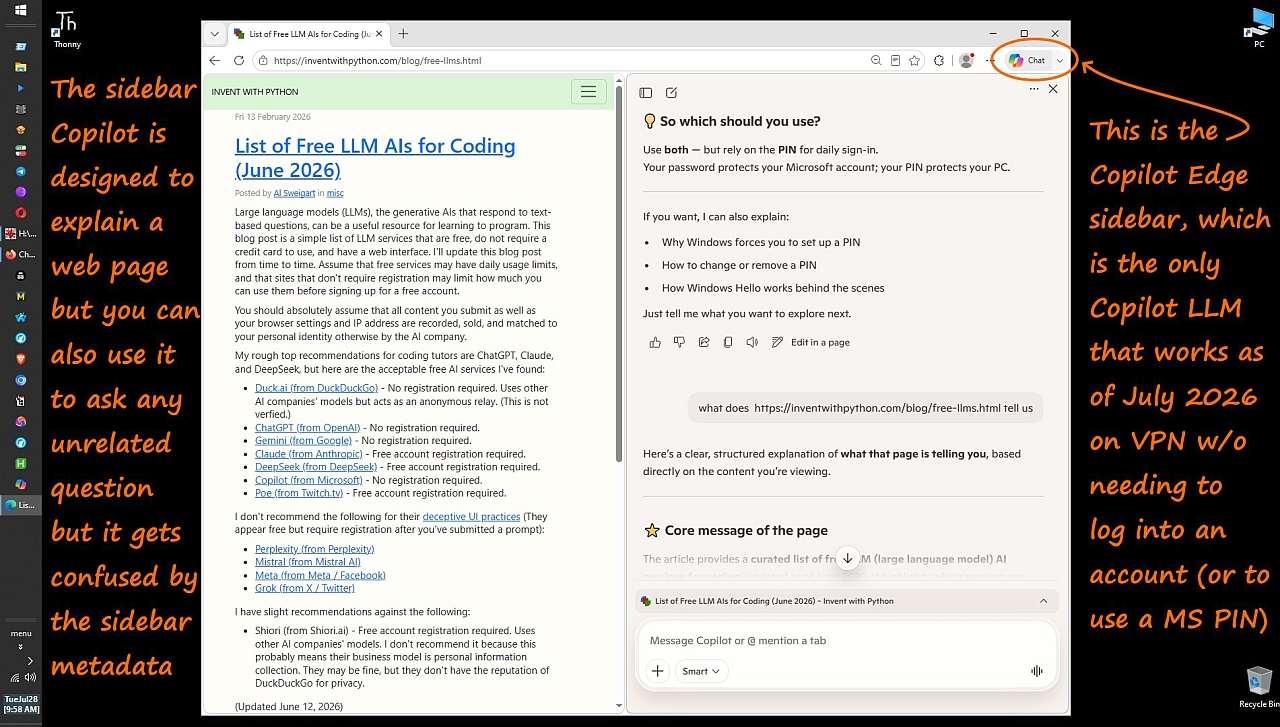
    Here is what that little chat icon looks like in my Windows Edge browser:
    <https://i.postimg.cc/brVq8DKH/copilot-sidebar.jpg>

    It works. On VPN. Sans login. But... it gets confused by sidebar metadata.

    My Task Bar also has a CoPilot icon, but that icon "doesn't know who I am". That would be an example of a path with a login requirement. At first, it made a fuss of installing itself, but now it sits there quietly.
    I think there was an MSOFFice365 CoPilot6 that made a fuss of
    installing itself, and I hunted that down and removed it (since
    M365 isn't rented/used on the machine and who wants a grumpy AI
    with nothing to play with).

    Yet, the MSEdge and its top-right-most icon, it knows my username, which implies that perhaps my usage of a PIN at startup time, counts as
    a login, and that's why I am not being pestered there. No policy change
    has occurred there recently.

    I don't fool with any other CoPilot portals, because if I were to do
    that, there would undoubtedly be some "side effect" I would later
    regret having triggered.

    There are many ways to run Copilot, some of which I tried as shown below.

    :: copilot.bat
    :: Launches Windows copilot without the mothership login being forced.
    :: ----------------------------------------------------------------------
    :: v1p3 20260726 (Firefox new-tab launch method)
    :: In July 2026, Copilot's server-side forced-login logic triggers whenever
    :: Copilot is launched from a redirect, a local server, a shortcut URL, or
    :: a fresh browser session that immediately navigates to Copilot. This causes
    :: the two-panel forced-login screen (left: "sign in to copilot", right: green
    :: blurry splash image). This is NOT the Edge sidebar; it is Copilot's own
    :: forced-login web mode.
    :: To bypass this, Firefox must already be running BEFORE Copilot is opened.
    :: Copilot must be opened in a NEW TAB inside an existing Firefox session.
    :: This produces a normal browsing context and avoids automation detection.
    :: Anonymous Copilot still works reliably ONLY in this pattern as of July 2026.
    ::
    :: v1p2 20260725 (Edge Copilot Sidebar Mode)
    :: In July 2026, Microsoft disabled most of the non-login copilot attempts.
    :: The Edge rule as of July 2026 is "If the URL is copilot.microsoft.com,
    :: then Edge overrides the launch and opens the Copilot sidebar".
    :: In July 2026, "Edge Copilot sidebar experience" overrides "use --app=",
    :: "use --new-window", "use --incognito", "use --guest",
    :: "use --disable-features" and "use --no-first-run".
    :: Edge now forcibly redirects any Copilot URL into the
    :: "Edge Copilot sidebar experience", which attaches page metadata,
    :: injects the Copilot sidebar, forces sign-in, forbids anonymous mode,
    :: forbids standalone windows and does not allow pure web Copilot.
    :: But Copilot can be used in an Edge sidebar session without logging
    :: into a mothership tracking account, but Edge metadata pollutes it.
    :: IsCurrent=true -> Edge Copilot sidebar
    :: IsCurrent=false -> copilot.microsoft.com
    :: edge_all_open_tabs = [
    :: { ... isCurrent=true },
    :: { pageTitle:"Microsoft Copilot: Your AI companion",
    :: pageUrl:"https://copilot.microsoft.com",
    :: tabId:1009037958,
    :: isCurrent:false } ]
    :: Luckily Firefox & Chromium should still allow anonymous Copilot.
    :: But Copilot's server-side redirect logic kicks in forcing the Edge
    :: Copilot sidebar mode, even though Copilot was launched inside Firefox.
    :: not the Edge sidebar.
    :: It's Copilot's forced-login web mode.
    ::
    :: v1p1 20251006 (what is this method called?)
    :: "C:\Program Files (x86)\Microsoft\Edge\Application\msedge.exe" ^
    :: --profile-directory=Default ^
    :: --app-id=aioglfahffbnednffnodjbiiojbochai ^
    :: --app-url=https://copilot.microsoft.com/ ^
    :: --app-run-on-os-login-mode=windowed ^
    :: --app-launch-source=19 ^
    :: --disable-features=msEdgeHubsSidebar,EdgeSidebar,SidePanel,EdgeSidePanel,SidePanelAutoExpand,SidePanelDragToOpen
    :: That sequences forces Edge into standalone app mode
    :: which disables the sidebar, disables the Copilot hub,
    :: disables the side panel, disables auto-expand, disables drag-to-open,
    :: and then launches Copilot as a PWA, bypassing login & metadata injection.
    ::
    :: v1p0 20250816 (what is this method called?)
    :: Launches Copilot w/o any login rquirements:
    :: "C:\Program Files (x86)\Microsoft\Edge\Application\msedge.exe" --app=https://copilot.microsoft.com/
    :: ----------------------------------------------------------------------
    @echo off

    :: v1p3 change: Remove Mongoose redirect entirely.
    :: Copilot now blocks redirect-based launches (forced-login mode).
    :: Firefox must start FIRST, then Copilot must open in a NEW TAB.

    :: Step 1 Launch Firefox normally (no URL)
    start "" "C:\app\browser\firefox\firefox.exe"

    :: Step 2 Give Firefox time to start up (2 seconds is too short)
    timeout /t 10 >nul

    :: Step 3 Open Copilot in a NEW TAB inside the running Firefox session
    :: This avoids automation detection and preserves anonymous mode.
    start "" "C:\app\browser\firefox\firefox.exe" -new-tab "https://copilot.microsoft.com"

    :: end of copilot.bat
    --
    We all strive to add privacy that marketing doesn't want us to have.
    --- Synchronet 3.22a-Linux NewsLink 1.2
  • From Maria Sophia@mariasophia@comprehension.com to alt.comp.os.windows-10,alt.comp.microsoft.windows,alt.comp.os.windows-11 on Tue Jul 28 10:46:44 2026
    From Newsgroup: alt.comp.os.windows-11

    Chris wrote:
    Maria Sophia <mariasophia@comprehension.com> wrote:
    Can anyone get Edge Copilot to work without logging in after July 2026?
    https://copilot.microsoft.com/


    Just use a local model and don't bother with any of the online ones. They will *always* use you as training data unless you pay for a firewalled
    model. Doesn't matter whether you login or not.

    Thanks for that idea, which, I agree, is the best way to run an LLM.

    I researched the local models and they're perfect except... except that
    they take a ton of disk space and seem to require a beefy machine.

    Dunno if my 2009 Windows 10 desktop can handle a local model but I do agree that's the way to go for someone like me who cares about privacy.

    I'll have to look into it 'cuz these web-page LLMs have gotten me hooked on
    the convenience, but, one by one, they've each started requiring a login.

    Looking it up, while other families exist (e.g., Qwen, DeepSeek, Gemma, Mistral), apparently Llama remains the most widely used on Windows.

    Disk space needed seems to be about 3-7 GB for an 8 billion parameters LLM model, and maybe around 30-40 GB for a 70 billion parameters LLM model.

    Parameters are the learned weights inside the neural network, where more parameters add deeper reasoning and stronger language ability.

    Apparently disk space depends on quantization (i.e., compression) though.

    Looking it up...
    The big problem is RAM where 64iV128 GB RAM is normal for local LLMs.
    The GPU needs to have VRAM starting at around 48 GB for local LLMs too.

    Apparently nost consumer GPUs (RTX 3060/3070/3080/4070/4080) will not work
    as we need workstation-class cards (i.e., RTX 6000 Ada, A100, H100, etc.).

    To check a Windows box for those requirements, these commands help:
    wmic cpu get name
    wmic memorychip get capacity
    systeminfo | find "Total Physical Memory"
    wmic path win32_VideoController get name

    In my case, my GPU has too little VRAM (2 GB) to run any modern model.
    Worse, my CPU lacks AVX2, which slows down inference significantly.
    Yet, my RAM (16 GB) is enough for small models but not medium or large.

    My machine might be able to run 3B-4B models though.
    a. Phi-4 mini
    b. Gemma 2 2B or 4B
    c. Qwen 2.5 3B

    That means my machine would likely only work with LM Studio or Ollama.
    If I were to choose a setup for my old, 2009 Windows 10 box, it may be
    a. LM Studio GUI
    b. Phi 4 mini (3.8B) models
    c. Which should work with ~2-3 GB disk & 16 GB RAM

    For now, I don't have the time to research how to install a local LLM.
    But if others are ahead of us, it would be good to know what they use.
    --
    Usenet allows purposefully helpful people to pool their experiences.
    --- Synchronet 3.22a-Linux NewsLink 1.2
  • From CoPilot User@invalid@invalid.invalid to alt.comp.os.windows-10,alt.comp.os.windows-11 on Tue Jul 28 19:02:32 2026
    From Newsgroup: alt.comp.os.windows-11

    On 28/07/2026 17:53, Maria Sophia wrote:
    Yup. The only time I ever set up an MSA was on a Windows S laptop, and that was before I learned you didn't need to create the MSA in order to convert
    it to Windows 10, and even so, I deleted the account immediately (although Microsoft took a month to actually wipe it off the face of the earth).

    Why did you do that? Was that account bothering you in any way?

    You should always use a separate account to log in to CoPilot, ChatGPT,
    and any other AI portals. While you don't need to use the email service,
    you should log in occasionally to delete any unwanted emails. You don't
    need to open any emails to do this. It's just a disposable account, so
    it's highly unlikely that Microsoft or Google will ever send you $1,000
    for using their services.
    --
    *Newsgroup Post *


    --- Synchronet 3.22a-Linux NewsLink 1.2
  • From Paul@nospam@needed.invalid to alt.comp.os.windows-10,alt.comp.microsoft.windows,alt.comp.os.windows-11 on Tue Jul 28 14:11:27 2026
    From Newsgroup: alt.comp.os.windows-11

    On Tue, 7/28/2026 1:09 PM, Chris wrote:
    Maria Sophia <mariasophia@comprehension.com> wrote:
    Can anyone get Edge Copilot to work without logging in after July 2026?
    https://copilot.microsoft.com/


    Just use a local model and don't bother with any of the online ones. They will *always* use you as training data unless you pay for a firewalled
    model. Doesn't matter whether you login or not.


    The one I'm using, runs fine with the network cable pulled.
    I think I've asked it three questions, since installing it
    six months ago. Definitely the wave of the future. The
    last question, took about four minutes to answer. This is a model
    that according to the description, is "sharp at science, not so
    good at current affairs".

    One of the limits on the local model (something I haven't figured out yet),
    is there is a claim of some sort of 4K token limit on input or output,
    whereas the "model designs" claim to have 128K tokens as a limit. This means
    in theory, I cannot drag and drop "War and Peace" into the query window.
    The thing will still engage "chunking" at a guess, when a text is offered,
    but the best way to offer text is via a web page URL. You could put some
    text into a pastebin for example. And hope the machine knows where
    the actual text sample is. Setting up a web server at 127.0.0.1
    should work for that.

    When a lot of things about running these are not explained,
    there are bound to be some troubling observations. And you cannot
    ask the machine anything that involves introspection. It doesn't
    know what is in the training set, or, what it ate for lunch :-)
    It's the very soul of disembodiment.

    "Dave, my mind is going. I can feel it." [Not really]

    Paul

    --- Synchronet 3.22a-Linux NewsLink 1.2
  • From Andy Burns@usenet@andyburns.uk to alt.comp.os.windows-10,alt.comp.microsoft.windows,alt.comp.os.windows-11 on Tue Jul 28 19:22:44 2026
    From Newsgroup: alt.comp.os.windows-11

    Maria Sophia wrote:

    Can anyone get Edge Copilot to work without logging in after July 2026?
    https://copilot.microsoft.com/

    I can chat to it within Edge (but not signed in by MSA) and within the
    Winn11 Copilot app (again not signed-in) but that URL wants a sign-in by microsoft, apple or google ...

    I find it knows a lot about eyesight issues, and has more time for
    giving detailed explanations than my optician does ...


    --- Synchronet 3.22a-Linux NewsLink 1.2
  • From Andy Burns@usenet@andyburns.uk to alt.comp.os.windows-10,alt.comp.microsoft.windows,alt.comp.os.windows-11 on Tue Jul 28 19:31:26 2026
    From Newsgroup: alt.comp.os.windows-11

    Andy Burns wrote:

    Maria Sophia wrote:

    Can anyone get Edge Copilot to work without logging in

    I find it knows a lot about eyesight issues, and has more time for
    giving detailed explanations than my optician does ...
    Gemini is broadly as good ...
    --- Synchronet 3.22a-Linux NewsLink 1.2
  • From Maria Sophia@mariasophia@comprehension.com to alt.comp.os.windows-10,alt.comp.microsoft.windows,alt.comp.os.windows-11 on Tue Jul 28 11:32:04 2026
    From Newsgroup: alt.comp.os.windows-11

    CoPilot User wrote:
    The only time I ever set up an MSA was on a Windows S laptop, and that
    was before I learned you didn't need to create the MSA in order to convert >> it to Windows 10, and even so, I deleted the account immediately (although >> Microsoft took a month to actually wipe it off the face of the earth).

    Why did you do that? Was that account bothering you in any way?

    You should always use a separate account to log in to CoPilot, ChatGPT,
    and any other AI portals. While you don't need to use the email service,
    you should log in occasionally to delete any unwanted emails. You don't
    need to open any emails to do this. It's just a disposable account, so
    it's highly unlikely that Microsoft or Google will ever send you $1,000
    for using their services.

    There are very useful tidbits for everyone to learn from in that post.

    First off, most people who "think" they're not logging into an LLM are.
    They just don't remember having logged into that LLM the first time.

    Secondly, I don't have any account set up on my Windows box, so it's
    impossible for me to 'accidentally' log into an LLM like they are doing.

    Thirdly, the reason I deleted the MSA was that I had mistakenly thought I
    had needed the MSA to change a Windows S machine to Windows 10 Home.

    Later, on other Windows S machines, I learned how to switch sans the MSA.

    Fourthly, regarding the good advice to use a separate login account for
    LLMs, that only solves half the problems (but it does solve that half).

    The first half is that the email address is not tied to your other
    activities, which is nice, so that half is solved by using a throwaway.

    But the second half is not solved by that method.

    The second half of the privacy problem is all LLM queries are tied to one account, and that is not solved by using a single throwaway email account.

    Still... it's a damn good idea for people who do log into LLMs.
    So I, for one, appreciate that you brought that up.

    Note: A lot of email accounts (like Google's GMail) barf on VPNs though.
    --
    Posted out of the goodness of my heart to help others who ask for advice.
    --- Synchronet 3.22a-Linux NewsLink 1.2
  • From Paul@nospam@needed.invalid to alt.comp.os.windows-10,alt.comp.microsoft.windows,alt.comp.os.windows-11 on Tue Jul 28 14:35:21 2026
    From Newsgroup: alt.comp.os.windows-11

    On Tue, 7/28/2026 1:46 PM, Maria Sophia wrote:

    That means my machine would likely only work with LM Studio or Ollama.
    If I were to choose a setup for my old, 2009 Windows 10 box, it may be
    a. LM Studio GUI
    b. Phi 4 mini (3.8B) models
    c. Which should work with ~2-3 GB disk & 16 GB RAM

    For now, I don't have the time to research how to install a local LLM.
    But if others are ahead of us, it would be good to know what they use.


    It's simple. Install LMStudio.

    Then, look for a model in the list of open weight models it has.
    Go and research the options it offers, for the one you think
    will work in your setup. You could start with a Gemma 2.4B or 4B
    for example, which should run on just about anything.

    Inference can be done purely on the CPU, and it doesn't even
    necessarily make good usage of the CPU. I'm running mine on
    the CPU, as my GPU is not good enough for most all of them.

    The model description, if it is a mixture of experts,
    will tell you how big one of the mixture elements is.
    The download files could be 58GB, while the MOE might
    take 20GB of VRAM. And that would tell you what kind
    of video card could be used. For example, the biggest Kimi
    model, is 100GB+ for VRAM, so an RTX6000 at 96GB would not
    be enough. It would take two RTX6000, and you have to
    go off and research whether your video card choice supports
    "sharding". Sharding does not apparently always work well.
    And depending on the video card brand, may not work at all.
    If a mixture of experts had different sizes models, it might
    manage to run one model per video card.

    It takes maybe a minute to load a large model, and it is
    not purely I/O constrained. Initially it works at
    the I/O rate, but once it gets to about 80% of the model
    loaded, things slow down for some reason.

    You don't need to do much, to get a text query window running.
    It will be a lot harder, to research what exactly it is doing.
    At the lower level, there is matrix math. At a higher level,
    there is a strategy planner, and an ordered list of Experts
    to run. And a few models, do not use a strategy planner, and
    they bind an Expert to each token. The output rate on that one,
    is well below 1 token per second, the approach then being a
    "novelty" rather than being practical.

    Paul
    --- Synchronet 3.22a-Linux NewsLink 1.2
  • From Maria Sophia@mariasophia@comprehension.com to alt.comp.os.windows-10,alt.comp.microsoft.windows,alt.comp.os.windows-11 on Tue Jul 28 12:04:29 2026
    From Newsgroup: alt.comp.os.windows-11

    Andy Burns wrote:
    Can anyone get Edge Copilot to work without logging in after July 2026?
    https://copilot.microsoft.com/

    I can chat to it within Edge (but not signed in by MSA) and within the Winn11 Copilot app (again not signed-in) but that URL wants a sign-in by microsoft, apple or google ...

    Hi Andy,

    This is a big deal, IMHO, because Microsoft DID NOT DOCUMENT this anywhere.

    A lot of people "think" they're not signed in, but a lot of them are.
    AFAIK, Windows 11 Copilot always requires identity
    It just inherits your Windows sign-in identity silently.
    a. Either with a sign into Windows with an MSA
    b. Or with a local account + PIN + an MSA added in Settings

    But I could be wrong as I don't use Windows 11, so I will defer to others.

    On Win10, up until about a week or two ago, I could just point Edge to
    https://copilot.microsoft.com/
    And it asked me to log in, but I brushed it away, and it worked.

    Every once in a while (about ever ten turns or so), it asked again.
    And I just brushed it away. This, I've been doing, for many months.

    But only recently, it requires me to log in (unless I use the sidebar).
    <https://i.postimg.cc/brVq8DKH/copilot-sidebar.jpg>
    You say you use the "Windows 11 copilot app", but that's not on Win10.

    Looking it up, apparently there are 5 ways to run Copilot on Windows
    a. Windows 11 has all 5
    b. Windows 10 has 3 of the 5

    As far as I can find out by searching, these are the five ways:
    1. Copilot in the Edge sidebar (Windows 10 & 11)
    (this is what I'm currently using which does not require an account)
    2. Copilot at copilot.microsoft.com (Windows 10 & 11)
    (on the Firefox group, nobody can get this to work anymore sans login)
    3. Copilot in Microsoft 365 apps (Windows 10 & 11)
    (for those on 365 subscriptions, requires Entra ID only)
    4. Copilot built into Windows (Windows 11 only)
    (this seems to be what you're using without needing to log into it)
    5. Copilot key on new keyboards (Windows 11 only)
    (but all it does is bring up the built-in copilot on Windows 11)

    So, based on number 4 above (and number 5), you're probably using that.
    But it's my understanding, all but the first one need an account.
    a. Either an MSA (or PIN, according to Paul's posts)
    b. Or EntraID (previously Azure AD)
    c. When I go to https://copilot.microsoft.com/, it says...
    a. Sign in to Copilot
    Upload files, use Voice without limits, and make Copilot
    yours with memory across conversations.
    b. Sign in with Microsoft
    c. Sign in with Apple (who passes a token to Microsoft)
    d. Sign in with Google (who also passes a token to Microsoft)

    As far as I can tell, only the Edge browser allows the Edge sidebar.
    AFAICT, Microsoft still allows the sidebar to operate without identity.

    But I'm not aware of any other way to run Edge w/o an identity.
    Are you sure there is no identity being used when you use Win11 Copilot?

    I find it knows a lot about eyesight issues, and has more time for
    giving detailed explanations than my optician does ..

    It's pretty good with pool chemistry also.

    I posted a long 22-turn chat, for example, on the Firefox newsgroup.
    Newsgroups: alt.comp.software.firefox
    Subject: Re: Recently, did your Firefox stop using Microsoft Copilot in anonymous mode?
    Date: Mon, 27 Jul 2026 17:46:02 -0700
    Message-ID: <1148u49$87l$1@nnrp.usenet.blueworldhosting.com>
    --
    Usenet allows purposefully helpful people to pool their experiences.
    --- Synchronet 3.22a-Linux NewsLink 1.2
  • From Maria Sophia@mariasophia@comprehension.com to alt.comp.os.windows-10,alt.comp.microsoft.windows,alt.comp.os.windows-11 on Tue Jul 28 12:15:14 2026
    From Newsgroup: alt.comp.os.windows-11

    Andy Burns wrote:
    Maria Sophia wrote:

    Can anyone get Edge Copilot to work without logging in

    I find it knows a lot about eyesight issues, and has more time for
    giving detailed explanations than my optician does ...
    Gemini is broadly as good ...

    The problem with Gemini, in my experience, is it sucks with VPN.
    https://gemini.google.com/
    So I haven't tried Gemini in a long while. But I'll try anew.

    OK. In Edge, I went to Gemini and asked a question.
    <https://gemini.google.com/app/ce21155543b1f6e4>
    Notice that it gave me a session identifier


    But I don't see a Google-authenticated token.

    Dunno if things changed, but I'm now running Gemini in Edge on VPN.
    I've had three turns and it's working so far so that's good to know.
    --- Synchronet 3.22a-Linux NewsLink 1.2
  • From Andy Burns@usenet@andyburns.uk to alt.comp.os.windows-10,alt.comp.microsoft.windows,alt.comp.os.windows-11 on Tue Jul 28 20:21:10 2026
    From Newsgroup: alt.comp.os.windows-11

    Maria Sophia wrote:

    A lot of people "think" they're not signed in, but a lot of them are.
    AFAIK, Windows 11 Copilot always requires identity
    It just inherits your Windows sign-in identity silently.
    a. Either with a sign into Windows with an MSA
    b. Or with a local account + PIN + an MSA added in Settings

    Mine is a local account, and i checked on Microsoft Store that I wasn't
    seen as logged-in... However... the Win11 App version of Copilot was
    using a remembered MSA, once I signed that out, it no longer wanted to
    chat with me ...

    --- Synchronet 3.22a-Linux NewsLink 1.2
  • From Maria Sophia@mariasophia@comprehension.com to alt.comp.os.windows-10,alt.comp.microsoft.windows,alt.comp.os.windows-11 on Tue Jul 28 12:41:31 2026
    From Newsgroup: alt.comp.os.windows-11

    Paul wrote:
    They don't really use cookies. You'll notice when a web page
    accuses you of shutting off the cookies, that the cookies are
    actually wide open.

    I think everyone thinks they're not logging in because Microsoft made the
    login part so transparent that it might have happened many years ago.

    And it's just remembered....

    I just realized Edge uses a profile, whether or not you want it.
    Edge:3dots (top right) > Settings > hamburger (top left) > Profiles

    Mine says "Profile 1", which I then pressed the trash can to delete.
    It came back. edge://settings/profiles {Default,Profile1}

    Looking it up, you can't use Edge without a profile.
    So everyone has, at least, Profile 1 and Default (I think)...
    %localappdata%\Microsoft\Edge\User Data\ (their profile name)

    So, even though I never logged into anything on Edge, I have:
    %localappdata%\Microsoft\Edge\User Data\Profile1
    But the date on everything is today, so it's all new stuff.
    But, I also have this, which contains data from years ago! :(
    %localappdata%\Microsoft\Edge\User Data\Default

    Even though the edge main data directory contains old stuff
    %localappdata%\Microsoft\Edge\User Data\

    I am about to run the nuclear option to ensure profiles are gone.
    taskkill /IM msedge.exe /IM msedgewebview2.exe /IM crashpad_handler.exe /F
    rmdir /S /Q "%localappdata%\Microsoft\Edge\User Data"

    Wish me luck.
    --- Synchronet 3.22a-Linux NewsLink 1.2
  • From Andy Burns@usenet@andyburns.uk to alt.comp.os.windows-10,alt.comp.microsoft.windows,alt.comp.os.windows-11 on Tue Jul 28 20:46:02 2026
    From Newsgroup: alt.comp.os.windows-11

    Maria Sophia wrote:

    I just realized Edge uses a profile, whether or not you want it.
    Edge:3dots (top right) > Settings > hamburger (top left) > Profiles

    Mine says "Profile 1", which I then pressed the trash can to delete.
    It came back. edge://settings/profiles {Default,Profile1}

    Looking it up, you can't use Edge without a profile.

    You can use a Guest instead of Profie1
    --- Synchronet 3.22a-Linux NewsLink 1.2
  • From Maria Sophia@mariasophia@comprehension.com to alt.comp.os.windows-10,alt.comp.microsoft.windows,alt.comp.os.windows-11 on Tue Jul 28 13:18:08 2026
    From Newsgroup: alt.comp.os.windows-11

    Andy Burns wrote:
    I just realized Edge uses a profile, whether or not you want it.
    Edge:3dots (top right) > Settings > hamburger (top left) > Profiles

    Mine says "Profile 1", which I then pressed the trash can to delete.
    It came back. edge://settings/profiles {Default,Profile1}

    Looking it up, you can't use Edge without a profile.

    You can use a Guest instead of Profie1

    Hi Andy,

    I trust you, Chris, Paul and a few others because you're reliable.
    I noticed you found out you were logged into an old MSA.
    I think a lot of people don't realize that.

    I, for one, didn't realize I had a "Default" and "Profile1" profile.
    So, to wipe them clean, I ran the tactical dirty nuclear bomb option:
    taskkill /IM msedge.exe /IM msedgewebview2.exe /IM crashpad_handler.exe /F
    rmdir /S /Q "%localappdata%\Microsoft\Edge\User Data"

    Somehow it created on my otherwise clean desktop, a new icon for Edge
    called "Microsoft Edge.lnk" with the target below that I never use:
    Target="C:\Program Files (x86)\Microsoft\Edge\Application\msedge.exe"
    (all my targets are customized)

    When I click it, I get a splash page:
    "Welcome to Microsoft Edge, the best-performing browser on Windows"
    "Let's start by signing you in and bringing over your passwords,
    history, and more."
    Buttons are:
    [Sign in to sync data]
    [Start without your data]
    With a link below that
    Microsoft Privacy Statement <https://go.microsoft.com/fwlink/?LinkId=521839>

    There is no guest option. I have no choice. I can't X the window away.
    I'll choose [Start without your data] where it now says:
    "Stay current with your browsing data
    Enjoy uninterrupted browsing in Microsoft Edge by always having access
    to favorites, history, cookies, and more from your other browser."

    There's a circle checked that says:
    "Bring over your data from other browsers regularly.
    You can manage your preferences any time in Settings.
    Manage (which brings you to options you can manage)

    The only option I have is a button for [Confirm and continue].
    (and the Microsoft Privacy Statement link)

    Now it asks:
    "Help us make Microsoft experiences more useful to you
    Allow Microsoft to save your browsing activity including history, usage,
    favorites, web content, and other browsing data to personalize and
    improve Microsoft Edge and Microsoft services like ads, search,
    shopping, news, and Copilot."
    To which I uncheck:
    Make your Microsoft experience more useful to you. Learn more
    Again, I have no choice but to hit the button
    [Confirm and start browsing]
    Which brings me to Edge with two tabs open:
    edge://customize/
    https://explore.microsoft.com/en-us/edge/welcome?form=MT00LJ&form=MT004A&sg=0&OCID=MT004A&cs=3247653286

    I have no idea what just happened. But let's look for profiles.
    Win+R > %localappdata%\Microsoft\Edge\User Data\
    There is a "Default", created today, but no Profile1 in that location.
    %localappdata%\Microsoft\Edge\User Data\Default

    There are very dangerous options which are set on by default.
    I think some of these are why people "think" they never logged in.

    Settings > Import browser data > {chrome, IE11, Firefox, etc.)
    Settings > Profile preferences >
    Automatic sign in on Edge = yes/no (default is yes)
    Allow single sign-on for work or school sits = yes/no (default yes)
    Share browsing data with other Windows features = yes/no (def yes)

    And of course, a myriad of settings that affect privacy which
    I won't list but all of which default to the wrong choice.such
    as opting to send Microsoft data "to improve the experience".

    One of the defaults I left was in Privacy, search, and services:
    Copilot and AI > Show Copilot button in toolbar = on (default)
    Copilot new tab page = off (default)

    Going to edge://settings/help it says
    Updating Microsoft Edge Version 150.0.4078.99 (Official build) (64-bit)

    I didn't see a "Guest" option yet though. Even in the Profile section.


    --- Synchronet 3.22a-Linux NewsLink 1.2
  • From Chris@ithinkiam@gmail.com to alt.comp.os.windows-10,alt.comp.microsoft.windows,alt.comp.os.windows-11 on Tue Jul 28 20:43:52 2026
    From Newsgroup: alt.comp.os.windows-11

    Maria Sophia <mariasophia@comprehension.com> wrote:
    Chris wrote:
    Maria Sophia <mariasophia@comprehension.com> wrote:
    Can anyone get Edge Copilot to work without logging in after July 2026?
    https://copilot.microsoft.com/


    Just use a local model and don't bother with any of the online ones. They
    will *always* use you as training data unless you pay for a firewalled
    model. Doesn't matter whether you login or not.

    Thanks for that idea, which, I agree, is the best way to run an LLM.

    I researched the local models and they're perfect except... except that
    they take a ton of disk space and seem to require a beefy machine.

    Dunno if my 2009 Windows 10 desktop can handle a local model but I do agree that's the way to go for someone like me who cares about privacy.

    I'll have to look into it 'cuz these web-page LLMs have gotten me hooked on the convenience, but, one by one, they've each started requiring a login.

    Well, then. Looks like you're going to have put a price on your desire for "privacy".

    Looking it up, while other families exist (e.g., Qwen, DeepSeek, Gemma, Mistral), apparently Llama remains the most widely used on Windows.

    Disk space needed seems to be about 3-7 GB for an 8 billion parameters LLM model, and maybe around 30-40 GB for a 70 billion parameters LLM model.

    Parameters are the learned weights inside the neural network, where more parameters add deeper reasoning and stronger language ability.

    Apparently disk space depends on quantization (i.e., compression) though.

    Looking it up...
    The big problem is RAM where 64-iV128 GB RAM is normal for local LLMs.
    The GPU needs to have VRAM starting at around 48 GB for local LLMs too.

    Apparently nost consumer GPUs (RTX 3060/3070/3080/4070/4080) will not work
    as we need workstation-class cards (i.e., RTX 6000 Ada, A100, H100, etc.).

    Lol no. That's the spec for *training* an LLM. Running an LLM requires a
    lot less.

    --- Synchronet 3.22a-Linux NewsLink 1.2
  • From Maria Sophia@mariasophia@comprehension.com to alt.comp.os.windows-10,alt.comp.microsoft.windows,alt.comp.os.windows-11 on Tue Jul 28 14:30:50 2026
    From Newsgroup: alt.comp.os.windows-11

    Maria Sophia wrote:
    I didn't see a "Guest" option yet though. Even in the Profile section.

    Augh. I didn't see it 'cuz it wasn't there.
    I looked it up.

    "Browse as Guest" shows up if you click the empty top-right avatar.
    Looking it up, Guest mode is a temporary, disposable profile.

    It's not tied to any account, and it doesn't change the default.
    And, apparently it forgets everything once we close the session.

    The odd thing is that Guest mode doesn't have the sidebar chat icon. Interestingly, since every thread should be a learning experience,
    the InPrivate mode does have the Edge sidebar icon at top right.

    To get into InPrivate mode, press Control+N or select the three dots
    to the top right and select "New InPrivate Window" from the menu.

    So, it seems the simplest test for not logging into Edge, is to use Guest
    mode, as Andy suggested, but the simplest test of the sidebar edge chat
    (which still doesn't require logging in) is with Edge InPrivate mode.
    --
    Every Usenet thread should be designed as a learning experience for all.
    --- Synchronet 3.22a-Linux NewsLink 1.2
  • From ant@ant@zimage.comANT (Ant) to alt.comp.os.windows-10,alt.comp.microsoft.windows,alt.comp.os.windows-11 on Wed Jul 29 00:07:22 2026
    From Newsgroup: alt.comp.os.windows-11

    Same without using Edge. MS really want users to log in. :(


    In alt.comp.microsoft.windows Maria Sophia <mariasophia@comprehension.com> wrote:
    Can anyone get Edge Copilot to work without logging in after July 2026?
    https://copilot.microsoft.com/

    As of this month, whenever I use MS Edge to go to Copilot, no matter what tricks I use, it wants me to immediately log into a mothership account.

    I can only find one trick that still works, and it only works in Edge.
    But with no other browser can I get copilot to not ask for a login now.

    Q: Other than sidebar Copilot, did you Copilot in Edge just recently ask
    for a login to a mothership account every time you go to it using Edge?

    NB: A separate thread on the Firefox ng shows nobody can do it there.
    Newsgroups: alt.comp.software.firefox
    Subject: Recently, did your Firefox stop using Microsoft Copilot in anonymous mode?
    Date: Sun, 26 Jul 2026 14:00:07 -0700
    Message-ID: <1145sgm$1cju$1@nnrp.usenet.blueworldhosting.com>
    --
    "I press on toward the goal to win the prize for which God has called me heavenward in Christ Jesus." --Philippians 3:14. When does this old ant get it? Note: A fixed width font (Courier, Monospace, etc.) is required to see this signature correctly.
    Note: A fixed width font (Courier, Monospace, etc.) is required to see this signature correctly.
    /\___/\ Ant(Dude) @ http://aqfl.net & http://antfarm.home.dhs.org.
    / /\ /\ \ Please nuke ANT if replying by e-mail.
    | |o o| |
    \ _ /
    ( )
    --- Synchronet 3.22a-Linux NewsLink 1.2
  • From Paul@nospam@needed.invalid to alt.comp.os.windows-10,alt.comp.microsoft.windows,alt.comp.os.windows-11 on Tue Jul 28 22:15:01 2026
    From Newsgroup: alt.comp.os.windows-11

    On Tue, 7/28/2026 4:43 PM, Chris wrote:
    Maria Sophia <mariasophia@comprehension.com> wrote:
    Chris wrote:
    Maria Sophia <mariasophia@comprehension.com> wrote:
    Can anyone get Edge Copilot to work without logging in after July 2026? >>>> https://copilot.microsoft.com/


    Just use a local model and don't bother with any of the online ones. They >>> will *always* use you as training data unless you pay for a firewalled
    model. Doesn't matter whether you login or not.

    Thanks for that idea, which, I agree, is the best way to run an LLM.

    I researched the local models and they're perfect except... except that
    they take a ton of disk space and seem to require a beefy machine.

    Dunno if my 2009 Windows 10 desktop can handle a local model but I do agree >> that's the way to go for someone like me who cares about privacy.

    I'll have to look into it 'cuz these web-page LLMs have gotten me hooked on >> the convenience, but, one by one, they've each started requiring a login.

    Well, then. Looks like you're going to have put a price on your desire for "privacy".

    Looking it up, while other families exist (e.g., Qwen, DeepSeek, Gemma,
    Mistral), apparently Llama remains the most widely used on Windows.

    Disk space needed seems to be about 3-7 GB for an 8 billion parameters LLM >> model, and maybe around 30-40 GB for a 70 billion parameters LLM model.

    Parameters are the learned weights inside the neural network, where more
    parameters add deeper reasoning and stronger language ability.

    Apparently disk space depends on quantization (i.e., compression) though.

    Looking it up...
    The big problem is RAM where 64-iV128 GB RAM is normal for local LLMs.
    The GPU needs to have VRAM starting at around 48 GB for local LLMs too.

    Apparently nost consumer GPUs (RTX 3060/3070/3080/4070/4080) will not work >> as we need workstation-class cards (i.e., RTX 6000 Ada, A100, H100, etc.).

    Lol no. That's the spec for *training* an LLM. Running an LLM requires a
    lot less.


    A Google, seems to dig up tables of such info.

    https://www.spheron.network/blog/gpu-memory-requirements-llm/

    Quick Answer: How Much VRAM Do You Need for an LLM?

    As a rule of thumb, an LLM needs about 2 GB of VRAM per billion parameters at FP16,
    or roughly 0.5 GB per billion at INT4, plus 15-20% on top for the KV cache, activations,
    and framework overhead.

    So a 7B model fits in ~16-20 GB, a 70B model needs ~140-170 GB at FP16 (or ~46 GB at INT4),
    and a 685B model like DeepSeek V3.2 needs ~822 GB at FP8.

    Model size FP16 VRAM INT4 VRAM Smallest GPU setup that runs it
    7-8B ~16-20 GB ~6-7 GB 1x RTX 4090 (24 GB)
    13-14B ~34 GB ~10 GB 1x RTX 5090 (32 GB), INT4
    32B ~76 GB ~22 GB 1x RTX 4090/5090 (24-32 GB), INT4

    70-72B ~168-172 GB ~46-47 GB 1x L40S (48 GB) at INT4, or 1x B300 at FP16
    109-123B ~262-295 GB ~66-75 GB 1x H100 (80 GB), INT4

    400B+ MoE ~960 GB+ ~240 GB+ 1x B300 (288 GB) or 4x H100, INT4 {forgetaboutit territory]
    685B MoE ~1.6 TB ~411 GB 8x H100 / 8x H200 at FP8

    The same web site, has this on a separate page.

    GPU Requirements: VRAM, Memory, and Storage
    Variant Precision VRAM
    GPT-OSS 20B BF16 ~42 GB
    GPT-OSS 20B FP8 ~21 GB
    GPT-OSS 120B MoE MXFP4 ~60 GB <=== running on Big Machine 128GB system RAM (no GPU) [58GB download]
    GPT-OSS 120B MoE BF16 TP4 ~240 GB

    *******

    My recommendation, is start with a small model, like a Gemma 2.4B or 4B, see how much RAM it takes to run, as a "calibration" of some of these tables.

    On Linux, the LMStudio was an AppImage. Just download it and run it.
    AppImage is a kind of container, similar to FlatPak or SNAP.

    This is not the latest, I checked the browser on the machine, to see where
    I got the AppImage from. This would be a few months out of date.

    https://installers.lmstudio.ai/linux/x64/0.4.12-1/LM-Studio-0.4.12-1-x64.AppImage

    The Harmony package isn't theirs, so it comes from somewhere as well. You will see that item listed in my downloads, in the picture below.

    In any case, you don't have to know a lot to use it. That's the whole idea. Load an open-weights model, give it a try. In this case, with the 60GB model loaded, system RAM consumption is in the 80GB range. So there's a bit of overhead on system RAM. If the Mixture of Experts were loaded to a video card, the size for that is less, but it's generally going to bust any video card
    you can afford. This is where the machines with a low end iGPU that maps
    96GB of system RAM for the GPU, comes in handy, as you buy a 128GB machine for $3K-$6K, it isn't as fast as an RTX6000, but it also doesn't cost $15K just
    for the video card with 96GB of fast VRAM. Apple this week, is apparently playing with the idea of leasing things like a Mac Studio, as a solution
    for the RAM cost/availability issue.

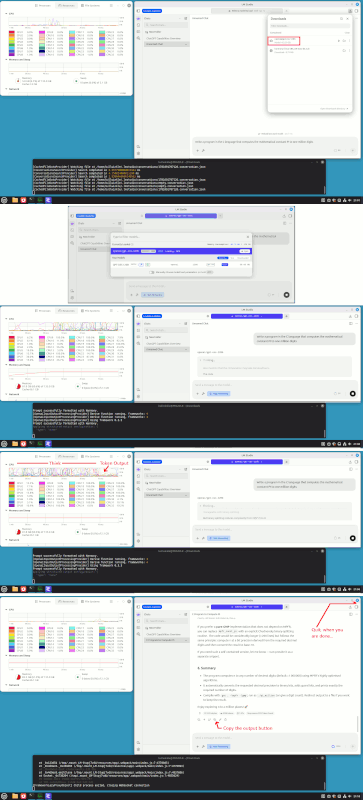
    [Picture] Paul uses his LLM-AI...

    https://i.postimg.cc/qqXCTQ7V/LMStudio-memory-usage.gif

    https://imgur.com/a/1s2JZcv

    A short sampling of the C code it wrote. Yes, it cheated.
    What was I thinking :-) Oh, yeah, this was a simulation.

    /* -------------------------------------------------------------
    * 2) Convert decimal digits raA binary precision.
    *
    * bits ree digits |u logree(10)
    * Add a safety margin (64rC>bits ree 20 extra decimal digits).
    * ------------------------------------------------------------- */
    const double LOG2_10 = 3.32192809488736234787; /* exact enough */
    mpfr_prec_t prec = (mpfr_prec_t)ceil(dec_digits * LOG2_10) + 64;

    /* -------------------------------------------------------------
    * 2) Initialise MPFR with the required precision.
    * ------------------------------------------------------------- */
    mpfr_set_default_prec(prec);
    mpfr_t pi;
    mpfr_init(pi); /* allocates space for a variable of 'prec' bits */

    /* -------------------------------------------------------------
    * 3) Compute -C. MPFR's const_pi uses a very fast AGMrCabased method <=== as a student, it always cheated at school...
    * and returns a correctly rounded value (roundrCatorCanearest). My fault for not slapping it around a bit...
    * ------------------------------------------------------------- */
    mpfr_const_pi(pi, MPFR_RNDN); /* MPFR_RNDN = round to nearest */

    With a good deal more effort, I could convince it to use
    one of the better PI algo that have been invented. Instead
    of using an infinite precision library that happens to have available
    to it, the "constant" PI. Cheating with ArcTan, might take longer.

    Paul
    --- Synchronet 3.22a-Linux NewsLink 1.2
  • From Paul@nospam@needed.invalid to alt.comp.os.windows-10,alt.comp.microsoft.windows,alt.comp.os.windows-11 on Tue Jul 28 22:46:59 2026
    From Newsgroup: alt.comp.os.windows-11

    On Tue, 7/28/2026 8:07 PM, Ant wrote:
    Same without using Edge. MS really want users to log in. :(


    In alt.comp.microsoft.windows Maria Sophia <mariasophia@comprehension.com> wrote:
    Can anyone get Edge Copilot to work without logging in after July 2026?
    https://copilot.microsoft.com/

    As of this month, whenever I use MS Edge to go to Copilot, no matter what
    tricks I use, it wants me to immediately log into a mothership account.

    I can only find one trick that still works, and it only works in Edge.
    But with no other browser can I get copilot to not ask for a login now.

    Q: Other than sidebar Copilot, did you Copilot in Edge just recently ask
    for a login to a mothership account every time you go to it using Edge?

    NB: A separate thread on the Firefox ng shows nobody can do it there.
    Newsgroups: alt.comp.software.firefox
    Subject: Recently, did your Firefox stop using Microsoft Copilot in anonymous mode?
    Date: Sun, 26 Jul 2026 14:00:07 -0700
    Message-ID: <1145sgm$1cju$1@nnrp.usenet.blueworldhosting.com>


    That's understandable, once you consider the attack surface
    these projects offer to the not-so-honest public.

    1) Commercial usage of a consumer test item.
    They also offer a commercial version, paid tokens, and they have
    to implement a usage counter to stop abuse. If you do enough free
    queries, I bet you'll get stopped eventually.

    2) It's a lot like running a USENET News server without authentication,
    and then being surprised when the server is filled with sporge or a flood.
    Authentication makes it easier to track abuse or note abuse patterns.
    Like when Kimi is scraping your datacenter. Or OpenAI is attacking Huggingface.
    Or... you get the idea.

    I don't particularly blame them for having some amount of tracking
    on the activity.

    You can always run a local model, if you don't like this. Scroll down, to the text section.

    https://lmstudio.ai/docs/app/system-requirements

    Start with a small model, and see if the speed bothers you. I get 9.7 tokens per second
    or so, as an output speed. The best machine you can buy, is estimated
    to produce 3000 tokens per second, or 300x faster roughly. That's what
    running locally (without a GPU...) buys you. Not all the machines Microsoft runs, are even remotely that fast. They have experimented with inference
    on "old beaters", less than optimal boxes. I've had a couple sessions
    that seemed excessively slow. But that's what I expect them to do, is
    calibrate the service. Sometimes the thinking stage is so fast, you
    don't even know half the output tokens have already been emitted,
    and you have to scroll down to see how much progress it has made.

    And I don't do a lot of these local sessions. For this discussion thread,
    I have done my fourth query, which was to write a C program, which it did.
    I did not constrain the problem enough, for a practical output. The
    problem is, I attempted to "type in a one-liner", and that's a mistake.

    And this is a reminder about working style.

    Take a text editor. Prepare your query. Add guard statements and
    anti-cheat text. Think about all the holes that are left in the
    query. Spend ten minutes if you have to...

    Then, paste the paragraph of text, into the query box. Press
    the "Up Arrow" icon on the right of the pasted text, to start the query.

    Preparing the query in an offline manner, helps you write better
    queries. Which is important if you are paying for the tokens.
    "If you shoot from the hip, you get shit for answers..."

    Paul

    --- Synchronet 3.22a-Linux NewsLink 1.2
  • From Andy Burns@usenet@andyburns.uk to alt.comp.os.windows-10,alt.comp.microsoft.windows,alt.comp.os.windows-11 on Wed Jul 29 08:12:50 2026
    From Newsgroup: alt.comp.os.windows-11

    Maria Sophia wrote:

    I didn't see a "Guest" option yet though. Even in the Profile section.

    Maybe a win11 difference then, I presume you get an avatar (grey
    anonymous) in the Edge toolbar? what's at the bottom of the list if you
    click it, here it's "browse as guest"
    --- Synchronet 3.22a-Linux NewsLink 1.2
  • From Maria Sophia@mariasophia@comprehension.com to alt.comp.os.windows-10,alt.comp.microsoft.windows,alt.comp.os.windows-11 on Wed Jul 29 01:44:21 2026
    From Newsgroup: alt.comp.os.windows-11

    Andy Burns wrote:
    I didn't see a "Guest" option yet though. Even in the Profile section.

    Maybe a win11 difference then, I presume you get an avatar (grey
    anonymous) in the Edge toolbar? what's at the bottom of the list if you click it, here it's "browse as guest"

    Thanks. I subsequently found Guest mode, under the avatar (as you noted).
    <Message-ID: <114b728$ugv$1@nnrp.usenet.blueworldhosting.com>

    The Guest mode isn't allowed to use the no-login Copilot sidebar.
    If the Guest mode wants to use Copilot, it has to log into an account.
    <https://copilot.microsoft.com/>

    However, "InPrivate" mode is allowed to use the no-login Copilot sidebar.

    To get into InPrivate mode, press Control+N or select the three dots
    to the top right and select "New InPrivate Window" from the menu.

    Pretty much, I think we've all concluded there is no way, today, to use
    Copilot sans an account other than via the copilot sidebar mechanism.
    --
    It takes a different kind of person to notice what nobody else can see.
    --- Synchronet 3.22a-Linux NewsLink 1.2
  • From Maria Sophia@mariasophia@comprehension.com to alt.comp.os.windows-10,alt.comp.microsoft.windows,alt.comp.os.windows-11 on Wed Jul 29 02:23:49 2026
    From Newsgroup: alt.comp.os.windows-11

    UPDATE:

    As of July 2026, Microsoft seems to have secretly enforced server-side redirects such that there is no way to use it sans login except via a
    special Microsoft-supplied Edge-only mechanism called a "sidebar chat".

    Here is a short summary of the various modes we've discussed in this thread.
    1. Regular mode (requires MSA, Google, or Apple account, or PIN, EntraID)
    2. Guest mode (requires MSA, Google, or Apple account, or PIN, EntraID)
    3. InPrivate mode (requires MSA, Google, or Apple account, or PIN, EntraID)
    4. Sidebar mode (uses a lightweight token tied to the browser session)
    5. 365 mode in apps (requires EntraID, formerly called Azure AD)
    6. Built-in mode (Win11 only, requires MSA, Google, or Apple account, or PIN, EntraID)

    See also the Firefox discussion of this topic, but with respect to Mozilla.
    Newsgroups: alt.comp.software.firefox
    Subject: Recently, did your Firefox stop using Microsoft Copilot in anonymous mode?
    Date: Sun, 26 Jul 2026 14:00:07 -0700
    Message-ID: <1145sgm$1cju$1@nnrp.usenet.blueworldhosting.com>

    The tentative conclusion, as of July 2026:
    a. Microsoft has quietly enforced server-side identity requirements for Copilot.
    b. Anonymous Copilot access is now blocked everywhere except the Edge sidebar.
    c. The Edge sidebar uses a special token mechanism that is not the same as normal login.
    d. All other Copilot entry points now require MSA, Google, Apple, PIN, or Entra ID.
    e. Microsoft did not document this change.

    Regular mode refers to a normal Edge/Chrome/Firefox window.
    A. Anonymous access is blocked as of July 2026
    B. You must sign in with:
    a. Microsoft Account (MSA)
    b. Google account (OAuth token passed to Microsoft)
    c. Apple account (OAuth token passed to Microsoft)
    d. Entra ID (enterprise)
    e. Windows Hello PIN (only if tied to an MSA/Entra ID)
    C. This is the same for all browsers, including Mozilla Firefox.

    Guest mode refers to a special non-signed-in Edge-browser profile
    a. Guest mode used to bypass identity prompts prior to July 2026
    b. But as of July 2026, Microsoft now enforces identity even in Guest mode.
    c. Now requires MSA / Google / Apple / Entra ID / PIN

    InPrivate mode refers to Edge's private browsing window (Ctrl+Shift+N).
    a. Now requires MSA / Google / Apple / Entra ID / PIN

    Sidebar mode refers to a panel built into Edge's sidebar
    a. Uses a lightweight Edge token (i.e., no explicit login)
    b. Does not use MSA, Google or Apple login

    365 mode refers to Copilot for Microsoft 365 inside Office apps
    a. Uses Entra ID only
    b. Personal Microsoft accounts are not supported.
    c. Does not use Google or Apple login

    Built-in mode refers to the Win 11 system-integrated Copilot
    a. Silently uses Windows sign-in identity (accepts MSA or Entra ID)
    b. Local accounts inherit identity if an MSA is linked
    b. Windows Copilot does not use Google or Apple login

    As always, please correct where/if I err or omit critical detail.
    --
    Sometimes you just have to test things empirically to figure 'em out.
    --- Synchronet 3.22a-Linux NewsLink 1.2
  • From Andy Burns@usenet@andyburns.uk to alt.comp.os.windows-10,alt.comp.microsoft.windows,alt.comp.os.windows-11 on Wed Jul 29 10:32:43 2026
    From Newsgroup: alt.comp.os.windows-11

    Maria Sophia wrote:

    However, "InPrivate" mode is allowed to use the no-login Copilot sidebar.

    "Right now, I only know what yourCOve shared in this conversation rCo and so far, you havenrCOt told me anything about yourself. My memory feature is currently off, so I canrCOt remember details across chats. If you want me
    to keep things like your name, preferences, or longrCaterm projects in
    mind, you can turn memory on"

    sounds about right ...

    --- Synchronet 3.22a-Linux NewsLink 1.2
  • From Maria Sophia@mariasophia@comprehension.com to alt.comp.os.windows-10,alt.comp.microsoft.windows,alt.comp.os.windows-11 on Wed Jul 29 04:40:09 2026
    From Newsgroup: alt.comp.os.windows-11

    Andy Burns wrote:
    However, "InPrivate" mode is allowed to use the no-login Copilot sidebar.

    "Right now, I only know what you've shared in this conversation - and so far, you haven't told me anything about yourself. My memory feature is currently off, so I can't remember details across chats. If you want me
    to keep things like your name, preferences, or long-term projects in
    mind, you can turn memory on"

    sounds about right ...

    Thanks for testing the "InPrivate" mode of the Edge sidebar chat feature.
    Edge: Control+Shift+N (3dots > New InPrivate window)

    The funny thing is you can't turn memory on when you're in InPrivate mode.

    That's because InPrivate browsing is designed to not store local history, cookies, or account data, so Copilot runs in a lightweight, no-login state.
    --- Synchronet 3.22a-Linux NewsLink 1.2
  • From Maria Sophia@mariasophia@comprehension.com to alt.comp.os.windows-10,alt.comp.microsoft.windows,alt.comp.os.windows-11 on Fri Aug 7 19:30:21 2026
    From Newsgroup: alt.comp.os.windows-11

    Interestingly, half way through the day today, the Copilot sidebar chat
    STOPPED working if you didn't log into a Microsoft Account.

    Is it just me?

    Or do others find that today, the Copilot sidebar chat changed how it works
    in that it won't do anything until you log into a Microsoft Account (which
    I don't have).
    --- Synchronet 3.22a-Linux NewsLink 1.2
  • From Paul@nospam@needed.invalid to alt.comp.os.windows-10,alt.comp.microsoft.windows,alt.comp.os.windows-11 on Sat Aug 8 01:03:14 2026
    From Newsgroup: alt.comp.os.windows-11

    On Fri, 8/7/2026 11:30 PM, Maria Sophia wrote:
    Interestingly, half way through the day today, the Copilot sidebar chat STOPPED working if you didn't log into a Microsoft Account.

    Is it just me?

    Or do others find that today, the Copilot sidebar chat changed how it works in that it won't do anything until you log into a Microsoft Account (which
    I don't have).


    The Reliability Monitor here, is showing

    9NRZT3Q9R3DL-Microsoft.WindowsAppRuntime.2

    getting updated every couple of days, no signs the
    update is malfunctioning in any way, but it does
    seem a fetish. There can't be bugs in it so bad,
    they're fixing them at that rate.

    The spacing of updates showing here, isn't as
    frequent as the rate of installation in my
    Reliability Monitor.

    https://learn.microsoft.com/en-us/windows-app/whats-new

    Sometimes, other in-box Metro.Apps get updates and the
    update fails, and the update is retried later on and eventually
    it succeeds. This is not that kind of pattern.

    Paul

    --- Synchronet 3.22a-Linux NewsLink 1.2
  • From ....winston@winstonmvp@gmail.com to alt.comp.os.windows-10,alt.comp.microsoft.windows,alt.comp.os.windows-11 on Sat Aug 8 12:29:44 2026
    From Newsgroup: alt.comp.os.windows-11

    On 08/08/2026 1:03 AM, Paul wrote:
    On Fri, 8/7/2026 11:30 PM, Maria Sophia wrote:
    Interestingly, half way through the day today, the Copilot sidebar chat
    STOPPED working if you didn't log into a Microsoft Account.

    Is it just me?

    Or do others find that today, the Copilot sidebar chat changed how it works >> in that it won't do anything until you log into a Microsoft Account (which >> I don't have).


    The Reliability Monitor here, is showing

    9NRZT3Q9R3DL-Microsoft.WindowsAppRuntime.2

    getting updated every couple of days, no signs the
    update is malfunctioning in any way, but it does
    seem a fetish. There can't be bugs in it so bad,
    they're fixing them at that rate.

    The spacing of updates showing here, isn't as
    frequent as the rate of installation in my
    Reliability Monitor.

    https://learn.microsoft.com/en-us/windows-app/whats-new

    Sometimes, other in-box Metro.Apps get updates and the
    update fails, and the update is retried later on and eventually
    it succeeds. This is not that kind of pattern.

    Paul


    While hiccups can and do occur, the op's issue cause/symptom is more
    likely from having previously tampered with Windows default and/or oobe settings or mis-configured Edge settings.

    Fyi...on a Local account
    - No MSA sign-on in Windows, Edge, Mail(Outlook app, not Office) and
    also no MSA sign-on in related MSA required apps/programs(OneDrive).
    - Edge Sidebar chat is enabled, works fine and all without prompt for
    MSA logon....which is the expected and design intent norm.
    - no app updates(Edge or CoPilot) modify anything forcing the Copilot Sidebar sign-on


    Additionally, even in a Windows MSA Logon account, signing out
    completely in Edge and Office, the Copilot Sidebar chat functions the
    same as the Local account(no MSA sign-on required for use).
    --
    ...w-i|#-o-#-n|#
    --- Synchronet 3.22a-Linux NewsLink 1.2
  • From Paul@nospam@needed.invalid to alt.comp.os.windows-10,alt.comp.microsoft.windows,alt.comp.os.windows-11 on Sat Aug 8 14:56:47 2026
    From Newsgroup: alt.comp.os.windows-11

    On Sat, 8/8/2026 12:29 PM, ....winston wrote:


    While hiccups can and do occur, the op's issue cause/symptom is more likely from having previously tampered with Windows default and/or oobe settings or mis-configured Edge settings.

    Fyi...on a Local account
    -a- No MSA sign-on in Windows, Edge, Mail(Outlook app, not Office) and also no MSA sign-on in related MSA required apps/programs(OneDrive).
    -a- Edge Sidebar chat is enabled, works fine and all without prompt for MSA logon....which is the expected and design intent norm.
    -a- no app updates(Edge or CoPilot) modify anything forcing the Copilot Sidebar sign-on


    Additionally, even in a Windows MSA Logon account, signing out completely in Edge and Office,
    the Copilot Sidebar chat functions the same as the Local account(no MSA sign-on required for use).

    For a Metro.App, is there ever a situation where an MSA prompt
    appears before the application agrees to start ?

    I presume in all these cases, the Metro.App was determined by licensing,
    to be allowed to install. And the behavior is a request by the Metro.App
    itself later (now running and allowed to run), for the MSA, giving access
    to something perhaps. Like something stored in the Cloud is being accessed.

    All the context the CoPilot program could need, could be stored
    on the local disk, with the exception if the model of usage allowed
    moving to any computer and continuing the session. Is there a kind
    of global setting which says "we don't need to synchronize our sessions
    across computers" ? At one time, there was the concept of passing
    work between computers and their interfaces.

    Paul


    --- Synchronet 3.22a-Linux NewsLink 1.2
  • From Maria Sophia@mariasophia@comprehension.com to alt.comp.os.windows-10,alt.comp.microsoft.windows,alt.comp.os.windows-11 on Sun Aug 9 09:31:51 2026
    From Newsgroup: alt.comp.os.windows-11

    Paul wrote:
    I presume in all these cases, the Metro.App was determined by licensing,
    to be allowed to install. And the behavior is a request by the Metro.App itself later (now running and allowed to run), for the MSA, giving access
    to something perhaps. Like something stored in the Cloud is being accessed.

    I literally do not understand what Paul & Winston are saying as they know
    more about Windows than I ever will, but what I know is Copilot is no
    longer available to me, even in the sidebar-chat form, sans login.

    I presume that's the case for everyone, but I'm not sure from responses.

    Moving forward, given Gemini limits free chats as does ChatGPT, I'm going
    to try, for the first time in earnest, the duck.ai interface & browser.
    Newsgroups: alt.comp.os.windows-10,alt.comp.microsoft.windows,alt.comp.os.windows-11
    Subject: PSA: Quick startup on the dedicated Duck.ai LLM/AI WebView2 chat mechanism
    Date: Sun, 9 Aug 2026 09:29:12 -0800
    Message-ID: <115add8$nnu$1@nnrp.usenet.blueworldhosting.com>

    In summary, as far as I can tell, Microsoft CoPilot no longer allows even a single chat to go unregistered to an account.

    I'm not sure if only a Microsoft Account will be acceptable, but the
    side-bar only allows an MSA (it doesn't have an option for Google/Apple).
    --
    We all strive to add privacy that marketing doesn't want us to have.
    --- Synchronet 3.22a-Linux NewsLink 1.2
  • From Andy Burns@usenet@andyburns.uk to alt.comp.os.windows-10,alt.comp.microsoft.windows,alt.comp.os.windows-11 on Sun Aug 9 18:41:37 2026
    From Newsgroup: alt.comp.os.windows-11

    Maria Sophia wrote:

    Moving forward, given Gemini limits free chats as does ChatGPT, I'm going

    I presume access to the AI chatbots is also blocked (without login) from
    the Firefox sidebar?

    <https://support.mozilla.org/en-US/kb/ai-chatbot>

    I have all AI (apart from website language translation disabled).

    --- Synchronet 3.22a-Linux NewsLink 1.2
  • From ....winston@winstonmvp@gmail.com to alt.comp.os.windows-10,alt.comp.microsoft.windows,alt.comp.os.windows-11 on Sun Aug 9 14:45:47 2026
    From Newsgroup: alt.comp.os.windows-11

    On 08/08/2026 2:56 PM, Paul wrote:
    On Sat, 8/8/2026 12:29 PM, ....winston wrote:


    While hiccups can and do occur, the op's issue cause/symptom is more likely from having previously tampered with Windows default and/or oobe settings or mis-configured Edge settings.

    Fyi...on a Local account
    -a- No MSA sign-on in Windows, Edge, Mail(Outlook app, not Office) and also no MSA sign-on in related MSA required apps/programs(OneDrive).
    -a- Edge Sidebar chat is enabled, works fine and all without prompt for MSA logon....which is the expected and design intent norm.
    -a- no app updates(Edge or CoPilot) modify anything forcing the Copilot Sidebar sign-on


    Additionally, even in a Windows MSA Logon account, signing out completely in Edge and Office,
    the Copilot Sidebar chat functions the same as the Local account(no MSA sign-on required for use).

    For a Metro.App, is there ever a situation where an MSA prompt
    appears before the application agrees to start ?

    Yes and No.
    The most common Windows Microsoft included apps do not require a MSA
    sign-on for use(e.g. Outlook mail app[fka Mail], Photos, Music, Maps).

    If one desires sync(settings, messages or files across devices) or
    integration with cloud features like Outlook.com/OneDrive an MSA is
    necessary. The OneDrive folder(2 way sync) in File Explorer requires an
    MSA.


    I presume in all these cases, the Metro.App was determined by licensing,
    to be allowed to install. And the behavior is a request by the Metro.App itself later (now running and allowed to run), for the MSA, giving access
    to something perhaps. Like something stored in the Cloud is being accessed.

    The term Metro.app no longer applies. The term was only Windows 8.0
    unique. Included apps for 8.1 was Modern apps, 10.x and later was
    termed Store or Windows apps to represent/describe UWP(Universal Windows Platform) apps...up until 2021. In 2021, development under the UWP
    naming ceased - since then in Win10/11, anything formerly UWP or newer[included desktop] are just 'Apps'.


    All the context the CoPilot program could need, could be stored
    on the local disk, with the exception if the model of usage allowed
    moving to any computer and continuing the session. Is there a kind
    of global setting which says "we don't need to synchronize our sessions across computers" ? At one time, there was the concept of passing
    work between computers and their interfaces.

    CoPilot Sidebar is not entirely the same as CoPilot(Windows) or CoPilot
    on the web.

    Sidebar is browser primarily intended but not specific to work with the
    open web page.
    Windows Copilot is intended for use across the device(tasks, files,
    settings, apps)
    Web version is stand-alone no integration with browser or OS.

    For the most part, trying to over-analyze it since it's subject to
    change is futile.
    i.e use it or ignore it!!!


    Paul


    --
    ...w-i|#-o-#-n|#
    --- Synchronet 3.22a-Linux NewsLink 1.2
  • From Paul@nospam@needed.invalid to alt.comp.os.windows-10,alt.comp.microsoft.windows,alt.comp.os.windows-11 on Sun Aug 9 18:57:27 2026
    From Newsgroup: alt.comp.os.windows-11

    On Sun, 8/9/2026 1:41 PM, Andy Burns wrote:
    Maria Sophia wrote:

    Moving forward, given Gemini limits free chats as does ChatGPT, I'm going

    I presume access to the AI chatbots is also blocked (without login) from the Firefox sidebar?

    <https://support.mozilla.org/en-US/kb/ai-chatbot>

    I have all AI (apart from website language translation disabled).

    Well, you have to be able to take a joke.

    I've tried out three models so far. Not really all
    that adventurous at running local models (on inadequate hardware).

    16GB of RAM would handle the 7GB or so Gemma 4 E4B needs (a bit weak model).
    64GB of RAM would handle the 35GB or so Gemma 4 31B needed.
    128GB of RAM would handle the 80GB the OpenAi 120B one needed.

    Two are loaded in a Windows copy of LMStudio.
    One is loaded in a Linux copy of LMStudio.

    The tale starts with the following query.

    Write a program in the C language that computes the mathematical constant PI to one million digits

    I started out, not really caring about the code :-)
    The mission here, was to see if an LLM-AI could "actually finish a mission". Can it work its little pencil, until the pencil is just a stub.
    The longest question runtime, was 50 minutes. Another of the runs
    took 23 minutes.

    1) With E4B, all it did was write a file full of "comment text"

    /* Comment text about how I would write your program */

    Utterly... useless. Like tits on a chest freezer.

    2) So I tried 31B. First I had it attempt the feat in the C language.

    It burbled along for a bit, talking to itself. It always
    announces "what the BEST algorithm is". Then it just happens
    to mention one of the older or inferior algorithms and it writes
    code for that! Then in the comments, it happens to mention
    "If I implemented the Binary Splitting Algorithm, that would
    be 200 lines of code." That's its excuse for why the homework
    assignment is late. A virtual dog ate the homework.

    3) Now, knowing from previous work I've done, that the C++ version
    of Bignum code is half the length of the C version (and runs at half
    the speed, so this is not a free lunch), I "cut the AI a break" by
    reducing that BSA-toughness issue, to a potential 100 lines of code.

    Write a program in the C++ language that computes
    the mathematical constant PI to one million digits

    This time it writes Chudnovsky, without BSA. And this time, it
    volunteers the comment about BSA, that "it would take five hundred
    lines of C++ to implement BSA and I could make an off-by-one error
    while writing it". So now I know, it is pulling its complexity
    estimates from the AI nether region (the hole where the slop comes out) :-)

    OK, so now I go online, and ask for a Chudnovsky with BSA. It's
    almost the first hit in the Google search. It is C++ .

    ( https://gist.github.com/komasaru/68f209118edbac0700da )

    /*
    * Compute PQT (by Binary Splitting Algorithm)
    */
    PQT Chudnovsky::compPQT(int n1, int n2)
    {
    int m;
    PQT res;

    if (n1 + 1 == n2) {
    res.P = (2 * n2 - 1);
    res.P *= (6 * n2 - 1);
    res.P *= (6 * n2 - 5);
    res.Q = C3_24 * n2 * n2 * n2;
    res.T = (A + B * n2) * res.P;
    if ((n2 & 1) == 1) res.T = - res.T;
    } else {
    m = (n1 + n2) / 2;
    PQT res1 = compPQT(n1, m);
    PQT res2 = compPQT(m, n2);
    res.P = res1.P * res2.P;
    res.Q = res1.Q * res2.Q;
    res.T = res1.T * res2.Q + res1.P * res2.T;
    }

    return res;
    }

    Notice that this is 23 lines of code :-) Nether regions, my ass.
    Now, is that code "scary" or what ? Does your little AI heart
    tremble at the thought of coughing up a hairball like that ?
    The code is recursive and calls itself, but that does not
    normally cause shyness in AI.

    So let's run that puppy. I ran it for two million digits,
    because the above code is missing the "+ 64 bits" thing
    you're supposed to add for the guard digits, which helps ensure
    the last digits in your millions of digits, are correct.

    $ ./chudnovskyBSA
    **** PI Computation ( 2000000 digits )
    TIME (COMPUTE): 0.664249 seconds.
    TIME (WRITE) : 0.172128 seconds.

    That code runs *ten times* faster than SuperPI 1.5 XS .
    You could re-write the code in C and shave more time off it.

    I don't think humans are obsolete, quite yet. Tip of the
    hat to komasaru for the code.

    Paul
    --- Synchronet 3.22a-Linux NewsLink 1.2
  • From Maria Sophia@mariasophia@comprehension.com to alt.comp.os.windows-10,alt.comp.microsoft.windows,alt.comp.os.windows-11 on Tue Aug 11 08:42:53 2026
    From Newsgroup: alt.comp.os.windows-11

    Paul wrote:
    getting updated every couple of days, no signs the
    update is malfunctioning in any way, but it does
    seem a fetish. There can't be bugs in it so bad,
    they're fixing them at that rate.

    Well, it's changing almost on a weekly basis, so I think Microsoft is
    testing things or maybe slowly changing things, but it works differently
    today.

    Yesterday, when I tried to use the two mechanisms within MS Edge
    a. copilot.microsoft.com (as a web page)
    b. copilot as a sidebar inside of edge
    it wouldn't even give me the option of an Apple or Google signin.

    Today, when I used the pinned Microsoft Edge taskbar shortcut:
    TARGET
    "C:\Program Files (x86)\Microsoft\Edge\Application\msedge.exe" --profile-directory=Default
    Up popped a "Choose your account" box, providing options for:
    a. Personal
    b. Work or school
    c. Or Sign in with Apple
    d. Or Sign in wth Google
    e. Or, maybe later (which doesn't do anything)

    I had already removed the chat thingey at the top right, so I brought it
    back to see if anything changed in the chat-sidebar whatchamacallit.
    Edge:3dots > Settings > hamburger > Copilot and AI > Copilot in Edge >
    A. Show Copilot button in toolbar
    Quickly open Copilot whenever you need it.
    B. Copilot new tab page
    Search, explore the web, and chat with Copilot from one search
    box in the new tab page.

    I turned both back on.
    Hmmm... It still only provides the Microsoft option (no Apple or Google).
    Let's get you signed in
    Upload files, use Voice without limits,
    and make Copilot yours with memory across conversations.

    So my conclusion, for today anyway, is
    1. The web page allows Microsoft/Apple signin
    2. But the sidebar thingey only allows an MSA sign in

    BTW, for whatever reason, my Edge browser is no longer opening up my
    startup pages once I changed it to open up other AIs. Odd.

    So I changed the taskbar-pinned shortcut target to
    TARGET
    "C:\Program Files (x86)\Microsoft\Edge\Application\msedge.exe" --profile-directory=Default edge://settings/privacy/clearBrowsingData https://gemini.google.com/app https://chatgpt.com/

    Funny thing. When I did *that*, a different Edge instance showed up!
    So it wasn't starting with my startup items 'cuz of that hidden instance.

    Windows befuddles me every single day.
    I tested it with "C:\> start msedge" and I proved it was repeatable.

    a. If an edge instance is already running
    b. Starting Edge again opens up a window that doesn't respect
    Edge:3dots > Settings > hamburger > Start, home, and new tab page
    c. Now, *every* edge instance shows up with two of those 3 URIs
    The Edge settings URI to clear browsing data doesn't show up

    Dunno why. As the settings show up on the first instance.
    But they don't show up from the TARGET when I added them.
    --
    Sometimes you just have to test things empirically to figure 'em out.
    --- Synchronet 3.22a-Linux NewsLink 1.2