Hello,
I am on Community fibre, symmetrical 2.5 gbit. On Nperf I get 1.7 down
and 2.4 up.
Upload is 2.4 but download has decreased to 700 Mbit. I am using Ookla
app in Win 11.
My Ethernet is a TP link TX 401 10 Gig. Cables, all are Cat 8. Tried different ones with the same result. My ONT is 10 Gig capable.
Got the latest driver from TP link, installed it and no difference.
Tested with Linux mint and I get 2.4 down and up.
On 06/14/2026 1:02 PM, Dan wrote:
Hello,
I am on Community fibre, symmetrical 2.5 gbit. On Nperf I get 1.7 down
and 2.4 up.
Upload is 2.4 but download has decreased to 700 Mbit. I am using Ookla
app in Win 11.
My Ethernet is a TP link TX 401 10 Gig. Cables, all are Cat 8. Tried
different ones with the same result. My ONT is 10 Gig capable.
Got the latest driver from TP link, installed it and no difference.
Tested with Linux mint and I get 2.4 down and up.
Router between fiber and device?
Device using wifi or cable?
Device speed test performed on wifi or cable
Device's network card/adapter specs?
Using a VPN? If so, disable and retest.
CAT8 is usually overkill, but acceptable.
For Windows, is TCP auto-tuning enabled?
Run this command in a Powershell admin:
netsh interface tcp show global
What does Auto-tuning show?
- A 'Normal' result = Enabled
As a test, if Normal, disable and retest
netsh interface tcp set global autotuninglevel=disabled
Restart the device, then retest
Note Auto-tuning can be turned back on:
netsh interface tcp set global autotuninglevel=normal
Hello,
I am on Community fibre, symmetrical 2.5 gbit. On Nperf I get 1.7 down
and 2.4 up.
Upload is 2.4 but download has decreased to 700 Mbit. I am using Ookla
app in Win 11.
My Ethernet is a TP link TX 401 10 Gig. Cables, all are Cat 8. Tried different ones with the same result. My ONT is 10 Gig capable.
Got the latest driver from TP link, installed it and no difference.
Tested with Linux mint and I get 2.4 down and up.
On Sun, 6/14/2026 1:02 PM, Dan wrote:
Hello,
I am on Community fibre, symmetrical 2.5 gbit. On Nperf I get 1.7 down
and 2.4 up.
Upload is 2.4 but download has decreased to 700 Mbit. I am using Ookla
app in Win 11.
My Ethernet is a TP link TX 401 10 Gig. Cables, all are Cat 8. Tried
different ones with the same result. My ONT is 10 Gig capable.
Got the latest driver from TP link, installed it and no difference.
Tested with Linux mint and I get 2.4 down and up.
I have three TX 401, and the testing stopped after I got two installed.
(I have no 10GbE switch for them, which is why the project is stalled
waiting for some cheep RealTek based box to "come along".)
I'm running them on CAT6A. In point to point test, I got around 1000MB/sec >instead of a number derived from 10GbE.
The purpose of selecting the TX 401, is so the PCI Express slot
does not have to be too fancy. That's so the card could work in
the 4930K machine. You need enough lanes (it's an x4 card) and
enough lane speed, to make it to 10GbE. And none of my equipment
is exactly smoking-fast. On older equipment, you have to take
the sub-sized buffers into account in the chipset -- the "lanes
need to be twice as fast as needed" to cover the buffer issue.
Later equipment seemed to fix that somehow. PCIe has gotten closer
to wirespeed since the white paper on buffer size versus speed came out.
There will be some cheaper ones, from RealTek, which run on
one PCI Express Rev4 lane, but not many machines will be kitted
out properly for that particular one. Whereas the TX 401 will run
in more of your machines (maybe even a 10-12 year old machine).
A second RealTek chip uses two PCIe Rev3 lanes (and presumably on an x4 shaped >piece of PCB). Which would not be the best for my 4930K with PCIe Rev2
lanes a-plenty. I think that's where the card is in that machine, on a
PCIe Rev2 interface. RealTek does not appear destined to make a
four lane version (their plan, after all, is to make dirt cheap
kit, even if it sucks around the edges a bit).
I don't have a 10GbE Switch yet for the thing, which is why I have
tested them point to point. And my project is in limbo, as I wait
for worthwhile materials to buy, to finish the job.
The TX 401 on this machine, is Code 22 (as I have disabled
it on purpose (to save power while it is not doing anything).
Driver is Marvel AQtion 3.1.10.0 Tuesday 4/23/2024 . (What catalog.update.microsoft.com
seems to be serving, is 3.1.10.0 . Tested this, by installing the third card to see
what driver is handed out, and that is the auto-installed one.)
The problem with testing them with "file sharing", is the
link is encrypted, and that could be a limitation for that
style of testing. As part of your "transport", there should
be less of a restriction in the path there.
https://www.servethehome.com/tp-link-10gigabit-pcie-network-adapter-mini-review-marvell-aqc113/
# It kinda looks like a CSP (chip scale) package, but maybe it's considered to be a fine pitch BGA
# Only important if you suspected the drivers for the three entries were somehow different.
# DO NOT remove the heatsink, unless you know you have the thermal tape or paste suited
# to the chip. I don't know if it is booby trapped, for example.
Marvell AQC113-B1-C chip
https://www.marvell.com/support/downloads.html
Category = Marvell Public Drivers
Platform = Windows
Part Number = AQC113
Keyword = <blank>
10/17/25 Marvell AQtion Windows 10 and 11 64-bit Driver
Marvell AQtion Windows 10 and 11 64-bit Driver
Marvell Public Drivers
Windows 10 and Windows 11 64-bit driver, windows-10-64-bit-driver Driver, Drivers 3.1.11
Name: Marvell_AQtion_Win_v3.1.11_10-17-2025.zip
Size: 664693 bytes (649 KiB)
SHA256: 81018243ED078AA3ACCCFD9E88EA189D4A79C8BA8B0998A6EF44AD041B324A78
One of the folders has this in it:
Marvell_AQtion_3.1.11.0_installer_win1x.msi 593,520 bytes
and right-clicking on that should work just as well as using the .INF setup in
the other folder.
*******
Over file sharing, I got 1.03GB/sec while transferring a 7GB DVD between RAM drives.
So that's file sharing.
The servethehome got 9000 on iperf, and dividing that by 8 gives 1.125GB/sec >so my measured value is a little less.
*******
The "Random number" of 700Mbit/sec does not ring any bells.
If you're watching the Ethernet interface in Task Manager, does the
transfer rate change with time ? My somewhat more modest network
connection, has a downward glitch every 5 seconds or so, which is
presumably an issue with the box at the corner. And mine is a wired connection.
The plan for the 10GbE cards was purely for transfers between machines.
Paul
On Sun, 6/14/2026 1:02 PM, Dan wrote:
Hello,
I am on Community fibre, symmetrical 2.5 gbit. On Nperf I get 1.7 down
and 2.4 up.
Upload is 2.4 but download has decreased to 700 Mbit. I am using Ookla
app in Win 11.
My Ethernet is a TP link TX 401 10 Gig. Cables, all are Cat 8. Tried
different ones with the same result. My ONT is 10 Gig capable.
Got the latest driver from TP link, installed it and no difference.
Tested with Linux mint and I get 2.4 down and up.
I have three TX 401, and the testing stopped after I got two installed.
(I have no 10GbE switch for them, which is why the project is stalled
waiting for some cheep RealTek based box to "come along".)
I'm running them on CAT6A. In point to point test, I got around 1000MB/sec >instead of a number derived from 10GbE.
The purpose of selecting the TX 401, is so the PCI Express slot
does not have to be too fancy. That's so the card could work in
the 4930K machine. You need enough lanes (it's an x4 card) and
enough lane speed, to make it to 10GbE. And none of my equipment
is exactly smoking-fast. On older equipment, you have to take
the sub-sized buffers into account in the chipset -- the "lanes
need to be twice as fast as needed" to cover the buffer issue.
Later equipment seemed to fix that somehow. PCIe has gotten closer
to wirespeed since the white paper on buffer size versus speed came out.
There will be some cheaper ones, from RealTek, which run on
one PCI Express Rev4 lane, but not many machines will be kitted
out properly for that particular one. Whereas the TX 401 will run
in more of your machines (maybe even a 10-12 year old machine).
A second RealTek chip uses two PCIe Rev3 lanes (and presumably on an x4 shaped >piece of PCB). Which would not be the best for my 4930K with PCIe Rev2
lanes a-plenty. I think that's where the card is in that machine, on a
PCIe Rev2 interface. RealTek does not appear destined to make a
four lane version (their plan, after all, is to make dirt cheap
kit, even if it sucks around the edges a bit).
I don't have a 10GbE Switch yet for the thing, which is why I have
tested them point to point. And my project is in limbo, as I wait
for worthwhile materials to buy, to finish the job.
The TX 401 on this machine, is Code 22 (as I have disabled
it on purpose (to save power while it is not doing anything).
Driver is Marvel AQtion 3.1.10.0 Tuesday 4/23/2024 . (What catalog.update.microsoft.com
seems to be serving, is 3.1.10.0 . Tested this, by installing the third card to see
what driver is handed out, and that is the auto-installed one.)
The problem with testing them with "file sharing", is the
link is encrypted, and that could be a limitation for that
style of testing. As part of your "transport", there should
be less of a restriction in the path there.
https://www.servethehome.com/tp-link-10gigabit-pcie-network-adapter-mini-review-marvell-aqc113/
# It kinda looks like a CSP (chip scale) package, but maybe it's considered to be a fine pitch BGA
# Only important if you suspected the drivers for the three entries were somehow different.
# DO NOT remove the heatsink, unless you know you have the thermal tape or paste suited
# to the chip. I don't know if it is booby trapped, for example.
Marvell AQC113-B1-C chip
https://www.marvell.com/support/downloads.html
Category = Marvell Public Drivers
Platform = Windows
Part Number = AQC113
Keyword = <blank>
10/17/25 Marvell AQtion Windows 10 and 11 64-bit Driver
Marvell AQtion Windows 10 and 11 64-bit Driver
Marvell Public Drivers
Windows 10 and Windows 11 64-bit driver, windows-10-64-bit-driver Driver, Drivers 3.1.11
Name: Marvell_AQtion_Win_v3.1.11_10-17-2025.zip
Size: 664693 bytes (649 KiB)
SHA256: 81018243ED078AA3ACCCFD9E88EA189D4A79C8BA8B0998A6EF44AD041B324A78
One of the folders has this in it:
Marvell_AQtion_3.1.11.0_installer_win1x.msi 593,520 bytes
and right-clicking on that should work just as well as using the .INF setup in
the other folder.
*******
Over file sharing, I got 1.03GB/sec while transferring a 7GB DVD between RAM drives.
So that's file sharing.
The servethehome got 9000 on iperf, and dividing that by 8 gives 1.125GB/sec >so my measured value is a little less.
*******
The "Random number" of 700Mbit/sec does not ring any bells.
If you're watching the Ethernet interface in Task Manager, does the
transfer rate change with time ? My somewhat more modest network
connection, has a downward glitch every 5 seconds or so, which is
presumably an issue with the box at the corner. And mine is a wired connection.
The plan for the 10GbE cards was purely for transfers between machines.
Paul
On Sun, 14 Jun 2026 17:01:45 -0400, "....winston"
<winstonmvp@gmail.com> wrote:
On 06/14/2026 1:02 PM, Dan wrote:
Hello,
I am on Community fibre, symmetrical 2.5 gbit. On Nperf I get 1.7 down
and 2.4 up.
Upload is 2.4 but download has decreased to 700 Mbit. I am using Ookla
app in Win 11.
My Ethernet is a TP link TX 401 10 Gig. Cables, all are Cat 8. Tried
different ones with the same result. My ONT is 10 Gig capable.
Got the latest driver from TP link, installed it and no difference.
Tested with Linux mint and I get 2.4 down and up.
Router between fiber and device?
Device using wifi or cable?
Device speed test performed on wifi or cable
Device's network card/adapter specs?
Using a VPN? If so, disable and retest.
CAT8 is usually overkill, but acceptable.
For Windows, is TCP auto-tuning enabled?
Run this command in a Powershell admin:
netsh interface tcp show global
What does Auto-tuning show?
- A 'Normal' result = Enabled
As a test, if Normal, disable and retest
netsh interface tcp set global autotuninglevel=disabled
Restart the device, then retest
Note Auto-tuning can be turned back on:
netsh interface tcp set global autotuninglevel=normal
Microsoft Windows [Version 10.0.26200.8655]
(c) Microsoft Corporation. All rights reserved.
C:\Windows\System32>netsh interface tcp show global
Querying active state...
TCP Global Parameters
----------------------------------------------
Receive-Side Scaling State : enabled
Receive Window Auto-Tuning Level : disabled
Add-On Congestion Control Provider : default
ECN Capability : disabled
RFC 1323 Timestamps : allowed
Initial RTO : 1000
Receive Segment Coalescing State : enabled
Non Sack Rtt Resiliency : disabled
Max SYN Retransmissions : 4
Fast Open : enabled
Fast Open Fallback : enabled
HyStart : enabled
Proportional Rate Reduction : enabled
Pacing Profile : off
C:\Windows\System32>
Router between fiber and device? Cat 8 Ethernet
Device using wifi or cable? Cat 8 Ethernet
Device speed test performed on wifi or cable Cat 8 Ethernet
Device's network card/adapter specs? TP link TX 401 10 Gig 10 Gig
enabled
Using a VPN? If so, disable and retest. No VPN
On Mon, 15 Jun 2026 03:55:52 -0400, Paul <nospam@needed.invalid>
wrote:
On Sun, 6/14/2026 1:02 PM, Dan wrote:
Hello,
I am on Community fibre, symmetrical 2.5 gbit. On Nperf I get 1.7 down
and 2.4 up.
Upload is 2.4 but download has decreased to 700 Mbit. I am using Ookla
app in Win 11.
My Ethernet is a TP link TX 401 10 Gig. Cables, all are Cat 8. Tried
different ones with the same result. My ONT is 10 Gig capable.
Got the latest driver from TP link, installed it and no difference.
Tested with Linux mint and I get 2.4 down and up.
I have three TX 401, and the testing stopped after I got two installed.
(I have no 10GbE switch for them, which is why the project is stalled
waiting for some cheep RealTek based box to "come along".)
I'm running them on CAT6A. In point to point test, I got around 1000MB/sec >> instead of a number derived from 10GbE.
The purpose of selecting the TX 401, is so the PCI Express slot
does not have to be too fancy. That's so the card could work in
the 4930K machine. You need enough lanes (it's an x4 card) and
enough lane speed, to make it to 10GbE. And none of my equipment
is exactly smoking-fast. On older equipment, you have to take
the sub-sized buffers into account in the chipset -- the "lanes
need to be twice as fast as needed" to cover the buffer issue.
Later equipment seemed to fix that somehow. PCIe has gotten closer
to wirespeed since the white paper on buffer size versus speed came out.
There will be some cheaper ones, from RealTek, which run on
one PCI Express Rev4 lane, but not many machines will be kitted
out properly for that particular one. Whereas the TX 401 will run
in more of your machines (maybe even a 10-12 year old machine).
A second RealTek chip uses two PCIe Rev3 lanes (and presumably on an x4 shaped
piece of PCB). Which would not be the best for my 4930K with PCIe Rev2
lanes a-plenty. I think that's where the card is in that machine, on a
PCIe Rev2 interface. RealTek does not appear destined to make a
four lane version (their plan, after all, is to make dirt cheap
kit, even if it sucks around the edges a bit).
I don't have a 10GbE Switch yet for the thing, which is why I have
tested them point to point. And my project is in limbo, as I wait
for worthwhile materials to buy, to finish the job.
The TX 401 on this machine, is Code 22 (as I have disabled
it on purpose (to save power while it is not doing anything).
Driver is Marvel AQtion 3.1.10.0 Tuesday 4/23/2024 . (What catalog.update.microsoft.com
seems to be serving, is 3.1.10.0 . Tested this, by installing the third card to see
what driver is handed out, and that is the auto-installed one.)
The problem with testing them with "file sharing", is the
link is encrypted, and that could be a limitation for that
style of testing. As part of your "transport", there should
be less of a restriction in the path there.
https://www.servethehome.com/tp-link-10gigabit-pcie-network-adapter-mini-review-marvell-aqc113/
# It kinda looks like a CSP (chip scale) package, but maybe it's considered to be a fine pitch BGA
# Only important if you suspected the drivers for the three entries were somehow different.
# DO NOT remove the heatsink, unless you know you have the thermal tape or paste suited
# to the chip. I don't know if it is booby trapped, for example.
Marvell AQC113-B1-C chip
https://www.marvell.com/support/downloads.html
Category = Marvell Public Drivers
Platform = Windows
Part Number = AQC113
Keyword = <blank>
10/17/25 Marvell AQtion Windows 10 and 11 64-bit Driver
Marvell AQtion Windows 10 and 11 64-bit Driver
Marvell Public Drivers
Windows 10 and Windows 11 64-bit driver, windows-10-64-bit-driver Driver, Drivers 3.1.11
Name: Marvell_AQtion_Win_v3.1.11_10-17-2025.zip
Size: 664693 bytes (649 KiB)
SHA256: 81018243ED078AA3ACCCFD9E88EA189D4A79C8BA8B0998A6EF44AD041B324A78 >>
One of the folders has this in it:
Marvell_AQtion_3.1.11.0_installer_win1x.msi 593,520 bytes
and right-clicking on that should work just as well as using the .INF setup in
the other folder.
*******
Over file sharing, I got 1.03GB/sec while transferring a 7GB DVD between RAM drives.
So that's file sharing.
The servethehome got 9000 on iperf, and dividing that by 8 gives 1.125GB/sec >> so my measured value is a little less.
*******
The "Random number" of 700Mbit/sec does not ring any bells.
If you're watching the Ethernet interface in Task Manager, does the
transfer rate change with time ? My somewhat more modest network
connection, has a downward glitch every 5 seconds or so, which is
presumably an issue with the box at the corner. And mine is a wired connection.
The plan for the 10GbE cards was purely for transfers between machines.
Paul
Update:
I installed these drivers as instructed by you, sadly no difference.
Marvell AQC113-B1-C chip
https://www.marvell.com/support/downloads.html
Category = Marvell Public Drivers
Platform = Windows
Part Number = AQC113
Keyword = <blank>
10/17/25 Marvell AQtion Windows 10 and 11 64-bit Driver
Marvell AQtion Windows 10 and 11 64-bit Driver
Marvell Public Drivers
Windows 10 and Windows 11 64-bit driver, windows-10-64-bit-driver Driver, Drivers 3.1.11
Name: Marvell_AQtion_Win_v3.1.11_10-17-2025.zip
Size: 664693 bytes (649 KiB)
SHA256:
81018243ED078AA3ACCCFD9E88EA189D4A79C8BA8B0998A6EF44AD041B324A78
One of the folders has this in it:
Marvell_AQtion_3.1.11.0_installer_win1x.msi 593,520 bytes
and right-clicking on that should work just as well as using the
.INF setup in
the other folder.
OK, thanks Paul. But I wonder why if I use A flash drive Linux Mint,
get full speed symmetrical, but on Windows I used to get 1800 Mbit
down and now reduced to 700 Mbit.
So which driver should I use?
Hello,
I am on Community fibre, symmetrical 2.5 gbit. On Nperf I get 1.7 down
and 2.4 up.
Upload is 2.4 but download has decreased to 700 Mbit. I am using Ookla
app in Win 11.
My Ethernet is a TP link TX 401 10 Gig. Cables, all are Cat 8. Tried >different ones with the same result. My ONT is 10 Gig capable.
Got the latest driver from TP link, installed it and no difference.
Tested with Linux mint and I get 2.4 down and up.
On 2026-06-15 12:37, Dan wrote:
OK, thanks Paul. But I wonder why if I use A flash drive Linux Mint,
get full speed symmetrical, but on Windows I used to get 1800 Mbit
down and now reduced to 700 Mbit.
So which driver should I use?
Although now officially retired, I still have one or two legacy 'customers' who call me in on an ad hoc basis to sort out problems for them.-a Reading through the thread, my first instinct was that I couldn't help, but now I'm beginning to wonder if an experience I had at one of these 'customers' may be relevant.
It was a new FTTP install, after everything had been set up and running I tried a speed test on my test laptop, an old Dell Latitude D610 which has a Gigabit netcard, and got well below the supposed speed of the connection.-a Alarmed, after some thought, I decided to test again with a different machine, in case that old laptop was throwing a wobbly I hadn't noticed before, so I tested again with a Dell Inspiron 15RSE 7520, and that successfully maxed out the connection.-a The problem was simply that the older laptop, despite its Gigabit hardware, hadn't got the grunt to sustain a level of network activity sufficient to max out the connection.
In your case, something similar seems to be happening only this time on the same laptop.-a The successful Linux test shows that the connection is running at the appropriate speed, so, as everyone has immediately realised but I'll restate the obvious, the problem is clearly something in Windows.-a Try looking/thinking back to when the reduction in speed occurred, what was going on at the time that could have changed things? Likely candidates are malware or legitimate software such as two conflicting anti-virus programs crippling the machine so the hardware is too busy to max out the network connection.-a What updates were installed at the time?-a Did you install any new software at the time?-a Did you encrypt the machine then?-a Etc.
On Sun, 14 Jun 2026 18:02:50 +0100, Dan
<danZZZ12398newsgroups@outlook.com> wrote:
Hello,
I am on Community fibre, symmetrical 2.5 gbit. On Nperf I get 1.7 down
and 2.4 up.
Upload is 2.4 but download has decreased to 700 Mbit. I am using Ookla
app in Win 11.
My Ethernet is a TP link TX 401 10 Gig. Cables, all are Cat 8. Tried >>different ones with the same result. My ONT is 10 Gig capable.
Got the latest driver from TP link, installed it and no difference.
Tested with Linux mint and I get 2.4 down and up.
My City Fibre 2.5Gb connection wasn't normal this morning (16th). The
ping was much higher than usual and the download/upload asymetric
instead of symetric. I don't check it very often but something I was
browsing wasn't loading properly.
Just checked it again, having read your posting, and the
download/upload are back to normal and the ping is 7. Usually ping is
4 but I'm not going to lose any sleep over that.
If there had been no improvement I'd have got on to the supplier,
which is a move that I'd recommend if you don't see any improvement. .
I've tested Jumbo
in a home LAN environment, and concluded with the limitations, it
wasn't worth the aggravation. Stick with the same rough 1500 byte MTU
numbers everywhere.
On Tue, 16 Jun 2026 18:13:47 +0100, Peter Johnson
<peter@parksidewood.nospam> wrote:
On Sun, 14 Jun 2026 18:02:50 +0100, Dan
<danZZZ12398newsgroups@outlook.com> wrote:
Hello,
I am on Community fibre, symmetrical 2.5 gbit. On Nperf I get 1.7 down
and 2.4 up.
Upload is 2.4 but download has decreased to 700 Mbit. I am using Ookla
app in Win 11.
My Ethernet is a TP link TX 401 10 Gig. Cables, all are Cat 8. Tried
different ones with the same result. My ONT is 10 Gig capable.
Got the latest driver from TP link, installed it and no difference.
Tested with Linux mint and I get 2.4 down and up.
My City Fibre 2.5Gb connection wasn't normal this morning (16th). The
ping was much higher than usual and the download/upload asymetric
instead of symetric. I don't check it very often but something I was
browsing wasn't loading properly.
Just checked it again, having read your posting, and the
download/upload are back to normal and the ping is 7. Usually ping is
4 but I'm not going to lose any sleep over that.
If there had been no improvement I'd have got on to the supplier,
which is a move that I'd recommend if you don't see any improvement. .
Thanks to all. In Linux Mint I get 2.4 symmetrical. So it is not a
hardware problem.
In nPerf, I get 1500 down and 2.4 up.
CPU is a AMD 7 9700X in the test machine.
Ping is about 3.
Anti Virus software is Norton. Been using that for years with no
connection problems.
No boot SSD encryption.
"Check also that Ethernet flow control is disabled in your NIC."
How do I do that?
Wireshark is way too technical for me.
On Wed, 6/17/2026 2:04 AM, Dan wrote:
On Tue, 16 Jun 2026 18:13:47 +0100, Peter Johnson
<peter@parksidewood.nospam> wrote:
On Sun, 14 Jun 2026 18:02:50 +0100, Dan
<danZZZ12398newsgroups@outlook.com> wrote:
Hello,
I am on Community fibre, symmetrical 2.5 gbit. On Nperf I get 1.7 down >>>> and 2.4 up.
Upload is 2.4 but download has decreased to 700 Mbit. I am using Ookla >>>> app in Win 11.
My Ethernet is a TP link TX 401 10 Gig. Cables, all are Cat 8. Tried
different ones with the same result. My ONT is 10 Gig capable.
Got the latest driver from TP link, installed it and no difference.
Tested with Linux mint and I get 2.4 down and up.
My City Fibre 2.5Gb connection wasn't normal this morning (16th). The
ping was much higher than usual and the download/upload asymetric
instead of symetric. I don't check it very often but something I was
browsing wasn't loading properly.
Just checked it again, having read your posting, and the
download/upload are back to normal and the ping is 7. Usually ping is
4 but I'm not going to lose any sleep over that.
If there had been no improvement I'd have got on to the supplier,
which is a move that I'd recommend if you don't see any improvement. .
Thanks to all. In Linux Mint I get 2.4 symmetrical. So it is not a
hardware problem.
In nPerf, I get 1500 down and 2.4 up.
CPU is a AMD 7 9700X in the test machine.
Ping is about 3.
Anti Virus software is Norton. Been using that for years with no
connection problems.
No boot SSD encryption.
"Check also that Ethernet flow control is disabled in your NIC."
How do I do that?
Wireshark is way too technical for me.
Right-click Start, look for Device Manager.
In Device Manager, find the TX 401 as "Marvel AQtion 10Gbit Network Adapter". >Double click.
Select the Advanced tab.
For Flow Control, there are these options:
Disabled
RX Enabled
TX Enabled
RX & TX Enabled <=== default
Paul
On Wed, 17 Jun 2026 05:20:21 -0400, Paul <nospam@needed.invalid>
wrote:
On Wed, 6/17/2026 2:04 AM, Dan wrote:
On Tue, 16 Jun 2026 18:13:47 +0100, Peter Johnson
<peter@parksidewood.nospam> wrote:
On Sun, 14 Jun 2026 18:02:50 +0100, Dan
<danZZZ12398newsgroups@outlook.com> wrote:
Hello,
I am on Community fibre, symmetrical 2.5 gbit. On Nperf I get 1.7 down >>>>> and 2.4 up.
Upload is 2.4 but download has decreased to 700 Mbit. I am using Ookla >>>>> app in Win 11.
My Ethernet is a TP link TX 401 10 Gig. Cables, all are Cat 8. Tried >>>>> different ones with the same result. My ONT is 10 Gig capable.
Got the latest driver from TP link, installed it and no difference.
Tested with Linux mint and I get 2.4 down and up.
My City Fibre 2.5Gb connection wasn't normal this morning (16th). The
ping was much higher than usual and the download/upload asymetric
instead of symetric. I don't check it very often but something I was
browsing wasn't loading properly.
Just checked it again, having read your posting, and the
download/upload are back to normal and the ping is 7. Usually ping is
4 but I'm not going to lose any sleep over that.
If there had been no improvement I'd have got on to the supplier,
which is a move that I'd recommend if you don't see any improvement. .
Thanks to all. In Linux Mint I get 2.4 symmetrical. So it is not a
hardware problem.
In nPerf, I get 1500 down and 2.4 up.
CPU is a AMD 7 9700X in the test machine.
Ping is about 3.
Anti Virus software is Norton. Been using that for years with no
connection problems.
No boot SSD encryption.
"Check also that Ethernet flow control is disabled in your NIC."
How do I do that?
Wireshark is way too technical for me.
Right-click Start, look for Device Manager.
In Device Manager, find the TX 401 as "Marvel AQtion 10Gbit Network Adapter".
Double click.
Select the Advanced tab.
For Flow Control, there are these options:
Disabled
RX Enabled
TX Enabled
RX & TX Enabled <=== default
Paul
Check also that Ethernet flow control is disabled in your NIC
In Device Manager, find the TX 401 as "Marvel AQtion 10Gbit Network
Adapter".
Double click.
Select the Advanced tab.
For Flow Control, there are these options:
Disabled
RX Enabled
TX Enabled
RX & TX Enabled <=== default
I set it to disabled, sadly no difference.
On Wed, 6/17/2026 7:12 AM, Dan wrote:
On Wed, 17 Jun 2026 05:20:21 -0400, Paul <nospam@needed.invalid>
wrote:
On Wed, 6/17/2026 2:04 AM, Dan wrote:
On Tue, 16 Jun 2026 18:13:47 +0100, Peter Johnson
<peter@parksidewood.nospam> wrote:
On Sun, 14 Jun 2026 18:02:50 +0100, Dan
<danZZZ12398newsgroups@outlook.com> wrote:
Hello,
I am on Community fibre, symmetrical 2.5 gbit. On Nperf I get 1.7 down >>>>>> and 2.4 up.
Upload is 2.4 but download has decreased to 700 Mbit. I am using Ookla >>>>>> app in Win 11.
My Ethernet is a TP link TX 401 10 Gig. Cables, all are Cat 8. Tried >>>>>> different ones with the same result. My ONT is 10 Gig capable.
Got the latest driver from TP link, installed it and no difference. >>>>>>
Tested with Linux mint and I get 2.4 down and up.
My City Fibre 2.5Gb connection wasn't normal this morning (16th). The >>>>> ping was much higher than usual and the download/upload asymetric
instead of symetric. I don't check it very often but something I was >>>>> browsing wasn't loading properly.
Just checked it again, having read your posting, and the
download/upload are back to normal and the ping is 7. Usually ping is >>>>> 4 but I'm not going to lose any sleep over that.
If there had been no improvement I'd have got on to the supplier,
which is a move that I'd recommend if you don't see any improvement. . >>>>
Thanks to all. In Linux Mint I get 2.4 symmetrical. So it is not a
hardware problem.
In nPerf, I get 1500 down and 2.4 up.
CPU is a AMD 7 9700X in the test machine.
Ping is about 3.
Anti Virus software is Norton. Been using that for years with no
connection problems.
No boot SSD encryption.
"Check also that Ethernet flow control is disabled in your NIC."
How do I do that?
Wireshark is way too technical for me.
Right-click Start, look for Device Manager.
In Device Manager, find the TX 401 as "Marvel AQtion 10Gbit Network Adapter".
Double click.
Select the Advanced tab.
For Flow Control, there are these options:
Disabled
RX Enabled
TX Enabled
RX & TX Enabled <=== default
Paul
Check also that Ethernet flow control is disabled in your NIC
In Device Manager, find the TX 401 as "Marvel AQtion 10Gbit Network
Adapter".
Double click.
Select the Advanced tab.
For Flow Control, there are these options:
Disabled
RX Enabled
TX Enabled
RX & TX Enabled <=== default
I set it to disabled, sadly no difference.
This might well be an ISP problem, and you should contact support
and see if they have any status items that could be affecting
your speed. Yes, I know one OS is able to run the equipment
properly, but we're attempting to tap Support for some clues
or ideas.
A technique I use occasionally, is to do a clean Windows install, then
carry out the speed test again, to see if Windows can be coaxed
to work. Then at least, you would know that something is screwed
up on your daily driver OS install. Since you're running a single
PC directly off the interface, and not using a router, then the
format on the cable (like PPPOE) must be de-capsulated by your OS.
My point-to-point testing would just use ordinary Ethernet packets
and PPPOE would not be involved. The router, if present, would
remove PPPOE and convert the incoming WAN signal to plain Ethernet.
Wireshark is available for both Windows and Linux, and all I would
be looking for there, is "black packets". Sometimes these indicate
"duplicate packet", as an example of a flaw you sometimes see. There
is no particular reason to examine any minutiae with the Wireshark.
it would just be for a quick check for black packets.
I've been lucky so far, that when I bench my cards in point
to point, the transfer speed is in the right ball park. My result isn't >exactly the same as the "servethehome" review result (iPerf at 9000Mbit/sec) >but it isn't off by too much.
the card may have domain validation, and if there are too many
CRC errors, maybe it gears down to 1GbE rate instead, or maybe
5GbE, 2GbE, 1GbE, but it is hard to imagine such an activity causing >700Mbit/sec as the final rate. That does not make a lot of sense.
Downshift Retries: 4
I don't even know whether I'd want to play with that.
One thing that is interesting about that pane, is I don't
see a forcing function, to "make" the interface run at 1GbE
instead of 10GbE. Normally on NICs, you would expect to see
"Auto, 1GbE, 100Mbit/sec, 10Mbit/sec" and one of the Marvell
chips goes all the way down to 10Mbit/sec. If you set to one
of the numeric values, that stops attempts at negotiating.
It would appear then, that the TX 401 on Windows runs "Auto"
and it will negotiate the highest rate the other end has to offer.
And only if some "Downshift" criterion is met, might it go from
10GbE to 5GbE or... lower.
Paul
So, I can only fix this by a full re-install of Win 11?
So, I can only fix this by a full re-install of Win 11?
On 2026-06-17 13:06, Dan wrote:
So, I can only fix this by a full re-install of Win 11?
To amplify, I hope, the reply that Paul has already made ...
He's not expecting you to throw away your current installation of
Windows, but rather to back it up with an imaging program such as
Macrium Reflect, the last free version of which is 8.0.7783, available
here ...
For completeness 32-bit version ...
<https://download.macrium.com/reflect/v8/v8.0.7783/reflect_setup_free_x86.exe>
... but more probably what you want, 64-bit version ...
<https://download.macrium.com/reflect/v8/v8.0.7783/reflect_setup_free_x64.exe>
To do this you will need a spare hard disk of sufficient capacity to
hold a back-up disk image, and a means of connecting it during the backup.
So the procedure would be ...
1) Backup current install of W11 to some form of external storage;
2) Reinstall W11;
3) Run the same speed test again and note the results;
4) Depending on the results of Step 3, one of:
Restore the original W11;
Remake the original W11 by reinstalling in stages everything
that was on it, testing the speed after each major installation,
finally copying your data from the original installation.
Of course, the above is tedious, but it may be the only way to get to
the bottom of what's causing the problem.
On Wed, 6/17/2026 8:06 AM, Dan wrote:
So, I can only fix this by a full re-install of Win 11?
That's a debug technique.
It does not guarantee a damn thing of course.
But we would like to know, in a general way, "which end" of the
setup is at fault.
You yourself have used differential debug technique, by
comparing your Linux (works) result versus your Windows (slow) result.
This is the same technique, only we're comparing a clean Windows install >without Avast or AVG installed, versus a Windows install that
has been around for a while and might have picked up bad habits.
One thing you have to remember, is not a lot of people connect
a computer directly to a 2.4Gbit/sec broadband service :-) Your
configuration should definitely work, and the OS has had the
capability of doing that termination for a lot of years. But if I were
to take a survey of users, maybe 0.5% of them might be attempting
such a thing. With some ISPs, the router is a rental item that
comes with the service for example, so any PPPOE processing
needed, just happens to be done by the router (a router so powerful,
it can handle such a data-rate). Not many routers can decapsulate
a 2.4Gbit/sec signal at wire speed. My router runs at 1/100th the necessary >speed (a wimp of a router), but then no 10GbE signal is going through it.
You can definitely do this with Windows and the system processor.
Open Task Manager while you run your Speed Test, and see what kind
of core-railing is going on.
*******
In this example, a very weird symptom. When he appears to be using some >Southbridge (PCH) lanes, the card seems to be resetting itself.
https://www.reddit.com/r/pchelp/comments/1ko2xk3/tplink_tx401_constant_connecting_and_disconnecting/
One commenter in a thread seems to think the chip can't drive a
long cable, and there may be a length limit issue. My cable is CAT6A
and is ten feet long, for whatever that is worth.
On my machines, one machine is using the upper slot for the TX-401,
the other machine is using the lower x4 slot for the TX-401. Makes
no difference, here. No problems being cause by a slow choice.
There is a Powershell
https://stackoverflow.com/questions/66279388/any-windows-alternative-to-unix-utility-ethtool-for-autonegotiation-of-ethernet
Get-NetAdapter
and friends, a bit limited but something to try. But all the second
command is doing, is displaying what's in that Device Manager panel.
There still isn't as much info as I would like.
While I could look in Eventvwr.msc, I don't know where exactly
any errors from a NIC would end up.
*******
OK, there are some comments here that seem to match yours. Some
people seem to be moderately happy. Linux always gets good press.
Windows, not so much.
https://www.pbtech.com/pacific/product/NICTPL1001/TP-Link-TX401-10Gbps-PCI-E-Ethernet-Adapter-1-x-RJ
This is the Device Manager "Details" tab for mine, Hardware Ids.
See if you have the same hardware as mine.
PCI\VEN_1D6A&DEV_04C0&SUBSYS_00011D6A&REV_03 >PCI\VEN_1D6A&DEV_04C0&SUBSYS_00011D6A
PCI\VEN_1D6A&DEV_04C0&CC_020000
PCIIVEN_1D6A&DEV_04C0&CC_0200
Paul
On 2026-06-17 13:06, Dan wrote:
So, I can only fix this by a full re-install of Win 11?
To amplify, I hope, the reply that Paul has already made ...
He's not expecting you to throw away your current installation of Windows, but rather to back it up with an imaging program such as Macrium Reflect, the last free version of which is 8.0.7783, available here ...
For completeness 32-bit version ...
<https://download.macrium.com/reflect/v8/v8.0.7783/reflect_setup_free_x86.exe>
... but more probably what you want, 64-bit version ...
<https://download.macrium.com/reflect/v8/v8.0.7783/reflect_setup_free_x64.exe>
To do this you will need a spare hard disk of sufficient capacity to hold a back-up disk image, and a means of connecting it during the backup.
So the procedure would be ...
1)-a Backup current install of W11 to some form of external storage;
2)-a Reinstall W11;
3)-a Run the same speed test again and note the results;
4)-a Depending on the results of Step 3, one of:
-a-a-a-a-a-a-a Restore the original W11;
-a-a-a-a-a-a-a Remake the original W11 by reinstalling in stages everything -a-a-a-a-a-a-a that was on it, testing the speed after each major installation,
-a-a-a-a-a-a-a finally copying your data from the original installation.
Of course, the above is tedious, but it may be the only way to get to the bottom of what's causing the problem.
On Wed, 17 Jun 2026 15:27:37 +0100, Java Jive <java@evij.com.invalid>
wrote:
Of course, the above is tedious, but it may be the only way to get to
the bottom of what's causing the problem.
Thank you all. I will have to bak up my data, image and then
re-install..
So the x64 version of macrium works wih Win 11 25H2?
On Wed, 17 Jun 2026 15:27:37 +0100, Java Jive <java@evij.com.invalid>
wrote:
On 2026-06-17 13:06, Dan wrote:
So, I can only fix this by a full re-install of Win 11?
To amplify, I hope, the reply that Paul has already made ...
He's not expecting you to throw away your current installation of
Windows, but rather to back it up with an imaging program such as
Macrium Reflect, the last free version of which is 8.0.7783, available
here ...
For completeness 32-bit version ...
<https://download.macrium.com/reflect/v8/v8.0.7783/reflect_setup_free_x86.exe>
... but more probably what you want, 64-bit version ...
<https://download.macrium.com/reflect/v8/v8.0.7783/reflect_setup_free_x64.exe>
To do this you will need a spare hard disk of sufficient capacity to
hold a back-up disk image, and a means of connecting it during the backup. >>
So the procedure would be ...
1) Backup current install of W11 to some form of external storage;
2) Reinstall W11;
3) Run the same speed test again and note the results;
4) Depending on the results of Step 3, one of:
Restore the original W11;
Remake the original W11 by reinstalling in stages everything
that was on it, testing the speed after each major installation,
finally copying your data from the original installation.
Of course, the above is tedious, but it may be the only way to get to
the bottom of what's causing the problem.
Thank you all. I will have to bak up my data, image and then
re-install..
So the x64 version of macrium works wih Win 11 25H2?
On Wed, 6/17/2026 10:27 AM, Java Jive wrote:
On 2026-06-17 13:06, Dan wrote:
So, I can only fix this by a full re-install of Win 11?
To amplify, I hope, the reply that Paul has already made ...
He's not expecting you to throw away your current installation of Windows, but rather to back it up with an imaging program such as Macrium Reflect, the last free version of which is 8.0.7783, available here ...
For completeness 32-bit version ...
<https://download.macrium.com/reflect/v8/v8.0.7783/reflect_setup_free_x86.exe>
... but more probably what you want, 64-bit version ...
<https://download.macrium.com/reflect/v8/v8.0.7783/reflect_setup_free_x64.exe>
To do this you will need a spare hard disk of sufficient capacity to hold a back-up disk image, and a means of connecting it during the backup.
So the procedure would be ...
1)a Backup current install of W11 to some form of external storage;
2)a Reinstall W11;
3)a Run the same speed test again and note the results;
4)a Depending on the results of Step 3, one of:
aaaaaaa Restore the original W11;
aaaaaaa Remake the original W11 by reinstalling in stages everything
aaaaaaa that was on it, testing the speed after each major installation,
aaaaaaa finally copying your data from the original installation.
Of course, the above is tedious, but it may be the only way to get to the bottom of what's causing the problem.
Since we're finding other people with TX-401 with the same problem
(and with radically different achieved bandwidths), it's something
on the Windows side that isn't working properly, but it's not clear
what it is. Maybe this experiment, of trying a clean install of
Windows, has already been tried by someone out there and it didn't help.
I didn't see anyone report that though, but neither has anyone
managed to fix it. I've not spotted any "[sorted]" reports.
Paul
Thanks to all. When I made boot CD, it said thatt a Win 11 wim was
used.
Seems as I am stuck with this problem.
On 2026-06-18 08:21, Dan wrote:
Thanks to all. When I made boot CD, it said thatt a Win 11 wim was
used.
Eh? What is the above supposed to mean? And why a CD when a 1GB USB
stick would do and be so much easier?
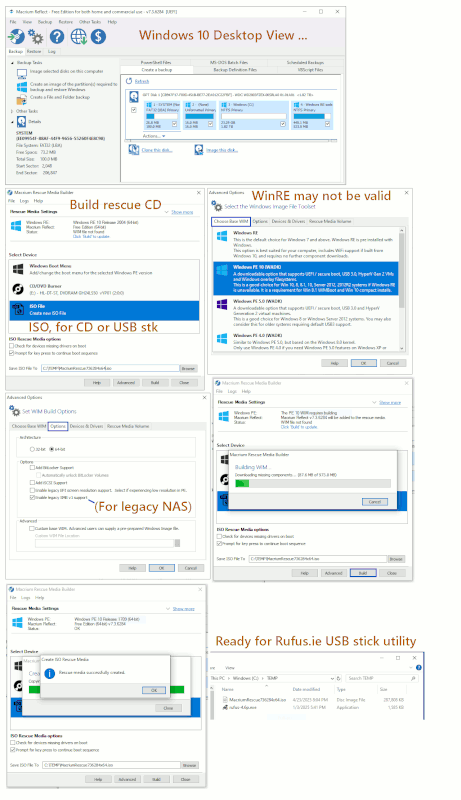
To create a rescue USB, do the following:
1) Run Macrium;
2) Insert the USB stick and wait until it's registered with Windows 11;
3) Choose ...
Other Tasks;
Create Rescue Media;
Removable USB Flash Drive;
4) To accept default settings just ...
5) Click 'Build' and confirm that only private use is intended.
The USB stick will be ready a few minutes later.
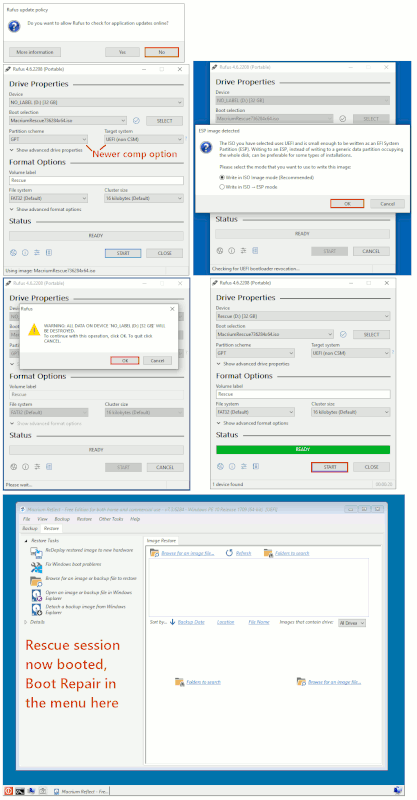
To boot from it, you may have temporarily to disable secure boot in the >BIOS, and/or press a particular key during booting to get a one-off boot >menu offering the USB as one of the options. Which keys you need to
press during boot to get you into the BIOS or a one-off boot menu varies
by make and sometimes by model of PC. For me with all Dell laptops,
it's <F2> for the BIOS, <F12> for the one-off boot menu. You should be
able to find yours either from messages displayed on the screen at the >appropriate time to press the key, or else by searching online.
Seems as I am stuck with this problem.
Shouldn't necessarily need to be, but you may have to do quite a bit of
work to get to the bottom of the problem, and only you can decide
whether the time and effort involved is worth the increase in download >speed.
Thanks, will do.
On Thu, 6/18/2026 5:51 AM, Dan wrote:
Thanks, will do.
I would work on trying to reproduce it, but I'd need a
high latency (the 4ms to 7ms ping thing) high bandwidth connection
to exercise it. All I've got here, is two TX-401 and zero latency between >cards, and that doesn't test everything. A higher ping, would
have more packets in flight.
Paul
On Thu, 18 Jun 2026 06:35:40 -0400, Paul <nospam@needed.invalid>
wrote:
On Thu, 6/18/2026 5:51 AM, Dan wrote:
Thanks, will do.
I would work on trying to reproduce it, but I'd need a
high latency (the 4ms to 7ms ping thing) high bandwidth connection
to exercise it. All I've got here, is two TX-401 and zero latency between
cards, and that doesn't test everything. A higher ping, would
have more packets in flight.
Paul
My ping is 3 ms with a 2.5 gig symmetrical connection. But the problem
is I am getting 700 down and 700 up.
On Thu, 6/18/2026 9:13 AM, Dan wrote:
On Thu, 18 Jun 2026 06:35:40 -0400, Paul <nospam@needed.invalid>
wrote:
On Thu, 6/18/2026 5:51 AM, Dan wrote:
Thanks, will do.
I would work on trying to reproduce it, but I'd need a
high latency (the 4ms to 7ms ping thing) high bandwidth connection
to exercise it. All I've got here, is two TX-401 and zero latency between >>> cards, and that doesn't test everything. A higher ping, would
have more packets in flight.
Paul
My ping is 3 ms with a 2.5 gig symmetrical connection. But the problem
is I am getting 700 down and 700 up.
At that point, I would be checking whether the interface is in GbE mode >instead of 10GbE mode. I would also be reviewing that no inadvertent
cabling errors have been made in the room, as it should not be so random >about this stuff. Like for the thing to do 70% of a GbE link, only an older >RealTek would be that cranky. Check that the cable is actually plugged
into the TX-401, and not plugged into that other RJ45 on your desktop computer.
Paul
My ping is 3 ms with a 2.5 gig symmetrical connection. But the problem
is I am getting 700 down and 700 up.
Op 18-06-2026 om 15:13 schreef Dan:
My ping is 3 ms with a 2.5 gig symmetrical connection. But the problem
is I am getting 700 down and 700 up.
Are you sure the "other end" of what you're testing is capable of
anything above 700?
He gets 2.4 when running Linux, 0.7 when running Windows.
On 18/06/2026 22:39, Paul wrote:
He gets 2.4 when running Linux, 0.7 when running Windows.
In that case it's probably a driver issue, possibly an unsolicited
driver update.
You can have a look in "View update history" in Windows Update, and if
there is anything there, try to revert it.
On 18/06/2026 22:39, Paul wrote:
He gets 2.4 when running Linux, 0.7 when running Windows.
In that case it's probably a driver issue, possibly an unsolicited driver update.
You can have a look in "View update history" in Windows Update, and if there is anything there, try to revert it.
On Thu, 6/18/2026 11:09 PM, dillinger wrote:
On 18/06/2026 22:39, Paul wrote:
He gets 2.4 when running Linux, 0.7 when running Windows.
In that case it's probably a driver issue, possibly an unsolicited driver update.
You can have a look in "View update history" in Windows Update, and if there is anything there, try to revert it.
The TX-401 is AQC113-B1-C . The B1 is likely a die revision.
In the case of AQC107 (a different chip), disabling "Recv Segment Coalescing (IPv4)" helped.
And that's a chip on a motherboard.
https://rog-forum.asus.com/t5/rampage-vi-strix-x299-series/aquantia-10gbe-fix-by-disabling-one-advanced-setting-on-the-chip/td-p/787269/page/2
One of the chips apparently had a PCI Express bug, and for that one, it runs if
you plug it into a PCIe x1 Rev4 lane. The AQC113-B1-C has run on x4 Rev3 and x4 Rev2.
In this thread, there is an electrical interference issue. This does not match the symptoms.
https://forum-en.msi.com/index.php?threads/marvell-aqtion-10gbit-network-adapter-network-link-is-lost.361223/page-3#posts
So far, none of those are a good exact match.
Paul
I looked at this, sadly no change.
"In that case it's probably a driver issue, possibly an unsolicited
driver update.
You can have a look in "View update history" in Windows Update, and if
there is anything there, try to revert it."
Nothing was there, I can only see the new Marvell chipset as a driver.
Op 20/06/2026 om 10:34 schreef Dan:
I looked at this, sadly no change.
"In that case it's probably a driver issue, possibly an unsolicited
driver update.
You can have a look in "View update history" in Windows Update, and if
there is anything there, try to revert it."
Nothing was there, I can only see the new Marvell chipset as a driver.
Too bad, I'm assuming it did work properly "before" some update?
Perhaps you can find something in Device Manager:
Right-click Start > Device Manager > Network Adapters > TX-401 > Properties
In the Events tab there should be a history of installed drivers.
In the Driver tab the Roll Back Driver button could offer an option to roll back the driver to some previously used version.
On Fri, 19 Jun 2026 06:35:04 -0400, Paul <nospam@needed.invalid>
wrote:
On Thu, 6/18/2026 11:09 PM, dillinger wrote:
On 18/06/2026 22:39, Paul wrote:
He gets 2.4 when running Linux, 0.7 when running Windows.
In that case it's probably a driver issue, possibly an unsolicited driver update.
You can have a look in "View update history" in Windows Update, and if there is anything there, try to revert it.
The TX-401 is AQC113-B1-C . The B1 is likely a die revision.
In the case of AQC107 (a different chip), disabling "Recv Segment Coalescing (IPv4)" helped.
And that's a chip on a motherboard.
https://rog-forum.asus.com/t5/rampage-vi-strix-x299-series/aquantia-10gbe-fix-by-disabling-one-advanced-setting-on-the-chip/td-p/787269/page/2
One of the chips apparently had a PCI Express bug, and for that one, it runs if
you plug it into a PCIe x1 Rev4 lane. The AQC113-B1-C has run on x4 Rev3 and x4 Rev2.
In this thread, there is an electrical interference issue. This does not match the symptoms.
https://forum-en.msi.com/index.php?threads/marvell-aqtion-10gbit-network-adapter-network-link-is-lost.361223/page-3#posts
So far, none of those are a good exact match.
I looked at this, sadly no change.
"In that case it's probably a driver issue, possibly an unsolicited
driver update.
You can have a look in "View update history" in Windows Update, and if
there is anything there, try to revert it."
Nothing was there, I can only see the new Marvell chipset as a driver.
On 2026-06-20 09:34, Dan wrote:
Mmmmm!-a-a Won't the chipset be handling the other end of the PCI Express traffic?-a I wonder if it might be worth trying uninstalling this update?
On Fri, 19 Jun 2026 06:35:04 -0400, Paul <nospam@needed.invalid>
wrote:
On Thu, 6/18/2026 11:09 PM, dillinger wrote:
On 18/06/2026 22:39, Paul wrote:
He gets 2.4 when running Linux, 0.7 when running Windows.
In that case it's probably a driver issue, possibly an unsolicited
driver update.
You can have a look in "View update history" in Windows Update, and
if there is anything there, try to revert it.
The TX-401 is AQC113-B1-C . The B1 is likely a die revision.
In the case of AQC107 (a different chip), disabling "Recv Segment
Coalescing (IPv4)" helped.
And that's a chip on a motherboard.
-a-a https://rog-forum.asus.com/t5/rampage-vi-strix-x299-series/
aquantia-10gbe-fix-by-disabling-one-advanced-setting-on-the-chip/td-
p/787269/page/2
One of the chips apparently had a PCI Express bug, and for that one,
it runs if
you plug it into a PCIe x1 Rev4 lane. The AQC113-B1-C has run on x4
Rev3 and x4 Rev2.
In this thread, there is an electrical interference issue. This does
not match the symptoms.
-a-a https://forum-en.msi.com/index.php?threads/marvell-aqtion-10gbit-
network-adapter-network-link-is-lost.361223/page-3#posts
So far, none of those are a good exact match.
I looked at this, sadly no change.
"In that case it's probably a driver issue, possibly an unsolicited
driver update.
You can have a look in "View update history" in Windows Update, and if>> there is anything there, try to revert it."
Nothing was there, I can only see the new Marvell chipset as a driver.>
What do you think, Paul, Dillinger, A N Other?
Op 20/06/2026 om 10:34 schreef Dan:
I looked at this, sadly no change.
"In that case it's probably a driver issue, possibly an unsolicited
driver update.
You can have a look in "View update history" in Windows Update, and if
there is anything there, try to revert it."
Nothing was there, I can only see the new Marvell chipset as a driver.
Too bad, I'm assuming it did work properly "before" some update?
Perhaps you can find something in Device Manager:
Right-click Start > Device Manager > Network Adapters > TX-401 > Properties
In the Events tab there should be a history of installed drivers.
In the Driver tab the Roll Back Driver button could offer an option to
roll back the driver to some previously used version.
Op 20-06-2026 om 22:22 schreef Java Jive:
On 2026-06-20 09:34, Dan wrote:
On Fri, 19 Jun 2026 06:35:04 -0400, Paul <nospam@needed.invalid>
wrote:
On Thu, 6/18/2026 11:09 PM, dillinger wrote:
On 18/06/2026 22:39, Paul wrote:
He gets 2.4 when running Linux, 0.7 when running Windows.
In that case it's probably a driver issue, possibly an unsolicited
driver update.
You can have a look in "View update history" in Windows Update, and
if there is anything there, try to revert it.
The TX-401 is AQC113-B1-C . The B1 is likely a die revision.
In the case of AQC107 (a different chip), disabling "Recv Segment
Coalescing (IPv4)" helped.
And that's a chip on a motherboard.
-a-a https://rog-forum.asus.com/t5/rampage-vi-strix-x299-series/
aquantia-10gbe-fix-by-disabling-one-advanced-setting-on-the-chip/td-
p/787269/page/2
One of the chips apparently had a PCI Express bug, and for that one,
it runs if
you plug it into a PCIe x1 Rev4 lane. The AQC113-B1-C has run on x4
Rev3 and x4 Rev2.
In this thread, there is an electrical interference issue. This does
not match the symptoms.
-a-a https://forum-en.msi.com/index.php?threads/marvell-aqtion-10gbit- >>>> network-adapter-network-link-is-lost.361223/page-3#posts
So far, none of those are a good exact match.
I looked at this, sadly no change.
"In that case it's probably a driver issue, possibly an unsolicited
driver update.
You can have a look in "View update history" in Windows Update, and if
there is anything there, try to revert it."
Nothing was there, I can only see the new Marvell chipset as a driver.
Mmmmm!-a-a Won't the chipset be handling the other end of the PCI Express
traffic?-a I wonder if it might be worth trying uninstalling this update?
What do you think, Paul, Dillinger, A N Other?
If the "new Marvell chipset as a driver" is an update to some default
driver it could be worth a try to uninstall or disable it.
Disclaimer: I don't have a TX-401, but this is how I handled similar
problems in the past.
On Sat, 6/20/2026 7:10 PM, dillinger wrote:
Op 20-06-2026 om 22:22 schreef Java Jive:
On 2026-06-20 09:34, Dan wrote:
On Fri, 19 Jun 2026 06:35:04 -0400, Paul <nospam@needed.invalid>
wrote:
On Thu, 6/18/2026 11:09 PM, dillinger wrote:
On 18/06/2026 22:39, Paul wrote:
He gets 2.4 when running Linux, 0.7 when running Windows.
In that case it's probably a driver issue, possibly an unsolicited >>>>>> driver update.
You can have a look in "View update history" in Windows Update, and >>>>>> if there is anything there, try to revert it.
The TX-401 is AQC113-B1-C . The B1 is likely a die revision.
In the case of AQC107 (a different chip), disabling "Recv Segment
Coalescing (IPv4)" helped.
And that's a chip on a motherboard.
aa https://rog-forum.asus.com/t5/rampage-vi-strix-x299-series/
aquantia-10gbe-fix-by-disabling-one-advanced-setting-on-the-chip/td- >>>>> p/787269/page/2
One of the chips apparently had a PCI Express bug, and for that one, >>>>> it runs if
you plug it into a PCIe x1 Rev4 lane. The AQC113-B1-C has run on x4
Rev3 and x4 Rev2.
In this thread, there is an electrical interference issue. This does >>>>> not match the symptoms.
aa https://forum-en.msi.com/index.php?threads/marvell-aqtion-10gbit- >>>>> network-adapter-network-link-is-lost.361223/page-3#posts
So far, none of those are a good exact match.
I looked at this, sadly no change.
"In that case it's probably a driver issue, possibly an unsolicited
driver update.
You can have a look in "View update history" in Windows Update, and if >>>> there is anything there, try to revert it."
Nothing was there, I can only see the new Marvell chipset as a driver.
Mmmmm!aa Won't the chipset be handling the other end of the PCI Express
traffic?a I wonder if it might be worth trying uninstalling this update? >>>
What do you think, Paul, Dillinger, A N Other?
If the "new Marvell chipset as a driver" is an update to some default
driver it could be worth a try to uninstall or disable it.
Disclaimer: I don't have a TX-401, but this is how I handled similar
problems in the past.
The default driver for the TPLink TX-401, is a Marvell version 10 driver.
If you go to the Marvell site and download the driver, that one is
version 11. I haven't spotted any difference between the two, at
the GUI level.
As for the "back end" of the chip, that would be using the bog standard
PCI drivers that are used throughout PCI and PCIe bridges inside the
CPU. It should just be another instance of that. It's a real driver,
but it is also an in-box driver and essential to the "bring-up" of
any modern computer.
Where the "surprises" come in, are on the skill set of the PCIe interface. >Whether it was an Intellectual Property design bought from a third party,
or you decided to do the PCIe your own self, in house. Then, you're on
the hook for PCIe PHY verification (which you can farm out to a test house).
A PCIe interface like this, has to handle x1, x2, x4 operation, lane reversal >(1,2,3,4 or 4,3,2,1 wiring), and handle failed PCIe lanes (so a x4 with a burned
out 3 pin, works as a x2 card and you still get some functionality out of it).
You can have an interface on the motherboard with a bifurcation problem
(the chopping up of larger slots into smaller ones). Or it simply refuses
to run at the correct speed (transmission line mismatch, transmission
errors and retransmissions).
If hardware came with decent monitoring software, you'd have an interface >with an error count for various things (Eth packets with transmission errors, >PCIe packets with transmission errors).
But since this setup seems to be running at a consistent rate, and the
rate does not vary as you tap dance in front of it, that suggests it's
not a "flaky" thing that is malfunctioning. It's some detail of the protocol, >it could even be an ISP issue... except we know it works properly under Linux >driver. Running at 700, could be switching to GbE, and then using
some sort of polled transfer and some part of any acceleration in
there, not working. Maybe the driver is making copies, instead of
trying to do Zero Copy DMA.
On cable, the MAC address of the equipment has to be authorized with the
ISP, and if you swap out some equipment, you have to phone them up and
tell them you are using different equipment. That shouldn't be quite the
same case with a fiber, since the physical wiring plant limits where
you could be coming from, and you're unlikely to manage to "steal service". >You also have your account and password, which indicate your PPPOE or PPPOA >setup is a known quantity to the supplier of the service. We know you're wired >to a certain street corner, and your account and password values are correct. >Whether Linux or Windows, the same MAC is sent as long as you haven't
been hacking at it.
Paul
On Sun, 21 Jun 2026 08:13:22 -0400, Paul <nospam@needed.invalid>
wrote:
On Sat, 6/20/2026 7:10 PM, dillinger wrote:
Op 20-06-2026 om 22:22 schreef Java Jive:
On 2026-06-20 09:34, Dan wrote:
Mmmmm!-a-a Won't the chipset be handling the other end of the PCI Express >>>> traffic?-a I wonder if it might be worth trying uninstalling this update? >>>>
On Fri, 19 Jun 2026 06:35:04 -0400, Paul <nospam@needed.invalid>
wrote:
On Thu, 6/18/2026 11:09 PM, dillinger wrote:
On 18/06/2026 22:39, Paul wrote:
He gets 2.4 when running Linux, 0.7 when running Windows.
In that case it's probably a driver issue, possibly an unsolicited >>>>>>> driver update.
You can have a look in "View update history" in Windows Update, and >>>>>>> if there is anything there, try to revert it.
The TX-401 is AQC113-B1-C . The B1 is likely a die revision.
In the case of AQC107 (a different chip), disabling "Recv Segment
Coalescing (IPv4)" helped.
And that's a chip on a motherboard.
-a-a https://rog-forum.asus.com/t5/rampage-vi-strix-x299-series/
aquantia-10gbe-fix-by-disabling-one-advanced-setting-on-the-chip/td- >>>>>> p/787269/page/2
One of the chips apparently had a PCI Express bug, and for that one, >>>>>> it runs if
you plug it into a PCIe x1 Rev4 lane. The AQC113-B1-C has run on x4 >>>>>> Rev3 and x4 Rev2.
In this thread, there is an electrical interference issue. This does >>>>>> not match the symptoms.
-a-a https://forum-en.msi.com/index.php?threads/marvell-aqtion-10gbit- >>>>>> network-adapter-network-link-is-lost.361223/page-3#posts
So far, none of those are a good exact match.
I looked at this, sadly no change.
"In that case it's probably a driver issue, possibly an unsolicited
driver update.
You can have a look in "View update history" in Windows Update, and if >>>>> there is anything there, try to revert it."
Nothing was there, I can only see the new Marvell chipset as a driver. >>>>
What do you think, Paul, Dillinger, A N Other?
If the "new Marvell chipset as a driver" is an update to some default
driver it could be worth a try to uninstall or disable it.
Disclaimer: I don't have a TX-401, but this is how I handled similar
problems in the past.
The default driver for the TPLink TX-401, is a Marvell version 10 driver.
If you go to the Marvell site and download the driver, that one is
version 11. I haven't spotted any difference between the two, at
the GUI level.
As for the "back end" of the chip, that would be using the bog standard
PCI drivers that are used throughout PCI and PCIe bridges inside the
CPU. It should just be another instance of that. It's a real driver,
but it is also an in-box driver and essential to the "bring-up" of
any modern computer.
Where the "surprises" come in, are on the skill set of the PCIe interface. >> Whether it was an Intellectual Property design bought from a third party,
or you decided to do the PCIe your own self, in house. Then, you're on
the hook for PCIe PHY verification (which you can farm out to a test house). >>
A PCIe interface like this, has to handle x1, x2, x4 operation, lane reversal
(1,2,3,4 or 4,3,2,1 wiring), and handle failed PCIe lanes (so a x4 with a burned
out 3 pin, works as a x2 card and you still get some functionality out of it).
You can have an interface on the motherboard with a bifurcation problem
(the chopping up of larger slots into smaller ones). Or it simply refuses
to run at the correct speed (transmission line mismatch, transmission
errors and retransmissions).
If hardware came with decent monitoring software, you'd have an interface
with an error count for various things (Eth packets with transmission errors,
PCIe packets with transmission errors).
But since this setup seems to be running at a consistent rate, and the
rate does not vary as you tap dance in front of it, that suggests it's
not a "flaky" thing that is malfunctioning. It's some detail of the protocol,
it could even be an ISP issue... except we know it works properly under Linux
driver. Running at 700, could be switching to GbE, and then using
some sort of polled transfer and some part of any acceleration in
there, not working. Maybe the driver is making copies, instead of
trying to do Zero Copy DMA.
On cable, the MAC address of the equipment has to be authorized with the
ISP, and if you swap out some equipment, you have to phone them up and
tell them you are using different equipment. That shouldn't be quite the
same case with a fiber, since the physical wiring plant limits where
you could be coming from, and you're unlikely to manage to "steal service". >> You also have your account and password, which indicate your PPPOE or PPPOA >> setup is a known quantity to the supplier of the service. We know you're wired
to a certain street corner, and your account and password values are correct.
Whether Linux or Windows, the same MAC is sent as long as you haven't
been hacking at it.
Paul
Hello,
I have uploaded a picture of the card, it says 1 gig light is on and
10 gig light is off.
https://postimg.cc/PvLwGq37
https://ibb.co/cSY1FCrt
https://freeimage.host/i/CTWAKAl
On Tue, 6/23/2026 2:43 AM, Dan wrote:
On Sun, 21 Jun 2026 08:13:22 -0400, Paul <nospam@needed.invalid>
wrote:
On Sat, 6/20/2026 7:10 PM, dillinger wrote:
Op 20-06-2026 om 22:22 schreef Java Jive:
On 2026-06-20 09:34, Dan wrote:
Mmmmm!aa Won't the chipset be handling the other end of the PCI Express >>>>> traffic?a I wonder if it might be worth trying uninstalling this update? >>>>>
On Fri, 19 Jun 2026 06:35:04 -0400, Paul <nospam@needed.invalid>
wrote:
On Thu, 6/18/2026 11:09 PM, dillinger wrote:
On 18/06/2026 22:39, Paul wrote:
He gets 2.4 when running Linux, 0.7 when running Windows.
In that case it's probably a driver issue, possibly an unsolicited >>>>>>>> driver update.
You can have a look in "View update history" in Windows Update, and >>>>>>>> if there is anything there, try to revert it.
The TX-401 is AQC113-B1-C . The B1 is likely a die revision.
In the case of AQC107 (a different chip), disabling "Recv Segment >>>>>>> Coalescing (IPv4)" helped.
And that's a chip on a motherboard.
aa https://rog-forum.asus.com/t5/rampage-vi-strix-x299-series/
aquantia-10gbe-fix-by-disabling-one-advanced-setting-on-the-chip/td- >>>>>>> p/787269/page/2
One of the chips apparently had a PCI Express bug, and for that one, >>>>>>> it runs if
you plug it into a PCIe x1 Rev4 lane. The AQC113-B1-C has run on x4 >>>>>>> Rev3 and x4 Rev2.
In this thread, there is an electrical interference issue. This does >>>>>>> not match the symptoms.
aa https://forum-en.msi.com/index.php?threads/marvell-aqtion-10gbit- >>>>>>> network-adapter-network-link-is-lost.361223/page-3#posts
So far, none of those are a good exact match.
I looked at this, sadly no change.
"In that case it's probably a driver issue, possibly an unsolicited >>>>>> driver update.
You can have a look in "View update history" in Windows Update, and if >>>>>> there is anything there, try to revert it."
Nothing was there, I can only see the new Marvell chipset as a driver. >>>>>
What do you think, Paul, Dillinger, A N Other?
If the "new Marvell chipset as a driver" is an update to some default
driver it could be worth a try to uninstall or disable it.
Disclaimer: I don't have a TX-401, but this is how I handled similar
problems in the past.
The default driver for the TPLink TX-401, is a Marvell version 10 driver. >>> If you go to the Marvell site and download the driver, that one is
version 11. I haven't spotted any difference between the two, at
the GUI level.
As for the "back end" of the chip, that would be using the bog standard
PCI drivers that are used throughout PCI and PCIe bridges inside the
CPU. It should just be another instance of that. It's a real driver,
but it is also an in-box driver and essential to the "bring-up" of
any modern computer.
Where the "surprises" come in, are on the skill set of the PCIe interface. >>> Whether it was an Intellectual Property design bought from a third party, >>> or you decided to do the PCIe your own self, in house. Then, you're on
the hook for PCIe PHY verification (which you can farm out to a test house).
A PCIe interface like this, has to handle x1, x2, x4 operation, lane reversal
(1,2,3,4 or 4,3,2,1 wiring), and handle failed PCIe lanes (so a x4 with a burned
out 3 pin, works as a x2 card and you still get some functionality out of it).
You can have an interface on the motherboard with a bifurcation problem
(the chopping up of larger slots into smaller ones). Or it simply refuses >>> to run at the correct speed (transmission line mismatch, transmission
errors and retransmissions).
If hardware came with decent monitoring software, you'd have an interface >>> with an error count for various things (Eth packets with transmission errors,
PCIe packets with transmission errors).
But since this setup seems to be running at a consistent rate, and the
rate does not vary as you tap dance in front of it, that suggests it's
not a "flaky" thing that is malfunctioning. It's some detail of the protocol,
it could even be an ISP issue... except we know it works properly under Linux
driver. Running at 700, could be switching to GbE, and then using
some sort of polled transfer and some part of any acceleration in
there, not working. Maybe the driver is making copies, instead of
trying to do Zero Copy DMA.
On cable, the MAC address of the equipment has to be authorized with the >>> ISP, and if you swap out some equipment, you have to phone them up and
tell them you are using different equipment. That shouldn't be quite the >>> same case with a fiber, since the physical wiring plant limits where
you could be coming from, and you're unlikely to manage to "steal service". >>> You also have your account and password, which indicate your PPPOE or PPPOA >>> setup is a known quantity to the supplier of the service. We know you're wired
to a certain street corner, and your account and password values are correct.
Whether Linux or Windows, the same MAC is sent as long as you haven't
been hacking at it.
Paul
Hello,
I have uploaded a picture of the card, it says 1 gig light is on and
10 gig light is off.
https://postimg.cc/PvLwGq37
https://ibb.co/cSY1FCrt
https://freeimage.host/i/CTWAKAl
I checked the box on one of mine, and there are several slips of paper in it. >Some of the papers are in the lower section of the box, along with a mini-DVD >thing (which would be some TPLINK drivers of some vintage).
OK, there are two LEDs. When designing NIC cards, you have to decide
as a designer, which reporting mode you will be using -- precise or hand-wavey.
And this is a hand-wavey one. A precise one might cost you more LEDs :-) For >example, if you're on a faceplate (!), you can have five LEDs if the GPIOs >support that.
10G Link - Only lights if 10G has been negotiated. Flashes for activity.
Link - Lights for 5G/2.5G/1G/100BT. Flashes for activity for one of those rates.
If you were running at 5G say, then your full transfer rate should have been evident (2400).
If you were running at 1G say, that explains a 700:700 kind of experience, but perhaps
some acceleration features in hardware would not be enabled either.
But the LEDs do not tell you a whole lot. Merely whether it managed to come >up in 10G mode, is about all those LEDs can tell you. They don't use multicolor
LEDs or three LEDs to indicate various things.
And someone here uses AIDA to determine the PCIe connector link configuration.
https://forums.servethehome.com/index.php?threads/aqc113-pcie-link-question.47381/
Note that, the 10G Link could be lit, but if you don't have enough PCIe bandwidth
(because the wrong PCIe lane rate was negotiated), devices are perfectly happy >to claim one thing on the peripheral end and another on the PCIe end, and
if the PCIe end "starves" the card, it normally "works" and should not complain,
but the transfer rate can be shitty. This has saved our ass numerous times in >the past. If the hardware had been "more brittle" about such issues, and
a mismatch caused the card to shut down, we would be much more dissatisfied >with our toys. Many people do not realize (me included!), that some
of our cards are running at one rate lower on PCIe than they are supposed to.
But the PCIe side, when you think about it, would have to be in some
"pretty trashy condition" to only manage 700:700 mbits/sec broadband
service. It's much easier to see your Link LED, know it is "less than 10G" >and simply assume it is 1G. You need some sort of utility that can read out >the current mode.
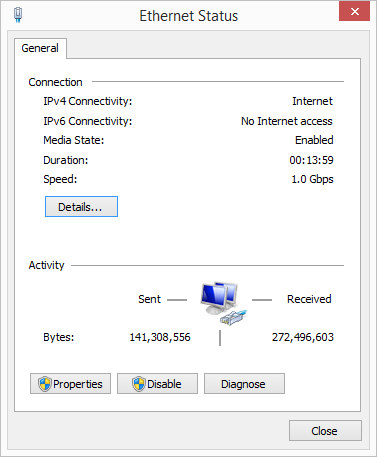
"Right-click the Network icon in the system tray and select Open Network & Internet settings .
Click on Network and Sharing Center . Next to Connections , click on the active connection (Ethernet).
In the Status window, you'll find the Speed value, displaying the current adapter speed.
"
https://images.tips.net/S15/Figs/T13384F3.png <=== example of a Windows 1G link rate
One of my concerns with this garbage, is when someone uses AIDA and checks the >PCIe side of the card, and the lane count is only x2 . Note that Chinese NoName vendors
of various things, will lie about what chip is onboard, so someone who got an AQC113c
may get x2 lanes as a test result, the AQC113 has the x4 lane scheme and apparently
switches to x1 Rev4 if a Rev4 slot is detected. Rather than continuing to run in
x4 lane mode when also running Rev4. Since no hardware I will ever own, will >have lots of Rev4 slots, there is little chance my cards would ever run Rev4 rates.
The card also has to decide what to do, if it is blowing CRC errors on PCIe packets.
I don't know if PCIe re-negotiates lane config on the fly or not.
You need really good instrumentation to find all these details out.
The counters are there. The software to access and display them, maybe not.
But at least, with your "Link" LED lit, you can now check that Windows panel in the tips.net diagram.
Paul
| Sysop: | Amessyroom |
|---|---|
| Location: | Fayetteville, NC |
| Users: | 70 |
| Nodes: | 6 (0 / 6) |
| Uptime: | 39:14:51 |
| Calls: | 948 |
| Calls today: | 2 |
| Files: | 1,325 |
| Messages: | 280,644 |