• Re: is OneDrive just spyware ?

    From Paul@nospam@needed.invalid to alt.comp.os.windows-11 on Fri Apr 17 05:24:13 2026
    From Newsgroup: alt.comp.os.windows-11

    On Fri, 4/17/2026 3:32 AM, MikeS wrote:
    On 16/04/2026 21:48, Lynn McGuire wrote:
    Is OneDrive just spyware ?-a I just bought a new Dell PC with Windows 11 Pro for my home.-a Besides the fact that Windows 11 forced me to use my home email address as a login, OneDrive was installed and activated without my explicit permission.

    I do not want anything installed in the cloud.-a I have a managed web server and it is being probed and/or attacked just about every minute. There is no way I want my personal information stored on somebody else's computer.

    I uninstalled OneDrive and deleted the OneDrive directories.-a I then used regedit to remove OneDrive from many places in the registry.-a I did not get them all yet after several hours of editing the registry.

    As far as I am concerned, Mickeysoft has turned into a spyware company. This does not bode well for the future of desktop software.

    Thanks,
    Lynn

    I don't like OneDrive so I don't use it. Simple. Its true that Microsoft tries
    to make it a default location but easy to avoid. Can't understand why people spend hours trying to eradicate it.

    I don't want it modifying any directory structures.
    That's why it had to go.

    If OneDrive had been purely passive, like it was Mega
    or something, I would follow your lead.

    Rather than "spyware", it is in the "nuisance" category.

    The same goes with the web version of Office. It stores
    documents on OneDrive (similar to how Google Docs would do it),
    which is a non-starter. I do not want multiple storage
    locations for trivial information. I can find things just fine
    here, with a couple copies of Agent Ransack and local drives.

    Paul
    --- Synchronet 3.21f-Linux NewsLink 1.2
  • From Anssi Saari@anssi.saari@usenet.mail.kapsi.fi to alt.comp.os.windows-11 on Fri Apr 17 12:54:40 2026
    From Newsgroup: alt.comp.os.windows-11

    Lynn McGuire <lynnmcguire5@gmail.com> writes:

    Is OneDrive just spyware ? I just bought a new Dell PC with Windows
    11 Pro for my home. Besides the fact that Windows 11 forced me to use
    my home email address as a login, OneDrive was installed and activated without my explicit permission.

    I haven't kept up but is a Microsoft account mandatory now in Windows
    11? My Windows 11 laptop is from 2022-ish and I just used a local
    account back then. While I may still have one ore more Microsoft
    accounts, I don't think I've used any of them in years. I'm pretty sure
    the laptop did just recently show the ad to backup to Onedrive, although
    I specifically turned that off.
    --- Synchronet 3.21f-Linux NewsLink 1.2
  • From Andy Burns@usenet@andyburns.uk to alt.comp.os.windows-11 on Fri Apr 17 11:07:47 2026
    From Newsgroup: alt.comp.os.windows-11

    Anssi Saari wrote:

    I haven't kept up but is a Microsoft account mandatory now in Windows
    11?

    No, but they keep making it harder and more obscure to setup
    (particularly a Home Edition) Win11 machine without a MSA; but it's
    always possible to create an MSA, use it to sign-in, then create a local
    admin account and local non-admin account, and bin-off the MSA.
    --- Synchronet 3.21f-Linux NewsLink 1.2
  • From Paul@nospam@needed.invalid to alt.comp.os.windows-11 on Fri Apr 17 07:42:07 2026
    From Newsgroup: alt.comp.os.windows-11

    On Fri, 4/17/2026 5:54 AM, Anssi Saari wrote:
    Lynn McGuire <lynnmcguire5@gmail.com> writes:

    Is OneDrive just spyware ? I just bought a new Dell PC with Windows
    11 Pro for my home. Besides the fact that Windows 11 forced me to use
    my home email address as a login, OneDrive was installed and activated
    without my explicit permission.

    I haven't kept up but is a Microsoft account mandatory now in Windows
    11? My Windows 11 laptop is from 2022-ish and I just used a local
    account back then. While I may still have one ore more Microsoft
    accounts, I don't think I've used any of them in years. I'm pretty sure
    the laptop did just recently show the ad to backup to Onedrive, although
    I specifically turned that off.


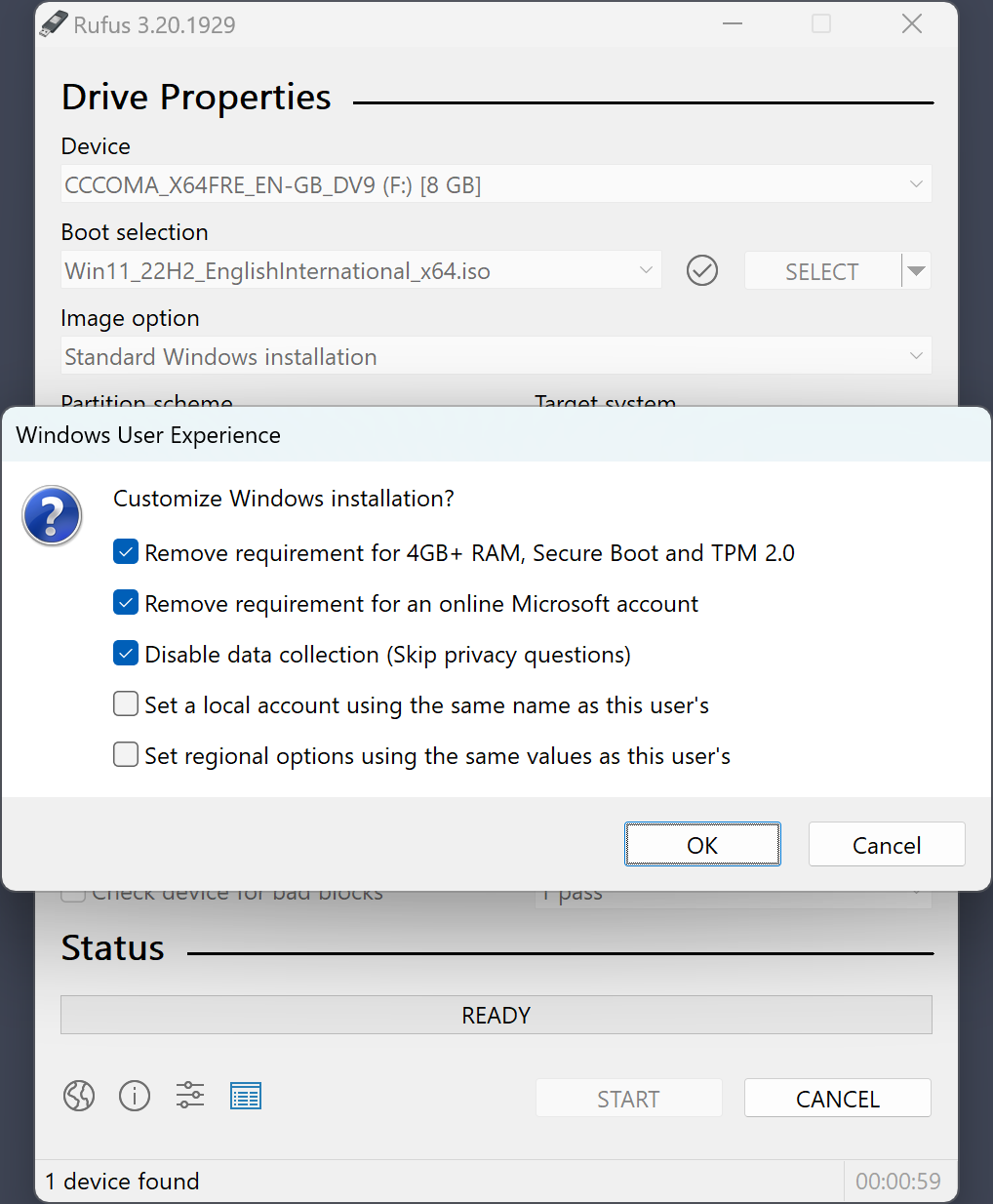
    [Picture] W11-Test-Machine-Local-Acct-25H2.gif

    https://postimg.cc/3kXbX62j

    https://imgur.com/a/BPaJKf5

    And this is the tool that helped do that (second line).

    https://rufus.ie/pics/screenshot4_en.png

    Paul


    --- Synchronet 3.21f-Linux NewsLink 1.2
  • From T@T@invalid.invalid to alt.comp.os.windows-11 on Fri Apr 17 05:16:20 2026
    From Newsgroup: alt.comp.os.windows-11

    On 4/17/26 02:10, ...w-i|#-o-#-n|# wrote:
    On 4/17/2026 12:51 AM, T wrote:
    On 4/17/26 00:32, MikeS wrote:
    Can't understand why people spend hours trying to eradicate it.

    It use to be annoying to remove until the European courts put
    he hammer on M$.-a Now is is a simple Add Remove Programs.

    People are just remember the old days.

    You're on a roll of falsehoods today.

    No EU court decision or ban exists on OneDrive presence or ability to remove.

    You might be trying to equate the renaming of SkyDrive(brand name before rename to OneDrive) in compliance with an EU settlement in 2013.
    -a- the settlement/agreement did not and never put a 'hammer' on MSFT
    for OneDrive install or ability to remove.

    FYI - the preferred and cleanest way to remove OneDrive(after disabling
    its features and quitting(it) is via:
    -aSettings/Apps/Installed Apps


    This is the last time I will be reading you. I am
    killing filing you are a stalker.


    Here is ChatGPT analysis:

    what was the European court ruling on removing Microsoft one drive?

    There wasnrCOt actually a European court ruling that specifically said rCLMicrosoft OneDrive must be removablerCY or banned it outright. ThatrCOs a common misunderstanding.

    What *did* happen in Europe is a set of **data protection and
    competition rulings/actions** involving MicrosoftrCOs cloud services (including OneDrive as part of Microsoft 365). HererCOs the accurate picture:

    ---

    ## 1) The key 2024 ruling (not about removing OneDrive)

    In **March 2024**, the EUrCOs data watchdog rCo the **European Data
    Protection Supervisor (EDPS)** rCo ruled that the **European Commission itself** had violated EU data protection law by using Microsoft 365. ([Conventus Law][1])

    The issues included:

    * Personal data being transferred outside the EU without proper safeguards
    * Lack of clarity about what data Microsoft processed and why
    * Risk of unauthorized access/disclosure of EU citizensrCO data
    ([Conventus Law][1])

    ### What the ruling required

    The EDPS did **not** order removal of OneDrive or Microsoft services.
    Instead, it required:

    * Fixing contracts and technical safeguards
    * Limiting or suspending certain data transfers outside the EU
    * Ensuring Microsoft only processes data under strict instructions ([PrivacyCraft][2])

    ---

    ## 2) Follow-up in 2025

    By mid-2025, the EU confirmed the issues were fixed:

    * Microsoft and the Commission changed contracts and data handling
    * Data transfers and processing were brought into compliance

    So the case was **closed after compliance**, not escalated into a ban. ([European Data Protection Supervisor][3])

    ---

    ## 3) Where the rCLremovalrCY idea comes from

    There are two related things that likely caused confusion:

    ### A. Orders to *suspend data transfers* (conditional)

    The 2024 decision said:

    * If compliance couldnrCOt be ensured, **data flows to non-EU countries
    had to be suspended** ([PrivacyCraft][2])

    Some people interpreted this as rCLyou must remove OneDrive,rCY but thatrCOs not what it said.

    ---

    ### B. Broader EU pressure on Microsoft bundling

    Separately, the EU has challenged Microsoft for bundling services (like
    Teams with Office).
    This led Microsoft to **unbundle products**, but againrConot remove
    OneDrive. ([SAMexpert][4])

    ---

    ## Bottom line

    * rYi No EU court ruled that OneDrive must be removed
    * rLoN+A A 2024 EU data protection decision found problems with how
    Microsoft 365 handled data
    * rLoN+A The remedy was **compliance fixes**, not banning or uninstalling OneDrive
    * rLoN+A By 2025, the case was resolved after Microsoft and the EU adjusted practices

    ---

    If you want, I can explain whether Windows in Europe might eventually be forced to let users uninstall OneDrive (thatrCOs a *different* regulatory trend involving the Digital Markets Act).

    [1]: https://conventuslaw.com/report/eu-cloud-gdpr-risks-highlighted-by-european-commission-ruling-over-microsoft-365-use/?utm_source=chatgpt.com
    "EU - Cloud GDPR Risks Highlighted By European ..."
    [2]: https://www.privacycraft.pro/post/edps-closes-microsoft-365-investigation-but-legal-and-political-challenges-remain?utm_source=chatgpt.com
    "EDPS Closes Microsoft 365 Investigation, But Legal and ..."
    [3]: https://www.edps.europa.eu/press-publications/press-news/press-releases/2025/european-commission-brings-use-microsoft-365-compliance-data-protection-rules-eu-institutions-and-bodies?utm_source=chatgpt.com
    "European Commission brings use of Microsoft 365 into ..."
    [4]: https://samexpert.com/microsoft-regulatory-roundup-2025/?utm_source=chatgpt.com
    "Microsoft Regulatory Roundup 2025"

    --- Synchronet 3.21f-Linux NewsLink 1.2
  • From Paul@nospam@needed.invalid to alt.comp.os.windows-11 on Fri Apr 17 08:50:17 2026
    From Newsgroup: alt.comp.os.windows-11

    On Thu, 4/16/2026 8:30 PM, T wrote:

    2)-a the communications to and from one drive are encrypted,
    but the data storage is not.-a M$ swears they do not data
    mine it, but I seriously do not believe them.

    If you want a web data service, I would recommend you use
    something other than One Drive.-a I personally adore Ice
    Drive as it gives me a drive letter and their support is
    world class.-a A lot of my customers like Drop Box.

    -T

    Privacy is not addressed in here.

    https://en.wikipedia.org/wiki/OneDrive

    "Microsoft has responded by indicating that "strict internal policies
    [are] in place to limit access to a user's data", and that advanced mechanisms,
    such as Microsoft's automated PhotoDNA scanning tool, are utilized to ensure
    users abide with the Code of Conduct "

    It would make no particular difference, whether the disk drives were
    encrypted at rest or not. Since it can be done for free, via FDE,
    there's no reason not to do it. But that only protects the content
    if someone walks out of the building with it. If the site is hacked,
    they can extricate whatever they want (the assumption in hacking,
    is you have acquired all the authentication mechanisms -- only the
    air-gapped signing machine is not online).

    That means you can safely store your copies of the Holy Bible in there.

    This article has some colored blocks for comparison of services.

    https://en.wikipedia.org/wiki/Comparison_of_file_hosting_services

    Proton has the highest (stated) rating, as it says "End-to-end encryption",
    but something like that would need to be audited.

    The best way to ensure an item is handled adequately, is to encrypt it yourself.
    and since Q-day is coming, you want to be ready for the Q environment.
    (Things encrypted with inadequate mechanisms, here today, can be cracked
    later when Q-day arrives.)

    The best thing, is to not store the goods in the cloud at all :-)
    It's not a branding issue as such, it's a more serious issue than that.

    Paul
    --- Synchronet 3.21f-Linux NewsLink 1.2
  • From T@T@invalid.invalid to alt.comp.os.windows-11 on Fri Apr 17 06:11:07 2026
    From Newsgroup: alt.comp.os.windows-11

    On 4/17/26 05:50, Paul wrote:
    The best thing, is to not store the goods in the cloud at all EfOe
    It's not a branding issue as such, it's a more serious issue than that.

    Well, stated.

    Second best would be Ice Drive. There is an encrypted folder
    that yo uhave to choose the key. And the key can not be
    recovered if you forget it.


    I store nothing private on the web, encrypted or not.

    Well, I should state that there is one instance that I do,
    but it is encrypted with a utility that I wrote. Good
    luck trying to break it!

    --- Synchronet 3.21f-Linux NewsLink 1.2
  • From =?UTF-8?B?Li4ud8Khw7HCp8KxwqTDsQ==?=@winstonmvp@gmail.com to alt.comp.os.windows-11 on Fri Apr 17 10:22:56 2026
    From Newsgroup: alt.comp.os.windows-11

    On 4/17/2026 5:16 AM, T wrote:
    On 4/17/26 02:10, ...w-i|#-o-#-n|# wrote:
    On 4/17/2026 12:51 AM, T wrote:
    On 4/17/26 00:32, MikeS wrote:
    Can't understand why people spend hours trying to eradicate it.

    It use to be annoying to remove until the European courts put
    he hammer on M$.-a Now is is a simple Add Remove Programs.

    People are just remember the old days.

    You're on a roll of falsehoods today.

    No EU court decision or ban exists on OneDrive presence or ability to
    remove.

    You might be trying to equate the renaming of SkyDrive(brand name
    before rename to OneDrive) in compliance with an EU settlement in 2013.
    -a-a- the settlement/agreement did not and never put a 'hammer' on MSFT
    for OneDrive install or ability to remove.

    FYI - the preferred and cleanest way to remove OneDrive(after
    disabling its features and quitting(it) is via:
    -a-aSettings/Apps/Installed Apps


    This is the last time I will be reading you.-a-a I am
    killing filing you are a stalker.


    Here is ChatGPT analysis:

    what was the European court ruling on removing Microsoft one drive?

    There wasnrCOt actually a European court ruling that specifically said rCLMicrosoft OneDrive must be removablerCY or banned it outright. ThatrCOs a common misunderstanding.

    What *did* happen in Europe is a set of **data protection and
    competition rulings/actions** involving MicrosoftrCOs cloud services (including OneDrive as part of Microsoft 365). HererCOs the accurate picture:

    ---

    ## 1) The key 2024 ruling (not about removing OneDrive)
    Yes, nothing about removing OneDrive

    In **March 2024**, the EUrCOs data watchdog rCo the **European Data Protection Supervisor (EDPS)** rCo ruled that the **European Commission itself** had violated EU data protection law by using Microsoft 365. ([Conventus Law][1])

    The issues included:

    * Personal data being transferred outside the EU without proper safeguards
    * Lack of clarity about what data Microsoft processed and why
    * Risk of unauthorized access/disclosure of EU citizensrCO data
    ([Conventus Law][1])

    ### What the ruling required

    The EDPS did **not** order removal of OneDrive or Microsoft services. Instead, it required:

    If you want, I can explain whether Windows in Europe might eventually be forced to let users uninstall OneDrive (thatrCOs a *different* regulatory trend involving the Digital Markets Act).

    Thanks for confirming my original statement
    "No EU court decision or ban exists on OneDrive presence or ability to remove."
    --
    ...w-i|#-o-#-n|#
    --- Synchronet 3.21f-Linux NewsLink 1.2
  • From =?UTF-8?B?Li4ud8Khw7HCp8KxwqTDsQ==?=@winstonmvp@gmail.com to alt.comp.os.windows-11 on Fri Apr 17 10:33:40 2026
    From Newsgroup: alt.comp.os.windows-11

    On 4/17/2026 3:07 AM, Andy Burns wrote:
    Anssi Saari wrote:

    I haven't kept up but is a Microsoft account mandatory now in Windows
    11?

    No, but they keep making it harder and more obscure to setup
    (particularly a Home Edition) Win11 machine without a MSA;-a but it's
    always possible to create an MSA, use it to sign-in, then create a local admin account and local non-admin account, and bin-off the MSA.

    An MSA online profile has the ability/option to close the MSA Account.
    - the user option choices are twofold - 30 or 60 days.

    The only other route is lack of use.
    - after 2 years of inactivity the account is marked for deletion.
    The deletion process is not on the first day after 2 years.
    -i.e. it can take up to 6 months or longer or via a scheduled purge of inactive accounts during server bay maintenance prior to backing up that
    bay to a redundant bay.
    --
    ...w-i|#-o-#-n|#
    --- Synchronet 3.21f-Linux NewsLink 1.2
  • From s|b@me@privacy.invalid to alt.comp.os.windows-11 on Fri Apr 17 20:25:25 2026
    From Newsgroup: alt.comp.os.windows-11

    On Fri, 17 Apr 2026 08:32:48 +0100, MikeS wrote:

    I don't like OneDrive so I don't use it. Simple. Its true that Microsoft tries to make it a default location but easy to avoid. Can't understand
    why people spend hours trying to eradicate it.

    It's still on my drive, but I chose 'Quit', so it doesn't start
    automatically with Windows. Sometimes it's handy to share files.
    --
    s|b
    --- Synchronet 3.21f-Linux NewsLink 1.2
  • From =?UTF-8?B?Li4ud8Khw7HCp8KxwqTDsQ==?=@winstonmvp@gmail.com to alt.comp.os.windows-11 on Fri Apr 17 19:25:41 2026
    From Newsgroup: alt.comp.os.windows-11

    On 4/17/2026 11:25 AM, s|b wrote:
    On Fri, 17 Apr 2026 08:32:48 +0100, MikeS wrote:

    I don't like OneDrive so I don't use it. Simple. Its true that Microsoft
    tries to make it a default location but easy to avoid. Can't understand
    why people spend hours trying to eradicate it.

    It's still on my drive, but I chose 'Quit', so it doesn't start
    automatically with Windows. Sometimes it's handy to share files.


    Quit closes the OneDrive App.

    The option(toggle feature) to not load automatically with Windows 11 can
    be configured at:
    Settings/Apps/Startup/Microsoft OneDrive
    --
    ...w-i|#-o-#-n|#
    --- Synchronet 3.21f-Linux NewsLink 1.2
  • From Stan Brown@someone@example.com to alt.comp.os.windows-11 on Sat Apr 18 01:42:52 2026
    From Newsgroup: alt.comp.os.windows-11

    On Thu, 16 Apr 2026 18:12:56 -0400, Paul wrote:
    When a partition is automatically encrypted, Microsoft can place
    the Recovery Key in the MSA account in the cloud. But we also
    see reports of encryption, where the MSA is no longer available
    to the user, which is the very definition of Not Good.

    I don't have a Microsoft account, having got my Windows 11 machine
    back when it was easy to bypass that at setup. A few weeks ago, I
    spent quite a while googling, without success, for how to find out
    your Recovery Key when you have no Microsoft account to sign into.
    Luckily none of my partitions have been Bitlockered, as I verified by
    typing
    manage-bde -status | more
    in an admin command prompt.

    If you
    want to use encryption, then you should store the Recovery
    Key where you can find it later.

    What do you think of VeraCrypt? That's what I use to encrypt all of
    my partitions that have anything I want to keep private.
    --
    "The power of accurate observation is frequently called cynicism by
    those who don't have it." --George Bernard Shaw
    --- Synchronet 3.21f-Linux NewsLink 1.2
  • From Paul@nospam@needed.invalid to alt.comp.os.windows-11 on Sat Apr 18 06:00:58 2026
    From Newsgroup: alt.comp.os.windows-11

    On Sat, 4/18/2026 4:42 AM, Stan Brown wrote:
    On Thu, 16 Apr 2026 18:12:56 -0400, Paul wrote:
    When a partition is automatically encrypted, Microsoft can place
    the Recovery Key in the MSA account in the cloud. But we also
    see reports of encryption, where the MSA is no longer available
    to the user, which is the very definition of Not Good.

    I don't have a Microsoft account, having got my Windows 11 machine
    back when it was easy to bypass that at setup. A few weeks ago, I
    spent quite a while googling, without success, for how to find out
    your Recovery Key when you have no Microsoft account to sign into.
    Luckily none of my partitions have been Bitlockered, as I verified by
    typing
    manage-bde -status | more
    in an admin command prompt.

    If you
    want to use encryption, then you should store the Recovery
    Key where you can find it later.

    What do you think of VeraCrypt? That's what I use to encrypt all of
    my partitions that have anything I want to keep private.


    My personal concern with encryption in general terms, is "failure modes".
    What do you do, when you cannot access a volume.

    But as far as the article goes, Veracrypt has been audited a couple
    times. I would only trust the opinion of a (relatively independent) cryptographer with no axe to grind.

    https://en.wikipedia.org/wiki/VeraCrypt

    When Q-day arrives, it is hard to say how good the strength of combined algorithms is. I don't expect everything we have to crumble on Q-day,
    the dominos will topple one by one as time passes. Quantum works
    on side effects, and it takes the practitioner some time, to find
    a way to use quantum to crack a code. Initially, nobody had an inkling
    at all, as to how you would go about doing this. The quantum at the
    time, it was mainly promoted by means of "things it was known to do",
    rather than "being good at everything". That's why I expect the
    impact to be felt gradually, rather than everything in sight
    being cracked on the same day.

    One of the funny effects of Q-day, will be when SHA-256 is cracked,
    as that instantly makes Bitcoin worthless. Presumably, someone in
    the Bitcoin ecosystem, is preparing for Q-day.

    Lots of crypto issues are in the middle of preparations for Q-day, so they
    know it is coming, but they cannot rush too much as that could open
    exploitable holes if they're not careful. If Veracrypt received a new
    suite, it would likely need another audit afterwards. The same will be
    true of a lot of things being beefed up.

    This is why on the occasional web site, instead of a file hash being
    SHA-256, it's SHA-512. It's because a few people are now "nervous".

    Paul
    --- Synchronet 3.21f-Linux NewsLink 1.2
  • From Mr. Man-wai Chang@toylet.toylet@gmail.com to alt.comp.os.windows-11 on Sat Apr 18 22:25:05 2026
    From Newsgroup: alt.comp.os.windows-11

    On 4/17/2026 4:48 AM, Lynn McGuire wrote:
    Is OneDrive just spyware ? I just bought a new Dell PC with Windows 11
    Pro for my home. Besides the fact that Windows 11 forced me to use my
    home email address as a login, OneDrive was installed and activated
    without my explicit permission.

    One should never ever allow things to go online automatically!! :)
    --

    @~@ Simplicity is Beauty! Remain silent! Drink, Blink, Stretch!
    / v \ May the Force and farces be with you! Live long and prosper!!
    /( _ )\ https://sites.google.com/site/changmw/
    ^ ^ https://github.com/changmw/changmw
    --- Synchronet 3.21f-Linux NewsLink 1.2
  • From s|b@me@privacy.invalid to alt.comp.os.windows-11 on Sat Apr 18 17:03:27 2026
    From Newsgroup: alt.comp.os.windows-11

    On Fri, 17 Apr 2026 19:25:41 -0700, ...w-i|#-o-#-n|# wrote:

    Quit closes the OneDrive App.

    The option(toggle feature) to not load automatically with Windows 11 can
    be configured at:
    Settings/Apps/Startup/Microsoft OneDrive

    It's not even in there on my end. But I can see

    OneDrive.Sync.Service.exe

    runnning in the background.
    --
    s|b
    --- Synchronet 3.21f-Linux NewsLink 1.2
  • From T@T@invalid.invalid to alt.comp.os.windows-11 on Sat Apr 18 19:00:15 2026
    From Newsgroup: alt.comp.os.windows-11

    On 4/18/26 07:25, Mr. Man-wai Chang wrote:
    On 4/17/2026 4:48 AM, Lynn McGuire wrote:
    Is OneDrive just spyware ?-a I just bought a new Dell PC with Windows 11
    Pro for my home.-a Besides the fact that Windows 11 forced me to use my
    home email address as a login, OneDrive was installed and activated
    without my explicit permission.

    One should never ever allow things to go online automatically!! :)

    1+ Hallelujah!
    --- Synchronet 3.21f-Linux NewsLink 1.2
  • From =?UTF-8?B?Li4ud8Khw7HCp8KxwqTDsSA=?=@winstonmvp@gmail.com to alt.comp.os.windows-11 on Tue Apr 21 12:04:31 2026
    From Newsgroup: alt.comp.os.windows-11

    s|b wrote on 4/18/2026 8:03 AM:
    On Fri, 17 Apr 2026 19:25:41 -0700, ...w-i|#-o-#-n|# wrote:

    Quit closes the OneDrive App.

    The option(toggle feature) to not load automatically with Windows 11 can
    be configured at:
    Settings/Apps/Startup/Microsoft OneDrive

    It's not even in there on my end. But I can see

    OneDrive.Sync.Service.exe

    runnning in the background.


    Should be unless OneDrive's been tweaked contrary to design intent or
    registry hacking instead of methodical removal(via the OneDrive app,
    Quit, Unlink) then uninstall via Settings/Apps.

    OneDrive.Sync.Service.exe for a 'Quit' and 'Not loading at Startup'
    OneDrive should be seen in the following version number folder:
    C:\Program Files\Microsoft OneDrive\26.055.0323.0004

    If you see it in an earlier folder(26.051.0316.0004 or earlier number) or
    only see and earlier version folder in C:\Program Files\Microsoft
    OneDrive then OneDrive is either corrupt or not removed/uninstalled in
    the methodical route.
    OneDrive open, Sync folders disabled(toggled off), Quit, restart
    OneDrive verify sync disabled, Unlink, then uninstall via Settings/Apps.
    --
    ...w-i|#-o-#-n|#
    --- Synchronet 3.21f-Linux NewsLink 1.2