From Newsgroup: uk.tech.broadcast
UTB added, as Liz might have some ideas.
Sorry, this has turned into a general ramble about Windows and Sound
(controls and software).
On 2025/8/3 9:47:9, Paul wrote:
On Sat, 8/2/2025 10:06 PM, J. P. Gilliver wrote:
I'm currently transcribing some old records (33s and 45s), and having
trouble persuading the PC to let me hear the input.
I'm using a USB-powered phono preamp; that works fine. It appears in
Sound | Recording as 2-USB PREAMP, and the OS thinks it's a microphone.
Yes, I _do_ know about the default being off for microphones to prevent
howlround, and under Properties | Listen for the device, I _have_
changed "Listen to this device" to ticked.
Trouble is, in GoldWave which I'm using to do the capturing, I can have
"Monitor input on visuals" set (otherwise the level meters don't move!),
but as soon as I do that, it no longer comes through the speakers. (I
can still record, but it's a lot easier to do so if I can hear the
record playing!) It seems to be a "sticky" thing in the OS - at one time
disabling and then re-enabling the device (somewhere in Windows
settings, not GoldWave) made it cone out of the speakers again, which
suggested to me it wasn't a GoldWave problem.
Anyone any ideas (other than "stop using Goldwave")? Anyone had similar
problems in keeping external (especially USB) sound input devices
audible? If so, what did you do to get round it?
Windows 10-64.
Right now, your hardware is relying on GoldWave to handle all the recording and
output chores.
Phono-2mV ------ USB stereo 44.1KHz 16bit ADC <=== Goldwave recording here
*******
Logically speaking, the (pseudo) analog path through a PC, has an "input multiplexer"
which samples microphone and line input. The output can go directly to the output
speakers (passthru, possibly at least one application like Goldwave as App1 would
need to passthru, to reach the output mixer). Which might be viewed in some way,
as the "Monitor" output. Then, using the "Stereo Mix" option (a hardware path in the HDAudio chip), you can record the Stereo Mix ("What you hear") and digitize that.
| \ (SSO is system sounds output, "ding")
--- | \ input mux as "mixer" App1 -- | \
--- | \___--------------------- App2 -- | ---- LineOut
--- | / SSO -- | /
| / | /
You might take the analog output of your USB Preamp, and feet that into
the HDAudio on your PC, with the intention of recording off the StereoMix recording path on the HDAudio.
Sorry, I misled you by saying the preamp is "USB powered". It also has
ADCs in it (as well as, I hope [it certainly sounds OK] RIAA
equalisation (whether before or after the ADC I don't know)): the _only_ connection from it to the PC is a USB lead, no analogue connection. And
that works: I have had it so I'm hearing the record playing, through the
PC speakers. I've even had that inside GoldWave, though I think not at
the same time as the visual indicators working.
Phono-2mV ---+-- USB stereo 44.1KHz 16bit ADC --x
|
+--- HDAudio-Line-Input ----HDAUDIO-chip -------------+-- LineOut --- [HeadPhones as clean monitor]
|
+-- HDAUDIO-ADC --- GoldWave | (StereoMix AKA "What-you-hear")
| | is what you select for recording.
+-----------------------------+
I find this stuff very confusing, when as a user I'm expected to "discover" how the PC is supposed to work, and make my applications work properly.
You're not kidding!
This isn't a Jack subsystem, ASIO, M-Audio cards with more inputs
and outputs and a mix-down architecture we're doing here, we're <cough>
Yes, I've played with those: they even allow a stupid user to connect
things up wrong(ly), such as input signals to the output socket and vice
versa. They do a fair job of autodetecting what you've done. (The last
one of those I had to deal with seemed _only_ to have a GUI - of its own design, not even following GUI conventions - for tweaking it, which
_wasn't_ very good, as the people I was helping are blind. They're
pretty computer-literate, but if a GUI goes its own way, it confuses
their access methods.)
But I digress (as I'm wont to do, sorry)! In this case, the signals from
the record player are coming in already digitised, via USB. (And I have
managed to get them to be 44100 stereo 16 bit, to match anything else
I'm likely to do; initially it wanted to be something else, 48000 and
more bits I think.)
"abusing" the limited Windows system audio architecture to make
our little recording studio. And it is GoldWave that *must* have
some model in mind, when it promises to allow you to Monitor and Record
at the same time. We can't "force" GoldWave to work properly, or any other application (Audacity) for that matter.
When I work with Audacity, I can't expect to do Input and Output simultaneously
with the one application instance. Sometimes I get to hear what I'm doing, and via the echo suppressor in the driver, it doesn't howl (too much).
I've had to use two applications, and fiddle about with cables and the Stereo Mix,
to find "some way" to do a thing. It's not exactly "convenient", whatever you end
up with in the end. It would not be out of the question for example, to end up using
*two* PCs to achieve an objective. Or *two* applications, one for Record, one App for
Playback or monitoring or something.
I _hope_ I'm not going to have to go that far! (GoldWave and Audacity
maybe?) I really don't want to stop using GW - I actually bought it (I
think just before Audacity came out, or I'd probably have gone for that
- from what little I've seen/read of it, Audacity does much the same as GoldWave [for the average user, anyway (GW has some very sophisticated
signal processing maths available raw, for those who know the subject)],
and of course Audacity is I believe free), and I've developed "muscle
memory" (and the equivalent) for how to do things in GW. But working out
how the signal, or pseudo-signal, routing works isn't easy (and I
suspect isn't in Audacity - or other alternatives - either).
I got the preamp for two reasons: 1. obviously, I need the RIAA
equalisation; 2. I wasn't sure the microphone input on the PC (this or
almost any other) is stereo - I think not. Yes, they use (or at least
can take) a three pole plug, but I think the third pole is used to feed
out a (current-limited) supply for "electret" (does the industry still
use that term?) microphones, rather than as an other-channel input.
(This being a laptop doesn't I think even _have_ a "line" input [blue],
only mic in and speaker out [usually pink and green, though I haven't
looked on this one].)>
As a bit of a joke, I tested Miracast a while back. Miracast normally allows displaying a PC video output, on a TV set (uses Wifi), and it requires some coupling
Hmm. To me "displaying on a TV set" still implies 625/25 or 525/30
signalling, but mention of WiFi makes me think you're talking about
higher resolutions!
between the GPU and the Wifi to do that. Well, they made an option in windows, so a PC can *receive* a Miracast screen and display that stream
on one of the display panels. And I set up a second PC as my Miracast receiver
(because I don't own a big-ass TV set!). And it worked fine -- this likely would not have worked, not that many years ago. But it worked, and it was kinda looking like a Remote Desktop Protocol instance, but the mouse
didn't work :-) That's an example of abusing some Windows functions, although the function achieved in that case, is not all that impressive. But I was happy, because I got to "pipe clean" the Miracast concept, and see a less-integrated set of hardware drivers actually work together to
achieve a result. Previously, the solution was semi-proprietary and
was a "reward for buying Intel or Nvidia or something". It originally
wasn't all that generic, and only certain specific hardwares could
be expected to work together.
Yes, like the remote controls that _might_ work your XX as well as the
YY they came with (for XX and YY read TV, video, hifi, satellite box,
etc.): on the whole, they only had better than a 50% chance if the
various devices were made by the same manufacturer. (I have one here
that involves "ViERA": I think that's a proprietary bus for Panasonic.)
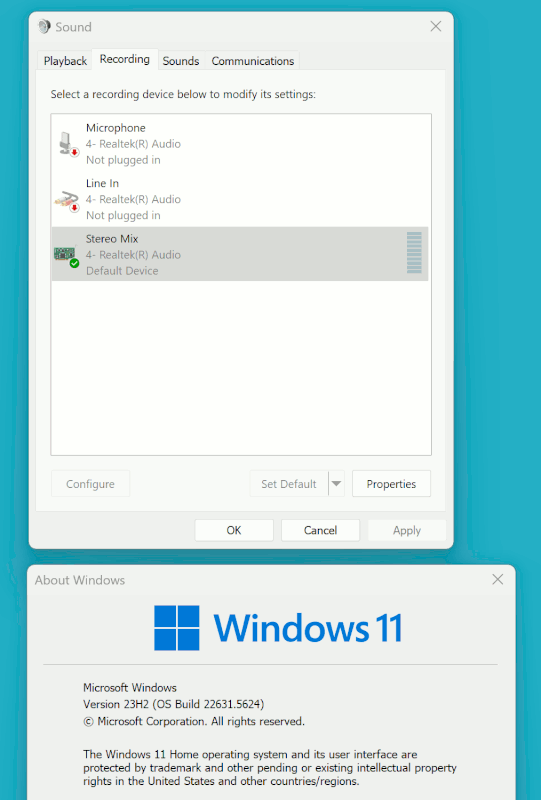
The audio isn't quite that bad, but the history of StereoMix is quite cloudy. At one time, a number of goofballs were claiming "StereoMix no longer works!".
But from my point of view, if you looked at all the HDAudio chip internal block diagrams, the path was there... and all that we needed to do,
was use an OS that still honoured the hardware details and tap into that.
Though in some frustrating cases, the functionality was there in the
chip, but the cheapskate manufacturer just hadn't made connections to
those pins on the device.
In some cases, there was a "Recipe" to make this input "re-appear" :-) Hideous concepts. There is no guarantee, that your setup will look
like this, but with enough voodoo, you can bring it back. See, StereoMix still exists. Here is the picture. The Win10 machine across the way will
also have one of these.
[Picture]
https://i.postimg.cc/zGy0FYz5/Loopback-Stereo-Mix-As-Input-Choice.gif
I don't know what analogue hardware is in this laptop; in "Sound", under "Playback", I have "Speakers\Conexant SmartAudio HD", and under
"Recording", I have "Microphone\2-USB PREAMP" and "Microphone\Conexant SmartAudio HD". The first only when the USB is plugged in; I presume the
other is the internal mic. - I think it's the little hole to the left of
the camera above the screen, presumably cut out if I plug in an external
mic. (I've never tried).>
Some of these things would be more apparent, if we could look at the
RealTek proprietary control panel for our RealTek audio chip, but
Microsoft has replaced the RealTek on windows 10, with their "Generic" simplified panel. But I still have at least one SSD with a copy of Win10 on it, where the RealTek panel is still there. I don't know why that
hasn't been zapped and killed. I think currently, the RealTek driver
has been containerized, similar to how the NVidia GPU driver has
been containerized, to "protect" the OS in Ring0 from some sort of attack.
Summary: It's a miracle, if anything still works on these machines :-)
I know there are devs, working somewhere, with good intention,
trying to make stuff work, but it's an uphill battle, like
swimming in sewage as a hobby. I have some instances of stuff
that *still work*. "Take that and that, you bastards" :-)
Paul
I love your attitude!
But in my case I'm not struggling with _analogue_ routing, at least on
the input side; it's just getting the signal both to _display_ in
GoldWave (as well as record - that seems to be no problem), and actually
come out of the speakers. As I say, I think the problem is not entirely GoldWave, as on one occasion where it wasn't coming out, I managed to
make it do so by disabling and then reenabling something in Sounds (I
think it was "Speakers").
I've just started a record playing; GoldWave is not running, and the
sound is coming out of the speakers. Starting GW: as soon as it had got
itself started, the sound muted - though is showing on the visuals in GW
(so would record fine). Closing GW - sound still off. Go into "Sounds" (quickest way is via [right-clicking] the speaker icon in the tray):
Playback tab, select Speakers, Properties, General tab - "Device usage:"
shows "Use this device (enable)". Change that to Don't use this device (disable); OK. Select Speakers | Properties again, change to Enable -
music comes back. Start GW again - sound is muted. Stop it - this time,
sound came back, but after a few seconds! Open GW - sound mutes.
BUT: I was then poking around in GoldWave, looking to see if there was a control I'd missed somewhere. After several minutes of me doing that -
BUT WITHOUT ME DOING ANYTHING! - the sound suddenly came on! I now have
both visual (the "meter bars" are moving, X-Y display, spectrogram) and audible!
There's another sound now: my head banging against a wall.
(Closed GW: sound stays playing. opened GW: sound _didn't_ mute!)
Ah well, while it's remaining "in a good mood", excuse me while I finish
this record! (I'm getting to know it quite well!)
--
J. P. Gilliver. UMRA: 1960/<1985 MB++G()AL-IS-Ch++(p)Ar@T+H+Sh0!:`)DNAf
It's not the pace of life that concerns me, it's the sudden stop at the end. --- Synchronet 3.21a-Linux NewsLink 1.2