• SOT: iCloud

    From Scott@newsgroups@gefion.myzen.co.uk to uk.d-i-y on Thu Feb 26 12:57:53 2026
    From Newsgroup: uk.d-i-y

    I have tried various permutations and searches with no success as yet.
    I am of course confident that someone here can point me in the correct direction.

    Apple has told me that my iCloud allocation is full. A large part of
    the data is photos. I would like to transfer all the photos to my PC.
    However, it seems this is not a straightforward task as I keep getting
    error messages. I suspect the problem may be that the files are HEIC
    (even though they can be displayed in Microsoft Photos).

    I see that it is easy to convert an HEIC file to jpg format. However,
    can this be done in bulk (there are 787 of them)? Is conversion even
    necessary? I see there is an app in the phone called 'Link to
    Windows'. Could this be of any relevance? I am reluctant to pay Apple
    a monthly fee to store files that I can store myself.

    Thank you for any assistance.
    --- Synchronet 3.21b-Linux NewsLink 1.2
  • From Tricky Dicky@tricky.dicky@sky.com to uk.d-i-y on Thu Feb 26 13:21:20 2026
    From Newsgroup: uk.d-i-y

    Scott <newsgroups@gefion.myzen.co.uk> wrote:
    I have tried various permutations and searches with no success as yet.
    I am of course confident that someone here can point me in the correct direction.

    Apple has told me that my iCloud allocation is full. A large part of
    the data is photos. I would like to transfer all the photos to my PC. However, it seems this is not a straightforward task as I keep getting
    error messages. I suspect the problem may be that the files are HEIC
    (even though they can be displayed in Microsoft Photos).

    I see that it is easy to convert an HEIC file to jpg format. However,
    can this be done in bulk (there are 787 of them)? Is conversion even necessary? I see there is an app in the phone called 'Link to
    Windows'. Could this be of any relevance? I am reluctant to pay Apple
    a monthly fee to store files that I can store myself.

    Thank you for any assistance.


    I have used an app called LocalSend to transfer files from my iPad to a PC.
    Not tried photos but it should work. I think the app works on iPhones too.

    --- Synchronet 3.21b-Linux NewsLink 1.2
  • From Roger Mills@mills37.fslife@gmail.com to uk.d-i-y on Thu Feb 26 20:17:52 2026
    From Newsgroup: uk.d-i-y

    On 26/02/2026 12:57, Scott wrote:
    I have tried various permutations and searches with no success as yet.
    I am of course confident that someone here can point me in the correct direction.

    Apple has told me that my iCloud allocation is full. A large part of
    the data is photos. I would like to transfer all the photos to my PC. However, it seems this is not a straightforward task as I keep getting
    error messages. I suspect the problem may be that the files are HEIC
    (even though they can be displayed in Microsoft Photos).

    I see that it is easy to convert an HEIC file to jpg format. However,
    can this be done in bulk (there are 787 of them)? Is conversion even necessary? I see there is an app in the phone called 'Link to
    Windows'. Could this be of any relevance? I am reluctant to pay Apple
    a monthly fee to store files that I can store myself.

    Thank you for any assistance.

    Irfanview (which is free) is happy to load, display and edit photos in
    HEIC format, and can do a bulk conversion to .jpg should you wish.
    --
    Cheers,
    Roger
    --- Synchronet 3.21b-Linux NewsLink 1.2
  • From Paul@nospam@needed.invalid to uk.d-i-y on Fri Feb 27 12:26:04 2026
    From Newsgroup: uk.d-i-y

    On Thu, 2/26/2026 7:57 AM, Scott wrote:
    I have tried various permutations and searches with no success as yet.
    I am of course confident that someone here can point me in the correct direction.

    Apple has told me that my iCloud allocation is full. A large part of
    the data is photos. I would like to transfer all the photos to my PC. However, it seems this is not a straightforward task as I keep getting
    error messages. I suspect the problem may be that the files are HEIC
    (even though they can be displayed in Microsoft Photos).

    I see that it is easy to convert an HEIC file to jpg format. However,
    can this be done in bulk (there are 787 of them)? Is conversion even necessary? I see there is an app in the phone called 'Link to
    Windows'. Could this be of any relevance? I am reluctant to pay Apple
    a monthly fee to store files that I can store myself.

    Thank you for any assistance.


    "I would like to transfer photos"
    "I keep getting error messages."

    Tell the audience what the error messages are,
    for a more thorough answer to your problem.

    *******

    Transferring files should not care about their content.
    The iCloud should be able to carry a binary blob and
    still download successfully.

    Either the magical tool you're using for download
    is being excessively nosy, or something else is wrong.

    If I transfer a file from another computer (a share),
    the process does not ask me whether
    I'd like to convert it. There will occasionally be
    files that resist typing, and we don't know what they
    are. Solving that problem is a separate step, from
    the transfer step.

    It's only when you *open* them in a viewer, that
    the errors show up like "format not recognized".
    There is a difference between a transmission
    error and the attempt to open in the viewer, and
    by giving us the error messages, we'll have a
    better idea what you were doing at the time.

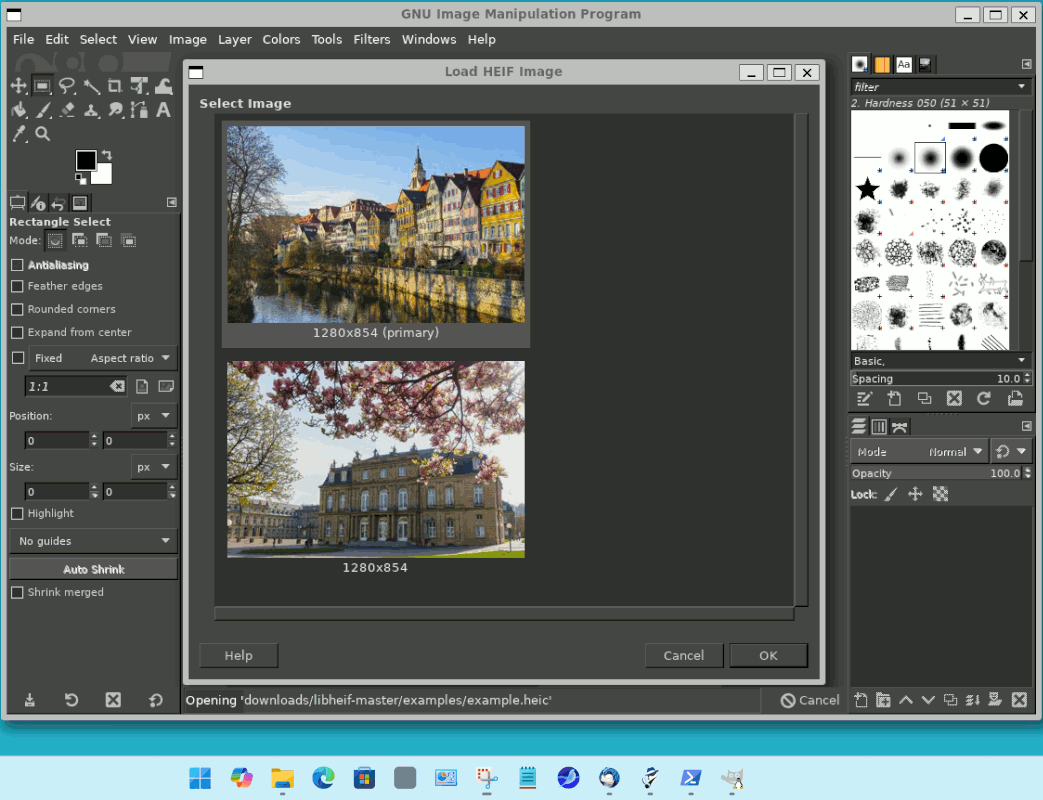
    Luckily, Apple chose an image format, that requires
    possessing an HEVC codec. The images actually can
    carry multiple frames (a file can have more than
    one image inside it, which some people do not know
    about - I didn't know this at first, for the sample
    picture below, that there were two frames). The
    multiple frames of information tells you that this
    format is not normal, it's backed by a video CODEC.

    On Windows, to examine an Apple photo properly, you
    could try the latest GIMP. It's free. And it will
    show any frames inside an Apple picture. It does not
    require buying an HEVC codec to make it work.

    https://www.gimp.org/downloads/

    Download GIMP 3.0.8

    x86 <=== this means Win10 32 bit installation (unlikely, but some do this)
    , x86_64 <=== w10/W11 64 bit install (more common choice)
    ARM64 <=== Perhaps a Qualcomm equipped ARM x64 laptop for Windows

    Warnings and information

    Supported OS: Windows 10 1903 or newer <=== picky, W10 or W11.
    An older GIMP runs on W7
    but then there is no HEIC

    This is a previously posted picture, showing what you see when opening
    the Apple image.

    [Picture]

    https://i.postimg.cc/4N6TnsWx/gimp-two-frames-example-heic.gif

    The Irfanview suggestion is much more practical, as long as it
    is modern enough to have the codec for it. As Irfanview can do
    bulk conversion, and then it would be preferable for the
    files to be easily recognized (by putting a consistent file
    extension on them). But Irfanview might only convert "the first frame",
    and that's where GIMP comes in. GIMP is your forensic tool,
    for determining "what am I losing when I convert these". You can
    see if I convert my example-heic, the frame with the pointy-building
    in it, is the only one in the JPG made by conversion.

    It's worth a look first, in GIMP, to see what's in the "container".
    Then see what Irfanview does, and whether it just gives the first frame.

    Paul
    --- Synchronet 3.21b-Linux NewsLink 1.2
  • From Scott@newsgroups@gefion.myzen.co.uk to uk.d-i-y on Fri Feb 27 21:18:10 2026
    From Newsgroup: uk.d-i-y

    On Thu, 26 Feb 2026 12:57:53 +0000, Scott
    <newsgroups@gefion.myzen.co.uk> wrote:
    [snip]

    Thanks for the suggestions. However, by good fortune I found an option
    to select all then backup to OneDrive. They can easily be moved from
    OneDrive to my hard drive, which fulfils my purpose.
    --- Synchronet 3.21b-Linux NewsLink 1.2
  • From John Rumm@see.my.signature@nowhere.null to uk.d-i-y on Sat Feb 28 15:03:34 2026
    From Newsgroup: uk.d-i-y

    On 26/02/2026 12:57, Scott wrote:
    I have tried various permutations and searches with no success as yet.
    I am of course confident that someone here can point me in the correct direction.

    Apple has told me that my iCloud allocation is full. A large part of
    the data is photos. I would like to transfer all the photos to my PC. However, it seems this is not a straightforward task as I keep getting
    error messages. I suspect the problem may be that the files are HEIC
    (even though they can be displayed in Microsoft Photos).

    I see that it is easy to convert an HEIC file to jpg format. However,
    can this be done in bulk (there are 787 of them)? Is conversion even necessary? I see there is an app in the phone called 'Link to
    Windows'. Could this be of any relevance? I am reluctant to pay Apple
    a monthly fee to store files that I can store myself.

    Thank you for any assistance.

    The file type should not influence the ability to transfer the file
    generally. However support for HEIC files outside of Apple's eco system
    is patchy.

    There are a number of ways to batch process them into other formats... I
    quite like Image Magick on the command line (or batch file) for this
    kind of job.

    You can install in windows command line using the standard package manager:

    winget install ImageMagick.Q16

    then conversion is as simple as:

    magick convert oldfilename.heic newfilename.jpg

    (or any other format)
    --
    Cheers,

    John.

    /=================================================================\
    | Internode Ltd - http://www.internode.co.uk | |-----------------------------------------------------------------|
    | John Rumm - john(at)internode(dot)co(dot)uk | \=================================================================/
    --- Synchronet 3.21d-Linux NewsLink 1.2