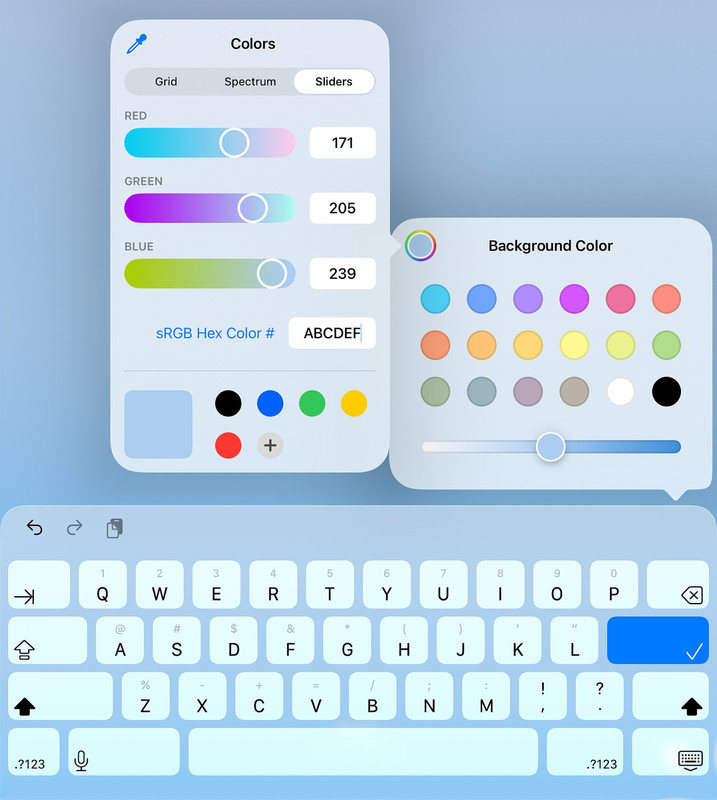
• PSA: Creating *any* RGB solid color for mobile wallpaper or Windows background

    From Maria Sophia@mariasophia@comprehension.com to comp.mobile.android,misc.phone.mobile.iphone,alt.comp.os.windows-10 on Tue Feb 17 20:22:03 2026
    From Newsgroup: misc.phone.mobile.iphone

    PSA:
    Creating *any* RGB solid color for mobile wallpaper or Windows background

    On the Android newsgroup is a lengthy thread about setting the homescreen/lockscreen to a solid-colored wallpaper, where, for Android, the capability depends greatly on the device particulars (launcher, Android version, OEM, model, etc.).
    Newsgroups: comp.mobile.android
    Subject: How to create a plain wallpaper/background?
    Date: Mon, 16 Feb 2026 13:09:54 +0000
    Message-ID: <2ihb6m-91k63.ln1@q957.zbmc.eu>

    The holy grail goal would be to select *any* RGB/HEX color by value,
    such as R=AB, G=CD, B=EF (decimal 171, 205, 239) for the color.

    As far as I know, none of the three platforms I own (and hence can test), allow the user to *directly* natively set the background color by number (although "some" of the Android devices do allow things I'm unaware of).

    Windows is perhaps the best because it's color-picker GUI has all colors,
    but the problem applies to all 3 major consumer platforms I own (AFAIK).
    a. Windows: Settings > Personalization > Colors > Custom color
    b. Android: (multiple methods depending on the device setup)
    c. iOS: (has no native method to set a solid color, but see below)

    To simplify things, we pointed out a free wallpaper-picker app, that works
    on all Android devices, but it only had a limited set of solid colors.
    *Wallpapers*, by Google
    <https://play.google.com/store/apps/details?id=com.google.android.apps.wallpaper>

    For a fee, meaning you lose some privacy, there are solid-color wallpaper generators on the mobile devices, which can generate *any* RGB value:
    *RGB Color Wallpaper Pro*, by TecDrop
    <https://play.google.com/store/apps/details?id=com.tecdrop.rgbcolorwallpaperpro>
    The app-to-wallpaper integration is possible because Android exposes a
    public wallpaper-setting API that apps are allowed to use.

    On my iPadOS 26.3 device, I could choose Settings > Wallpaper > Add a new wallpaper > colors but those are not true colors but color gradients.

    Apparently Apple dislikes flat, uniform backgrounds because they apparently consider them visually too stark for the system aesthetic or something.

    Even so, only a limited set of colors for the gradient were available.

    But all is not lost given we can generate a solid color image.
    <https://singlecolorimage.com/>
    Which, when we parse the API, turns out to be:
    <https://singlecolorimage.com/get/<HEX>/<WIDTH>x<HEIGHT>>
    So, for example, for the hex color ABCDEF, the link would be:
    <https://singlecolorimage.com/get/abcdef/400x100>

    But having to use the web just to generate a solid-color image file is,
    well, it's against my standards, so let's do it with just an editor.
    gvim wallpaper.ppm
    P3 400 100 255 171 205 239
    magick wallpaper.ppm wallpaper.png
    That creates a get a 400+100 pixel solid #ABCDEF PNG, identical to the downloaded image created from the single-color-image web site above.

    Note that almost any Windows image editor will do what ImageMagick does,
    so consider the "magick" command simply one example of many that work.

    The PPM can vary depending on the device screen particular
    a. Windows: P3 1920 1080 255 171 205 239 (1920x180 monitor)
    b. Android: P3 1600 720 255 171 205 239 (Galaxy A32-5G)
    c. iOS: P3 2360 1640 255 171 205 239 (my 10th-gen iPad)

    Using the exact screen resolution is ideal if:
    a. We want zero scaling
    b. We want pixel-perfect gradients (not needed for solid colors)
    c. We want crisp edges (again, not needed for solid colors)
    But for a pure solid color, scaling is mathematically lossless.
    So our 400+100 wallpaper image is just as good as a 2360+1640 one.

    Once we have the image, all three platforms can choose that image.
    a. Windows: Settings > Personalization > Background > Picture
    b. Android: Gallery/Photos > (choose the image) > Set as wallpaper
    c. iOS: Settings > Wallpaper > Add New Wallpaper > Photos

    Speaking of privacy, you likely do not want your wallpaper to be unique:
    *How your phone can be tracked by your wallpaper*
    <https://groups.google.com/g/comp.mobile.android/c/MH2n3cymu6E/>

    As always, everything I say above could be wrong so I challenge others to
    help make this PSA iron-clad so that it's a useful reference for all.
    --
    There are many ways to do something as simple as set a solid color.
    --- Synchronet 3.21b-Linux NewsLink 1.2
  • From Maria Sophia@mariasophia@comprehension.com to comp.mobile.android,misc.phone.mobile.iphone,alt.comp.os.windows-10 on Tue Feb 17 20:56:30 2026
    From Newsgroup: misc.phone.mobile.iphone

    Maria Sophia wrote:
    gvim wallpaper.ppm
    P3 400 100 255 171 205 239
    magick wallpaper.ppm wallpaper.png
    That creates a 400x100 pixel solid #ABCDEF PNG, identical to the
    downloaded image created from the single-color-image web site above.

    Oops. I wrote that PSA off the cuff in a few minutes so I didn't realize
    there was missing data in the description that was actually in my ppm file.
    C:\> type wallpaper.ppm
    P3 1 1 255 171 205 239
    C:\> magick wallpaper.ppm wallpaper.png

    That was my mistake. The prior PPM header declares 400x100 pixels
    (40,000 pixels total), but only provides one pixel's worth of RGB
    data. ImageMagick is stricter than Irfanview about PPM completeness.

    The PPM I actually used when testing was:
    P3 1 1 255 171 205 239
    which is a complete 1x1 PPM. ImageMagick accepts that file because
    it contains exactly the amount of pixel data the header declares.

    P3 -> Magic number. Means "ASCII PPM" (Portable Pixmap, text format).
    1 -> Image width in pixels. This file contains exactly 1 column.
    1 -> Image height in pixels. This file contains exactly 1 row.
    255 -> Maximum channel value. Defines the scale for R, G, B.
    255 means each color channel ranges from 0 to 255.
    171 -> Red channel value for the single pixel (0-255).
    This corresponds to hex AB.
    205 -> Green channel value for the single pixel (0-255).
    This corresponds to hex CD.
    239 -> Blue channel value for the single pixel (0-255).
    This corresponds to hex EF.

    IrfanView is more forgiving than ImageMagick. If a PPM ends early,
    IrfanView simply repeats the last pixel to fill the image. That is
    why my original example appeared to work in IrfanView but not in
    ImageMagick and I accidentally didn't make that distinction prior.

    Mea culpa!

    The correct minimal PPM for a solid color is therefore:
    P3 1 1 255 R G B
    Then you can scale it to any size you want using any way you want.

    For example:
    magick wallpaper.ppm -scale 400x100! wallpaper.png

    -scale -> Resize operation.
    Tells ImageMagick to scale the image to a new size.
    400x100! -> Target dimensions for the resize.
    400 = width in pixels
    100 = height in pixels
    ! = force exact size, ignore aspect ratio.
    (The bang means to stretch or squash if needed.)

    This produces a mathematically perfect solid-color image of any
    desired resolution such as these for my three platforms I own:

    a. Windows (1920x1080)
    C:\> magick wallpaper.ppm -scale 1920x1080! win-1920x1080.png

    b. Android (Galaxy A32-5G, 1600x720)
    C:\> magick wallpaper.ppm -scale 1600x720! android-1600x720.png

    c. iOS (10th-gen iPad, 2360x1640)
    C:\> magick wallpaper.ppm -scale 2360x1640! ipad-2360x1640.png

    As always, these PSAs and Tutorials are written to help everyone.
    If/when you find an error, please improve so that everyone benefits.
    --
    If we think we understand something, we don't. But if we think we don't
    quite yet understand something, then we're just beginning to understand it.
    --- Synchronet 3.21b-Linux NewsLink 1.2
  • From Alan@nuh-uh@nope.com to comp.mobile.android,misc.phone.mobile.iphone,alt.comp.os.windows-10 on Tue Feb 17 17:56:45 2026
    From Newsgroup: misc.phone.mobile.iphone

    On 2026-02-17 17:22, Maria Sophia wrote:
    PSA: Creating *any* RGB solid color for mobile wallpaper or Windows background

    On the Android newsgroup is a lengthy thread about setting the homescreen/lockscreen to a solid-colored wallpaper, where, for Android, the capability depends greatly on the device particulars (launcher, Android version, OEM, model, etc.).
    Newsgroups: comp.mobile.android
    Subject: How to create a plain wallpaper/background?
    Date: Mon, 16 Feb 2026 13:09:54 +0000
    Message-ID: <2ihb6m-91k63.ln1@q957.zbmc.eu>

    The holy grail goal would be to select *any* RGB/HEX color by value,
    such as R=AB, G=CD, B=EF (decimal 171, 205, 239) for the color.

    As far as I know, none of the three platforms I own (and hence can
    test), allow the user to *directly* natively set the background color by number
    (although "some" of the Android devices do allow things I'm unaware of).

    And...

    ...as usual...

    ...you're wrong.

    iOS allows you to "*directly* natively set the background color by number"

    Settings
    Wallpapers
    Add New
    Colour
    Select the colour wheel top left of "Background colour"
    Then pick by Grid, Spectrum, or Sliders...

    ...with RGB numbers or hex values.

    Now we begin the usual dance where Arlen will first claim this isn't true...

    ...then have to be hit over the head with it repeatedly...

    ...and then will somehow claim he discovered it!


    --- Synchronet 3.21b-Linux NewsLink 1.2
  • From Maria Sophia@mariasophia@comprehension.com to comp.mobile.android,misc.phone.mobile.iphone,alt.comp.os.windows-10 on Tue Feb 17 21:09:52 2026
    From Newsgroup: misc.phone.mobile.iphone

    Maria Sophia wrote:
    On my iPadOS 26.3 device, I could choose Settings > Wallpaper > Add a new wallpaper > colors but those are not true colors but color gradients.

    Oops. I made another minor mistake in hastily writing that PSA just now.

    I can't get my iPad to set a solid color, but you can fake it (not really)
    by using the gradient screen (which you can type into "ABCDEF") as shown.
    <https://i.postimg.cc/RFJJph5s/abcdef.jpg>

    But it's a gradient.
    Not a solid color.

    If anyone knows how to use that native GUI to get a solid color, that would
    be in keeping with this PSA which is about setting solid-color backgrounds.
    --
    We can never know everything but knowing that should stop us from trying.
    --- Synchronet 3.21b-Linux NewsLink 1.2
  • From Alan@nuh-uh@nope.com to comp.mobile.android,misc.phone.mobile.iphone,alt.comp.os.windows-10 on Tue Feb 17 18:15:31 2026
    From Newsgroup: misc.phone.mobile.iphone

    On 2026-02-17 18:09, Maria Sophia wrote:
    Maria Sophia wrote:
    On my iPadOS 26.3 device, I could choose Settings > Wallpaper > Add a new
    wallpaper > colors but those are not true colors but color gradients.

    Oops. I made another minor mistake in hastily writing that PSA just now.

    I can't get my iPad to set a solid color, but you can fake it (not
    really) by using the gradient screen (which you can type into "ABCDEF")
    as shown.
    <https://i.postimg.cc/RFJJph5s/abcdef.jpg>

    But it's a gradient. Not a solid color.

    If anyone knows how to use that native GUI to get a solid color, that would be in keeping with this PSA which is about setting solid-color backgrounds.

    Ah, the goalpost drag!

    This was about setting a "plain wallpaper" originally.

    The fact that iOS applies a gradient doesn't really make the wallpaper
    any less "plain".
    --- Synchronet 3.21b-Linux NewsLink 1.2
  • From Maria Sophia@mariasophia@comprehension.com to comp.mobile.android,misc.phone.mobile.iphone,alt.comp.os.windows-10 on Tue Feb 17 21:45:42 2026
    From Newsgroup: misc.phone.mobile.iphone

    Maria Sophia wrote:
    Speaking of privacy, you likely do not want your wallpaper to be unique:
    *How your phone can be tracked by your wallpaper*
    <https://groups.google.com/g/comp.mobile.android/c/MH2n3cymu6E/>

    To continue to clarify so that every point is covered in sufficient detail

    Things have changed since that particular Apr 26, 2022 PSA discussion about fingerprint privacy when pre-Android 8.1 apps could read wallpaper bitmaps.
    WallpaperManager.getDrawable()
    The returned bitmap was the actual wallpaper image!

    In those days, apps could hash it, upload it, or even reconstruct the
    original photo! If your wallpaper was a photo of your kid, your dog, your house, etc., any app could silently read it. That was a real privacy hole.

    Android 8.1 tried to avoid this by requiring READ_EXTERNAL_STORAGE such
    that after 8.1 apps can no longer read the wallpaper image itself, but they still could read the WallpaperColors object which has some juicy data...

    In later Android versions, the wallpaper is stored in a protected system directory, not in shared storage.
    Wallpaper: /data/system/users/0/wallpaper
    Lockscreen: /data/system/users/0/wallpaper_loc

    In the current Android versions, apps get much less wallpaper information:
    WallpaperManager.getWallpaperColors()
    a. 3 "main colors"
    b. 1 "secondary color"
    c. 1 "tertiary color"
    d. And some luminance metadata

    FingerprintJS showed that this color set can be hashed into what they
    called ~144 bits of entropy but if you use a pure solid-color wallpaper,
    the color set contains almost no entropy & as such, is apparently not all
    that useful for malevolent fingerprinting purposes (AFAIK).

    Because if you take:
    a. 3 RGB colors
    b. luminance metadata
    c. some internal weighting
    and hash them, you can produce a value that looks like a fingerprint.

    But it is only a fingerprint within the same app on the same device.
    Better yet, pure solid colors collapse the entropy to almost nothing

    A 1x1 PPM expanded to our screen size produces a mathematically uniform
    image with no EXIF, no camera noise & no unique patterns to fingerprint.

    I guess if we use a color nobody uses, that might still fingerprint us,
    but a pure black wallpaper produces the same WallpaperColors object for everyone.

    Which is why this PSA about generating solid-color wallpapers is actually
    one of the million things most people "should" know about privacy, but
    perhaps they only know about 3 or 4 of those million things about privacy.

    Note that there is no iOS wallpaper fingerprinting vector. If an iOS app
    knows anything about your wallpaper, you gave it the image yourself.

    As for Windows, any app can read the wallpaper, which is stored in
    %AppData%\Microsoft\Windows\Themes\TranscodedWallpaper
    No special wallpaper fingerprinting mechanism exists, but program you run
    can read your wallpaper file because it can read all your files anyway.
    --
    Privacy is a feature you build yourself into everything you touch and use.
    --- Synchronet 3.21b-Linux NewsLink 1.2
  • From Jeff Layman@Jeff@invalid.invalid to comp.mobile.android,misc.phone.mobile.iphone,alt.comp.os.windows-10 on Wed Feb 18 08:33:43 2026
    From Newsgroup: misc.phone.mobile.iphone

    On 18/02/2026 01:22, Maria Sophia wrote:
    PSA:
    Creating *any* RGB solid color for mobile wallpaper or Windows background

    On the Android newsgroup is a lengthy thread about setting the homescreen/lockscreen to a solid-colored wallpaper, where, for Android, the capability depends greatly on the device particulars (launcher, Android version, OEM, model, etc.).
    And some of them have an interesting hurdle to jump over. On my Xiaomi
    Redmi Note 10 5G I have access to a very limited number of themes for wallpaper choice. There are "more" I can try to see, but if I do it
    turns up with the same issue as if I take a photo myself (which could be
    a completely black photo) and want to use that as wallpaper. That issue
    is not being able to use any other theme unless I agree to Xiaomi's user agreement and privacy policy (which they say I can opt out of once I've
    opted in by looking in "Settings". So why make it necessary in the first place?).

    Fortunately one of their themes that I could use was a fairly dark interplanetary picture, so I use that.

    Why they insist on agreeing to their user agreement and privacy policy
    before using a theme is beyond me. Well, no, it's not really, as it's
    just another means of data burrowing.
    --
    Jeff
    --- Synchronet 3.21b-Linux NewsLink 1.2
  • From Chris Green@cl@isbd.net to comp.mobile.android,misc.phone.mobile.iphone,alt.comp.os.windows-10 on Wed Feb 18 12:27:48 2026
    From Newsgroup: misc.phone.mobile.iphone

    Alan <nuh-uh@nope.com> wrote:
    On 2026-02-17 18:09, Maria Sophia wrote:
    Maria Sophia wrote:
    On my iPadOS 26.3 device, I could choose Settings > Wallpaper > Add a new >> wallpaper > colors but those are not true colors but color gradients.

    Oops. I made another minor mistake in hastily writing that PSA just now.

    I can't get my iPad to set a solid color, but you can fake it (not
    really) by using the gradient screen (which you can type into "ABCDEF")
    as shown.
    <https://i.postimg.cc/RFJJph5s/abcdef.jpg>

    But it's a gradient. Not a solid color.

    If anyone knows how to use that native GUI to get a solid color, that would be in keeping with this PSA which is about setting solid-color backgrounds.

    Ah, the goalpost drag!

    This was about setting a "plain wallpaper" originally.

    The fact that iOS applies a gradient doesn't really make the wallpaper
    any less "plain".

    OP here, I certainly meant with no gradient when I asked the question. :-)

    I.e. I just want the whole screen the same colour and brightness.
    --
    Chris Green
    -+
    --- Synchronet 3.21b-Linux NewsLink 1.2
  • From Alan@nuh-uh@nope.com to comp.mobile.android,misc.phone.mobile.iphone,alt.comp.os.windows-10 on Wed Feb 18 08:12:18 2026
    From Newsgroup: misc.phone.mobile.iphone

    On 2026-02-18 04:27, Chris Green wrote:
    Alan <nuh-uh@nope.com> wrote:
    On 2026-02-17 18:09, Maria Sophia wrote:
    Maria Sophia wrote:
    On my iPadOS 26.3 device, I could choose Settings > Wallpaper > Add a new >>>> wallpaper > colors but those are not true colors but color gradients.

    Oops. I made another minor mistake in hastily writing that PSA just now. >>>
    I can't get my iPad to set a solid color, but you can fake it (not
    really) by using the gradient screen (which you can type into "ABCDEF")
    as shown.
    <https://i.postimg.cc/RFJJph5s/abcdef.jpg>

    But it's a gradient. Not a solid color.

    If anyone knows how to use that native GUI to get a solid color, that would >>> be in keeping with this PSA which is about setting solid-color backgrounds. >>
    Ah, the goalpost drag!

    This was about setting a "plain wallpaper" originally.

    The fact that iOS applies a gradient doesn't really make the wallpaper
    any less "plain".

    OP here, I certainly meant with no gradient when I asked the question. :-)

    I.e. I just want the whole screen the same colour and brightness.


    Well I'd call a simple gradient with a colour you choose pretty plain.

    Efye
    --- Synchronet 3.21b-Linux NewsLink 1.2
  • From Maria Sophia@mariasophia@comprehension.com to comp.mobile.android,misc.phone.mobile.iphone,alt.comp.os.windows-10 on Wed Feb 18 12:54:13 2026
    From Newsgroup: misc.phone.mobile.iphone

    Jeff Layman wrote:
    Why they insist on agreeing to their user agreement and privacy policy before using a theme is beyond me. Well, no, it's not really, as it's
    just another means of data burrowing.

    Hi Jeff,

    Thanks for that enlightening observation of how your own Xiaomi Redmi Note
    10 5G requires you to agree to the mothership "collection" policy.

    Every company (including Samsung, Google & Microsoft) likes to mimic
    Apple's privacy-robbing monetization of its loyal user based, if they can.

    What you're describing on the Xiaomi is a different class of "wallpaper
    privacy issue" than the Android-level fingerprinting we've been talking
    about, so it's worth spelling out the distinction clearly, because it helps people on all platforms understand where the real risk is coming from.
    a. Android's wallpaper-color fingerprinting is a technical quirk.
    b. Xiaomi's wallpaper-theme gatekeeping is a business model.

    Much like how Apple's privacy-robbing strategy on iOS 'forces' you to
    create an account just so that "your" device is functionally useful,
    Xiaomi's "agree to our privacy policy before using themes" is the first
    step in Xiaomi's monetization and data-collection strategy.

    Xiaomi's Themes app is treated as a service, not a system component.
    To use that service, you are required to:
    a. Accept their privacy policy
    b. Accept their user agreement
    c. Give them permission to collect analytics
    d. Give them permission to collect device identifiers
    e. Give them permission to track theme usage
    f. Give them permission to push ads and recommendations
    Where even a completely black photo triggers the same requirement!
    But that's not all.
    g. Apparently just browsing "more themes" triggers the requirement
    h. As does using a custom wallpaper triggers the requirement
    But wait... there's more!
    i. Apparently just switching away from Xiaomi's pre-approved themes
    also triggers the requirement!

    You could almost argue that Xiaomi outflanks even Apple when it comes to policies that are designed to mine all the data they can from you,
    although, let's be clear, even Xiomi doesn't stoop as low as Apple when it comes to adding your device identifiers into every single app you install.

    With respect to Xiomi's mothership privacy robbing strategy...
    i. Just as with Apple, it's not about the wallpaper.
    ii. It's about forcing you into their data ecosystem.

    Why does Xiaomi do this for something as trivial as wallpapers?
    Because themes are one of their revenue streams.

    Just as with Google products (which is why I have no Google Account on my phone), the Xiaomi Themes app is tied to:
    A. Your Xiaomi account
    B. The Xiaomi cloud
    C. Xiaomi ads
    D. Xiaomi analytics
    E. Xiaomi personalization
    F. Xiaomi storefront content
    Where they want (and get)
    G. your device model
    H. your region
    I. your usage patterns
    J. your theme preferences
    K. your wallpaper choices
    L. your Xiaomi account identity
    M. your advertising ID

    But, as with Microsoft, they want legal permission to collect it.
    That's why they block you from:
    i. using custom wallpapers
    ii. browsing theme catalogs
    iii. applying downloaded themes
    ...until you agree.

    Luckily for you, this PSA hits home as Xiaomi's Themes app is optional.

    You can bypass Xiaomi's theme ecosystem entirely by:
    1. Generating your own solid-color wallpaper
    2. Setting it through the system wallpaper picker
    3. Which bypasses Xiaomi's theme catalog
    4. Which also bypasses Xiaomi's cloud sync
    5. And bypasses Xiaomi's analytics

    Because the hex 1x1 PPM -> PNG method is:
    a. offline
    b. metadata-free
    c. EXIF-free
    d. noise-free
    e. fingerprint-resistant
    And, for you, it's the right Xiaomi-ecosystem-independent workaround!
    --
    Privacy is a feature you build yourself into everything you touch and use.
    --- Synchronet 3.21b-Linux NewsLink 1.2
  • From Carlos E. R.@robin_listas@es.invalid to comp.mobile.android,misc.phone.mobile.iphone,alt.comp.os.windows-10 on Wed Feb 18 19:34:59 2026
    From Newsgroup: misc.phone.mobile.iphone

    On 2026-02-18 17:12, Alan wrote:
    On 2026-02-18 04:27, Chris Green wrote:
    Alan <nuh-uh@nope.com> wrote:
    On 2026-02-17 18:09, Maria Sophia wrote:
    Maria Sophia wrote:
    On my iPadOS 26.3 device, I could choose Settings > Wallpaper > Add >>>>> a new
    wallpaper > colors but those are not true colors but color gradients. >>>>
    Oops. I made another minor mistake in hastily writing that PSA just
    now.

    I can't get my iPad to set a solid color, but you can fake it (not
    really) by using the gradient screen (which you can type into "ABCDEF") >>>> as shown.
    <https://i.postimg.cc/RFJJph5s/abcdef.jpg>

    But it's a gradient. Not a solid color.

    If anyone knows how to use that native GUI to get a solid color,
    that would
    be in keeping with this PSA which is about setting solid-color
    backgrounds.

    Ah, the goalpost drag!

    This was about setting a "plain wallpaper" originally.

    The fact that iOS applies a gradient doesn't really make the wallpaper
    any less "plain".

    OP here, I certainly meant with no gradient when I asked the
    question.-a :-)

    I.e. I just want the whole screen the same colour and brightness.


    Well I'd call a simple gradient with a colour you choose pretty plain.

    Efye

    Can't you choose a zero gradient?

    Still I think this is converted to a display bitmap which is what the rendering routine uses.
    --
    Cheers,
    Carlos E.R.
    ESEfc-Efc+, EUEfc-Efc|;
    --- Synchronet 3.21b-Linux NewsLink 1.2
  • From Alan@nuh-uh@nope.com to comp.mobile.android,misc.phone.mobile.iphone,alt.comp.os.windows-10 on Wed Feb 18 10:37:25 2026
    From Newsgroup: misc.phone.mobile.iphone

    On 2026-02-18 10:34, Carlos E. R. wrote:
    On 2026-02-18 17:12, Alan wrote:
    On 2026-02-18 04:27, Chris Green wrote:
    Alan <nuh-uh@nope.com> wrote:
    On 2026-02-17 18:09, Maria Sophia wrote:
    Maria Sophia wrote:
    On my iPadOS 26.3 device, I could choose Settings > Wallpaper >
    Add a new
    wallpaper > colors but those are not true colors but color gradients. >>>>>
    Oops. I made another minor mistake in hastily writing that PSA just >>>>> now.

    I can't get my iPad to set a solid color, but you can fake it (not
    really) by using the gradient screen (which you can type into
    "ABCDEF")
    as shown.
    <https://i.postimg.cc/RFJJph5s/abcdef.jpg>

    But it's a gradient. Not a solid color.

    If anyone knows how to use that native GUI to get a solid color,
    that would
    be in keeping with this PSA which is about setting solid-color
    backgrounds.

    Ah, the goalpost drag!

    This was about setting a "plain wallpaper" originally.

    The fact that iOS applies a gradient doesn't really make the wallpaper >>>> any less "plain".

    OP here, I certainly meant with no gradient when I asked the
    question.-a :-)

    I.e. I just want the whole screen the same colour and brightness.


    Well I'd call a simple gradient with a colour you choose pretty plain.

    Efye

    Can't you choose a zero gradient?

    Not that I can see, no.


    Still I think this is converted to a display bitmap which is what the rendering routine uses.
    Completely agree. Calculate pixel values every time? No way.
    --- Synchronet 3.21b-Linux NewsLink 1.2
  • From Your Name@YourName@YourISP.com to misc.phone.mobile.iphone,alt.comp.os.windows-10,comp.mobile.android on Thu Feb 19 10:27:00 2026
    From Newsgroup: misc.phone.mobile.iphone

    On 2026-02-18 12:27:48 +0000, Chris Green said:
    Alan <nuh-uh@nope.com> wrote:
    On 2026-02-17 18:09, Maria Sophia wrote:
    Maria Sophia wrote:
    On my iPadOS 26.3 device, I could choose Settings > Wallpaper > Add a new >>>> wallpaper > colors but those are not true colors but color gradients.

    Oops. I made another minor mistake in hastily writing that PSA just now. >>>
    I can't get my iPad to set a solid color, but you can fake it (not
    really) by using the gradient screen (which you can type into "ABCDEF")
    as shown.
    <https://i.postimg.cc/RFJJph5s/abcdef.jpg>

    But it's a gradient. Not a solid color.

    If anyone knows how to use that native GUI to get a solid color, that would >>> be in keeping with this PSA which is about setting solid-color backgrounds. >>
    Ah, the goalpost drag!

    This was about setting a "plain wallpaper" originally.

    The fact that iOS applies a gradient doesn't really make the wallpaper
    any less "plain".

    OP here, I certainly meant with no gradient when I asked the question. :-)

    I.e. I just want the whole screen the same colour and brightness.

    It's simply the Maria / Arlen troll making a know-nothing complaint
    about Apple yet again. Just ignore the the moron.

    --- Synchronet 3.21b-Linux NewsLink 1.2
  • From Maria Sophia@mariasophia@comprehension.com to misc.phone.mobile.iphone,alt.comp.os.windows-10,comp.mobile.android on Wed Feb 18 17:38:26 2026
    From Newsgroup: misc.phone.mobile.iphone

    Your Name wrote:
    On 2026-02-18 12:27:48 +0000, Chris Green said:
    Alan <nuh-uh@nope.com> wrote:
    On 2026-02-17 18:09, Maria Sophia wrote:
    Maria Sophia wrote:
    On my iPadOS 26.3 device, I could choose Settings > Wallpaper > Add a new >>>>> wallpaper > colors but those are not true colors but color gradients. >>>>
    Oops. I made another minor mistake in hastily writing that PSA just now. >>>>
    I can't get my iPad to set a solid color, but you can fake it (not
    really) by using the gradient screen (which you can type into "ABCDEF") >>>> as shown.
    <https://i.postimg.cc/RFJJph5s/abcdef.jpg>

    But it's a gradient. Not a solid color.

    If anyone knows how to use that native GUI to get a solid color, that would
    be in keeping with this PSA which is about setting solid-color backgrounds.

    Ah, the goalpost drag!

    This was about setting a "plain wallpaper" originally.

    The fact that iOS applies a gradient doesn't really make the wallpaper
    any less "plain".

    OP here, I certainly meant with no gradient when I asked the question. :-) >>
    I.e. I just want the whole screen the same colour and brightness.

    It's simply the Maria / Arlen troll making a know-nothing complaint
    about Apple yet again. Just ignore the the moron.

    Let's try to stay focused on topic for the technical question, since the
    thread concerns cross-platform behavior rather than personalities.

    The whole point of every Usenet thread here is to add technical value.

    The Apple-specific posters (e.g., Your Name and Alan Baker) are actually
    the ones best positioned to clarify whether iPadOS exposes any native
    mechanism for assigning a true solid-color wallpaper. They use iOS every
    day so they are better positioned to answer whether iPadOS provides a system-level method, not a gradient approximation, not a workaround, but an actual uniform RGB value applied across the entire framebuffer.

    For completeness, I had already investigated yesterday whether third-party
    iOS apps could replicate what the Android utilities do. On Android, apps
    can set a solid-color background because the OS exposes the necessary wallpaper-setting APIs, including the ability to supply a raw bitmap or programmatically generated color field. Windows exposes similar
    functionality.

    iPadOS, however, as far as I could tell, does not expose an equivalent
    public API that allows an app to programmatically set a wallpaper from an arbitrary RGB hex value.

    Unless the Apple posters (e.g., Your Name & Alan Baker) know otherwise, it appears the only options available to third-party iOS developers are the
    ones Apple explicitly permits, and those do not include direct wallpaper manipulation as far as I have been able to ascertain in my own tests.

    As a result, the "solid color" apps that exist on Android simply do not
    appear to have been yet implemented on iPadOS, perhaps due to the fact that Apple won't allow private API access on the platform.

    So the technical question remains open for Alan Baker & Your Name to help answer, which is...

    Q: Does iPadOS provide any first-party, GUI-accessible method
    to set a non-gradient, uniform-single-color wallpaper?
    A: ?

    If not, then the limitation is architectural rather than user error.
    --- Synchronet 3.21b-Linux NewsLink 1.2
  • From Alan@nuh-uh@nope.com to misc.phone.mobile.iphone,alt.comp.os.windows-10,comp.mobile.android on Wed Feb 18 14:53:20 2026
    From Newsgroup: misc.phone.mobile.iphone

    On 2026-02-18 14:38, Maria Sophia wrote:
    Your Name wrote:
    On 2026-02-18 12:27:48 +0000, Chris Green said:
    Alan <nuh-uh@nope.com> wrote:
    On 2026-02-17 18:09, Maria Sophia wrote:
    Maria Sophia wrote:
    On my iPadOS 26.3 device, I could choose Settings >
    Wallpaper > Add a new wallpaper > colors but those are not
    true colors but color gradients.

    Oops. I made another minor mistake in hastily writing that
    PSA just now.

    I can't get my iPad to set a solid color, but you can fake
    it (not really) by using the gradient screen (which you can
    type into "ABCDEF") as shown. <https://i.postimg.cc/RFJJph5s/
    abcdef.jpg>

    But it's a gradient. Not a solid color.

    If anyone knows how to use that native GUI to get a solid
    color, that would be in keeping with this PSA which is about
    setting solid-color backgrounds.

    Ah, the goalpost drag!

    This was about setting a "plain wallpaper" originally.

    The fact that iOS applies a gradient doesn't really make the
    wallpaper any less "plain".

    OP here, I certainly meant with no gradient when I asked the
    question. :-)

    I.e. I just want the whole screen the same colour and
    brightness.

    It's simply the Maria / Arlen troll making a know-nothing
    complaint about Apple yet again. Just ignore the the moron.

    Let's try to stay focused on topic for the technical question, since
    the thread concerns cross-platform behavior rather than
    personalities.

    You mean the way you did when you posted all of this (everything
    included to show Arlen-the-narcissists "focus" on the technical):

    <quote>
    Hi Carlos,

    This is just going to you on the Android newsgroup because you authored
    the troll thread on teh Android newsgroup amplifying Alan Baker's own
    trolls.

    You call me a troll for writing all these PSAs and Tutorials, and I
    agree I do invest a lot of energy into developing them into bona-fide
    value. Yet... you don't call Alan Baker a troll. You actually agree with
    Alan Baker every time he says I'm a troll.

    Why? Why don't you apply the same rules to Alan Baker that you apply to me?

    Why is it that my PSAs and Tutorials you consider trolls, but the
    garbage that Alan Baker spews, to you, is perfectly reasonable Usenet
    chatter?

    For example, notice in this thread how Alan Baker is desperate to change
    the goalposts (which are clearly stated in the SUBJECT line for God's
    sake) from solid color to "gradient" and yet, at the same time that Alan
    Baker tries to change the goal posts, he literally claims I tried to
    change 'em.

    WTF? Even the original OP, Chris Green, agreed what the goal post always
    was.

    And now you see Alan Baker desperate to change it again to 'simple',
    even as the goal post is and was always a solid color (typically black).

    While you'll note I never respond to Alan Baker's trolls, you very often
    do and in doing so, especially when you agree with Alan Baker when he
    calls me a troll for wrirting all these PSAs and Tutorials, you AMPLIFY
    his trolls.

    My question to you, Carlos, since *you* authored that troll thread on me:

    Q: Why do you consider Alan Baker's trolls, NOT trolls?
    A: ?
    --
    </quote>
    --- Synchronet 3.21b-Linux NewsLink 1.2
  • From Hank Rogers@Hank@nospam.invalid to misc.phone.mobile.iphone,alt.comp.os.windows-10,comp.mobile.android on Wed Feb 18 17:37:27 2026
    From Newsgroup: misc.phone.mobile.iphone

    Maria Sophia wrote on 2/18/2026 4:38 PM:
    Apple won't allow


    BINGO!

    Mary, if you use ANY apple product, you MUST do everything EXACTLY as prescribed in their walled garden. I'm surprised you were apparently
    not aware of this. I wonder if you really have any apple stuff?

    Either throw your apple shit in the garbage, or learn how to use it as
    best you can (and as much as they allow you).

    Quit sparring with apple evangelists! They are as fucked up in the head
    as you (though from different psychoses).

    Good Luck Mary! Try to concentrate on your tutorials and forget about
    tilting the apple windmill.

    --- Synchronet 3.21b-Linux NewsLink 1.2
  • From Hank Rogers@Hank@nospam.invalid to misc.phone.mobile.iphone,alt.comp.os.windows-10,comp.mobile.android on Wed Feb 18 17:45:57 2026
    From Newsgroup: misc.phone.mobile.iphone

    Alan wrote on 2/18/2026 4:53 PM:
    On 2026-02-18 14:38, Maria Sophia wrote:
    Your Name wrote:
    On 2026-02-18 12:27:48 +0000, Chris Green said:
    Alan <nuh-uh@nope.com> wrote:
    On 2026-02-17 18:09, Maria Sophia wrote:
    Maria Sophia wrote:
    On my iPadOS 26.3 device, I could choose Settings >
    Wallpaper > Add a new wallpaper > colors but those are not
    true colors but color gradients.

    Oops. I made another minor mistake in hastily writing that
    PSA just now.

    I can't get my iPad to set a solid color, but you can fake
    it (not really) by using the gradient screen (which you can
    type into "ABCDEF") as shown. <https://i.postimg.cc/RFJJph5s/
    abcdef.jpg>

    But it's a gradient. Not a solid color.

    If anyone knows how to use that native GUI to get a solid
    color, that would be in keeping with this PSA which is about
    setting solid-color backgrounds.

    Ah, the goalpost drag!

    This was about setting a "plain wallpaper" originally.

    The fact that iOS applies a gradient doesn't really make the
    wallpaper any less "plain".

    OP here, I certainly meant with no gradient when I asked the
    question.a :-)

    I.e. I just want the whole screen the same colour and
    brightness.

    It's simply the Maria / Arlen troll making a know-nothing
    complaint about Apple yet again. Just ignore the the moron.

    Let's try to stay focused on topic for the technical question, since
    the thread concerns cross-platform behavior rather than
    personalities.

    You mean the way you did when you posted all of this (everything
    included to show Arlen-the-narcissists "focus" on the technical):


    STOP. NOW. You should refer this to Apple's Legal department. Let
    them pursue this case.

    You are not qualified, plus you will be exposed to prosecution yourself
    if you continue to harass a person suffering from severe mental illness.

    --- Synchronet 3.21b-Linux NewsLink 1.2
  • From Maria Sophia@mariasophia@comprehension.com to misc.phone.mobile.iphone,alt.comp.os.windows-10,comp.mobile.android on Thu Feb 19 14:25:11 2026
    From Newsgroup: misc.phone.mobile.iphone

    Here's the short, clear truth but it's not great news for anyone who wants
    a true solid-color wallpaper on iPadOS using only the native GUI supplied.

    Natively, iPadOS cannot produce a true solid-color wallpaper using the
    built-in "Color" option as even in iPadOS 26.3, Apple's "Color" wallpapers
    are always gradients, even when you type in a HEX value like ABCDEF.

    The GUI looks like it might allow a flat color, but the rendering engine intentionally applies a subtle radial or linear gradient.

    This is not a bug. It's simply Apple's design choice.

    And it's consistent across all sources I checked since Apple's wallpaper
    system in iPadOS 26.x is built around the "Liquid Glass" aesthetic, which emphasizes depth, translucency, and gradients.

    Apple makes all that profit off of marketing gimmicks, not technology.

    Apple simply does not provide a native way to set a perfectly uniform, flat RGB/HEX background but all is not lost if you're stuck on an iPad as I am.

    The only way I know of to get a mathematically perfect, uniform color on
    iPadOS is to create (or download) a pure solid-color image (PNG/JPG).

    Using any solid-color image, you can set it as a wallpaper through Photos. Since privacy is a million things, of which most people know about three,

    The 1x1 PPM -> PNG workflow is ideal because:
    a. It's offline
    b. It's metadata-free
    c. It's watermark-free
    d. It's fingerprint-resistant
    e. It scales perfectly with no artifacts
    f. It bypasses Apple's gradient-only UI

    And iPadOS will happily accept any imported image as a wallpaper, even
    though the iOS operating system refuses to generate a flat color itself.
    --
    There are two kinds of people on Usenet, only one of which can add value.
    --- Synchronet 3.21b-Linux NewsLink 1.2
  • From Maria Sophia@mariasophia@comprehension.com to misc.phone.mobile.iphone,alt.comp.os.windows-10,comp.mobile.android on Thu Feb 19 15:06:19 2026
    From Newsgroup: misc.phone.mobile.iphone

    To add value so that this becomes a useful reference for all three common platforms, Android, iOS and Windows, here's a quick summary of details.

    1. The universal 1x1 pixel solid-color privacy-aware method:
    A mathematically perfect solid-color wallpaper only needs one pixel.
    Every OS scales it losslessly because all pixels are identical.

    Minimal PPM format (ASCII only):
    P3 1 1 255 R G B
    This produces a 1x1 pixel image with the exact RGB values you want.
    It contains:
    a. no EXIF
    b. no metadata
    c. no compression artifacts
    d. no camera noise
    e. no unique patterns
    f. no fingerprintable entropy beyond the RGB value
    This works on Windows, Android, and iOS/iPadOS.

    2. Windows notes:
    Windows supports solid colors natively, but the GUI color picker:
    a. does not accept HEX directly
    b. does not always allow precise RGB entry
    c. may apply GPU dithering depending on settings

    Using a generated PNG guarantees:
    a. exact RGB
    b. no dithering
    c. no metadata
    d. no artifacts
    Windows accepts any PNG as wallpaper without modification.

    3. Android notes:
    Android is the most flexible platform.

    Universally true:
    a. Any app can set wallpaper via the public API.
    b. Any image viewer can "Set as wallpaper".
    c. A 1x1 PNG scales perfectly on all devices.

    Not universal:
    a. Native solid-color pickers vary by OEM.
    b. Google Wallpapers app has a limited palette.
    Yet, the offline PPM -> PNG method in this PSA works on all devices.

    4. IOS/iPadOS notes:
    iOS and iPadOS cannot generate a true solid color using the built-in
    "Color" wallpaper option. Even when entering a HEX value, Apple applies
    a gradient.

    Limitations:
    a. All "Color" wallpapers are gradients.
    b. No API exists for apps to set wallpaper.
    c. No toggle to disable shading.
    d. No way to force a flat color through Accessibility.

    Therefore:
    a. The best way to get a true solid color is to import an image.

    5. Privacy benefits of solid colors on the various platforms:

    A. Android (modern versions) exposes only:
    a. 3 main colors
    b. 1 secondary color
    c. 1 tertiary color
    d. luminance metadata

    B. A pure solid color collapses all of these to the same value, producing:
    a. near-zero entropy
    b. no unique fingerprint
    c. no reconstructable image

    iOS:
    a. Apps cannot read wallpaper data unless the user gives them the image.

    Windows:
    a. Any program can read the wallpaper file, but a 1x1 PNG contains
    nothing but three bytes of color.

    6. Imagmagic command syntax:
    This works on Windows, macOS, Linux, Android (via Termux), etc.
    but I could find no native, user-installable version of ImageMagick for iOS
    or iPadOS so only iOS can't do what all other operating systems easily do.
    I. Create a solid-color PNG from a HEX value:
    magick -size 1x1 xc:"#ABCDEF" solid-abcdef.png
    II. Scale it to device resolution:
    magick solid-abcdef.png -scale 2360x1640! ipad-2360x1640.png

    7. How does pure solid black help with privacy?
    Pure black (#000000) produces the lowest possible entropy on Android.
    Every device returns the same WallpaperColors object.

    Benefits:
    a. hardest wallpaper to fingerprint
    b. reduces OLED power consumption
    c. visually clean and uniform

    Note that while the gradient contains more entropy than pure black, on iOS, apps cannot access it anyway, so the difference is irrelevant in practice.

    Windows exposes the wallpaper file directly, so gradients absolutely
    contain more fingerprintable data than pure black would.
    --
    If privacy is a million things to do, most people only know about three.
    --- Synchronet 3.21b-Linux NewsLink 1.2
  • From Hank Rogers@Hank@nospam.invalid to misc.phone.mobile.iphone,alt.comp.os.windows-10,comp.mobile.android on Thu Feb 19 16:42:10 2026
    From Newsgroup: misc.phone.mobile.iphone

    Maria Sophia wrote on 2/19/2026 2:06 PM:
    To add value so that this becomes a useful reference for all three common platforms, Android, iOS and Windows, here's a quick summary of details.

    1. The universal 1x1 pixel solid-color privacy-aware method:
    A mathematically perfect solid-color wallpaper only needs one pixel.
    Every OS scales it losslessly because all pixels are identical.

    Minimal PPM format (ASCII only):
    aa P3 1 1 255 R G B
    This produces a 1x1 pixel image with the exact RGB values you want.
    It contains:
    a. no EXIF
    b. no metadata
    c. no compression artifacts
    d. no camera noise
    e. no unique patterns
    f. no fingerprintable entropy beyond the RGB value
    This works on Windows, Android, and iOS/iPadOS.

    2. Windows notes:
    Windows supports solid colors natively, but the GUI color picker:
    a. does not accept HEX directly
    b. does not always allow precise RGB entry
    c. may apply GPU dithering depending on settings

    Using a generated PNG guarantees:
    a. exact RGB
    b. no dithering
    c. no metadata
    d. no artifacts
    Windows accepts any PNG as wallpaper without modification.

    3. Android notes:
    Android is the most flexible platform.

    Universally true:
    a. Any app can set wallpaper via the public API.
    b. Any image viewer can "Set as wallpaper".
    c. A 1x1 PNG scales perfectly on all devices.

    Not universal:
    a. Native solid-color pickers vary by OEM.
    b. Google Wallpapers app has a limited palette.
    Yet, the offline PPM -> PNG method in this PSA works on all devices.

    4. IOS/iPadOS notes:
    iOS and iPadOS cannot generate a true solid color using the built-in
    "Color" wallpaper option. Even when entering a HEX value, Apple applies
    a gradient.

    Limitations:
    a. All "Color" wallpapers are gradients.
    b. No API exists for apps to set wallpaper.
    c. No toggle to disable shading.
    d. No way to force a flat color through Accessibility.

    Therefore:
    a. The best way to get a true solid color is to import an image.

    5. Privacy benefits of solid colors on the various platforms:

    A. Android (modern versions) exposes only:
    a a. 3 main colors
    a b. 1 secondary color
    a c. 1 tertiary color
    a d. luminance metadata

    B. A pure solid color collapses all of these to the same value, producing:
    a a. near-zero entropy
    a b. no unique fingerprint
    a c. no reconstructable image

    iOS:
    a. Apps cannot read wallpaper data unless the user gives them the image.

    Windows:
    a. Any program can read the wallpaper file, but a 1x1 PNG contains
    aa nothing but three bytes of color.

    6. Imagmagic command syntax:
    This works on Windows, macOS, Linux, Android (via Termux), etc. but I
    could find no native, user-installable version of ImageMagick for iOS
    or iPadOS so only iOS can't do what all other operating systems easily do.
    I. Create a solid-color PNG from a HEX value:
    aa magick -size 1x1 xc:"#ABCDEF" solid-abcdef.png
    aII. Scale it to device resolution:
    aa magick solid-abcdef.png -scale 2360x1640! ipad-2360x1640.png

    7. How does pure solid black help with privacy?
    Pure black (#000000) produces the lowest possible entropy on Android.
    Every device returns the same WallpaperColors object.

    Benefits:
    a. hardest wallpaper to fingerprint
    b. reduces OLED power consumption
    c. visually clean and uniform

    Note that while the gradient contains more entropy than pure black, on iOS, apps cannot access it anyway, so the difference is irrelevant in practice.

    Windows exposes the wallpaper file directly, so gradients absolutely
    contain more fingerprintable data than pure black would.

    Congrats Mary. You solved this and added 999999% value with a 1X1 pixel
    file!

    ELEGANT solution.

    Thanks for helping all us secret agents stay invisible with your super
    privacy tools.

    --- Synchronet 3.21b-Linux NewsLink 1.2
  • From Maria Sophia@mariasophia@comprehension.com to misc.phone.mobile.iphone,alt.comp.os.windows-10,comp.mobile.android on Thu Feb 19 22:31:08 2026
    From Newsgroup: misc.phone.mobile.iphone

    It's important to note that most people only know about three of the
    million things they should know about privacy, which is why most people
    think it's absurd for anyone to add privacy into their daily use model.

    An example is I might post images to social media, web forums, and to
    Amazon Vine, where, if I didn't know how easy it is to fingerprint.

    It takes just a few seconds to obfuscate the digital fingerprint that every digital camera, phone or DSLR leaves by imprinting microscopic, consistent imperfections in every photo it takes.

    These imperfections form a kind of 'camera fingerprint' where companies who
    do such things can analyze these patterns (sometimes called sensor noise patterns or PRNU) to determine that two photos came from the same device,
    even if the photos were never repeated on the various platforms themselves.

    Ten seconds and we can drastically prevent that correlation fingerprint.
    But we have to be knowledgeable enough to know how privacy actually works.
    --
    Privacy is a feature you build yourself into everything you touch & use.
    --- Synchronet 3.21b-Linux NewsLink 1.2
  • From Herbert Kleebauer@klee@unibwm.de to misc.phone.mobile.iphone,alt.comp.os.windows-10,comp.mobile.android on Fri Feb 20 10:58:36 2026
    From Newsgroup: misc.phone.mobile.iphone

    On 2/19/2026 9:06 PM, Maria Sophia wrote:

    To add value so that this becomes a useful reference for all three common platforms, Android, iOS and Windows, here's a quick summary of details.


    2. Windows notes:
    Windows supports solid colors natively, but the GUI color picker:
    a. does not accept HEX directly

    In Win 10/11 you can directly enter the hex values.
    Win10 screenshot: https://onlib.de/temp/back.jpg


    6. Imagmagic command syntax:
    This works on Windows, macOS, Linux, Android (via Termux), etc.
    but I could find no native, user-installable version of ImageMagick for iOS or iPadOS so only iOS can't do what all other operating systems easily do.
    I. Create a solid-color PNG from a HEX value:
    magick -size 1x1 xc:"#ABCDEF" solid-abcdef.png
    II. Scale it to device resolution:
    magick solid-abcdef.png -scale 2360x1640! ipad-2360x1640.png

    No need to install Imagmagic to generate a monochrome picture
    of screen size. There should be a web browser available on any
    phone/tablet.

    - Create a html file with this content:
    <html><head></head><body bgcolor=#4080ff></body></html>
    or use this one: https://onlib.de/temp/1.html

    - open the html file in a web broser
    - make a screen shot
    - open the screen shot and zoom in until only the color is displayed
    - again make a screen shot

    Now you have a picture of the size of the screen with only one
    color which you can use as background image.


    --- Synchronet 3.21b-Linux NewsLink 1.2
  • From Jeff Layman@Jeff@invalid.invalid to comp.mobile.android,misc.phone.mobile.iphone,alt.comp.os.windows-10 on Fri Feb 20 10:12:44 2026
    From Newsgroup: misc.phone.mobile.iphone

    On 18/02/2026 17:54, Maria Sophia wrote:
    Jeff Layman wrote:
    uckily for you, this PSA hits home as Xiaomi's Themes app is optional.

    You can bypass Xiaomi's theme ecosystem entirely by:
    1. Generating your own solid-color wallpaper
    2. Setting it through the system wallpaper picker
    3. Which bypasses Xiaomi's theme catalog
    4. Which also bypasses Xiaomi's cloud sync
    5. And bypasses Xiaomi's analytics

    Not sure I can. According to "Settings" I have only one entry which has
    that term, and that is just "Wallpaper". Opening that brings up the
    limited wallpaper palette, and trying anything further opens the "User agreement and Privacy policy" popup which I have to agree to before proceeding.

    However, searching in "Apps" shows ten which have wallpaper in the name.
    Three are com.android:
    wallpaperbackup
    wallpapercropper
    wallpaperpicker

    four are com.miui:
    miwallpaper.overlay
    miwallpaper.overlay.customize
    wallpaper.overlay
    wallpaper.overlay.customize

    There are three further apps:
    Live Wallpaper Picker
    MiWallpaper
    Wallpaper Carousel

    According to the App Manager, all are System apps except the last which
    is a User app. Also, according to the App Manager:
    MiWallpaper
    "Removing this might make it impossible to set a lock or home wallpaper, resulting in a black solid wall paper". That wouldn't be a problem, but
    it continues "Note: it may also result in longer boot times (~15
    seconds) because the system tries to call MiWallpaper during boot ".

    The App Manager could not fetch for the package info for com.miui. miwallpaper.overlay, so I couldn't check anything about that. I didn't
    try with some of the others.

    It looks like Xiaomi have locked down rather a lot of the wallpaper
    stuff for reasons of their own. All the wallpaper apps seems to be in
    data folders I can't access too (perhaps I could with adb), but it
    really isn't important enough to waste any more time on.
    --
    Jeff
    --- Synchronet 3.21b-Linux NewsLink 1.2
  • From Maria Sophia@mariasophia@comprehension.com to misc.phone.mobile.iphone,alt.comp.os.windows-10,comp.mobile.android on Fri Feb 20 05:28:07 2026
    From Newsgroup: misc.phone.mobile.iphone

    Herbert Kleebauer wrote:
    On 2/19/2026 9:06 PM, Maria Sophia wrote:

    To add value so that this becomes a useful reference for all three common
    platforms, Android, iOS and Windows, here's a quick summary of details.


    2. Windows notes:
    Windows supports solid colors natively, but the GUI color picker:
    a. does not accept HEX directly

    In Win 10/11 you can directly enter the hex values.
    Win10 screenshot: https://onlib.de/temp/back.jpg

    Hi Herbert,

    Thanks for pointing that out where you are absolutely right that Windows 10
    and Windows 11 *do* allow direct HEX entry in the Custom Color dialog. Your screenshot confirms it, and that is useful information for anyone running a modern Windows build. Thank you for clarifying what I misspoke about prior.

    Digging into it, the only nuance perhaps worth adding for completeness is
    that not all Windows installations expose the HEX field the same way:

    a. Older Windows 10 builds apparently did not initially show the HEX box.
    b. Some OEM-customized Windows images hide or replace the default color UI.
    c. Windows 7/8 never supported HEX entry at all as far as I could find out
    d. Even on Win10/11, the HEX box only appears in the "Custom Color" dialog,
    not in the main background settings panel.

    So the statement should probably be refined to something more akin to...

    "Windows 10 and 11 support direct HEX entry, but earlier versions and
    some OEM builds do not."

    That keeps the PSA accurate for everyone, regardless of which Windows
    version they are on.

    Your correction is appreciated as it helps make the reference more precise.

    6. Imagmagic command syntax:
    This works on Windows, macOS, Linux, Android (via Termux), etc.
    but I could find no native, user-installable version of ImageMagick for iOS >> or iPadOS so only iOS can't do what all other operating systems easily do. >> I. Create a solid-color PNG from a HEX value:
    magick -size 1x1 xc:"#ABCDEF" solid-abcdef.png
    II. Scale it to device resolution:
    magick solid-abcdef.png -scale 2360x1640! ipad-2360x1640.png

    No need to install Imagmagic to generate a monochrome picture
    of screen size. There should be a web browser available on any
    phone/tablet.

    - Create a html file with this content:
    <html><head></head><body bgcolor=#4080ff></body></html>
    or use this one: https://onlib.de/temp/1.html

    - open the html file in a web broser
    - make a screen shot
    - open the screen shot and zoom in until only the color is displayed
    - again make a screen shot

    Now you have a picture of the size of the screen with only one
    color which you can use as background image.

    Thanks for jumping in with improvements. I always appreciate when someone
    adds something concrete that helps make the reference better for everyone.

    Your HTML trick absolutely works in the sense that it produces a uniform
    color on the display, and for many people that is "good enough" because
    the screenshot ends up being a solid block of pixels. It is a clever
    workaround and it is nice because it requires no tools beyond a browser.

    There may be technical caveats worth pointing out so readers understand
    the tradeoffs:

    1. A screenshot is never a mathematically pure solid color.
    a. It can contain EXIF or metadata depending on the platform.
    b. It may contain compression artifacts (e.g., iOS apparently uses
    JPEG for screenshots in some cases, PNG in others).
    c. It may contain scaling artifacts if the browser UI or zooming is not
    pixel-perfect.
    d. It may contain color-space tagging (Display P3 vs sRGB).

    2. A screenshot is device-dependent.
    a. The resulting file is tied to the exact screen resolution.
    b. It may include color-management adjustments applied by the OS.
    c. It is not guaranteed to be identical across devices.

    This matters mainly for people who want:
    a. a mathematically perfect solid color,
    b. a wallpaper with zero entropy for privacy,
    c. a file that is identical across platforms,
    d. a file with no metadata, no EXIF, and no compression noise.

    That is why the 1x1 PPM -> PNG method is still a more precise and platform-neutral way to generate a true solid-color wallpaper. It produces
    a file that contains literally three bytes of color data and nothing else.

    But your HTML method is still very useful for people who want a quick,
    no-tools solution, especially on platforms like iOS where command-line
    tools are not available. So thanks for adding it to the toolbox.

    The more options we give people, the better the reference becomes.
    --
    Intelligent people can always come up with many solutions to any problem.
    --- Synchronet 3.21b-Linux NewsLink 1.2
  • From Herbert Kleebauer@klee@unibwm.de to misc.phone.mobile.iphone,alt.comp.os.windows-10,comp.mobile.android on Fri Feb 20 11:53:42 2026
    From Newsgroup: misc.phone.mobile.iphone

    On 2/20/2026 11:28 AM, Maria Sophia wrote:
    Herbert Kleebauer wrote:


    That is why the 1x1 PPM -> PNG method is still a more precise and platform-neutral way to generate a true solid-color wallpaper. It produces
    a file that contains literally three bytes of color data and nothing else.

    You can also use the web browser to generate the 1 pixel file.

    <html><head></head><body>
    <img src="data:image/bmp,%42%4D%3A%00%00%00%00%00%00%00%36%00%00%00%28%00%00%00%01%00%00%00%01%00%00%00%01%00%18%00%00%00%00%00%04%00%00%00%C4%0E%00%00%C4%0E%00%00%00%00%00%00%00%00%00%00%FF%80%40%00"
    width=100% border=0></body></html>

    Open the html file and save the picture. You can change the rgb
    value at the end of the line (%FF%80%40). There must be no line
    wrap in the long second line (or use: https://onlib.de/temp/2.html )
    --- Synchronet 3.21b-Linux NewsLink 1.2
  • From Alan@nuh-uh@nope.com to misc.phone.mobile.iphone,alt.comp.os.windows-10,comp.mobile.android on Fri Feb 20 09:16:24 2026
    From Newsgroup: misc.phone.mobile.iphone

    On 2026-02-19 19:31, Maria Sophia wrote:
    It's important to note that most people only know about three of the
    million things they should know about privacy, which is why most people
    think it's absurd for anyone to add privacy into their daily use model.

    And the narcissism continues with the implication that you're smarter
    than "most people".
    --- Synchronet 3.21b-Linux NewsLink 1.2
  • From Maria Sophia@mariasophia@comprehension.com to misc.phone.mobile.iphone,alt.comp.os.windows-10,comp.mobile.android on Fri Feb 20 13:52:00 2026
    From Newsgroup: misc.phone.mobile.iphone

    Herbert Kleebauer wrote:
    That is why the 1x1 PPM -> PNG method is still a more precise and
    platform-neutral way to generate a true solid-color wallpaper. It produces >> a file that contains literally three bytes of color data and nothing else.

    You can also use the web browser to generate the 1 pixel file.

    <html><head></head><body>
    <img src="data:image/bmp,%42%4D%3A%00%00%00%00%00%00%00%36%00%00%00%28%00%00%00%01%00%00%00%01%00%00%00%01%00%18%00%00%00%00%00%04%00%00%00%C4%0E%00%00%C4%0E%00%00%00%00%00%00%00%00%00%00%FF%80%40%00"
    width=100% border=0></body></html>

    Open the html file and save the picture. You can change the rgb
    value at the end of the line (%FF%80%40). There must be no line
    wrap in the long second line (or use: https://onlib.de/temp/2.html )

    Hi Herbert,

    Now *that* is clever!
    It even solves that iOS can't easily run ImageMagick on the command line.

    I smiled when I saw your value-added brilliant suggestion above, because
    you're doing something "very Herbert", given you've solved many issues on
    this newsgroup using clever tricks that most people have no clue about.

    Least of all me!

    What I love is you have the attitude of solving all problems, much like I
    do, and Paul does, and Andy, and a few others, where we all have confidence without insecurity, knowledge without ego as we're purposefully helpful.
    A. You always find a workaround.
    B. You generally prefers minimal tools.
    C. You use brilliantly clever hacks (like embedding a BMP in a data URL).
    D. You solve problems by hand-crafting binary structures.
    E. You avoid dependencies when possible.
    F. And, you write compact, technical examples.
    Your problem-solving purposefully helpful additive style is distinctive.

    Specifically, you're solving the problem that, for example,
    1. ImageMagick is the most precise way to generate a solid-color PNG.
    2. But it may not be installed (& platforms like iOS can't run it).

    I appreciate that you added value in proposing two unique methods:
    Method 1: The HTML-screenshot trick
    Method 2: The embedded 1-pixel BMP trick

    The HTML-screenshot trick:
    a. Make an HTML file with <body bgcolor=#ABCDEF>.
    b. Open it in a browser.
    c. Take a screenshot.
    d. Crop/zoom so only the color fills the screen.
    e. Take another screenshot.
    This results in a wallpaper-sized image that is visually a solid color.
    Which
    A. Works on any device (Android, iOS, Windows, Linux, macOS).
    B. Requires no imaging tools.
    C. Requires no command line.
    Hence, it bypasses the ImageMagick limitation (e.g., on iOS).
    However, a screenshot isn't as mathematically pure as a 1x1 pixel is.

    You thought about the mathematical purity of the first method above,
    and then you solved that with the mathematical purity of method 2.

    The embedded-BMP trick is completely different in terms of craftsmanship.
    a. Embed a 1x1 BMP file directly inside an HTML <IMG> tag
    <img src="data:image/bmp,%42%4D%3A%00%00%00...%EF%CD%AB%00">
    b. Where the %EF%CD%AB at the end is the RGB value.
    And the trailing %00 is the BMP padding byte Herbert included.

    When you open the HTML file in a browser:
    a. The browser decodes the BMP.
    b. We can right-click > Save Image As.
    c. We get a real 1+1 BMP file with the exact RGB values.

    This does produce a mathematically pure 1x1 image (iF the browser saves it without modification). Hence, this is more fingerprint resistant in that
    A. It avoids ImageMagick.
    B. It works on any device with a browser.
    C. It produces a true 1x1 pixel file (not a screenshot).
    D. It allows you to change the RGB value manually.

    I haven't tested this for entropy, as it could be that browsers might
    i. Convert BMP -> PNG on save
    ii. Add metadata
    iii. Change color space
    iv. Re-encode the image
    v. Upscale the image
    So we'd need to check if the result is identical across platforms.

    BTW, I test most solutions, where at first it confused me why Herbert
    changed the order from RGB to BGR and why he padded with extra bytes.

    It turns out Herbert's BMP trick works that way because BMP stores pixels
    in BGR order (which is a legacy of Intel's little-endian byte layout)
    and pads each row to a 4-byte boundary. Once I reversed ABCDEF to EF CD AB
    and kept the padding byte, the color came out exactly as I had expected.

    I study every poster to this newsgroup, where I respect that you are
    offering alternative methods which don't require any image editors!

    Thanks again for contributing as the more options we give people, the
    better the reference becomes a useful source for solving the problem.
    --
    I'm never afraid to say what I don't know or what I do know as my ego isn't tied to pretending otherwise, unlike most people, who are always afraid
    --- Synchronet 3.21b-Linux NewsLink 1.2
  • From Maria Sophia@mariasophia@comprehension.com to misc.phone.mobile.iphone,alt.comp.os.windows-10,comp.mobile.android on Fri Feb 20 21:44:09 2026
    From Newsgroup: misc.phone.mobile.iphone

    Herbert Kleebauer wrote:
    D. You solve problems by hand-crafting binary structures.

    Surely not. I used Irfanview to generate the 1 pixel picture and
    then copy&pasted the hex values of the file into the html file
    (adding the % by a global substitute in notepad).


    The HTML-screenshot trick:

    However, a screenshot isn't as mathematically pure as a 1x1 pixel is.

    If you zoom into a monochrome picture, it stays monochrome, anything
    else would be a software bug. Open the final picture in Irfanview,
    and replace the chosen rgb color by a different color. If all pixel
    changes the color, then there was only this one rgb color in the picture.

    Hi Herbert,

    Thanks for the clarification. Your kind advice helps me understand exactly
    what you were demonstrating. I believe your point is that if the *source*
    image is truly monochrome, then any screenshot of it will also be
    monochrome, and zooming into it should never introduce new colors. In other words, the pixel data remains uniform even if the file format around it changes. That's a fair and important distinction.

    What I was trying to highlight earlier is that there are two different
    layers to "purity":

    1. Pixel-level purity
    As you said, if the original image contains only one RGB value, then
    every pixel in the screenshot will also contain that same RGB value.
    Zooming in won't reveal anything else. That part is guaranteed.

    2. File-level purity
    Even though the pixels remain uniform, the *saved file* may still
    contain extra metadata, color-space tags, or compression artifacts
    depending on the platform. That doesn't affect the color itself, but it
    does mean the4re is a chance that the file is no longer the minimal
    three-byte representation that a 1x1 BMP or PPM provides.

    I'm happy you suggested these improvements because your method works on all
    the platforms, as it doesn't require a tool such as ImageMagick to exist.

    Your embedded-BMP trick neatly sidesteps that second issue, because the
    browser is decoding a literal 1x1 BMP structure. As long as the browser
    saves it without modification, the result is a mathematically exact single-pixel file with only the BGR value and the required padding byte.

    So your method is absolutely valid, and it's a clever way to generate a
    pure 1x1 image on any device, including iOS, without needing ImageMagick
    or any external tools. It's a great addition to the set of solutions.
    --
    The nice thing about Usenet is you get good ideas from everyone on it.
    --- Synchronet 3.21b-Linux NewsLink 1.2
  • From Herbert Kleebauer@klee@unibwm.de to misc.phone.mobile.iphone,alt.comp.os.windows-10,comp.mobile.android on Sat Feb 21 09:02:44 2026
    From Newsgroup: misc.phone.mobile.iphone

    On 2/21/2026 3:44 AM, Maria Sophia wrote:
    Herbert Kleebauer wrote:

    1. Pixel-level purity
    As you said, if the original image contains only one RGB value, then
    every pixel in the screenshot will also contain that same RGB value.
    Zooming in won't reveal anything else. That part is guaranteed.

    Nothing is guaranteed, there always can be software bugs. For example,
    I also tried to save the 1 pixel bitmap with Firefox on my tablet, but
    it failed. The saved picture had a few extra bytes and was no valid
    bitmap file. Don't know whether the bug is in Firefox or Android, but
    doesn't matter, the result is the same: it doesn't work.


    2. File-level purity
    Even though the pixels remain uniform, the *saved file* may still
    contain extra metadata, color-space tags, or compression artifacts

    I didn't test it, but I really hope that in pictures with only one color
    there are no compression artifacts. Save the picture with high compression
    as jpeg and then open it in Irfanview and check if there is any other
    color beside the one chosen.

    --- Synchronet 3.21b-Linux NewsLink 1.2