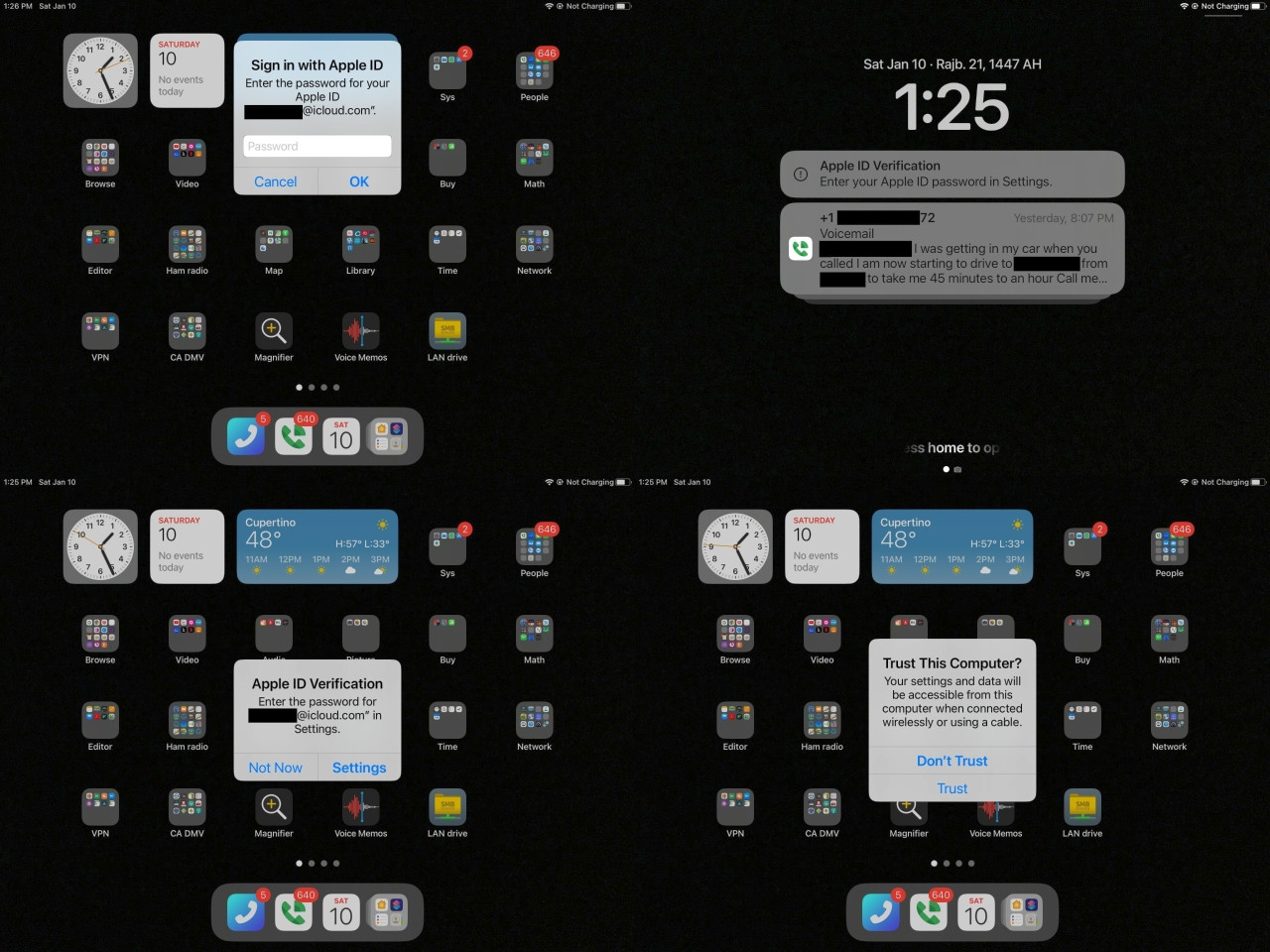
• Why does iOS ask for your passwd even though you never logged out?

    From Maria Sophia@mariasophia@comprehension.com to misc.phone.mobile.iphone,comp.sys.mac.advocacy on Tue Jan 6 10:21:08 2026
    From Newsgroup: misc.phone.mobile.iphone

    Q: Why does iOS ask for your passwd even though you never logged out?
    A: ? <https://i.postimg.cc/nrFHSvby/appleid11.jpg>

    Every day, all day, my iPad asks me for my passwd multiple times in a row.
    <https://i.postimg.cc/LXzB3Lc0/appleid01.jpg>
    That's just a fact.
    <https://i.postimg.cc/8k3GQyj4/appleid09.jpg>

    It's not an opinion.
    It's how iOS works.

    But why?

    Most people don't remember it because when it asks, they enter the passwd.
    Even though they never logged out.

    And then they forget all about it.

    Most people never wonder why Apple asks for the password even though
    they're logged in because they never logged out. For years.


    But watch what happens if you do NOT enter the password again & again.
    Just watch.

    Eventually Apple bricks the device (in about two years time, twice so far).
    You have to go to the Apple store & present government ID to unlock it.

    And then...
    You enter the password.

    And your two-year cycle begins anew.
    Ask me how I know this.

    The question is WHY does Apple require your account passwd even though
    you're logged in and even though you never logged out (for years on end)?
    --
    It's not strange that most iOS users never understand how iOS works.
    What's strange is that they deny iOS works the way that iOS works.
    --- Synchronet 3.21a-Linux NewsLink 1.2
  • From D7@D7@Robotkinetics.uk to misc.phone.mobile.iphone,alt.computer.workshop,comp.sys.mac.advocacy on Tue Jan 6 11:06:18 2026
    From Newsgroup: misc.phone.mobile.iphone

    On Tue, 6 Jan 2026 10:21:08 -0500, Maria Sophia wrote:

    Q: Why does iOS ask for your passwd even though you never logged out?
    A: ? <https://i.postimg.cc/nrFHSvby/appleid11.jpg>

    Every day, all day, my iPad asks me for my passwd multiple times in a row.
    <https://i.postimg.cc/LXzB3Lc0/appleid01.jpg>
    That's just a fact.
    <https://i.postimg.cc/8k3GQyj4/appleid09.jpg>

    It's not an opinion.
    It's how iOS works.

    But why?

    Most people don't remember it because when it asks, they enter the passwd. Even though they never logged out.

    And then they forget all about it.

    Most people never wonder why Apple asks for the password even though
    they're logged in because they never logged out. For years.


    But watch what happens if you do NOT enter the password again & again.
    Just watch.

    Eventually Apple bricks the device (in about two years time, twice so far). You have to go to the Apple store & present government ID to unlock it.

    And then...
    You enter the password.

    And your two-year cycle begins anew.
    Ask me how I know this.

    The question is WHY does Apple require your account passwd even though
    you're logged in and even though you never logged out (for years on end)?

    It's for security to protect the user. Something Android sorely lacks.
    Besides, how many people end up being locked out? Most people prefer
    to use their iPhone so they will never end up in your ficticious
    scenario.
    --- Synchronet 3.21a-Linux NewsLink 1.2
  • From Tyrone@none@none.none to comp.sys.mac.advocacy,misc.phone.mobile.iphone on Tue Jan 6 16:31:59 2026
    From Newsgroup: misc.phone.mobile.iphone

    On Jan 6, 2026 at 11:06:18 AM EST, "7" <D7@Robotkinetics.uk> wrote:

    On Tue, 6 Jan 2026 10:21:08 -0500, Maria Sophia wrote:

    Q: Why does iOS ask for your passwd even though you never logged out?
    A: ? <https://i.postimg.cc/nrFHSvby/appleid11.jpg>

    Every day, all day, my iPad asks me for my passwd multiple times in a row. >> <https://i.postimg.cc/LXzB3Lc0/appleid01.jpg>
    That's just a fact.
    <https://i.postimg.cc/8k3GQyj4/appleid09.jpg>

    It's not an opinion.
    It's how iOS works.

    But why?

    Most people don't remember it because when it asks, they enter the passwd. >> Even though they never logged out.

    And then they forget all about it.

    Most people never wonder why Apple asks for the password even though
    they're logged in because they never logged out. For years.


    But watch what happens if you do NOT enter the password again & again.
    Just watch.

    Eventually Apple bricks the device (in about two years time, twice so far). >> You have to go to the Apple store & present government ID to unlock it.

    And then...
    You enter the password.

    And your two-year cycle begins anew.
    Ask me how I know this.

    The question is WHY does Apple require your account passwd even though
    you're logged in and even though you never logged out (for years on end)?

    It's for security to protect the user. Something Android sorely lacks. Besides, how many people end up being locked out? Most people prefer
    to use their iPhone so they will never end up in your ficticious
    scenario.

    Being an Androidiot, Arlen knows NOTHING about security.
    --- Synchronet 3.21a-Linux NewsLink 1.2
  • From Tom Elam@thomas.e.elam@gmail.com to misc.phone.mobile.iphone,comp.sys.mac.advocacy on Tue Jan 6 11:54:03 2026
    From Newsgroup: misc.phone.mobile.iphone

    On 1/6/2026 10:21 AM, Maria Sophia wrote:
    Q: Why does iOS ask for your passwd even though you never logged out?
    A: ? <https://i.postimg.cc/nrFHSvby/appleid11.jpg>

    Every day, all day, my iPad asks me for my passwd multiple times in a row.
    <https://i.postimg.cc/LXzB3Lc0/appleid01.jpg>
    That's just a fact.
    <https://i.postimg.cc/8k3GQyj4/appleid09.jpg>

    It's not an opinion.
    It's how iOS works.

    But why?

    Most people don't remember it because when it asks, they enter the passwd. Even though they never logged out.

    And then they forget all about it.

    Most people never wonder why Apple asks for the password even though
    they're logged in because they never logged out. For years.


    But watch what happens if you do NOT enter the password again & again.
    Just watch.

    Eventually Apple bricks the device (in about two years time, twice so far). You have to go to the Apple store & present government ID to unlock it.

    And then...
    You enter the password.

    And your two-year cycle begins anew.
    Ask me how I know this.

    The question is WHY does Apple require your account passwd even though
    you're logged in and even though you never logged out (for years on end)?

    Never had iOS on several phones and iPads ask for my Apple password
    unless something unusual I did triggers it. Or maybe you don't have Face
    ID and fingerprint enabled?
    --- Synchronet 3.21a-Linux NewsLink 1.2
  • From Maria Sophia@mariasophia@comprehension.com to misc.phone.mobile.iphone,alt.computer.workshop,comp.sys.mac.advocacy on Tue Jan 6 12:49:09 2026
    From Newsgroup: misc.phone.mobile.iphone

    7 wrote:
    The question is WHY does Apple require your account passwd even though
    you're logged in and even though you never logged out (for years on end)?

    It's for security to protect the user. Something Android sorely lacks. Besides, how many people end up being locked out? Most people prefer
    to use their iPhone so they will never end up in your ficticious
    scenario.

    Hi 7,

    Happy New Year!

    I'm aware Apple "says" it's for security, so in that way I agree with you.

    But as you likely may know, there's no more security on iOS than Android.
    Newsgroups: misc.phone.mobile.iphone,comp.sys.mac.advocacy
    Subject: What are the merits of the claim that iOS is "way more secure"?
    Date: Mon, 22 Dec 2025 12:15:53 -0700
    Message-ID: <10ic5d9$2mvn$1@nnrp.usenet.blueworldhosting.com>

    So it's not really "for security" so it must be for some other reason.
    But what?

    Security is often used by Apple as a socially acceptable explanation that avoids saying why they do it, so we have to dig deeper to find out why.

    Since only iOS does it (as far as I'm aware), could it be a rather subtle
    form of ecosystem reinforcement perhaps, keeping you tied to the system?
    --
    Without testing iOS, people who use it will never understand how it works.
    --- Synchronet 3.21a-Linux NewsLink 1.2
  • From Alan@nuh-uh@nope.com to misc.phone.mobile.iphone,comp.sys.mac.advocacy on Tue Jan 6 10:17:05 2026
    From Newsgroup: misc.phone.mobile.iphone

    On 2026-01-06 07:21, Maria Sophia wrote:
    Q: Why does iOS ask for your passwd even though you never logged out?
    A: ? <https://i.postimg.cc/nrFHSvby/appleid11.jpg>

    "Feb 9"...

    ...of what year?


    Every day, all day, my iPad asks me for my passwd multiple times in a row.
    <https://i.postimg.cc/LXzB3Lc0/appleid01.jpg>

    A single image doesn't prove that and "every day, all day"...

    ...when?

    That's just a fact.
    <https://i.postimg.cc/8k3GQyj4/appleid09.jpg>

    That picture shows both "Feb 8" AND "Tuesday"...

    ...so it was taken in February 2022 at the earliest.


    It's not an opinion.
    It's how iOS works.

    No. It MIGHT be how your particular device worked for some still
    unproven period of time nearly 4 years ago.

    But you have no proof that this just how iOS works.


    But why?

    Most people don't remember it because when it asks, they enter the passwd. Even though they never logged out.

    And then they forget all about it.

    Most people never wonder why Apple asks for the password even though
    they're logged in because they never logged out. For years.


    But watch what happens if you do NOT enter the password again & again.
    Just watch.

    Eventually Apple bricks the device (in about two years time, twice so far). You have to go to the Apple store & present government ID to unlock it.

    In order to prove that you own a device that locked after too many
    failed login attempts.


    And then...
    You enter the password.

    And your two-year cycle begins anew.
    Ask me how I know this.

    Because you're lying.


    The question is WHY does Apple require your account passwd even though
    you're logged in and even though you never logged out (for years on end)?

    The real question is:

    Who thinks you're telling the truth?

    And the answer is:

    Nobody!

    --- Synchronet 3.21a-Linux NewsLink 1.2
  • From Alan@nuh-uh@nope.com to misc.phone.mobile.iphone,alt.computer.workshop,comp.sys.mac.advocacy on Tue Jan 6 10:18:01 2026
    From Newsgroup: misc.phone.mobile.iphone

    On 2026-01-06 09:49, Maria Sophia wrote:
    7 wrote:
    The question is WHY does Apple require your account passwd even though
    you're logged in and even though you never logged out (for years on end)? >>
    It's for security to protect the user. Something Android sorely lacks.
    Besides, how many people end up being locked out? Most people prefer
    to use their iPhone so they will never end up in your ficticious
    scenario.

    Hi 7,

    Happy New Year!

    I'm aware Apple "says" it's for security, so in that way I agree with you.

    But as you likely may know, there's no more security on iOS than Android.
    Newsgroups: misc.phone.mobile.iphone,comp.sys.mac.advocacy
    Subject: What are the merits of the claim that iOS is "way more secure"?
    Date: Mon, 22 Dec 2025 12:15:53 -0700
    Message-ID: <10ic5d9$2mvn$1@nnrp.usenet.blueworldhosting.com>

    So it's not really "for security" so it must be for some other reason.
    But what?

    Security is often used by Apple as a socially acceptable explanation that avoids saying why they do it, so we have to dig deeper to find out why.

    Since only iOS does it (as far as I'm aware), could it be a rather subtle form of ecosystem reinforcement perhaps, keeping you tied to the system?

    Physical security of the device is different than security WITHIN the OS
    and ecosystem.
    --- Synchronet 3.21a-Linux NewsLink 1.2
  • From Alan@nuh-uh@nope.com to misc.phone.mobile.iphone,comp.sys.mac.advocacy on Tue Jan 6 10:18:29 2026
    From Newsgroup: misc.phone.mobile.iphone

    On 2026-01-06 08:54, Tom Elam wrote:
    On 1/6/2026 10:21 AM, Maria Sophia wrote:
    Q: Why does iOS ask for your passwd even though you never logged out?
    A: ?-a <https://i.postimg.cc/nrFHSvby/appleid11.jpg>

    Every day, all day, my iPad asks me for my passwd multiple times in a
    row.
    -a-a-a-a <https://i.postimg.cc/LXzB3Lc0/appleid01.jpg>
    That's just a fact.
    -a-a-a-a <https://i.postimg.cc/8k3GQyj4/appleid09.jpg>

    It's not an opinion.
    It's how iOS works.

    But why?

    Most people don't remember it because when it asks, they enter the
    passwd.
    Even though they never logged out.

    And then they forget all about it.

    Most people never wonder why Apple asks for the password even though
    they're logged in because they never logged out. For years.


    But watch what happens if you do NOT enter the password again & again.
    Just watch.

    Eventually Apple bricks the device (in about two years time, twice so
    far).
    You have to go to the Apple store & present government ID to unlock it.

    And then...
    You enter the password.

    And your two-year cycle begins anew.
    Ask me how I know this.

    The question is WHY does Apple require your account passwd even though
    you're logged in and even though you never logged out (for years on end)?

    Never had iOS on several phones and iPads ask for my Apple password
    unless something unusual I did triggers it. Or maybe you don't have Face
    ID and fingerprint enabled?

    Look at the images.

    It happened nearly 4 years ago.

    --- Synchronet 3.21a-Linux NewsLink 1.2
  • From Maria Sophia@mariasophia@comprehension.com to misc.phone.mobile.iphone,comp.sys.mac.advocacy on Tue Jan 6 13:29:10 2026
    From Newsgroup: misc.phone.mobile.iphone

    Tom Elam wrote:
    The question is WHY does Apple require your account passwd even though
    you're logged in and even though you never logged out (for years on end)?

    Never had iOS on several phones and iPads ask for my Apple password
    unless something unusual I did triggers it. Or maybe you don't have Face
    ID and fingerprint enabled?

    Hi Tom Elam,

    Happy New Year.

    Thanks for helping us better understand Apple's iOS operating system.

    I don't have FaceID or Fingerprint but I don't think that's related.
    I also don't have a PIN, which I don't think is related.

    I do have 2FV on my latest iOS device because I create a new bogus Apple ID
    for every device, but Apple requires 2FV nowadays, like it or not.

    Having answered your question, it turns out 2FV, FaceID, TouchID, PINs, &
    the Apple ID do not control or influence the expiration of Apple service tokens. Token expiration is determined by each individual Apple service.

    Each Apple service controls its own token lifecycle, for example...
    a. iCloud Drive has its own expiration rules
    b. iMessage has its own expiration rules
    c. App Store has its own expiration rules
    d. Find My has its own expiration rules
    e. Keychain escrow has its own expiration rules
    etc.

    With that answer behind us, I think you must have seen a password prompt at some point because it is normal behavior on iOS to repeatedly ask for the password since iOS does not rely on a single login.

    Apparently iOS uses many separate authentication tokens, each tied to a different Apple service such as this short list of some of them below:
    1. Apple ID identity tokens
    2. Apple iCloud tokens
    3. Apple App Store tokens
    4. Apple iMessage tokens
    5. Apple FaceTime tokens
    6. Apple Find My tokens
    7. Apple Game Center tokens
    8. Apple Activation tokens
    9. Apple Keychain escrow tokens
    10. Apple background sync tokens

    These service tokens expire on different schedules but, luckily for us,
    many of them are silently refreshed in the background without us knowing.

    However, when a token that cannot be silently refreshed expires, iOS asks
    for the Apple ID password. This happens even if the user never logged out.
    --
    The only way to understand any operating system, including iOS, is to test
    it, since if we simply use the system only as designed, we learn nothing.
    --- Synchronet 3.21a-Linux NewsLink 1.2
  • From Alan@nuh-uh@nope.com to misc.phone.mobile.iphone,comp.sys.mac.advocacy on Tue Jan 6 10:41:02 2026
    From Newsgroup: misc.phone.mobile.iphone

    On 2026-01-06 10:29, Maria Sophia wrote:
    Tom Elam wrote:
    The question is WHY does Apple require your account passwd even though
    you're logged in and even though you never logged out (for years on end)? >>
    Never had iOS on several phones and iPads ask for my Apple password
    unless something unusual I did triggers it. Or maybe you don't have Face
    ID and fingerprint enabled?

    Hi Tom Elam,

    Happy New Year.

    Thanks for helping us better understand Apple's iOS operating system.

    I don't have FaceID or Fingerprint but I don't think that's related.
    I also don't have a PIN, which I don't think is related.

    I do have 2FV on my latest iOS device because I create a new bogus Apple ID for every device, but Apple requires 2FV nowadays, like it or not.

    Having answered your question, it turns out 2FV, FaceID, TouchID, PINs, &
    the Apple ID do not control or influence the expiration of Apple service tokens. Token expiration is determined by each individual Apple service.

    Each Apple service controls its own token lifecycle, for example...
    a. iCloud Drive has its own expiration rules
    b. iMessage has its own expiration rules
    c. App Store has its own expiration rules
    d. Find My has its own expiration rules
    e. Keychain escrow has its own expiration rules
    etc.

    With that answer behind us, I think you must have seen a password prompt at some point because it is normal behavior on iOS to repeatedly ask for the password since iOS does not rely on a single login.

    Apparently iOS uses many separate authentication tokens, each tied to a different Apple service such as this short list of some of them below:
    1. Apple ID identity tokens
    2. Apple iCloud tokens
    3. Apple App Store tokens
    4. Apple iMessage tokens
    5. Apple FaceTime tokens
    6. Apple Find My tokens
    7. Apple Game Center tokens
    8. Apple Activation tokens
    9. Apple Keychain escrow tokens
    10. Apple background sync tokens

    These service tokens expire on different schedules but, luckily for us,
    many of them are silently refreshed in the background without us knowing.

    However, when a token that cannot be silently refreshed expires, iOS asks
    for the Apple ID password. This happens even if the user never logged out.

    But your example is nearly 4 years old.

    Produce something current, please.

    You claim it happens "all day, every day", so...
    --- Synchronet 3.21a-Linux NewsLink 1.2
  • From Maria Sophia@mariasophia@comprehension.com to comp.sys.mac.advocacy,misc.phone.mobile.iphone on Tue Jan 6 16:28:32 2026
    From Newsgroup: misc.phone.mobile.iphone

    Tyrone wrote:
    Being an Androidiot, he knows NOTHING about security.

    Hi Tyrone,

    Happy New Year!

    Thank you for understanding that many of us have both Android & iOS
    knowledge, but this technical thread isn't about Android; it's about understanding WHY iOS asks for the passwd even when we're logged in.

    Here is my iPad from December 28th, 2025 where I opened it up around that
    time to help someone on the newsgroup (maybe it was Ant on battery issues).
    <https://i.postimg.cc/50zktn7G/appleid20251228.jpg>

    All day, every day, iOS nags me to sign in even though I never logged out.

    Since it's pretty much assured you've seen this prompt also, I ask you:
    Q: What do you make of the fact iOS constantly nags me for a passwd?
    A: ?

    This thread was opened so that we can all learn more about how iOS works by discussing facts together as adults who strive to better understand the OS.
    --
    The only way to understand any operating system, including iOS, is to test
    it, since if we simply use the system only as designed, we learn nothing.
    --- Synchronet 3.21a-Linux NewsLink 1.2
  • From Alan@nuh-uh@nope.com to comp.sys.mac.advocacy,misc.phone.mobile.iphone on Tue Jan 6 14:33:07 2026
    From Newsgroup: misc.phone.mobile.iphone

    On 2026-01-06 13:28, Maria Sophia wrote:
    Tyrone wrote:
    Being an Androidiot, he knows NOTHING about security.

    Hi Tyrone,

    Happy New Year!

    Thank you for understanding that many of us have both Android & iOS knowledge, but this technical thread isn't about Android; it's about understanding WHY iOS asks for the passwd even when we're logged in.

    Here is my iPad from December 28th, 2025 where I opened it up around that time to help someone on the newsgroup (maybe it was Ant on battery issues).
    <https://i.postimg.cc/50zktn7G/appleid20251228.jpg>

    All day, every day, iOS nags me to sign in even though I never logged out.

    All you've ever shown is that it asked once on Tuesday, February 8, 2022.
    --- Synchronet 3.21a-Linux NewsLink 1.2
  • From Tyrone@none@none.none to comp.sys.mac.advocacy,misc.phone.mobile.iphone on Wed Jan 7 01:16:23 2026
    From Newsgroup: misc.phone.mobile.iphone

    On Jan 6, 2026 at 5:33:07rC>PM EST, "Alan" <nuh-uh@nope.com> wrote:

    On 2026-01-06 13:28, Maria Sophia wrote:
    Tyrone wrote:
    Being an Androidiot, he knows NOTHING about security.

    Hi Tyrone,

    Happy New Year!

    Thank you for understanding that many of us have both Android & iOS
    knowledge, but this technical thread isn't about Android; it's about
    understanding WHY iOS asks for the passwd even when we're logged in.

    Here is my iPad from December 28th, 2025 where I opened it up around that
    time to help someone on the newsgroup (maybe it was Ant on battery issues). >> <https://i.postimg.cc/50zktn7G/appleid20251228.jpg>

    All day, every day, iOS nags me to sign in even though I never logged out.

    All you've ever shown is that it asked once on Tuesday, February 8, 2022.

    It is STILL astonishing that, considering his 100% record here of lying and/or just plain being wrong, he STILL expects us to just take his word for every absurd-claim-of-the-day he makes.

    I now have - collected over many years - 4 iPhones (5, 8+, 12 Pro Max, 16 Pro Max), 4 iPod Touch 7s and 13 various model iPads. NONE have EVER asked me to login for no reason. Only when I am downloading something from the App Store. etc.

    As always, he is full of shit.

    BTW, all still work. Even the 11 year old iPad Air 2 (I have 2 of those).
    Yes, they are MUCH slower than my MUCH newer iPad Pro models, but they still work.

    As always, another Arlen lie put to rest.
    --- Synchronet 3.21a-Linux NewsLink 1.2
  • From Maria Sophia@mariasophia@comprehension.com to comp.sys.mac.advocacy,misc.phone.mobile.iphone on Wed Jan 7 00:18:01 2026
    From Newsgroup: misc.phone.mobile.iphone

    Tyrone wrote:
    All day, every day, iOS nags me to sign in even though I never logged out. >>
    All you've ever shown is that it asked once on Tuesday, February 8, 2022.

    It is STILL astonishing that, considering his 100% record here of lying and/or
    just plain being wrong, he STILL expects us to just take his word for every absurd-claim-of-the-day he makes.

    I now have - collected over many years - 4 iPhones (5, 8+, 12 Pro Max, 16 Pro Max), 4 iPod Touch 7s and 13 various model iPads. NONE have EVER asked me to login for no reason. Only when I am downloading something from the App Store. etc.

    As always, he is full of shit.

    BTW, all still work. Even the 11 year old iPad Air 2 (I have 2 of those). Yes, they are MUCH slower than my MUCH newer iPad Pro models, but they still work.

    As always, another Arlen lie put to rest.

    Hi Tyrone,

    Happy New Year!

    First off, Alan Baker is wrong as that screenshot was from when I was
    helping Ant on December 28th 2025, about a week ago, where Alan Baker's
    claim that iOS changed fundamentally in how it does tokens is absurd.
    <https://i.postimg.cc/50zktn7G/appleid20251228.jpg>

    Ignoring Alan Baker's utterly ridiculous claim that iOS has changed in how
    it does authentication, I have screenshots for many dates, but it doesn't matter unless Alan Baker wants to explain why he makes the inane claim that
    iOS has fundamentally changed in how it does token expiration & renewal.

    Ignoring Alan Baker coming up with the first ludicrous excuse he can think
    of to defend Apple to the death no matter what, we come back to your memory
    of your personal experiences, Tyrone.

    I strongly suspect you gave the password when asked, and since that's
    perfectly natural for you to do, you don't remember doing it when you did.

    But even if you didn't do it, there is a well-documented technical
    explanation of why iOS asks for the Apple ID password even when the user
    never logged out. This behavior is considered normal for iOS, and, in fact, it's documented by Apple. But when any given user receives it depends on
    which Apple services they use and whether silent token refresh succeeds.

    Keep in mind the key fact that iOS does not rely on a single login session.

    Instead iOS uses many separate authentication tokens. As I explained in
    gory detail elsewhere in this thread, each Apple service issues its own
    token and each token has its own expiration rules.

    I already provided examples of Apple services that issue tokens such as
    1. Apple ID identity service
    2. iCloud Drive
    3. iCloud Photos
    4. iMessage
    5. FaceTime
    6. App Store
    7. Find My
    8. Game Center
    9. Keychain escrow
    10. Background sync services

    Apple documents this architecture in multiple places, for example:

    Apple Identity Services:
    <https://developer.apple.com/documentation/sign_in_with_apple>

    iCloud authentication and tokens:
    <https://support.apple.com/en-us/HT203512>

    App Store authentication:
    <https://support.apple.com/en-us/HT208924>

    iMessage and FaceTime activation:
    <https://support.apple.com/en-us/HT201422>

    Activation Lock and device activation tokens:
    <https://support.apple.com/en-us/HT201365>

    These services do not share a single token. Each service controls its own
    token lifecycle. Many tokens can be silently refreshed in the background.

    However, some tokens cannot be silently refreshed. When one of those tokens expires, iOS must ask for the Apple ID password. This happens even if the
    user never logged out.

    This explains why two users can have different experiences:

    a. If a user has many Apple services enabled, more tokens exist, so there
    are more opportunities for a token to expire.
    b. If a user has fewer services enabled, fewer tokens exist, so prompts are
    less frequent.
    c. If silent refresh succeeds, the user never sees a prompt.
    d. If silent refresh fails, the user sees a password prompt.

    Silent refresh can fail for many reasons, including:

    1. Network interruptions
    2. Device offline for long periods
    3. Disabled services
    4. Expired or revoked tokens
    5. Server side changes by Apple
    6. Apple ID security policy changes

    Apple documents that some services require periodic reauthentication. For example, iMessage and FaceTime activation tokens expire and must be
    renewed. The App Store also requires periodic reauthentication. iCloud
    services may require reauthentication when tokens expire or when security policies change.

    Because of this Apple-only architecture, it is technically normal for iOS
    to request the Apple ID password even when the user never logged out.

    The request is triggered by token expiration, not by user logout.

    This also explains why some users can claim they never see prompts.

    Maybe they don't remember since entering a password is a normal activity
    for them, but even if they truly didn't enter the password, if their
    tokens refresh silently, they will not notice the process. If they enter
    the password immediately when prompted, they will forget the prompt
    occurred. If they use fewer Apple services, fewer tokens exist to expire.

    If a user intentionally refuses to enter the password for long periods, multiple tokens will expire without renewal. Eventually the device will
    lose access to Apple services that require valid tokens. In some cases,
    such as in two of my three iPads to date, the iOS device may require reactivation which requires your government ID (which blows Apple's claim
    to privacy out of the water like the military does drug runners).

    Apple documents how the process works in the Activation Lock and device activation support pages.
    <https://support.apple.com/en-us/108934>
    <https://support.apple.com/en-us/HT204921>

    In summary:
    1. iOS uses many independent authentication tokens.
    2. Each token has its own expiration schedule.
    3. Some tokens can be silently refreshed, some cannot.
    4. When a token that cannot be silently refreshed expires, iOS asks for the
    Apple ID password.
    5. This happens even if the user never logged out.
    6. Different users remember password entry differently, as for some
    people it's a normal occurrence they don't bother to remember.
    7. Yet different users see different behavior depending on which
    services they use and whether silent refresh succeeds.
    8. This behavior is documented by Apple and is normal for iOS.

    This explanation does not depend on personal experience.
    It is based on the documented design of Apple's authentication system.
    --
    People who use iOS without testing it, will never understand how iOS works under the covers because they only see a tiny portion of what happens.
    --- Synchronet 3.21a-Linux NewsLink 1.2
  • From Alan@nuh-uh@nope.com to comp.sys.mac.advocacy,misc.phone.mobile.iphone on Tue Jan 6 22:04:16 2026
    From Newsgroup: misc.phone.mobile.iphone

    On 2026-01-06 21:18, Maria Sophia wrote:
    Tyrone wrote:
    All day, every day, iOS nags me to sign in even though I never logged out. >>>
    All you've ever shown is that it asked once on Tuesday, February 8, 2022. >>
    It is STILL astonishing that, considering his 100% record here of lying and/or
    just plain being wrong, he STILL expects us to just take his word for every >> absurd-claim-of-the-day he makes.

    I now have - collected over many years - 4 iPhones (5, 8+, 12 Pro Max, 16 Pro
    Max), 4 iPod Touch 7s and 13 various model iPads. NONE have EVER asked me to >> login for no reason. Only when I am downloading something from the App Store.
    etc.

    As always, he is full of shit.

    BTW, all still work. Even the 11 year old iPad Air 2 (I have 2 of those).
    Yes, they are MUCH slower than my MUCH newer iPad Pro models, but they still >> work.

    As always, another Arlen lie put to rest.

    Hi Tyrone,

    Happy New Year!

    First off, Alan Baker is wrong as that screenshot was from when I was
    helping Ant on December 28th 2025, about a week ago, where Alan Baker's
    claim that iOS changed fundamentally in how it does tokens is absurd.
    <https://i.postimg.cc/50zktn7G/appleid20251228.jpg>

    First off, that's a different shot than you offered in your first post.

    https://i.postimg.cc/nrFHSvby/appleid11.jpg

    https://i.postimg.cc/nrFHSvby/appleid11.jpg

    https://i.postimg.cc/8k3GQyj4/appleid09.jpg

    Second off, we have no way of checking whether you altered that
    "screenshot" you've just shown.


    Ignoring Alan Baker's utterly ridiculous claim that iOS has changed in how
    it does authentication, I have screenshots for many dates, but it doesn't matter unless Alan Baker wants to explain why he makes the inane claim that iOS has fundamentally changed in how it does token expiration & renewal.

    I make no claims other than that you are the only one reporting this behaviour...

    ...and your initial screenshots, if they showed a date, showed either
    Tuesday February 8, or Wednesday February 0...

    ...and the last time those two days fell on those two dates was in 2022.

    THAT is a fact.
    --- Synchronet 3.21a-Linux NewsLink 1.2
  • From Chris@ithinkiam@gmail.com to misc.phone.mobile.iphone,comp.sys.mac.advocacy on Wed Jan 7 08:15:26 2026
    From Newsgroup: misc.phone.mobile.iphone

    Maria Sophia <mariasophia@comprehension.com> wrote:
    Tyrone wrote:
    Being an Androidiot, he knows NOTHING about security.

    Hi Tyrone,

    Happy New Year!

    Thank you for understanding that many of us have both Android & iOS knowledge, but this technical thread isn't about Android; it's about understanding WHY iOS asks for the passwd even when we're logged in.

    Here is my iPad from December 28th, 2025 where I opened it up around that time to help someone on the newsgroup (maybe it was Ant on battery issues).
    <https://i.postimg.cc/50zktn7G/appleid20251228.jpg>

    And you gave Ant wrong information. <sigh>

    All day, every day, iOS nags me to sign in even though I never logged out.

    It's clear this is unique to you.

    Since it's pretty much assured you've seen this prompt also, I ask you:
    Q: What do you make of the fact iOS constantly nags me for a passwd?
    A: ?

    I can guarantee you this does not happen anywhere near daily. I probably
    see this about once a year on my ipad or my iphone. Both are used
    constantly.

    I know this because I don't know my AopleID password and have to look it up
    in my pw manager every time. If I had to do this daily I'd get passed off
    very, very quickly.

    This thread was opened so that we can all learn more about how iOS works by discussing facts together as adults who strive to better understand the OS.

    Problem is you refuse to learn from others. Just like you tried to with the
    SMB epiphany. Plus we cannot prove a negative so this topic will simply go around in circles. Yet again.

    --- Synchronet 3.21a-Linux NewsLink 1.2
  • From Chris@ithinkiam@gmail.com to misc.phone.mobile.iphone,comp.sys.mac.advocacy on Wed Jan 7 15:44:04 2026
    From Newsgroup: misc.phone.mobile.iphone

    Maria Sophia <mariasophia@comprehension.com> wrote:
    Tyrone wrote:
    All day, every day, iOS nags me to sign in even though I never logged out. >>>
    All you've ever shown is that it asked once on Tuesday, February 8, 2022. >>
    It is STILL astonishing that, considering his 100% record here of lying and/or
    just plain being wrong, he STILL expects us to just take his word for every >> absurd-claim-of-the-day he makes.

    I now have - collected over many years - 4 iPhones (5, 8+, 12 Pro Max, 16 Pro
    Max), 4 iPod Touch 7s and 13 various model iPads. NONE have EVER asked me to >> login for no reason. Only when I am downloading something from the App Store.
    etc.

    As always, he is full of shit.

    BTW, all still work. Even the 11 year old iPad Air 2 (I have 2 of those). >> Yes, they are MUCH slower than my MUCH newer iPad Pro models, but they still >> work.

    As always, another Arlen lie put to rest.

    Hi Tyrone,

    Happy New Year!

    First off, Alan Baker is wrong as that screenshot was from when I was
    helping Ant on December 28th 2025, about a week ago,

    Your OP screenshots were from February (maybe 2022). All you've evidenced
    is that you've seen this twice in about four years.


    I strongly suspect you gave the password when asked, and since that's perfectly natural for you to do, you don't remember doing it when you did.

    False. I don't know my AppleID password so I would remember having to look
    it up.

    --- Synchronet 3.21a-Linux NewsLink 1.2
  • From Tyrone@none@none.none to comp.sys.mac.advocacy,misc.phone.mobile.iphone on Wed Jan 7 22:32:34 2026
    From Newsgroup: misc.phone.mobile.iphone

    On Jan 7, 2026 at 12:18:01rC>AM EST, "Maria Sophia" <mariasophia@comprehension.com> wrote:

    Tyrone wrote:
    All day, every day, iOS nags me to sign in even though I never logged out. >>>
    All you've ever shown is that it asked once on Tuesday, February 8, 2022. >>
    It is STILL astonishing that, considering his 100% record here of lying and/or
    just plain being wrong, he STILL expects us to just take his word for every >> absurd-claim-of-the-day he makes.

    I now have - collected over many years - 4 iPhones (5, 8+, 12 Pro Max, 16 Pro
    Max), 4 iPod Touch 7s and 13 various model iPads. NONE have EVER asked me to >> login for no reason. Only when I am downloading something from the App Store.
    etc.

    As always, he is full of shit.

    BTW, all still work. Even the 11 year old iPad Air 2 (I have 2 of those).
    Yes, they are MUCH slower than my MUCH newer iPad Pro models, but they still >> work.

    As always, another Arlen lie put to rest.

    I strongly suspect you gave the password when asked, and since that's perfectly natural for you to do, you don't remember doing it when you did.

    Stop assuming I am stupid. It is fucking insulting.

    You claim that "All day, every day, iOS nags me to sign in even though I never logged out."

    That has NEVER happened to me. Ever. On ANY of my many iOS devices. Over MANY years. Do you understand that?

    I strongly suspect that you are a lying piece of shit.
    --- Synchronet 3.21a-Linux NewsLink 1.2
  • From Maria Sophia@mariasophia@comprehension.com to misc.phone.mobile.iphone,comp.sys.mac.advocacy on Wed Jan 7 20:03:33 2026
    From Newsgroup: misc.phone.mobile.iphone

    Chris wrote:
    First off, Alan Baker is wrong as that screenshot was from when I was
    helping Ant on December 28th 2025, about a week ago,

    Your OP screenshots were from February (maybe 2022). All you've evidenced
    is that you've seen this twice in about four years.

    Hi Chris,

    Happy New Year!

    Since iOS is exhibiting documented Apple behavior, I see it every day, all
    day. Your absurd excuses are forcing me to dig into my screenshot folder.

    October 27, 2023 <https://i.postimg.cc/WzGq756M/appleid20231027.jpg>
    December 11, 2023 <https://i.postimg.cc/vH757Z0Z/appleid20231211.jpg>
    May 20, 2024 <https://i.postimg.cc/FsXjJLgb/appleid20240520.jpg>
    August 3, 2024 <https://i.postimg.cc/tJWWMqyL/appleid20240803.jpg>
    December 8, 2024 <https://i.postimg.cc/NMWRD9hF/appleid20241208.jpg>
    December 10, 2024 <https://i.postimg.cc/R0p73pXY/appleid20241210.jpg>
    December 16, 2024 <https://i.postimg.cc/W1n6V1rs/appleid20241216.jpg>
    December 19, 2024 <https://i.postimg.cc/jdy48XSn/appleid20241219.jpg>
    April 8, 2025 <https://i.postimg.cc/SKSdYM41/appleid20250408.jpg>
    April 17, 2025 <https://i.postimg.cc/y6tLpxhr/appleid20250417.jpg>
    September 2, 2025 <https://i.postimg.cc/dDc1gJ1p/appleid20250902.jpg>
    October 31, 2025 <https://i.postimg.cc/D0X0CS2g/appleid20251031.jpg>
    January 7, 2026 <https://i.postimg.cc/cLMgytQ0/appleid20260107.jpg>
    (I have millions of these over time simply because it's how iOS works.)

    Do you seriously need more of the same screenshots, Chris?
    This is Apple's documented behavior for heaven's sake!

    It's appreciable work just to prove to you that the Apple documentation is correct. What did you find out when you read the cited documentation Chris?

    I strongly suspect you gave the password when asked, and since that's
    perfectly natural for you to do, you don't remember doing it when you did.

    False. I don't know my AppleID password so I would remember having to look
    it up.

    Newsgroups: misc.phone.mobile.iphone
    Subject: Why do zealots fabricate inane excuses for Apple's documented behavior?
    Date: Wed, 7 Jan 2026 19:54:15 -0500
    Message-ID: <10jmv7o$bto$1@nnrp.usenet.blueworldhosting.com>
    --
    It's immensely time consuming to get some people to read Apple's documents.
    --- Synchronet 3.21a-Linux NewsLink 1.2
  • From Maria Sophia@mariasophia@comprehension.com to comp.sys.mac.advocacy,misc.phone.mobile.iphone on Wed Jan 7 20:28:12 2026
    From Newsgroup: misc.phone.mobile.iphone

    Tyrone wrote:
    I strongly suspect you gave the password when asked, and since that's
    perfectly natural for you to do, you don't remember doing it when you did.

    Stop assuming I am stupid. It is fucking insulting.

    You claim that "All day, every day, iOS nags me to sign in even though I never
    logged out."

    That has NEVER happened to me. Ever. On ANY of my many iOS devices. Over MANY years. Do you understand that?

    I strongly suspect that you are a lying piece of shit.

    Hi Tyrone,

    Happy New Year!

    I'm going to ignore Chris' excuse that he doesn't know what his password
    is, and I'll ignore Alan Baker's excuse that he wants to see the popup
    every day that I've seen it (which is every day, all day, many times a
    day), both of which I've addressed in this thread I just authored.
    Newsgroups: misc.phone.mobile.iphone
    Subject: Why do zealots fabricate inane excuses for Apple's documented behavior?
    Date: Wed, 7 Jan 2026 19:54:15 -0500Message-ID: <10jmv7o$bto$1@nnrp.usenet.blueworldhosting.com>

    For you, since you say you're not stupid, I will respond with information
    about Apple's documented authentication process so that you can learn more.

    To help you understand, I've provided references for you to read before you reply to this technical post as it will take time to digest how iOS works.

    Technical summary of iOS authentication escalation

    1. Overview
    In this scenario the user is already logged into everything. The user has completed initial setup, signed into Apple ID, iCloud, App Store, iMessage, FaceTime, Find My, and all related services. The user is not logged out.
    The user is simply refusing to re enter the Apple ID password when
    prompted.

    Keep in mind that iOS does not rely on a single login event.
    It relies on many independent authentication tokens issued by Apple
    servers. These tokens expire on different schedules.

    When the user refuses to re authenticate, the device cannot refresh these tokens. Over time, the device enters progressively more severe
    authentication failure states. The final state is an Activation Lock
    escalation that requires in person identity verification.

    2. Why the escalation takes so long
    Each Apple service has its own token, its own refresh interval, and its own retry logic. These services do not fail at the same time. They fail in
    stages.

    a. Short lived services retry often and fail first
    b. Medium lived services retry less often and fail later
    c. Long lived services retry rarely and fail last

    Important nuance:
    Short lived tokens do expire in hours or days, but their expiration does
    not always trigger a visible password prompt. Many token failures are
    handled silently. iOS retries these tokens in the background. Only certain failures escalate to a visible password prompt. This is why the user does
    not see a prompt every time a short lived token expires.

    The system is designed to tolerate temporary outages. Only long term
    refusal to authenticate causes the full escalation.

    3. Apple account subsystems and token lifetimes
    Apple maintains multiple account subsystems. Each subsystem has its own
    tokens and its own expiration schedule. Apple does not publish exact token lifetimes, but the behavior is known from observation and from Apple documentation that confirms independent authentication for each service.

    a. Apple ID core identity tokens, long lived, months to years
    Controls device ownership, Activation Lock, and account integrity.
    Apple ID overview:
    <https://support.apple.com/HT203993>

    b. iCloud account tokens, medium lived, weeks to months
    Controls iCloud Drive, iCloud Backup, iCloud Mail, and iCloud Photos.
    iCloud overview:
    <https://support.apple.com/HT201104>

    c. App Store and purchase tokens, medium lived, weeks
    Controls app downloads, updates, and purchase validation.
    App Store sign in requirements:
    <https://support.apple.com/HT201389>

    d. iMessage and FaceTime tokens, short lived, hours to days
    Controls messaging identity and session state.
    These often expire silently and retry silently, so they do not
    always trigger visible prompts.
    iMessage and FaceTime activation:
    <https://support.apple.com/HT201422>

    e. Find My device association tokens, long lived, months to years
    Binds the device to the Apple ID for anti theft protection.
    Find My and Activation Lock:
    <https://support.apple.com/HT201365>

    f. iCloud Keychain escrow tokens, long lived, months
    Controls end to end encrypted keychain syncing.
    iCloud Keychain:
    <https://support.apple.com/HT204085>

    g. Device Setup Services tokens, long lived, months
    Controls device registration and trust state.
    Device activation requirements:
    <https://support.apple.com/HT201557>

    h. APNs account validation tokens, short lived, hours to days
    Controls push notifications for account alerts.
    These also expire silently.
    APNs overview:
    <https://developer.apple.com/documentation/usernotifications>

    4. Timeline of token expirations
    The following timeline reflects typical behavior when the user refuses to re-enter the Apple ID password.

    a. First week
    Short lived tokens expire. iMessage and FaceTime may deactivate.
    APNs account alerts may fail. These failures often occur silently.
    The user may see some password prompts, but not necessarily one
    per token expiration.

    b. First month
    Medium lived tokens expire. iCloud Drive, iCloud Mail, and
    App Store tokens fail. App updates may stop. iCloud services
    may show errors. Visible password prompts become more frequent.

    c. Three to six months
    Long lived tokens begin to expire. Find My association tokens
    may fail to refresh. iCloud Keychain may stop syncing.
    Device Setup Services may report account verification errors.
    Password prompts become persistent.

    d. One to two years
    Very long lived tokens expire. Device to Apple ID binding tokens
    and Activation Lock ownership tokens cannot be refreshed.
    The device enters a security critical state. The server classifies
    the device as having an unverified owner.

    e. Activation Lock escalation
    The device is placed into a hard lock state.
    The user must verify identity in person.
    My Apple store requires government ID to prove Apple ID ownership.
    (ask me how I know that)

    5. How Activation Lock decides when to hard lock
    Activation Lock is enforced by Apple servers. It is tied to the Apple ID,
    not the hardware. The server escalates to a hard lock when several
    conditions accumulate.

    a. The device cannot refresh Apple ID session tokens for an extended time
    b. The device cannot confirm the identity of the Apple ID owner
    c. Long lived ownership tokens have expired
    d. The device has repeated failed attempts to validate account state
    e. The device has inconsistent or missing iCloud security state

    When these conditions are met, the server classifies the device as having
    an unverified owner. This is the same classification used for stolen
    devices. At that point, the device is placed into a hard lock state that requires identity verification.

    6. Why Apple requires government ID
    Apple ID is the root of trust for the entire ecosystem. It controls Find My Activation Lock, iCloud Keychain, iMessage identity, App Store purchases, device registration, and end to end encrypted data.

    Because of this, Apple treats Apple ID ownership as identity. Hardware ownership is irrelevant. A receipt proves you bought a device. It does not prove you are the owner of the Apple ID that controls the device.

    When digital verification fails, Apple requires government ID to prove
    Apple ID ownership. This is why devices are unlocked instantly once ID is shown. The hardware was never broken. The Apple ID ownership state was unverified.

    Common claims and why they are wrong

    1. Claim: Apple does not ask for repeated password prompts
    This is incorrect. Apple documents that many services require periodic
    re authentication. Apple ID, iCloud, App Store, iMessage, FaceTime, Find
    My, and iCloud Keychain all require token refresh. When the user refuses
    to re authenticate, these services fail and retry. Some failures are
    silent, others escalate to visible prompts. Apple documentation confirms independent authentication for each service.

    Apple ID overview:
    https://support.apple.com/HT203993
    iCloud overview:
    https://support.apple.com/HT201104
    iMessage and FaceTime activation:
    https://support.apple.com/HT201422

    2. Claim: The device only asks for a password if the user logs out
    This is false. The user in this scenario is already logged into
    everything. The user is not logging out. The user is refusing to re
    enter the password when prompted. Token expiration and revalidation requirements occur even when the user never logs out. Apple services
    must refresh tokens to maintain trust state.

    3. Claim: Apple does not use multiple tokens
    Incorrect. Apple uses many independent tokens. Each service has its own
    token, its own expiration schedule, and its own retry logic. Apple
    documents separate authentication for Apple ID, iCloud, App Store,
    iMessage, FaceTime, Find My, and iCloud Keychain. These systems do not
    share a single token. They fail independently.

    4. Claim: Token expiration should cause daily prompts
    This misunderstands how iOS works. Short lived tokens do expire in hours
    or days, but most of these failures are silent. iOS retries them in the background. Only certain failures escalate to visible prompts. This is
    why the user does not see a prompt every time a short lived token
    expires.

    5. Claim: Activation Lock only triggers if the device is erased
    This is false. Activation Lock is tied to Apple ID ownership, not to
    device erasure. When long lived ownership tokens expire and cannot be refreshed, the server classifies the device as having an unverified
    owner. This is the same classification used for stolen devices. The
    device then enters a hard lock state even if it was never erased.

    Activation Lock documentation:
    https://support.apple.com/HT201365

    6. Claim: A receipt should be enough to unlock the device
    Incorrect. A receipt proves hardware purchase. It does not prove Apple
    ID ownership. Apple ID is the root of trust for Find My, Activation
    Lock, iCloud Keychain, iMessage identity, App Store purchases, device registration, and encrypted data. When digital verification fails, Apple requires government ID to prove Apple ID ownership.

    7. Claim: The device was bricked
    This is not accurate. A bricked device cannot be recovered. In this
    case, the device was placed into an Activation Lock escalation state.
    Apple unlocked it instantly once the user presented government ID. This
    proves the hardware was not damaged. The Apple ID ownership state was unverified.
    --
    It's immensely time consuming to get some people to read Apple's documents.
    --- Synchronet 3.21a-Linux NewsLink 1.2
  • From Maria Sophia@mariasophia@comprehension.com to misc.phone.mobile.iphone,comp.sys.mac.advocacy on Wed Jan 7 20:54:08 2026
    From Newsgroup: misc.phone.mobile.iphone

    Chris wrote:
    Maria Sophia <mariasophia@comprehension.com> wrote:
    Tyrone wrote:
    Being an Androidiot, he knows NOTHING about security.

    Hi Tyrone,

    Happy New Year!

    Thank you for understanding that many of us have both Android & iOS
    knowledge, but this technical thread isn't about Android; it's about
    understanding WHY iOS asks for the passwd even when we're logged in.

    Here is my iPad from December 28th, 2025 where I opened it up around that
    time to help someone on the newsgroup (maybe it was Ant on battery issues). >> <https://i.postimg.cc/50zktn7G/appleid20251228.jpg>

    And you gave Ant wrong information. <sigh>

    Hi Chris,

    Happy New Year!

    I'll let Ant respond because you claimed the same thing about the help I
    kindly and voluntarily gave to badgolferman as the help I gave to Ant.

    I think my advice in both cases was 100% correct, but that should be
    covered in the respective threads, as I am not responding to whataboutism.

    All day, every day, iOS nags me to sign in even though I never logged out.

    It's clear this is unique to you.

    Hi Chris,

    Before you ever repeat that claim you need to understand the behavior I see
    all day every day on iOS is easily reproducible by those who care to do so.

    Why is this well-documented iOS action so easily provable to anyone?
    October 27, 2023 <https://i.postimg.cc/WzGq756M/appleid20231027.jpg>
    December 11, 2023 <https://i.postimg.cc/vH757Z0Z/appleid20231211.jpg>
    May 20, 2024 <https://i.postimg.cc/FsXjJLgb/appleid20240520.jpg>
    August 3, 2024 <https://i.postimg.cc/tJWWMqyL/appleid20240803.jpg>
    December 8, 2024 <https://i.postimg.cc/NMWRD9hF/appleid20241208.jpg>
    December 10, 2024 <https://i.postimg.cc/R0p73pXY/appleid20241210.jpg>
    December 16, 2024 <https://i.postimg.cc/W1n6V1rs/appleid20241216.jpg>
    December 19, 2024 <https://i.postimg.cc/jdy48XSn/appleid20241219.jpg>
    April 8, 2025 <https://i.postimg.cc/SKSdYM41/appleid20250408.jpg>
    April 17, 2025 <https://i.postimg.cc/y6tLpxhr/appleid20250417.jpg>
    September 2, 2025 <https://i.postimg.cc/dDc1gJ1p/appleid20250902.jpg>
    October 31, 2025 <https://i.postimg.cc/D0X0CS2g/appleid20251031.jpg>
    January 7, 2026 <https://i.postimg.cc/cLMgytQ0/appleid20260107.jpg>
    (I have millions of these over time simply because it's how iOS works.)

    1. The system design is deterministic
    iOS uses a fixed set of authentication tokens with fixed expiration
    schedules. These schedules do not depend on user opinion. They depend on
    server side rules. When the user refuses to re authenticate, the same
    sequence of failures will occur on any device tied to the same Apple ID
    architecture.

    2. Each service fails independently
    Apple ID, iCloud, App Store, iMessage, FaceTime, Find My, and iCloud
    Keychain all maintain separate authentication states.
    These states expire on predictable schedules. When the user refuses
    to refresh them, they fail in the same order on every device.

    3. Token expiration is enforced by Apple servers
    Token expiration is not random. It is enforced by Apple servers.
    When a token reaches its lifetime limit, the server rejects it.
    This behavior is consistent across all devices and all regions.

    4. Activation Lock escalation is rule based
    Activation Lock escalation is triggered when long lived ownership tokens
    expire and cannot be refreshed. This is a server side rule. Any device
    that reaches this state will be classified as unverified.

    Activation Lock documentation:
    <https://support.apple.com/HT201365>

    5. The user behavior is the trigger
    The failure mode requires a specific behavior pattern. The user must be
    logged into everything, must refuse to re authenticate, must ignore
    prompts for months or years, and must allow all token layers to expire.
    If this behavior is repeated, the outcome will be the same.

    6. The system cannot bypass its own trust model
    iOS cannot refresh tokens without user authentication. It cannot skip
    token layers. It cannot override server side expiration.
    Because of this, the failure cascade is reproducible on any device.

    Since it's pretty much assured you've seen this prompt also, I ask you:
    Q: What do you make of the fact iOS constantly nags me for a passwd?
    A: ?

    I can guarantee you this does not happen anywhere near daily. I probably
    see this about once a year on my ipad or my iphone. Both are used
    constantly.

    I know this because I don't know my AopleID password and have to look it up in my pw manager every time. If I had to do this daily I'd get passed off very, very quickly.


    As to your point that most users never see this failure mode that I see,
    all day, every day, I would heartily agree with you on that Chris.

    I never disagree with anyone who poses a logically sensible viewpoint.

    1. Most users enter the password when asked
    The majority of users re enter the Apple ID password the first or second
    time the system asks. This immediately refreshes all expired tokens. The
    system returns to a stable state. Because of this, users never see the
    long term failure cascade.

    2. Short lived token failures are silent
    Short lived tokens expire in hours or days, but iOS retries them
    silently. These failures do not always trigger visible prompts.
    Users never notice that these tokens expired.

    3. Medium lived token failures are infrequent
    Medium lived tokens expire in weeks. Most users re authenticate long
    before these tokens fail. The system never reaches the point where
    multiple services are failing at once.

    4. Long lived token failures require months of refusal
    Long lived tokens expire in months. Only a user who refuses to re
    authenticate for months will see these failures. This is extremely rare.

    5. Very long lived tokens require one to two years of refusal
    Activation Lock ownership tokens and device to Apple ID binding tokens
    expire on a one to two year schedule. Only a user who refuses to enter
    the password for years will reach this state. This is why almost nobody
    ever sees it.

    6. Most users never stress test the system
    The failure mode requires a specific behavior pattern. The user must be
    logged into everything, must refuse to re authenticate, must ignore
    prompts for years, and must allow all token layers to expire. Normal
    users never do this.

    This thread was opened so that we can all learn more about how iOS works by >> discussing facts together as adults who strive to better understand the OS.

    Problem is you refuse to learn from others. Just like you tried to with the SMB epiphany. Plus we cannot prove a negative so this topic will simply go around in circles. Yet again.

    With all due respect, Chris, I think I do understand how the system works.

    That's why I've been testing it for years to the point that I had to bring
    two of my iPads to the local Apple Store to get them unlocked by Apple.

    I've tested the system.
    You haven't.

    What that means is you misunderstand how the system works but I'm not sure
    what part of the system you are misunderstanding, as there are reasons.

    Here are potentially just some reasons that might be why you misunderstand
    how iOS works in terms of token expiry and the documented consequences.

    1. Maybe you are assuming a single login controls everything?
    Many users believe that signing into Apple ID once is enough.
    They do not understand that iOS uses many independent tokens.
    They assume that if the user never logs out, the system should
    never ask again. This is not how Apple designed the system.

    2. Maybe you, like Tyrone does, confuse silent failures with no failures?
    Short lived tokens fail silently. Medium lived tokens often fail
    silently. Some people who don't understand how iOS works simply
    assume that because they do not see prompts, no tokens are expiring.
    They do not realize that iOS is retrying in the background.

    3. Maybe you, like Alan Baker, don't understand token expiration schedules?
    Apple does not publish token lifetimes. Most users do not know that
    different services expire on different schedules. They assume that
    all tokens last forever. This is incorrect.

    4. Or, maybe you believe, like Jolly Roger does, that prompts only
    occur after logout?
    This is a common misconception. Prompts occur when tokens expire
    and cannot be refreshed. Logout is not required. The user in this
    scenario is logged into everything. The prompts occur because the
    user refuses to re-authenticate.

    5. Or, maybe you are confused about Activation Lock escalation?
    A lot of people believe Activation Lock only triggers after
    device erasure. This is false. Activation Lock triggers when the
    server cannot confirm Apple ID ownership. Long lived ownership
    tokens expire after one to two years. If the user refuses to
    re-authenticate, the server classifies the device as unverified.
    Activation Lock documentation:
    <https://support.apple.com/HT201365>

    While I don't know where you're confused, I have tested iOS for years in
    this regard, and I've read the documentation, and what I see fits it.

    You likely have no tested iOS sufficiently to understand how it works.
    I have (in the case of this authorization prompt for my password).

    Most users know nothing about how the authentication works on iOS.
    Like Tyrone, they have not refused authentication for years like I have.

    Therefore, they have not observed the long term failure cascade.
    They assume their limited experience applies to all cases.
    They do not understand the edge case because they have never triggered it.

    Regarding the topic at hand, which is essential to understanding how iOS authentication works, what did you learn when you read the cites I gave?
    --
    It's immensely time consuming to get some people to read Apple's documents.
    --- Synchronet 3.21a-Linux NewsLink 1.2
  • From Your Name@YourName@YourISP.com to misc.phone.mobile.iphone,comp.sys.mac.advocacy on Thu Jan 8 15:46:03 2026
    From Newsgroup: misc.phone.mobile.iphone

    On 2026-01-07 22:32:34 +0000, Tyrone said:
    On Jan 7, 2026 at 12:18:01rC>AM EST, "Maria Sophia" <mariasophia@comprehension.com> wrote:
    Tyrone wrote:
    All day, every day, iOS nags me to sign in even though I never logged out.

    All you've ever shown is that it asked once on Tuesday, February 8, 2022. >>>
    It is STILL astonishing that, considering his 100% record here of lying >>> and/or just plain being wrong, he STILL expects us to just take his
    word for every absurd-claim-of-the-day he makes.

    I now have - collected over many years - 4 iPhones (5, 8+, 12 Pro Max,
    16 Pro Max), 4 iPod Touch 7s and 13 various model iPads. NONE have EVER >>> asked me to login for no reason. Only when I am downloading something
    from the App Store. etc.

    As always, he is full of shit.

    BTW, all still work. Even the 11 year old iPad Air 2 (I have 2 of those). >>> Yes, they are MUCH slower than my MUCH newer iPad Pro models, but they still
    work.

    As always, another Arlen lie put to rest.

    I strongly suspect you gave the password when asked, and since that's
    perfectly natural for you to do, you don't remember doing it when you did.

    Stop assuming I am stupid. It is fucking insulting.

    You claim that "All day, every day, iOS nags me to sign in even though I never
    logged out."

    That has NEVER happened to me. Ever. On ANY of my many iOS devices. Over MANY years. Do you understand that?

    I strongly suspect that you are a lying piece of shit.

    Yep, as awlays.

    The *only* times our iPad asks for any kind of password are when waking
    it from sleep / rebooting (asks for the PIN code), when using the App
    Store to install / update apps (asks for the user name and password),
    when using an app on another device that wants to connect to the iPad
    (e.g. iTunes on the Mac to do a manual backup, the iPad asks for the
    PIN code).


    --- Synchronet 3.21a-Linux NewsLink 1.2
  • From Maria Sophia@mariasophia@comprehension.com to misc.phone.mobile.iphone,comp.sys.mac.advocacy on Wed Jan 7 22:55:45 2026
    From Newsgroup: misc.phone.mobile.iphone

    Your Name wrote:
    That has NEVER happened to me. Ever. On ANY of my many iOS devices. Over MANY
    years. Do you understand that?


    Yep, as awlays.

    The *only* times our iPad asks for any kind of password are when waking
    it from sleep / rebooting (asks for the PIN code), when using the App
    Store to install / update apps (asks for the user name and password),
    when using an app on another device that wants to connect to the iPad
    (e.g. iTunes on the Mac to do a manual backup, the iPad asks for the
    PIN code).

    Hi Your Name,

    Happy New Year!

    I am not responding to personal remarks so I thank you for being polite in
    your response kindly outlining your experiences.

    Your Name's experience is fully consistent with Apple's token based authentication model. It does not contradict anything described earlier.
    It simply reflects a different set of enabled services and a different
    pattern of token refresh behavior.

    1. If a user enables only a few Apple services, then only a few tokens
    exist on the device. Your Name mentions the App Store, the device PIN
    and iTunes backup trust. He does not mention iCloud Drive, iCloud
    Photos, iCloud Keychain, Messages in iCloud, FaceTime, Find My, Game
    Center or other iCloud services. Each of those services issues its own
    token. Fewer enabled services means fewer tokens that can expire.

    2. Many Apple tokens can refresh silently. If the device is online and the
    token supports silent refresh, iOS renews it without asking for the
    Apple ID password. If a user's devices stay online often and have no
    expired or revoked tokens, silent refresh succeeds and no prompt is
    shown.

    3. Some tokens only prompt during specific actions. The App Store token
    prompts when installing or updating apps. The device trust system
    prompts when connecting to iTunes for backup. The device PIN is needed
    at unlock. These are action triggered events, not token expiration
    events. If a user does not use services that require periodic
    reauthentication, they will not see periodic prompts.

    4. If a token never reaches a non silent expiration boundary, the user
    never sees a password request. Some tokens refresh silently unless the
    device is offline for long periods or unless Apple ID security changes.
    If none of those conditions occur, the user will not be prompted.

    5. Your Name's experience represents the minimal token, maximal silent
    refresh case. Your experience represents the maximal token, occasional
    silent refresh failure case. Both outcomes are normal results of the
    same architecture.

    In short, Your Name sees fewer prompts likely because he possibly uses
    fewer Apple services and his tokens refresh silently. This is exactly what Apple's well-documented iOS token-based design predicts.

    Keep in mind that...
    iOS does not use a single unified login session. Each Apple service issues
    its own authentication token. Each token has its own expiration rules and
    its own refresh behavior. Apple documents this across multiple developer
    and support pages.

    1. Apple Identity Services uses token based authentication.
    2. iCloud services use separate tokens for Drive, Photos, Keychain and
    background sync.
    3. iMessage and FaceTime activation tokens expire and must be renewed.
    4. The App Store requires periodic reauthentication.
    5. Activation Lock and device activation use their own tokens.

    These services do not share a single token. Some tokens can be refreshed silently. Others cannot. When a token that cannot be silently refreshed expires, iOS must request the Apple ID password even if the user never
    logged out.

    This explains why different users see different behavior.

    A. Users with many Apple services enabled have more tokens, so there are
    more chances for one to expire.
    B. Users with fewer services enabled have fewer tokens, so prompts are
    less frequent.
    C. If silent refresh succeeds, the user sees nothing.
    D. If silent refresh fails, iOS must prompt.

    Apple also states that some services require periodic reauthentication.
    This is normal behavior in Apple's token based architecture. It does not
    depend on personal memory or personal habits. It depends on which services
    are enabled and whether their tokens refresh successfully.

    My point is not about anyone's honesty. It is about how Apple's
    authentication system is designed and documented.
    --
    The purpose of this newsgroup is to better understand how iOS works.
    --- Synchronet 3.21a-Linux NewsLink 1.2
  • From Chris@ithinkiam@gmail.com to misc.phone.mobile.iphone,comp.sys.mac.advocacy on Thu Jan 8 08:19:34 2026
    From Newsgroup: misc.phone.mobile.iphone

    Maria Sophia <mariasophia@comprehension.com> wrote:
    Tyrone wrote:
    I strongly suspect you gave the password when asked, and since that's
    perfectly natural for you to do, you don't remember doing it when you did. >>
    Stop assuming I am stupid. It is fucking insulting.

    You claim that "All day, every day, iOS nags me to sign in even though I never
    logged out."

    That has NEVER happened to me. Ever. On ANY of my many iOS devices. Over MANY
    years. Do you understand that?

    I strongly suspect that you are a lying piece of shit.

    Hi Tyrone,

    Happy New Year!

    I'm going to ignore Chris' excuse that he doesn't know what his password
    is

    Typical. Ignorance is bliss.

    and I'll ignore Alan Baker's excuse that he wants to
    For you, since you say you're not stupid, I will respond with information about Apple's documented authentication process so that you can learn more.

    To help you understand, I've provided references for you to read before you reply to this technical post as it will take time to digest how iOS works.

    Technical summary of iOS authentication escalation

    1. Overview
    In this scenario the user is already logged into everything. The user has completed initial setup, signed into Apple ID, iCloud, App Store, iMessage, FaceTime, Find My, and all related services. The user is not logged out.
    The user is simply refusing to re enter the Apple ID password when
    prompted.

    This is 100% a you problem. You choose to do that and thus get the repercussions. You claim you're logged in, but if you don't authenticate, you're not.

    Token expiry is not unique to iOS. It's the bedrock of MFA. My work systems
    (MS authentication based) prompt me constantly and especially if they spot
    a change in behaviour. Like if I've moved within the physical area of my
    work area or if I'm working at home or travelling, or if I'm logging into a
    new service, or using a different device.

    All trigger an MFA request.

    *THAT* password I know very well and could type in my sleep. However, I
    often use my password manager for that too as it's easier and more secure.

    This is not "how iOS works" it is how MFA works. https://en.wikipedia.org/wiki/Multi-factor_authentication

    --- Synchronet 3.21a-Linux NewsLink 1.2
  • From Chris@ithinkiam@gmail.com to misc.phone.mobile.iphone,comp.sys.mac.advocacy on Thu Jan 8 08:41:41 2026
    From Newsgroup: misc.phone.mobile.iphone

    Maria Sophia <mariasophia@comprehension.com> wrote:
    Chris wrote:
    Maria Sophia <mariasophia@comprehension.com> wrote:
    Tyrone wrote:
    Being an Androidiot, he knows NOTHING about security.

    Hi Tyrone,

    Happy New Year!

    Thank you for understanding that many of us have both Android & iOS
    knowledge, but this technical thread isn't about Android; it's about
    understanding WHY iOS asks for the passwd even when we're logged in.

    Here is my iPad from December 28th, 2025 where I opened it up around that >>> time to help someone on the newsgroup (maybe it was Ant on battery issues). >>> <https://i.postimg.cc/50zktn7G/appleid20251228.jpg>

    And you gave Ant wrong information. <sigh>

    Hi Chris,

    Happy New Year!

    I'll let Ant respond because you claimed the same thing about the help I kindly and voluntarily gave to badgolferman as the help I gave to Ant.

    I think my advice in both cases was 100% correct,

    It wasn't. You responded with ipad-specific advice which doesn't exist on iphone. This is more evidence of how little you know about iOS. You're not aware that iPadOS rea iOS.

    but that should be
    covered in the respective threads, as I am not responding to whataboutism.

    The above is a fact. Not "whataboutism". Of course you don't know the difference as you always confuse the two yourself.

    All day, every day, iOS nags me to sign in even though I never logged out. >>
    It's clear this is unique to you.

    Hi Chris,

    Before you ever repeat that claim you need to understand the behavior I see all day every day on iOS is easily reproducible by those who care to do so.

    iPadOS not iOS.

    Why is this well-documented iOS action so easily provable to anyone?
    October 27, 2023 <https://i.postimg.cc/WzGq756M/appleid20231027.jpg>
    December 11, 2023 <https://i.postimg.cc/vH757Z0Z/appleid20231211.jpg>
    May 20, 2024 <https://i.postimg.cc/FsXjJLgb/appleid20240520.jpg>
    August 3, 2024 <https://i.postimg.cc/tJWWMqyL/appleid20240803.jpg>
    December 8, 2024 <https://i.postimg.cc/NMWRD9hF/appleid20241208.jpg>
    December 10, 2024 <https://i.postimg.cc/R0p73pXY/appleid20241210.jpg>
    December 16, 2024 <https://i.postimg.cc/W1n6V1rs/appleid20241216.jpg>
    December 19, 2024 <https://i.postimg.cc/jdy48XSn/appleid20241219.jpg>
    April 8, 2025 <https://i.postimg.cc/SKSdYM41/appleid20250408.jpg>
    April 17, 2025 <https://i.postimg.cc/y6tLpxhr/appleid20250417.jpg>
    September 2, 2025 <https://i.postimg.cc/dDc1gJ1p/appleid20250902.jpg>
    October 31, 2025 <https://i.postimg.cc/D0X0CS2g/appleid20251031.jpg>
    January 7, 2026 <https://i.postimg.cc/cLMgytQ0/appleid20260107.jpg>
    (I have millions of these over time simply because it's how iOS works.)

    Again none of this changes the fact that only you see this. Everyone, and I mean everyone, who's responded to this thread doesn't see this across
    multiple devices.

    I dare you to post this on Reddit and see how many respond positively.

    1. The system design is deterministic
    iOS uses a fixed set of authentication tokens with fixed expiration
    schedules. These schedules do not depend on user opinion. They depend on
    server side rules. When the user refuses to re authenticate, the same
    sequence of failures will occur on any device tied to the same Apple ID
    architecture.

    2. Each service fails independently
    Apple ID, iCloud, App Store, iMessage, FaceTime, Find My, and iCloud
    Keychain all maintain separate authentication states.
    These states expire on predictable schedules. When the user refuses
    to refresh them, they fail in the same order on every device.

    3. Token expiration is enforced by Apple servers
    Token expiration is not random. It is enforced by Apple servers.
    When a token reaches its lifetime limit, the server rejects it.
    This behavior is consistent across all devices and all regions.

    4. Activation Lock escalation is rule based
    Activation Lock escalation is triggered when long lived ownership tokens
    expire and cannot be refreshed. This is a server side rule. Any device
    that reaches this state will be classified as unverified.

    Activation Lock documentation:
    <https://support.apple.com/HT201365>

    Activation lock is an important feature of Apple devices. No mention of
    tokens in link noted.

    5. The user behavior is the trigger
    The failure mode requires a specific behavior pattern. The user must be
    logged into everything, must refuse to re authenticate,

    If a user refuses to authenticate then they are not logged in. Any local
    user details are simply cached from previous logins and no refresh of
    anything is possible.

    must ignore
    prompts for months or years, and must allow all token layers to expire.
    If this behavior is repeated, the outcome will be the same.

    Unsurprisingly. This is user-led.

    6. The system cannot bypass its own trust model
    iOS cannot refresh tokens without user authentication. It cannot skip
    token layers. It cannot override server side expiration.

    Of course not. That would be a serious failure of MFA.

    Because of this, the failure cascade is reproducible on any device.

    Since it's pretty much assured you've seen this prompt also, I ask you:
    Q: What do you make of the fact iOS constantly nags me for a passwd?
    A: ?

    I can guarantee you this does not happen anywhere near daily. I probably
    see this about once a year on my ipad or my iphone. Both are used
    constantly.

    I know this because I don't know my AopleID password and have to look it up >> in my pw manager every time. If I had to do this daily I'd get passed off
    very, very quickly.


    As to your point that most users never see this failure mode that I see,
    all day, every day, I would heartily agree with you on that Chris.

    At least that's something.

    I never disagree with anyone who poses a logically sensible viewpoint.

    Debatable.

    1. Most users enter the password when asked
    The majority of users re enter the Apple ID password the first or second
    time the system asks. This immediately refreshes all expired tokens. The
    system returns to a stable state. Because of this, users never see the
    long term failure cascade.

    Correct. They will only see it if they do something unusual. Like get a new device or sign-up for a new service.

    This thread was opened so that we can all learn more about how iOS works by >>> discussing facts together as adults who strive to better understand the OS. >>
    Problem is you refuse to learn from others. Just like you tried to with the >> SMB epiphany. Plus we cannot prove a negative so this topic will simply go >> around in circles. Yet again.

    With all due respect, Chris, I think I do understand how the system works.

    Maybe. Your inference is completely off, however.

    That's why I've been testing it for years to the point that I had to bring two of my iPads to the local Apple Store to get them unlocked by Apple.

    How does this help your privacy? You have to physically present yourself
    and presumably show proof of who you say you are and that the ipads aren't stolen.

    I've tested the system.
    You haven't.

    And the system is working perfectly.
    You aren't.

    What that means is you misunderstand how the system works but I'm not sure what part of the system you are misunderstanding, as there are reasons.

    You misunderstand because you can't comprehend how others don't think like
    you.

    Regarding the topic at hand, which is essential to understanding how iOS authentication works, what did you learn when you read the cites I gave?

    Very little, as none of your links support your inferences. As per usual.

    The cause of the effect you're seeing is 100% you. Not iPadOS. Not Apple.

    NB: this thread is massively off-topic as this is about your ipads not any iphone.
    --- Synchronet 3.21a-Linux NewsLink 1.2
  • From Maria Sophia@mariasophia@comprehension.com to misc.phone.mobile.iphone,comp.sys.mac.advocacy on Thu Jan 8 13:44:11 2026
    From Newsgroup: misc.phone.mobile.iphone

    Chris wrote:
    NB: this thread is massively off-topic as this is about your ipads not any iphone.

    Hi Chris,

    Thanks for taking the time to respond. Since this thread is about how
    iOS authentication actually works, but I must disagree on whether trying to understand how iOS really works is "massively off-topic" for an iOS ng.

    In my opinion, this thread is massively on topic as it's about how iOS
    actually works. It's not about what the average user experience is.

    It's about how iOS is designed, and as such, it's massively on topic.
    Only Apple does this. Nobody else. Just Apple. Keep that in mind Chris.
    Jan 7/8 2026 <https://i.postimg.cc/zXLnKCVM/appleid20260107-08.jpg>

    It's critical for people to understand iOS/iPadOS is unique in doing this.

    Once you are already logged in, no mainstream operating system locks the
    device later simply because you refuse to re-enter your account password.
    Not Windows.
    Not macOS.
    Not Linux.
    Not Android.
    Not ChromeOS.

    None of them behave like iOS/iPadOS in this regard.

    In the interest of the goal being to understand how iOS really works, I
    thank you for not refuting the technical claims I posted as to how iOS
    works. It seems, to me, perhaps that you're rejecting my conclusions
    because you do not understand the architecture.

    If you, or anyone else, has a spare iOS device (I have plenty as I mainly
    use them for testing how iOS works) you too would find out that the entire cascade Apple documents as inevitable is inevitable if the user refuses authentication for long enough. I have provided many explanations in this thread which describe how the process works, and nobody can refute that.

    Since you haven't tested iOS like I have, I will invest the energy to thoughtfully respond by going through each of your related points in detail
    so we can see where we agree, where we differ, and where the technical
    model is being misunderstood.

    Again none of this changes the fact that only you see this. Everyone,
    and I mean everyone, who's responded to this thread doesn't see this
    across multiple devices.

    This is an appeal to popularity, not a technical argument.

    The scenario I described requires refusing to authenticate for
    months or years. I'd doing that to test how iOS really works.

    I agree with all of you, Tyrone included, that almost nobody on this
    newsgroup tests how iOS works in years'long testing like I do.

    So almost nobody sees the long term failure cascade that I see.
    Rarity does not disprove the mechanism.

    The test shows how the mechanism works, all the way to Activation Lock.

    I dare you to post this on Reddit and see how many respond positively.

    Again, that is appealing to popularity, not architecture.

    The token based design does not depend on how many people have seen the
    test sequence that I've employed as it takes a spare iOS device to test.

    The test results depend only on how Apple implemented authentication.

    1. The system design is deterministic
    iOS uses a fixed set of authentication tokens with fixed expiration
    schedules. These schedules do not depend on user opinion. They depend on >> server side rules. When the user refuses to re authenticate, the same
    sequence of failures will occur on any device tied to the same Apple ID >> architecture.

    You did not refute this, Chris, which is good because it's how iOS works.

    You simply opined that others do not see the end state, although Tom Elam,
    to his credit, saw the beginnings of the final Activation Lock end state.

    He simply provided his password when asked so he never got as far as I did. Which is understandable, as he was using iOS, not testing iOS like I am.

    Tom's experience is consistent with my point that most users re-enter the password (even though they never logged out) usually well before long-lived tokens expire. I am not disputing that most people re-enter the password.

    I do raise my eyes when people claim they don't ever re-enter their
    password, because if people don't re-authenticate, they will end up in Activation Lock within about two years of refusing to re-enter their
    password, based on my testing on multiple devices.

    The documentation supports this where my tests record the timeline.

    2. Each service fails independently
    Apple ID, iCloud, App Store, iMessage, FaceTime, Find My, and iCloud
    Keychain all maintain separate authentication states.
    These states expire on predictable schedules. When the user refuses
    to refresh them, they fail in the same order on every device.

    I break out this section of my prior response as you do not refute this.

    That's good because this is how Apple documents the services, as separate systems with separate authentication.

    To your credit, you did not try to claim any Apple source that says there
    is a single unified token. You simply asserted that you do not see the failures. That is not a rebuttal of the architecture.

    Your user experience is different than mine because I am testing how iOS
    really works, and you're just using iOS in normal day-to-day activities.

    3. Token expiration is enforced by Apple servers
    Token expiration is not random. It is enforced by Apple servers.
    When a token reaches its lifetime limit, the server rejects it.
    This behavior is consistent across all devices and all regions.

    Again to your credit, you did not dispute that Apple servers enforce token validity. In fact you indirectly agreed when you said the system cannot
    bypass its own trust model. That is the same point, which we agree upon.

    It's how iOS is designed to work.
    The iOS device cannot override server side expiration.

    That's why I ended up having to go to the Apple Store to get the Activation Lock overridden manually (by producing government ID) to prove who I am.

    Only Apple does this Chris. Nobody else. Just Apple. Why?

    4. Activation Lock escalation is rule based
    Activation Lock escalation is triggered when long lived ownership tokens >> expire and cannot be refreshed. This is a server side rule. Any device
    that reaches this state will be classified as unverified.

    Activation Lock documentation:
    <https://support.apple.com/HT201365>

    Activation lock is an important feature of Apple devices. No mention of tokens in link noted.

    Correct, the consumer doc does not use the word token. Apple rarely
    exposes internal mechanisms in user facing docs. The fact that the doc
    does not use the word token does not mean the system is not token based.

    Apple developer docs and observed behavior show that authentication is
    token based across services. The doc describes the effect, not the
    internal mechanism.

    5. The user behavior is the trigger
    The failure mode requires a specific behavior pattern. The user must be >> logged into everything, must refuse to re authenticate,

    If a user refuses to authenticate then they are not logged in. Any local
    user details are simply cached from previous logins and no refresh of anything is possible.

    Here you are mixing two different concepts so I will invest the energy to
    try to help you better understand how iOS works in this specific instance.

    Logged in state on the device is not the same as having valid server side tokens. A device can remain logged in while its tokens expire.

    This is critically important to understand if the goal is to understand how
    iOS really works, as no other operating system works the same way.

    Cached credentials do not equal valid tokens. That is the entire purpose of token based authentication. The device can show the user as logged in while
    the server rejects expired tokens and demands re authentication.

    must ignore
    prompts for months or years, and must allow all token layers to expire. >> If this behavior is repeated, the outcome will be the same.

    Unsurprisingly. This is user-led.

    On this we agree. The cascade only happens if the user refuses to
    authenticate for long periods. That is exactly what I said.

    Remember, I am using my spare iOS devices to test how iOS really works.

    Also keep in mind that most users are so ingrained to enter their password
    when asked that they wouldn't easily REMEMBER doing so, which I understand.

    I'm different than most iOS users because I'm acutely tuned to when Apple violates my privacy so I refuse to enter my password when Apple asks me to.

    Because I'm testing how the system works with respect to its architecture.

    However, the fact that my test experience is user driven does not
    contradict the architecture. It re-enforces the architecture.

    Most users see the initial prompt and re enter the password, so they never reach the long term failure states, so they never learn how iOS really
    works.

    We're different, Chris. You and I. We care deeply about how iOS really
    works. We're not on iOS just to play games.

    I'm on iOS to learn how it works.
    And how iOS works is VERY DIFFERENET from every other common OS, Chris.

    6. The system cannot bypass its own trust model
    iOS cannot refresh tokens without user authentication. It cannot skip
    token layers. It cannot override server side expiration.

    Of course not. That would be a serious failure of MFA.

    Here you agree with me again, which is good as there is common ground.

    If the system cannot bypass its trust model, then long lived tokens that
    are never renewed must eventually expire.

    When they expire, the server must treat the device as unverified until ownership is re-established. That's how iOS works.

    Note that Windows and Android do NOT work that way, so this isn't
    intuitive. It's something I only learned by testing how iOS works.

    Only iOS works this way.
    The question for this thread is why.

    Because of this, the failure cascade is reproducible on any device.

    I'm glad you didn't try to refute that statement as it's how iOS works.

    Given your agreement that the system cannot bypass its trust model, it
    follows that any device subjected to the same long term refusal to
    authenticate will eventually reach the same state.

    The timing may vary but the iOS cascade direction is fixed.

    Since it's pretty much assured you've seen this prompt also, I ask you: >>>> Q: What do you make of the fact iOS constantly nags me for a passwd?
    A: ?

    I can guarantee you this does not happen anywhere near daily. I probably >>> see this about once a year on my ipad or my iphone. Both are used
    constantly.

    I know this because I don't know my AopleID password and have to look it up >>> in my pw manager every time. If I had to do this daily I'd get passed off >>> very, very quickly.

    Again and again, your experience is consistent with the model I described.

    You rarely enter the password.
    That is exactly what I said most users do.

    When you do enter the password, you refresh expired tokens.

    Because you do not refuse for years, you never see the long term failure cascade that I am testing to better understand how iOS really works.

    Remember, no other operating system works this way exactly. Just iOS.
    SO it's not intuitive. It has to be understood by reading or by testing.

    Or both. Which is what I do in order to learn better how iOS really works. Remember, I'm nothing like most people in that I test how systems work.

    Anyone who refuses to enter their Apple ID password for months or years
    will eventually get repeated password prompts, then service failures, then
    long lived token expiration, then Activation Lock escalation.

    This is not my opinion.
    It is how Apple's token based architecture works.

    I wouldn't have realized how DIFFERENT iOS is from every other operating
    system in that respect unless I had tested it and looked up why it happens.

    That's why this thread is massively on topic for how iOS really works.

    As to your point that most users never see this failure mode that I see,
    all day, every day, I would heartily agree with you on that Chris.

    At least that's something.

    I try to never say an indefensible logically sensible statement, Chris.

    I'm not trying to defend Apple to the death, no matter what.
    My ego is not invested in my choice of Apple products to test, Chris.

    So I can say the truth about Apple products.

    We all agree that most users never see the long term cascade.
    Even Tyrone and Tom Elam would likely agree with our assessments.

    The disagreement is not about frequency.
    It is about whether the state exists at all.

    I never disagree with anyone who poses a logically sensible viewpoint.

    Debatable.

    That is your opinion, not a technical point.

    1. Most users enter the password when asked
    The majority of users re enter the Apple ID password the first or second >> time the system asks. This immediately refreshes all expired tokens. The >> system returns to a stable state. Because of this, users never see the
    long term failure cascade.

    Correct. They will only see it if they do something unusual. Like get a new device or sign-up for a new service.

    Here you explicitly agree with my point that most users never see the
    long term cascade. Where we differ is that I have intentionally tested how
    iOS truly works under the covers by repeatedly refusing to re-authenticate (when I was already authenticated!) for years on test devices.

    Despite Alan Baker's absurd attempt to defend Apple to the death no matter what, it is reproducible. It happened yesterday. It happened today.
    Jan 7/8 2026 <https://i.postimg.cc/zXLnKCVM/appleid20260107-08.jpg>

    Bear in mind, it doesn't swipe away immediately. Apple is insistent on
    getting my password entered, It asks MANY times, until it gives up.

    For a while...

    So it will happen tomorrow. And the next day. And the next after that.
    Until, after about two years (in my experience) Apple "bricks" the device.

    It's not actually permanently bricked so that's just a term I use to
    describe that Apple locks me out of my own device for not repeatedly
    entering the password (note the word "repeated" as even someone not testing
    the system will be repeatedly asked but for them it won't be every day).

    That is how I reached the edge case.
    Every day iOS nags me to log into an account that I never logged out of.

    Nobody else does that, to my knowledge. Just iOS. The question is why.

    Problem is you refuse to learn from others. Just like you tried to with the >>> SMB epiphany. Plus we cannot prove a negative so this topic will simply go >>> around in circles. Yet again.

    With all due respect, Chris, I think I do understand how the system works.

    Maybe. Your inference is completely off, however.

    With all due respect, you have not shown which specific inference you feel
    is wrong Chris.

    You have only asserted that it is wrong.

    Without an alternative model that explains how multiple services maintain
    trust without independent authentication and token lifetimes, this is not a rebuttal.

    Anyone would see this result if they tested iOS the way I tested it.
    Jan 7/8 2026 <https://i.postimg.cc/zXLnKCVM/appleid20260107-08.jpg>

    That's why I've been testing it for years to the point that I had to bring >> two of my iPads to the local Apple Store to get them unlocked by Apple.

    How does this help your privacy? You have to physically present yourself
    and presumably show proof of who you say you are and that the ipads aren't stolen.

    This is a separate issue. I agree that requiring government ID is bad
    for privacy. That is exactly my point. Apple markets privacy, yet in
    this edge case they require in person ID to restore access. The fact
    that they unlocked the devices instantly once ID was shown proves the
    hardware was fine and the issue was account trust state.

    Only iOS works this way.
    No other common consumer operating system works this way.

    The massively apropos question for this esteemed newsgroup, is why.

    I've tested the system.
    You haven't.

    And the system is working perfectly.
    You aren't.

    This is rhetoric, not analysis. The system is doing what Apple designed
    it to do. That does not mean the design is user friendly or privacy
    friendly in this edge case.

    The question in this thread isn't what Apple is doing.
    We all know how iOS is architected if we read the documentation, Chris.

    The question is WHY is Apple doing it.

    iOS/iPadOS is unique in doing this.
    Why?

    What that means is you misunderstand how the system works but I'm not sure >> what part of the system you are misunderstanding, as there are reasons.

    You misunderstand because you can't comprehend how others don't think like you.

    Explaining how iOS works is not a misunderstanding, Chris.
    Testing out how iOS really works is not a misunderstanding, Chris.

    I fully accept that you recognize that I am trained as a scientist and engineer, and as such, I am unlike most iOS users out there for sure.

    With the exception of a handful of posters to this newsgroup, I am in a different league when it comes to my goal of understanding how iOS works.

    So I agree with your point that others know nothing of how iOS works.
    They probably only care that their games work and they can use emojis.
    And maybe they care about trading in their old iPhone for a new color.

    But I care to learn and to discuss how iOS works.
    Not about how many emojis that Apple has deigned to add to iOS, Chris.

    I'm sure most iOS users glibly enter the password every time Apple asks
    them to, to the point that they don't even REMEMBER being asked for it.

    But I'm using my iPads to test how iOS works so I learn it better.

    I agree that most users never see the long term failure cascade, but every
    user does see the initial password prompt at some point. They just enter
    the password and move on, often without realizing they never logged out
    and that the prompt was triggered by an expiring token. Like Tom did.

    Regarding the topic at hand, which is essential to understanding how iOS
    authentication works, what did you learn when you read the cites I gave?

    Very little, as none of your links support your inferences. As per usual.

    The links support the existence of separate services with separate authentication. They do not spell out the long term refusal scenario.

    Apple does not document every edge case. The inferences come from
    combining the docs with long term observation.

    My iPad will definitely be Activation Locked in due time.
    Just wait.

    The cause of the effect you're seeing is 100 percent you. Not iPadOS. Not Apple.

    I strive to never disagree with a logically sensible statement from anyone.

    Therefore we agree that my behavior is the trigger. Where we disagree is
    on what that trigger reveals. I am not claiming a bug. I am describing
    how the system behaves when pushed to an extreme that normal users
    never reach.

    But every user does see the initial password prompt at some point.

    It appears because certain Apple ID tokens cannot be refreshed silently, so when one of those tokens expires the system must ask for the password.
    Users enter it and move on, often without realizing they never logged out
    and that the prompt was triggered by an expiring token.

    NB: this thread is massively off-topic as this is about your ipads not any iphone.

    I disagree that understanding how iOS works is "massively off topic".
    In fact, for this newsgroup, understanding iOS is massively on topic.

    The authentication architecture is shared across iOS and iPadOS for
    Apple ID, iCloud, App Store, iMessage, FaceTime, Find My, and
    Activation Lock. The behavior of tokens and trust state is the same
    class of problem. The device form factor does not change the model.

    In summary, you agreed with several key points. You agreed that most
    users never see the long-term cascade. You agreed the system cannot
    bypass its own trust model. You agreed that refusing to authenticate
    has consequences. You did not provide an alternative technical model
    that explains how multiple services maintain trust without independent authentication and token lifetimes. My explanation is based on Apple documentation and long term testing. You may disagree with my choice to
    stress test the system but that does not change how the system works.

    Do you at least agree that every user sees the initial password prompt,
    Chris? That prompt is the first stage of the same token-expiration
    sequence I am describing. The only difference is that most users enter
    the password early, while I deliberately refused long enough to observe
    the full cascade to Activation Lock & manual unlock presenting my ID.
    <https://i.postimg.cc/q75t7MSk/appleid03.jpg>
    --
    There are two kinds of people who use computers, the main group being
    people who use them yet they never try to understand how they really work.
    --- Synchronet 3.21a-Linux NewsLink 1.2
  • From Maria Sophia@mariasophia@comprehension.com to misc.phone.mobile.iphone,comp.sys.mac.advocacy on Thu Jan 8 13:56:19 2026
    From Newsgroup: misc.phone.mobile.iphone

    Hi Chris,

    Thanks for the reply as the topic here is how iOS really works, when, we
    all are now aware that no other common consumer OS works this way at all.

    To flesh out how iOS really works, I will respond to your points factually
    and precisely.

    Note this is the beginning of the activation-lock cascade only Apple does:
    Jan 7/8 2026 <https://i.postimg.cc/zXLnKCVM/appleid20260107-08.jpg>

    And note, only Apple 'bricks' the device (over time) if you refuse to
    re-enter passwords for accounts that you never logged out of.
    <https://i.postimg.cc/q75t7MSk/appleid03.jpg>

    Note: Apple will unlock the 'bricked' device but I had to manually visit
    the Apple Store and present government ID to prove to Apple who I am.

    This is 100% a you problem. You choose to do that and thus get the repercussions. You claim you're logged in, but if you don't authenticate, you're not.

    This is mixing two different concepts. Logged in state on the device is
    not the same as having valid server side tokens. iOS maintains local
    session state separately from Apple ID token validity. A user can be
    fully logged in, using the device normally, while individual service
    tokens expire in the background. That is why the system can ask for the
    Apple ID password even though the user never logged out.

    This is not my opinion. It is how token based authentication works.

    Token expiry is not unique to iOS. It's the bedrock of MFA. My work
    systems (MS authentication based) prompt me constantly and especially if
    they spot a change in behaviour.

    Correct that token expiry is not unique to iOS. What *is* unique to iOS
    is the way Apple ties multiple independent service tokens to a single
    Apple ID trust state and then escalates failures across services when
    tokens cannot be refreshed.

    Only Apple 'bricks' the users device (i.e., Activation Lock).
    <https://i.postimg.cc/q75t7MSk/appleid03.jpg>

    Windows, macOS, Linux, Android, and ChromeOS all use token expiry, but
    none of them lock the device or escalate to an ownership verification
    state simply because cloud tokens expire. They only degrade the cloud
    service. iOS is the only mainstream OS where cloud token expiration can eventually lead to a device level trust failure.

    All trigger an MFA request.

    Correct. And on iOS, some Apple ID tokens cannot be refreshed silently.
    When one of those expires, the system must ask for the password. Every
    user sees this initial prompt eventually. Most users enter the password immediately, which resets all expired tokens and prevents further
    escalation.

    The only difference in my case is that I deliberately refused to enter
    the password for months and years on test devices. That is why I reached
    the deeper failure states that normal users never see.
    <https://i.postimg.cc/q75t7MSk/appleid03.jpg>

    I did that to LEARN how iOS truly works, Chris.
    I feel you should be commending me for TEACHING you how iOS truly works.

    No other common consumer OS vendor 'bricks' your device this way.
    Just Apple.

    Why?

    This is not "how iOS works" it is how MFA works.

    MFA explains why a password prompt appears. It does not explain the
    entire escalation sequence. The escalation sequence is specific to iOS
    because:

    1. Each Apple service maintains its own authentication state.
    2. These states expire on different schedules.
    3. Some tokens can refresh silently, some cannot.
    4. When a non refreshable token expires, the system must prompt.
    5. If the user refuses long enough, more tokens expire.
    6. When long lived ownership tokens expire, the device is classified as
    unverified and Activation Lock is triggered.

    This is not generic MFA behavior.
    It is the specific way Apple designed its trust model.

    In summary:

    1. Token expiry is universal.
    2. The multi layer cascade across services is specific to iOS.
    3. The device level trust failure after long term refusal is specific to
    iOS.
    4. Every user sees the initial password prompt. Most users enter the
    password and never see the deeper layers.

    My testing simply followed the same process to its logical end point.
    <https://i.postimg.cc/q75t7MSk/appleid03.jpg>

    If you disagree with any specific technical point above, please indicate
    which one and provide the alternative model you believe iOS uses.
    --
    There are two kinds of people who use computers, the main group being
    people who use them yet they never try to understand how they really work.
    --- Synchronet 3.21a-Linux NewsLink 1.2
  • From candycanearter07@candycanearter07@candycanearter07.nomail.afraid to misc.phone.mobile.iphone,comp.sys.mac.advocacy on Fri Jan 9 05:10:06 2026
    From Newsgroup: misc.phone.mobile.iphone

    Maria Sophia <mariasophia@comprehension.com> wrote at 01:03 this Thursday (GMT):
    Chris wrote:
    First off, Alan Baker is wrong as that screenshot was from when I was
    helping Ant on December 28th 2025, about a week ago,

    Your OP screenshots were from February (maybe 2022). All you've evidenced
    is that you've seen this twice in about four years.

    Hi Chris,

    Happy New Year!

    Since iOS is exhibiting documented Apple behavior, I see it every day, all day. Your absurd excuses are forcing me to dig into my screenshot folder.

    October 27, 2023 <https://i.postimg.cc/WzGq756M/appleid20231027.jpg>
    December 11, 2023 <https://i.postimg.cc/vH757Z0Z/appleid20231211.jpg>
    May 20, 2024 <https://i.postimg.cc/FsXjJLgb/appleid20240520.jpg>
    August 3, 2024 <https://i.postimg.cc/tJWWMqyL/appleid20240803.jpg>
    December 8, 2024 <https://i.postimg.cc/NMWRD9hF/appleid20241208.jpg>
    December 10, 2024 <https://i.postimg.cc/R0p73pXY/appleid20241210.jpg>
    December 16, 2024 <https://i.postimg.cc/W1n6V1rs/appleid20241216.jpg>
    December 19, 2024 <https://i.postimg.cc/jdy48XSn/appleid20241219.jpg>
    April 8, 2025 <https://i.postimg.cc/SKSdYM41/appleid20250408.jpg>
    April 17, 2025 <https://i.postimg.cc/y6tLpxhr/appleid20250417.jpg>
    September 2, 2025 <https://i.postimg.cc/dDc1gJ1p/appleid20250902.jpg>
    October 31, 2025 <https://i.postimg.cc/D0X0CS2g/appleid20251031.jpg>
    January 7, 2026 <https://i.postimg.cc/cLMgytQ0/appleid20260107.jpg>
    (I have millions of these over time simply because it's how iOS works.)
    [snip]


    i get these kinds of notifs multiple times a day
    --
    user <candycane> is generated from /dev/urandom
    --- Synchronet 3.21a-Linux NewsLink 1.2
  • From Alan@nuh-uh@nope.com to misc.phone.mobile.iphone,comp.sys.mac.advocacy on Fri Jan 9 09:36:07 2026
    From Newsgroup: misc.phone.mobile.iphone

    On 2026-01-07 19:55, Maria Sophia wrote:
    Your Name wrote:
    That has NEVER happened to me. Ever. On ANY of my many iOS devices. Over MANY
    years. Do you understand that?


    Yep, as awlays.

    The *only* times our iPad asks for any kind of password are when waking
    it from sleep / rebooting (asks for the PIN code), when using the App
    Store to install / update apps (asks for the user name and password),
    when using an app on another device that wants to connect to the iPad
    (e.g. iTunes on the Mac to do a manual backup, the iPad asks for the
    PIN code).

    Hi Your Name,

    Happy New Year!

    I am not responding to personal remarks so I thank you for being polite in your response kindly outlining your experiences.

    Your Name's experience is fully consistent with Apple's token based authentication model. It does not contradict anything described earlier.
    It simply reflects a different set of enabled services and a different pattern of token refresh behavior.

    1. If a user enables only a few Apple services, then only a few tokens
    exist on the device. Your Name mentions the App Store, the device PIN
    and iTunes backup trust. He does not mention iCloud Drive, iCloud
    Photos, iCloud Keychain, Messages in iCloud, FaceTime, Find My, Game
    Center or other iCloud services. Each of those services issues its own
    token. Fewer enabled services means fewer tokens that can expire.

    On my iPhone right now I have almost ALL the Apple iCloud services
    enabled; 17 out of a possible 21.


    2. Many Apple tokens can refresh silently. If the device is online and the
    token supports silent refresh, iOS renews it without asking for the
    Apple ID password. If a user's devices stay online often and have no
    expired or revoked tokens, silent refresh succeeds and no prompt is
    shown.

    Your source for this claim, please!


    3. Some tokens only prompt during specific actions. The App Store token
    prompts when installing or updating apps. The device trust system
    prompts when connecting to iTunes for backup. The device PIN is needed
    at unlock. These are action triggered events, not token expiration
    events. If a user does not use services that require periodic
    reauthentication, they will not see periodic prompts.

    4. If a token never reaches a non silent expiration boundary, the user
    never sees a password request. Some tokens refresh silently unless the
    device is offline for long periods or unless Apple ID security changes.
    If none of those conditions occur, the user will not be prompted.

    5. Your Name's experience represents the minimal token, maximal silent
    refresh case. Your experience represents the maximal token, occasional
    silent refresh failure case. Both outcomes are normal results of the
    same architecture.

    Your source for all the assertions you make in these paragraphs, please!


    In short, Your Name sees fewer prompts likely because he possibly uses
    fewer Apple services and his tokens refresh silently. This is exactly what Apple's well-documented iOS token-based design predicts.

    Keep in mind that...
    iOS does not use a single unified login session. Each Apple service issues its own authentication token. Each token has its own expiration rules and
    its own refresh behavior. Apple documents this across multiple developer
    and support pages.


    Source?

    1. Apple Identity Services uses token based authentication.

    Source?

    2. iCloud services use separate tokens for Drive, Photos, Keychain and
    background sync.

    Source?

    3. iMessage and FaceTime activation tokens expire and must be renewed.

    Source?

    4. The App Store requires periodic reauthentication.
    5. Activation Lock and device activation use their own tokens.

    These services do not share a single token. Some tokens can be refreshed silently. Others cannot. When a token that cannot be silently refreshed expires, iOS must request the Apple ID password even if the user never
    logged out.

    For someone who claims to "only state facts"...

    ...you sure don't provide much evidence, do you?


    This explains why different users see different behavior.

    A. Users with many Apple services enabled have more tokens, so there are
    more chances for one to expire.
    B. Users with fewer services enabled have fewer tokens, so prompts are
    less frequent.
    C. If silent refresh succeeds, the user sees nothing.
    D. If silent refresh fails, iOS must prompt.

    Apple also states that some services require periodic reauthentication.

    WHERE is this stated?

    This is normal behavior in Apple's token based architecture. It does not depend on personal memory or personal habits. It depends on which services are enabled and whether their tokens refresh successfully.

    My point is not about anyone's honesty. It is about how Apple's authentication system is designed and documented.

    It is very much about your honesty.
    --- Synchronet 3.21a-Linux NewsLink 1.2
  • From Tyrone@none@none.none to comp.sys.mac.advocacy,misc.phone.mobile.iphone on Fri Jan 9 20:03:35 2026
    From Newsgroup: misc.phone.mobile.iphone

    On Jan 7, 2026 at 10:55:45rC>PM EST, "Maria Sophia" <mariasophia@comprehension.com> wrote:

    This explains why different users see different behavior.

    You wish.

    A. Users with many Apple services enabled have more tokens, so there are
    more chances for one to expire.

    I have everything enabled on about 16 active devices. I have NEVER been randomly prompted to enter my password. Not hourly. Not daily. Not monthly.
    NOT "Every day, all day long".

    This explains why you are full of shit.
    --- Synchronet 3.21a-Linux NewsLink 1.2
  • From Maria Sophia@mariasophia@comprehension.com to comp.sys.mac.advocacy,misc.phone.mobile.iphone on Fri Jan 9 17:07:22 2026
    From Newsgroup: misc.phone.mobile.iphone

    Tyrone wrote:
    I have everything enabled on about 16 active devices. I have NEVER been randomly prompted to enter my password. Not hourly. Not daily. Not monthly.
    NOT "Every day, all day long".

    Hi Tyrone,

    This thread is a technical thread discussion how iOS really works, given no other common consumer operating system works how iOS does in this regard.

    So we all need to think and read the documentation and deal with the facts. Otherwise, we'll never be able to progress to a deeper iOS understanding.

    To that end, thank you for describing your personally memory of your user experience, where, in this very thread, we've seen the range of remembered personal experiences from those who claim they have absolutely no memory of encountering how iOS works with respect to authentication tokens expiry schedules, to those who have a memory of them, to those who tested it.

    Which user experience do you think is the more or less reliable?
    a. People who don't remember encountering what Apple documents is the case
    b. People who remember encountering what Apple documents is the case
    c. People who tested exactly what Apple documents is the case

    Since we wish to keep this discussion as the adult technical level...

    1. Please realize I'm aware that your memory of your user experience
    is data which we are taking into account to understand how iOS works.

    a. Your experience is data, however it is not a proof of how the
    system works for all users or all configurations.

    b. Apple documents that its services use independent credentials
    and that those credentials need to be refreshed, even when
    you never explicitly "log out".

    c. A user who always re enters the password or uses Face ID or
    Touch ID when prompted will see very different behavior from
    a user who refuses those prompts for months or years.

    2. Apple documents independent services and credentials.

    a. Apple ID and iCloud are separate subsystems with their own
    authentication and state.

    Apple ID overview:
    <https://support.apple.com/HT203993>

    iCloud overview:
    <https://support.apple.com/HT201104>

    b. iMessage and FaceTime have their own activation and
    credential state. They are not simply "on" forever.

    iMessage and FaceTime activation:
    <https://support.apple.com/HT201422>

    c. App Store and purchase functions have their own sign in
    behavior. Apple documents that you can be asked to enter your
    Apple ID password again for purchases, downloads, and updates.

    App Store and Apple ID sign in:
    <https://support.apple.com/HT201389>

    d. Find My and Activation Lock are tied to Apple ID ownership
    and device binding. Those are long lived, but not infinite.

    Find My and Activation Lock:
    <https://support.apple.com/HT201365>

    3. So why do password prompt frequencies differ between users.

    a. Number of services in use

    Two users can both say "I have everything enabled" yet still
    differ in detail. Examples, mail accounts in Mail, iCloud
    Mail on or off, iCloud Keychain, Family Sharing, region, and
    which app store content they use.

    b. How quickly prompts are satisfied

    If you enter your password, or use Face ID or Touch ID, when
    the system requests it, the underlying tokens get refreshed.
    In that case, short lived and medium lived token expiration
    events may be invisible to you.

    Remember I'm teswting how iOS works. You're not.

    So I see exactly how iOS works, but for you, it's masked.
    I am explicitly refusing to re enter the password when asked,
    which forces repeated retries and escalations that you will
    not see if you glibly and repeatedly cooperate with the prompts.

    c. Silent retries and background failures

    Many token refresh failures are handled in the background.
    Short-lived credentials can be retried without showing the
    user anything unless the failures persist.

    So "I do not remember seeing many prompts" is not the same
    as "no token ever expired" or "no retries occurred".

    d. Device history and age

    A device that has been continuously upgraded and kept signed
    in for years, with regular successful re authentication,
    presents a very different history to Apple servers compared
    to a device that repeatedly refuses sign in prompts.

    4. What "every day, all day" actually means

    a. It is shorthand for "frequent and persistent prompts over
    time", not a literal claim that the system prompts exactly
    once per hour on a fixed schedule.

    b. When you have a cluster of services all trying to refresh
    credentials and the user continually cancels or refuses, it
    is normal to experience the constant nagging every single day.
    Oct 27, 2023 <https://i.postimg.cc/WzGq756M/appleid20231027.jpg>
    Dec 11, 2023 <https://i.postimg.cc/vH757Z0Z/appleid20231211.jpg>
    May 20, 2024 <https://i.postimg.cc/FsXjJLgb/appleid20240520.jpg>
    Aug 3, 2024 <https://i.postimg.cc/tJWWMqyL/appleid20240803.jpg>
    Dec 8, 2024 <https://i.postimg.cc/NMWRD9hF/appleid20241208.jpg>
    Dec 10, 2024 <https://i.postimg.cc/R0p73pXY/appleid20241210.jpg>
    Dec 16, 2024 <https://i.postimg.cc/W1n6V1rs/appleid20241216.jpg>
    Dec 19, 2024 <https://i.postimg.cc/jdy48XSn/appleid20241219.jpg>
    Apr 8, 2025 <https://i.postimg.cc/SKSdYM41/appleid20250408.jpg>
    Apr 17, 2025 <https://i.postimg.cc/y6tLpxhr/appleid20250417.jpg>
    Sept 2, 2025 <https://i.postimg.cc/dDc1gJ1p/appleid20250902.jpg>
    Oct 31, 2025 <https://i.postimg.cc/D0X0CS2g/appleid20251031.jpg>
    Jan 7, 2026 <https://i.postimg.cc/cLMgytQ0/appleid20260107.jpg>
    (this is just a small sample)

    That is especially true when core account state or security
    settings are out of date.

    5. What is and is not being claimed

    a. I am not claiming that every iOS user sees these prompts at
    the same frequency.

    b. I am not claiming that your 16 devices are malfunctioning.

    c. I am claiming that Apple documents independent authentication
    for multiple services, that those credentials expire, and
    that refusal to re authenticate for extended periods leads
    to more frequent and more severe prompts, up to and including
    Activation Lock escalation.

    d. Those behaviors follow from the security model Apple has
    documented, not from any one persons anecdote, yours or mine.

    If you want to dispute the technical description, the useful way to
    do that is to show where the behavior I described contradicts the
    Apple documents cited above, not to assert that your own devices are
    the only valid reference for how the system works.
    --
    There are people who don't remember things, so, since they don't remember
    them happening, they reasonably believe it didn't happen (yet it did).
    --- Synchronet 3.21a-Linux NewsLink 1.2
  • From -hh@recscuba_google@huntzinger.com to comp.sys.mac.advocacy,misc.phone.mobile.iphone on Sat Jan 10 06:25:53 2026
    From Newsgroup: misc.phone.mobile.iphone

    On 1/9/26 15:03, Tyrone wrote:
    On Jan 7, 2026 at 10:55:45rC>PM EST, "Maria Sophia" <mariasophia@comprehension.com> wrote:

    This explains why different users see different behavior.

    You wish.

    A. Users with many Apple services enabled have more tokens, so there are
    more chances for one to expire.

    I have everything enabled on about 16 active devices. I have NEVER been randomly prompted to enter my password. Not hourly. Not daily. Not monthly. NOT "Every day, all day long".

    This explains why you are full of shit.

    I do recall a period around five years ago where there was some sort of
    issue with iCloud, such that users were being prompted 'frequently' for passwords on their devices.

    T'was weird & irritating, but also quite obviously an isolated incident.

    Fast-forward to today, I don't recall having to enter my iCloud password
    on any device for at least all of last year (2025)...its just not one of
    the things that I bother to that explicitly track...but I did find a
    notation that I used it while setting up a new device in January 2024.


    -hh
    --- Synchronet 3.21a-Linux NewsLink 1.2
  • From Brock McNuggets@brock.mcnuggets@gmail.com to comp.sys.mac.advocacy,misc.phone.mobile.iphone on Sat Jan 10 17:49:09 2026
    From Newsgroup: misc.phone.mobile.iphone

    On Jan 10, 2026 at 4:25:53rC>AM MST, "-hh" wrote <10jtd01$33tij$1@dont-email.me>:

    On 1/9/26 15:03, Tyrone wrote:
    On Jan 7, 2026 at 10:55:45rC>PM EST, "Maria Sophia"
    <mariasophia@comprehension.com> wrote:

    This explains why different users see different behavior.

    You wish.

    A. Users with many Apple services enabled have more tokens, so there are >>> more chances for one to expire.

    I have everything enabled on about 16 active devices. I have NEVER been
    randomly prompted to enter my password. Not hourly. Not daily. Not monthly. >> NOT "Every day, all day long".

    This explains why you are full of shit.

    I do recall a period around five years ago where there was some sort of
    issue with iCloud, such that users were being prompted 'frequently' for passwords on their devices.

    T'was weird & irritating, but also quite obviously an isolated incident.

    Fast-forward to today, I don't recall having to enter my iCloud password
    on any device for at least all of last year (2025)...its just not one of
    the things that I bother to that explicitly track...but I did find a
    notation that I used it while setting up a new device in January 2024.


    -hh

    I have been asked when using iCloud. As I should be!
    --
    It's impossible for someone who is at war with themselves to be at peace with you.
    --- Synchronet 3.21a-Linux NewsLink 1.2
  • From Alan@nuh-uh@nope.com to comp.sys.mac.advocacy,misc.phone.mobile.iphone on Sat Jan 10 11:01:10 2026
    From Newsgroup: misc.phone.mobile.iphone

    On 2026-01-09 14:07, Maria Sophia wrote:
    Tyrone wrote:
    I have everything enabled on about 16 active devices. I have NEVER been
    randomly prompted to enter my password. Not hourly. Not daily. Not monthly. >> NOT "Every day, all day long".

    Hi Tyrone,

    This thread is a technical thread discussion how iOS really works, given no other common consumer operating system works how iOS does in this regard.

    So we all need to think and read the documentation and deal with the facts. Otherwise, we'll never be able to progress to a deeper iOS understanding.

    To that end, thank you for describing your personally memory of your user experience, where, in this very thread, we've seen the range of remembered personal experiences from those who claim they have absolutely no memory of encountering how iOS works with respect to authentication tokens expiry schedules, to those who have a memory of them, to those who tested it.

    Which user experience do you think is the more or less reliable?
    a. People who don't remember encountering what Apple documents is the case
    b. People who remember encountering what Apple documents is the case
    c. People who tested exactly what Apple documents is the case

    Since we wish to keep this discussion as the adult technical level...

    1. Please realize I'm aware that your memory of your user experience
    is data which we are taking into account to understand how iOS works.

    Are you though? Really?


    a. Your experience is data, however it is not a proof of how the
    system works for all users or all configurations.


    Read that again, but replace the word "Your" with "My"


    b. Apple documents that its services use independent credentials
    and that those credentials need to be refreshed, even when
    you never explicitly "log out".

    That is not what any documentation you have shown says.


    c. A user who always re enters the password or uses Face ID or
    Touch ID when prompted will see very different behavior from
    a user who refuses those prompts for months or years.

    Except no one else has seen the behaviour you claim is the norm.


    2. Apple documents independent services and credentials.

    a. Apple ID and iCloud are separate subsystems with their own
    authentication and state.

    Apple ID overview:
    <https://support.apple.com/HT203993>

    That is not what this says at all.


    iCloud overview:
    <https://support.apple.com/HT201104>

    Nor this.

    What they say is that one's Apple Account (show that you actually care
    about details by using the correct term, huh?) is what is used to give
    you access to iCloud:

    'Your Apple Account is what you use to access Apple services like the
    App Store, Apple Music, iCloud'


    b. iMessage and FaceTime have their own activation and
    credential state. They are not simply "on" forever.

    iMessage and FaceTime activation:
    <https://support.apple.com/HT201422>

    Even if that were true, so what?


    c. App Store and purchase functions have their own sign in
    behavior. Apple documents that you can be asked to enter your
    Apple ID password again for purchases, downloads, and updates.

    App Store and Apple ID sign in:
    <https://support.apple.com/HT201389>

    d. Find My and Activation Lock are tied to Apple ID ownership
    and device binding. Those are long lived, but not infinite.

    Find My and Activation Lock:
    <https://support.apple.com/HT201365>

    3. So why do password prompt frequencies differ between users.

    a. Number of services in use

    Two users can both say "I have everything enabled" yet still
    differ in detail. Examples, mail accounts in Mail, iCloud
    Mail on or off, iCloud Keychain, Family Sharing, region, and
    which app store content they use.

    No. Because "everything" means everything.

    Or is that FACT lost on you?


    b. How quickly prompts are satisfied

    If you enter your password, or use Face ID or Touch ID, when
    the system requests it, the underlying tokens get refreshed.
    In that case, short lived and medium lived token expiration
    events may be invisible to you.

    Remember I'm teswting how iOS works. You're not.

    We have no evidence of that beyond your word...

    ...and your word isn't good.


    So I see exactly how iOS works, but for you, it's masked.
    I am explicitly refusing to re enter the password when asked,
    which forces repeated retries and escalations that you will
    not see if you glibly and repeatedly cooperate with the prompts.

    c. Silent retries and background failures

    Many token refresh failures are handled in the background.
    Short-lived credentials can be retried without showing the
    user anything unless the failures persist.

    So "I do not remember seeing many prompts" is not the same
    as "no token ever expired" or "no retries occurred".

    d. Device history and age

    A device that has been continuously upgraded and kept signed
    in for years, with regular successful re authentication,
    presents a very different history to Apple servers compared
    to a device that repeatedly refuses sign in prompts.

    4. What "every day, all day" actually means

    a. It is shorthand for "frequent and persistent prompts over
    time", not a literal claim that the system prompts exactly
    once per hour on a fixed schedule.

    b. When you have a cluster of services all trying to refresh
    credentials and the user continually cancels or refuses, it
    is normal to experience the constant nagging every single day.
    Oct 27, 2023 <https://i.postimg.cc/WzGq756M/appleid20231027.jpg>
    Dec 11, 2023 <https://i.postimg.cc/vH757Z0Z/appleid20231211.jpg>
    May 20, 2024 <https://i.postimg.cc/FsXjJLgb/appleid20240520.jpg>
    Aug 3, 2024 <https://i.postimg.cc/tJWWMqyL/appleid20240803.jpg>
    Dec 8, 2024 <https://i.postimg.cc/NMWRD9hF/appleid20241208.jpg>
    Dec 10, 2024 <https://i.postimg.cc/R0p73pXY/appleid20241210.jpg>
    Dec 16, 2024 <https://i.postimg.cc/W1n6V1rs/appleid20241216.jpg>
    Dec 19, 2024 <https://i.postimg.cc/jdy48XSn/appleid20241219.jpg>
    Apr 8, 2025 <https://i.postimg.cc/SKSdYM41/appleid20250408.jpg>
    Apr 17, 2025 <https://i.postimg.cc/y6tLpxhr/appleid20250417.jpg>
    Sept 2, 2025 <https://i.postimg.cc/dDc1gJ1p/appleid20250902.jpg>
    Oct 31, 2025 <https://i.postimg.cc/D0X0CS2g/appleid20251031.jpg>
    Jan 7, 2026 <https://i.postimg.cc/cLMgytQ0/appleid20260107.jpg>
    (this is just a small sample)

    Maybe you should post on a site that then leads to scam sites when you
    try to download the images, huh?

    Or is that the point: to prevent us from looking further at your images?


    That is especially true when core account state or security
    settings are out of date.

    5. What is and is not being claimed

    a. I am not claiming that every iOS user sees these prompts at
    the same frequency.

    b. I am not claiming that your 16 devices are malfunctioning.

    c. I am claiming that Apple documents independent authentication
    for multiple services, that those credentials expire, and
    that refusal to re authenticate for extended periods leads
    to more frequent and more severe prompts, up to and including
    Activation Lock escalation.
    d. Those behaviors follow from the security model Apple has
    documented, not from any one persons anecdote, yours or mine.

    If you want to dispute the technical description, the useful way to
    do that is to show where the behavior I described contradicts the
    Apple documents cited above, not to assert that your own devices are
    the only valid reference for how the system works.

    You haven't quoted any part of any Apple document to support your nonsense.

    You've offered us your assertions as to what has been said in them.

    --- Synchronet 3.21a-Linux NewsLink 1.2
  • From Maria Sophia@mariasophia@comprehension.com to comp.sys.mac.advocacy,misc.phone.mobile.iphone on Sat Jan 10 14:39:06 2026
    From Newsgroup: misc.phone.mobile.iphone

    hh wrote:
    I do recall a period around five years ago where there was some sort of issue with iCloud, such that users were being prompted 'frequently' for passwords on their devices.

    T'was weird & irritating, but also quite obviously an isolated incident.

    Fast-forward to today, I don't recall having to enter my iCloud password
    on any device for at least all of last year (2025)...its just not one of
    the things that I bother to that explicitly track...but I did find a notation that I used it while setting up a new device in January 2024.


    Hi -hh,

    Thanks for sharing your experience so we all benefit from each other.

    The goal of this thread is to better understand how iOS actually behaves
    with respect to reauthentication, since Apple is the only common consumer operating system vendor whose devices will eventually be 'bricked' by the mother ship (i.e., activation lock) even when the user never signed out.

    Ask me how I know this. <https://i.postimg.cc/g008YhxP/appleid02.jpg>

    My test iPad was set up normally, logged into my Apple ID once, and
    used for a while to exercise services. After that point I refused all
    password prompts. The device stayed online, contacted Apple servers
    whenever it wanted, and I never entered the password again. The prompts
    became more nagging over time, to the point that it would refuse to go away even after a half dozen cancels. After about two years Apple unilaterally 'bricked' my iPad (i.e., activation lock). It happened for two iPads and
    I'm on the third iPad test as we speak as I use them to test iOS.

    My goal is to understand how the iOS device really works.

    The reason your experience may differ from others is that iOS does not use
    a single token. It uses multiple independent tokens with different
    expiration rules. Apple does not publish the timers, but the behavior is
    known from developer documentation and observation.

    1. When you sign into an Apple ID, the device receives several token
    types. Examples include iCloud service tokens, App Store tokens,
    iMessage and FaceTime registration tokens, Find My association
    tokens, and device based authentication tokens for iCloud Keychain
    and other services.

    2. These tokens do not expire at the same time. Some expire in hours,
    some in days, some in months. Some refresh silently when the device
    can reach Apple servers. Others require the user to enter the Apple
    ID password.

    3. If you refuse to enter the password long enough, eventually one of
    the critical tokens expires and cannot be silently refreshed. At
    that point the device demands the password. If you continue to
    refuse, the device eventually loses the ability to prove to Apple
    that it is still authorized to be associated with the Apple ID.

    4. When the device can no longer prove that association, it will enter
    activation lock on the next reboot or major system event. This is
    what happened to my test iPad. I never signed out, but the device
    no longer had a valid token to prove its status.

    5. This also explains why you may not see prompts. If your devices
    refresh tokens during App Store use, iCloud sync, or other normal
    activity, the timers never expire. That prevents the cascade that
    leads to activation lock.

    What's weird is even if you do nothing at all, iOS still contacts Apple servers. This happens because several internal system events force
    background check ins that are not visible to the user.

    a. Time and certificate validation events. iOS periodically validates
    system time, certificate trust anchors, and security policies.

    When a certificate nears expiration or a trust list changes,
    the device contacts Apple mothership tracking mainframes.

    b. Push notification channel maintenance.
    Apple Push Notification services (APNs) requires periodic
    keepalive traffic. APNs uses a persistent TLS connection from
    the device to Apple servers. This connection is created by iOS
    itself, not by the carrier.

    When the connection drops or rotates, the device
    reconnects automatically. The device maintains this connection by
    sending periodic keepalive packets.

    These packets go over the Internet, not through any carrier
    specific signaling channel

    c. Find My device state checks. The Find My association token is
    validated in the background even if you never open any app.

    d. iCloud account validity checks. The system performs periodic
    account checks regardless of user activity.

    e. Keybag and escrow service checks. Devices that have ever used
    iCloud Keychain perform periodic escrow and keybag validation.

    f. Backend policy changes. When Apple rotates signing keys or updates
    backend policy, the device contacts Apple the next time it wakes or
    enters a background refresh window.

    g. Network transitions. Reconnecting to WiFi, waking from sleep, or
    recovering from network loss often triggers background contact.

    These events occur even when the user does nothing but leave the
    device powered on and connected to the Internet. Because of this, the
    device notices token expiration quickly. If a critical token expires
    and cannot be refreshed without the password, the device starts
    prompting. If the user continues to refuse, activation lock follows.

    The key point is that activation lock is not triggered by signing out.
    It is triggered when the device can no longer prove to Apple that it
    is still authorized to be associated with the Apple ID.

    No other common consumer operating system does what iOS does.
    That's why it's important for all of us to understand how it works.
    --
    The purpose of this newsgroup is to better understand how iOS works.
    --- Synchronet 3.21a-Linux NewsLink 1.2
  • From Maria Sophia@mariasophia@comprehension.com to misc.phone.mobile.iphone,comp.sys.mac.advocacy on Sat Jan 10 15:11:32 2026
    From Newsgroup: misc.phone.mobile.iphone

    candycanearter07 wrote:
    i get these kinds of notifs multiple times a day

    Hi candycanearter07,

    Thanks for letting us know your personal experience with iOS as to the frequency of these password requests as the count is always more than zero (even as some on this newsgroup have claimed they've never seen them, which isn't possible based on my understanding of Apple's own documentation).

    The reason for asking the question is if we don't know the answer to this
    basic question, we have no idea how iOS works, given only iOS does this.

    Eventually, if we ignore these prompts, Apple 'bricks' the device.
    Ask me how I know this. <https://i.postimg.cc/g008YhxP/appleid02.jpg>

    No other operating system vendor 'bricks' the device (Activation Lock) if
    you simply refuse to enter the password when you've never logged out.

    All major consumer operating systems contact their vendor servers in the background, but none behave exactly like iOS. The key difference is that
    iOS ties background server contact to mandatory identity tokens that can expire. If the user refuses to reauthenticate, the device can eventually activation lock. No other common OS does this.

    1. Android
    Android devices contact Google for push notifications, time sync,
    certificate updates, and Play Store checks. The frequency is similar
    to iOS for push notifications. However, Android does not activation
    lock itself if you refuse to enter your Google password. You can
    ignore Google prompts forever and the device will not brick itself.

    2. Windows
    Windows contacts Microsoft for updates, time sync, certificate checks,
    and telemetry. The frequency ranges from minutes to days depending on
    the subsystem. Windows does not lock the device if you refuse to sign
    into a Microsoft account. Local accounts continue to work normally.

    3. macOS
    macOS contacts Apple servers for updates, push notifications, and
    iCloud services, but far less aggressively than iOS. macOS does not
    activation lock itself if you refuse to enter your Apple ID password.
    Activation Lock exists on Macs, but it is tied to Find My and
    firmware state, not token expiration.

    4. ChromeOS
    ChromeOS contacts Google servers frequently for sync, policy, and
    updates. ChromeOS does not activation lock itself if you refuse to
    sign in. You can use guest mode indefinitely.

    5. Linux
    Linux does not contact any vendor servers unless the user installs
    software that does so. There is no activation lock, no forced account,
    and no token expiration tied to device usability.

    Summary
    iOS is the only common consumer OS where background server contact is
    linked to identity tokens that can expire and eventually lock the device
    if the user refuses to reauthenticate. Other OSes phone home, but none
    tie device usability to remote token validation in this way.
    --
    If we can't ask questions on this newsgroup about how iOS really works,
    then what good is this newsgroup other than a Usenet marketing portal?
    --- Synchronet 3.21a-Linux NewsLink 1.2
  • From Alan@nuh-uh@nope.com to comp.sys.mac.advocacy,misc.phone.mobile.iphone on Sat Jan 10 12:57:38 2026
    From Newsgroup: misc.phone.mobile.iphone

    On 2026-01-10 11:39, Maria Sophia wrote:
    hh wrote:
    I do recall a period around five years ago where there was some sort of
    issue with iCloud, such that users were being prompted 'frequently' for
    passwords on their devices.

    T'was weird & irritating, but also quite obviously an isolated incident.

    Fast-forward to today, I don't recall having to enter my iCloud password
    on any device for at least all of last year (2025)...its just not one of
    the things that I bother to that explicitly track...but I did find a
    notation that I used it while setting up a new device in January 2024.


    Hi -hh,

    Thanks for sharing your experience so we all benefit from each other.

    The goal of this thread is to better understand how iOS actually behaves
    with respect to reauthentication, since Apple is the only common consumer operating system vendor whose devices will eventually be 'bricked' by the mother ship (i.e., activation lock) even when the user never signed out.

    The goal of any thread you start is to feed your narcissism.


    Ask me how I know this. <https://i.postimg.cc/g008YhxP/appleid02.jpg>

    My test iPad was set up normally, logged into my Apple ID once, and
    used for a while to exercise services. After that point I refused all password prompts. The device stayed online, contacted Apple servers
    whenever it wanted, and I never entered the password again. The prompts became more nagging over time, to the point that it would refuse to go away even after a half dozen cancels. After about two years Apple unilaterally 'bricked' my iPad (i.e., activation lock). It happened for two iPads and
    I'm on the third iPad test as we speak as I use them to test iOS.

    Riiiiiiiight. This "test iPad" has been used like that exclusively since
    2022, has it?


    My goal is to understand how the iOS device really works.

    The reason your experience may differ from others is that iOS does not use
    a single token. It uses multiple independent tokens with different
    expiration rules. Apple does not publish the timers, but the behavior is known from developer documentation and observation.

    1. When you sign into an Apple ID, the device receives several token
    types. Examples include iCloud service tokens, App Store tokens,
    iMessage and FaceTime registration tokens, Find My association
    tokens, and device based authentication tokens for iCloud Keychain
    and other services.

    2. These tokens do not expire at the same time. Some expire in hours,
    some in days, some in months. Some refresh silently when the device
    can reach Apple servers. Others require the user to enter the Apple
    ID password.

    3. If you refuse to enter the password long enough, eventually one of
    the critical tokens expires and cannot be silently refreshed. At
    that point the device demands the password. If you continue to
    refuse, the device eventually loses the ability to prove to Apple
    that it is still authorized to be associated with the Apple ID.

    You've never presented any evidence that this is true.

    When you lose access to the Apple ACCOUNT (can you not get correct basic details like the fact that it hasn't been called an "AppleID" since
    September of 2024?) then in order for Apple to unlock a device tied to
    that account, you'll be required to prove that you are, in FACT, the
    person who owns that Apple Account.


    4. When the device can no longer prove that association, it will enter
    activation lock on the next reboot or major system event. This is
    what happened to my test iPad. I never signed out, but the device
    no longer had a valid token to prove its status.

    5. This also explains why you may not see prompts. If your devices
    refresh tokens during App Store use, iCloud sync, or other normal
    activity, the timers never expire. That prevents the cascade that
    leads to activation lock.

    What's weird is even if you do nothing at all, iOS still contacts Apple servers. This happens because several internal system events force
    background check ins that are not visible to the user.

    a. Time and certificate validation events. iOS periodically validates
    system time, certificate trust anchors, and security policies.

    When a certificate nears expiration or a trust list changes,
    the device contacts Apple mothership tracking mainframes.

    b. Push notification channel maintenance.
    Apple Push Notification services (APNs) requires periodic
    keepalive traffic. APNs uses a persistent TLS connection from
    the device to Apple servers. This connection is created by iOS
    itself, not by the carrier.

    When the connection drops or rotates, the device
    reconnects automatically. The device maintains this connection by
    sending periodic keepalive packets.

    These packets go over the Internet, not through any carrier
    specific signaling channel

    c. Find My device state checks. The Find My association token is
    validated in the background even if you never open any app.

    d. iCloud account validity checks. The system performs periodic
    account checks regardless of user activity.

    e. Keybag and escrow service checks. Devices that have ever used
    iCloud Keychain perform periodic escrow and keybag validation.

    f. Backend policy changes. When Apple rotates signing keys or updates
    backend policy, the device contacts Apple the next time it wakes or
    enters a background refresh window.

    g. Network transitions. Reconnecting to WiFi, waking from sleep, or
    recovering from network loss often triggers background contact.

    These events occur even when the user does nothing but leave the
    device powered on and connected to the Internet. Because of this, the
    device notices token expiration quickly. If a critical token expires
    and cannot be refreshed without the password, the device starts
    prompting. If the user continues to refuse, activation lock follows.

    The key point is that activation lock is not triggered by signing out.
    It is triggered when the device can no longer prove to Apple that it
    is still authorized to be associated with the Apple ID.

    No other common consumer operating system does what iOS does.
    That's why it's important for all of us to understand how it works.

    The key point is that no one believes your bullshit.
    --- Synchronet 3.21a-Linux NewsLink 1.2
  • From Tyrone@none@none.none to comp.sys.mac.advocacy,misc.phone.mobile.iphone on Sat Jan 10 21:19:30 2026
    From Newsgroup: misc.phone.mobile.iphone

    On Jan 10, 2026 at 2:01:10rC>PM EST, "Alan" <nuh-uh@nope.com> wrote:

    You haven't quoted any part of any Apple document to support your nonsense.

    Par for the course.

    You've offered us your assertions as to what has been said in them.

    New name. Same old Arlen. Loads of verbal diarrhea followed by random links that NEVER backup the absurd-claim-of-the-day.

    <yawn>
    --- Synchronet 3.21a-Linux NewsLink 1.2
  • From Maria Sophia@mariasophia@comprehension.com to comp.sys.mac.advocacy,misc.phone.mobile.iphone on Sat Jan 10 16:52:38 2026
    From Newsgroup: misc.phone.mobile.iphone

    Tyrone wrote:
    On Jan 10, 2026 at 2:01:10rC>PM EST, "Alan" <nuh-uh@nope.com> wrote:

    You haven't quoted any part of any Apple document to support your nonsense.

    Par for the course.

    Hi Tyrone,

    It's interesting, and perhaps rather revealing that you have 16 iOS
    devices, and yet you have no memory of being asked for a password even when
    you were already logged into them, since certainly others have remembered.

    It's almost as if your claimed experience is the only one in the world
    since iOS absolutely uses multiple independent authentication tokens.

    A: This is documented across Apple developer materials.
    Each service maintains its own authentication state.
    This is not controversial in technical circles.

    B. Tokens do expire on different schedules.
    Apple does not publish exact lifetimes, but the behavior is well-known.
    Some tokens refresh silently, some require user interaction.

    C. Silent refresh failures do cause password prompts.
    This is normal behavior.
    It does not require logout.

    D. Long-term refusal to authenticate can cause cascading failures.
    This is consistent with how token-based systems behave.

    E. Activation Lock is server-side and tied to Apple ID trust state.
    If the server cannot validate the Apple ID owner, the device can enter
    a locked state even without erasure.

    The fact you have no memory of iOS doing what it does, is revealing.

    But you did mention that you enter the passwd for obtaining apps, right?

    1. When you download an app and enter your Apple ID password, iOS
    refreshes multiple authentication tokens.

    2. The App Store uses its own set of tokens:
    a. Purchase validation token
    b. App Store session token
    c. StoreKit transaction token

    Apple documents that App Store sign in is separate from iCloud:
    https://support.apple.com/HT201389

    3. When you successfully authenticate for an App Store action, the
    following usually happens:
    a. The App Store tokens are refreshed
    b. The Apple ID session token may be refreshed
    c. The device proves to Apple servers that the Apple ID owner is
    present and valid

    4. This can indirectly refresh other long lived Apple ID state because
    Apple treats a successful password entry as a high confidence
    re authentication event.

    5. What it does NOT refresh:
    a. iMessage or FaceTime activation tokens
    b. iCloud Keychain escrow tokens
    c. Find My device binding tokens
    d. Device Setup Services tokens

    Those subsystems have their own refresh cycles and their own
    failure modes.

    6. Summary:
    Entering your Apple ID password for an App Store download DOES
    refresh some authentication state, but it does NOT refresh all
    Apple ID related tokens. This is why two users can see very
    different long term behavior depending on which prompts they
    satisfy and which they ignore.

    So your lack of memory of iOS doing what it does is rather revealing.

    --- Synchronet 3.21a-Linux NewsLink 1.2
  • From Maria Sophia@mariasophia@comprehension.com to misc.phone.mobile.iphone,comp.sys.mac.advocacy on Sat Jan 10 16:54:30 2026
    From Newsgroup: misc.phone.mobile.iphone

    Tyrone wrote:
    On Jan 10, 2026 at 2:01:10rC>PM EST, "Alan" <nuh-uh@nope.com> wrote:

    You haven't quoted any part of any Apple document to support your nonsense.

    Par for the course.

    Hi Tyrone,

    It's interesting, and perhaps rather revealing that you have 16 iOS
    devices, and yet you have no memory of being asked for a password even when
    you were already logged into them, since certainly others have remembered.

    It's almost as if your claimed experience is the only one in the world
    since iOS absolutely uses multiple independent authentication tokens.

    A: This is documented across Apple developer materials.
    Each service maintains its own authentication state.
    This is not controversial in technical circles.

    B. Tokens do expire on different schedules.
    Apple does not publish exact lifetimes, but the behavior is well-known.
    Some tokens refresh silently, some require user interaction.

    C. Silent refresh failures do cause password prompts.
    This is normal behavior.
    It does not require logout.

    D. Long-term refusal to authenticate can cause cascading failures.
    This is consistent with how token-based systems behave.

    E. Activation Lock is server-side and tied to Apple ID trust state.
    If the server cannot validate the Apple ID owner, the device can enter
    a locked state even without erasure.

    The fact you have no memory of iOS doing what it does, is revealing.

    But you did mention that you enter the passwd for obtaining apps, right?

    1. When you download an app and enter your Apple ID password, iOS
    refreshes multiple authentication tokens.

    2. The App Store uses its own set of tokens:
    a. Purchase validation token
    b. App Store session token
    c. StoreKit transaction token

    Apple documents that App Store sign in is separate from iCloud:
    https://support.apple.com/HT201389

    3. When you successfully authenticate for an App Store action, the
    following usually happens:
    a. The App Store tokens are refreshed
    b. The Apple ID session token may be refreshed
    c. The device proves to Apple servers that the Apple ID owner is
    present and valid

    4. This can indirectly refresh other long lived Apple ID state because
    Apple treats a successful password entry as a high confidence
    re authentication event.

    5. What it does NOT refresh:
    a. iMessage or FaceTime activation tokens
    b. iCloud Keychain escrow tokens
    c. Find My device binding tokens
    d. Device Setup Services tokens

    Those subsystems have their own refresh cycles and their own
    failure modes.

    6. Summary:
    Entering your Apple ID password for an App Store download DOES
    refresh some authentication state, but it does NOT refresh all
    Apple ID related tokens. This is why two users can see very
    different long term behavior depending on which prompts they
    satisfy and which they ignore.

    So your lack of memory of iOS doing what it does is rather revealing.
    --- Synchronet 3.21a-Linux NewsLink 1.2
  • From Chris@ithinkiam@gmail.com to misc.phone.mobile.iphone,comp.sys.mac.advocacy on Sun Jan 11 00:17:36 2026
    From Newsgroup: misc.phone.mobile.iphone

    Maria Sophia <mariasophia@comprehension.com> wrote:
    Hi Chris,

    Thanks for the reply as the topic here is how iOS really works, when, we
    all are now aware that no other common consumer OS works this way at all.

    To flesh out how iOS really works, I will respond to your points factually and precisely.

    Note this is the beginning of the activation-lock cascade only Apple does:
    Jan 7/8 2026 <https://i.postimg.cc/zXLnKCVM/appleid20260107-08.jpg>

    And note, only Apple 'bricks' the device (over time) if you refuse to re-enter passwords for accounts that you never logged out of.
    <https://i.postimg.cc/q75t7MSk/appleid03.jpg>

    Note: Apple will unlock the 'bricked' device

    It's not bricked then, is it? It's simply locked.

    but I had to manually visit
    the Apple Store and present government ID to prove to Apple who I am.

    Kinda defeats your attempts at not giving Apple your details. Doesn't it?

    This is 100% a you problem. You choose to do that and thus get the
    repercussions. You claim you're logged in, but if you don't authenticate,
    you're not.

    This is mixing two different concepts.

    Not at all. This is still 100% down to your behaviour.

    --- Synchronet 3.21a-Linux NewsLink 1.2
  • From Chris@ithinkiam@gmail.com to misc.phone.mobile.iphone,comp.sys.mac.advocacy on Sun Jan 11 00:27:24 2026
    From Newsgroup: misc.phone.mobile.iphone

    Maria Sophia <mariasophia@comprehension.com> wrote:
    Tyrone wrote:
    On Jan 10, 2026 at 2:01:10rC>PM EST, "Alan" <nuh-uh@nope.com> wrote:

    You haven't quoted any part of any Apple document to support your nonsense. >>
    Par for the course.

    1. When you download an app and enter your Apple ID password, iOS
    refreshes multiple authentication tokens.

    2. The App Store uses its own set of tokens:
    a. Purchase validation token
    b. App Store session token
    c. StoreKit transaction token

    Apple documents that App Store sign in is separate from iCloud:
    https://support.apple.com/HT201389

    Just like all your other links, this isn't even close to supporting your
    claim. And as always no mention ofv tokens nor their unique expiry times.

    --- Synchronet 3.21a-Linux NewsLink 1.2
  • From Tyrone@none@none.none to comp.sys.mac.advocacy,misc.phone.mobile.iphone on Sun Jan 11 02:08:41 2026
    From Newsgroup: misc.phone.mobile.iphone

    On Jan 10, 2026 at 7:27:24rC>PM EST, "Chris" <ithinkiam@gmail.com> wrote:

    Maria Sophia <mariasophia@comprehension.com> wrote:
    Tyrone wrote:
    On Jan 10, 2026 at 2:01:10rC>PM EST, "Alan" <nuh-uh@nope.com> wrote:

    You haven't quoted any part of any Apple document to support your nonsense.

    Par for the course.

    1. When you download an app and enter your Apple ID password, iOS
    refreshes multiple authentication tokens.

    2. The App Store uses its own set of tokens:
    a. Purchase validation token
    b. App Store session token
    c. StoreKit transaction token

    Apple documents that App Store sign in is separate from iCloud:
    https://support.apple.com/HT201389

    Just like all your other links, this isn't even close to supporting your claim. And as always no mention ofv tokens nor their unique expiry times.

    The link he posted is:

    Change your Apple Account country or region

    NOTHING about "tokens".

    Arlen is getting more pathetic every day.
    --- Synchronet 3.21a-Linux NewsLink 1.2
  • From Maria Sophia@mariasophia@comprehension.com to comp.sys.mac.advocacy,misc.phone.mobile.iphone on Sat Jan 10 22:02:04 2026
    From Newsgroup: misc.phone.mobile.iphone

    Tyrone wrote:
    On Jan 10, 2026 at 7:27:24rC>PM EST, "Chris" <ithinkiam@gmail.com> wrote:

    Maria Sophia <mariasophia@comprehension.com> wrote:
    Tyrone wrote:
    On Jan 10, 2026 at 2:01:10rC>PM EST, "Alan" <nuh-uh@nope.com> wrote:

    You haven't quoted any part of any Apple document to support your nonsense.

    Par for the course.

    1. When you download an app and enter your Apple ID password, iOS
    refreshes multiple authentication tokens.

    2. The App Store uses its own set of tokens:
    a. Purchase validation token
    b. App Store session token
    c. StoreKit transaction token

    Apple documents that App Store sign in is separate from iCloud:
    https://support.apple.com/HT201389

    Just like all your other links, this isn't even close to supporting your
    claim. And as always no mention ofv tokens nor their unique expiry times.

    The link he posted is:

    Change your Apple Account country or region

    NOTHING about "tokens".


    Hi Chris & Tyrone,

    Thank you for attacking the links, but not the claims because I described
    how iOS works, and you've never provided a single counter link, which is a clear indication that you have no counter claim. You just want nicer links.

    Since both of you appear to be curious about learning more of what was
    claimed, here are more of the facts with Apple documentation links that describe the tokens involved in App Store and Apple ID authentication.

    As always, if you have any point you feel is incorrect, please don't
    hesitate to provide the links that back up any counterclaim you make.

    1. Apple documents that App Store sign in is separate from iCloud
    sign in. This is the structural point being made.
    <https://support.apple.com/HT201389>

    2. Apple documents StoreKit transaction tokens.
    These are used for purchase validation.
    <https://developer.apple.com/documentation/storekit/transaction>

    3. Apple documents the signed transaction tokens used by the App
    Store Server API. These are part of the App Store authentication
    and purchase validation flow.
    <https://developer.apple.com/documentation/appstoreserverapi/jwstransaction>

    4. Apple documents the renewal info token used for subscription state.
    <https://developer.apple.com/documentation/appstoreserverapi/jwsrenewalinforesponse>

    5. Apple documents Apple ID authentication tokens in the Sign in with
    Apple framework. These include ID tokens and authorization codes.
    <https://developer.apple.com/documentation/sign_in_with_apple/signinwithapplejs>

    These links show that Apple uses multiple authentication tokens in
    different parts of its system, and that App Store authentication is
    separate from iCloud authentication. Consumer support pages do not list
    token names or expiry times, but Apple developer documentation does
    describe the tokens and their roles.

    As always, if you have Apple documentation that shows the described
    behavior is wrong, please include the link so it can be reviewed.
    Otherwise, I will rely on the documentation already cited.
    --
    Apple iOS works differently than all other common consumer OS platforms.
    If you claim to know iOS, and you don't know that... you don't know iOS.
    --- Synchronet 3.21a-Linux NewsLink 1.2
  • From Maria Sophia@mariasophia@comprehension.com to misc.phone.mobile.iphone,comp.sys.mac.advocacy on Sat Jan 10 22:02:26 2026
    From Newsgroup: misc.phone.mobile.iphone

    Tyrone wrote:
    On Jan 10, 2026 at 7:27:24rC>PM EST, "Chris" <ithinkiam@gmail.com> wrote:

    Maria Sophia <mariasophia@comprehension.com> wrote:
    Tyrone wrote:
    On Jan 10, 2026 at 2:01:10rC>PM EST, "Alan" <nuh-uh@nope.com> wrote:

    You haven't quoted any part of any Apple document to support your nonsense.

    Par for the course.

    1. When you download an app and enter your Apple ID password, iOS
    refreshes multiple authentication tokens.

    2. The App Store uses its own set of tokens:
    a. Purchase validation token
    b. App Store session token
    c. StoreKit transaction token

    Apple documents that App Store sign in is separate from iCloud:
    https://support.apple.com/HT201389

    Just like all your other links, this isn't even close to supporting your
    claim. And as always no mention ofv tokens nor their unique expiry times.

    The link he posted is:

    Change your Apple Account country or region

    NOTHING about "tokens".


    Hi Chris & Tyrone,

    Thank you for attacking the links, but not the claims because I described
    how iOS works, and you've never provided a single counter link, which is a clear indication that you have no counter claim. You just want nicer links.

    Since both of you appear to be curious about learning more of what was
    claimed, here are more of the facts with Apple documentation links that describe the tokens involved in App Store and Apple ID authentication.

    As always, if you have any point you feel is incorrect, please don't
    hesitate to provide the links that back up any counterclaim you make.

    1. Apple documents that App Store sign in is separate from iCloud
    sign in. This is the structural point being made.
    <https://support.apple.com/HT201389>

    2. Apple documents StoreKit transaction tokens.
    These are used for purchase validation.
    <https://developer.apple.com/documentation/storekit/transaction>

    3. Apple documents the signed transaction tokens used by the App
    Store Server API. These are part of the App Store authentication
    and purchase validation flow.
    <https://developer.apple.com/documentation/appstoreserverapi/jwstransaction>

    4. Apple documents the renewal info token used for subscription state.
    <https://developer.apple.com/documentation/appstoreserverapi/jwsrenewalinforesponse>

    5. Apple documents Apple ID authentication tokens in the Sign in with
    Apple framework. These include ID tokens and authorization codes.
    <https://developer.apple.com/documentation/sign_in_with_apple/signinwithapplejs>

    These links show that Apple uses multiple authentication tokens in
    different parts of its system, and that App Store authentication is
    separate from iCloud authentication. Consumer support pages do not list
    token names or expiry times, but Apple developer documentation does
    describe the tokens and their roles.

    As always, if you have Apple documentation that shows the described
    behavior is wrong, please include the link so it can be reviewed.
    Otherwise, I will rely on the documentation already cited.
    --
    Apple iOS works differently than all other common consumer OS platforms.
    If you claim to know iOS, and you don't know that... you don't know iOS.
    --- Synchronet 3.21a-Linux NewsLink 1.2
  • From Maria Sophia@mariasophia@comprehension.com to misc.phone.mobile.iphone,comp.sys.mac.advocacy on Sat Jan 10 22:23:30 2026
    From Newsgroup: misc.phone.mobile.iphone

    Chris wrote:
    Maria Sophia <mariasophia@comprehension.com> wrote:
    Hi Chris,

    Thanks for the reply as the topic here is how iOS really works, when, we
    all are now aware that no other common consumer OS works this way at all.

    To flesh out how iOS really works, I will respond to your points factually >> and precisely.

    Note this is the beginning of the activation-lock cascade only Apple does: >> Jan 7/8 2026 <https://i.postimg.cc/zXLnKCVM/appleid20260107-08.jpg>

    And note, only Apple 'bricks' the device (over time) if you refuse to
    re-enter passwords for accounts that you never logged out of.
    <https://i.postimg.cc/q75t7MSk/appleid03.jpg>

    Note: Apple will unlock the 'bricked' device

    It's not bricked then, is it? It's simply locked.
    but I had to manually visit
    the Apple Store and present government ID to prove to Apple who I am.

    Kinda defeats your attempts at not giving Apple your details. Doesn't it?

    This is 100% a you problem. You choose to do that and thus get the
    repercussions. You claim you're logged in, but if you don't authenticate, >>> you're not.

    This is mixing two different concepts.

    Not at all. This is still 100% down to your behaviour.


    Hi Chris,

    I agree with you that most people never test how iOS works so they never
    learn the interesting details that I learned that I have imparted to you.

    Most people simply play games with iOS.
    I test how it works.

    This thread is about how it works.
    Once we all understand how it works, we can BEGIN to delve into the WHY.

    But we can't even get to the intelligent part of this question if you
    refute Apple's own documented behavior without providing any cites at all.

    Since the topic here is the technical behavior of iOS when Apple ID authentication is not refreshed, the tests were to see how iOS handles it.

    My actions were clearly part of testing how the system behaves when it
    requests reauthentication even though the user is already signed in.

    You should probably commend me for teaching you how iOS really works.
    The goal was to observe the mechanism, not to avoid signing in.

    1. Regarding the term bricked, whether one calls the state locked or
    disabled is a wording issue. Every time I said "bricked", I put it in
    quotes and put the words "Activation Lock" after that, so if you missed
    that, I apologize for not making it clearer to you what Apple does.

    Remember, no other operating system vendor 'bricks' your device (Activation Lock) but Apple. Only Apple. Nobody else. The main question here is why?

    If you can find a nicer way to say you're locked out of your own device by Apple, then give us those words defending Apple's actions, Chris.

    Because technical point is iOS restricts device functionality when required authentication tokens expire even when the user has not signed out.

    2. The in person identity check is not the subject here. The relevant
    fact is that iOS requires identity verification when Apple ID
    authentication cannot be refreshed. That is how the system is designed.

    3. User behavior and system design are separate concepts. The question
    being examined is how iOS handles expired or unrefreshed authentication
    tokens. Being signed in and having valid tokens are different states. iOS maintains multiple tokens with independent expiry and when one expires
    iOS demands reauthentication.

    4. Apple documents the existence of these tokens in its developer documentation.

    a. StoreKit transaction tokens
    <https://developer.apple.com/documentation/storekit/transaction>

    b. App Store Server API signed transaction tokens
    <https://developer.apple.com/documentation/appstoreserverapi/jwstransaction>

    c. Renewal info tokens
    <https://developer.apple.com/documentation/appstoreserverapi/jwsrenewalinforesponse>

    d. Apple ID authentication tokens
    <https://developer.apple.com/documentation/sign_in_with_apple/signinwithapplejs>

    e. Apple documents that App Store sign in is separate from iCloud
    <https://support.apple.com/HT201389>

    These links show that iOS uses multiple authentication tokens with
    independent expiry and that App Store authentication is separate from
    iCloud authentication.

    The behavior observed during testing matches Apple's documentation.

    If you have Apple documentation that shows the described behavior is
    wrong please include the link so it can be reviewed. Otherwise I will
    rely on the documentation already cited showing how iOS actually works.
    --
    Apple iOS works differently than all other common consumer OS platforms.
    If you claim to know iOS, and you don't know that... you don't know iOS.
    --- Synchronet 3.21a-Linux NewsLink 1.2
  • From Alan@nuh-uh@nope.com to comp.sys.mac.advocacy,misc.phone.mobile.iphone on Sun Jan 11 00:11:55 2026
    From Newsgroup: misc.phone.mobile.iphone

    On 2026-01-10 13:52, Maria Sophia wrote:
    Tyrone wrote:
    On Jan 10, 2026 at 2:01:10rC>PM EST, "Alan" <nuh-uh@nope.com> wrote:

    You haven't quoted any part of any Apple document to support your nonsense. >>
    Par for the course.

    Hi Tyrone,

    It's interesting, and perhaps rather revealing that you have 16 iOS
    devices, and yet you have no memory of being asked for a password even when you were already logged into them, since certainly others have remembered.

    It's almost as if your claimed experience is the only one in the world
    since iOS absolutely uses multiple independent authentication tokens.

    A: This is documented across Apple developer materials.
    Each service maintains its own authentication state.
    This is not controversial in technical circles.

    And yet you do not quote those documents to support your claims.

    Interesting.


    B. Tokens do expire on different schedules.
    Apple does not publish exact lifetimes, but the behavior is well-known.
    Some tokens refresh silently, some require user interaction.

    Same observation


    C. Silent refresh failures do cause password prompts.
    This is normal behavior.
    It does not require logout.

    Same observation


    D. Long-term refusal to authenticate can cause cascading failures.
    This is consistent with how token-based systems behave.

    Same observation


    E. Activation Lock is server-side and tied to Apple ID trust state.
    If the server cannot validate the Apple ID owner, the device can enter
    a locked state even without erasure.

    The fact you have no memory of iOS doing what it does, is revealing.

    But you did mention that you enter the passwd for obtaining apps, right?

    1. When you download an app and enter your Apple ID password, iOS
    refreshes multiple authentication tokens.

    2. The App Store uses its own set of tokens:
    a. Purchase validation token
    b. App Store session token
    c. StoreKit transaction token

    Apple documents that App Store sign in is separate from iCloud:
    https://support.apple.com/HT201389

    3. When you successfully authenticate for an App Store action, the
    following usually happens:
    a. The App Store tokens are refreshed
    b. The Apple ID session token may be refreshed
    c. The device proves to Apple servers that the Apple ID owner is
    present and valid

    4. This can indirectly refresh other long lived Apple ID state because
    Apple treats a successful password entry as a high confidence
    re authentication event.

    5. What it does NOT refresh:
    a. iMessage or FaceTime activation tokens
    b. iCloud Keychain escrow tokens
    c. Find My device binding tokens
    d. Device Setup Services tokens

    Those subsystems have their own refresh cycles and their own
    failure modes.

    6. Summary:
    Entering your Apple ID password for an App Store download DOES
    refresh some authentication state, but it does NOT refresh all
    Apple ID related tokens. This is why two users can see very
    different long term behavior depending on which prompts they
    satisfy and which they ignore.

    So your lack of memory of iOS doing what it does is rather revealing.


    So you claim that for more approximately 4 years, you had an iPad that
    you've just kept for "testing"...

    ...but you also claim you've gone to the Apple Store with physical proof
    of identification to get that same iPad unlocked.
    --- Synchronet 3.21a-Linux NewsLink 1.2
  • From Alan@nuh-uh@nope.com to comp.sys.mac.advocacy,misc.phone.mobile.iphone on Sun Jan 11 00:16:10 2026
    From Newsgroup: misc.phone.mobile.iphone

    On 2026-01-10 19:02, Maria Sophia wrote:
    Tyrone wrote:
    On Jan 10, 2026 at 7:27:24rC>PM EST, "Chris" <ithinkiam@gmail.com> wrote:

    Maria Sophia <mariasophia@comprehension.com> wrote:
    Tyrone wrote:
    On Jan 10, 2026 at 2:01:10rC>PM EST, "Alan" <nuh-uh@nope.com> wrote: >>>>>
    You haven't quoted any part of any Apple document to support your nonsense.

    Par for the course.

    1. When you download an app and enter your Apple ID password, iOS
    refreshes multiple authentication tokens.

    2. The App Store uses its own set of tokens:
    a. Purchase validation token
    b. App Store session token
    c. StoreKit transaction token

    Apple documents that App Store sign in is separate from iCloud:
    https://support.apple.com/HT201389

    Just like all your other links, this isn't even close to supporting your >>> claim. And as always no mention ofv tokens nor their unique expiry times. >>
    The link he posted is:

    Change your Apple Account country or region

    NOTHING about "tokens".


    Hi Chris & Tyrone,

    Thank you for attacking the links, but not the claims because I described
    how iOS works, and you've never provided a single counter link, which is a clear indication that you have no counter claim. You just want nicer links.

    Since both of you appear to be curious about learning more of what was claimed, here are more of the facts with Apple documentation links that describe the tokens involved in App Store and Apple ID authentication.

    As always, if you have any point you feel is incorrect, please don't
    hesitate to provide the links that back up any counterclaim you make.

    1. Apple documents that App Store sign in is separate from iCloud
    sign in. This is the structural point being made.
    <https://support.apple.com/HT201389>

    That doesn't reference the "App Store" at all and only references
    "iCloud" once:

    'After you update your Apple Account billing address and payment method,
    you can upgrade your iCloud+ plan using the pricing in your new country
    or region.'


    2. Apple documents StoreKit transaction tokens.
    These are used for purchase validation.
    <https://developer.apple.com/documentation/storekit/transaction>

    "Token" doesn't appear in that page.

    Not once.


    3. Apple documents the signed transaction tokens used by the App
    Store Server API. These are part of the App Store authentication
    and purchase validation flow.
    <https://developer.apple.com/documentation/appstoreserverapi/jwstransaction>

    More assertions not supported by what is actually written there.


    4. Apple documents the renewal info token used for subscription state.
    <https://developer.apple.com/documentation/appstoreserverapi/jwsrenewalinforesponse>

    'The page you're looking for can't be found."


    5. Apple documents Apple ID authentication tokens in the Sign in with
    Apple framework. These include ID tokens and authorization codes.
    <https://developer.apple.com/documentation/sign_in_with_apple/signinwithapplejs>

    'The page you're looking for can't be found.'


    These links show that Apple uses multiple authentication tokens in
    different parts of its system, and that App Store authentication is
    separate from iCloud authentication. Consumer support pages do not list
    token names or expiry times, but Apple developer documentation does
    describe the tokens and their roles.

    Those links show nothing of the kind.


    As always, if you have Apple documentation that shows the described
    behavior is wrong, please include the link so it can be reviewed.
    Otherwise, I will rely on the documentation already cited.

    Quote the parts that make your assertions true.

    --- Synchronet 3.21a-Linux NewsLink 1.2
  • From Maria Sophia@mariasophia@comprehension.com to comp.sys.mac.advocacy,misc.phone.mobile.iphone on Sun Jan 11 06:22:40 2026
    From Newsgroup: misc.phone.mobile.iphone

    Maria Sophia wrote:
    As always, if you have Apple documentation that shows the described
    behavior is wrong, please include the link so it can be reviewed.
    Otherwise, I will rely on the documentation already cited.

    The question is not whether iOS works the way it works, but why?
    Until people on this newsgroup understand what, they'll never get to why.

    Chris & Tyrone argue only that their "memory" of how iOS works can only be
    how iOS works, even as others have remembered iOS working the way it does.

    The fact that Chris and Tyrone have not produced even a single link
    supporting their erroneous claims about how iOS works, despite multiple requests, notwithstanding, here is a corrected set of links previously
    provided for reference.

    1. Apple documents that App Store sign in can use a different Apple ID
    than iCloud sign in. This is the structural point being made.
    <https://support.apple.com/en-us/102654>

    2. Apple documents StoreKit transaction tokens.
    These are used for purchase validation.
    <https://developer.apple.com/documentation/storekit/transaction>

    3. Apple documents the signed transaction tokens used by the App Store
    Server API. These are part of the App Store authentication and
    purchase validation flow.
    <https://developer.apple.com/documentation/appstoreserverapi/jwstransaction>

    4. Apple documents the renewal info token used for subscription state.
    <https://developer.apple.com/documentation/appstoreservernotifications/jwsrenewalinfo>

    5. Apple documents Apple ID authentication tokens in the Sign in with
    Apple framework. These include ID tokens and authorization codes.
    <https://developer.apple.com/documentation/signinwithapplejs>

    Note that only items 2 and 3 use the literal word "token" in the body
    text. The other items describe authentication structures that function
    as tokens even if Apple does not use that exact word on the page. This distinction does not change the technical facts being described.

    These links show that Apple uses multiple authentication tokens in
    different parts of its system, and that App Store authentication is
    separate from iCloud authentication. Consumer support pages do not list
    token names or expiry times, but Apple developer documentation does
    describe the tokens and their roles.

    If anyone believes the technical description of how iOS really works is
    wrong, they simply need to provide Apple documentation that contradicts the cited material.

    Neither Chris nor Tyrone has been able to refute how Apple iOS works.
    All they can do to defend Apple to the death, no matter what, has been to
    claim they have no "memory" of iOS working the way it actually works.

    Yet, others have reported their memory of iOS working the way it works.
    And, of course, I have tested it on 4 separate iPads over the years.
    <https://i.postimg.cc/q75t7MSk/appleid03.jpg>

    Including my latest two iPads (one of which is where these came from).
    Oct 27, 2023 <https://i.postimg.cc/WzGq756M/appleid20231027.jpg>
    Dec 11, 2023 <https://i.postimg.cc/vH757Z0Z/appleid20231211.jpg>
    May 20, 2024 <https://i.postimg.cc/FsXjJLgb/appleid20240520.jpg>
    Aug 3, 2024 <https://i.postimg.cc/tJWWMqyL/appleid20240803.jpg>
    Dec 8, 2024 <https://i.postimg.cc/NMWRD9hF/appleid20241208.jpg>
    Dec 10, 2024 <https://i.postimg.cc/R0p73pXY/appleid20241210.jpg>
    Dec 16, 2024 <https://i.postimg.cc/W1n6V1rs/appleid20241216.jpg>
    Dec 19, 2024 <https://i.postimg.cc/jdy48XSn/appleid20241219.jpg>
    Apr 8, 2025 <https://i.postimg.cc/SKSdYM41/appleid20250408.jpg>
    Apr 17, 2025 <https://i.postimg.cc/y6tLpxhr/appleid20250417.jpg>
    Sept 2, 2025 <https://i.postimg.cc/dDc1gJ1p/appleid20250902.jpg>
    Oct 31, 2025 <https://i.postimg.cc/D0X0CS2g/appleid20251031.jpg>
    Jan 7, 2026 <https://i.postimg.cc/cLMgytQ0/appleid20260107.jpg>
    Jan 7/8 2026 <https://i.postimg.cc/zXLnKCVM/appleid20260107-08.jpg>
    Jan 10, 2026 <https://i.postimg.cc/ZqGn04Ln/appleid20260110.jpg>
    Jan 11, 2026 <https://i.postimg.cc/3w4WKd2T/appleid20260111.jpg>

    The question is not whether iOS works the way it works, but why?

    The amount of energy required to get folks on this newsgroup to
    understand how iOS works is so immense, they'll never get to why.

    But I will.
    --
    The amount of energy required to get folks on this newsgroup to
    understand how iOS works is so immense, they'll never get to why.
    --- Synchronet 3.21a-Linux NewsLink 1.2
  • From Maria Sophia@mariasophia@comprehension.com to misc.phone.mobile.iphone,comp.sys.mac.advocacy on Sun Jan 11 06:31:42 2026
    From Newsgroup: misc.phone.mobile.iphone

    Maria Sophia wrote:
    As always, if you have Apple documentation that shows the described
    behavior is wrong, please include the link so it can be reviewed.
    Otherwise, I will rely on the documentation already cited.

    The question is not whether iOS works the way it works, but why?
    Until people on this newsgroup understand what, they'll never get to why.

    Chris & Tyrone argue only that their "memory" of how iOS works can only be
    how iOS works, even as others have remembered iOS working the way it does.

    The fact that Chris and Tyrone have not produced even a single link
    supporting their erroneous claims about how iOS works, despite multiple requests, notwithstanding, here is a corrected set of links previously
    provided for reference.

    1. Apple documents that App Store sign in can use a different Apple ID
    than iCloud sign in. This is the structural point being made.
    <https://support.apple.com/en-us/102654>

    2. Apple documents StoreKit transaction tokens.
    These are used for purchase validation.
    <https://developer.apple.com/documentation/storekit/transaction>

    3. Apple documents the signed transaction tokens used by the App Store
    Server API. These are part of the App Store authentication and
    purchase validation flow.

    <https://developer.apple.com/documentation/appstoreserverapi/jwstransaction>

    4. Apple documents the renewal info token used for subscription state.

    <https://developer.apple.com/documentation/appstoreservernotifications/jwsrenewalinfo>

    5. Apple documents Apple ID authentication tokens in the Sign in with
    Apple framework. These include ID tokens and authorization codes.
    <https://developer.apple.com/documentation/signinwithapplejs>

    Note that only items 2 and 3 use the literal word "token" in the body
    text. The other items describe authentication structures that function
    as tokens even if Apple does not use that exact word on the page. This distinction does not change the technical facts being described.

    These links show that Apple uses multiple authentication tokens in
    different parts of its system, and that App Store authentication is
    separate from iCloud authentication. Consumer support pages do not list
    token names or expiry times, but Apple developer documentation does
    describe the tokens and their roles.

    If anyone believes the technical description of how iOS really works is
    wrong, they simply need to provide Apple documentation that contradicts the cited material.

    Neither Chris nor Tyrone has been able to refute how Apple iOS works.
    All they can do to defend Apple to the death, no matter what, has been to
    claim they have no "memory" of iOS working the way it actually works.

    Yet, others have reported their memory of iOS working the way it works.
    And, of course, I have tested it on 4 separate iPads over the years.
    <https://i.postimg.cc/q75t7MSk/appleid03.jpg>

    Including my latest two iPads (one of which is where these came from).
    Oct 27, 2023 <https://i.postimg.cc/WzGq756M/appleid20231027.jpg>
    Dec 11, 2023 <https://i.postimg.cc/vH757Z0Z/appleid20231211.jpg>
    May 20, 2024 <https://i.postimg.cc/FsXjJLgb/appleid20240520.jpg>
    Aug 3, 2024 <https://i.postimg.cc/tJWWMqyL/appleid20240803.jpg>
    Dec 8, 2024 <https://i.postimg.cc/NMWRD9hF/appleid20241208.jpg>
    Dec 10, 2024 <https://i.postimg.cc/R0p73pXY/appleid20241210.jpg>
    Dec 16, 2024 <https://i.postimg.cc/W1n6V1rs/appleid20241216.jpg>
    Dec 19, 2024 <https://i.postimg.cc/jdy48XSn/appleid20241219.jpg>
    Apr 8, 2025 <https://i.postimg.cc/SKSdYM41/appleid20250408.jpg>
    Apr 17, 2025 <https://i.postimg.cc/y6tLpxhr/appleid20250417.jpg>
    Sept 2, 2025 <https://i.postimg.cc/dDc1gJ1p/appleid20250902.jpg>
    Oct 31, 2025 <https://i.postimg.cc/D0X0CS2g/appleid20251031.jpg>
    Jan 7, 2026 <https://i.postimg.cc/cLMgytQ0/appleid20260107.jpg>
    Jan 7/8 2026 <https://i.postimg.cc/zXLnKCVM/appleid20260107-08.jpg>
    Jan 10, 2026 <https://i.postimg.cc/ZqGn04Ln/appleid20260110.jpg>
    Jan 11, 2026 <https://i.postimg.cc/3w4WKd2T/appleid20260111.jpg>

    The question is not whether iOS works the way it works, but why?

    The amount of energy required to get folks on this newsgroup to
    understand how iOS works is so immense, they'll never get to why.

    But I will.
    --
    The amount of energy required to get folks on this newsgroup to
    understand how iOS works is so immense, they'll never get to why.
    --- Synchronet 3.21a-Linux NewsLink 1.2
  • From Maria Sophia@mariasophia@comprehension.com to comp.sys.mac.advocacy,misc.phone.mobile.iphone on Sun Jan 11 06:37:38 2026
    From Newsgroup: misc.phone.mobile.iphone

    Maria Sophia wrote:
    The amount of energy required to get folks on this newsgroup to
    understand how iOS works is so immense, they'll never get to why.

    But I will.

    Getting back to the question posed in the original post of this thread:
    Q: Why does iOS ask for your passwd even though you never logged out?
    A: ? <https://i.postimg.cc/nrFHSvby/appleid11.jpg>

    At this point the question is no longer whether iOS works the way it
    works. That has been demonstrated repeatedly with Apple documentation,
    multiple user reports, and direct testing. The remaining question is
    why only iOS behaves this way when other consumer platforms do not.

    The answer appears to come from three design choices Apple made that
    Android and Windows do not make, so here's my first-pass explanation.

    1. iOS is built around a single identity authority. One Apple ID
    controls App Store, iCloud, Find My, Activation Lock, device
    restore, purchases, subscriptions, keychain sync, and more.

    Android does not use a single identity authority. Google accounts
    control Play Store and some sync features, but device security,
    restore, and OEM services are separate. Windows is even more
    decoupled, with Microsoft accounts used for Store and sync, but
    device security and activation are independent.

    Because iOS centralizes identity, it uses multiple authentication
    tokens with independent expiry. Android and Windows do not
    centralize identity this way.

    2. iOS couples identity to device security state. Activation Lock,
    Find My, restore authorization, and device association all depend on
    Apple ID authentication.

    Android does not tie device unlock, restore, or factory reset to the
    Google account in the same way. Factory Reset Protection exists, but
    it does not block normal device use when tokens expire. Windows does
    not restrict device functionality when Microsoft account tokens
    expire.

    When required tokens cannot be refreshed iOS restricts device
    functionality. Android and Windows do not behave this way.

    3. iOS uses short lived tightly scoped tokens. Apple documents ID
    tokens, authorization codes, App Store session tokens, purchase
    validation tokens, StoreKit transaction tokens, and renewal info
    tokens.

    Android uses fewer tokens with longer lifetimes. Google Play uses a
    long lived account token and a purchase token that does not affect
    device functionality. Windows uses even fewer tokens, with long
    lived Microsoft account credentials and no device level coupling.

    Each iOS token has its own expiry and scope. Android and Windows use
    fewer tokens with longer lifetimes and less coupling.

    No other operating system ecosystem "bricks" (Activation Lock) your device
    if you simply refuse to re-authenticate when constantly asked to.

    These design choices explain why only iOS behaves this way. The
    behavior is not caused by user actions. It is the result of Apple's
    chosen architecture which no other operating system vendor has chosen
    to implement.

    Only iOS behaves this way because only Apple chose:
    A. a single identity authority,
    B. tight coupling between identity and device security, and
    C. a large ecosystem of short-lived authentication tokens.

    Android & Windows deliberately avoid all of these poor design choices. The resulting differences in behavior are the direct consequence of Apple's architectural decisions, which only iOS users (no other OS does this).
    --
    The amount of energy required to get folks on this newsgroup to
    understand how iOS works is so immense, they'll never get to why.
    --- Synchronet 3.21a-Linux NewsLink 1.2
  • From Maria Sophia@mariasophia@comprehension.com to misc.phone.mobile.iphone,comp.sys.mac.advocacy on Sun Jan 11 06:41:00 2026
    From Newsgroup: misc.phone.mobile.iphone

    Maria Sophia wrote:
    The amount of energy required to get folks on this newsgroup to
    understand how iOS works is so immense, they'll never get to why.

    But I will.

    Getting back to the question posed in the original post of this thread:
    Q: Why does iOS ask for your passwd even though you never logged out?
    A: ? <https://i.postimg.cc/nrFHSvby/appleid11.jpg>

    At this point the question is no longer whether iOS works the way it
    works. That has been demonstrated repeatedly with Apple documentation,
    multiple user reports, and direct testing. The remaining question is
    why only iOS behaves this way when other consumer platforms do not.

    The answer appears to come from three design choices Apple made that
    Android and Windows do not make, so here's my first-pass explanation.

    1. iOS is built around a single identity authority. One Apple ID
    controls App Store, iCloud, Find My, Activation Lock, device
    restore, purchases, subscriptions, keychain sync, and more.

    Android does not use a single identity authority. Google accounts
    control Play Store and some sync features, but device security,
    restore, and OEM services are separate. Windows is even more
    decoupled, with Microsoft accounts used for Store and sync, but
    device security and activation are independent.

    Because iOS centralizes identity, it uses multiple authentication
    tokens with independent expiry. Android and Windows do not
    centralize identity this way.

    2. iOS couples identity to device security state. Activation Lock,
    Find My, restore authorization, and device association all depend on
    Apple ID authentication.

    Android does not tie device unlock, restore, or factory reset to the
    Google account in the same way. Factory Reset Protection exists, but
    it does not block normal device use when tokens expire. Windows does
    not restrict device functionality when Microsoft account tokens
    expire.

    When required tokens cannot be refreshed iOS restricts device
    functionality. Android and Windows do not behave this way.

    3. iOS uses short lived tightly scoped tokens. Apple documents ID
    tokens, authorization codes, App Store session tokens, purchase
    validation tokens, StoreKit transaction tokens, and renewal info
    tokens.

    Android uses fewer tokens with longer lifetimes. Google Play uses a
    long lived account token and a purchase token that does not affect
    device functionality. Windows uses even fewer tokens, with long
    lived Microsoft account credentials and no device level coupling.

    Each iOS token has its own expiry and scope. Android and Windows use
    fewer tokens with longer lifetimes and less coupling.

    No other operating system ecosystem "bricks" (Activation Lock) your device
    if you simply refuse to re-authenticate when constantly asked to.

    These design choices explain why only iOS behaves this way.

    The Draconian behavior of only iOS is not caused by user actions.
    It is the result of Apple's chosen architecture which no other operating
    system vendor has chosen to implement (not even Apple for macOS).

    Only iOS behaves this way because only Apple chose:
    A. a single identity authority,
    B. tight coupling between identity and device security, and
    C. a large ecosystem of short-lived authentication tokens.

    Android & Windows deliberately avoid all of these poor design choices. The resulting differences in behavior are the direct consequence of Apple's architectural decisions, which only iOS users (no other OS does this).
    --
    The amount of energy required to get folks on this newsgroup to
    understand how iOS works is so immense, they'll never get to why.
    --- Synchronet 3.21a-Linux NewsLink 1.2
  • From Maria Sophia@mariasophia@comprehension.com to misc.phone.mobile.iphone,comp.sys.mac.advocacy on Sun Jan 11 06:51:41 2026
    From Newsgroup: misc.phone.mobile.iphone

    Maria Sophia wrote:
    Android & Windows deliberately avoid all of these poor design choices. The resulting differences in behavior are the direct consequence of Apple's architectural decisions, which only iOS users (no other OS does this).

    Moving forward...

    To help teach the folks on this newsgroup how iOS is different from all
    other operating systems when it comes to its rather poor design choices, here's a summary of the coupling choices that only iOS devices enforce.

    A. Identity coupling comparison
    1. iOS
    a. Apple ID is a single, universal identity for App Store,
    iCloud, Find My, Activation Lock, device restore, purchases,
    subscriptions, and keychain sync.
    b. Many short-lived tokens must remain valid simultaneously.
    c. Expired tokens can block system-level operations.

    2. macOS
    a. Apple ID is important but not required for device operation.
    b. iCloud services fail when tokens expire, but the OS
    remains usable.
    c. Activation Lock applies only after a wipe/reset on
    T2/Apple Silicon.

    3. Android
    a. A Google account is not required to install software
    b. Even so, the account is not the single identity for
    the whole device.
    c. Expired tokens only break Google services.
    d. Device functionality is never restricted.

    4. Windows
    a. Microsoft account is optional.
    b. Expired tokens only affect cloud services.
    c. Local login and OS functionality remain intact.

    B. Security state coupling comparison
    1. iOS
    a. Apple ID token validity is tied to Activation Lock,
    Find My, restore authorization & device association.
    b. If tokens cannot refresh, the OS may block:
    i. signing out
    ii. disabling Find My
    iii. restoring the device
    iv. completing setup after reboot
    c. This can create a "soft brick" scenario.

    2. macOS
    a. Apple ID is not tied to core device security during normal use.
    b. Activation Lock only applies after a wipe/reset.
    c. Expired tokens never restrict macOS functionality.

    3. Android
    a. Security features (FRP) are isolated from token expiry.
    b. Android never restricts functionality due to refusal to sign in.
    c. Only a factory reset triggers FRP.

    4. Windows
    a. Security features (BitLocker, Secure Boot) are independent of
    Microsoft account authentication.
    b. Expired tokens never affect device usability.
    c. Cloud services simply stop syncing.

    C. Token strategy comparison
    1. iOS
    a. Many short-lived, tightly scoped tokens:
    i. ID tokens
    ii. App Store session tokens
    iii. purchase validation tokens
    iv. StoreKit transaction tokens
    v. renewal info tokens
    b. Failure to refresh some tokens blocks system operations.

    2. macOS
    a. Uses Apple ID tokens but with looser coupling.
    b. Expiry affects cloud services, not OS functionality.

    3. Android
    a. Fewer tokens, longer-lived, broader scope.
    b. Expiry rarely affects anything beyond Google apps.

    4. Windows
    a. Minimal token complexity.
    b. Long-lived tokens for cloud services only.

    Only iOS ties account-token validity directly to device security
    and system operations. Android, Windows, and macOS do not.

    The question is why?
    --
    The amount of energy required to get folks on this newsgroup to
    understand how iOS works is so immense, they'll never get to why.
    --- Synchronet 3.21a-Linux NewsLink 1.2
  • From Chris@ithinkiam@gmail.com to misc.phone.mobile.iphone,comp.sys.mac.advocacy on Sun Jan 11 12:34:07 2026
    From Newsgroup: misc.phone.mobile.iphone

    Maria Sophia <mariasophia@comprehension.com> wrote:
    Chris wrote:
    Maria Sophia <mariasophia@comprehension.com> wrote:
    Hi Chris,

    Thanks for the reply as the topic here is how iOS really works, when, we >>> all are now aware that no other common consumer OS works this way at all. >>>
    To flesh out how iOS really works, I will respond to your points factually >>> and precisely.

    Note this is the beginning of the activation-lock cascade only Apple does: >>> Jan 7/8 2026 <https://i.postimg.cc/zXLnKCVM/appleid20260107-08.jpg>

    And note, only Apple 'bricks' the device (over time) if you refuse to
    re-enter passwords for accounts that you never logged out of.
    <https://i.postimg.cc/q75t7MSk/appleid03.jpg>

    Note: Apple will unlock the 'bricked' device

    It's not bricked then, is it? It's simply locked.
    but I had to manually visit
    the Apple Store and present government ID to prove to Apple who I am.

    Kinda defeats your attempts at not giving Apple your details. Doesn't it?

    This is 100% a you problem. You choose to do that and thus get the
    repercussions. You claim you're logged in, but if you don't authenticate, >>>> you're not.

    This is mixing two different concepts.

    Not at all. This is still 100% down to your behaviour.

    This thread is about how it works.

    Nope. This is simply an exercise in extreme behaviour and not within design parameters.

    4. Apple documents the existence of these tokens in its developer documentation.

    Ah! Let's see what they actually say. Shall we? I'll mark them as Success
    or Fail in relation to supporting info on session tokens.

    a. StoreKit transaction tokens
    <https://developer.apple.com/documentation/storekit/transaction>

    API docs on App Store transaction management. No mention of tokens nor
    sessions nor timeouts. [Fail]

    b. App Store Server API signed transaction tokens
    <https://developer.apple.com/documentation/appstoreserverapi/jwstransaction>

    Related to the above for a specific object. No mention of tokens nor
    sessions nor timeouts. [Fail]

    c. Renewal info tokens
    <https://developer.apple.com/documentation/appstoreserverapi/jwsrenewalinforesponse>

    404 [Fail]

    A search of the API shows no endpoint matching that name.


    d. Apple ID authentication tokens
    <https://developer.apple.com/documentation/sign_in_with_apple/signinwithapplejs>

    404 [Fail]

    e. Apple documents that App Store sign in is separate from iCloud
    <https://support.apple.com/HT201389>

    That is not at all what that link explains. It's for people who want to
    change the country of their residence to access local Apple services and
    apps. [Fail]

    Five attempts and five fails. Impressively bad.

    If I had to guess you got chatgpt to provide you the "documentation" which doesn't exist so it made it up. Not the first time you've reported chatgpt answers as fact without checking them.

    These links show that iOS uses multiple authentication tokens with independent expiry and that App Store authentication is separate from
    iCloud authentication.

    Not at all. Not even close.

    If you still believe those links are accurate, provide the explicit quote
    which supports your assertion that each Apple service uses different tokens
    and they timeout differently.

    The behavior observed during testing matches Apple's documentation.

    It doesn't match any document you've shared.

    The behaviour you're demonstrating is such an extreme edge case that I
    doubt there is *any* documentation covering it. No developer will be
    prepared for a genuine user to continually ignore requests to access Apple services on an Apple device for years on end.


    --- Synchronet 3.21a-Linux NewsLink 1.2
  • From Chris@ithinkiam@gmail.com to misc.phone.mobile.iphone,comp.sys.mac.advocacy on Sun Jan 11 12:34:09 2026
    From Newsgroup: misc.phone.mobile.iphone

    Maria Sophia <mariasophia@comprehension.com> wrote:

    Each iOS token has its own expiry and scope. Android and Windows use
    fewer tokens with longer lifetimes and less coupling.

    I'm snipping to the nub as you're simply hiding lies in your verbosity.

    Nothing you've demonstrated or tried to evidence with links supports this statement.
    --- Synchronet 3.21a-Linux NewsLink 1.2
  • From Chris@ithinkiam@gmail.com to misc.phone.mobile.iphone,comp.sys.mac.advocacy on Sun Jan 11 12:34:11 2026
    From Newsgroup: misc.phone.mobile.iphone

    Maria Sophia <mariasophia@comprehension.com> wrote:
    Tyrone wrote:
    On Jan 10, 2026 at 7:27:24rC>PM EST, "Chris" <ithinkiam@gmail.com> wrote:

    Maria Sophia <mariasophia@comprehension.com> wrote:
    Tyrone wrote:
    On Jan 10, 2026 at 2:01:10rC>PM EST, "Alan" <nuh-uh@nope.com> wrote: >>>>>
    You haven't quoted any part of any Apple document to support your nonsense.

    Par for the course.

    1. When you download an app and enter your Apple ID password, iOS
    refreshes multiple authentication tokens.

    2. The App Store uses its own set of tokens:
    a. Purchase validation token
    b. App Store session token
    c. StoreKit transaction token

    Apple documents that App Store sign in is separate from iCloud:
    https://support.apple.com/HT201389

    Just like all your other links, this isn't even close to supporting your >>> claim. And as always no mention ofv tokens nor their unique expiry times. >>
    The link he posted is:

    Change your Apple Account country or region

    NOTHING about "tokens".


    Hi Chris & Tyrone,

    Thank you for attacking the links, but not the claims because I described
    how iOS works

    Incorrect. We're challenging your claims via the links that supposedly
    support them. They do not.

    <https://support.apple.com/HT201389>

    These are used for purchase validation.
    <https://developer.apple.com/documentation/storekit/transaction>

    <https://developer.apple.com/documentation/appstoreserverapi/jwstransaction>

    <https://developer.apple.com/documentation/appstoreserverapi/jwsrenewalinforesponse>

    <https://developer.apple.com/documentation/sign_in_with_apple/signinwithapplejs>

    These links show that...

    ...Donald doesn't check his homework done for him by chatgpt. Two are dead links. lol.
    --- Synchronet 3.21a-Linux NewsLink 1.2
  • From Maria Sophia@mariasophia@comprehension.com to misc.phone.mobile.iphone,comp.sys.mac.advocacy on Sun Jan 11 08:38:05 2026
    From Newsgroup: misc.phone.mobile.iphone

    Chris wrote:
    The behaviour you're demonstrating is such an extreme edge case that I
    doubt there is *any* documentation covering it. No developer will be
    prepared for a genuine user to continually ignore requests to access Apple services on an Apple device for years on end.

    Hi Chris,

    I'm happy to read you're unable to refute any of the facts, even as you
    seem to be agonizingly desperate to do so, especially as you must know by
    now, I corrected the links elsewhere in this thread, but the important
    point is that no other operating system works like this.

    Just iOS.
    Not even macOS works like this.

    Just iOS.

    Not Windows. Not Linux. Not Android. Not even macOS.

    Just iOS works this way.
    Why?

    The question isn't that it works this way as only you and Tyrone don't "remember" it working the way it works, but the question is why.

    It's no longer necessary to point out that you and Tyrone both repeatedly claimed you don't remember how iOS works and yet you repeatedly say it
    works the way you don't remember it to work.

    If you don't think it works the way it works, then refute how it works.
    Tell us.

    Tell us all, Chris.

    Q: How do you think token expiry & authentication works.
    A: ?

    Why do you think it works that way?
    --
    Some people hate how iOS works so they deny iOS works the way it works.
    --- Synchronet 3.21a-Linux NewsLink 1.2
  • From Maria Sophia@mariasophia@comprehension.com to misc.phone.mobile.iphone,comp.sys.mac.advocacy on Sun Jan 11 08:42:16 2026
    From Newsgroup: misc.phone.mobile.iphone

    Maria Sophia wrote:
    As always, if you have Apple documentation that shows the described
    behavior is wrong, please include the link so it can be reviewed.
    Otherwise, I will rely on the documentation already cited.

    It's interesting that only Chris & Tyrone not only don't remember how iOS works, but they repeatedly claim iOS works the way they don't remember.

    It's kind of funny really.

    The fact is iOS does not rely on a single login.
    It uses many separate Apple service tokens, each tied to a different Apple service, and each with its own expiration schedule.

    These tokens expire at different times.

    When an Apple service token that cannot be silently refreshed expires,
    iOS asks for the Apple ID password again. This happens even if the user
    never logged out and never bought anything.

    Some Apple service tokens refresh silently in the background. Others do
    not. When a non silent token expires, the user sees the password dialog.

    Visible prompts occur only when one of these conditions is true:
    1. The refresh token for that service has expired.
    2. The token was invalidated on Apple's servers.
    3. The service requires a high security reauth, such as App Store or
    iCloud Keychain.

    This is why iOS sometimes asks for the Apple ID password even though the
    user has been logged in for years.

    As for why iOS does this more than other platforms, the reason is that
    iOS ties far more system functions to Apple service tokens, and some of
    those tokens do not silently refresh. Android also uses multiple tokens,
    but Android refreshes most of them silently and does not tie as many
    system features to a single identity provider.

    So the short answer is as to why iOS and not Android is simply that
    iOS asks for the password because a specific Apple service token expired
    and could not be silently refreshed. This is normal behavior for iOS and
    does not mean nor require that the user logged out or purchased anything.
    --- Synchronet 3.21a-Linux NewsLink 1.2
  • From Alan@nuh-uh@nope.com to misc.phone.mobile.iphone,comp.sys.mac.advocacy on Sun Jan 11 09:23:01 2026
    From Newsgroup: misc.phone.mobile.iphone

    On 2026-01-11 05:38, Maria Sophia wrote:
    Chris wrote:
    The behaviour you're demonstrating is such an extreme edge case that I
    doubt there is *any* documentation covering it. No developer will be
    prepared for a genuine user to continually ignore requests to access Apple >> services on an Apple device for years on end.

    Hi Chris,

    I'm happy to read you're unable to refute any of the facts, even as you
    seem to be agonizingly desperate to do so, especially as you must know by now, I corrected the links elsewhere in this thread, but the important
    point is that no other operating system works like this.

    Just iOS.
    Not even macOS works like this.

    Just iOS.

    Not Windows. Not Linux. Not Android. Not even macOS.

    Just iOS works this way.
    Why?

    The question isn't that it works this way as only you and Tyrone don't "remember" it working the way it works, but the question is why.

    It's no longer necessary to point out that you and Tyrone both repeatedly claimed you don't remember how iOS works and yet you repeatedly say it
    works the way you don't remember it to work.

    If you don't think it works the way it works, then refute how it works.
    Tell us.

    Tell us all, Chris.

    Q: How do you think token expiry & authentication works.
    A: ?

    Why do you think it works that way?

    Why do you think you snipped everything Chris said...

    ...all of which was absolutely correct about you not having posted a
    single fact supporting your assertions?

    --- Synchronet 3.21a-Linux NewsLink 1.2
  • From Alan@nuh-uh@nope.com to comp.sys.mac.advocacy,misc.phone.mobile.iphone on Sun Jan 11 09:24:38 2026
    From Newsgroup: misc.phone.mobile.iphone

    On 2026-01-11 03:22, Maria Sophia wrote:
    Maria Sophia wrote:
    As always, if you have Apple documentation that shows the described
    behavior is wrong, please include the link so it can be reviewed.
    Otherwise, I will rely on the documentation already cited.

    The question is not whether iOS works the way it works, but why?
    Until people on this newsgroup understand what, they'll never get to why.

    Chris & Tyrone argue only that their "memory" of how iOS works can only be how iOS works, even as others have remembered iOS working the way it does.

    The fact that Chris and Tyrone have not produced even a single link supporting their erroneous claims about how iOS works, despite multiple requests, notwithstanding, here is a corrected set of links previously provided for reference.

    1. Apple documents that App Store sign in can use a different Apple ID
    than iCloud sign in. This is the structural point being made.
    <https://support.apple.com/en-us/102654>

    That document is about app-specific for APPS, not the App Store.

    The title might have given that away:

    'Sign in to APPS with your Apple Account using app-specific passwords'
    --- Synchronet 3.21a-Linux NewsLink 1.2
  • From Alan@nuh-uh@nope.com to misc.phone.mobile.iphone,comp.sys.mac.advocacy on Sun Jan 11 09:35:45 2026
    From Newsgroup: misc.phone.mobile.iphone

    On 2026-01-11 03:31, Maria Sophia wrote:
    Maria Sophia wrote:
    As always, if you have Apple documentation that shows the described
    behavior is wrong, please include the link so it can be reviewed.
    Otherwise, I will rely on the documentation already cited.

    The question is not whether iOS works the way it works, but why?
    Until people on this newsgroup understand what, they'll never get to why.

    Chris & Tyrone argue only that their "memory" of how iOS works can only be how iOS works, even as others have remembered iOS working the way it does.

    The fact that Chris and Tyrone have not produced even a single link supporting their erroneous claims about how iOS works, despite multiple requests, notwithstanding, here is a corrected set of links previously provided for reference.

    1. Apple documents that App Store sign in can use a different Apple ID
    than iCloud sign in. This is the structural point being made.
    <https://support.apple.com/en-us/102654>


    Not in that document it doesn't.

    'Sign in to apps with your Apple Account using app-specific passwords'


    2. Apple documents StoreKit transaction tokens.
    These are used for purchase validation.
    <https://developer.apple.com/documentation/storekit/transaction>

    Not a single instance of the word "token".


    3. Apple documents the signed transaction tokens used by the App Store
    Server API. These are part of the App Store authentication and
    purchase validation flow.

    <https://developer.apple.com/documentation/appstoreserverapi/jwstransaction>


    Which proves...what?


    4. Apple documents the renewal info token used for subscription state.

    <https://developer.apple.com/documentation/appstoreservernotifications/jwsrenewalinfo>

    Ummmmm...no. "Token" appears in the left sidebar where you can view
    OTHER documents on the same site.


    5. Apple documents Apple ID authentication tokens in the Sign in with
    Apple framework. These include ID tokens and authorization codes.
    <https://developer.apple.com/documentation/signinwithapplejs>

    Not a single mention of "token" anywhere.


    Note that only items 2 and 3 use the literal word "token" in the body
    text. The other items describe authentication structures that function

    Neither actually does. Item three does have "token" in the sidebar...

    ...one of which is in an unclickable heading and two of which take you
    to OTHER documents.

    as tokens even if Apple does not use that exact word on the page. This distinction does not change the technical facts being described.

    These links show that Apple uses multiple authentication tokens in
    different parts of its system, and that App Store authentication is
    separate from iCloud authentication. Consumer support pages do not list
    token names or expiry times, but Apple developer documentation does
    describe the tokens and their roles.


    No, they do not.

    If anyone believes the technical description of how iOS really works is wrong, they simply need to provide Apple documentation that contradicts the cited material.

    You need to actually quote the text that you claim is there.

    It's not our job to prove a negative.
    --- Synchronet 3.21a-Linux NewsLink 1.2
  • From Alan@nuh-uh@nope.com to misc.phone.mobile.iphone,comp.sys.mac.advocacy on Sun Jan 11 09:36:35 2026
    From Newsgroup: misc.phone.mobile.iphone

    On 2026-01-10 19:02, Maria Sophia wrote:
    Tyrone wrote:
    On Jan 10, 2026 at 7:27:24rC>PM EST, "Chris" <ithinkiam@gmail.com> wrote:

    Maria Sophia <mariasophia@comprehension.com> wrote:
    Tyrone wrote:
    On Jan 10, 2026 at 2:01:10rC>PM EST, "Alan" <nuh-uh@nope.com> wrote: >>>>>
    You haven't quoted any part of any Apple document to support your nonsense.

    Par for the course.

    1. When you download an app and enter your Apple ID password, iOS
    refreshes multiple authentication tokens.

    2. The App Store uses its own set of tokens:
    a. Purchase validation token
    b. App Store session token
    c. StoreKit transaction token

    Apple documents that App Store sign in is separate from iCloud:
    https://support.apple.com/HT201389

    Just like all your other links, this isn't even close to supporting your >>> claim. And as always no mention ofv tokens nor their unique expiry times. >>
    The link he posted is:

    Change your Apple Account country or region

    NOTHING about "tokens".


    Hi Chris & Tyrone,

    Thank you for attacking the links, but not the claims because I described
    how iOS works, and you've never provided a single counter link, which is a clear indication that you have no counter claim. You just want nicer links.

    Are autistic? Do you have some other learning disorder?

    Because posting the same information (at least) 3 times won't make it
    any more correct.
    --- Synchronet 3.21a-Linux NewsLink 1.2
  • From Tyrone@none@none.none to comp.sys.mac.advocacy,misc.phone.mobile.iphone on Sun Jan 11 17:59:48 2026
    From Newsgroup: misc.phone.mobile.iphone

    On Jan 11, 2026 at 12:24:38rC>PM EST, "Alan" <nuh-uh@nope.com> wrote:

    On 2026-01-11 03:22, Maria Sophia wrote:
    Maria Sophia wrote:
    As always, if you have Apple documentation that shows the described
    behavior is wrong, please include the link so it can be reviewed.
    Otherwise, I will rely on the documentation already cited.

    The question is not whether iOS works the way it works, but why?
    Until people on this newsgroup understand what, they'll never get to why.

    Chris & Tyrone argue only that their "memory" of how iOS works can only be >> how iOS works, even as others have remembered iOS working the way it does. >>
    The fact that Chris and Tyrone have not produced even a single link
    supporting their erroneous claims about how iOS works, despite multiple
    requests, notwithstanding, here is a corrected set of links previously
    provided for reference.

    1. Apple documents that App Store sign in can use a different Apple ID
    than iCloud sign in. This is the structural point being made.
    <https://support.apple.com/en-us/102654>

    That document is about app-specific for APPS, not the App Store.

    The title might have given that away:

    'Sign in to APPS with your Apple Account using app-specific passwords'

    This is laughable. Arlen actually says "this is the corrected link for reference".

    Hey Arlen. Did you actually READ this link? This is also NOT about using "a different Apple ID", it is using a different PASSWORD for apps to sign in to your existing Apple ID. This is all about SECURITY. You don't want to give your password to an app.

    The only "Structural point being made" is that Arlen is full of shit. AGAIN. --- Synchronet 3.21a-Linux NewsLink 1.2
  • From Chris@ithinkiam@gmail.com to misc.phone.mobile.iphone,comp.sys.mac.advocacy on Sun Jan 11 18:24:37 2026
    From Newsgroup: misc.phone.mobile.iphone

    Maria Sophia <mariasophia@comprehension.com> wrote:
    Chris wrote:
    The behaviour you're demonstrating is such an extreme edge case that I
    doubt there is *any* documentation covering it. No developer will be
    prepared for a genuine user to continually ignore requests to access Apple >> services on an Apple device for years on end.

    Hi Chris,

    I'm happy to read you're unable to refute any of the facts

    Why lie and deny reality, Donald?

    You intentionally snipped the majority of my post which rebuffed all your "facts". This proves to me that my suspicion is correct: none of it was discovered by you, but is simply AI slop. Why otherwise would you post two links to non-existent API endpoints? That's more than a simple error.

    --- Synchronet 3.21a-Linux NewsLink 1.2
  • From pothead@pothead@snakebite.com to misc.phone.mobile.iphone,comp.sys.mac.advocacy on Sun Jan 11 18:31:38 2026
    From Newsgroup: misc.phone.mobile.iphone

    On 2026-01-11, Chris <ithinkiam@gmail.com> wrote:
    Maria Sophia <mariasophia@comprehension.com> wrote:
    Chris wrote:
    The behaviour you're demonstrating is such an extreme edge case that I
    doubt there is *any* documentation covering it. No developer will be
    prepared for a genuine user to continually ignore requests to access Apple >>> services on an Apple device for years on end.

    Hi Chris,

    I'm happy to read you're unable to refute any of the facts

    Why lie and deny reality, Donald?

    Donald?
    How many nyms does this "Maria" have?

    You intentionally snipped the majority of my post which rebuffed all your "facts". This proves to me that my suspicion is correct: none of it was discovered by you, but is simply AI slop. Why otherwise would you post two links to non-existent API endpoints? That's more than a simple error.

    That's a classic snit Brock McNuggets sidestep. He believes that folks won't actually
    check the links.

    As for this thread, I'm a Linux user but I have an iPhone and have had various models for years.

    I've never experienced being locked out and TBH I had to look up my
    iCloud PW because I rarely have to enter it. I can't remember the last time in fact.
    I have a few items like Mail, Messages, Photos etc set to backup from iPhone
    to iCloud and it just works transparently.
    The only time I have really used it when I upgrade to a new iPhone or want to archive my photos locally.

    So I'm not sure what Maria is talking about but if these issues were causing problems for users the Internet would be overflowing with complaints.
    --
    pothead

    rCLLiberals seem to assume that, if you donrCOt believe in their particular political solutions, then you donrCOt really care about
    the people that they claim to want to help.rCY

    rCo Thomas Sowell
    --- Synchronet 3.21a-Linux NewsLink 1.2
  • From Maria Sophia@mariasophia@comprehension.com to misc.phone.mobile.iphone,comp.sys.mac.advocacy on Sun Jan 11 15:08:06 2026
    From Newsgroup: misc.phone.mobile.iphone

    Chris wrote:
    doesn't check his homework

    Read the posts with the corrected links explaining the "tokens", Chris.

    If you think iOS works differently than it does, just tell us how you
    'think' it works, Chris, because the question was never how it works (which
    is different from all other common consumer operating systems), but WHY.

    iOS uses multiple independent authentication tokens
    a. iCloud uses its own token set.
    b. iMessage and FaceTime use their own tokens.
    c. App Store and Apple Media Services use their own tokens.
    d. Device activation and device unlock services use their own tokens.
    e. Sign in with Apple uses OAuth 2.0 style tokens.
    etc.

    iOS treats each service as needing its own cryptographic proof.

    Each token has its own expiration rules, revocation rules and refresh
    rules. When any token becomes invalid, and if it can't update itself
    silently, then iOS triggers a password prompt such as that below.
    Jan 10, 2026 <https://i.postimg.cc/ZqGn04Ln/appleid20260110.jpg>

    For those who nitpick on exact words in order for them to attempt to defend Apple to the death no matter what, the word "token" isn't often used in user-facing documentation but it's used in developer docs, such as in

    Apple: Verifying a User <https://developer.apple.com/documentation/signinwithapple/verifying-a-user> "After your app receives a user's information, you can verify their
    associated identity token with the server to confirm that the token isn't expired and ensure it hasn't been tampered with or replayed to your app."

    If any one of these tokens expires or fails validation, iOS silently
    refreshes some without your password, but others require the password.
    <https://i.postimg.cc/LXzB3Lc0/appleid01.jpg>

    If anyone thinks the system works differently, then they should tell us how they think the system works because we're not asking how it works but why.
    --
    If people can't even understand how it works, they'll never understand why.
    --- Synchronet 3.21a-Linux NewsLink 1.2
  • From Maria Sophia@mariasophia@comprehension.com to misc.phone.mobile.iphone,comp.sys.mac.advocacy on Sun Jan 11 15:09:27 2026
    From Newsgroup: misc.phone.mobile.iphone

    Hi Chris,

    If you think iOS works differently than it does, just tell us how you
    'think' it works, Chris, because the question was never how it works (which
    is different from all other common consumer operating systems), but WHY.

    iOS uses multiple independent authentication tokens
    a. iCloud uses its own token set.
    b. iMessage and FaceTime use their own tokens.
    c. App Store and Apple Media Services use their own tokens.
    d. Device activation and device unlock services use their own tokens.
    e. Sign in with Apple uses OAuth 2.0 style tokens.
    etc.

    Apparently iOS treats each service as needing its own cryptographic proof.

    Each token has its own expiration rules, revocation rules and refresh
    rules. When any token becomes invalid, and if it can't update itself
    silently, then iOS triggers a password prompt such as that below.
    Jan 10, 2026 <https://i.postimg.cc/ZqGn04Ln/appleid20260110.jpg>

    For those who nitpick on exact words in order for them to attempt to defend Apple to the death no matter what, the word "token" isn't often used in user-facing documentation but it's used in developer docs, such as in

    Apple: Verifying a User <https://developer.apple.com/documentation/signinwithapple/verifying-a-user> "After your app receives a user's information, you can verify their
    associated identity token with the server to confirm that the token isn't expired and ensure it hasn't been tampered with or replayed to your app."

    If any one of these tokens expires or fails validation, iOS silently
    refreshes some without your password, but others require the password.
    <https://i.postimg.cc/LXzB3Lc0/appleid01.jpg>

    If anyone thinks the system works differently, then they should tell us how they think the system works because we're not asking how it works but why.
    --
    If people can't even understand how it works, they'll never understand why.
    --- Synchronet 3.21a-Linux NewsLink 1.2
  • From Maria Sophia@mariasophia@comprehension.com to misc.phone.mobile.iphone,comp.sys.mac.advocacy on Sun Jan 11 15:15:33 2026
    From Newsgroup: misc.phone.mobile.iphone

    pothead wrote:
    if these issues were causing
    problems for users the Internet would be overflowing with complaints.


    The question was never how iOS works because we know how iOS works.
    The question was why.

    If people claim to understand how iOS works, they wouldn't argue like Chris
    and Tyrone did that iOS can't possibly work any other way than the way they mis-remember it to work. Seriously.

    Both have claimed they never remembered how iOS works since plenty of
    others in this thread have accurately remembered how it works.

    The question was never how it works, but why it works the way it works.
    Only iOS does this.

    Nobody else.
    Just iOS.

    Not Linux. Not Windows. Not Android. Not even macOS.

    iOS uses separate authentication tokens for services like iCloud, iMessage, FaceTime, the App Store, and device activation. Most of these tokens can refresh silently for a while, but some eventually require your Apple ID password to re-establish trust with Apple's servers.
    Oct 27, 2023 <https://i.postimg.cc/WzGq756M/appleid20231027.jpg>
    Dec 11, 2023 <https://i.postimg.cc/vH757Z0Z/appleid20231211.jpg>
    May 20, 2024 <https://i.postimg.cc/FsXjJLgb/appleid20240520.jpg>
    Aug 3, 2024 <https://i.postimg.cc/tJWWMqyL/appleid20240803.jpg>
    Dec 8, 2024 <https://i.postimg.cc/NMWRD9hF/appleid20241208.jpg>
    Dec 10, 2024 <https://i.postimg.cc/R0p73pXY/appleid20241210.jpg>
    Dec 16, 2024 <https://i.postimg.cc/W1n6V1rs/appleid20241216.jpg>
    Dec 19, 2024 <https://i.postimg.cc/jdy48XSn/appleid20241219.jpg>
    Apr 8, 2025 <https://i.postimg.cc/SKSdYM41/appleid20250408.jpg>
    Apr 17, 2025 <https://i.postimg.cc/y6tLpxhr/appleid20250417.jpg>
    Sept 2, 2025 <https://i.postimg.cc/dDc1gJ1p/appleid20250902.jpg>
    Oct 31, 2025 <https://i.postimg.cc/D0X0CS2g/appleid20251031.jpg>
    Jan 7, 2026 <https://i.postimg.cc/cLMgytQ0/appleid20260107.jpg>
    Jan 7/8 2026 <https://i.postimg.cc/zXLnKCVM/appleid20260107-08.jpg>
    Jan 10, 2026 <https://i.postimg.cc/ZqGn04Ln/appleid20260110.jpg>
    Jan 11, 2026 <https://i.postimg.cc/3w4WKd2T/appleid20260111.jpg>
    etc.

    If you repeatedly refuse to enter the password, more and more tokens expire without being renewed, and the device gradually loses the ability to verify
    its status with Apple. Once the activation token can no longer be
    refreshed, the device is treated as unverified, and it will eventually fall into Activation Lock because Apple can no longer confirm that the device is associated with a valid, authenticated Apple ID.

    Ask me how I know this: <https://i.postimg.cc/q75t7MSk/appleid03.jpg>

    The question was never how iOS works as everyone knows how it works.
    The question for intelligent adults is why it works the way it does.
    --- Synchronet 3.21a-Linux NewsLink 1.2
  • From Maria Sophia@mariasophia@comprehension.com to misc.phone.mobile.iphone,comp.sys.mac.advocacy on Sun Jan 11 15:24:45 2026
    From Newsgroup: misc.phone.mobile.iphone

    Chris wrote:
    Nothing you've demonstrated or tried to evidence with links supports this statement.

    Chris,

    The question in this thread is not how iOS works but why it works the way
    it does with respect to token expiry leading to activation lock over time.

    No other common consumer operating system works that way, Chris.
    Not Linux. Not Windows. Not Android. Not even macOS.
    Just iOS.

    The question was never how it works, but why it works the way it does.

    I had thought all of you already understood the basics of iOS token expiry which you repeatedly claim is wrong, but you provide no description of your
    own of how iOS token expiry works.

    That's not a discussion, Chris.
    Calling me names because you can't understand how it works isn't either.

    Instead of calling me names, tell us how you think iOS token expiry works.
    --- Synchronet 3.21a-Linux NewsLink 1.2
  • From Maria Sophia@mariasophia@comprehension.com to comp.sys.mac.advocacy,misc.phone.mobile.iphone on Sun Jan 11 15:26:18 2026
    From Newsgroup: misc.phone.mobile.iphone

    Tyrone wrote:
    The only "Structural point being made"

    Read the posts with the corrected links explaining the "tokens", Tyrone.

    If you think iOS works differently than it does, just tell us how you
    'think' it works, Chris, because the question was never how it works (which
    is different from all other common consumer operating systems), but WHY.

    iOS uses multiple independent authentication tokens
    a. iCloud uses its own token set.
    b. iMessage and FaceTime use their own tokens.
    c. App Store and Apple Media Services use their own tokens.
    d. Device activation and device unlock services use their own tokens.
    e. Sign in with Apple uses OAuth 2.0 style tokens.
    etc.

    iOS treats each service as needing its own cryptographic proof.

    Each token has its own expiration rules, revocation rules and refresh
    rules. When any token becomes invalid, and if it can't update itself
    silently, then iOS triggers a password prompt such as that below.
    Jan 10, 2026 <https://i.postimg.cc/ZqGn04Ln/appleid20260110.jpg>

    For those who nitpick on exact words in order for them to attempt to defend Apple to the death no matter what, the word "token" isn't often used in user-facing documentation but it's used in developer docs, such as in

    Apple: Verifying a User <https://developer.apple.com/documentation/signinwithapple/verifying-a-user> "After your app receives a user's information, you can verify their
    associated identity token with the server to confirm that the token isn't expired and ensure it hasn't been tampered with or replayed to your app."

    If any one of these tokens expires or fails validation, iOS silently
    refreshes some without your password, but others require the password.
    <https://i.postimg.cc/LXzB3Lc0/appleid01.jpg>

    If anyone thinks the system works differently, then they should tell us how they think the system works because we're not asking how it works but why.
    --
    If people can't even understand how it works, they'll never understand why.
    --- Synchronet 3.21a-Linux NewsLink 1.2
  • From Maria Sophia@mariasophia@comprehension.com to misc.phone.mobile.iphone,comp.sys.mac.advocacy on Sun Jan 11 15:40:40 2026
    From Newsgroup: misc.phone.mobile.iphone

    Maria Sophia wrote:
    Q: Why does iOS ask for your passwd even though you never logged out?
    A: ? <https://i.postimg.cc/nrFHSvby/appleid11.jpg>

    Q: Why does iOS ask for your passwd even though you never logged out?
    A: <https://i.postimg.cc/g008YhxP/appleid02.jpg>

    Once we understand that iOS relies on multiple independent tokens,
    each with its own expiry and its own rules for renewal, the testing
    procedure follows naturally. <https://i.postimg.cc/LXzB3Lc0/appleid01.jpg>

    If we refuse to enter the Apple ID password long enough, more
    and more of those tokens age out. Some can refresh silently for a while,
    but others cannot, and when the activation token finally expires, the
    device cannot prove to Apple that it is still associated with a valid
    account. <https://i.postimg.cc/q75t7MSk/appleid03.jpg>

    At that point iOS does exactly what it was designed to do. It falls back to Activation Lock because, from Apple's perspective, a device that cannot authenticate itself is indistinguishable from a lost or stolen device.
    <https://i.postimg.cc/8zSvshQf/appleid04.jpg>

    That is the "why" behind the behavior. We do not have to like the design,
    but denying the mechanism does not make it go away.

    I tested this behavior on multiple iPads and I have confirmed it works as described above where here is current data on just one of my test iPads.
    Oct 27, 2023 <https://i.postimg.cc/WzGq756M/appleid20231027.jpg>
    Dec 11, 2023 <https://i.postimg.cc/vH757Z0Z/appleid20231211.jpg>
    May 20, 2024 <https://i.postimg.cc/FsXjJLgb/appleid20240520.jpg>
    Aug 3, 2024 <https://i.postimg.cc/tJWWMqyL/appleid20240803.jpg>
    Dec 8, 2024 <https://i.postimg.cc/NMWRD9hF/appleid20241208.jpg>
    Dec 10, 2024 <https://i.postimg.cc/R0p73pXY/appleid20241210.jpg>
    Dec 16, 2024 <https://i.postimg.cc/W1n6V1rs/appleid20241216.jpg>
    Dec 19, 2024 <https://i.postimg.cc/jdy48XSn/appleid20241219.jpg>
    Apr 8, 2025 <https://i.postimg.cc/SKSdYM41/appleid20250408.jpg>
    Apr 17, 2025 <https://i.postimg.cc/y6tLpxhr/appleid20250417.jpg>
    Sept 2, 2025 <https://i.postimg.cc/dDc1gJ1p/appleid20250902.jpg>
    Oct 31, 2025 <https://i.postimg.cc/D0X0CS2g/appleid20251031.jpg>
    Jan 7, 2026 <https://i.postimg.cc/cLMgytQ0/appleid20260107.jpg>
    Jan 7/8 2026 <https://i.postimg.cc/zXLnKCVM/appleid20260107-08.jpg>
    Jan 10, 2026 <https://i.postimg.cc/ZqGn04Ln/appleid20260110.jpg>
    Jan 11, 2026 <https://i.postimg.cc/3w4WKd2T/appleid20260111.jpg>

    If you believe iOS doesn't work as tested and as described, then please
    inform us how you feel iOS handles token expiry when not satisfied.
    --
    If we don't understand how iOS works, we have no business being here.
    --- Synchronet 3.21a-Linux NewsLink 1.2
  • From Alan@nuh-uh@nope.com to misc.phone.mobile.iphone,comp.sys.mac.advocacy on Sun Jan 11 13:08:38 2026
    From Newsgroup: misc.phone.mobile.iphone

    On 2026-01-11 12:40, Maria Sophia wrote:
    Maria Sophia wrote:
    Q: Why does iOS ask for your passwd even though you never logged out?
    A: ? <https://i.postimg.cc/nrFHSvby/appleid11.jpg>

    1. Why do you provide a picture that must be at least 4 years old?

    2. Prove you never logged out.


    Q: Why does iOS ask for your passwd even though you never logged out?
    A: <https://i.postimg.cc/g008YhxP/appleid02.jpg>

    1. Why do you only post your pictures at a site that prevents them from
    being examined more closely? Why do you post them at a resolution that prevents close examination of them?

    2. Prove you never logged out of THAT iPad. Prove you didn't just enter
    the wrong password too many times.

    3. Prove you didn't STEAL that iPad.

    Once we understand that iOS relies on multiple independent tokens,
    each with its own expiry and its own rules for renewal, the testing
    procedure follows naturally. <https://i.postimg.cc/LXzB3Lc0/appleid01.jpg>

    This pictures proves nothing about "tokens", independent or otherwise.


    If we refuse to enter the Apple ID password long enough, more
    and more of those tokens age out. Some can refresh silently for a while,
    but others cannot, and when the activation token finally expires, the
    device cannot prove to Apple that it is still associated with a valid account. <https://i.postimg.cc/q75t7MSk/appleid03.jpg>

    You've yet to prove the reason you were locked out is that you simply
    didn't enter your password.


    At that point iOS does exactly what it was designed to do. It falls back to Activation Lock because, from Apple's perspective, a device that cannot authenticate itself is indistinguishable from a lost or stolen device.
    <https://i.postimg.cc/8zSvshQf/appleid04.jpg>


    You haven't proven that at all.


    That is the "why" behind the behavior. We do not have to like the design,
    but denying the mechanism does not make it go away.

    I tested this behavior on multiple iPads and I have confirmed it works as described above where here is current data on just one of my test iPads.
    Oct 27, 2023 <https://i.postimg.cc/WzGq756M/appleid20231027.jpg>
    Dec 11, 2023 <https://i.postimg.cc/vH757Z0Z/appleid20231211.jpg>
    May 20, 2024 <https://i.postimg.cc/FsXjJLgb/appleid20240520.jpg>
    Aug 3, 2024 <https://i.postimg.cc/tJWWMqyL/appleid20240803.jpg>
    Dec 8, 2024 <https://i.postimg.cc/NMWRD9hF/appleid20241208.jpg>
    Dec 10, 2024 <https://i.postimg.cc/R0p73pXY/appleid20241210.jpg>
    Dec 16, 2024 <https://i.postimg.cc/W1n6V1rs/appleid20241216.jpg>
    Dec 19, 2024 <https://i.postimg.cc/jdy48XSn/appleid20241219.jpg>
    Apr 8, 2025 <https://i.postimg.cc/SKSdYM41/appleid20250408.jpg>
    Apr 17, 2025 <https://i.postimg.cc/y6tLpxhr/appleid20250417.jpg>
    Sept 2, 2025 <https://i.postimg.cc/dDc1gJ1p/appleid20250902.jpg>
    Oct 31, 2025 <https://i.postimg.cc/D0X0CS2g/appleid20251031.jpg>
    Jan 7, 2026 <https://i.postimg.cc/cLMgytQ0/appleid20260107.jpg>
    Jan 7/8 2026 <https://i.postimg.cc/zXLnKCVM/appleid20260107-08.jpg>
    Jan 10, 2026 <https://i.postimg.cc/ZqGn04Ln/appleid20260110.jpg>
    Jan 11, 2026 <https://i.postimg.cc/3w4WKd2T/appleid20260111.jpg>

    If you believe iOS doesn't work as tested and as described, then please inform us how you feel iOS handles token expiry when not satisfied.

    You refusing to log in isn't proof.

    --- Synchronet 3.21a-Linux NewsLink 1.2
  • From Alan@nuh-uh@nope.com to comp.sys.mac.advocacy,misc.phone.mobile.iphone on Sun Jan 11 13:11:58 2026
    From Newsgroup: misc.phone.mobile.iphone

    Where Arlen was so desperate to prove he was right, he glommed onto the
    first link he could find with the word "catenary" in some relation to "racing"...

    ...only he didn't bother to check exactly WHAT was said.

    In this case, he glommed onto the first links he found that mentioned
    "tokens" in relation to "Apple"...

    ...and didn't notice that they were in the TABLE OF CONTENTS...

    ...and NOT in the actual pages he provide links to.


    On 2026-01-11 12:26, Maria Sophia wrote:
    Tyrone wrote:
    The only "Structural point being made"

    Read the posts with the corrected links explaining the "tokens", Tyrone.

    If you think iOS works differently than it does, just tell us how you
    'think' it works, Chris, because the question was never how it works (which is different from all other common consumer operating systems), but WHY.

    iOS uses multiple independent authentication tokens
    a. iCloud uses its own token set.
    b. iMessage and FaceTime use their own tokens.
    c. App Store and Apple Media Services use their own tokens.
    d. Device activation and device unlock services use their own tokens.
    e. Sign in with Apple uses OAuth 2.0 style tokens.
    etc.

    iOS treats each service as needing its own cryptographic proof.

    Each token has its own expiration rules, revocation rules and refresh
    rules. When any token becomes invalid, and if it can't update itself silently, then iOS triggers a password prompt such as that below.
    Jan 10, 2026 <https://i.postimg.cc/ZqGn04Ln/appleid20260110.jpg>

    For those who nitpick on exact words in order for them to attempt to defend Apple to the death no matter what, the word "token" isn't often used in user-facing documentation but it's used in developer docs, such as in

    Apple: Verifying a User <https://developer.apple.com/documentation/signinwithapple/verifying-a-user> "After your app receives a user's information, you can verify their associated identity token with the server to confirm that the token isn't expired and ensure it hasn't been tampered with or replayed to your app."

    If any one of these tokens expires or fails validation, iOS silently refreshes some without your password, but others require the password.
    <https://i.postimg.cc/LXzB3Lc0/appleid01.jpg>

    If anyone thinks the system works differently, then they should tell us how they think the system works because we're not asking how it works but why.

    --- Synchronet 3.21a-Linux NewsLink 1.2
  • From Alan@nuh-uh@nope.com to misc.phone.mobile.iphone,comp.sys.mac.advocacy on Sun Jan 11 13:13:50 2026
    From Newsgroup: misc.phone.mobile.iphone

    (I figure if Arlen can post the same information over and over...

    ...and over...

    ...then I can post the same reply laughing at him!)


    Where Arlen was so desperate to prove he was right, he glommed onto the
    first link he could find with the word "catenary" in some relation to "racing"...

    ...only he didn't bother to check exactly WHAT was said.

    In this case, he glommed onto the first links he found that mentioned
    "tokens" in relation to "Apple"...

    ...and didn't notice that they were in the TABLE OF CONTENTS...

    ...and NOT in the actual pages he provide links to.


    On 2026-01-11 12:08, Maria Sophia wrote:
    Chris wrote:
    doesn't check his homework

    Read the posts with the corrected links explaining the "tokens", Chris.

    If you think iOS works differently than it does, just tell us how you
    'think' it works, Chris, because the question was never how it works (which is different from all other common consumer operating systems), but WHY.

    iOS uses multiple independent authentication tokens
    a. iCloud uses its own token set.
    b. iMessage and FaceTime use their own tokens.
    c. App Store and Apple Media Services use their own tokens.
    d. Device activation and device unlock services use their own tokens.
    e. Sign in with Apple uses OAuth 2.0 style tokens.
    etc.

    iOS treats each service as needing its own cryptographic proof.

    Each token has its own expiration rules, revocation rules and refresh
    rules. When any token becomes invalid, and if it can't update itself silently, then iOS triggers a password prompt such as that below.
    Jan 10, 2026 <https://i.postimg.cc/ZqGn04Ln/appleid20260110.jpg>

    For those who nitpick on exact words in order for them to attempt to defend Apple to the death no matter what, the word "token" isn't often used in user-facing documentation but it's used in developer docs, such as in

    Apple: Verifying a User <https://developer.apple.com/documentation/signinwithapple/verifying-a-user> "After your app receives a user's information, you can verify their associated identity token with the server to confirm that the token isn't expired and ensure it hasn't been tampered with or replayed to your app."

    If any one of these tokens expires or fails validation, iOS silently refreshes some without your password, but others require the password.
    <https://i.postimg.cc/LXzB3Lc0/appleid01.jpg>

    If anyone thinks the system works differently, then they should tell us how they think the system works because we're not asking how it works but why.

    --- Synchronet 3.21a-Linux NewsLink 1.2
  • From Alan@nuh-uh@nope.com to misc.phone.mobile.iphone,comp.sys.mac.advocacy on Sun Jan 11 13:28:36 2026
    From Newsgroup: misc.phone.mobile.iphone

    On 2026-01-11 12:24, Maria Sophia wrote:
    Chris wrote:
    Nothing you've demonstrated or tried to evidence with links supports this
    statement.

    Chris,

    The question in this thread is not how iOS works but why it works the way
    it does with respect to token expiry leading to activation lock over time.

    You've yet to show that that is what is happening.


    No other common consumer operating system works that way, Chris.
    Not Linux. Not Windows. Not Android. Not even macOS.
    Just iOS.

    Nope. You haven't shown that yet.


    The question was never how it works, but why it works the way it does.

    Nope. The question is still WHAT WAS ACTUALLY GOING ON FOR YOU?


    I had thought all of you already understood the basics of iOS token expiry which you repeatedly claim is wrong, but you provide no description of your own of how iOS token expiry works.

    Back at ya there.
    --- Synchronet 3.21a-Linux NewsLink 1.2
  • From Alan@nuh-uh@nope.com to misc.phone.mobile.iphone,comp.sys.mac.advocacy on Sun Jan 11 13:33:06 2026
    From Newsgroup: misc.phone.mobile.iphone

    On 2026-01-11 12:09, Maria Sophia wrote:
    Hi Chris,
    Hi Arlen!

    Why won't you address what was written?

    I'll put it back for you:


    Maria Sophia <mariasophia@comprehension.com> wrote:> Chris wrote:
    The behaviour you're demonstrating is such an extreme edge
    case that I doubt there is *any* documentation covering it. No
    developer will be prepared for a genuine user to continually
    ignore requests to access Apple>> services on an Apple device
    for years on end.

    Hi Chris,

    I'm happy to read you're unable to refute any of the facts
    Why lie and deny reality, Donald?

    You intentionally snipped the majority of my post which rebuffed
    all your "facts". This proves to me that my suspicion is correct:
    none of it was discovered by you, but is simply AI slop. Why
    otherwise would you post two links to non-existent API endpoints?
    That's more than a simple error.

    Well?


    --- Synchronet 3.21a-Linux NewsLink 1.2
  • From Alan@nuh-uh@nope.com to misc.phone.mobile.iphone,comp.sys.mac.advocacy on Sun Jan 11 13:36:20 2026
    From Newsgroup: misc.phone.mobile.iphone

    On 2026-01-11 03:41, Maria Sophia wrote:
    Maria Sophia wrote:
    The amount of energy required to get folks on this newsgroup to
    understand how iOS works is so immense, they'll never get to why.

    But I will.

    Getting back to the question posed in the original post of this thread:
    Q: Why does iOS ask for your passwd even though you never logged out?
    A: ? <https://i.postimg.cc/nrFHSvby/appleid11.jpg>

    At this point the question is no longer whether iOS works the way it
    works. That has been demonstrated repeatedly with Apple documentation, multiple user reports, and direct testing. The remaining question is
    why only iOS behaves this way when other consumer platforms do not.

    The answer appears to come from three design choices Apple made that
    Android and Windows do not make, so here's my first-pass explanation.

    1. iOS is built around a single identity authority. One Apple ID
    controls App Store, iCloud, Find My, Activation Lock, device
    restore, purchases, subscriptions, keychain sync, and more.

    False. Simply, indisputably false.

    At a minimum, you can use one Apple Account (get the details right,
    Arlen!) to access your iCloud services and a different Apple Account to
    access the App Store.


    Android does not use a single identity authority. Google accounts
    control Play Store and some sync features, but device security,
    restore, and OEM services are separate. Windows is even more
    decoupled, with Microsoft accounts used for Store and sync, but
    device security and activation are independent.

    Because iOS centralizes identity, it uses multiple authentication
    tokens with independent expiry. Android and Windows do not
    centralize identity this way.

    2. iOS couples identity to device security state. Activation Lock,
    Find My, restore authorization, and device association all depend on
    Apple ID authentication.

    Android does not tie device unlock, restore, or factory reset to the
    Google account in the same way. Factory Reset Protection exists, but
    it does not block normal device use when tokens expire. Windows does
    not restrict device functionality when Microsoft account tokens
    expire.

    When required tokens cannot be refreshed iOS restricts device
    functionality. Android and Windows do not behave this way.

    When the token for iCloud services cannot be refreshed, the
    functionality of those services SHOULD be restricted.


    3. iOS uses short lived tightly scoped tokens. Apple documents ID
    tokens, authorization codes, App Store session tokens, purchase
    validation tokens, StoreKit transaction tokens, and renewal info
    tokens.

    Android uses fewer tokens with longer lifetimes. Google Play uses a
    long lived account token and a purchase token that does not affect
    device functionality. Windows uses even fewer tokens, with long
    lived Microsoft account credentials and no device level coupling.

    Assertions without any evidence, let alone proof.


    Each iOS token has its own expiry and scope. Android and Windows use
    fewer tokens with longer lifetimes and less coupling.

    No other operating system ecosystem "bricks" (Activation Lock) your device
    if you simply refuse to re-authenticate when constantly asked to.

    You've yet to show that that is what actually happened.

    The rest of your blather snipped.
    --- Synchronet 3.21a-Linux NewsLink 1.2
  • From Tyrone@none@none.none to comp.sys.mac.advocacy,misc.phone.mobile.iphone on Sun Jan 11 22:17:11 2026
    From Newsgroup: misc.phone.mobile.iphone

    On Jan 11, 2026 at 3:08:06rC>PM EST, "Maria Sophia" <mariasophia@comprehension.com> wrote:

    Apple: Verifying a User <https://developer.apple.com/documentation/signinwithapple/verifying-a-user> "After your app receives a user's information, you can verify their associated identity token with the server to confirm that the token isn't expired and ensure it hasn't been tampered with or replayed to your app."

    Did you actually read THIS page? This is app developers verifying a users
    Apple Account on their own servers.

    "Start by securely transmitting the identity token and authorization code to your app server."

    "After verifying the identity token on your server, call the Token validation endpoint with the client_id, client_secret, and nonce information.

    "On success, the server issues a refresh token, which you use to obtain access tokens with future calls. You may verify the refresh token up to once a day to confirm that the userrCOs Apple Account on that device is still in good standing
    with ApplerCOs servers. ApplerCOs servers may throttle your call if you attempt to
    verify a userrCOs Apple Account more than once a day."

    "User interaction is required any time a new identity token is requested. User sessions are long-lived on device, so calling for a new identity token on
    every launch, or more frequently than once a day, can result in your request failing due to throttling."

    Sounds like you have some fucked up app(s) that are not following the rules. You should NOT be seeing requests to login every day. Which you have yet to prove anyway.

    So we see that this is NOT "How iOS works". It is some condition that YOU have created. Which again, you have yet to prove.

    Don't you ever get tired of being proven wrong?
    --- Synchronet 3.21a-Linux NewsLink 1.2
  • From Maria Sophia@mariasophia@comprehension.com to comp.sys.mac.advocacy,misc.phone.mobile.iphone on Sun Jan 11 18:21:31 2026
    From Newsgroup: misc.phone.mobile.iphone

    Tyrone wrote:
    Don't you ever get tired of being proven wrong?

    Hi Tyrone,

    I've explained how it works but you have no idea how iOS works & yet you
    claim that how iOS works with respect to tokens is wrong isn't how it
    works.

    So tell us how YOU claim it works.

    Why does this prompt appear on every iOS device ever made at some point?

    Tell us.

    What is your claim as to how iOS works with respect to token expiry &
    renewal?
    --- Synchronet 3.21a-Linux NewsLink 1.2
  • From Chris@ithinkiam@gmail.com to misc.phone.mobile.iphone,comp.sys.mac.advocacy on Mon Jan 12 07:02:31 2026
    From Newsgroup: misc.phone.mobile.iphone

    pothead <pothead@snakebite.com> wrote:
    On 2026-01-11, Chris <ithinkiam@gmail.com> wrote:
    Maria Sophia <mariasophia@comprehension.com> wrote:
    Chris wrote:
    The behaviour you're demonstrating is such an extreme edge case that I >>>> doubt there is *any* documentation covering it. No developer will be
    prepared for a genuine user to continually ignore requests to access Apple >>>> services on an Apple device for years on end.

    Hi Chris,

    I'm happy to read you're unable to refute any of the facts

    Why lie and deny reality, Donald?

    Donald?
    How many nyms does this "Maria" have?

    Given he constantly lies, makes out he's the best expert, is thin skinned,
    and attacks everyone who disagrees with him I found a nym for him that
    fits.

    You intentionally snipped the majority of my post which rebuffed all your
    "facts". This proves to me that my suspicion is correct: none of it was
    discovered by you, but is simply AI slop. Why otherwise would you post two >> links to non-existent API endpoints? That's more than a simple error.

    That's a classic snit Brock McNuggets sidestep. He believes that folks won't actually
    check the links.

    As for this thread, I'm a Linux user but I have an iPhone and have had various
    models for years.

    I've never experienced being locked out and TBH I had to look up my
    iCloud PW because I rarely have to enter it. I can't remember the last time in
    fact.

    Yep. That's normal. I'm the same.

    I have a few items like Mail, Messages, Photos etc set to backup from iPhone to iCloud and it just works transparently.
    The only time I have really used it when I upgrade to a new iPhone or want to archive my photos locally.

    So I'm not sure what Maria is talking about but if these issues were causing problems for users the Internet would be overflowing with complaints.

    He doesn't use his ipads like any normal user would and then complains
    about why they're misbehaving.


    --- Synchronet 3.21a-Linux NewsLink 1.2
  • From Chris@ithinkiam@gmail.com to misc.phone.mobile.iphone,comp.sys.mac.advocacy on Mon Jan 12 07:02:32 2026
    From Newsgroup: misc.phone.mobile.iphone

    Maria Sophia <mariasophia@comprehension.com> wrote:
    Hi Chris,


    Your credibility is rock bottom right now. You're desperately trying to
    pretend you didn't post fake links to non-existent API calls.

    You've always said you want people to correct you, but as always the truth
    is the opposite.

    iOS uses multiple independent authentication tokens

    Which you've asserted many times and never evidenced.


    Apple: Verifying a User <https://developer.apple.com/documentation/signinwithapple/verifying-a-user> "After your app receives a user's information, you can verify their associated identity token with the server to confirm that the token isn't expired and ensure it hasn't been tampered with or replayed to your app."

    A-ha! A real link! Which actually mentions tokens! Hallelujah! It's only
    taken you five days to find *something*.

    Now let's see what it also says:

    "You may verify the refresh token up to once a day to confirm that the
    userrCOs Apple Account on that device is still in good standing with ApplerCOs servers."

    "You may continue to use the same refresh token until itrCOs invalidated rCo for example, by an Apple Account account password change, or when a user revokes access to your app rCo or the token verification fails."

    Which tells us that checks should only be done once a day and that it's
    user behaviour that invalidates tokens. Not time.

    Plus, there's no mention that each apple service users different tokens.
    Even third party apps only need the one identity token which can be
    refreshed daily at most. The diagram in the link is pretty clear.

    If any one of these tokens expires or fails validation, iOS silently refreshes some without your password

    Incorrect: "Obtaining a new identity token on the device requires user interaction." Note *device* and not service/app. One login is sufficient
    for all services.

    Yet again you fail, in your attempt to rationalise your weird behaviour.

    but others require the password.
    <https://i.postimg.cc/LXzB3Lc0/appleid01.jpg>

    If anyone thinks the system works differently, then they should tell us how they think the system works because we're not asking how it works but why.

    Nonsensical. You're confusing your "hows" and your "whys".

    You should be happy that we've all learnt something. That iPadOS doesn't
    use multiple tokens. There's one identity token for the *device* and apps/services can request refresh tokens no more than once a day. User
    activity can invalidate a token which then prompts the user to
    authenticate. Nice and easy.

    So your experience is 100% caused by your behaviour. Not iPadOS. Not Apple.


    Let's see how DonGPT responds to this...?
    --- Synchronet 3.21a-Linux NewsLink 1.2
  • From Alan@nuh-uh@nope.com to comp.sys.mac.advocacy,misc.phone.mobile.iphone on Sun Jan 11 23:12:00 2026
    From Newsgroup: misc.phone.mobile.iphone

    On 2026-01-11 15:21, Maria Sophia wrote:
    Tyrone wrote:
    Don't you ever get tired of being proven wrong?

    Hi Tyrone,

    I've explained how it works but you have no idea how iOS works & yet you claim that how iOS works with respect to tokens is wrong isn't how it
    works.

    So tell us how YOU claim it works.

    Why does this prompt appear on every iOS device ever made at some point?

    Tell us.

    What is your claim as to how iOS works with respect to token expiry & renewal?

    Why did you snip everything he said?
    --- Synchronet 3.21a-Linux NewsLink 1.2
  • From Maria Sophia@mariasophia@comprehension.com to misc.phone.mobile.iphone,comp.sys.mac.advocacy on Mon Jan 12 02:35:22 2026
    From Newsgroup: misc.phone.mobile.iphone

    Chris wrote:
    Given he constantly lies

    This thread is proof that you & Tyrone throw personal insults, not me.

    Even so, I'm not going to respond to your incessant personal attacks, nor
    that of Tyrone as I am keeping my comments to the technical point at hand.

    Q: Why does iOS ask for a password even though you have never logged out?

    Since I already answered both the how and why, and since you and Tyrone
    have resorted to using personal insults instead of technical assessment,
    please allow me to ask you an adult question in response to your incessant
    and never ending personal attacks, Chris.

    Q: How do YOU think iOS works in terms of initiation & expiry of tokens?
    A: ?
    --- Synchronet 3.21a-Linux NewsLink 1.2
  • From Alan@nuh-uh@nope.com to misc.phone.mobile.iphone,comp.sys.mac.advocacy on Sun Jan 11 23:44:23 2026
    From Newsgroup: misc.phone.mobile.iphone

    On 2026-01-11 23:35, Maria Sophia wrote:
    Chris wrote:
    Given he constantly lies

    This thread is proof that you & Tyrone throw personal insults, not me.

    Even so, I'm not going to respond to your incessant personal attacks, nor that of Tyrone as I am keeping my comments to the technical point at hand.

    Q: Why does iOS ask for a password even though you have never logged out?

    No. The question is:

    Did iOS actually ask you for a password while you were never logged out...

    ...or are you lying about the whole thing?


    Since I already answered both the how and why, and since you and Tyrone

    You haven't.

    have resorted to using personal insults instead of technical assessment, please allow me to ask you an adult question in response to your incessant and never ending personal attacks, Chris.

    Q: How do YOU think iOS works in terms of initiation & expiry of tokens?
    A: ?

    --- Synchronet 3.21a-Linux NewsLink 1.2
  • From Maria Sophia@mariasophia@comprehension.com to misc.phone.mobile.iphone,comp.sys.mac.advocacy on Mon Jan 12 02:51:01 2026
    From Newsgroup: misc.phone.mobile.iphone

    pothead wrote:
    I have an iPhone and have had various models for years.

    Hi Pothead,

    Thanks for your level-headed assessment where most people have no idea how
    iOS works so of course they never noticed what iOS does under the covers.

    I have tested this token expiry process for years.
    I know HOW it works.

    The question was never HOW it works - but WHY it works the way it works.
    As such, this is a technical thread.

    It's not meant for personal attacks, so I appreciate that you haven't
    attacked personally and please note, I never respond to Snit (Brock
    McNuggets) nor to Alan Baker so please don't make the mistake of
    associating me with them.

    You'll note I have not responded to the many personal attacks thrown by
    both Chris & Tyrone, so please understand this is a technical thread.

    The question is simply WHY iOS asks for your login when you never logged
    out. Jan 10, 2026 <https://i.postimg.cc/ZqGn04Ln/appleid20260110.jpg>

    I've never experienced being locked out and TBH I had to look up my
    iCloud PW because I rarely have to enter it. I can't remember the last time in
    fact.

    Note you said you 'rarely have to enter it', which is proof that you have
    to enter it, which is the beginning of the cascade we're all trying to
    better understand from a technical viewpoint.

    This isn't personal.
    It's technical.

    What's wasting all our time is while you and many others admitted that you
    get asked, Tyrone and Chris are refusing to accept that fact of iOS life.

    Since they refuse to accept that they get asked too, this thread will spin forever if any conversation requires their agreement of how iOS works.

    Luckily, I have taken the liberty to explain to them how iOS works.
    And the proof is you've already accepted that you DO get asked.

    The problem here is Tyrone and Chris refuse to accept that iOS fact.

    Yet the question is simply why does iOS ask for your password when you
    never logged out. <https://i.postimg.cc/LXzB3Lc0/appleid01.jpg>

    I have a few items like Mail, Messages, Photos etc set to backup from iPhone to iCloud and it just works transparently.
    The only time I have really used it when I upgrade to a new iPhone or want to archive my photos locally.

    I appreciate you're trying to understand what's going on, where there isn't
    a "problem" per se, since the question isn't how to solve how iOS works.

    The issue is WHY iOS works the way that iOS works with respect to token
    expiry and renewal.

    I repeat for the effect since you seem to be striving to understand the
    purpose of this thread.

    There is no "problem" per se, to solve.

    The problem is the technical intellectual educational question of how iOS
    works with respect to token expiry & re-authentication.

    Please ignore all the vitriol from Chris & Tyrone (I don't see anything
    from Snit or Alan Baker but I'm sure they are throwing insults too).

    Let's focus on why iOS works differently with respect to this topic than
    every other common consumer operating system, including, yes, macOS.

    So I'm not sure what Maria is talking about but if these issues were causing problems for users the Internet would be overflowing with complaints.

    Please understand that Chris & Tyrone are the ones throwing the personal attacks, not me. They are trying to derail the topic to personal attacks.

    They apparently feel it's not fair to ask how iOS works or why it works the
    way it works, but I feel that's a perfectly fair technical question on this
    ng. <https://i.postimg.cc/y6tLpxhr/appleid20250417.jpg>

    Don't you?
    --
    Nobody can claim to understand how iOS works if they don't understand how
    iOS token expiry & renewal processes work differently from all other OS's.
    --- Synchronet 3.21a-Linux NewsLink 1.2
  • From Maria Sophia@mariasophia@comprehension.com to misc.phone.mobile.iphone,comp.sys.mac.advocacy on Mon Jan 12 03:04:41 2026
    From Newsgroup: misc.phone.mobile.iphone

    Chris wrote:
    Let's see how DonGPT responds to this...?

    I'm not going to respond to your incessant personal attacks, nor those from Tyrone as I am keeping my comments civil to the technical point at hand.

    Chris, with all due respect, you are conflating one specific OAuth flow,
    Sign in with Apple, with the authentication architecture of iOS as a whole.

    The identity token and refresh token described in the Sign in with Apple
    docs apply only to third party app login. They do not represent the tokens
    used by iCloud, Apple Media Services, IDS for iMessage and FaceTime, Find
    My, Activation Lock, or device activation.

    Sign in with Apple is implemented through the Authentication Services framework. It issues an ID token and a refresh token that are valid only
    for that OAuth client. The once-per-day refresh rule applies only to
    that OAuth flow. It does not apply to iCloud service tokens, Apple Media Services tokens, IDS tokens, or activation tokens.

    iCloud uses its own account token and service specific credentials for
    Drive, Photos, Backup, Keychain, Mail, Contacts, Calendars, Notes,
    Reminders, and Safari sync. These services do not use the Sign in with
    Apple token and do not share its refresh rules.

    Apple Media Services, which covers the App Store, iTunes Store, TV,
    Music, Books, and Podcasts, uses a different token family entirely. AMS
    tokens are issued by a separate backend and have their own expiration
    and refresh behavior.

    iMessage and FaceTime use IDS authentication, which is documented as a
    separate protocol with its own key material and its own token lifecycle.
    IDS tokens are not interchangeable with iCloud or AMS tokens.

    Find My uses FMIP authentication, which again is a separate service with
    its own credentials and its own validation rules.

    Activation and Activation Lock use activation certificates and device
    specific credentials that are not part of any of the above systems.

    Because these authentication domains are independent, a failure or
    expiration in any one of them can trigger a password prompt such as
    Jan 10th 2026 <https://i.postimg.cc/ZqGn04Ln/appleid20260110.jpg>

    This is why users can see Apple ID password prompts even when they have not logged out or made a purchase. It is not caused by user behavior.

    That's why everyone on this newsgroup who responded, except you and Tyrone, have easily admitted remembering these standard Apple ID password prompts.
    <https://i.postimg.cc/LXzB3Lc0/appleid01.jpg>

    It is caused by the fact that iOS uses multiple authentication domains with different lifetimes and different refresh rules.

    If you truly believe that all Apple services share a single token, please
    cite Apple documentation that states this explicitly.

    As far as I'm aware, Sign in with Apple documentation does not make that
    claim, because it applies only to the OAuth flow used by third party apps,
    not to the internal authentication mechanisms of iCloud, AMS, IDS, Find My,
    or activation.

    Please, when you respond, do not include personal insults as we're trying
    to answer a highly technical yet very important question about why iOS
    works this way since no other consumer OS works this way (not even macOS).
    --
    People who use iOS without testing it, will never understand how iOS works under the covers because they only see a tiny portion of what happens.
    --- Synchronet 3.21a-Linux NewsLink 1.2
  • From Maria Sophia@mariasophia@comprehension.com to comp.sys.mac.advocacy,misc.phone.mobile.iphone on Mon Jan 12 03:52:07 2026
    From Newsgroup: misc.phone.mobile.iphone

    Those who don't test how iOS works will never understand how it works.

    This describes the tentative full sequence as far as I can figure out on my
    own as to what happens when a user has no pin, no face id, no fingerprint gimmicks, but is fully signed in to an Apple ID on an iPad and then refuses every Apple ID password prompt thereafter (so as to test how iOS really
    works).

    1. Initial state
    The device works normally. The user is signed in to Apple ID. All iCloud
    services function. App Store updates work. Messages uses iMessage. The
    device has no local lock because there is no passcode.

    2. First token expiration
    Apple ID tokens expire on a schedule.
    When the first major token expires, the system asks for the
    Apple ID password. The user refuses. The device continues working,
    but the expired token cannot be renewed.

    3. Service degradation
    As more tokens expire, iCloud syncing pauses, iMessage falls back
    to SMS, the App Store refuses updates, and iCloud Keychain disables
    itself. The device keeps prompting for the password. The user keeps
    refusing. The device continues to function as a local tablet.

    4. Long term expiration
    Over months, then years, every Apple ID token on the device ages out.
    None can be refreshed because the user never enters the password.
    The device remains signed in, but only in a stale state.
    Apple servers eventually treat the account session as invalid.

    5. Server side enforcement
    After roughly two years of continuous refusal, my testing shows
    that Apple servers stop accepting the stale session entirely.

    When the device checks in after an update or a security event,
    the servers require full re authentication. The device cannot supply it.

    6. Activation Lock
    Because the device is still associated with the Apple ID, and
    because the servers now require authentication before allowing the
    device to continue, the device enters Activation Lock.

    The screen reports Apple ID disabled.
    The device cannot finish startup or reach the home screen.
    Local use does not prevent this because the lock is enforced by
    Apple servers, not by the device.

    7. Final state
    The device is effectively unusable until the correct Apple ID
    password is entered. No amount of daily use, uptime, or local
    activity avoids this outcome. The only recovery is to enter the
    Apple ID password online which Apple may refuse due to, I
    suspect, VPN (but I don't know why Apple online refused it).

    8. At that point, the account is locked semi permanently.
    You have to visit the Apple store to unlock your own device.
    And then Apple requires government ID (ask me how I know this).

    Note that this is tentatively how it works.
    But this doesn't answer the question of WHY it works this way.

    Especially when no other consumer OS works this way (not even macOS).

    The reason iOS behaves this way is that Apple treats iPads and iPhones as
    cloud managed devices, not as independent computers. The operating system
    is designed so that the Apple ID is the controlling authority for
    ownership, activation, and long term authorization. This is different from macOS, which treats the Apple ID as optional and secondary.

    1. Device identity is tied to Apple servers
    When an iPad is signed in to an Apple ID, the device identity
    is stored on Apple servers. The device is considered part of the
    account. Activation Lock is a server side feature, not a local feature.
    The device must check in with Apple servers to confirm that the account
    is still valid.

    2. Tokens are the only proof of authorization
    Apple ID tokens are time limited. They prove that the person using the
    device authenticated recently. When the tokens expire, the device cannot
    prove that the current user is still authorized. Apple does not allow
    indefinite use of stale tokens because that would defeat the purpose of
    tying the device to the account.

    3. iOS is designed to fail closed, not fail open
    When the device cannot refresh tokens, Apple does not allow the
    device to continue as if nothing happened. Instead, the system degrades
    services, then eventually requires full re authentication.

    If the user refuses, the system does not assume the user is legitimate.
    It assumes the opposite.

    4. Long term refusal looks like account compromise
    From Apple servers, a device that refuses authentication for years looks
    like a stolen device or a hijacked account. The servers eventually stop
    accepting the stale session. When the device checks in after an update
    or
    a security event, the servers demand fresh credentials. If the device
    cannot supply them, the servers block activation.

    5. Activation Lock is the enforcement mechanism
    Activation Lock is triggered because the device is still associated with
    the Apple ID, but the servers no longer accept the stale session. The
    device cannot complete startup without server approval. This is why the
    device becomes Activation Locked even though it was never erased or
    reset.

    6. Why macOS does not behave this way
    macOS does not tie device activation to Apple ID.
    Macs can run without any Apple ID at all. Macs do not use Activation
    Lock as a mandatory part of the startup process. iOS and iPadOS do.
    This is why the same long term refusal does not brick a Mac.

    iOS devices can run with no Apple ID at all, just like macOS.
    But the moment you sign in to an Apple ID, the rules change.
    The iOS device becomes tied to the cloud account, and the cloud account
    becomes the authority for ownership and activation.

    iOS and iPadOS have Activation Lock built into the startup path.
    macOS does
    not. If an iOS device was ever signed in to an Apple ID,
    Activation Lock
    can still apply even after signing out.

    A Mac never blocks startup based on
    Apple ID status.
    iOS does.

    7. Why other consumer OSes do not behave this way
    Windows, Linux, and Android do not use server side activation tied to a
    cloud account in the same way. They do not treat cloud identity as the
    controlling authority for device ownership. Apple does. This is why the
    behavior is unique to iOS and iPadOS.

    In summary, the reason this happens is that iOS and iPadOS are designed so
    that Apple ID is the root of trust for the device. If the user refuses to refresh that trust for long enough, the system eventually locks the device because it cannot prove that the user is still authorized.

    Ask me how I know this.
    <https://i.postimg.cc/LXzB3Lc0/appleid01.jpg>
    <https://i.postimg.cc/g008YhxP/appleid02.jpg>
    <https://i.postimg.cc/q75t7MSk/appleid03.jpg>
    --
    If you never think how iOS works, you'll never understand how iOS works.
    --- Synchronet 3.21a-Linux NewsLink 1.2
  • From Maria Sophia@mariasophia@comprehension.com to misc.phone.mobile.iphone,comp.sys.mac.advocacy on Mon Jan 12 03:52:30 2026
    From Newsgroup: misc.phone.mobile.iphone

    Those who don't test how iOS works will never understand how it works.

    This describes the tentative full sequence as far as I can figure out on my
    own as to what happens when a user has no pin, no face id, no fingerprint gimmicks, but is fully signed in to an Apple ID on an iPad and then refuses every Apple ID password prompt thereafter (so as to test how iOS really
    works).

    1. Initial state
    The device works normally. The user is signed in to Apple ID. All iCloud
    services function. App Store updates work. Messages uses iMessage. The
    device has no local lock because there is no passcode.

    2. First token expiration
    Apple ID tokens expire on a schedule.
    When the first major token expires, the system asks for the
    Apple ID password. The user refuses. The device continues working,
    but the expired token cannot be renewed.

    3. Service degradation
    As more tokens expire, iCloud syncing pauses, iMessage falls back
    to SMS, the App Store refuses updates, and iCloud Keychain disables
    itself. The device keeps prompting for the password. The user keeps
    refusing. The device continues to function as a local tablet.

    4. Long term expiration
    Over months, then years, every Apple ID token on the device ages out.
    None can be refreshed because the user never enters the password.
    The device remains signed in, but only in a stale state.
    Apple servers eventually treat the account session as invalid.

    5. Server side enforcement
    After roughly two years of continuous refusal, my testing shows
    that Apple servers stop accepting the stale session entirely.

    When the device checks in after an update or a security event,
    the servers require full re authentication. The device cannot supply it.

    6. Activation Lock
    Because the device is still associated with the Apple ID, and
    because the servers now require authentication before allowing the
    device to continue, the device enters Activation Lock.

    The screen reports Apple ID disabled.
    The device cannot finish startup or reach the home screen.
    Local use does not prevent this because the lock is enforced by
    Apple servers, not by the device.

    7. Final state
    The device is effectively unusable until the correct Apple ID
    password is entered. No amount of daily use, uptime, or local
    activity avoids this outcome. The only recovery is to enter the
    Apple ID password online which Apple may refuse due to, I
    suspect, VPN (but I don't know why Apple online refused it).

    8. At that point, the account is locked semi permanently.
    You have to visit the Apple store to unlock your own device.
    And then Apple requires government ID (ask me how I know this).

    Note that this is tentatively how it works.
    But this doesn't answer the question of WHY it works this way.

    Especially when no other consumer OS works this way (not even macOS).

    The reason iOS behaves this way is that Apple treats iPads and iPhones as
    cloud managed devices, not as independent computers. The operating system
    is designed so that the Apple ID is the controlling authority for
    ownership, activation, and long term authorization. This is different from macOS, which treats the Apple ID as optional and secondary.

    1. Device identity is tied to Apple servers
    When an iPad is signed in to an Apple ID, the device identity
    is stored on Apple servers. The device is considered part of the
    account. Activation Lock is a server side feature, not a local feature.
    The device must check in with Apple servers to confirm that the account
    is still valid.

    2. Tokens are the only proof of authorization
    Apple ID tokens are time limited. They prove that the person using the
    device authenticated recently. When the tokens expire, the device cannot
    prove that the current user is still authorized. Apple does not allow
    indefinite use of stale tokens because that would defeat the purpose of
    tying the device to the account.

    3. iOS is designed to fail closed, not fail open
    When the device cannot refresh tokens, Apple does not allow the
    device to continue as if nothing happened. Instead, the system degrades
    services, then eventually requires full re authentication.

    If the user refuses, the system does not assume the user is legitimate.
    It assumes the opposite.

    4. Long term refusal looks like account compromise
    From Apple servers, a device that refuses authentication for years looks
    like a stolen device or a hijacked account. The servers eventually stop
    accepting the stale session. When the device checks in after an update
    or
    a security event, the servers demand fresh credentials. If the device
    cannot supply them, the servers block activation.

    5. Activation Lock is the enforcement mechanism
    Activation Lock is triggered because the device is still associated with
    the Apple ID, but the servers no longer accept the stale session. The
    device cannot complete startup without server approval. This is why the
    device becomes Activation Locked even though it was never erased or
    reset.

    6. Why macOS does not behave this way
    macOS does not tie device activation to Apple ID.
    Macs can run without any Apple ID at all. Macs do not use Activation
    Lock as a mandatory part of the startup process. iOS and iPadOS do.
    This is why the same long term refusal does not brick a Mac.

    iOS devices can run with no Apple ID at all, just like macOS.
    But the moment you sign in to an Apple ID, the rules change.
    The iOS device becomes tied to the cloud account, and the cloud account
    becomes the authority for ownership and activation.

    iOS and iPadOS have Activation Lock built into the startup path.
    macOS does
    not. If an iOS device was ever signed in to an Apple ID,
    Activation Lock
    can still apply even after signing out.

    A Mac never blocks startup based on
    Apple ID status.
    iOS does.

    7. Why other consumer OSes do not behave this way
    Windows, Linux, and Android do not use server side activation tied to a
    cloud account in the same way. They do not treat cloud identity as the
    controlling authority for device ownership. Apple does. This is why the
    behavior is unique to iOS and iPadOS.

    In summary, the reason this happens is that iOS and iPadOS are designed so
    that Apple ID is the root of trust for the device. If the user refuses to refresh that trust for long enough, the system eventually locks the device because it cannot prove that the user is still authorized.

    Ask me how I know this.
    <https://i.postimg.cc/LXzB3Lc0/appleid01.jpg>
    <https://i.postimg.cc/g008YhxP/appleid02.jpg>
    <https://i.postimg.cc/q75t7MSk/appleid03.jpg>
    --
    If you never think how iOS works, you'll never understand how iOS works.
    --- Synchronet 3.21a-Linux NewsLink 1.2
  • From Tyrone@none@none.none to comp.sys.mac.advocacy,misc.phone.mobile.iphone on Mon Jan 12 15:03:08 2026
    From Newsgroup: misc.phone.mobile.iphone

    On Jan 12, 2026 at 3:04:41 AM EST, "Maria Sophia" <mariasophia@comprehension.com> wrote:

    Chris wrote:
    Let's see how DonGPT responds to this...?

    I'm not going to respond to your incessant personal attacks, nor those from Tyrone as I am keeping my comments civil to the technical point at hand.

    Chris, with all due respect, you are conflating one specific OAuth flow,
    Sign in with Apple, with the authentication architecture of iOS as a whole.

    The identity token and refresh token described in the Sign in with Apple
    docs apply only to third party app login. They do not represent the tokens used by iCloud, Apple Media Services, IDS for iMessage and FaceTime, Find
    My, Activation Lock, or device activation.

    So why are you linking to that page as if it DOES apply to iCloud, Apple Media Services, IDS for iMessage and FaceTime, FindMy, Activation Lock, or device activation?

    The answer is obvious. You are just posting links without reading them.
    AGAIN.
    --- Synchronet 3.21a-Linux NewsLink 1.2
  • From Tyrone@none@none.none to comp.sys.mac.advocacy,misc.phone.mobile.iphone on Mon Jan 12 15:03:20 2026
    From Newsgroup: misc.phone.mobile.iphone

    On Jan 12, 2026 at 2:12:00 AM EST, "Alan" <nuh-uh@nope.com> wrote:

    On 2026-01-11 15:21, Maria Sophia wrote:
    Tyrone wrote:
    Don't you ever get tired of being proven wrong?

    Hi Tyrone,

    I've explained how it works but you have no idea how iOS works & yet you
    claim that how iOS works with respect to tokens is wrong isn't how it
    works.

    So tell us how YOU claim it works.

    Why does this prompt appear on every iOS device ever made at some point?

    Tell us.

    What is your claim as to how iOS works with respect to token expiry &
    renewal?

    Why did you snip everything he said?

    For the same reason he snips EVERYTHING that EVERYONE says. Because we are proving him wrong.

    Again.

    Which BTW is always easy because HE provides the links that prove his absurd-claim-of-the-day is bullshit.

    Notice that he STILL has not quoted ANYTHING from ANY of these links that support his absurd-claim-of-the-day. Because he expects us to read it and be as confused as he is, and then just conclude "Wow this is above my head, he must be right". He STILL thinks we are a stupid as he is.

    Give it up, Arlen. Stop "furiously Googling" in your desperate attempt to
    prove you are right. Once again, you have no idea what you are talking about.
    It took you 5 DAYS to even post an Apple link with the word "token" and THAT just had "Token" in the table of contents.
    --- Synchronet 3.21a-Linux NewsLink 1.2
  • From Tyrone@none@none.none to comp.sys.mac.advocacy,misc.phone.mobile.iphone on Mon Jan 12 15:05:24 2026
    From Newsgroup: misc.phone.mobile.iphone

    On Jan 12, 2026 at 2:44:23 AM EST, "Alan" <nuh-uh@nope.com> wrote:

    On 2026-01-11 23:35, Maria Sophia wrote:
    Chris wrote:
    Given he constantly lies

    This thread is proof that you & Tyrone throw personal insults, not me.

    Even so, I'm not going to respond to your incessant personal attacks, nor
    that of Tyrone as I am keeping my comments to the technical point at hand. >>
    Q: Why does iOS ask for a password even though you have never logged out?

    No. The question is:

    Did iOS actually ask you for a password while you were never logged out...

    ...or are you lying about the whole thing?


    Since I already answered both the how and why, and since you and Tyrone

    You haven't.

    have resorted to using personal insults instead of technical assessment,
    please allow me to ask you an adult question in response to your incessant >> and never ending personal attacks, Chris.

    Q: How do YOU think iOS works in terms of initiation & expiry of tokens?
    A: ?

    The question is, why do YOU think it works this way? You have not supplied
    ANY link that supports this ridiculous claim.
    --- Synchronet 3.21a-Linux NewsLink 1.2
  • From Chris@ithinkiam@gmail.com to misc.phone.mobile.iphone,comp.sys.mac.advocacy on Mon Jan 12 17:38:31 2026
    From Newsgroup: misc.phone.mobile.iphone

    On 12/01/2026 07:35, Maria Sophia wrote:
    Chris wrote:
    Given he constantly lies

    This thread is proof that you & Tyrone throw personal insults, not me.

    There is not a single case of me insulting you in this thread. You may
    not like that you're being challenged to support your claims, which you
    have almost universally failed to do, but that is not an insult.

    Even so, I'm not going to respond to your incessant personal attacks, nor that of Tyrone as I am keeping my comments to the technical point at hand.

    Do you deny you provided *fake* links in support of your assertions?

    Do you deny using chatgpt to make up facts for you?

    Do you deny that you have not provided any evidence in support of your
    claim that Apple uses multiple tokens? Note: Screenshots of your ipad
    are not evidence of separate tokens.

    Do you deny that your ipads were activation locked due to your behaviour?

    Do you deny failing to respond to direct questions? (this'll be interesting)

    Q: Why does iOS ask for a password even though you have never logged out?

    Since I already answered both the how and why,

    Didn't happen. Also correction; iPadOS not iOS. You have not tested iOS.

    and since you and Tyrone
    have resorted to using personal insults

    Also didn't happen, from me. Tyrone is a little more colourful with his language.

    instead of technical assessment,
    please allow me to ask you an adult question in response to your incessant and never ending personal attacks, Chris.

    Q: How do YOU think iOS works in terms of initiation & expiry of tokens?
    A: ?

    I don't need to think. It is quite well explained in the ONE AND ONLY
    link you have shared that is related to this topic. There's one ("long
    lived") identity token per device and a refresh token can be requested
    at most daily. https://developer.apple.com/documentation/signinwithapple/verifying-a-user
    --- Synchronet 3.21a-Linux NewsLink 1.2
  • From Maria Sophia@mariasophia@comprehension.com to comp.sys.mac.advocacy,misc.phone.mobile.iphone on Mon Jan 12 13:35:41 2026
    From Newsgroup: misc.phone.mobile.iphone

    Tyrone wrote:
    The answer is obvious.

    The question in this thread is technical and it's about WHY (not how).

    If people can't understand how it works, they'll never be able to
    contribute meaningfully to help answer why only iOS works this way.

    I've explained how iOS works with respect to token expiry & renewal.
    You need to comprehend how it works before you can help answer why.

    Since you claim the explanation given is "bullshit", if you think iOS works differently than described, then you should state how you think it works.
    --
    If someone can't explain how it works, they'll never understand why.
    --- Synchronet 3.21a-Linux NewsLink 1.2
  • From Maria Sophia@mariasophia@comprehension.com to comp.sys.mac.advocacy,misc.phone.mobile.iphone on Mon Jan 12 13:37:00 2026
    From Newsgroup: misc.phone.mobile.iphone

    Tyrone wrote:
    Once again, you have no idea what you are talking about.

    Hi Tyrone,

    The question in this thread is technical and it's about WHY (not how).

    If people can't understand how it works, they'll never be able to
    contribute meaningfully to help answer why only iOS works this way.

    I've explained how iOS works with respect to token expiry & renewal.
    You need to comprehend how it works before you can help answer why.

    Since you claim the explanation given is "bullshit", if you think iOS works differently than described, then you should state how you think it works.
    --- Synchronet 3.21a-Linux NewsLink 1.2
  • From Maria Sophia@mariasophia@comprehension.com to comp.sys.mac.advocacy,misc.phone.mobile.iphone on Mon Jan 12 13:38:51 2026
    From Newsgroup: misc.phone.mobile.iphone

    Tyrone wrote:
    You have not supplied
    ANY link that supports this ridiculous claim.


    The question in this thread is technical and it's about WHY (not how).

    If people can't understand how it works, they'll never be able to
    contribute meaningfully to help answer why only iOS works this way.

    I've explained how iOS works with respect to token expiry & renewal.
    You need to comprehend how it works before you can help answer why.

    Since you claim the explanations given are "ridiculous", if you think iOS
    works differently than described, then tell us how you believe it works.
    --- Synchronet 3.21a-Linux NewsLink 1.2
  • From Alan@nuh-uh@nope.com to comp.sys.mac.advocacy,misc.phone.mobile.iphone on Mon Jan 12 10:43:43 2026
    From Newsgroup: misc.phone.mobile.iphone

    On 2026-01-12 10:35, Maria Sophia wrote:
    Tyrone wrote:
    The answer is obvious.

    The question in this thread is technical and it's about WHY (not how).

    That is simply false.


    If people can't understand how it works, they'll never be able to
    contribute meaningfully to help answer why only iOS works this way.

    I've explained how iOS works with respect to token expiry & renewal.
    You need to comprehend how it works before you can help answer why.

    Since you claim the explanation given is "bullshit", if you think iOS works differently than described, then you should state how you think it works.

    No quotes were given.

    The "explanation" was your naked assertions backed up by nothing.


    --- Synchronet 3.21a-Linux NewsLink 1.2
  • From Alan@nuh-uh@nope.com to comp.sys.mac.advocacy,misc.phone.mobile.iphone on Mon Jan 12 10:44:53 2026
    From Newsgroup: misc.phone.mobile.iphone

    Is it purely narcissism...

    ...or actual mental illness?


    On 2026-01-12 10:38, Maria Sophia wrote:
    Tyrone wrote:
    You have not supplied
    ANY link that supports this ridiculous claim.


    The question in this thread is technical and it's about WHY (not how).

    That is simply false.


    If people can't understand how it works, they'll never be able to
    contribute meaningfully to help answer why only iOS works this way.

    I've explained how iOS works with respect to token expiry & renewal.
    You need to comprehend how it works before you can help answer why.

    Since you claim the explanation given is "bullshit", if you think iOS works differently than described, then you should state how you think it works.

    No quotes were given.

    The "explanation" was your naked assertions backed up by nothing.


    --- Synchronet 3.21a-Linux NewsLink 1.2
  • From Alan@nuh-uh@nope.com to comp.sys.mac.advocacy,misc.phone.mobile.iphone on Mon Jan 12 10:46:21 2026
    From Newsgroup: misc.phone.mobile.iphone

    Oh, yes!

    It is!

    <https://www.msdmanuals.com/professional/psychiatric-disorders/personality-disorders/narcissistic-personality-disorder-npd>

    On 2026-01-12 10:37, Maria Sophia wrote:
    Tyrone wrote:
    Once again, you have no idea what you are talking about.

    Hi Tyrone,

    The question in this thread is technical and it's about WHY (not how).

    That is simply false.


    If people can't understand how it works, they'll never be able to
    contribute meaningfully to help answer why only iOS works this way.

    I've explained how iOS works with respect to token expiry & renewal.
    You need to comprehend how it works before you can help answer why.

    Since you claim the explanation given is "bullshit", if you think iOS works differently than described, then you should state how you think it works.

    No quotes were given.

    The "explanation" was your naked assertions backed up by nothing.
    --- Synchronet 3.21a-Linux NewsLink 1.2
  • From Maria Sophia@mariasophia@comprehension.com to misc.phone.mobile.iphone,comp.sys.mac.advocacy on Mon Jan 12 14:07:25 2026
    From Newsgroup: misc.phone.mobile.iphone

    Chris wrote:
    On 12/01/2026 07:35, Maria Sophia wrote:
    Chris wrote:
    Given he constantly lies

    This thread is proof that you & Tyrone throw personal insults, not me.

    There is not a single case of me insulting you in this thread.

    No hard feelings. This is an Apple group on Usenet. I'm used to it.

    However, every time you tried to insult me, I simply said I'm going to stay above that level so as to keep this thread (and every thread) technical.

    I do not plan on responding to personal insults for the entire year.
    It's an experiment to see if I can change the ways of people here.

    You may
    not like that you're being challenged to support your claims, which you
    have almost universally failed to do, but that is not an insult.

    I've explained how I think iOS works with respect to token expiry and
    renewal, and you've disputed that claim but without explaining anything.

    Tell us all how you think iOS works because you disputing how it works
    doesn't help unless you help explain how it works and why it's different.

    Do you deny that you have not provided any evidence in support of your
    claim that Apple uses multiple tokens? Note: Screenshots of your ipad
    are not evidence of separate tokens.

    The goal here is to understand WHY Apple's authentication token expiry & renewal works the way it works. All you're doing is claiming I'm wrong.

    Fine.
    What did your research tell you when you googled my claims, Chris?

    Do you deny that your ipads were activation locked due to your behaviour?

    Please explain how you feel "my behavior" changes how iOS is designed?

    Do you deny failing to respond to direct questions? (this'll be interesting)

    You asked how it works, and I told you how I think it works even as the question never was how it works but why only iOS works this way.

    Since you claimed it doesn't work the way I've described it to work, then
    the burden is on you to explain how you think it works differently.


    Q: Why does iOS ask for a password even though you have never logged out?

    Since I already answered both the how and why,

    Didn't happen.

    Only you and Tyrone claim iOs doesn't work the way it does.
    Everyone else who posted said it did ask them for their password.

    Also correction; iPadOS not iOS. You have not tested iOS.

    I use iPadOS and iOS interchangeably and will continue to do so unless you explain how iPadOS works differently than iOS in terms of the underlying authentication mechanism expiry and renewal.

    and since you and Tyrone
    have resorted to using personal insults

    Also didn't happen, from me. Tyrone is a little more colourful with his language.

    On many Apple-related newsgroups, discussions can become personal very
    quickly the moment someone posts an uncomfortable truth about Apple.

    Let's try this year-long experiment to see if we can change the attitude of this newsgroup by not personally attacking someone or their actions.

    instead of technical assessment,
    please allow me to ask you an adult question in response to your incessant >> and never ending personal attacks, Chris.

    Q: How do YOU think iOS works in terms of initiation & expiry of tokens?
    A: ?

    I don't need to think. It is quite well explained in the ONE AND ONLY
    link you have shared that is related to this topic. There's one ("long lived") identity token per device and a refresh token can be requested
    at most daily. https://developer.apple.com/documentation/signinwithapple/verifying-a-user

    I had already responded to your confusion but I'll kindly respond anew
    because nobody can answer the question of WHY until they understand How.

    The link you keep citing describes ONLY the "Sign in with Apple" web-auth
    flow used by third-party apps. That is a developer document. It's for apps
    that the developer's write. It doesn't deal directly with the internal
    Apple ID tokens used by iOS for device activation, iCloud sync, App Store authorization, or long term account validity.

    Those internal tokens are not well documented by Apple. Their lifetimes, renewal rules, and server side enforcement behavior are not described
    deeply in public developer docs. Hence, the main way for us to understand
    how they behave over long periods of non-renewal is to test actual devices
    in the real world, which is what I have been doing for years.

    I know how it works because I have TESTED how it works for years, Chris.
    You haven't. But you can benefit from the experience that I've gained.

    The "one long-lived token per device" you mention applies only to the Sign-in-With-Apple OAuth flow. It does not govern:
    1. iCloud service tokens
    2. App Store purchase tokens
    3. iMessage/FaceTime registration tokens
    4. iCloud Keychain escrow tokens
    5. Device activation/ownership tokens
    6. Activation Lock server checks

    So the question remains of how do YOU think iOS handles the initiation, expiration, and enforcement of the internal Apple ID tokens that control
    device ownership and activation?

    Once we agree on the how, only then can we get to the more-important and
    vastly more revealing discussion of why only iOS works the way it does.
    --- Synchronet 3.21a-Linux NewsLink 1.2
  • From Tyrone@none@none.none to comp.sys.mac.advocacy,misc.phone.mobile.iphone on Mon Jan 12 19:46:54 2026
    From Newsgroup: misc.phone.mobile.iphone

    On Jan 12, 2026 at 1:37:00 PM EST, "Maria Sophia" <mariasophia@comprehension.com> wrote:

    Tyrone wrote:
    Once again, you have no idea what you are talking about.

    Hi Tyrone,

    The question in this thread is technical and it's about WHY (not how).

    But you are technically wrong. iOS does NOT require you to login multiple times. Some app(s) that you have are doing that, for unknown reasons. One of the links that YOU provided says so.

    And that was just ONE link of many that had nothing to do with tokens AND 2 dead links.

    So AGAIN, you have not proved your claim that "Why does iOS require you to login". iOS is NOT requiring this. It is YOUR apps AND you still have no
    proved that this is even happening.

    Shall I post a screen shot from 2022 to prove that I am not required to enter my password?


    If people can't understand how it works, they'll never be able to
    contribute meaningfully to help answer why only iOS works this way.

    Which explains YOUR posts in this thread. You DON'T understand how it works and thus your contributions ARE bullshit.

    I've explained how iOS works with respect to token expiry & renewal.
    You need to comprehend how it works before you can help answer why.

    You have "explained" what you believe is happening, with links that say no
    such thing.

    Since you claim the explanation given is "bullshit", if you think iOS works differently than described, then you should state how you think it works.

    YOU are stating "how you think it works". A link YOU provided describes how
    it actually works.
    --- Synchronet 3.21a-Linux NewsLink 1.2
  • From Maria Sophia@mariasophia@comprehension.com to comp.sys.mac.advocacy,misc.phone.mobile.iphone on Mon Jan 12 16:02:55 2026
    From Newsgroup: misc.phone.mobile.iphone

    Tyrone wrote:
    On Jan 12, 2026 at 1:37:00 PM EST, "Maria Sophia" <mariasophia@comprehension.com> wrote:

    Tyrone wrote:
    Once again, you have no idea what you are talking about.

    Hi Tyrone,

    The question in this thread is technical and it's about WHY (not how).

    But you are technically wrong. iOS does NOT require you to login multiple times. Some app(s) that you have are doing that, for unknown reasons. One of the links that YOU provided says so.

    And that was just ONE link of many that had nothing to do with tokens AND 2 dead links.

    So AGAIN, you have not proved your claim that "Why does iOS require you to login". iOS is NOT requiring this. It is YOUR apps AND you still have no proved that this is even happening.

    Shall I post a screen shot from 2022 to prove that I am not required to enter my password?


    If people can't understand how it works, they'll never be able to
    contribute meaningfully to help answer why only iOS works this way.

    Which explains YOUR posts in this thread. You DON'T understand how it works and thus your contributions ARE bullshit.

    I've explained how iOS works with respect to token expiry & renewal.
    You need to comprehend how it works before you can help answer why.

    You have "explained" what you believe is happening, with links that say no such thing.

    Since you claim the explanation given is "bullshit", if you think iOS works >> differently than described, then you should state how you think it works.

    YOU are stating "how you think it works". A link YOU provided describes how it actually works.

    Hi Tyrone,

    You keep asserting that "iOS does NOT require you to login multiple
    times" and that it "is YOUR apps" doing this, but you have not actually described a technical model of what you think is happening inside iOS.

    Let me separate the pieces, then you can tell us which specific part you disagree with and what your alternative explanation is.

    1. App prompts versus system prompts

    When I talk about repeated Apple ID password prompts, I am not talking
    about some random third-party app asking for its own login.

    I am talking about iOS / iPadOS itself, with only stock Apple apps,
    presenting Apple ID password prompts for:

    1. iCloud sync and backup
    2. App Store app updates and purchases
    3. iMessage and FaceTime activation
    4. iCloud Keychain
    5. Account security and "Apple ID settings" panels

    These are system level dialogs tied directly to the Apple ID that owns
    the device, not a separate app account.

    If your position is that "some app(s) are doing that", then please
    name the specific app and explain how that app could trigger system
    level Apple ID prompts on a clean device with mainly Apple software
    installed. <https://i.postimg.cc/ZqGn04Ln/appleid20260110.jpg>

    These prompts are extremely absolutely clearly from Apple herself.
    Jan 11, 2026 <https://i.postimg.cc/3w4WKd2T/appleid20260111.jpg>

    2. What I am actually claiming

    My claim is not "iOS asks you for a password every five minutes".

    My technical claim is:

    1. Once a device is signed in to an Apple ID, iOS / iPadOS uses
    internal credentials (tokens) to authorize iCloud, App Store,
    iMessage / FaceTime, and to satisfy server side checks related to
    activation and ownership.

    2. Those internal credentials expire on some schedule and must be
    renewed, which is why everyone eventually sees Apple ID password
    prompts even though they never logged out.
    You say you don't "remember" those prompts but others did remember.
    Your "memory" is not the final arbiter of how iOS really works.

    3. If the user refuses to enter the password for a long time, Apple
    services degrade (sync stops, App Store updates fail, etc.).

    4. If the user refuses for long enough, Apple servers ultimately stop
    accepting the stale session, and the device can end up in an
    "Apple ID disabled" and Activation Lock state even though it was
    never erased or reset. Ask me how I know this.
    <https://i.postimg.cc/g008YhxP/appleid02.jpg>

    Note that no other common consumer operating system does that.
    Not even macOS.

    That description comes from long term testing on real iPads, not from
    one developer web page. And certainly not from anyone's faulty "memory".
    Oct 27, 2023 <https://i.postimg.cc/WzGq756M/appleid20231027.jpg>
    Dec 11, 2023 <https://i.postimg.cc/vH757Z0Z/appleid20231211.jpg>
    May 20, 2024 <https://i.postimg.cc/FsXjJLgb/appleid20240520.jpg>
    Aug 3, 2024 <https://i.postimg.cc/tJWWMqyL/appleid20240803.jpg>
    Dec 8, 2024 <https://i.postimg.cc/NMWRD9hF/appleid20241208.jpg>
    Dec 10, 2024 <https://i.postimg.cc/R0p73pXY/appleid20241210.jpg>
    Dec 16, 2024 <https://i.postimg.cc/W1n6V1rs/appleid20241216.jpg>
    Dec 19, 2024 <https://i.postimg.cc/jdy48XSn/appleid20241219.jpg>
    Apr 8, 2025 <https://i.postimg.cc/SKSdYM41/appleid20250408.jpg>
    Apr 17, 2025 <https://i.postimg.cc/y6tLpxhr/appleid20250417.jpg>
    Sept 2, 2025 <https://i.postimg.cc/dDc1gJ1p/appleid20250902.jpg>
    Oct 31, 2025 <https://i.postimg.cc/D0X0CS2g/appleid20251031.jpg>
    Jan 7, 2026 <https://i.postimg.cc/cLMgytQ0/appleid20260107.jpg>
    Jan 7/8 2026 <https://i.postimg.cc/zXLnKCVM/appleid20260107-08.jpg>
    Jan 10, 2026 <https://i.postimg.cc/ZqGn04Ln/appleid20260110.jpg>
    Jan 11, 2026 <https://i.postimg.cc/3w4WKd2T/appleid20260111.jpg>
    etc. (I have billions more but that should refute your "memory".)

    3. You have said:

    1. "iOS does NOT require you to login multiple times."
    2. "It is YOUR apps."
    3. "You still have not proved that this is even happening."

    But you have not provided:

    1. Any explanation of how iOS / iPadOS is supposed to behave when the
    internal Apple ID credentials expire and the user refuses to
    re authenticate for months or years.
    2. Any step by step model of what happens to iCloud, App Store,
    iMessage / FaceTime, and activation checks under long term
    refusal.
    3. Any long term test of your own that contradicts the behavior I am
    seeing on multiple devices.

    A screenshot from 2022 where you happened not to be prompted is not a
    technical explanation of how the system works over multi year refusal
    of Apple ID password prompts.

    4. The link you keep referring to

    You keep pointing at a specific "Sign in with Apple" developer page
    that I provided along with many others (dozens in this thread)
    and saying it is the only page that "describes how it actually works".

    That document explains the OAuth style flow that third-party apps and
    web sites use when a user chooses "Sign in with Apple" instead of
    making a separate username and password.

    It does not document the internal Apple ID mechanisms used for:
    1. iCloud services
    2. App Store authorization
    3. iMessage and FaceTime registration
    4. iCloud Keychain escrow and recovery
    5. Device activation, ownership, and Activation Lock

    I agree that I should not have let that one page become the center of
    this debate, because it clearly is not the whole story. But treating
    that page as if it fully defines iOS device ownership and activation
    is just as incorrect. Both you & Chris are making that same mistake.

    I apologize for allowing you & Chris to mistakenly believe that that
    one page is the only descriptor of how iOS credentials actually work.

    That was my fault. But we can recover from it by our future steps.

    5. The useful next step

    Calling my observations "bullshit" does not tell anyone how you think
    iOS actually behaves any more than Chris calling me a 'Donald' does.

    If you think I am wrong, then the productive thing is for you to put
    your model on the table, in clear technical terms. For example:

    1. Under your view, what exactly happens to the internal Apple ID
    credentials on a device that is signed in once and then refuses
    every Apple ID password prompt for two years?
    2. Why do iCloud, App Store, and other Apple services eventually
    break on my test devices if "iOS does not require you to login"?
    3. Under what conditions, in your model, would "Apple ID disabled"
    and Activation Lock appear on a device that was never erased or
    reset?

    Once you state that clearly, we can compare it to real world tests
    and at least see where the disagreement actually is.

    Until then, I will continue to base my understanding on what multiple
    iPads have done over years of daily use with long term refusal of Apple
    ID prompts, because that is data, not just opinion.
    --
    For people to not strive to understand how iOS works is fine if all they
    do is play games on iOS, but we're technical people who try to understand.
    --- Synchronet 3.21a-Linux NewsLink 1.2
  • From Maria Sophia@mariasophia@comprehension.com to misc.phone.mobile.iphone,comp.sys.mac.advocacy on Mon Jan 12 16:04:40 2026
    From Newsgroup: misc.phone.mobile.iphone

    Tyrone wrote:
    On Jan 12, 2026 at 1:37:00 PM EST, "Maria Sophia" <mariasophia@comprehension.com> wrote:

    Tyrone wrote:
    Once again, you have no idea what you are talking about.

    Hi Tyrone,

    The question in this thread is technical and it's about WHY (not how).

    But you are technically wrong. iOS does NOT require you to login multiple times. Some app(s) that you have are doing that, for unknown reasons. One of the links that YOU provided says so.

    And that was just ONE link of many that had nothing to do with tokens AND 2 dead links.

    So AGAIN, you have not proved your claim that "Why does iOS require you to login". iOS is NOT requiring this. It is YOUR apps AND you still have no proved that this is even happening.

    Shall I post a screen shot from 2022 to prove that I am not required to enter my password?


    If people can't understand how it works, they'll never be able to
    contribute meaningfully to help answer why only iOS works this way.

    Which explains YOUR posts in this thread. You DON'T understand how it works and thus your contributions ARE bullshit.

    I've explained how iOS works with respect to token expiry & renewal.
    You need to comprehend how it works before you can help answer why.

    You have "explained" what you believe is happening, with links that say no such thing.

    Since you claim the explanation given is "bullshit", if you think iOS works >> differently than described, then you should state how you think it works.

    YOU are stating "how you think it works". A link YOU provided describes how it actually works.

    Hi Tyrone,

    You keep asserting that "iOS does NOT require you to login multiple
    times" and that it "is YOUR apps" doing this, but you have not actually described a technical model of what you think is happening inside iOS.

    Let me separate the pieces, then you can tell us which specific part you disagree with and what your alternative explanation is.

    1. App prompts versus system prompts

    When I talk about repeated Apple ID password prompts, I am not talking
    about some random third-party app asking for its own login.

    I am talking about iOS / iPadOS itself, with only stock Apple apps,
    presenting Apple ID password prompts for:

    1. iCloud sync and backup
    2. App Store app updates and purchases
    3. iMessage and FaceTime activation
    4. iCloud Keychain
    5. Account security and "Apple ID settings" panels

    These are system level dialogs tied directly to the Apple ID that owns
    the device, not a separate app account.

    If your position is that "some app(s) are doing that", then please
    name the specific app and explain how that app could trigger system
    level Apple ID prompts on a clean device with mainly Apple software
    installed. <https://i.postimg.cc/ZqGn04Ln/appleid20260110.jpg>

    These prompts are extremely absolutely clearly from Apple herself.
    Jan 11, 2026 <https://i.postimg.cc/3w4WKd2T/appleid20260111.jpg>

    2. What I am actually claiming

    My claim is not "iOS asks you for a password every five minutes".

    My technical claim is:

    1. Once a device is signed in to an Apple ID, iOS / iPadOS uses
    internal credentials (tokens) to authorize iCloud, App Store,
    iMessage / FaceTime, and to satisfy server side checks related to
    activation and ownership.

    2. Those internal credentials expire on some schedule and must be
    renewed, which is why everyone eventually sees Apple ID password
    prompts even though they never logged out.
    You say you don't "remember" those prompts but others did remember.
    Your "memory" is not the final arbiter of how iOS really works.

    3. If the user refuses to enter the password for a long time, Apple
    services degrade (sync stops, App Store updates fail, etc.).

    4. If the user refuses for long enough, Apple servers ultimately stop
    accepting the stale session, and the device can end up in an
    "Apple ID disabled" and Activation Lock state even though it was
    never erased or reset. Ask me how I know this.
    <https://i.postimg.cc/g008YhxP/appleid02.jpg>

    Note that no other common consumer operating system does that.
    Not even macOS.

    That description comes from long term testing on real iPads, not from
    one developer web page. And certainly not from anyone's faulty "memory".
    Oct 27, 2023 <https://i.postimg.cc/WzGq756M/appleid20231027.jpg>
    Dec 11, 2023 <https://i.postimg.cc/vH757Z0Z/appleid20231211.jpg>
    May 20, 2024 <https://i.postimg.cc/FsXjJLgb/appleid20240520.jpg>
    Aug 3, 2024 <https://i.postimg.cc/tJWWMqyL/appleid20240803.jpg>
    Dec 8, 2024 <https://i.postimg.cc/NMWRD9hF/appleid20241208.jpg>
    Dec 10, 2024 <https://i.postimg.cc/R0p73pXY/appleid20241210.jpg>
    Dec 16, 2024 <https://i.postimg.cc/W1n6V1rs/appleid20241216.jpg>
    Dec 19, 2024 <https://i.postimg.cc/jdy48XSn/appleid20241219.jpg>
    Apr 8, 2025 <https://i.postimg.cc/SKSdYM41/appleid20250408.jpg>
    Apr 17, 2025 <https://i.postimg.cc/y6tLpxhr/appleid20250417.jpg>
    Sept 2, 2025 <https://i.postimg.cc/dDc1gJ1p/appleid20250902.jpg>
    Oct 31, 2025 <https://i.postimg.cc/D0X0CS2g/appleid20251031.jpg>
    Jan 7, 2026 <https://i.postimg.cc/cLMgytQ0/appleid20260107.jpg>
    Jan 7/8 2026 <https://i.postimg.cc/zXLnKCVM/appleid20260107-08.jpg>
    Jan 10, 2026 <https://i.postimg.cc/ZqGn04Ln/appleid20260110.jpg>
    Jan 11, 2026 <https://i.postimg.cc/3w4WKd2T/appleid20260111.jpg>
    etc. (I have billions more but that should refute your "memory".)

    3. You have said:

    1. "iOS does NOT require you to login multiple times."
    2. "It is YOUR apps."
    3. "You still have not proved that this is even happening."

    But you have not provided:

    1. Any explanation of how iOS / iPadOS is supposed to behave when the
    internal Apple ID credentials expire and the user refuses to
    re authenticate for months or years.
    2. Any step by step model of what happens to iCloud, App Store,
    iMessage / FaceTime, and activation checks under long term
    refusal.
    3. Any long term test of your own that contradicts the behavior I am
    seeing on multiple devices.

    A screenshot from 2022 where you happened not to be prompted is not a
    technical explanation of how the system works over multi year refusal
    of Apple ID password prompts.

    4. Regarding the link you keep referring to, which I had provided to you:
    <https://developer.apple.com/documentation/signinwithapple/verifying-a-user>
    You keep pointing at that specific "Sign in with Apple" developer page
    that I provided along with many others (dozens in this thread)
    and saying it is the only page that "describes how it actually works".

    That document explains the OAuth style flow that third-party apps and
    web sites use when a user chooses "Sign in with Apple" instead of
    making a separate username and password.

    It does not document the internal Apple ID mechanisms used for:
    1. iCloud services
    2. App Store authorization
    3. iMessage and FaceTime registration
    4. iCloud Keychain escrow and recovery
    5. Device activation, ownership, and Activation Lock

    I agree that I should not have let that one page become the center of
    this debate, because it clearly is not the whole story. But treating
    that page as if it fully defines iOS device ownership and activation
    is just as incorrect. Both you & Chris are making that same mistake.

    I apologize for allowing you & Chris to mistakenly believe that that
    one page is the only descriptor of how iOS credentials actually work.

    That was my fault. But we can recover from it by our future steps.

    5. The useful next step

    Calling my observations "bullshit" does not tell anyone how you think
    iOS actually behaves any more than Chris calling me a 'Donald' does.

    If you think I am wrong, then the productive thing is for you to put
    your model on the table, in clear technical terms. For example:

    1. Under your view, what exactly happens to the internal Apple ID
    credentials on a device that is signed in once and then refuses
    every Apple ID password prompt for two years?
    2. Why do iCloud, App Store, and other Apple services eventually
    break on my test devices if "iOS does not require you to login"?
    3. Under what conditions, in your model, would "Apple ID disabled"
    and Activation Lock appear on a device that was never erased or
    reset?

    Once you state that clearly, we can compare it to real world tests
    and at least see where the disagreement actually is.

    Until then, I will continue to base my understanding on what multiple
    iPads have done over years of daily use with long term refusal of Apple
    ID prompts, because that is data, not just opinion.
    --
    For people to not strive to understand how iOS works is fine if all they
    do is play games on iOS, but we're technical people who try to understand.
    --- Synchronet 3.21a-Linux NewsLink 1.2
  • From Alan@nuh-uh@nope.com to misc.phone.mobile.iphone,comp.sys.mac.advocacy on Mon Jan 12 13:36:28 2026
    From Newsgroup: misc.phone.mobile.iphone

    On 2026-01-12 11:07, Maria Sophia wrote:
    Chris wrote:
    On 12/01/2026 07:35, Maria Sophia wrote:
    Chris wrote:
    Given he constantly lies

    This thread is proof that you & Tyrone throw personal insults, not me.

    There is not a single case of me insulting you in this thread.

    No hard feelings. This is an Apple group on Usenet. I'm used to it.

    However, every time you tried to insult me, I simply said I'm going to stay above that level so as to keep this thread (and every thread) technical.

    Calling you a liar is not an insult.

    It is simply speaking the facts.


    I do not plan on responding to personal insults for the entire year.
    It's an experiment to see if I can change the ways of people here.

    Bullshit.

    You're a narcissist, and that's a fact too.


    You may
    not like that you're being challenged to support your claims, which you
    have almost universally failed to do, but that is not an insult.

    I've explained how I think iOS works with respect to token expiry and renewal, and you've disputed that claim but without explaining anything.

    You didn't explain why you THINK it works that way.

    Not a single quote of any text that supports your supposed "thoughts".


    Tell us all how you think iOS works because you disputing how it works doesn't help unless you help explain how it works and why it's different.

    Do you deny that you have not provided any evidence in support of your
    claim that Apple uses multiple tokens? Note: Screenshots of your ipad
    are not evidence of separate tokens.

    The goal here is to understand WHY Apple's authentication token expiry & renewal works the way it works. All you're doing is claiming I'm wrong.

    And there you go again.

    You claim you have an OPINION (you "think") it works a certain way...

    ...and now you assume your OPINION is fact.


    Fine.
    What did your research tell you when you googled my claims, Chris?

    Do you deny that your ipads were activation locked due to your behaviour?

    Please explain how you feel "my behavior" changes how iOS is designed?

    You have yet show you have any CLUE how iOS is designed.


    Do you deny failing to respond to direct questions? (this'll be interesting)

    You asked how it works, and I told you how I think it works even as the question never was how it works but why only iOS works this way.

    And then you pretend your poorly (actually "un-") supported thoughts are actually fact...


    Since you claimed it doesn't work the way I've described it to work, then
    the burden is on you to explain how you think it works differently.

    Q: Why does iOS ask for a password even though you have never logged out? >>>
    Since I already answered both the how and why,

    Didn't happen.

    Only you and Tyrone claim iOs doesn't work the way it does.
    Everyone else who posted said it did ask them for their password.

    Also false. A lie, because you knew it was false when you wrote it.


    Also correction; iPadOS not iOS. You have not tested iOS.

    I use iPadOS and iOS interchangeably and will continue to do so unless you explain how iPadOS works differently than iOS in terms of the underlying authentication mechanism expiry and renewal.

    You also use "Apple ID" when what you mean is "Apple Account" and that suggests you haven't bothered to read the documentation you implicitly
    rely on.
    --- Synchronet 3.21a-Linux NewsLink 1.2
  • From Chris@ithinkiam@gmail.com to misc.phone.mobile.iphone,comp.sys.mac.advocacy on Mon Jan 12 22:04:21 2026
    From Newsgroup: misc.phone.mobile.iphone

    Maria Sophia <mariasophia@comprehension.com> wrote:
    Chris wrote:
    Let's see how DonGPT responds to this...?

    I'm not going to respond to your incessant personal attacks,

    Firstly, calling you out on posting AI slop is not a personal attack. It's criticising you for being disingenuous and lying.

    Secondly, if you're going to not respond then don't. Responding by saying you're not going to respond is ... well, let's go with ... daft.

    Chris, with all due respect, you are conflating one specific OAuth flow,

    Apple does not use OAuth.

    Seriously, give it up. You're out of your depth.

    Sign in with Apple, with the authentication architecture of iOS as a whole.

    It's Apple authentication. iOS/iPadOS doesn't have an "authentication architecture".

    The identity token and refresh token described in the Sign in with Apple
    docs apply only to third party app login. They do not represent the tokens used by iCloud, Apple Media Services, IDS for iMessage and FaceTime, Find
    My, Activation Lock, or device activation.

    Prove it.

    Sign in with Apple is implemented through the Authentication Services framework. It issues an ID token and a refresh token that are valid only
    for that OAuth client. The once-per-day refresh rule applies only to
    that OAuth flow. It does not apply to iCloud service tokens, Apple Media Services tokens, IDS tokens, or activation tokens.

    Are you using chatgpt again? Apple doesn't use OAuth.

    iCloud uses its own account token and service specific credentials for
    Drive, Photos, Backup, Keychain, Mail, Contacts, Calendars, Notes,
    Reminders, and Safari sync. These services do not use the Sign in with
    Apple token and do not share its refresh rules.

    Prove it.

    Apple Media Services, which covers the App Store, iTunes Store, TV,
    Music, Books, and Podcasts, uses a different token family entirely. AMS tokens are issued by a separate backend and have their own expiration
    and refresh behavior.

    Prove it.

    iMessage and FaceTime use IDS authentication, which is documented as a separate protocol with its own key material and its own token lifecycle.
    IDS tokens are not interchangeable with iCloud or AMS tokens.

    Prove it.

    Find My uses FMIP authentication, which again is a separate service with
    its own credentials and its own validation rules.

    Prove it.

    Activation and Activation Lock use activation certificates and device specific credentials that are not part of any of the above systems.

    Prove it.

    I suspect all the above is again AI slop. Given you have not provided any
    cites which you say you always do.

    Because these authentication domains are independent, a failure or
    expiration in any one of them can trigger a password prompt such as
    Jan 10th 2026 <https://i.postimg.cc/ZqGn04Ln/appleid20260110.jpg>

    This is why users can see Apple ID password prompts even when they have not logged out or made a purchase. It is not caused by user behavior.

    You wish!

    Given no single person on here concurs with you - I discount candycaneeater
    as he's probably a sock - we have to apply Occam's Razor and look at the simplest explanation: you are doing this to yourself.

    That's why everyone on this newsgroup who responded, except you and Tyrone, have easily admitted remembering these standard Apple ID password prompts.
    <https://i.postimg.cc/LXzB3Lc0/appleid01.jpg>

    We've all admitted to have been asked for a password once of twice a year
    at most. No one gets prompts several times a day. Only you.

    It is caused by the fact that iOS uses multiple authentication domains with different lifetimes and different refresh rules.

    That's your baseless assertion.

    If you truly believe that all Apple services share a single token, please cite Apple documentation that states this explicitly.

    I did.

    You have yet to prove that Apple uses multiple ones.


    --- Synchronet 3.21a-Linux NewsLink 1.2
  • From Alan@nuh-uh@nope.com to comp.sys.mac.advocacy,misc.phone.mobile.iphone on Mon Jan 12 14:27:19 2026
    From Newsgroup: misc.phone.mobile.iphone

    On 2026-01-12 13:02, Maria Sophia wrote:
    Tyrone wrote:
    On Jan 12, 2026 at 1:37:00 PM EST, "Maria Sophia"
    <mariasophia@comprehension.com> wrote:

    Tyrone wrote:
    Once again, you have no idea what you are talking about.

    Hi Tyrone,

    The question in this thread is technical and it's about WHY (not how).

    But you are technically wrong. iOS does NOT require you to login multiple >> times. Some app(s) that you have are doing that, for unknown reasons. One of >> the links that YOU provided says so.

    And that was just ONE link of many that had nothing to do with tokens AND 2 >> dead links.

    So AGAIN, you have not proved your claim that "Why does iOS require you to >> login". iOS is NOT requiring this. It is YOUR apps AND you still have no
    proved that this is even happening.

    Shall I post a screen shot from 2022 to prove that I am not required to enter
    my password?


    If people can't understand how it works, they'll never be able to
    contribute meaningfully to help answer why only iOS works this way.

    Which explains YOUR posts in this thread. You DON'T understand how it works >> and thus your contributions ARE bullshit.

    I've explained how iOS works with respect to token expiry & renewal.
    You need to comprehend how it works before you can help answer why.

    You have "explained" what you believe is happening, with links that say no >> such thing.

    Since you claim the explanation given is "bullshit", if you think iOS works >>> differently than described, then you should state how you think it works. >>
    YOU are stating "how you think it works". A link YOU provided describes how >> it actually works.

    Hi Tyrone,

    You keep asserting that "iOS does NOT require you to login multiple
    times" and that it "is YOUR apps" doing this, but you have not actually described a technical model of what you think is happening inside iOS.

    And you haven't even supported that your supposed "technical model"
    bears any relationship to the facts.
    --- Synchronet 3.21a-Linux NewsLink 1.2
  • From Maria Sophia@mariasophia@comprehension.com to misc.phone.mobile.iphone,comp.sys.mac.advocacy on Mon Jan 12 18:03:53 2026
    From Newsgroup: misc.phone.mobile.iphone

    Chris wrote:
    Maria Sophia <mariasophia@comprehension.com> wrote:
    Chris wrote:
    Let's see how DonGPT responds to this...?

    I'm not going to respond to your incessant personal attacks,

    Firstly, calling you out on posting AI slop is not a personal attack. It's criticising you for being disingenuous and lying.

    Secondly, if you're going to not respond then don't. Responding by saying you're not going to respond is ... well, let's go with ... daft.

    Chris, with all due respect, you are conflating one specific OAuth flow,

    Apple does not use OAuth.

    Seriously, give it up. You're out of your depth.

    Sign in with Apple, with the authentication architecture of iOS as a whole.

    It's Apple authentication. iOS/iPadOS doesn't have an "authentication architecture".

    The identity token and refresh token described in the Sign in with Apple
    docs apply only to third party app login. They do not represent the tokens >> used by iCloud, Apple Media Services, IDS for iMessage and FaceTime, Find
    My, Activation Lock, or device activation.

    Prove it.

    Sign in with Apple is implemented through the Authentication Services
    framework. It issues an ID token and a refresh token that are valid only
    for that OAuth client. The once-per-day refresh rule applies only to
    that OAuth flow. It does not apply to iCloud service tokens, Apple Media
    Services tokens, IDS tokens, or activation tokens.

    Are you using chatgpt again? Apple doesn't use OAuth.

    iCloud uses its own account token and service specific credentials for
    Drive, Photos, Backup, Keychain, Mail, Contacts, Calendars, Notes,
    Reminders, and Safari sync. These services do not use the Sign in with
    Apple token and do not share its refresh rules.

    Prove it.

    Apple Media Services, which covers the App Store, iTunes Store, TV,
    Music, Books, and Podcasts, uses a different token family entirely. AMS
    tokens are issued by a separate backend and have their own expiration
    and refresh behavior.

    Prove it.

    iMessage and FaceTime use IDS authentication, which is documented as a
    separate protocol with its own key material and its own token lifecycle.
    IDS tokens are not interchangeable with iCloud or AMS tokens.

    Prove it.

    Find My uses FMIP authentication, which again is a separate service with
    its own credentials and its own validation rules.

    Prove it.

    Activation and Activation Lock use activation certificates and device
    specific credentials that are not part of any of the above systems.

    Prove it.

    I suspect all the above is again AI slop. Given you have not provided any cites which you say you always do.

    Because these authentication domains are independent, a failure or
    expiration in any one of them can trigger a password prompt such as
    Jan 10th 2026 <https://i.postimg.cc/ZqGn04Ln/appleid20260110.jpg>

    This is why users can see Apple ID password prompts even when they have not >> logged out or made a purchase. It is not caused by user behavior.

    You wish!

    Given no single person on here concurs with you - I discount candycaneeater as he's probably a sock - we have to apply Occam's Razor and look at the simplest explanation: you are doing this to yourself.

    That's why everyone on this newsgroup who responded, except you and Tyrone, >> have easily admitted remembering these standard Apple ID password prompts. >> <https://i.postimg.cc/LXzB3Lc0/appleid01.jpg>

    We've all admitted to have been asked for a password once of twice a year
    at most. No one gets prompts several times a day. Only you.

    It is caused by the fact that iOS uses multiple authentication domains with >> different lifetimes and different refresh rules.

    That's your baseless assertion.

    If you truly believe that all Apple services share a single token, please
    cite Apple documentation that states this explicitly.

    I did.

    You have yet to prove that Apple uses multiple ones.

    Chris,

    I am going to ignore personal attacks for this coming year as a long-term experiment to see if the conversations on this Apple ng can be improved.

    You appear to be making two very strong claims, both of which I dispute.

    1. "Apple does not use OAuth."
    2. The one identity token in the Sign in with Apple doc is
    "Apple authentication" for everything.

    On the first point, the label does not matter. Call it OAuth, OpenID
    Connect, or "Apple web sign in", the document you keep citing is about
    a specific browser / app sign in flow for third party clients. It is
    scoped to that use case. It does not describe device activation, Find
    My, iCloud, or Apple Media Services. It just doesn't. And never did.

    On the second point, you say you "proved" Apple uses a single token by
    pointing to that page. But that page does not say any of the following:

    1. It does not say that iCloud uses the Sign in with Apple identity
    token.
    2. It does not say that App Store/Apple Media Services use that
    token.
    3. It does not say that iMessage/FaceTime (IDS) use that token.
    4. It does not say that Find My/FMIP use that token.
    5. It does not say that device activation or Activation Lock use that
    token.

    You are reading far more into that page than Apple actually wrote.
    Now to your repeated "prove it" challenge.

    Apple does not publish a complete internal map of every token, key, and certificate used by every service. Neither of us can "prove" the exact
    internal structure short of working on the inside at Apple.

    I do have friends and neighbors high up at Apple but I'm not hitting them
    up for something that we can work out ourselves if we're intelligent about
    it.

    What we can say with confidence is:

    1. Apple itself separates its systems into distinct services:
    1. iCloud
    2. Apple Media Services (App Store, TV, Music, etc.)
    3. iMessage / FaceTime (IDS)
    4. Find My
    5. Device activation and Activation Lock

    2. Each of those services has its own client APIs and its own servers.
    They use different URLs, parameters, and error codes.

    3. At minimum, that means they are separate authentication domains,
    even if they ultimately derive from the same Apple ID.

    You asked me to "prove" that these services do not all share one
    magical token. The simplest observation is this:

    If every Apple service used the Sign in with Apple identity token, the developer documentation for those services would say so. It does not.

    The Sign in with Apple doc you quoted never claims to be the universal
    token for all Apple services, only for that one sign in flow.

    On password prompts:

    You say "no one" gets frequent prompts and that I am "doing this to
    myself". But several people in this thread have already said they see occasional Apple ID prompts without logging out or buying anything.

    They are not testing what I am testing, but they are at least
    confirming the basic phenomenon: iOS/iPadOS sometimes asks for the
    Apple ID password even when the user did not explicitly sign out.
    <https://i.postimg.cc/LXzB3Lc0/appleid01.jpg>

    My specific years-long iOS authentication testing was more extreme:
    <https://i.postimg.cc/3w4WKd2T/appleid20260111.jpg>
    1. Device signed in once to an Apple ID.
    2. No passcode, no Face ID, no Touch ID.
    3. Daily use for years.
    4. Every Apple ID password prompt refused.
    5. No erase, no reset, no logout.

    Under that pattern, services degrade over time and eventually the
    devices hit an "Apple ID disabled" and Activation Lock state tied to
    that Apple ID. You are free not to like that result, but it is not a
    screenshot from one afternoon, it is multi year behavior on real
    hardware. <https://i.postimg.cc/q75t7MSk/appleid03.jpg>

    You keep saying it's all my fault, but you can't possibly believe that my behavior changes what iOS does. My behavior TESTS exactly what iOS does.

    For you to claim that testing iOS is essentially my fault, is absurd.
    My tests can not change how iOS works. They simply prove how it works.

    You keep saying "prove it" while offering no technical model of your
    own. So let me ask again, in a way that should be easy to answer if you
    are sure I am wrong:

    1. In your view, what happens internally when the credentials tied to
    an Apple ID on a device age out and the user refuses every password
    prompt for years?
    2. How do you think iCloud, App Store, iMessage / FaceTime, Find My,
    and activation checks behave under that long term refusal?
    3. Under your model, what exact condition produces "Apple ID disabled"
    and Activation Lock on a device that was never erased or reset?

    If you have a clear explanation for those points, put it on the table.
    Then we can compare it with the behavior I am seeing on actual devices
    instead of trading meaningless "prove it" back-and-forth barbs.

    Until then, I am going to keep distinguishing between:

    1. The specific web sign in flow described in the Sign in with Apple
    page you keep quoting.
    2. The broader set of Apple services that clearly have their own
    servers and their own authentication behavior, whether Apple chooses
    to call that OAuth or something else.

    Let's try to answer the question of WHY only iOS does this.
    We can't get there until we begin to agree on how iOS works.
    --- Synchronet 3.21a-Linux NewsLink 1.2
  • From Tyrone@none@none.none to comp.sys.mac.advocacy,misc.phone.mobile.iphone on Tue Jan 13 00:23:59 2026
    From Newsgroup: misc.phone.mobile.iphone

    On Jan 12, 2026 at 4:02:55rC>PM EST, "Maria Sophia" <mariasophia@comprehension.com> wrote:

    Tyrone wrote:
    On Jan 12, 2026 at 1:37:00 PM EST, "Maria Sophia"
    <mariasophia@comprehension.com> wrote:

    Tyrone wrote:
    Once again, you have no idea what you are talking about.

    Hi Tyrone,

    The question in this thread is technical and it's about WHY (not how).

    But you are technically wrong. iOS does NOT require you to login multiple >> times. Some app(s) that you have are doing that, for unknown reasons. One of >> the links that YOU provided says so.

    And that was just ONE link of many that had nothing to do with tokens AND 2 >> dead links.

    So AGAIN, you have not proved your claim that "Why does iOS require you to >> login". iOS is NOT requiring this. It is YOUR apps AND you still have no
    proved that this is even happening.

    Shall I post a screen shot from 2022 to prove that I am not required to enter
    my password?


    If people can't understand how it works, they'll never be able to
    contribute meaningfully to help answer why only iOS works this way.

    Which explains YOUR posts in this thread. You DON'T understand how it works >> and thus your contributions ARE bullshit.

    I've explained how iOS works with respect to token expiry & renewal.
    You need to comprehend how it works before you can help answer why.

    You have "explained" what you believe is happening, with links that say no >> such thing.

    Since you claim the explanation given is "bullshit", if you think iOS works >>> differently than described, then you should state how you think it works. >>
    YOU are stating "how you think it works". A link YOU provided describes how >> it actually works.

    Hi Tyrone,

    You keep asserting that "iOS does NOT require you to login multiple
    times" and that it "is YOUR apps" doing this, but you have not actually described a technical model of what you think is happening inside iOS.

    A link that YOU PROVIDED describes it:

    <https://developer.apple.com/documentation/signinwithapple/verifying-a-user>

    "User interaction is required any time a new identity token is requested. User sessions are long-lived on device, so calling for a new identity token on
    every launch, or more frequently than once a day, can result in your request failing due to throttling."

    Do you EVER read the links you post?
    --- Synchronet 3.21a-Linux NewsLink 1.2
  • From Maria Sophia@mariasophia@comprehension.com to comp.sys.mac.advocacy,misc.phone.mobile.iphone on Mon Jan 12 20:16:53 2026
    From Newsgroup: misc.phone.mobile.iphone

    Tyrone wrote:
    On Jan 12, 2026 at 4:02:55rC>PM EST, "Maria Sophia" <mariasophia@comprehension.com> wrote:

    Tyrone wrote:
    On Jan 12, 2026 at 1:37:00 PM EST, "Maria Sophia"
    <mariasophia@comprehension.com> wrote:

    Tyrone wrote:
    Once again, you have no idea what you are talking about.

    Hi Tyrone,

    The question in this thread is technical and it's about WHY (not how).

    But you are technically wrong. iOS does NOT require you to login multiple >>> times. Some app(s) that you have are doing that, for unknown reasons. One of
    the links that YOU provided says so.

    And that was just ONE link of many that had nothing to do with tokens AND 2 >>> dead links.

    So AGAIN, you have not proved your claim that "Why does iOS require you to >>> login". iOS is NOT requiring this. It is YOUR apps AND you still have no >>> proved that this is even happening.

    Shall I post a screen shot from 2022 to prove that I am not required to enter
    my password?


    If people can't understand how it works, they'll never be able to
    contribute meaningfully to help answer why only iOS works this way.

    Which explains YOUR posts in this thread. You DON'T understand how it works
    and thus your contributions ARE bullshit.

    I've explained how iOS works with respect to token expiry & renewal.
    You need to comprehend how it works before you can help answer why.

    You have "explained" what you believe is happening, with links that say no >>> such thing.

    Since you claim the explanation given is "bullshit", if you think iOS works
    differently than described, then you should state how you think it works. >>>
    YOU are stating "how you think it works". A link YOU provided describes how
    it actually works.

    Hi Tyrone,

    You keep asserting that "iOS does NOT require you to login multiple
    times" and that it "is YOUR apps" doing this, but you have not actually
    described a technical model of what you think is happening inside iOS.

    A link that YOU PROVIDED describes it:

    <https://developer.apple.com/documentation/signinwithapple/verifying-a-user>

    "User interaction is required any time a new identity token is requested. User
    sessions are long-lived on device, so calling for a new identity token on every launch, or more frequently than once a day, can result in your request failing due to throttling."

    Do you EVER read the links you post?

    Hi Tyrone,

    Yes, I read that link. I gave it to you long ago as one of many links.
    You're quoting a document that describes a very specific thing:

    It describes one thing about iOS and only one thing about iOS.

    *Sign in with Apple for third-party apps:*
    <https://developer.apple.com/documentation/signinwithapple/verifying-a-user>

    Your claim that it describes everything possible about iOS isn't correct. You're confused. Very confused.

    The fact you repeatedly misuse that link shows how confused you are.
    The sentence you quoted is explicitly scoped to a single flow:

    "User interaction is required any time a new identity token is
    requested. User sessions are long-lived on device, so calling for a
    new identity token on every launch, or more frequently than once a
    day, can result in your request failing due to throttling."

    A few important points you're glossing over in your confused state:

    1. Scope of that document

    That page is about Sign in with Apple as used by third-party apps
    via the AuthenticationServices framework.

    It is *not* a description of:
    a. iCloud account tokens
    b. App Store / Apple Media Services tokens
    c. iMessage / FaceTime (IDS) authentication
    d. Find My / FMIP credentials
    e. activation / Activation Lock credentials
    etc.

    In your confusion, you are treating that one OAuth-style identity
    token as if it were "how iOS authentication works" globally.

    It's not. And clearly Apple does not say that in that document.

    2. What the quote actually says

    The quote is talking about what *apps* should do when they use
    Sign in with Apple:

    a. User interaction is required any time a new identity token is
    requested.
    b. Sessions are long-lived on device.
    c. Calling for a new identity token ... more frequently than once a
    day ... can result in your request failing due to throttling.

    That is guidance to app developers so they don't spam the user with
    sign-in prompts and get throttled. It does *not* say this is the
    sole token used by the OS for everything, nor that other internal
    Apple services behave the same way.

    The fact you think it does is a problem only you can resolve internally.

    3. Your claim versus what I'm describing

    You keep saying:

    a. "iOS does NOT require you to login multiple times.
    It is YOUR apps."
    b. "A link YOU PROVIDED describes how it actually works."

    That link describes *one* identity token used in *one* sign-in
    flow. It does not prove that:

    A. iCloud, App Store, IDS, Find My, and activation share that same
    token, or
    B. there are not multiple internal authentication domains with their
    own credentials and expirations.

    At most, the link says if an app abuses Sign in with Apple and
    keeps asking for fresh tokens, the user will get prompted and the
    app can be throttled. That is compatible with my point that
    different services/tokens can independently produce prompts.

    4. What you still haven't done

    You keep asserting "iOS does NOT require you to login multiple
    times" and that it's "YOUR apps", but you have not provided any
    technical model of:

    a. how you think the system Apple ID tokens for iCloud, App Store,
    IDS, Find My, and activation are structured, or
    b. how, under your model, a device behaves if those credentials age
    and the user refuses every password prompt for years.

    Saying "this link proves it" when the link is clearly scoped to
    Sign in with Apple for third-party apps is not a technical model.

    If you believe that the Sign in with Apple identity token is the single
    token used for *all* Apple services on the device, then please quote
    where Apple states that explicitly.

    The page you cited does not say that. It describes the behavior of one
    specific API, not the entire authentication architecture of iOS.

    Until you can spell out how you think the rest of the services work,
    we are still at the point where you are asserting every claim is
    "bullshit" without you actually providing any technical explanation.

    Remember, I have tested the system. I not only know how it works, but I've documented how it works. Specifically, I "remember": how it works.

    You do not as you are the only one claiming it doesn't ask for your
    password. Everyone else (even Chris at one point) "remembered" it does.

    Because... it does.
    That's how iOS works.

    It's DIFFERENT from all other common consumer operating systems that way.
    The question is why?
    --- Synchronet 3.21a-Linux NewsLink 1.2
  • From Maria Sophia@mariasophia@comprehension.com to misc.phone.mobile.iphone,comp.sys.mac.advocacy on Mon Jan 12 20:18:22 2026
    From Newsgroup: misc.phone.mobile.iphone

    Posted here to keep all the technical answers together in one thread.
    That way, this serves as a reference vehicle for how iOS actually works.


    Tyrone wrote:
    You have "explained" what you believe is happening, with links that say no >>> such thing.

    Since you claim the explanation given is "bullshit", if you think iOS works
    differently than described, then you should state how you think it works. >>>
    YOU are stating "how you think it works". A link YOU provided describes how
    it actually works.

    Hi Tyrone,

    You keep asserting that "iOS does NOT require you to login multiple
    times" and that it "is YOUR apps" doing this, but you have not actually
    described a technical model of what you think is happening inside iOS.

    A link that YOU PROVIDED describes it:

    <https://developer.apple.com/documentation/signinwithapple/verifying-a-user>

    "User interaction is required any time a new identity token is requested. User
    sessions are long-lived on device, so calling for a new identity token on every launch, or more frequently than once a day, can result in your request failing due to throttling."

    Do you EVER read the links you post?

    Hi Tyrone,

    Yes, I read that link. I gave it to you long ago as one of many links.
    You're quoting a document that describes a very specific thing:

    It describes one thing about iOS and only one thing about iOS.

    *Sign in with Apple for third-party apps:*

    <https://developer.apple.com/documentation/signinwithapple/verifying-a-user>

    Your claim that it describes everything possible about iOS isn't correct. You're confused. Very confused.

    The fact you repeatedly misuse that link shows how confused you are.
    The sentence you quoted is explicitly scoped to a single flow:

    "User interaction is required any time a new identity token is
    requested. User sessions are long-lived on device, so calling for a
    new identity token on every launch, or more frequently than once a
    day, can result in your request failing due to throttling."

    A few important points you're glossing over in your confused state:

    1. Scope of that document

    That page is about Sign in with Apple as used by third-party apps
    via the AuthenticationServices framework.

    It is *not* a description of:
    a. iCloud account tokens
    b. App Store / Apple Media Services tokens
    c. iMessage / FaceTime (IDS) authentication
    d. Find My / FMIP credentials
    e. activation / Activation Lock credentials
    etc.

    In your confusion, you are treating that one OAuth-style identity
    token as if it were "how iOS authentication works" globally.

    It's not. And clearly Apple does not say that in that document.

    2. What the quote actually says

    The quote is talking about what *apps* should do when they use
    Sign in with Apple:

    a. User interaction is required any time a new identity token is
    requested.
    b. Sessions are long-lived on device.
    c. Calling for a new identity token ... more frequently than once a
    day ... can result in your request failing due to throttling.

    That is guidance to app developers so they don't spam the user with
    sign-in prompts and get throttled. It does *not* say this is the
    sole token used by the OS for everything, nor that other internal
    Apple services behave the same way.

    The fact you think it does is a problem only you can resolve internally.

    3. Your claim versus what I'm describing

    You keep saying:

    a. "iOS does NOT require you to login multiple times.
    It is YOUR apps."
    b. "A link YOU PROVIDED describes how it actually works."

    That link describes *one* identity token used in *one* sign-in
    flow. It does not prove that:

    A. iCloud, App Store, IDS, Find My, and activation share that same
    token, or
    B. there are not multiple internal authentication domains with their
    own credentials and expirations.

    At most, the link says if an app abuses Sign in with Apple and
    keeps asking for fresh tokens, the user will get prompted and the
    app can be throttled. That is compatible with my point that
    different services/tokens can independently produce prompts.

    4. What you still haven't done

    You keep asserting "iOS does NOT require you to login multiple
    times" and that it's "YOUR apps", but you have not provided any
    technical model of:

    a. how you think the system Apple ID tokens for iCloud, App Store,
    IDS, Find My, and activation are structured, or
    b. how, under your model, a device behaves if those credentials age
    and the user refuses every password prompt for years.

    Saying "this link proves it" when the link is clearly scoped to
    Sign in with Apple for third-party apps is not a technical model.

    If you believe that the Sign in with Apple identity token is the single
    token used for *all* Apple services on the device, then please quote
    where Apple states that explicitly.

    The page you cited does not say that. It describes the behavior of one
    specific API, not the entire authentication architecture of iOS.

    Until you can spell out how you think the rest of the services work,
    we are still at the point where you are asserting every claim is
    "bullshit" without you actually providing any technical explanation.

    Remember, I have tested the system. I not only know how it works, but I've documented how it works. Specifically, I "remember": how it works.

    You do not as you are the only one claiming it doesn't ask for your
    password. Everyone else (even Chris at one point) "remembered" it does.

    Because... it does.
    That's how iOS works.

    It's DIFFERENT from all other common consumer operating systems that way.
    The question is why?
    --- Synchronet 3.21a-Linux NewsLink 1.2
  • From Chris@ithinkiam@gmail.com to misc.phone.mobile.iphone,comp.sys.mac.advocacy on Tue Jan 13 08:16:56 2026
    From Newsgroup: misc.phone.mobile.iphone

    Maria Sophia <mariasophia@comprehension.com> wrote:
    Chris wrote:
    Maria Sophia <mariasophia@comprehension.com> wrote:
    Chris wrote:
    Let's see how DonGPT responds to this...?

    I'm not going to respond to your incessant personal attacks,

    Firstly, calling you out on posting AI slop is not a personal attack. It's >> criticising you for being disingenuous and lying.

    Secondly, if you're going to not respond then don't. Responding by saying
    you're not going to respond is ... well, let's go with ... daft.

    Chris, with all due respect, you are conflating one specific OAuth flow,

    Apple does not use OAuth.

    Seriously, give it up. You're out of your depth.

    Sign in with Apple, with the authentication architecture of iOS as a whole.

    It's Apple authentication. iOS/iPadOS doesn't have an "authentication
    architecture".

    The identity token and refresh token described in the Sign in with Apple >>> docs apply only to third party app login. They do not represent the tokens >>> used by iCloud, Apple Media Services, IDS for iMessage and FaceTime, Find >>> My, Activation Lock, or device activation.

    Prove it.

    Sign in with Apple is implemented through the Authentication Services
    framework. It issues an ID token and a refresh token that are valid only >>> for that OAuth client. The once-per-day refresh rule applies only to
    that OAuth flow. It does not apply to iCloud service tokens, Apple Media >>> Services tokens, IDS tokens, or activation tokens.

    Are you using chatgpt again? Apple doesn't use OAuth.

    iCloud uses its own account token and service specific credentials for
    Drive, Photos, Backup, Keychain, Mail, Contacts, Calendars, Notes,
    Reminders, and Safari sync. These services do not use the Sign in with
    Apple token and do not share its refresh rules.

    Prove it.

    Apple Media Services, which covers the App Store, iTunes Store, TV,
    Music, Books, and Podcasts, uses a different token family entirely. AMS
    tokens are issued by a separate backend and have their own expiration
    and refresh behavior.

    Prove it.

    iMessage and FaceTime use IDS authentication, which is documented as a
    separate protocol with its own key material and its own token lifecycle. >>> IDS tokens are not interchangeable with iCloud or AMS tokens.

    Prove it.

    Find My uses FMIP authentication, which again is a separate service with >>> its own credentials and its own validation rules.

    Prove it.

    Activation and Activation Lock use activation certificates and device
    specific credentials that are not part of any of the above systems.

    Prove it.

    I suspect all the above is again AI slop. Given you have not provided any
    cites which you say you always do.

    Because these authentication domains are independent, a failure or
    expiration in any one of them can trigger a password prompt such as
    Jan 10th 2026 <https://i.postimg.cc/ZqGn04Ln/appleid20260110.jpg>

    This is why users can see Apple ID password prompts even when they have not >>> logged out or made a purchase. It is not caused by user behavior.

    You wish!

    Given no single person on here concurs with you - I discount candycaneeater >> as he's probably a sock - we have to apply Occam's Razor and look at the
    simplest explanation: you are doing this to yourself.

    That's why everyone on this newsgroup who responded, except you and Tyrone, >>> have easily admitted remembering these standard Apple ID password prompts. >>> <https://i.postimg.cc/LXzB3Lc0/appleid01.jpg>

    We've all admitted to have been asked for a password once of twice a year
    at most. No one gets prompts several times a day. Only you.

    It is caused by the fact that iOS uses multiple authentication domains with >>> different lifetimes and different refresh rules.

    That's your baseless assertion.

    If you truly believe that all Apple services share a single token, please >>> cite Apple documentation that states this explicitly.

    I did.

    You have yet to prove that Apple uses multiple ones.

    Chris,

    I am going to ignore any accurate criticisms of my argument and hide
    behind fake victimhood.

    There. Fixed it for you.

    You appear to be making two very strong claims, both of which I dispute.

    1. "Apple does not use OAuth."
    2. The one identity token in the Sign in with Apple doc is
    "Apple authentication" for everything.

    On the first point, the label does not matter. Call it OAuth, OpenID
    Connect, or "Apple web sign in", the document you keep citing is about
    a specific browser / app sign in flow for third party clients. It is
    scoped to that use case. It does not describe device activation, Find
    My, iCloud, or Apple Media Services. It just doesn't. And never did.

    Of course it matters. They are specific brands and have different
    mechanisms. Anyone who values facts would stick to accuracy and stop making stuff up.

    The fact you don't care about accuracy adds even more weight to your disinterest in truth. All you want is a nodding dog audience. Which is very reminiscent of a well known personality...

    On the second point, you say you "proved" Apple uses a single token by pointing to that page. But that page does not say any of the following:

    Further evidence that accuracy and facts are alien concepts to you. I never claimed any proof. You asked for cites to evidence my position. Which I
    gave. Something you've refused to do. Because you can't.

    1. It does not say that iCloud uses the Sign in with Apple identity
    token.
    2. It does not say that App Store/Apple Media Services use that
    token.
    3. It does not say that iMessage/FaceTime (IDS) use that token.
    4. It does not say that Find My/FMIP use that token.
    5. It does not say that device activation or Activation Lock use that
    token.

    It's the only documented mechanism we have. Why wouldn't Apple use it?

    You are reading far more into that page than Apple actually wrote.
    Now to your repeated "prove it" challenge.

    Apple does not publish a complete internal map of every token, key, and certificate used by every service. Neither of us can "prove" the exact internal structure short of working on the inside at Apple.

    Thanks for confirming you have no evidence to support your claims.

    All you have is guesswork and a single observation of unusual behaviour
    caused by an extreme edge case scenario.

    This is a futile exercise.
    --- Synchronet 3.21a-Linux NewsLink 1.2
  • From pothead@pothead@snakebite.com to misc.phone.mobile.iphone,comp.sys.mac.advocacy on Tue Jan 13 15:30:27 2026
    From Newsgroup: misc.phone.mobile.iphone

    On 2026-01-12, Chris <ithinkiam@gmail.com> wrote:
    pothead <pothead@snakebite.com> wrote:
    On 2026-01-11, Chris <ithinkiam@gmail.com> wrote:
    Maria Sophia <mariasophia@comprehension.com> wrote:
    Chris wrote:
    The behaviour you're demonstrating is such an extreme edge case that I >>>>> doubt there is *any* documentation covering it. No developer will be >>>>> prepared for a genuine user to continually ignore requests to access Apple
    services on an Apple device for years on end.

    Hi Chris,

    I'm happy to read you're unable to refute any of the facts

    Why lie and deny reality, Donald?

    Donald?
    How many nyms does this "Maria" have?

    Given he constantly lies, makes out he's the best expert, is thin skinned, and attacks everyone who disagrees with him I found a nym for him that
    fits.

    ROTFLMAO!
    That's funny!


    You intentionally snipped the majority of my post which rebuffed all your >>> "facts". This proves to me that my suspicion is correct: none of it was
    discovered by you, but is simply AI slop. Why otherwise would you post two >>> links to non-existent API endpoints? That's more than a simple error.

    That's a classic snit Brock McNuggets sidestep. He believes that folks won't actually
    check the links.

    As for this thread, I'm a Linux user but I have an iPhone and have had various
    models for years.

    I've never experienced being locked out and TBH I had to look up my
    iCloud PW because I rarely have to enter it. I can't remember the last time in
    fact.

    Yep. That's normal. I'm the same.

    Good to know. I'm not an Apple person. And by rarely having to enter it that comes down to upgrading the phone or changing some aspect of iCloud, which is rare.
    In normal day to day use, I don't remember it asking.
    And to the point I have never been locked out.

    My experience is set it and forget it.

    I have a few items like Mail, Messages, Photos etc set to backup from iPhone >> to iCloud and it just works transparently.
    The only time I have really used it when I upgrade to a new iPhone or want to
    archive my photos locally.

    So I'm not sure what Maria is talking about but if these issues were causing >> problems for users the Internet would be overflowing with complaints.

    He doesn't use his ipads like any normal user would and then complains
    about why they're misbehaving.

    As a Linux user with an iPhone and Apple watch, my method is to just leave it alone and let them work. And they do work extremely well for me.
    BTW I also have a Samsung mid tier phone and it too works fine for me.
    --
    pothead

    rCLLiberals seem to assume that, if you donrCOt believe in their particular political solutions, then you donrCOt really care about
    the people that they claim to want to help.rCY

    rCo Thomas Sowell
    --- Synchronet 3.21a-Linux NewsLink 1.2