• How do I view my per hour battery usage in iPhone's iOS v26.2?

    From ant@ant@zimage.comANT (Ant) to misc.phone.mobile.iphone on Tue Dec 23 22:58:58 2025
    From Newsgroup: misc.phone.mobile.iphone

    Hello,

    How do I view my per hour battery usage in iPhone's iOS v26.2? I used to
    be able to do that in v18 and iPhone 6+'s v12.5.7. Did v26(.2) remove
    it? :( I want to see each previous hour details.

    Thank you for reading and hopefully answering soon. :)
    --
    "This is how God showed his love among us: He sent his one and only Son into the world that we might live through him." --1 John 4:9. Merry Xmas eve eve!
    Note: A fixed width font (Courier, Monospace, etc.) is required to see this signature correctly.
    /\___/\ Ant(Dude) @ http://aqfl.net & http://antfarm.home.dhs.org.
    / /\ /\ \ Please nuke ANT if replying by e-mail.
    | |o o| |
    \ _ /
    ( )
    --- Synchronet 3.21a-Linux NewsLink 1.2
  • From Marian@marianjones@helpfulpeople.com to misc.phone.mobile.iphone on Tue Dec 23 20:46:00 2025
    From Newsgroup: misc.phone.mobile.iphone

    Ant wrote:
    How do I view my per hour battery usage in iPhone's iOS v26.2? I used to
    be able to do that in v18 and iPhone 6+'s v12.5.7. Did v26(.2) remove
    it? :( I want to see each previous hour details.

    Hi Ant,

    I had no idea so I looked it up for you, but was dismayed at what I found.

    As far as I can tell, iOS 26.x no longer provides the per-hour historical battery usage view that older versions like iOS 12 and iOS 18 used to show.

    Apple appears to have removed that level of detail sometime after iOS 18,
    but Apple does not document the exact version where the change occurred.

    As far as I am able to find out by searching, there is no official Apple release note stating when the per-hour view was actually removed.

    And yet, as you noted, it's apparently gone.

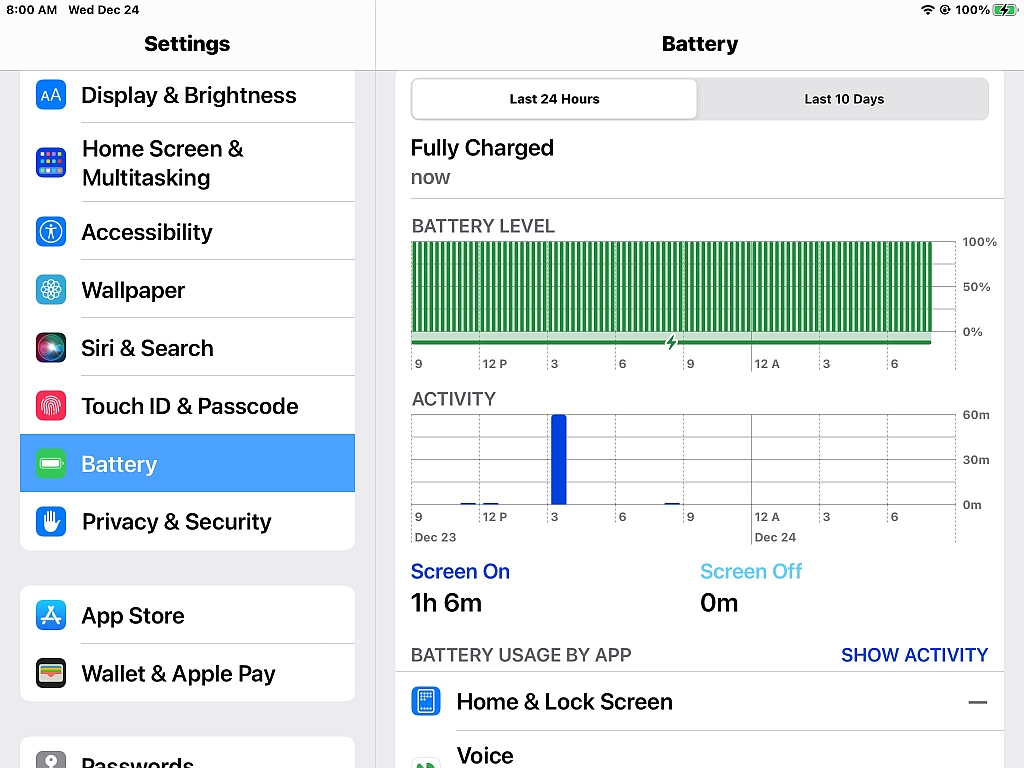
    In iOS 26.2, the Battery section only shows:
    a. Last 24 Hours (but not broken down by each previous hour)
    b. Last 10 Days (daily totals only)
    c. App-by-app usage percentages
    d. Screen-on and screen-off time
    e. Charging history

    What is missing now (compared to older versions such as iOS 12 and iOS 18):
    A. No per-hour history
    B. No ability to scroll back hour by hour for previous days
    C. No detailed timeline like the older versions had

    To confirm, the path is:
    Settings > Battery > Last 24 Hours / Last 10 Days

    If you like, you can tap the bars to see which apps were active during that period, but, unfortunately, as far as I can figure out on my own, you can't view each past hour individually anymore. I'm sorry about that.

    It's unfortunate that Apple does not publish detailed change logs for
    Battery settings, so there is no official Apple document explaining the
    removal of the per-hour view as far as I've been able to ascertain.

    This trend by Apple toward reducing low-level telemetry is only inferred
    from comparing the Battery UI across multiple iOS releases and from user reports (like yours) noting the loss of detailed graphs over time.

    The bottom line is that you are not missing anything, as iOS 26.2 simply
    does not provide the per-hour battery usage view that older versions did,
    and, worse, as far as I can tell from searching, Apple has not published
    any documentation explaining the removal.

    I know you've asked the same question on the Apple boards, so let's hope someone there can provide more help than I have been able to give you.
    --
    I converse civilly with anyone who remains civil, no matter who they are.
    My goal on these Apple newsgroups is to teach, learn and to help others.
    --- Synchronet 3.21a-Linux NewsLink 1.2
  • From Chris@ithinkiam@gmail.com to misc.phone.mobile.iphone on Wed Dec 24 10:12:48 2025
    From Newsgroup: misc.phone.mobile.iphone

    Ant <ant@zimage.comANT> wrote:
    Hello,

    How do I view my per hour battery usage in iPhone's iOS v26.2? I used to
    be able to do that in v18 and iPhone 6+'s v12.5.7. Did v26(.2) remove
    it? :( I want to see each previous hour details.

    It's there under Battery -> View All Battery Usage. You can then select
    each app to see their usage each day over the last week.

    --- Synchronet 3.21a-Linux NewsLink 1.2
  • From Chris@ithinkiam@gmail.com to misc.phone.mobile.iphone on Wed Dec 24 10:15:17 2025
    From Newsgroup: misc.phone.mobile.iphone

    Marian <marianjones@helpfulpeople.com> wrote:

    To confirm, the path is:
    Settings > Battery > Last 24 Hours / Last 10 Days

    Doesn't exist on my iOS 26.2. What phone model is this on?

    --- Synchronet 3.21a-Linux NewsLink 1.2
  • From Marian@marianjones@helpfulpeople.com to misc.phone.mobile.iphone on Wed Dec 24 06:07:58 2025
    From Newsgroup: misc.phone.mobile.iphone

    Chris wrote:
    To confirm, the path is:
    Settings > Battery > Last 24 Hours / Last 10 Days

    Doesn't exist on my iOS 26.2. What phone model is this on?

    Hi Chris,

    Here's a screenshot taken for you on one of my iPads just now.
    <https://i.postimg.cc/6p70Rkky/settings-battery-last24hours.jpg>
    --- Synchronet 3.21a-Linux NewsLink 1.2
  • From ant@ant@zimage.comANT (Ant) to misc.phone.mobile.iphone on Thu Dec 25 07:36:51 2025
    From Newsgroup: misc.phone.mobile.iphone

    Marian <marianjones@helpfulpeople.com> wrote:
    Chris wrote:
    To confirm, the path is:
    Settings > Battery > Last 24 Hours / Last 10 Days

    Doesn't exist on my iOS 26.2. What phone model is this on?

    Hi Chris,

    Here's a screenshot taken for you on one of my iPads just now. <https://i.postimg.cc/6p70Rkky/settings-battery-last24hours.jpg>

    That's iPad(OS), not iPhone. :P
    --
    "But the angel said to them, 'Do not be afraid. I bring you good news of great joy that will be for all the people.'" --Luke 2:10. Merry Xmas & :) BD Jesus eves!
    Note: A fixed width font (Courier, Monospace, etc.) is required to see this signature correctly.
    /\___/\ Ant(Dude) @ http://aqfl.net & http://antfarm.home.dhs.org.
    / /\ /\ \ Please nuke ANT if replying by e-mail.
    | |o o| |
    \ _ /
    ( )
    --- Synchronet 3.21a-Linux NewsLink 1.2
  • From ant@ant@zimage.comANT (Ant) to misc.phone.mobile.iphone on Thu Dec 25 07:40:16 2025
    From Newsgroup: misc.phone.mobile.iphone

    Chris <ithinkiam@gmail.com> wrote:
    Ant <ant@zimage.comANT> wrote:
    Hello,

    How do I view my per hour battery usage in iPhone's iOS v26.2? I used to be able to do that in v18 and iPhone 6+'s v12.5.7. Did v26(.2) remove
    it? :( I want to see each previous hour details.

    It's there under Battery -> View All Battery Usage. You can then select
    each app to see their usage each day over the last week.

    No, I want to view the previous specific hour. See the left side in https://mbsdirect.com/images/blog/art_images/2020-02-19-4b409/Battery-graphs-1024x997.png
    as an example.
    --
    "But the angel said to them, 'Do not be afraid. I bring you good news of great joy that will be for all the people.'" --Luke 2:10. Merry Xmas & :) BD Jesus eves!
    Note: A fixed width font (Courier, Monospace, etc.) is required to see this signature correctly.
    /\___/\ Ant(Dude) @ http://aqfl.net & http://antfarm.home.dhs.org.
    / /\ /\ \ Please nuke ANT if replying by e-mail.
    | |o o| |
    \ _ /
    ( )
    --- Synchronet 3.21a-Linux NewsLink 1.2
  • From Alan Browne@bitbucket@blackhole.com to misc.phone.mobile.iphone on Thu Dec 25 10:15:01 2025
    From Newsgroup: misc.phone.mobile.iphone

    On 2025-12-23 22:46, Marian wrote:
    Ant wrote:
    How do I view my per hour battery usage in iPhone's iOS v26.2? I used
    to be able to do that in v18 and iPhone 6+'s v12.5.7. Did v26(.2)
    remove it? :( I want to see each previous hour details.

    As far as I can tell, iOS 26.x no longer provides the per-hour historical battery usage view that older versions like iOS 12 and iOS 18 used to show.

    Yes it does. Battery | View All.. | then tap on the "day" bars for usage
    on those days. (1 week worth).

    And below that: last week's worth of use for various apps.
    --
    "It would be a measureless disaster if Russian barbarism overlaid
    the culture and independence of the ancient States of Europe."
    Winston Churchill

    --- Synchronet 3.21a-Linux NewsLink 1.2
  • From Marian@marianjones@helpfulpeople.com to misc.phone.mobile.iphone on Thu Dec 25 09:46:17 2025
    From Newsgroup: misc.phone.mobile.iphone

    Ant wrote:
    Here's a screenshot taken for you on one of my iPads just now.
    <https://i.postimg.cc/6p70Rkky/settings-battery-last24hours.jpg>

    That's iPad(OS), not iPhone. :P

    For full disclosure, I took that screenshot on the iPad I use most, which
    is my oldest iPad... which is... let me look... forever stuck on iOS 16.7.2

    ... which asks me a hundred times a day ...

    ...to log into the various Apple mothership tracking servers... which most Apple owners have no idea they're always tethered to... because an iOS
    device doesn't do much without them...

    :)

    I hope you find a good answer to your per-hour battery-usage question!

    Merry Christmas!

    --- Synchronet 3.21a-Linux NewsLink 1.2
  • From Alan Browne@bitbucket@blackhole.com to misc.phone.mobile.iphone on Thu Dec 25 12:10:14 2025
    From Newsgroup: misc.phone.mobile.iphone

    On 2025-12-25 11:46, Marian wrote:

    ...to log into the various Apple mothership tracking servers... which most Apple owners have no idea they're always tethered to... because an iOS
    device doesn't do much without them...

    Distorted Reality message again from Arlen. Par I guess.

    1) iOS runs fine w/o any connection to Apple cloud at all. Can surf the
    web, do one's e-mail, use myriad other apps and web based services, etc.

    2) But, to take full advantage of the country club amenities via Apple
    Cloud services, of course it is connected to their servers and services.

    With ones Apple devices meshed via iCloud - and all the secure
    communications and storage therein, the powerful personal experience
    emerges when one daily drives a Mac/iPhone/Watch and if need be iPad and others.

    A case in point - and this does not apply generally[1] to Android is
    Passkeys, the growing secure login method for a rapidly growing number
    of sites.

    On Apple, the same Passkey one has set up from any of his iCloud linked accounts is near instantly available via iCloud/Passwords on his other
    devices that have secure login (biometric or password guarded: ie on my
    Mac it's fingerprint, Phone:FaceID). No special app needed - it's in
    the bones of iOS, MacOS, etc.

    Smooth sailing at the Apple Country Club. A gated facility with free
    access to the wilder world outside.

    [1] This is possible on an Android phone - via "Google Password Manager"
    in Chrome. Eeeeeiiii ! What a stinkin' plop of proposition that is!

    (repost)
    --
    "Man is the only animal that blushes. Or needs to."
    -Samuel Clemens

    --- Synchronet 3.21a-Linux NewsLink 1.2
  • From Tyrone@none@none.none to misc.phone.mobile.iphone on Thu Dec 25 17:49:06 2025
    From Newsgroup: misc.phone.mobile.iphone

    On Dec 25, 2025 at 11:46:17rC>AM EST, "Marian" <marianjones@helpfulpeople.com> wrote:

    Ant wrote:
    Here's a screenshot taken for you on one of my iPads just now.
    <https://i.postimg.cc/6p70Rkky/settings-battery-last24hours.jpg>

    That's iPad(OS), not iPhone. :P

    For full disclosure, I took that screenshot on the iPad I use most, which
    is my oldest iPad... which is... let me look... forever stuck on iOS 16.7.2

    ... which asks me a hundred times a day ...

    ...to log into the various Apple mothership tracking servers... which most Apple owners have no idea they're always tethered to... because an iOS
    device doesn't do much without them...

    Yes folks. Yet ANOTHER load of bullshit from our resident know-nothing troll.


    And you wonder why no one here believes a word you say.
    --- Synchronet 3.21a-Linux NewsLink 1.2
  • From Alan Browne@bitbucket@blackhole.com to misc.phone.mobile.iphone on Thu Dec 25 12:50:17 2025
    From Newsgroup: misc.phone.mobile.iphone

    On 2025-12-25 02:40, Ant wrote:
    Chris <ithinkiam@gmail.com> wrote:
    Ant <ant@zimage.comANT> wrote:
    Hello,

    How do I view my per hour battery usage in iPhone's iOS v26.2? I used to >>> be able to do that in v18 and iPhone 6+'s v12.5.7. Did v26(.2) remove
    it? :( I want to see each previous hour details.

    It's there under Battery -> View All Battery Usage. You can then select
    each app to see their usage each day over the last week.

    No, I want to view the previous specific hour. See the left side in https://mbsdirect.com/images/blog/art_images/2020-02-19-4b409/Battery-graphs-1024x997.png
    as an example.

    Apple likely have simplified that 'view' as metrics (from those whose
    phoned report) show few people use / want such a feature.
    --
    "Man is the only animal that blushes. Or needs to."
    -Samuel Clemens

    --- Synchronet 3.21a-Linux NewsLink 1.2
  • From Tyrone@none@none.none to misc.phone.mobile.iphone on Thu Dec 25 17:57:10 2025
    From Newsgroup: misc.phone.mobile.iphone

    On Dec 25, 2025 at 12:10:14rC>PM EST, "Alan Browne" <bitbucket@blackhole.com> wrote:

    On 2025-12-25 11:46, Marian wrote:

    ...to log into the various Apple mothership tracking servers... which most >> Apple owners have no idea they're always tethered to... because an iOS
    device doesn't do much without them...

    Distorted Reality message again from Arlen. Par I guess.

    1) iOS runs fine w/o any connection to Apple cloud at all. Can surf the
    web, do one's e-mail, use myriad other apps and web based services, etc.

    2) But, to take full advantage of the country club amenities via Apple
    Cloud services, of course it is connected to their servers and services.

    With ones Apple devices meshed via iCloud - and all the secure
    communications and storage therein, the powerful personal experience
    emerges when one daily drives a Mac/iPhone/Watch and if need be iPad and others.

    Exactly. This is the entire point of the Apple ecosystem. Everything works together.

    A case in point - and this does not apply generally[1] to Android is Passkeys, the growing secure login method for a rapidly growing number
    of sites.

    On Apple, the same Passkey one has set up from any of his iCloud linked accounts is near instantly available via iCloud/Passwords on his other devices that have secure login (biometric or password guarded: ie on my
    Mac it's fingerprint, Phone:FaceID). No special app needed - it's in
    the bones of iOS, MacOS, etc.

    Exactly. This is the entire point of the Apple ecosystem. Everything works together. Something Arlen will never admit - or even understand.

    Because Troll.

    Smooth sailing at the Apple Country Club. A gated facility with free
    access to the wilder world outside.

    [1] This is possible on an Android phone - via "Google Password Manager"
    in Chrome. Eeeeeiiii ! What a stinkin' plop of proposition that is!

    (repost)
    --- Synchronet 3.21a-Linux NewsLink 1.2
  • From Marian@marianjones@helpfulpeople.com to misc.phone.mobile.iphone on Thu Dec 25 14:10:24 2025
    From Newsgroup: misc.phone.mobile.iphone

    Tyrone wrote:
    With ones Apple devices meshed via iCloud - and all the secure
    communications and storage therein, the powerful personal experience
    emerges when one daily drives a Mac/iPhone/Watch and if need be iPad and
    others.

    Exactly. This is the entire point of the Apple ecosystem.
    Everything works together.

    This thread can be titled any of the following to help people understand
    iOS Design, and specifically "What Happens When You Refuse the Apple ID"?

    iOS Design Assumptions and Apple ID Dependence
    How iOS Behaves When You Decline an Apple ID
    The Role of Apple ID in iOS Functionality
    iOS Architecture and Mandatory Cloud Integration
    iOS as a Cloud-Dependent Platform: Design or Limitation?
    The Apple Ecosystem and Forced Cloud Integration
    iOS Without an Apple ID: What Actually Happens
    Living Signed-Out on iOS: A Technical Reality Check
    iOS Prompts and Apple ID Lock-In: A Closer Look
    etc.

    If you refuse to sign in, like I do, then iOS will repeatedly prompt you.
    That part is absolutely real whether or not people are aware of it.

    The system is built around the assumption that an Apple ID is always
    present, so if you decline to provide one, you end up in a permanent "incomplete setup" state that keeps resurfacing.

    Obviously iOS relies heavily on Apple ID for syncing, App Store access, iMessage, FaceTime, passkeys, and almost every other integrated feature.
    So yes, once you are signed into the Cupertino servers, "everything works together" because the device is designed to treat the cloud services as
    the center of gravity. The local device becomes the interface layer for
    that larger system.

    Once you're signed in, the system handles authentication silently in the background, but hiding that sign-in does not mean it is not happening.
    It simply means the prompts are suppressed because the device finally has
    the credentials it keeps asking for.

    If you refuse to sign in (as I have been testing for years), then you
    will eventually be forced by Apple to sign in again. The system will keep trying to complete tasks that require an Apple ID, and each failure
    triggers another prompt. That is not a bug. It is how the platform is
    designed.

    And one of the clearest examples is that you cannot update apps at all
    unless you are signed into an Apple ID. Even apps you already have
    installed cannot be updated without logging into the Apple servers. At
    the same time, the OS itself *can* be updated without an Apple ID. This
    means that over time, the OS will advance while the apps remain frozen,
    and eventually many of them will refuse to run because they no longer
    match the newer OS requirements. This is not hypothetical. It is built
    into the design.

    Every common consumer ecosystem "works together" if you are willing to
    stay logged into the mothership all day long. Apple simply pushes that
    model harder than most.

    A case in point - and this does not apply generally[1] to Android is
    Passkeys, the growing secure login method for a rapidly growing number
    of sites.

    There are fundamental concepts that need to be stated about the locked-in nature of the Apple ecosystem, which we may need to discuss in a separate thread.

    It seems we need a separate thread on the topic of how iOS is designed.

    From: Marian <marianjones@helpfulpeople.com>
    Newsgroups: misc.phone.mobile.iphone,comp.sys.mac.advocacy
    Subject: Why iOS Requires an Apple ID for Basic Functionality
    Date: Thu, 25 Dec 2025 14:07:51 -0700
    Organization: BWH Usenet Archive (https://usenet.blueworldhosting.com)
    Message-ID: <10ik938$1fhm$1@nnrp.usenet.blueworldhosting.com>

    On Apple, the same Passkey one has set up from any of his iCloud linked
    accounts is near instantly available via iCloud/Passwords on his other
    devices that have secure login (biometric or password guarded: ie on my
    Mac it's fingerprint, Phone:FaceID). No special app needed - it's in
    the bones of iOS, MacOS, etc.

    What needs to be taught is that iOS is designed around the assumption that
    the cloud is the authoritative source. Once you're signed into the Apple servers, of course things appear seamless. That is the whole point of the design. The device is not meant to operate independently of that system.

    Exactly. This is the entire point of the Apple ecosystem. Everything works together. Something Arlen will never admit - or even understand.

    What needs to be taught is that iOS devices lose major functionality when
    you are not logged into the Apple servers. The platform is structured so
    that the cloud account is not optional. If you decline to sign in, you
    will be prompted constantly because the system is trying to complete tasks
    that it cannot complete without those credentials.

    Because Troll.

    Smooth sailing at the Apple Country Club. A gated facility with free
    access to the wilder world outside.

    The frequency of sign-ins to Apple's Cupertino matrix is high simply
    because almost every subsystem on iOS expects an Apple ID:
    App Store
    iCloud
    iMessage
    FaceTime
    Keychain / Passkeys
    Find My
    Device backups
    App updates
    Subscriptions
    Apple Pay
    Screen Time
    Family Sharing
    Photos sync
    Notes sync
    Safari sync
    Password autofill
    Two-factor prompts
    System services that check entitlement status
    etc.

    When you're signed out, each of these tries to initialize, fails, and
    triggers a prompt. So the frequency I am describing is rational and
    predictable given the architecture.

    [1] This is possible on an Android phone - via "Google Password Manager"
    in Chrome. Eeeeeiiii ! What a stinkin' plop of proposition that is!

    The fact is that iOS devices are designed around the assumption that the
    cloud account is always present. That is why the experience feels like a
    dumb terminal when you decline to participate in that model.

    Any OS can behave like iOS if you are willing to log into the mothership servers constantly. The difference is that on iOS, the design makes that
    model unavoidable, and if you refuse to sign in, you see the underlying mechanics exposed all day, every day, forever.

    If you disagree, or want to discuss why this is the case, see:
    From: Marian <marianjones@helpfulpeople.com>
    Newsgroups: misc.phone.mobile.iphone,comp.sys.mac.advocacy
    Subject: Why iOS Requires an Apple ID for Basic Functionality
    Date: Thu, 25 Dec 2025 14:07:51 -0700
    Organization: BWH Usenet Archive (https://usenet.blueworldhosting.com)
    Message-ID: <10ik938$1fhm$1@nnrp.usenet.blueworldhosting.com>
    --
    My goal on these Apple newsgroups is to teach, learn and to help others.
    This particular thread is all about learning from others & teaching them.
    --- Synchronet 3.21a-Linux NewsLink 1.2
  • From Marian@marianjones@helpfulpeople.com to misc.phone.mobile.iphone on Thu Dec 25 14:13:08 2025
    From Newsgroup: misc.phone.mobile.iphone

    Tyrone wrote:
    ...to log into the various Apple mothership tracking servers... which most >> Apple owners have no idea they're always tethered to... because an iOS
    device doesn't do much without them...

    Yes folks. Yet ANOTHER load of bullshit from our resident know-nothing troll.


    And you wonder why no one here believes a word you say.

    To help people learn about how iOS is really designed, I opened this adult thread which is designed to discuss the topic Tyrone seeks to learn about.

    From: Marian <marianjones@helpfulpeople.com>
    Newsgroups: misc.phone.mobile.iphone,comp.sys.mac.advocacy
    Subject: Why iOS Requires an Apple ID for Basic Functionality
    Date: Thu, 25 Dec 2025 14:07:51 -0700
    Organization: BWH Usenet Archive (https://usenet.blueworldhosting.com)
    Message-ID: <10ik938$1fhm$1@nnrp.usenet.blueworldhosting.com>
    --- Synchronet 3.21a-Linux NewsLink 1.2
  • From Your Name@YourName@YourISP.com to misc.phone.mobile.iphone on Fri Dec 26 11:32:15 2025
    From Newsgroup: misc.phone.mobile.iphone

    On 2025-12-25 17:57:10 +0000, Tyrone said:
    On Dec 25, 2025 at 12:10:14rC>PM EST, "Alan Browne" <bitbucket@blackhole.com> wrote:
    On 2025-12-25 11:46, Marian wrote:

    ...to log into the various Apple mothership tracking servers... which most >>> Apple owners have no idea they're always tethered to... because an iOS
    device doesn't do much without them...

    Distorted Reality message again from Arlen. Par I guess.

    1) iOS runs fine w/o any connection to Apple cloud at all. Can surf the
    web, do one's e-mail, use myriad other apps and web based services, etc.

    Yep. You can easily use an iPhone, iPad, or Mac computer without any connection to the outside world at all. The iPhone will of course
    simply be a small iPad / iPod Touch / digital diary rather than an
    actual 'phone' (although in many places a mobile phone even without a
    SIM card can still be used to call emergency services).


    2) But, to take full advantage of the country club amenities via Apple
    Cloud services, of course it is connected to their servers and services.

    With ones Apple devices meshed via iCloud - and all the secure
    communications and storage therein, the powerful personal experience
    emerges when one daily drives a Mac/iPhone/Watch and if need be iPad and
    others.

    Exactly. This is the entire point of the Apple ecosystem. Everything works together.

    A case in point - and this does not apply generally[1] to Android is
    Passkeys, the growing secure login method for a rapidly growing number
    of sites.

    On Apple, the same Passkey one has set up from any of his iCloud linked
    accounts is near instantly available via iCloud/Passwords on his other
    devices that have secure login (biometric or password guarded: ie on my
    Mac it's fingerprint, Phone:FaceID). No special app needed - it's in
    the bones of iOS, MacOS, etc.

    Exactly. This is the entire point of the Apple ecosystem. Everything works together. Something Arlen will never admit - or even understand.

    Because Troll.

    Smooth sailing at the Apple Country Club. A gated facility with free
    access to the wilder world outside.

    [1] This is possible on an Android phone - via "Google Password Manager"
    in Chrome. Eeeeeiiii ! What a stinkin' plop of proposition that is!

    (repost)


    --- Synchronet 3.21a-Linux NewsLink 1.2
  • From Jolly Roger@jollyroger@pobox.com to misc.phone.mobile.iphone on Fri Dec 26 00:04:56 2025
    From Newsgroup: misc.phone.mobile.iphone

    On 2025-12-25, Marian <marianjones@helpfulpeople.com> wrote:
    Ant wrote:
    Here's a screenshot taken for you on one of my iPads just now.
    <https://i.postimg.cc/6p70Rkky/settings-battery-last24hours.jpg>

    That's iPad(OS), not iPhone. :P

    For full disclosure, I took that screenshot on the iPad I use most, which
    is my oldest iPad... which is... let me look... forever stuck on iOS 16.7.2

    Yet again, Arlen demonstrates his lack of knowledge of current Apple's
    platform features.

    Merry Christmas!

    Sure.
    --
    E-mail sent to this address may be devoured by my ravenous SPAM filter.
    I often ignore posts from Google. Use a real news client instead.

    JR
    --- Synchronet 3.21a-Linux NewsLink 1.2
  • From ant@ant@zimage.comANT (Ant) to misc.phone.mobile.iphone on Fri Dec 26 00:47:19 2025
    From Newsgroup: misc.phone.mobile.iphone

    Alan Browne <bitbucket@blackhole.com> wrote:
    On 2025-12-23 22:46, Marian wrote:
    Ant wrote:
    How do I view my per hour battery usage in iPhone's iOS v26.2? I used
    to be able to do that in v18 and iPhone 6+'s v12.5.7. Did v26(.2)
    remove it? :( I want to see each previous hour details.

    As far as I can tell, iOS 26.x no longer provides the per-hour historical battery usage view that older versions like iOS 12 and iOS 18 used to show.

    Yes it does. Battery | View All.. | then tap on the "day" bars for usage
    on those days. (1 week worth).

    But how do I view the hour's details like 8 AM to 9 AM? I want to see
    ALL apps that were hogging power within that hour only.
    --
    "But the angel said to them, 'Do not be afraid. I bring you good news of great joy that will be for all the people.'" --Luke 2:10. Merry Xmas & :) BD Jesus eves!
    Note: A fixed width font (Courier, Monospace, etc.) is required to see this signature correctly.
    /\___/\ Ant(Dude) @ http://aqfl.net & http://antfarm.home.dhs.org.
    / /\ /\ \ Please nuke ANT if replying by e-mail.
    | |o o| |
    \ _ /
    ( )
    --- Synchronet 3.21a-Linux NewsLink 1.2
  • From ant@ant@zimage.comANT (Ant) to misc.phone.mobile.iphone on Fri Dec 26 00:48:18 2025
    From Newsgroup: misc.phone.mobile.iphone

    Alan Browne <bitbucket@blackhole.com> wrote:
    On 2025-12-25 02:40, Ant wrote:
    Chris <ithinkiam@gmail.com> wrote:
    Ant <ant@zimage.comANT> wrote:
    Hello,

    How do I view my per hour battery usage in iPhone's iOS v26.2? I used to >>> be able to do that in v18 and iPhone 6+'s v12.5.7. Did v26(.2) remove
    it? :( I want to see each previous hour details.

    It's there under Battery -> View All Battery Usage. You can then select
    each app to see their usage each day over the last week.

    No, I want to view the previous specific hour. See the left side in https://mbsdirect.com/images/blog/art_images/2020-02-19-4b409/Battery-graphs-1024x997.png
    as an example.

    Apple likely have simplified that 'view' as metrics (from those whose
    phoned report) show few people use / want such a feature.

    Darn. :( Time to leave a feedback. It was useful to see why my iPhone
    just got very warm and lost so much battery power.
    --
    "But the angel said to them, 'Do not be afraid. I bring you good news of great joy that will be for all the people.'" --Luke 2:10. Merry Xmas & :) BD Jesus eves!
    Note: A fixed width font (Courier, Monospace, etc.) is required to see this signature correctly.
    /\___/\ Ant(Dude) @ http://aqfl.net & http://antfarm.home.dhs.org.
    / /\ /\ \ Please nuke ANT if replying by e-mail.
    | |o o| |
    \ _ /
    ( )
    --- Synchronet 3.21a-Linux NewsLink 1.2
  • From Marian@marianjones@helpfulpeople.com to misc.phone.mobile.iphone on Thu Dec 25 18:51:41 2025
    From Newsgroup: misc.phone.mobile.iphone

    Your Name wrote:
    On 2025-12-25 17:57:10 +0000, Tyrone said:
    On Dec 25, 2025 at 12:10:14rC>PM EST, "Alan Browne" <bitbucket@blackhole.com>
    wrote:
    On 2025-12-25 11:46, Marian wrote:

    ...to log into the various Apple mothership tracking servers... which most >>>> Apple owners have no idea they're always tethered to... because an iOS >>>> device doesn't do much without them...

    Distorted Reality message again from Arlen. Par I guess.

    1) iOS runs fine w/o any connection to Apple cloud at all. Can surf the >>> web, do one's e-mail, use myriad other apps and web based services, etc.

    Yep. You can easily use an iPhone, iPad, or Mac computer without any connection to the outside world at all. The iPhone will of course
    simply be a small iPad / iPod Touch / digital diary rather than an
    actual 'phone' (although in many places a mobile phone even without a
    SIM card can still be used to call emergency services).


    Hi Your Name,

    Merry Christmas!

    I think it is worth being precise about what runs fine actually means in
    the context of iOS because iOS is different from all other common OS's.

    The key distinction is that iOS is the only widely used OS that does not
    permit installation of third party software without authenticating to the vendor controlled account system. Android allows sideloading and allows the
    use of alternative store clients such as Aurora without any Google account. Windows, macOS, Linux, and Android all permit software installation without
    any vendor account. iOS does not.

    It is correct that an iPhone or iPad will boot and operate without signing
    into an Apple ID, and it is correct that you can use offline apps, local
    media, basic web browsing, and email through third party providers.
    However, this is only possible after the device has already been activated
    on Apple servers and after any desired applications have already been
    installed through an authenticated App Store session. iOS does not permit installation of applications without Apple ID authentication, and every App Store installation is tied to the Apple ID used.

    So, without the account, you can't install a single app, or update it.
    That's huge.

    iOS is the only mobile OS that requires server side activation tied to the device hardware before the device can be used. This activation is mandatory
    and cannot be bypassed. Windows and macOS have activation mechanisms, but
    they do not require a cloud account and they do not lock the device to a personal identity. That's also a huge difference you didn't yet mention.

    Only iOS has the concept of requiring a mothership account to install apps. Only iOS has the concept of the default messenger even having an account.
    Only iOS forces activation on matrix-tracking servers. Nobody else does.
    Only Apple unilaterally locks the device if you haven't logged in recently. Only Apple requires government ID in order to get that iOS device unlocked. etc.

    So rest assured, when you think about how iOS is vastly different from all other operating systems (including macOS), you will think differently.

    Yes, an iPhone or iPad will boot and operate without signing into an Apple
    ID, and yes, you can use it for offline apps, local media, basic web
    browsing, and email through third party providers if (and this is big), if you've already activated the iOS device on Apple's tracking servers, and if you've already installed apps using a login on Apple's tracking servers
    (where Apple inserts a unique identifier for you into ever app installed).

    None of that is in dispute by anyone who understands how iOS really works.

    But it is also technically accurate that a large portion of iOS
    functionality is architecturally dependent on Apple authenticated services.

    That is not a value judgment. It is simply how the platform is designed. Without an Apple ID, you lose:
    a. App Store access including app installation and updates
    b. iMessage to iMessage (but not to SMS/RCS) and FaceTime
    c. iCloud sync, backup, and Keychain
    d. Find My and Activation Lock
    e. Apple Books, Apple Music, Apple TV, and similar services
    etc.

    These are not fringe features. They are core components of the ecosystem.

    So while the device will operate, it does so in a significantly reduced
    mode. Calling that fine depends on what someone considers baseline functionality, but from a technical standpoint, the OS is intentionally
    built around authenticated cloud services.

    None of this requires assuming anything about motives or motherships.
    It is simply the practical reality of how iOS is engineered.
    --
    Discussing actual technical realities of iOS design that only a tiny
    fraction of users ever learn because Apple marketing doesn't explain this.
    --- Synchronet 3.21a-Linux NewsLink 1.2
  • From Marian@marianjones@helpfulpeople.com to misc.phone.mobile.iphone on Thu Dec 25 19:00:56 2025
    From Newsgroup: misc.phone.mobile.iphone

    Ant wrote:
    Alan Browne <bitbucket@blackhole.com> wrote:
    On 2025-12-25 02:40, Ant wrote:
    Chris <ithinkiam@gmail.com> wrote:
    Ant <ant@zimage.comANT> wrote:
    Hello,

    How do I view my per hour battery usage in iPhone's iOS v26.2? I used to >>>>> be able to do that in v18 and iPhone 6+'s v12.5.7. Did v26(.2) remove >>>>> it? :( I want to see each previous hour details.

    It's there under Battery -> View All Battery Usage. You can then select >>>> each app to see their usage each day over the last week.

    No, I want to view the previous specific hour. See the left side in
    https://mbsdirect.com/images/blog/art_images/2020-02-19-4b409/Battery-graphs-1024x997.png
    as an example.

    Apple likely have simplified that 'view' as metrics (from those whose
    phoned report) show few people use / want such a feature.

    Darn. :( Time to leave a feedback. It was useful to see why my iPhone
    just got very warm and lost so much battery power.

    Hi Ant,

    Merry Christmas.

    Can you do us a favor since both Alan Browne & Jolly Roger claimed that the answer I researched to give to you was wrong, so I need to know from you.

    Was my answer correct?
    Or wrong?

    BTW, if you need me to check more things, I have a newer iPad tenth
    generation on iOS 18.5 which I purposefully just now did NOT update so that
    I could screenshot, for you, whatever it is you may need me to screenshot.

    I could do any iPadOS 18.5 (22F76) screenshot you like for you, and then I
    can update it with a screenshot from a later update, if you need more help.

    Let me know if what Jolly Roger and Alan Browne said about my help for you,
    as I will apologize publicly and profusely if what I wrote to you is wrong.
    --
    Sharing real-world testing of iOS behavior that most people never see,
    so that we can all understand Apple's iOS system behavior more clearly.
    --- Synchronet 3.21a-Linux NewsLink 1.2
  • From Jolly Roger@jollyroger@pobox.com to misc.phone.mobile.iphone on Fri Dec 26 05:17:34 2025
    From Newsgroup: misc.phone.mobile.iphone

    On 2025-12-26, Ant <ant@zimage.comANT> wrote:
    Alan Browne <bitbucket@blackhole.com> wrote:
    On 2025-12-23 22:46, Marian wrote:
    Ant wrote:
    How do I view my per hour battery usage in iPhone's iOS v26.2? I used
    to be able to do that in v18 and iPhone 6+'s v12.5.7. Did v26(.2)
    remove it? :( I want to see each previous hour details.

    As far as I can tell, iOS 26.x no longer provides the per-hour historical >> > battery usage view that older versions like iOS 12 and iOS 18 used to show.

    Yes it does. Battery | View All.. | then tap on the "day" bars for usage
    on those days. (1 week worth).

    But how do I view the hour's details like 8 AM to 9 AM? I want to see
    ALL apps that were hogging power within that hour only.

    Meh, I see no evidence that the default display doesn't give you all you
    need to know to figure out which activities are causing the most battery
    drain.
    --
    E-mail sent to this address may be devoured by my ravenous SPAM filter.
    I often ignore posts from Google. Use a real news client instead.

    JR
    --- Synchronet 3.21a-Linux NewsLink 1.2