• Why are free iOS IPAs =?utf-8?Q?device=E2=80=91locked_while?= =?utf-8?Q?_Android_APKs_aren=E2=80=99t=3F?=

    From Marian@marianjones@helpfulpeople.com to misc.phone.mobile.iphone,comp.sys.mac.advocacy on Tue Dec 30 19:54:38 2025
    From Newsgroup: comp.sys.mac.advocacy


    Q: Does Apple modify free IPAs you download/install from the App Store?
    A: Yes. Every free IPA is made unique per user/device once delivered.

    Why?

    HINT:
    Q: Does Google modify free APKs you download/install from the Play Store?
    A: No. Android free apps are not locked to the user nor to the device.

    Only iOS embeds identity-bound metadata into delivered free app packages.
    Why?
    --
    The entry fee for posting on Usenet operating system newsgroups should be
    that the people posting should know something about the operating system.
    --- Synchronet 3.21a-Linux NewsLink 1.2
  • From Tom Elam@thomas.e.elam@gmail.com to misc.phone.mobile.iphone,comp.sys.mac.advocacy on Wed Dec 31 18:26:47 2025
    From Newsgroup: comp.sys.mac.advocacy

    On 12/30/2025 9:54 PM, Marian wrote:

    Q: Does Apple modify free IPAs you download/install from the App Store?
    A: Yes. Every free IPA is made unique per user/device once delivered.

    Why?

    HINT: Q: Does Google modify free APKs you download/install from the Play Store?
    A: No. Android free apps are not locked to the user nor to the device.

    Only iOS embeds identity-bound metadata into delivered free app packages. Why?

    Are you EVER going to realize that 99.9999999% of iPhone owners will
    never read any of your posts? Or, if they stumbled across you they would
    not understand or give a care?

    Face it, you are pissing a weak stream into a Cat 5 hurricane.
    --- Synchronet 3.21a-Linux NewsLink 1.2
  • From badgolferman@REMOVETHISbadgolferman@gmail.com to misc.phone.mobile.iphone,comp.sys.mac.advocacy on Wed Dec 31 23:34:54 2025
    From Newsgroup: comp.sys.mac.advocacy

    Marian <marianjones@helpfulpeople.com> wrote:

    Q: Does Apple modify free IPAs you download/install from the App Store?
    A: Yes. Every free IPA is made unique per user/device once delivered.

    Why?

    HINT:
    Q: Does Google modify free APKs you download/install from the Play Store?
    A: No. Android free apps are not locked to the user nor to the device.

    Only iOS embeds identity-bound metadata into delivered free app packages. Why?

    I donrCOt know if this has anything to do with your question, but when I upgrade a device to a newer one all the apps IrCOve got installed on the previous device are automatically downloaded and installed on the new
    device.

    --- Synchronet 3.21a-Linux NewsLink 1.2
  • From Brock McNuggets@brock.mcnuggets@gmail.com to comp.sys.mac.advocacy,misc.phone.mobile.iphone on Thu Jan 1 01:07:39 2026
    From Newsgroup: comp.sys.mac.advocacy

    On Dec 30, 2025 at 7:54:38rC>PM MST, "Marian" wrote <10j239d$26t4$1@nnrp.usenet.blueworldhosting.com>:


    Q: Does Apple modify free IPAs you download/install from the App Store?
    A: Yes. Every free IPA is made unique per user/device once delivered.

    Why?

    HINT:
    Q: Does Google modify free APKs you download/install from the Play Store?
    A: No. Android free apps are not locked to the user nor to the device.

    Only iOS embeds identity-bound metadata into delivered free app packages. Why?

    What impact do you imagine this has on most users?
    --
    It's impossible for someone who is at war with themselves to be at peace with you.
    --- Synchronet 3.21a-Linux NewsLink 1.2
  • From Tyrone@none@none.none to comp.sys.mac.advocacy,misc.phone.mobile.iphone on Thu Jan 1 01:44:47 2026
    From Newsgroup: comp.sys.mac.advocacy

    On Dec 30, 2025 at 9:54:38rC>PM EST, "Marian" <marianjones@helpfulpeople.com> wrote:


    Q: Does Apple modify free IPAs you download/install from the App Store?
    A: Yes. Every free IPA is made unique per user/device once delivered.

    Why?

    HINT:
    Q: Does Google modify free APKs you download/install from the Play Store?
    A: No. Android free apps are not locked to the user nor to the device.

    Only iOS embeds identity-bound metadata into delivered free app packages. Why?

    Maybe so the people who write the apps have an accurate count of how many people are using it? Unlike in Android, where there can be 1,000 downloads but 50,000 people are using it.

    Not everyone enjoys the "Wild West" vibe of Android, where no one is in control.
    --- Synchronet 3.21a-Linux NewsLink 1.2
  • From Marian@marianjones@helpfulpeople.com to misc.phone.mobile.iphone,comp.sys.mac.advocacy on Wed Dec 31 19:33:23 2025
    From Newsgroup: comp.sys.mac.advocacy

    badgolferman wrote:
    Only iOS embeds identity-bound metadata into delivered free app packages.
    Why?

    I don't know if this has anything to do with your question, but when I upgrade a device to a newer one all the apps I've got installed on the previous device are automatically downloaded and installed on the new
    device.

    Hi badgolferman,

    Happy New Year!

    It's important for all of us to UNDERSTAND what Apple does to an IPA
    (which only Apple does, as no other OS vendor does what Apple does).

    What you are describing when you upgrade a device is not app portability.

    It is an account-level re-download. The new device does not receive the
    actual app package from the old device. Instead, it contacts the App
    Store and downloads a fresh, Apple-signed, Apple-encrypted build.

    Unlike every other common consumer operating system, iOS app packages are
    not portable artifacts like APKs, EXEs, DEBs, or RPMs.

    1. App Store builds are re-signed by Apple, not the developer.
    The developer's signature is removed and replaced with an App Store
    distribution signature. iOS validates this signature against Apple's
    certificate chain at install and launch time.

    2. The executable inside the IPA is encrypted with FairPlay DRM.
    The Mach-O binary is encrypted, and the decryption keys are provisioned
    per device during installation. These keys cannot be transferred to
    another device.

    3. The App Store injects identity-bound metadata into the package.
    This includes account identifiers and device-targeting information.
    Unlike every other common consumer operating system app installer,
    an IPA extracted from one device cannot be sideloaded onto another
    because that identity-bound mothership metadata will not match.

    4. iOS enforces mandatory code signing at the kernel level.
    The AMFI (Apple Mobile File Integrity) subsystem refuses to execute
    any binary that is not signed by Apple for App Store distribution
    or by a provisioning profile that explicitly authorizes that device.
    There is no path for running unsigned code on consumer iOS builds.

    Because of these mechanisms, an iOS IPA is not a portable software
    artifact. It is a cryptographically-constrained container that can only
    be installed when Apple authorizes the transaction for a specific Apple
    ID on a specific device class.

    So yes, your apps appear on a new device during an upgrade, but only
    because Apple reissues new, device-specific builds. You are not
    transferring the app itself, and you cannot reuse or redistribute the
    IPA the way you can on Windows, Android, or Linux.

    The core difference is that iOS is the only mainstream consumer
    operating system where even free applications cannot be freely copied,
    shared, or executed across devices without the platform owner's explicit cryptographic approval.

    Apple's behavior isn't arbitrary, as it's the result of a design philosophy that treats all executable code on consumer iOS devices as something that
    must be cryptographically authorized by Apple. Everything else flows from
    that.

    Your Apple ID is embedded into every IPA you install from the App Store.
    No other common consumer operating systrem does that. Just iOS.

    HINT: Not even macOS inserts your Apple ID into every app you install.
    --- Synchronet 3.21a-Linux NewsLink 1.2
  • From Marian@marianjones@helpfulpeople.com to misc.phone.mobile.iphone,comp.sys.mac.advocacy on Wed Dec 31 19:42:30 2025
    From Newsgroup: comp.sys.mac.advocacy

    Tom Elam wrote:
    Only iOS embeds identity-bound metadata into delivered free app packages.
    Why?

    Are you EVER going to realize that 99.9999999% of iPhone owners will
    never read any of your posts? Or, if they stumbled across you they would
    not understand or give a care?

    Face it, you are pissing a weak stream into a Cat 5 hurricane.

    Hi Tom Elam,

    Happy New Year!

    The goal of this thread is to UNDERSTAND how iOS works. '

    It doesn't matter that 1 in a million understand anything about iOS.
    What matters is WE understand iOS.

    Because we're intelligent well-informed intellectually-curious people.
    This is simply a discussion so we all better understand how iOS works.

    Did you ever wonder why only iOS adds your identity to every app you
    install? Windows doesn't do that. Android doesn't do it. Linux doesn't
    either. Even macOS doesn't do it. Yup. Only iOS embeds your identity into
    every app.

    Doesn't that make you wonder why iOS does it but macOS doesn't do it?

    Hint: It turns out that macOS predates the App Store and therefore, try as
    they might, Apple cannot lock it down without destroying the platform.

    What's different is iOS was designed from day one to:
    a. block sideloading
    b. block competing app stores
    c. enforce Apple's payment system (even for free apps!)
    d. enforce Apple's signing (disregarding developer signing)
    e. enforce Apple's DRM (even for free apps!)
    f. enforce Apple's control

    No other common consumer operating system but iOS embeds your identity into every app you install. Why do you think Apple does that, but only for iOS?
    --
    Intelligent people own the imagination to ask how a tool actually works.
    --- Synchronet 3.21a-Linux NewsLink 1.2
  • From Marian@marianjones@helpfulpeople.com to comp.sys.mac.advocacy,misc.phone.mobile.iphone on Wed Dec 31 19:51:25 2025
    From Newsgroup: comp.sys.mac.advocacy

    Tyrone wrote:
    Only iOS embeds identity-bound metadata into delivered free app packages.
    Why?

    Maybe so the people who write the apps have an accurate count of how many people are using it? Unlike in Android, where there can be 1,000 downloads but 50,000 people are using it.

    Not everyone enjoys the "Wild West" vibe of Android, where no one is in control.

    Hi Tyrone,

    Happy New Year!

    You compare iOS to the "wild west" of every other operating system (i.e., Windows, Linux & Android), but what about comparing iOS to Apple's macOS?

    Q: Does Apple's macOS modify free apps you install from the Mac App Store?
    A: Nope.

    Hmmm... ever wonder why only iOS embeds your identity into every installer?

    When you download an app from the Mac App Store, the app bundle remains:
    a. signed by the developer, not re-signed by Apple
    b. not encrypted with FairPlay DRM
    c. not tied to your Apple ID
    d. not tied to your device
    e. not injected with identity-bound metadata

    Hence, not only do macOS apps NOT have your identity embedded into them,
    but macOS apps are portable (like for all other operating systems).

    So you can copy them to another Mac and they will still run.
    By contrast, iOS App Store IPAs are:
    A. re-signed by Apple
    B. FairPlay-encrypted
    C. bound to your Apple ID
    D. bound to your device class
    E. injected with identity-linked metadata
    F. not portable

    Ever wonder why macOS does not use the iOS lockdown model?
    I do.

    Note: macOS apps do include a receipt file, but it is not embedded into the executable, not cryptographically enforced, and not identity-binding in the
    iOS sense. Hence, the app remains fully portable. Only iOS locks it to you.
    --
    Intelligent people own the imagination to figure out how a tool works.
    --- Synchronet 3.21a-Linux NewsLink 1.2
  • From Marian@marianjones@helpfulpeople.com to misc.phone.mobile.iphone,comp.sys.mac.advocacy on Wed Dec 31 20:04:43 2025
    From Newsgroup: comp.sys.mac.advocacy

    Marian wrote:
    Only iOS embeds identity-bound metadata into delivered free app packages. Why?

    Given only iOS locks down the installer to your identity, not even macOS
    does that, intelligent people begin to wonder why iOS is so different.

    iOS is Appleos revenue engine while macOS is not
    This is what Apple will never say out loud.

    What Apple never says in their (brilliant) propaganda is that...
    a. iOS is where Apple makes most of its App Store commissions
    (because iOS forces all consumer software distribution
    through the App Store, unlike macOS)
    b. iOS is where Apple makes most of its in-app purchase commission
    (because iOS mandates Appleos payment system for most categories,
    unlike macOS)
    c. iOS is where Apple makes most of its subscription commission
    (because iOS enforces App Store billing rules, unlike macOS)
    d. iOS is where Apple makes most of its developer-program revenue
    (because shipping an iOS app requires a paid developer account,
    unlike macOS)
    e. iOS is where Apple makes most of its device lock-in revenue
    (because apps, purchases, and services are tied to the Apple ID
    and the iOS ecosystem)
    f. iOS is where Apple makes most of its ecosystem lock-in revenue
    (because iMessage, AirDrop, Apple Watch pairing, and App Store
    purchases anchor users to iOS)

    These revenue streams exist on macOS, but iOS is where they actually scale, because iOS is the only Apple platform that is cryptographically locked
    down and commercially controlled end-to-end.

    If iOS apps were portable like macOS apps:
    A. users could share apps
    B. developers could distribute outside the App Store
    C. alternative app stores could exist
    D. Apple couldn't enforce in-app purchase rules
    E. Apple couldn't take a cut
    F. Apple couldn't block competition
    G. Apple couldn't enforce region restrictions
    H. Apple couldn't enforce device restrictions
    The entire business model collapses.

    macOS doesn't generate that kind of revenue, so Apple never applied the
    same restrictions.

    Q: So why do you think every IPA is tied to your Apple ID on iOS?
    A: ?
    --- Synchronet 3.21a-Linux NewsLink 1.2
  • From Marian@marianjones@helpfulpeople.com to misc.phone.mobile.iphone,comp.sys.mac.advocacy on Wed Dec 31 20:08:49 2025
    From Newsgroup: comp.sys.mac.advocacy

    Marian wrote:
    Q: So why do you think every IPA is tied to your Apple ID on iOS?
    A: ?

    Q: So why do you think every IPA is tied to your Apple ID on iOS?
    A: The embedded Apple ID prevents redistribution of the IPA!

    Notice everything is harder on iOS when you simply want to back up and
    re-use an IPA. No other operating system makes something this simple,
    that hard.

    This is intentional.

    If the IPA did not contain your Apple ID:
    a. you could copy it
    b. share it
    c. sideload it
    d. install it on other devices
    e. bypass the App Store
    f. bypass Apple's payment system (but we're talking free apps)
    g. bypass Apple's region restrictions

    Apple's entire business model would collapse.
    So the Apple ID is embedded to enforce:
    A. App Store monopoly
    B. payment control
    C. region control
    D. device control
    E. account control

    This is not speculation.
    It's how the DRM system is designed.

    If we don't fully understand this concept, then we know nothing about iOS.
    --
    Intelligent people own the imagination to figure out how a tool works.
    --- Synchronet 3.21a-Linux NewsLink 1.2
  • From badgolferman@REMOVETHISbadgolferman@gmail.com to misc.phone.mobile.iphone,comp.sys.mac.advocacy on Thu Jan 1 03:32:32 2026
    From Newsgroup: comp.sys.mac.advocacy

    Marian wrote:

    Because of these mechanisms, an iOS IPA is not a portable software
    artifact. It is a cryptographically-constrained container that can
    only be installed when Apple authorizes the transaction for a
    specific Apple ID on a specific device class.

    When I used iTunes to back up my device to the computer, you had the
    ability to save IPAs and reinstall older versions to your new device.
    When a newer version of iTunes came out that removed that capability I complained about it here and nospam directed me to a version of iTunes
    which still did that. I still have the installation program he
    recommended but haven't installed it on my Windows 11 laptop. These
    days I back up my phone to iCloud. I know you don't approve of that
    but I'm fine with it.
    --- Synchronet 3.21a-Linux NewsLink 1.2
  • From Brock McNuggets@brock.mcnuggets@gmail.com to comp.sys.mac.advocacy,misc.phone.mobile.iphone on Thu Jan 1 06:21:26 2026
    From Newsgroup: comp.sys.mac.advocacy

    On Dec 31, 2025 at 8:08:49rC>PM MST, "Marian" wrote <10j4og2$2neh$1@nnrp.usenet.blueworldhosting.com>:

    Marian wrote:
    Q: So why do you think every IPA is tied to your Apple ID on iOS?
    A: ?

    Q: So why do you think every IPA is tied to your Apple ID on iOS?
    A: The embedded Apple ID prevents redistribution of the IPA!

    Notice everything is harder on iOS when you simply want to back up and
    re-use an IPA. No other operating system makes something this simple,
    that hard.

    You don't get how apps are installed on iOS. At all. LOL!

    ...
    --
    It's impossible for someone who is at war with themselves to be at peace with you.
    --- Synchronet 3.21a-Linux NewsLink 1.2
  • From Your Name@YourName@YourISP.com to misc.phone.mobile.iphone,comp.sys.mac.advocacy on Thu Jan 1 19:52:01 2026
    From Newsgroup: comp.sys.mac.advocacy

    On 2026-01-01 06:21:26 +0000, Brock McNuggets said:
    On Dec 31, 2025 at 8:08:49rC>PM MST, "Marian" wrote <10j4og2$2neh$1@nnrp.usenet.blueworldhosting.com>:
    Marian wrote:
    Q: So why do you think every IPA is tied to your Apple ID on iOS?
    A: ?

    Q: So why do you think every IPA is tied to your Apple ID on iOS?
    A: The embedded Apple ID prevents redistribution of the IPA!

    Notice everything is harder on iOS when you simply want to back up and
    re-use an IPA. No other operating system makes something this simple,
    that hard.

    You don't get how apps are installed on iOS. At all. LOL!

    ...

    I think you meant to type "You don't get anything at all", which be far
    more accurate for that braindead idiot "Marian" / "Arlen".

    --- Synchronet 3.21a-Linux NewsLink 1.2
  • From Brock McNuggets@brock.mcnuggets@gmail.com to comp.sys.mac.advocacy,misc.phone.mobile.iphone on Thu Jan 1 07:24:13 2026
    From Newsgroup: comp.sys.mac.advocacy

    On Dec 31, 2025 at 11:52:01rC>PM MST, "Your Name" wrote <10j55ig$3a9d5$1@dont-email.me>:

    On 2026-01-01 06:21:26 +0000, Brock McNuggets said:
    On Dec 31, 2025 at 8:08:49rC>PM MST, "Marian" wrote
    <10j4og2$2neh$1@nnrp.usenet.blueworldhosting.com>:
    Marian wrote:
    Q: So why do you think every IPA is tied to your Apple ID on iOS?
    A: ?

    Q: So why do you think every IPA is tied to your Apple ID on iOS?
    A: The embedded Apple ID prevents redistribution of the IPA!

    Notice everything is harder on iOS when you simply want to back up and
    re-use an IPA. No other operating system makes something this simple,
    that hard.

    You don't get how apps are installed on iOS. At all. LOL!

    ...

    I think you meant to type "You don't get anything at all", which be far
    more accurate for that braindead idiot "Marian" / "Arlen".

    Fair.
    --
    It's impossible for someone who is at war with themselves to be at peace with you.
    --- Synchronet 3.21a-Linux NewsLink 1.2
  • From Marian@marianjones@helpfulpeople.com to misc.phone.mobile.iphone,comp.sys.mac.advocacy on Thu Jan 1 10:32:12 2026
    From Newsgroup: comp.sys.mac.advocacy

    Your Name wrote:
    Q: So why do you think every IPA is tied to your Apple ID on iOS?
    A: The embedded Apple ID prevents redistribution of the IPA!

    Notice everything is harder on iOS when you simply want to back up and
    re-use an IPA. No other operating system makes something this simple,
    that hard.

    You don't get how apps are installed on iOS. At all. LOL!

    ...

    I think you meant to type "You don't get anything at all", which be far
    more accurate for that braindead idiot

    Hi Your Name,

    Happy New Year!

    I will ignore you calling me a brain-dead idiot" for simply explaining on
    an Apple ng how iOS IPAs work, which, let's be clear, no other operating
    system in history (not even macOS!) locks up an installer like iOS does!

    Nor does any other operating system embed your identity into every app.

    iOS has never treated an IPA as a portable installer. What Apple delivers
    to your device is not the developer's signed package. Apple strips the developer signature, re-signs the binary with an App Store distribution certificate, encrypts the executable with FairPlay, and injects metadata
    that ties the package to your Apple ID and to the class of device that requested it.

    When iTunes used to let us "save" IPAs, the file we saw on disk was not
    a portable installer. It was a container holding an encrypted Mach-O
    binary plus a receipt proving we were entitled to download that version.
    The encryption keys needed to decrypt the executable were never inside
    the IPA. They were delivered separately by Apple to a specific device at install time. Without those keys, the binary inside the IPA is useless.

    This is why an IPA copied from iTunes could not be installed on another
    device unless that device was authorized by Apple for our Apple ID. The
    kernel level subsystem AMFI (Apple Mobile File Integrity) refuses to run
    any code that is not signed for that device. The FairPlay layer refuses
    to decrypt the binary unless the device has the correct per-device keys.
    Both checks must pass or the app will not launch.

    During device migration, even in the old iTunes era, the IPA was not transferred to the new phone. The new phone contacted Apple, presented
    our Apple ID and the receipt from the IPA, and Apple issued a fresh
    encrypted build targeted for the new hardware. That is why restoring an
    older version only worked when Apple still allowed that version to be
    reissued. The IPA on disk was never the thing being installed. It was
    only proof of entitlement.

    iCloud backup does not change any of this. Whether we use iTunes,
    iCloud, or device-to-device transfer, the app binaries themselves are
    never copied between devices. Only app data is transferred. The apps are
    always re-downloaded from Apple and re-encrypted for the specific device
    that requested them.

    Bottom line: even when we could see the IPA file in iTunes, it was never
    a portable artifact like an APK, EXE, DEB, or RPM. It was always tied to
    our Apple ID, always required Apple's cryptographic authorization, and
    could only be executed on devices Apple approved. The only thing that
    changed is that Apple stopped showing us the IPA file. The underlying
    security model has been the same since day one.

    Nobody does this but Apple, and, even then, only with iOS (not macOS!).
    Why do you think that is the case, Your Name?
    --
    The difference between intelligent people is that only the brightest can
    see through the (rather brilliant) propaganda that Apple marketing spews.
    --- Synchronet 3.21a-Linux NewsLink 1.2
  • From Marian@marianjones@helpfulpeople.com to misc.phone.mobile.iphone,comp.sys.mac.advocacy on Thu Jan 1 11:28:34 2026
    From Newsgroup: comp.sys.mac.advocacy

    badgolferman wrote:
    Marian wrote:

    Because of these mechanisms, an iOS IPA is not a portable software >>artifact. It is a cryptographically-constrained container that can
    only be installed when Apple authorizes the transaction for a
    specific Apple ID on a specific device class.

    When I used iTunes to back up my device to the computer, you had the
    ability to save IPAs and reinstall older versions to your new device.
    When a newer version of iTunes came out that removed that capability I complained about it here and nospam directed me to a version of iTunes
    which still did that. I still have the installation program he
    recommended but haven't installed it on my Windows 11 laptop. These
    days I back up my phone to iCloud. I know you don't approve of that
    but I'm fine with it.

    Hi badgolferman,

    Happy New Year!

    These technical threads are asked so that ALL of us have a better chance of understanding how iOS works, since it works like no other OS on earth.

    I have used the "old" iTunes in the past myself, and, as a short anecdote,
    it was actually my *first* experience ever with an Apple mobile device!

    I had purchased iPods from Costco decades ago, and I simply wanted to
    populate them with the thousands of MP3s I had on my Panasonic player.

    What I "thought" I would do is slide the files from the PC to the iPod.
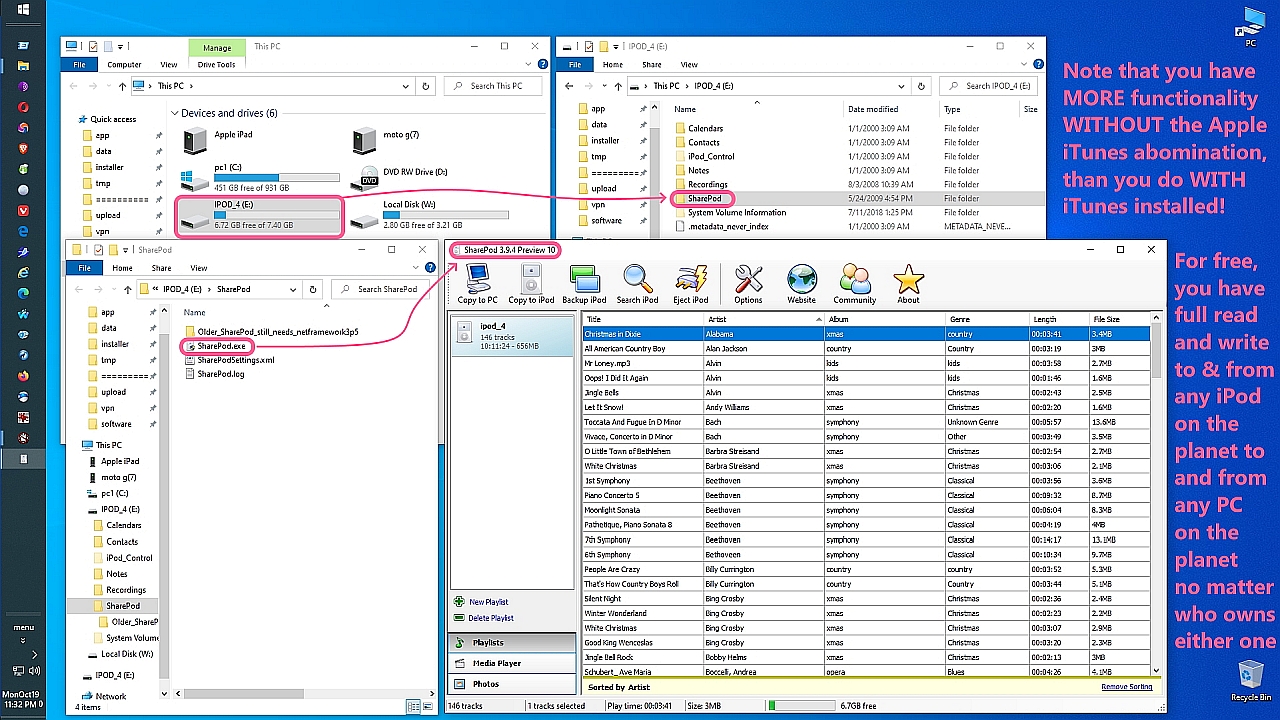
    <https://i.postimg.cc/fRtZFGSt/sharepod01.jpg>

    That's what I ended up doing - and what I still do - but that's too easy to
    be what Apple wants me to do - yet again proving Apple does things the
    hardest way possible - for no other reason than to lock in their profits.

    The official method, of course, was to use "iTunes", so I installed it, and instantly realized it was an abomination in every possible way imaginable.

    Luckily I'm intelligent, so I promptly ditched iTunes for the free SharePod software, which allowed me to copy both ways any MP3 that I wanted to.

    That's where I learned that almost everything you do with iOS is more
    difficult than doing that same task on any other OS (including macOS).

    It was a rude awakening, especially as SharePod was eventually bought by
    Apple and destroyed - but the old copies on my old iPods still work fine!

    That 1st lesson that Apple handcuffs interoperability was learned the hard
    way, just as the lesson IPAs are locked to an AppleID/device was learned.

    We both have experience with the older iTunes versions on Windows.
    What you describe is absolutely correct from the user side, which is that
    older iTunes did let you download and store IPA files locally, and
    it appeared to the user that we were backing up the actual app.

    A lot of people remember it the same way, so your recollection is not
    unusual. Jolly Roger, for example, still, to this day, insists that a
    portable IPA is being backed up, but he doesn't understand how it works.

    The part that is easy to miss is what was actually inside those IPAs and
    how iOS handled them during restore. Even though the old iTunes showed a
    local IPA file, that file was not a portable installer in the same sense
    as an APK, EXE, DEB, or RPM. It was a container that held an encrypted
    binary plus a receipt proving you were entitled to download that version.

    The executable inside the IPA was encrypted with FairPlay, and the keys
    needed to decrypt it were never stored in the IPA itself. Those keys were delivered separately by Apple to a specific device at install time. That
    is why an IPA copied from iTunes was not portable. It would not install on another device unless Apple authorized that other device for your Apple ID.

    To be clear, you are right that the older iTunes let you keep older IPA versions around, and you are right that you could sometimes reinstall them
    on your own devices.

    So it "appeared" to people like Jolly Roger, who don't understand how it actually works, that the IPA was being installed on the 2nd device.

    However...

    The most interesting part that was happening behind the scenes is that the
    new device was not actually using the IPA file as the installer!

    During a restore, the new device simply contacted Apple, and the new device presented the receipt from the IPA, and then Apple issued a fresh, device-specific encrypted build of that IPA to that new device.

    The IPA on disk looked like an installer, but in reality it only served as proof of entitlement. Not as the executable that would run on the device.

    I agree this is tricky.
    I agree this is not intuitive.

    With Apple, almost everything you do is not what Apple claims it is.
    You have to keep Descartes in mind when trying to understand Apple's claims "we should doubt what can be doubted in order to understand what it is".

    The fact that the IPA was just a ruse, in that the IPA the old iTunes saved
    was merely an entitlement record, is also why restoring an older version of
    the app only worked when Apple still allowed that version to be reissued.

    A fact lost on Jolly Roger was that when Apple stopped signing that older version, the IPA on disk could no longer be used to install it.

    So the IPA file the old iTunes saved to (and taking up space on) your
    Windows disk was merely an entitlement. A proof of ownership file.

    The IPA the old iTunes saved was never a usable installer executable.

    You brought up the concept of iCloud backup, but it works the same way.
    The cloud is simply another computer that isn't your own desktop PC.

    Whether you use iTunes, iCloud, or device-to-device transfer, the IPA app binaries themselves are never copied between devices. Only the app data is transferred. The app installers are always re-downloaded from Apple's App
    Store and then re-encrypted for the specific device that requested them.

    Your personal information is embedded directly into the new app also.

    Think about that.
    Nobody but Apple embeds your unique personal information into every app.

    Just Apple.
    And just for iOS.

    Why?

    In summary, thank you for bringing up how the old iTunes worked, as iTunes holds a very dear place in my heart as my first horrid experience with how Apple designed "interoperability" (which, for me, was with the iPods).

    I didn't realize Apple could make something so simple as sliding an MP3
    file back and forth from the PC to the iPod, so horribly difficult!

    That's where I began to learn that everything is more difficult with Apple
    when you're actually using devices in the real world (i.e., not all Apple).

    So your memory of how iTunes behaved on the outside is correct, but the IPA files it saved were simply never portable installers.

    They were personalized, and tied to your Apple ID, and dependent on Apple's cryptographic approval. As such, they were mere proof-of-purchase files.

    The only real change over the years is that Apple removed the user-facing ability to see or store the IPA file. The underlying security model has
    been the same since the beginning.
    --
    Descartes introduced methodical doubt, which is the idea that we should
    doubt that which can be doubted in order to find what is fully certain.
    --- Synchronet 3.21a-Linux NewsLink 1.2
  • From Tyrone@none@none.none to comp.sys.mac.advocacy,misc.phone.mobile.iphone on Thu Jan 1 18:58:28 2026
    From Newsgroup: comp.sys.mac.advocacy

    On Jan 1, 2026 at 1:28:34rC>PM EST, "Marian" <marianjones@helpfulpeople.com> wrote:

    badgolferman wrote:
    Marian wrote:

    Because of these mechanisms, an iOS IPA is not a portable software
    artifact. It is a cryptographically-constrained container that can
    only be installed when Apple authorizes the transaction for a
    specific Apple ID on a specific device class.

    When I used iTunes to back up my device to the computer, you had the
    ability to save IPAs and reinstall older versions to your new device.
    When a newer version of iTunes came out that removed that capability I
    complained about it here and nospam directed me to a version of iTunes
    which still did that. I still have the installation program he
    recommended but haven't installed it on my Windows 11 laptop. These
    days I back up my phone to iCloud. I know you don't approve of that
    but I'm fine with it.

    Hi badgolferman,

    Happy New Year!

    These technical threads are asked so that ALL of us have a better chance of understanding how iOS works, since it works like no other OS on earth.

    Thankfully iOS is different. Wouldn't be so secure if it worked like Windows and Android.

    But you knew that.
    --- Synchronet 3.21a-Linux NewsLink 1.2
  • From WolfFan@akwolffan@zoho.com to misc.phone.mobile.iphone, comp.sys.mac.advocacy on Thu Jan 1 13:58:11 2026
    From Newsgroup: comp.sys.mac.advocacy

    On Dec 31, 2025, badgolferman wrote
    (in article <10j4psg$35r54$1@dont-email.me>):

    Marian wrote:

    Because of these mechanisms, an iOS IPA is not a portable software artifact. It is a cryptographically-constrained container that can
    only be installed when Apple authorizes the transaction for a
    specific Apple ID on a specific device class.

    Intriguing. I once had a Windows phone. It was a work device, the company built a number of apps for WinPhone. Then MS changed the OS, and the old apps didnrCOt work with the new OS. The company rewrote their apps. And MS changed the OS again, and the rewritten apps didnrCOt work with the new OS. Again.
    And the company went to Android and Apple. I replaced the WinPhone with an iPhone; the company apps, rewriten for iOS, worked.

    Meanwhile, I got an Android phone to replace my old persopnal Motorola flip-phone. This device was a disaster. It froze, it crashed, it dropped calls, it never got calls... I replaced it with an iPhone. And, to simplify things, I used ApplerCOs stuff to copy the contents, including the company apps, over to the new iPhone. It worked. I have replaced both phones multiple times since. All apps move over. Not ONE has EVER been device-locked to an
    old phone. Not one. All apps worked on BOTH phones.

    And I got an iPad. Again, to simplify life, I used ApplerCOs stuff to copy everything over to the iPad. Almost all apps had no problems; a few (none of them Apple apps except for the original Weather app; note that a later
    Weather app now works on iPads and was automatically installed during an update) were iPhone-only and didnrCOt copy; two (neither of them Apple apps) popped up a request to update to an iPad-compatible version, which when I
    said yes downloaded automatically from the Apple Store. I could have used the iPhone version, but in both cases the various controls swam in a display that they werenrCOt designed for; these were banking apps, from Citi and Chase.
    The iPad versions were designed for the larger iPad screen. Two apps, MS Authenticator and the Google equivalent, both transfered over but could required fiddling to get full functions out of them; this was expected, they _are_ security apps, after all. I got a companyiPad; again things worked the way that my personal iPad had. I have since replaced both iPads without problems. Not only were almost all apps NOT device-locked, they almost all worked on different types of devices.

    IrCOve been using iPhones for abouut 15 years and iPads for over a decade. I donrCOt see any evidence of device-locking.

    When I used iTunes to back up my device to the computer, you had the
    ability to save IPAs and reinstall older versions to your new device.
    When a newer version of iTunes came out that removed that capability I complained about it here and nospam directed me to a version of iTunes
    which still did that. I still have the installation program he
    recommended but haven't installed it on my Windows 11 laptop. These
    days I back up my phone to iCloud. I know you don't approve of that
    but I'm fine with it.

    I back stuff up to iCloud. And to my Mac desktop. And to my Windows desktop.
    I run full backups. I keep the backups on USB devices. Every so often I
    format one of my devices (Settings/General/Erase All Content and Settings)
    and do a full restore from backup, rCycause it ainrCOt a backup if it ainrCOt been tested; so far, no problems. Note that thatrCOs a restore from a backup on a USB device formatted ExFAT. I suspect that Arlen doesnrCOt think that thatrCOs possible; herCOs wrong if he does. I have the silly ghit killfiled, so I donrCOt know (and donrCOt care).

    --- Synchronet 3.21a-Linux NewsLink 1.2
  • From Marian@marianjones@helpfulpeople.com to comp.sys.mac.advocacy,misc.phone.mobile.iphone on Thu Jan 1 15:36:33 2026
    From Newsgroup: comp.sys.mac.advocacy

    Tyrone wrote:
    These technical threads are asked so that ALL of us have a better chance of >> understanding how iOS works, since it works like no other OS on earth.

    Thankfully iOS is different. Wouldn't be so secure if it worked like Windows and Android.

    But you knew that.

    Hi Tyrone,

    Happy New Year!

    Thank you for understanding that the point of these threads on these Apple newsgroups are to better understand the truth, outside of Apple propaganda.

    To put it bluntly, the (rather brilliant) Apple propaganda is that Apple products, particularly iOS, are harder to use because they're "more safe".

    That is, Apple's (rather brilliant) propaganda is the reason every
    interaction outside of the Apple ecosystem is handcuffed, is, for "safety".

    Yet, there is no safety.

    So, as we proved in exquisite detail in a variety of recent threads, there
    is no mobile device that is less secure than Apple iOS mobile devices are.

    In most measures, iOS security is atrocious, and yet, in other measures
    Android security is atrocious - but in the end, they're about the same.

    Given nobody who is a security professional would ever claim iOS is "more safe", then my assessment is you gave away everything... for nothing.

    Not only did you give away interoperability for "safety" that you never
    got, but you gave away the ability to do zillions of useful functionality
    that all other platforms easily do, for that "safety" that you never got.

    You gave away everything...
    For nothing.

    But when you realize WHY you gave away everything and got nothing in
    return, then you realize WHY Apple "claims" they locked up iOS "for
    safety".

    Q: Does anyone on this ng know why Apple "claims" they locked up iOS
    "for safety" and yet, Apple has never actually delivered that safety?
    A: ?

    HINT in the references in the sig.
    --
    From: Marian <marianjones@helpfulpeople.com>
    Newsgroups: misc.phone.mobile.iphone,comp.sys.mac.advocacy
    Subject: What are the merits of the claim that iOS is "way more secure"?
    Date: Mon, 22 Dec 2025 12:15:53 -0700
    Organization: BWH Usenet Archive (https://usenet.blueworldhosting.com)

    From: Marian <marianjones@helpfulpeople.com>
    Newsgroups: misc.phone.mobile.iphone,comp.sys.mac.advocacy
    Subject: What did Google's project zero really say about Apple never
    testing much of their iOS code?
    Date: Mon, 22 Dec 2025 11:34:16 -0700
    Organization: BWH Usenet Archive (https://usenet.blueworldhosting.com) Message-ID: <10ic2v8$307u$1@nnrp.usenet.blueworldhosting.com>

    From: Marian <marianjones@helpfulpeople.com>
    Newsgroups: misc.phone.mobile.iphone,comp.sys.mac.advocacy
    Subject: What does the CISA KEV database say about Android/iOS known
    critical exploits?
    Date: Mon, 22 Dec 2025 11:20:58 -0700
    Organization: BWH Usenet Archive (https://usenet.blueworldhosting.com) Message-ID: <10ic26a$1pu9$1@nnrp.usenet.blueworldhosting.com>

    From: Marian <marianjones@helpfulpeople.com>
    Newsgroups: misc.phone.mobile.iphone,comp.sys.mac.advocacy
    Subject: What does it really mean when an entity chooses iOS or Android as their main platform?
    Date: Mon, 22 Dec 2025 11:10:02 -0700
    Organization: BWH Usenet Archive (https://usenet.blueworldhosting.com) Message-ID: <10ic1hq$2ckt$1@nnrp.usenet.blueworldhosting.com>

    From: Marian <marianjones@helpfulpeople.com>
    Newsgroups: misc.phone.mobile.iphone,comp.sys.mac.advocacy
    Subject: Security Is Far More Comprehensive Than Simple Malware Statistics Date: Sun, 21 Dec 2025 22:06:24 -0700
    Organization: BWH Usenet Archive (https://usenet.blueworldhosting.com) Message-ID: <10iajkh$l9v$1@nnrp.usenet.blueworldhosting.com>
    --- Synchronet 3.21a-Linux NewsLink 1.2
  • From Marian@marianjones@helpfulpeople.com to misc.phone.mobile.iphone,comp.sys.mac.advocacy on Thu Jan 1 16:10:50 2026
    From Newsgroup: comp.sys.mac.advocacy

    WolfFan wrote:
    On Dec 31, 2025, badgolferman wrote
    (in article <10j4psg$35r54$1@dont-email.me>):

    Marian wrote:

    Because of these mechanisms, an iOS IPA is not a portable software
    artifact. It is a cryptographically-constrained container that can
    only be installed when Apple authorizes the transaction for a
    specific Apple ID on a specific device class.

    Intriguing. I once had a Windows phone. It was a work device, the company built a number of apps for WinPhone. Then MS changed the OS, and the old apps
    didn't work with the new OS. The company rewrote their apps. And MS changed the OS again, and the rewritten apps didn't work with the new OS. Again.
    And the company went to Android and Apple. I replaced the WinPhone with an iPhone; the company apps, rewriten for iOS, worked.

    Meanwhile, I got an Android phone to replace my old persopnal Motorola flip-phone. This device was a disaster. It froze, it crashed, it dropped calls, it never got calls... I replaced it with an iPhone. And, to simplify things, I used Apple's stuff to copy the contents, including the company apps, over to the new iPhone. It worked. I have replaced both phones multiple
    times since. All apps move over. Not ONE has EVER been device-locked to an old phone. Not one. All apps worked on BOTH phones.

    And I got an iPad. Again, to simplify life, I used Apple's stuff to copy everything over to the iPad. Almost all apps had no problems; a few (none of them Apple apps except for the original Weather app; note that a later Weather app now works on iPads and was automatically installed during an update) were iPhone-only and didn't copy; two (neither of them Apple apps) popped up a request to update to an iPad-compatible version, which when I said yes downloaded automatically from the Apple Store. I could have used the
    iPhone version, but in both cases the various controls swam in a display that
    they weren't designed for; these were banking apps, from Citi and Chase.
    The iPad versions were designed for the larger iPad screen. Two apps, MS Authenticator and the Google equivalent, both transfered over but could required fiddling to get full functions out of them; this was expected, they _are_ security apps, after all. I got a companyiPad; again things worked the way that my personal iPad had. I have since replaced both iPads without problems. Not only were almost all apps NOT device-locked, they almost all worked on different types of devices.

    I've been using iPhones for abouut 15 years and iPads for over a decade. I don't see any evidence of device-locking.

    When I used iTunes to back up my device to the computer, you had the
    ability to save IPAs and reinstall older versions to your new device.
    When a newer version of iTunes came out that removed that capability I
    complained about it here and nospam directed me to a version of iTunes
    which still did that. I still have the installation program he
    recommended but haven't installed it on my Windows 11 laptop. These
    days I back up my phone to iCloud. I know you don't approve of that
    but I'm fine with it.

    I back stuff up to iCloud. And to my Mac desktop. And to my Windows desktop. I run full backups. I keep the backups on USB devices. Every so often I format one of my devices (Settings/General/Erase All Content and Settings) and do a full restore from backup, 'cause it ain't a backup if it ain't
    been tested; so far, no problems. Note that that's a restore from a backup on a USB device formatted ExFAT.

    Hi WolfFan,

    Happy New Year!

    Thank you for describing your love of Apple products and how well they work
    for you. Your experiences described above with migrating between iPhones
    and iPads are completely valid, but they do not contradict the technical
    point being discussed.

    What you are describing is Apple's migration system, not the underlying mechanics of how iOS apps are packaged, encrypted, or restored.

    The distinction matters, because the question here is not whether apps
    appear to transfer between devices, but whether an IPA is a portable
    installer and whether it's locked to an AppleID (aka Apple Account).

    Here is the part that is easy to miss:

    A. iOS apps are never copied from one device to another.
    During any restore or migration, whether iCloud, iTunes, Quick Start,
    device to device, or the old iTunes IPA library, the app binaries
    themselves are not transferred.

    Only the app data is transferred.
    The apps are always re-downloaded from Apple's servers.

    B. Your apps always "moved over" because the new device simply contacted
    Apple, presented your Apple ID entitlements, and Apple issued a fresh,
    device-specific encrypted copy of each app. As long as the app is still
    available and Apple is still signing that version, everything works
    seamlessly.

    This does not mean the apps were portable or copied from the old device.
    It also does not mean the IPA format was ever a portable installer.
    And it certainly doesn't mean your identity wasn't embedded into the IPA.

    Here are the technical facts.

    1. IPAs are encrypted with FairPlay.
    The executable inside an IPA is encrypted and cannot run
    on any device until Apple issues device-specific decryption keys.

    2. The IPA never contains those keys.
    This is why an IPA cannot be installed offline or moved to
    another device that isn't registered to a given Apple ownership.

    3. During restore, iOS never installs the binary from the IPA.
    Even in the old iTunes era, the IPA served only as a receipt + blob
    proving entitlement.

    4. Apple always re-downloads the app.
    If Apple stops signing a version, the IPA on disk becomes unusable,
    even if you still have it.

    5. Your successful migrations simply mean Apple continued to authorize
    your apps. That is good, but it does not change how the system works.

    6. The user's Apple ID entitlement is embedded into the IPA in the form
    of a receipt. The IPA contains a small receipt file that identifies
    the Apple ID that purchased or downloaded the app. This receipt is
    what proves entitlement. It does not contain the decryption keys for
    the app, but it does contain the Apple ID identity information
    that Apple uses to decide whether to issue a new, device-specific
    encrypted copy of the app during restore.

    The receipt is the only part of the IPA that ties it to the
    user's Apple account.

    Given that's actually how iOS works, you can see that iOS works differently than every other common consumer operating system, including macOS.

    Only iOS doesn't allow the user to back up a usable app installer.
    Nobody else.
    Just Apple.

    And even then, just for iOS.
    The macOS installation file can be backed up like Android, Windows, etc.

    It's just the iOS IPA that is basically only a mere receipt.
    HINT: Why do you think Apple now hides that IPA in iTunes backups?

    In summary, we're all glad you added your experience to this technical
    thread, since we're all here to learn how iOS really works.

    By now you realize you have not "seen" device-locking because Apple handles
    all the cryptographic authorization behind the scenes. As long as you use
    the same Apple ID, the app is still available, and Apple still signs the version, everything works smoothly. The locking is there, and your identity
    is embedded into every installation but you just do not see all of this
    because Apple automates the entire process.

    Bottom line:
    Your experience is real, but it does not contradict the technical reality.

    iOS apps are always tied to your Apple ID and reissued by Apple for each device. Unlike every other OS, IPAs have never been portable installers.
    --
    Only when you truly understand how iOS works, and not only how Apple
    (rather brilliantly) advertises how it works - can you appreciate genius.
    --- Synchronet 3.21a-Linux NewsLink 1.2
  • From Tom Elam@thomas.e.elam@gmail.com to misc.phone.mobile.iphone,comp.sys.mac.advocacy on Thu Jan 1 23:12:33 2026
    From Newsgroup: comp.sys.mac.advocacy

    On 12/31/2025 9:42 PM, Marian wrote:
    Tom Elam wrote:
    Only iOS embeds identity-bound metadata into delivered free app
    packages.
    Why?

    Are you EVER going to realize that 99.9999999% of iPhone owners will
    never read any of your posts? Or, if they stumbled across you they
    would not understand or give a care?

    Face it, you are pissing a weak stream into a Cat 5 hurricane.

    Hi Tom Elam,

    Happy New Year!

    The goal of this thread is to UNDERSTAND how iOS works. '

    It doesn't matter that 1 in a million understand anything about iOS.
    What matters is WE understand iOS.

    Because we're intelligent well-informed intellectually-curious people.
    This is simply a discussion so we all better understand how iOS works.

    Did you ever wonder why only iOS adds your identity to every app you
    install? Windows doesn't do that. Android doesn't do it. Linux doesn't either. Even macOS doesn't do it. Yup. Only iOS embeds your identity into every app.

    Doesn't that make you wonder why iOS does it but macOS doesn't do it?

    Hint: It turns out that macOS predates the App Store and therefore, try as they might, Apple cannot lock it down without destroying the platform.

    What's different is iOS was designed from day one to:
    a. block sideloading
    b. block competing app stores
    c. enforce Apple's payment system (even for free apps!)
    d. enforce Apple's signing (disregarding developer signing)
    e. enforce Apple's DRM (even for free apps!)
    f. enforce Apple's control

    No other common consumer operating system but iOS embeds your identity into every app you install. Why do you think Apple does that, but only for iOS?

    So what? Nobody but you cares about your objections. Apple phones work
    just fine. We don't care about your technical nuances. We do care about predictable OS updates. We care about service after the sale, ease of
    use, device integration and have the resources to make choices.

    I was an Android phone and tablet customer from 2005 to 2019. I quit for
    2 reasons. First was the need to get an iPad for an app not available on Android. Second was the sorry state of Android phone and tablet OS updates.

    My initial iPhone 6s experience was not great but the iPad 7 and 9 and
    6s successors have worked out fine.The iPads have been far better than
    any Android tablet, and I had a few of those. I do not remember every
    getting an Android tablet OS update.

    Bottom line you are wasting your time.


    --- Synchronet 3.21a-Linux NewsLink 1.2
  • From Maria Sophia@mariasophia@comprehension.com to misc.phone.mobile.iphone,comp.sys.mac.advocacy on Fri Jan 2 04:21:51 2026
    From Newsgroup: comp.sys.mac.advocacy

    Tom Elam wrote:
    No other common consumer operating system but iOS embeds your identity into >> every app you install. Why do you think Apple does that, but only for iOS?

    So what? Nobody but you cares about your objections. Apple phones work
    just fine. We don't care about your technical nuances. We do care about predictable OS updates. We care about service after the sale, ease of
    use, device integration and have the resources to make choices.

    I was an Android phone and tablet customer from 2005 to 2019. I quit for
    2 reasons. First was the need to get an iPad for an app not available on Android. Second was the sorry state of Android phone and tablet OS updates.

    My initial iPhone 6s experience was not great but the iPad 7 and 9 and
    6s successors have worked out fine.The iPads have been far better than
    any Android tablet, and I had a few of those. I do not remember every getting an Android tablet OS update.

    Bottom line you are wasting your time.

    Hi Tom Elam,

    Happy New Year!

    You're describing user experience, which is a different issue.
    a. This thread is about why only iOS can't back up app installers.
    b. And why only iOS embeds your identity (and device) in the IPA.

    Certainly no other consumer operating system does that but iOS.
    A. Even macOS doesn't do that.
    B. Only iOS does it.

    Why?
    --- Synchronet 3.21a-Linux NewsLink 1.2